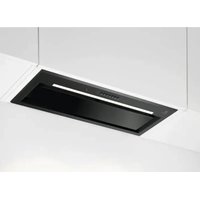
LFG828K - Basket ELECTROLUX - Free user manual and instructions
Find the device manual for free LFG828K ELECTROLUX in PDF.

 FR
FR
 BG
BG
 CA
CA
 CS
CS
 DA
DA
 DE
DE
 EL
EL
 EN
ES
EN
ES
 ET
ET
 FI
FI
 HU
HU
 IT
IT
 KA
KA
 KK
KK
 LT
LT
 LV
LV
 MK
MK
 NL
NL
 NO
NO
 PL
PL
 PT
PT
 RO
RO
 RU
RU
 SK
SK
 SL
SL
 SQ
SQ
 SR
SR
 SV
SV
 TR
TR
 UK
UK
| Product type | Cooker hood |
| Brand | Electrolux |
| Model | LFG828K |
| Number of speeds | 3 manual speeds + Boost function |
| AutoSense function | Yes, automatic speed adjustment according to cooking vapors |
| Hob2Hood function | Yes, connection with compatible hob |
| Breeze function | Yes, operation at minimum speed for 60 minutes |
| Lighting | LED, adjustable intensity and color temperature (neutral, warm, cool) |
| Grease filter | Metal, dishwasher safe (every 2 months approximately) |
| Charcoal filter | Optional, replaceable (non-regenerated type) |
| AutoSense filter | Yes, cleanable with hot water |
| Filter alarm | Yes, for grease filter (40h) and charcoal filter (160h) |
| Automatic cooling | Yes, automatic activation above 70°C |
| Minimum safety distance | 65 cm between hob and hood |
| Child safety | Child lock not mentioned, but supervision required for children under 8 years |
| Installation type | Wall-mounted or under cabinet (external extraction or recirculation with charcoal filter) |
| Power supply | 220-240 V, 50/60 Hz (not specified, standard estimate) |
| Control | Touch (sensitive buttons) |
| Sound signal | Yes, can be deactivated (except for shutdown) |
| Bulb replacement | Integrated LED, replacement by a technician only |
Frequently Asked Questions - LFG828K ELECTROLUX
User questions about LFG828K ELECTROLUX
0 question about this device. Answer the ones you know or ask your own.
Ask a new question about this device
Download the instructions for your Basket in PDF format for free! Find your manual LFG828K - ELECTROLUX and take your electronic device back in hand. On this page are published all the documents necessary for the use of your device. LFG828K by ELECTROLUX.
USER MANUAL LFG828K ELECTROLUX
natural_image
Simple line drawing of a chimney with three dots on the base (no text or symbols)LFG825K LFG828K
natural_image
Technical line drawing of a rectangular structural component with an arrow indicating direction (no text or symbols)natural_image
Diagram of a window with a grid pattern and a curved arrow indicating rotation (no text or symbols)natural_image
Three diagrams showing a mechanical or electrical setup with arrows indicating motion, no text or symbols present.i
natural_image
Technical line drawing of a rectangular structural component with an arrow indicating direction (no text or symbols)natural_image
Diagram of a solar panel with a curved arrow indicating rotation or movement (no text or symbols present)natural_image
Three identical diagrams showing a mechanical or electrical component with arrows indicating movement, no text or symbols present.
natural_image
Technical line drawing of a rectangular structural component with an arrow indicating direction (no text or symbols)natural_image
Diagram of a solar panel with a grid pattern and a curved arrow indicating rotation (no text or symbols)natural_image
Three schematic diagrams showing mechanical or electrical components with arrows indicating movement, no text or symbols present.
natural_image
Technical line drawing of a rectangular structural component with an arrow indicating direction (no text or symbols)natural_image
Diagram of a solar panel with a curved arrow indicating rotation (no text or symbols)natural_image
Three diagrams showing a mechanical or electrical setup with arrows indicating movement, no text or symbols present.i
natural_image
Technical line drawing of a rectangular structural component with an arrow indicating direction (no text or symbols)natural_image
Symbol of a trash bin crossed out by a diagonal line, representing no waste or discharge (no text or labels present)natural_image
Recycling symbol with three arrows forming a triangle (no text or labels)natural_image
Technical line drawing of a rectangular duct or channel with an arrow indicating direction (no text or symbols)natural_image
Diagram of a solar panel with a grid pattern and directional arrow indicating rotation (no text or symbols)natural_image
Three identical diagrams showing a cylindrical object with an arrow pointing to its base, each with a separate view of a block and a directional arrow (no text or symbols)
Welcome to Electrolux! Thank you for choosing our appliance.

Get usage advice, brochures, troubleshooting, service and repair information: www.electrolux.com/support
Subject to change without notice.
CONTENTS
- SAFETY INFORMATION....79
- SAFETY INSTRUCTIONS....82
- INSTALLATION....83
- PRODUCT DESCRIPTION....83
- DAILY USE....84
- CARE AND CLEANING....87
- TROUBLESHOOTING....89
- ENVIRONMENTAL CONCERNS....90
1. ⚠SAFETY INFORMATION
Before the installation and use of the appliance read the supplied instructions carefully. The manufacturer is not responsible for any injuries or damage that result from incorrect installation or usage. Always keep the instructions in a safe and accessible location for future reference.
1.1 Children and vulnerable people safety
- This appliance can be used by children aged from 8 years and above and persons with reduced physical, sensory or mental capabilities or lack of experience and knowledge if they have been given supervision or instruction concerning the use of the appliance in a safe way and understand the hazards involved. Children of less than 8 years of age and persons with very extensive and complex disabilities shall be kept away from the appliance unless continuously supervised.
- Children should be supervised to ensure that they do not play with the appliance.
-
Keep all packaging away from children and dispose of it appropriately.
-
Keep children and pets away from the appliance when it operates.
- Children shall not carry out cleaning and user maintenance of the appliance without supervision.
1.2 General Safety
- This appliance is intended for domestic use above hobs, cookers and similar cooking devices.
- This appliance is designed for single household domestic use in an indoor environment.
- This appliance may be used in offices, hotel guest rooms, bed & breakfast guest rooms, farm guest houses and other similar accommodation where such use does not exceed (average) domestic usage levels.
- Before carrying out any maintenance, disconnect the appliance from the power supply.
- CAUTION: Accessible parts may become hot during use with cooking appliances.
- Use only the fixing screws supplied with the appliance if not supplied, use the screws recommended in the installation instructions. Install the appliance in a safe and suitable place that meets installation requirements.
- WARNING: Failure to install the screws or fixing device in accordance with these instructions may result in electrical hazards.
- Do not use adhesives to fix the appliance.
- The minimum distance between the hob surface on which the pans stand and the lower part of the appliance shall be at least 65 cm, unless otherwise specified in the installation instructions for the appliance or hob.
- The discharge of air must comply with local authorities regulations.
- Ensure good air ventilation in the room where the appliance is installed to avoid the backflow of gases into the room from appliances burning gas or other fuels, including open fires.
- Make sure that the ventilation openings are not blocked and the air collected by the appliance is not conveyed into a duct used to exhaust smoke and steam from other appliances (central heating systems, thermosiphons, water-heaters, etc.).
- When the appliance operates with other appliances the maximum vacuum generated in the room should not exceed 0.04 mbar.
- If the supply cord is damaged, it must be replaced by the manufacturer, its Authorised Service Centre or similarly qualified persons to avoid an electrical hazard.
- If the cord set is damaged, it must be replaced by a special cord set available from the manufacturer or its Authorised Service Centre.
- If the appliance is connected directly to the power supply, the electrical installation must be equipped with an isolating device that allows to disconnect the appliance from the mains at all poles. Complete disconnection must comply with conditions specified in the overvoltage category III. The means for disconnection must be incorporated in the fixed wiring in accordance with the wiring rules.
- Do not flambé under the appliance.
- Do not use to exhaust hazardous or explosive materials and vapours.
- Clean the appliance regularly with a soft cloth to prevent the deterioration of the surface material.
- Do not use a steam cleaner, water spray, harsh abrasive cleaners or sharp metal scrapers to clean the surface of the appliance. Use only neutral detergents.
- Clean grease filters regularly (at least every 2 months) and remove grease deposits from the appliance to prevent the risk of fire.
- Use a cloth to clean the interior of the appliance.
2. SAFETY INSTRUCTIONS
2.1 Installation

WARNING!
Risk of injury, electric shock, fire, burns or damage to the appliance.
- Only a qualified person must install this appliance.
- Do not install or use a damaged appliance.
- Follow the installation instructions supplied with the appliance.
• Always take care when moving the appliance as it is heavy. Always use safety gloves and enclosed footwear. - Before installing the appliance remove all the packaging, the labelling and the protective film.
- Do not install the exhaust air into a wall cavity, unless the cavity is designed for that purpose.
2.2 Electrical connection

WARNING!
Risk of fire and electric shock.
- All electrical connections should be made by a qualified electrician.
- Make sure that the parameters on the rating plate are compatible with the electrical ratings of the mains power supply.
- If the symbol ( ) is not printed on the rating plate, the appliance must be earthed.
• Always use a correctly installed shockproof socket. - Do not let the electricity mains cable tangle.
- Do not use multi-plug adapters and extension cables.
- If the mains socket is loose, do not connect the mains plug.
- Do not pull the mains cable to disconnect the appliance. Always pull the mains plug.
- The shock protection of live and insulated parts must be fastened in such a way that it cannot be removed without tools.
• Make sure the appliance is installed correctly. Loose and incorrect electricity mains cable can make the terminal become too hot.
- Connect the appliance at the end of the installation. Make sure that there is access to the mains after the installation.
2.3 Use

WARNING!
Risk of injury, burns and electric shock.
- This appliance is for cooking purpose only. Do not use the appliance for any other purpose.
- Do not change the specification of this appliance.
- Do not operate the appliance with wet hands or when it comes in contact with water.
- Use only the accessories supplied with the appliance.
- Keep flames or heated objects away from fats and oils during cooking and frying.
- Do not use uncovered electric grills.
- Do not use the appliance as a storage surface.
- Do not pour liquids over the appliance.
- Do not use magnifying glasses, binoculars or similar optical devices to look directly at the lighting of the appliance.
- If the appliance works with other devices, the maximum developed pressure must not exceed 4 Pa (4x10⁻⁵ bar).
2.4 Service
• To repair the appliance contact the Authorised Service Centre. Use original spare parts only.
- Concerning the lamp(s) inside this product and spare part lamps sold separately: These lamps are intended to withstand extreme physical conditions in household appliances, such as temperature, vibration, humidity, or are intended to signal information about the operational status of the appliance. They are not intended to be used in other applications
and are not suitable for household room illumination.
2.5 Disposal

WARNING!
Risk of injury or suffocation.
- Contact your municipal authority for information on how to dispose of the appliance.
- Disconnect the appliance from the mains supply.
- Cut off the mains electrical cable close to the appliance and dispose of it.
3. INSTALLATION

WARNING!
Refer to Safety chapters.
3.1 Installation instructions
i
For complete information about the installation of the appliance refer to a separate installation booklet.
4. PRODUCT DESCRIPTION
4.1 Control panel overview
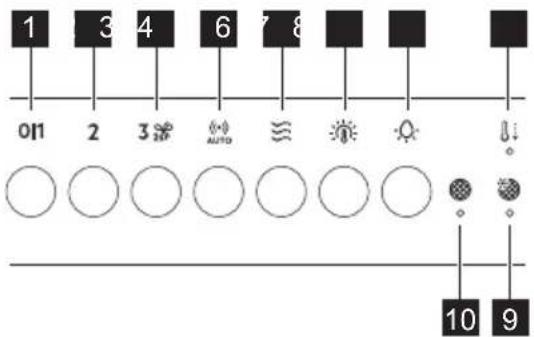
Function Description
1
First Speed / Off The motor switches to first speed level. Second press or long press while other functions operate, turns off the appliance.
2
Second speed The motor switches to second speed level. Second press turns off the appliance.
3
Third speed / Boost function The motor switches to third speed level. Press and hold for 2 seconds to activate the Boost function. Second press turns off the appliance.
4
AutoSense Activates and deactivates the AutoSense function.
5
Breeze The hood operates on the lowest speed. After 60 minutes the motor turns off.
6
Light colour temperature Changes the light colour temperature.
7
Lamp Turns the lights on and off. Changes the light intensity.
8
Automatic cool down Indicates that the Automatic cool down is active.
Function Description
9
AutoSense filter notification Reminds to change or clean the AutoSense filter.
10
Filter notification Reminds to change or clean the charcoal filter and clean the grease filter.
5. DAILY USE
5.1 Using the hood - manual mode
Check the recommended speed according to the table below.
0|1
While heating up food, cooking with covered pots.
2
While cooking with covered pots on multiple cooking zones or burners, gentle frying.
3
While boiling and frying big quantities of food without a lid, cooking on multiple cooking zones or burners.
2s
While boiling and frying big quantities of food without a lid, big humidity. After 8 minutes the appliance returns to previous setting.
§§
Refreshes the air in kitchen after cooking at a very low noise level. The function turns off automatically after 60 minutes. Use after cooking only.
i
It is recommended to leave the hood operating for approximately 15 minutes before and after cooking.
Activating the appliance
To operate the hood:
Press the desired fan speed button.
Deactivating the appliance
To turn off the fan press the activated speed again or long press the button.
Perfect Illumination - Lighting
i
The hood lighting works independently to other hood functions.
Activating and deactivating the lighting To illuminate the cooking surface press the
button. Press the button again to change the light intensity in the following order: Maximum, Medium, Low, Off.
To switch off the lights, press and hold the button for 3 seconds.
Setting the light colour temperature
i
The hood remembers the last setting of the light colour temperature.
There are two ways to set the light colour temperature:
-
Press the button to change the colour temperature from neutral, through warm to cold.
-
Press and hold the button to move smoothly between light colour temperatures. Release it once you reach the desired setting.
5.2 Hob2Hood®
It is a function that connects the hob to a hood. Both the hob and the hood are equipped with an infrared signal communicator. The fan speed is determined based on the mode setting and the temperature of the hottest cookware on the hob. Alternatively, you can manually control
the fan using the hob. This function can be activated from the hob's control panel.

For more information how to use the function, refer to the hob user manual.

For information on how to use the function together with AutoSense® function, refer to the AutoSense® chapter.
5.3 Activating Boost Function
When you press and hold 2, the Boost function starts to operate for 8 minutes. After that time, the appliance returns to its previous speed settings.
5.4 AutoSense
The function automatically adjusts the fan speed level basing on the TVOC sensor (Total Volatile Organic Compounds), air temperature, and relative humidity coming from the hob.
-
Press to turn on the function. The function indicator lights up.
-
To turn off the function, press or any other speed level button on the hood control panel.

WARNING!
If your hob is equipped with the Hob ^2 Hood function, switch its mode to H1 to use it together with the AutoSense. In this mode, the AutoSense function and lighting are activated automatically each time the hob is turned on. Refer to hob user manual.

WARNING!
During the first 96 hours after plugging in the appliance, the function runs in a dedicated startup mode for air sensor tuning. Hood reactions may vary at the startup mode. During that time the (•) AUTO indicator pulsates.

WARNING!
A blackout or unplugging and plugging in the appliance again causes internal sensor self-tuning. It may take up to 24 hours for the function to regain full capability.

The AutoSense function can run for a maximum of 5 hours.

Pressing the 🐘 Button with the hood off will start the AutoSense function at Breeze speed by default. When another speed has been already selected and the fan is working, the AutoSense function will start at that speed.

CAUTION!
This function is sensitive to cleaning agents. After cleaning, wait at least half an hour before turning on the function to avoid unintentional activation of the Boost function.

When used with a gas hob, the function may operate at higher speeds due to gas combustion.

While preparing food that generates little odour over an extended period (e.g. simmering), the hood may stop and then restart within a few seconds. If the hob power level is very low, the generated odour may not be sufficient for AutoSense to function properly. If your hood switches off and does not restart, use manual mode to operate it.
To permanently deactivate the function:
- Make sure the fan and the lighting are turned off.
- Press and hold the and buttons.
AUTO and ≈ indicators blink twice.
To activate the function again:
- Make sure the fan and the lighting are turned off.
- Press and hold the and buttons.
AUTO and indicators blink once.
5.5 Automatic cool down
This function turns on automatically when the temperature of the hood exceeds 70^ C. The hood continues to operate on the third speed to cool down. The indicator with the symbol ☐ on the panel turns on.
i
For safety reason, if the temperature grows higher while the function is active, the hood turns off and symbol starts to blink. The hood can be turned on again when the indicator stops blinking.
5.6 Filter notification
The filter alarm serves as a reminder to clean the grease filter and either replace or clean the charcoal filter, depending on its type. The indicator and blinks regularly for 30 seconds if the grease filter must be cleaned. The indicator and 2 blinks twice per every second for 30 seconds if the charcoal filter must be replaced or cleaned. Reset can be performed during or out of the notification period.
i
This function is activated after 40 hours of the operation of the hood when the grease filter requires cleaning and after 160 hours when the charcoal filter requires cleaning or replacement.
i
Refer to cleaning the grease filter in Care and cleaning chapter.
i
Refer to cleaning the charcoal filter or replacing the charcoal filter in Care and cleaning chapter.
To reset the function counter:
For grease filter, press and hold ≈ for 3 seconds.
For charcoal filter, press and hold 2 for 3 seconds.
The indicator stops blinking for the correct reset in the notification period. The indicator
blinks once for correct reset out of the notification period.
To activate or deactivate the filter notification for charcoal filter:
-
Make sure the fan and the light are turned off.
-
Press and hold 2 and for 3 seconds. The function is activated if both indicators blink once. The function is deactivated if both indicators blink twice.
5.7 AutoSense® filter notification
Filter alarm reminds to clean the AutoSense® filter. The indicators and blink regularly for 30 seconds if the filter must be cleaned.
i
Refer to Care and cleaning chapter.
A reset can be performed during or out of the notification period.
To reset the function during the notification period:
- Press and hold the button for 3 seconds. Indicators and stop blinking for the correct reset.
To reset the function out of the notification period:
- Make sure that the fan is turned off.
- Press and hold the button for 3 seconds.
The indicator blinks once for the correct reset.
5.8 Deactivating and activating panel sounds
To deactivate or activate the sounds of the panel:
- Make sure the fan and the lighting are turned off.
- Press and hold and buttons.
6. CARE AND CLEANING
6.1 Notes on cleaning
Cleaning Agents
Do not use abrasive detergents and brushes.
Clean the surface of the appliance with a soft cloth with warm water and a mild detergent.
After cooking some parts of appliance can get hot. To avoid stains appliance must be cooled down and dried with clean cloth or paper towels.
Clean stains with a mild detergent.
Keep the hood clean
Clean the appliance each month to prevent the deterioration of the surface material.
Clean the interior and grease filters carefully from fat. Fat accumulation or other residue may cause fire.
Follow the instructions to clean the filters when the filter notification is on. Refer to the Daily Use chapter.
Charcoal filter
The time of saturation of the charcoal filter varies depending on the type of cooking and the regularity of cleaning the grease filter. Refer to leaflet included in the accessory.

Before carrying out any maintenance, make sure there is no cookware on the hob and that the hood and the hob are disconnected from the power supply.
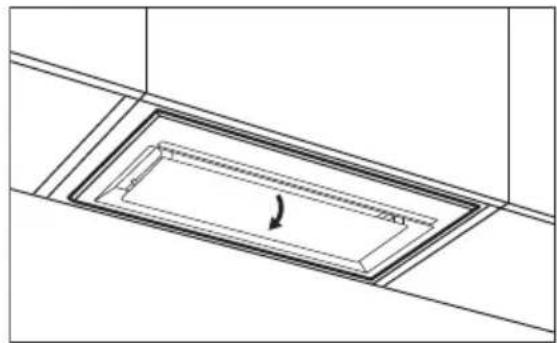
6.2 Cleaning the grease filter
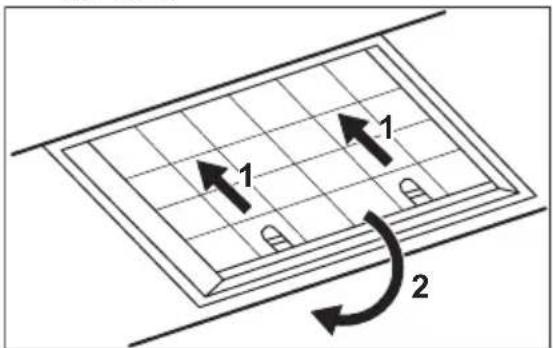
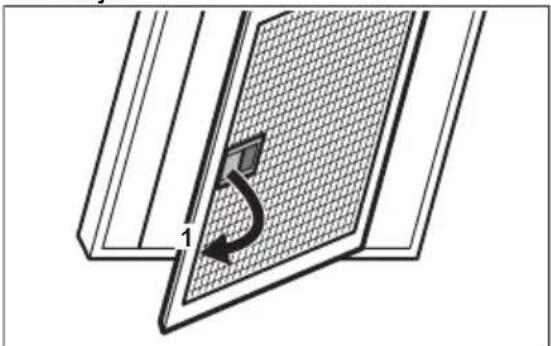
Filters are mounted with the use of clips and pins on the opposite side.
To clean the filter:
- Pull the cover to open it.
Both indicators blink once if sounds are enabled and twice if sounds are disabled.

The off sounds of the hood cannot be disabled.
natural_image
Technical line drawing of a rectangular duct or channel with an arrow indicating direction (no text or symbols)- Pull the handle on the filter underneath the hood and slightly tilt the front of the filter down.
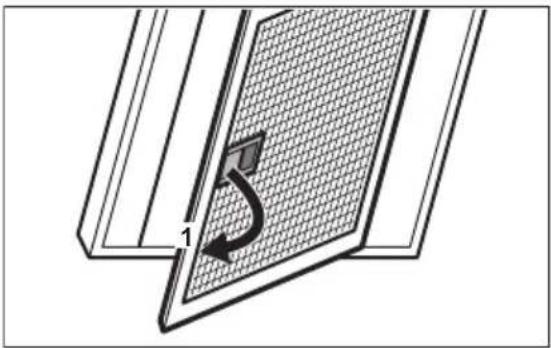
natural_image
Diagram of a solar panel with a grid pattern and a curved arrow indicating rotation (no text or symbols)- Clean the grease filters by hand using a sponge with non-abrasive detergents, or clean them in a dishwasher. We recommend cleaning the grease filters by hand.

The dishwasher must be set to a low temperature and a short cycle. The grease filter may discolour, it has no influence on the performance of the appliance.
- To mount the filters back follow the first two steps in reverse order.
Repeat the steps for all filters if applicable.
6.3 Replacing the charcoal filter - optional 📁

Depending on type, filter can be or cannot be regenerated. Refer to the leaflet provided with the filter.
To replace the filter:
- Remove the grease filters from the appliance.
Refer to "Cleaning the grease filter" in this chapter. - Pull the tabs towards the bottom part of the filter.
- Slightly tilt the front of the filter downwards, then pull.
- To install a new filter, perform the steps in the following order.
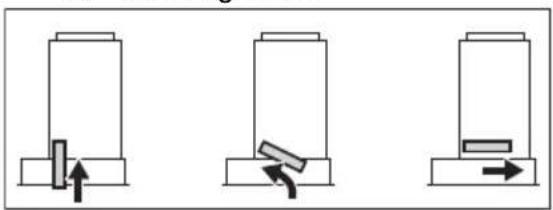
natural_image
Three diagrams showing a mechanical or electrical setup with arrows indicating movement, no text or symbols present.
Refer to the separate Installation Instructions booklet.
6.4 Cleaning the AutoSense filter

The AutoSense filter must be cleaned when the filter notification is on. Refer to the "AutoSense filter notification" chapter.
To remove the filter:
- Remove the grease filter from the appliance.
Refer to the "Cleaning the grease filter" chapter. - Turn the filter clockwise (1) and then pull (2).
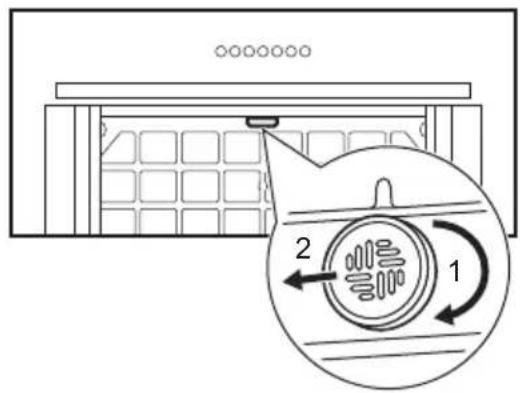
- Wash the filter in hot water without using detergent.
- To install the filter back, perform the steps in reverse order.

CAUTION!
The filter has to be fully dried before installing it back into the appliance.
6.5 Replacing the lamp
This appliance is supplied with a LED lamp and separate control gear (LED driver). These parts can be replaced by a technician only. In case of any malfunction refer to "Service" in the "Safety Instructions" chapter.
7. TROUBLESHOOTING

WARNING!
Refer to Safety chapters.
7.1 What to do if...
| Problem Possible cause Remedy | ||
| You cannot activate the appli-ance. | The appliance is not con- nected to a power supply or it is connected incorrectly. | Check if the appliance is correctly connected to the electrical supply. |
| You cannot activate the appli-ance. | Lack of electrical power supply. | Check the fuse or the main switch. If the fuse or the switch continue to break the circuit, contact a qualified electrician. |
| You cannot activate the appli-ance. | Cabinet doors are not aligned with the cabinet frame. | Align the cabinet doors. |
| The lamp does not operate. The lamp is defective. Contact an Authorised Service Centre. | ||
| The brightness level or light colour temperature is not as described in the instructions. | Incorrect Perfect illumina- tion setting. | Press the button to check if you are able to change all three colour temperatures. |
| The lamp is defective. Contact an Authorised Service Centre. | ||
| The appliance does not absorb enough vapours. | The motor speed is not ad- equate to the appearing va- pours. | Increase the speed of the motor. |
| The indicator pulsates. | The internal sensor of the function is in the self-tuning mode. | Refer to the AutoSense in "Daily use" chapter. |
| The indicator blinks rapidly three times, and the Auto- Sense function does not start. | The function is permanently deactivated. | Activate the function. Refer to the AutoSense in "Daily use" chapter. |
| The indicator blinks rapidly for three seconds, and the Au- toSense function does not start. | There is a malfunction. Contact an Authorised Service Centre. | |
| The filter alarm indicator on together withor . 2 | The filter alarm is on. The grease filter must be cleaned or the charcoal fil- ter (optional) must be re- placed or cleaned. | Refer to the filter notification in "Daily use" chap- ter. |
| The filter alarm indicator on together withAUTO | The AutoSense filter alarm is on. The filter must be cleaned. | Refer to the AutoSense filter notification in "Daily use" chapter. |
8. ENVIRONMENTAL CONCERNS
Recycle materials with the symbol .Put the packaging in relevant containers to recycle it. Help protect the environment and human health by recycling waste of electrical and electronic appliances. Do not dispose of
appliances marked with the symbol 📀 with the household waste. Return the product to your local recycling facility or contact your municipal office.
natural_image
Technical line drawing of a rectangular structural component with internal channels and a curved arrow indicating direction (no text or symbols)natural_image
Diagram of a window with a grid pattern and a curved arrow indicating rotation (no text or symbols)natural_image
Three schematic diagrams showing mechanical or electrical components with arrows indicating movement, no text or symbols present.
natural_image
Technical line drawing of a rectangular structural component with internal channels and a curved arrow indicating direction (no text or symbols)natural_image
Diagram of a solar panel with a curved arrow indicating rotation (no text or symbols)-
Kallutage filtri esiosa kergelt allapoole, seejärel tömmake.
-
Uue filtri paigaldamiseks teostage samad toimingud vastupidises järjekorras.
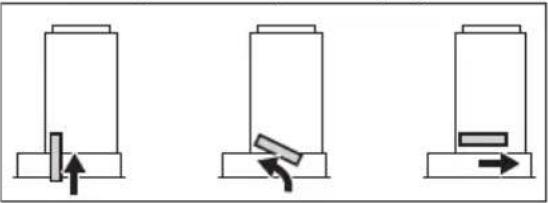
natural_image
Three diagrams showing mechanical or electrical components with arrows indicating movement, no text or symbols present.i
Vt eraldi paigaldusjuhiste brošüüri.
6.4 AutoSense filtri puhastamine
i
1. ⚠TURVALLISUUSTIEDOT
natural_image
Technical line drawing of a rectangular structural component with an arrow indicating direction (no text or symbols)natural_image
Diagram of a solar panel with a curved arrow indicating rotation (no text or symbols)natural_image
Three identical diagrams showing a mechanical or electrical component with arrows indicating movement, no text or symbols present.i
natural_image
Technical line drawing of a rectangular structural component with internal channels and a curved arrow indicating direction (no text or symbols)natural_image
Diagram of a solar panel with a grid pattern and a curved arrow indicating rotation (no text or symbols)natural_image
Three diagrams showing a mechanical or electrical setup with arrows indicating movement, no text or symbols present.
5. SVAKODNEVNA UPORABA
5.1 Uporaba nape - ručni način rada
natural_image
Technical line drawing of a rectangular structural component with an arrow indicating direction (no text or symbols)- Povucite ručicu na filtru ispod nape i lagano nagnite prednji dio filtra prema dolje.
natural_image
Diagram of a solar panel with a grid pattern and a curved arrow indicating rotation (no text or symbols)- Filtar za masnoću očistite ručno koristeći spužvu s neabrazivnim deterdžentima ili ga očistite u perilici posuđa. Preporučujemo ručno čišćenje filtera za masnoću.

natural_image
Three identical diagrams showing a mechanical or electrical component with arrows indicating movement, no text or symbols present.
Pogledajte zasebnu knjižicu s uputama za postavljanje.
6.4 Čišćenje AutoSense filtra

AutoSense filtar se mora očistiti kad se uključi obavijest o filtru. Pogledajte poglavlje "AutoSense obavijesti o filtru".
-
Operite filtar u vrućoj vodi bez uporabe deterdženta.
-
Za ponovno instaliranje filtra, ponovite korake obrnutim redoslijedom.

OPREZ!
Prije ugradnje nazad u uređaj, filtar se mora potpuno osušiti.
6.5 Zamjena žarulje
natural_image
Technical line drawing of a rectangular structural component with an arrow indicating direction (no text or symbols)natural_image
Diagram of a solar panel with a curved arrow indicating rotation or movement, no text or symbols presentnatural_image
Three diagrams showing a mechanical or electrical setup with arrows indicating movement, no text or symbols present.
natural_image
Technical line drawing of a rectangular structural component with internal channels and a curved arrow indicating direction (no text or symbols)natural_image
Diagram of a window with a grid pattern and a curved arrow indicating rotation (no text or symbols)natural_image
Three schematic diagrams showing mechanical or electrical components with arrows indicating movement, no text or symbols present.
5.7 AutoSense® grades & benefits of the quality of the products
ζ_0 η_1 η_2 η_3 η_4 η_5 η_6 η_7 η_8 η_9 η_10 η_11 η_12 η_13 η_14 η_15 η_16 η_17 η_18 η_19 η_20 η_21 η_22 η_23 η_24 η_25 η_26 η_27 η_28 η_29 η_30 η_31 η_32 η_33 η_34 η_35 η_36 η_37 η_38 η_39 η_40 η_41 η_42 η_43 η_44 η_45 η_46 η_47 η_48 η_49 η_50 η_51 η_52 η_53 η_54 η_55 η_56 η_57 η_58 η_59 η_60 η_61 η_62 η_63 η_64 η_65 η_66 η_67 η_68 η_69 η_70 η_71 η_72 η_73 η_74 η_75 η_76 η_77 η_78 η_79 η_80 η_81 η_82 η_83 η_84 η_85 η_86 η_87 η_88 η_89 η_90 η_91 η_92 η_93 η_94 η_95 η_96 η_97 η_98 η_99 η_100 .
i
5.8 3s6g0n1 b4g0n1 00s0003s00s 00 s0003s00s
3560000 b4d000 g5dmlusmoszgo sb hslusmoszgo:
modification of the following text:
natural_image
Technical line drawing of a rectangular structural component with an arrow indicating direction (no text or symbols)natural_image
Diagram of a window with a grid pattern and a curved arrow indicating rotation (no text or symbols)natural_image
Three schematic diagrams showing mechanical or electrical components with arrows indicating movement, no text or symbols present.i
6.4 AutoSense grades
i
AutoSense grades no y60s gsnghdngomu, ony grades no y60n dhyymdngds h#mnygmos. obomgon os3o "AutoSense grades no dhyymdngds".
உஞஞ்களு எஞமைகுகே:
7. 36mm8m9d0u smdm2b3ms

zsnggmbngd5!
| 36m02m02s 3g1s0mm 3n0g0n 3sdmls3sm0 | ||
| dm0ym0nm0sul 3g0gsssj0m0ng0s. | dm0ym0nm0s s6 s6nul0g0m0g0nm 33g0nul0g0m1n0s5 s6s6s6m0m0ns0000000000000000000000000000000000000000000000000000000000000000000000000000000000000000000000000000 | 0g0d0g0n, s6nul s7s 3m0y0m0nm0s u0m0s000000000000000000000000000000000000000000000000000000000000000000000000000000000000000000000000000 |
| dm0ym0nm0sul 3g0gsssj0m0ng0s. | gm0g0m0g0m0g0m0nulb3m0m0s. | 0g0d0g0n 3g3g0n s6 g0g0nul s8m0m0m0nm. o7g0g0n g0g0n l6m0s0 ond3s1, gm0g0m0m0nm 36m0g0nmb5nm gm0g0m0m0mL. |
| dm0ym0nm0sul 3g0gsssj0m0ng0s. | 3m0g0nul 3s0g0n s6s6nul 3m0g0nulh6m0n0s5gsu0m0g0m0n. | g0s0g0m0n 3m0g0nul 3s0g0n. |
| 6s0m0ns s6 3g0dsm0l. 6s0m0ns 6g0n5g0g0m0s. 3n0s0m0n 3g0m0n0g0m 3g0m0n 3g0m0n 3g0m0n 3g0m0n 3g0m0n 3g0m0n 3g0m0n 3g0m0n 3g0m0n 3g0m0n 3g0m0n 3g0m0n 3g0m0n 3g0m0n 3g0m0n 1g0m0s0. | ||
| 1o3s0s0nul 1o3g0 s6 g0m0u0g0d0g0m0g0m0s 3g0b3s3g0s o6b0m0g0m0d0n dooom0g0m0n0g0d0g0m0g0m0s 3g0m0nul 3g0m0nul 3g0m0nul 3g0m0nul 3g0m0nul 3g0m0nul 3g0m0nul 3g0m0nul 3g0m0nul 3g0m0nul 3g0m0nul 3g0m0nul 3g0m0nul 3g1s0m0nul 3g1s0m0nul 3g1s0m0nul 3g1s0m0nul 3g1s0m0nul 3g1s0m0nul 3g1s0m0nul 3g1s0m0nul 3g1s0m0nul 3g1s0m0nul 3g1m0nul 3g1m0nul 3g1m0nul 3g1m0nul 3g1m0nul 3g1m0nul 3g1m0nul 3g1m0nul 3g1m0nul 3g1m0nul 3g1m0nul 3g1m0nul 3g1m0nunl. | 6s0m0n1o Perfect illumination 3s0s0g0n. | 0o5s0m0n 1o5m0s1, n6s0s 3g0d0m0n, 3g0d0m0n o7s s6s usd3s 3g0m0u0g0d0g0m0nul 3g0m0nul 3g1s0m0n. |
| 6s0m0ns 6g0n5g0g0m0s. 3n0s0m0n 3g0m0n0g0m 3g0m0nul 3g1s0m0nul 3g1s0mul 3g1s0mul 3g1s0mul 3g1s0mul 3g1s0mul 3g1s0mul 3g1s0mul 3g1s0mul 3g1s0mul 3g1s0mul 3g1s0mul 3g1s0mul 3g1s0mul 3s0m0nul 3g1s0mul 3g1s0mul 3g1s0mul 3g1s0mul 3g1s0mul 3g1s0mul 3g1s0mul 3g1s0mul 3g1s0mul 3g1s0mul 3g1s0mul 3g1s1mul 3g1s1mul 3g1s1mul 3g1s1mul 3g1s1mul 3g1s1mul 3g1s1mul 3g1s1mul 3g1s1mul 3g1s1mul 3g1s1mul 3g1s1mul 3g1s1mul 4g1s1mul 3g1s1mul 3g1s1mul 3g1s1mul 3g1s1mul 3g1s1mul 3g1s1mul 3g1s1mul 3g1s1mul 3g1s1mul 3g1s1mul 3g1s1mul 3g1s2mul 3g1s2mul 3g1s2mul 3g1s2mul 3g1s2mul 3g1s2mul 3g1s2mul 3g1s2mul 3g1s2mul 3g1s2mul 3g1s2mul 3g1s2mul 3g1s2mul 4g1s2mul 3g1s2mul 3g1s2mul 3g1s2mul 3g1s2mul 3g1s2mul 3g1s2mul 3g1s2mul 3g1s2mul 3g1s2mul 3g1s2mul 3g1s2mul 3g1s3mul 3g1s3mul 3g1s3mul 3g1s3mul 3g1s3mul 3g1s3mul 3g1s3mul 3g1s3mul 3g1s3mul 3g1s3mul 3g1s3mul 3g1s3mul 3g1s3mul 4g1s3mul 3g1s3mul 3g1s3mul 3g1s3mul 3g1s3mul 3g1s3mul 3g1s3mul 3g1s3mul 3g1s3mul 3g1s3mul 3g1s3mul 3g1s3mul 3g1s4mul 3g1s4mul 3g1s4mul 3g1s4mul 3g1s4mul 3g1s4mul 3g1s4mul 3g1s4mul 3g1s4mul 3g1s4mul 3g1s4mul 3g1s4mul 3g1s4mul 4g1s4mul 3g1s4mul 3g1s4mul 3g1s4mul 3g1s4mul 3g1s4mul 3g1s4mul 3g1s4mul 3g1s4mul 3g1s4mul 4g1s4mul 3g1s4mul 3g1s5mul 3g1s5mul 3g1s5mul 3g1s5mul 3g1s5mul 3g1s5mul 3g1s5mul 3g1s5mul 3g1s5mul 3g1s5mul 3g1s5mul 3g1s5mul 4g1s4mul 3g1s4mul 3g1s4mul 3g1s4mul 3g1s4mul 3g1s4mul 3g1s4mul 3g1s4mul 3g1s4mul 3g1s4mul 4g1s4mul 3g1s4mul 4g1s4mul 3g1s4mul 3g1s4mul 3g1s4mul 3g1s4mul 3g1s4mul 4g1s4mul 3g1s4mul 3g1s4mul 3g1s4mul 3g1s4mul 4g1s4mul 3g1s4mul 3g1s4mul 3g1s4mul 3g1s4mul 4g1s4mul 3g1s4mul 3g1s5mul 3g1s5mul 3g1s5mul 3g1s5mul 3g1s5mul 3g1s6mul 3g1s6mul 3g1s6mul 3g1s6mul 3g1s6mul 3g1s6mul 3g1s6mul 3g1s6mul 3g1s6mul 4g1s4mul 3g1s4mul 3g1s4mul 3g1s4mul 3g1s4mul 3g1s4mul 3g1s4mul 3g1s4mul 3g1s4mul 4g1s4mul 3g1s4mul 3g1s4mul 3g1s5mul 3g1s5mul 3g1s5mul 3g1s5mul 3g1s5mul 3g1s5mul 3g1s5mul 3g1s5mul 4g1s4mul 3g1s4mul 3g1s4mul 3g1s4mul 4g1s4mul 3g1s4mul 3g1s4mul 3g1s4mul 3g1s4mul 4g1s4mul 3g1s4mul 3g1s4mul 3g1s5mul 3g1s5mul 3g1s5mul 3g1s5mul 3g1s6mul 3g1s6mul 3g1s6mul 3g1s6mul 3g1s6mul 3g1s6mul 3g1s6mul 4g1s4mul 3g1s4mul 3g1s4mul 3g1s4mul 3g1s4mul 4g1s4mul 3g1s4mul 3g1s4mul 3g1s4mul 4g1s4mul 3g1s4mul 3g1s4mul 3g1s4mul 4g1s4mul 3g1s4mul 3g1s4mul 3g1s4mul 4g1s2mul 3g1s2mul 3g1s2mul 3g1s2mul 3g1s2mul 3g1s2mul 3g1s2mul 3g1s2mul 3g1s2mul 4g1s2mul 3g1s2mul 3g1s2mul 3g1s5mul 3g1s5mul 3g1s5mul 3g1s5mul 3g1s5mul 3g1s5mul 3g1s5mul 3g1s5mul 4g1s2mul 3g1s2mul 3g1s2mul 3g1s2mul 3g1s2mul 3g1s2mul 4g1s2mul 3g1s2mul 3g1s2mul 3g1s2mul 4g1s2mul 3g1s2mul 3g1s2mul 3g1s2mul 4g1s2mul 3g1s2mul 3g1s2mul 3g1s2mul 4g1s4mul 3g1s4mul 3g1s4mul 3g1s4mul 3g1s4mul 3g1s4mul 4g1s4mul 3g1s4mul 3g1s4mul 3g1s4mul 4g1s4mul 3g1s4mul 3g1s4mul 3g1s5mul 3g1s5mul 3g1s5mul 3g1s5mul 4g1s4mul 3g1s4mul 3g1s4mul 3g1s4mul 3g1s4mul 4g1s4mul 3g1s4mul 3g1s4mul 3g1s4mul 4g1s4mul 3g1s4mul 3g1s4mul 4g1s4mul 3g1s4mul 3g1s4mul 4g1s4mul 3g1s4mul 3g1s4mul 3g1s4mul 4g1s4mul 3g1s4mul 3g1s4mul 3g1s4mul 4g1s4mul 3g1s5mul 3g1s5mul 3g1s5mul 3g1s5mul 4g1s4mul 3g1s4mul 3g1s4mul 3g1s4mul 4g1s4mul 3g1s4mul 3g1s4mul 3g1s4mul 4g1s4mul 3g1s5mul 3g1s5mul 3g1s5mul 4g1s4mul 3g1s5mul 3g1s5mul 3g1s5mul 4g1s4mul 3g1s5mul 3g1s5mul 3g1s5mul 4g1s4mul 3g1s5mul 3g1s5mul 3g1s5mul 5g1s2mul 3g1s2mul 3g1s2mul 3g1s2mul 3g1s2mul 4g1s2mul 3g1s2mul 3g1s2mul 4g1s2mul 3g1s2mul 4g1s2mul 3g1s2mul 4g1s2mul 3g1s2mul 4g1s2mul 5g1s2mul 3g1s2mul 3g1s2mul 4g1s2mul 3g1s2mul 4g1s2mul 5g1s2mul 3g1s2mul 4g1s2mul 3g1s2mul 5g1s2mul 4g1s2mul 5g1s2mul 5g1s2mul 5g1s2mul 6g1s2mul 3g1s2mul 3g1s2mul 3g1s2mul 4g1s2mul 3g1s2mul 4g1s2mul 5g1s2mul 3g1s2mul 5g1s2mul 5g1s2mul 6g1s2mul 3g1s2mul 3g1s2mul 3g1s2mul 5g1s2mul 3g1s2mul 5g1s2mul 5g1s2mul 6g1s2mul 3g1s2mul 3g1s2mul 3g1s2mul 5g1s2mul 3g1s2mul 5g1s2mul 5g1s5mul 3g1s5mul 3g1s5mul 3g1s5mul 4g1s4mul 3g1s4mul 3g1s4mul 3g1s4mul 3g1s4mul 4g1s4mul 3g1s4mul 3g1s4mul 4g1s4mul 3g1s4mul 3g1s4mul 4g1s4mul 3g1s4mul 3g1s5mul 3g1s5mul 3g1s5mul 4g1s5mul 3g1s5mul 3g1s5mul 4g1s5mul 3g1s5mul 3g1s5mul 4g1s5mul 3g1s5mul 3g1s5mul 4g1s5mul 3g1s5mul 3g1s5mul 4g1s4mul 3g1s4mul 3g1s4mul 3g1s4mul 4g1s4mul 3g1s4mul 3g1s4mul 4g1s4mul 3g1s4mul 3g1s4mul 4g1s4mul 3g1s4mul 4g1s4mul 3g1s4mul 4g1s4mul 3g1s4mul 4g1s4mul 3g1s4mul 4g1s4mul 3g1s4mul 4g1s4mul 3g1s4mul 4g1s5mul 3g1s5mul 3g1s5mul 3g1s5mul 4g1s5mul 3g1s5mul 3g1s5mul 3g1s5mul 4g1s5mul 3g1s5mul 3g1s5mul 4g1s5mul 3g1s5mul 3g1s5mul 4g1s5mul 3g1s5mul 3g1s5mul 5g1s2mul 3g1s2mul 3g1s2mul 3g1s2mul 4g1s2mul 3g1s2mul 3g1s2mul 4g1s2mul 3g1s2mul 4g1s2mul 5g1s2mul 3g1s2mul 3g1s2mul 4g1s2mul 3g1s2mul 5g1s2mul 3g1s2mul 4g1s2mul 5g1s2mul 5g1s2mul 5g1s2mul 6g1s2mul 3g1s2mul 3g1s2mul 3g1s2mul 4g1s2mul 3g1s2mul 4g1s2mul 5g1s5mul 3g1s5mul 3g1s5mul 3g1s5mul 4g1s5mul 3g1s5mul 3g1s5mul 4g1s5mul 3g1s5mul 4g1s5mul 5g1s5mul 3g1s5mul 4g1s5mul 5g1s5mul 3g1s5mul 4g1s5mul 5g1s5mul 5g1s5mul 6g1s2mul 3g1s2mul 3g1s2mul 3g1s2mul 4g1s2mul 3g1s2mul 3g1s2mul 4g1s2mul 3g1s2mul 4g1s2mul 5g1s2mul 3g1s2mul 4g1s2mul 5g1s2mul 5g1s2mul 6g1s2mul 3g1s2mul 3g1s2mul 3g1s2mul 4g1s2mul 3g1s2mul 4g1s2mul 5g1s2mul 3g1s2mul 4g1s2mul 5g1s2mul 5g1s2mul 6g1s2mul 3g1s5mul 3g1s5mul 3g1s5mul 4g1s5mul 3g1s5mul 4g1s5mul 5g1s5mul 5g1s5mul 6g1s5mul 3g1s5mul 3g1s5mul 3g1s5mul 4g1s5mul 5g1s5mul 5g1s5mul 6g1s5mul 3g1s5mul 3g1s5mul 3g1s5mul 4g1s5mul 5g1s5mul 5g1s5mul 6g1s2mul 3g1s2mul 3g1s2mul 3g1s2mul 4g1s2mul 3g1s2mul 4g1s2mul 5g1s2mul 3g1s2mul 4g1s2mul 5g1s2mul 5g1s2mul 5g1s2mul 6g1s2mul 3g1s2mul 3g1s2mul 3g1s2mul 4g1s2mul 5g1s2mul 5g1s2mul 6g1s2mul 3g1s2mul 3g1s2mul 3g1s2mul 4g1s2mul 5g1s2mul 5g1s2mul 6g1s2mul 3g1s2mul 3g1s5mul 3g1s5mul 3g1s5mul 4g1s5mul 5g1s5mul 5g1s5mul 6g1s5mul 3g1s5mul | ||
| 36m00g0s 01usdmm 00g0o 02dmlu35mm | ||
| 00m00m0 00b50m0b50m0n60m0z0m0m0 00m0m0m0s ≈ 2 00m0. | 00m00m0 00a00m0m0b0m0y0m0n0b50m0 h50m0m0s. 00b0m0 00m00m 00b0s 00n00m0m0 s6 b6b0m0m0 00m00m (00m00m00m00m) 00b0s 00m00m0m0 s6 00n00m0m0. | 00b0m0m 00m00m0m0 00b0m0m0b0m0s 00s0m "ym30m0m0m0m0 00dmy0b0s". |
| 00m00m0 00a00m0b0m0y0m0n60m0z0m0m0 00m0m0m0s (*) AUTO0m0. | AutoSense 00m00m0 00b50m0b50m h50m0m0s. 00m00m0m0 00b0m0m0m. | 00m0m AutoSense 00m00m0m0 00b0m0m0b0s 00s0m "ym30m0m0m0m0 00dmy0b0s". |
natural_image
Technical line drawing of a rectangular structural component with internal channels and a curved arrow indicating direction (no text or symbols)natural_image
Diagram of a solar panel with a grid pattern and a curved arrow indicating rotation (no text or symbols)natural_image
Three identical diagrams showing a mechanical or electrical component with arrows indicating movement, no text or symbols present.
natural_image
Technical line drawing of a rectangular recessed space with an arrow indicating direction (no text or symbols)natural_image
Diagram of a solar panel with a grid pattern and a curved arrow indicating rotation (no text or symbols)natural_image
Three diagrams showing mechanical or electrical components with arrows indicating movement, no text or symbols present.
4. PRODUKTA APRAKSTS
natural_image
Technical line drawing of a rectangular structural component with internal channels and a curved arrow indicating direction (no text or symbols)natural_image
Diagram of a solar panel with a grid pattern and a curved arrow indicating rotation (no text or symbols)natural_image
Three identical diagrams showing a mechanical or electrical component with arrows indicating movement, no text or symbols present.
natural_image
Technical line drawing of a rectangular structural component with an arrow indicating direction (no text or symbols)natural_image
Diagram of a solar panel with grid pattern and labeled component 'U' (no text or symbols beyond label)natural_image
Three schematic diagrams showing mechanical or electrical components with arrows indicating movement, no text or symbols present.i
4. PRODUCTBESCHRIJVING
natural_image
Technical line drawing of a rectangular structural component with internal channels and a curved arrow indicating direction (no text or symbols)natural_image
Diagram of a door panel with a grid pattern and a curved arrow indicating rotation (no text or symbols)natural_image
Three identical diagrams showing a mechanical or electrical component with arrows indicating movement, no text or symbols present.
7. PROBLEEMOPLOSSING

WAARSCHUWING!
natural_image
Technical line drawing of a rectangular duct or channel with an arrow indicating direction (no text or symbols)natural_image
Diagram of a window frame with a grid pattern and a curved arrow indicating rotation (no text or symbols)natural_image
Three diagrams showing mechanical or electrical components with arrows indicating movement, no text or symbols present.
natural_image
Technical line drawing of a rectangular structural component with an arrow indicating direction (no text or symbols)natural_image
Diagram of a window frame with a grid pattern and a curved arrow indicating rotation (no text or symbols)natural_image
Three schematic diagrams showing mechanical or electrical components with arrows indicating movement, no text or symbols present.
natural_image
Technical line drawing of a rectangular structural component with an arrow indicating direction (no text or symbols)natural_image
Diagram of a solar panel with a grid pattern and a curved arrow indicating rotation (no text or symbols)natural_image
Three schematic diagrams showing mechanical or electrical components with arrows indicating movement, no text or symbols present.
natural_image
Technical line drawing of a rectangular recessed space with an arrow indicating direction (no text or symbols)natural_image
Diagram of a door panel with a grid pattern and a curved arrow indicating rotation (no text or symbols)natural_image
Three diagrams showing a mechanical or electrical setup with arrows indicating movement, no text or symbols present.i
natural_image
Technical line drawing of a rectangular structural component with internal channels and a curved arrow indicating direction (no text or symbols)natural_image
Diagram of a solar panel with a curved arrow indicating rotation or movement (no text or symbols)natural_image
Three diagrams showing mechanical or electrical components with arrows indicating movement, no text or symbols present.
natural_image
Technical line drawing of a rectangular duct or channel with an arrow indicating direction (no text or symbols)natural_image
Diagram of a solar panel with a curved arrow indicating rotation (no text or symbols)- Tukové filtre čistite ručne pomocou špongie s neabrazivnymi čistiacimi prostriedkami alebo ich čistite v umývačke. Odporúčame ručné čistenie tukových filtrov.
i
natural_image
Three diagrams showing a mechanical or electrical setup with arrows indicating movement, no text or symbols present.i
natural_image
Technical line drawing of a rectangular structural component with an arrow indicating direction (no text or symbols)natural_image
Diagram of a window frame with a grid pattern and a curved arrow indicating rotation (no text or symbols)natural_image
Three identical diagrams showing a mechanical or electrical component with arrows indicating movement, no text or symbols present.
natural_image
Technical line drawing of a rectangular structural component with an arrow indicating direction (no text or symbols)natural_image
Diagram of a door panel with a grid pattern and a curved arrow indicating rotation (no text or symbols)natural_image
Three identical diagrams showing a mechanical or electrical component with arrows indicating movement, no text or symbols present.
natural_image
Technical line drawing of a rectangular structural component with internal channels and a curved arrow indicating direction (no text or symbols)natural_image
Diagram of a window with a grid pattern and a curved arrow indicating rotation (no text or symbols)natural_image
Three diagrams showing a mechanical or electrical setup with arrows indicating movement, no text or symbols present.
natural_image
Technical line drawing of a rectangular structural component with an arrow indicating direction (no text or symbols)natural_image
Diagram of a window with a grid pattern and a curved arrow indicating rotation (no text or symbols)natural_image
Three identical diagrams showing a mechanical or electrical component with arrows indicating movement, no text or symbols present.
natural_image
Technical line drawing of a rectangular structural component with an arrow indicating direction (no text or symbols)natural_image
Diagram of a door panel with a grid pattern and a curved arrow indicating rotation (no text or symbols)natural_image
Three diagrams showing mechanical or electrical components with arrows indicating movement, no text or symbols present.
natural_image
Technical line drawing of a rectangular recessed space with an arrow indicating direction (no text or symbols)natural_image
Diagram of a solar panel with a curved arrow indicating rotation or movement, no text or symbols presentnatural_image
Three diagrams showing mechanical or electrical components with arrows indicating movement, no text or symbols present.
natural_image
Three diagrams showing a mechanical or electrical setup with arrows indicating movement, no text or symbols present.
natural_image
Diagram of a solar panel with a curved arrow indicating rotation or movement, no text or symbols presentnatural_image
Technical line drawing of a rectangular structural component with an arrow indicating direction (no text or symbols)هذا小微企业 Muslims Concentrated Markets Markets Markets Markets Markets Markets Markets Markets Markets Markets Markets Markets Markets Markets Markets Markets Markets Markets Markets Markets Markets Markets Markets Markets Markets Markets Markets Markets Markets Markets Markets Markets Markets Markets Markets Markets Markets Markets Markets Markets Markets Markets Markets Markets Markets Markets Markets Markets Markets Markets Markets Markets Markets Markets Markets Markets Markets Markets Markets Markets Markets Markets Markets Markets Markets Markets Markets Markets Markets Markets Markets Markets Markets Markets Markets Markets Markets Markets Markets Markets Markets Markets Markets Markets Markets Markets Markets Markets Markets Markets Markets Markets Markets Markets Markets Markets Markets Markets Markets Markets Market Markets Markets Markets Markets Markets Markets Markets Markets Markets Markets Markets Markets Markets Markets Markets Markets Markets Markets Markets Markets Markets Markets Markets Markets Markets Markets Markets Markets Markets Markets Markets Markets Markets Markets Markets Markets Markets Markets Markets Markets Markets Markets Markets Markets Markets Markets Markets Markets Markets Markets Markets Markets Markets Markets Markets Markets Markets Markets Markets Markets Markets Markets Markets Markets Markets Markets Markets Markets Markets Markets Markets Markets Markets Markets Markets Markets Markets Markets Markets Markets Markets Markets Markets Markets Markets Markets Markets Markets Markets Markets Markets Markets Markets Markets Markets Markets Markets Markets Markets markets, 2018.
- Welcome to Electrolux! Thank you for choosing our appliance.
- CONTENTS
- ⚠SAFETY INFORMATION
- Children and vulnerable people safety
- General Safety
- SAFETY INSTRUCTIONS
- Installation
- WARNING!
- Electrical connection
- Use
- Service
- Disposal
- INSTALLATION
- Installation instructions
- PRODUCT DESCRIPTION
- Control panel overview
- Function Description
- DAILY USE
- Using the hood - manual mode
- Activating the appliance
- To operate the hood:
- Deactivating the appliance
- Perfect Illumination - Lighting
- Activating and deactivating the lighting To illuminate the cooking surface press the
- Setting the light colour temperature
- Hob2Hood®
- Activating Boost Function
- AutoSense
- CAUTION!
- To permanently deactivate the function:
- To activate the function again:
- Automatic cool down
- Filter notification
- To reset the function counter:
- To activate or deactivate the filter notification for charcoal filter:
- AutoSense® filter notification
- Deactivating and activating panel sounds
- CARE AND CLEANING
- Notes on cleaning
- Cleaning Agents
- Keep the hood clean
- Charcoal filter
- Cleaning the grease filter
- To clean the filter:
- Replacing the charcoal filter - optional 📁
- Cleaning the AutoSense filter
- Replacing the lamp
- TROUBLESHOOTING
- ENVIRONMENTAL CONCERNS
- AutoSense filtri puhastamine
- ⚠TURVALLISUUSTIEDOT
- SVAKODNEVNA UPORABA
- Uporaba nape - ručni način rada
- Čišćenje AutoSense filtra
- OPREZ!
- Zamjena žarulje
- AutoSense® grades & benefits of the quality of the products
- i
- 3s6g0n1 b4g0n1 00s0003s00s 00 s0003s00s
- AutoSense grades
- 36mm8m9d0u smdm2b3ms
- zsnggmbngd5!
- PRODUKTA APRAKSTS
- PRODUCTBESCHRIJVING
- PROBLEEMOPLOSSING
- WAARSCHUWING!
Brand : ELECTROLUX
Model : LFG828K
Category : Basket