USER MANUAL GSC3506 GRANDSTREAM
Grandstream Networks, Inc.
126 Brookline Ave, 3rd Floor
Boston, MA 02215. USA
Tel: +1 (617) 566 - 9300
For Certification, Warranty and RMA information, please visit www.grandstream.com
EU Agent:
Picus Advisors Ltd
Taivalmaki 9F1-02200 Espoo, FINLAND
https://www.picus.fi
Note: For European Union only

GRANDSTREAM
CONNECTING THE WORLD
natural_image
Circular pattern with concentric dotted lines and a small green dot at the center (no text or symbols)
GSC3506
SIP/Multicast Intercom Speaker
Quick Installation Guide
Content
English....1
简体中文....7
Español....13
Français....19
Deutsch....25
Italiano....31
Русский....37
Português....43
Polski....49
The GSC3506 is not pre-configured to support or make emergency calls to any type of hospital, law enforcement agency, medical care unit ("Emergency Service(s)") or any other kind of Emergency Service. You must make additional arrangements to access Emergency Services. It is your responsibility to purchase SIP-compliant Internet telephone service, properly configure the GSC3506 to use that service, and periodically test your configuration to confirm that it works as you expect. It is also your responsibility to purchase traditional wireless or landline telephone services to access Emergency Services.
GRANDSTREAM DOES NOT PROVIDE CONNECTIONS TO EMERGENCY SERVICES VIA THE GSC3506. NEITHER GRANDSTREAM NOR ITS OFFICES, EMPLOYEES OR AFFILIATES MAY BE HELD LIABLE FOR ANY CLAIM, DAMAGE, OR LOSS, AND YOU HEREBY WAIVE ANY AND ALL SUCH CLAIMS OR CAUSES OF ACTION ARISING FROM OR RELATING TO YOUR INABILITY TO USE THE GSC3506 TO CONTACT EMERGENCY SERVICES, AND YOUR FAILURE TO MAKE ADDITIONAL ARRANGEMENTS TO ACCESS EMERGENCY SERVICES IN ACCORDANCE WITH THE IMMEDIATELY PRECEDING PARAGRAPH.
The GNU GPL license terms are incorporated into the device firmware and can be accessed via the Web user interface of the device at my_device_ip/gpl_license. It can also be accessed here: http://www.grandstream.com/legal/open-source-software
To obtain a CD with GPL source code information please submit a written request to info@grandstream.com
OVERVIEW
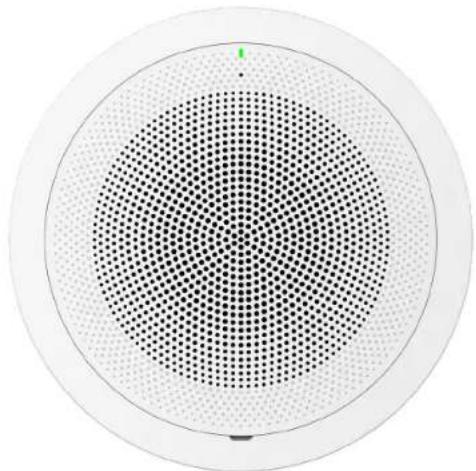
The GSC3506 is a 1-way public address SIP speaker that allows offices, schools, hospitals, apartments and more to build powerful public address announcement solutions that expand security and communication. This robust SIP speaker offers crystal clear HD audio functionality with a high-fidelity 30-Watt HD speaker. The GSC3506 support built-in whitelists, blacklists and greylists to easily block unwanted calls, SIP and multicast paging, group paging and PTT. users can easily sculpt a state-of-the-art security and PA announcement solution. Thanks to its modern industrial design and rich features, the GSC3506 is the ideal SIP speaker for any setting.
PRECAUTIONS
- Do not attempt to open, disassemble, or modify the device.
- Do not expose this device to temperatures outside range of 0 °C to 45 °C in operation and -10 °C to 60 °C in storage.
- Do not expose the GSC3506 to environments outside of the following humidity range: 10-90% RH (non-condensing).
- Do not power cycle your GSC3506 during system boot up or firmware upgrade. You may corrupt firmware images and cause the unit to malfunction.
PACKAGE CONTENTS
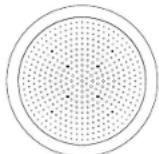
1x GSC3506

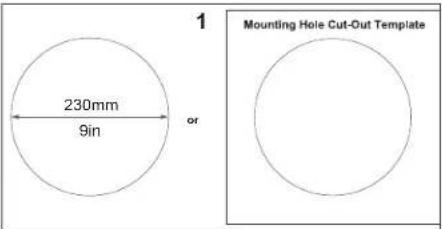
Mounting Hole Cut-Out Template
Ceiling Mount Kit
(optional and sold separately)
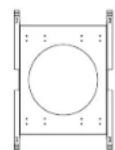
1x Ceiling Bracket

8x Screws (M4)

1x Quick Installation Guide
GSC3506 PORTS AND BUTTONS
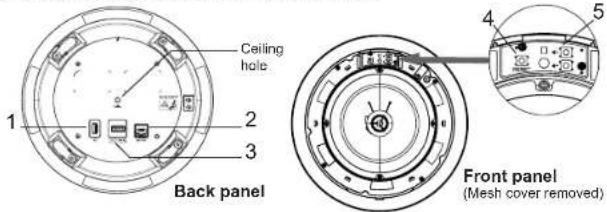
| NO. | Port Label | Description | |
| 1 | USB Port USB2.0, External USB Storage | |
| 2 | NET/F | | Ethernet RJ45 port (10/100Mbps) supporting PoE/PoE+. |
| 3 | 2-Pin port | | 2-pin switch-in input portAlarm-in input port (Access voltage 5V to 12V) |
| 4 | Reset RESET | | Factory reset button.Press for 10 seconds to reset factory default settings. |
| 5 | Volume Sound Volume buttons. | |
HARDWARE INSTALLATION
GSC3506 can be mounted on the ceiling or the Boom. Please refer to the following steps for the appropriate installation.
Ceiling Mount
- Drill a round hole with a diameter of 230mm or use the Mounting Hole Cut-Out Template.
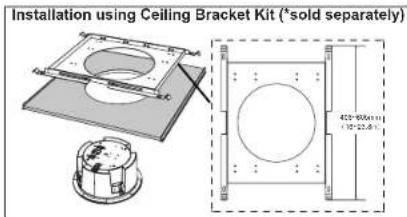
Fix the Ceiling Bracket using the screws from the kit as show in the illustration.
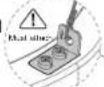
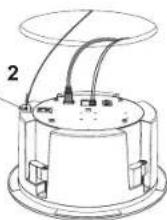
- To ensure safety, install first the anti-fall ropes, then plug in the Ethernet and 2-pin cables.
Note: The anti-fall rope diameter must be less than 5mm, and the pulling force must be greater than 25kgf.
-
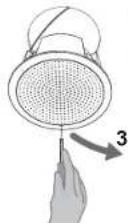
Open the front cover with a flat-head screwdriver.
-
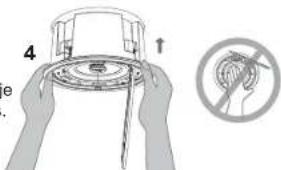
Align the device with the hole and push up slowly with two hands.
Warning: Avoid pressing the horn with your hands.
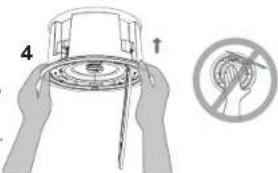
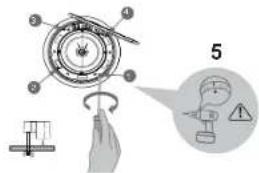
- Use a screwdriver and gently rotate clockwise the screws marked as (1), (2), (3) and (4) in the step 5 illustration.
Warning: If you use an electric drill, make sure to adjust it to the minimum speed gear first.
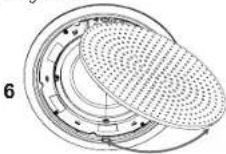
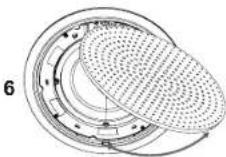
- Align the notch on the front cover with the notch on the device, press the whole front cover to ensure that each buckle is fastened.
Boom Mount
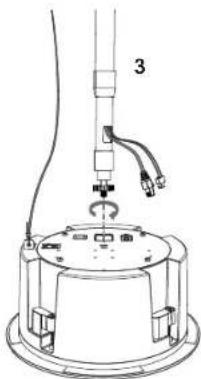
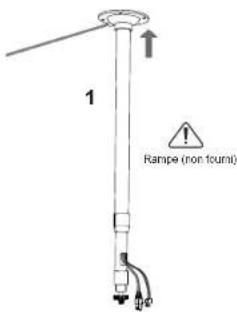
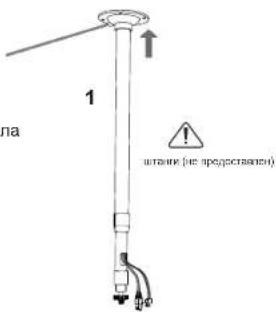
- Fix the Boom in the ceiling.
- To ensure safety, install first the anti-fall ropes.
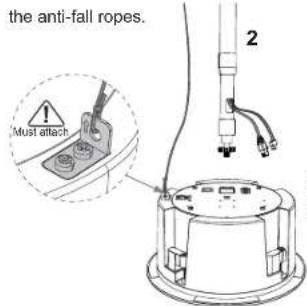
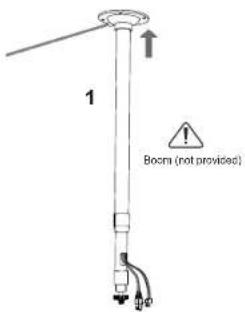
Note: The anti-fall rope diameter must be less than 5mm, and the pulling force must be greater than 25kgf.
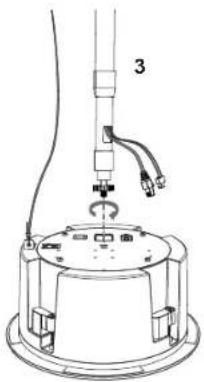
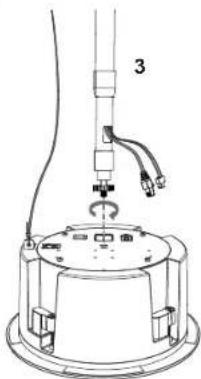
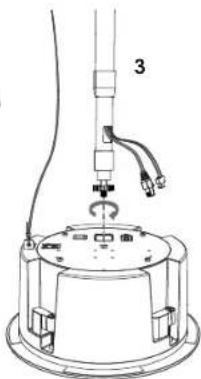
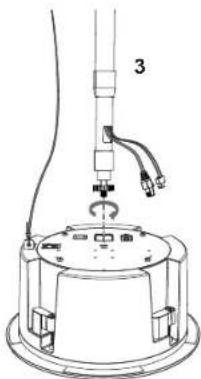
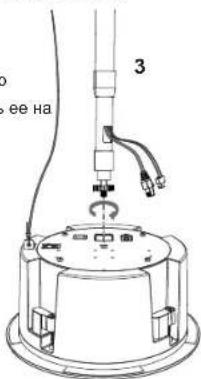
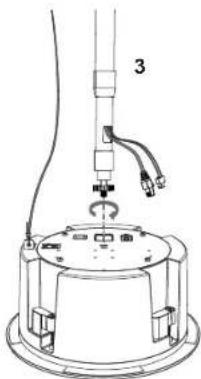
- Attach the Boom with GSC3506 ceiling hole and rotate to fix it in place.
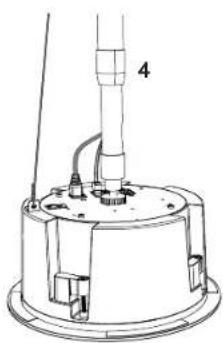
natural_image
Technical line drawing of a mechanical device with labeled component '4' (no text or symbols beyond label)
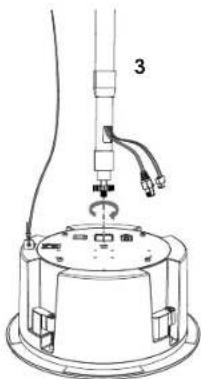
- Plug in the Ethernet and 2-pin cables.
POWERING AND CONNECTING GSC3506
GSC3506 can be powered on using PoE/PoE+ switch or PoE injector using following steps:
Step 1: Plug a RJ45 Ethernet cable into the network port of the GSC3506.
Step 2: Plug the other end into the power over Ethernet (PoE) switch or PoE injector.
Note: It is recommended to use PoE+ power supply to achieve the best audio effect.
Connecting Wiring Seat
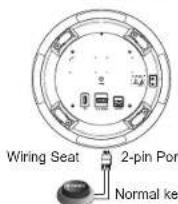
GSC3506 supports to connect a "Normal Key" to 2-pin port via Wiring Seat.
Step 1: Take the wiring seat from the install kits.
Step 2: Connect the Normal Key with the wiring seat (as shown in the illustration on the right).
ACCESSING THE CONFIGURATION INTERFACE
A computer connected to the same network as the GSC3506 can discover and access its configuration interface using its MAC address :
- Locate the MAC address on the MAC tag of the unit, which is on the underside of the device, or on the package.
- From a computer connected to same network as the GSC3506, type in the following address using the GSC3506's MAC address on your browser: http://gsc_.local
Example: if a GSC3506 has the MAC address C0:74:AD:11:22:33, this unit can be accessed by typing http://gsc_c074ad112233.local on the browser.
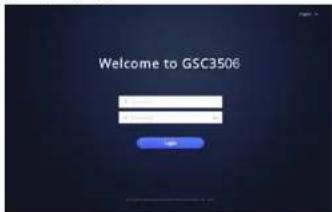
For more information, please refer to GSC3506
User Manual at: https://www.grandstream.com/support
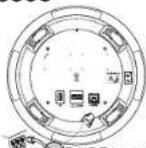
Network Port
IRJ45 Ethernet cable to Power over Ethernet (PoE) Switch or PoE injector.

ZH
natural_image
Technical line drawing of a mechanical device with labeled component '4' (no text or symbols beyond label)
- 插入网线和2-Pin排线。
开启并连接GSC3506
https://www.grandstream.com/support
Note: The anti-fall rope diameter must be less than 5mm, and the pulling force must be greater than 25kgf.
natural_image
Technical line drawing of a mechanical device with labeled component '4' (no text or symbols beyond label)
natural_image
Technical line drawing of a mechanical device with labeled component '4' (no text or symbols beyond label)
natural_image
Technical line drawing of a mechanical device with labeled component '4' (no text or symbols beyond label)
natural_image
Technical line drawing of a mechanical device with labeled component '4' (no text or symbols beyond label)
- Collegare i cavi Ethernet e a 2 pin.
ACCENSIONE E COLLEGAMENTO DEL GSC3506
natural_image
Technical line drawing of a mechanical device with labeled component '4' (no text or symbols beyond label)
natural_image
Technical diagram showing a mechanical assembly with a circular component and a cross-sectional view (no text or symbols)
natural_image
Technical line drawing of a mechanical device with labeled component '4' (no text or symbols beyond label)
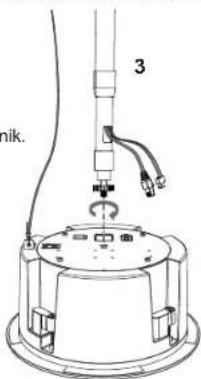
- Conecte os cabos Ethernet e de 2 pinos.
LIGANDO E CONECTANDO O GSC3506
natural_image
Technical line drawing of a mechanical device with no visible text or symbols
For certification information, please refer to User Manuals:
http://www.grandstream.com
Common part:
This equipment complies with radiation exposure limits set forth for an uncontrolled environment. This transmitter must not be co-located or operating in conjunction with any other antenna or transmitter. This equipment should be installed and operated with minimum distance 20cm between the radiator& your body.
This device complies with part 15 of the FCC Rules. Operation is subject to the following two conditions: (1) this device may not cause harmful interference, and (2) this device must accept any interference received, including interference that may cause undesired operation.
Any Changes or modifications not expressly approved by the party responsible for compliance could void the user's authority to operate the equipment.
Note: This equipment has been tested and found to comply with the limits for a Class B digital device, pursuant to part 15 of the FCC Rules. These limits are designed to provide reasonable protection against harmful interference in a residential installation. This equipment generates, uses and can radiate radio frequency energy and, if not installed and used in accordance with the instructions, may cause harmful interference to radio communications. However, there is no guarantee that interference will not occur in a particular installation. If this equipment does cause harmful interference to radio or television reception, which can be determined by turning the equipment off and on, the user is encouraged to try to correct the interference by one or more of the following measures:
—Reorient or relocate the receiving antenna.
—Increase the separation between the equipment and receiver.
—Connect the equipment into an outlet on a circuit different from that to which the receiver is connected.
—Consult the dealer or an experienced radio/TV technician for help.
Radio equipment
Operation of 5150-5250 MHz is restricted to indoor use only.
This device contains licence-exempt transmitter(s)/receiver(s) that comply with Innovation, Science and Economic Development Canada's licence-exempt RSS(s). Operation is subject to the following two conditions:
(1) This device may not cause interference.
(2) This device must accept any interference, including interference that may cause undesired operation of the device.
This product meets the applicable Innovation, Science and Economic Development Canada technical specifications.
Operation of 5150-5350 MHz is restricted to indoor use only. Support Frequency Bands and Power:
BT 2402-2480 MHz < 15 dBm;
BLE 2402-2480 MHz < 10 dBm;
WLAN 2412-2472 MHz < 20 dBm;
WLAN 5150-5250 MHz < 18 dBm;
WLAN 5250-5350 MHz < 18 dBm;
WLAN 5470-5725 MHz < 19 dBm;
WLAN 5725-5875 MHz < 14 dBm;
The simplified EU declaration of conformity referred to in Article 10(9) shall be provided as follows:
Hereby, [Grandstream Networks, Inc.] declares that the radio equipment type [GSC3506] is in compliance with Directive 2014/53/EU.
The full text of the EU declaration of conformity is available at the following internet address: www.grandstream.com
Operation of 5150-5350 MHz is restricted to indoor use only. Support Frequency Bands and Power:
BT 2402-2480 MHz < 15 dBm;
BLE 2402-2480 MHz < 10 dBm;
WLAN 2412-2472 MHz < 20 dBm;
WLAN 5150-5250 MHz < 18 dBm;
WLAN 5250-5350 MHz < 18 dBm;
WLAN 5470-5725 MHz < 19 dBm;
WLAN 5725-5875 MHz < 14 dBm;
The simplified UK declaration of conformity referred to in Regulation 8& 14 shall be provided as follows:
Hereby, [Grandstream Networks, Inc.] declares that the radio equipment type [GSC3506] is in compliance with Directive RER 2017 (S.I.2017/1206)..
The full text of the UK declaration of conformity is available at the following internet address: www.grandstream.com