
ACDC TIG-200 - Welding machine Vevor - Free user manual and instructions
Find the device manual for free ACDC TIG-200 Vevor in PDF.
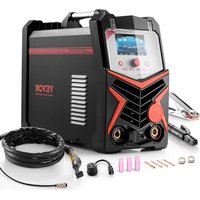


| Product Type | Inverter Welding Machine |
| Brand | Vevor |
| Model | ACDC TIG-200 |
| Input Voltage | 110 V or 220 V, single phase, 50/60 Hz |
| Max Input Current | 45 A (110 V), 34 A (220 V) |
| MMA Output Current (110 V) | 40 - 130 A |
| MMA Output Current (220 V) | 40 - 180 A |
| TIG Output Current (110 V) | 10 - 150 A |
| TIG Output Current (220 V) | 10 - 200 A |
| Duty Cycle | 20% at 130 A (110 V MMA), 20% at 180 A (220 V MMA), 20% at 150 A (110 V TIG), 20% at 200 A (220 V TIG) |
| Electrode Diameter (MMA) | 1.6 to 5.0 mm (E6010, E6011, E6013, E7014, E7018, stainless steel) |
| Electrode Diameter (TIG) | 1.6 to 4.0 mm |
| Welding Modes | MMA DC, TIG DC, TIG AC, Pulsed TIG DC, Pulsed TIG AC |
| Main Functions | Current adjustment, anti-stick, hot start, arc force, pre-flow, post-flow, 2T/4T mode, spot welding, foot pedal control |
| Display | Digital screen with rotary encoder for adjustments |
| Weight (approx.) | Approximately 10 kg |
| Dimensions (approx.) | Approximately 40 x 20 x 30 cm |
| Box Contents | Machine, power cable, 300 A ground clamp (4.2 m), welding clamp (5.3 m), TIG torch WP-17 (1 set), gas hose (with throat strap), welding helmet, argon gas gauge, foot pedal |
| Safety | Thermal protection, automatic shutdown on overheating, cooling ventilation, CE certification |
| Warranty and Support | Technical support and electronic warranty certificate at www.vevor.com/support |
Frequently Asked Questions - ACDC TIG-200 Vevor
User questions about ACDC TIG-200 Vevor
0 question about this device. Answer the ones you know or ask your own.
Ask a new question about this device
Download the instructions for your Welding machine in PDF format for free! Find your manual ACDC TIG-200 - Vevor and take your electronic device back in hand. On this page are published all the documents necessary for the use of your device. ACDC TIG-200 by Vevor.
USER MANUAL ACDC TIG-200 Vevor
Technical Support and E-Warranty Certificate
www.vevor.com/support
TIG Welder
Model: ACDC TIG-200
We continue to be committed to providing you tools with competitive prices. "Save Half", "Half Price", or any other similar expressions used by us only represent an estimate of savings you might benefit from buying certain tools with us compared to the major top brands and do not necessarily mean to cover all categories of tools offered by us. You are kindly reminded to verify carefully when placing an order with us if you are actually saving half in comparison with the top major brands.
Model: ACDC TIG-200
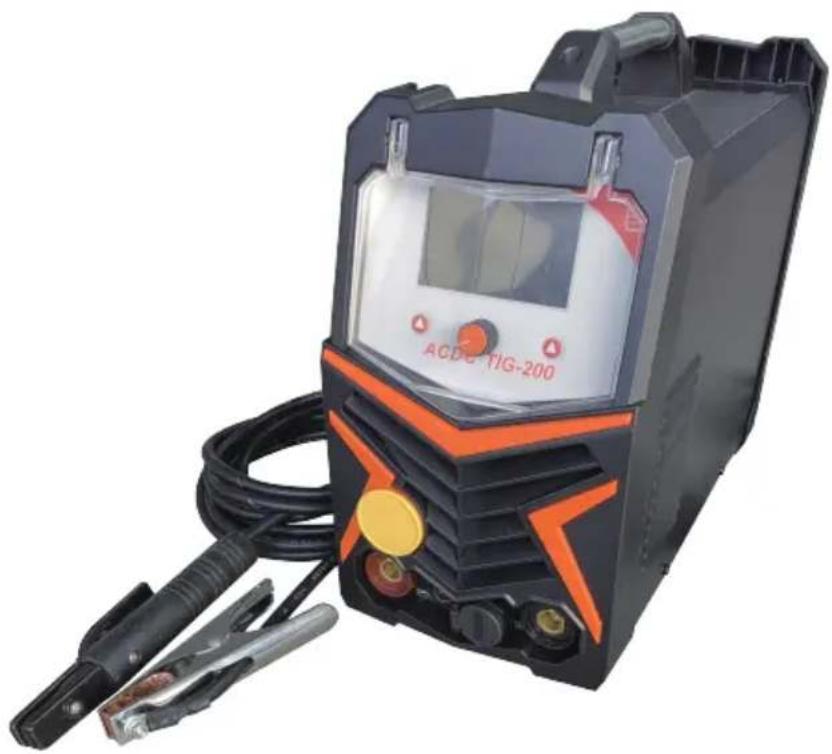
Note: The product picture is for reference; the actual details shall prevail.
NEED HELP? CONTACT US!
Have product questions? Need technical support? Please feel free to contact us:
Technical Support and E-Warranty Certificate www.vevor.com/support
This is the original instruction. Please read all manual instructions carefully before operating. VEVOR reserves a clear interpretation of our user manual. The appearance of the product shall be subject to the product you received. Please forgive us that we won't inform you again if there are any technology or software updates on our product.
| Warning-Toreducetheriskofinjury, usermustreadinstructionsmanualcarefully. | |
| CORRECTDISPOSALforDisplay ThisproductissubjecttotheprovisionofeuropeanDirective2012/19/EU.The symbolsshowingawheeliebincrossedthroughindicatesthatheproductrequires separaterefusecollectionintheEuropeanUnion.Thisapliestotheproductand allaccessoriesmarkedwiththissymbolPRODUCTsmarkedassuchmaynotbe discardedwithnormaldomesticwaste,butmustbetakentoacollectionpointfor recyclingelectricalandronicdevicese . | |
| CE | ComplianceisaECsecuritycertification. |
The ACDC TIG-200 provides a convenient method of performing "stick" welding carbon steel. Inverter technology provides the capability of welding thin or heavy gauge steel with precision and ease. When adding the optional lift TIG torch (not included), gas regulator, and a cylinder of shielding gas, the ACDC TIG-200 becomes a TIG welder.
SPECIFICATIONS
| Output Current Range: | Input Current | Input Voltage | Rated Duty Cycle | Rod Diameter | Rod Material |
| MMA 110V40-130A 220V 40~180A | I1 max 45A (110V) I1 eff 34.8A (110V) I1 max 34A (220V) I1 eff 26.3A (220V) | 110Vor220V | 20%@110V130A220V180A | 1/16~6/311.6~5.0mm | E6010 E6011 E6013 E7014 E7018S tainless Steel |
| TIG 110V10-150A 220V 10~200A | 110Vor220V | 20%@110V150A220V200A | 1/16~5/321.6~4.0mm |
DUTY CYCLE
The rated duty cycle refers to the amount of welding that can be done within an amount of time. The ACDC TIG-200 has a duty cycle of 60% at 195A. It is easiest to look at your welding time in blocks of 10 minutes and the duty cycle being a percentage of that 10 minutes. If welding at 195A with a 60% duty cycle, within a 10 minute block of time you can weld for 6 minutes with 4 minutes of cooling for the welder. If the duty cycle is exceeded, the welder will automatically shut off, however the fan will continue running to cool the overheated components. When a safe temperature has been reached, the welder will automatically switch the welder output back on. To increase the duty cycle you can turn down the amperage output control.
READ AND UNDERSTAND ALL INSTRUCTIONS AND PRECAUTIONS BEFORE PROCEEDING.
This unit emits a powerful high voltage and extreme heat which can cause severe burns, dismemberment, electrical shock and death. VEVOR shall not be held liable for consequences due to deliberate or unintentional misuse of this product.
SAFETY INFORMATION
The following explanations are displayed in this manual, on the labeling, and on all other information provided with this product:
DANGER
DANGER indicates a hazardous situation which, if not avoided, will result in death or serious injury.
WARNING
WARNING indicates a hazardous situation which, if not avoided, could result in death or serious injury.
CAUTION
CAUTION used with the safety alert symbol, indicates a hazardous situation which, if not avoided, could result in minor or moderate injury.
NOTICE
NOTICE is used to address practices not related to personal injury.
READ INSTRUCTIONS
Thoroughly read and understand this manual before using the welder. Save for future reference.
DANGER ELECTRIC SHOCK CAN KILL!
- Improper use of an electric welder can cause electric shock, injury and death! Read all precautions described in the Welder Manual to reduce the possibility of electric shock.
- Disconnect welder from power supply before assembly, disassembly or maintenance of the torch, contact tip and when installing or removing nozzles.
- Always wear dry, protective clothing and leather welding gloves and insulated footwear. Use suitable clothing made from durable flame-resistant material to protect your skin.
- If other persons or pets are in the area of welding, use welding screens to protect bystanders from sparks.
- Always operate the welder in a clean, dry, well ventilated area. Do not operate the welder in humid, wet, rainy or poorly ventilated areas.
- The electrode and work (or ground) circuits are electrically "hot" when the welder is on. Do not allow these "hot" parts to come in contact with your bare skin or wet clothing.
- Separate yourself from the welding circuit by using insulating mats to prevent contact from the work surface.
- Be sure that the work piece is properly supported and grounded prior to beginning an electric welding operation.
- Always attach the ground clamp to the piece to be welded and as close to the weld area as possible. This will give the least resistance and best weld.
DANGER WELDING SPARKS CAN CAUSE FIRE OR EXPLOSION!
- Electric welding produces sparks which can be discharged considerable distances at high velocity igniting flammable or exploding vapors and materials.
- Do not operate electric arc welder in areas where flammable or explosive vapors are present.
- Do not use near combustible surfaces. Remove all flammable items within 35 feet of the welding area. Always keep a fire extinguisher nearby while welding.
- Use welding blankets to protect painted and or flammable surfaces; rubber weather-stripping, dash boards, engines, etc.
- Ensure power supply has properly rated wiring to handle power usage.
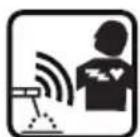
WARNING: ELECTROMAGNETIC FIELDS CAN BE A HEALTH HAZARD!
- The electromagnetic field generated during arc welding may interfere with various electrical and electronic devices, such as cardiac pacemakers. Anyone using such devices should consult with their physician prior to performing any electric welding operations.
- Exposure to electromagnetic fields while welding may have other health effects which are not yet known.
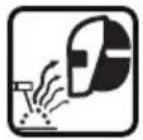
WARNING: ARC RAYS CAN BURN!
- Arc rays produce intense ultraviolet radiation which can burn exposed skin and cause eye damage. Use a shield with the proper filter (a minimum of #11) to protect your eyes from sparks and the rays of the arc when welding or when observing open arc welding (see ANSI Z49.1 and Z87.1 for safety standards).
- Use suitable clothing made from durable flame-resistant material to protect your skin.
- If other persons or pets are in the area of welding, use welding screens to protect bystanders from sparks and arc rays.
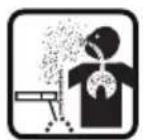
WARNING: FUMES AND WELDING GASES CAN BE A HEALTH HAZARD!
- Fumes and gases released during welding are hazardous. Do not breathe fumes produced by the welding operation. Wear an OSHA-approved respirator when welding.
- Always work in a properly ventilated area.
- Never weld coated materials, including but not limited to: cadmium plated, galvanized, lead based paints.
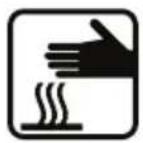
CAUTION: HOT METAL AND TOOLS WILL BURN!
Electric welding heats metal and tools to temperatures that will cause severe burns! Use protective, heat resistant gloves and clothing when using Eastwood or any other welding equipment. Never touch welded work surface, torch tip, or nozzle until they have completely cooled.

CAUTION: FLYING METAL CHIPS CAN CAUSE INJURY!
- Grinding and sanding will eject metal chips, dust, debris, and sparks at high velocity. To prevent eye injury, wear approved safety glasses.
- Wear an OSHA-approved respirator when grinding or sanding.
- Read all manuals included with specific grinders, sanders or other power tools used before and after the welding process. Be aware of all power tool safety warnings.
REQUIRED ITEMS
Before you begin using the TIG/MMA 205 STICK WELDER, make sure you have the following:
- A properly grounded 1Phase 110/220 Volt AC, 50/60Hz, 50A circuit breaker. NOTE: Unit must be grounded to work properly and safely!
- A clean, safe, well-lit, dry and well-ventilated work area.
- A non-flammable, long sleeve shirt or WELDING Jacket
- Heavy Duty Welding Gloves
- Auto-Darkening Welding Helmet to provide eye protection during welding operations. Note: MUST be a #11 lens or darker.
- Dedicated stainless steel wire welding brushes for each material to be welded.
CONTENTS
Remove all items from the box. Compare with list below to make sure unit is complete.
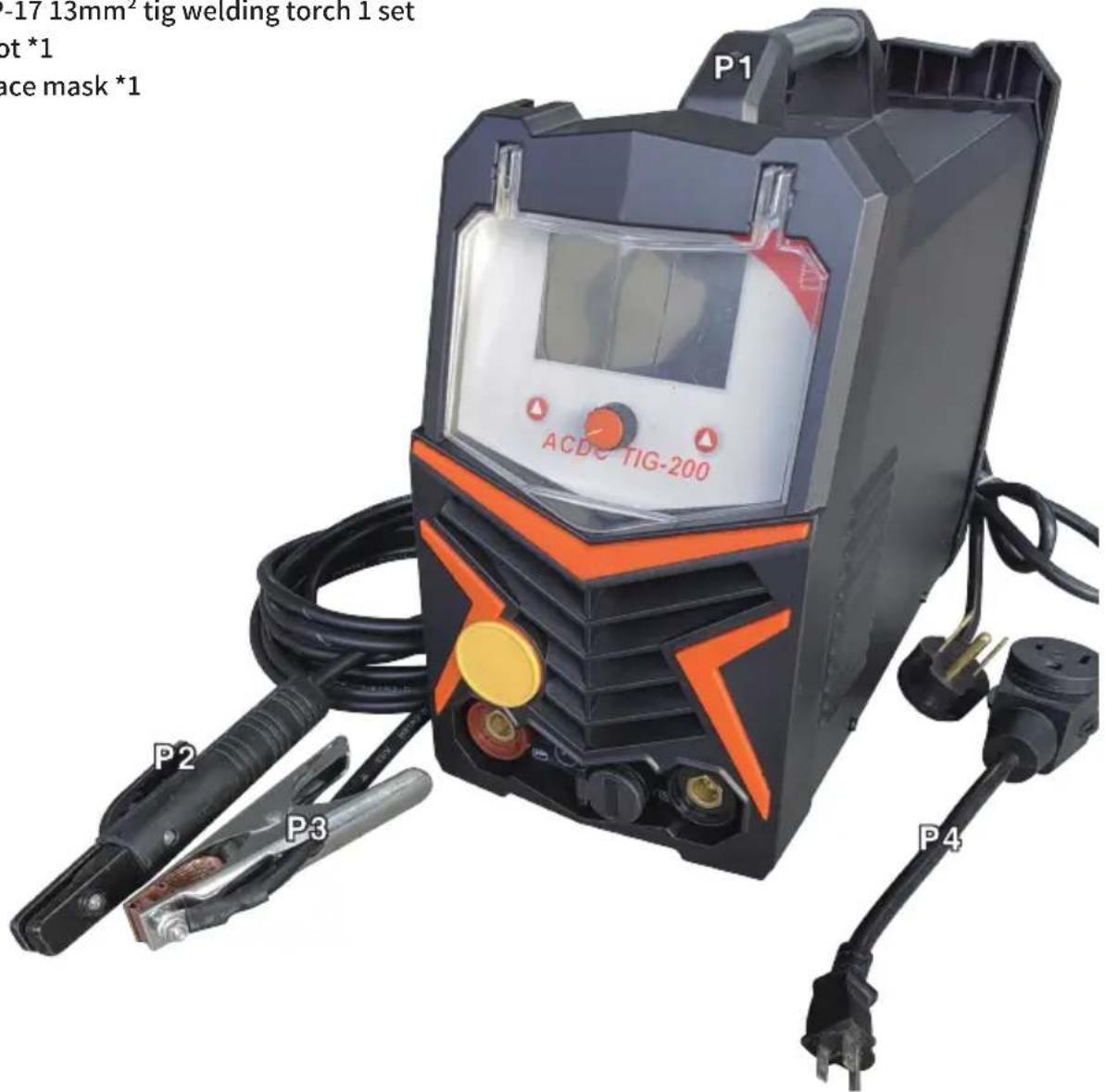
1. ACDC TIG-200 2. Power Adapter Cord (Dual power supply machine) 3. 2m 25mm² Ground clamp 300A 1 set 4. 2m 25mm² electric welding pliers 300A 1 set 5. 3m air pipe *1 6. Tracheolaryngeal band *2 7. Argon arc welding gas meter *1 8. WP-17 13mm² tig welding torch 1 set 9. Foot *1 10. Face mask *1
CONTROL AND DISPLAY PANEL
Button 1 encoder Button 2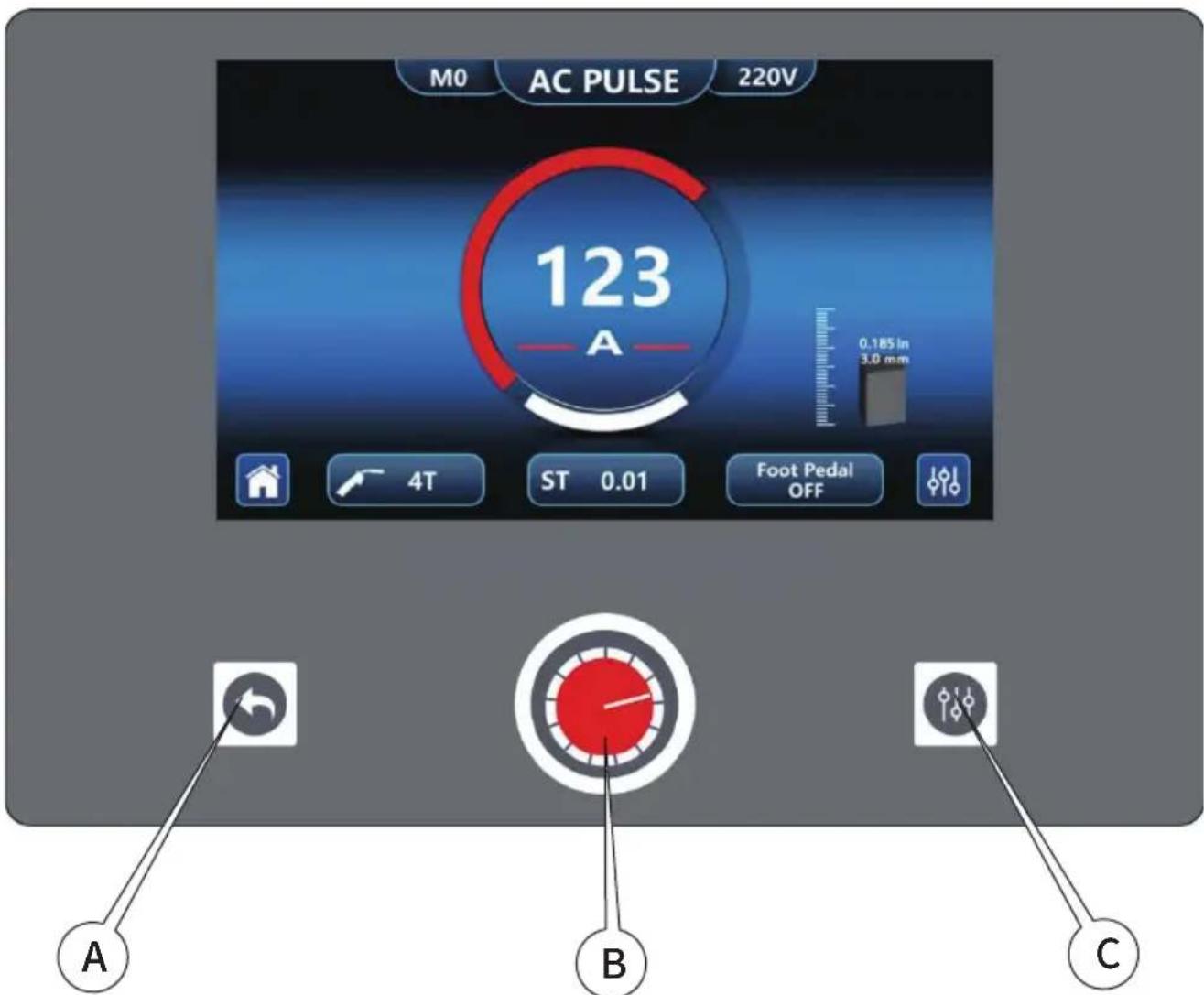
Click the button to select the function to be steady on In-screen alarm such as thermal protection
PANEL OPERATION INSTRUCTIONS
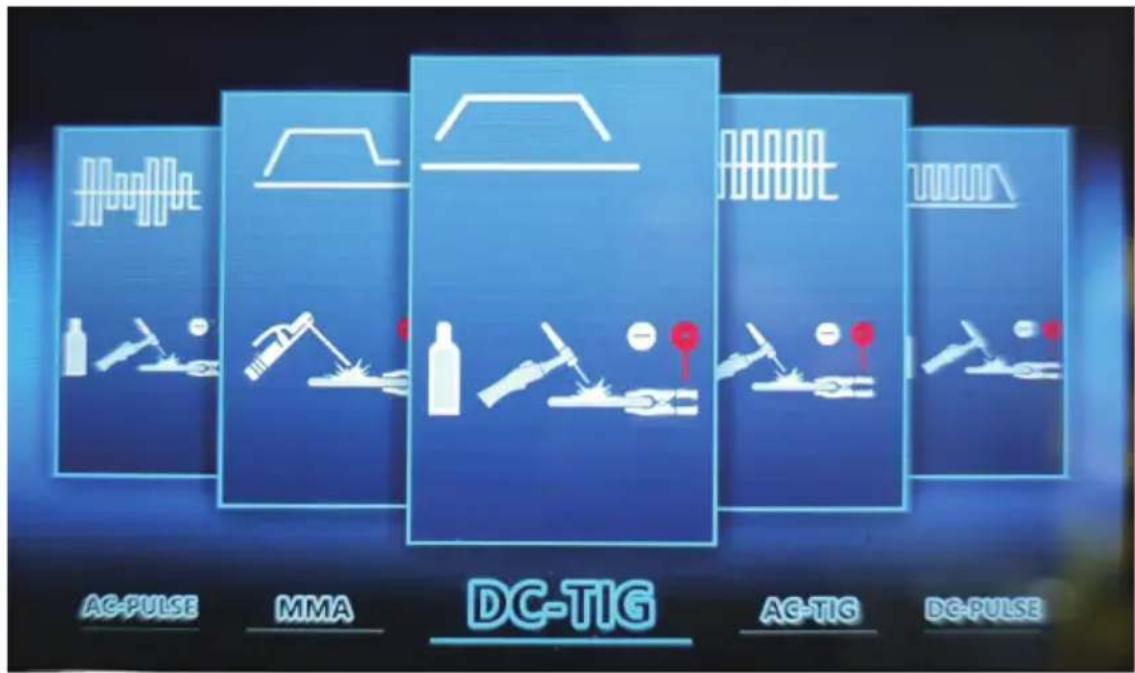
WELDING TYPE SELECTION
- Rotary encoder, cycle to choose 5 welding types: DC manual welding, DC argon arc welding, AC argon arc welding, DC pulse welding, AC pulse welding.
- Select the desired welding type and press the encoder to enter the operation screen.
- The picture displayed on the welding type selection interface is as follows:
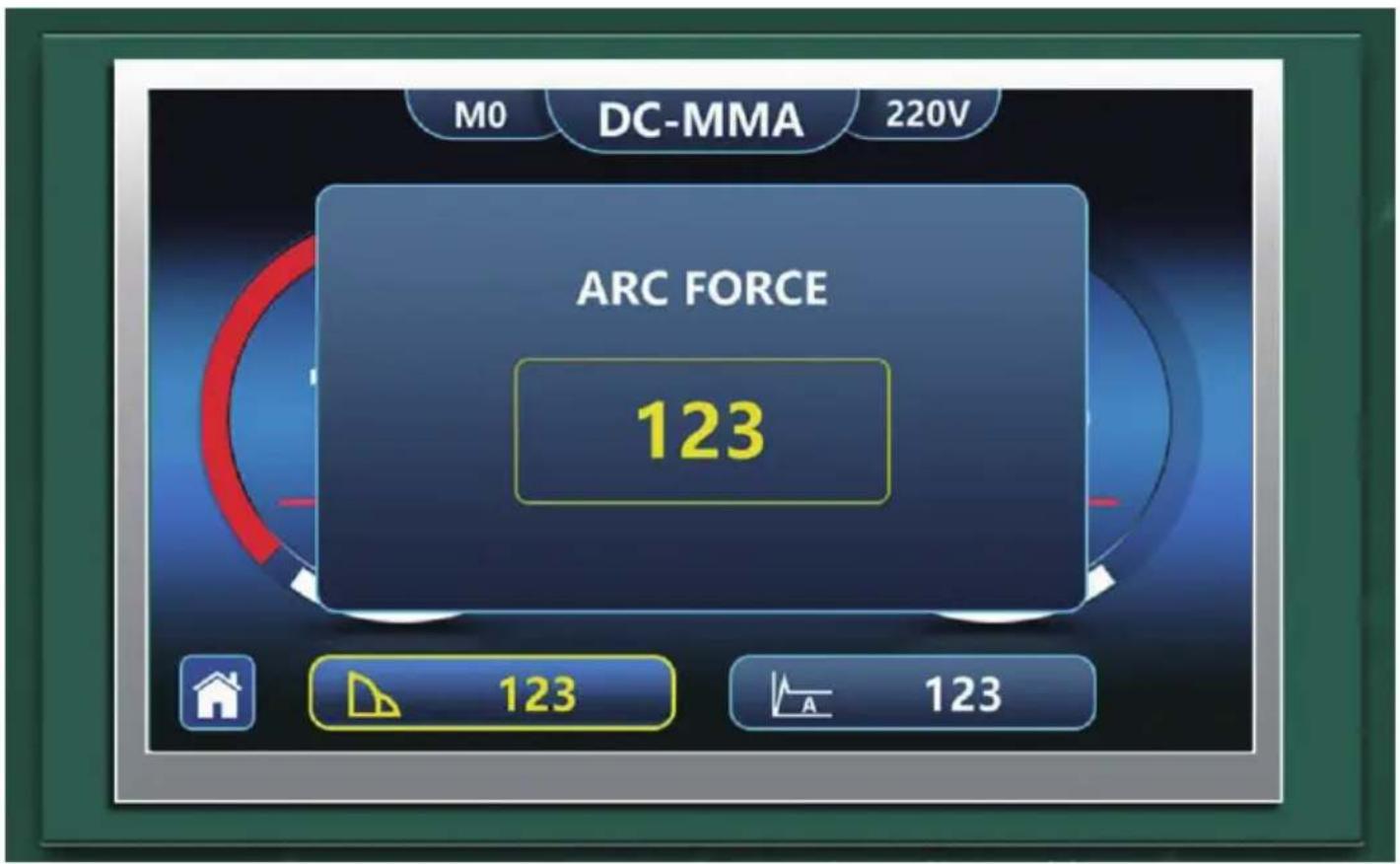
- MMA indicator, power status indicator.
- Current, actual voltage display.
- Button 1: Corresponding to the interface return icon, press to return to the welding type selection interface.
- Encoder: rotate to adjust the current, press the encoder and rotate to select anti-stick, anti-shock, thrust current and arc current, select the required adjustment parameters and press again to pop up the adjustment window, rotate the encoder to adjust parameters, and finally press to confirm and exit the pop-up window (you can press the button at any time during the adjustment process 1 Exit the current parameter setting; If you do not perform any operation during parameter adjustment, it will automatically return to the current adjustment state after 5 seconds.
| FEATURE | RADIUS | DEFAULT VALUE | REGULATE |
| DC Current | 40-200 | 40 | Encoder regulation |
| ANT | ON、OFF | ON | Encoder regulation |
| VRD | ON、OFF | ON | Encoder regulation |
| ARC Force | 0-60 | 0 | Encoder regulation |
| HOT Start | 0-60 | 0 | Encoder regulation |
DC TIG, AC TIG, DC PULSE, AC PULSE OPERATION PAGE DESCRIPTION
Welding type indication, power status indication. - Current, plate thickness display. - Button 1: Corresponding to the interface return icon, press to return to the welding type selection interface. - Encoder: Rotate the adjustment current (automatically match the plate thickness), press the encoder and rotate to select the operation mode, spot welding time, interval time, pedal switch, select the required adjustment parameters and press again to pop up the adjustment window, rotate the encoder to adjust parameters, and finally press to confirm and exit the pop-up window (you can press the button at any time during the adjustment process 1 Exit the current parameter setting; If you do not perform any operation during parameter adjustment, it will automatically return to the current adjustment state after 5 seconds. - Button 2: Enter the complex setting interface, enter the back button 2 to select parameters, the encoder to adjust the value, press 1 to return to the upper interface.
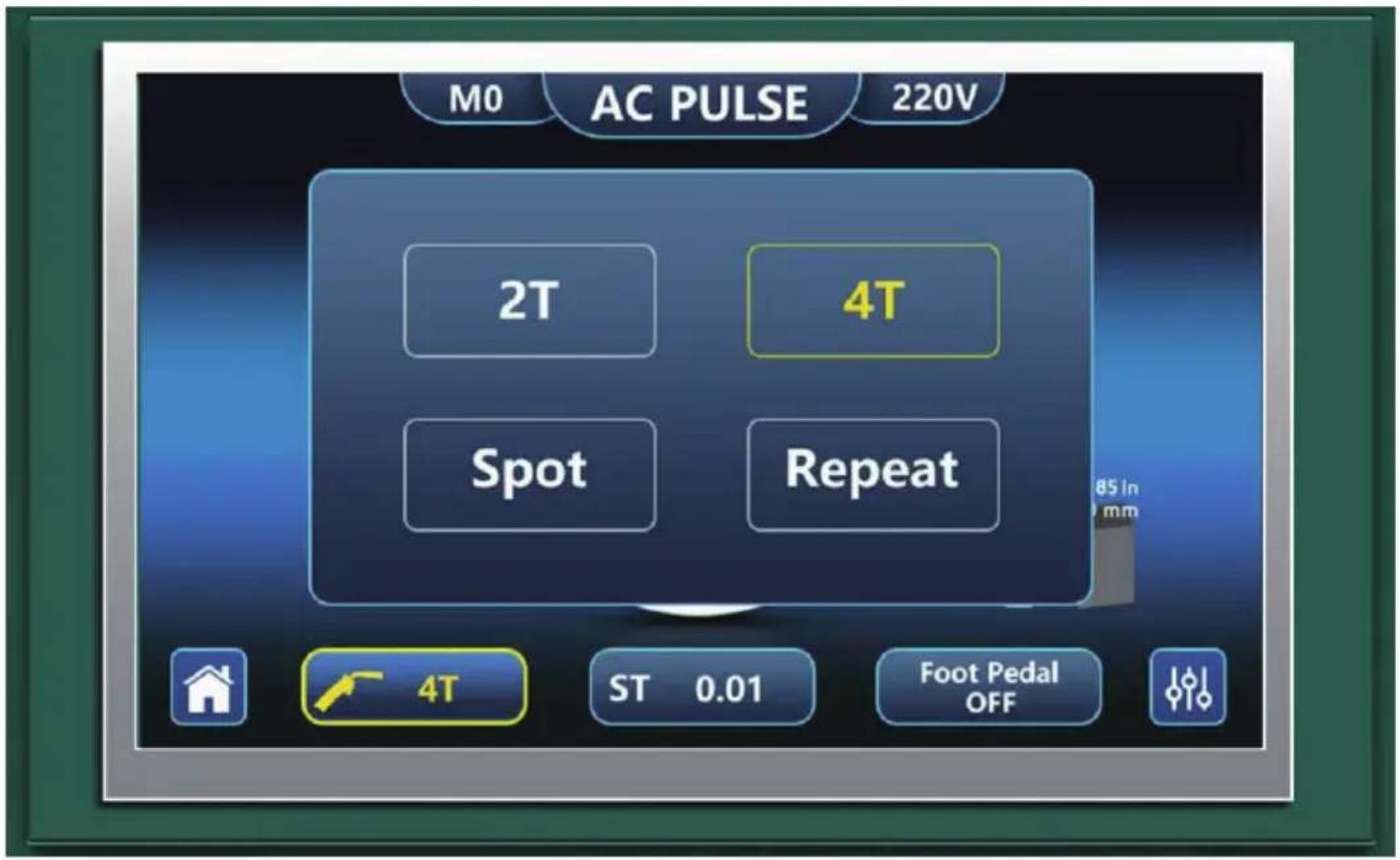
| FEATURE | RADIUS | DEFAULT VALUE | REGULATE |
| Current | 10-200 | 10 | Encoder regulation |
| Operate Mode | 2T、4T SPOT、REPEAT | 2T | Encoder regulation |
| Spot Time 0.01S | 0.01S-9.99S | Encoder regulation | |
| Interval Time 0.01S | 0.01S-9.99S | Encoder regulation | |
| Foot Pedal OFF | OFF、ON | Encoder regulation |
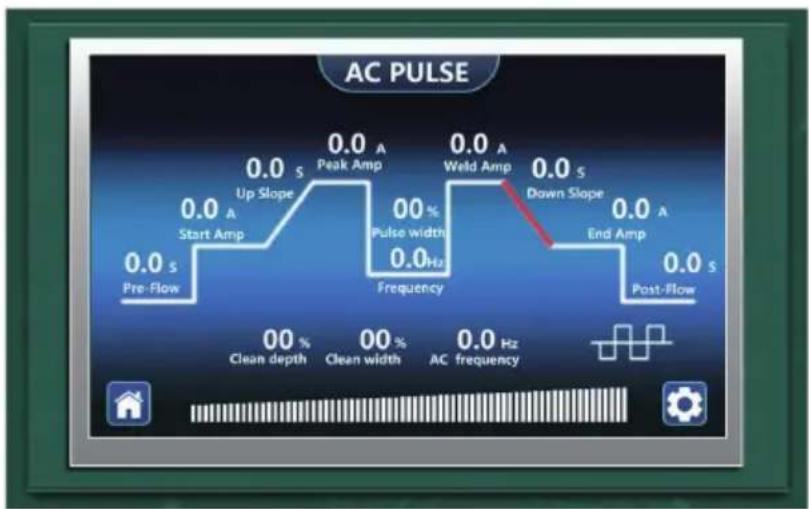
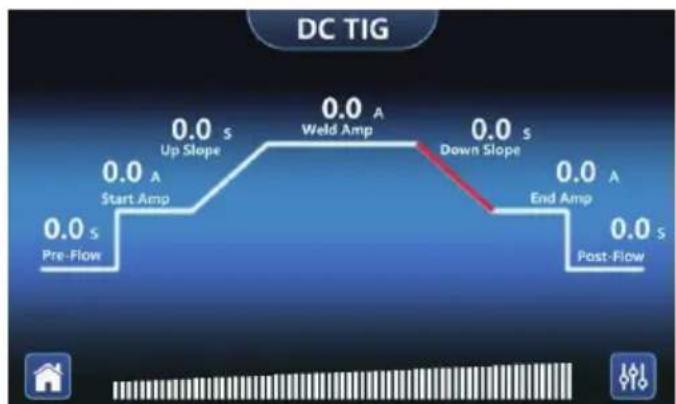
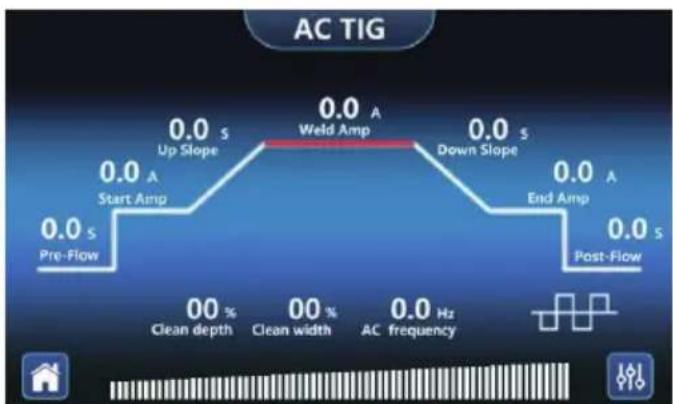
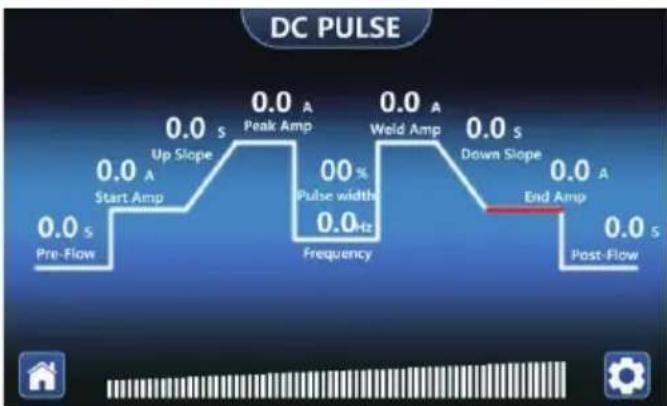
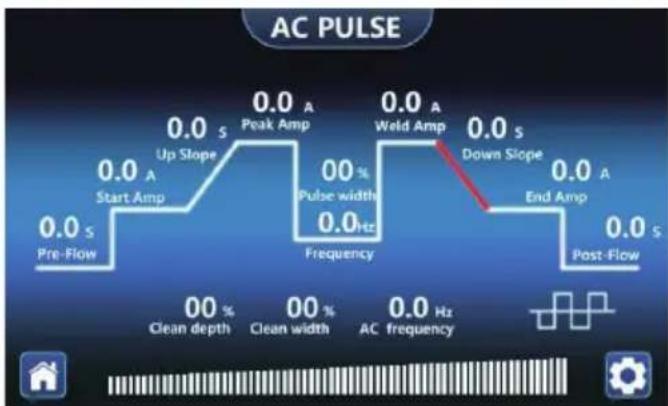
DC TIG PARAMETER TABLE
| FEATURE | RADIUS | DEFAULTVALUE | REGULATES | |
| Pre-Flow | 0-10 | 0 | Button 2 Select | Encoder regulation |
| Start Amp | 10-200 | 10 | Button 2 Select | Encoder regulation |
| Up Slope | 0-10 | 0 | Button 2 Select | Encoder regulation |
| Weld Amp | 10-200 | 10 | Button 2 Select | Encoder regulation |
| Down Slope | 0-10 | 0 | Button 2 Select | Encoder regulation |
| End Amp | 10-200 | 10 | Button 2 Select | Encoder regulation |
| Post-Flow | 0-10 | 0 | Button 2 Select | Encoder regulation |
ELECT
DC PULSE PARAMETER TABLE
| FEATURE | RADIUS | DEFAULTVALUE | REGULATES | |
| Pre-Flow | 0-10 | 0 | Button 2 Select | Encoder regulation |
| Start Amp | 10-200 | 10 | Button 2 Select | Encoder regulation |
| Up Slope | 0-10 | 0 | Button 2 Select | Encoder regulation |
| Peak Amp | 10-200 | 10 | Button 2 Select | Encoder regulation |
| Pulse Frequency | 2-99.9 | 5 | Button 2 Select | Encoder regulation |
| Weld Amp | 10-200 | 10 | Button 2 Select | Encoder regulation |
| Down Slope | 0-10 | 0 | Button 2 Select | Encoder regulation |
| Pulse Width | 10-90 | 50 | Button 2 Select | Encoder regulation |
| End Amp | 10-200 | 10 | Button 2 Select | Encoder regulation |
| Post-Flow | 0-10 | 0 | Button 2 Select | Encoder regulation |
AC TIG PARAMETER TABLE
| FEATURE | RADIUS | DEFAULTVALUE | REGULATES | |
| Pre-Flow | 0-10 | 0 | Button 2 Select | Encoder regulation |
| Start Amp | 10-200 | 10 | Button 2 Select | Encoder regulation |
| Up Slope | 0-10 | 0 | Button 2 Select | Encoder regulation |
| Weld Amp | 10-200 | 10 | Button 2 Select | Encoder regulation |
| Down Slope | 0-10 | 0 | Button 2 Select | Encoder regulation |
| End Amp | 10-200 | 10 | Button 2 Select | Encoder regulation |
| Post-Flow | 0-10 | 0 | Button 2 Select | Encoder regulation |
| Clean Depth | 50-150 | 100 | Button 2 Select | Encoder regulation |
| Clean Width | 30-80 | 50 | Button 2 Select | Encoder regulation |
| AC Frequency | 20-200 | 20 | Button 2 Select | Encoder regulation |
ELECT
| FEATURE | RADIUS | DEFAULTVALUE | REGULATES | |
| Pre-Flow | 0-10 | 0 | Button 2 Select | Encoder regulation |
| Start Amp | 10-200 | 10 | Button 2 Select | Encoder regulation |
| Up Slope | 0-10 | 0 | Button 2 Select | Encoder regulation |
| Peak Amp | 10-200 | 10 | Button 2 Select | Encoder regulation |
| Pulse Frequency | 2-99.9 | 5 | Button 2 Select | Encoder regulation |
| Pulse Width | 10-90 | 50 | Button 2 Select | Encoder regulation |
| Weld Amp | 10-200 | 10 | Button 2 Select | Encoder regulation |
| Down Slope | 0-10 | 0 | Button 2 Select | Encoder regulation |
| End Amp | 10-200 | 10 | Button 2 Select | Encoder regulation |
| Post-Flow | 0-10 | 0 | Button 2 Select | Encoder regulation |
| Clean Depth | 50-150 | 100 | Button 2 Select | Encoder regulation |
| Clean Width | 30-80 | 50 | Button 2 Select | Encoder regulation |
| AC Frequency | 20-200 | 20 | Button 2 Select | Encoder regulation |
ELECT
Thermal protection LED illuminates when the unit has reached the maximum internal component temperature. This occurs when the duty cycle has been exceeded.
The welder will automatically shut off, however the fan will continue running to cool the overheated components. When a safe temperature has been reached, the protective circuit will automatically switch the welder output back on.
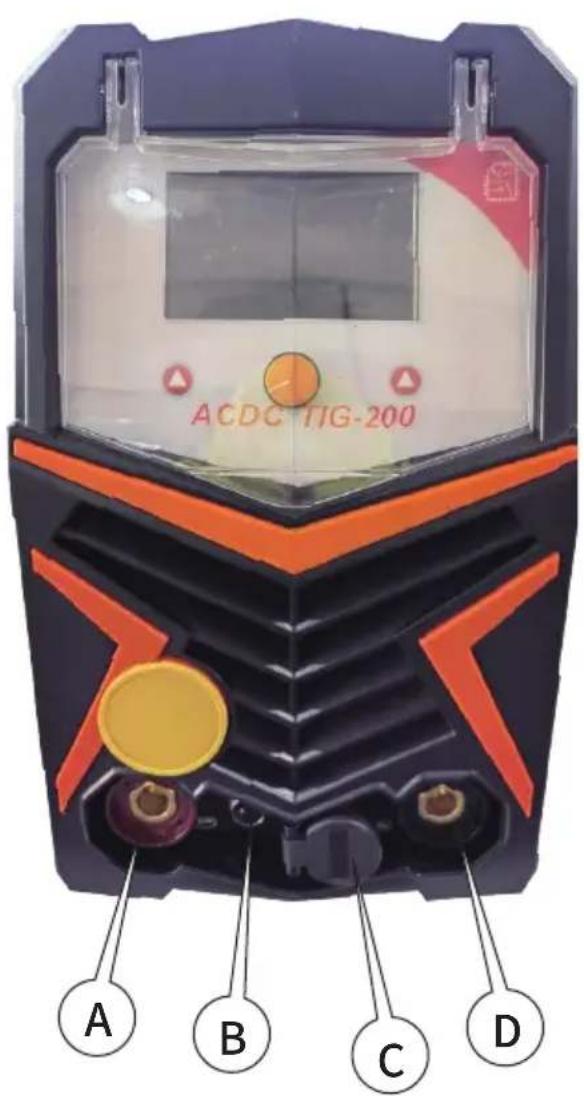
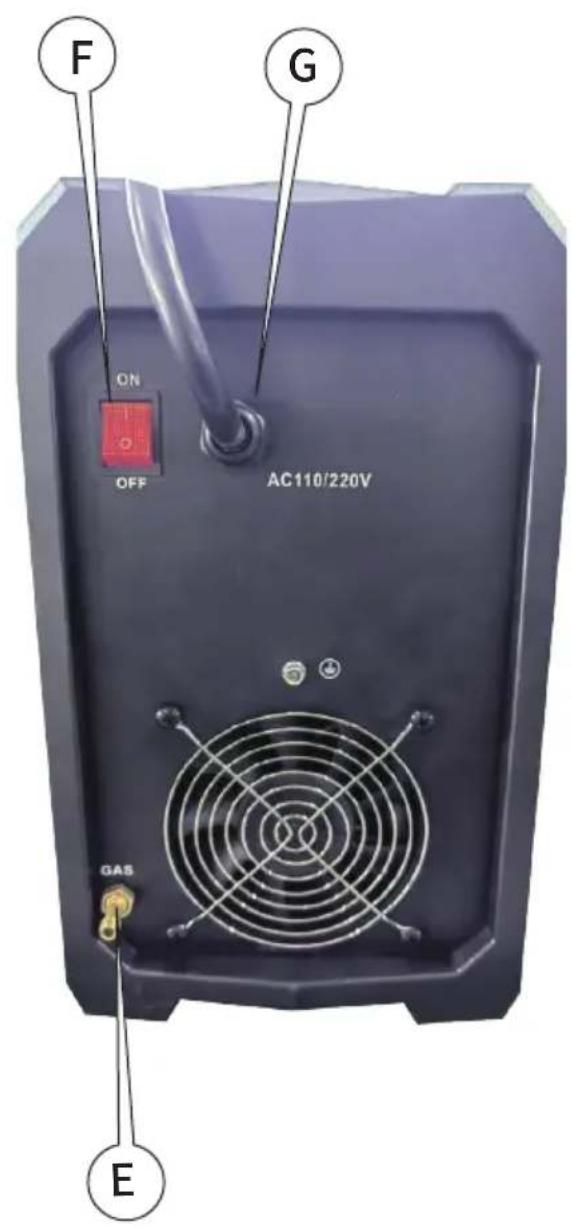
A: positive output interface B: gun switch interface C: gas-electric interface D: negative output interface E: TIG gas interface F: power switch G: power cord
MANUAL WELDING DEBUGGING AND OPERATION
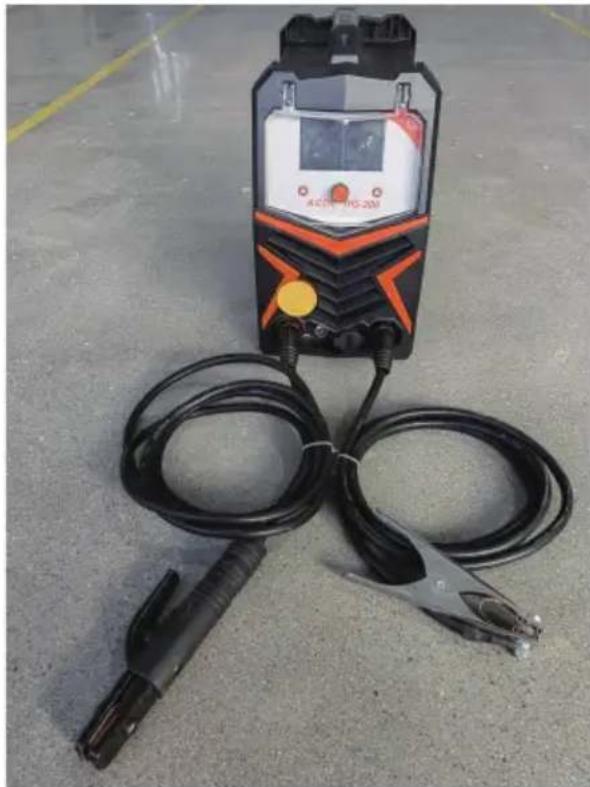
- Connect the power plug and turn on the power switch.
- Connect the welding pliers to the positive output port, and connect the ground clamp to the negative output port.
- Hold the workpiece with a ground clamp.
- Press the welding mode button to switch to manual welding mode.
- Adjust the current knob to adjust the current to the appropriate range.
- Touch the electrode and the workpiece with the welding pliers, and start the arc welding.
ARGON ARC WELDING DEBUGGING AND OPERATION
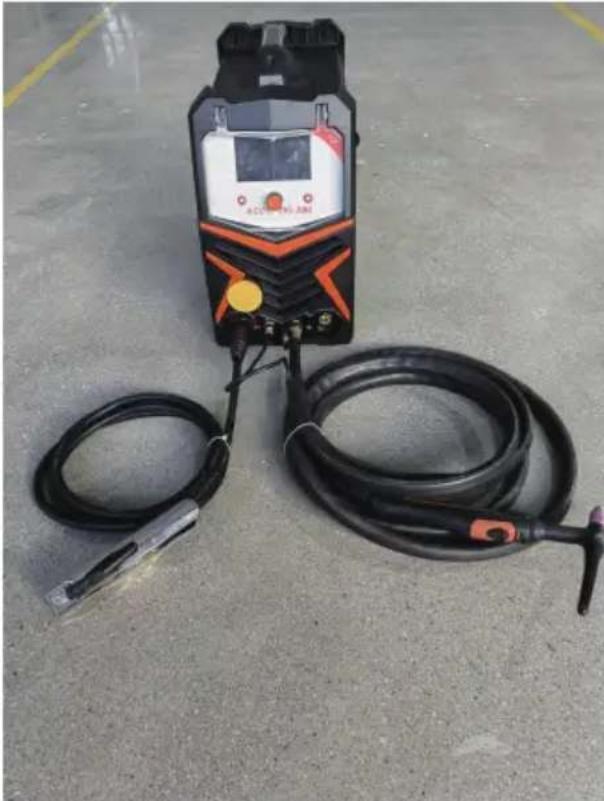
- Power on and turn on the power switch.
- Connect the argon arc welding gun to the gas-electric interface of the welding machine and tighten it clockwise.
- Insert the two-core plug of the torch into the switch port of the torch.
- Connect the ground clamp quick connector to the positive output end of the welder and hold the workpiece with the ground clamp.
- Press the welding mode button to switch to argon arc welding mode.
- Connect the gas cylinder gas pipe to the argon arc welding gas port on the rear panel and tighten it with the throat band.
- Turn the cylinder valve to reach the appropriate welding pressure.
- According to the thickness of the plate, turn the current adjustment knob to achieve the appropriate welding current.
- Touch the tungsten electrode of the welding torch to the workpiece, press the gun switch on the handle, and welding begins.
PREPARED TO "STICK" WELDING
- Plug the power cord into a properly grounded, 1Phase 110/220 Volt AC, 50/60Hz, 50A circuit breaker.
- Make sure the electrode or "Stick" is not making contact with the grounded workpiece.
- Switch the Power Switch to "ON".
DANGER
ELECTRIC SHOCK CAN CAUSE INJURY OR DEATH!
The electrode and work (or ground) circuits are electrically "hot" when the welder is on. Do not allow these "hot" parts to come in contact with your bare skin or wet clothing. Always wear dry, protective clothing and leather welding gloves and insulated footwear.
WARNING
ARC RAYS CAN BURN!
Arc rays produce intense ultraviolet radiation which can burn exposed skin and cause eye damage. Use a shield with the proper filter (a minimum of #11) to protect your eyes from sparks and the rays of the arc when welding or when observing open arc welding (see ANSI Z49.1 and Z87.1 for safety standards).
DANGER
WELDING SPARKS CAN CAUSE FIRE OR EXPLOSION!
Electric welding produces sparks which can be discharged considerable distances at high velocity igniting flammable or exploding vapors and materials. Remove all flammable items within 35 feet of the welding area. Always keep a fire extinguisher nearby while welding.
WARNING
FUMES AND WELDING GASES CAN BE A HEALTH HAZARD!
Fumes and gasses released during welding are hazardous. Do not breathe fumes that are produced by the welding operation. Wear an OSHA-approved respirator when welding. Always work in a properly ventilated area.
CAUTION
HOT METAL AND TOOLS WILL BURN!
Electric welding heats metal and tools to temperatures that will cause severe burns! Use protective, heat resistant gloves and clothing.
- While wearing a properly functioning Auto Darkening Welding Helmet, lightly drag the tip of the Welding Rod along the workpiece surface to start an arc.
- Feed the Welding Rod into the workpiece joint at a 15-degree angle.
- Lift rod from workpiece when weld bead is completed.
- Turn off the welder power switch.
- Set the Electrode or "Stick" Holder on a safe, non-flammable surface.
TROUBLESHOOTING
| PROBLEM | CAUSE | CORRECTION |
| Contamination in weld bead | Contaminated Electrode Rod | Make sure that Electrodes are clean and dry before use. |
| Contaminated Base Metal | Clean base metal of any oil, debris, coatings, or moisture. If base metal is cold rolled steel make sure to remove any mill scale. | |
| Poor Weld Appearance | Incorrect positioning | The angle of the electrode should be at 45° and drug away from the weld arc. Failing to do so may cause poor weld appearance. |
| Weld Bead is Cracking | Too much heat in material | Reduce heat & allow more time between passes. |
| Base Metal is absorbing too much heat | Preheat base metal (consult welding codes for requirements) | |
| Incorrect Filler Wire | Use correct filler wire type & diameter for the joint being welded. | |
| Material is Warping | Insufficient Clamping | Clamp work piece tightly & weld while clA are in place. |
| Insufficient Tack Welds | Add more tack welds until rigidity and stiffness is developed. | |
| Too Much Heat in Material | To reduce heat it is best to spread the welding out around the area. This can be done by using stitch welding techniques, alternating sides, and/or taking your time and allowing the pieces to cool between passes. | |
| Porosity in weld bead | Contaminated Electrode Rod | Make sure that Electrodes are clean and dry before use. |
| Contaminated base metal | Clean base metal making sure to remove any oil, debris, coatings, or moisture. | |
| Difficulty Starting Arc | Incomplete Circuit | Check Ground connection. Make sure that the ground is on a freshly cleaned surface and close to the welding area. It is suggested to weld toward the ground connection |
| Amperage Too Low | Based on the material welding & size/material of the electrode, pick an appropriate amperage to perform the desired weld. | |
| Contaminated Base Metal | Clean base metal of any oil, debris, coatings, or moisture. If base metal is cold rolled steel make sure to remove any mill scale. | |
| Arc Wander | Electrode too far from welding surface | Move electrode so that it is contacting the weld puddle and feed rod into the puddle as needed. |
| Difficulty Holding Arc | Amperage Too Low | Based on the material welding and size/material of the electrode, pick an appropriate amperage to perform the desired weld. |
| Electrode too far from welding surface | Move electrode so that it is contacting the weld puddle and feed rod into the puddle as needed. | |
| Incomplete Circuit | Check Ground connection. Make sure that the ground is on a freshly cleaned surface and close to the welding area. It is suggested to weld toward the ground connection. | |
| Contaminated Electrode Rod | Make sure that Electrodes are clean and dry before use. | |
| Contaminated Base Metal | Clean base metal of any oil, debris, coatings, or moisture. |
Manufacturer: Zhejiang Xingyi Ventilator Electrical Appliance Co., Ltd. Address: Danya Industrial Park, Zeguo Town, WENLING Zhejiang 317523 Imported to AUS: SIHAO PTY LTD. 1 ROKEVA STREET EASTWOOD NSW 2122 Australia
Imported to USA: Sanven Technology Ltd. Suite 250, 9166 Anaheim Place, Rancho Cucamonga, CA 91730
REPU
YH CONSULTING LIMITED C/O YH Consulting
Limited Office 147, Centurion House, London
Road, Staines-upon-Thames, Surrey, TW18 4AX
REP EC
E-CrossStu GmbH
69 Mainzer Landstr.,
60329 Frankfurt am Main.
VEVOR®
TOUGH TOOLS, HALF PRICE
Technical Support and E-Warranty Certificate
www.vevor.com/support
VEVOR®
TOUGH TOOLS, HALF PRICE
www.vevor.com/support
PREPARED TO "STICK" WELDING
- Plug the power cord into a properly grounded, 1Phase 110/220 Volt AC, 50/60Hz, 50A circuit breaker.
- Make sure the electrode or "Stick" is not making contact with the grounded workpiece.
- Switch the Power Switch to "ON".
DANGER
ELECTRIC SHOCK CAN CAUSE INJURY OR DEATH!
The electrode and work (or ground) circuits are electrically "hot" when the welder is on. Do not allow these "hot" parts to come in contact with your bare skin or wet clothing. Always wear dry, protective clothing and leather welding gloves and insulated footwear.
WARNING
ARC RAYS CAN BURN!
Arc rays produce intense ultraviolet radiation which can burn exposed skin and cause eye damage. Use a shield with the proper filter (a minimum of #11) to protect your eyes from sparks and the rays of the arc when welding or when observing open arc welding (see ANSI Z49.1 and Z87.1 for safety standards).
DANGER
WELDING SPARKS CAN CAUSE FIRE OR EXPLOSION!
Electric welding produces sparks which can be discharged considerable distances at high velocity, igniting flammable or exploding vapors and materials. Remove all flammable items within 35 feet of the welding area. Always keep a fire extinguisher nearby while welding.
WARNING
FUMES AND WELDING GASES CAN BE A HEALTH HAZARD!
Fumes and gases released during welding are hazardous. Do not breathe fumes that are produced by the welding operation. Wear an OSHA-approved respirator when welding. Always work in a properly ventilated area.
CAUTION
HOT METAL AND TOOLS WILL BURN!
Electric welding heats metal and tools to temperatures that will cause severe burns! Use protective, heat-resistant gloves and clothing.
- While wearing a properly functioning Auto Darkening Welding Helmet, lightly drag the tip of the Welding Rod along the workpiece surface to start an arc.
- Feed the Welding Rod into the workpiece joint at a 15° angle.
- Lift rod from workpiece when weld bead is completed.
- Turn off Welder power switch.
- Set the Electrode or "Stick" Holder on a safe, non-flammable surface.
TROUBLESHOOTING
| PROBLEM | CAUSE | CORRECTION |
| Contamination in weld bead | Contaminated Electrode Rod | Make sure that Electrodes are clean and dry before use. |
| Contaminated Base Metal | Clean base metal of any oil, debris, coatings, or moisture. If base metal is cold rolled steel make sure to remove any mill scale. | |
| Poor Weld Appearance | Incorrect positioning | The angle of the electrode should be at 45° and drug away from the weld arc. Failing to do so may cause poor weld appearance. |
| Weld Bead is Cracking | Too much heat in material | Reduce heat & allow more time between passes. |
| Base Metal is absorbing too much heat | Preheat base metal (consult welding codes for requirements) | |
| Incorrect Filler Wire | Use correct filler wire type & diameter for the joint being welded. | |
| Material is Warping | Insufficient Clamping | Clamp work piece tightly & weld while cIA are in place. |
| Insufficient Tack Welds | Add more tack welds until rigidity and stiffness is developed. | |
| Too Much Heat in Material | To reduce heat it is best to spread the welding out around the area. This can be done by using stitch welding techniques, alternating sides, and/or taking your time and allowing the pieces to cool between passes. | |
| Porosity in weld bead | Contaminated Electrode Rod | Make sure that Electrodes are clean and dry before use. |
| Contaminated base metal | Clean base metal making sure to remove any oil, debris, coatings, or moisture. | |
| Difficulty Starting Arc | Incomplete Circuit | Check Ground connection. Make sure that the ground is on a freshly cleaned surface and close to the welding area. It is suggested to weld toward the ground connection |
| Amperage Too Low | Based on the material welding & size/material of the electrode, pick an appropriate amperage to perform the desired weld. | |
| Contaminated Base Metal | Clean base metal of any oil, debris, coatings, or moisture. If base metal is cold rolled steel make sure to remove any mill scale. | |
| Arc Wander | Electrode too far from welding surface | Move electrode so that it is contacting the weld puddle and feed rod into the puddle as needed. |
| Difficulty Holding Arc | Amperage Too Low | Based on the material welding and size/material of the electrode, pick an appropriate amperage to perform the desired weld. |
| Electrode too far from welding surface | Move electrode so that it is contacting the weld puddle and feed rod into the puddle as needed. | |
| Incomplete Circuit | Check Ground connection. Make sure that the ground is on a freshly cleaned surface and close to the welding area. It is suggested to weld toward the ground connection. | |
| Contaminated Electrode Rod | Make sure that Electrodes are clean and dry before use. | |
| Contaminated Base Metal | Clean base metal of any oil, debris, coatings, or moisture. |
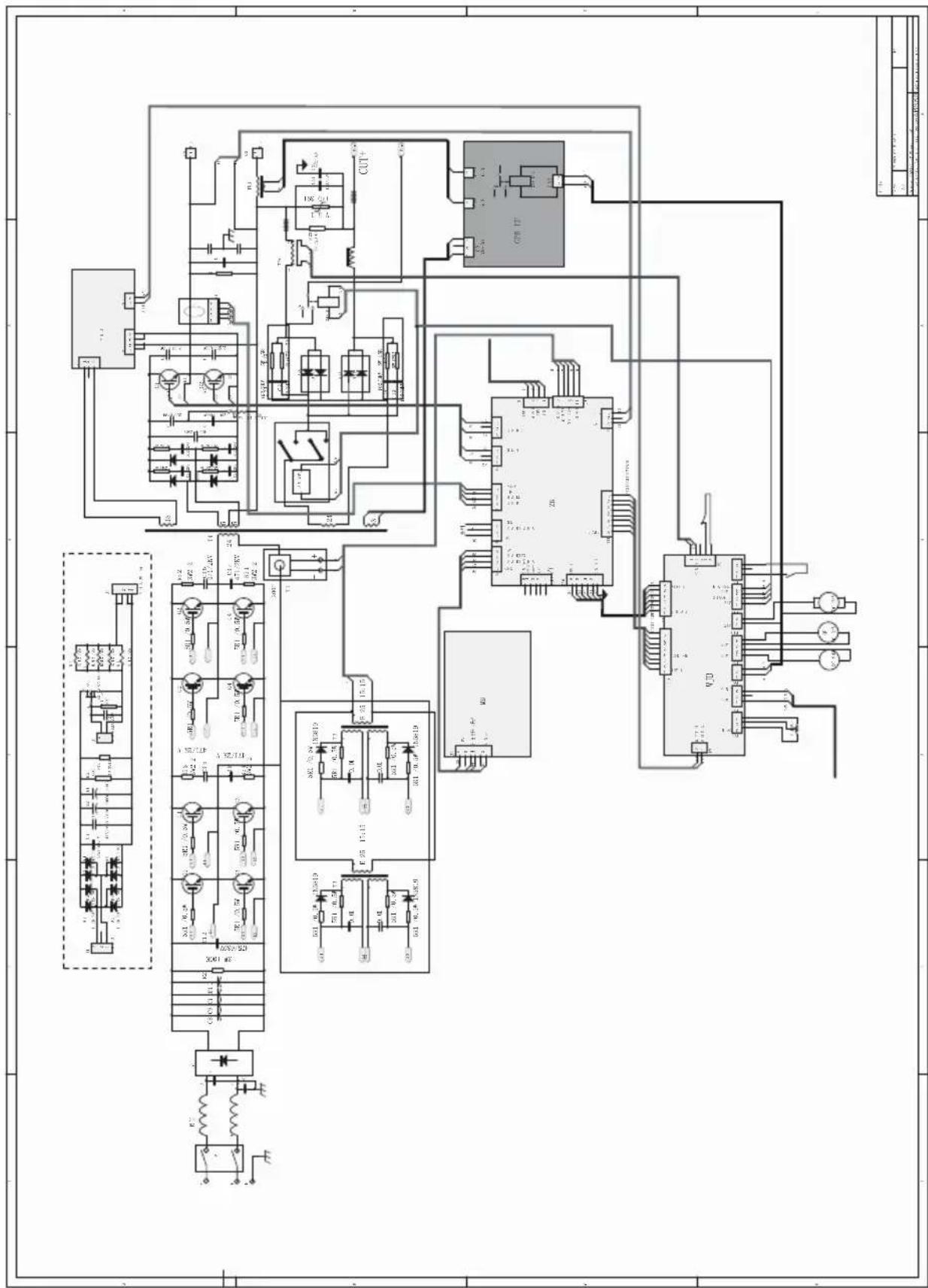
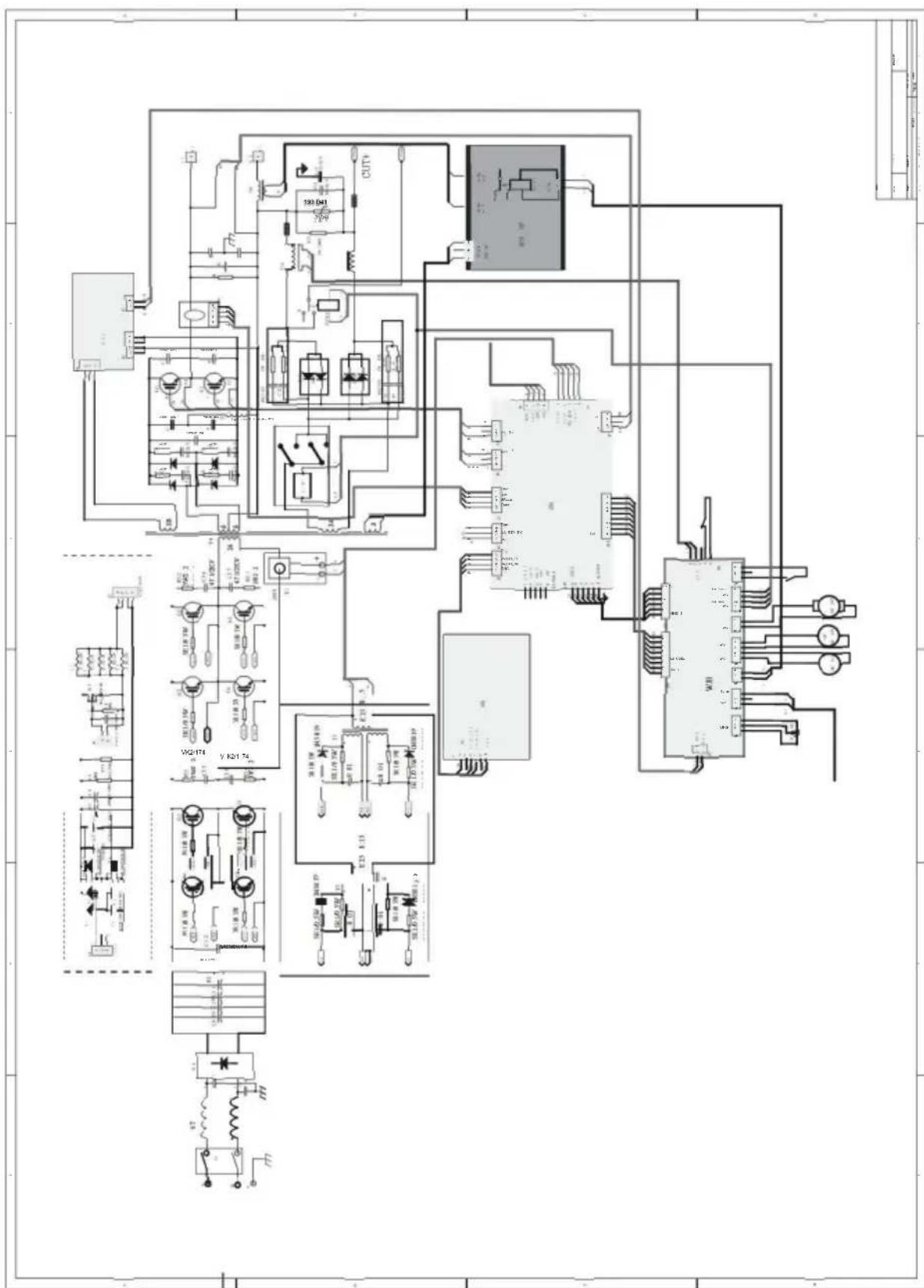
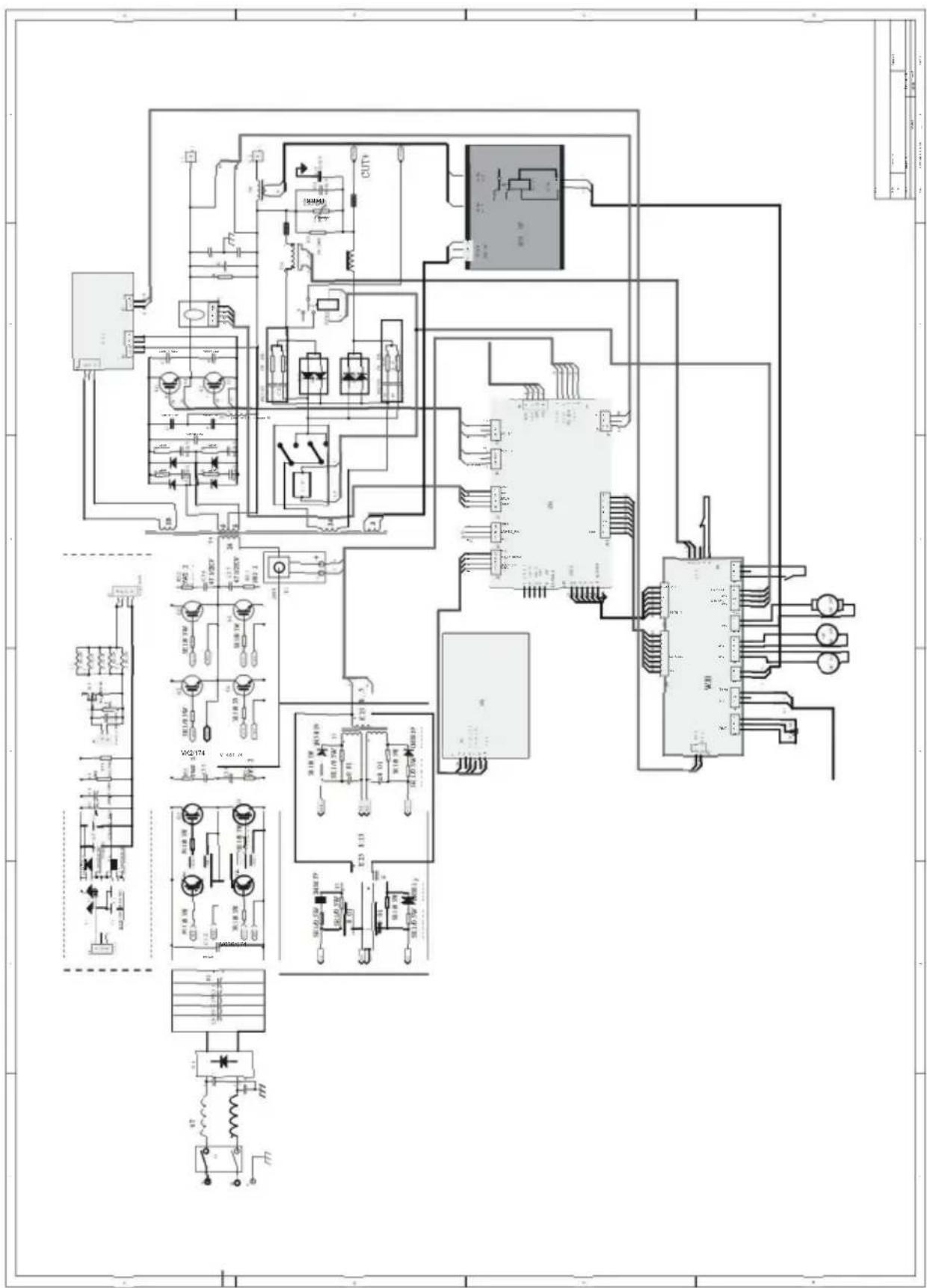
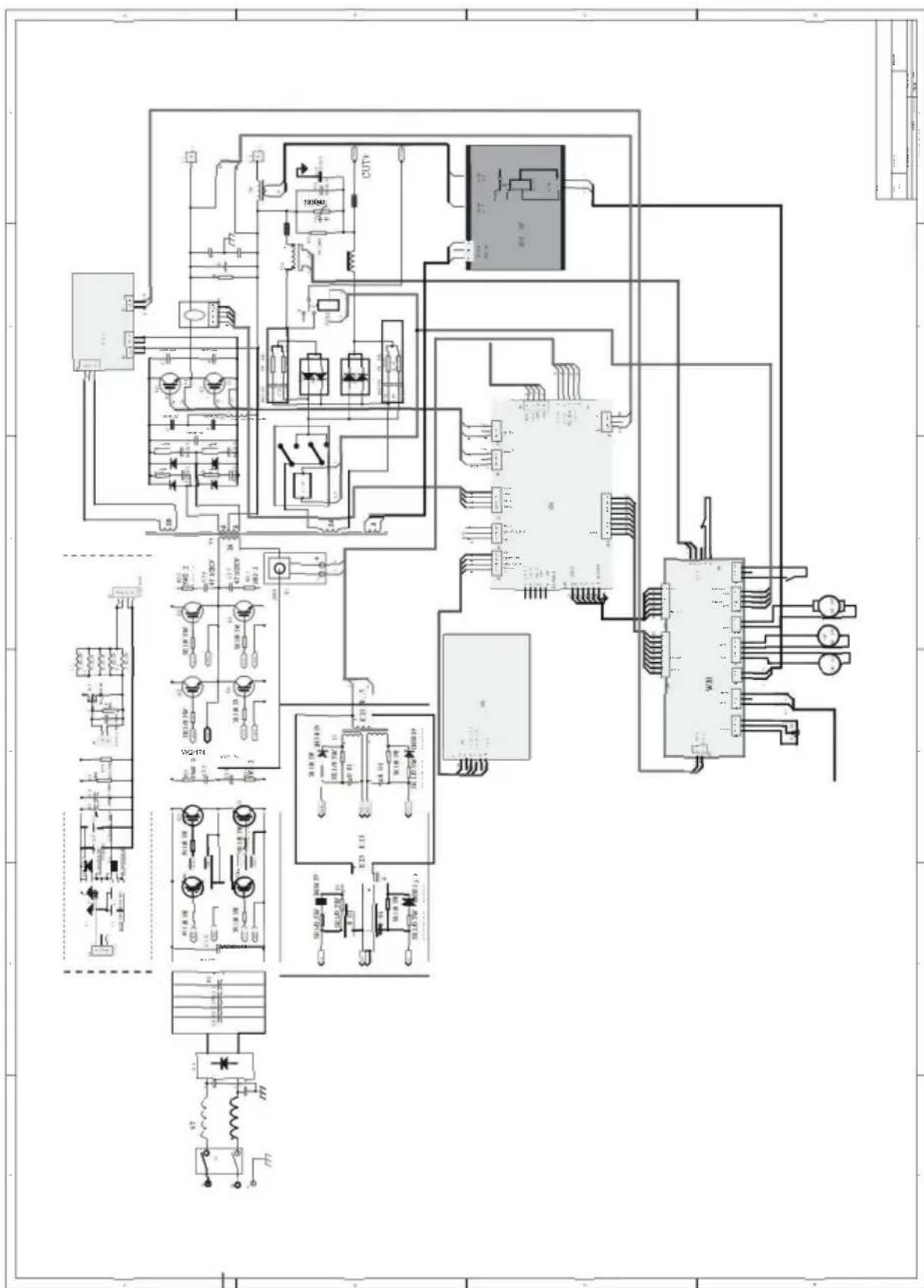
WIRING DIAGRAM
Manufacturer: Zhejiang Xingyi Ventilator Electrical Appliance Co., Ltd.
Address: Danya Industrial Park, Zeguo Town, WENLING Zhejiang 317523 Imported into Australia:
SIHAO PTY LTD. 1 ROKEVA STREET, ASTWOOD NSW2122, Australia Imported into the
United States: Sanven
Technology Ltd. Suite 250, 9166 Anaheim Place, Rancho Cucamonga, CA 91730
YH CONSULTING LIMITED. C/OYH Consulting Limited Office 147, Centurion House, London Road, Staines-upon-Thames, Surrey, TW18 4AX
E-CrossStu GmbH
Mainzer Landstr.69,
www.vevor.com/support
TIG Welder
Model: ACDC TIG-200
PREPARED TO "STICK" WELDING
- Plug the power cord into a properly grounded, 1Phase 110/220 Volt AC, 50/60Hz, 50A circuit breaker.
- Make sure the electrode or "Stick" is not making contact with the grounded workpiece.
- Switch the Power Switch to "ON".
DANGER
ELECTRIC SHOCK CAN CAUSE INJURY OR DEATH!
The electrode and work (or ground) circuits are electrically "hot" when the welder is on. Do not allow these "hot" parts to come in contact with your bare skin or wet clothing. Always wear dry, protective clothing and leather welding gloves and insulated footwear.
WARNING
ARC RAYS CAN BURN!
Arc rays produce intense ultraviolet radiation which can burn exposed skin and cause eye damage. Use a shield with the proper filter (a minimum of #11) to protect your eyes from sparks and the rays of the arc when welding or when observing open arc welding (see ANSI Z49.1 and Z87.1 for safety standards).
DANGER
WELDING SPARKS CAN CAUSE FIRE OR EXPLOSION!
Electric welding produces sparks which can be discharged considerable distances at high velocity igniting flammable or exploding vapors and materials. Remove all flammable items within 35 feet of the welding area. Always keep a fire extinguisher nearby while welding.
WARNING
FUMES AND WELDING GASES CAN BE A HEALTH HAZARD!
Fumes and gasses released during welding are hazardous. Do not breathe fumes that are produced by the welding operation. Wear an OSHA approved respirator when welding. Always work in a properly ventilated area.
CAUTION
HOT METAL AND TOOLS WILL BURN!
Electric welding heats metal and tools to temperatures that will cause severe burns! Use protective, heat resistant gloves and clothing.
- While wearing a properly functioning Auto Darkening Welding Helmet, lightly drag the tip of the Welding Rod along the workpiece surface to start an arc.
- Feed the Welding Rod into the workpiece joint at a 15° angle.
- Lift rod from workpiece when weld bead is completed.
- Turn off Welder power switch.
- Set the Electrode or "Stick" Holder on a safe, non-flammable, surface.
TROUBLESHOOTING
| PROBLEM | CAUSE | CORRECTION |
| Contamination in weld bead | Contaminated Electrode Rod | Make sure that Electrodes are clean and dry before use. |
| Contaminated Base Metal | Clean base metal of any oil, debris, coatings, or moisture. If base metal is cold rolled steel make sure to remove any mill scale. | |
| Poor Weld Appearance | Incorrect positioning | The angle of the electrode should be at 45° and drug away from the weld arc. Failing to do so may cause poor weld appearance. |
| Weld Bead is Cracking | Too much heat in material | Reduce heat & allow more time between passes. |
| Base Metal is absorbing too much heat | Preheat base metal (consult welding codes for requirements) | |
| Incorrect Filler Wire | Use correct filler wire type & diameter for the joint being welded. | |
| Material is Warping | Insufficient Clamping | Clamp work piece tightly & weld while cIA are in place. |
| Insufficient Tack Welds | Add more tack welds until rigidity and stiffness is developed. | |
| Too Much Heat in Material | To reduce heat it is best to spread the welding out around the area. This can be done by using stitch welding techniques, alternating sides, and/or taking your time and allowing the pieces to cool between passes. | |
| Porosity in weld bead | Contaminated Electrode Rod | Make sure that Electrodes are clean and dry before use. |
| Contaminated base metal | Clean base metal making sure to remove any oil, debris, coatings, or moisture. | |
| Difficulty Starting Arc | Incomplete Circuit | Check Ground connection. Make sure that the ground is on a freshly cleaned surface and close to the welding area. It is suggested to weld toward the ground connection |
| Amperage Too Low | Based on the material welding & size/material of the electrode, pick an appropriate amperage to perform the desired weld. | |
| Contaminated Base Metal | Clean base metal of any oil, debris, coatings, or moisture. If base metal is cold rolled steel make sure to remove any mill scale. | |
| Arc Wander | Electrode too far from welding surface | Move electrode so that it is contacting the weld puddle and feed rod into the puddle as needed. |
| Difficulty Holding Arc | Amperage Too Low | Based on the material welding and size/material of the electrode, pick an appropriate amperage to perform the desired weld. |
| Electrode too far from welding surface | Move electrode so that it is contacting the weld puddle and feed rod into the puddle as needed. | |
| Incomplete Circuit | Check Ground connection. Make sure that the ground is on a freshly cleaned surface and close to the welding area. It is suggested to weld toward the ground connection. | |
| Contaminated Electrode Rod | Make sure that Electrodes are clean and dry before use. | |
| Contaminated Base Metal | Clean base metal of any oil, debris, coatings, or moisture. |
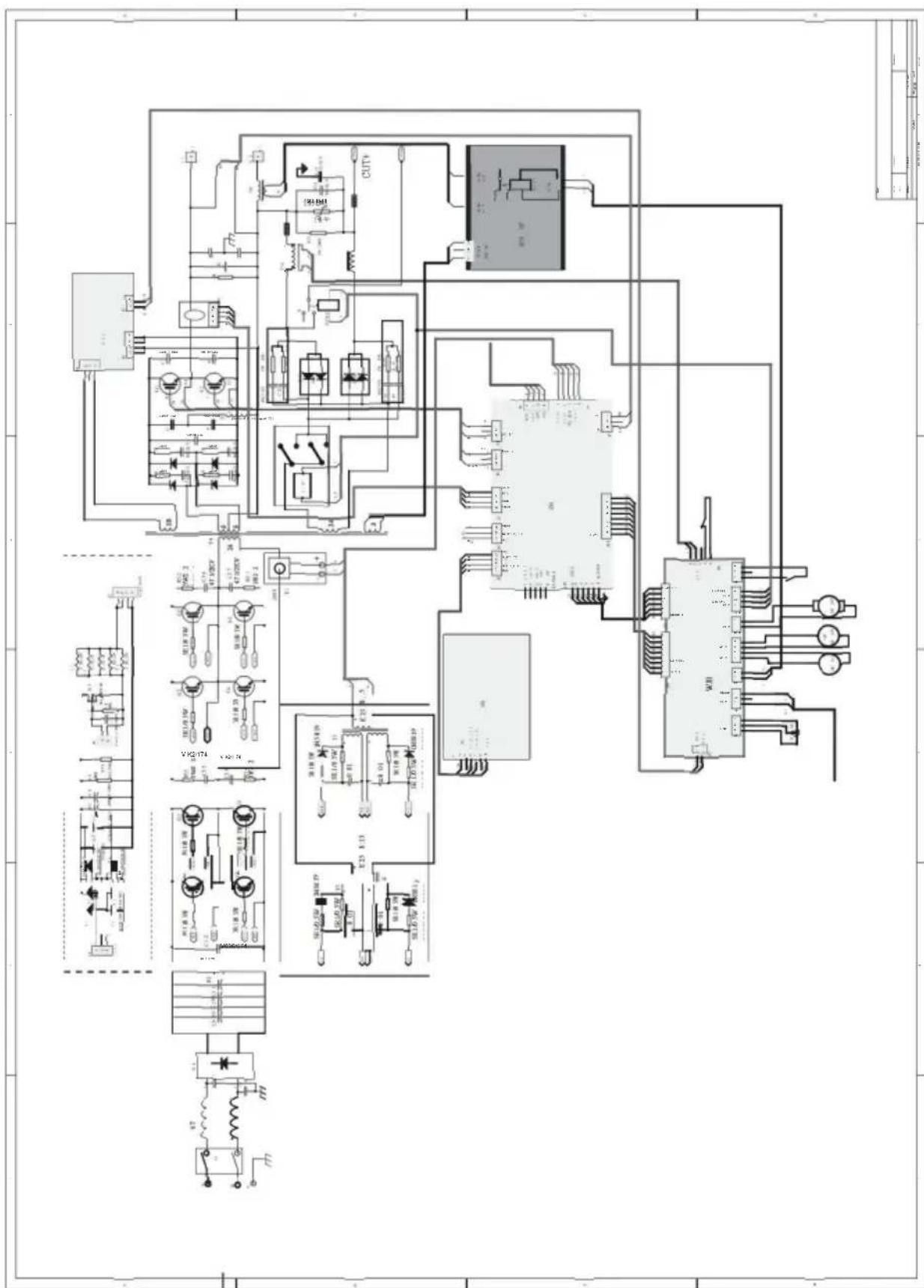
WIRING DIAGRAM
Manufacturer: Zhejiang Xingyi Ventilator Electrical Appliance Co., Ltd.
Address: Danya Industrial Park, Zeguo Town, WENLING Zhejiang 317523. Imported to Australia: SIHAO PTY LTD. 1 ROKEVA STREET EASTWOOD NSW2122 Australia.
Imported to the USA: Sanven Technology Ltd. Suite 250, 9166 Anaheim Place, Rancho Cucamonga, CA 91730.
YH CONSULTING LIMITED. C/O YH Consulting Limited Bureau 147, Centurion House, London Road, Staines-upon-Thames, Surrey, TW18 4AX
E-CrossStu GmbH
Mainzer Landstr. 69,
60329 Frankfurt am Main.
VEVOR
TOUGH TOOLS, HALF PRICE
www.vevor.com/support
VEVOR
TOUGH TOOLS, HALF PRICE
www.vevor.com/support
TIG Welder
Model: ACDC TIG-200
PREPARED TO "STICK" WELDING
- Plug the power cord into a properly grounded, 1Phase 110/220 Volt AC, 50/60Hz, 50A circuit breaker.
- Make sure the electrode or "Stick" is not making contact with the grounded workpiece.
- Switch the Power Switch to "ON".
DANGER
ELECTRIC SHOCK CAN CAUSE INJURY OR DEATH!
The electrode and work (or ground) circuits are electrically "hot" when the welder is on. Do not allow these "hot" parts to come in contact with your bare skin or wet clothing. Always wear dry, protective clothing and leather welding gloves and insulated footwear.
WARNING
ARC RAYS CAN BURN!
Arc rays produce intense ultraviolet radiation which can burn exposed skin and cause eye damage. Use a shield with the proper filter (a minimum of #11) to protect your eyes from sparks and the rays of the arc when welding or when observing open arc welding (see ANSI Z49.1 and Z87.1 for safety standards).
DANGER
WELDING SPARKS CAN CAUSE FIRE OR EXPLOSION!
Electric welding produces sparks which can be discharged considerable distances at high velocity igniting flammable or exploding vapors and materials. Remove all flammable items within 35 feet of the welding area. Always keep a fire extinguisher nearby while welding.
WARNING
FUMES AND WELDING GASES CAN BE A HEALTH HAZARD!
Fumes and gasses released during welding are hazardous. Do not breathe fumes that are produced by the welding operation. Wear an OSHAapproved respirator when welding. Always work in a properly ventilated area.
CAUTION
HOT METAL AND TOOLS WILL BURN!
Electric welding heats metal and tools to temperatures that will cause severe burns! Use protective, heat resistant gloves and clothing.
- While wearing a properly functioning Auto Darkening Welding Helmet, lightly drag the tip of the Welding Rod along the workpiece surface to start an arc.
- Feed the Welding Rod into the workpiece joint at a 15° angle.
- Lift rod from workpiece when weld bead is completed.
- Turn off Welder power switch.
- Set the Electrode or "Stick" Holder on a safe, non-flammable, surface.
TROUBLESHOOTING
| PROBLEM | CAUSE | CORRECTION |
| Contamination in weld bead | Contaminated Electrode Rod | Make sure that Electrodes are clean and dry before use. |
| Contaminated Base Metal | Clean base metal of any oil, debris, coatings, or moisture. If base metal is cold rolled steel make sure to remove any mill scale. | |
| Poor Weld Appearance | Incorrect positioning | The angle of the electrode should be at 45° and drug away from the weld arc. Failing to do so may cause poor weld appearance. |
| Weld Bead is Cracking | Too much heat in material | Reduce heat & allow more time between passes. |
| Base Metal is absorbing too much heat | Preheat base metal (consult welding codes for requirements) | |
| Incorrect Filler Wire | Use correct filler wire type & diameter for the joint being welded. | |
| Material is Warping | Insufficient Clamping | Clamp work piece tightly & weld while cIA are in place. |
| Insufficient Tack Welds | Add more tack welds until rigidity and stiffness is developed. | |
| Too Much Heat in Material | To reduce heat it is best to spread the welding out around the area. This can be done by using stitch welding techniques, alternating sides, and/or taking your time and allowing the pieces to cool between passes. | |
| Porosity in weld bead | Contaminated Electrode Rod | Make sure that Electrodes are clean and dry before use. |
| Contaminated base metal | Clean base metal making sure to remove any oil, debris, coatings, or moisture. | |
| Difficulty Starting Arc | Incomplete Circuit | Check Ground connection. Make sure that the ground is on a freshly cleaned surface and close to the welding area. It is suggested to weld toward the ground connection |
| Amperage Too Low | Based on the material welding & size/material of the electrode, pick an appropriate amperage to perform the desired weld. | |
| Contaminated Base Metal | Clean base metal of any oil, debris, coatings, or moisture. If base metal is cold rolled steel make sure to remove any mill scale. | |
| Arc Wander | Electrode too far from welding surface | Move electrode so that it is contacting the weld puddle and feed rod into the puddle as needed. |
| Difficulty Holding Arc | Amperage Too Low | Based on the material welding and size/material of the electrode, pick an appropriate amperage to perform the desired weld. |
| Electrode too far from welding surface | Move electrode so that it is contacting the weld puddle and feed rod into the puddle as needed. | |
| Incomplete Circuit | Check Ground connection. Make sure that the ground is on a freshly cleaned surface and close to the welding area. It is suggested to weld toward the ground connection. | |
| Contaminated Electrode Rod | Make sure that Electrodes are clean and dry before use. | |
| Contaminated Base Metal | Clean base metal of any oil, debris, coatings, or moisture. |
WIRING DIAGRAM
Product: Zhejiang Xingyi Ventilator Electrical Appliance Co., Ltd.
Address: Danya Industrial Park, Zeguo Town, WENLING Zhejiang 317523 Imported into AUS: SIHAO PTY LTD. 1 ROKEVA STREET EASTWOOD NSW2122
Australia Imported
into the USA: Sanven Technology Ltd. Suite 250, 9166 Anaheim Place, Rancho Cucamonga, CA 91730
YH CONSULTING LIMITED. C/O YH Consulting Limited Office 147, Centurion House, London Road, Staines-upon-Thames, Surrey, TW18 4AX
E-CrossStu GmbH
Mainzer Landstr.69,
60329 Frankfurt am Main.
VEVOR®
TOUGH TOOLS, HALF PRICE
electronics www.vevor.com/support
VEVOR
TOUGH TOOLS, HALF PRICE
www.vevor.com/support
TIG Welder
Model: ACDC TIG-200
PREPARATION FOR "STICK" WELDING
- Plug the power cord into a properly grounded, 1-phase 110/220 Volt AC, 50/60Hz, 50A circuit breaker.
- Make sure the electrode or "stick" is not making contact with the grounded workpiece.
- Switch the power switch to "ON".
DANGER
ELECTRIC SHOCK CAN CAUSE INJURY OR DEATH!
The electrode and work (or ground) circuits are electrically "hot" when the welder is on. Do not allow these "hot" parts to come in contact with your bare skin or wet clothing. Always wear dry, protective clothing, leather welding gloves, and insulated footwear.
WARNING
ARC RAYS CAN BURN!
Arc rays produce intense ultraviolet radiation which can burn exposed skin and cause eye damage. Use a shield with the proper filter (a minimum of #11) to protect your eyes from sparks and the rays of the arc when welding or when observing open arc welding (see ANSI Z49.1 and Z87.1 for safety standards).
DANGER
WELDING SPARKS CAN CAUSE FIRE OR EXPLOSION!
Electric welding produces sparks which can be discharged considerable distances at high velocity, igniting flammable or exploding vapors and materials. Remove all flammable items within 35 feet of the welding area. Always keep a fire extinguisher nearby while welding.
WARNING
FUMES AND WELDING GASES CAN BE A HEALTH HAZARD!
Fumes and gases released during welding are hazardous. Do not breathe fumes that are produced by the welding operation. Wear an OSHA-approved respirator when welding. Always work in a properly ventilated area.
CAUTION
HOT METAL AND TOOLS WILL BURN!
Electric welding heats metal and tools to temperatures that will cause severe burns! Use protective, heat-resistant gloves and clothing.
- While wearing a properly functioning Auto Darkening Welding Helmet, lightly drag the tip of the Welding Rod along the workpiece surface to start an arc.
- Feed the Welding Rod into the workpiece joint at a 15° angle.
- Lift rod from workpiece when weld bead is completed.
- Turn off Welder power switch.
- Set the Electrode or "Stick" Holder on a safe, non-flammable surface.
TROUBLESHOOTING
| PROBLEM | CAUSE | CORRECTION |
| Contamination in weld bead | Contaminated Electrode Rod | Make sure that Electrodes are clean and dry before use. |
| Contaminated Base Metal | Clean base metal of any oil, debris, coatings, or moisture. If base metal is cold rolled steel make sure to remove any mill scale. | |
| Poor Weld Appearance | Incorrect positioning | The angle of the electrode should be at 45° and drug away from the weld arc. Failing to do so may cause poor weld appearance. |
| Weld Bead is Cracking | Too much heat in material | Reduce heat & allow more time between passes. |
| Base Metal is absorbing too much heat | Preheat base metal (consult welding codes for requirements) | |
| Incorrect Filler Wire | Use correct filler wire type & diameter for the joint being welded. | |
| Material is Warping | Insufficient Clamping | Clamp work piece tightly & weld while cIA are in place. |
| Insufficient Tack Welds | Add more tack welds until rigidity and stiffness is developed. | |
| Too Much Heat in Material | To reduce heat it is best to spread the welding out around the area. This can be done by using stitch welding techniques, alternating sides, and/or taking your time and allowing the pieces to cool between passes. | |
| Porosity in weld bead | Contaminated Electrode Rod | Make sure that Electrodes are clean and dry before use. |
| Contaminated base metal | Clean base metal making sure to remove any oil, debris, coatings, or moisture. | |
| Difficulty Starting Arc | Incomplete Circuit | Check Ground connection. Make sure that the ground is on a freshly cleaned surface and close to the welding area. It is suggested to weld toward the ground connection |
| Amperage Too Low | Based on the material welding & size/material of the electrode, pick an appropriate amperage to perform the desired weld. | |
| Contaminated Base Metal | Clean base metal of any oil, debris, coatings, or moisture. If base metal is cold rolled steel make sure to remove any mill scale. | |
| Arc Wander | Electrode too far from welding surface | Move electrode so that it is contacting the weld puddle and feed rod into the puddle as needed. |
| Difficulty Holding Arc | Amperage Too Low | Based on the material welding and size/material of the electrode, pick an appropriate amperage to perform the desired weld. |
| Electrode too far from welding surface | Move electrode so that it is contacting the weld puddle and feed rod into the puddle as needed. | |
| Incomplete Circuit | Check Ground connection. Make sure that the ground is on a freshly cleaned surface and close to the welding area. It is suggested to weld toward the ground connection. | |
| Contaminated Electrode Rod | Make sure that Electrodes are clean and dry before use. | |
| Contaminated Base Metal | Clean base metal of any oil, debris, coatings, or moisture. |
WIRING DIAGRAM
Manufacturer: Zhejiang Xingyi Ventilator Electrical Appliance Co., Ltd.
YH CONSULTING LIMITED. C/O YH Consulting Limited
Office 147, Centurion House, London Road,
Staines-upon-Thames, Surrey, TW18 4AX
E-CrossStu GmbH
Mainzer Landstr. 69,
DC MMA OPERATING PANEL
DC PULSE PARAMETERS
PREPARED FOR "STICK" WELDING
- Plug the power cord into a properly grounded, 1-phase 110/220 Volt AC, 50/60Hz, 50A circuit breaker.
- Make sure the electrode or "Stick" is not making contact with the grounded workpiece.
- Switch the Power Switch to "ON".
DANGER
ELECTRIC SHOCK CAN CAUSE INJURY OR DEATH!
The electrode and work (or ground) circuits are electrically "hot" when the welder is on. Do not allow these "hot" parts to come in contact with your bare skin or wet clothing. Always wear dry, protective clothing and leather welding gloves and insulated footwear.
WARNING
ARC RAYS CAN BURN!
Arc rays produce intense ultraviolet radiation which can burn exposed skin and cause eye damage. Use a shield with the proper filter (a minimum of #11) to protect your eyes from sparks and the rays of the arc when welding or when observing open arc welding (see ANSI Z49.1 and Z87.1 for safety standards).
DANGER
WELDING SPARKS CAN CAUSE FIRE OR EXPLOSION!
Electric welding produces sparks which can be discharged considerable distances at high velocity igniting flammable or exploding vapors and materials. Remove all flammable items within 35 feet of the welding area. Always keep a fire extinguisher nearby while welding.
WARNING
FUMES AND WELDING GASES CAN BE A HEALTH HAZARD!
Fumes and gasses released during welding are hazardous. Do not breathe fumes that are produced by the welding operation. Wear an OSHA approved respirator when welding. Always work in a properly ventilated area.
CAUTION
HOT METAL AND TOOLS WILL BURN!
Electric welding heats metal and tools to temperatures that will cause severe burns! Use protective, heat resistant gloves and clothing.
- While wearing a properly functioning Auto Darkening Welding Helmet, lightly drag the tip of the Welding Rod along the workpiece surface to start an arc.
- Feed the Welding Rod into the workpiece joint at a 15° angle.
- Lift rod from workpiece when weld bead is completed.
- Turn off Welder power switch.
- Set the Electrode or "Stick" Holder on a safe, non-flammable, surface.
TROUBLESHOOTING
| PROBLEM | CAUSE | CORRECTION |
| Contamination in weld bead | Contaminated Electrode Rod | Make sure that Electrodes are clean and dry before use. |
| Contaminated Base Metal | Clean base metal of any oil, debris, coatings, or moisture. If base metal is cold rolled steel make sure to remove any mill scale. | |
| Poor Weld Appearance | Incorrect positioning | The angle of the electrode should be at 45° and drug away from the weld arc. Failing to do so may cause poor weld appearance. |
| Weld Bead is Cracking | Too much heat in material | Reduce heat & allow more time between passes. |
| Base Metal is absorbing too much heat | Preheat base metal (consult welding codes for requirements) | |
| Incorrect Filler Wire | Use correct filler wire type & diameter for the joint being welded. | |
| Material is Warping | Insufficient Clamping | Clamp work piece tightly & weld while cIA are in place. |
| Insufficient Tack Welds | Add more tack welds until rigidity and stiffness is developed. | |
| Too Much Heat in Material | To reduce heat it is best to spread the welding out around the area. This can be done by using stitch welding techniques, alternating sides, and/or taking your time and allowing the pieces to cool between passes. | |
| Porosity in weld bead | Contaminated Electrode Rod | Make sure that Electrodes are clean and dry before use. |
| Contaminated base metal | Clean base metal making sure to remove any oil, debris, coatings, or moisture. | |
| Difficulty Starting Arc | Incomplete Circuit | Check Ground connection. Make sure that the ground is on a freshly cleaned surface and close to the welding area. It is suggested to weld toward the ground connection |
| Amperage Too Low | Based on the material welding & size/material of the electrode, pick an appropriate amperage to perform the desired weld. | |
| Contaminated Base Metal | Clean base metal of any oil, debris, coatings, or moisture. If base metal is cold rolled steel make sure to remove any mill scale. | |
| Arc Wander | Electrode too far from welding surface | Move electrode so that it is contacting the weld puddle and feed rod into the puddle as needed. |
| Difficulty Holding Arc | Amperage Too Low | Based on the material welding and size/material of the electrode, pick an appropriate amperage to perform the desired weld. |
| Electrode too far from welding surface | Move electrode so that it is contacting the weld puddle and feed rod into the puddle as needed. | |
| Incomplete Circuit | Check Ground connection. Make sure that the ground is on a freshly cleaned surface and close to the welding area. It is suggested to weld toward the ground connection. | |
| Contaminated Electrode Rod | Make sure that Electrodes are clean and dry before use. | |
| Contaminated Base Metal | Clean base metal of any oil, debris, coatings, or moisture. |
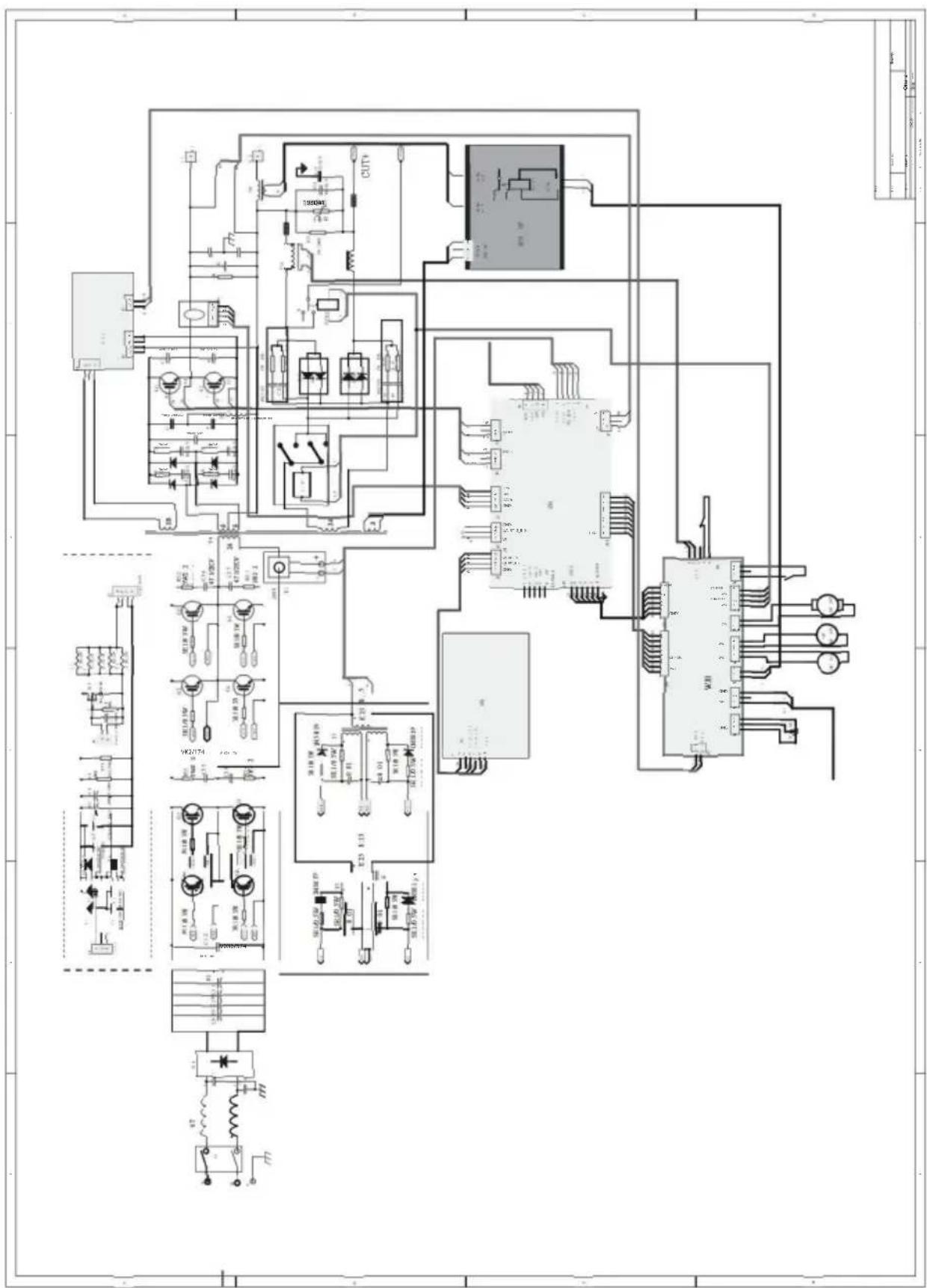
WIRING DIAGRAM
Manufacturer: Zhejiang Xingyi Ventilator Electrical Appliance Co., Ltd.
Address: Danya Industrial Park, Zeguo Town, WENLING Zhejiang 317523 Importer for AUS: SIHAO PTY LTD. 1 ROKEVA STREET EASTWOOD NSW2122 Australia Importer for USA:
Sanven Technology Ltd. Suite 250, 9166 Anaheim Place, Rancho Cucamonga, CA 91730
YH CONSULTING LIMITED. Office C/O YH Consulting Limited 147, Centurion House, London Road, Staines-upon-Thames, Surrey, TW18 4AX
E-CrossStu GmbH
Mainzer Landstr.69,
60329 Frankfurt am Main.
VEVOR
TOUGH TOOLS, HALF PRICE
NEED HELP? CONTACT US AT
PREPARING FOR "STICK" WELDING
- Plug the power cord into a properly grounded, 1-phase 110/220 Volt AC, 50/60Hz, 50A circuit breaker.
- Make sure the electrode or "stick" is not making contact with the grounded workpiece.
- Switch the Power Switch to "ON".
DANGER
ELECTRIC SHOCK CAN CAUSE INJURY OR DEATH!
The electrode and work (or ground) circuits are electrically "hot" when the welder is on. Do not allow these "hot" parts to come in contact with your bare skin or wet clothing. Always wear dry, protective clothing and leather welding gloves and insulated footwear.
WARNING
ARC RAYS CAN BURN!
Arc rays produce intense ultraviolet radiation which can burn exposed skin and cause eye damage. Use a shield with the proper filter (a minimum of #11) to protect your eyes from sparks and the rays of the arc when welding or when observing open arc welding (see ANSI Z49.1 and Z87.1 for safety standards).
DANGER
WELDING SPARKS CAN CAUSE FIRE OR EXPLOSION!
Electric welding produces sparks which can be discharged considerable distances at high velocity igniting flammable or exploding vapors and materials. Remove all flammable items within 35 feet of the welding area. Always keep a fire extinguisher nearby while welding.
WARNING
FUMES AND WELDING GASES CAN BE A HEALTH HAZARD!
Fumes and gases released during welding are hazardous. Do not breathe fumes produced by the welding operation. Wear an OSHA-approved respirator when welding. Always work in a properly ventilated area.
CAUTION
HOT METAL AND TOOLS WILL BURN!
Electric welding heats metal and tools to temperatures that will cause severe burns! Use protective, heat-resistant gloves and clothing.
- While wearing a properly functioning Auto Darkening Welding Helmet, lightly drag the tip of the Welding Rod along the workpiece surface to start an arc.
- Feed the Welding Rod into the workpiece joint at a 15-degree angle.
- Lift rod from workpiece when weld bead is completed.
- Turn off Welder power switch.
- Set the Electrode or "Stick" Holder on a safe, non-flammable surface.
TROUBLESHOOTING
| PROBLEM | CAUSE | CORRECTION |
| Contamination in weld bead | Contaminated Electrode Rod | Make sure that Electrodes are clean and dry before use. |
| Contaminated Base Metal | Clean base metal of any oil, debris, coatings, or moisture. If base metal is cold rolled steel make sure to remove any mill scale. | |
| Poor Weld Appearance | Incorrect positioning | The angle of the electrode should be at 45° and drug away from the weld arc. Failing to do so may cause poor weld appearance. |
| Weld Bead is Cracking | Too much heat in material | Reduce heat & allow more time between passes. |
| Base Metal is absorbing too much heat | Preheat base metal (consult welding codes for requirements) | |
| Incorrect Filler Wire | Use correct filler wire type & diameter for the joint being welded. | |
| Material is Warping | Insufficient Clamping | Clamp work piece tightly & weld while cIA are in place. |
| Insufficient Tack Welds | Add more tack welds until rigidity and stiffness is developed. | |
| Too Much Heat in Material | To reduce heat it is best to spread the welding out around the area. This can be done by using stitch welding techniques, alternating sides, and/or taking your time and allowing the pieces to cool between passes. | |
| Porosity in weld bead | Contaminated Electrode Rod | Make sure that Electrodes are clean and dry before use. |
| Contaminated base metal | Clean base metal making sure to remove any oil, debris, coatings, or moisture. | |
| Difficulty Starting Arc | Incomplete Circuit | Check Ground connection. Make sure that the ground is on a freshly cleaned surface and close to the welding area. It is suggested to weld toward the ground connection |
| Amperage Too Low | Based on the material welding & size/material of the electrode, pick an appropriate amperage to perform the desired weld. | |
| Contaminated Base Metal | Clean base metal of any oil, debris, coatings, or moisture. If base metal is cold rolled steel make sure to remove any mill scale. | |
| Arc Wander | Electrode too far from welding surface | Move electrode so that it is contacting the weld puddle and feed rod into the puddle as needed. |
| Difficulty Holding Arc | Amperage Too Low | Based on the material welding and size/material of the electrode, pick an appropriate amperage to perform the desired weld. |
| Electrode too far from welding surface | Move electrode so that it is contacting the weld puddle and feed rod into the puddle as needed. | |
| Incomplete Circuit | Check Ground connection. Make sure that the ground is on a freshly cleaned surface and close to the welding area. It is suggested to weld toward the ground connection. | |
| Contaminated Electrode Rod | Make sure that Electrodes are clean and dry before use. | |
| Contaminated Base Metal | Clean base metal of any oil, debris, coatings, or moisture. |
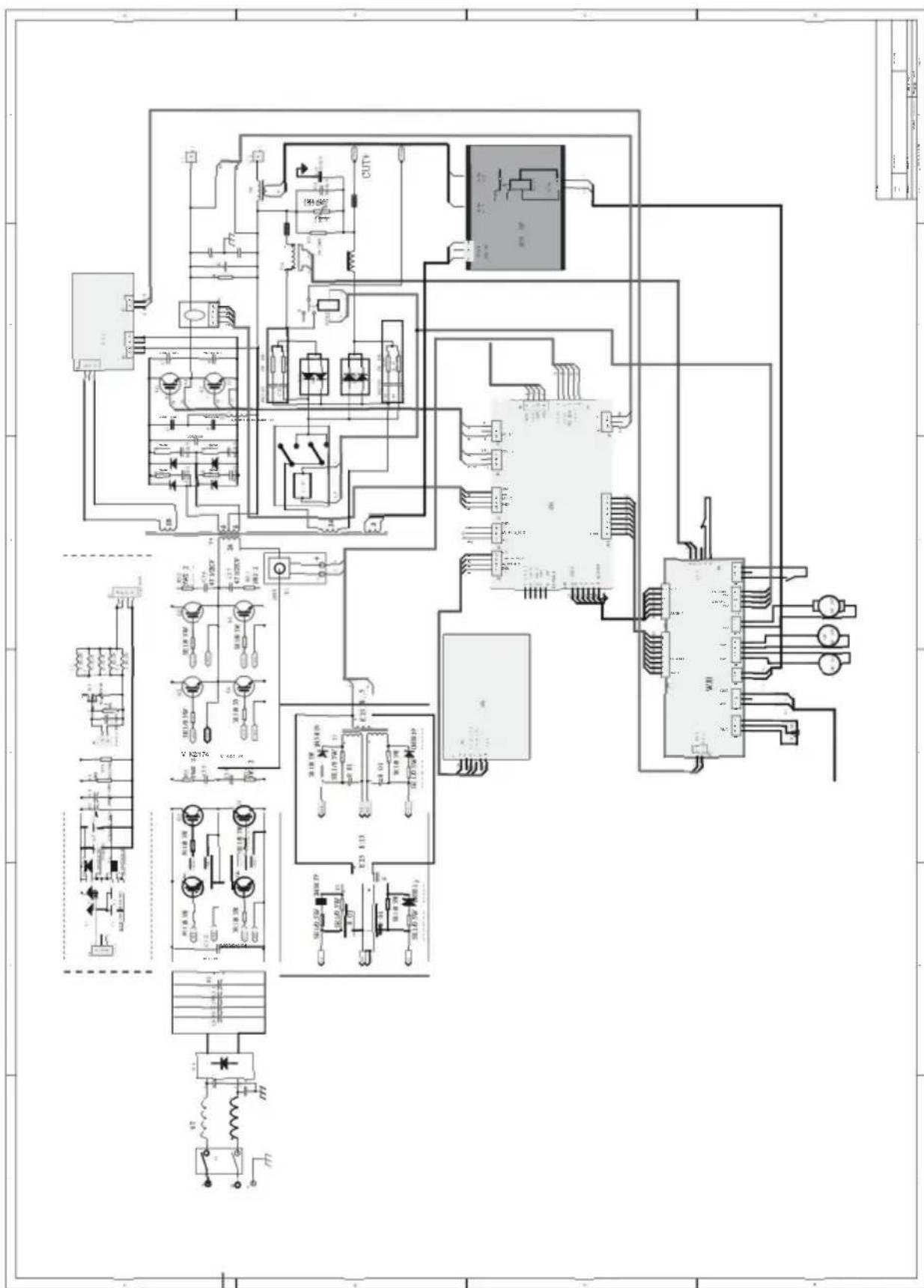
WIRING DIAGRAM
Manufacturer: Zhejiang Xingyi Ventilator Electrical Appliance Co., Ltd.
Address: Danya Industrial Park, Zeguo Town, WENLING Zhejiang 317523. Imported into AU: SIHAO PTY LTD. 1 ROKEVA STREET EASTWOOD NSW2122
YH CONSULTING LIMITED. C/O YH Consulting Limited
Office 147, Centurion House, London Road,
Staines-upon-Thames, Surrey, TW18 4AX
E-CrossStu GmbH
Mainzer Landstr.69,
60329 Frankfurt am Main.
VEVOR
TOUGH TOOLS, HALF PRICE
www.vevor.com/support
VEVOR
TOUGH TOOLS, HALF PRICE
www.vevor.com/support
TIG welder
Model: ACDC TIG-200
PREPARED TO "STICK" WELDING
- Plug the power cord into a properly grounded, 1Phase 110/220 Volt AC, 50/60Hz, 50A circuit breaker.
- Make sure the electrode or "Stick" is not making contact with the grounded workpiece.
- Switch the Power Switch to "ON".
DANGER
ELECTRIC SHOCK CAN CAUSE INJURY OR DEATH!
The electrode and work (or ground) circuits are electrically "hot" when the welder is on. Do not allow these "hot" parts to come in contact with your bare skin or wet clothing. Always wear dry, protective clothing and leather welding gloves and insulated footwear.
WARNING
ARC RAYS CAN BURN!
Arc rays produce intense ultraviolet radiation which can burn exposed skin and cause eye damage. Use a shield with the proper filter (a minimum of #11) to protect your eyes from sparks and the rays of the arc when welding or when observing open arc welding (see ANSI Z49.1 and Z87.1 for safety standards).
DANGER
WELDING SPARKS CAN CAUSE FIRE OR EXPLOSION!
Electric welding produces sparks which can be discharged considerable distances at high velocity igniting flammable or exploding vapors and materials. Remove all flammable items within 35 feet of the welding area. Always keep a fire extinguisher nearby while welding.
WARNING
FUMES AND WELDING GASES CAN BE A HEALTH HAZARD!
Fumes and gasses released during welding are hazardous. Do not breathe fumes that are produced by the welding operation. Wear an OSHAapproved respirator when welding. Always work in a properly ventilated area.
CAUTION
HOT METAL AND TOOLS WILL BURN!
Electric welding heats metal and tools to temperatures that will cause severe burns! Use protective, heat resistant gloves and clothing.
- While wearing a properly functioning Auto Darkening Welding Helmet, lightly drag the tip of the Welding Rod along the workpiece surface to start an arc.
- Feed the Welding Rod into the workpiece joint at a 15° angle.
- Lift rod from workpiece when weld bead is completed.
- Turn off Welder power switch.
- Set the Electrode or "Stick" Holder on a safe, non-flammable, surface.
TROUBLESHOOTING
| PROBLEM | CAUSE | CORRECTION |
| Contamination in weld bead | Contaminated Electrode Rod | Make sure that Electrodes are clean and dry before use. |
| Contaminated Base Metal | Clean base metal of any oil, debris, coatings, or moisture. If base metal is cold rolled steel make sure to remove any mill scale. | |
| Poor Weld Appearance | Incorrect positioning | The angle of the electrode should be at 45° and drug away from the weld arc. Failing to do so may cause poor weld appearance. |
| Weld Bead is Cracking | Too much heat in material | Reduce heat & allow more time between passes. |
| Base Metal is absorbing too much heat | Preheat base metal (consult welding codes for requirements) | |
| Incorrect Filler Wire | Use correct filler wire type & diameter for the joint being welded. | |
| Material is Warping | Insufficient Clamping | Clamp work piece tightly & weld while cIA are in place. |
| Insufficient Tack Welds | Add more tack welds until rigidity and stiffness is developed. | |
| Too Much Heat in Material | To reduce heat it is best to spread the welding out around the area. This can be done by using stitch welding techniques, alternating sides, and/or taking your time and allowing the pieces to cool between passes. | |
| Porosity in weld bead | Contaminated Electrode Rod | Make sure that Electrodes are clean and dry before use. |
| Contaminated base metal | Clean base metal making sure to remove any oil, debris, coatings, or moisture. | |
| Difficulty Starting Arc | Incomplete Circuit | Check Ground connection. Make sure that the ground is on a freshly cleaned surface and close to the welding area. It is suggested to weld toward the ground connection |
| Amperage Too Low | Based on the material welding & size/material of the electrode, pick an appropriate amperage to perform the desired weld. | |
| Contaminated Base Metal | Clean base metal of any oil, debris, coatings, or moisture. If base metal is cold rolled steel make sure to remove any mill scale. | |
| Arc Wander | Electrode too far from welding surface | Move electrode so that it is contacting the weld puddle and feed rod into the puddle as needed. |
| Difficulty Holding Arc | Amperage Too Low | Based on the material welding and size/material of the electrode, pick an appropriate amperage to perform the desired weld. |
| Electrode too far from welding surface | Move electrode so that it is contacting the weld puddle and feed rod into the puddle as needed. | |
| Incomplete Circuit | Check Ground connection. Make sure that the ground is on a freshly cleaned surface and close to the welding area. It is suggested to weld toward the ground connection. | |
| Contaminated Electrode Rod | Make sure that Electrodes are clean and dry before use. | |
| Contaminated Base Metal | Clean base metal of any oil, debris, coatings, or moisture. |
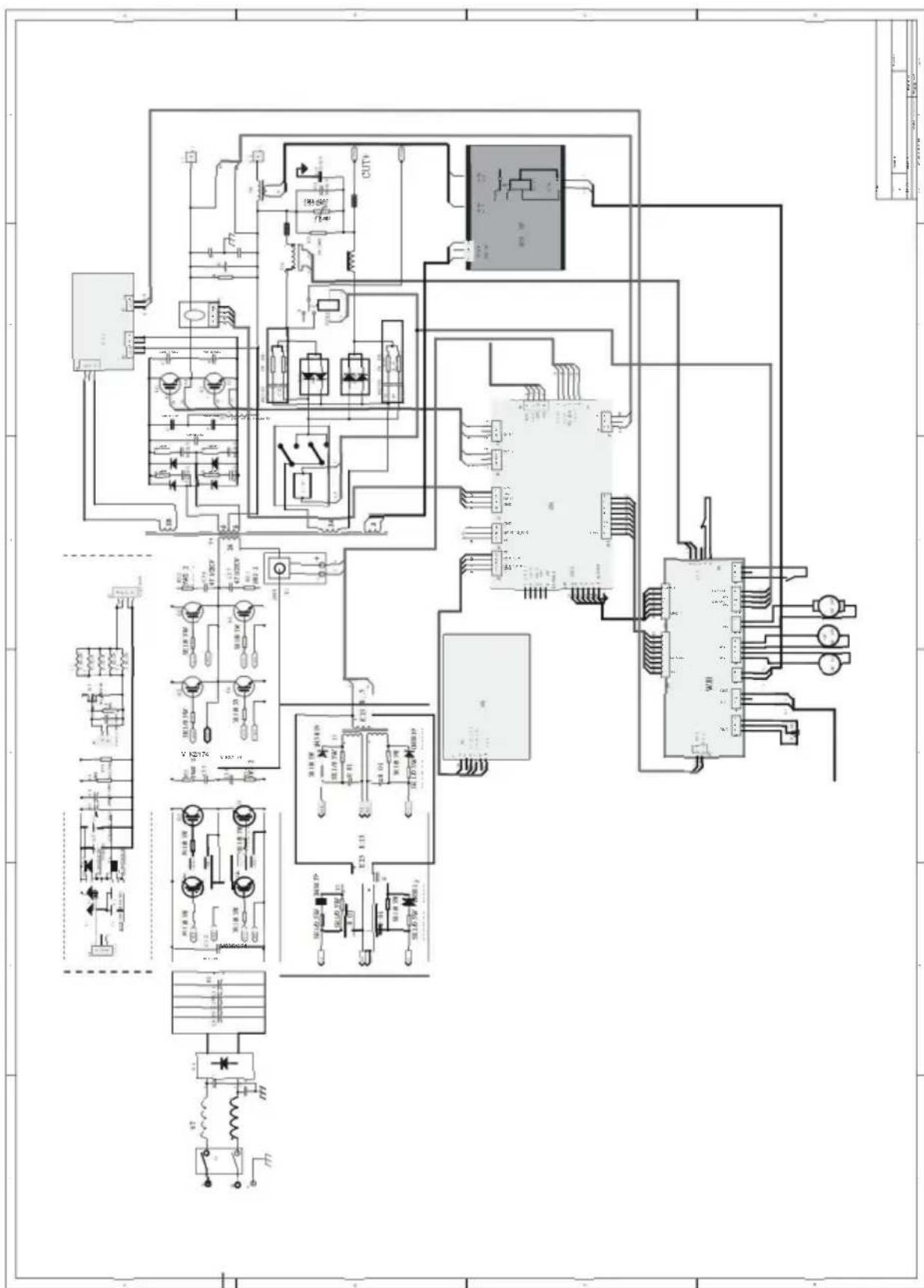
WIRING DIAGRAM
Manufacturer: Zhejiang Xingyi Ventilator Electrical Appliance Co., Ltd.
Address: Danya Industrial Park, Zeguo Town, WENLING Zhejiang 317523 Imported to AUS: SIHAO PTY LTD. 1 ROKEVA STREET EASTWOOD NSW2122 Australia Imported to USA:
Sanven Technology Ltd. Suite 250, 9166 Anaheim Place, Rancho Cucamonga, CA 91730
| UK | REP |
YH CONSULTING LIMITED. C/O YH Consulting Limited Office 147, Centurion House, London Road, Staines-upon-Thames, Surrey, TW18 4AX
| EC | REP |
E-CrossStu GmbH
Mainzer Landstr.69,
60329 Frankfurt am Main.
VEVOR
TOUGH TOOLS, HALF PRICE
www.vevor.com/support
- TECHNICAL SUPPORT AND E-WARRANTY CERTIFICATE WWW.VEVOR.COM/SUPPORT
- SPECIFICATIONS
- DUTY CYCLE
- READ AND UNDERSTAND ALL INSTRUCTIONS AND PRECAUTIONS BEFORE PROCEEDING
- SAFETY INFORMATION
- DANGER
- WARNING
- CAUTION
- NOTICE
- READ INSTRUCTIONS
- DANGER ELECTRIC SHOCK CAN KILL
- DANGER WELDING SPARKS CAN CAUSE FIRE OR EXPLOSION
- WARNING: ELECTROMAGNETIC FIELDS CAN BE A HEALTH HAZARD
- WARNING: ARC RAYS CAN BURN
- WARNING: FUMES AND WELDING GASES CAN BE A HEALTH HAZARD
- CAUTION: HOT METAL AND TOOLS WILL BURN
- CAUTION: FLYING METAL CHIPS CAN CAUSE INJURY
- REQUIRED ITEMS
- CONTENTS
- CONTROL AND DISPLAY PANEL
- PANEL OPERATION INSTRUCTIONS
- WELDING TYPE SELECTION
- DC TIG, AC TIG, DC PULSE, AC PULSE OPERATION PAGE DESCRIPTION
- MANUAL WELDING DEBUGGING AND OPERATION
- ARGON ARC WELDING DEBUGGING AND OPERATION
- PREPARED TO "STICK" WELDING
- VEVOR®
- TOUGH TOOLS, HALF PRICE
- WIRING DIAGRAM
- VEVOR
- PREPARATION FOR "STICK" WELDING
- DC MMA OPERATING PANEL
- PREPARED FOR "STICK" WELDING
- PREPARING FOR "STICK" WELDING
Brand : Vevor
Model : ACDC TIG-200
Category : Welding machine