
DB18V-821 - Plane Vevor - Free user manual and instructions
Find the device manual for free DB18V-821 Vevor in PDF.



| Brand | Vevor |
| Model | DB18V-821 |
| Product type | Cordless Planer |
| Rated voltage | 18 V |
| No-load speed | 16000 /min |
| Max planing width | 82 mm |
| Max planing depth | 2 mm |
| Max rabbet depth | 8 mm |
| Motor type | Brushless |
| Net weight | 2.5 kg |
| Power supply | 18 V lithium-ion battery (not included) |
| Dust bag capacity | Empty frequently |
| Vacuum connection | Yes, 1-1/4 in outlet |
| Edge guide | Included, adjustable |
| Depth guide | Included |
| Blade wrench | Included |
| Reversible blades | Yes, 2 reversible blades |
| Rest stand | Yes, automatic retractable |
| Safety features | Trigger lock, eye and ear protection recommended |
| Maintenance | Clean exhaust port, empty dust bag, replace belt if necessary |
Frequently Asked Questions - DB18V-821 Vevor
User questions about DB18V-821 Vevor
0 question about this device. Answer the ones you know or ask your own.
Ask a new question about this device
Download the instructions for your Plane in PDF format for free! Find your manual DB18V-821 - Vevor and take your electronic device back in hand. On this page are published all the documents necessary for the use of your device. DB18V-821 by Vevor.
USER MANUAL DB18V-821 Vevor
Technical Support and E-Warranty Certificate www.vevor.com/support
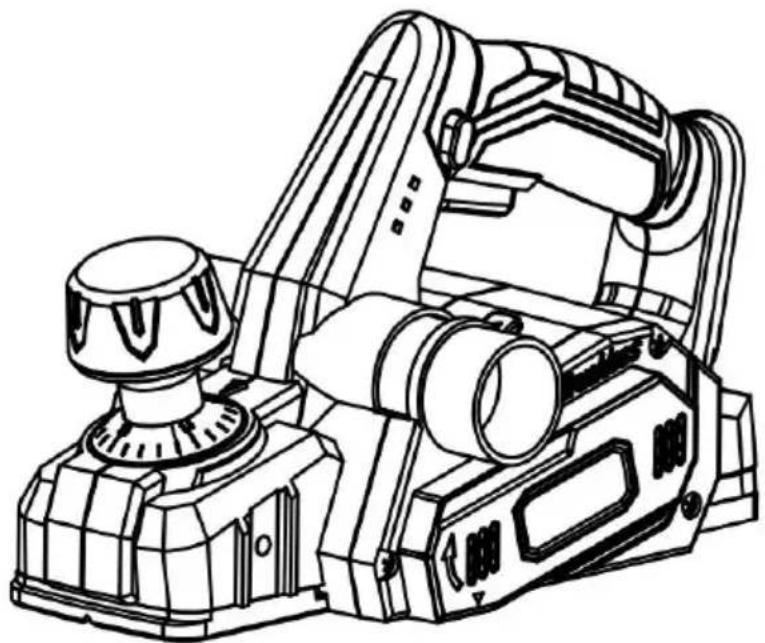
PLANER
MODEL: DB18V-821
We continue to be committed to provide you tools with competitive price. "Save Half", "Half Price" or any other similar expressions used by us only represents an estimate of savings you might benefit from buying certain tools with us compared to the major top brands and does not necessarily mean to cover all categories of tools offered by us. We kindly remind you to verify carefully when you are placing an order with us if you are actually saving half in comparison with the top major brands.
MODEL: DB18V-821
WARNING: To reduce the risk of injury, the user must read and understand the operator's manual before using this product.
NEED HELP? CONTACT US!
Have product questions? Need technical support? Please feel free to contact us:
Technical Support and E-Warranty Certificate www.vevor.com/support
This is the original instruction. Please read all manual instructions carefully before operating. VEVOR reserves a clear interpretation of the user manual. The appearance of the product shall be subject to the product you received. Please forgive us that we won't inform you again if there are any technology or software updates on our product.
TABLE OF CONTENTS
※General Power Tool Safety Warnings....03 ※Planer Safety Warnings....06 ※Symbols....08 ※Features....10 ※Assembly....10 ※Operation....11 ※Accessories....26

WARNING
Read all safety warnings and all instructions. Failure to follow the warnings and instructions may result in electric shock, fire and/or serious injury.
Save all warnings and instructions for future reference.
The term "power tool" in the warnings refers to your mains-operated (corded) power tool or battery-operated (cordless) power tool.
WORK AREA SAFETY
- Keep work area clean and well lit. Cluttered or dark areas invite accidents. Do not operate power tools in explosive atmospheres, such as in the presence of flammable liquids, gases or dust. Power tools create sparks that may ignite the dust or fumes.
- Keep children and bystanders away while operating a power tool. Distractions can cause you to lose control.
ELECTRICAL SAFETY
Power tool plugs must match the outlet. Never modify the plug in any way. Do not use any adapter plugs with earthed (grounded) power tools. Unmodified plugs and matching outlets will reduce risk of electric shock. Avoid body contact with earthed or grounded surfaces such as pipes, radiators, ranges and refrigerators. There is an increased risk of electric shock if your body is earthed or grounded. Do not expose power tools to rain or wet conditions. Water entering a power tool will increase the risk of electric shock. Do not abuse the cord. Never use the cord for carrying, pulling or unplugging the power tool. Keep cord away from heat, oil, sharp edges or moving parts. Damaged or entangled cords increase the risk of electric shock.
When operating a power tool outdoors, use an extension cord suitable for outdoor use. Use of a cord suitable for outdoor use reduces the risk of electric shock. If operating a power tool in a damp location is unavoidable, use a residual current device (RCD) protected supply. Use of an RCD reduces the risk of electric shock. Use this product only with batteries and chargers listed in tool/appliance/battery pack/charger correlation supplement 987000-432.
PERSONAL SAFETY
Stay alert, watch what you are doing and use common sense when operating a power tool. Do not use a power tool while you are tired or under the influence of drugs, alcohol or medication. A moment of inattention while operating power tools may result in serious personal injury. Use personal protective equipment. Always wear eye protection. Protective equipment such as dust mask, non-skid safety shoes, hard hat or hearing protection used for appropriate conditions will reduce personal injuries. Prevent unintentional starting. Ensure the switch is in the off-position before connecting to power source and/or battery pack, picking up or carrying the tool.
Carrying power tools with your finger on the switch or energizing power tools that have the switch on invites accidents.
Remove any adjusting key or wrench before turning the power tool on. A wrench or key left attached to a rotating part of the power tool may result in personal injury. Do not overreach. Keep proper footing and balance at all times. This enables better control of the power tool in unexpected situations. Dress properly. Do not wear loose clothing or jewelry. Keep your clothing and gloves away from moving parts. Loose clothes, jewelry, or long hair can be caught in moving parts. If devices are provided for the connection of dust extraction and
collection facilities, ensure these are connected and properly used. Use of dust collection can reduce dust-related hazards.
Do not wear loose clothing or jewelry. Contain long hair. Loose clothing or long hair can be drawn into air vents. Do not use a ladder or unstable support. Stable footing on a solid surface enables better control of the power tool in unexpected situations.
POWER TOOL USE AND CARE
Do not force the power tool. Use the correct power tool for your application. The correct power tool will do the job better and safer at the rate for which it was designed. Do not use the power tool if the switch does not turn it on and off. Any power tool that cannot be controlled with the switch is dangerous and must be repaired. Disconnect the plug from the power source and/or the battery pack from the power tool before making any adjustments, changing accessories, or storing power tools. Such preventive safety measures reduce the risk of starting the power tool accidentally. Store idle power tools out of the reach of children and do not allow persons unfamiliar with the power tool or these instructions to operate the power tool. Power tools are dangerous in the hands of untrained users. Maintain power tools. Check for misalignment or binding of moving parts, breakage of parts, and any other condition that may affect the power tool's operation. If damaged, have the power tool repaired before use. Many accidents are caused by poorly maintained power tools. Keep cutting tools sharp and clean. Properly maintained cutting tools with sharp cutting edges are less likely to bind and are easier to control. Use the power tool, accessories, tool bits, etc., in accordance with these instructions, taking into account the working conditions and the work to be performed. Use of the power tool for operations different from those intended could result in a hazardous situation.
BATTERY TOOL USE AND CARE
■ Recharge only with the charger specified by the manufacturer. A charger that is suitable for one type of battery pack may create a risk of fire when used with another battery pack. ■ Use power tools only with specifically designated battery packs. Use of any other battery packs may create a risk of injury and fire. ■ When battery pack is not in use, keep it away from other metal objects like paper clips, coins, keys, nails, screws or other small metal objects that can make a connection from one terminal to another. Shorting battery terminals together may cause burns or a fire. ■ Under abusive conditions, liquid may be ejected from the battery; avoid contact. If contact accidentally occurs, flush with water. If liquid contacts eyes, additionally seek medical help. Liquid ejected from the battery may cause irritation or burns.
SERVICE
■ Have your power tool serviced by a qualified repair person using identical replacement parts. This will ensure that the safety of the tool is maintained. ■ When servicing a power tool, use only identical replacement parts. Follow instructions in the Maintenance section of this manual. Use of unauthorized parts or failure to follow Maintenance instructions may create a risk of shock or injury.
PLANER SAFETY WARNINGS
■ Wait for the cutter to stop before setting the tool down. An exposed rotating cutter may engage the surface leading to possible loss of control and serious injury. ■ Use clamps or another practical way to secure and support the workpiece to a stable platform. Holding the work by hand or against your body leaves it unstable and may lead to loss of control. ■ Hold the power tool by insulated gripping surfaces only.
■ Know your power tool. Read the operator's manual carefully. Learn its applications and limitations, as well as the specific potential hazards related to this power tool. Following this rule will reduce the risk of electric shock, fire, or serious injury.
■ Always wear eye protection with side shields marked to comply with ANSI Z87.1. Following this rule will reduce the risk of serious personal injury.
■ Protect your lungs. Wear a face or dust mask if the operation is dusty. Following this rule will reduce the risk of serious personal injury.
■ Protect your hearing. Wear hearing protection during extended periods of operation. Following this rule will reduce the risk of serious personal injury.
■ Battery tools do not have to be plugged into an electrical outlet; they are always in operating condition. Be aware of possible hazards when not using your battery tool or when changing accessories. Following this rule will reduce the risk of electric shock, fire, or serious personal injury.
■ Do not place battery tools or their batteries near fire or heat. This will reduce the risk of explosion and possibly injury.
■ Do not crush, drop or damage the battery pack. Do not use a battery charger that has been dropped or received a sharp blow. A damaged battery is subject to explosion. Properly dispose of a dropped or damaged battery immediately.
■ Batteries can explode in the presence of a source of ignition, such as a pilot light. To reduce the risk of serious personal injury, never use cordless product in the presence of open flame. An exploded battery can propel debris and chemicals. If exposed, flush with water immediately.
■ Do not charge battery tool in a damp or wet location. Do not use or charge battery packs or products in locations where the temperature is less than 50°F or more than 100°F. Do not store outside or in vehicles.
■ Under extreme usage or temperature conditions, battery leakage may occur. If liquid comes in contact with your skin, wash immediately with soap and water. If liquid gets into your eyes, flush them with clean water for at least 10 minutes, then seek immediate medical attention. Following this rule will reduce the risk of serious personal injury.
this rule will reduce the risk of serious personal injury.
■ Save these instructions. Refer to them frequently and use them to instruct others who may use this tool. If you loan someone this tool, give them these instructions also.
SYMBOLS
The following signal words and meanings are intended to explain the level of risk associated with this product.
| SYMBOL | SIGNAL | MEANING | |
 | DANGER | Indicates a hazardous situation, which, if not avoided,will result in death or serious injury | |
 | WARNING | Indicates a hazardous situation, which, if not avoided, could result in death or serious injury | |
 | CAUTION | Indicates a hazardous situation, which, if not avoided, could result in death or serious injury | |
| NOTICE: | (Without Safety Alert Symbol) Indicates informal considered important, but not related to a pote injury (e.g. messages relating to property dama | ||
| Some of the following symbols may be used on this product. Please and learn their meaning. Proper interpretation of these symbols will all operate the product better and safer. | |||
| SYMBOL | SIGNAL | MEANING | |
 | Safety Alert | Indicates a potential personal injury hazard | |
 | Read Operator's Manual | To reduce the risk of injury,user must rea understand operator's manual before using this product. | |
 | Eye Protection | Always wear eye protection with side shie marked to comply with ANSI Z87.1 | |
 | Ear Protection | Always wear ear protectors when using the product. | |
 | Wear dust masks | Always wear dust masks when using this product. | |
 | Wet Conditions Alert | Do not expose to rain or use in damp I | |
 | No Hands Symbol | Failure to keep your hands away from the blade will result in serious personal injury. | |
 | Recycle Symbol | This product uses lithium-ion (Li-ion)batterie Local, state or federal laws may prohibit disposal of batteries in ordinary trash. Cor your local waste authority for information regarding available recycling and/or disposa options. | |
 | Correct Disposal | This product is subject to the provision of European Directive 2012/19/EC. The symbol showing a wheelie bin crossed through indicates that the product requires separate refuse collection in the European Union. T applies to the product and all accessories marked with this symbol. Products marked such may not be discarded with normal domestic waste, but must be taken to a collection point for recycling electrical and electronic devices | |
 | FCC statement | This device complies with Part 15 of the Rules. Operation is subject to the following conditions:(1)This device may not cause harmful interference, and (2)this device must accept any interference received, including interference that may cause undesired operation. | |
| V | Volts | Voltage | |
| Hz | Hertz | Frequency (cycles per second) | |
| min | Minutes | Time | |
| no | No Load Speed | Rotational speed, at no load | |
| .../min | Per Minute | Revolutions, strokes, surface speed, orbits etc., per minute. | |
FEATURES
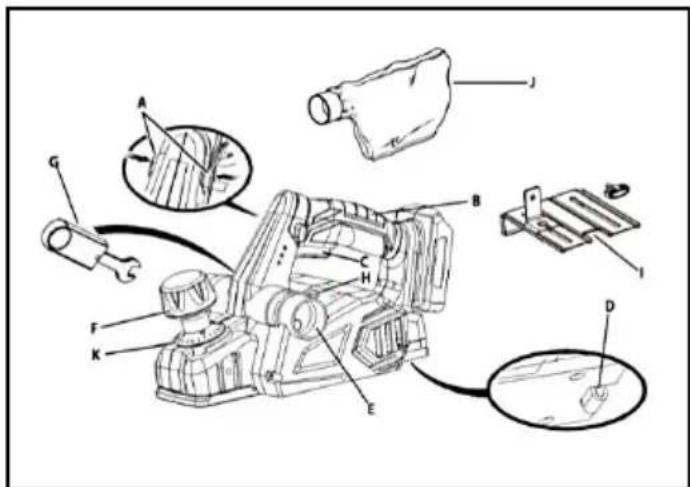
PRODUCT SPECIFICATIONS
| Model | DB18V-821 |
| Rated Voltage | 18V |
| No-load speed | 16000/min |
| Max planing width | 82 MM |
| Max planing depth | 2 MM |
| Max Rabbeting depth | 8 MM |
| Motor type | Brushless |
| Net weight | 2.5 KGS |
ASSEMBLY

WARNING:
Do not use this product if it is not completely assembled or if any parts appear to be missing or damaged. Use of a product that is not properly and completely assembled or with damaged or missing parts could result in serious personal injury.

WARNING:
Do not attempt to modify this product or create accessories or attachments not recommended for use with this product. Any such alteration or modification is misuse and could result in a hazardous condition leading to possible serious personal injury.
OPERATION

WARNING:
Do not allow familiarity with tools to make you careless. Remember that a careless fraction of a second is sufficient to inflict serious injury.

WARNING:
Always remove the battery pack from the tool when assembling, making adjustments, cleaning, or when not in use. Removing the battery will prevent accidental starting that could cause serious personal injury.

WARNING:
Always wear eye protection with side shields marked to comply with Z87.1. Failure to do so could result in objects being thrown into your eyes, resulting in possible serious injury.

WARNING:
Do not use any attachments or accessories not recommended by the manufacturer of this product. The use of attachments or accessories not recommended can result in serious personal injury.

Attention:
When planning too fast or too deep, it will cause equipment overload protection and shorten battery life. Please control the planning speed and depth reasonably.
APPLICATIONS
You may use this tool for the purposes listed below:
■ Planing the edge of a wooden door or shelf ■ Planing the edge of a piece of lumber ■ Making rabbet cuts in wood ■ Chamfering sharp edges of lumber
ADJUSTING THE EXHAUST DIRECTION

WARNING:
Collected dust from planing surface coatings such as polyurethanes, linseed oil, etc., can self-ignite in the planer dust bag or elsewhere and cause a fire. To reduce the risk of fire, always empty the dust bag frequently while planing. NEVER store or leave a planer without first emptying the dust bag. Also follow the recommendations of the coating manufacturer.
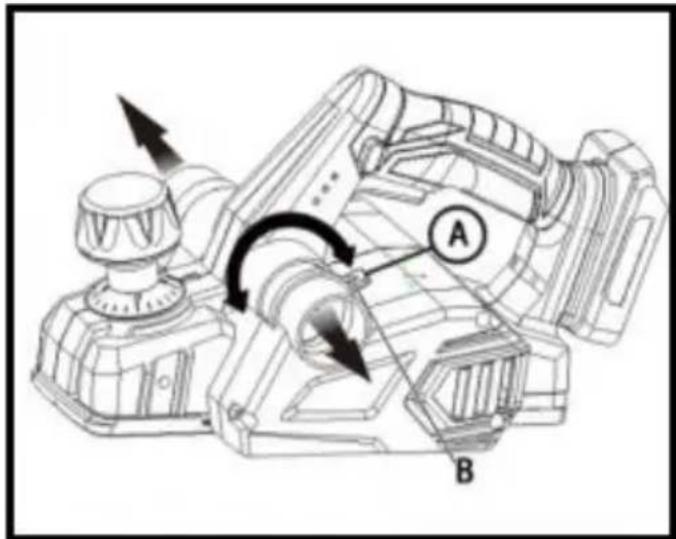
Change the direction of the exhaust to either the right or left to control the direction of debris when working in confined areas.
To adjust the exhaust direction and dust bag:
■ Remove the battery pack. ■ To adjust exhaust to the right: Move the exhaust direction lever so the arrow points right (the handle will point left). Install the dust bag on the right exhaust port. ■ To adjust exhaust to the left: Move the exhaust direction lever so the arrow points left (the handle will point right). Install the dust bag on the left exhaust port.
NOTE: Check that the dust bag is attached to the same port selected by the exhaust direction lever.
ATTACHING THE DUST BAG
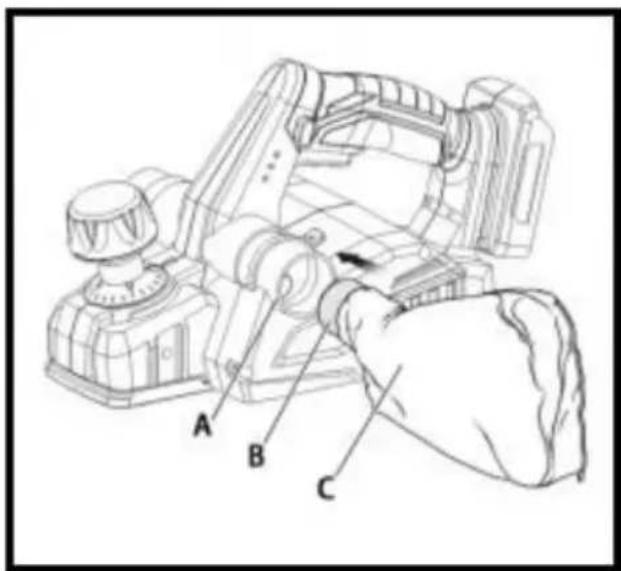
■ Remove the battery pack.
■ Slide the collar of the dust bag onto the exhaust port.
NOTE: To remove the dust bag, pull it straight out of the exhaust port.

NOTICE:
The dust bag fills quickly. Empty it often to prevent damage to the planer.
ATTACHING THE PLANER TO A VACUUM
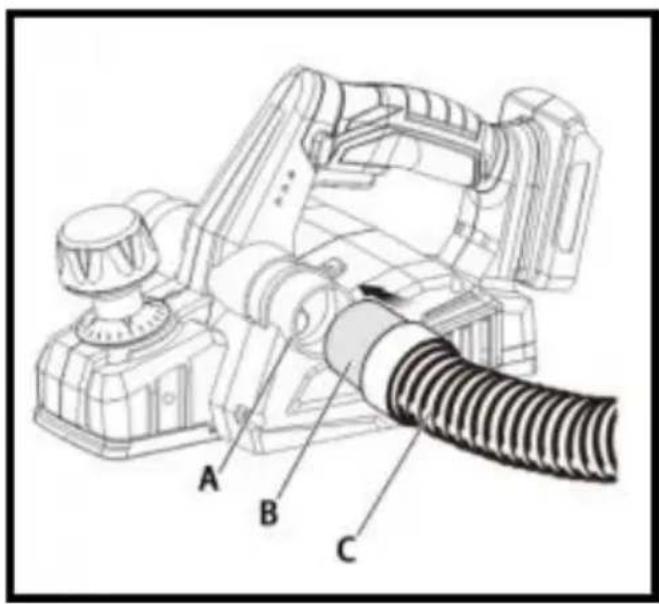
The chip collection system of the planer has a 1-1/4 in. port for inserting a vacuum hose.
■ Remove the battery pack. Remove the dust bag. ■ Attach a vacuum hose to the left or right chip exhaust. ■ Set exhaust direction lever to the selected exhaust port. ■ Connect the vacuum to a power supply. ■ Turn vacuum on before starting cut.

WARNING:
When the tool is not connected to vacuum, always reinstall the dust back onto the tool. Failure to do so could cause dust or foreign objects to be thrown into your face or eyes, which could result in possible serious injury.
INSTALLING/REMOVING BATTERY PACK
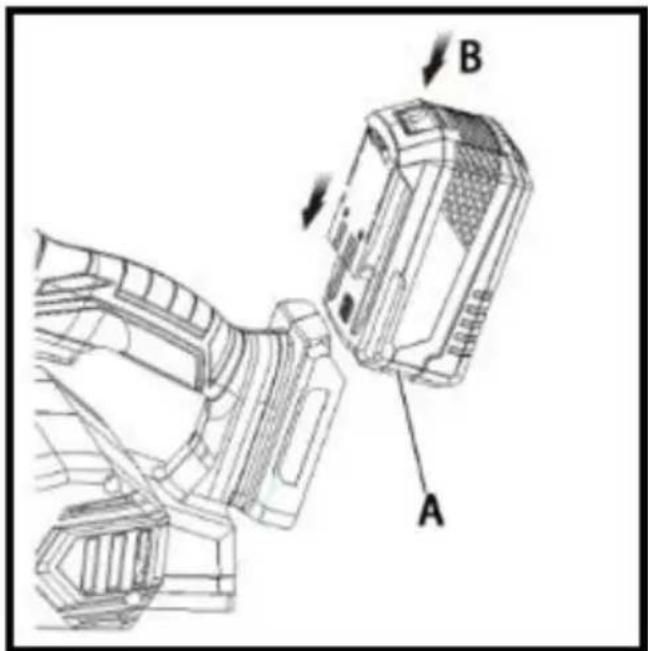
■ Lock the switch trigger. ■ Insert the battery pack into the product as shown. ■ Make sure the latches on each side of the battery pack snap into place and the battery pack is secured in the product before beginning operation. ■ Depress the latches to remove the battery pack. ■ For complete charging instructions, see the operator's manuals for your battery pack and charger.
STARTING/STOPPING THE PLANER
■ To start the planer: Push the lock-off button from either side, and depress the switch trigger. ■ To stop the planer: Release the switch trigger.
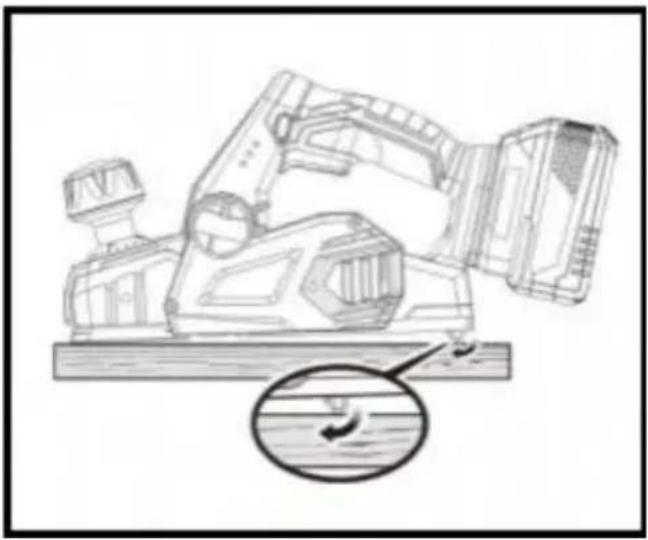
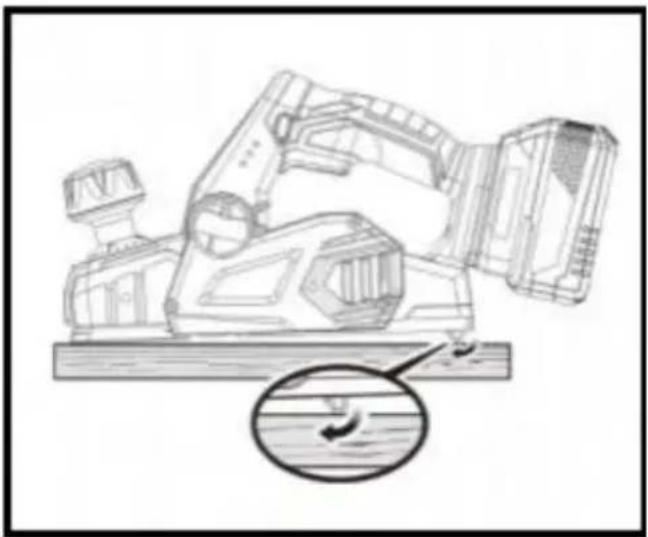
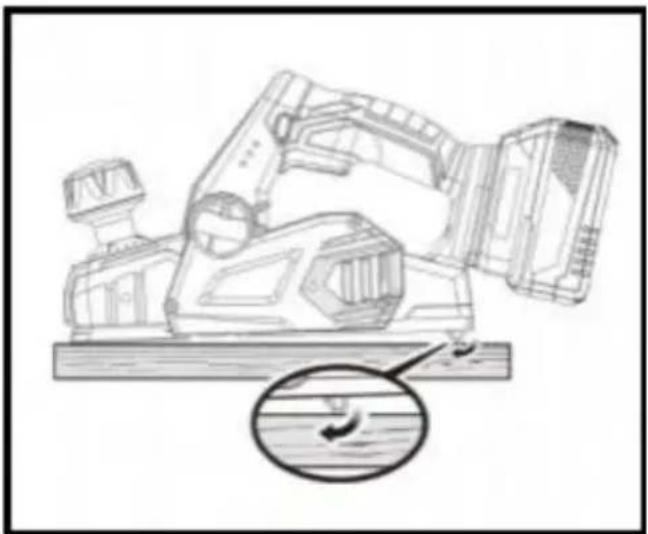
KICKSTAND
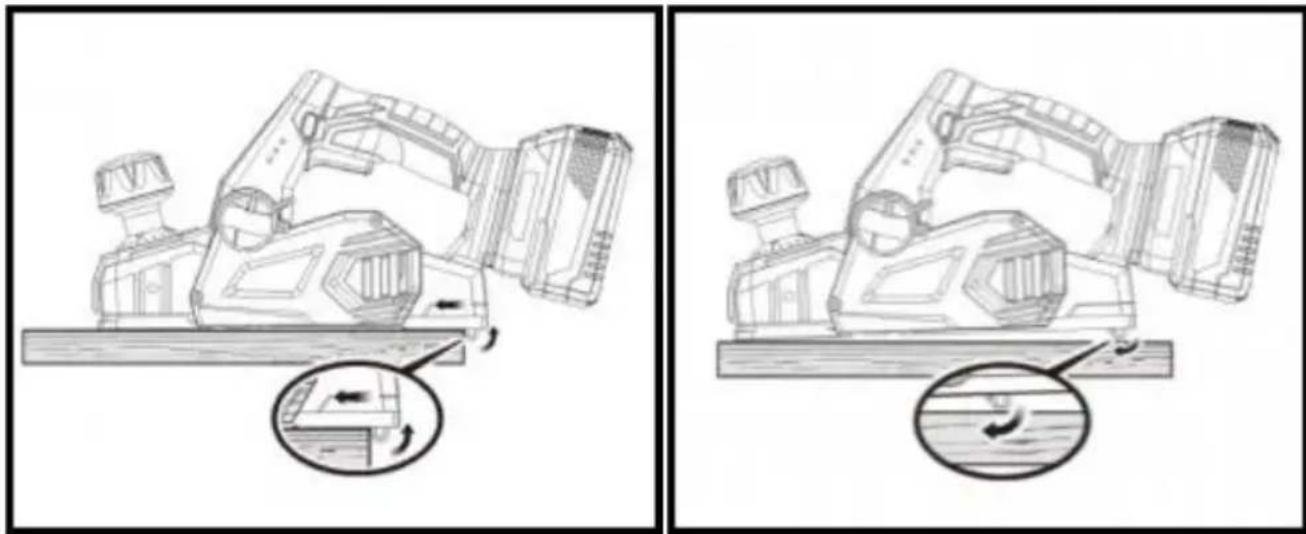
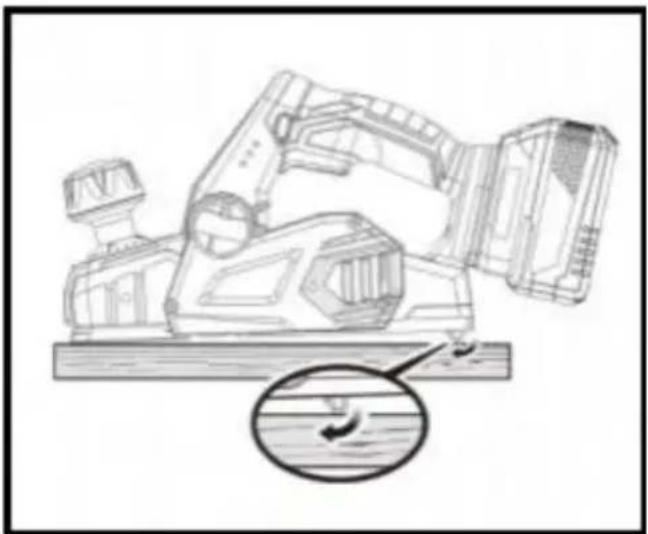
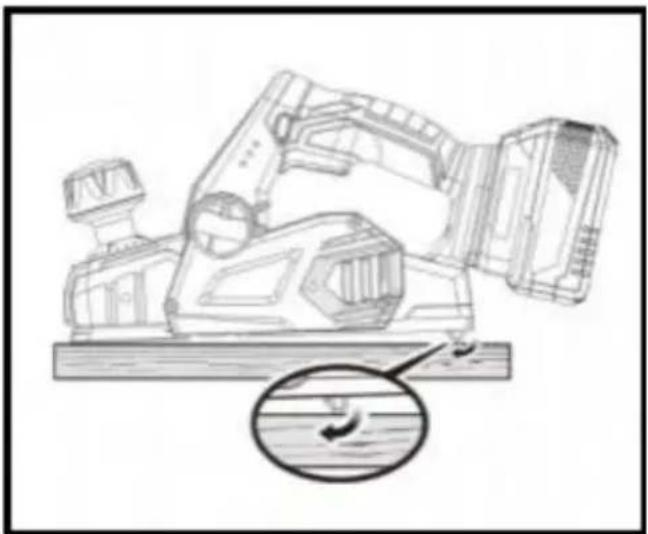
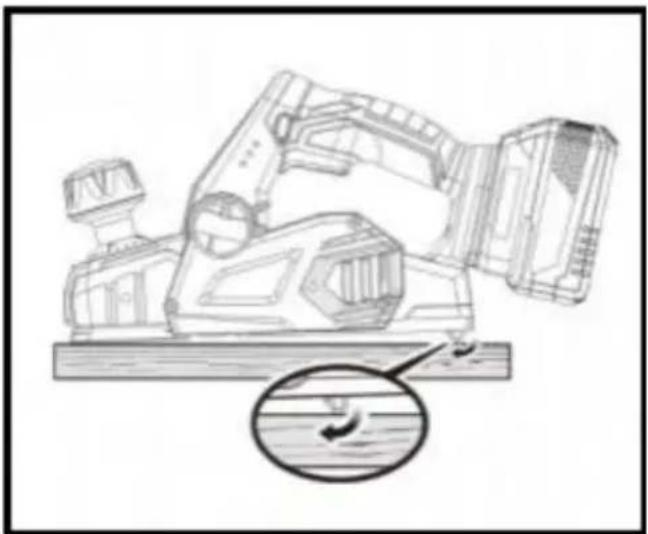
The planer has been equipped with an automatic pivoting kickstand that will prevent the blades from contacting the workbench when not in use. When you begin the planing operation, the kickstand will automatically retract as it passes over the edge of the workpiece. When setting the planer down on the workbench, the kickstand will automatically pivot down to prevent the blade from making any contact.

WARNING:
Make sure the kickstand operates freely at all times and that the area surrounding the kickstand is clear of debris. Failure to do so could result in serious personal injury.
PLANING DEPTH
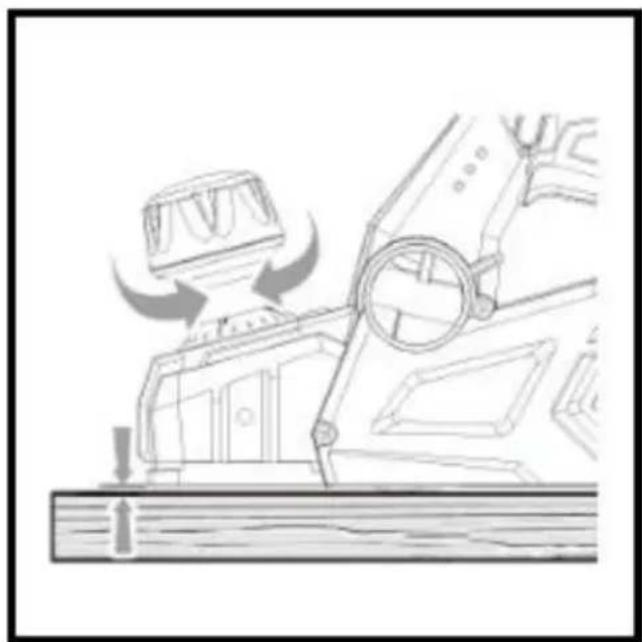
When you begin planing a rough piece of material, the planer will remove the high spots at first. Successive passes will remove more material. By removing no more than 1/64 in. with each pass, you achieve the smoothest finish, even from the roughest workpiece.
Always begin by making test cuts in scrap wood to make sure that the planer is removing the desired amount of wood.
To set the planning depth:
■ Remove the battery pack. ■ Turn the depth adjustment knob clockwise to set the desired depth of cut. The maximum depth of cut is 1/16 in.
NOTE: Use only detented depth settings. Attempting cuts with the depth cut settings between the detented positions can result in uneven cuts.
NOTE: To protect the blades during storage, transporting, etc., turn the depth adjustment knob counterclockwise to the top of the depth of cut scale to park the blade.

WARNING:
Always clamp the workpiece securely before making a cut. Work moving during a cut could result in loss of control of the planer and cause
injury.
■ Clamp the work securely. ■ Be sure the material to be planed is free of nails, staples, or screws. ■ Support the work so that the operation is on your side.
NOTICE:
Planing too fast results in a poor finish and increases chip build-up in the chip exhaust. Chip build-up restricts airflow and can cause motor overheating.
WARNING:
Do not attempt to clear a blocked chip exhaust until the blades stop and you have disconnected the product from the power source. Failure to heed this warning can result in serious personal injury.
PLANING
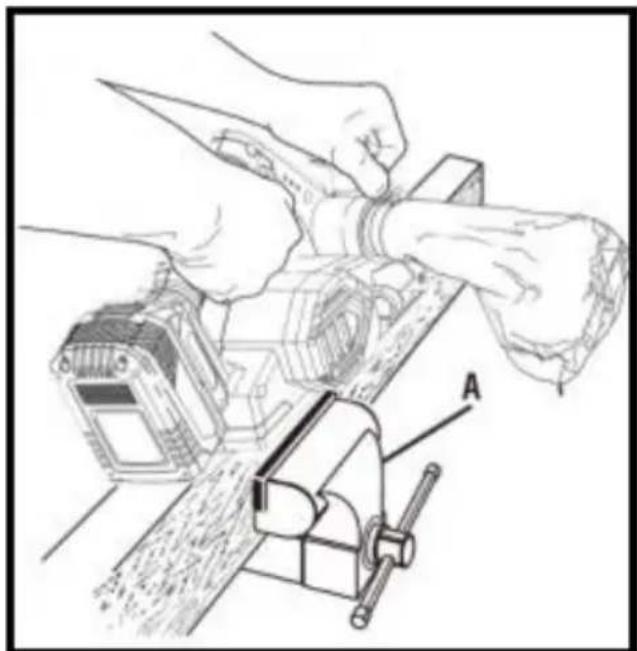
■ Clamp the work securely. ■ Adjust the planing depth. Refer to Planing Depth earlier in this manual. ■ Hold the depth adjustment knob with one hand and the handle with the other hand.

WARNING:
Always use two hands on the tool for any operation; this assures that you maintain control and avoid risk of serious personal injury. Always properly support and clamp the work so that both hands are free to control the planer.
Never operate the tool overhead or inverted from the proper operating position; serious personal injury may result.
■ Place the front shoe on the edge of work to be planed. NOTE: Make sure the blades are not touching the work. ■ Apply pressure to the depth adjustment knob so that the front shoe is completely flat on the work. Start the planer and let the motor reach maximum speed. ■ Hold the planer firmly and push it forward into the work, using a slow steady motion. Plane slowly and empty the dust bag often. ■ Apply downward pressure toward the rear handle as you reach the end of the planed cut. This helps keep the rear section of the base in contact with the work and prevents the front of the planer from gouging the cut.

WARNING:
Be careful to avoid hitting nails or staples during planning operation; action could nick, crack, or damage blades.
NOTE: We suggest that you always keep an extra set of blades on hand. As soon as the blades in the planer show signs of becoming dull, replace them. The blades are reversible and can be reversed until both sides become dull.
CHAMFERING
The planer is designed with a chamfering groove in the front shoe to chamfer corners of boards as shown. Before making a cut on good wood, practice cutting on scrap lumber to determine the amount to be removed.
Practice cutting on scrap lumber to determine the amount to be removed.
■ Clamp the work securely. ■ Hold the depth adjustment knob with one hand and the handle with the other hand. ■ Place the chamfering groove on the surface to be cut. ■ Start the planer and let the motor reach maximum speed. ■ Hold the planer firmly and push it forward into the work, using a steady motion. ■ Apply downward pressure to keep the planer flat at the beginning end of the work surface.
The planer comes with an adjustable edge guide for precision edge planing and rabbet cutting. Attach the edge guide to either side of the planer for planing edges, and attach the edge guide to the left side for making rabbet cuts.
The planer comes with an adjustable edge guide for precision edge and rabbet cutting. Attach the edge guide to either side of the plane for planing edges, and attach the edge guide to the left side for making rabbet cuts.
Remove the battery pack.
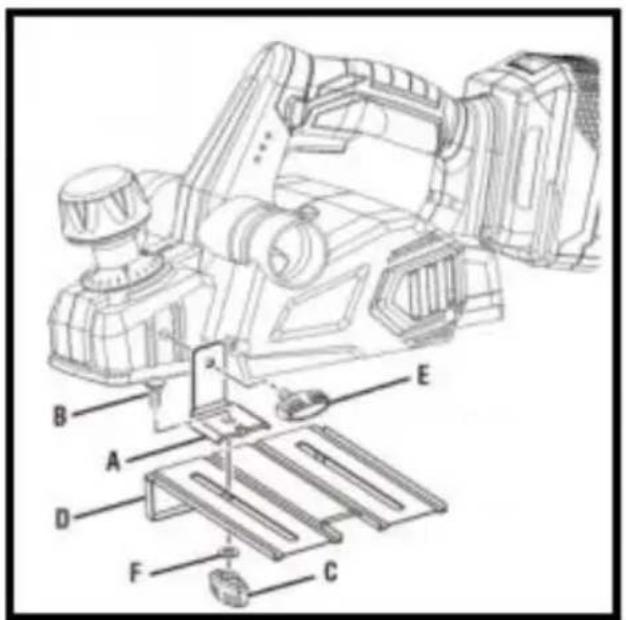
Attach the bracket to the desired side of the planer and tighten the bolt securely.
Attach the edge guide to the bracket using the knob nut and the head bolt. Tighten the knob nut securely.
■ Attach the edge guide to the bracket using the knob nut and the head bolt. ■ Tighten the knob nut securely.
Follow the directions in the Planning section earlier in this manual. Hold the edge guide firmly against the edge of the work surface.
Follow the directions in the Planning section earlier in this manual. Hold the edge guide firmly against the edge of the work surface.
ATTACHING THE EDGE GUIDE FOR MAKING RABBET CUTS
Remove the battery pack. Attach the bracket to the left side of the planer and tighten the screw securely. Attach the edge guide loosely to the bracket using the knob nut and a carriage head bolt (do not tighten). Adjust the edge guide to the desired width for the rabbet cut. Tighten the knob nut securely.
TO MAKE RABBET CUTS
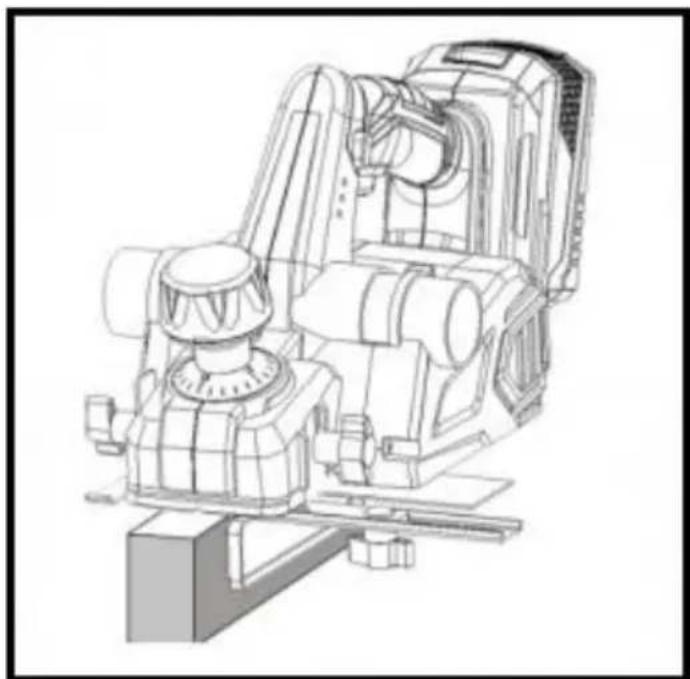
Follow the directions in the Planning section earlier in this manual. Press the edge guide firmly against the edge of the work surface.
The depth of the rabbet is determined by the depth of the cut and the number of passes made along the work surface.
The maximum depth of the rabbet cut is 1/2 inch and has to be cut in passes or less to reach the desired depth. The width of the rabbet is adjustable by moving the edge guide.

WARNING:
When servicing, use only identical replacement parts. Use of any other parts may create a hazard or cause product damage.

WARNING:
Always wear eye protection with side shields marked to comply with Z87.1. Failure to do so could result in objects being thrown into your eyes, resulting in possible serious injury.
GENERAL MAINTENANCE
Avoid using solvents when cleaning plastic parts. Most plastics are susceptible to damage from various types of commercial solvents and may be damaged by their use. Use clean cloths to remove dirt, dust, oil, etc.

WARNING:
Do not at any time let brake fluids, gasoline, petroleum-based products, penetrating oils, etc., come in contact with plastic parts. Chemicals can damage, weaken, or destroy plastic, which may result in serious personal injury.
Electric tools used on fiberglass material, wallboard, spackling compound, or plaster are subject to accelerated wear and possible premature failure.
Because the fiberglass chips and grindings are highly abrasive to bear brushes, commutators, etc. Consequently, we do not recommend using this tool for extended work on these types of materials. However, if you work with any of these materials, it is extremely important to clean the tool using compressed air.
LUBRICATION
All of the bearings in this tool are lubricated with a sufficient amount of grade lubricant for the life of the unit under normal operating conditions. Therefore, no further lubrication is required.
CLEANING THE EXHAUST PORT AND EMPTYING THE DUST BAG
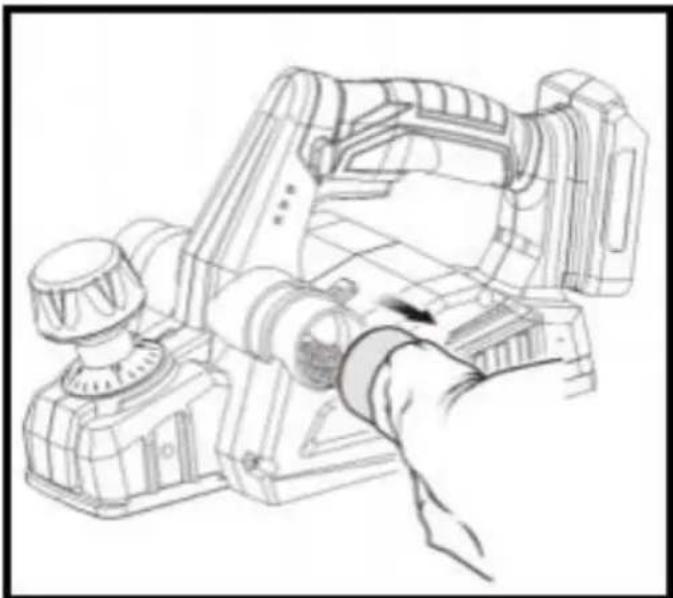
After using the planer for an extended period of time or when planing green lumber, chips may build up in the exhaust port and require cleaning. Chip build-up restricts airflow and causes the motor to overheat. Clean the exhaust port and empty the dust bag regularly.
■ Remove the battery pack. ■ Remove the dust bag from the exhaust port. ■ Clean the chip or dust build-up from the exhaust port of the planer with a small piece of wood. Do not use your hands or fingers. ■ Empty all debris from the dust bag and ensure that the collar is free of debris. ■ Replace the dust bag.
REPLACING BLADES
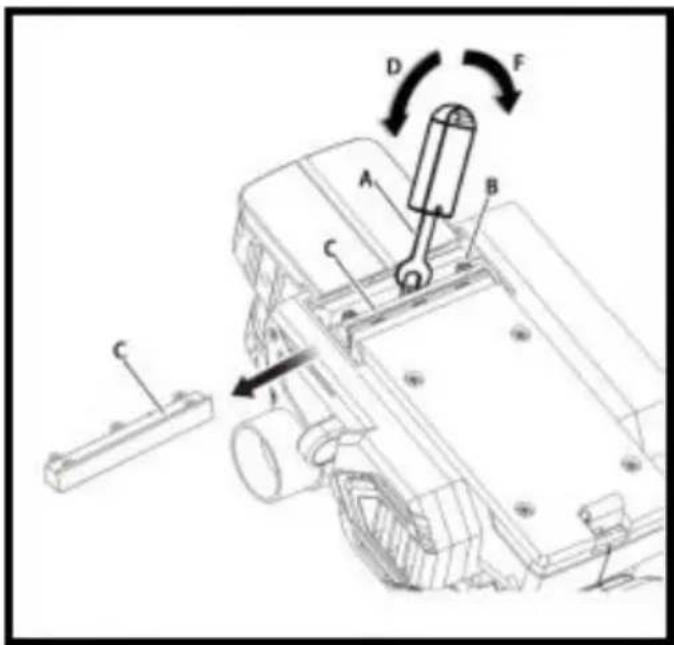
The planer blades are reversible. When one edge becomes dull, they can be reversed so that the other side can be used.
Always replace or reverse blades in pairs. Do not attempt to sharpen blades. If the blades in the planer show signs of becoming dull, chipped, or damaged in any way, replace them.
When replacing the blades, use recommended replacement blades only.
! WARNING:
Always wear heavy leather gloves and use caution when loosening blade screws and handling and/or changing blades. Blades are sharp and can cause serious personal injury.
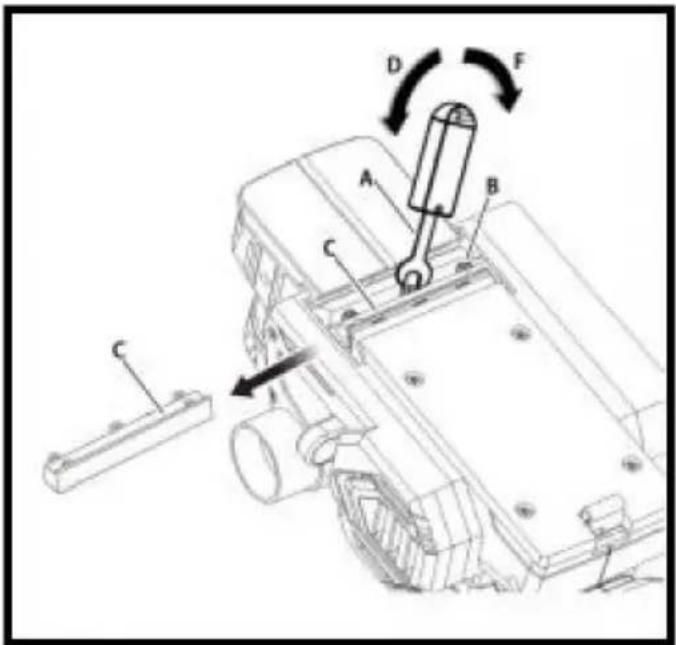
■ Remove the battery pack. ■ Secure the planer in an upside-down position. ■ Loosen the three screws securing the blade on the blade holder by turning counterclockwise with the provided blade wrench.
NOTE: Do not over-loosen the screws. If screws are too loose, alignment with the new blade will not be accurate.
NOTE: Before removing the old blades, take notice of the direction of the blades as well as how the tapered edge of the old blades is oriented. The edge of the new blades must be in the same orientation as the original blades, with the tapered edge on the same side as the screw heads and the flat edge facing the cutter block.
Depress the spring-loaded blade guard. Push the blade holder out of the cutter block assembly using the screwdriver. Remove the old blade from the blade holder by sliding the blade using the tip of a screwdriver.
NOTE: If the blade cannot be easily pushed out of the blade holder after loosening the blade securing screws, use a block of wood to break the blade loose from the blade holder with a short sharp blow. Then push the blade with a screwdriver to remove it. If necessary, tap the block of wood sharply with a small hammer to break the blade loose.
Clean any sawdust or wood chips from around the blade area. Slide the new blade into the slot of the blade holder. Use a screwdriver to push the blade into the blade holder until it is centered into position. Depress the spring-loaded blade guard. Insert the blade holder into the cutter block assembly. Retighten the three blade securing screws using the blade wrench. Repeat the above procedure to change the other blade.
REPLACING THE BELT
When replacing the belt, use the recommended replacement belt only.
Remove the battery pack. Remove belt cover screws. Remove the belt cover.
Force the old belt from the small pulley by turning it in the direction of rotation. As you turn the belt, pull and work it off the small pulley until it is completely removed from both pulleys.
Install the new belt over the small pulley, being sure to align it properly. As you turn the belt, push and work it onto the large pulley until it is in place.
place.
Replace the belt cover. Install belt cover screws and tighten securely.
NOTE: Do not overtighten the screws.
ACCESSORIES
ACCESSORIES--BRUSHLESS PLANER WITH COLOR BOX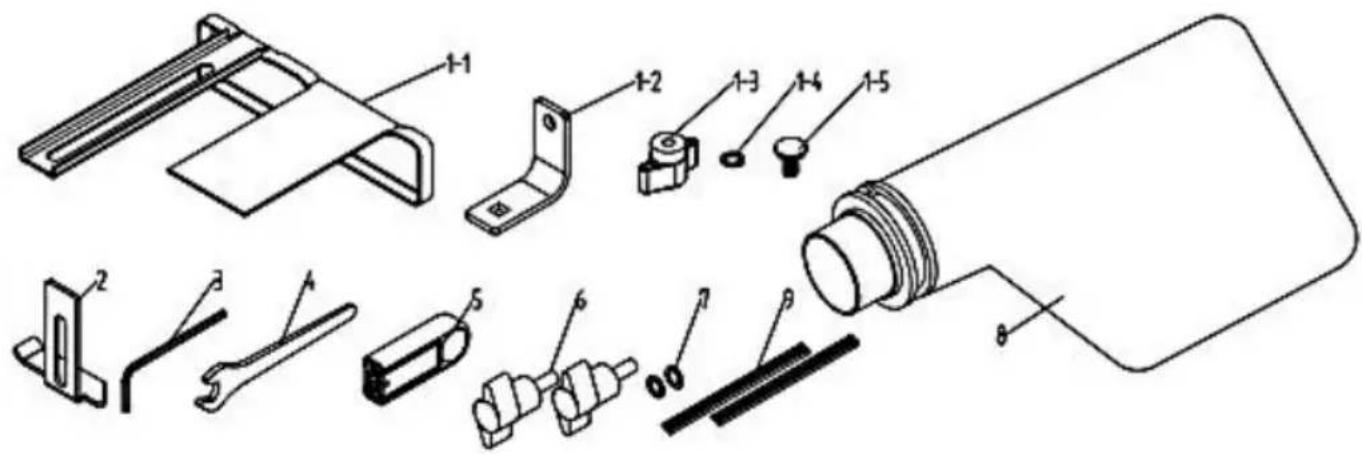
| PART NO. | DESCRIPTION | QTY |
| 1 | Parallel Guide | |
| 1-1 | Parallel Guide | 1 PC |
| 1-2 | Parallel Guider bracket | 1 PC |
| 1-3 | Butterfly nut | 1 PC |
| 1-4 | Flat washer | 1 PC |
| 1-5 | Square neck bolts | 1 PC |
| 2 | Depth Guide | 1 PC |
| 3 | Inner hex wrench | 1 PC |
| 4 | Spanner | 1 PC |
| 5 | Wrench cover | 1 PC |
| 6 | Butterfly screw | 2 PCS |
| 7 | Flat washer | 2 PCS |
| 8 | Dust bag | 1 PC |
| 9 | Blade | 1 SET |
ACCESSORIES--BRUSHLESS PLANER WITH BMC BOX

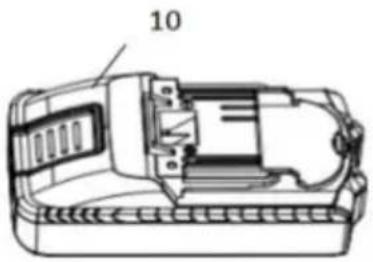
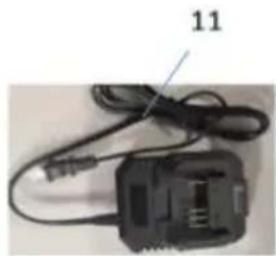
| PART NO. | DESCRIPTION | QTY |
| 1 | Parallel Guide | |
| 1-1 | Parallel Guide | 1 PC |
| 1-2 | Parallel Guider bracket | 1 PC |
| 1-3 | Butterfly nut | 1 PC |
| 1-4 | Flat washer | 1 PC |
| 1-5 | Square neck bolts | 1 PC |
| 2 | Depth Guide | 1 PC |
| 3 | Inner hex wrench | 1 PC |
| 4 | Spanner | 1 PC |
| 5 | Wrench cover | 1 PC |
| 6 | Butterfly screw | 2 PCS |
| 7 | Flat washer | 2 PCS |
| 8 | Dust bag | 1 PC |
| 9 | Blade | 1 SET |
| 10 | Battery | 1 PC |
| 11 | changer | 1 PC |
DB18V-821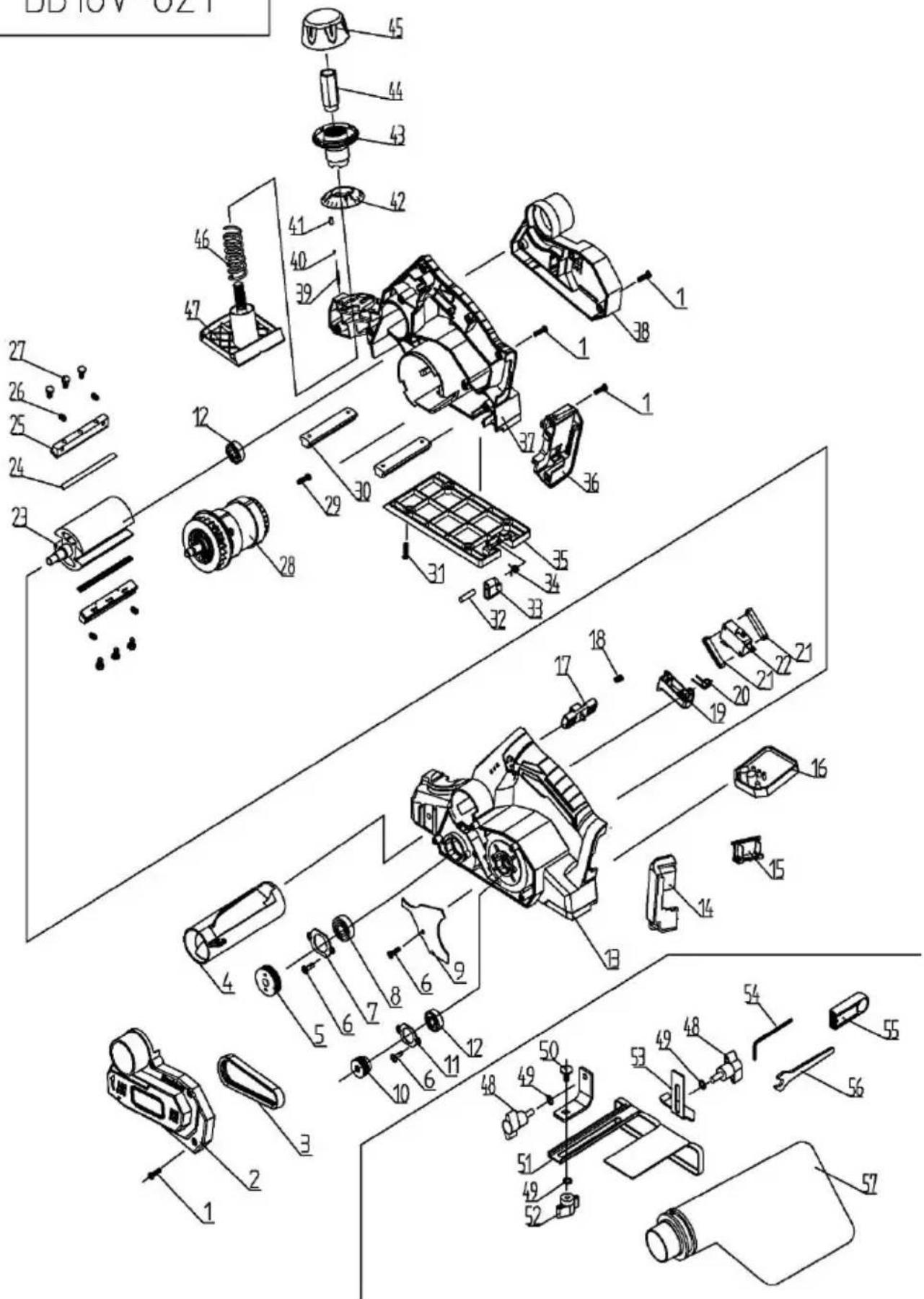
| DB18V-821B | |||||||
| NO. | DESCRIPTION | QTY | NO. | DESCRIPTION | QTY | ||
| 1 | TAPPING SCREW ST4*14 | 20 | PCS | 30 | SUPPORT BOARD | 2 | PCS |
| 2 | BELT COVER | 1 | PCS | 31 | TAPPING SCREW ST4*12 | 4 | PCS |
| 3 | BELT | 1 | PCS | 32 | CYLINDRICAL PIN 5*32 | 1 | PCS |
| 4 | DUST TUBE | 1 | PCS | 33 | PARK REST | 1 | PCS |
| 5 | V-PULLEY (BIG) | 1 | PCS | 34 | TORSION SPRING | 1 | PCS |
| 6 | TAPPING SCREW ST4X12 | 5 | PCS | 35 | BASE | 1 | PCS |
| 7 | BEARING COVER | 1 | PCS | 36 | BATTERY PIN COVER(2) | 1 | PCS |
| 8 | BALL BEARING 6000RS | 1 | PCS | 37 | RIGHT HOUSING | 1 | PCS |
| 9 | DUST BAFFLE | 1 | PCS | 38 | REAR COVER | 1 | PCS |
| 10 | V-PULLEY(SMALL) | 1 | PCS | 39 | TORSION SPRING | 1 | PCS |
| 11 | BEARING COVER | 1 | PCS | 40 | STEEL BALL 2.5 | 1 | PCS |
| 12 | BALL BEARING 608RS | 2 | PCS | 41 | BULLET | 1 | PCS |
| 13 | LEFT HOUSING | 1 | PCS | 42 | DEPTH SCALE | 1 | PCS |
| 14 | BATTERY PIN COVER(1) | 1 | PCS | 43 | KNOB | 1 | PCS |
| 15 | BATTERY PIN | 1 | PCS | 44 | ADJUST NUT | 1 | PCS |
| 16 | PCB CONTROL BOARD | 1 | PCS | 45 | KNOB COVER | 1 | PCS |
| 17 | LOCK-OFF BUTTON | 1 | PCS | 46 | ADJUSTMENT SPRING | 1 | PCS |
| 18 | SPRING | 1 | PCS | 47 | FRONT BASE | 1 | PCS |
| 19 | BUTTON OF SWITCH | 1 | PCS | 48 | BUTTERFLY SCREW | 2 | PCS |
| 20 | TORSION SPRING | 1 | PCS | 49 | FLAT WASHER φ 6 | 3 | PCS |
| 21 | SWITCH BASE | 2 | PCS | 50 | SQUARE NECK BOLT M6X12 | 1 | PCS |
| 22 | SWITCH | 1 | PCS | 51 | EDGE GUIDE | 1 | PCS |
| 23 | ROLLER | 1 | PCS | 52 | BUTTERFLY NUT | 1 | PCS |
| 24 | BLADE | 2 | PCS | 53 | DEPTH GUIDER | 1 | PCS |
| 25 | BLADE HOLDER | 2 | PCS | 54 | INTERNAL HEX. WRENCH | 1 | PCS |
| 26 | SCREW M5*10 | 4 | PCS | 55 | WRENCH STORAGE | 1 | PCS |
| 27 | HEX BOLT M5*8 | 6 | PCS | 56 | WRENCH | 1 | PCS |
| 28 | BRUSHLESS MOTOR | 1 | PCS | 57 | DUST BAG | 1 | PCS |
| 29 | TAPPING SCREW ST4*10 | 2 | PCS | ||||
Manufacturer: Shanghai Muxin Muye Youxian Gongsi
Address: Shuangchenglu 803nong11hao1602A-1609shi, Baoshanqu, Shanghai 200000 CN.
Imported to AUS: SIHAO PTY LTD, 1 ROKEVA STREET EASTWOOD NSW 2122 Australia
Imported to USA: Sanven Technology Ltd., Suite 250, 9166 Anaheim Pla Rancho Cucamonga, CA 91730
| EC | REP |
E-CrossStu GmbH
Mainzer Landstr.69, 60329 Frankfurt am Main
| UK | REP |
YH CONSULTING LIMITED.
C/O YH Consulting Limited Office 147, Centurion House London Road, Staines-upon-Thames, Surrey, TW18 4
VEVOR®
TOUGH TOOLS, HALF PRICE
Technical Support and E-Warranty Certificate www.vevor.com/support
VEVOR®
TOUGH TOOLS, HALF PRICE

PRODUCT FEATURES
ADJUSTING THE EXHAUST DIRECTION

WARNING:
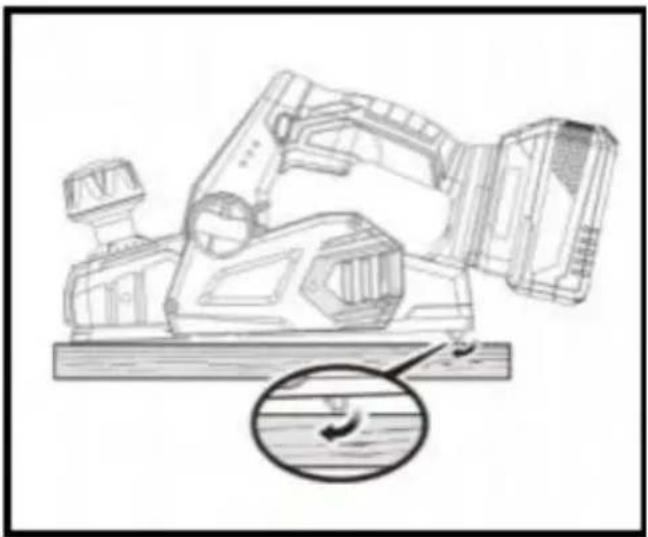
REPLACEMENT OF BLADES
C/O YH Consulting Limited Office 147, Centurion House, London Road, Staines-upon-Thames, Surrey, TW18 4AX
VEVOR®
TOUGH TOOLS, HALF PRICE

C/O YH Consulting Limited Office 147, Centurion House, London Road, Staines-upon-Thames, Surrey, TW18 4AX
VEVOR®
TOUGH TOOLS, HALF PRICE

Imported into AUS: SIHAO PTY LTD, 1 ROKEVA STREET EASTWOOD NSW 2122 Australia
Imported into USA: Sanven Technology Ltd., Suite 250, 9166 Anaheim Place, Rancho Cucamonga, CA 91730

Imported into Australia: SIHAO PTY LTD, 1 ROKEVA STREET EASTWOOD NSW 2122 Australia
Imported into USA: Sanven Technology Ltd., Suite 250, 9166 Anaheim Place, Rancho Cucamonga, CA 91730
E-CrossStu GmbH
C/O YH Consulting Limited Office 147, Centurion House,
London Road, Staines-upon-Thames, Surrey, TW18 4AX
VEVOR®
TOUGH TOOLS, HALF PRICE

WORKPLACE SAFETY
ADJUSTING THE EXHAUST DIRECTION

WARNING:
Imported into AUS: SIHAO PTY LTD, 1 ROKEVA STREET EASTWOOD NSW 2122 Australia
Imported into USA: Sanven Technology Ltd., Suite 250, 9166 Anaheim Place, Rancho Cucamonga, CA 91730
| Przedstaw ciel UE |
| REP WIELKIEJ BRYTANII |
E-CrossStu GmbH
Mainzer Landstr.69, 60329 Frankfurt am Main.
YH CONSULTING LIMITED.
C/O YH Consulting Limited Office 147, Centurion House, London Road, Staines-upon-Thames, Surrey, TW18 4AX
VEVOR®
TOUGH TOOLS, HALF PRICE

NEED HELP? CONTACT US!
SAFETY WARNINGS FOR PLANER MACHINE
Lock the trigger switch.
C/O YH Consulting Limited Office 147, Centurion House, London Road, Staines-upon-Thames, Surrey, TW18 4AX
VEVOR®
TOUGH TOOLS, HALF PRICE
Technical support and e-warranty certificate www.vevor.com/support
VEVOR®
TOUGH TOOLS, HALF PRICE
www.vevor.com/support
TABLE OF CONTENTS
ADJUSTING THE EXHAUST DIRECTION

WARNING:
Clamp the workpiece securely
C/O YH Consulting Limited Office 147, Centurion House, London Road, Staines-upon-Thames, Surrey, TW18 4AX
VEVOR®
TOUGH TOOLS, HALF PRICE
- PLANER
- MODEL: DB18V
- NEED HELP? CONTACT US
- TABLE OF CONTENTS
- WARNING
- SAVE ALL WARNINGS AND INSTRUCTIONS FOR FUTURE REFERENCE
- WORK AREA SAFETY
- ELECTRICAL SAFETY
- PERSONAL SAFETY
- POWER TOOL USE AND CARE
- BATTERY TOOL USE AND CARE
- SERVICE
- PLANER SAFETY WARNINGS
- SYMBOLS
- FEATURES
- ASSEMBLY
- OPERATION
- ATTENTION
- APPLICATIONS
- ADJUSTING THE EXHAUST DIRECTION
- TO ADJUST THE EXHAUST DIRECTION AND DUST BAG
- ATTACHING THE DUST BAG
- NOTICE
- ATTACHING THE PLANER TO A VACUUM
- INSTALLING/REMOVING BATTERY PACK
- STARTING/STOPPING THE PLANER
- KICKSTAND
- PLANING DEPTH
- TO SET THE PLANNING DEPTH
- PLANING
- CHAMFERING
- THE PLANER COMES WITH AN ADJUSTABLE EDGE GUIDE FOR PRECISION EDGE PLANING AND RABBET CUTTING. ATTACH THE EDGE GUIDE TO EITHER SIDE OF THE PLANER FOR PLANING EDGES, AND ATTACH THE EDGE GUIDE TO THE LEFT SIDE FOR MAKING RABBET CUTS
- REMOVE THE BATTERY PACK
- FOLLOW THE DIRECTIONS IN THE PLANNING SECTION EARLIER IN THIS MANUAL. HOLD THE EDGE GUIDE FIRMLY AGAINST THE EDGE OF THE WORK SURFACE
- ATTACHING THE EDGE GUIDE FOR MAKING RABBET CUTS
- TO MAKE RABBET CUTS
- GENERAL MAINTENANCE
- LUBRICATION
- CLEANING THE EXHAUST PORT AND EMPTYING THE DUST BAG
- REPLACING BLADES
- REPLACING THE BELT
- ACCESSORIES
- ACCESSORIES--BRUSHLESS PLANER WITH BMC BOX
- VEVOR®
- TOUGH TOOLS, HALF PRICE
- REPLACEMENT OF BLADES
- WORKPLACE SAFETY
- SAFETY WARNINGS FOR PLANER MACHINE
- WWW.VEVOR.COM/SUPPORT
Brand : Vevor
Model : DB18V-821
Category : Plane