5003 - Video camera Vevor - Free user manual and instructions
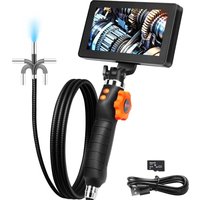
Find the device manual for free 5003 Vevor in PDF.


| Product Type | LCD Digital Endoscope (Inspection Camera) |
| Brand | Vevor |
| Model | 5003 |
| Screen Size | 5.0 inch IPS HD |
| Screen Resolution | 1280 x 720 pixels |
| Photo Resolution | 1920 x 1080 (2M) |
| Video Resolution | 720p |
| Photo Format | JPG |
| Video Format | AVI |
| Battery | Lithium-ion 2000 mAh |
| Battery Life | 3 hours |
| Charging Time | 2.5 hours |
| Charging Port | Micro-USB (5V/1A or 5V/2A) |
| TF Card Capacity | 0 to 64 GB (FAT32) |
| Operating Temperature | -10 to 45°C |
| Camera Temperature | -10 to 80°C |
| Lighting | Adjustable LED |
| Main Functions | Photo taking, video recording, digital zoom, album, settings |
| Supported Languages | 10 languages including French |
| Included Accessories | Protective ring, magnet, hook, mirror |
| Safety | Do not use for medical diagnosis, avoid shocks, keep dry, do not expose to high temperature |
| Maintenance and Cleaning | Clean the lens with an alcohol-dampened cloth, store in a dry place |
| Technical Support | www.vevor.com/support |
Frequently Asked Questions - 5003 Vevor
User questions about 5003 Vevor
0 question about this device. Answer the ones you know or ask your own.
Ask a new question about this device
Download the instructions for your Video camera in PDF format for free! Find your manual 5003 - Vevor and take your electronic device back in hand. On this page are published all the documents necessary for the use of your device. 5003 by Vevor.
USER MANUAL 5003 Vevor
Technical Support and E-Warranty Certificate www.vevor.com/support
LCD Digital Endoscope
Model: 5003
We continue to be committed to provide you tools with competitive p "Save Half", "Half Price" or any other similar expressions used by us represents an estimate of savings you might benefit from buying cer tools with us compared to the major top brands and does not neces mean to cover all categories of tools offered by us. You are kindly re to verify carefully when you are placing an order with us if you are saving half in comparison with the top major brands.
VEVOR®
TOUGH TOOLS, HALF PRICE
LCD Digital Endoscope
Instruction Manual
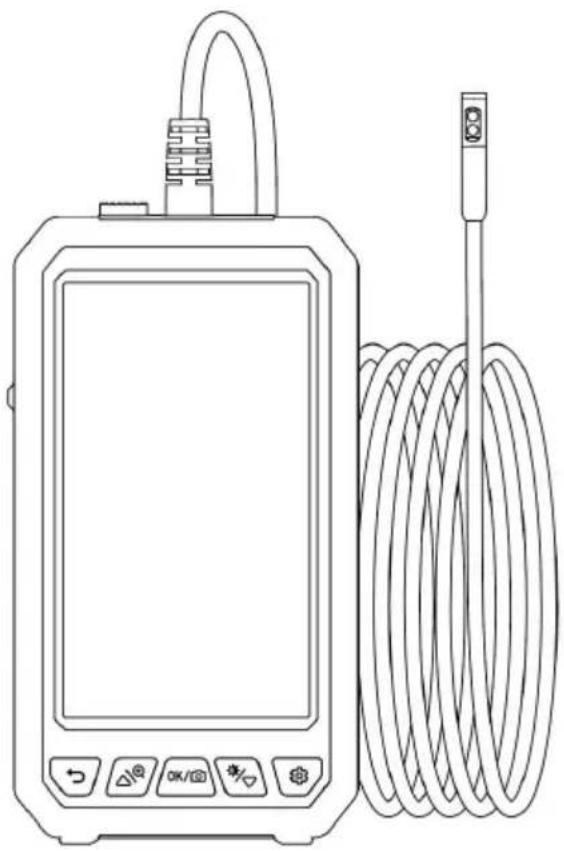
natural_image
Line drawing of a handheld electronic device with a coiled cable and indicator lights (no text or symbols)
NEED HELP? CONTACT US!
Have product questions? Need technical support? Please feel free to us: Technical Support and E-Warranty Certificate
www.vevor.com/support
This is the original instruction, please read all manual instruction carefully before operating. VEVOR reserves a clear interpretation user manual. The appearance of the product shall be subject to product you received. Please forgive us that we won't inform you there are any technology or software updates on our product.
Please read this manual carefully before use!
Safety and Maintenance
- The product is an industrial endoscopy camera and is not intended for me use or human examination.
- Do not hit the camera violently and do not pull the cable.
- When used in an environment with sharp bumps, please use it carefully to prevent the waterproof protective layer of the probe from being scratched.
- The camera probe is not made of heat-resistant and high-temperature mate. When checking the automobile engine, please ensure that the tempera ture ir engine drops to the normal emperature.
- When not in use, please ensure that the lens and the main unit are clear dry, and avoid contact with oil, etc. or other corrosive and dangerous substar
- This product is not suitable for people with limited physical, sensory or medical abilities.
- Do not allow children to touch and operate this equipment.
Battery Instructions
- Please use a 5V household charger that meets the safety regulations to charge the equipment. Fast charging is not supported.
- This device supports charging while using.
- If the device is not used for a long time, please ensure that it is charge once every 3 months to prevent irreparable damage caused by excessive discharge of the battery.
PRODUCT INTRODUCTION
(There are different colors, and the products are subject to the physical object received)
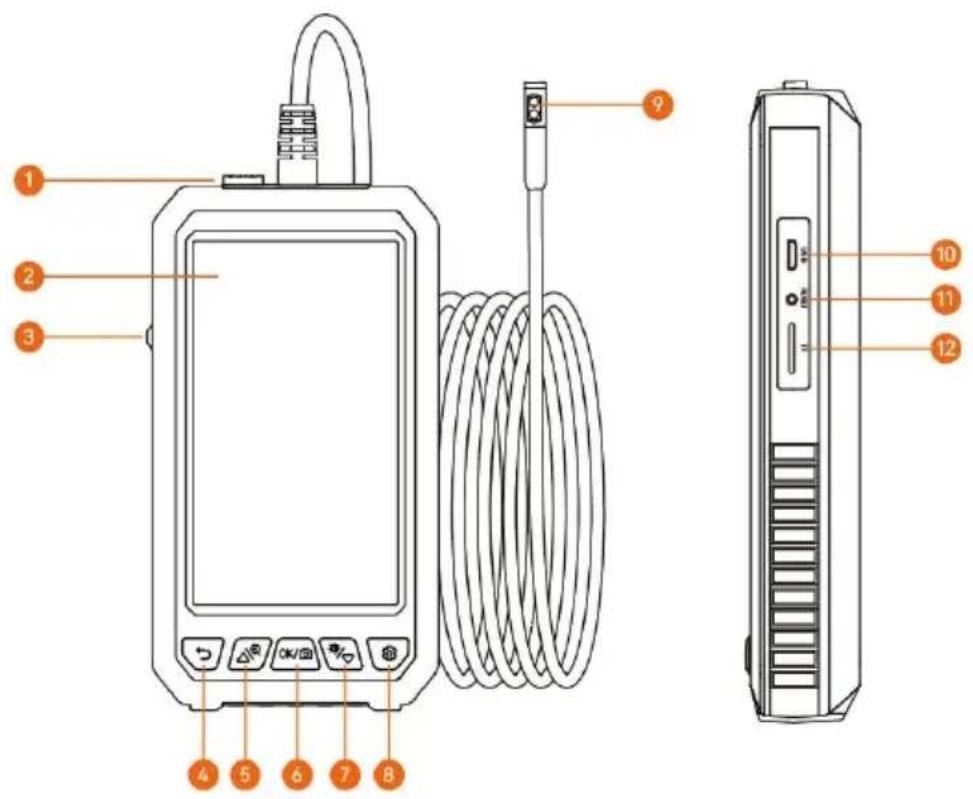
1. Camera lock
Insert the Type-c camera interface into the device, and the lock can make interface contact stable and prolong the service life. If you want to change camera, you need to press and move the lock in the opposite direction of interface.
2. Screen
5-inch IPS full-view HD color screen
3. Power supply
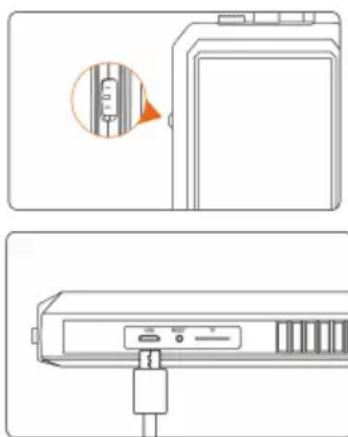
Flip the switch toward the camera to turn it on, and flip it the other way off
4. Back/Album
Operate this button on the video interface, its function is to enter the picture management, and it is the return function on other interfaces
5. Up/zoom in
If the button is operated on the video interface, the image can be cyclicall enlarged, and it is the upward movement button on other interfaces
6. Camera key/confirmation key
When operating this key on the camera interface, short press to take pictu and long press to record video. Another interface is the confirmation functio
7. Down
When operating this button on the video interface, it is to adjust the bright the LED light. If another interface is move down function.
8. Setting key
Short press the ⚙ " to enter the menu setting function.(If the product is a dual-lens camera, long press the ⚙ " " to switch between the side camera a the front camera)
9. Lens
With bright LED light lens
10. USB charging interface
Data transmission is possible when the USB is connected to the computer charging (it is recommended not to use an adapter above 12V to charge the product)
11. Reset button
When the product crashes, press it to restart the device
12.TF cardslot
Support to expand 0-64G TF (MicroSD) card
*Please insert the TF card when the machines turn off
natural_image
Technical line drawing showing two views of a device with a close-up inset (no text or symbols)Flip the switch toward the camera to turn it and flip it the other way to turn it
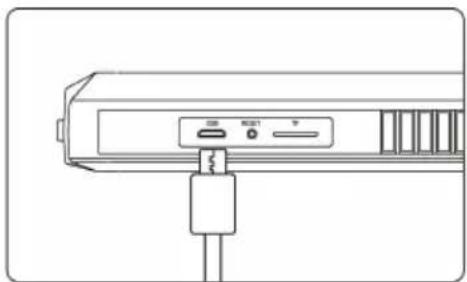
Use the USB charging cable to charge the device
Insert TF card:
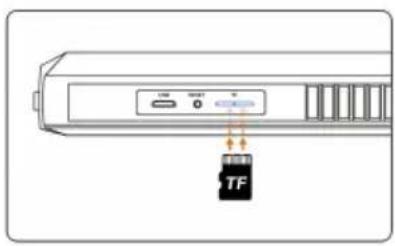
*Please insert the TF card in the off state *Please pay attention to whether the insertion direction and front and back sides of TF card are correct *Do not use excessive force when inserting or pulling out the TF card to prevent damage to the card slot structur
Language settings
The system supports Simplified Chinese, Japanese, English, Korean, French, German, Italian, Spanish, Russian, Polish
- Press "💡" button to enter the setting page
- Select the language setting
- Press the up and down button to select the desired language
- Press "OK"/to save
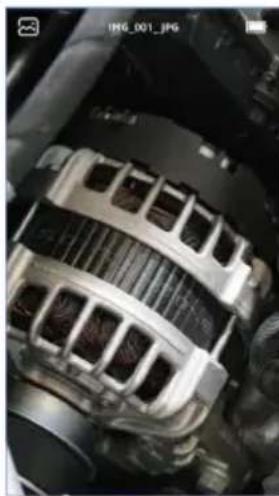
Enter photo album
natural_image
Close-up of an automotive alternator component (no visible text or symbols)- Press "D" to switch to photo album viewing.
- Select the photo or video that you want to view, press "©" to delete the photo or video.
Settings

- Click the " " button to enter the setting mode.
- Use the 🔊 " ", 🔊 " keys to move the gray cursor and select the desired menu item.
- Select the desired item, click the " key to enter, use the " and " " keys to select the required parameters, and then click the " key to confirm.
- After the setting is completed, click the " " ke exit the setting mode.
Copy Picture and Video Files
Can use a TF card to copy directly, or use a USB cable to connect to core copy
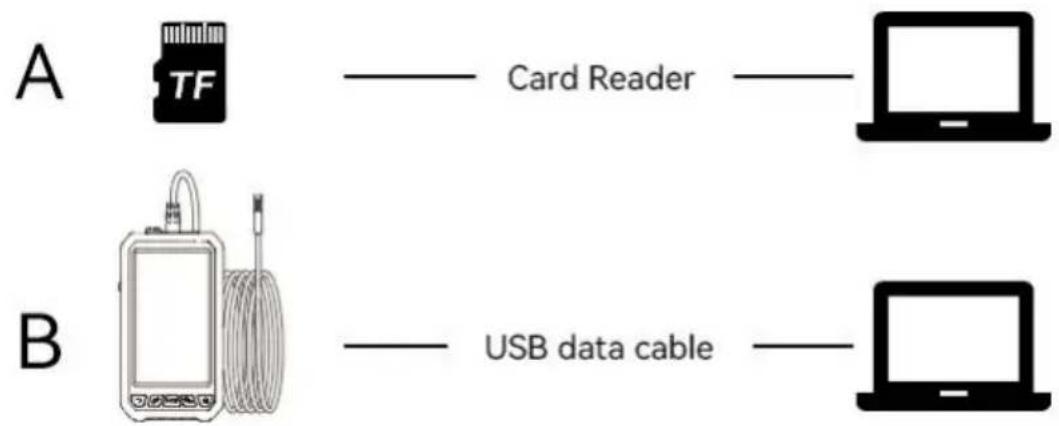
When operating the copy, if the machine is not connected to the computer, restart the machine or plug and unplug the USB data line. Do not plug and the USB data cable during the data transmission process, which will cause the data transmission to fail.
Charging Guide
natural_image
Line drawing of a device rear panel with ports and connectors (no text or symbols)- Connect the device to the Micro USB adapter for charging(5V / 1A/ 5V / 2A). The product does not support fast charging.
- During the charging process, the power symbol indicates that the charging is in progress
Use the USB charging 3. When the device is fully charged, the power cable to charge the device display shows the full state
FAQ
- Lags happened during the photo outputting of the product
Please check whether the product has sufficient power, or restart the device.
- Product crash
Please press the reset button of the device, or restart the device.
- Imaging screen is not clear
The best imaging focal length of the product is: 2cm-10cm, please calibrate the distance to the object, or clean the front of the camera with a clean alcohol
- Product charging
Please use (5V / 1A/5V / 2A) charger to charge the device. The product does support fast charging.
- The camera is heat
It is normal for the camera to heat up, especially when the camera LED lig at the highest brightness. But it does not affect normal use or service life.
- TF card can not be recognized
Please confirm whether the TF format is FTA32. If not, please format it an recognize it. Please plug and unplug the TF card again.
Accessories Installation Guide
Accessories: Protective ring*1, Magnet *1, Hook *1
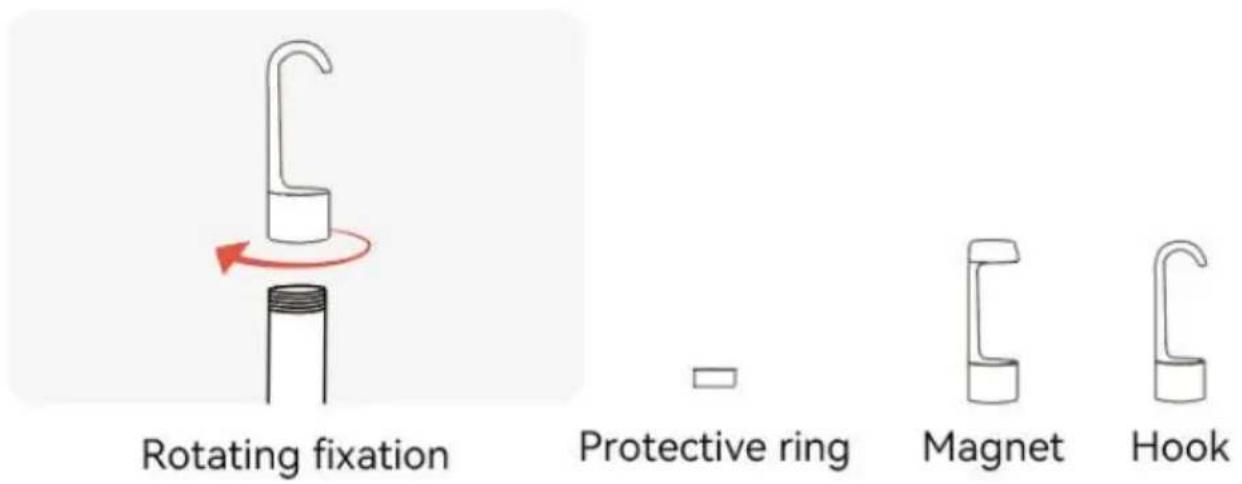
Mirror
Dual lens no need side mirror, single lens is equipped with side mirror
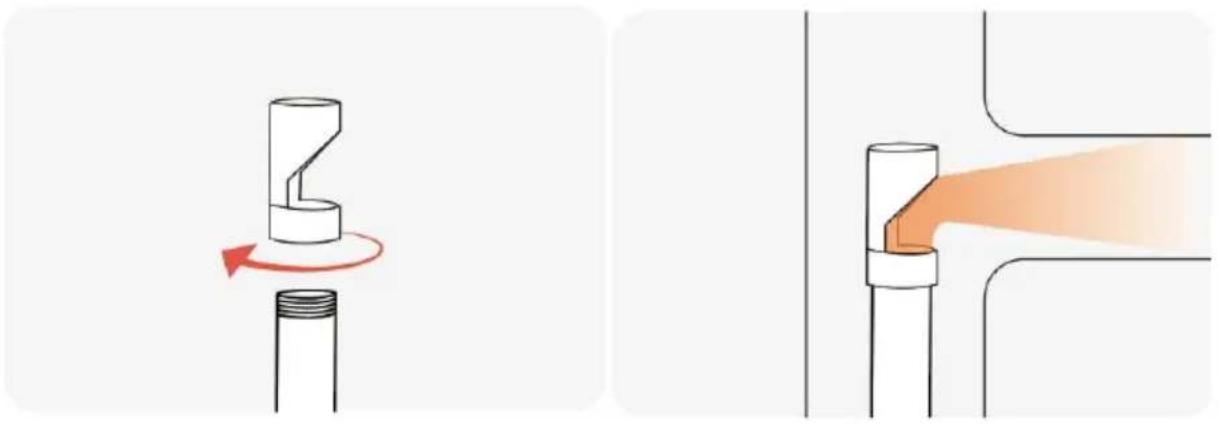
natural_image
Diagram showing a mechanical component being twisted with a red arrow, no text or symbols presentRotating fixation Reflect the side through the mirror, observing objects in a wider range
Specifications
| Screen type: 5.0-inch color display |
| Photo resolution: 1920*1080 |
| Screen resolution: 1280*720 |
| Photo format: Jpg |
| Video format: AVI |
| Operating temperature: 14°F-113°F(-10°C-45°C) |
| Camera temperature: 14°F-176°F(-10°C~80°C) |
| Charge port: Micro USB |
| Battery: 2000mAh |
| Battery life: 3 hours |
| Battery charging time: 2.5 hours |
| TF capacity: 0~64G |
FCC statement:

This device complies with Part 15 of the FCC Rules. Operation subject to the following two conditions:
(1) This device may not cause harmful interference, and (2) this device must accept any interference received, including
interference that may cause undesired operation.
Disposal information:
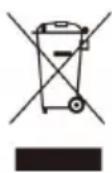
This product is subject to the provision of European Directive 2012/19/EU. The symbol showing a wheelie bin crossed through indicates that the product requires separate refuse collection in the European Union. This applies to the product and all accessories
marked with this symbol. Products marked as such may not be discarded with normal domestic waste, but must be taken to a collection point for recycling electrical and electronic devices.
Manufacturer: Shanghaimuxinmuyeyouxiangongsi
Address: Shuangchenglu 803nong11hao1602A-1609shi, baoshanqu, shanghai 200000 CN.
Imported to AUS: SIHAO PTY LTD. 1 ROKEVA STREETEASTWOOD NSW 2 Australia
Imported to USA: Sanven Technology Ltd. Suite 250, 9166 Anaheim Place, Rancho Cucamonga, CA 91730
| UK | REP |
YH CONSULTING LIMITED.
C/O YH Consulting Limited Office 147,
Centurion House, London Road,
Staines-upon-Thames, Surrey, TW18 4AX
| EC | REP |
E-CrossStu GmbH
Mainzer Landstr.69,
60329 Frankfurt am Main.
VEVOR®
TOUGH TOOLS, HALF PRICE
Technical Support and E-Warranty Certificate
www.vevor.com/support
VEVOR®
TOUGH TOOLS, HALF PRICE
natural_image
Line drawing of a handheld electronic device with a coiled cable and control buttons (no text or symbols)
BESOIN D'AIDE? CONTACTEZ-NOUS!
www.vevor.com/support
natural_image
Diagram showing a device with a highlighted internal component and an orange arrow pointing to it (no text or symbols present)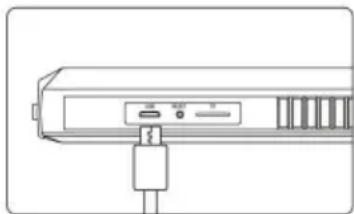
natural_image
Line drawing of a device rear panel with ports and connectors (no text or symbols)
natural_image
Close-up of a car's internal combustion engine component (no visible text or symbols)natural_image
Line drawing of a device with ports and connectors (no text or symbols)natural_image
Diagram showing a mechanical component being twisted with a red arrow, and a close-up of the pipe joint with an orange tip (no text or symbols)Fixation rotative
C/O YH Consulting Limited Bureau 147, Maison Centurion, London Road,
Staines-upon-Thames, Surrey, TW18 4AX
E-CrossStu GmbH
Mainzer Landstr.69,
natural_image
Line drawing of a handheld electronic device with a coiled cable and control buttons (no text or symbols)
1. Kamerasperre
natural_image
Technical line drawing of a device rear panel with a close-up inset showing a cable connector (no text or symbols)natural_image
Close-up of a car's internal combustion engine component (no visible text or symbols)natural_image
Line drawing of a device with ports and connectors (no text or symbols)natural_image
Diagram showing two mechanical joint configurations with arrows indicating rotation and flow direction (no text or symbols)C/O YH Consulting Limited Office 147, Centurion House, London Road,
Staines-upon-Thames, Surrey, TW18 4AX
www.vevor.com/support
VEVOR®
TOUGH TOOLS, HALF PRICE
natural_image
Line drawing of a handheld electronic device with a coiled cable and control buttons (no text or symbols)
HO BISOGNO DI AIUTO? CONTATTACI!
www.vevor.com/support
natural_image
Diagram showing a device with a highlighted internal component and an orange arrow pointing to it (no text or symbols present)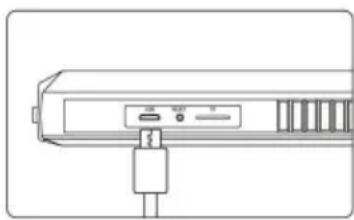
natural_image
Line drawing of a computer monitor with ports and cable (no text or symbols)
natural_image
Close-up of a car's internal combustion engine component (no visible text or symbols)natural_image
Line drawing of a device with ports and connectors (no text or symbols)natural_image
Diagram showing two mechanical joint configurations with arrows indicating rotation and divergence (no text or symbols)Fissazione rotante
Importato in AUS: SIHAO PTY LTD. 1 ROKEVA STREETEASTWOOD NSW 2122
Australia
C/O YH Consulting Limited Ufficio 147,
Casa del Centurione, London Road,
Staines-upon-Thames, Surrey, TW18 4AX
| REP.CE |
E-CrossStu GmbH
Mainzer Landstr.69,
natural_image
Line drawing of a handheld electronic device with a coiled cable and control buttons (no text or symbols)
- Bloqueo de cámara
natural_image
Technical line drawing of a device rear panel with a close-up inset showing a cable connector (no text or symbols)
Insertar tarjeta TF:
natural_image
Close-up of a car's internal combustion engine component (no visible text or symbols)natural_image
Line drawing of a device with ports and connectors (no text or symbols)natural_image
Diagram showing two mechanical components with a red rotation arrow, one being compressed and the other being tilted (no text or symbols)Fijación giratoria
Casa Centurión, London Road,
Staines upon Thames, Surrey, TW18 4AX
E-CrossStu GmbH
Mainzer Landstr.69,
natural_image
Line drawing of a handheld electronic device with a coiled cable and control buttons (no text or symbols)
POTRZEBUJE POMOCY? SKONTAKTUJ SIĘ Z NAMI!
1. Blokada aparatu
natural_image
Diagram showing a device panel with a highlighted internal component (no text or symbols)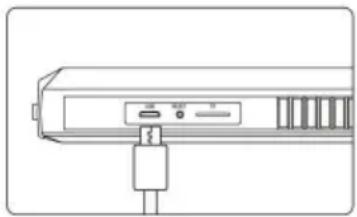
natural_image
Line drawing of a device rear panel with ports and connectors (no text or symbols)
Włóż kartę TF:
natural_image
Close-up of a car's internal combustion engine component (no visible text or symbols)natural_image
Line drawing of a device with ports and connectors (no text or symbols)natural_image
Diagram showing two mechanical components with a red rotation arrow, one being compressed and the other being tilted (no text or symbols)Mocowanie obrotowe
C/O YH Consulting Limited Biuro 147,
Dom Centuriona, London Road,
Staines-upon-Thames, Surrey, TW18 4AX
| REPREZENT KE |
E-CrossStu GmbH
Mainzer Landstr.69,
60329 Frankfurt nad Menem.
VEVOR®
TOUGH TOOLS, HALF PRICE
natural_image
Line drawing of a handheld electronic device with a coiled cable and control buttons (no text or symbols)
HULP NODIG? NEEM CONTACT MET ONS OP!
1. Cameravergrendeling
natural_image
Technical line drawing of a device rear panel with ports and connectors, showing front and side views (no text or symbols)natural_image
Close-up of a car's internal combustion engine component (no visible text or symbols)natural_image
Line drawing of a device with ports and connectors (no text or symbols)natural_image
Diagram showing a mechanical component being twisted with a red arrow, alongside its close-up view of the orange tip (no text or symbols)Roterende fixatie
C/O YH Consulting Limited Kantoor 147, Centurion House, Londen Road, Staines-upon-Thames, Surrey, TW18 4AX
natural_image
Line drawing of a handheld electronic device with a coiled cable and control buttons (no text or symbols)
BEHÖVS HJÄLP? KONTAKTA OSS!
www.vevor.com/support
PRODUKT INTRODUKTION
1. Kameralås
natural_image
Diagram showing a device panel with an orange arrow pointing to a vertical bar and a small inset view of the component (no text or symbols)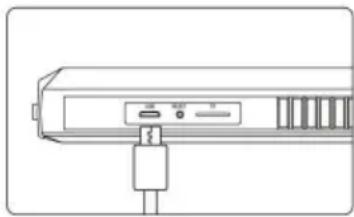
natural_image
Line drawing of a device rear panel with ports and connectors (no text or symbols)
Sätt i TF-kort:
natural_image
Close-up of a car's internal combustion engine component (no visible text or symbols)natural_image
Line drawing of a device rear panel with ports and connectors (no text or symbols)natural_image
Diagram showing two mechanical joint configurations with arrows indicating rotation and flow direction (no text or symbols)Roterande fixering
C/O YH Consulting Limited Office 147, Centurion House, London Road,
Staines-upon-Thames, Surrey, TW18 4AX
| EC | REP |
E-CrossStu GmbH
Mainzer Landstr.69,
60329 Frankfurt am Main.
VEVOR®
TOUGH TOOLS, HALF PRICE
www.vevor.com/support