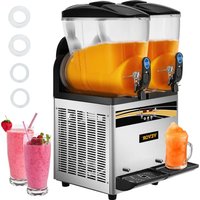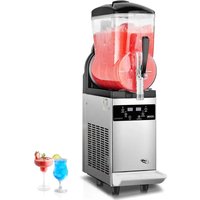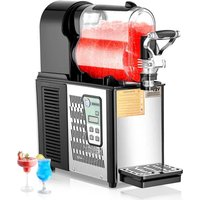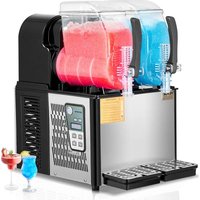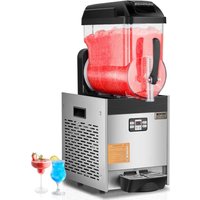
XRJ12LX1 - Ice Maker Vevor - Free user manual and instructions
Find the device manual for free XRJ12LX1 Vevor in PDF.


| Product type | Slush machine |
| Brand | Vevor |
| Model | XRJ12LX1 |
| Bowl capacity | 12 liters |
| Dimensions (L x W x H) | 28.5 x 52.5 x 74.5 cm |
| Net weight | Approximately 30 kg |
| Power supply | Electric (see rating label) |
| Voltage | 220-240 V |
| Frequency | 50 Hz |
| Noise | Less than 65 dB |
| Climate type | N (normal) |
| Recommended liquid temperature | 20 °C to 32 °C |
| Number of bowls | 1 |
| Main functions | Cleaning, Juice (cold drink), Slush / margarita wine / ice |
| Control panel | Digital display with POWER MIX, JUS, SLUSH, SETUP, ADD, MINUS buttons |
| Lighting | Built-in LED |
| Bowl material | Stainless steel |
| Maintenance | Daily cleaning recommended; condenser to be cleaned regularly |
| Spare parts | Available (see manual) |
| Warranty and support | Electronic warranty certificate and support at www.vevor.com/support |
Frequently Asked Questions - XRJ12LX1 Vevor
User questions about XRJ12LX1 Vevor
0 question about this device. Answer the ones you know or ask your own.
Ask a new question about this device
Download the instructions for your Ice Maker in PDF format for free! Find your manual XRJ12LX1 - Vevor and take your electronic device back in hand. On this page are published all the documents necessary for the use of your device. XRJ12LX1 by Vevor.
USER MANUAL XRJ12LX1 Vevor
Technical Support and E-Warranty Certificate www.vevor.com/support
SLUSH MACHINE
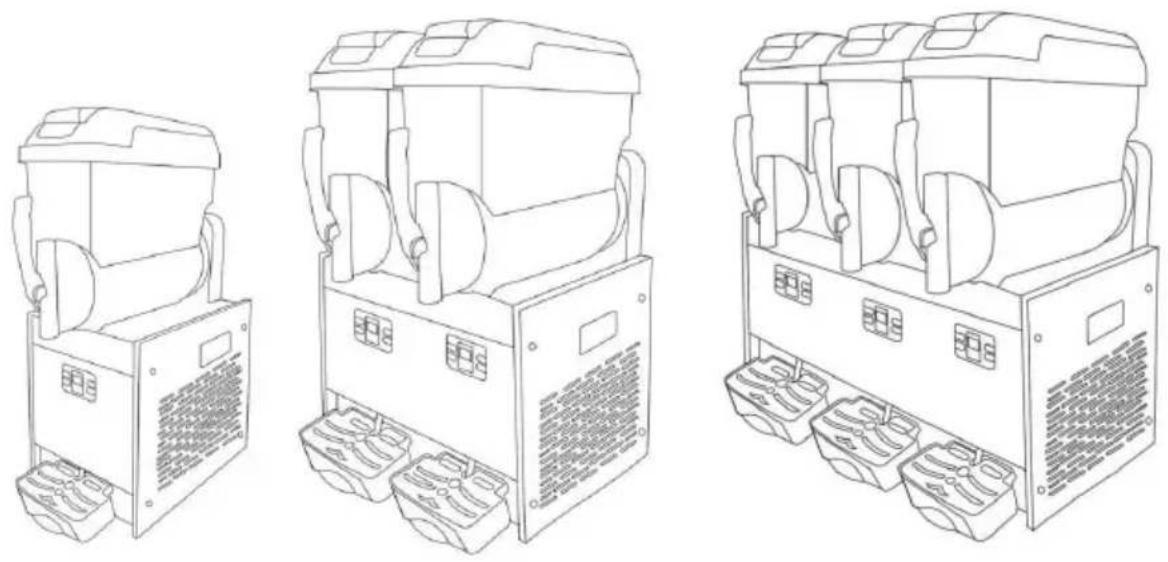
MODEL: XRJ12LX1 XRJ12LX2 XRJ12LX3
We continue to be committed to provide you tools with competitive price. "Save Half", "Half Price" or any other similar expressions used by us only represents an estimate of savings you might benefit from buying certain tools with us compared to the major top brands and does not necessarily mean to co all categories of tools offered by us. You are kindly reminded to verify carefully when you are placing an order with us if you are actually Saving Half in comparison with the top major brands.
MODEL: XRJ12LX1 XRJ12LX2 XRJ12LX3
NEED HELP? CONTACT US!
Have product questions? Need technical support? Please feel free to contact us:
Technical Support and E-Warranty Certificate www.vevor.com/support
This is the original instruction, please read all manual instructions carefully before operating. VEVOR reserves a clear interpretation of user manual. The appearance of the product shall be subject to product you received. Please forgive us that we won't inform you and there are any technology or software updates on our product.

Warning-To reduce the risk of injury, user must read instructions manual carefully.

CAUTION: Changes or modifications not expressly appro by the party responsible for compliance could void the authority to operate the equipment!
This device complies with Part 15 of the FCC Rules. is subject to the following two conditions:
1) This product may cause harmful interference. 2) This product must accept any interference received, in interference that may cause undesired operation.
WARNING: Changes or modifications to this product not expressly approved by the party.responsible for compliant could void the user's authority to operate the product.
Note: This product has been tested and found to comp the limits for a Class B digital device pursuant to Part FCC Rules. These limits are designed to provide reaso protection against harmful interference in a residential installation.
This product generates, uses and can radiate radio frequency, and if not installed and used in accordance with instructions, may cause harmful interference to radio communications. However, there is no guarantee that interference will not occur in a particular installation. If product does cause harmful interference to radio or telecommunication, which can be determined by turning the product and on, the user is encouraged to try to correct the user by one or more of the following measures.
- Reorient or relocate the receiving antenna.
- Increase the distance between the product and receiv
- Connect the product to an outlet on a circuit different to which the receiver is connected.
- Consult the dealer or an experienced radio/TV technic assistance.
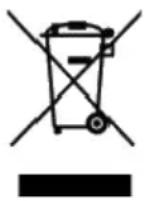 | This product is subject to the provision of European Di 2012/19/EC.The symbol showing a wheelie bin crossed through indicates that the product requires separate refu collection in the European Union.This applies to the pro and all accessories marked with this symbol.Products m as such may not be discarded with normal domestic w must be taken to a collection point for recycling electric electronic devices |
Instructions
Thank you very much for choosing this slush machine.Slush machine kind of machine and equipment widely used in the food industry and catering industry,it is mainly through the frozen juice,milk or yogurt and other beverages frozen into a sorbet,and will be cut into fine particles through the scraper,made of soft taste snow ice!Please read all of the instructions before using it.The information will help you achieve the possible results.
Contents
- Introduction
1.1 Manufacturer
1.2 Operator
1.3 Manual distribution
1.3.1 Function and content
1.3.2 Who must read the manual
1.3.3 How to keep the manual - Machine description
2.1 Usage
2.2 Main components
2.3 Technical data
2.4 Control panel - Safety manual
- Transportation and storage
4.1 Packing
4.2 Transportation
4.3 Storage
5. Installation
5.1 Parts list
5.2 Position to install
5.3 Handling package material
5.4 Connecting power
6. Operation
6.1 Preparing material
6.2 Starting a 1-bowl slushmachine.
6.3 Starting a 2-bowl slush machine.
6.4 Starting· a-3-bowl.slush·machine
6.5 Dispensing the slush
6.6 Adjusting slush consistency.
6.7 Emergency.
7. Cleaning and maintenance
7.1 Empty the bowl.
7.2 Disassembling the dispensing tap
7.3 Moving out bowl and cover
7.4 Cleaning and disinfecting parts.
7.5 Resetting cleaned parts
7.6 Cleaning steps
7.7 Cleaning drip trays
7.8 Replacing the bulb
7.9 Cleaning condenser
7.9.1 Cleaning the condenser of one-bowl slush machine
7.9.2 Cleaning the condenser of two-bowl slush machine
7.10 Scheduled maintenance
8. Waste treatment
9. Troubleshooting
10. Intelligent electrical valves system.
11. Slush machine explosive diagram.
1. Introduction
1.1 Manufacturer
The manufacturer's details are shown on the identification plate
1.2 Operator
Based on different applications. there are two types of persons.
User
In accord with Health standard people trained compel techniques,
Know all to distribute slush have below ability after reading this manu
Place and change slush machine Properly dispensing the products
Cleaning the slush machine
Specialized technical people
Studied this manual and trained how to install, use and maintain this machine;
When serious fault, can repair the slush machine and know this manual well
Master all information of the manual and can explain the diagrams and graphs correctly;
Know important hygienic knowledge well, prevent accident concurring, know technical and safety standard
Have experience to serve this kind of slush machine.
Master treatment measure to emergency. ind separated safety device a use the machine correctly

People are banned to use the machine who do not accord w above requirement
1.3 Manual distribution
Users have to read this manual carefully before using.
1.3.1 Function and content
Offer vital information of using and installing
1.3.2 Who to read manual
Users and specialized technical people.
This manual is an inseparable part of the machine.
So it needs to be delivered to the purchaser when sold.
1.3.3 How to keep manual
Manual has to be placed nearby the machine and keep intact and c
2. Machine description
2.1 Usage
This machine is specially used for making slush. If used to make da other foods, bowl material temperature needs to be tested and abide b machine's current regulation and standard
2.2 Main Component
| 1.Bowl roof2.Bowl3.Control panel | 4.Drip tray5.Drip tray cover6.Drain hose | 7.Tap8.Handle |
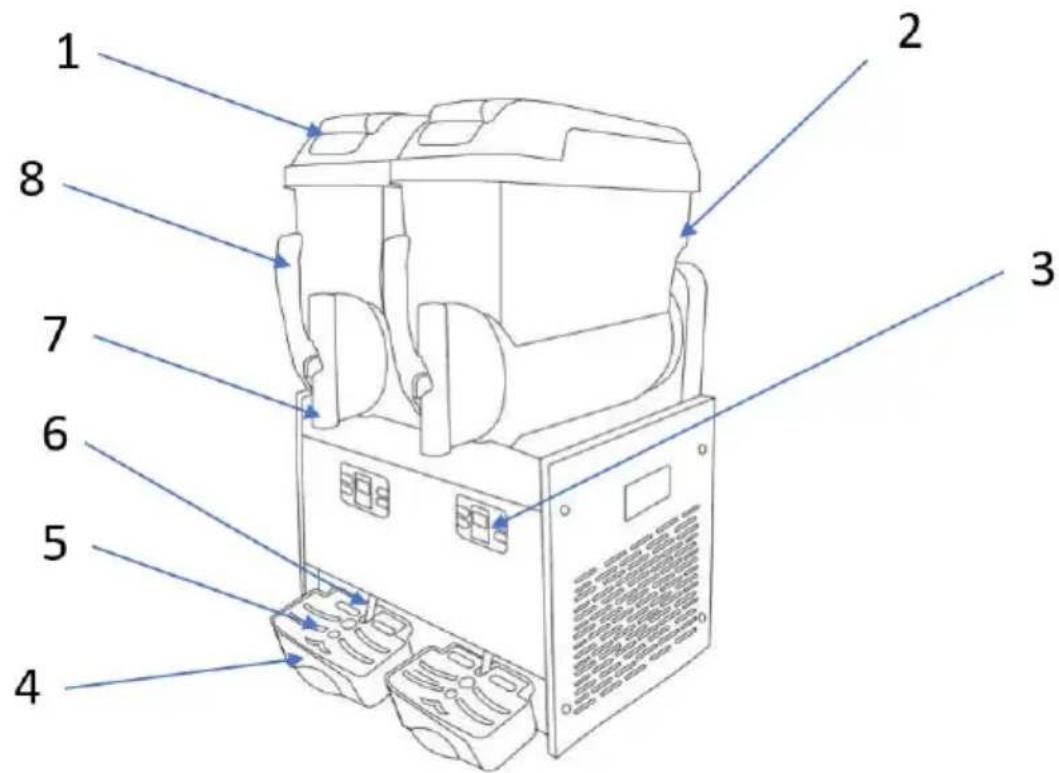
Fig.1
2.3 Technical data
Remarks:
Capacity and weight are approximate number
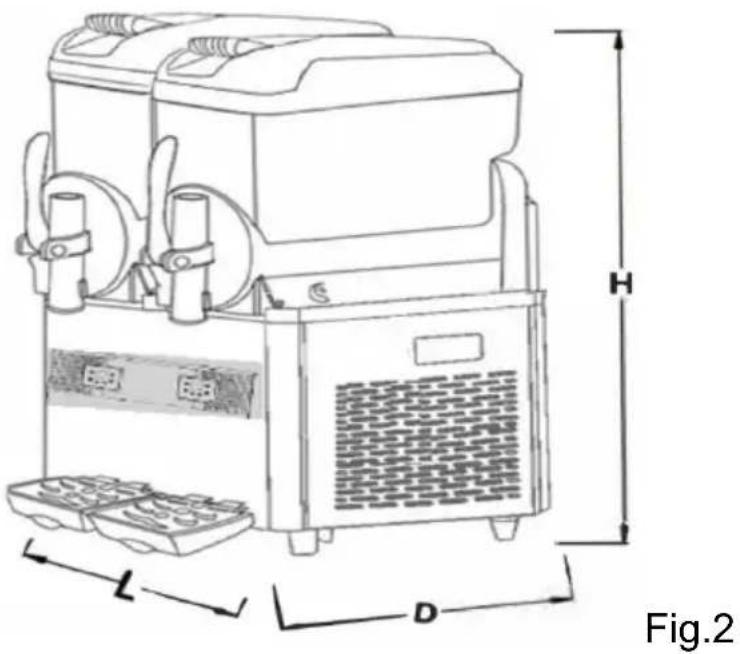
| Mode | XRJ12LX1 | XRJ12LX2 | XRJ12LX3 |
| Size LxDxH-(cm) | 28.5x52.5x74.5 | 43x54x74 | 63x53.5x74.5 |
| Net weight (kg) (Bow empty) | See nameplate | ||
| Power (w) | See nameplate | ||
| Liquid Temperature | Min:20°C/68°F Max:32°C/89°F | ||
| Bow | 1 | 2 | 3 |
| Bowl volume (L) | 12 | 24 | 36 |
| Noise | <65 decibel | ||
| Climate type | N | ||
Capacity and weight are approximate number
Manufacturer has right to change and will not notice specially.

Any change and increase has to be approved and executed by manufactory.
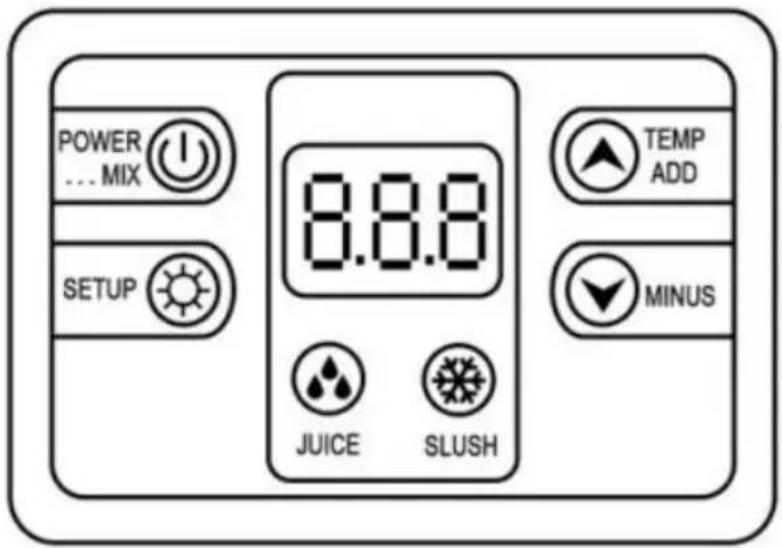
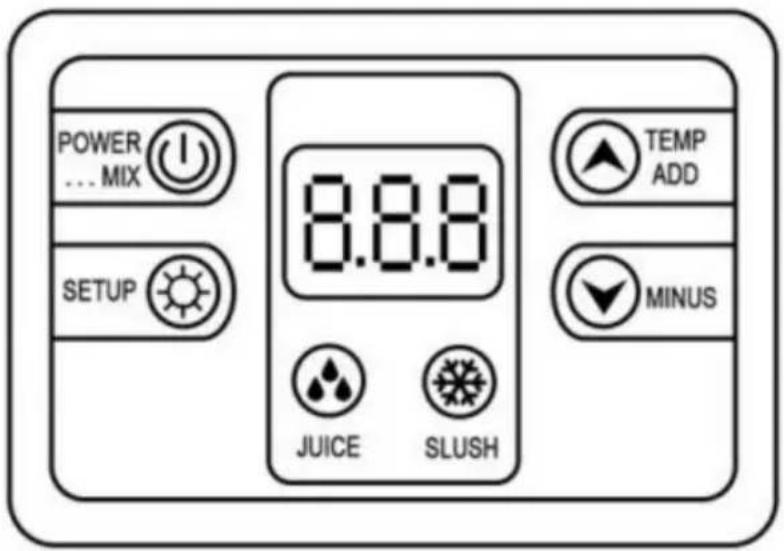
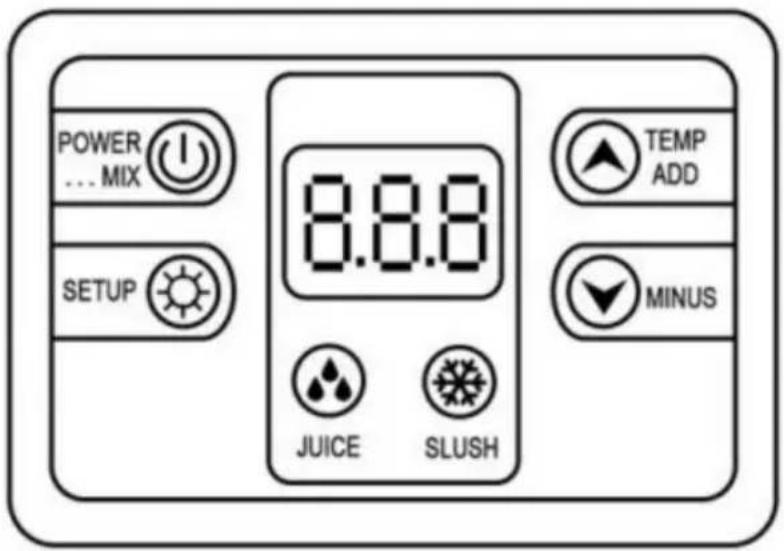
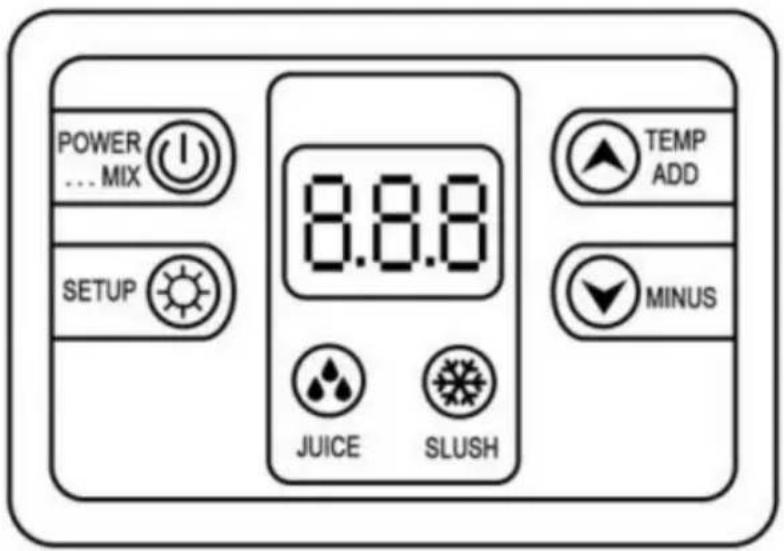
2.4 Control panel
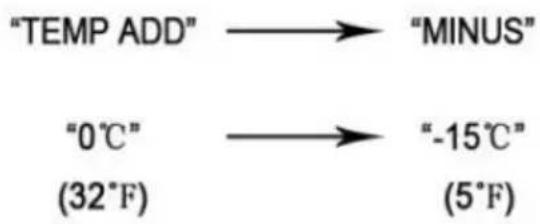
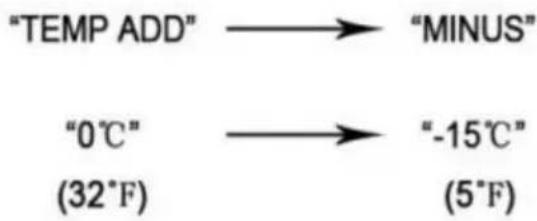
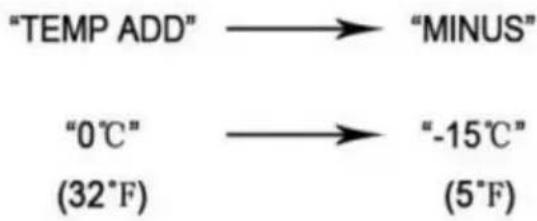
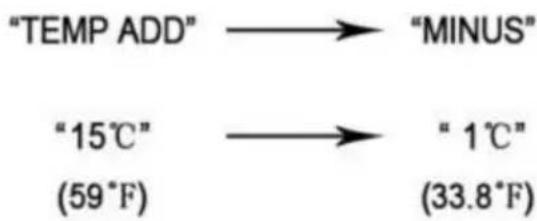
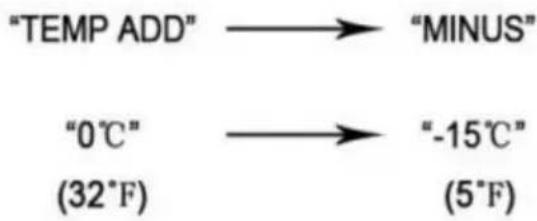
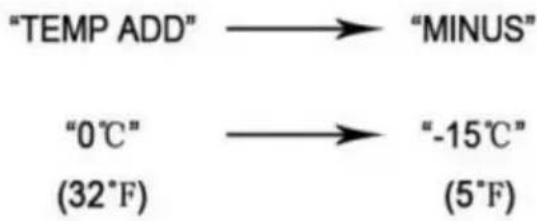
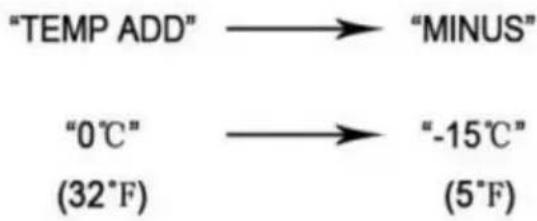
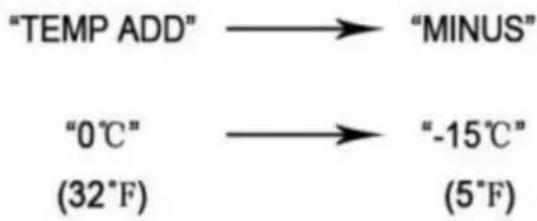
Adjustment of slush temperature

flowchart
graph LR
    A["TEMP ADD"] --> B["MINUS"]
    C["0°C"] --> D["-15°C"]
    E["(32°F)"] --> F["(5°F)"]
Press the button "MINUS", it would turn colder, Press"TEMP ADD", it would get warmer.
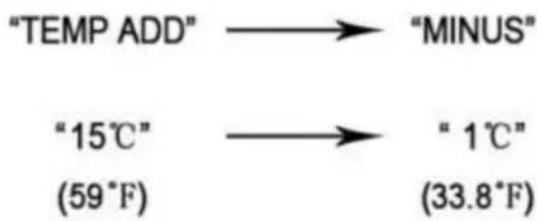
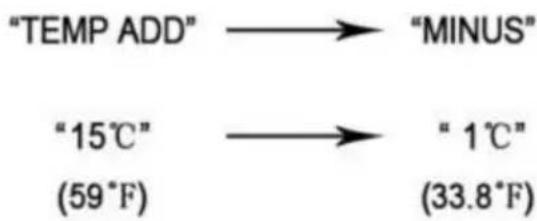
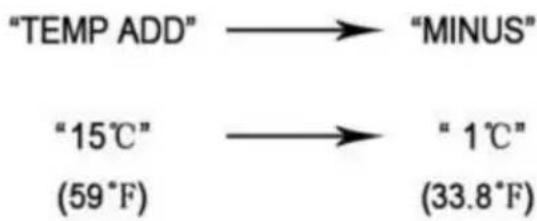
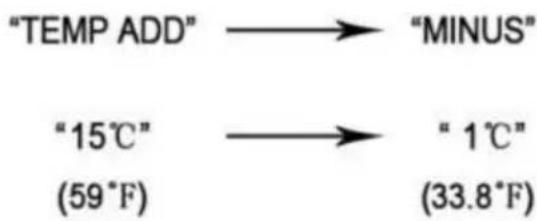
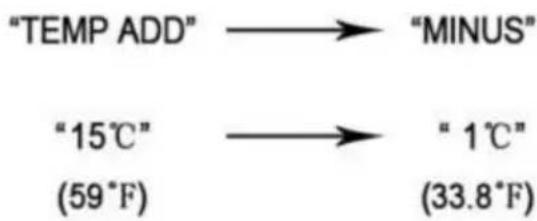
Adjustment of juice temperature

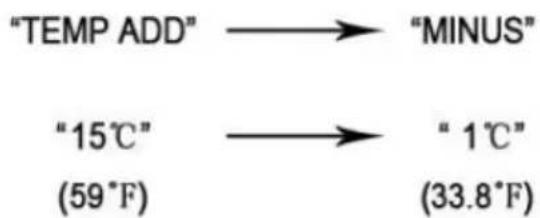
Press the button "MINUS", it would turn colder, Press"TEMP ADD", it would get warmer.
Fig.3
3. Safety manual
Slush machine parts and condenser's installation, slush machine trouble shooting ,exclusion and maintenance have to be operated by manufacture professionals or people who have related experience.
Without experienced people monitoring or guiding, slush machine can be used by disabled, sense disable, mental disable people, lack of experience and knowledge;
Children need to be taken care of when playing nearby the machine. When machine's wire is broken, they have to be replaced by manufacture professionals or people who have related experience
When machine is scraped, it has to be delivered and handled by relat authority institutions
4. Transportation and storage
4.1 Packing
Wooden box,contoured foam&collect.
Packing size (approximate)
| Width (L) | Depth (D) | Height (H) | |
| XRJ12LX1 | 385mm | 585mm | 910mm |
| XRJ12LX2 | 518mm | 585mm | 915mm |
| XRJ12LX3 | 690mm | 570mm | 860mm |
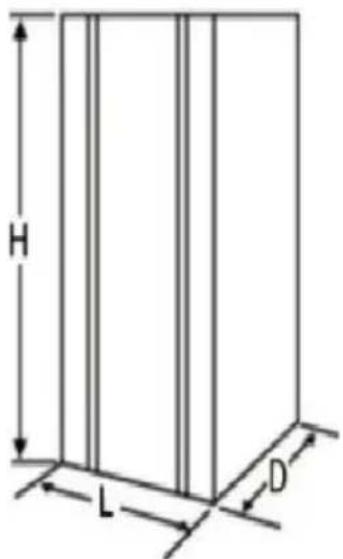
Fig.4
4.2 Transportation
Keep up ward and carried by two people at least.
4.3 Storage
Notice please do not exceed three layers. See fig.5
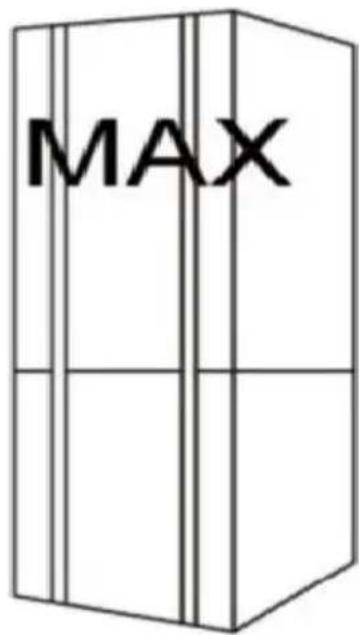
Fig.5
5. Installation
The slush machine has to be installed indoor with hard and plain ground under enough light and ventilation(Ground inclination can't be more than degree)
5.1 Parts list
After cleaning and disinfecting all indicated parts in manual have to be coated with lubricating oil.
5.2 Position to install
Installation position have to be planned in advance;
Installation place have to be hard and plain
Installation condition is enough light and ventilation and clean; Power socket is also needed;
Installation distance from other objects see below fig.6
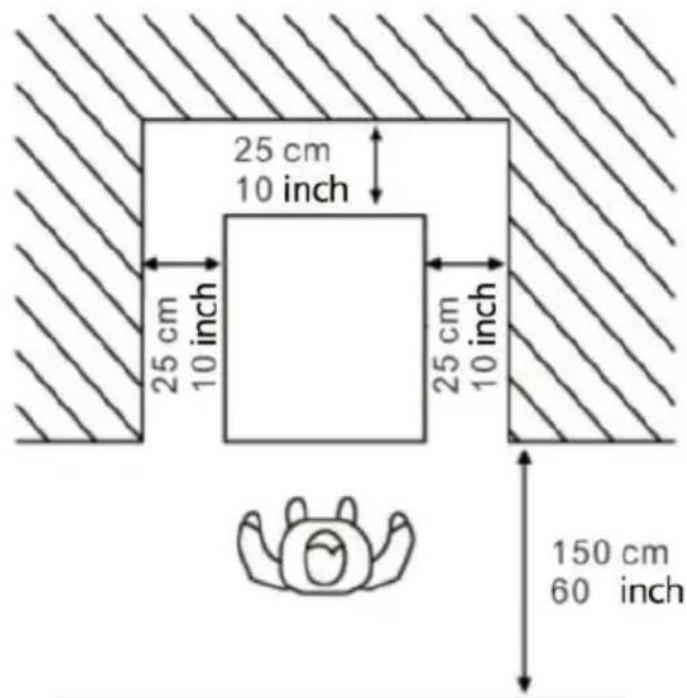
Fig.6
5.3 Handling package material
Handling packing material separately under local rules and we suggest keep it to repack and ship in future.
5.4 Electrical connection
This job may be performed only by specialized technical personnel.
Before plugging in the machine, make sure that the main switch is sw off.
The Purchaser is responsible for making the electrical connection.
The machine must be connected to the electricity mains by means of plug fitted on the power cord. Be sure to comply with:
The technical regulations and standards in force at the time of install:
The data shown on the rating plate on the side of the machine
6. Operation
| Slushy(Percentage of sugar: ≥15%) | If you need to adjust the consistency of slush or ice cream you can adjust knob I: to adjust the hardness temperature of slush /margarita wine/ ice cream."+" : means thicker consistency more Lower temperature."-" : means Low consistency / higher temperature. |
| Margarita Wine Slush(Percentage of liquor. 10%-60% | |
| Ice Cream(Percentage of ice cream pow≥33%) |
Note: When the temperature inside bowls is very low, there will be 1 on the outside of the bowls, which is normal.
Checking the functions before the machine is working
6.1 Preparing material and stirring evenly
Only water is prohibited
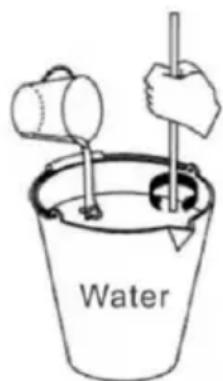
Fig.7
Attention:
Operate under manufacturer's direction;
Dilute and stir concentrated liquor with water in a container Mixture's content should be more than 15%. Lower content will damage the au and gear motors
If you need to make margarita wine slush, pour the
appropriate percentage of margarita into the container
according to your needs
If you want to make ice cream, the ratio of ice cream powder to water is usually 1:2.5 or 1:3, which is often recommended on the ice cream powder package.
Remove the lid as below direction:
-
Lift the top lid;
-
Pour the material into bowls

Attention: Do not open the cover by force.
Hot liquid can not be put in(hot liquid means degree exceed 40 °C
3.Close the top lid after pouring the material
- Warning: Before connecting power or starting maoput material into bowl
- Material can not just be water.
- Warning: Banning petting hand in bowl machine i working
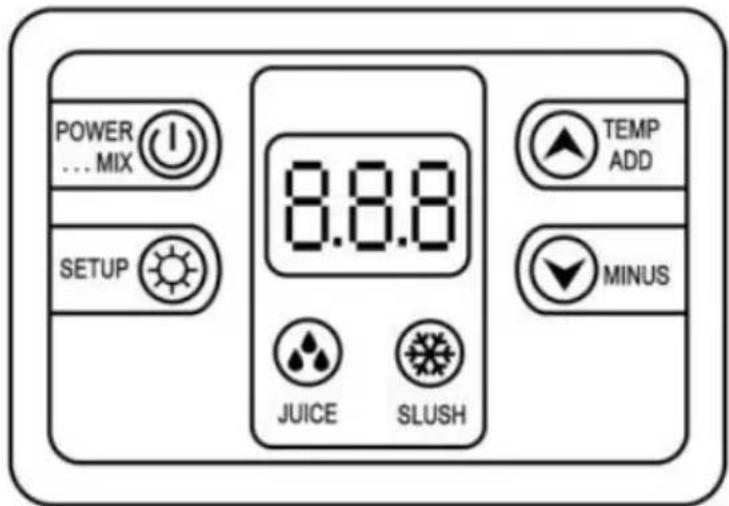
| 8.8.8 | Display screen |
| Cleaning/standby system | |
| Juice system | |
| Slush system | |
| Temperature Increase | |
| Temperature Decrease | |
| Settings button |
6.2 Starting a 1-BOWL SLUSH MACHINE Model: XRJ12LX1
Function1 Clean System: Press "POWER MIX KEY", turn on mixing
function. Press"POWER MIX KEY" again to turn off the mixing functio Function 2 Make juice: Press the "JUICE KEY", turn on the cold drir function, and the compressor is powered on. then press the "POWER KEY" to close the juice function.
Function3 Make slush/margarita wine/ice cream: Press the "SLUSH KEY" turn on the slush/margarita wine/ice cream function, and the compressor powered on. then press the "POWER MIX KEY" to close the slush/margarita wine/ice cream function.
Function4 Light: When plugged in, the light will automatically light up you need to turn it off, just unplug the light cord connector on the machine.
6.3 Starting a 2-BOWL SLUSH MACHINEModel: XRJ12L X2
There is a control panel under each bowl to control this bowl.
Function1 Clean System: Press "POWER MIX KEY", each on mixing function. Press"POWER MIX KEY" again to turn off the mixing functio Function 2 Make juice: Press the "JUICE KEY", turn on the cold drir function, and the compressor is powered on. then press the "POWER KEY" to close the juice function.
Function3 Make slush/margarita wine/ice cream: Press the "SLUSH KEY" turn on the slush/margarita wine/ice cream function, and the compressor powered on. then press the "POWER MIX KEY" to close the slush/margarita wine/ice cream function.
Function4 Light: When plugged in, the light will automatically light up you need to turn it off, just unplug the light cord connector on the machine.
6.4 Starting a 3-BOWL SLUSH MACHINE Model: XRJ12L .X3
There is a control panel under each bowl to control each bowl.
Function1 Clean System: Press "POWER MIX KEY", turn on mixing function. Press"POWER MIX KEY" again to turn off the mixing functio Function 2 Make juice: Press the "JUICE KEY", turn on the cold drir function, and the compressor is powered on. then press the "POWER
KEY"to close the juice function.
Function3 Make slush/margarita wine/ice cream: Press the "SLUSH KEY" turn on the slush/margarita wine/ice cream function, and the compressor powered on. then press the "POWER MIX KEY" to close the slush/margarita wine/ice cream function.
Function4 Light: When plugged in, the light will automatically light up you need to turn it off, just unplug the light cord connector on the machine.
6.5 Dispensing slush
Pulling down the handle and slush will outflow from

Attention: if dispense slush first time or after
a long stop, please extrude and waste a little and then distribute customers.
7. Cleaning and maintenance
Before cleaning or maintaining external parts, please ensure main switch off and unplugged.
Any cleaning or maintaining protection supplies needs to wear (gloves. glasses an so on) based on local safety standard
When cleaning or maintaining, operate as below.
Wear protective gloves against an accident.
Do not use solvent or flammable substance
Do not use tough or metal sponge to clean machine or its parts
Do not spray liquid to nearby area.
Do not wash parts in the bowl
Do not dry parts in furnace or microwave oven.
Do not immerse the machine in water
Do not spray the water to the machine directly.
Warm water and approximate cleaner can be used (abiding by local
and rules)
After finishing, make sure that all protective covers and guards that have been removed or opened and sent back in place and properly secure. Cleanliness and hygiene have to be taken carefully and forcibly based on local standard to ensure qualified slush
Bowl needs to be cleaned everyday at least and abiding by local law regulations
And cleaning times may be added based on different products. More information, please consult the manufacturer if machine will not be used one day continuously please clean dispensing taps with clean rag.
Even though machine's components of stainless steel, plastic and rub are easy to clean as well as its shape, it is still necessary to prevent and fungi reproduction due to halfway cleaning. When the plug is not out or the total switch is in the open state, do not clean or maintain a machine.
7.1 Empty the bowl
Before cleaning bowl , empty the bowl
If it is the first time to use, no need to make it empty .
This manual just explains one bowl as sample
Other bowls' operations are the same based on their related button. Pl click the power key and the key"STRIR", then pour material out from
7.2 Disassembling the dispensing tap
Before removing the bowl, it is recommended to disassemble the tap. cleaning ,the tap must not be reapplied until the bowl has been corr positioned in its seat. Remove fastener by hand , then disconnect the dispensing handle by pushing upward, then push the piston and spring downward, remove the 0-ring. Put all spare parts in lukewarm water( temperature around 50"C)and clean as shown in. fig.9
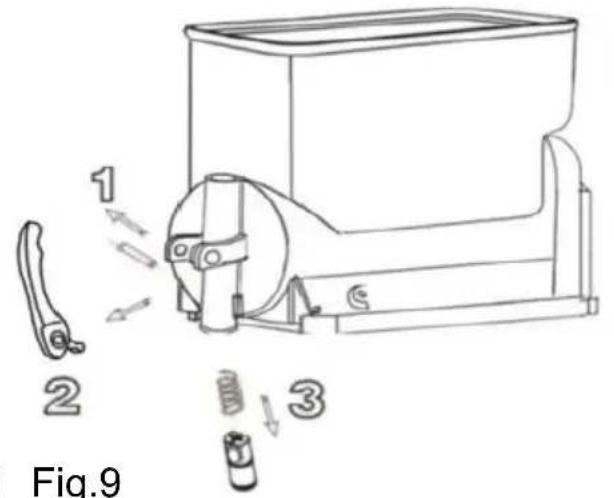
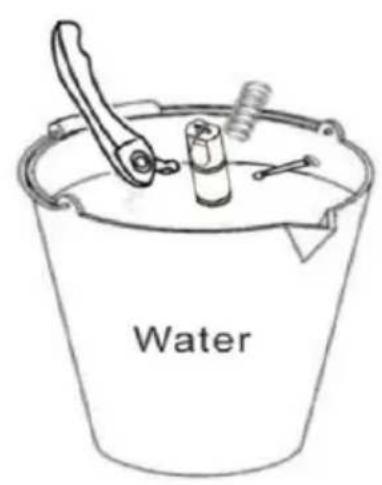
Fig.8 Fig.9
Do not disassemble taps when there are products or liquid in bowls
7.3 Moving out the bowl and cover
Move out every bowl to clean the machine.
Move out the bowl as below steps:
- Lift the top cover upward and take it out.
pull the tank upward and outward to completely remove it from its se
- Take out the stirrer and the seal of stirrer. See fig.10.
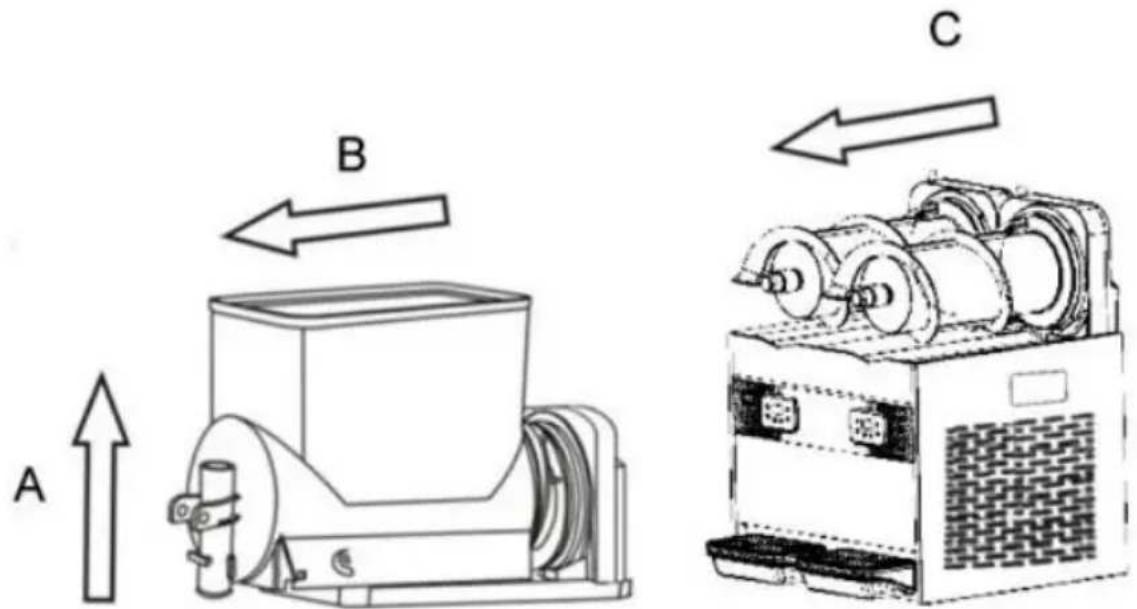
Fig.10
7.4 Clean and disinfect parts
All dismantled parts should be cleaned thoroughly

Importance: Cleaning way has abide by local current hygiene standard.
Please operate as below instructions:
Pour water in the container. And then mix sanitizer with water (Add sodium hypochlorite to water)
Using a sponge with sanitizer to clean bowls, covers and evaporators thoroughly, cleaning with water thoroughly
Add sanitizer to another container.
Put dismantled parts in sanitizer for 30 minutes.
Repeat cleaning with water thoroughly .
Make the parts dry.
Assemble machine under 7.5instruction.
Using a sponge with sanitizer clean the roof and the parts touching material.
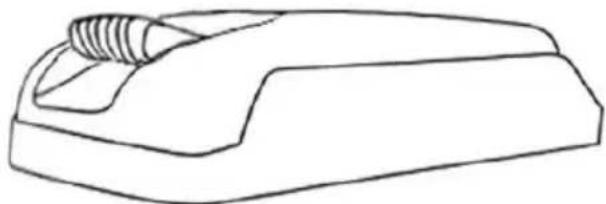
natural_image
Line drawing of a mechanical component with threaded end (no text or symbols)Fig.11
Remain for 30 minutes
Clean bottom surface with water 2-3 times by the sponge.
Put the cover at clean area and dry it by rag
Ban cleaning by water or disinfecting before taking away the cover
7.5 Reset cleaned parts
All disinfected parts have to be reassembled carefully.
Some parts need to be lubricated to work normally
Put gasket (A) on stirrer.see Fig.12
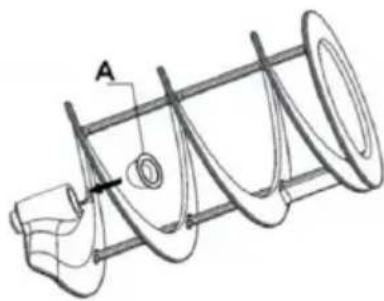
natural_image
Technical line drawing of a mechanical component with helical grooves and a labeled section A (no text or symbols beyond label)Fig.12
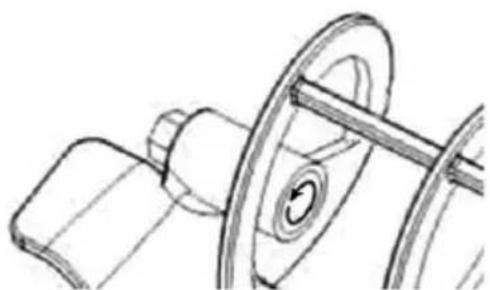
Importance: Check gasket in regular if broken. Please replace a new one. Replace gasket(A) once at least one year Using the grease provided, lubricate the seal A) see Fig.13
natural_image
Technical line drawing of a mechanical assembly with pulley and shaft (no text or symbols)Fig.13
Install the gasket (B), lubricate it with grease as circle arrow n See Fig 14
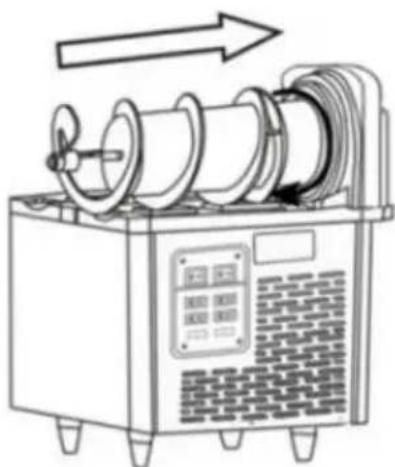
natural_image
Line drawing of a mechanical device with spools and a control panel, no text or symbols presentFig.14

Put stirrer on to the stainless steel cylinder as straight arrow,
Fig.14. Attention: Adjust the stirrer to appropriate location.
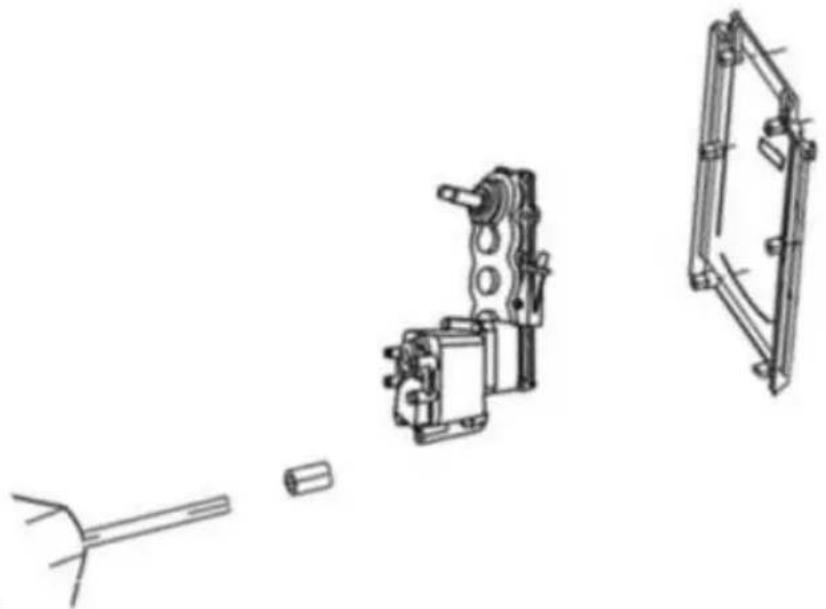
Replace the seal ring. When the motor part leaks, you need to replace the seal ring
Take out the motor bracket connected to the motor and then replace head seal ring(washer of axis, seal of axis).
When replacing. You need to add some grease. Then install the motor bracket connected to the motor.
See fig.15
natural_image
Technical line drawing of mechanical components including a shaft, housing, and frame (no text or symbols)Fig.15
Assemble the bowl and install the cover as Fig.16
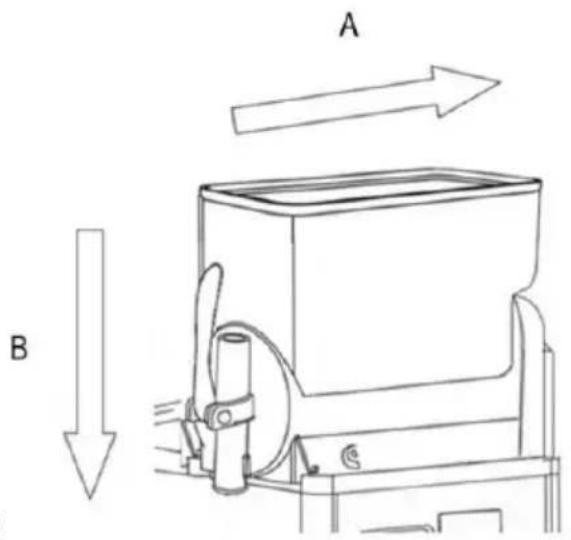
Fig.16
Install taps as below instructions as Fig.17
-
Lubricate bolt totally with grease.
-
Insert screw, when taps steady.
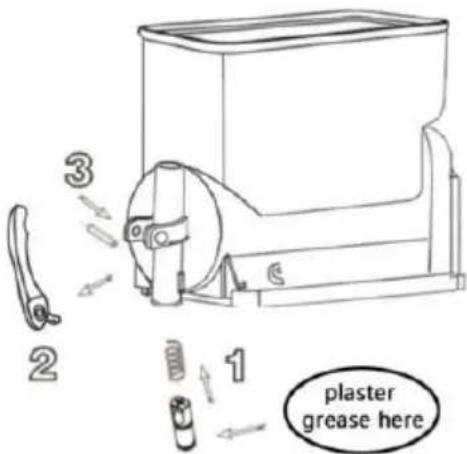
Fig.17

Attention: install all parts under figures instructions.
Please apply grease well to prevent liquid leakage.
7.6 Cleaning step
Before using this machine, below cleaning steps are needed
- Fill bowl with water fully
2.Start machine only in cleaning mode and stir for 5 minutes
- Stop machine and open tap to clear container.
7.7 Cleaning drip trays
Drip tray should be emptied and cleaned everyday

Attention: All machine drip trays should be cleaned.
Drip trays need to be emptied and cleaned. Take out water tray by upward and then outward.
Washing the tray and grid. Separately with lukewarm water.
Dry all of the components. Fit the tray back in place and press down to secure it to the machine. Reposition the grid on top of the tray.

When machines stopped, cleaning by wet rag and dry the parts.
7.8 Replace bulb

Only when machine power is off and unplugged, the bulb can replaced According to below figure, open the inner cover, replace the LED bulb, after assembly put the inner cover back, confirm being cl well.
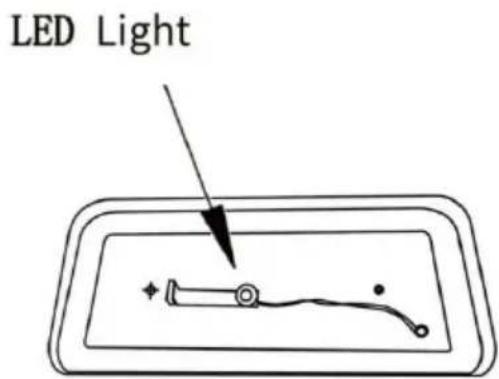
Fig.18
7.9 Cleaning the condenser
Only professionals can clean the condenser. They know all operating well, using approximate device and abide by local law and regulation strictly
Condensers needs to be cleaned in regular.
Warning: Machine sharp surface may reveal after dismantling safety protection parts.
Dirty condenser will weaken machine function.
Condensers can be seen after taking out safety protection parts.
Even though only one plate (front or back or side) is not installed the machine is also banned to use.
Operators are banned to clean condensers
Protection parts need to be positioned by Screwdrivers
Fig:19
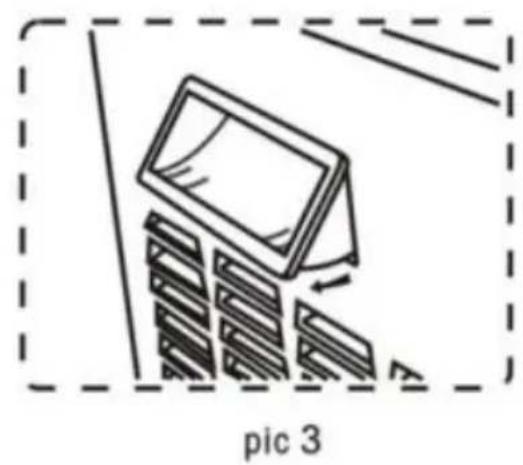
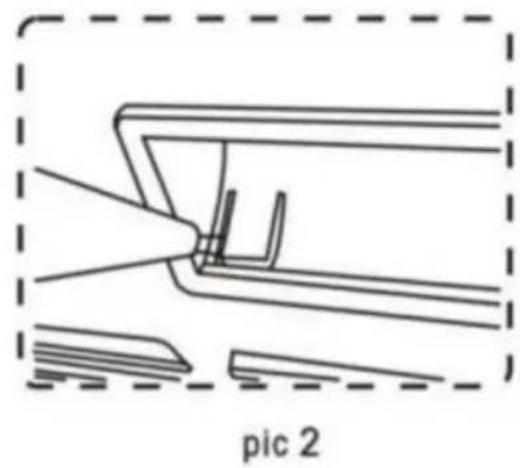
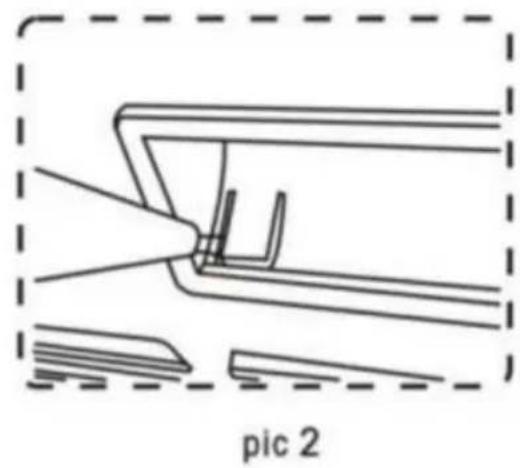
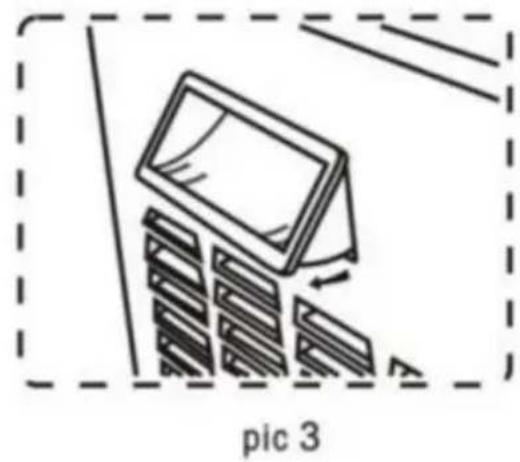
Panel Dismounting Method
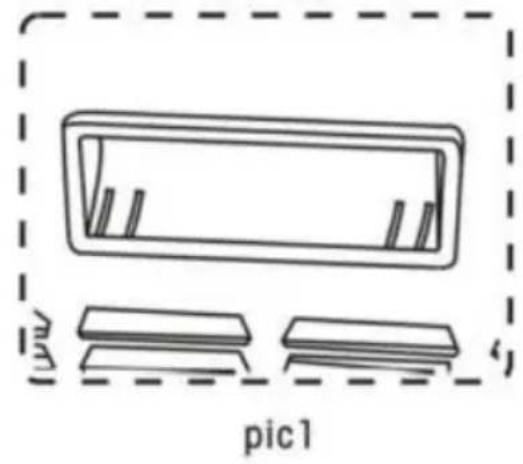
natural_image
Simple line drawing of a rectangular object with internal features, enclosed in a dashed border, and two separate rectangular blocks below labeled 'pic1' (no text or symbols on the objects themselves)In order to take off the panel, we have to take off the handle first (see pic 1)
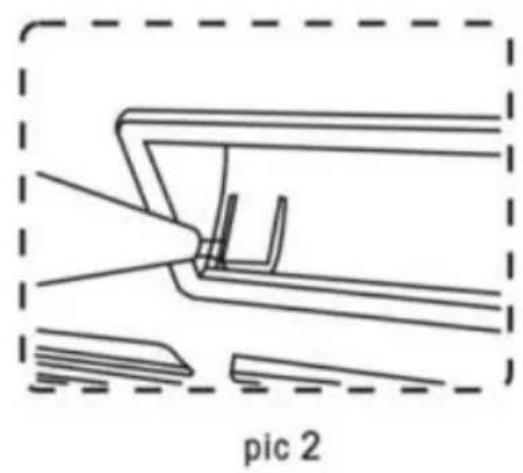
natural_image
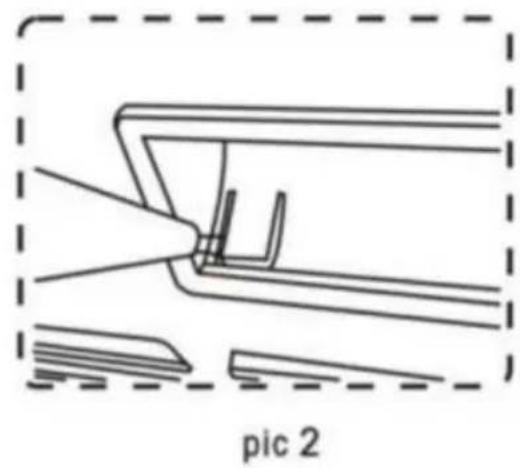
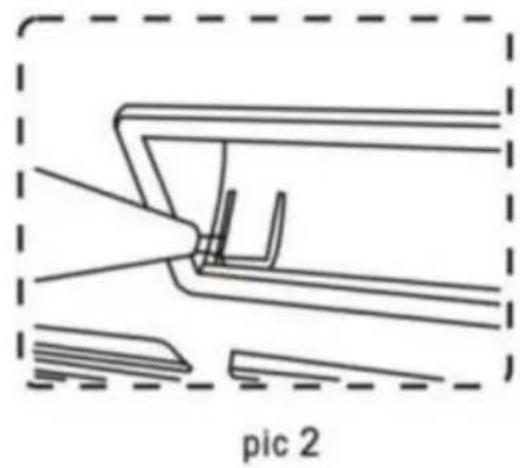
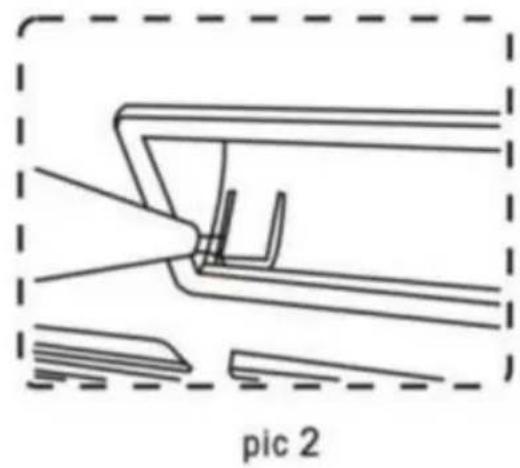
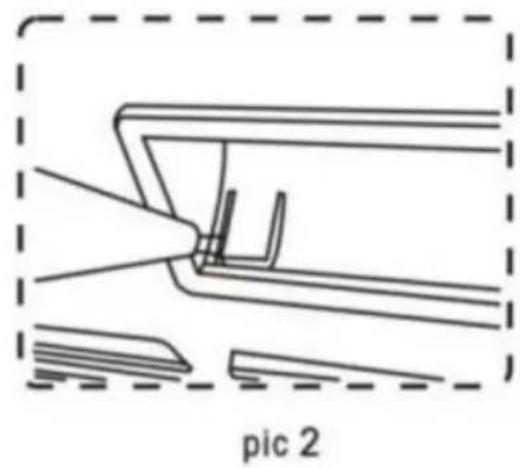
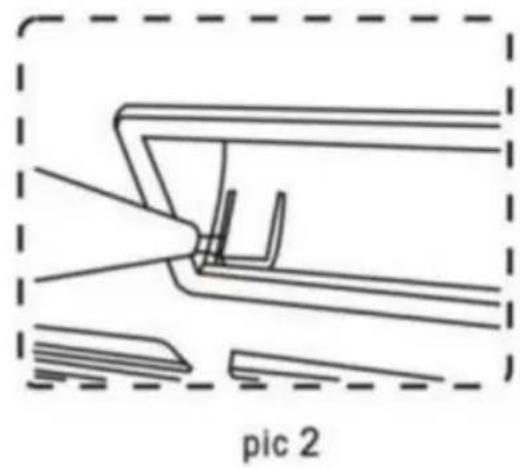
Diagram of a mechanical assembly with labeled components, showing a tool interacting with a component inside a dashed boundary (no text or symbols on the diagram itself)Using slot type screwdriver pry up the panel side (see pic 2)
natural_image
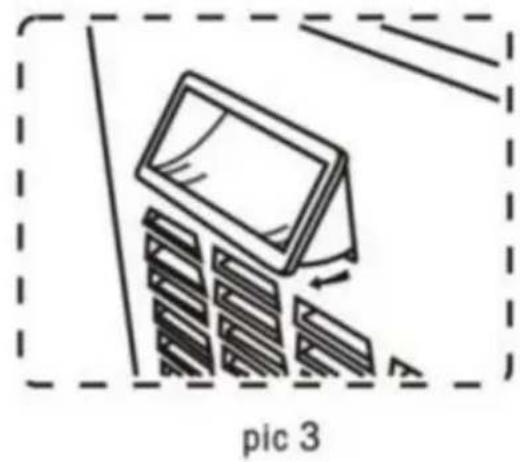
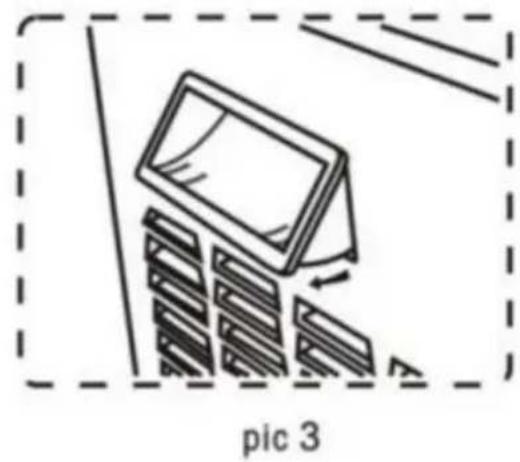
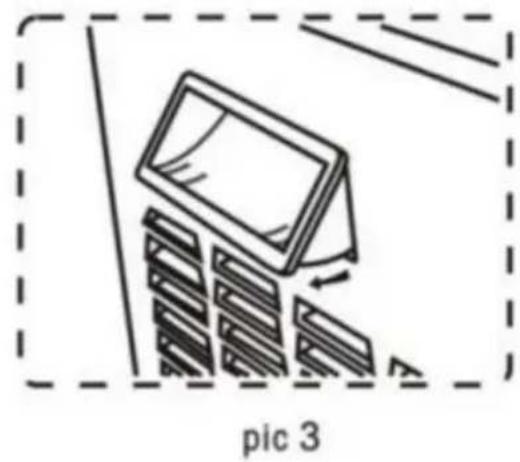
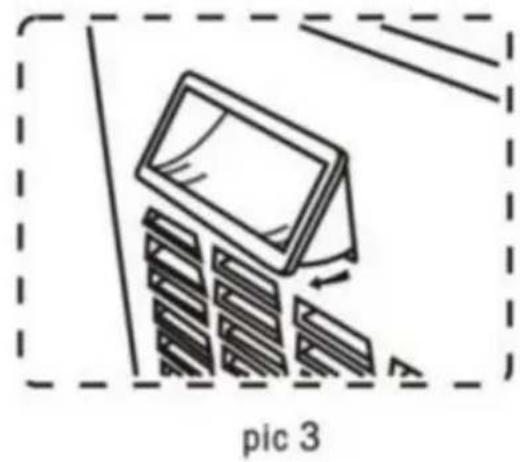
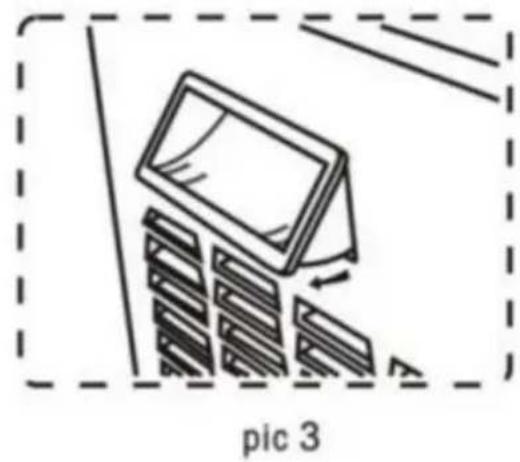
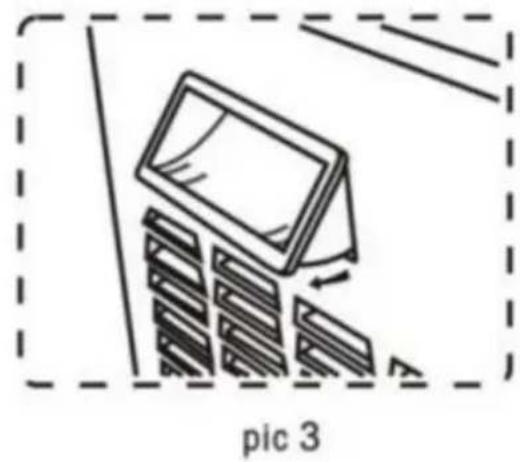
Illustration of a monitor with stacked books, enclosed in a dashed border (no text or symbols)Pry up both side of the handle, then take off the handle from panel
7.9.1 Cleaning the condenser of one-bowl slush machine
Safety protection parts need screwdrivers to fasten and dismantle.
- Loose side panel screw.
- Take out side panel
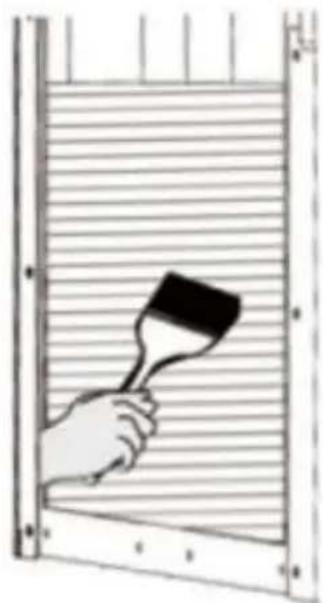
- Dismantle safety protection parts. Brush dust from condenser surfac with dry brush as Fig20
natural_image
Illustration of a hand holding a paintbrush over a window frame (no text or symbols)Fig.20
After cleaning condenser, reposition safety protection parts
7.9.2 Cleaning the condenser of two-bowl slush machine According to the following instructions
- Loose the crews of the back plate.
- Loose the screws of the side plate.
- Take out the side panel.
Dismantle safety protection parts.
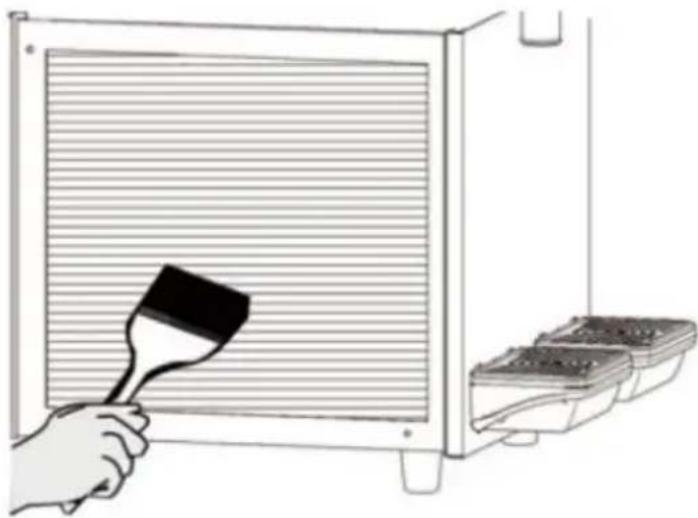
Brush dust from the condenser surface with dry brush as below.
natural_image
Illustration of a hand using a paintbrush to clean or store air from a microwave oven (no text or symbols)Fig.21
7.10 Scheduled maintenance
This machine needs to be maintained by professionals in regular(at le year).
Regular maintenance can ensure machine and its parts in good safety state
Any broken parts need to be replaced with original manufacturer
When any parts of machine are malfunctioned or broken machine is banned to use.
The user can not maintain the machine himself
8. Waste treatment
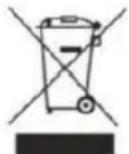
Electronic waste need to be handled according to2002/96/EC
But wastes need to be dismantled and classified and useful parts should be recycled
Above rubbish bin reminds people classifying. rubbish. Treating wastes correctly protectorate our environment.
9. Troubleshooting
| Trouble | Potential reasons | Solution |
| Can not turn on the machine | No input power | Insert the plug into the appropriate socket |
| Not pressed the switch | Press the switch | |
| Outlet leaking | Outlet without Vaseline | Add Vaseline on outlet |
| Outlet broken | Change the outlet | |
| Bowl leaking | The bowl not be installable suitable position | Check the bowl position |
| No Vaseline on bowl's ring | Add Vaseline on seal ring | |
| Bad seal ring | Change the seal ring | |
| The stirrer n working | Not turn on the main sv | Turn on the main swit |
| Bowl inside freezing | Turn off the main switch and let the ice melting | |
| The machine not making slush | Not turn on the main sv | Turn on the main swit |
| Not turn on the Freeze b | Turn on the Freeze butt | |
| The slush thickness is r suitable | Adjust the slush thickness | |
| Condenser too dirty/poor ventilation | Clean the condenser | |
| Slush machine approach the hot position | Put the machine in a o position | |
| The stirrer makes noisy | The sugar level of water too low | Increase the sugar leve |
| The back of stainless st cylinder is too dry | Add some concentrated water on it |
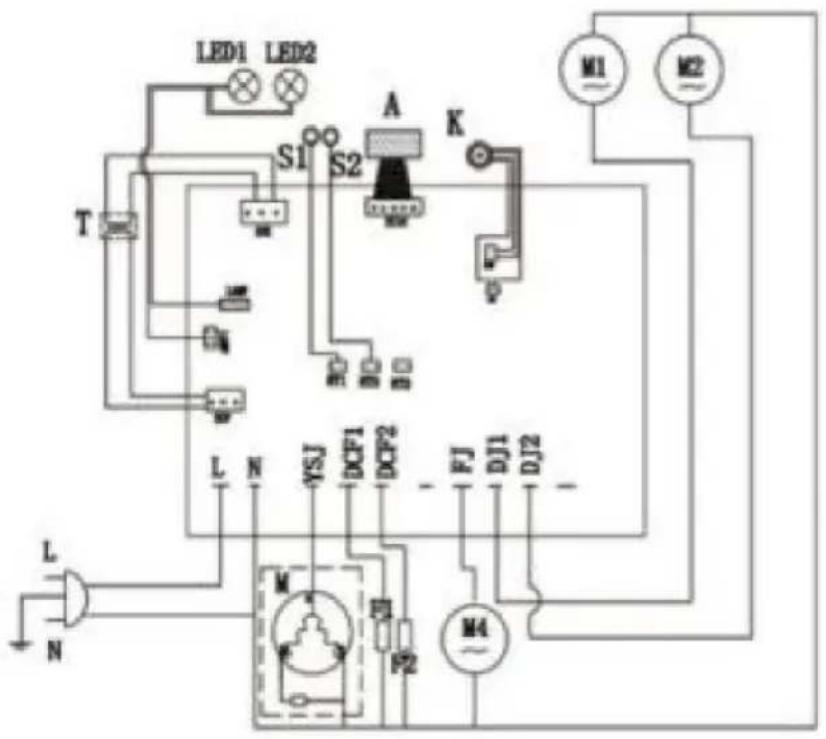
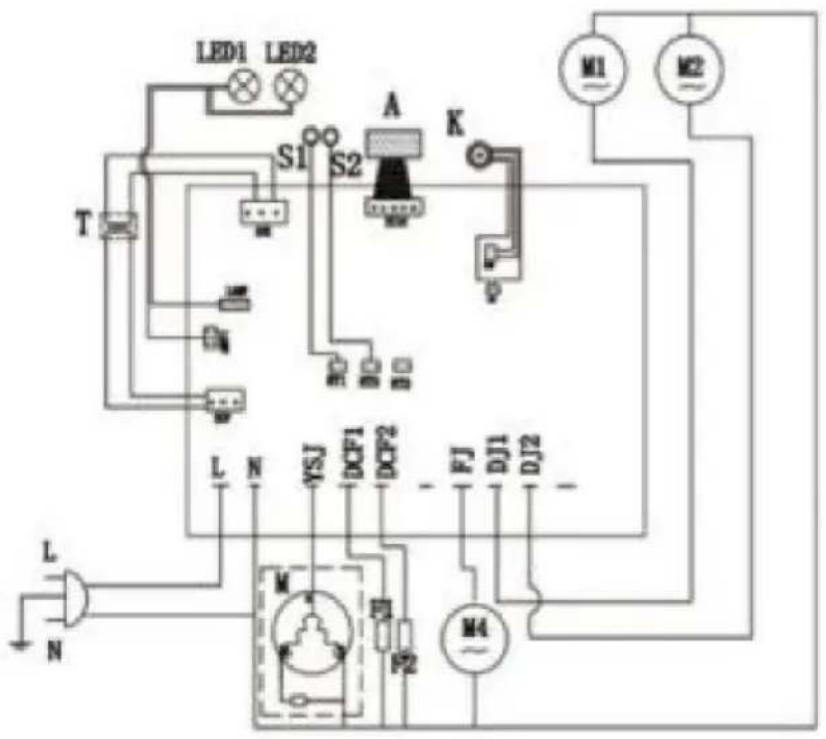
10. Intelligent electronic valve system
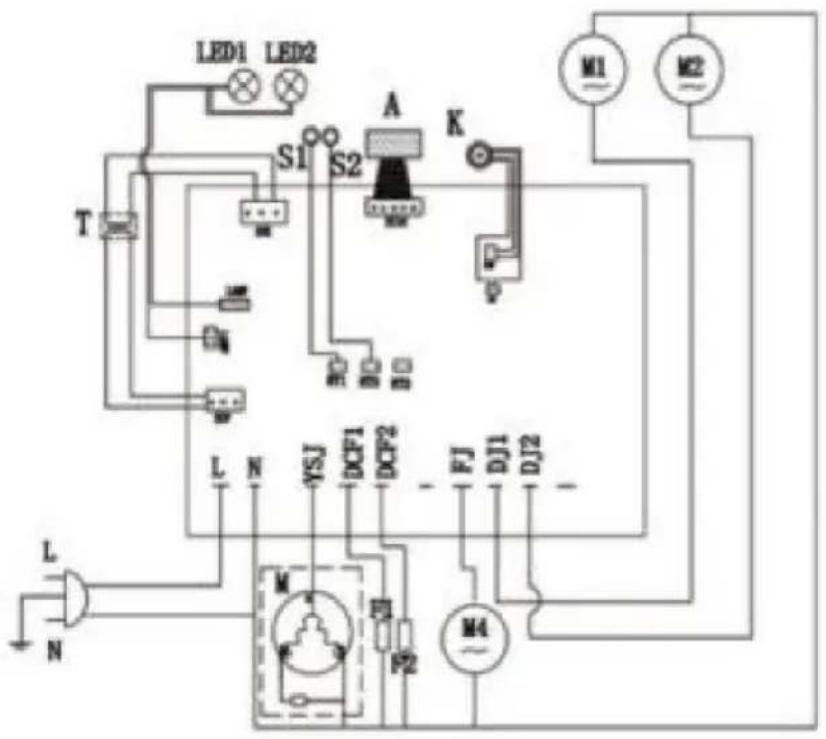
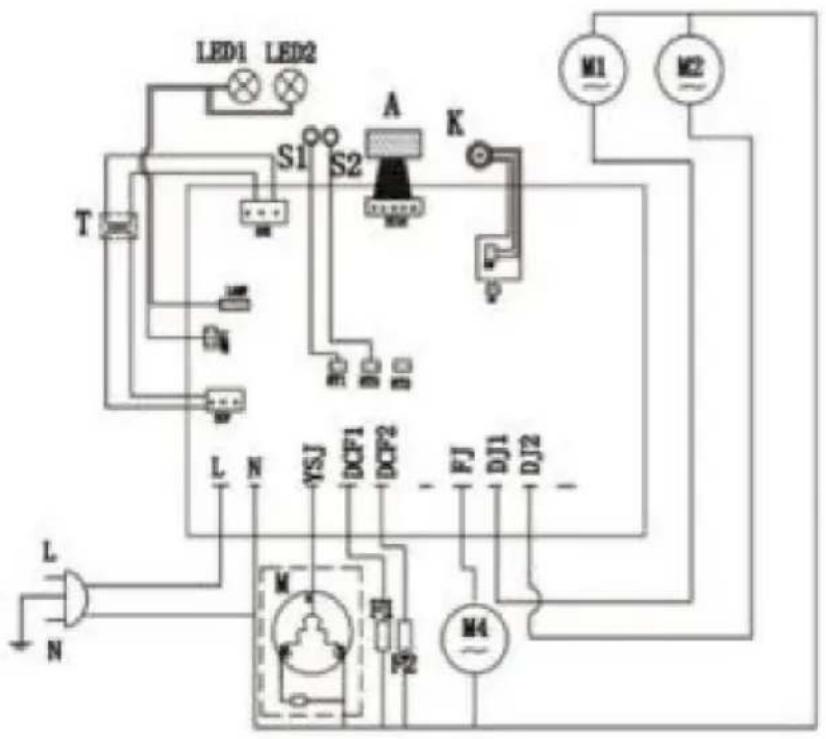
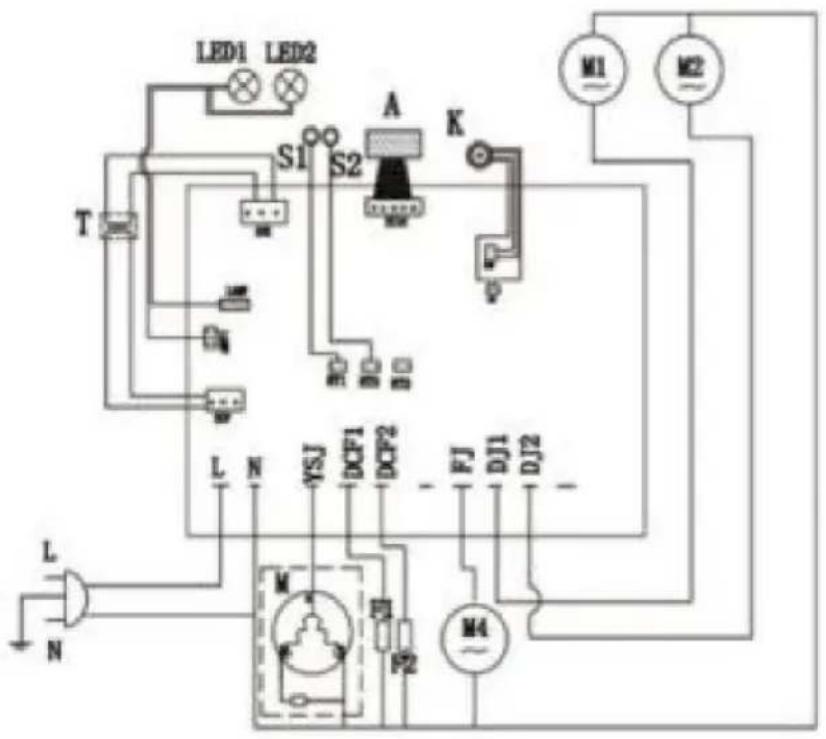
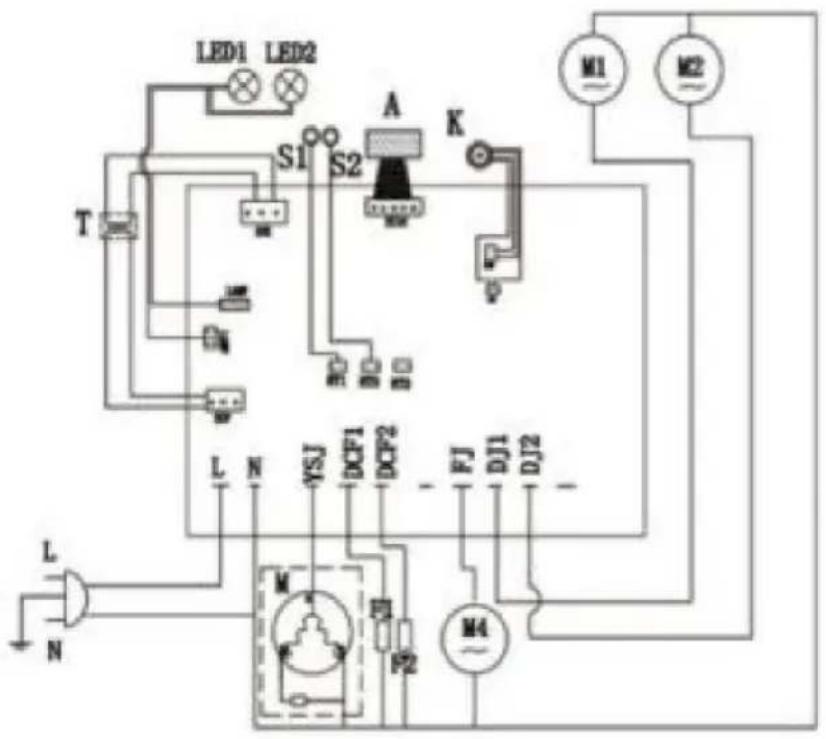
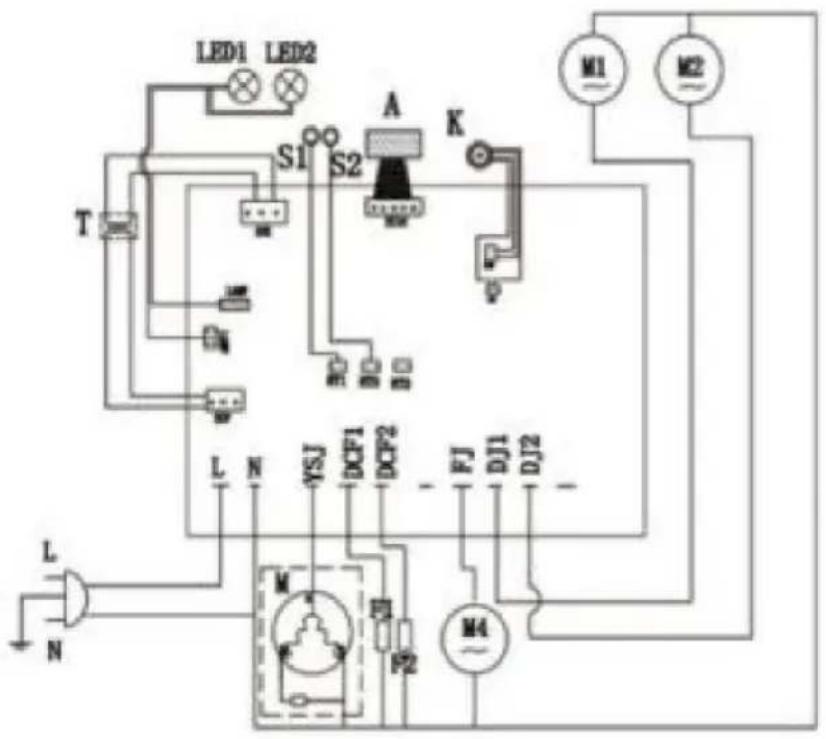
Electrical diagram-XRJ12LX1
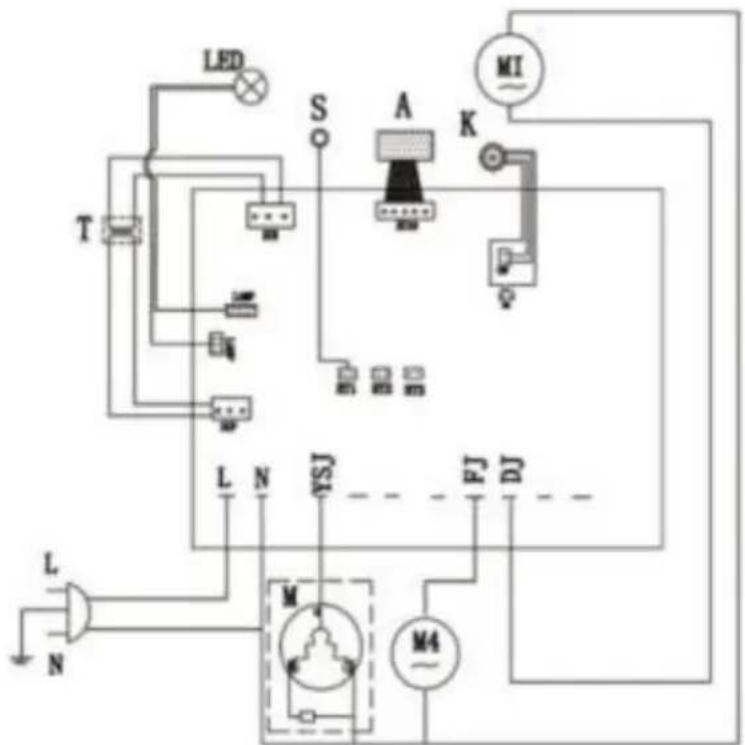
M Compressor
M4 Cooling fan
M1/M2/M3 AC geared motor
K Main switch
A Touchpad
T Transformer
LED LED light board
S Temperature sensor
F Electromagnetic valve
Electrical diagram-XRJ12LX2
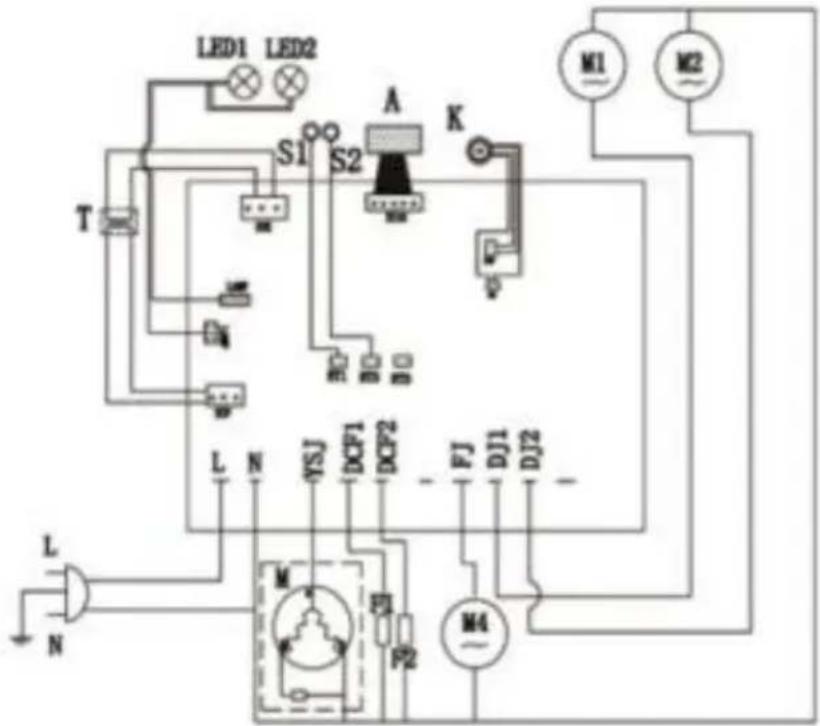
M Compressor
M4 Cooling fan
M1/M2/M3 AC geared motor
K Main switch
A Touchpad
T Transformer
LED1/LED2 LED light board
S1/S2 Temperature sensor
LED1/LED2/LED3 LED light board
S1/S2/S3 Temperature sensor
F1/F2/F3 Electromagnetic valve
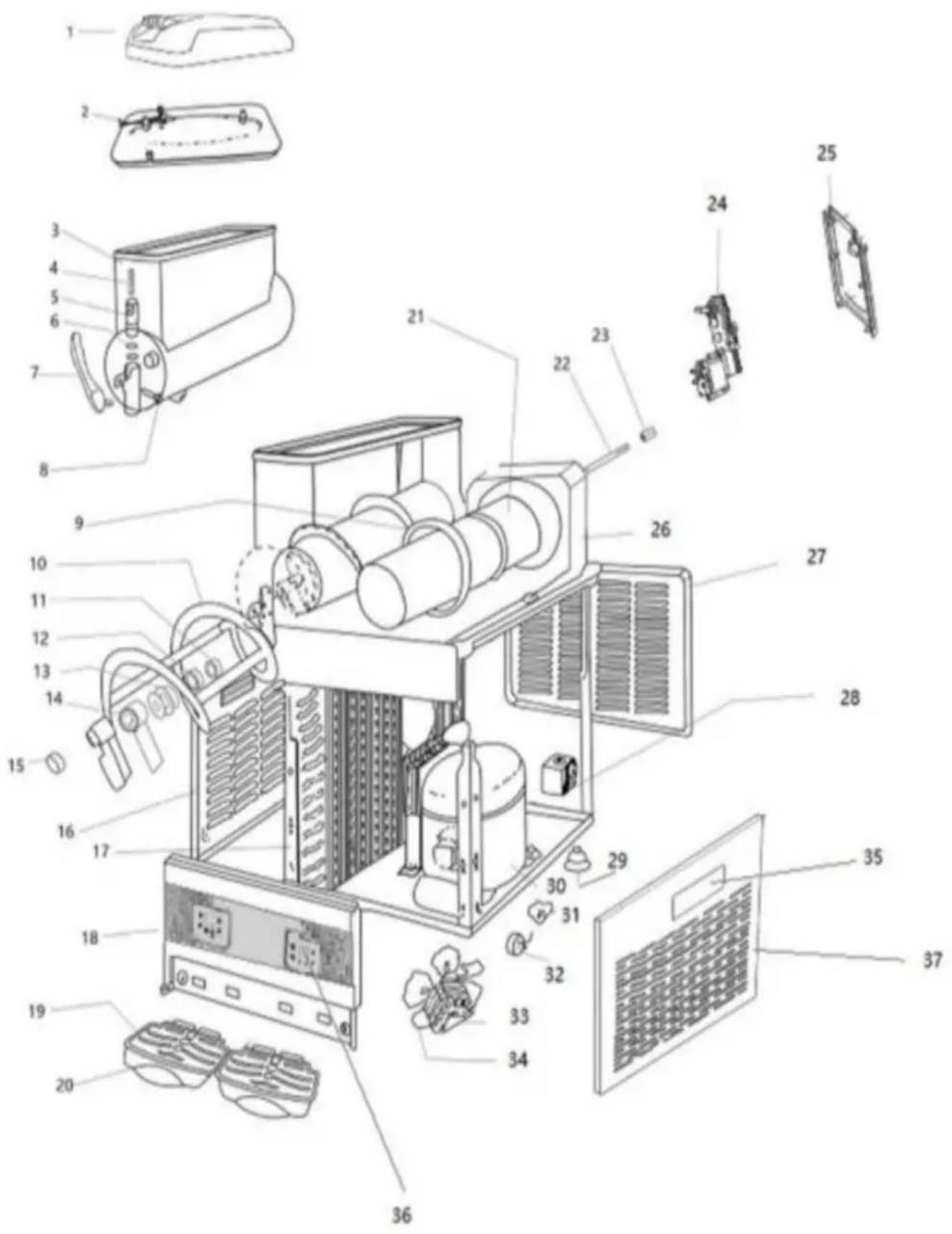
11.Slush machine explosive diagram
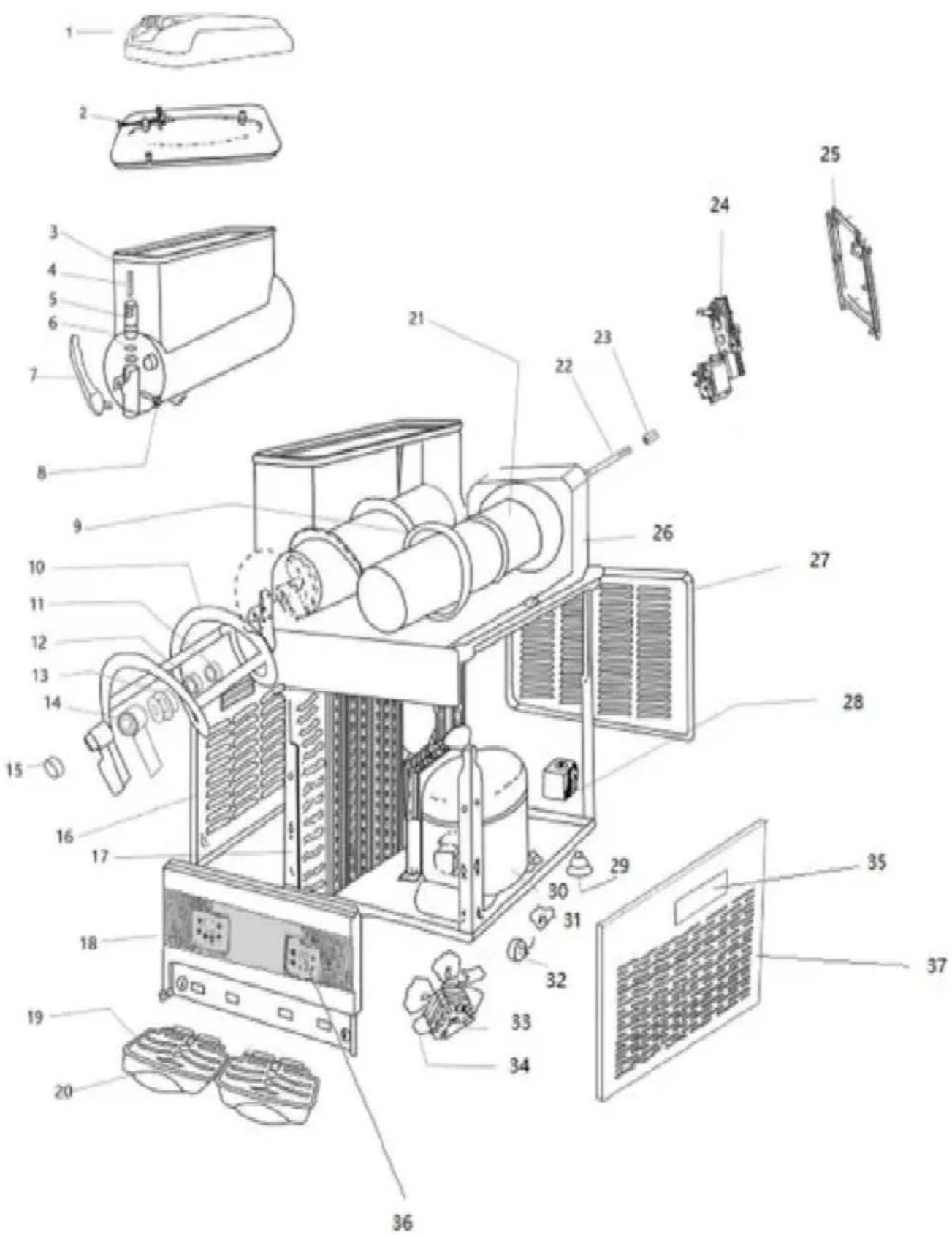
| Code | Parts Name |
| 1 | Roof |
| 2 | Inner cover |
| 3 | Tank |
| 4 | Spring |
| 5 | Plunger |
| 6 | Small seal ring |
| 7 | Handle |
| 8 | Pin of handle |
| 9 | Tank seal ring |
| 10 | Stirrer |
| 11 | Washer of axis |
| 12 | Seal of axis |
| 13 | Seal of stirrer |
| 14 | Connect of stirrer |
| 15 | Plug |
| 16 | Left side panel |
| 17 | Condenser |
| 18 | Front panel |
| 19 | Grid |
| 20 | Water tray |
| 21 | Evaporator |
| 22 | Stir rod |
| Code | Parts Name |
| 23 | Copper bush |
| 24 | Mix motor |
| 25 | Back panel of motor fram |
| 26 | Fixed board |
| 27 | Back panel |
| 28 | Solenoid valve assembly |
| 29 | Foot |
| 30 | Compressor |
| 31 | Regenerator of compressor |
| 32 | Tutamen |
| 33 | Fan motor |
| 34 | Fan |
| 35 | Side panel handle |
| 36 | Control board |
| 37 | Right side panel |
VEVOR®
TOUGH TOOLS, HALF PRICE
Technical Support and E-Warranty Certificate
www.vevor.com/support
VEVOR®
TOUGH TOOLS, HALF PRICE
natural_image
Line drawings of three different industrial equipment units with heat sinks and ventilation grilles (no text or symbols)BESOIN D'AIDE? CONTACTEZ-NOUS!
Fig.2
Adjustment of slush temperature

Press the button "MINUS", it would turn colder, Press"TEMP ADD", it would get warmer.
Adjustment of juice temperature

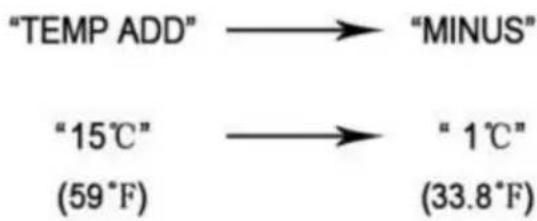
Press the button "MINUS", it would turn colder, Press"TEMP ADD", it would get warmer.
Fig.3
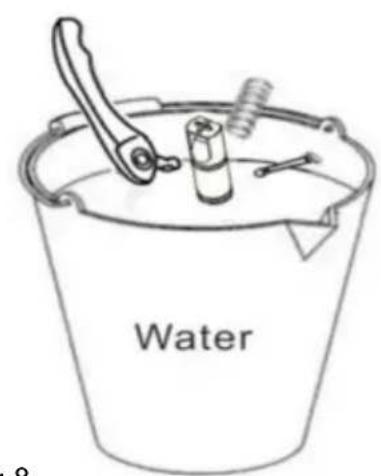
Fig.9Fig.8
natural_image
Line drawing of a mechanical component with threaded end (no text or symbols)Fig.11
Rester 30 minutes
natural_image
Technical line drawing of a mechanical component with helical grooves and a labeled section A (no text or symbols beyond label)Fig.12
natural_image
Technical line drawing of a mechanical assembly with pulley and shaft (no text or symbols)Fig.13

natural_image
Line drawing of a mechanical device with coiled components and an arrow indicating direction (no text or symbols)Fig.14

natural_image
Technical line drawings of mechanical components including a rod, cylindrical part, and frame assembly (no text or labels)Fig.15
Fig.17

Fig.18
natural_image
Simple line drawing of a rectangular object with internal vertical bars, and two separate rectangular blocks below, labeled 'pic1' (no text or symbols on the objects themselves)In order to take off the panel, we have to take off the handle first (see pic 1)
natural_image
Pure technical line drawing of a mechanical component with no text or symbolsUsing slot type screwdriver pry up the panel side (see pic 2)
natural_image
Illustration of a monitor with a stack of books, no text or symbols presentPry up both side of the handle, then take off the handle from panel
natural_image
Illustration of a hand holding a paintbrush near a window frame (no text or symbols)Fig.20
natural_image
Illustration of a hand using a paintbrush to clean or store air quality near a microwave oven (no text or symbols)Fig.21
M Compressor
M4 Cooling fan
M1/M2/M3 AC geared motor
K Main switch
A Touchpad
T Transformer
LED LED light board
S Temperature sensor
F Electromagnetic valve
Electrical diagram-XRJ12LX2
M Compressor
M4 Cooling fan
M1/M2/M3 AC geared motor
K Main switch
A Touchpad
T Transformer
LED1/LED2 LED light board
S1/S2 Temperature sensor
LED1/LED2/LED3 LED light board
S1/S2/S3 Temperature sensor
F1/F2/F3 Electromagnetic valve
www.vevor.com/support
Slush-Maschine
MODELL: XRJ12LX1 XRJ12LX2 XRJ12LX3
natural_image
Line drawings of three industrial cooling unit designs with heat sinks and fan compartments (no text or symbols)2.4 Bedienfeld
Adjustment of slush temperature

Press the button "MINUS", it would turn colder, Press"TEMP ADD", it would get warmer.
Adjustment of juice temperature

Press the button "MINUS", it would turn colder, Press"TEMP ADD", it would get warmer.
Abb.3
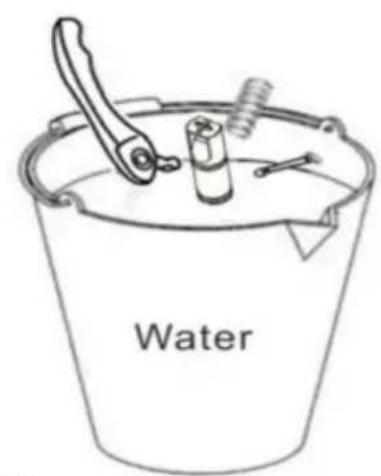
Abb.9Abb.8
natural_image
Line drawing of a mechanical component with threaded end (no text or symbols)Abb.11
natural_image
Technical line drawing of a coiled spring or helical component with labeled section A (no text or symbols beyond label)Abb.12
natural_image
Technical line drawing of a mechanical assembly with pulley and shaft (no text or symbols)Abb.13

natural_image
Line drawing of a mechanical device with coiled components and an arrow indicating direction (no text or symbols)Abb.14

natural_image
Technical line drawings of mechanical components including a rod, cylindrical part, and frame assembly (no text or labels)Abb.15
Abb.17

Abb.18
7.9 Kondensator reinigen
natural_image
Simple line drawing of a rectangular object with internal vertical bars, enclosed in a dashed border, and two separate rectangular blocks below labeled 'pic1' (no text or symbols on the objects themselves)In order to take off the panel, we have to take off the handle first (see pic 1)
natural_image
Pure technical line drawing of a mechanical component with no text or symbolsUsing slot type screwdriver pry up the panel side (see pic 2)
natural_image
Illustration of a monitor with a stack of books, no text or symbols presentPry up both side of the handle, then take off the handle from panel
natural_image
Illustration of a hand holding a paintbrush near a window frame (no text or symbols)Abb.20
natural_image
Illustration of a hand using a paintbrush to clean or store air quality near a microwave oven (no text or symbols)Abb.21
M Compressor
M4 Cooling fan
M1/M2/M3 AC geared motor
K Main switch
A Touchpad
T Transformer
LED LED light board
S Temperature sensor
F Electromagnetic valve
Electrical diagram-XRJ12LX2
M Compressor
M4 Cooling fan
M1/M2/M3 AC geared motor
K Main switch
A Touchpad
T Transformer
LED1/LED2 LED light board
S1/S2 Temperature sensor
LED1/LED2/LED3 LED light board
S1/S2/S3 Temperature sensor
F1/F2/F3 Electromagnetic valve
www.vevor.com/support
VEVOR®
TOUGH TOOLS, HALF PRICE
elettronica www.vevor.com/support
MACCHINA PER GRANITO
MODELLO: XRJ12LX1 XRJ12LX2 XRJ12LX3
natural_image
Line drawings of three different industrial equipment units with heat sinks and ventilation grilles (no text or symbols)Figura 2
Adjustment of slush temperature

Press the button "MINUS", it would turn colder, Press"TEMP ADD", it would get warmer.
Adjustment of juice temperature

Press the button "MINUS", it would turn colder, Press"TEMP ADD", it would get warmer.
Figura 3
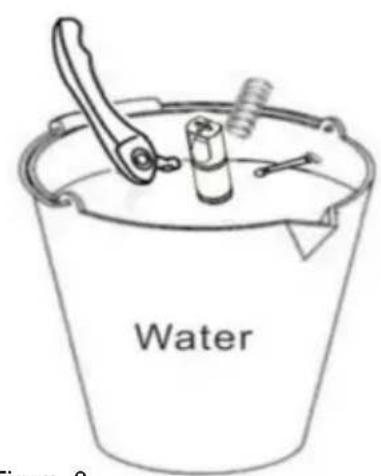
Figura 9 Figura 8
natural_image
Line drawing of a mechanical component with threaded end (no text or symbols)Figura 11
natural_image
Technical line drawing of a coiled spring or helical component with labeled section A (no text or symbols beyond label)Figura 12
natural_image
Technical line drawing of a mechanical assembly with pulley and shaft (no text or symbols)Figura 13

natural_image
Line drawing of a mechanical device with coiled components and an arrow indicating direction (no text or symbols)Figura 14

natural_image
Technical line drawings of mechanical components including a rod, cylindrical part, and frame assembly (no text or labels)Figura 15
Figura 17

Figura 18
natural_image
Simple line drawing of a rectangular object with internal vertical bars, and two separate rectangular blocks below, labeled 'pic1' (no text or symbols on the objects themselves)In order to take off the panel, we have to take off the handle first (see pic 1)
natural_image
Pure technical line drawing of a mechanical component with no text or symbolsUsing slot type screwdriver pry up the panel side (see pic 2)
natural_image
Illustration of a monitor with a stack of books, no text or symbols presentPry up both side of the handle, then take off the handle from panel
natural_image
Illustration of a hand holding a paintbrush near a window frame (no text or symbols)Figura 20
natural_image
Illustration of a hand using a paintbrush to clean or store air quality inside a microwave oven (no text or symbols)Figura 21
M Compressor
M4 Cooling fan
M1/M2/M3 AC geared motor
K Main switch
A Touchpad
T Transformer
LED LED light board
S Temperature sensor
F Electromagnetic valve
Electrical diagram-XRJ12LX2
M Compressor
M4 Cooling fan
M1/M2/M3 AC geared motor
K Main switch
A Touchpad
T Transformer
LED1/LED2 LED light board
S1/S2 Temperature sensor
LED1/LED2/LED3 LED light board
S1/S2/S3 Temperature sensor
F1/F2/F3 Electromagnetic valve
elettronica www.vevor.com/support
VEVOR®
TOUGH TOOLS, HALF PRICE
natural_image
Line drawings of three industrial cooling unit designs with heat sinks and fan compartments (no text or labels)Figura 2
2.4 Panel de control
Adjustment of slush temperature


Press the button "MINUS", it would turn colder, Press"TEMP ADD", it would get warmer.
Adjustment of juice temperature

Press the button "MINUS", it would turn colder, Press"TEMP ADD", it would get warmer.
Figura 3
Figura 8
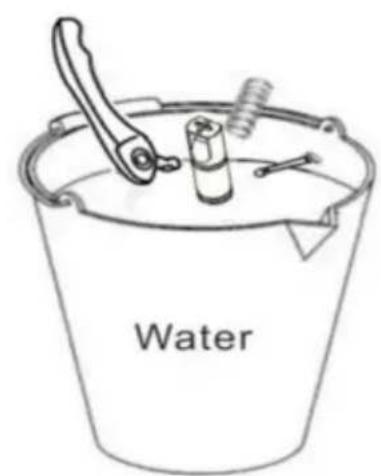
Figura 9
natural_image
Line drawing of a mechanical component with threaded end (no text or symbols)Figura 11
natural_image
Technical line drawing of a coiled spring or helical component with labeled section A (no text or symbols beyond label)Figura 12
natural_image
Technical line drawing of a mechanical assembly with pulley and shaft (no text or symbols)Figura 13

natural_image
Line drawing of a mechanical device with coiled components and an arrow indicating direction (no text or symbols)Figura 14

natural_image
Technical line drawings of mechanical components including a shaft, housing, and frame (no text or symbols)Figura 15
Figura 17

Figura 18
natural_image
Simple line drawing of a rectangular object with internal vertical bars, enclosed in a dashed border, and two separate rectangular blocks below labeled 'pic1' (no text or symbols on the objects themselves)In order to take off the panel, we have to take off the handle first (see pic 1)
natural_image
Pure technical line drawing of a mechanical component with no text or symbolsUsing slot type screwdriver pry up the panel side (see pic 2)
natural_image
Illustration of a monitor with a stack of books, no text or symbols presentPry up both side of the handle, then take off the handle from panel
natural_image
Illustration of a hand holding a paintbrush near a window frame (no text or symbols)Figura 20
natural_image
Illustration of a hand using a paintbrush to clean or store air from a microwave oven (no text or symbols)Figura 21
M Compressor
M4 Cooling fan
M1/M2/M3 AC geared motor
K Main switch
A Touchpad
T Transformer
LED LED light board
S Temperature sensor
F Electromagnetic valve
Electrical diagram-XRJ12LX2
M Compressor
M4 Cooling fan
M1/M2/M3 AC geared motor
K Main switch
A Touchpad
T Transformer
LED1/LED2 LED light board
S1/S2 Temperature sensor
LED1/LED2/LED3 LED light board
S1/S2/S3 Temperature sensor
F1/F2/F3 Electromagnetic valve
natural_image
Line drawings of three different industrial equipment units with heat sinks and ventilation grilles (no text or symbols)POTRZEBUJESZ POMOCY? SKONTAKTUJ SIĘ Z NAMI!
Rys.2
Adjustment of slush temperature

Press the button "MINUS", it would turn colder, Press"TEMP ADD", it would get warmer.
Adjustment of juice temperature

Press the button "MINUS", it would turn colder, Press"TEMP ADD", it would get warmer.
Ryc.3
natural_image
Line drawing of a mechanical component with a threaded end (no text or symbols)Ryc.11
natural_image
Technical line drawing of a mechanical component with helical grooves and a labeled section A (no text or symbols beyond label)Ryc.12
natural_image
Technical line drawing of a mechanical assembly with pulley and shaft (no text or symbols)Ryc.13

natural_image
Line drawing of a mechanical device with coiled components and an arrow indicating direction (no text or symbols)Ryc.14

natural_image
Technical line drawings of mechanical components including a rod, cylindrical part, and frame assembly (no text or labels)Ryc.15
Ryc.17

Ryc.18
natural_image
Simple line drawing of a rectangular object with internal vertical bars, and two separate rectangular blocks below, labeled 'pic1' (no text or symbols on the objects themselves)In order to take off the panel, we have to take off the handle first (see pic 1)
natural_image
Pure technical line drawing of a mechanical component with no text or symbolsUsing slot type screwdriver pry up the panel side (see pic 2)
natural_image
Illustration of a monitor with a stack of books, no text or symbols presentPry up both side of the handle, then take off the handle from panel
natural_image
Illustration of a hand holding a paintbrush near a window frame (no text or symbols)Ryc.20
natural_image
Line drawing of a hand holding a paintbrush near a window with a tray (no text or symbols)Ryc.21
M Compressor
M4 Cooling fan
M1/M2/M3 AC geared motor
K Main switch
A Touchpad
T Transformer
LED LED light board
S Temperature sensor
F Electromagnetic valve
Electrical diagram-XRJ12LX2
M Compressor
M4 Cooling fan
M1/M2/M3 AC geared motor
K Main switch
A Touchpad
T Transformer
LED1/LED2 LED light board
S1/S2 Temperature sensor
LED1/LED2/LED3 LED light board
S1/S2/S3 Temperature sensor
F1/F2/F3 Electromagnetic valve
natural_image
Line drawings of three industrial cooling unit designs with heat sinks and fan bases (no text or symbols)HULP NODIG? NEEM CONTACT MET ONS OP!
Afbeelding 2
Adjustment of slush temperature

Press the button "MINUS", it would turn colder, Press"TEMP ADD", it would get warmer.
Adjustment of juice temperature

Press the button "MINUS", it would turn colder, Press"TEMP ADD", it would get warmer.
Figuur 3
natural_image
Line drawing of a mechanical component with threaded end (no text or symbols)Afbeelding 11
Blijf 30 minuten
natural_image
Technical line drawing of a coiled spring or helical component with labeled section A (no text or symbols beyond label)Afbeelding 12
natural_image
Technical line drawing of a mechanical assembly with pulley and shaft (no text or symbols)Afbeelding 13

natural_image
Line drawing of a mechanical device with coiled components and an arrow indicating direction (no text or symbols)Afbeelding 14

natural_image
Technical line drawings of mechanical components including a rod, bracket, and frame (no text or symbols)Afbeelding 15
Afbeelding 17

Afbeelding 18
7.9 Condensor reinigen
natural_image
Simple line drawing of a rectangular object with internal vertical bars, and two separate rectangular blocks below, labeled 'pic1' (no text or symbols on the objects themselves)In order to take off the panel, we have to take off the handle first (see pic 1)
natural_image
Pure technical line drawing of a mechanical component with no text or symbolsUsing slot type screwdriver pry up the panel side (see pic 2)
natural_image
Illustration of a monitor with stacked books and a stack of books, enclosed in a dashed border (no text or symbols)Pry up both side of the handle, then take off the handle from panel
natural_image
Illustration of a hand holding a paintbrush near a window frame (no text or symbols)Afbeelding 20
natural_image
Illustration of a hand using a paintbrush to clean or store air quality near a microwave oven (no text or symbols)Afbeelding 21
M Compressor
M4 Cooling fan
M1/M2/M3 AC geared motor
K Main switch
A Touchpad
T Transformer
LED LED light board
S Temperature sensor
F Electromagnetic valve
Electrical diagram-XRJ12LX2
M Compressor
M4 Cooling fan
M1/M2/M3 AC geared motor
K Main switch
A Touchpad
T Transformer
LED1/LED2 LED light board
S1/S2 Temperature sensor
LED1/LED2/LED3 LED light board
S1/S2/S3 Temperature sensor
F1/F2/F3 Electromagnetic valve
www.vevor.com/support
SLUSH MASKIN
MODELL: XRJ12LX1 XRJ12LX2 XRJ12LX3
1.3 Manuell distribution
Fig.2
2.4 Kontrollpanel
Adjustment of slush temperature

Press the button "MINUS", it would turn colder, Press"TEMP ADD", it would get warmer.
Adjustment of juice temperature

Press the button "MINUS", it would turn colder, Press"TEMP ADD", it would get warmer.
Fig.3
3. Säkerhetsmanual
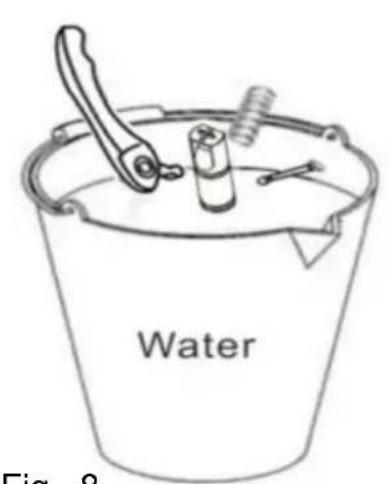
Fig. 9Fig. 8
natural_image
Line drawing of a mechanical component with threaded end (no text or symbols)Fig. 11
Stanna i 30 minuter
natural_image
Technical line drawing of a mechanical component with helical grooves and a labeled section A (no text or symbols beyond label)Fig. 12
natural_image
Mechanical assembly diagram showing a pulley and rotating component (no text or symbols)Fig. 13
natural_image
Line drawing of a mechanical device with a spool and control panel, no text or symbols presentFig. 14

natural_image
Technical line drawings of mechanical components including a rod, cylindrical part, and frame assembly (no text or symbols)Fig. 15
Fig. 17

Fig. 18
natural_image
Simple line drawing of a rectangular object with internal vertical lines, and two separate rectangular blocks below, labeled 'pic1' (no text or symbols on the objects themselves)In order to take off the panel, we have to take off the handle first (see pic 1)
natural_image
Pure technical diagram showing a mechanical assembly with no text or symbols, labeled 'pic 2' below (no readable text or symbols within the diagram itself)Using slot type screwdriver pry up the panel side (see pic 2)
natural_image
Illustration of a monitor with stacked books and a stack of books, enclosed in a dashed border (no text or symbols)Pry up both side of the handle, then take off the handle from panel
natural_image
Illustration of a hand holding a paintbrush near a window frame (no text or symbols)Fig.20
natural_image
Line drawing of a hand holding a paintbrush near a window with a tray (no text or symbols)Fig. 21
M Compressor
M4 Cooling fan
M1/M2/M3 AC geared motor
K Main switch
A Touchpad
T Transformer
LED LED light board
S Temperature sensor
F Electromagnetic valve
Electrical diagram-XRJ12LX2
M Compressor
M4 Cooling fan
M1/M2/M3 AC geared motor
K Main switch
A Touchpad
T Transformer
LED1/LED2 LED light board
S1/S2 Temperature sensor
LED1/LED2/LED3 LED light board
S1/S2/S3 Temperature sensor
F1/F2/F3 Electromagnetic valve
- Slammaskinens explosiva diagram
www.vevor.com/support