
ST-2090D - Soldering station Vevor - Free user manual and instructions
Find the device manual for free ST-2090D Vevor in PDF.
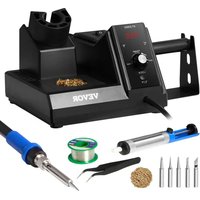


| Brand | Vevor |
| Model | ST-2090D |
| Product Type | Soldering Station |
| Supply Voltage | 110/240 V AC |
| Power | 80 W |
| Temperature Range | 80 °C – 480 °C |
| Temperature Stability | ±2 °C |
| Temperature Adjustment | By rotary knob |
| Temperature Unit | °C / °F (switchable) |
| Display | Nixie Tube |
| Temperature Lock | Yes |
| Auto Sleep | Yes (after 10 min on stand) |
| Auto Shutdown | Yes (after 20 min of sleep) |
| Included Tip Types | T900-K, T900-SI, T900-I, T900-H, T900-LB, T900-0.8D, T900-1.2D, T900-1.6D, T900-2.4D, T900-3.2D, T900-1.2LD, T900-SB, T900-B, T900-S10 (5 provided, detailed list in manual) |
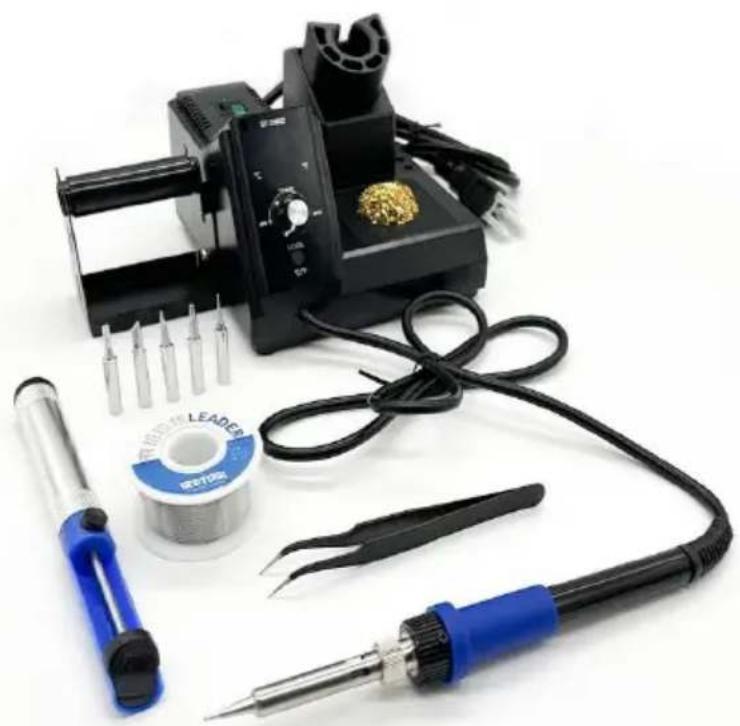
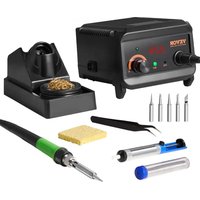
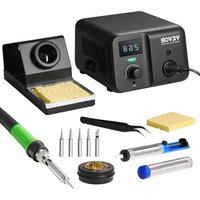
| Included Accessories | Tweezers, desoldering pump, brass wool, solder wire (30 g, lead-free), wire holder, tube coil, iron stand |
| Usage | For electronic soldering, brazing |
| Safety | Do not use in humid environment, keep out of reach of children, use original accessories |
| Maintenance | Clean tips with brass wool; replace heating element if necessary |
| Warranty | 2 years (excluding consumables) |
| Standards | Compliant with FCC Part 15 rules |
Frequently Asked Questions - ST-2090D Vevor
User questions about ST-2090D Vevor
0 question about this device. Answer the ones you know or ask your own.
Ask a new question about this device
Download the instructions for your Soldering station in PDF format for free! Find your manual ST-2090D - Vevor and take your electronic device back in hand. On this page are published all the documents necessary for the use of your device. ST-2090D by Vevor.
USER MANUAL ST-2090D Vevor
Technical Support and E-Warranty Certificate www.vevor.com/support
SOLDERING STATION KIT
MODEL: ST-2090D
We continue to be committed to provide you tools with competitive price. "Save Half", "Half Price" or any other similar expressions used by us only represents an estimate of savings you might benefit from buying certain tools with us compared to the major top brands and does not necessarily mean to cover all categories of tools offered by us. You are kindly reminded to verify carefully when you are placing an order with us if you are actually saving half in comparison with the top major brands.
VEVOR®
TOUGH TOOLS, HALF PRICE
SOLDERING
STATION KIT
MODEL: ST-2090D
NEED HELP? CONTACT US!
Have product questions? Need technical support? Please feel free to contact us:
Technical Support and E-Warranty Certificate www.vevor.com/support
This is the original instruction, please read all manual instructions carefully before operating. VEVOR reserves a clear interpretation of our user manual. The appearance of the product shall be subject to the product received. Please forgive us that we won't inform you again if there are technology or software updates on our product.
The soldering iron needs to be tested before it leaves the factory, so the tip may cover a small amount of tin, and the casing will be slightly yellowing is a normal phenomenon.
Copyright information
The design of this product (including internal software) and its accessories is protected by relevant state laws. Any violation of the relevant rights of our company will be subject to legal sanctions. Users shall consciously abide by the relevant state laws when using this product.
Disclaimer
We will take no responsibility for any personal injury or property damage caused by reasons other than the product quality problem, which may include force majeure (natural disasters, etc.) or personal behavior during the operation of the product. This manual is organized, compiled, and released by SHENZHEN ATTE TECHNOLOGY CO., LTD. according to the latest product features. We will not be responsible for further notice of the subsequent improvement of the product and this manual.
Safety precautions
| Warning | Misuse of this product may lead to serious injury or deaf user. |
| Caution | Misuse of this product may lead to serious injury to the material damage to the object involved. |
To avoid electric shock or injury to the human body or fire hazard, the following basic rules must be observed when using the equipment. In order to ensure personal safety, only parts and accessories approved or recommended by the original factory can be used, otherwise serious consequences may occur!
WARNING
When using this product, the soldering pencil/soldering tip, with the temperature up to 80-480°C, may cause burns to the user or cause a fire due to application. So users shall strictly observe the following rules:
- Keep this product away from flammable materials.
- Keep the product out of children's reach.
- Do not use this product if you are inexperienced or have no sufficient necessary knowledge without the guidance of related personnel.
- Do not use this product under wet environment or with wet hands to avoid electric shock.
- Do not modify this product and its accessories without authorization.
- Please turn off the power when replacing parts and iron tips, and do not use until the equipment is completely cooled down.
- Please use the accessories from the original factory when replacing product parts.
- Make sure to turn off the power switch when the equipment is temporarily stopped or out of use.
- If the power cord is damaged, please ask the manufacturer or its service agent or similar qualified personnel to repair it, so as to avoid personal injury or product damage.
- This appliance can be used by children aged from 8 years and above and persons with reduced physical, sensory or mental capabilities or lack of experience and knowledge if they have been given supervision or instruction concerning use of the appliance in a safe way and understand the hazards involved. Children shall not play with the appliance. Cleaning and user maintenance shall not be made by children without supervision.
Essential knowledge for users
Users are required to have basic knowledge of common sense and electrical operations before using the product. Minors shall use the product under the guidance of a professional or guardian.
Packing list
Main unit (including machine, power cable and handle) x1pc
Solder Tips*5 Tweezer *1 Desoldering Pump*1
Brass Wool *1 30Grams Tin Wire (Lead Free) *1
Soldering Wire Holder*1 Tube Reel*1 Iron Holder*1
User Manual*1
Features
- This product designed with nixie tube display.
- Combined soldering station with soldering stand.
- MCU controlled temperature calibration with PID system equipped, adjust temperature by knob button, easy to operate.
- The handle structure is ergonomically designed for comfortable grip.
- The heating wire and sensor are made of PTC material, which is quick in temperature rise and precise in temperature control.
- Auto-standby, auto-shut down is available. • Using 3 cored power cable.
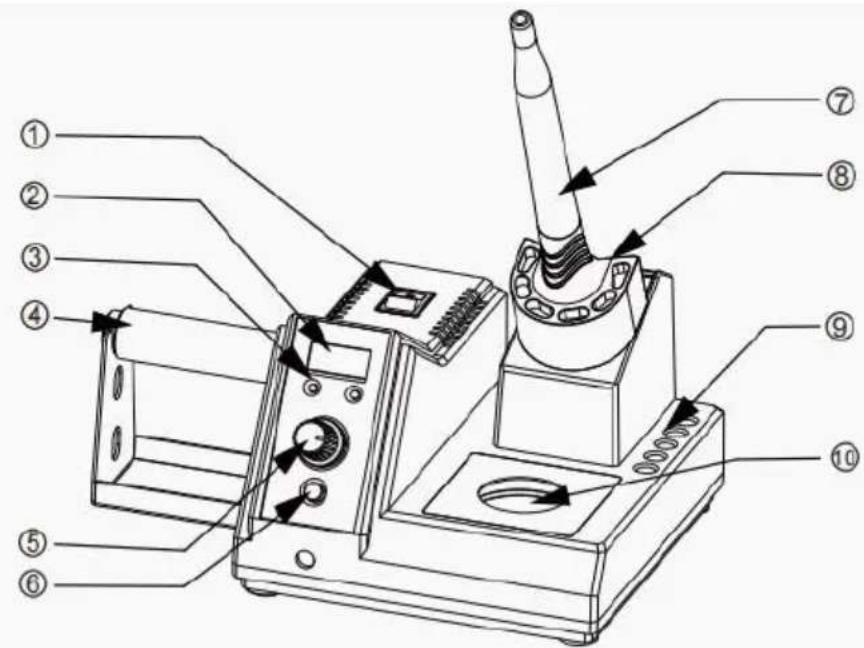
Appearance and control panel
- Power button
- Nixie tube display
- Indicate light for temperature unit
- Soldering wire holder
- Temperature adjustable knob button
- Temperature unit switch / temperature lock
- Soldering handle
- Soldering stand
- Soldering tip s lot
- Tip cleaner location
Specification
| Item No. | Voltage | Power | Temperature range |
| ST-2090D | 110/240V AC | 80W | 80°C~480°C |
| Temperature stability | Adjustable method | Temperature unit | Display method |
| ± 2°C | Knob | °C/° F | Nixie tube |
Operational guide
1. Power button
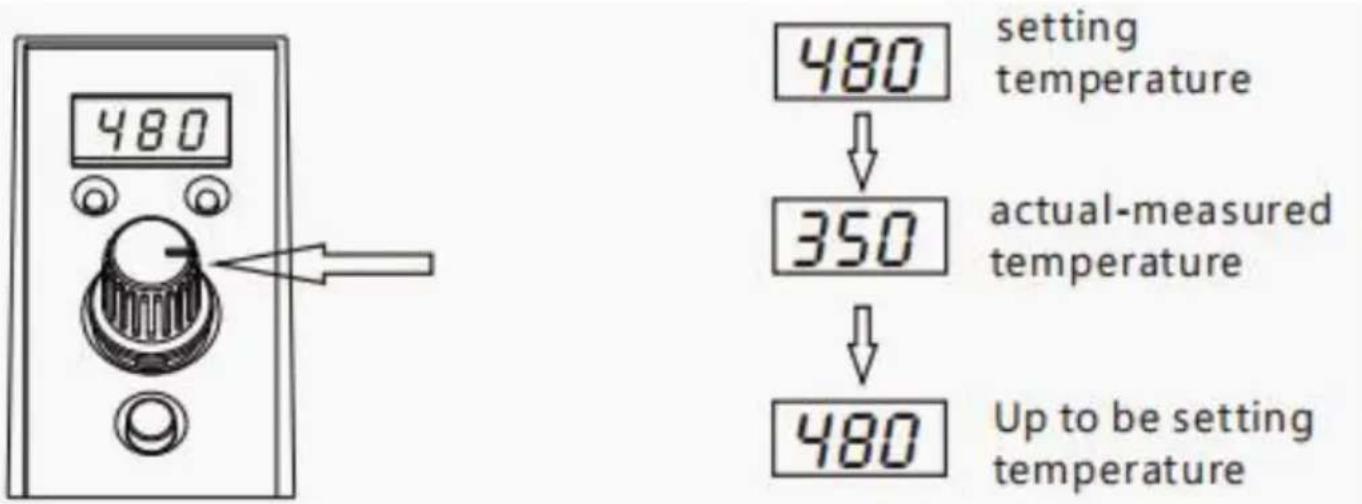
Turn on after this device is given power. Set the temperature you want, which will be shown on the nixie tube display by knob. It will show the real temperature of the soldering tip after 3 seconds.
2. Temperature Setting
When this device is working, it can adjust temperature rapidly. The setting temperature will be shown when adjusting temperature; the real temperature of the soldering tip will be displayed after stopped adjusting temperature for 3 seconds.
Temperature range is 80~480°C.
3. Temperature Locking Function
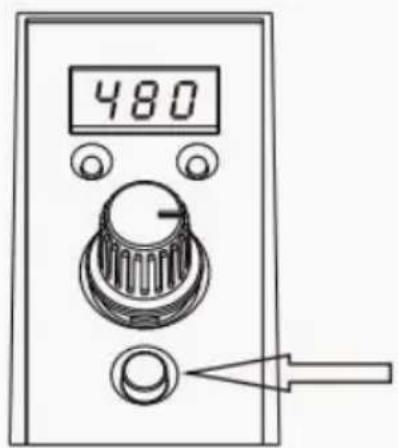
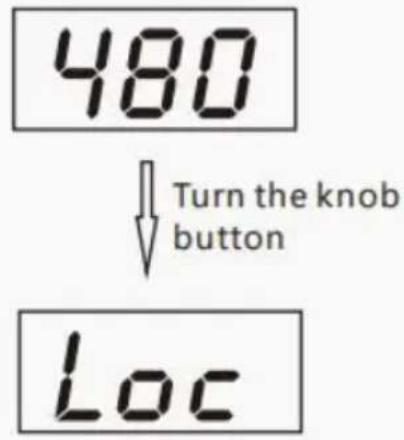
Press LOOK/°C/°F button for 3 seconds at the same time under working mode, the current temperature will be locked, the temperature won't be changed by turning the knob button, and display LOC for locking temperature. Can unlock the current temperature by pressing LOOK/°C/°F button for 3 seconds again when temperature locking.
4. Switching Temperature Unit
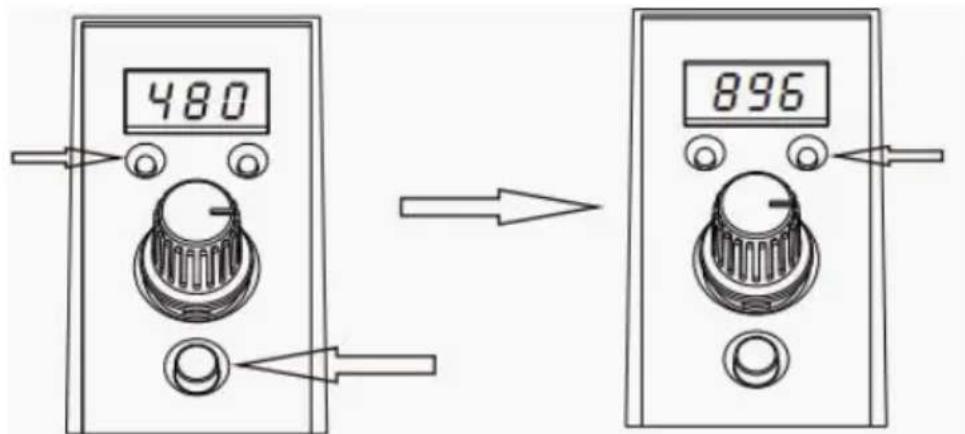
The current temperature unit will be switched by pressing LOOK/°C/°F button at the same time under working mode, the indicate light of temperature unit will change accordingly.
5. Auto Standby Function
When the soldering iron is not in use and put on the iron holder, auto standby after 10 minutes, heater is heating up to 200 °C, nixie tube displays STB, pick up the soldering iron and back to normal working mode.
6. Auto Sleep Function
In auto standby mode, the soldering station will auto sleep after 20 minutes, tube displays SLP, the heating core is not heated, it will get back to normal mode by adjusting the knob or pressing the button. (P.S. It will auto sleep with use machine doesn't operate and turn to sleep mode)
7. Warning
E02 shown on the display screen means there is an error with the sensor.
8. Soldering tips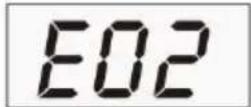
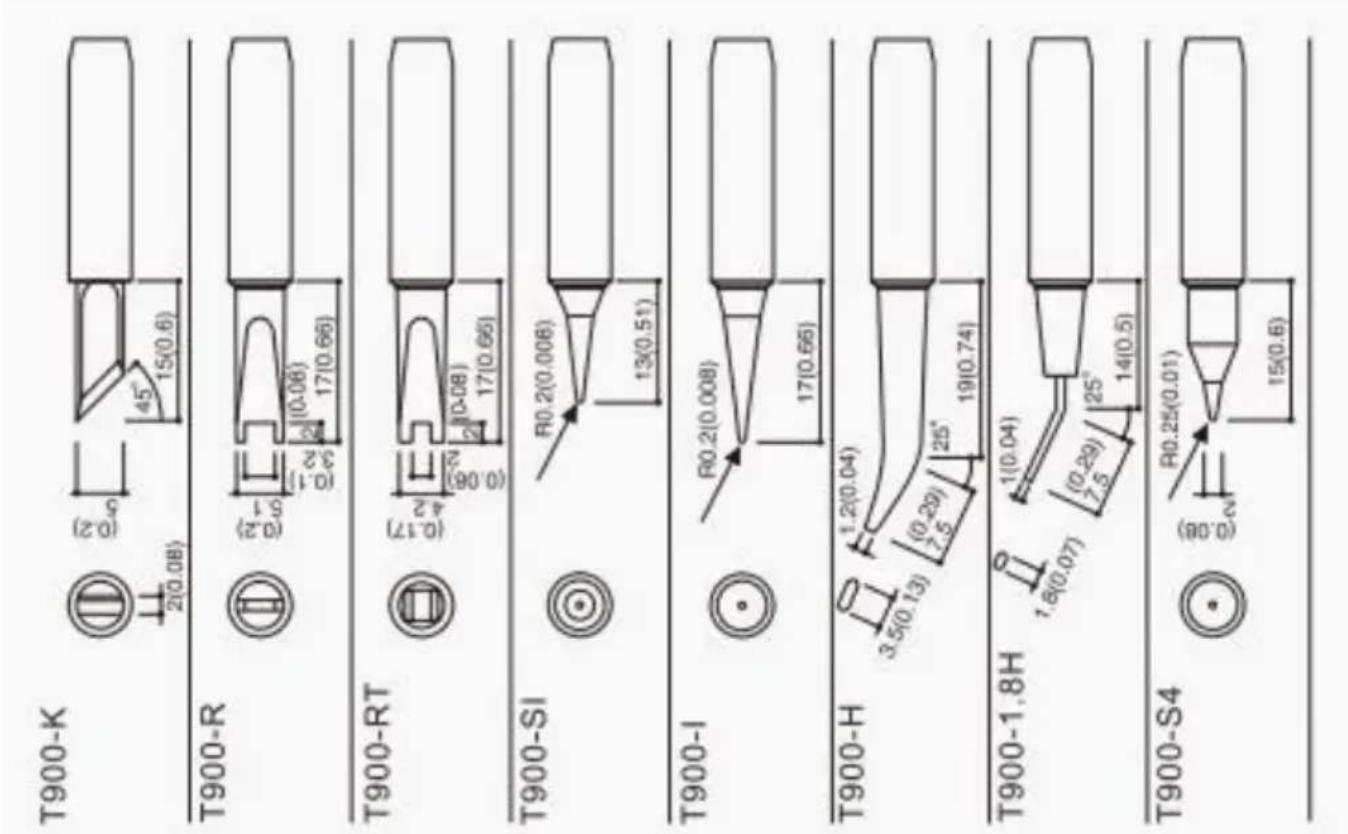
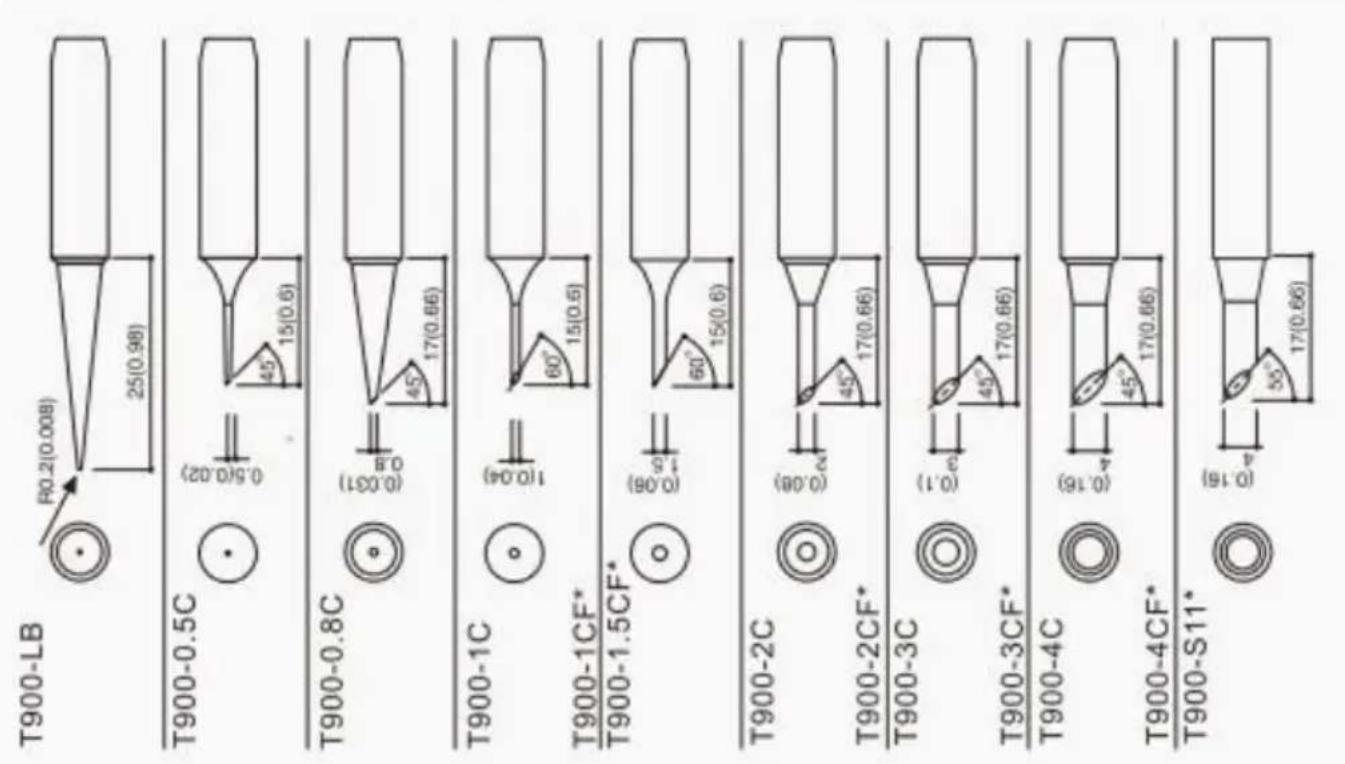

Product warranty
- This product is guaranteed for two years from the date of purchase (excluding consumables such as the heating core). If any quality problem is found within the guarantee period, we will provide maintenance free of charge.
- For products beyond the warranty period, we provide life-long maintenance services.
- For products damaged due to improper use or unauthorized changes to the product parts, our company only provides limited warranty service.
- In case of a product fault, please send the faulty product to the designated maintenance shop for repair. Service centers and personnel not authorized by the factory are prohibited from carrying out any maintenance on the product.
FCC Information
CAUTION: Changes or modifications not expressly approved by the party responsible for compliance could void the user's authority to operate the equipment!
This device complies with Part 15 of the FCC Rules. Operation is subject to the following two conditions:
1) This product may cause harmful interference. 2) This product must accept any interference received, including interference that may cause undesired operation.
WARNING: Changes or modifications to this product not expressly approved by the party responsible for compliance could void the user's authority to operate the product.
Note: This product has been tested and found to comply with the limits for a Class B digital device pursuant to Part 15 of the FCC Rules. These limits are designed to provide reasonable protection against harmful interference in a residential installation.
This product generates, uses, and can radiate radio frequency energy, and if not installed and used in accordance with the instructions, may cause harmful interference to radio communications. However, there is no guarantee that interference will not occur in a particular installation. If this product does cause harmful interference to radio or television reception, which can be determined by turning the product off and on, the user is encouraged to try to correct the interference by one or more of the following measures.
- Reorient or relocate the receiving antenna.
- Increase the distance between the product and receiver.
- Connect the product to an outlet on a circuit different from that to which the receiver is connected.
- Consult the dealer or an experienced radio/TV technician for assistance.
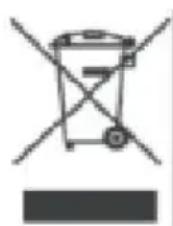
CORRECT DISPOSAL
This product is subject to the provisions of European Directive 2012/19/EU. The symbol showing a wheelie bin crossed through indicates that the product requires separate refuse collection in the European Union. This applies to the product and all accessories marked with this symbol. Products marked as such may not be discarded with normal domestic waste, but must be taken to a collection point for recycling electrical and electronic devices.
Manufacturer: Shanghai Muxin Muye Youxian Gongsi
Address: Shuangchenglu 803nong 11hao 1602A-1609shi, Baoshanqu, Shanghai 200000 CN.
Imported to AUS: SIHAO PTY LTD. 1 ROKEVA STREET, EASTWOOD NSW 2122 Australia
Imported to USA: Sanven Technology Ltd. Suite 250, 9166 Anaheim Place, Rancho Cucamonga, CA 91730
| UK | REP |
YH CONSULTING LIMITED. C/O YH Consulting Limited Office 147, Centurion House, London Road, Staines-upon-Thames, Surrey, TW18 4A>
| EC | REP |
Technical Support and E-Warranty Certificate
www.vevor.com/support
VEVOR®
TOUGH TOOLS, HALF PRICE
NEED HELP? CONTACT US!
Specification
Rancho Cucamonga, CA 91730
YH CONSULTING LIMITED. C/O YH Consulting Limited
Office 147, Centurion House, London Road,
Staines-upon-Thames, Surrey, TW18 4AX
E-CrossStu GmbH
Mainzer Landstr.69,
Specification
YH CONSULTING LIMITED. C/O YH Consulting Limited Office 147, Centurion House, London Road, Staines-upon-Thames, Surrey, TW18 4AX
www.vevor.com/support
VEVOR®
TOUGH TOOLS, HALF PRICE
Specification
Imported in AUS: SIHAO PTY LTD. 1 ROKEVA STREETEASTWOOD
New South Wales 2122 Australia
Imported into the USA: Sanven Technology Ltd. Suite 250, 9166 Anaheim Place, Rancho Cucamonga, CA 91730
YH CONSULTING LIMITED. C/O YH Consulting Limited Office 147, Centurion House, London Road, Staines-upon-Thames, Surrey, TW18 4AX
Specification
Consulting Limited Office 147, Centurion House, London Road, Staines-upon-Thames, Surrey, TW18 4AX
E-CrossStu GmbH
Mainzer Landstr.69,
NEED HELP? CONTACT US!
Specification
YH CONSULTING LIMITED. C/O YH Consulting Limited Office 147, Centurion House, London Road, Staines-upon-Thames, Surrey, TW18 4AX
| Przedstaw ciel UE |
E-CrossStu GmbH
Mainzer Landstr.69,
60329 Frankfurt am Main.
VEVOR®
TOUGH TOOLS, HALF PRICE
NEED HELP? CONTACT US!
Specification
Anaheim Place, Rancho Cucamonga, CA 91730
| VK | REP |
YH CONSULTING LIMITED. C/O YH Consulting Limited Office 147, Centurion House, London Road, Staines-upon-Thames, Surrey, TW18 4AX
warranty certificate www.vevor.com/support
VEVOR®
TOUGH TOOLS, HALF PRICE
NEED HELP? CONTACT US!
Specification
| Art.nr. | Spänning | Driva | Temperaturområde |
| ST-2090D | 110/240V AC | 80W | 80°C~480°C |
| Temperatur stabilitet | Justerbar metod | Temperatur enhet | Visningsmetod |
| ± 2 y | Knopp | °C/°F | Nixie tub |
Operating Guide
1. Power button
3. Temperature lock function
YH CONSULTING LIMITED. C/O YH Consulting Limited Office 147, Centurion House, London Road, Staines-upon-Thames, Surrey, TW18 4AX
www.vevor.com/support
- SOLDERING STATION KIT
- VEVOR®
- MODEL: ST-2090D
- NEED HELP? CONTACT US
- TECHNICAL SUPPORT AND E-WARRANTY CERTIFICATE WWW.VEVOR.COM/SUPPORT
- COPYRIGHT INFORMATION
- DISCLAIMER
- WARNING
- ESSENTIAL KNOWLEDGE FOR USERS
- PACKING LIST
- FEATURES
- APPEARANCE AND CONTROL PANEL
- OPERATIONAL GUIDE
- POWER BUTTON
- TEMPERATURE SETTING
- TEMPERATURE LOCKING FUNCTION
- SWITCHING TEMPERATURE UNIT
- AUTO STANDBY FUNCTION
- AUTO SLEEP FUNCTION
- PRODUCT WARRANTY
- FCC INFORMATION
- CORRECT DISPOSAL
- TOUGH TOOLS, HALF PRICE
- OPERATING GUIDE
- TEMPERATURE LOCK FUNCTION
Brand : Vevor
Model : ST-2090D
Category : Soldering station