
BY801E - Personal protective equipment Vevor - Free user manual and instructions
Find the device manual for free BY801E Vevor in PDF.
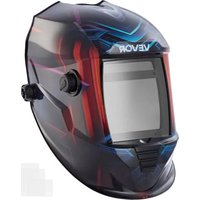


| Product Type | Auto-Darkening Welding Helmet |
| Brand | Vevor |
| Model | BY801E |
| LCD Viewing Area | 100 × 80 mm |
| Cartridge Size | 114 × 133 mm |
| UV/IR Protection | Yes, built-in UV/IR protection |
| Arc Sensors | 4 sensors |
| Variable Shades | Welding: 9-13, Cutting: 5-9, Grinding: 4 |
| Shade Control | Variable adjustment by external knob |
| Sensitivity Control | Variable adjustment by external knob |
| Power Supply | Solar cells with battery backup (2 × CR2032) |
| Low Battery Indicator | Red LED |
| On/Off | Fully automatic |
| Switching Time Light → Dark | 1/25,000 s |
| Switching Time Dark → Light | 0.1 s to 1.0 s (adjustable) |
| TIG Rating | DC ≥ 5 A, AC ≥ 5 A |
| Operating Temperature | -5 °C to +55 °C |
| Storage Temperature | -20 °C to +70 °C |
| Operating Modes | Welding, Cutting, Grinding |
| Delay Adjustment | 0.1 s to 1.0 s |
| Estimated Weight | Approximately 500 g |
| Estimated Dimensions (Shell) | Approximately 280 × 220 × 200 mm |
| Available Spare Parts | Front lens, ADF cartridge, inner lens, cartridge holder, shell, headband, etc. |
| Safety Standards | Compliant with ANSI Z49.1, ANSI Z87.1 |
| Disposal | WEEE Directive 2012/19/EU - do not dispose with household waste |
Frequently Asked Questions - BY801E Vevor
User questions about BY801E Vevor
0 question about this device. Answer the ones you know or ask your own.
Ask a new question about this device
Download the instructions for your Personal protective equipment in PDF format for free! Find your manual BY801E - Vevor and take your electronic device back in hand. On this page are published all the documents necessary for the use of your device. BY801E by Vevor.
USER MANUAL BY801E Vevor
WELDING HELMET
MODEL: BY801E

This is the original instruction. Please read all manual instructions carefully before operating. VEVOR reserves a clear interpretation of our user manual. The appearance of the product shall be subject to the product received. Please forgive us that we won't inform you again if there are technology or software updates on our product.

Warning: To reduce the risk of injury, user must read instruction manual carefully.
SAFETY INSTRUCTIONS
WARNING:
Read this material before using this product. Failure to do so can result in injury.
WELDING HELMET SAFETY PRECAUTIONS
READ BEFORE USING
Protect yourself and others from injury — read, follow, and save these important safety precautions and operating instructions.
Symbol Usage
DANGER! - Indicates a hazardous situation which, if not avoided, will result in death or serious injury. The possible hazards are shown in the adjoining symbols or explained in the text.
Indicates a hazardous situation which, if not avoided, could result in death or serious injury. The possible hazards are shown in the adjoining symbols or explained in the text.
NOTICE - Indicates statements not related to personal injury.
Indicates special instructions.

This group of symbols means Warning!
Watch Out! ELECTRIC SHOCK, MOVING PARTS, and HOT PARTS hazards.
Consult symbols and related instructions below for necessary actions to avoid hazards.
Arc Welding Hazards

Only qualified persons should install, operate, maintain, and repair the unit.
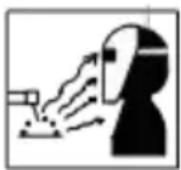
ARC RAYS can burn eyes and skin.
Arc rays from the welding process produce intense visible and invisible (ultraviolet and infrared) rays that can burn eyes and skin. Sparks from the weld.
- Wear a welding helmet fitted with a proper shade of filter to protect your face and eyes when welding or watching (see ANSI Z49.1 and Z87.1 listed in Safety Standards). Refer to Shade and sensitivity charts. Wear approved safety glasses with side shields under your helmet.
- Use protective screens or barriers to protect others from flash, glare, and sparks; warn others not to watch the arc.
- Wear body protection made from durable, flame-resistant material (leather, heavy cotton, wool). Body protection includes oil-free clothing such as leather gloves, heavy shirt, cuffless trousers, high shoes, and a cap.
- Before welding, adjust the auto-darkening lens sensitivity setting to meet the application.
- Stop welding immediately if the auto-darkening lens does not darken when the arc is struck. See the Owner's Manual for more information.
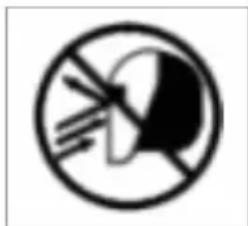
WELDING HELMETS do not provide unlimited eye, ear, and face protection.
Arc rays from the welding process produce intense visible and invisible (ultraviolet and infrared) rays that can burn eyes and skin. Sparks fly off from the weld.
- Use impact resistant safety spectacles or goggles and ear protection at all times when using this welding helmet.
- Do not use this helmet while working with or around explosives or corrosive liquids.
- Do not weld in the overhead position while using this helmet.
- Inspect the auto-lens frequently. Immediately replace any scratched, cracked, or pitted cover lenses or auto-lenses.
- NOISE can damage hearing.
- Noise from some processes or equipment can damage hearing.
- Wear approved ear protection if noise level is high.
READ INSTRUCTIONS.
Read and follow all labels and the Owner's Manual carefully before installing, operating, or servicing unit. Read the safety information at the beginning of the manual and in each section.
- Use only genuine replacement parts from the manufacturer.
- Perform maintenance and service according to the Owner's Manuals, industry standards, and national, state, and local codes.
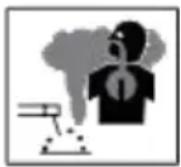
FUMES AND GASES can be hazardous.
Welding produces fumes and gases. Breathing these fumes and gases can be hazardous to your health.
- Keep your head out of the fumes. Do not breathe the fumes.
- If inside, ventilate the area and/or use local forced ventilation at the arc to remove welding fumes and gases. The recommended way to determine adequate ventilation is to sample for the composition and quantity of fumes and gases to which personnel are exposed.
- If ventilation is poor, wear an approved air-supplied respirator.
- Read and understand the Safety Data Sheets (SDSs) and the manufacturer instructions for adhesives, coatings, cleaners, consumables, coolants, degreasers, fluxes, and metals.
- Work in a confined space only if it is well ventilated, or while wearing an air-supplied respirator. Always have a trained watch person nearby. Welding fumes and gases can displace air and lower the oxygen level causing injury or death. Be sure the breathing air is safe.
- Do not weld in locations near degreasing, cleaning, or spraying operations. The heat and rays of the arc can react with vapors to form highly toxic irritating gases.
- Do not weld on coated metals, such as galvanized, lead, or cadmium plate steel, unless the coating is removed from the weld area, the area is well ventilated, and while wearing an air-supplied respirator. The coatings and any metals containing these elements can give off toxic fumes if welded.
Proposition 65 Warnings
Welding or cutting equipment produces fumes or gases which contain chemicals known to the State of California to cause birth defects and, in some cases, cancer. (California Health & Safety Code Section 25249.5
seq.)
SPECIFICATIONS
| Optical Class | 1/1/1/2 |
| LCD viewing Area | 100 x 80 mm (3.94 x 3.15 in.) |
| Cartridge size | 114 x 133mm (4.50 x 5.25in.) |
| UV/IR protection | UV/IR protection |
| Arc senso | 4 |
| variable welding shades | WELD ModelDarkened State:NO.9-13/Light State:NO.4 CUTModelDarkened State:NO.5-9/Light State:NO.4 GrindModelLightState:NO.4 |
| shade Control | variable adjust by external knob |
| sensitivity Control | variable adjust by external knob |
| power supply | solar cells with battery assist |
| Low Battery warning | Red Light |
| Battery | CR203 Lithium (2 Required) |
| Power On/Off | Fully automatic |
| Light to Dark switching Time | 1/25,000sec. |
| Dark to Light switching Time | 0.1sec.-1.0 sec. |
| TIG Rating | DC≥ 5 amps; AC≥ 5 amps |
| Operating Temperature | 23。F ~ 131。F (-5 。C ~ 55。C) |
| storage Temperature | -4。F~ 158。F (-20 。C ~ 70。C) |
OPERATING INSTRUCTIONS
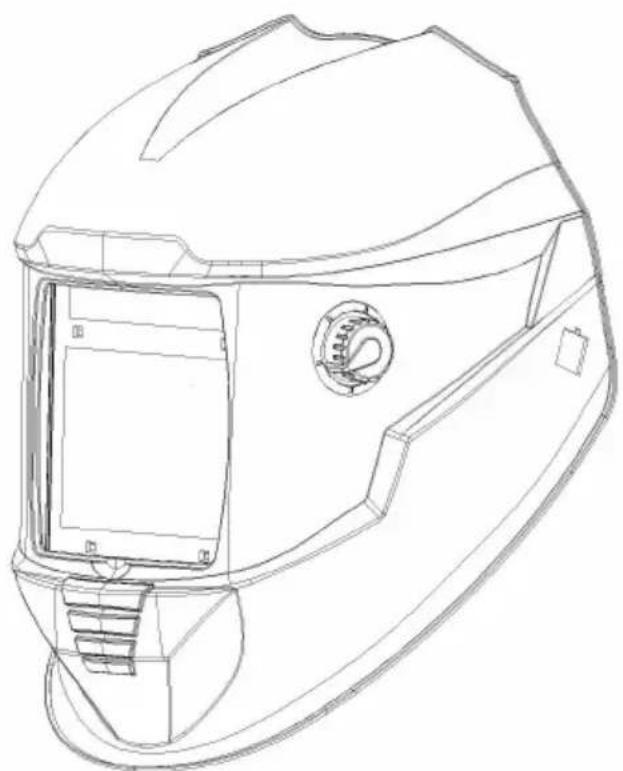
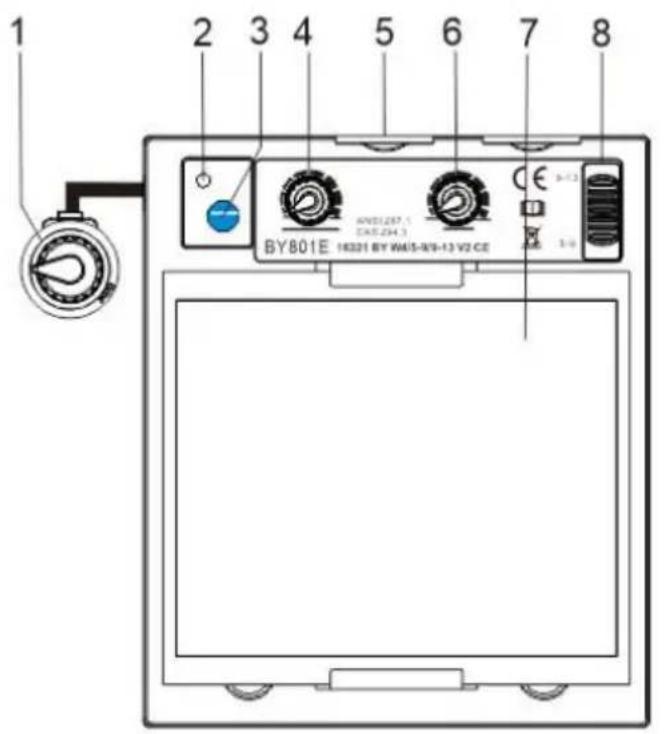
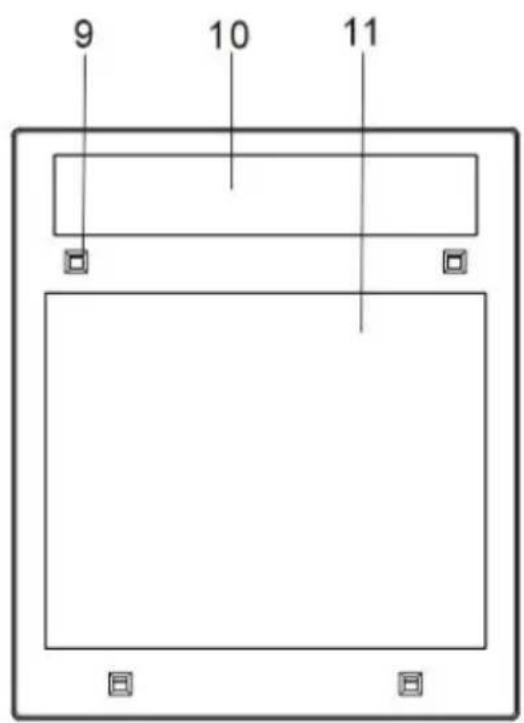
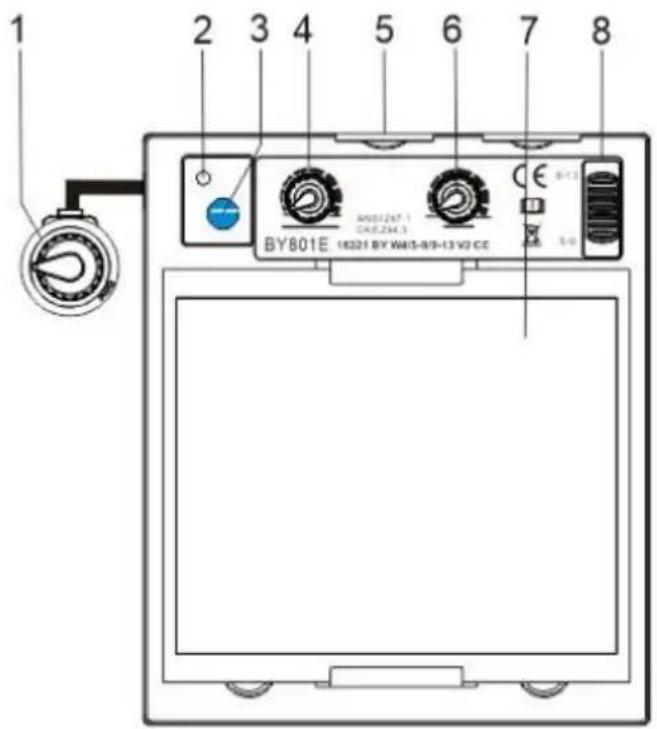
Helmet Controls
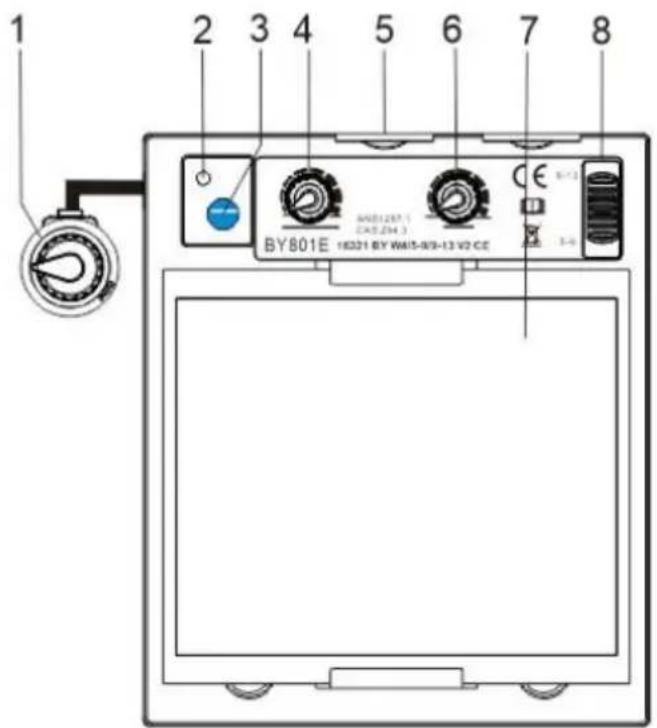
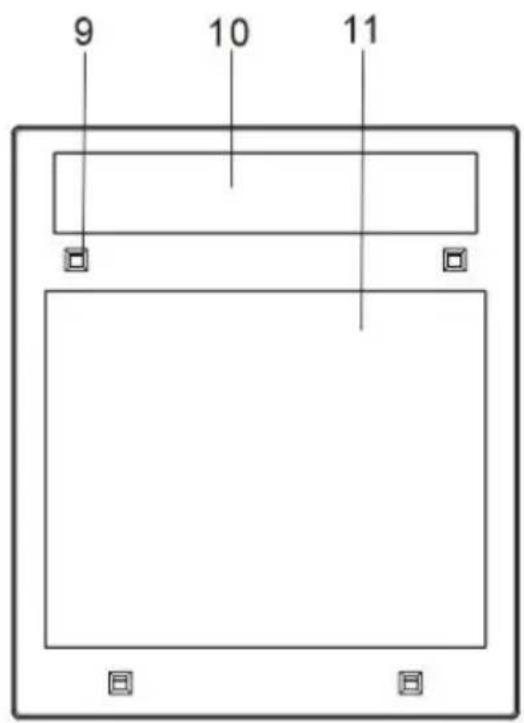
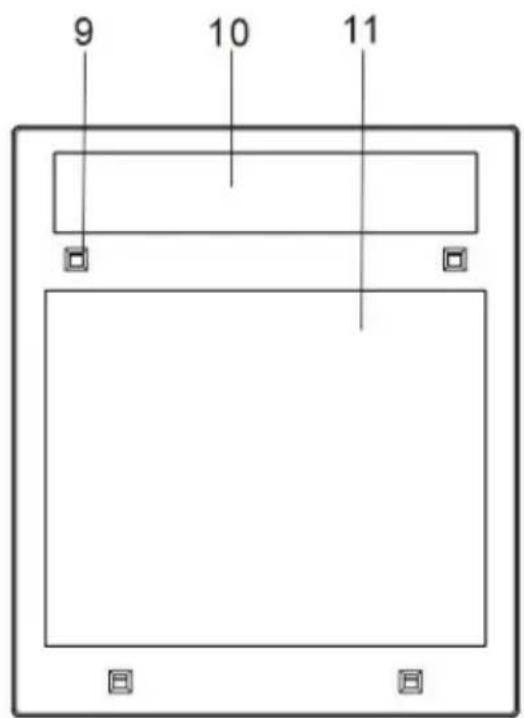
| NO. | DESCRIPTLON |
| 1 | Shade control knob |
| 2 | Low voltage indicator |
| 3 | Self-test button |
| 4 | Sensitivity control knob |
| 5 | Lithium battery |
| 6 | Delay time control knob |
| 7 | LCD |
| 8 | CUT-Weld |
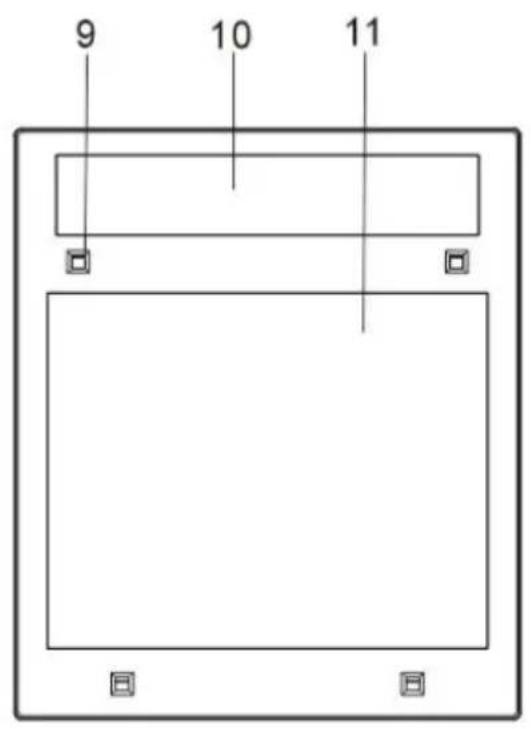
| 9 | Arc censor |
| 10 | Solar cell |
| 11 | UV/IR filter |
OPERATING INSTRUCTIONS
Reset Button And Low Battery Indicator
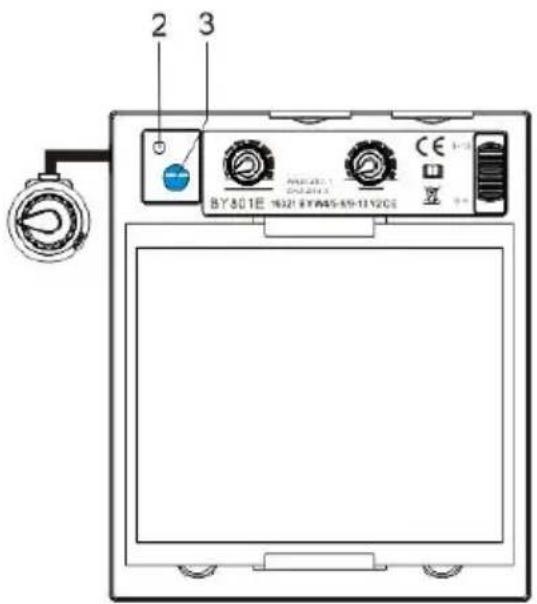
- Reset Button: Press Reset button to check if the lens is working properly. When the Reset button is pressed, the lens should darken and return to the clear state. Do not use the helmet if the lens does not function as described.
- Low Battery Indicator The low battery indicator lights when 2-3 days of battery life remain. If battery power is low, replace with CR2030 lithium batteries.
Lens Delay Control
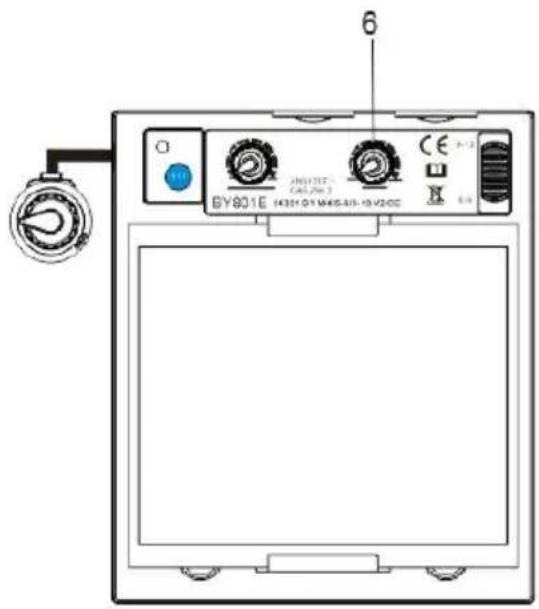
1. Lens Delay Control
The lens delay control is used to adjust the time for the lens to switch to the clear state after welding.
The delay is particularly useful in eliminating bright after-rays present in higher amperage applications where the molten puddle remains bright momentarily after welding. Lens delay adjusts from min (0.10 second) to max (1.0 second).
Mode Control
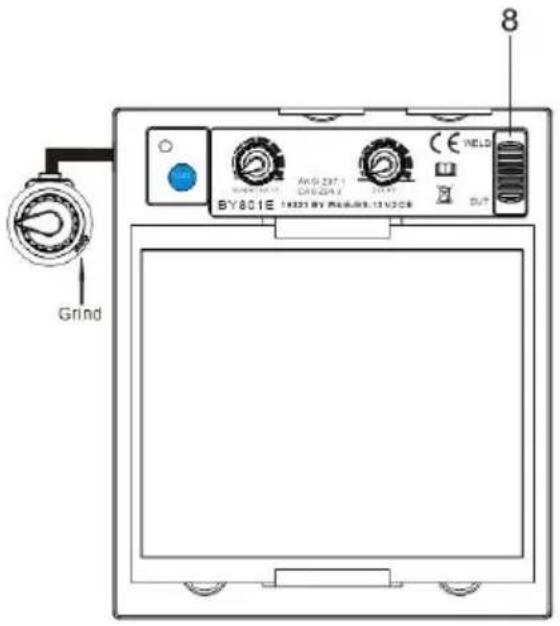
Adjustments are possible.
1. Weld Mode
Used for most welding applications. In this mode the lens turns on when it optically senses a welding arc. Adjust shade, sensitivity, and delay settings as needed.
2. Cut Mode
Used for cutting applications. In this mode the lens turns on when it optically senses a cutter arc. Adjust shade, sensitivity, and delay settings as needed.
3. Grind Mode
Used for metal grinding applications. In this mode the lens is fixed at shade No. 4. No adjustments are possible.
Sensitivity Control
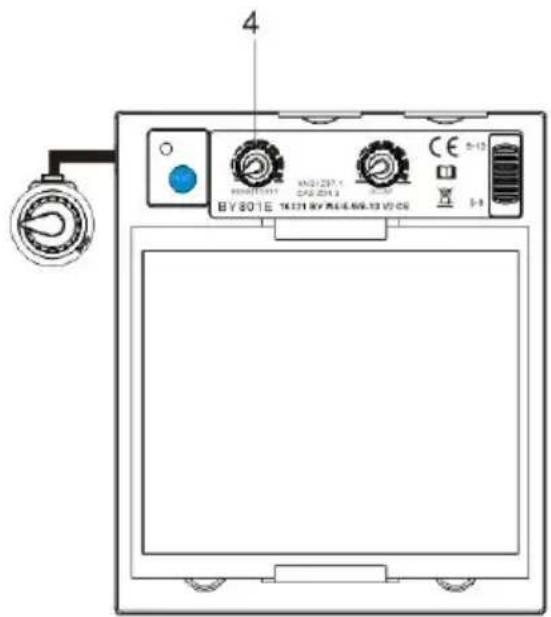
Press the "SENSITIVITY" button; it is selected according to the welding process and environmental light. The default sensitivity is medium.
- Select minimum: Suitable for high amperage welding or welding in bright environmental light (for example, when there is disturbing light from another welder nearby).
- Select maximum: Suitable for low amperage welding, use in poor light conditions (for example, pipe welding where part of the arc is obscured from view), and where the welding
arc becomes stable (for example, TIG welding).
Variable Shade Control
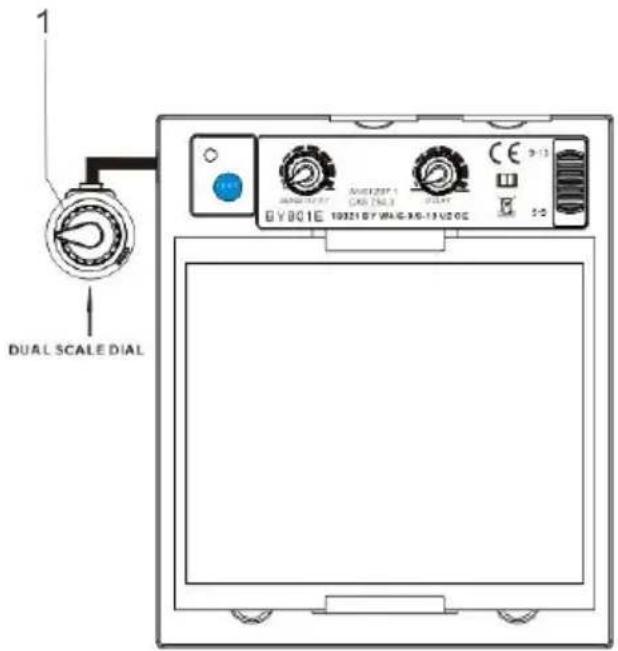
1 Variable Shade Control Use the control to adjust the lens shade in the darkened state. Use the table below to select the proper shade control setting based on your welding process. The shade ranges for each mode are as follows: Weld - No. 9 - No. 13; Cut - No. 5 - No. 9
Reference: ANSI Z49.1:2005
| Process | Electrode Size in. (mm) | Arc Current Amperes | Minimum Protective Shade No. | Suggested Shade No. (Comfort)* |
| Shielded Metal Ar Welding (SMAW) | Less than 3/32(2.4) 3/32-5/32(2.4-4.0) 5/32-1/4(4.0-6.4) More than 1/4 (6.4) | Less than 6060-160160-250250-550 | 781011 | --101214 |
| Gas Metal Arc Welding (GMAW) | Less than 6060-160160-250250-500 | 7101010 | --111214 | |
| Flux Cored Arc Welding (FCAW) | ||||
| Gas Tungsten Ar Welding (TIG) | Less than 5050-150150-500 | 8810 | 101214 | |
| Air Carbon Arc Cutting (CAC-A) | Light Heavy | Less than 50 500-1000 | 10 11 | 12 14 |
| Plasma Arc Cutting (PAC) | Less than 20 20-40 40-60 60-80 80-300 300-400 400-800 | 4 5 6 8 8 9 10 | 4 5 6 8 9 12 14 | |
| Plasma Arc Welding (PAW) | Less than 20 20-100 100-400 400-800 | 6 8 10 11 | 6-8 10 12 14 |
- Start with a shade that is too dark to see the weld zone. Then, use a lighter shade that gives a sufficient view of the weld zone without going below the minimum.
ADJUSTING HEADGEAR
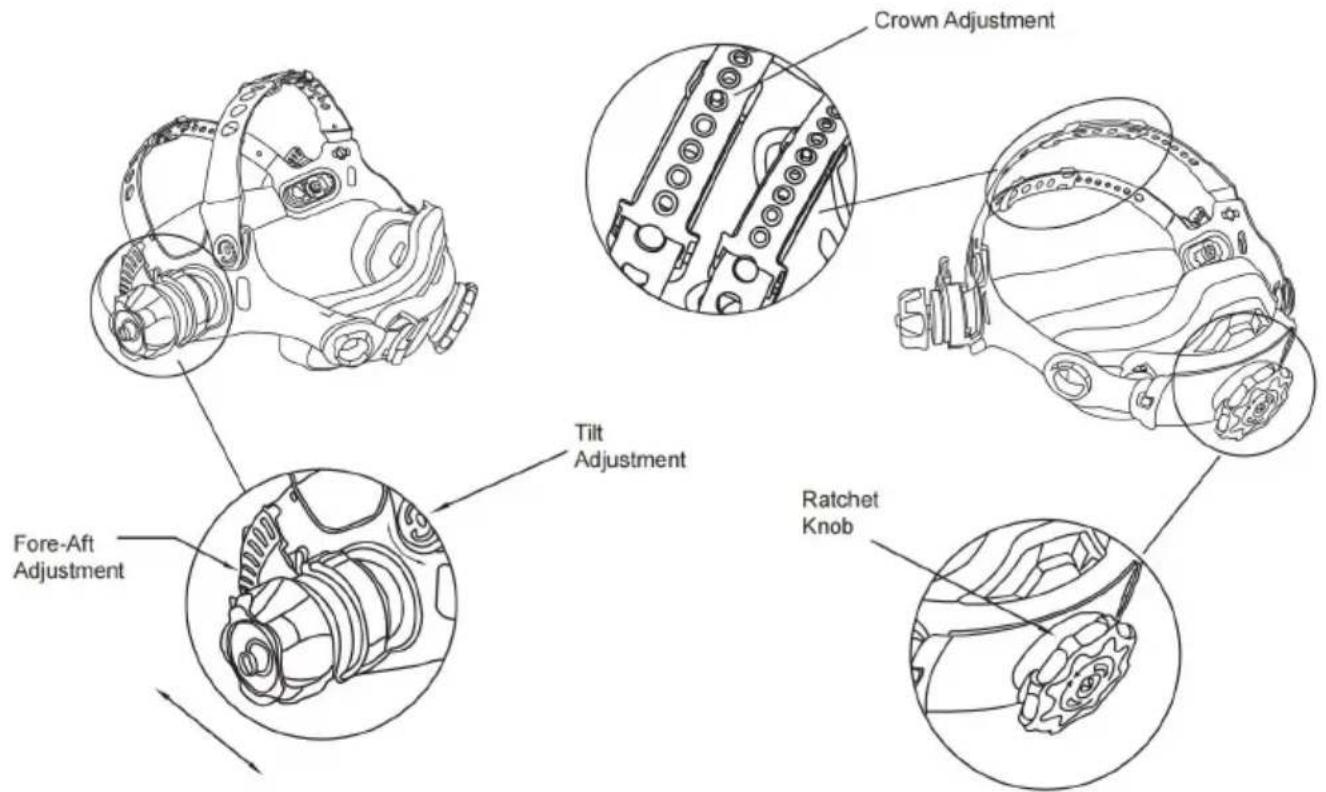
HEAD SIZE ADJUSTMENT: Headgear tightness is adjusted by turning the ratchet knob to the right or left to adjust for the desired head size. This knob is located at the back of the helmet.
ADJUSTMENT is made by adjusting the comfort, then placing the strap under the guide and snapping the pins into the holes to lock securely in place.
TILT: Tilt adjustment is located on the right side of the helmet. Loosen the headgear
tension knob and push the top end of the adjustment lever outward until the stop tab clears the notches. Then rotate the lever forward or back to the tilt position. The stop will automatically engage again when released, locking the helmet into position.
FORE / AFT ADJUSTMENT: Adjusts the distance between the user's face and the lens. To
adjust, slide and hold the spring-loaded caps upward while moving the head into one of four slotted locations. Once the desired distance has been achieved, release the cap and it will return to its resting position once the adapter is set in one of the four slots.
NOTE: Make sure both sides are equally positioned for proper orientation.
REPLACING THE BATTERY
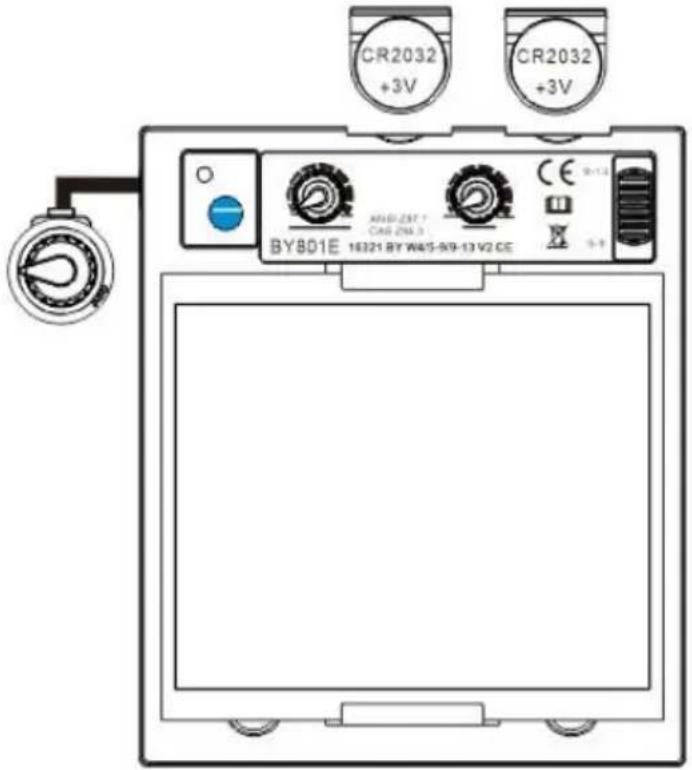
This ADF is powered by a replaceable battery and solar power. The battery is located at the bottom corner of the ADF cartridge.
Replace the battery when the LOW BATTERY light is lit.
Replace with CR2032 lithium type batteries (2 required) or equivalent. Be sure the Positive (+) side of the battery faces up (toward the inside of the helmet).
CARTRIDGE AND LENS REPLACEMENT
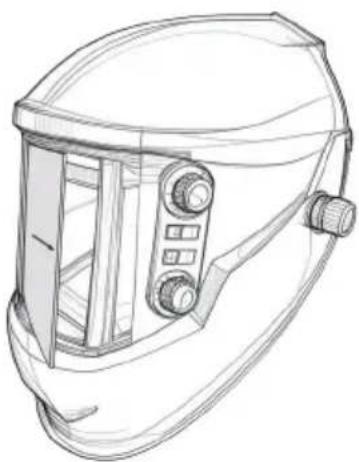
Warning: Never use the auto-darkening lens without the inside and outside lens covers properly installed. Welding spatter will damage the auto-darkening lens and void the warranty.
Front clear cover lens:
Remove the outside cover lens by prying from the groove and reinstall a new one.
Replacing inside clear lens:
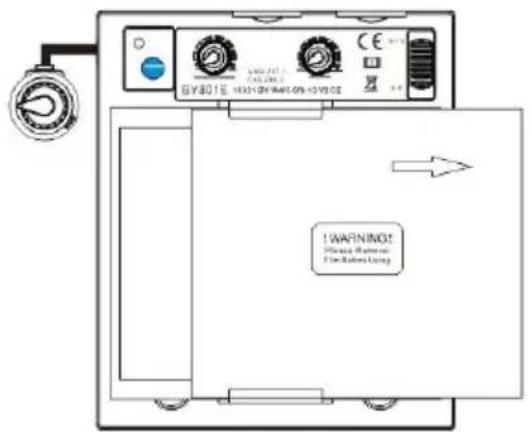
Warning: There is a cable connecting the battery and the lens. Please be careful not to break it.
Inside lens cover:
Remove the inside lens cover by prying the cover from the groove in the gasket and reinstall a new one.
CARTRIDGE AND LENS REPLACEMENT
Change the shade cartridge.
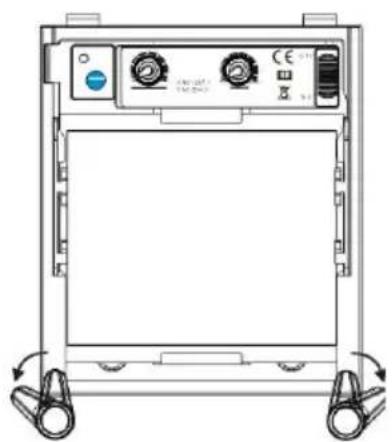
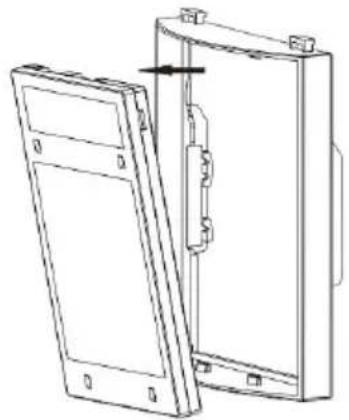
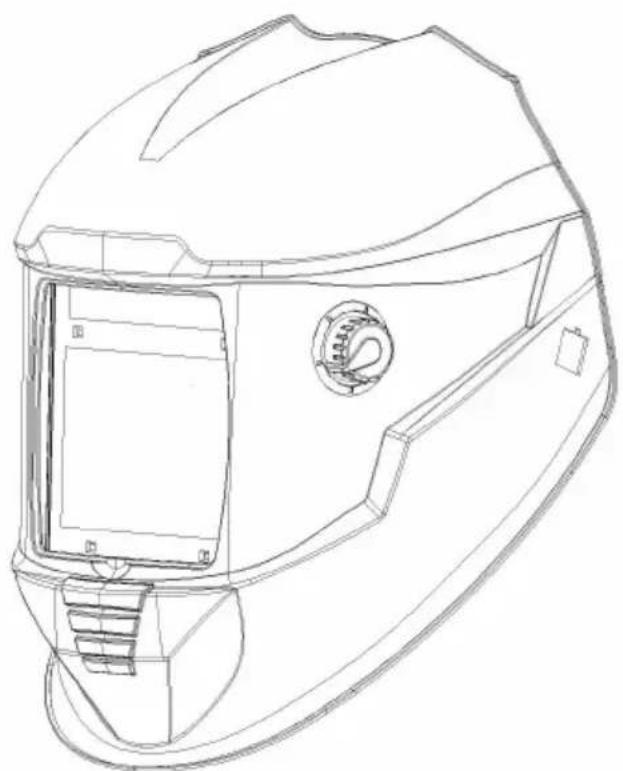
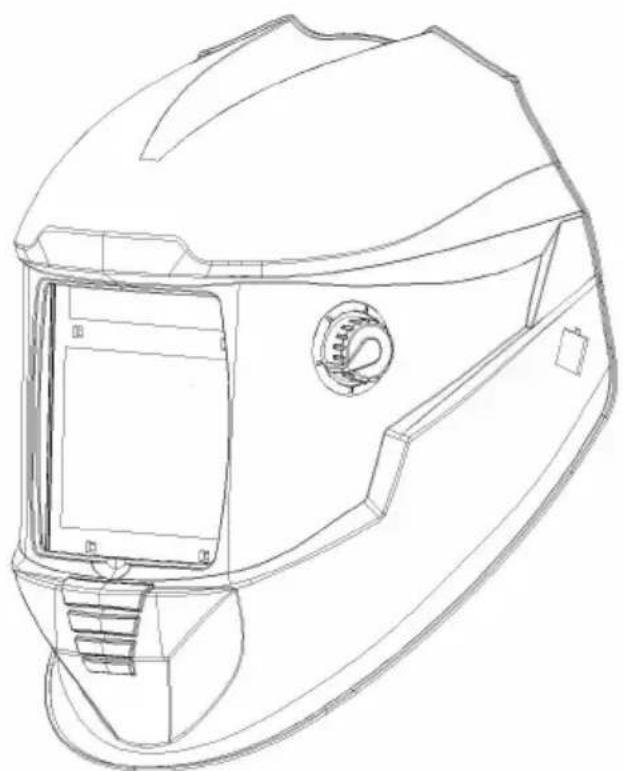
Remove ADF holder assembly from helmet shell. See Figure 1 and Figure 2 for removal. Flex bottom end of the ADF holder to allow for ADF cartridge to be removed from frame. Install new ADF cartridge into frame per Figure 3. Make sure that the ADF cartridge is inserted in ADF holder correctly as shown. Insert ADF holder assembly into helmet shell.
Installing an Aftermarket Magnifying Lens
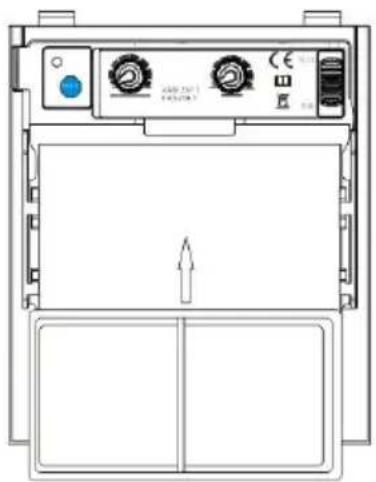
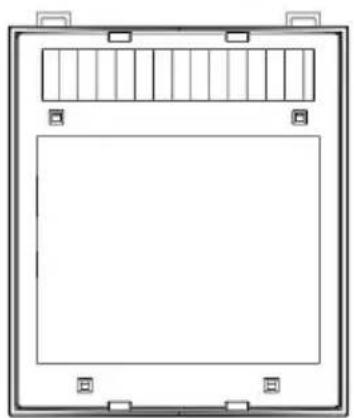
Simply slide the magnifying lens into the short rail located on the sides of ADF holder per Figure 4. Shade cartridge must be removed from ADF holder to install magnifying lens.
COMMON PROBLEMS AND REMINDERS
| PROBLEM | POSSIBLE CAUSE | SOLUTION |
| Difficult to see through filter. | Front cover lens dirty. | Clean or replace front cover le |
| Cartridge dirty. | Clean the Auto-Darkening cartridge with soapy water solution and soft cloth. | |
| Filter does not darken when arc is struck. | sensitivity is set too lo | Adjust sensitivity to required lev |
| Front cover lens dirty. | Clean or replace front cover le | |
| Front cover lens is damaged. | Check for cracked or pitted fro cover lens and replace as required. | |
| sensors are blocked or solar panel is blocked. | Make sure you are not blockin the sensors or solar panels wi your arm or other obstacle wh welding. Adjust your position so that thesensors can see the w arc. | |
| Grind Mode selected. | Make sure proper shade is selected. | |
| Is the switch on 5-9/9-13 stuck in the middle. | Turn the switch to the correct position. | |
| Filter remains dark after completing a weld. | sensitivity set too high | Adjust sensitivity to required level. |
| Delay time set too high | Adjust delay time to required level. | |
| Low Battery. | Replacing battery. | |
| Filter does not darken when TEST button is pushed. | Low battery. | Replacing battery. |
| the LED will no turn on after pressing button. | Plug-in jack from filter not completely inserted | Remove plug-in jack port and re-insert it into the port. |
WARNING! Operator must stop using the auto-darkening filter welding helmet immediately if the above-mentioned problems cannot be corrected. Contact the dealer.
REPLACEMENT PARTS
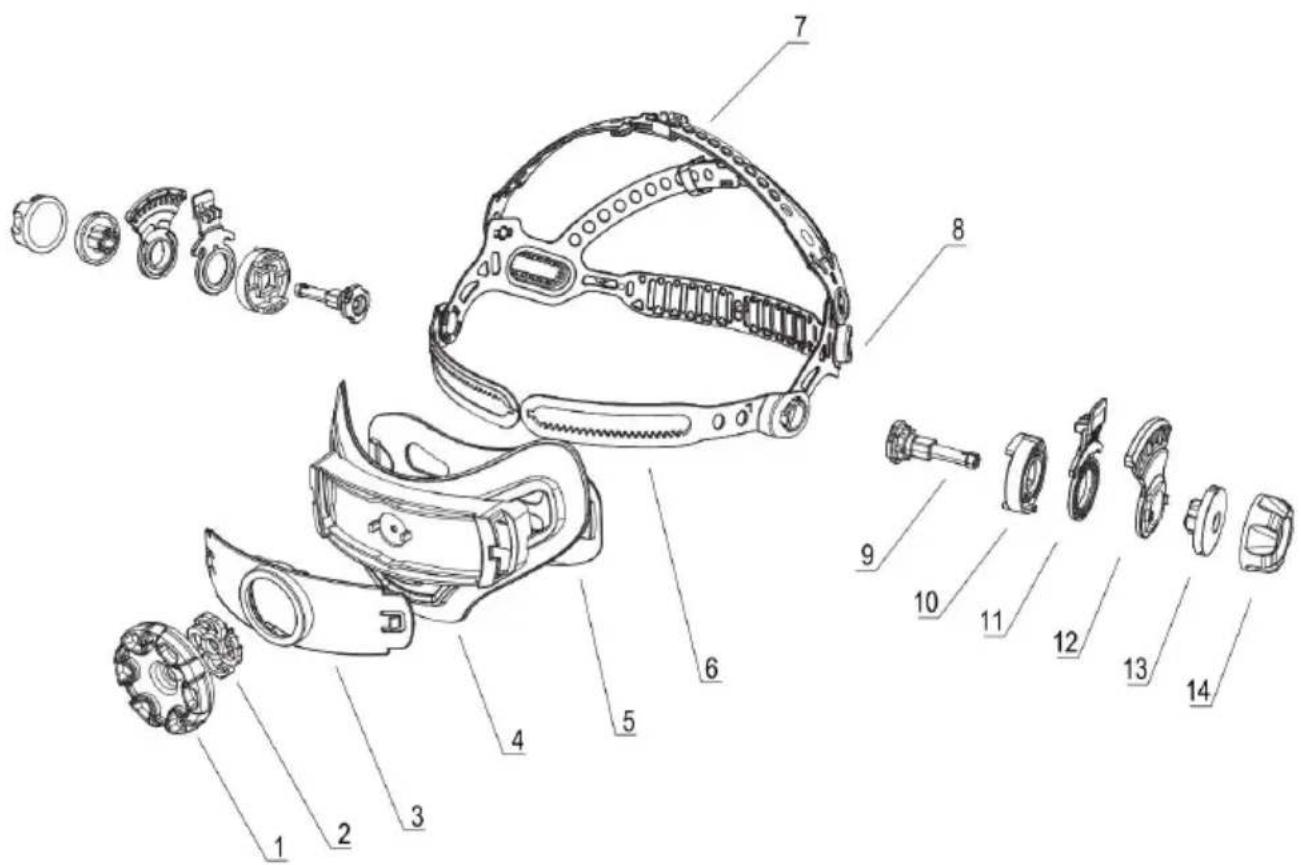
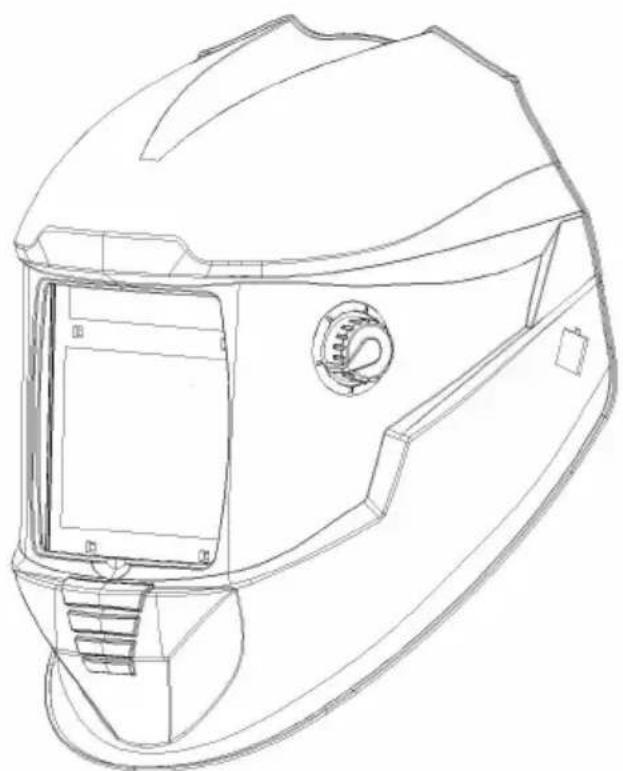
| NO. | DESCRIPTLON | NO. | DESCRIPTLON |
| 1 | Hand wheel gear | 8 | Fastener |
| 2 | Pinion | 9 | Retainer |
| 3 | Back cover1 | 10 | Position-hold button-1 |
| 4 | Back cover2 | 11 | Position-hold plate |
| 5 | Gear bar | 12 | Position-hold button-2 |
| 6 | Scallops1 | 13 | Nut |
| 7 | Scallops2 | 14 |
REPLACEMENT PARTS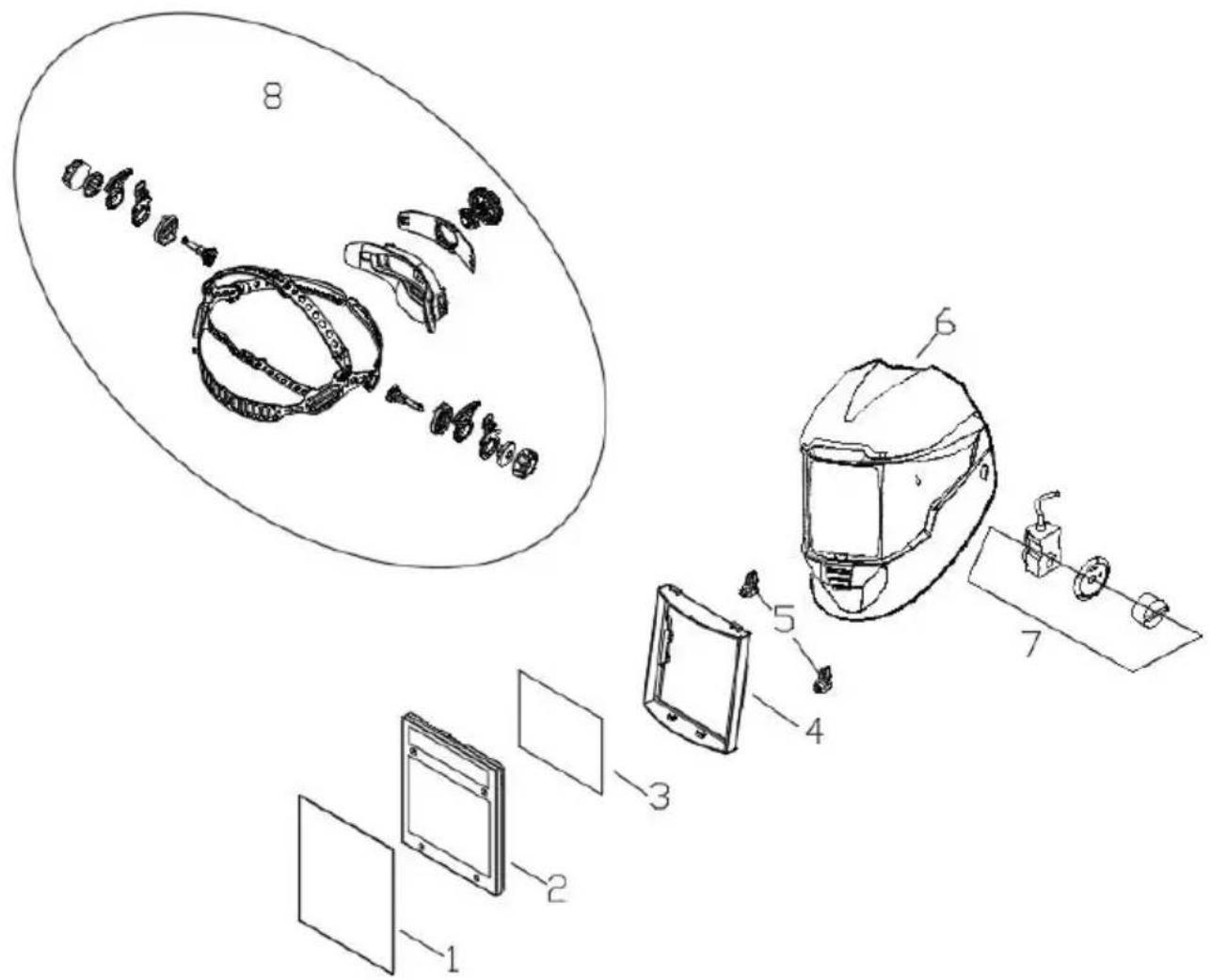
| NO. | PART NO . | DESCRIP TLON | QTY |
| 1 | BY-010003 | Front Cover Lens | 1 |
| 2 | BY-010001 | ADF | 1 |
| 3 | BY-010005 | Inside Cover Lens | 1 |
| 4 | BY-010018 | Cartridge Holder | 1 |
| 5 | BY-010019 | Cartridge Holder Knob | 2 |
| 6 | BY-010002 | Helmet Shell | 1 |
| 7 | BY-010025 | Variable Shade Control | 1 |
| 8 | BY-010014 | Headgear | 1 |
CORRECT DISPOSAL
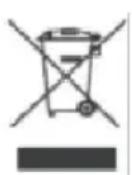
This product is subject to the provision of European Directive 2012/19/EU. The symbol showing a wheelie bin crossed through indicates that the product requires separate refuse collection in the European Union. This applies to the product and all
accessories marked with this symbol. Products marked as such may not be discarded with normal domestic waste, but must be taken to a collection point for recycling electrical and electronic devices.
Manufacturer: Shanghai Muxin Muye Youxian Gongsi
Address: Room 1602A-1609, No. 11, Lane 803, Shuangcheng Road, Baoshan District, Shanghai 200000, CN.
Imported to AUS: SIHAO PTY LTD. 1 ROKEVA STREET, EASTWOOD NSW 2 Australia
Imported to USA: Sanven Technology Ltd. Suite 250, 9166 Anaheim Place, Rancho Cucamonga, CA 91730
| UK | REP |
YH CONSULTING LIMITED. C/O YH Consulting Limited, Office 147, Centurion House, London Road, Staines-upon-Thames, Surrey, TW18 4A
| EC | REP |
Affordable. Reliable. Home Improvement.
WELDING HELMET
MODEL: BY801E
CR2032.
Figure 1
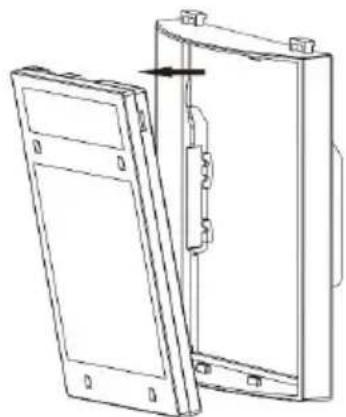
Figure 2
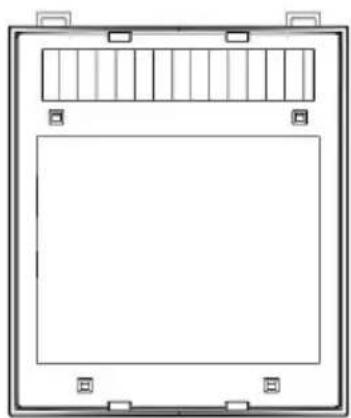
Figure 3
Figure 4
| NON . | DESCRIPTION | NON . | DESCRIPTION |
| 1 | Engrenage à volant | 8 | Attache |
| 2 | Pignon | 9 | Retenue |
| 3 | Dos couverture 1 | 10 | Position - maintenir bouton -1 |
| 4 | Dos couverture 2 | 11 | Plaque de maintien en position |
| 5 | Engrenage bar | 12 | Position - maintenir bouton -2 |
| 6 | Coquilles Saint-Jacques1 | 13 | Noix |
| 7 | Coquilles Saint-Jacques2 | 14 |
SPARE PARTS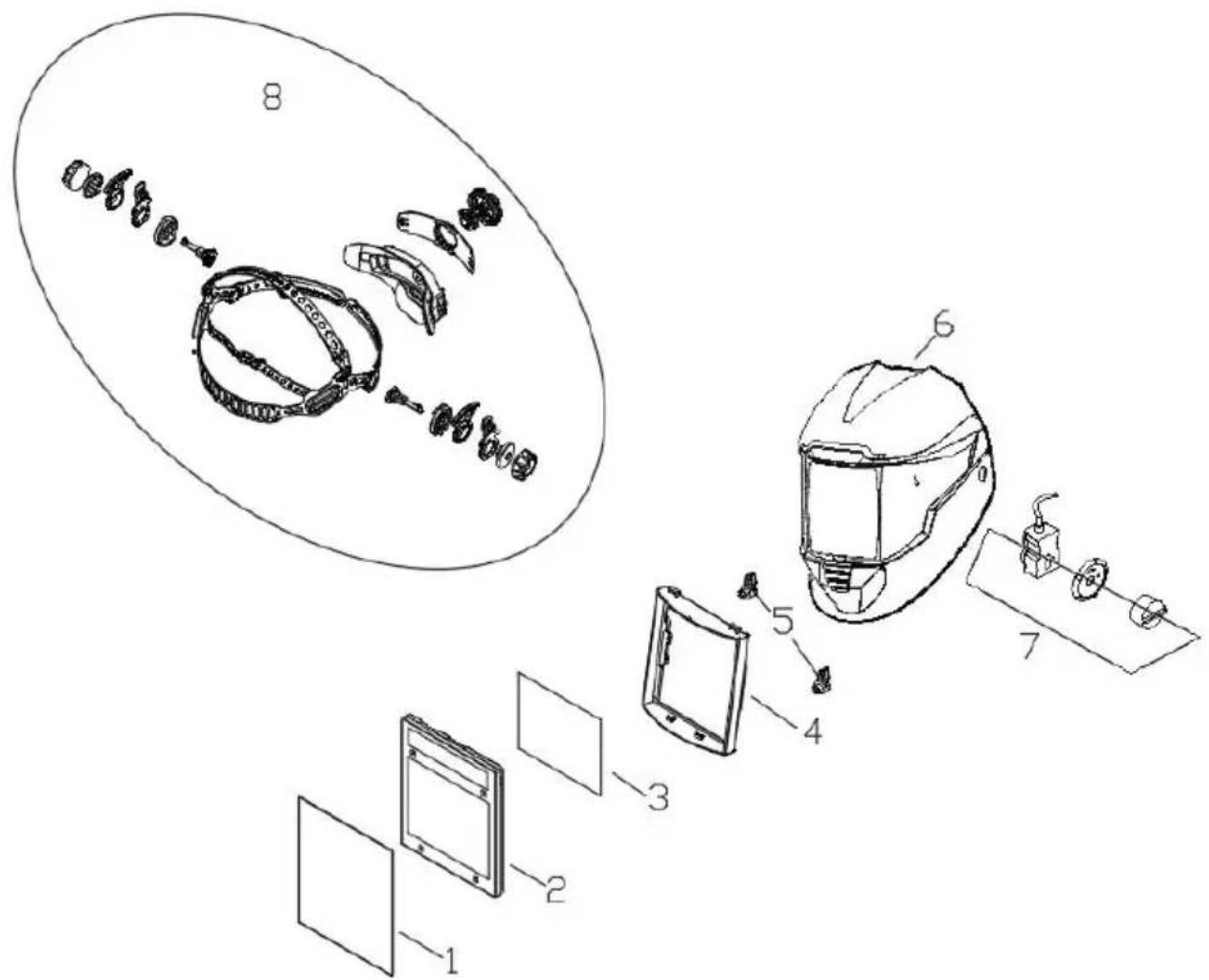
YH CONSULTING LIMITED. C/O YH Consulting Limited, Office 147, Centurion House, London Road, Staines-upon-Thames, Surrey, TW18 4A
| EC | REP |
Affordable. Reliable. Home Improvement.
WELDING HELMET
MODEL: BY801E
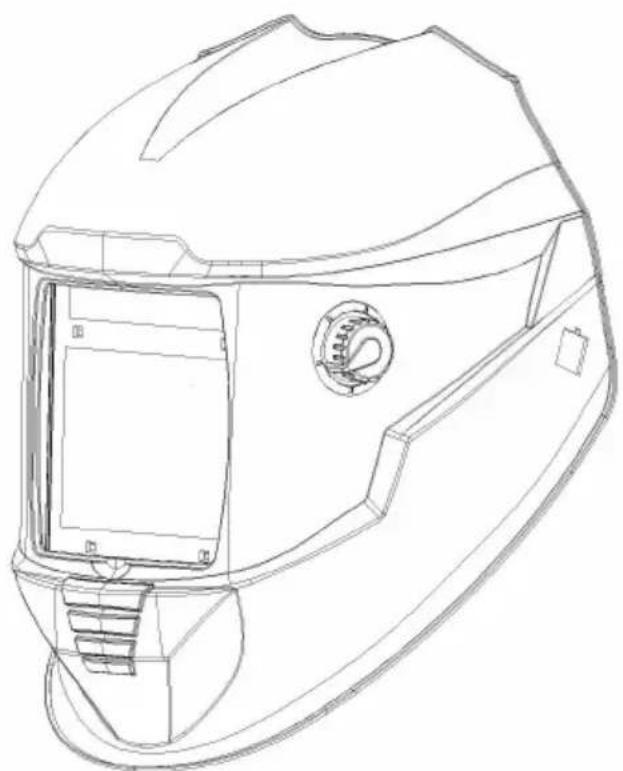
Figure 1
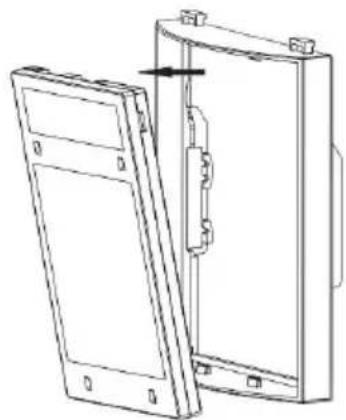
Figure 2
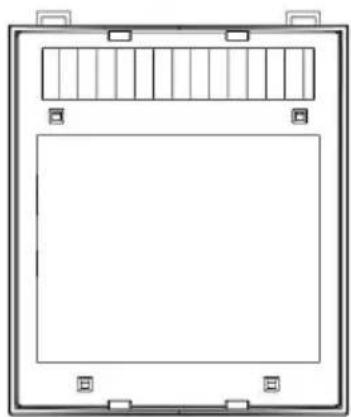
Figure 3
Figure 4
YH CONSULTING LIMITED. C/O YH Consulting Limited Office 147, Centurion House, London Road, Staines-upon-Thames, Surrey, TW18 4A>
| EC | REP |
Affordable. Reliable. Home Improvement.
WELDING HELMET
MODEL: BY801E
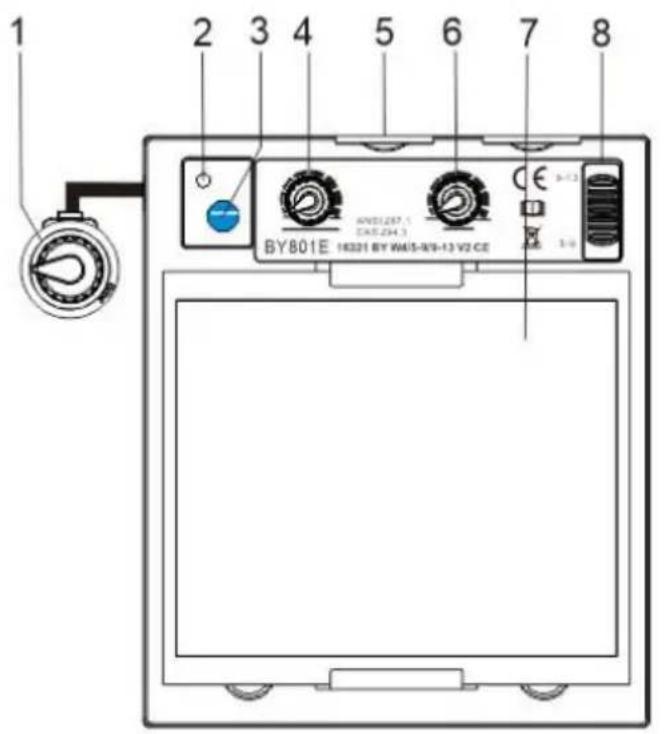
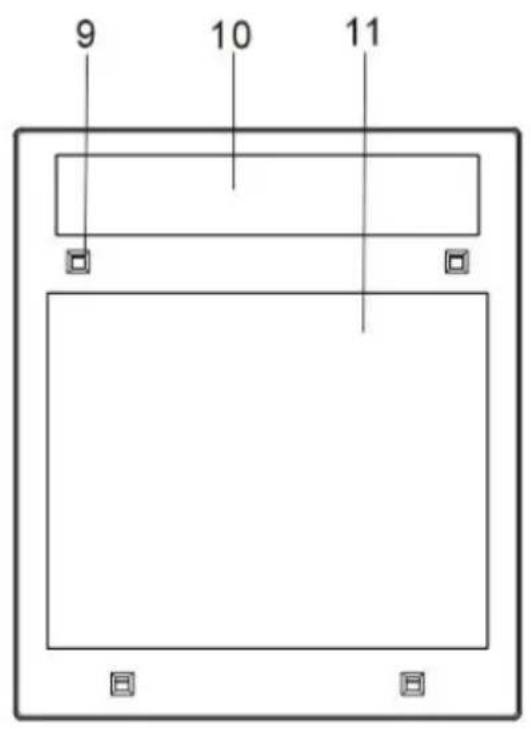
Figure 1
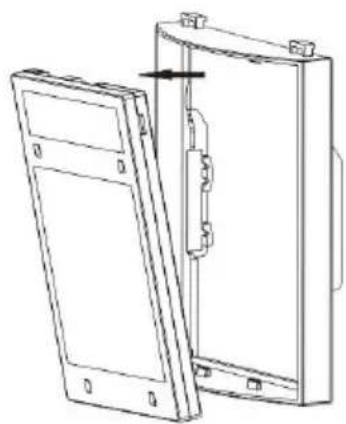
Figure 2
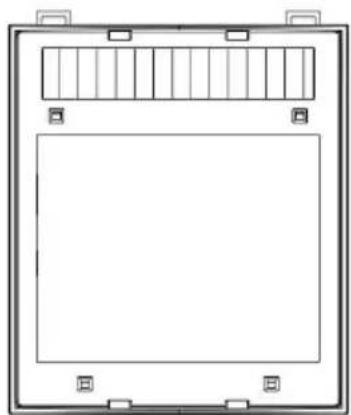
Figure 3
Figure 4
| NO. | PARTE NO . | DESCRIZIONE | QUANTITÀ |
| 1 | BY-010003 | Fronte Copertina Lente | 1 |
| 2 | BY-010001 | ADF | 1 |
| 3 | BY-010005 | Dentro Copertina Lente | 1 |
| 4 | BY-010018 | Cartuccia Titolare | 1 |
| 5 | BY-010019 | Cartuccia Pomello di supporto | 2 |
| 6 | BY-010002 | Casco Conchiglia | 1 |
| 7 | BY-01002 5 | Controllo variabile dell'ombra | 1 |
| 8 | BY-010014 | Copricapo | 1 |
Imported in AUS: SIHAO PTY LTD. 1 ROKEVA STREET EASTWOOD NSW 2122 Australia
Imported into the USA: Sanven Technology Ltd. Suite 250, 9166 Anaheim Place, Rancho Cucamonga, CA 91730
| UK | REP |
YH CONSULTING LIMITED. C/O YH Consulting Limited, Office 147, Centurion House, London Road, Staines-upon-Thames, Surrey, TW18 4AX
| EC | REP |
Affordable. Reliable. Home Improvement.
WELDING HELMET
MODEL: BY801E
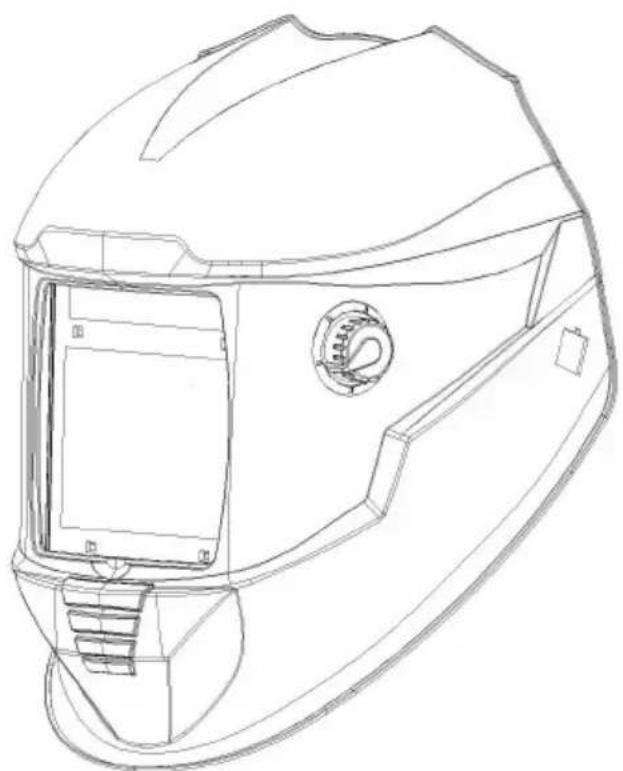
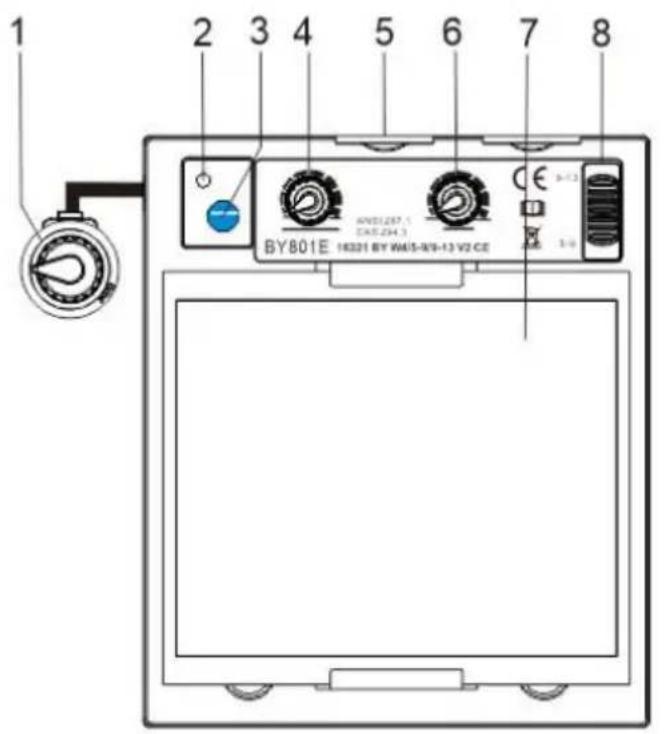
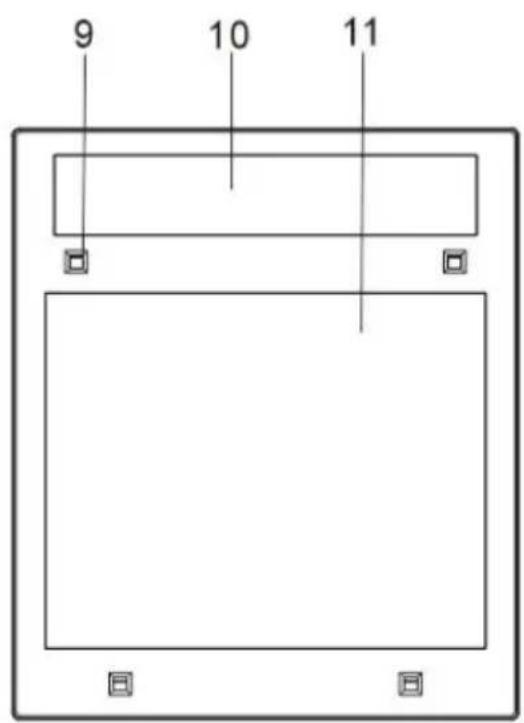
Figure 1
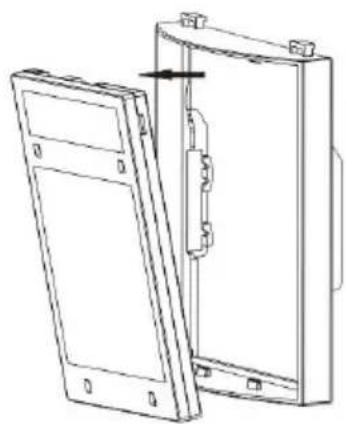
Figure 2
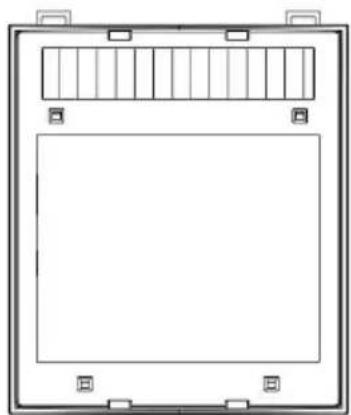
Figure 3
YH CONSULTING LIMITED. C/O YH Consulting Limited, Office 147, Centurion House, London Road, Staines-upon-Thames, Surrey, TW18 4AX
| EC | REP |
Affordable. Reliable. Home Improvement.
WELDING HELMET
MODEL: BY801E

with CR2030 lithium battery.
Figure 1
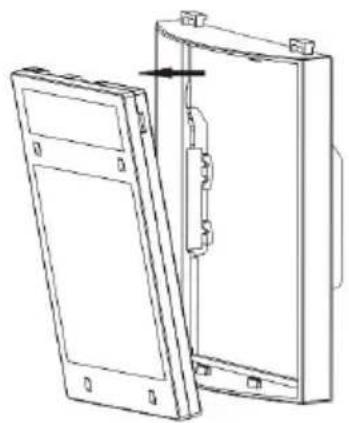
Figure 2
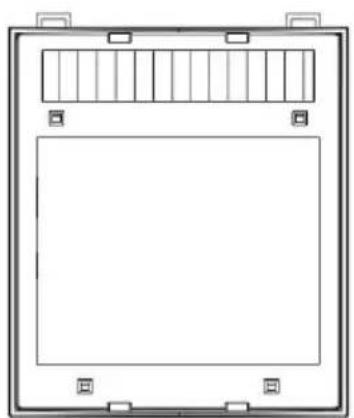
Figure 3
Figure 4
YH CONSULTING LIMITED. C/O YH Consulting Limited Office 147, Centurion House, London Road, Staines-upon-Thames, Surrey, TW18 4AX
| EC | REP |
Affordable. Reliable. Home Improvement.
LASHELM
MODEL: BY801E
Booglassen Haza- routes

REPLACEMENT OF CARTRIDGE AND LENS
Figure 1
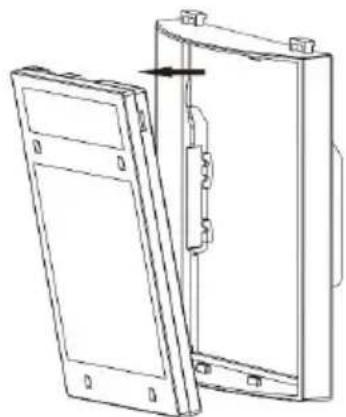
Figure 2
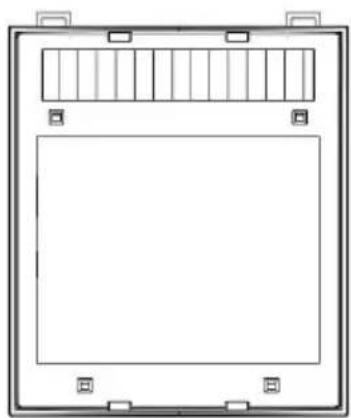
Figure 3
Figure 4
YH CONSULTING LIMITED. C/O YH Consulting Limited Office 147, Centurion House, London Road, Staines-upon-Thames, Surrey, TW18 4AX
| EC | REP |
Affordable. Reliable. Home Improvement.
SVETSHJÄLM
MODEL: BY801E
possible.
1 Welding Mode
Figure 1
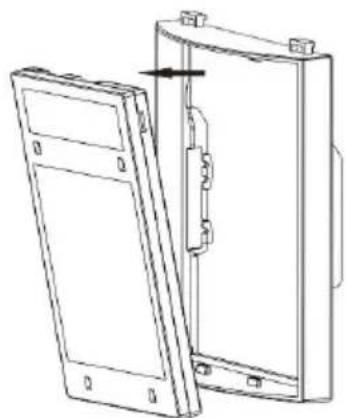
Figure 2
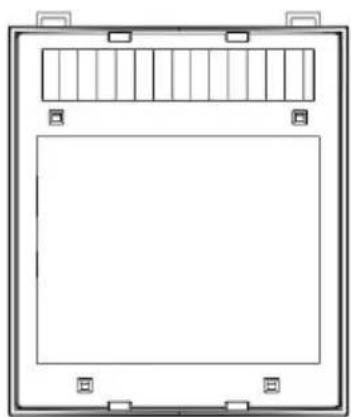
Figure 3
Figure 4
COMMON PROBLEMS AND REMINDERS
| EC | REP |
- SAFETY INSTRUCTIONS
- WARNING
- WELDING HELMET SAFETY PRECAUTIONS
- READ BEFORE USING
- SYMBOL USAGE
- INDICATES SPECIAL INSTRUCTIONS
- ARC WELDING HAZARDS
- WELDING HELMETS DO NOT PROVIDE UNLIMITED EYE, EAR, AND FACE PROTECTION
- READ INSTRUCTIONS
- FUMES AND GASES CAN BE HAZARDOUS
- PROPOSITION 65 WARNINGS
- OPERATING INSTRUCTIONS
- RESET BUTTON AND LOW BATTERY INDICATOR
- LENS DELAY CONTROL
- MODE CONTROL
- WELD MODE
- CUT MODE
- GRIND MODE
- SENSITIVITY CONTROL
- VARIABLE SHADE CONTROL
- ADJUSTING HEADGEAR
- REPLACING THE BATTERY
- CARTRIDGE AND LENS REPLACEMENT
- FRONT CLEAR COVER LENS
- REPLACING INSIDE CLEAR LENS
- INSIDE LENS COVER
- CHANGE THE SHADE CARTRIDGE
- INSTALLING AN AFTERMARKET MAGNIFYING LENS
- COMMON PROBLEMS AND REMINDERS
- REPLACEMENT PARTS
- CORRECT DISPOSAL
- BOOGLASSEN HAZA- ROUTES
- REPLACEMENT OF CARTRIDGE AND LENS
- WELDING MODE
Brand : Vevor
Model : BY801E
Category : Personal protective equipment