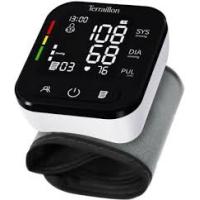
Pressio TP251 - Blood pressure monitor TERRAILLON - Free user manual and instructions
Find the device manual for free Pressio TP251 TERRAILLON in PDF.


User questions about Pressio TP251 TERRAILLON
0 question about this device. Answer the ones you know or ask your own.
Ask a new question about this device
Download the instructions for your Blood pressure monitor in PDF format for free! Find your manual Pressio TP251 - TERRAILLON and take your electronic device back in hand. On this page are published all the documents necessary for the use of your device. Pressio TP251 by TERRAILLON.
USER MANUAL Pressio TP251 TERRAILLON
text_image
ANS DE GARANTIE YEARS GUARANTEEMANUEL D'UTILISATION – INSTRUCTION MANUAL
text_image
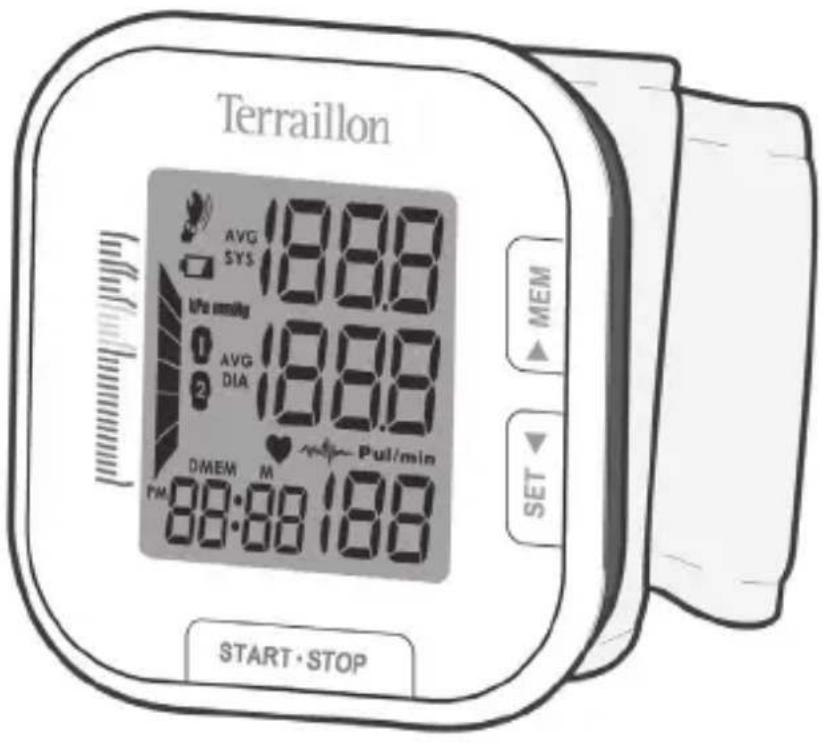
Terraillon AVG 18.88 SYS Upa mmHg AVG 18.88 DIA DMEM M Pull/min PM 88:88:188 START·STOP MEM SETTerraillon®
LE BIEN-ÊTRE PRÉCISÉMENT
C€ 0123




FR TENSIOMÈTRE POIGNET – NOTICE D'UTILISATION .... 4
EN WRIST BLOOD PRESSURE MONITOR – INSTRUCTION MANUAL 14
DE HANDGELENK-BLUTDRUCKMESSGERÄT – BEDIENUNGSANLEITUNG 24
NL POLSBLOEDDRUKMETER – HANDLEIDING 34
IT SFIGMOMANOMETRO – MANUALE DI ISTRUZIONI 44
ES TENSIÓMETRO DE MUÑECA – MANUAL DE INSTRUCCIONES 54
PT MONITOR DE PRESSÃO SANGUINEA DE PULSO – MANUAL DE INSTRUÇÕES ...... 64
FR
TENSIOMÈTRE POIGNET – NOTICE D'UTILISATION
natural_image
Illustration of a computer mouse with a rolled paper and a rolled document on top (no text or symbols)This device is intended for adult use only. This device is intended for no-invasive measuring and monitoring of arterial blood pressure. It is not intended for use on extremities other than the wrist or for functions other than obtaining a blood pressure measurement. Do not confuse self-monitoring with self-diagnosis. This unit allows you to monitor your blood pressure. Do not begin or end medical treatment without asking a physician for treatment advice. If you are taking medication, consult your physician to determine the most appropriate time to measure your blood pressure. Never change a prescribed medication without consulting your Physician. When the device was used to measure patients who have common arrhythmias such as atrial or ventricular premature beats or arterial fibrillation, the best result may occur with deviation. Please consult your physician about the result. If the cuff pressure exceeds 40 kPa (300 mmHg), the unit will automatically deflate. Should the cuff not deflate when pressures exceeds 40 kPa (300 mmHg), detach the cuff from the arm and press the START/STOP button to stop inflation. The equipment is not AP/APG equipment and not suitable for use in the presence of a flammable anesthetic mixture with air of with oxygen or nitrous oxide. The operator shall not touch output of batteries /adapter and the patient simultaneously. To avoid measurement errors, please avoid the condition of strong electromagnetic field radiated interference signal or electrical fast transient/burst signal. The user must check that the equipment functions safely and see that it is in proper working condition before being used. This device is contraindicated for any female who may be suspected of, or is pregnant. This unit is not suitable for continuous monitoring during medical emergencies or operations. Otherwise, the patient's wrist and fingers will become anaesthetic, swollen and even purple due to a lack of blood. Please use the device under the environment which was provided in the user manual. Otherwise, the performance and lifetime of the device will be impacted and reduced. During use, the patient will be in contact with the cuff. The materials of the cuff have been tested and found to comply with requirements of ISO 10993-5:2009 and ISO 10993-10:2010. It will not cause any potential sensitization or irritation reaction. Please use ACCESSORIES and detachable partes specified/ authorised by MANUFACTURE. Otherwise, it may cause damage to the unit or danger to the user/patients. The device doesn't need to be calibrated within the two years of reliable service. Please dispose of ACCESSORIES, detachable parts, and the ME EQUIPMENT according to the local guidelines. If you have any problems with this device, such as setting up, maintaining or using, please contact the after-sales service. Don't open or repair the device by yourself.
EN
BLOOD PRESSURE MONITOR – INSTRUCTION MANUAL
MONITOR COMPONENTS
text_image
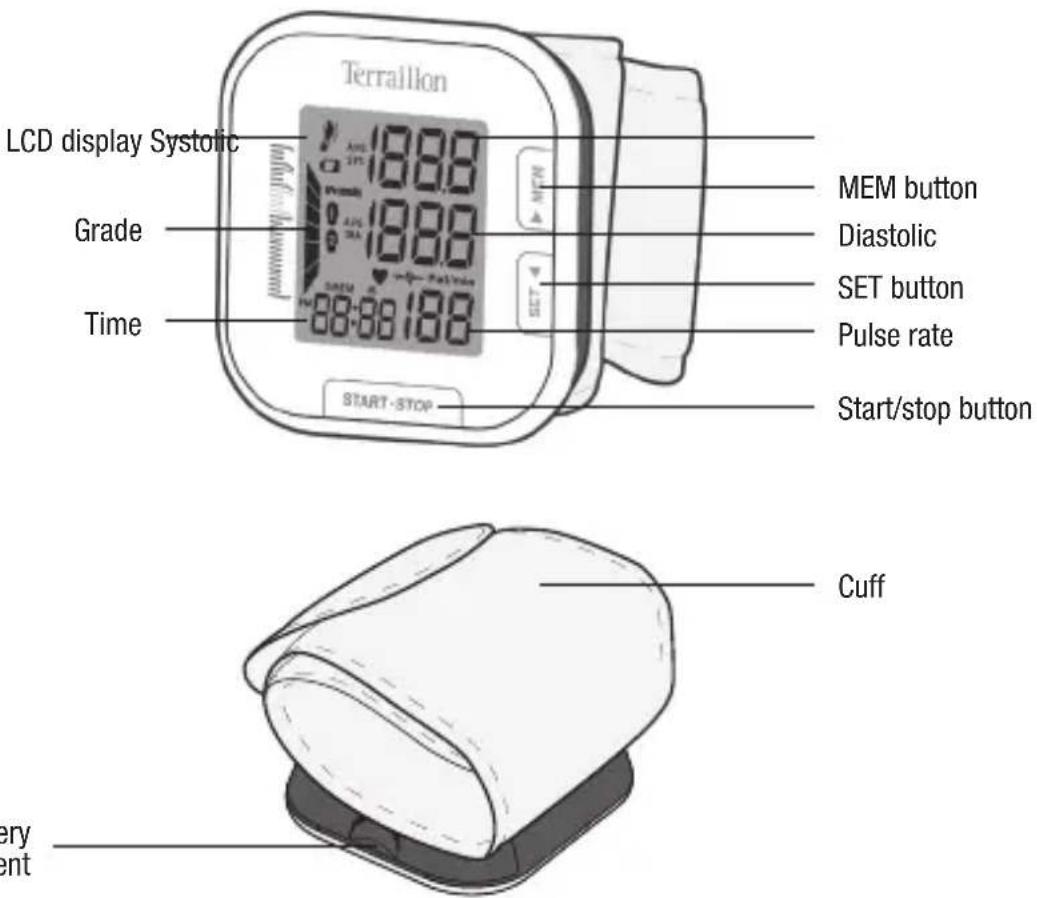
LCD display Systolic Grade Time Terraillon MEM button Diastolic SET button Pulse rate Start/stop button Cuff very entTerraillon.
EN
BLOOD PRESSURE MONITOR – INSTRUCTION MANUAL
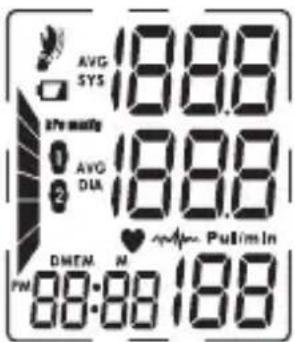
LCD display signal
text_image
AVG SYS 18.00 DIA AVG DIA 18.00 PM 88:00 PM AVG S 2nd Monet 18.00 PM AVG S 2nd Monet 18.00 PM AVG S 2nd Monet 18.00 PM AVG S 2nd Monet 18.00 PM| SYMBOL DESCRIPTION EXPLANATION | ||
| SYS | Systolic blood pressure High pressure result | |
| DIA | Diastolic blood pressure Low pressure result | |
| Pul/min | Pulse per minute Heatbeats per minute, BPM | |
| [06aw] | Shocking reminding | Shocking will result in inaccurate |
| 8888 | Memory Display the serial number of the measurement | |
| kPa | kPa Measurement Unit of the blood pressure | |
| mmHg | mmHg Measurement Unit of the blood pressure | |
 | Low battery Batteries are low and need to be replaced | |
 | Irregular heartbeat Irregular heartbeat detection | |
| | | Grade The grade of the blood pressure | |
 | Current Time Day/Month/Year, Hour/Minute | |
 | Heartbeat Heartbeat detection during the measurement | |
| AVG | The average value The average value of the latest three records | |
 | User 1 Start measurement for User 1 | |
 | User 2 Start measurement for User 2 | |
EN
BLOOD PRESSURE MONITOR – INSTRUCTION MANUAL
BEFORE YOU START
Installing and Replacing the Batteries
- 2×AAA batteries (Not Included)
- Open the battery cover
• Install the batteries by matching the correct polarity, as shown - Replace the cover

natural_image
Illustration of a rolled-up medical device with a slide and a separate device (no text or symbols visible)Replace the batteries whenever the below happen
- The lo+D shows
- The display dims
• The display does not light up
CAUTION
Remove batteries if the device is not likely to be used for some time. The old batteries are harmful to the environment; do not dispose with other daily trash. Remove the old batteries from the device and follow your local recycling guidelines. Do not dispose of batteries in fire. Batteries may explode or leak.
Setting Date, Time and Measurement Unit
It is important to set the clock before using your blood pressure monitor, so that a time stamp can be assigned to each record that is stored in the memory.
- When the monitor is off, hold pressing "SET" button for 3 seconds to enter the mode for year setting. Or when the monitor is off, press "SET" button shortly, it will display the time. Then hold pressing "SET" button to enter the mode for year setting. Note: "MEM" button allows you to change the data, "SET" button allows you to confirm the data.
- Press "MEM" button to change the [DAY].
- When you get the right day, press "SET" button to set down and turn to next step.
- Repeat steps 2 and 3 to set the [MONTH] and [YEAR].
- Then the monitor diverts to time setting. Select the time format. Repeat steps 2 and 3 to confirm the time format, between 12h and 24h.
- Repeat steps 2 and 3 to set the [HOUR] and [MINUTE].
- Repeat steps 2 and 3 to set the [UNIT].
- After the unit is set, the LCD will display all the settings you have done and then it will turn off.
EN
BLOOD PRESSURE MONITOR – INSTRUCTION MANUAL
MEASUREMENT
Tie the Cuff
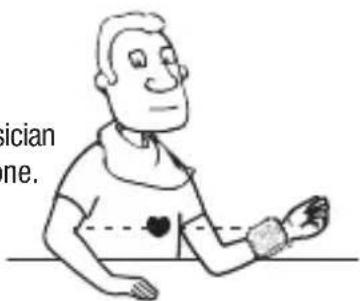
- Remove all accessories (watch, bracelet, etc) from your wrist. If your physician has diagnosed you with poor circulation in your wrist, use the other one.
- Roll or push up your sleeve to expose the skin.
- Apply the cuff to your wrist with your palm facing up.
- Position the edge of the cuff about 1-1.5cm
- Fasten the wrist cuff around your wrist, leaving no extra room between the cuff and your skin. If the cuff is too loose, the measurement will not be accurate.
• Rest for 5 minutes before measuring.
- Wait at least 3 minutes between measurements. This allows your blood circulation to recover.
- For a meaningful comparison, try to measure under similar conditions.
text_image
ician ne.Start the Measurement
- Before you start measurement, select the desired user-ID first. Hold MEM button until the user-ID blinks. Then, press MEM button to change the user ID between 1 and 2. Press SET button to confirm your selection. Then the LCD will turn off.
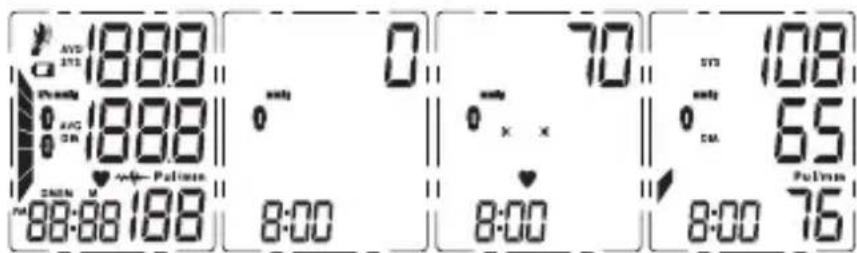
- When the monitor is off, press the "START/STOP button to turn on the monitor, and it will finish the whole measurement. And save the measurement data.
(1) LCD display
(2) Adjust to zero
(3) Inflating and measuring
(4) Display and save the measurement result
text_image
AVD 1888 0 70 108 1888 0 x x 65 8:00 8:00 8:00 75Terraillon.
EN
BLOOD PRESSURE MONITOR – INSTRUCTION MANUAL
- Press "START/STOP" button to power off, otherwise it will turn off within 1 minute.
Tips: Maximum 60 records per user.
DATA MANAGEMENT
Recall the Records
- When the monitor is off, please press "MEM" button, it will display the latest record first when the records are less than three groups. When there are more than three groups, it will display the average value of the latest three records first.
- Press "MEM" button or "SET" button to get the record you want.
The date and time of the record will be shown alternately.

The current No. is No 1

The corresponding date is January 2nd
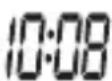
The corresponding time is P.M. 10:08
- If you want to look over another user's data, switch the User button to select the desired user. Then you can look over its historical records.
Delete the Records
If you did not get the correct measurement, you can delete all results for the selected user by following steps below.
- Hold pressing "MEM" button for 3 seconds when the monitor is in the memory recall mode, the flash display "dEL ALL" will show.
- Press "SET" button to confirm deleting and the monitor will turn off.
- If you don't want to delete the records, press "START/STOP" button to escape.
EN
BLOOD PRESSURE MONITOR – INSTRUCTION MANUAL
INFORMATION FOR USER
Tips for Measurement
Measurements may be inaccurate if taken in the following circumstances:
• Within 1 hour after dinner or drinking
- Immediate measurement after tea, coffee, smoking
- Within 20 minutes after taking a bath
- When talking or moving your fingers
• In a very cold environment
- When you want to discharge urine
Maintenance
In order to get the best performance, please follow the instructions below:
- Put in a dry place and avoid the sunshine
- Avoid touching water, clean it with a dry cloth in case
- Avoid intense shaking and collisions
- Avoid dusty and unstable temperature environment
• Using wet cloths to remove dirt - Do not attempt to clean the reusable cuff with water and never immerse the cuff in water
ABOUT BLOOD PRESSURE
What are systolic pressure and diastolic pressure?
When ventricles contract and pump blood out of the heart, the blood pressure reaches its maximum value in the cycle, which is called systolic pressure. When the ventricles relax, the blood pressure reaches its minimum value in the cycle, which is called diastolic pressure.
EN
BLOOD PRESSURE MONITOR – INSTRUCTION MANUAL
What is the standard blood pressure classification?
The blood pressure classification published by World Health Organization (WHO) and International Society of Hypertension (ISH) in 1999 is as follows:
CAUTION
Only a physician can tell your normal BP range. Please contact a physician if your measuring result falls out of the range. Please note that only a physician can tell whether your blood pressure value has reached a dangerous point.
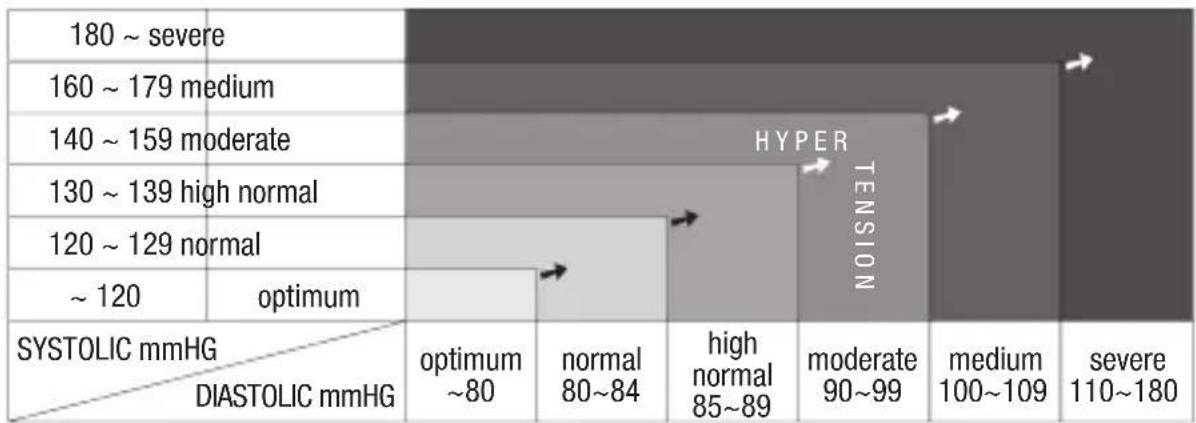
heatmap
| SYSTOLIC mmHG / DIASTOLIC mmHG | optimum ~80 | normal 80~84 | high normal 85~89 | moderate 90~99 | medium 100~109 | severe 110~180 | |---|---|---|---|---|---|---| | 180 ~ severe | | | | | | | | 160 ~ 179 medium | | | | | | | | 140 ~ 159 moderate | | | | | | | | 130 ~ 139 high normal | | | | | | | | 120 ~ 129 normal | | | | | | | | ~ 120 | optimum | | | | | | HYPER TENSIONIrregular Heartbeat Detector
An irregular heartbeat is detected when a heartbeat rhythm varies while the unit is measuring the systolic and diastolic blood pressure. During each measurement, this equipment records the heartbeat intervals and works out the standard deviation. If the calculated value is larger than or equal to 15, the irregular heartbeat symbol appears on the symbol when the measurement results are displayed. CAUTION
The appearance of the IHB icon indicates that a pulse irregularity consistent with an irregular heart-beat was detected during measurement. Usually this is NOT a cause for concern. However, if the symbol appears often, we recommend you seek medical advice. Please note that the device does not replace a cardiac examination, but serves to detect pulse irregularities at an early stage.
EN
BLOOD PRESSURE MONITOR – INSTRUCTION MANUAL
Why does my blood pressure fluctuate throughout the day?
- Individual blood pressure varies multiple times everyday. It is also affected by the way you tie your cuff and your measurement position, so please take the measurement under the same conditions.
- If the person takes medicine, the pressure will vary more.
- Wait at least 3 minutes for another measurement.
Why do I get a different blood pressure at home compared to the hospital?
The blood pressure is different even throughout the day due to weather, emotion, exercise etc. Also, there is the “white coat” effect, which means blood pressure usually increases in clinical settings.
What you need to pay attention to when you measure your blood pressure at home:
- If the cuff is tied properly on the upper arm.
- If the cuff is too tight or too loose.
- If you feel anxious.
- Taking 2-3 deep breaths before beginning will be better for measuring.
- Advice: Relax yourself for 4-5 minutes until you calm down.
Is the result the same if measuring on the right wrist?
It is ok for both wrists, but there will be some different results for different people. We suggest you measure the same wrist every time.
BLOOD PRESSURE MONITOR – INSTRUCTION MANUAL
PROBLEM SYMPTOM CHECK THIS REMEDY
| No power | Display will not light up | Batteries are exhausted Replace with new batteriesBatteries are inserted incorrectly Insert the batteries correctly | |
| Lowbatteries | Display is dim or show | Batteries are low Replace with new batteries | |
| Errormessage | E 1 shows The cuff is not secure Refasten the cuff and then measure again | ||
| E 2 shows The cuff is very tight | Readjust the cuff ,not too loose or too tightand then measure again | ||
| E 3 shows The pressure of the cuff is excessThe monitor detected motion, | Relax for a moment and then measure again | ||
| E10 ou E11 shows | talking or the pluse is too poor whilemeasuring | Relax for a moment and then measure again | |
| E20 shows | The measurement process does notdetect the pulse signal | Loosen the clothing on the wristand then measure again | |
| E21 shows | The treatment of the measurementfailed | Relax for a momentand then measure again | |
| EExx,showson the display | A calibration error occurred (XX canbe some numeric characters,such as01, 02 and so on) | Retake the measurement. If the problempersists, contact the retailer or ourcustomer service department for furtherassistance. Refer to the warranty for contactinformation and return instructions | |
This product is guaranteed for 2 years against material and manufacturing defects. During this period, such defects will be repaired free of charge (proof of purchase must be presented if the scale is under warranty). This warranty does not cover damage resulting from accidents, improper use or negligence. If you have a complaint please contact the store where you purchased the product first.
Waste electrical products should not be disposed of with household waste.
Please recycle where facilities exist.
Check with your local authority or retailer for recycling advice.
DE
natural_image
Illustration of a printer with rolled paper and a base cover, no text or symbols presentnatural_image
Cartoon illustration of a person wearing a bandage with heart symbols on the chest (no text or labels)DE
natural_image
Illustration of a rolled-up battery being placed on a base with a separate plug and plastic cover (no text or symbols)natural_image
Illustration of a rolled-up medical device with a slide and a separate clip, no text or symbols present.natural_image
Cartoon illustration of a person sitting with hands on hips, wearing a shirt and cap (no text or symbols)IT
SFIGMOMANOMETRO – MANUALE DI ISTRUZIONI
natural_image
Illustration of a printer with rolled paper and a mouse, no text or symbols presentnatural_image
Illustration of a rolled-up document being placed on a base with a separate paper clip (no text or symbols)| Power supply Battery powered mode: | 2*AAA batteries (3V DC)(Not Included) |
| Display mode Digital LCD V.A.35mm×41mm | |
| Measurement mode Oscillographic testing mode | |
| Measurement range Rated cuff pressure: | 0kPa - 40kPa (0mmHg~300mmHg)Measurement pressure: 5.3kPa-30.7kPa(40mmHg-230mmHg)pulse value: (40-199) beat/minute |
| Accuracy Pressure: | 5°C-40°C within±0.4kPa(3mmHg)pulse value:±5% |
| Normal working condition Temperature:5°C to 40°C | Relative humidity: ≤85%RHAtmospheric pressure: 86kPa to 106kPa |
| Storage & transportation condition | Temperature:-20°C to 60°CRelative humidity: 10%RH to 93%RHAtmospheric pressure: 50kPa to 106kPa |
| Measurement perimeter of the wrist About 13.5cm-21.5cm | |
| Net Weight Approx.100g(Excluding the dry cells) | |
| External dimensions Approx.73mmx67.5mmx22.5mm | |
| Attachment User manual | |
| Mode of operation Continuous operation | |
| Degree of protection Type BF applied part | |
| Protection against ingress of water IP22 | |
| Software version V01 | |
| Device classification Internally Powered ME Equipment | |
WARNING: No modification of this equipment is allowed.
COMPLIED EUROPEAN STANDARDS LIST
Complied European Standards List
| Risk management | ISO/EN 14971:2012 Medical devices — Application of risk management to medical devices |
| Labeling EN 980 | Symbols for use in the labelling of medical devices |
| User manual EN 1 | 041: 2008 Medical equipment manufacturers to provide information |
| General Requirements for Safety | EN 60601-1: 2006 Medical electrical equipment - Part 1: General requirements for basic safety and essential performance IEC/EN 60601-1-11: 2010 Medical electrical equipment -- Part 1-11: General requirements for basic safety and essential performance - Collateral standard: Requirements for medical electrical equipment and medical electrical systems used in the home healthcare environment |
| Electromagnetic compatibility | IEC/EN 60601-1-2:2007 Medical electrical equipment - Part 1-2: General requirements for basic safety and essential performance - Collateral standard:Electromagnetic compatibility - Requirements and tests |
| Performance requirements | EN 1060-1:1995+A2:2009 Non-invasive blood pressure Part 1: General requirementsEN 1060-3:1997+A2:2009 Non-invasive blood pressure Part 3: Supplementary requirementsfor electromechanical blood pressure measuring system |
| Clinical investigation | EN 1060-4: 2004 Automatic Blood Pressure Monitor overall systemInterventional accuracy of the testing process |
| Usability | IEC/EN 60601-1-6: 2010 Medical electrical equipment -- Part 1-6: General requirements for basic safety and essential performance - Collateral Standard: Usability IEC/EN 62366: 2007 Medical devices - Application of usability engineering to medical devices |
| Software life-cycle processes | IEC/EN 62304:2006+AC: 2008 Medical device software - Software life cycle processes |
EMC GUIDANCE
Table 1 – Guidance and MANUFACTURER'S declaration – ELECTROMAGNETIC EMISSIONS – for all ME EQUIPMENT and ME SYSTEMS
| Guidance and manufacturer's declaration – electromagnetic emissions | ||
| The device is intended for use in the electromagnetic environment specified below. The customer or the user of the device should assure that it is used in such an environment | ||
| Emissions test Compliance Electromagnetic environment – guidance | ||
| RF emissions CISPR 11 | Group 1 | The device uses RF energy only for its internal function. Therefore, its RF emissions are very low and are not likely to cause any interference in nearby electronic equipment |
| RF emissions CISPR 11 | Class B | |
| Harmonic emissions IEC 61000-3-2 | Not applicable | |
| Voltage fluctuations/ flicker emissions IEC 61000-3-3 | Not applicable | |
Table 2 – Guidance and MANUFACTURER'S declaration – electromagnetic IMMUNITY – for all ME EQUIPMENT and ME SYSTEMS
| Guidance and manufacturer's declaration - electromagnetic immunity | |||
| The device is intended for use in the electromagnetic environment specified below.The customer or the user of the device should assure that it is used in such an environment. | |||
| IMMUNITY test IEC | 60601- test level Compliance level | Electromagnetic environment – guidance | |
| Electrostatic discharge (ESD)IEC 61000-4-2 | ± 6 kV contact± 8 kV air | ± 6 kV contact± 8 kV air | Floors should be wood, concrete or ceramic tile. If floors are covered with synthetic material,the relative humidity should be at least 30 %. |
| Electrical fast transient/burstIEC 61000-4-4 | ± 2 kV for power supply lines± 1 kV for input/output lines | Not applicable | Mains power quality should be that of a typical commercial or hospital environment. |
| SurgeIEC 61000-4-5 | ± 1 kV line(s) to line(s)± 2 kV line(s) to earth | Not applicable | Mains power quality should be that of a typical commercial or hospital environment. |
| Voltage dips, short interruptions and voltage variations on power supply input linesIEC 61000-4-11 | <5 % U_T (>95 % dip in V_T for 0,5 cycle40 % U_T (60 % dip in V_T for 5 cycles70 % U_T (30 % dip in V_T for 25 cycles<5 % U_T (>95 % dip in V_T for 5 s | Not applicable | Mains power quality should be that of a typical commercial or hospital environment. If the user of the device requires continued operation during power mains interruptions,it is recommended that the device be powered from an uninterruptible power supply or a battery. |
| Power frequency(50/60 Hz)magnetic fieldIEC 61000-4-8 | 3 A/m 3 A/m | Power frequency magnetic fields should be at levels characteristic of a typical location in a typical commercial or hospital environment. | |
| NOTE U_T is the a.c. mains voltage prior to application of the test level. | |||
Table 4 – Guidance and MANUFACTURER'S declaration – electromagnetic IMMUNITY – for ME EQUIPMENT and ME SYSTEMS that are not LIFE-SUPPORTING
| Guidance and manufacturer's declaration - electromagnetic immunity | |||
| The device is intended for use in the electromagnetic environment specified below.The customer or the user of the device should assure that it is used in such an environment. | |||
| IMMUNITY test | IEC 60601- test level | Compliance level | Electromagnetic environment - guidance |
| Conducted RFIEC 61000-4-6 | 3 Vrms150 kHz to 80 MHz | Not applicable | Portable and mobile RF communications equipment should be used no closer to any part of the device, including cables,than the recommended separation distance calculated from the equation applicable to the frequency of the transmitter.Recommended separation distance d = [ 3,5V_1 ] |
| Radiated RFIEC 61000-4-3 | 3 V/m80 MHz to 2,5 GHz | 3 V/m | d = 1.167 80 MHz to 800 MHz d = 2.333 800 MHz to 2,5 GHzwhere P is the maximum output power rating of the transmitter in watts (W) according to the transmitter manufacturer and d is therecommended separation distance in metres (m).Field strengths from fixed RF transmitters, as determined by an electromagnetic site survey, ^a should be less than the compliance level in each frequency range. ^b Interference may occur in the vicinity of equipment marked with the following symbol: [IMAGE] |
| NOTE 1 At 80 MHz and 800 MHz, the higher frequency range applies.NOTE 2 These guidelines may not apply in all situations. Electromagnetic propagation is affected by absorption and reflection from structures, objects and people. | |||
| a Field strengths from fixed transmitters, such as base stations for radio (cellular/cordless) telephones and land mobile radios, amateur radio, AM and FM radio broadcast and TV broadcast cannot be predicted theoretically with accuracy.To assess the electromagnetic environment due to fixed RF transmitters, an electromagnetic site survey should be considered.If the measured field strength in the location in which the device is used exceeds the applicable RF compliance level above, the device should be observed to verify normal operation. If abnormal performance is observed, additional measures may be necessary, such as re-orienting or relocating the device.b Over the frequency range 150 kHz to 80 MHz, field strengths should be less than [V_1] V/m. | |||
Table 6 – Recommended separation distances between portable and mobile RF communications equipment and the ME EQUIPMENT or ME SYSTEM – for ME EQUIPMENT and ME SYSTEMS that are not LIFE-SUPPORTING
| Recommended separation distances between portable and mobile RF communications equipment and the device | |||
| The device is intended for use in an electromagnetic environment in which radiated RF disturbances are controlled. The customer or the user of the device can help prevent electromagnetic interference by maintaining a minimum distance between portable and mobile RF communications equipment (transmitters) and the device as recommended below, according to the maximum output power of the communications equipment. | |||
| IMMUNITY test IEC 60601- test level Compliance level | Electromagnetic environment – guidance | ||
| Rated maximum output power of transmitterW | Separation distance according to frequency of transmitterm | ||
| 150 kHz to 80 MHz d = [ 3.5V_1 ] | 80 MHz to 800 MHz 800 MHz to 2,5 GHz d = 1.167 | d = 2.333 | |
| 0,01 0,01 0 | 01 0,01 | ||
| 0,1 0,1 0,1 | 0,1 | ||
| 1 1 1 1 | |||
| 10 10 | 10 | 10 | |
| 100 | 100 | 100 | 100 |
| For transmitters rated at a maximum output power not listed above, the recommended separation distanced in metres (m) can be estimated using the equation applicable to the frequency of the transmitter, wherePis the maximum output power rating of the transmitter in watts (W) according to the transmitter manufacturer.NOTE 1 At 80 MHz and 800 MHz, the separation distance for the higher frequency range applies.NOTE 2 These guidelines may not apply in all situations. Electromagnetic propagation is affected by absorption and reflection from structures, objects and people. | |||
Model : TMB-988

Guangdong Transtek Medical Electronics Co., Ltd.
Zone A, No.105, Dongli Road, Torch Development District,
Zhongshan,528437,Guangdong,China

MDSS - Medical Device Safety Service GmbH
Schiffgraben 41, 30175 Hannover, Germany
Terraillon.
LE MUN-ÉTIN PARÉL SÉAIRENT
Terraillon SAS France & Headquarters
1, rue Ernest Gouin
78290 Croissy-sur-Seine - France
Quarry Bay - Hong Kong
Tel: + 852 (0)2960 7200
customerservice@terraillon-asia.com