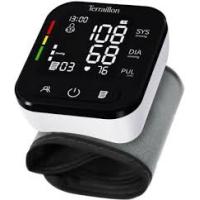
PRESSIO W - Blood pressure monitor TERRAILLON - Free user manual and instructions
Find the device manual for free PRESSIO W TERRAILLON in PDF.



User questions about PRESSIO W TERRAILLON
0 question about this device. Answer the ones you know or ask your own.
Ask a new question about this device
Download the instructions for your Blood pressure monitor in PDF format for free! Find your manual PRESSIO W - TERRAILLON and take your electronic device back in hand. On this page are published all the documents necessary for the use of your device. PRESSIO W by TERRAILLON.
USER MANUAL PRESSIO W TERRAILLON
54120_S_Pressio W-V10.qxd 6/09/05
13:49 Page 1
Table des Matieres
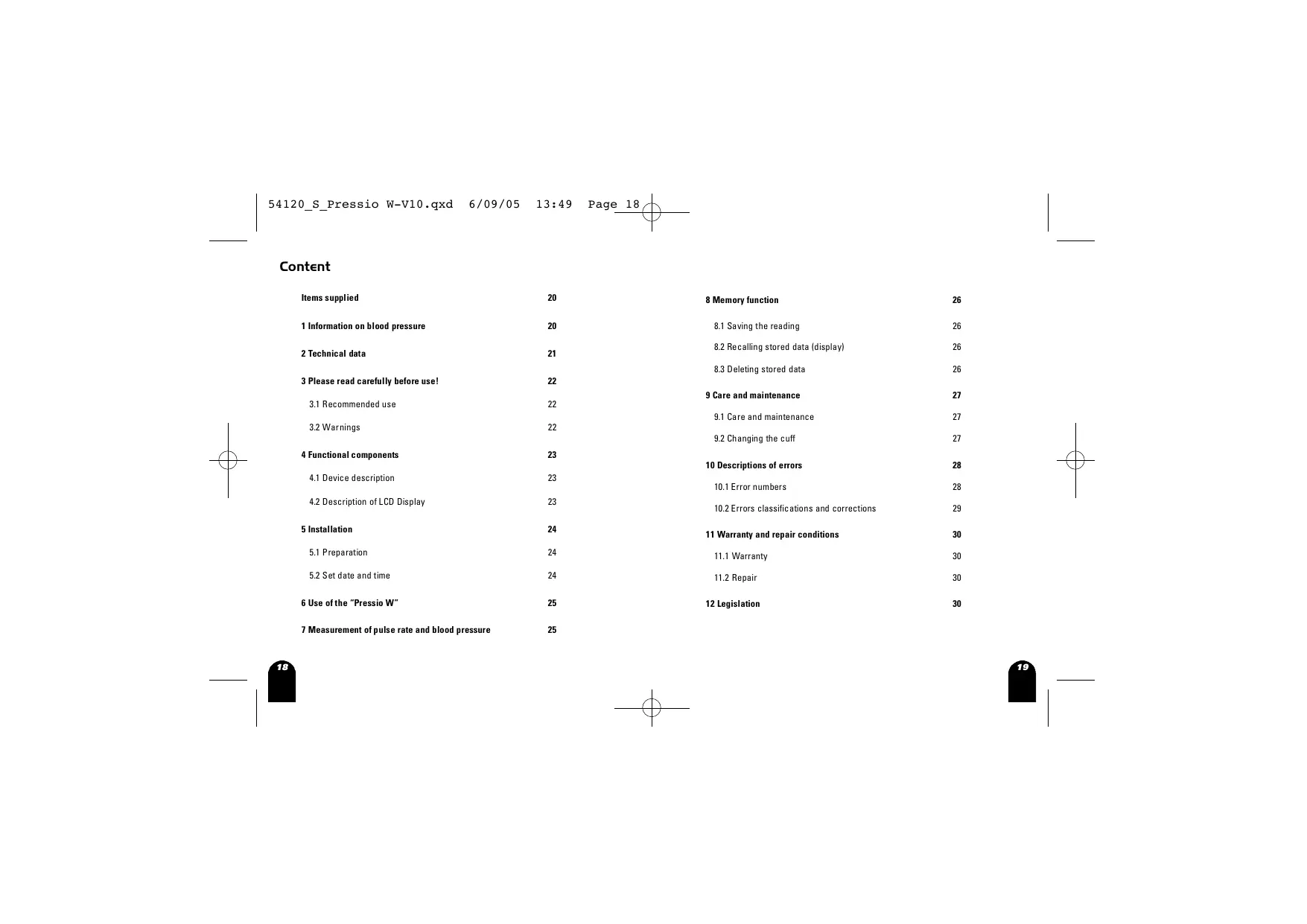
Content
Inhalt
Contenuo
Indices
Inhoud

Mode d'emploi
Please read carefully before use! 17

Bedienungsanleitung
Source: World Health Organisation
2 Spécifications techniques du "Pressio W"
Plage de mesure
Pression arterielle (tension): 30-280 mmHg
3 Please read carefully before use! 22
3.1Recommended use 22
3.2Warnings 22
4 Functional components 23
4.1 Device description 23
4.2 Description of LCD Display 23
5 Installation 24
5.1 Preparation 24
5.2 Set date and time 24
6 Use of the "Pressio W" 25
7 Measurement of pulse rate and blood pressure 25

8 Memory function 26
8.1 Saving the reading 26
8.2 Recalling stored data (display) 26
8.3 Deleting stored data 26
9 Care and maintenance 27
9.1 Care and maintenance 27
9.2 Changing the cuff 27
10 Descriptions of errors 28
10.1 Error numbers 28
10.2 Errors classifications and corrections 29
11 Warranty and repair conditions 30
11.1 Warranty 30
11.2 Repair 30
12 Legislation 30

This wristwatch for pulse and blood pressure measurement provides a top-quality system incorporating the latest technology, which is easy to use and extremely reliable. Thank you for your confidence; please do not hesitate to contact us at any time if you have queries concerning the product or servicing.
Items supplied
- "Pressio W" wristwatch pulse and blood pressure measurement device for home use
- Instructions for use
- Storage case
- Two batteries (2 x 1.5V AAA size alkaline)
I Information on blood pressure
The circulatory system in our bodies supplies all organs and tissues with sufficient oxygen and nutrients to meet their requirements. The heart acts as a pump to keep the blood moving. It normally beats to a regular rhythm, 60 to 80 times a minute. This is known as the heart rate or pulse rate.
Blood pressure is subject to a number of changes in the course of the day and during the night. When sleeping, blood pressure is low. High to very high values occur when we are agitated or in periods of physical exertion. The temporary increase in blood pressure at these times is quite normal. It soon goes down again.
Blood pressure is the result of contraction and relaxation of the beating heart.
The upper (systolic) and lower (diastolic) pressures can be measured.
Blood pressure readings are expressed in millimetres of mercury (mmHg).
The upper limit of the normal range for adults is 135 / 85mmHg . (recommendations for the measurement of blood pressure from the Deutsche Liga zur Bekämpfung des hohen Blutdrucks e.V., Heidelberg).
If we measure blood pressure regularly, we can learn a great deal about the way our own bodies work and their reactions to outside influences.
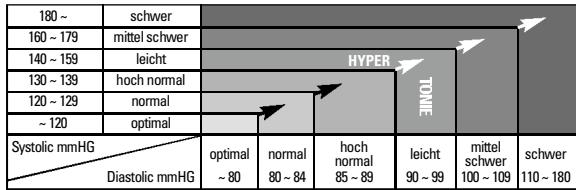
We can therefore lead healthier lives! Why not find out your own blood pressure patterns? Your doctor will certainly be pleased to help. Please find below a first overview which is subject to further interpretation by a qualified medical person.
Source: World Health Organisation
| 180 ~ | severe | ||||||
| 160 ~ 179 | medium | ||||||
| 140 ~ 159 | moderate | HYPER | TENSIVE | ||||
| 130 ~ 139 | high normal | ||||||
| 120 ~ 129 | normal | ||||||
| ~ 120 | optimum | ||||||
| Systolic mmHG Diastolic mmHG | optimum ~80 | normal 80 ~ 84 | high normal 85 ~ 89 | modate 90 ~ 99 | medium 100 ~ 109 | severe 110 ~ 180 | |
2 Technical data
Measurement range
Blood Pressure: 30-280 mmHg
Pulse Rate: 40-199 beats/min
Measurement method Oscillometric method
Storage capacity 60 measurements
(systolic and diastolic pressure, pulse rate, date and time)
Accuracy
Blood Pressure: ± 3mmHg
Pulse rate: +/- 4%
Power source 2 x 1.5V AAA size alkaline batteries
Display Liquid crystal display (LCD)
Visible size approx. 38 × 28 ~mm
Operating temperature +10^ + 40^
Operating humidity 15% -95% RH (non-condensing)
Storage temperature -20 °C - +50 °C
Storage humidity 15% -95% RH (non-condensing)
Cuff size Wrist circumference between 12.5 and 21~cm
Dimensions 87mm× 65mm× 34mm (L× W× D)
Weight 120 g without batteries


3 Please read carefully before use!
3.1 Recommended use
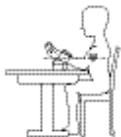
- The "Pressio W" is to be used in measuring pulse rate and blood pressure. To obtain accurate values, the blood pressure monitor should be worn on the wrist under any clothing. During the measurement, do not move and keep silent to ensure best accuracy. It is also important that your pressure cuff is at the same height level as your heart.
- Avoid measuring blood pressure in 30 minutes after exercise, bathing, or returning from outdoor.
- To switch off your "Pressio W" or stop any current action, please press "START/STOP" button. If users forget to switch off the device, it will turn off automatically after two minutes idling.
3.2Warnings
- Never make any change to your current medication on the basis of the results you obtain. The assessment of results and decisions regarding subsequent treatment can only be taken by the doctor.
- If you suffer from cardiac arrhythmias (irregular Heartbeats) or are pregnant you should consult your doctor to check whether this method of measuring your own blood pressure with the "Pressio W" is suitable for you.
- This unit is not suitable for use in cases of severe arteriosclerosis of the wrist, advanced arterial occlusive disease or in conditions involving vascular spasm.
- If discomfort is experienced during a measurement, press the START/STOP key to deflate the cuff immediately. Unfasten the cuff and remove the device. Please contact your dealer.
The unit should not be operated in the vicinity of an MRI scanner.
The device is suitable for measuring pulse and bbod pressure in adults only.
The pulse display on the unit cannot be used for checking the heart rate of a cardiac pacemaker. - The use of components not supplied with the equipment can lead to incorrect measurements (except for batteries).
- On no account use the "Pressio W" when bathing or showering. Should moisture penetrate the unit, the batteries must be removed immediately and further use of the unit avoided. Contact your dealer.
4 Functional components
Pressio W Blood Pressure Monitor applies the Oscilometric method to measure human systolic/diastolic blood pressure and pulse rate. All values are shown on the LCD monitor.
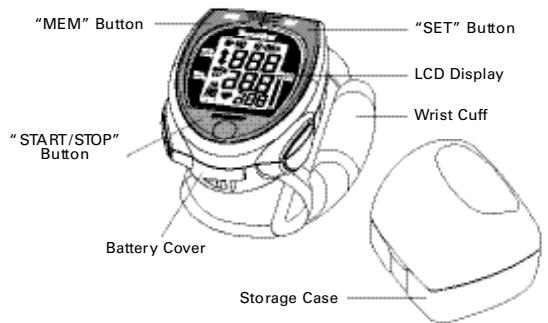
4.1 Device description
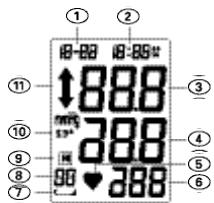
4.2 Description of LCD Display
① Date ② Time
Systolic Pressure
④ Diastolic Pressure
⑤ Pulse Symbol
⑥ Pulse Rate
⑦ Low Battery Symbol
⑧ Memory Set
⑨ Memory Symbol
Average Measurement Symbol
① Inflation/Deflation Symbol


5 Installation
5.1 Preparation
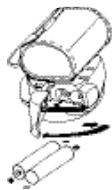
Open the battery compartment on the back of the watch. Insert the batteries supplied as shown in the diagram. Then close the cover.
5.2 Set date and time
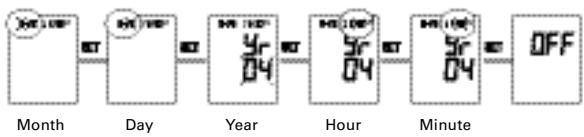
- While in power off mode, press the "SET" button to enter Date/Time setting procedure and the Month value will begin to flash.
- To adjust the value of Month, press "MEM" button. Pressing once will advance the flashing value by 1. If the "MEM" button is held down, the value increases automatically.
- Once finished, press "SET" button again to confirm the set value and go to the next setting.
Follow the steps instructed above to adjust the value of date and time consecutively.

6 Use of the "Pressio W"
- Sit in a chair with your feet flat on the floor and place your arm on table so that the cuff will be at the same level as your heart as shown on the diagram.
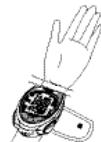
- Wrap the pressure cuff around the wrist with the palm facing up.
- Adjust the upper edge of the monitor, it should be about 0.5cm to 1cm below the ball of thumb as shown in the diagram.
- Fasten the cuff on the wrist until it is a comfortable fit. Please note that the cuff must not constrict. Snugly on the wrist is fine.
Relax your hand with palm facing up. - Ensure your wrist is unbent.
- During the measurement, do not move and keep silent to ensure best accuracy.
Blood pressure naturally differs between two arms, so always measure your blood pressure on the same wrist, in order to ensure comparability of two readings.
7 Measurement of pulse rate and blood pressure
- Press the "START/STOP" button.
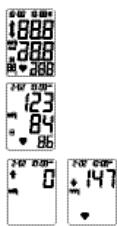
- All display symbols appear for approx. 2 seconds. This is the initial LCD test.
- When the monitor completes the necessary preparations before measurement, the last reading result will be shown on the display for 1 second.
- Then the monitor begins to measure your blood pressure, and you will see the inflation symbol on the display when inflating. During the process of deflation, the symbol of inflation will turn off and the symbol of deflation will turn on instead.
After the measurement is completed, your blood pressure and pulse will be displayed on the LCD automatically.
About 0,5 1cm


8 Memory function
8.1 Saving the reading
- Your "Pressio W" can store data from up to 60 measurements.
- Once the 60 measurements are recorded, each subsequent reading replaces the "oldest" in the memory.
8.2 Recalling stored data (display)
- To recall the memory, press "MEM" button first. Then, the average result of all stored measurements will be shown on the LCD first.
- After the average reading is shown on the display, you can press "MEM" button to track historical records from no.1 to no.60.
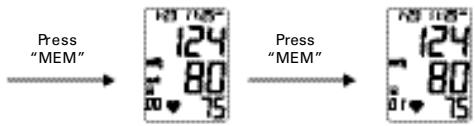
- To come back to the first records, please press "SET" button.
This function is available only after readings have been saved to memory! If no data has been stored, the display will go directly to the "setting time and date" function.
8.3 Deleting stored data
While in power off mode, press "MEM" button and hold it until the screen shows "Cl".
9 Care and maintenance
9.1 Care and maintenance
- If necessary, clean the plastic housing and cuff with a slightly moistened cotton cloth.
- Do not disassemble, repair or remodel the monitor.
- Do not expose the monitor to extreme temperature, very high humidity, or direct sunlight.
- Avoid dropping and rough handling.
- Do not immerse the device in water. It may cause damage if water enters.
- Do not use any gas, strong detergent, or solvents to clean the device, including the arm cuff.
- Batteries should not be discarded with domestic waste! Please dispose of batteries only in the disposal bins provided in shops.

9.2 Changing the cuff
If you need a new cuff for your "Pressio W", this can be obtained from Terraillon as an accessory. For technical reasons, the cuff should only be changed by Terraillon. Please consult your dealer if necessary.

IO Descriptions of errors
10.1 Error numbers
| Numbers | Causes |
| Err 0 | No pulse or detected pulse is out of range. |
| Err 1 | Cuff serious leakage or inflation too low. |
| Err 2 | Systolic cannot be measured. |
| Err 3 | Cuff pressure is too high. |
| Err 4 | Diastolic cannot be measured or is outside of range. |
| Err 5 | Deflation is too fast. |
| Err 6 | Deflation is too slow. |
| Err 7 | Systolic outsides the legal range. |
| Err 8 | Mean pressure is outside of range. |
| Err 9 | Cuff pressure is not enough even if the highest value is pumped. |
10.2 Errors classifications and corrections
| Conditions | Causes | Corrective Actions |
| No display after push the "START /STOP" button. | The position of the batteries is incorrect. | Insert the batteries in the correct position (e.g 5.1). |
| The voltage of the batteries is extremely low. | Replace both batteries with new ones. | |
| Low battery symbol appears. | The voltage of the batteries is extremely low. | Replace both batteries with new ones. |
| When chilly, the batteries might have a weak electron release. | Warm up the batteries, or place in a warm place for a while then re-start again. | |
| Battery life is too short. | May be using wrong battery type. | Use only Alkaline batteries. |
| No reading after measurement. | The voltage of the batteries is extremely low. | Replace both batteries with new ones. |
| Suspicious measurement results. Higher or lower than user's average measurement. | May not be in correct position during measuring. | Always take measurements in correct position (e.g 6). |
| The blood pressure naturally varies from time to time. | Relax and try to measure again. | |
| Pulse rate higher/lower than user's average. | Move wrist or body during measurement. | Do not move wrist or body during measurement. |
| Measuring right after exercice. | Do not measure right after exercice. | |
| Power switches off automatically. | System design. | Push the "START/STOP" button again, and then measure again. |
| Device reinflates during measurement. | This is normal: if user's blood pressure exceeds the initial pressure value, the device will automatically pump to a higher pressure, by 20mmHg each time, until it reaches a suitable level. | Relax and try to measure again. |
| Cuff is not fastened. | Fasten the cuff again. |

II Warranty and repair conditions
11.1 Warranty
-
Terraiillon provide a two year warranty on the blood pressure measuring unit from the date of purchase. The correctly completed warranty card or invoice constitute evidence of the date of purchase.
-
Deficiencies due to material defects or manufacturing errors will be corrected free of charge within the warranty period.
-
Services provided under warranty do not extend the period of warranty, either for the unit itself or for selected components.
The following are excluded from the warranty:
- all damage resulting from incorrect handling, e.g. failure to observe the instructions for use.
- damage attributable to repair or intervention by the retailer or unauthorised third parties.
- damage occurring in transit between the manufacturer and the user or during return to the customer service department.
-
accessories subject to normal wear and tear (cuff, batteries, etc.).
-
Liability for direct or indirect damage caused by the equipment is also excluded even if the damage to the unit is recognised as covered by the warranty.
-
Lost warranty cards cannot be replaced. Warranty cards altered without justification are invalid.
Further claims, for whatever reasons these are made, are excluded.
Terraillon provide no warranty for the batteries supplied with the equipment.
11.2 Repair
- In the case of a warranty claim, please complete the warranty card with your exact name and address and full details of the fault.
Please contact your dealer for information on methods of dispatch.
12 Legislation
"Pressio W" conforms to the European specifications on which medical products legislation is based. The quality of the equipment has been examined under EC regulation 93/42/EEC and bears the mark CE0197.

PRESSIO W
Warranty Card
Model Serial number
Name
Street
City
Country Postal Code
Date Purchased Purchased from
Description of error
Please fill out all sections of this card and send it with the device.

PRESSIO W
Warranty Card
For service and repair contact
Adress/Stamp of distributor/Dealer
If not stamped, contact your point of purchase for further information
(ENG)

PRESSIO W
Source: World Health Organisation