
B35IM - Refrigerator Vevor - Free user manual and instructions
Find the device manual for free B35IM Vevor in PDF.
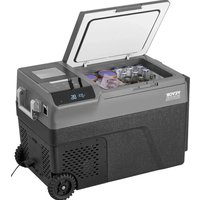


| Product Type | Car refrigerator with built-in ice maker |
| Brand | Vevor |
| Model | B35IM |
| Power Supply | DC 12V/24V or AC 100-240V (with adapter included) |
| Power Consumption | Not specified, but compatible with cigarette lighter and battery |
| Cooling Temperature Range | -20 °C to 20 °C (-4 °F to 68 °F) |
| Refrigerator Capacity | Approximately 30-40 L (not specified, estimate) |
| Ice Production Capacity | Ice basket about 1.2 L, water tank 1 L |
| Operating Modes | MAX (quick cooling) and ECO (energy saving) |
| Battery Protection | 3 levels (H, M, L) to prevent excessive discharge |
| Display | Digital with temperature, mode, ice making status |
| Controls | Touch panel with power on/off, temperature adjustment, ice mode |
| Power-off Memory | Retains settings after power loss |
| Water Circuit Cleaning Function | Built-in pump cleaning mode |
| Cabinet Material | Not specified, probably plastic or metal |
| Dimensions (approx.) | Not provided, typical for portable car refrigerator |
| Weight | Not provided |
| Included Accessories | Cigarette lighter cable, power adapter, manual, ice basket, ice scoop |
| Maintenance and Cleaning | Clean interior with a damp cloth before use; drain water every 5 hours in ice mode |
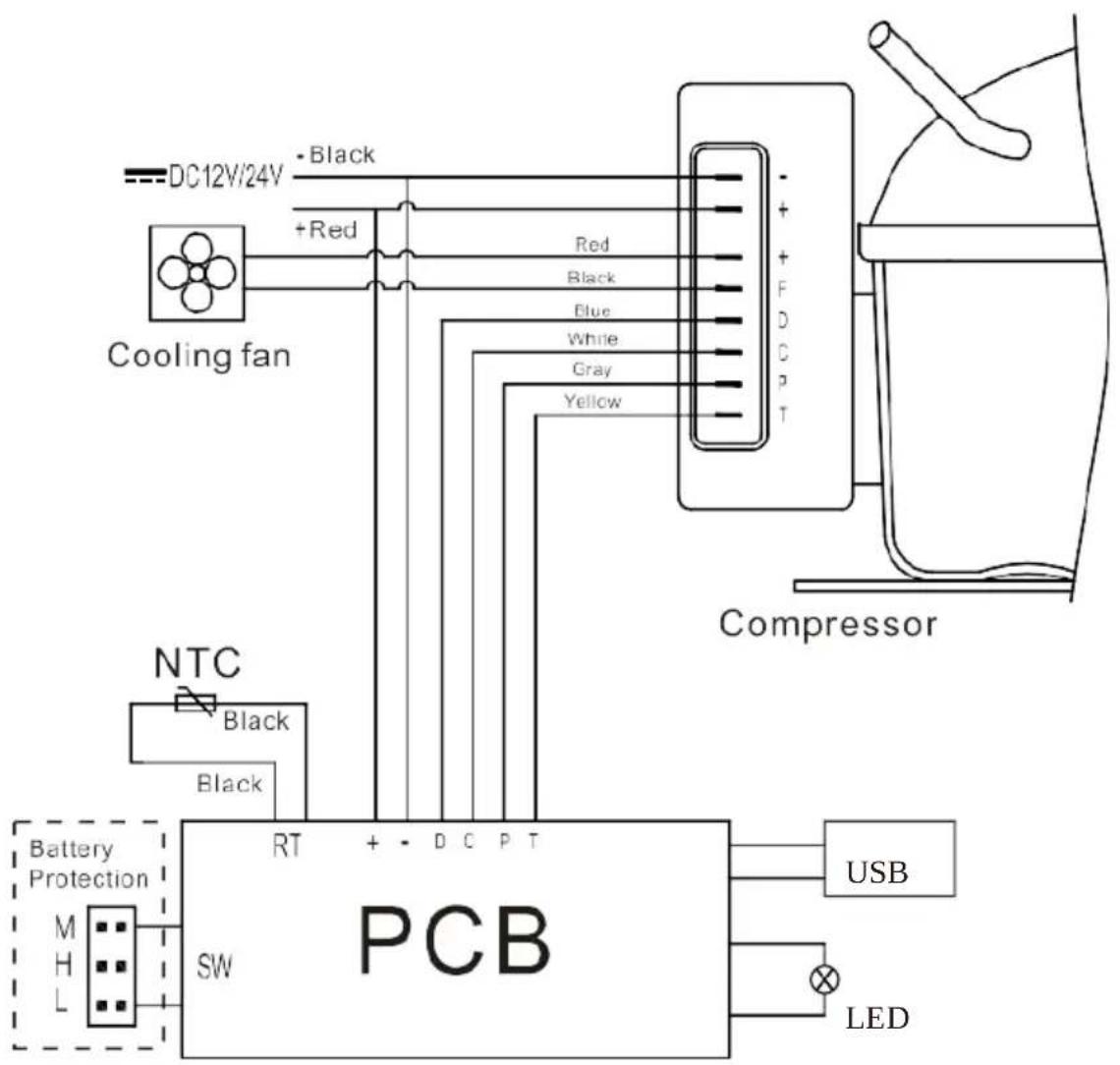
| Safety | Reverse polarity protection, fuse, automatic shutdown in case of compressor overheating |
| Error Codes | E1: low voltage; E2: fan; E3: compressor start; E4: low speed; E5: overheating; E6: NTC sensor |
| Compliance | WEEE Directive 2012/19/EC, FCC Part 15 (Class B) |
| Intended Use | Refrigeration and ice making in car, camping, travel |
| Warranty | Electronic warranty certificate via www.vevor.com/support |
Frequently Asked Questions - B35IM Vevor
User questions about B35IM Vevor
0 question about this device. Answer the ones you know or ask your own.
Ask a new question about this device
Download the instructions for your Refrigerator in PDF format for free! Find your manual B35IM - Vevor and take your electronic device back in hand. On this page are published all the documents necessary for the use of your device. B35IM by Vevor.
USER MANUAL B35IM Vevor
Technical Support and E-Warranty Certificate www.vevor.com/support
CAR REFRIGERATOR
USER MANUAL
MODEL: B35IM
We continue to be committed to providing you with tools at competitive prices. "Save Half", "Half Price", or any other similar expressions used by us only represent the estimate of savings you might benefit from buying certain tools with us compared to top brands and does not necessarily mean to cover all categories of tools offered. We kindly remind you to verify carefully when placing an order with us to ensure you are actually saving half in comparison with the top major brands.
VEVOR®
Car Refrigerator
MODEL: B35IM
NEED HELP? CONTACT US!
Have product questions? Need technical support? Please feel free to contact us:
Technical Support and E-Warranty Certificate www.vevor.com/support
This is the original instruction. Please read all manual instructions carefully before operating. VEVOR reserves the right to interpret the user manual. The appearance of the product shall be subject to the product you received. Please forgive us that we won't inform you of any technology or software updates on our product.
| Warning-To reduce the risk of injury, user must re instructions manual carefully. | |
| This product is subject to the provision of European D 2012/19/EC. The symbol showing a wheelie bin cross through indicates that the product requires separate recollection in the European Union. This applies to the and all accessories marked with this symbol. Products as such may not be discarded with normal domestic w must be taken to a collection point for recycling elec electronic devices |
Attention
Before using the refrigerator, please read this manual carefully and keep it properly.
1. Before using the refrigerator, clean it inside and outside with a damp cloth. 2. Do not fill the refrigerator with corrosive liquids. Do not directly pour liquids into the refrigerator. 3. When the refrigerator is not used for a long time, please disconnect the power supply and keep it dry. 4. Regularly clean the inner chamber to prevent odor and bacteria and ensure food safety. 5. Shut down the refrigerator and battery before pulling by the trolley (battery).
Connect the Power Supply
- Find the DC power cord in the kit. Connect the DC plug to the power input of the car refrigerator.
- Place the refrigerator in the car (trunk, seats, etc.). Lay out the power cords according to your car's interior space. Insert the cigar
lighter plug (one side of the power cord) into the car cigarette lighter.
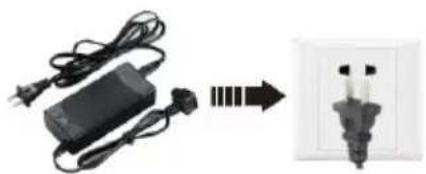
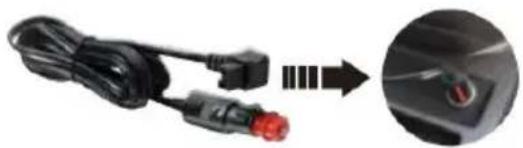
Adapter: Connect the car cigarette lighter
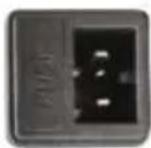
DC 12/24V
Connect the car refrigerator
- The refrigerator can be connected to more than one energy source.
- The refrigerator can be connected directly to a DC12V/24V power supply.
- If the refrigerator is used with an AC100-240V power supply, an AC adapter should be used.
Car Refrigerator Operation
Car battery protection voltage reference:
The built-in ECO electronic control module can automatically monitor the car battery voltage. The refrigerator will automatically cut off when the power is excessively consumed, protecting the battery from being drained too low to affect auto-ignition.
| Battery Voltage | Factory default voltage protection value H | ||
| H (high) level | M (medium) level | L (low) level | |
| DC12V | DC11.3V OFF | DC10.1V OFF | DC9.6V OFF |
| DC12.5V ON | DC11.4V ON | DC10.9V ON | |
| DC24V | DC24.6V OFF | DC22.3V OFF | DC21.3V OFF |
| DC26.0V ON | DC23.7V ON | DC22.7V ON | |
Note: When the power supply is connected and the refrigerator is turned on, disconnecting or starting refers to disconnecting or starting the compressor.
Component Diagram
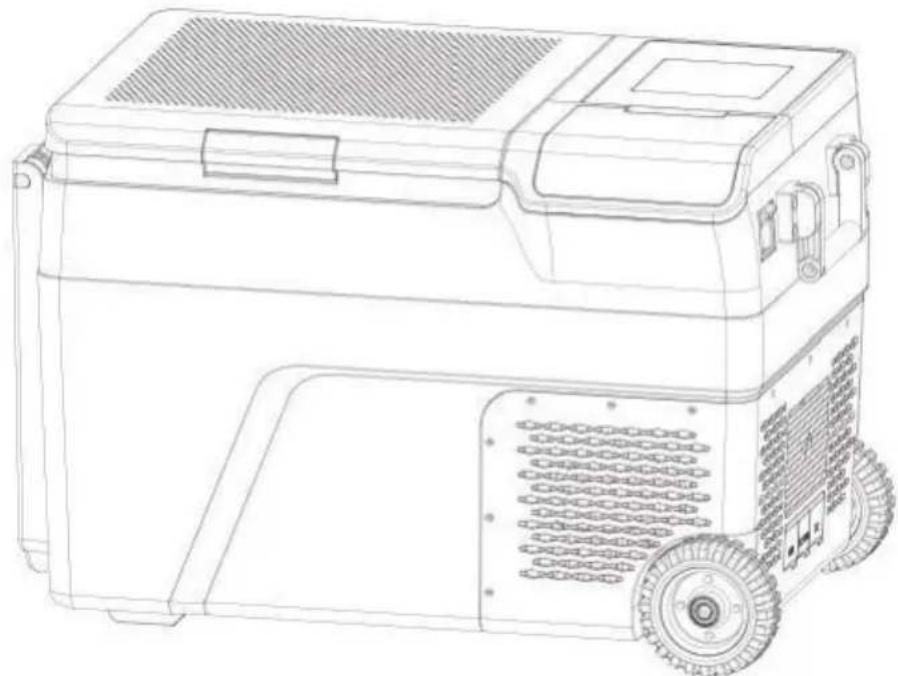
Parts schematic
① Cabinet ③ Door buckle ⑤ Sealing strip ⑦ Ice cube tray ⑨ Ice shovel ⑪ Roller ⑬ Convenience receptacle ⑤ Foot pad ① Door cover button
② Small table board ④ Lid ⑥ Control panel ⑧ Ice basket ⑩ Recessed handle ⑫ Drain cover ⑭ Battery cover ⑥ Corkscrew Storage compartment
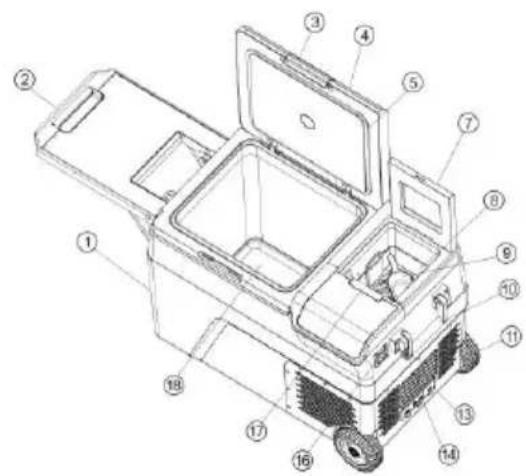
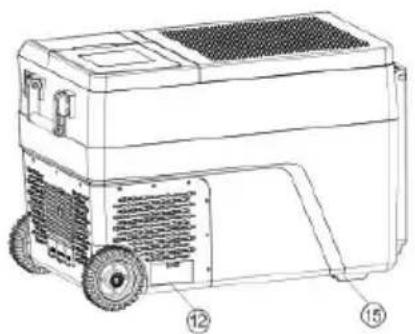
Function and operation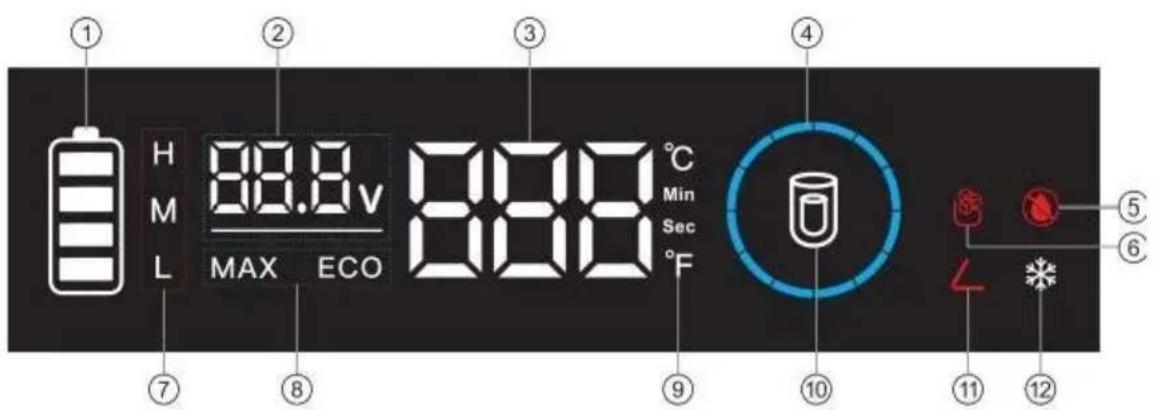
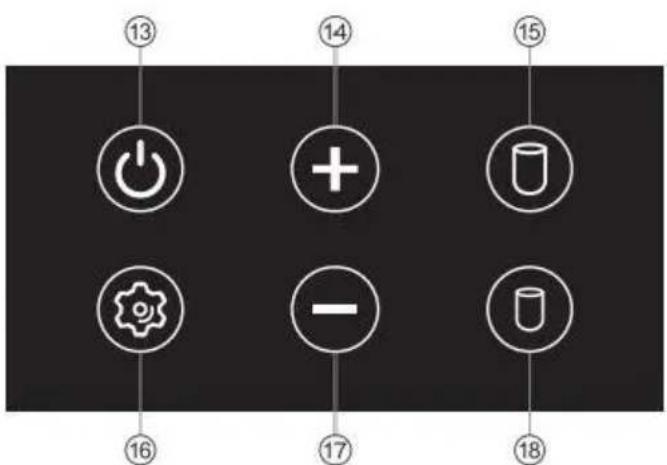
| ①Battery capacity ②Voltage display ③ Fridge temperature display ④Ice making state ⑤ Hydropenia ⑥Ice full | ⑦ Battery Protection Mode ⑧ Cooling Mode ⑨ Temperature/time display ⑩ Large ice / small ⑪ Door open prompt | ⑫ Refrigerated conditio ⑬On / Off ⑭ Temperature control ⑮ Big Ice Mode ⑯Set ⑰ Temperature control ⑱Small Ice Mode |
- Power Supply: connect to DC 12V/24V or AC 100-240V power (using dedicated adapter).
- Display Screen Initialization: After powering on, the digital display is fully on for one second, and then displayed normally.
- Power ON/OFF: press to switch ON/OFF. In standby state, 6 key lights are breathing flashing.
- Temperature Setting: under the running state, press to increase temperature, and press to decrease temperature; keep pressing for adjusting the temperature quickly. The setting will be saved automatically after stopping operating for three seconds. Temperature setting range: -20~20°C (-4~68°F)
- Ice Production Mode: Press " " or " " when the refrigerator is turned
and the machine enters the ice making mode.
- Switch by touching the " " and " " keys. The time required for the ice-making process is displayed on the display screen.
- Enter the forced unice mode by touching the and " " buttons at the same time.
- Pipeline cleaning mode: in ice making mode, enter the cleaning mode by long pressing the " + " and " - " keys. After the pump runs for three minutes, it will automatically switch to the refrigerator mode; drain the water and recharge the drinking water. You need to touch the ice making button again to enter ice making mode.
- In the process of ice making, long press the button for three seconds to show the internal temperature of the refrigerator, and return to the ice making state after five seconds.
- Temperature Unit Setting: under the running state, long
press and at the same time for three seconds to switch between Celsius or Fahrenheit.
- Cooling Mode: under the running state, press to switch between MAX (fast cooling) and ECO (energy saving mode). (*Factory setting is MAX.)
Battery Protection Mode: under the running state, long press or for three seconds until the screen flashes, then press again to select protection mode H1, N2, L3. After no key action is detected, set the corresponding geflicker for 5 seconds, exit the setting, and save.
- Power-off Memory Function: There is a power-off memory function for car refrigerators. When the power is lost, the working state (On/Off state, working mode, etc.) before power-off can be automatically recovered at
next startup; no need to set it again. ECO: Energy-saving cooling. MAX: Powerful cooling.
Water injection operation
- Press the door cover button of the ice maker to open the door cover and remove the ice basket and ice shovel. Pour the water into the sink; the water level should not exceed the MAX position, and the water injection is about 1L. After adding water, put the ice basket back into the ice machine and close the door cover. (Make ice according to the first point of function, and the basket is about 1.2L)
- Water quality requirements: the hardness of the water quality is less than 250ppm.
1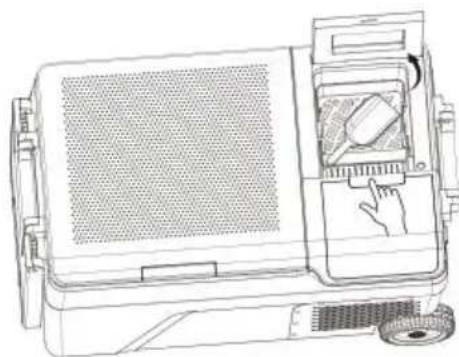
2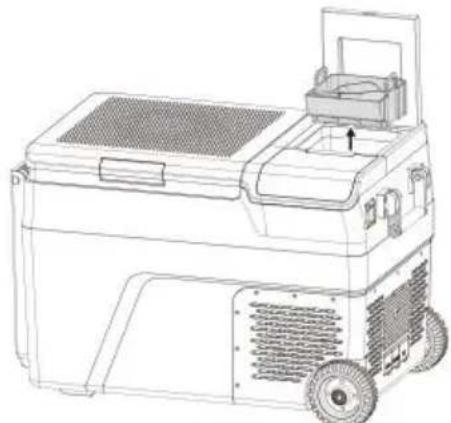
3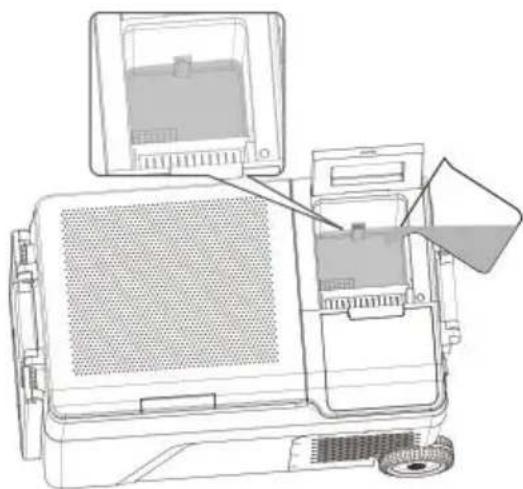
4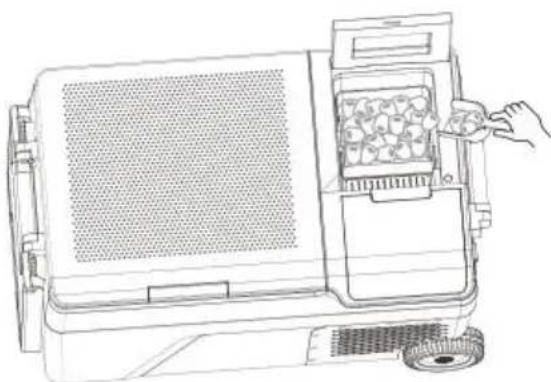
Drainage operation
- After continuous operation for 5 hours, it is recommended to remove the water in the water system and recharge the new water
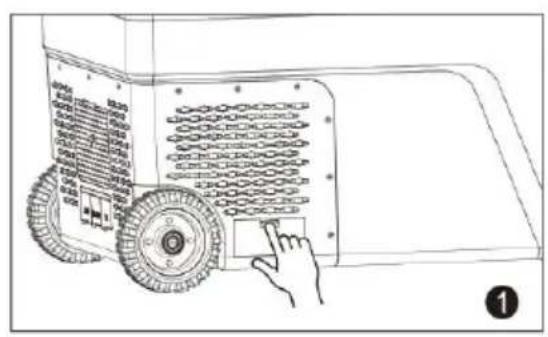
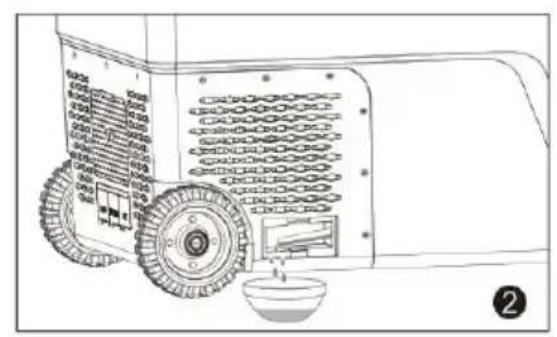
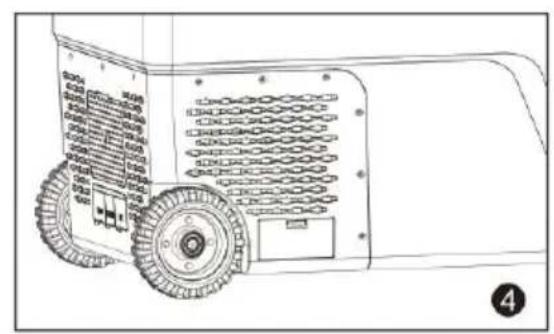
- Press the drainage cover buckle pointed to by the arrow, take out drainage cover, built-in drainage pipe, pull out the drainage pipe, after drainage is completed
Put the drain pipe back in place to avoid water leakage from the rain water injection.
A kindly reminder! For the health of you and your family, please use soft cloth before / after

Simple Fault Analysis
Advice: If abnormal situations cannot be resolved through a simple face analysis, please get in touch with professional customer service for assistance.
Car Refrigerator Does Not Work
- Check if the power is connected correctly. (check If the plug is loo or positive and negative poles are reversed).
- Check if the power switch on the operation panel is turned on.
- Check if the cooling ventilation is normal.
- Check if the fuse is blown.
Poor Cooling Performance
- Check if the lid is closed correctly.
- Check if the door seal is damaged or deformed.
- Check if there is poor ventilation around the refrigerator.
- Check if the temperature is set correctly.
Definition of Error Codes on the Display
| Error Code | Error Type |
| E1 | Low Input Voltage |
| E2 | Fan Fault |
| E3 | Compressor start failed |
| E4 | Low Rotational Speed of Compressor |
| E5 | Controller module temperature too high |
| E6 | Open or Short Circuit of NTC |
Abnormal Noise
- The car refrigerator is not placed smoothly.
- Touch a wall or other object. 3. There are parts loose or falling off inside.
Condensation on Refrigerator Surface
When the ambient air humidity exceeds 75%, slight condensation will occur on the box surface, which is normal.
Failures and Solutions
△E1: Low Input Voltage
- Failure 1: Insert the refrigerator power cord into the cigarette lighter before the car starts. Solution 1: Wait a while to connect the car after it starts.
- Failure 2: The input voltage of the adapter is too low.
Solution 2: Adjust the battery protection level to middle-voltage or low-voltage. If it doesn't work, please replace a new adapter.
△E2: Fan Fault
Please replace a new fan when you identify there is a fan malfunction.
△E3: Input Voltage Fault Due to Compressor Frequently Starting
When the refrigerator is used in the car, and E3 appears, please shut down for 5 minutes and restart it.
If it doesn't work, that can be identified to be E1 fault; please solve according to the solution of E1.
When the refrigerator is connecting with the adapter and E3 appearing
(1) Please adjust the battery protection level to the middle or low levels. (2) If it doesn't work, please replace a new adapter.
△E4: Low Rotational Speed of Compressor
Please adjust the input voltage and repower it.
E5: Overheating of Controller Chip
Please power off for 5 minutes and check if poor ventilation around the compressor causes the overheating.
Packing List
| No. | Item | Qty | Remark |
| 1 | Refrigerator | 1 set | |
| 2 | Cigarette wire | 1 set | |
| 3 | Power adapter | 1 set | |
| 4 | Manual | 1 pcs |
Use Suggestions
- If equipped with a backup battery, you can maintain any temperature set under any circumstances without worries.
- When placing ice cream, please adjust the temperature to the lowest and ensure the refrigerator is powered on for a long time.
- Prevent health problems from drinking bottled water caused by hot temperatures.
- Frozen food, rare seafood, and vehicle-mounted refrigerators let frozen fresh food accompany the journey.
- Healthcare products, insulin, and imported drugs need to be refrigerated, and the precise temperature control of onboard refrigerators will escort health along the way.
- The tea leaves are effectively kept fresh in the car refrigerator, and you can drink fresh and delicious tea anytime during the self-driving tour.
- The best storage temperature of red wine is 10°C - 18°C (50 - 64.4°F).
The precise temperature control of the car refrigerator can effectively ensure the storage temperature of red wine.
- The storage time of high-grade fruit in the car at high summer temperatures will be at least 2 hours. The storage time is shorter even if the air conditioner is turned on. Using a car refrigerator can effectively preserve high-grade fruit.
- The coating of high-grade sunglasses will fall off under the high temperature in summer. The car refrigerator is an ideal place to place them. High-grade cosmetics quickly deteriorate under high temperatures in the car. Carry cosmetics with the car; the car refrigerator will be your choice.
Safety Precautions
(1) Ensure that the power voltage connected to the onboard refrigerator is correct at all times.
(The parameters are labeled with the approved voltage parameters of the
onboard refrigerator).
(2) Do not pour liquid directly into the car refrigerator. (3) Modifying the refrigerator without permission is forbidden to avoid danger. (4) This appliance is not intended for use by persons (including children) with reduced physical, sensory, or mental capabilities, or lack of experience and knowledge, unless they have been given supervision or instruction concerning use of the appliance by a person responsible for their safety. (5) Children should be supervised to ensure that they do not play with the appliance. (6) This appliance can be used by children aged from 8 years and above and persons with reduced physical, sensory or mental capabilities or lack of experience and knowledge if they have been given supervision or instruction concerning use of the appliance in a safe way and understand the hazards involved. Children shall not play with the appliance. Cleaning and user maintenance shall not be made by children without supervision. (7) To avoid a hazard due to instability of the appliance, it must be placed in accordance with the instructions. (8) Do not store explosive substances such as aerosol cans with a flammable propellant in this appliance.
WARNING: This appliance contains flammable foaming agent
cyclopentane:
1) Please avoid contact with fire when you transport and use it. 2) Please ask a professional for servicing when the machine breaks or malfunctions. 3) Please send it to your local appointed disposal station when you dispose of it.

WARNING: During use, service, and disposal of the appliance,
please pay attention to a symbol similar to the one on the left side, which is located on the rear of the appliance (rear panel or compressor) and is yellow-orange in color. It is a risk of fire warning symbol. There are flammable materials in refrigerant pipes and compressors. Please stay away from fire
sources during use, service, and disposal.
FCC Information
CAUTION: Changes or modifications not expressly approved by the party responsible for compliance could void the user's authority to operate the equipment!
This device complies with Part 15 of the FCC Rules. Operation is subject to the following two conditions:
1) This product may cause harmful interference. 2) This product must accept any interference received, including interference that may cause undesired operation.
WARNING: Changes or modifications to this product not expressly approved by the party responsible for compliance could void the user's authority to operate the product.
Note: This product has been tested and found to comply with the limits for a Class B digital device, pursuant to Part 15 of the FCC Rules. These limits are designed to provide reasonable protection against harmful interference in a residential installation.
This product generates, uses, and can radiate radio frequency energy. If not installed and used in accordance with the instructions, it may cause harmful interference to radio communications. However, there is no guarantee that interference will not occur in a particular installation. If this product does cause harmful interference to radio or television reception, which can be determined by turning the product off and on, the user is encouraged to try to correct the interference by one or more of the following measures.
- Reorient or relocate the receiving antenna.
- Increase the distance between the product and the receiver.
- Connect the product to an outlet on a circuit different from that to which the receiver is connected. Consult the dealer or an experienced radio/TV technician for assistance.
VEVOR
TOUGH TOOLS, HALF PRICE
Technical Support and E-Warranty Certificate
https://www.vevor.com/support
VEVOR®
TOUGH TOOLS, HALF PRICE
Technical assistance and electronic warranty certificate www.vevor.com/support
CAR REFRIGERATOR
USER MANUAL
MODEL: B35IM
https://www.vevor.com/support
VEVOR
TOUGH TOOLS, HALF PRICE
electronics https://www.vevor.com/support
VEVOR®
TOUGH TOOLS, HALF PRICE
Technical support and electronic warranty certificate www.vevor.com/support
CAR REFRIGERATOR
USER MANUAL
MODEL: B35IM
E2: Fan failure
https://www.vevor.com/support
VEVOR
TOUGH TOOLS, HALF PRICE
Technical support and e-warranty certificate www.vevor.com/support
AUTO REFRIGERATOR MANUAL
MODEL: B35IM
NEED HELP? CONTACT US!
warranty certificate https://www.vevor.com/support
VEVOR
TOUGH TOOLS, HALF PRICE
www.vevor.com/support
www.vevor.com/support

- CAR REFRIGERATOR
- USER MANUAL
- VEVOR®
- NEED HELP? CONTACT US
- ATTENTION
- CONNECT THE POWER SUPPLY
- CAR REFRIGERATOR OPERATION
- CAR BATTERY PROTECTION VOLTAGE REFERENCE
- COMPONENT DIAGRAM
- PARTS SCHEMATIC
- WATER INJECTION OPERATION
- DRAINAGE OPERATION
- SIMPLE FAULT ANALYSIS
- CAR REFRIGERATOR DOES NOT WORK
- POOR COOLING PERFORMANCE
- ABNORMAL NOISE
- CONDENSATION ON REFRIGERATOR SURFACE
- FAILURES AND SOLUTIONS
- △E1: LOW INPUT VOLTAGE
- △E2: FAN FAULT
- △E3: INPUT VOLTAGE FAULT DUE TO COMPRESSOR FREQUENTLY STARTING
- △E4: LOW ROTATIONAL SPEED OF COMPRESSOR
- E5: OVERHEATING OF CONTROLLER CHIP
- USE SUGGESTIONS
- SAFETY PRECAUTIONS
- WARNING: THIS APPLIANCE CONTAINS FLAMMABLE FOAMING AGENT
- FCC INFORMATION
- VEVOR
- TOUGH TOOLS, HALF PRICE
- AUTO REFRIGERATOR MANUAL
- WWW.VEVOR.COM/SUPPORT
Brand : Vevor
Model : B35IM
Category : Refrigerator