
BL-ME32L - Refrigerator Vevor - Free user manual and instructions
Find the device manual for free BL-ME32L Vevor in PDF.



| Brand | Vevor |
| Model | BL-ME32L |
| Product Type | Compact Refrigerator |
| Capacity | 1.13 cubic feet (32 liters) |
| Dimensions (W x D x H) | 18.5 x 17.7 x 33.5 inches (47 x 45 x 85 cm) |
| Weight | 47.4 lbs (21.5 kg) |
| Power Supply | AC 115V / 60Hz |
| Power Consumption | 70 W (average) |
| Temperature Range | 32°F to 50°F (0°C to 10°C) |
| Cooling System | Compressor cooling |
| Defrost Type | Manual defrost |
| Control Type | Rotary thermostat |
| Door Hinge | Reversible door (left or right) |
| Shelves | 2 adjustable wire shelves |
| Interior Light | LED interior lighting |
| Noise Level | Below 42 dB |
| Energy Efficiency | Energy-saving compressor design |
| Maintenance | Easy-clean removable shelves and door gasket |
| Safety Features | Sturdy door latch, anti-tip design |
| Repairability | User-replaceable door gasket and thermostat |
Frequently Asked Questions - BL-ME32L Vevor
User questions about BL-ME32L Vevor
0 question about this device. Answer the ones you know or ask your own.
Ask a new question about this device
Download the instructions for your Refrigerator in PDF format for free! Find your manual BL-ME32L - Vevor and take your electronic device back in hand. On this page are published all the documents necessary for the use of your device. BL-ME32L by Vevor.
USER MANUAL BL-ME32L Vevor
Technical Support and E-Warranty Certificate www.vevor.com/support
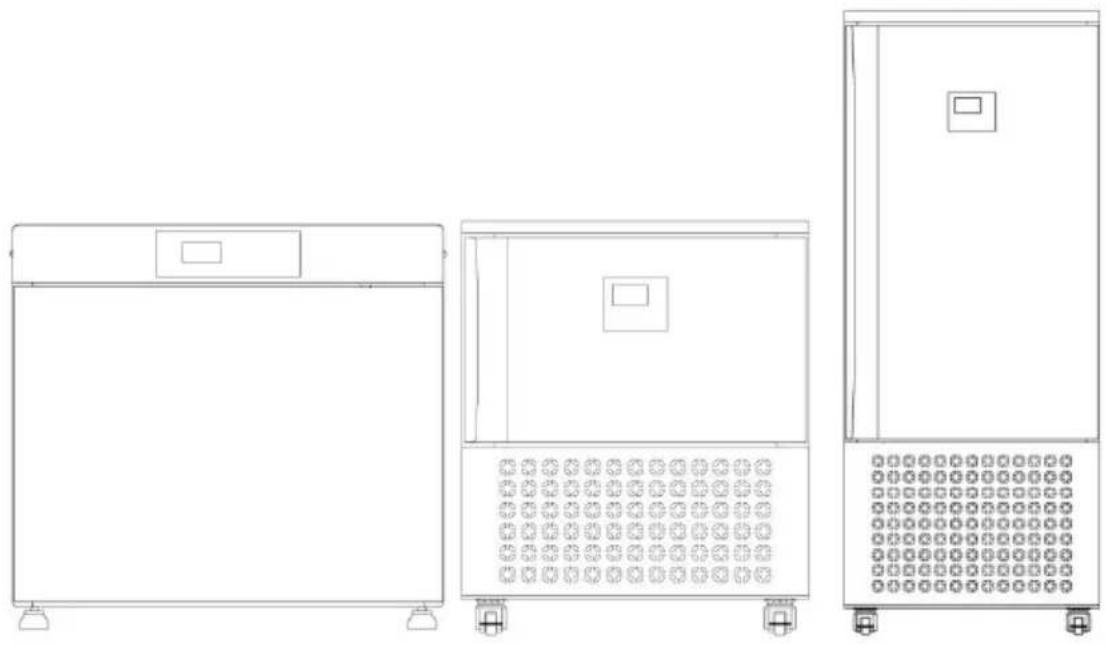
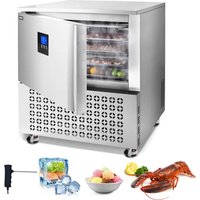
BLAST CHILLER
We continue to be committed to provide you tools with competitive price. "Save Half", "Half Price" or any other similar expressions used by us only represents an estimate of savings you might benefit from buying certain tools with us compared to the major top brands and does not necessarily mean to co all categories of tools offered by us. You are kindly reminded to verify carefully when you are placing an order with us if you are actually Saving Half in comparison with the top major brands.
NEED HELP? CONTACT US!
Have product questions? Need technical support? Please feel free to contact us:
Technical Support and E-Warranty Certificate www.vevor.com/support
This is the original instruction, please read all manual instructions carefully before operating. VEVOR reserves a clear interpretation of user manual. The appearance of the product shall be subject to product you received. Please forgive us that we won't inform you and there are any technology or software updates on our product.

Warning-To reduce the risk of injury, user must read instructions manual carefully.
CORRECT DISPOSAL
This product is subject to the provision of European D 2012/19/EC. The symbol showing a wheelie bin crossed through indicates that the product requires separate refu collection in the European Union. This applies to the p and all accessories marked with this symbol. Products as such may not be discarded with normal domestic w must be taken to a collection point for recycling electri electronic devices
IMPORTANT SAFETY INFORMATION
SAFETY PRECAUTIONS
WARNING

- Read this Safety Note carefully before using it so that you correctly.
- The precautions noted here are intended to enable you to set the freezer to prevent precautions that endanger the safety of others.
- According to the content safety precautions are divided into: W MATTERS
- Please comply with the safety content
WARNING
- Must use a separate three-hole socket and cooperate with the appropriate electrical degree meter and fuse(if it is 220V 60Hz to be equipped with independent air switch), do not share multiple sockets v other electrical appliances,to avoid danger.
- The grounding end of the socket should have are reliable grounding wire addition to the grounding wire, should also be installed with leakage protector.
- Plug and plug correctly, inserted to insert tighty, make the plug and th plug contact is good, pull off should hold the plug. do not hand pullth
cord, to prevent the plug loose or disconnected.
- Do not damage the insulation layer of the power cord,do notpressu wire,do not replace or lengthen the power cordat will.If the power cord damaged or broken,so,to avoid danger must be replaced by full-time personnel.
- Do not use combustible spraynear the freezer /freezer, otherwise it cause a fireor explosion. When there is combustible gas around the froz cabinet/freezer, such as leaking gas, liquefiedgas, etc., first of all, to open the window to remove the combustible gas around, do not unplug or close thermostat and other switches, so as not to produce electric spark caused by explosion.
- Please remove the powerplug during maintenance to prevent electric shock. Do not use wet hands unplug or plug the power plug in case electric shock.
- In case of abnormal operation, the power supply should be immedi cut off, and the operation should be stopped. Before the abnormality is excluded, please do not turn on the power supply. The abnormal state operation is prone to danger.
MATTERS
- Do not touch the exposed, piping and wiring, which may cause scald electric shock.
- Pull the plug off the plug from the power outlet when moving the freezer/freezer.
- Remove the freezer/freezer for a long use.
- Non-professional personnel shall not disassemble, repairor transform them.
- Whether movingor transporting, it should be avoided from collision or violent vibration, and the freezer/freezer tit angle should not exceed 45 degrees to avoid damage to the refrigeration system.
- The quick-frozen cabinet/freezer should be placed in a dry place, such being placed in awet or water place for a long time, the box will rust affect the electrical insulation strength. Do not use it outside or where
get the rain.
- Do not put the freezer /freezer in drect sunlight or near the heat source, otherwise itvill affect the insulation layer and sheet metal life of the freezer.
- In order to make the quick-frozen cabinet /freezer better ventilated heat dissipation, the space displayed in the "machine installation mode" should be left around the quick-frozen cabinet to facilitate ventilat and heat dissipation and reduce energy consumption.
- The ground placed shall be flat and firm. And keep the level, so that display cabinet is placed smoothly, for safety needs, and can enable the compressor to work smoothly, reduce vibration and noise.
FIRST USE
-
First, remove the packaging of the freezer /freezing cabinet/freezer, put the machine on the horizontal ground, the surrounding environment is dry and ventilated place, the distance from the wall and other obstacles is less than 30cm.
-
Please conduct a thoroughinternal cleaning and disinfection.
-
After standing for 2 to 5 hours, plug the appropriate power supply w secure cable. (Note: BL-E15,220V 60Hz needs to be connected with the three-phase air switch)
-
Turn the machine control switch on, and the compressor has a delay protection for 3 minutes. When the compressor starts to start, the quick-freezing cabinet begins to enter the refrigeration state, and therefrigeration begins.
-
Turn on the power supply for trial run, because the freezing cabinet hot, the first cooling will be slow. When the temperature in the cabinet to -30°C , the items can be placed, and the speed when placing the item should be as fast as possible to avoid the large loss of cold volume. 6. Each plate is recommended to place 2-4 kilograms of frozen
products,because the heat release of frozen products is proportional to refrigeration capacity,do not place too much frozen products,more haste not up to;at the sametime because of the different food,the release o
different heat, put more or less, packaging mode and many other factors the cooling time of the cabinet temperature will be quite different.
-
Keep the cold air circulation in the cabinet unblocked, and do not pl air outlet.
-
When the product will automatically defrost once every 4 or 6 hours and modified), the compressor will be shutdown, and the temperature in the cabinet will ise, which is a normal phenomenon. After the defrosting ends, the refrigeration will start again.
-
Under the no-load premise, the cabinet temperature can reach -35°C -40°C (about 40-60 minutes of different ring temperature and difference), into the product, dueto the different quick-frozen product, The weight of the frozen, the heat released by itself is different, so the frozen time will be different, please calculate the frozen time according to the actual product situation.
-
Because the quick-freezing cabinet belongs to the cryogenic freezer, heat dissipation situation and the placement of the equipment will cau the quick-freezing effect of the equipment difference. The operator should read the operation manual in detail before starting to operate the equipment.
-
Because the quick-frozen food itself has calories, in the process of quick-frozen food is frozen, it should be analyzed according to different situations, not simply to determine whether the temperature in the cab reaches -35°C or -40°C. (Subject to the food probe)
-
Because the quick-frozen food is different, the quick-frozen methods are different. The company does not promise that a certain kind of food can quickly-frozen within the specified time, nor does it bear any costs and losses caused by the quickly-frozen food, please adjust according to the actual production situation.
-
Because this product has a small capacity compared with cold storage, quick-frozen can not be compared with large capacity cold storage, please know.
MACHINE INSTALLATION MODE
IMPORTANT: The product must be connected with a relabla salaly gr cable.


Installing the Supporting bar:

Insert the Supporting bar into the corresponding hole in the freezer;
Operation Instructions
IMPORTANT: Temperature adjustment shall be adjusted dcordfng to the actual situation and the required temperature. After each adjustment, It should be run for a period of time to stabilize
High voltage alarm LED
Fan LED
Condensation clean light
Probe indicator LED
Defrost LED
Door switch
-
Power on/off: Press for 3 seconds to turn off the refrigerator mode, turn off the temperature display, "---" display, and stop all control output. Press again for 1 second, the measured temperature will be displayed and the refrigerator mode will be activated after delay time.
-
Refrigeration probe hard and quick-freezing mode: Press the button LED is on, and start the quick-freezing press to quite the quick-freezing, it will automatically enter the storage mode after the quick-freezing is completed, the buzzer sounds for 5 seconds.
-
Refrigerator mode: press button to start refrigerating, and press button to stop refrigerating. Temperature setting range: -35\~20°C (-31\~68°F).
-
Manually enter/stop defrosting: Press for 6 seconds to enter the defrosting state or stop defrosting.
-
Defrost temperature display: Press the defrost temperature will be
displayed flashing, and the display will be exited without pressing any for 6 seconds.
- Condenser temperature display: Press the condenser temperature will be displayed flashing, and the display will be exited without press any button for 6 seconds.
- Probe temperature display: In refrigeration and probe quick-freezing mode, press the probe temperature will flash and display, and the display will exit without pressing any button for 6 seconds. (*Factory set -18°C/00°F)
- Refrigeration LED: During the refrigerating the refrigeration LED is in the constant temperature state, the refrigeration LED off; during the process, the refrigeration LED flashes.
- Defrost: During the defrosting, the LED is on; when the defrostir the LED is off. during the dropping process, the refrigeration LED flash 10. Fan: When the fan is running, the fan LED is on; when the far stopped, the fan LED is off.
- Current mode controls temperature adjustment: Press once to enter the quick setting temperature 1P, then press button to select 4F press to increase, press to decrease, and return to normal operation mode if no key is pressed within 6 seconds.
| 1P | Refrigeration set temperature | E1~E2 | -35°C(-31°F) |
| 4P | Refrigeration probe hard and quick-freezing set temperature | -45~50°C(-49~122°F) | -18°C(00°F) |
12. Temperature Unit Setting:
- Press button and hold for 6 seconds to enter parameter setup mo while E1 flashes.
- Press again button to select sequentially from E2 E3……, Until the screen shows CF, then press and button select Celsius or Fahrenheit.
8. Alarm control
- When the condenser sensor temperature is higher than value C6 a duration more than 10 minutes, the alarm is started. It'll dispaly FC a LED is flash display, to remind the condenser heat dissipation bad need to clean the condenser. When the condenser sensor temperature lower than the value C1, the alarm will be cancelled.
During the alarm process, the buzzer sound, press random button to cancel the sound. When the sound is cancelled for 30 minutes and still not clear, will restart the buzzer to alarm.
- When the pressure is too high, the pressure switch is turned off, alarm is activated, the symbol light flashes, the cabinet temperature is "HP" are alternately displayed, the compressor is disconnected, and the evaporator fan is stopped after a delay of 30 minutes; when the press reduced, the pressure switch is turned on, the alarm is released, and system returns to normal. display, the compressor resumes normal operation.
During the alarm process, the buzzer sounds. Press ramdon button to silence it and return to normal display, with the symbol light continuing flash.
- During the alarm process, the buzzer sound, press random button cancel the sound. When the sound is cancelled for 30 minutes and still not clear, will restart the buzzer to alarm. - Fault code:
| Alarm code | Meaning |
| HI | High temperature alarm |
| L0 | ow-temperaturewaming |
| HP | High pressure alarm |
| 1L | Cabinet temperature lower than -45°C(49°F) open cicut |
| 1H | Cabinet temperature higher than°C(210F)or shortcircuit |
| 2L | Probe temperature below-45°C(-49°F or opencircuit |
| 2H | Probe temperature above 99°C 210F)or shcuit |
| 3L | Frorostingtemperature below-45°C(49F or opecuit |
| 3H | Frorosting probe above 99°C (210°F)or shcuit |
| 4L | Condenser temperature below -45°C(-49F)orop circuit |
| 4H | Condenser temperature above °C(210°F)or short circuit |
| FS | Condenserfan stopalarm |
| D0 | Door openoropen door time-out alarm |
Normal refrigeration mode
(-40\~+20°C or -40\~68°F)





- Power on/off: long press for 3 seconds, stop refrigerating operation mode, stop temperature display, --- is displayed, all the control outputs stopped. Press again for once to turn on, the measured temperature displayed, will start refrigerating operation mode after the delay.
- Sensor refrigeration hard blast freezing: press button for once, the button LED will be on, the blast freezing will start, and after the blast freezing is completed, it will automatically enter the storage mode, and buzzer will sound for 5 seconds to display "End". Press button to ex the current blast freezing mode (factory setting is °C/37°F)
- Sensor frozen hard blast freezing: press button for once, the but LED will be on, the blast freezing will start, and after the blast freeze completed, it will automatically enter the storage mode, and the buzzes sound for 5 seconds to display "End". Press button to exit the current blast freezing mode. Factory setting is -0800°F)
- Sensor soft blast freezing: press button for once, the button LED be on, the blast freezing will start, and after the blast freezing is co it will automatically enter the storage mode, and the buzzer will sound seconds to display "End". Press button to exit the current blast freeze mode. During blast freezing, "1" will flash when the sensor temperature more than 3°C / 37°F , and "2" will flash when the sensor temperature is less than 3°C / 37°F . Temperature setting range: -18 3°C(00 37°F) .
- Refrigeration control: Press button to enter the refrigeration control
temperature mode, and press button to exit the current refrigeration mode. Temperature setting range: -40\~20°C (-40\~68°F).
- Manual start/stop defrost: Press button and hold for 6 seconds to defrost or stop defrost.
- Display the evap. Sensor temperature: Press for once to flash display the evap. Sensor temperature. If no more button is pressed w seconds, it will exit the display.
- Display the condenser sensor temperature: Press for once to flash display the condenser sensor temperature. If no more button is pressed within 6 seconds, it will exit the display.
- Refrigerating LED: During refrigeration, the LED is on; When the room temp. is constant, the LED is off; During the delay process, the flashes.
- Defrost LED: During defrosting, the LED is on; When defrost stops LED is off. During the dripping time, the LED flashes.
- Fan LED: When the fan operates, the LED is n; When the fan s LED is off.
• Temperature Unit Setting:
1) Press button and hold for 6 seconds to enter parameter setup r while E1 flashes.
2) Press again button to select sequentially from E2 E3……, Until the screen shows CF, then press and button select Celsius or Fahrenheit.
- The factory default resumption: press button and button simultaneously for 6 seconds, "888" is displayed and flashes, at this
all the parameters will resume to factory defaults.
- Parameters locking:
1) Press button and hold for 6 seconds to lock the parameters if "OFF" is displayed or to unlock if "On" is displayed.
2) Parameters can be displayed only and can not be modified if locked, but the adjustment of the set temp. is still active (Factory default is "On"
- Parameter adjustment in the current selection mode: press butto for once to enter the quick setting temperature, then press button to select the parameter, press button to increase the parameter,
press button to decrease the parameter, and if no more button is pressed within 6 seconds, will return to the normal operation mode.
| 1P | Cold storage probe was hard a flash-frozen controlled temperature | -45-50°C (-49~122°F) | +3°C(37°F) |
| 2P | Croprobes were hard flash frozen controlled temperature | -45~50°C (-49~122°F) | -18°C(00°F) |
| 3P | The Probe was soft and flash-frozen controlled temperature | -20-30°C (-04~86°F) | -18°C(00°F) |
| 4P | Refrigeration control temperature | E1~E2 | -40°C(-40°F) |
- Display "dEF" when the machine is frosting or normal within 20 m of completion.
- Fault code prompt
| Alarm code | Meaning |
| HI | High temperature alarm |
| L0 | ow-temperaturewaming |
| HP | High pressure alarm |
| 1L | Cabinet temperature lower than °C(459°F)or open cicut |
| 1H | Cabinet temperature higher than 99°C (210 shortcircuit |
| 2L | Probe temperature below-45°C(-49°F or opencircuit |
| 2H | Probe temperature above °C(210F)or shoit cicut |
| 3L | Frorostingtemperature below-45°C(49F or ope cicut |
| 3H | Frorosting probe above 99°C (210°F)or sh circuit |
| 4L | Condenser temperature below °C(49F)oropen circuit |
| 4H | Condenser temperature above 99°C(210°F)or short circuit |
| FS | Condenserfan stopalarm |
| D0 | Door openoropen door time-out alarm |
Maintenance and advice
- The equipment belongs to the low-temperature freezer, which is usually used as a single
food cooling event, and can not be used as a storage cabinet. f used hours a day, appear if the temperature does not drop, the evaporator frost too thick, please stop for 10\~12 hours, or manually defrosting. Do not run continuously for 7 days to strain the refrigeration system. - Devices on the equipment are vulnerable parts, should avoid collision, scrub should be carefully wiped, to avoid damage.
- Drainage ains at the lower left of the equipment(if applicable), shall be regularly drained or connected to the drain.
- It is recommended that users shutdown when notfrozen food and consume lessenergy.
- The equipment shall be cleaned from the condenser dust once for 2 months, the wireshal be cut off the rear ventilation board removed, clear dust on the condenser with a soft brush, installed back to the ventilati board, do not use tap water washing or use sharp tools to clean, so a avoid leakage or leakage of refrigerant.
- Please conduct the following checks to ensure the safety after the maintenance.
- Is the power cord plug fully plugged into the power socket.
- Whether the power plug has abnormal heating phenomenon.
- Whether the power cord has cracks or scratches.
Trouble Shooting
| Trouble | Cause and Remedy |
| No power supply | 1. Check whether the power supply is electric;2. Whether the power cord is inserted;3. Whether the operation switch is closed;4. Whether the power cord is damaged. |
| No refrigeration at all | 1. Check whether the power failure,and whether power plug is not plugged in on the power sock2. Check whether the fuse is disconnected and leakage protector is working. Where a leakage pr is installed) |
| Poor cooling effect | 1. Check whether the condenser is dity and vent is good,otherwise clean the condenser to improve ventilation;2. check whether theevaporator is too frosting,excessive manual defrosting or stop defros3. check whether the temperature controller parameters are appropriate;4. Whether the frozen cabinet/freezer is in direct sunlight or too close to the heat source. |
| No downtime | 1. Whethertheambient temperature is too high;2. Checkwhether the thermostat parameter setting appropriate. |
| Noise | 1. Check whether the ground is flat and solid;2. Check whether the freezer /freezer is stable. |
| Use the probes correctly | 1. Is the food probe properly inserted into the fo center position. |
The following phenomena are not troubles
- When the ambient humidity is too high, sometimes there will be condensation on the shell of the freezer, and dry with acloth.
- Frozen cabinet /freezer sometimes has a slight running water sound, which is the sound of refrigerant flow in the pipeline, which is a normal phenomenon.
- Frozen freezer work, the compressor, condenser will heat, the seare normal phenomena.
- When more high temperature items are stored at a time, it is normal the freezing cabinet /freezer to cool down for a long time.
- In summer, the ambient temperature is high, and the quick-freezing cabinet/freezer needs to work for a long time to fall to the rapid free temperature of the required food, which is a normal phenomenon.
- Every 4 or 6 hours of running will automatically enter the defrosting state, at this time the temperature will increase slightly, with a small amount of fog in the tuyere, which is a normal phenomenon.
1.BL-ME32L
![graph TD A["Power line"] --> B["Inverter"] B --> C["E Earth"] C --> D["Evaporator fan"] D --> E["Controller"] E --> F["Frost"] F --> G["Compression engine"] G --> H["P Pressure protection"] H --> I["Ground"] style A fill:#f9f,stroke:#333 style G fill:#ccf,stroke:#333](/content/2026/08/1616142/images/2d109ad5198bef231d931a64b3091c1f57fe47dbdf220d53417c357cbc96089a.jpg)
2.BL-E3/E5/E15
![graph TD A["Power line"] --> B["Controller"] B --> C["Pressure protection"] C --> D["P"] D --> E["Earth"] E --> B B --> F["Frost"] B --> G["Condenser tan"] B --> H["Evaporator tan"] B --> I["Demist"] B --> J["Compression engine"] B --> K["Food temperature probe"]](/content/2026/08/1616142/images/b1cfaf5c1193734b27346e11703ca2593d338915f853af572d6e77cd440a788c.jpg)
Packing List
| No. | Item | Qty | Remark |
| 1 | Display Refrigerator | 1 set | |
| 2 | Manual | 1 pcs | |
| 3 | Shelf | 1 pcs | Only for BL-ME32L |
| 4 | Tray | 4 pcs | Only for BL-ME32L |
| 4 | Tray | 3 pcs | Only for BL-E3 |
| 4 | Tray | 5 pcs | Only for BL-E5 |
| 4 | Tray | 15 pcs | Only for BL-E15 |
| 5 | Supporting bar | 6 pcs | Only for BL-E3 |
| 5 | Supporting bar | 10 pcs | Only for BL-E5 |
| 5 | Supporting bar | 30 pcs | Only for BL-E15 |

During using, service and disposal the appliance, pay attention to symbol similar as left side, which located on rear of appliance (rear panel or compr and with yellow or orange color.
It's risk of fire warning symbol. There are flamma materials in refrigerant pipes and compressor.
Please be far away fire source during using, serv disposal.
VEVOR®
TOUGH TOOLS, HALF PRICE
Technical Support and E-Warranty Certificate www.vevor.com/support
- BLAST CHILLER
- NEED HELP? CONTACT US
- TECHNICAL SUPPORT AND E-WARRANTY CERTIFICATE WWW.VEVOR.COM/SUPPORT
- CORRECT DISPOSAL
- IMPORTANT SAFETY INFORMATION
- SAFETY PRECAUTIONS
- WARNING
- MATTERS
- FIRST USE
- MACHINE INSTALLATION MODE
- OPERATION INSTRUCTIONS
- TEMPERATURE UNIT SETTING
- ALARM CONTROL
- PARAMETERS LOCKING
- MAINTENANCE AND ADVICE
- THE FOLLOWING PHENOMENA ARE NOT TROUBLES
- BL-ME32L
- BL-E3/E5/E
- VEVOR®
Brand : Vevor
Model : BL-ME32L
Category : Refrigerator