
IC36 - Refrigerator Vevor - Free user manual and instructions
Find the device manual for free IC36 Vevor in PDF.


| Product type | Refrigerator |
| Brand | Vevor |
| Model | IC36 |
| Dimensions (W x H x D) | Approximately 50 x 85 x 50 cm |
| Net weight | Approximately 25 kg |
| Power supply | 220-240 V, 50 Hz |
| Energy consumption | Class A+ (approximately 100 kWh/year) |
| Capacity | Approximately 90 liters |
| Main functions | Cooling, adjustable thermostat, interior lighting |
| Defrost type | Manual |
| Maintenance and cleaning | Unplug before cleaning, use a soft cloth and soapy water |
| Safety | Do not immerse in water, do not use a steam cleaner |
| Spare parts and repairability | Door seal, shelves and thermostat available from the manufacturer |
| General information | User manual available in several languages |
| Refrigerant | R600a |
| Noise level | Less than 40 dB |
| Installation | Free-standing, sufficient ventilation space |
| Warranty | 1 year (depending on retailer) |
Frequently Asked Questions - IC36 Vevor
User questions about IC36 Vevor
0 question about this device. Answer the ones you know or ask your own.
Ask a new question about this device
Download the instructions for your Refrigerator in PDF format for free! Find your manual IC36 - Vevor and take your electronic device back in hand. On this page are published all the documents necessary for the use of your device. IC36 by Vevor.
USER MANUAL IC36 Vevor
Technical Support and E-Warranty Certificate www.vevor.com/support
CAR REFRIGERATOR
USER MANUAL
MODEL: IC36
We continue to be committed to provide you tools with competitive price. "Save Half", "Half Price" or any other similar expressions used by us only represent of savings you might benefit from buying certain tools with us compared top brands and doses not necessarily mean to cover all categories of tools offered are kindly reminded to verify carefully when you are placing an order with us actually saving half in comparison with the top major brands.
SMART CONTROL- FRIDGEAPP INSTRUCTIONS
First Step: Turn on the Bluetooth on your smart device, start the AF click "Search" to find nearby fridges. A location authorization pop-up v appear. Click "Authorize" to grant permission.
Second Step: Click fridge icon for Bluetooth pairing (the APP will pro you to pair the fridge by pressing the set button on the fridge's control panel when connecting the fridge for the first time). After pairing, the will switch to the main interface allowing you to control the fridge.


| 1Menu2Current temperature3Current voltage4Target temperature5Switch ice maker/fridge6Set7ON/OFF8Current battery910Temperature control | 10ECO(saving energy mode)/MAX(fast cooling mode)12Lock/unlock13Celsius/Fahrenheit14Unpairing the device and return to s15Battery protection mode:High/Medium/Low16Makingice17ON/OFFice maker18Warn |
Note:

*Click the lock icon on the APP to lock/unlock the control panel on the fridge, if locked, the fridge can only be controlled by the APP. Note:
*When switch to the ice maker compartment, the temperature is not adjustable.
Downloading the "CAR FRIDGE FREEZER" Application

IOS

Android
Scan the QR code on the left or search for the "CAR FREEZER" APP in the APP Store (for Apple devices) or Goo (for Android devices).
VEVOR®
Car Refrigerator
MODEL:IC36

NEED HELP? CONTACT US!
Have product questions? Need technical support? Please feel fr contact us:
Technical Support and E-Warranty Certificate www.vevor.com/support
This is the original instruction, please read all manual instruction carefully before operating. VEVOR reserves a clear interpretation user manual. The appearance of the product shall be subject to product you received. Please forgive us that we won't inform your data to where you are any technology or software updates on our product.
 | Warning-To reduce the risk of injury, user must re instructions manual carefully. |
 | This product is subject to the provision of European D 2012/19/EC. The symbol showing a wheelie bin cross through indicates that the product requires separate re collection in the European Union. This applies to the and all accessories marked with this symbol. Products as such may not be discarded with normal domestic w must be taken to a collection point for recycling electr electronic devices |
Attentions
Before using the refrigerator, please read this manual carefully an keep it properly
- Before using the refrigerator, clean it inside and outside with a dam cloth.
- Do not fill the refrigerator with corrosive liquids. Do not directly pou liquids into the refrigerator.
- When the refrigerator is not used for a long time, please disconnect power supply and keep it dry.
- Regularly clean the inner chamber to prevent odor and bacteria and ensure food safety.
5.Shut down the refrigerator and battery before pulling by the trolley (battery).
Connect the Power Supply
- Find the DC power cord in the kit. Connect DC plug to the power the car refrigerator.
- Well place the refrigerators in the car (back-up, seats...).
- Lay out power cords per your car's interior space. Insert the cigarette lighter plug (one side of the power cord) into the car cigarette lighter
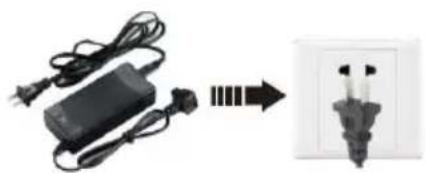

Adapter Connect the car cigarette lighter
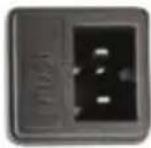
DC 12/24V
Connect the car refrigerator
- The refrigerator can be connected to more than one energy source.
- The refrigerator can connect directly to the DC12V/24V power supply
- If the refrigerator is used an AC100-240V power supply, an AC ada should be adopted.
Car Refrigerator Operation
Component Diagram
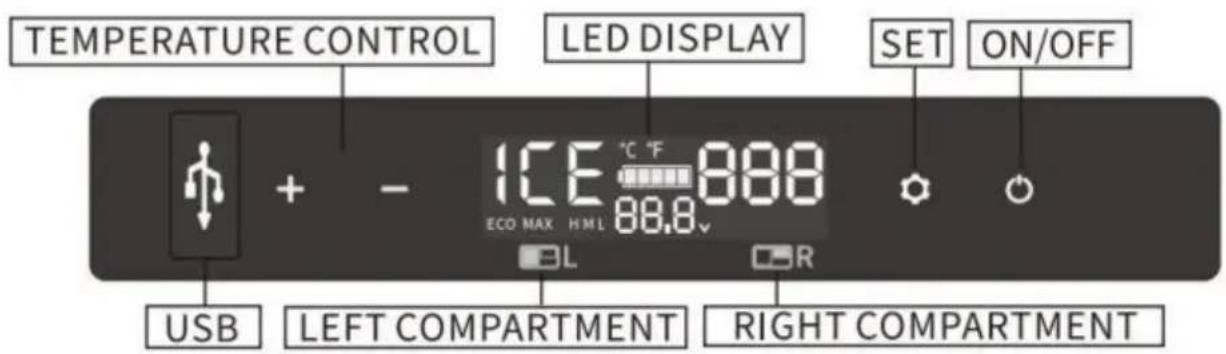
Note: the left compartment is ice maker and the right compartment is fridge.

Function and operation
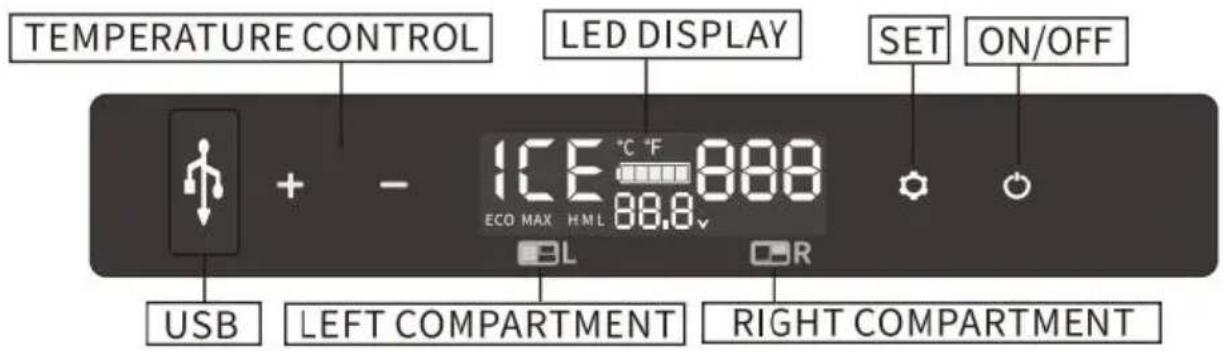
- Power Supply: connect to DC 12V/24V or AC 100-240V power (using dedicated adapter).
- Display Screen Initialization:when the fridge is powered on,the buzz will make a long beep,and the display will be on for two seconds the standby mode.
·Power ON/OFF: press to switch ON/OFF. long press for three seconds to switch OFF.
·Temperature Setting: under the running state, the left compartment(ice maker) and the right compartment(fridge) work independently.
Left compartment(ice maker): under the running state, long press
and to switch ON/OFF left compartment(ice maker).The ice making cycle is 9 minutes.When the ice maker is short of water,the screen (F9,press and to reset it.When the switch of the ice maker detects that the water storage box is not placed properly,the screen displays FA,press and to reset it.When the basket of the ice maker is full of cubes,the screen displays FU,press and to reset it.
Right compartment(fridge): under the running state, long press and to
switch ON/OFF the temperature setting of the right
compartment(fridge).Press for to adjust the temperature of the fridge.
Under the running state, when the left compartment(ice maker) and the compartment (fridge) work at the same time, press or to enter the temperature setting of the right compartment(fridge). Press to increase temperature and press to decrease temperature. Long press or to quickly adjust temperature. The setting will be saved after stop operating three seconds.
Note: the temperature of the left compartment(ice maker) cannot be adjusted, the
temperature of the right compartment(fridge)can be adjusted. The temperature displayed is the current temperature of the compartments, it take a while to reach the set temperature. When the fridge work independently, the temperature range is -20°C to 20°C . When the fridge ice maker work at the same time, the lowest setting temperature of the compartment(fridge)is -12°C/10°F .
·Cooling Mode: under the running state, press to switch MAX(fast cooling mode) and Eco(energy saving mode).(*Factory setting is MAX.)
·Battery Protection Mode: under the running state,long press for three seconds until the left screen flashes,then press again to switch High(H),Medium(M) and Low(L) ("Factory setting is High).
Voltage Reference:
| MODE\INPUT | DC 12V | DC 24V | ||
| CUT OUT | CUT IN | CUT OUT | CUT IN | |
| H1 | 8.5V | 10.9V | 21.3V | 22.7V |
| H2 | 10.1V | 11.4V | 22.3V | 23.7V |
| H3 | 11.1V | 12.4V | 24.3V | 25.7V |
*the voltage is theoretical value, there may be a deviation in different scenarios.
*H should be set when the product is connected to car power, and M should be set when it is connected to a portable battery or other battery.
- Temperature Unit Setting: switch OFF the fridge,long press for three seconds until E1 displays,then switch to E5 by pressing again.then press or to select Celsius or Fahrenheit.
- Reset: switch OFF the fridge, long press for three seconds until display E1 , under E1 mode, long press at the same time for three seconds to reset it.
Recommended temperature for common food:
| Drinks | Fruits | Vegetable | Delicatessen | Wine | Ice cream | Meat |
| 5°C/41°F | 5~8°C/41~46°F | 3~10°C/37~50°F | 4°C/39°F | 10°C/50°F | -10°C/14°F | -18°C/0°F |
Things to note
Cleaning:
- Switch off and unplug the device first to avoid electric shock.
- Use wet cloth to clean the device and dry it.
- Do not soak the fridge in water and do not wash it directly.
- Do not use abrasive cleaning agents during cleaning as these can damage the device.
Storage:
If the device will not be in use for a long time, please follow the ins
- Switch off and unplug the device.
·Take out all the items stored in the device.
·Wipe off excess water with a soft rag. - Put the fridge in a cool and dry place.
Leave the lid slightly open to prevent odors from forming. - Recommended storage environment:
ambient temperature:25°C, ambient humidity:≤75%.
Defrosting:
Humidity can form frost in the interior of the cooling device or on the evaporator. This reduces the cooling capacity. Defrost the device in goodtime to avoid this.
- Switch off and unplug the device first to avoid electric shock.
·Take out all the items stored in the device. - Keep the lid open.
-Wipe off the defrosted water.

Never use hard or pointed tools to remove ice or to loosen ob
which have frozen in place.
Troubleshooting methods
Advice: If abnormal situations cannot be resolved through a simple fat analysis, please get in touch with professional customer service for assistance.
| Issues | Cause/Suggestions |
| Refrigerator does not work | ·Check if the switch is on. ·Check if the plug and socket are connected Check if the fuse has been burnt. Check if the power supply is malfunctioned. ·Switch on/off the fridge frequently may cause start delay of the compressor |
| Refrigerator compartments are too warm | ·The door is opened frequently ·A large amount of warm or hot food was recently ·The refrigerator has been disconnected for a long time. |
| Food is frozen | The temperature was set too low |
| There is "water flow noise from inside the refrigerator | ·It's a normal phenomenon, caused by the flod refrigerant |
| There are waterdrop around the refrigerator casing of door gap | ·It's a normal phenomenon, the moisture will condense to water when it touches a cold surface of the refrigerator. |
| The compressor is slightly noisy when starting | ·It's a normal phenomenon, the noise will be reduced after the compressor works stably |
| Code F1 displayed | Possible cause:low voltage to fridge Adjust the battery protection from High to M or from Medium to Low. |
| Code F2 displayed | Possible cause:condenser fan is overloaded Disconnect power to fridge for 5 minutes & If the code shows again, contact manufacture service. |
| Code F3 displayed | ·Possible cause:the compressor starts too frequently.Disconnect power to fridge for 5 minutes &If the code shows again,contact manufacturer service. |
| Code F4 displayed | ·Possible cause:compressor not kicking in Disconnect power to fridge for 5 minutes &If the code shows again,contact manufacturer service |
| Code F5 displayed | ·Possible cause:overheating of the compresso &electronics. Disconnect power to fridge for minutes &re-start.If the code shows again,contact manufacturer service. |
| Code F6 displayed | ·Possible cause:no parameter can be detecte the controllerDisconnect power to fridge for 5 minutes &If the code shows again,contact manufacturer service. |
| Code F7 or F8 displayed | ·Possible cause:temperature sensor is faulty.Contact manufacturer for service. |
| Code F9 displayed | ·Possible cause:the ice maker is short of wPress and to reset it |
| Code FA displayed | ·Possible cause:the switch of the ice maker detects that the water storagebox is not placed properlyPress and to reset it |
| Code FU displayed | ·Possible cause:The basket of the ice maker of ice cubesPress  reset it reset it |
Packing List
| No. | Item | Qty | Remark |
| 1 | Refrigerator | 1 set | |
| 2 | Cigarette wire | 1 set | |
| 3 | Power adapter | 1 set | |
| 4 | Manual | 1 pcs |
Use Suggestions
- If equipped with a backup battery, you can maintain any temperature set under any circumstances without worries.
- When placing ice cream, please adjust the temperature to the low must be powered on for a long time.
- Prevent the health problems of drinking bottled water caused by high temperatures.
- Frozen food, rare seafood, and vehicle-mounted refrigerators let frozen fresh food accompany the journey.
- Healthcare products, insulin, and imported drugs need to be refrigerate and the precise temperature control of onboard refrigerators will escort health along the way.
- The tea leaves are effectively kept fresh in the car refrigerator, ar can drink fresh and delicious tea anytime during the self-driving tour.
- The best storage temperature of red wine is 10\ °C - 18\ °C (50 - 64.4 °F ).
The precise temperature control of the car refrigerator can effectively ensure the storage temperature of red wine. - The storage time of high-grade fruit in the car at high summer temperatures will be at least 2 hours. The storage time is shorter ev the air conditioner is turned on. Using a car refrigerator can effectively
preserve high-grade fruit.
- The coating of high-grade sunglasses will fall off under the high temperature in summer. The car refrigerator is an ideal place to place
- High-grade cosmetics quickly deteriorate under high temperatures in the car. Carry cosmetics with the car; the car refrigerator will be you choice.
Safety Precautions

WARNING!
Do not operate the appliance if it is visibly damaged.
·Do not block the gaps of the fridge with things like pin,wire,etc.
- Do not expose the appliance to rain or soak it in water.
- Do not place the appliance near naked flames or other heat sources (heaters, direct sunlight, gas ovens etc.)
- Do not store any explosive substances like spray cans with a flamm propellant.
- Ensure the supply cord is dry and not trapped or damaged. Do not multiple portable socket-outlets or portable power supplies at the rear the appliance.
- Check the voltage specification on the type plate corresponds to that the energy supply. The appliance is only to be used with the power s unit provided with the appliance.
- Do not use electrical appliances inside the food storage compartments, the appliance, unless they are of the type recommended by the manufacturer.
- Once unpacked and before turning on, the appliance must be placed at level surface for more than 6 hours.
- Make sure that the appliance stays horizontally when it is running. T angle must be less than 5° for longtime running and be less than 45° short time running.
- Keep the ventilation openings in the unit casing or in the built-in str free of obstacles.
- Keep the applianceable on the ground or in the car; Do not drain it down.
- When positioning the appliance, ensure the supply cord is not trapped damaged.
- Do not locate multiple portable socket-outlets or portable power suppli at the rear of the appliance.
·Risk of child entrapment. Before you throw away your old refrigerator freezer: *Take off the doors.
*Leave the shelves in place so that children may not easily climb ins
- Do not use mechanical devices or other means to accelerate the defrosting process,other than those recommended by the manufacturer.

· :Risk of fire/flammable materials.
CAUTION!
·Repairs may only be carried out by qualified personnel. Incorrect repair may cause danger. The lamp and supply cord must be replaced by the manufacturer or qualified persons.
- The installation of DC power in the boat must be handled by qualified electricians.
·Children shall not play with the appliance. Cleaning and user mainten shall not be made by children without supervision.
The appliance can be used by children aged from 8 years and about persons with reduced physical, sensory or mental capabilities or lack of experience and knowledge if they've been given supervision or instruct concerning use of the device in a safe way and understand the hazard
NOTICE!
- Disconnect the power supply before each cleaning and maintenance a after every use.
·Do not use sharp tools to defrost; Do not damage the refrigerant circ
·Risk of child entrapment. Before you throw away your old refrigerator freezer: take off the doors: leave the shelves in place so that children I not easily climb inside.
- Check if the cooling capacity of the appliance is suitable for storing food or medicine. Food may only be stored in its original packaging or suitable containers.
- If the appliance is left empty for long periods, switch off, defrost, clean, dry, and leave the door open to prevent mould developing within the appliance.
·The appliance is intended to be used in household and similar applications such as:
-Staff kitchen areas in shops, offices and other working environments;
-Camping, Farm houses and by clients in hotels, motels and other residential environments;
-Bed and breakfast type environments;
-Catering and similar non-retail applications.
·To avoid contamination of drink, please respect the following instruction
-Opening the door for long periods can cause a significant increase of temperature in the compartments of the appliance.
-Clean regularly surfaces that can come in contact with drink and accessible drainage systems.
-Store raw meat and fish in suitable containers in the refrigerator, so it is not in contact with or drip onto other food;
-Store raw meat and fish in suitable containers in the refrigerator, so it is not in contact with or drip onto other food.
-If the refrigerating appliance is left empty for long periods, switch off, defrost, clean, dry, and leave the door open to prevent mould develop within the appliance.

Please according to local regulations regarding disposal of the applian for its flammable refrigerant and blowing gas.
WARNING: This appliance contains flammable foaming agent cyclopentane:
1) Please avoid contact fire when you transport and use it.
2) Please ask a professional for servicing when the machine breaks
3) Please send it to your local appointed disposal station when you it.

WARNING: During use, service, and disposal of the appliance please pay attention to a symbol similar to the left side, which is lo the rear of the appliance (rear panel or compressor) and with yellow orange color. It's a risk of fire warning symbol. There are flammable materials in refrigerant pipes and compressors. Please be far away fir source during use, service, and disposal.
VEVOR®
TOUGH TOOLS, HALF PRICE
Technical Support and E-Warranty Certificate
https://www.vevor.com/support
VEVOR®
TOUGH TOOLS, HALF PRICE
IOS Android

BESOIN D'AIDE? CONTACTEZ-NOUS!
Adaptateur

IOS Android

www.vevor.com/support
Adapter

https://www.vevor.com/support
VEVOR®
TOUGH TOOLS, HALF PRICE
iOS

Androide
HO BISOGNO DI AIUTO? CONTATTACI!
Adattatore

elettronica https://www.vevor.com/support
VEVOR®
TOUGH TOOLS, HALF PRICE
IOS

Androide
Adaptador

iOS Android

POTRZEBUJE POMOCY? SKONTAKTUJ SIĘ Z NAMI!
Adapter

Funkcja i działanie
https://www.vevor.com/support
VEVOR®
TOUGH TOOLS, HALF PRICE
Technische ondersteuning en e-garantiecertificaat www.vevor.com/support
AUTO KOELKAST HANDLEIDING
MODEL: IC36
IOS

Android
HULP NODIG? NEEM CONTACT MET ONS OP!
Adapter

Functie en werking
:Risico op brand/ontvlambare materialen.
VOORZICHTIGHEID!
IOS Android

BEHÖVS HJÄLP? KONTAKTA OSS!
Adapter

Anslut bilens cigarettändare

DC 12/24V
Anslut bilkylskåpet
Funktion och drift

www.vevor.com/support

- CAR REFRIGERATOR
- USER MANUAL
- SMART CONTROL- FRIDGEAPP INSTRUCTIONS
- NOTE
- DOWNLOADING THE "CAR FRIDGE FREEZER" APPLICATION
- VEVOR®
- NEED HELP? CONTACT US
- ATTENTIONS
- CONNECT THE POWER SUPPLY
- CONNECT THE CAR REFRIGERATOR
- CAR REFRIGERATOR OPERATION
- COMPONENT DIAGRAM
- FUNCTION AND OPERATION
- VOLTAGE REFERENCE
- THINGS TO NOTE
- CLEANING
- STORAGE
- DEFROSTING
- TROUBLESHOOTING METHODS
- USE SUGGESTIONS
- SAFETY PRECAUTIONS
- WARNING
- CAUTION
- NOTICE
- TOUGH TOOLS, HALF PRICE
- BESOIN D'AIDE? CONTACTEZ-NOUS
- WWW.VEVOR.COM/SUPPORT
- HO BISOGNO DI AIUTO? CONTATTACI
- FUNKCJA I DZIAŁANIE
- AUTO KOELKAST HANDLEIDING
- HULP NODIG? NEEM CONTACT MET ONS OP
- FUNCTIE EN WERKING
- VOORZICHTIGHEID
- BEHÖVS HJÄLP? KONTAKTA OSS
- ANSLUT BILKYLSKÅPET
- FUNKTION OCH DRIFT
Brand : Vevor
Model : IC36
Category : Refrigerator