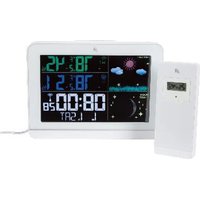
HX075-0500600-AG-001 - Weather Station AURIOL - Free user manual and instructions
Find the device manual for free HX075-0500600-AG-001 AURIOL in PDF.


User questions about HX075-0500600-AG-001 AURIOL
0 question about this device. Answer the ones you know or ask your own.
Ask a new question about this device
Download the instructions for your Weather Station in PDF format for free! Find your manual HX075-0500600-AG-001 - AURIOL and take your electronic device back in hand. On this page are published all the documents necessary for the use of your device. HX075-0500600-AG-001 by AURIOL.
USER MANUAL HX075-0500600-AG-001 AURIOL
text_image
25.0 60 23.2 58 20:15:59 23'11'04'04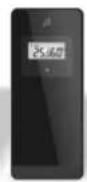
1
text_image
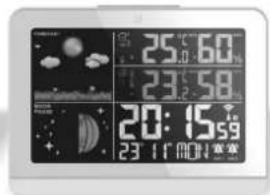
25.0 60 23.2 58 20:15:59 23 11 MOH寒寒2
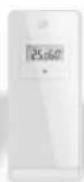
text_image
PDF ONLINE www.lidl-service.comRADIO-CONTROLLED WEATHER STATION •
Usage and safety instructions

TRÅDL∅S VEJRSTATION
GB IE Usage and safety instructions
Table of Contents
Table of Contents - 1 -
Introduction - 2 -
Approved use - 2 -
Scope of delivery - 2 -
Technical specifications - 2 -
Radio-controlled weather station ..... - 2 -
Plug-in power supply - 2 -
Outdoor sensor - 2 -
Explanation of symbols ...... - 3 -
Explanation of the battery symbols ...... - 5 -
Important safety Importance safety formation..... - 6 -
Safety instructions for users - 6 -
Safety information for the batteries ..... - 7 -
Electrical hazard - 8 -
Hanging or positioning the device securely ... - 9 -
Hanging or setting up the outdoor sensor
securely - 10 -
Description of the device .... - 11 -
Display - 11 -
Control panels - 12 -
Description of the outdoor sensor .... - 13 -
Starting up the device.... - 14 -
Radio reception - 15 -
Interference with reception - 15 -
Switch radio reception off and on ..... - 15 -
Restart radio reception .... - 15 -
End radio reception ...... - 15 -
Quick set-up ....- 15 -
Basic settings - 15 -
Adjusting the time zone - 16 -
12/24-hour time format - 16 -
Switch on/dim display illumination ....- 16 -
Alarm - 16 -
Setting the alarm - 16 -
Activate or deactivate the alarm ...... - 17 -
Snooze function (SNOOZE) ...... - 17 -
Switch off the alarm - 17 -
Temperature - 17 -
Select temperature unit - 17 -
Set temperature warning ...... - 17 -
Enable and disable the temperature
warning - 17 -
Frost warning ...... - 17 -
Weather forecast - 18 -
Weather symbols - 18 -
Trends - 18 -
Outdoor sensor/channel setting - 18 -
Indoor humidity - 19 -
Phases of the moon - 19 -
Maximum and minimum values ...... - 19 -
Battery level indicator - 19 -
Restart (RESET) - 20 -
Cleaning instructions - 20 -
Storage - 20 -
Simplified EU Declaration of Conformity..... - 20 -
Disposal - 20 -
Disposing of the electrical device ..... - 20 -
Disposal of batteries - 21 -
Recycling - 22 -
Waste disposal - 22 -
The digi-tech gmbh warranty ...... - 23 -
Warranty terms - 23 -
Warranty period and statutory
claims for defects - 23 -
Scope of Warranty - 23 -
Processing in the event of a
warranty claim - 23 -
Order Service - 24 -
Service - 24 -
Supplier - 24 -
GB IE NI
RADIO-CONTROLLED WEATHER STATION
Introduction
Congratulations on purchasing your new radio-controlled weather station (hereinafter referred to simply as "device"). You have chosen a high-quality device. The operating instructions are part of this device. They contain important information pertaining to the safety, use and disposal of the device. Please familiarise yourself with all the operating and safety instructions before using this device. Use the device only as described and for the purposes indicated. When passing the device on to third parties, hand over all documents with it. Please keep the packaging and operating instructions for future queries.

Approved use
This device is suitable for displaying the time and for using the additional functions described. Any other use or modification of the device is considered to be improper use. The manufacturer is not liable for damage caused by improper use or incorrect operation. The device is not intended for commercial use.
Scope of delivery
Note: Please check the package after purchase. Make sure that all parts are included and that none are defective. Do not use the device if the delivery is incomplete and/or parts are damaged. Contact the service department (see "Procedure in the event of a warranty claim").
• 1 x radio-controlled weather station
• 2 x batteries 1.5 V AA LR6
• 1 x plug-in power supply
• 1 x outdoor sensor
• 2 x batteries 1.5 V AAA LRO3
- 2 x screws
- 2 x dowels
• 1 x operating instructions
Technical specifications
Radio-controlled weather station
- DCF77 radio control signal, frequency band 77.5 kHz
• Measuring range/temperature: -9.9 – 50 °C
• Temperature display/tolerance: +/- 2 °C
• Measuring range/humidity: 20% – 95%
• Humidity display/tolerance: +/- 8%
• Dimensions: approx. 156 x 114 x 31 mm
• Weight: approx. 249 g (excl. battery)
• Batteries: 2 x 1.5 V AA R6/LR6 - Protection class III

Plug-in power supply
• Model: HX075-0500600-AG-001
• Manufacturer: Dongguan Shijie Huaxu Electronics Factory
- Weight: 63 g
• Cable length: approx. 1.5 m, excl. connector
• Input: 100 - 240 V, \~ 50/60 Hz, 0.3 A Max
• Output: 5.0 V 0.6 A, 3.0 W
• Average operational efficiency: 69.4%
• Efficiency at low load (10%): 60.11%
• Zero load power consumption: < 0.1 W
- Protection class: II
• Energy efficiency level: VI
Outdoor sensor
• Measuring range/temperature: -20 – 50 °C
• Temperature display/tolerance: +/- 2 °C
• Measuring range/humidity: 20% – 95%
• Humidity indicator/tolerance: +/- 8%
- Range: max. 100 m

• Transmission frequency: 433.92 MHz
• Transmission power: 0.024 W, -10 dB
• Dimensions: approx. 102 x 43.5 x 29.5 mm
• Weight: approx. 51 g (excl. battery)
- Protection rating provided by casing (external sensor):
IPX4 (weatherproof protection in accordance with IEC 60529 Standard)
Batteries: 2 x 1.5 V AAA R03/LR03, (UM-4)
- symbol for DC voltage
Explanation of symbols
 DANGER! DANGER! | This warning signal/word indicates a hazard with a high level of risk which, if not avoided, could result in death or serious injury. |
 WARNING! WARNING! | This symbol/word indicates a hazard with a medium degree of risk, which may result in death or serious injury if the hazard is not avoided. |
 ELECTRICSHOCK/RISK OFDEATH! ELECTRICSHOCK/RISK OFDEATH! | This symbol indicates a risk of electric shock. |
| Note: | This signal word indicates additional information. |
 | Improper use of disposable/rechargeable batteries may cause an explosion and/or leakage of battery fluid. |
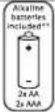 Incl. Incl. | Alkaline batteries included |
  | Radio-controlled weather station batteries: 2 × 1.5 V AA R6/LR6 |
  | Outdoor sensor batteries: 2 × 1.5 V AAA R03/LR03, (UM-4) |
GB IE NI
| = = = , DC 5 V | Symbol for DC voltage (5 volts) | |
 | Protection class III - DeviceProtection against electric shock (shock current) by protective low voltage (<60 V DC) | |
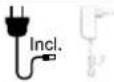 | Plug-in power supply included | |
 | Protection class II - Plug-in power supply(Protection by enhanced or double insulation) | |
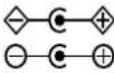 | Polarity of the barrel connector, 5 V = 0.6 A 3.0 W | |
 | Protection rating provided by the housing (outdoor sensor only): IPX4 (splash water protection in accordance with IEC 60529 standard) | |
 | Energy efficiency level VI | |
 | TÜV-Rheinland safety certification (the "GS" mark) | |
  | Please read the operating instructions! | |
 | The digi-tech gmbh demonstrates conformity with the applicable EU directives by means of the CE marking. | |
 | With the UKCA marking, digi-tech gmbh declares that the product is in conformity with the relevant statutory requirements applicable to the product. | |
 | Use only in dry indoor areas! | |
 | Indoor/outdoor temperature | |
 | Humidity | |
 | Frost warning, snow warning | |
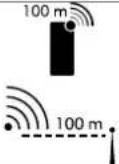 | Range of outdoor sensor: max. 100 mTransmission frequency: 433.92 MHzTransmission power: 0.024 W | |
 | DCF77 radio signal | |
 | Radio waves/radio symbol | |
 | Time | |
 | Alarm clock | |
 | Snooze | |
Explanation of the battery symbols


Always keep batteries out of children's reach.
Do not throw batteries into fire or put them in contact with fire.
Always insert batteries with the correct polarity.
Do not deform or damage batteries.
-5-
GB IE NI

Do not open or disassemble batteries.

Do not mix batteries of different brands or types.

Do not mix new and used batteries.

Do not charge batteries.

Protect batteries from moisture and keep them away from liquids.

Do not short-circuit batteries.

Always insert the batteries in the correct polarity.
Important safety information
Safety instructions for users

WARNING!
RISK OF INJURY!
This device can be used by persons (including children aged 8 and over) with reduced physical, sensory and mental abilities, as well as by persons with a lack of experience and knowledge, if they have been given supervision or instruction concerning use of the device with respect to safety and if they understand the hazards involved. Children must not play with
the device. Cleaning and user maintenance must not be carried out by children unless they are supervised.
Also keep the packaging film out of reach of children.
There is a risk of suffocation.
-6-
GB IE NI
Safety information for the batteries

WARNING!
HEALTH HAZARD! RISK OF EXPLOSION!
Keep new and old
disposable/rechargeable batteries out of reach of small children. If a disposable/rechargeable battery is swallowed, seek medical attention immediately.
If you think batteries may have been swallowed or have got into any part of the body, seek medical attention immediately.
The disposable/rechargeable batteries must always be inserted with the correct polarity. Clean the battery and device contacts beforehand if necessary. Do not attempt to recharge, short-circuit, or open the batteries. Never heat the disposable/rechargeable batteries to recharge them. Do not expose the disposable/rechargeable batteries to excessive heat such as sunshine, fire or the like. There is an increased risk of leakage! Never throw
disposable/rechargeable batteries onto a fire, as they may explode.
Improper use of disposable/rechargeable batteries may cause an explosion and/or leakage of battery fluid. If the disposable/rechargeable batteries do leak, avoid contact with skin, eyes and mucous membranes.

Use protective gloves. In the event of contact with battery fluid, rinse the affected areas with plenty of clean water straight away and seek immediate medical attention. Remove exhausted disposable/rechargeable batteries from the device immediately as there is an increased risk of leakage.
Note:
- Non-rechargeable batteries must not be charged!
- Different battery types or new and used batteries must not be used together!
- Do not short-circuit the connecting terminals!
- Empty batteries/rechargeable batteries must be removed from the device and safely disposed of (see Disposal of batteries)!
GB IE NI
-7-
- If the device is stored unused for a prolonged period of time, the disposable/rechargeable batteries should be removed.
Electrical hazard

DANGER!

RISK OF ELECTRIC SHOCK/DEATH!
- Do not immerse the device and the plug-in power supply in water or other liquids to avoid the risk of electric shock.
- Do not touch the device and the plug-in power supply with wet hands, and do not operate it outdoors or in rooms with high humidity.
- Do not place any receptacles filled with liquids, such as vases, on or in the immediate vicinity of the device and power supply. The receptacle could tip over, and the liquid could compromise electrical safety.
- Do not open or remove the casing of the device and the plug-in power supply under any circumstances. There are live parts inside the
casing; contact with these could result in an electric shock.
- Do not insert any objects into openings in the device. You could touch live parts. If you do, there is a risk of electric shock.
- Unplug the plug-in power supply from the mains socket if it starts acting faultily when in operation (e.g., malfunctions or smoke), after use and during thunderstorms. Always pull on the plug-in power supply, not on the connection cable.
- To completely disconnect the device from electrical power, pull the plug-in power supply out of the mains socket. The plug-in power supply always consumes a small amount of power as long as it is connected to a mains socket. Even if the device is not connected to the plug-in power supply.
- The mains socket must always be easily accessible so that you can quickly unplug the plug-in power supply in an emergency.
- Position the cable of the plug-in power supply in such a way that it does not become a tripping
GB IE NI
hazard. The cable of the plug-in power supply unit must not be kinked or squeezed.
- Keep the plug-in power supply cable away from hot surfaces and sharp edges.
- Do not make modify the device or plug-in power supply.
- Only have repairs to the device or the plug-in power supply unit carried out by a specialist workshop. Improper repairs can result in considerable danger to the user.
- Operate the device only with the plug-in power supply provided. Only use the plug-in power supply for this device. In the event of a defect, the plug-in power supply unit may only be exchanged for a power supply unit of the same type.
- Only for use with an SELV power supply. Safety Extra Low Voltage describes a voltage that is selected to be so low that there is no danger of excessive currents in your body when touching it directly, both during intended use operation and in the event of a single fault.
Hanging or positioning the device securely

The device is not designed to be used in rooms with a high humidity level (e.g., bathrooms).
You can use the rawlplug and screw supplied for wall mounting. Before mounting to the wall, make sure that there are no gas, water or electricity lines at the drilling location. Note the condition of the wall. The enclosed fittings are not suitable for all types of wall.
The manufacturer assumes no liability for damage caused by improper fastening.
- Set up the stand (36) in order to position the device securely.
- Protect easily damaged surfaces when attaching the device to the wall, otherwise scratches may occur.
Make sure that
- adequate ventilation is always guaranteed (do not place the device on shelves or places where curtains or furniture cover the ventilation slots (34) and leave at least 10 cm of space on all sides);
- the device is not placed on a thick carpet or bed when operating and it is not in the direct path of any heat sources (e.g., heaters);
• the device is not exposed to direct sunlight; - contact with splashing or dripping water is avoided;
- the appliance does not hang or stand in the immediate vicinity of magnetic fields (e.g., loudspeakers);
- no foreign bodies or dust can enter the device;
- candles and other open flames are kept away from the device at all times to prevent the spread of fire.
GB IE NI
Hanging or setting up the outdoor sensor securely
Place the outdoor sensor so that it is protected from the direct effects of the weather, e.g., under a porch or carport. The outdoor sensor has protection rating IPX4 and is therefore protected against splashing water.
You can use the raw plug and screw supplied for wall mounting. Before mounting to the wall, make sure that there are no gas, water or electricity lines at the drilling location. Note the condition of the wall. The enclosed fittings are not suitable for all types of wall.
The manufacturer accepts no liability for damage caused by incorrect mounting.
Be sure to protect sensitive surfaces before setting up the device, otherwise scratches may occur. Make sure that:
- the outdoor sensor is standing or hanging upright;
- there is always sufficient ventilation (leave at least 10 cm clearance on all sides);
- the outdoor sensor is not exposed to direct sunlight;
- the outdoor sensor is not hanging or standing in the immediate vicinity of magnetic fields (e.g., loudspeakers);
- no foreign bodies or dust can enter the device;
- easily-damaged surfaces are protected before setting up.
Description of the device
Display
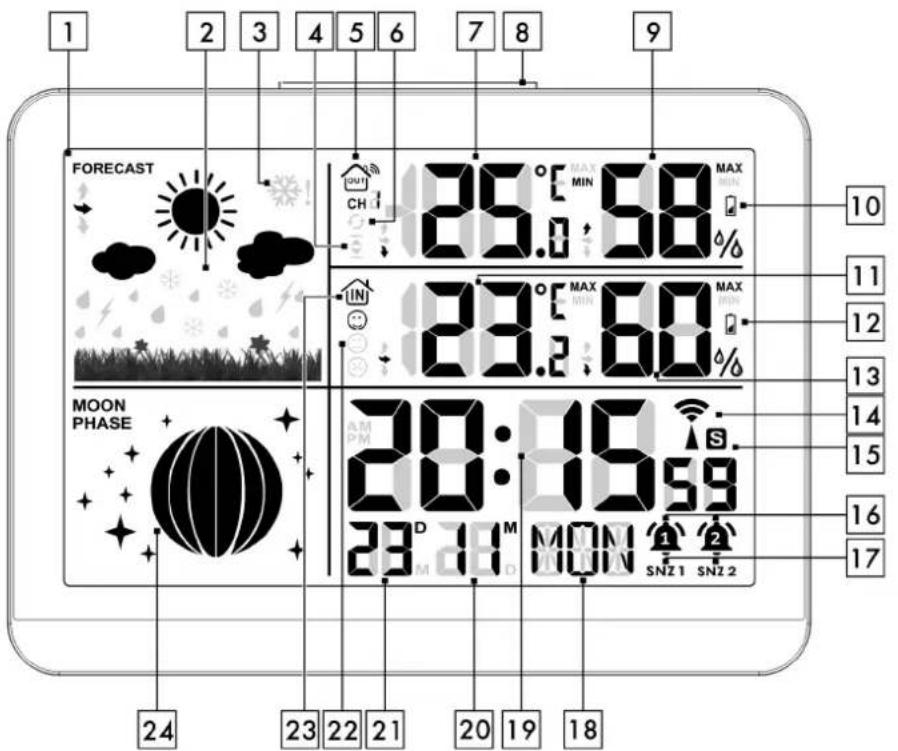
text_image
1 2 3 4 5 6 7 8 9 FORECAST 26.0:68% MAX MIN 10 CH 23.2:68% MAX MIN 11 12 13 14 15 MOON PHASE 28:06:59 23 D M MON 1 2 SNZ 1 SNZ 2 24 23 22 21 20 19 18| 1 | Display | 2 | Weather symbol |
| 3 | Frost warning | 4 | Temperature warning |
| 5 | Outdoor sensor/channel indicator | 6 | Rotation symbol |
| 7 | Outdoor temperature | 8 | SNOOZE/LIGHT button |
| 9 | Outdoor humidity | 10 | Battery level indicator/outdoor sensor |
| 11 | Room temperature | 12 | Battery level indicator/device |
| 13 | Indoor humidity | 14 | Radio control symbol (DCF77) |
GB IE NI
| 15 | Daylight saving time display | 16 | Alarm symbols 1+2 |
| 17 | SNOOZE symbols 1+2 | 18 | Weekday |
| 19 | Time display | 20 | Month/M (Day/D) |
| 21 | Day/D (Month/M) | 22 | Comfort symbols |
| 23 | Room display/device | 24 | Moon phase |
Control panels
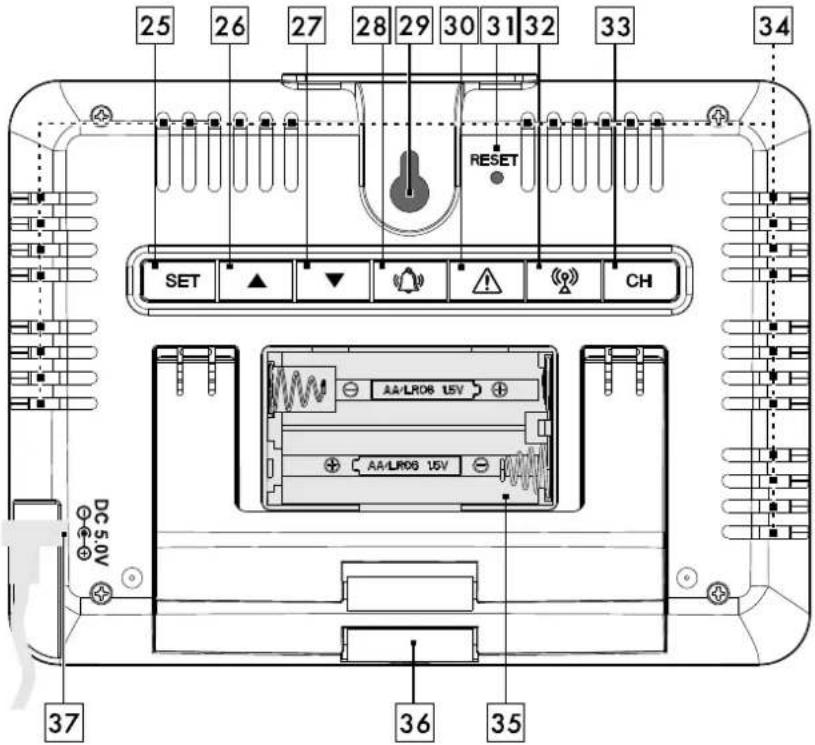
text_image
25 26 27 28 29 30 31 32 33 34 RESET SET ▲ ▼ ⚪️ ⚪️ CH AA/LR06 15V AA/LR06 15V DC 5.0V 37 36 35| 25 | SET button | 26 | Up button, MAX/MIN |
| 27 | Down button, °C/°F | 28 | Alarm button |
| 29 | Suspension device | 30 | Temperature warning button |

| 31 | RESET button | 32 | Restart/switch off the radio reception button |
| 33 | Channel button | 34 | Ventilation slots |
| 35 | Battery compartment | 36 | Stand for unfolding |
| 37 | Hollow plug socket, DC 5.0 V |
Description of the outdoor sensor
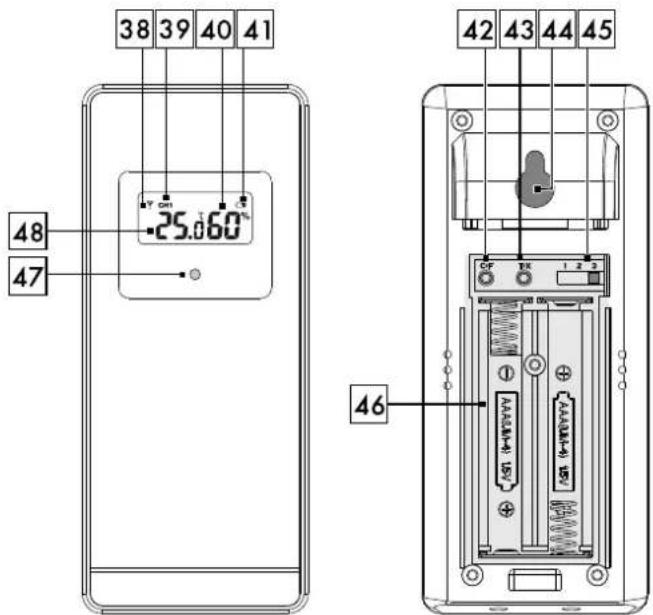
text_image
38 39 40 41 -25.060° 48 47 42 43 44 45 46| 38 | Radio display | 39 | Channel display (1, 2, 3) |
| 40 | Outdoor humidity | 41 | Battery level indicator |
| 42 | °C/°F button | 43 | T/X button |
| 44 | Suspension device | 45 | Channel selector switch (1, 2, 3) |
| 46 | Battery compartment | 47 | Control LED |
| 48 | Outdoor temperature |
Starting up the device

First insert the batteries into the battery compartment of the outdoor sensor (46) and only then into the battery compartment of the device (35).
- Remove the protective film from the device and the external sensor.
- Open the battery compartment of the outdoor sensor (46).
- Insert the supplied batteries with the correct polarity.
The control LED (47) lights up temporarily and the outside temperature (48) and outside humidity (40) are displayed.
- Close the battery compartment (46).
- Open the battery compartment of the device (35).
- Insert the supplied batteries with the correct polarity.
The display is briefly displayed in its entirety. A beep sounds and the room temperature (11) and humidity (13) are displayed.
- Close the battery compartment (35).
The display (1) is temporarily displayed in its entirety, then the weather symbol flashes briefly – slightly cloudy. As a result, the radio waves of the outdoor sensor/channel
display (5) flash and the device receives the data of the outdoor sensor. This process can take a few minutes. If the reception is successful, the selected channel CH 1, 2 or 3 is displayed in the outdoor sensor/channel display (5). The current outside temperature (7) and the current outside humidity (9) appear on the display. After the external sensor has been
successfully received, the device will start receiving the DCF77 radio signal and the radio symbol (14) will flash on the display. This process can take 3-10 minutes. During reception, all buttons except the SNOOZE/LIGHT button (8) and the radio reception button (32) have no function and the display lighting is temporarily switched off. If reception of the time signal is unsuccessful after 10 minutes, the radio symbol (14) will go out.
Set the time manually (see "Basic settings"). The unit will receive the radio signal between 01:00 and 03:00 and start a new reception attempt at 04:00 and 05:00. The time is corrected automatically after successful signal reception.
Note: Please do not move the device or the outdoor sensor during the reception process.
If the reception is successful, the radio symbol (14) appears
permanently and the correct time, date and day of the week are automatically set. During daylight saving time, the daylight saving time display (15) appears on the display.


Radio reception
Interference with reception
The DCF77 radio signal is sent from near Frankfurt am Main. It can be received within a radius of up to approx. 2000 km from Frankfurt am Main. However, there are some sources of interference that can significantly impair reception. If your device does not receive the DCF77 radio signal as it should, hang or place the device in a different location. Note that there may be electromagnetic radiation in the vicinity of computers, telephones, radios and TVs which can interfere with the reception of the DCF77 radio signal. Problems with radio signal reception can also be caused by strong building insulation (metal components), high mountains or atmospheric interference. Replace the batteries, if necessary.
Switch radio reception off and on
- You can switch off the radio reception permanently by pressing the SET button (25) 1 x long and 9 x short. ON will appear. Press the up button (26) or the down button (27) to switch to OFF. The radio symbol (14) will disappear. The device will no longer receive a DCF77 radio signal.
- You can switch off the radio reception manually by pressing the SET button (25) 1 x long and 9 x short. OFF will appear. Press the up button (26) or the down button (27) to switch to ON. The radio symbol (14) will appear on the display. The unit will receive the radio signal between 01:00 and 03:00 and start a new reception attempt at 04:00 and 05:00. The time is corrected automatically after successful signal reception.
Restart radio reception
- You can restart the radio reception by pressing the radio reception button (32). The radio symbol (14) will flash in the display, the device will receive the DCF77 radio signal.
This process can take 3-10 minutes. If the reception is successful, the radio control symbol (14) appears permanently.
End radio reception
- You can end the radio reception by pressing the radio reception button (32) when receiving the DCF77 radio signal.
- The radio symbol (14) will disappear. The unit will now no longer receive a DCF77 radio signal. Between 01:00 and 03:00, the unit will make another attempt to receive the radio signal and will make another attempt to receive at 04:00 and 05:00.
Quick set-up
When setting numeric values, you can use the quick set-up by pressing and holding the up button (26) or the down button (27).
Basic settings
You can make the following settings: The year, the D/M<->M/D position, the month, the day, the time zone, the hours, the minutes, the 12/24-hour time format, the language of the weekday display, and the radio reception ON/OFF.
- Press and hold the SET button (25) in the normal time display for about 3 seconds — the year will flash and can be adjusted with the up button (26) and the down button (27).
- Press the SET button (25) to confirm the setting.
- Set the position of D (day)/M (month) M (month)/<->D (day), the month, the day, the time zone 00 - (-)12, the hours, the minutes, the 12-/24-hour time format in the same way, the language of the weekday display (ENG=English, FRE=French, GER=German, SPA=Spanish, DUT=Dutch, DAN=Danish, ITA=Italian, RUS=Russian) and the radio reception ON/OFF.
- Confirm your setting by pressing the SET button (25). To return to the normal time display.
Adjusting the time zone
If you are in a country where the current time differs from the DCF77 radio signal, use the time zone adjustment to use your device in a time zone other than the standard-setting (UTC + 1 = Central European Time).
- Set the difference in hours (e.g., -01) to the desired time zone.
- Press the SET button (25) 1 x long and then 4 x short in normal time display. The time zone flashes and can be set with the up button (26) and the down button (27).
- Press the SET button (25) to confirm the setting.
- Press the SET button (25) repeatedly until you return to the normal time display.
12/24-hour time format
- Press the down button (27) in the normal time display. The 12- or 24-hour time format flashes and can be adjusted with the up button (26) and the down button (27).
In the 12-hour time format, the display shows AM in the morning and PM in the afternoon.
Switch on/dim display illumination
For continuous display illumination, the plug-in power supply must be connected to the hollow plug socket (37) and to an external power source.
Battery operation:
Press the SNOOZE/LIGHT button (8) to turn on the display illumination for about 5 seconds.
Mains operation:
Press the SNOOZE/LIGHT button (8) to choose between high, low or no display illumination.
Alarm

Setting the alarm
The device has 2 separately adjustable alarm times.
- In the normal time display, briefly press the SET button(25) to select Alarm1 R1 or Alarm2 R2.
- When Alarm 1 RI or Alarm 2 RE is displayed, press and hold the SET button (25) for approx. 3 seconds to switch to the setting mode.
The hours flash on the display.
- Set the hours by pressing the up button (26) and the down button (27).
- Confirm the setting by pressing the SET button (25).
- Set the minutes in the same way.
- Confirm your setting by pressing the SET button (25). To return to the normal time display.

Activate or deactivate the alarm
Your device has two separate alarms Alarm 1 and Alarm 2.
- Press the alarm button (28) once to activate Alarm1.
The alarm symbol 1 (6) appears on the display (1).
- Press the alarm button (28) again to activate
Alarm2. The alarm symbol 2 appears on the display (1).
- Press the alarm button (28) again to activate both alarms.
The alarm symbols 1+2 (1)(2) appear on the display (1).
- Press the alarm button (28) again to activate both alarms.
The alarm symbols (16) are extinguished.
If the alarm is not deactivated within 2 minutes, it switches off automatically and sounds again after 24 hours.
Snooze function (SNOOZE)
- When the alarm sounds, press the
SNOOZE/LIGHT button (8) to temporarily deactivate the alarm.
The respective SNOOZE symbol (17) SNZ 1
or SNZ 2 flashes in the display.
The alarm will sound again after approx. 5 minutes.
Switch off the alarm
- Press any button except the SNOOZE/LIGHT button (8) to turn off the alarm.
The alarm will sound again after 24 hours.
Temperature
Select temperature unit
- In the normal time display, press the down button (27) to display the temperature in Celsius (°C) or Fahrenheit (°F).
Set temperature warning
You can set a temperature warning with an upper and lower limit value. The device is preset to an upper limit of 50 °C and a lower limit of -20 °C.
- Press and hold the temperature warning button (30) for about 3 seconds. The upper value
(-15 - 50 °C) will flash and can be adjusted with the up button (26) and the down button (27).
- Press the temperature warning button (30) to confirm your entry. The lower value (-20 - 50 °C) will flash and can be adjusted with the up button (26) and the down button (27).
- Press the temperature warning button (30) to confirm your entry.
If the upper value is exceeded or the lower value is undershot, the temperature warning symbol (4) flashes and an alarm tone sounds when the sensor channel is displayed.
Enable and disable the temperature warning
- Press the temperature warning button (30) to activate the temperature warning (4).
- Press the temperature warning button (30) again to deactivate the temperature warning (4).
Frost warning
If the outdoor sensor measures a temperature below +1 °C -- 1 °C, there is a risk of frost. The

frost warning symbol (3) will flash. An alarm tone will also sound. If the temperature is below - 1.1 °C for a longer period of time, only the frost warning symbol (3) will appear permanently.
Note: Even if the frost warning is not displayed, there is usually always a risk of frost and/or black ice at temperatures around freezing point. The outdoor sensor can only measure the local temperature in the place where it is installed.
If you use several outdoor sensors, the outdoor sensor with the lowest channel (1, 2 or 3) is always used for the frost warning.
- Press any button except the SNOOZE/LIGHT button (8) to stop the alarm.
Weather forecast
Note: The device starts the weather forecast about six hours after it has been switched on.
The weather symbols show the weather trend for the next few hours and not the current weather.
Weather symbols
Your device can display the following weather symbols (2):
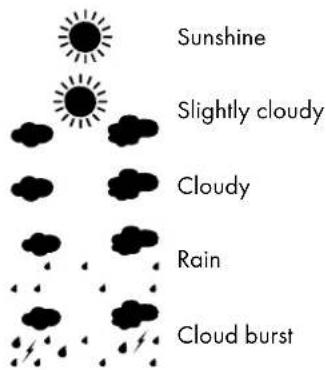
text_image
Sunshine Slightly cloudy Cloudy Rain Cloud burst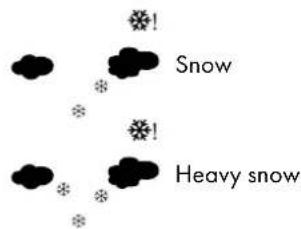
text_image
Snow Heavy snowTrends
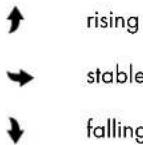
Your device can display the trends for the weather data: temperature, humidity and grill weather symbol.
Outdoor sensor/channel setting
Up to three outdoor sensors can be used simultaneously with your device.
- Open the battery compartment of the outdoor sensor (46).
- Set the desired channel (1 - 3) on the channel selector switch (45).
- You can display the temperature in Celsius (°C) or Fahrenheit (°F) on the outdoor sensor — press the °C/°F button (42).
- You can transfer the data directly from the outdoor sensor to the device — press the T/X button (43).
- Close the battery compartment (46) of the outdoor sensor.
- Press and hold the channel button (33) on the device for about 3 seconds. The device is now receiving the signal of the outside sensor and the radio waves of the outside sensor/channel indicator (5) be flashing.
GB IE NI

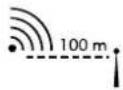
Note: The outdoor sensor must be located within a maximum radius of 100 m around the device, without obstacles.
If more than one outdoor sensor is used:
- In the normal time display, press the channel button (33) to switch between the reception channels.
The rotation symbol (6) will show in the display that the system is automatically switching between the different reception channels.
- Only external sensors that are used are displayed.
- Press and hold the channel button (33) to remove unused channels or add new channels.
Note: The red control LED light (47) will flash briefly while the signal is being transmitted.
Indoor humidity
The current indoor humidity (13) is shown on the display.
The comfort symbols (22) show the evaluation of the room humidity in 3 categories:
| < 40% Dry | 40 - 70% Comfortable | >70% Humid |
Phases of the moon
Your device is equipped with a moon phase display (24). The phases of the moon are:
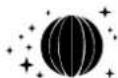

natural_image
Sequence of black-and-white silhouettes showing a crescent moon above each other, with no text or symbols present.New moon
Waxing crescent moon
First quarter moon
Waxing gibbous moon
Full moon
Waning gibbous moon
Last quarter moon
Waning crescent moon
Maximum and minimum values
The maximum and minimum temperature and humidity are saved from the moment the batteries are inserted.
- Press and release the up button (26) repeatedly to read the maximum MAX and minimum MIN values of room temperature (11), room humidity (13) and outside temperature (7), outside humidity (9) in the display (1).
- The minimum and maximum values are automatically deleted every night at 00:00.
Battery level indicator
If the batteries become too weak to keep the device, the external sensor and the data transmission in operation, the battery level indicator (10) or (12) appears in the display of the device or the external sensor (41).

The batteries should be replaced as soon as possible in all devices. Restart the appliance.
Restart (RESET)
- Press the RESET button (31) with a thin object to reset the device and restart radio reception. All data will be lost.
Cleaning instructions

DANGER!

ELECTRIC SHOCK/ RISK OF DEATH!

Unplug the plug-in power supply from the mains socket before cleaning the device. The device must not be exposed to moisture; avoid dripping or splashing water.
Improper cleaning can damage the device. Do not immerse the device in water or other liquids.
Do not use aggressive cleaning agents, brushes with metal or nylon bristles or sharp or metallic cleaning objects such as knives, hard spatulas etc. These can damage the surface.
Clean the device with a soft, dry, lint-free cloth, such as is used for cleaning eyeglass lenses.
Storage
If the device will not be used for an extended period of time, remove the batteries and store the device, cleaned and protected from sunlight, in a dry, cool place, ideally in the original packaging.
Simplified EU Declaration of Conformity

The digi-tech gmbh hereby declares that the radio controlled weather station 4-LD6162-1-2 complies with the RED 2014/53/EU directive, Article 10 (8).
You can download your operating instructions and declaration of conformity here: www.digi-tech-gmbh.com/downloads Then click on the magnifying glass and enter the article number 392071_2201.
Disposal
The product and packaging materials are recyclable; dispose of them separately for better waste treatment. For options for disposing of the used product, please contact your town council or city administration.
Pay attention to the labelling on the packaging materials when separating waste; these are marked with abbreviations (a) and numbers (b) that mean the following:
1-7: plastics
20-22: paper and cardboard 80-98: composites.

Disposing of the electrical device
The symbol with the crossed-out waste bin signifies that electrical and electronic equipment must not be disposed of with household waste.
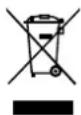
Consumers are legally obliged to collect electrical and electronic equipment separately from unsorted municipal waste at the end of their service life. In this way, an environmentally friendly and resource-saving usage is ensured.

Disposable and rechargeable batteries that are not firmly enclosed by the electrical or electronic device and that can be removed in a non-destructive way must be separated from the device before it is handed over to a collection point and disposed of as intended. The same applies to light sources that can be removed from the device in a non-destructive way.
Owners of electrical and electronic equipment from private households can hand them in at the collection points of the public waste disposal authorities or at the collection points set up by the manufacturers or distributors within the jurisdiction of the ElektroG (Electrical and Electronic Equipment Act). The surrender of old devices is free of charge. Please dispose of the device by returning it to your local branch of LIDL.
Dealers with a sales area of at least 400 m^2 for electrical and electronic equipment are obliged to take them back. The same applies to food retailers with a total sales area of at least 800 m^2 , provided that they offer electrical and electronic equipment continuously or at least several times a year. Distance sellers with a storage area of at least 400 m^2 for electrical and electronic equipment or a total storage area of at least 800 m^2 are also obligated. In general, distributors are obliged to ensure that old devices can be returned free of charge by means of suitable return options at a reasonable distance.
Consumers have the option of handing over an old device free of charge to a distributor who is obliged to take it back if the consumer purchases an equivalent new device with essentially the same function. This possibility also exists for deliveries to a private
household. In distance selling, the option of free pick-up when purchasing a new device is limited to heat exchangers, computer monitors and large devices that have at least one outer edge with a length of more than 50 cm. When concluding the purchase contract, the distributor must ask the consumer about how they intend to return the device. Apart from that, consumers can hand in up to three old devices of one type at a distributor's collection point free of charge, without this being tied to the purchase of a new device. However, the edge lengths of the respective devices must not exceed 25 cm.
Consumers are encouraged to take measures to avoid waste. With regard to electrical and electronic devices, this means extending their lifespan by repairing defective devices and selling used devices that are in good working order instead of disposing of them.
Remove the battery before disposal without causing damage and dispose of it separately (see "Disposal of batteries").
Disposal of batteries
The accompanying symbol indicates that batteries and rechargeable batteries must not be disposed of with normal household waste. Defective or used batteries/rechargeable batteries must be recycled in accordance with Directive 2006/66/EU and its amendments. Consumers are legally obliged to dispose of all batteries and rechargeable batteries, regardless of whether they contain harmful substances such as: Cd = cadmium, Hg = mercury, Pb = lead, Li = lithium or not, at a collection point in their municipality/district or at a retail outlet, for environmentally friendly


disposal and for the recovery of valuable raw materials such as cobalt, nickel, or copper. Batteries and rechargeable batteries may be returned free of charge.

WARNING!
Environmental damage due to incorrect disposal of batteries/rechargeable batteries!
Some of the possible materials such as mercury, cadmium and lead are poisonous and, if not disposed of properly, endanger the environment. Heavy metals, for example, can have harmful effects on the health of humans, animals and plants and accumulate in the environment and in the food chain, and then enter the body indirectly via food.

WARNING!
Risk of explosion!
With used batteries containing lithium (Li = lithium), there is a high risk of fire. Therefore, special attention must be paid to the proper disposal of used and rechargeable batteries containing lithium.
Incorrect disposal can also lead to internal and external short circuits due to thermal effects (heat) or mechanical damage. A short circuit can lead to a fire or an explosion and have serious consequences for humans and the environment.
For this reason, tape off the poles of lithium-based and rechargeable batteries prior to disposal in order to avoid an external short circuit. Batteries and rechargeable batteries that are not permanently installed in the device must be removed and disposed of separately before disposal of the device.
Please only return empty batteries and rechargeable batteries! Use rechargeable batteries instead of disposable batteries whenever possible.
Recycling
This product packaging consists of recyclable materials.

Waste disposal
Please dispose of packaging in an environmentally friendly manner. Note the labelling on the various packaging materials and dispose of them separately if necessary.

GB IE NI
The digi-tech gmbh warranty
This device has a 3-year warranty valid from the date of purchase. In the event of defects in this device, you have legal rights against the seller of the device. These statutory rights are not limited by our warranty set out below.
Warranty terms
The warranty period begins on the date of purchase. Please keep the receipt. This document is required as proof of purchase. If a material or manufacturing defect occurs within three years of the date of purchase of this device, the device will be repaired or replaced – at our discretion – by us free of charge. This warranty requires that the defective device and the purchase receipt are presented within the three-year period with a briefly written statement stating the nature of the defect and when it occurred. If the defect is covered by our warranty, you will receive the repaired or a new device back. No new warranty period begins with the repair or replacement of the device.
Warranty period and statutory claims for defects
Statutory warranty rights do not extend the warranty period. This also applies to replaced and repaired parts. Any damage or defects already present at the time of purchase must be reported immediately after unpacking. After the warranty has expired, any repairs are subject to a charge.
Scope of Warranty
The device was carefully manufactured according to strict quality guidelines and carefully checked before delivery. The warranty applies to material or manufacturing defects. This warranty does not cover parts of
the product that are subject to normal wear and tear and can therefore be regarded as wear parts or for damage to fragile parts, e.g. switches, batteries or parts made of glass. This warranty is void if the unit has been damaged or improperly used or maintained. For proper use of the device, all instructions given in the manual must be strictly observed. Uses and actions that are advised against or warned against in the operating instructions must be avoided at all costs. The device is designed exclusively for private and not for commercial use. The warranty expires in the event of abusive or improper handling, the use of force or repairs that were not carried out by our authorised service branch.
Processing in the event of a warranty claim
To ensure that your request is processed quickly, please follow the instructions below:
- For all inquiries, please have the receipt and item number (392071_2201) ready as proof of purchase.
- Please refer to the type plate, engraving, title page of your manual (bottom left) or to the sticker on the back or underside for the item number.
- If functional errors or other defects occur, first contact the following service department by phone or email.

You can download this manual and many other user manuals, product videos and software at www.lidl-service.com.
text_image
PDF ONLINE www.lidi-service.comThis QR code will take you directly to the Lidl service page (www.lidl-service.com) and you will be able to access your operating manual by entering the article number (392071_2201).
Order Service
Further external sensors can be ordered by fax: +49(0) 6198-5770-99 or online: www.interquartz.de. The price for an outdoor sensor is 5,-€ plus tax and shipping.
Service
Inter-Quartz GmbH
Valterweg 27A
65817 Eppstein
GERMANY
Email: support@inter-quartz.de
Phone: +49 (0)6198 571825

DK 800 5515 6616
BE 00800 5515 6616
NL 00800 5515 6616
IAN 392071_2201
Item-No.: 4-LD6162-1-2

Year of manufacture: 2022

Supplier
Please note that the following address is not a service address. Contact the service point named above first.
digi-tech gmbh
Valterweg 27A
65817 Eppstein
GERMANY


Indholdsfortegnelse
natural_image
Sequence of black crescent moon and moon-like shapes arranged vertically (no text or symbols)nouvelle lune
lune croissante
Open of demonteer batterijen niet.
NL BE

natural_image
Sequence of black-and-white geometric patterns resembling crescent moons or celestial bodies (no text or symbols)Nieuwe maan
Toenemende maan
www.digi-tech-gmbh.com/downloads