Perfect Smile ZK7010 - Toothbrush Concept - Free user manual and instructions
Find the device manual for free Perfect Smile ZK7010 Concept in PDF.


| Product Type | Sonic electric toothbrush |
| Brand | Concept |
| Model | Perfect Smile ZK7010 |
| Supply Voltage | 5 V DC |
| Power | 1.5 W |
| Battery Type | Lithium-ion 700 mAh / 3.7 V |
| Charger | Induction charging base |
| Charging Time | ≤ 8 hours |
| Battery Life | Up to 1 month (2 minutes twice daily) |
| Cleaning Modes | Everyday Clean, Whitening, Gum Care |
| Intensity Levels | 3 |
| Waterproof Rating | IPX7 (waterproof, cleanable under running water) |
| Timer | Pause every 30 seconds, automatic shut-off after 2 minutes |
| Memory | Remembers last mode and intensity |
| Brush Head Replacement Indicator | Flashing orange light after 3 months (180 uses) |
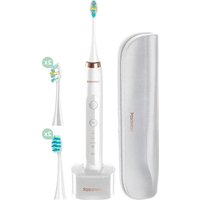
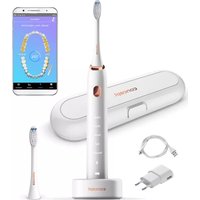
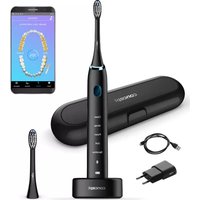
| Package Contents | 1 rechargeable toothbrush, 4 brush heads (2x 3D, 2x Soft), 1 charging base, 1 travel case |
| Operating and Charging Temperature | 5 to 40 °C |
| Maintenance | Head and body: rinse with water and dry. Base: wipe with a dry cloth. |
| Safety | Do not immerse the base. Do not use if damaged or dropped in water. |
| Recycling | Lithium-ion battery to be recycled separately. Return the appliance to a WEEE collection centre. |
Frequently Asked Questions - Perfect Smile ZK7010 Concept
User questions about Perfect Smile ZK7010 Concept
0 question about this device. Answer the ones you know or ask your own.
Ask a new question about this device
Download the instructions for your Toothbrush in PDF format for free! Find your manual Perfect Smile ZK7010 - Concept and take your electronic device back in hand. On this page are published all the documents necessary for the use of your device. Perfect Smile ZK7010 by Concept.
USER MANUAL Perfect Smile ZK7010 Concept
Sonic electric toothbrush
natural_image
Two concept electric toothbrush models shown from different angles (no text or symbols on the devices themselves)ZK7010 | ZK7011
CZ
HU LV DE FRNSK PL
IT ES
RO
PODĚKOVÁNÍ
natural_image
White ergonomic computer mouse with a labeled part (no text or symbols on the device itself)SK
concept
concept
SK
NÁVOD NA OBSLUHU
Nabijanie
HU
concept
concept
HU
HASZNÁLATI ÚTMUTATÓ
Feltöltés
Thank you for purchasing a Concept product. We wish you much joy with your new appliance every day you use it. Please read the instruction manual carefully before Initial use. To refer to this manual any time you need to, we recommend you to keep it in a safe place. And please pass it to any future owner of the appliance.
| Technical specifications | |
| Voltage 5 V DC | |
| Input 1,5 W | |
| Functions Everyday Clean, Whitening, Gum Care | |
| Number of intensity levels 3 | |
| Charging induction charger | |
| Charging time ≤ 8 h | |
| Battery Li-ion 700 mAh / 3,7 V | |
| Water resistance IPX7 | |
IMPORTANT SAFETY PRECAUTIONS
- Do not use the device in any other way than as described in this manual.
- If you have had dental surgery in the last two months, consult your dentist about using the device.
- During the first days of using the device, you may notice a slight bleeding from the gums. If the gums bleed for more than 14 days, stop using the device and consult your dentist.
- Do not use brush heads other than those recommended by the manufacturer.
- If you have a pacemaker or other device installed, consult your doctor about using this toothbrush.
- The device is intended only for cleaning teeth, gums and tongue. Do not use it for other purposes.
- If you experience discomfort or pain, stop using the device and seek medical attention.
- Remove all the covering and marketing materials from the device before the first use.
- Make sure the mains voltage corresponds to the values on the rating plate of the device.
-
Do not leave the device unattended when it is switched on or connected to the mains.
-
If you put the device down during use, always switch it off.
- Before connecting or disconnecting the device from the mains socket, make sure that the device is switched off.
- When disconnecting the device from the wall outlet, never pull the power cord, grasp the plug end and disconnect it by removing it from the receptacle.
- Do not allow children or unauthorized people to handle the device, use it out of their reach.
- Do not use the device in the bathtub.
- Do not leave the device in a place from which it can fall into a sink or a bathtub.
- If the device has fallen into water, do not reach for it and unplug it immediately.
- Do not share the brush head with other people.
- Do not place metal objects (coins, staples, etc.) on the charger.
- Persons with reduced mobility, reduced sensory perception, mental disadvantage or persons not familiar with the operation must use the device only under the supervision of responsible person, who is familiar with the instructions.
- Pay extra attention if the device is used near children.
- Do not use the device as a toy.
- Before cleaning and after use of the device, switch the device off and disconnect it from the mains.
- Do not let the power cord touch hot surfaces.
- Do not allow the device to hang on the power cord.
- Do not use the device in an environment where there are explosive gases and flammable substances (solvents, varnishes, adhesives etc.).
- Do not use coarse and chemically aggressive substances to clean the device.
- Do not use the device if it is not working properly, has been dropped, damaged or immersed in liquid. Have it checked and repaired by an authorized service centre.
- Do not use the device with a damaged cord or plug and have it repaired immediately by an authorized service centre.
- Do not wrap the power cord around the device body.
- Do not use the device outdoors.
EN
concept
concept
EN
- The device is only suitable for home use and is not intended for commercial use.
- Do not immerse the charging base, cable, adapter or device in water or any other liquid.
- Do not use any accessories other than those recommended by the manufacturer.
- Do not repair the device yourself. Contact an authorized service centre.
- This device can be used by children aged from 8 years and above and persons with reduced physical, sensory or mental capabilities or lack of experience and knowledge if they have been given supervision or instruction concerning the use of the device in a safe way and understand the hazards involved. Cleaning and maintenance performed by the user must not be carried out by children unless they are 8 years old and under supervision. Children under the age of 8 must be kept away from the device and its power supply. Do not let children play with the device.
- Stop using the brush head if the fibres on the brush head are damaged or bent. Replace the brush head every 3 months (alerted by a flashing light on the brush body after 180 runs), or sooner if signs of wear appear.
- If you use toothpaste containing sodium bicarbonate (commonly found in whitening toothpastes), clean the brush head thoroughly with soap and water after each use. This will prevent the plastic from cracking.
- Charge, store and use the device at a temperature of 5 -40°C.
- Do not expose the device to direct sunlight or high temperatures.
Damages from failure to follow the manufacturer's instructions are not covered by the warranty.

CAUTION:
This device is waterproof. It is suitable for cleaning under running water. Do not use or clean the device while it is connected to the power cord.
PRODUCT DESCRIPTION
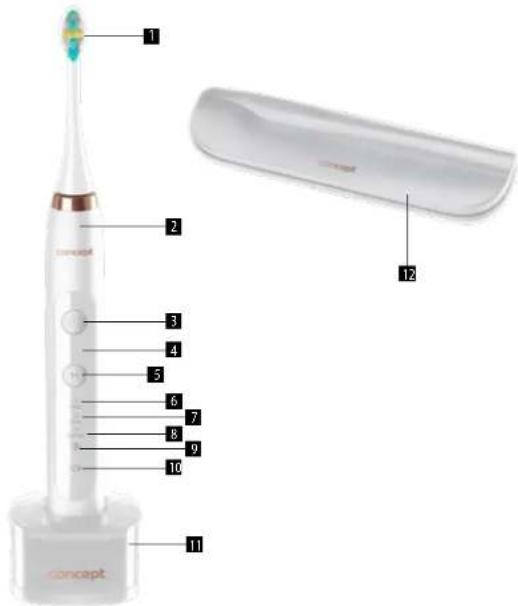
1 Brush head
2 Appliance body
3 On/Off button and button to change cleaning mode
4 Intensity indicator
5 Button to change intensity
6 Everyday Clean mode
7 Whitening mode
8 Gum Care mode
9 Head replacement indicator
10 Charging indicator
11 Charging base
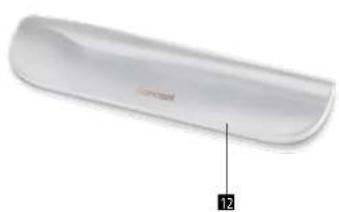
12 Travel case
Package contains
1x Rechargeable toothbrush
4x Heads (2x 3D, 2x Soft)
1x Charging base
1x Travel case
EN
concept
concept
EN
OPERATING INSTRUCTIONS
Charging
- Fully charge the battery before using the device for the first time.
- If the device has not been used for more than 6 months, charge it for more than 8 hours.
- Charge only when the battery is low.
- Do not charge the device outdoors or near hot surfaces.
- Place the toothbrush on the charging base, plug the USB cable into the adapter and connect the adapter to the mains. Note: The adapter is not included, use an adapter such as the one from your mobile phone for charging.
- During charging, the charging indicator lights up in red, after fully charged the indicator goes off.
• The battery lasts up to 1 month on a full charge (when cleaning for 2 minutes twice a day), a low battery is indicated
by a flashing indicator on the body of the brush when cleaning is complete.
• To make better use of the battery, we recommend discharging the battery once a year.
Cleaning modes
Everyday Clean - suitable for everyday cleaning. Removes 100% of plaque.
Whitening - whitens teeth, helps to remove surface stains.
Gum Care - to stimulate and massage the gums.
Smart timer
• Every 30 seconds the brush pauses to alert you to move to the next part of your mouth.
• After 2 minutes, the toothbrush automatically switches off.
Mode and intensity selection
- To switch on the brush, press the button 3. If you press button 3 again within 3 seconds of switching on, you have selected the cleaning mode. If you press button 3 after more than 3 seconds, the brush will switch off.
- Press the M button during cleaning to select the cleaning intensity from stage 1 to stage 3 (the corresponding indicator lights up).
Memory function
- The toothbrush remembers the last mode and intensity run. The next time the brush is switched on, it starts at the mode and intensity level it was last run at.
Brush head replacement reminder
- After 3 months of using the toothbrush twice a day (after 180 runs), the indicator on the toothbrush body will flash orange for approximately 30 seconds to remind you to change the brush head.
Before first use, fully charge the battery - the indicator will stop glowing red.
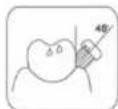
For effective gum cleaning, brush gums at a 45° angle.
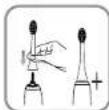
Fit the brush head onto the brush body.
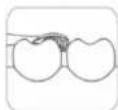
Apply the brush lightly to avoid damaging the gums.
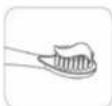
Rinse the brush head, apply paste, insert the brush head into the mouth and then switch on the brush and select the cleaning mode and intensity.
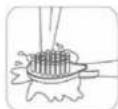
Rinse the brush head with water and dry.
TROUBLESHOOTING
| Problem Possible cause Remedy | ||
| Weak vibrations | Too much pressure on teeth. Reduce pressure on teeth. | |
| Improperly fitted brush head. Fit the brush head again. | ||
| Loose brush head or abnormal sound | The brush head is damaged. Replace the brush head. | |
| Shorter operating time with a charged battery | Charging error. Charge the toothbrush correctly. | |
| Empty battery. Charge the brush to full charge. | ||
| The toothbrush does not work Power has run out. Charge the battery. | ||
CLEANING AND MAINTENANCE
Do not wash any of the parts in the dishwasher.
Brush head - After use, rinse with water and dry.
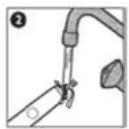
Brush body - Rinse with water and dry. Do not use water warmer than 40 °C or any cleaning agents.
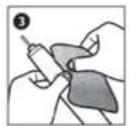
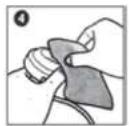
Charging base - Wipe only with a dry cloth. Wet and damp fabrics can cause a short circuit.
Replacing the brush head - we recommend replacing the brush head every 3 months (See flashing head replacement
indicator).
Store the device in a dry and dust-free place.
Do not expose to high temperatures.
Keep out of reach of children.
Warning: The device contains a rechargeable lithium battery. Recycle accordingly.
EN
concept
concept
DE

SERVICE
Extensive maintenance or repair, which requires access to internal parts of the product, has to be performed by a qualified specialist or the service centre. This appliance does not contain any user-repairable parts.
ENVIRONMENTAL CONCERNS
- Packaging materials and old appliances should be recycled.
• Packaging materials may be disposed of as sorted waste. - Dispose the plastic bags made of polyethylene (PE) of as sorted waste.
Recycling of the appliance at the end of its lifespan:

This appliance is labelled in accordance with European Directive 2012/19/EU concerning used electrical and electronic appliances (Waste Electrical and Electronic Equipment - WEEE). The symbol on the product or on its packaging indicates that this product may not be treated as household waste. Instead, it should be taken to the appropriate collection point for the recycling of electrical and electronic equipment. By ensuring this product is disposed of correctly, you will help prevent potential negative consequences for the environment and human health, which could otherwise be caused by inappropriate waste handling of this product. The disposal of such material has to be done according to the recycling regulations. For more detailed information about recycling of this appliance see the authorized local office or service for household waste disposal or the shop, where you purchased the appliance.

The product meets all the necessary requirements of the EU directives applicable to the specific product.
Changes in text, design, and technical specifications are subject to change without prior notice and we reserve the right to change them.
44
DANKSAGUNG
FR
concept
concept
FR
MODE D'EMPLOI
Chargement
MANUALE D'USO
Ricarica
ES
concept
concept
ES
MANUAL DE USO
Carga
INSTRUCTIUNI DE UTILIZARE
Încărcare


- PODĚKOVÁNÍ
- concept
- NÁVOD NA OBSLUHU
- Nabijanie
- HASZNÁLATI ÚTMUTATÓ
- Feltöltés
- IMPORTANT SAFETY PRECAUTIONS
- EN
- CAUTION:
- PRODUCT DESCRIPTION
- OPERATING INSTRUCTIONS
- Charging
- Cleaning modes
- Smart timer
- Mode and intensity selection
- Memory function
- Brush head replacement reminder
- CLEANING AND MAINTENANCE
- SERVICE
- ENVIRONMENTAL CONCERNS
- Recycling of the appliance at the end of its lifespan:
- DANKSAGUNG
- MODE D'EMPLOI
- Chargement
- MANUALE D'USO
- Ricarica
- MANUAL DE USO
- Carga
- INSTRUCTIUNI DE UTILIZARE
- Încărcare
Brand : Concept
Model : Perfect Smile ZK7010
Category : Toothbrush