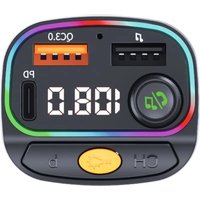
DigiCar 400 BT - Car audio accessory TECHNISAT - Free user manual and instructions
Find the device manual for free DigiCar 400 BT TECHNISAT in PDF.


| Product type | Bluetooth FM transmitter with hands-free and charger functions |
| Brand | TechniSat |
| Model | DigiCar 400 BT |
| Dimensions (H x W x D) | 86 x 44 x 40 mm |
| Weight | Approx. 43 g |
| Power supply | 12-24 V DC via cigarette lighter socket (2 A) |
| Bluetooth version | 5.0 (2402-2480 MHz, max. power 2 dBm) |
| FM frequency range | 87.5 - 108.0 MHz |
| Main functions | Wireless FM transmission, hands-free with echo cancellation, MP3/WMA/WAV playback from USB or microSD, QC 3.0 and USB-C charging, multicolor LED lighting |
| Charging ports | 1x USB-A QC 3.0 (max. 18 W), 1x USB-C (max. 5 W) |
| Media playback port | 1x USB-A (for USB drive) and 1x microSD reader (max. 64 GB) |
| Max charging current (USB-A QC 3.0) | 5V/3A, 9V/2A, 12V/1.5A |
| Max charging current (USB-C) | 5V/1A |
| Total output power (two ports) | Max. 20 W |
| Max supported capacity (USB/microSD) | 64 GB |
| Operating temperature | -10 °C to 45 °C |
| Operating humidity | 5 - 90 % RH (non-condensing) |
| Maintenance and cleaning | Disconnect the device, use a slightly damp cotton cloth with mild soapy solution; do not use solvents |
| Safety | Do not open, avoid water and metal objects in connectors, use only 12-24 V voltage, unplug if odor or smoke occurs |
Frequently Asked Questions - DigiCar 400 BT TECHNISAT
User questions about DigiCar 400 BT TECHNISAT
0 question about this device. Answer the ones you know or ask your own.
Ask a new question about this device
Download the instructions for your Car audio accessory in PDF format for free! Find your manual DigiCar 400 BT - TECHNISAT and take your electronic device back in hand. On this page are published all the documents necessary for the use of your device. DigiCar 400 BT by TECHNISAT.
USER MANUAL DigiCar 400 BT TECHNISAT
natural_image
Abstract geometric composition with blue and yellow triangular shapes (no text or symbols)Operating instructions
DIGICAR 300 BT
Bluetooth FM transmitter with hands-free function and charging capability for mobile devices.
natural_image
Close-up of a black and yellow electric guitar with a sensor and control knob (no visible text or symbols)TechniSat
1 Foreword
These instructions will help you to use your device, hereinafter referred to as DIGICAR 300 BT, transmitter, device or product, safely and as intended.
1.1 Target group for instructions
The operating instructions are intended for anyone who sets up, operates, cleans or disposes of the unit.
1.1.1 Purpose of the device
The device is designed for Bluetooth to FM signal transmission, phone calls and music playback. The device is intended for private use and is not suitable for commercial use.
1.2 Important instructions
To minimise safety risks, avoid damage to the appliance and contribute to environmental protection, please observe the following instructions. Please read all safety instructions carefully and keep them for future reference. Always follow all warnings and cautions in this Quick Start Guide and on the back of the unit.

Caution - Indicates an important guideline to be followed to avoid loss of health, defects in the device, loss/misuse of data or unintended operation.

Note - Indicates a note on the function described and the related and possibly other function to be followed with reference to the relevant point in the manual.
1.2.1 Security
For your own protection, please read the safety precautions carefully before operating the DIGICAR 300 BT transmitter. The manufacturer is not liable for damage caused by incorrect handling and failure to observe the following safety precautions.

Never open the appliance! Touching live parts is life-threatening!

Any necessary interventions must only be carried out by trained personnel.

The unit can only be operated in temperate climates.
Attention!
Do not place or cover the unit with soft surfaces such as carpets, blankets or near curtains and wall hangings. The ventilation openings could be covered. This could interfere with the necessary air circulation. This could lead to a fire in the unit.
Attention!
The device may only be connected to the vehicle's power supply
12-24V DC via the cigarette lighter socket. Never use the unit for operation at any other voltage.
- Do not use the device in direct or strong sunlight.
- When disconnecting the device from the cigarette lighter socket, do not pull on the USB cable (if plugged in).
- If the device is damaged, it must not be started up.
- If the appliance is transported for a long time in cold conditions and then moved to a warm room, do not switch it on immediately; wait for the temperature to even out.
- Do not expose the appliance to dripping or splashing water. If water enters the appliance, switch off the appliance and contact the service department.
- Do not expose the unit to heat sources that heat it in addition to normal use.


- In the event of a noticeable malfunction of the appliance, the appearance of odours or smoke, serious faults, damage to the housing, switch off the appliance and contact the service department.
- If the device shows any other damage, it must not be put into operation.
- When disconnecting the USB cable from the power supply, pull on the power supply, not the cable.
- Do not operate the unit near bathtubs, swimming pools or splashing water.
- Never attempt to repair a faulty unit yourself. Always contact one of our service centres.
- Foreign objects such as needles, coins, etc. must not fall into the device. Do not touch the connection contacts with metal objects or fingers. This can lead to short circuits.
- Do not place open flame sources such as lit candles on the unit.
- The device remains connected to the car power supply even when it is switched off. If the device is not going to be used for a long time, unplug it from the car socket.
- Never leave children unattended while using this device.
- This equipment is not intended for use by persons (including children) with reduced physical, sensory or
mental or lacking in experience and/or knowledge, unless they are supervised by a person responsible for their safety or have received instructions from that person on how to use the device.
- It is forbidden to make changes to the device.
- Damaged equipment or damaged accessories must not be reused.
- If the product is moved from cold to warm, moisture may accumulate inside the product. In this case, wait approximately one hour before operating.
- Do not switch on the device in areas where the use of electronic devices is prohibited or where it may cause interference or other hazards. Comply with any prohibitions, regulations or warnings given by the personnel of the place where you want to use the device.
- Use a suitable, easily accessible cigarette lighter socket and avoid using multiple sockets (splitters)!
- Do not touch the device with wet hands, danger of electric shock!
- In the event of a malfunction or smoke and odour from the housing, the unit must be disconnected from the power supply immediately!
- If the device will not be used for a long period of time, please unplug it.
- Too high a volume can cause hearing damage.
- For USB-connectable devices, the connection socket should be mounted close to the device and should be easily accessible.

Danger of suffocation!
The device is not a toy. Keep the appliance, its accessories and packaging out of the reach of children. Cables and foil packaging can wrap around a child's neck or be swallowed, and this can result in choking or suffocation.
1.2.2 Disposal

Disposal instructions
Your new device was protected by the packaging on its way to you. All materials used are environmentally friendly and recyclable. Please help us to dispose of the packaging in an environmentally friendly way. Please contact your dealer or local waste disposal facility for information on current disposal methods.

Danger of suffocation! Packaging Risk of suffocation due to foil and

ts should not be left to children. aging materials.

This appliance has been designed and manufactured using high-quality materials and components that are recyclable. The symbol of the crossed-out wheeled bin indicates that the product is subject to separate collection
collection in accordance with Directive 2012/19/EU of the European Parliament and of the Council and in accordance with Directive 2006/66/EC of the European Parliament and of the Council
and informs that electrical and electronic equipment as well as batteries and accumulators, after their useful life, must not be disposed of with other household waste. The user is obliged to hand it over to a waste electrical equipment collector
and electronic equipment and batteries and accumulators to a collection system for such waste, including to an appropriate shop, local collection point or municipal unit. Waste equipment can have a harmful effect on the environment and human health due to its potential content of hazardous substances, mixtures and components. The household fulfils an important role in contributing to the reuse and recovery, including recycling, of waste equipment. At this stage, attitudes are formed that influence
to preserve the common good of a clean environment. Households are also one of the biggest users of small equipment and rational management of this equipment affects the recovery of secondary raw materials. In the event of improper disposal of this product, penalties may be imposed in accordance with national legislation.
1.2.3 Legal information

TechniSat Digital Sp. z o.o. hereby declares that the radio device type DIGICAR 300 BT (76-5259-00) complies with Directive 2014/53/EC and RoHS 2011/65/EU. The full text of the EU declaration of conformity is available at the following internet address: hGp://konf.tsat.de/?ID=25105

Changes and misprints reserved. As of 01/24 copying and reproduction only with permission of the publisher. The latest version of the manual is available in PDF format in the download area of the homepage www.technisat.pl
TechniSat is not responsible for damage to the product caused by external factors, wear and tear or improper handling, unauthorised repairs, modifications or accidents.
1.2.4 Service information and warranty
This product is quality tested and has a statutory warranty period of 24 months from the date of purchase. Please retain your invoice as proof of purchase. For warranty claims, please contact the seller of the product or the manufacturer. In the case of warranty claims, the cost of shipping directly to the manufacturer will be paid by the customer.
If you have any questions or information, or if you have a problem with this device, our technical hotline is available: Monday. - to Friday, from 8:00 a.m. to 4:00 p.m. on telephone number: +71 310 41 48
The guarantor, within the scope of the granted guarantee, undertakes to remove at its own expense any defects in the product. The removal of defects will be carried out by replacing the defective product with a new, defect-free one or by repairing it.
In order to make use of the guarantee, the purchaser must report the defective product to the point of sale where the product was purchased and deliver the defective product there. The product must be delivered complete.
The warranty does not cover product defects caused by the purchaser or resulting from:
- use or install the product in a manner inconsistent with the instructions for use,
- improper storage or maintenance of the appliance,
- repairs or modifications to the product carried out by unauthorised persons,
- ingress of liquids or foreign bodies,
- lightning strikes and power line surges.
The provisions of the guarantee do not exclude, limit or suspend the rights of purchasers (consumers) under generally applicable law.
To obtain detailed information on a Product, including the rules and procedures for the guarantee procedure, the assignment of an RMA number, it is possible to by telephone at 71 310 41 48 or by e-mail a t serwis@technisat.com, on working days from 8 a.m. to 4 p.m. Service requests via the Internet at www.serwis.technisat.com
2 Description of the DIGICAR 300 BT
21 Contents of the kit
Before commissioning, check that the scope of delivery is complete: 1x
DIGICAR 300 BT FM transmitter
1x User manual
22 Special features of the DIGICAR 300 BT
The DIGICAR 300 BT is used to transmit the audio stream to the car radio by using FM modulation and has the following functions:
- Wirelessly transmits sound to the car audio system via FM transmission.
- It has a hands-free function.
- The device uses echo cancellation and noise suppression technology.
- Allows you to play MP3/WMA/WAV files directly from a USB stick or microSD card.
- Powered by 12-24V, directly from the car's cigarette lighter socket.
- USB QC 3.0 and USB-C 5W port.
- LED display.
23 Multimedia functions
Transmitter function
Connect the FM transmitter to the 12V/24V socket in the car, switch on the car radio and select an unused FM frequency. A long press on the button will allow you to edit the frequency of the transmitter. Then, using the dial alone, set the correct frequency and confirm by pressing.
The transmitter function allows transmission from an MP3/WMA player (USB, microSD card) and directly from a Bluetooth connection to the car audio system.
When using a USB memory stick
Connect a USB stick containing MP3/WMA/WAV files to the USB port (USB player). The transmitter will automatically play and transfer the audio to the car stereo. (Max. 64GB)
When using a Bluetooth connection
Activate the Bluetooth function on the mobile device (e.g. smartphone), search for the name of the new device "DIGICAR 300 BT", click on it to pair. (Some devices may require you to enter a PIN, please enter "0000").
Once successfully paired, the DIGICAR 300 BT will stream music from your phone to your car stereo system. In the event of an incoming call, the device will automatically switch to call mode (hands-free).
The buttons and can be used to play previous/next piece.
MP3/WMA playback from USB stick or microSD card
To switch on the music player, please plug in the USB flash drive with the files
MP3/WMA/WAV.
When a music stick is connected, the device will automatically start playing.
Pressing the dial button will activate the pause, pressing again
button of the dial will start playback.
Switch between Bluetooth mode and USB/microSD playback by pressing the button for a longer time.
Use the buttons and to play the previous/next track.
24 Hands-free function
Receiving an incoming call
When your phone is paired with the DIGICAR 300 BT during an incoming call, please press the dial button. The call will be answered, the device will automatically switch to hands-free mode.
Termination of a voice call
To end the phone call, please press the dial button again.
Rejecting a voice call
Press and hold the dial button to reject an incoming call.
Dialing the last phone number
To call the last telephone number, please press the dial button twice.
25 Changing modes of operation
To change from USB/microSD to Bluetooth playback mode, please hold down longer. Pressing longer again will return you to the MP3/WMA/WAV player.
2.6 External device charging function
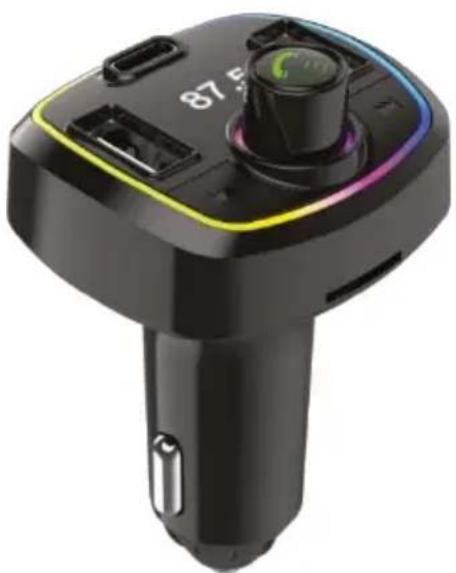
The DIGICAR 300 BT has two USB-A ports. For charging external devices (phones and tablets), only the port marked QC 3.0 (orange) is used. The USB-A port labelled 📋 only allows the playback of music from a connected USB flash drive.
In addition, there is also a USB-C port for charging external devices with a max. 5W.

The USB QC 3.0 and USB-C ports are used exclusively for charging mobile devices (phones and tablets).
27 LED lighting mode
Changing the colour of the backlighting takes place by pressing the button for a longer period of time. The following colours are available: red-orange-yellow-green-violet-blue-white-flashing-until the lighting is switched off. Each time
longer pressing the button changes colour.
3 Cleaning

Do not clean the device with a wet cloth or under running water. Before cleaning, pull out the USB plug and switch off the device!

Do not use sponges, cleaning powders or solvents such as alcohol or petrol.
Do not use any of the following: salt water, insecticides, spirits, chlorinated or acidic solvents (ammonium chloride).

If necessary, use a cotton cloth with small amounts of a water-based or alcohol-based, alkali-free soap solution.
Rub the surface gently with a cotton cloth.
4 Specification
| Device dimensions | 86 x 44 x 40 mm (H x W x D) |
| Bluetooth version | 5.0 |
| Bluetooth | 2402-2480 MHz, power: max. 2 dBm |
| FM | 87.5-108.0MHz, power: -90.5 dBm |
| USB port voltage | 5V/±0.5V |
| Input voltage | 12-24V, 2A |
| Max. charging current (mobile devices only) | USB A compliant with QC 3.0 (max. 18W): 5V/3A, 9V/2A, 12V/1.5AUSB-C (max 5W): 5V/1AWhen using two connectors (USB QC 3.0 and USB-C), the maximum output power is 20W. |
| Number of USB ports | 1x USB-A charging port - QC 3.01x USB-A port media player. 1x USB-C port charging - max. 5W. |
| Maximum capacity of the supported USB and microSD memory stick for media playback | 64 GB |
| Weight neGo | approx. 43g |
| Operating temperature, humidity | -10oC to 45oC, 5 - 90% relative humidity (non-condensing) |
5 Manufacturer
TechniSat Digital Sp. z o.o.
ul. Poznańska 2,
Siemianice, 55-120 Oborniki
Śląskie

natural_image
Abstract geometric composition with blue and yellow triangular shapes (no text or symbols)Instrukcja obsługi
DIGICAR 300 BT
natural_image
Close-up of a black and yellow handheld electric guitar with a sensor and display (no visible text or symbols)TechniSat
1 Przedmowa
1x Transmiter FM DIGICAR 300 BT
natural_image
Abstract geometric composition with blue and yellow triangular shapes (no text or symbols)Betriebsanleitung
DIGICAR 300 BT
natural_image
Close-up of a black and yellow electric guitar with a sensor and control panel (no visible text or symbols)TechniSat
1 Vorwort
natural_image
Two crossed-out diagrams showing a fence with smoke and a sunburst, no text or symbols present.natural_image
Abstract geometric composition with blue and yellow triangular shapes (no text or symbols)Návod k obsluze
DIGICAR 300 BT
natural_image
Close-up of a black and yellow electric guitar with a sensor and control knob (no visible text or symbols)TechniSat
1 Předmluva
natural_image
Abstract geometric composition with blue and yellow triangular shapes (no text or symbols)Návod na obsluhu
DIGICAR 300 BT
natural_image
Close-up of a black and yellow electric guitar with a sensor and control panel (no visible text or symbols)TechniSat
1 Predslov
natural_image
Abstract geometric composition with blue and yellow triangular shapes (no text or symbols)natural_image
Close-up of a black and yellow electric guitar with a sensor and control panel (no visible text or symbols)TechniSat
1 Voorwoord
natural_image
Close-up of a black and yellow electric vehicle charging plug with a sensor and display (no visible text or symbols)1 Предговор
natural_image
Abstract geometric composition with blue and yellow triangular shapes (no text or symbols)Mode d'emploi
DIGICAR 300 BT
natural_image
Close-up of a black and yellow electric guitar with a sensor and control panel (no visible text or symbols)TechniSat
1 Avant-propos
natural_image
Two crossed-out symbols: a left with diagonal lines and a right with radiating lines, both without any text or labels.natural_image
Abstract geometric composition with blue and yellow triangular shapes (no text or symbols)Οδηγίες λειτουργίας
DIGICAR 300 BT
natural_image
Close-up of a black and yellow electric guitar with a sensor and control panel (no visible text or symbols)TechniSat
1 Πρόλογος
natural_image
Abstract geometric composition with blue and yellow triangular shapes (no text or symbols)Használati utasítás
DIGICAR 300 BT
natural_image
Close-up of a black and yellow electric guitar with a sensor and control panel (no visible text or symbols)TechniSat
1 Előszó
natural_image
Abstract geometric composition with blue and yellow triangular shapes (no text or symbols)natural_image
Close-up of a black and yellow electric guitar with a sensor and control panel (no visible text or symbols)TechniSat
1 lžanga
natural_image
Abstract geometric composition with blue and yellow triangular shapes (no text or symbols)Lietošanas instrukcija
DIGICAR 300 BT
natural_image
Close-up of a black automotive I/O charger with a yellow and white accent, showing no visible text or symbols on the device body.TechniSat
1 Priekšvārds
natural_image
Abstract geometric composition with blue and yellow triangular shapes (no text or symbols)natural_image
Close-up of a black and yellow electric vehicle (no visible text or symbols)TechniSat
1 Prefață
natural_image
Abstract geometric composition with blue and yellow triangular shapes (no text or symbols)Navodila za uporabo
DIGICAR 300 BT
natural_image
Close-up of a black and yellow electric guitar with a sensor and control panel (no visible text or symbols)TechniSat
1 Predgovor
Ta navodila vam bodo pomagala pri varni in predvideni uporabi naprave, v nadaljevanju DIGICAR 300 BT, oddajnika, naprave ali izdelka.
1.1 Ciljna skupina navodil
natural_image
Two symbolic diagrams: one with a crossed-out spring-like structure and another with a sunburst pattern (no text or labels)V primeru opazne okvare aparata, pojava vonjav ali dima, resnih napak, poškodb ohišja izklopite aparat in se obrnite na servisno službo.
- Operating instructions
- DIGICAR 300 BT
- Foreword
- Target group for instructions
- Purpose of the device
- Important instructions
- Security
- Attention!
- Danger of suffocation!
- Disposal
- Disposal instructions
- Legal information
- Service information and warranty
- Description of the DIGICAR 300 BT
- Contents of the kit
- Special features of the DIGICAR 300 BT
- Multimedia functions
- Transmitter function
- When using a USB memory stick
- When using a Bluetooth connection
- MP3/WMA playback from USB stick or microSD card
- Hands-free function
- Receiving an incoming call
- Termination of a voice call
- Rejecting a voice call
- Dialing the last phone number
- Changing modes of operation
- External device charging function
- The USB QC 3.0 and USB-C ports are used exclusively for charging mobile devices (phones and tablets).
- LED lighting mode
- Cleaning
- Specification
- Manufacturer
- Instrukcja obsługi
- Przedmowa
- Betriebsanleitung
- Vorwort
- Návod k obsluze
- Předmluva
- Návod na obsluhu
- Predslov
- Voorwoord
- Предговор
- Mode d'emploi
- Avant-propos
- Οδηγίες λειτουργίας
- Πρόλογος
- Használati utasítás
- Előszó
- lžanga
- Lietošanas instrukcija
- Priekšvārds
- Prefață
- Navodila za uporabo
- Predgovor
- Ciljna skupina navodil
Brand : TECHNISAT
Model : DigiCar 400 BT
Category : Car audio accessory