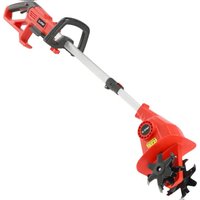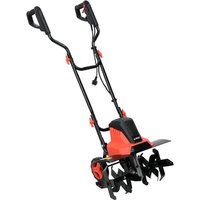
YT-84850 - Electric tiller Yato - Free user manual and instructions
Find the device manual for free YT-84850 Yato in PDF.


| Product type | Electric cultivator |
| Brand | Yato |
| Model | YT-84850 |
| Rated voltage | 230-240 V~ |
| Rated frequency | 50 Hz |
| Rated power | 1500 W |
| Maximum working depth | 220 mm |
| Working width | 450 mm |
| Weight | 10.3 kg |
| Sound pressure level (LpA) | 80.4 dB(A) ± 3.0 |
| Sound power level (LwA) | 91.67 dB(A) ± 1.40 |
| Vibration level (left handle) | 0.968 ± 1.5 m/s² |
| Vibration level (right handle) | 0.947 ± 1.5 m/s² |
| Insulation class | II |
| Protection rating (IP) | IPX4 |
| Motor type | Electric |
| Intended use | Loosening and cultivating small soil surfaces (gardens, plots) |
| Safety - Switch lock | Yes, protection against accidental start |
| Safety - Recommended residual current device | ≤ 30 mA |
| Auxiliary wheels | Yes, for transport |
| Maintenance - Cleaning | After each use, brush or cloth, no water |
| Maintenance - Blade replacement | Every 2 years or 50 hours of use |
| Storage | Dark, dry, frost-free, well-ventilated place, 10-30 °C |
Frequently Asked Questions - YT-84850 Yato
User questions about YT-84850 Yato
0 question about this device. Answer the ones you know or ask your own.
Ask a new question about this device
Download the instructions for your Electric tiller in PDF format for free! Find your manual YT-84850 - Yato and take your electronic device back in hand. On this page are published all the documents necessary for the use of your device. YT-84850 by Yato.
USER MANUAL YT-84850 Yato
natural_image
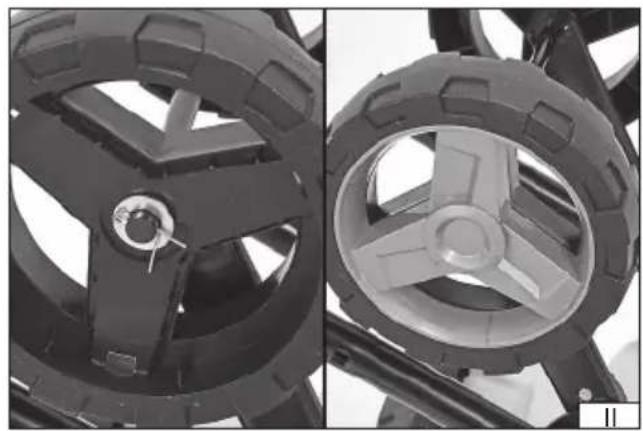
Close-up of two views of a vehicle wheel assembly, showing front and side views with no visible text or symbols.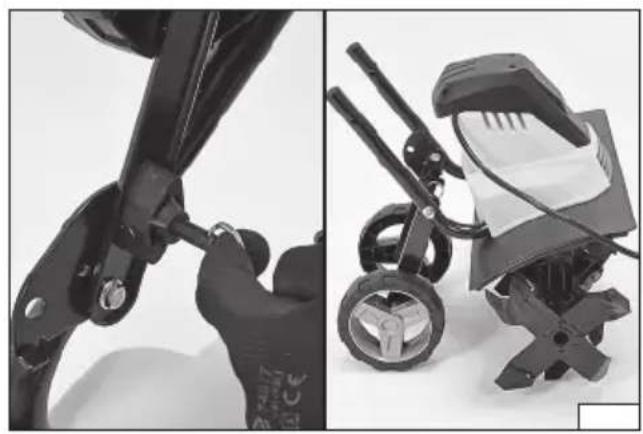
natural_image
Side-by-side comparison of a black and white toy car stroller with attached accessories (no visible text or symbols)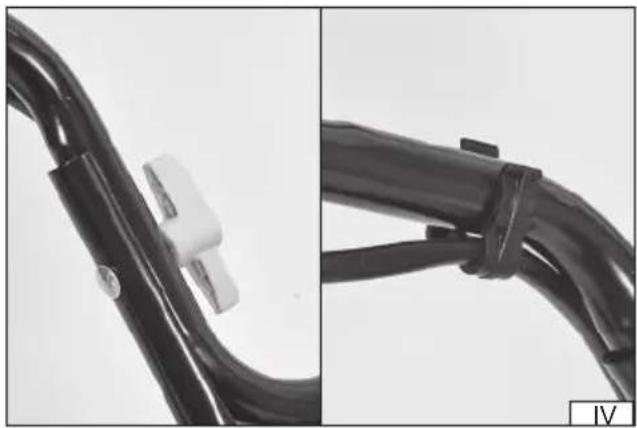
natural_image
Close-up of two black cable connectors with plastic clips, one showing a white clip and the other a black clip (no text or symbols visible)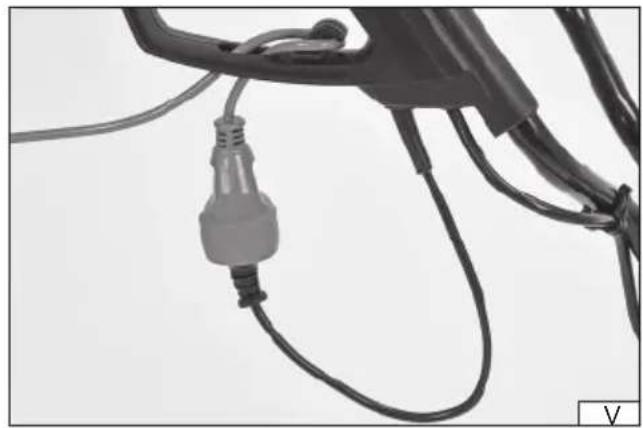
natural_image
Close-up of a black electrical plug connected to wires, no visible text or symbols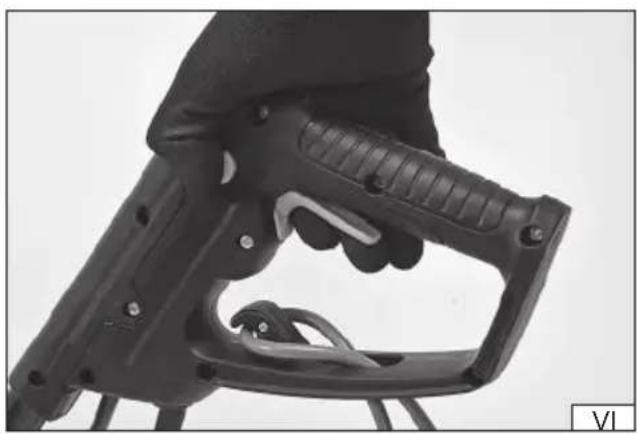
natural_image
Close-up of a black mechanical tool handle with textured grip and metal clamping (no visible text or symbols)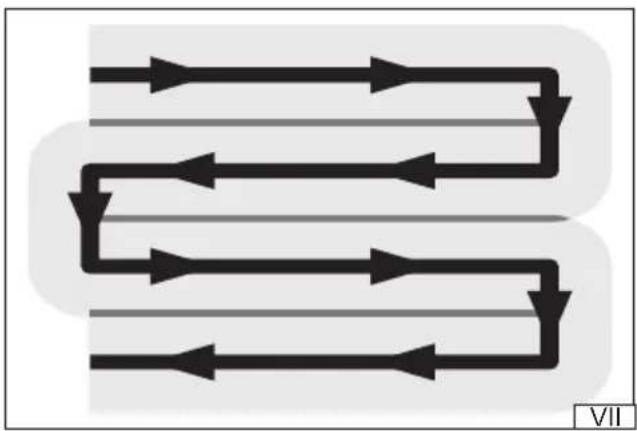
flowchart
graph TD
    A["Top Path"] --> B["Left Path"]
    B --> C["Right Path"]
    C --> D["Bottom Path"]
    D --> E["Left Path"]
    E --> F["Right Path"]
    F --> G["Bottom Path"]
    G --> H["Left Path"]
    H --> I["Right Path"]
    I --> J["Bottom Path"]
- motor housing
- handle
- power switch
- power switch lock
- blades
- blades' guard
DE
This symbol indicates that waste electrical and electronic equipment (including batteries and storage cells) cannot be disposed of with other types of waste. Waste equipment should be collected and handed over separately to a collection point for recycling and recovery, in order to reduce the amount of waste and the use of natural resources. Uncontrolled release of hazardous components contained in electrical and electronic equipment may pose a risk to human health and have adverse effects for the environment. The household plays an important role in contributing to reuse and recovery, including recycling of waste equipment. For more information about the appropriate recycling methods, contact your local authority or retailer.
Read the operating instruction
Wear protective goggles
Schutzbrille tragen
Wear hearing protectors
Stay away from bystanders
Beware of the discarded items
Keep the flexible power cord away from the cutting tools. Before adjusting or cleaning, in case of cable braiding or damage, switch off the device and pull the plug out of the socket.
Wear protective shoes
Do not expose to precipitation
Keep away from rotating parts.
Second class of insulation
PRODUCT CHARACTERISTICS
The electric tiller is designed for scarifying and cultivating small patches of soil. It makes cultivating land in gardens and plots significantly easier. Soil cultivation is carried out using rotating blades. It is unacceptable to use the tiller for cultivating larger patches of land. Proper, reliable and safe operation of the device depends on appropriate use, that is why you should
Read this entire instructions manual before the first use of the tool and keep it for future reference.
The supplier shall not be held liable for any damage or injury resulting from improper use of the tool, failure to observe the safety regulations and recommendations of this manual. Use of the tool for purposes other than those for which it was intended shall cause the loss of the user's rights to a warranty and statutory warranty.
The machine is designed for household use only and must not be used professionally, i.e. in workplaces or for paid work.
ACCESSORIES
The tiller is supplied complete but requires assembly before first use.
TECHNICAL DATA
| Parameter Unit Value | ||
| Catalogue No. YT-84850 | ||
| Rated voltage [V~] 230-240 | ||
| Rated frequency [Hz] 50 | ||
| Rated power [W] 1500 | ||
| Max. operating depth [mm] | 220 | |
| Groove width | [mm] | 450 |
| Weight | [kg] | 10.3 |
| Noise level | ||
| -power L_pA | [dB(A)] | 80.4 ± 3.0 |
| -power L_ A | [dB(A)] | 91,67 ± 1,40 |
| Vibration level (left / right handle) | [m/s2] | 0.968 ± 1.5 / 0.947 ± 1.5 |
| Insulation class | II | |
| Protection rating | IPX4 |
SAFETY INSTRUCTIONS
IMPORTANT! READ CAREFULLY BEFORE USE KEEP FOR FUTURE REFERENCE
Manual
Read the instructions carefully. Familiarise yourself with the controls and proper use of the tool. If you are going to pass the tool on to another person, always attach the manual to the tool. Always use the tool in accordance with the guidelines in the manual.
Never allow children or persons who have not read the manual to operate the tool. National regulations may specify the exact age of the operator.
Never work when anyone else, especially children or pets, is around. Before starting work, designate a safety zone within which bystanders and pets will not be allowed.
Remember that it is the operator or the user who is responsible for accidents or hazards to other people or the environment.
Preparation
Always wear sturdy shoes and long trousers when working. Do not operate the tool barefoot or when wearing open toe sandals. Avoid wearing damaged clothing which is too loose or has hanging straps or ribbons. Loose clothing parts can be caught by the tool's moving parts which can lead to injuries.
Carefully check the area where the tool will be operated and remove any objects which could get into the tool. Caught objects can cause damage to the tool, or can be ejected at high speed, which poses a threat to the operator and the environment.
Always check the blades, bolts and the blades' assembly equipment for wear or damage before use. Replace worn-out or damaged parts in sets to maintain balance. Replace damaged or illegible plates.
Inspect the power supply cord and extension cord for damage or wear before use. If the cord is damaged during use, disconnect it from the direct power supply. DO NOT TOUCH THE CORD BEFORE DISCONNECTING THE POWER SUPPLY. Do not use the tool if the cord is defective or damaged.
Operation
Work only in daylight or in good artificial lighting. Improper lighting of the workplace can lead to accidents.
When on a slope, always make sure your feet are set firmly.
Walk, never run.
Work across the slopes, never up or down. This will make control of the tool much easier.
Take special care when changing driving direction on a slope.
Do not work on excessively declined slopes.
Pay special attention when reversing or pulling the tool towards you.
Turn off the drive of the cutting element(s) if the tool must be tilted when moving it on surfaces other than the workplace and when transported to and from the workplace.
Do not use the tool with damaged guards or housings and without a safety device, e.g. Attached guards.
Switch on the motor carefully in accordance with the instructions, paying attention to whether your feet are away from the cutting element.
Do not tilt the machine when starting the motor, except when it requires tilting during starting. In this case, do not tilt more than necessary and lift only the part which is away from the operator.
Keep your hands and feet away from rotating parts.
Do not move the tool with the motor running.
Stop the tool and pull the plug from the socket. Make sure that all moving parts are not in motion.
Stop the machine and make sure that all moving parts are stationary:
- every time you step away from the tool;
- before checking, cleaning or repairing the tool;
- after it being hit by a foreign object. Check that the tool is not damaged and, if necessary, repair it before restarting and operating.
If the tool starts to vibrate excessively (check immediately):
- check for damage;
EN
- replace or repair any damaged part;
- check and tighten any loose parts.
Maintenance and storage
Keep all nuts, bolts and screws in good condition to ensure safe tool operation.
In the case of multi-blade tools, be careful, as rotation of one cutting element may cause rotation of other blades.
Use caution when adjusting the tool to avoid fingers getting between the tool's moving blades and fixed parts.
Always leave the tool to cool down before the next start-up, or before storing in a closed space.
Be careful when performing any work on the blades, even when the drive is switched off as the blades can still rotate. Always wait for the blades to come to a complete stop before proceeding with any activities.
Replace worn-out or damaged parts to ensure safety of operation. Use original spare parts and equipment only.
Recommendations for class II tools
The tool must be powered by a residual current device (RCD) with a tripping current of 30 mA or less.
Risks related to noise and vibrations
The tool is designed to reduce the risk of exposing the user to noise and vibration as much as possible. However, it is not possible to completely eliminate these hazards. Additionally, people in the vicinity of the operating tool are also exposed to noise hazards.
However, the risks associated with the above mentioned hazards can be reduced by observing the following guidelines:
- the product should be used in accordance with its intended purpose, described in the manual;
- make sure that the tool is in good condition and is regularly maintained;
- use proper and well-sharpened cutting tools;
- use a fi rm grip on the product handle;
- plan work so that frequent breaks can be incorporated.
Residual risks
Even if all safety precautions are followed during operation, the potential risk of injury remains. The following risks remain in relation to the design of the product.
Vibration-related injuries caused by prolonged operation of the tool, incorrect manner of work, or work with an improperly maintained tool.
Injuries caused by an unexpected impact from hidden, ejected objects.
PRODUCT OPERATION
Preparing for operation
Unpack the product by removing all packaging components. It is recommended to retain the packaging, which can be of use when transporting or storing the product.
EN
Check that no part of the product has been damaged during transport. In case of damage detection, such as cracks or deformations, it will disqualify the product from further use until it is repaired or damaged components are replaced.
It is recommended to place the components on a flat, hard, and clean surface.
Use personal protective equipment such as protective gloves, eye protection, and protective clothing during assembly.
Caution! Make sure that the tool is not connected to the power supply before starting the assembly. The power supply cord plug must be removed from the socket.
Tool assembly
Turn the tool so that the blades are facing up. This will make it easier to install the supporting wheels on the axle. Remove the decorative rims mounted on the latches from the wheels, and then install the wheels on the axles. Install the wheels in such a manner that the decorative rims face outside the tool. Secure each wheel using a washer and pin (II). Then mount the decorative rim (II) on each wheel.
Pull and hold the wheel lock and position it as shown in Figure (iii). Then set the tool so that it rests on blades and wheels.
Install the handles so that the tool looks as in Figure (I). Secure the connections using screws and knobs (IV). The screws have square heads which must be adjusted to the holes in the handle pipes. Screw the knobs on the inside of the handles. Such installation will reduce the risk of accidental catching of the knobs on an obstacle during operation. The cables connecting the switch to the motor should be fixed to the handle pipes with the supplied clips (IV). If they are allowed to hang loose, they can become entangled with an obstacle, tool or the operator, increasing the risk of injury and electric shock.
When assembled in this manner, the tool is ready to work.
Preparing the workplace
The tiller is intended only for soil cultivation. The ground cannot be too hard. If the ground is too hard or dry, moisturise it before starting work and wait for the water to soak into the ground.
Working on a hard surface such as concrete or wood is prohibited.
Before starting work, remove all visible stones, roots, wires and other items which may damage the tiller blades. Particular attention should be paid to electrical cables, including those supplying power to the tool. Be aware that electrical cables can be hidden underground.
The tiller only works correctly when it is driven forward. Avoid reversing the tool. During reversing, the power supply cord can be caught and cut, which can cause electric shock.
The workplace and length of the power supply cord must be prepared and adjusted in such a manner that it is possible to move along rows (VII). Rows should be kept equal in width, slightly overlapping so as not to leave any space. Take special care when changing the direction. Make sure to begin work from the electrical connection side. This will reduce the risk of driving over the power supply cord.
Connecting to the power supply
The tool is equipped only with a short power supply cord and it is necessary to use extension cords. Always use cords intended for outdoor use due to the nature of the work. The power supply cord should have a single socket matching the tool's plug. It is forbidden to modify the plug or socket to make them fit. The electrical parameters of the power supply cord should correspond to the electrical parameters of the tool, listed on the rating plate. It should be noted that the size of the power supply cord's gauge depends on the length of the cord. Follow the instructions below regarding the power supply cord gauge:
- 1.0 mm ^2 – cord length not greater than 40 m;
- 1.5 mm ^2 – cord length not greater than 60 m;
- 2.5 mm ^2 – cord length not greater than 100 m.
When preparing for operation and during operation, pay attention to the power supply cord. Protect the power supply cord from water, moisture, oils, heat sources and sharp objects. Lay the cord so that it does not come within the reach of the tool's blade.
Cutting the cord may result in electric shock and serious injury or death. Make sure that you do not become entangled in the cord.
This can lead to a fall and serious injury.
Do not overload the power supply cord, and do not cause any of the cord's section to become stressed. Do not pull the cord when moving the tool. Always remove the cord plug and socket by pulling on the plug and socket housing, never pull on the cord.
Pass the extension cord through the hole in the tool handle and attach it to the hook (V). This will protect the plug of the cord and extension cord from being pulled out.
Starting the tool
Set the tiller in the place where the work is to commence. The tiller can only be started when in vertical position.
If the tiller is equipped with supporting wheels, rest it on the wheels and lift the blades so that they do not come into contact with the ground. If the tiller does not have supporting wheels, set the blades on the ground. Grasp both handles firmly.
The switch is equipped with a safety device, protecting against starting the tool accidentally. To start the tool, press and hold the lock button with your thumb, then press and hold the switch. The tool will start and the blades will begin spinning. You do not need to hold down the lock button any longer, but hold down the switch at all times. The switch cannot be locked in the "on" position.
The tool stops when the pressure on the switch is released.
EN
The blades may still rotate for some time after releasing the pressure on the switch.
When work is finished, turn off the tool, wait for the blades to stop completely, disconnect it by removing the plug from the power supply socket and proceed with maintenance.
Tiller operation
When working, you have to be prepared for unexpected situations. The blades may hit a stone, root or other obstacle which was not visible before. In such a case, turn the tool off immediately, remove the power supply cord plug and inspect the tool. In case of any damage, do not proceed with work.
Do not exert excessive pressure on the tiller. Blades should not sink in more than 3 to 4 centimetres.
Take regular breaks during work to avoid fatigue and overwork. This will allow better product control and reduce the risk of accidents.
Caution! Always push the tiller while working; never pull it towards you. Pulling the tool causes the operator to move backwards, which means no control over the area behind the operator's back. In addition, when pulling the tiller backwards, the blades can catch the power supply cord.
Push the tiller slowly; always walk, never run. This will give you better control of the tool and reduce the response time to unexpected events.
During operation, move along the rows (VII). Rows should be kept equal in width, slightly overlapping so as not to leave any space. Take special care when changing the direction.
Make sure to begin work from the electrical connection side. This will reduce the risk of driving over the power supply cord.
Caution! If a foreign object hits the tool during operation, switch the tool off immediately, wait for the blades to stop, then disconnect the power supply cord, and allow the tool to cool down. Then check the tiller for damage. If the damage is detected, it is forbidden to continue working before removing the damage. Excessive vibration during operation can be caused by damage to the tool. In that case, stop working, disconnect the power supply cord, and check the product.
PRODUCT MAINTENANCE
Caution! Make sure that the product is disconnected from the power supply before starting any maintenance works. The power cord must be unplugged from the socket.
Always wear protective gloves during all maintenance works.
If the maintenance procedure is not contained in the manual, it means that it should be performed at an authorised service centre.
Clean the product immediately after each use. The soil which remains on the blades will be the easiest to remove before it dries.
Soil residues should be removed from the blades with a soft brush or a painting brush with plastic bristles, or with a cloth. Clean the ventilation openings to ensure that they are clear.
Dirt that is difficult to remove can be cleaned with an air jet with a pressure of up to 0.3 MPa.
Never use chemicals, alkaloids, abrasives, or aggressive detergents to clean the product. The product cannot be cleaned with a water jet or by immersion in water.
Check for wear and damage to the blades. If excessive wear or damage is observed, replace the blade with a new one. The blades will lose the paint coating during operation. This is a normal phenomenon and does not indicate damage to the blades.
Lack of paint coating, however, makes the blades more susceptible to corrosion. Therefore, each time after cleaning, they should be covered with a thin layer of anti-corrosion agent or a thin layer of light mechanical oil. Before starting work, the blades must be cleaned of any residual material to prevent the material from penetrating the soil.
Always replace the blades with the original ones, identical to the ones installed in the tiller at the factory. Only the use of original spare parts can maintain the product safety. The blade should be replaced by an experienced user. To do this, contact an authorised service centre of the manufacturer.
The blades should be replaced every two years or after every 50 hours of operation.
If the power supply cord or the internal cable connecting the product power switch to the motor is damaged, it must be replaced by an authorised service centre of the manufacturer. The cables cannot be repaired and must be replaced. It is forbidden to operate the tool with any of the cables damaged.
STORAGE AND TRANSPORT
Caution! Always disconnect the product from the power supply before storing or transporting it. Clean according to the instructions.
Store in the dark, dry, frost-free, and well-ventilated areas. The place of storage should protect the tool from access by children. The product should be stored at a temperature between 10 and 30°C. It is recommended that the product is stored in its original packaging or another packaging that protects it from dust.
Transport the product by carrying it by the handles. Transport in such a position that the blades do not come into contact with the ground. Protect the product from impacts and strong vibrations during transport. Secure the product against slipping or tipping over during transport.
PRODUKTBESCHREIBUNG
CARACTÉRISTIQUES DU PRODUIT
DECLARATION OF CONFORMITY
0225/YT-84850/EC/2025
We declare and guarantee with full responsibility that the following products:
Electric tiller; 230-240 V\~; 50 Hz; 1500 W; 450 mm; item no. YT-84850
meet requirements of the following European Standards / Technical Specifications:
EN 60335-1:2012 + A11:2014 + A13:2017 + A1:2019 + A14:2019 + A2:2019 + A15:2021
EN 709:1997 + A4:2010
EN ISO 12100:2010
EN 62233:2008
EN IEC 55014-1:2021
EN IEC 55014-2:2021
EN IEC 61000-3-2:2019 + A1:2021
EN 61000-3-3:2013 + A1:2019 + A2:2021
and fulfill requirements of the following European Directives:
2006/42/EC Machinery and safety elements
2014/30/EU Electromagnetic compatibility (EMC) Directive
2011/65/EU Restriction of the Use of Certain Hazardous Substances
Serial number: concern all serials numbers of item(s) mentioned in this declaration
The person authorized to compile the technical file:
Agnieszka Rędziak
(Place and date of issue)
V-CE PREZES ZARZADU
JAN SZMIDT
(Name and signature of authorized person)
TOYA S.A.
DECLARATION OF CONFORMITY
0225/YT-84850/EC/2025
We declare and guarantee with full responsibility that the following products:
Electric tiller; 230-240 V\~; 50 Hz; 1500 W; 450 mm; item no. YT-84850
fulfil requirements of the following European Directive: 2000/14/WE
Conformity assessment procedure:
Manufacturer quality-control system, examination of the manufacturer's technical file and periodical inspection by notified body
Notified body:
TÜV Rheinland LGA Products GmbH; notification no. 0197
Tillystraße 2, 90431 Nürnberg, Germany
Measured sound power level on an equipment representative for this type: 91,67 dB(A)
Guaranteed sound power level for this equipment: 93 dB(A)
conformity and references of the other Community Directives applied:
2006/42/EC Machinery and safety elements
2014/30/EU Electromagnetic compatibility (EMC) Directive
2011/65/EU Restriction of the Use of Certain Hazardous Substances
Wrocław, 2025.02.03
(Place and date of issue)
V-CE PREZES ZARZADU
JAN SZMIDT
(Name and signature of authorized person)
TOYA S.A.