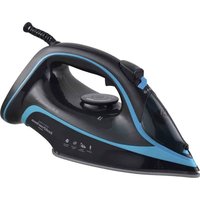
AnodiPress Steam ASP-27KPA - Iron Grunkel - Free user manual and instructions
Find the device manual for free AnodiPress Steam ASP-27KPA Grunkel in PDF.


User questions about AnodiPress Steam ASP-27KPA Grunkel
0 question about this device. Answer the ones you know or ask your own.
Ask a new question about this device
Download the instructions for your Iron in PDF format for free! Find your manual AnodiPress Steam ASP-27KPA - Grunkel and take your electronic device back in hand. On this page are published all the documents necessary for the use of your device. AnodiPress Steam ASP-27KPA by Grunkel.
USER MANUAL AnodiPress Steam ASP-27KPA Grunkel
natural_image
Black and blue power steam iron with blue trim, displayed against white background (no text or symbols visible on body)Manual de Instrucciones Instruction Manual
Modelo: ASP-27KPA
GRACIAS POR ESCOGER ESTE PRODUCTO GRUNKEL
natural_image
Symbol of a trash bin crossed with no text or numbers, representing waste sorting or disposal (no text present)text_image
on de partes D E F C G B H I A JTHANK YOU FOR CHOOSING THIS GRUNKEL PRODUCT
GRUNKEL puts at your disposal innovative, durable and practical products. When used responsibly and with proper maintenance, it will provide you with a long useful life and will help make everyday life a much easier task.
We appreciate your trust and hope you enjoy it.
Discover the rest of our range at www.grunkel.com

text_image
C€
text_image
RoHS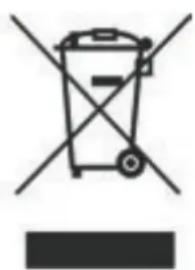
natural_image
Symbol of a trash bin with crossed lines indicating no waste or discharge, and a solid black rectangle below (no text or labels)This manual is a faithful reproduction in terms of characteristics, operation and aesthetics of the product you have purchased, except for typographical, printing or translation errors. The specification, operation and features of this appliance are subject to change without notice.

BEFORE PUTTING THE APPLIANCE ON WORKING
- Please read carefully the instructions for use of this manual in its entirety before putting it into operation.
- Pay special attention to safety instructions.
- Keep this instruction manual. If you give the device to a third party, these instructions must also be given.
- Also keep the guarantee, the purchase receipt or invoice and, if possible, the box with the inner packaging for possible future requests.
Safety measures for its use
ABefore using the appliance, make sure that the voltage used corresponds to that shown on the appliance's label. Always connect the plug to a suitable power source.
To prevent electrical hazards, do not immerse cord, plug, or appliance in water or other liquid. Please read the cleaning instructions carefully.
Do not use unauthorized accessories. This will void the warranty and may cause accidents.
Do not let cord hang over edge of table or shelf. Keep it away from hot surfaces. Do not allow it to come into contact with sharp or blunt objects. Do not operate if the cord or plug is damaged or if you notice that the appliance is not working properly.
Do not leave the appliance running unattended. Always switch off the appliance or unplug it (by pulling the plug, not the cable). To disconnect, grasp plug and remove from outlet. Never disconnect by pulling on the cable.
In case of any repair, cable replacement or adjustment, please consult a qualified technician, or take the device to the Official Technical Service.

CAUTION: For the safety of your children, do not leave packing materials (plastic bags, cardboard, polyethylene, etc.) within their reach.

CAUTION: The appliance reaches very high temperatures when in operation. Be extremely careful during use. Avoid contact with hot parts of the appliance.
Always supervise the appliance when it is used in the vicinity of children. Never leave the appliance running unattended.
Use the appliance only for its intended use.
The appliance is not intended to be operated by means of an external timer or a separate remote control system.
Never use a fork or other sharp object to clean the appliance, as this could cause serious damage or lead to an accident.
Do not immerse the appliance in water or any other liquid. Do not handle the unit with wet hands.
Before cleaning the appliance, make sure that it is disconnected from the mains and that it has cooled down completely.
If you need a copy of the instruction manual, please contact an authorized service center.
Do not use the appliance incorrectly. Serious injury could result. In case of misuse by the customer
If the customer misuses the appliance, it will be out of warranty.
Do not use it outdoors.
At the end of use, turn the switch to the OFF position and wait for the appliance to cool down completely in an upright position.
Empty the water tank completely at the end of use.
It is recommended to always empty the water from the tank to avoid the accumulation of limescale residues that can damage both the water tank and the appliance.
of limescale that can damage both the tank and the appliance's pipes. CAUTION: the water contained in the tank may still be hot.
It is recommended to use distilled or demineralized water. Tap water can cause accumulation of minerals that can block the
Activating the steam ironing function releases hot steam that reaches a long distance. Keep a safe distance when using to avoid accidental burns.
Do not use the appliance in damp or wet environments, such as a bathroom.
Do not leave the appliance switched on unattended.
The water tank must be filled with the appliance switched off and disconnected from the mains.
Do not allow the power cord to come into contact with the soleplate of the iron.
Do not use the iron on very dry garments.
Do not point the iron in the direction of people when it is still hot.
Do not overfill the water tank. Do not add dyes or similar products to the water tank. water tank. If you detect water leaks in the appliance, do not use it; contact the Official Technical Service.
Always place the appliance in the correct position and on a flat and stable surface, even when not in use. Use the appliance on a suitable, smooth, balanced and stable ironing board.
Never use the appliance on a garment that is being worn. This could cause burns and serious injury.
Do not use the appliance on zippers, snaps, rivets, rings or other similar metal items. Rubbing against these parts could scratch the soleplate of the appliance and affect its proper functioning.
WARNING: In case of improper use, there is a risk of injury and loss of warranty.
Children should be supervised to ensure that they do not play with this appliance.
Keep the appliance and cord out of the reach of children under 8 years of age.
This appliance is intended for occasional use during travel or temporary movement. It is not suitable for regular household use.
This device should only be used in domestic environments. Commercial use is restricted to a:
- Stores, offices and similar working environments.
- Rural working environments.
- By customers in hotels, hostels and similar accommodation.

WARNING: This appliance is for DOMESTIC use only. It is not intended for industrial use.

CAUTION!
THIS APPLIANCE IS NOT INTENDED FOR USE OR CLEANING BY CHILDREN UNDER THE AGE OF 8 YEARS WITHOUT ADULT SUPERVISION. IT IS ALSO NOT INTENDED FOR USE OR CLEANING BY PERSONS WITH REDUCED PHYSICAL, SENSORY OR MENTAL CAPABILITIES, WITHOUT EXPERIENCE OR KNOWLEDGE OF ITS USE, OR WHO HAVE NOT RECEIVED ADEQUATE TRAINING UNDER THE DIRECT SUPERVISION OF A QUALIFIED PERSON.
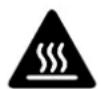
CAUTION
Hot
surface
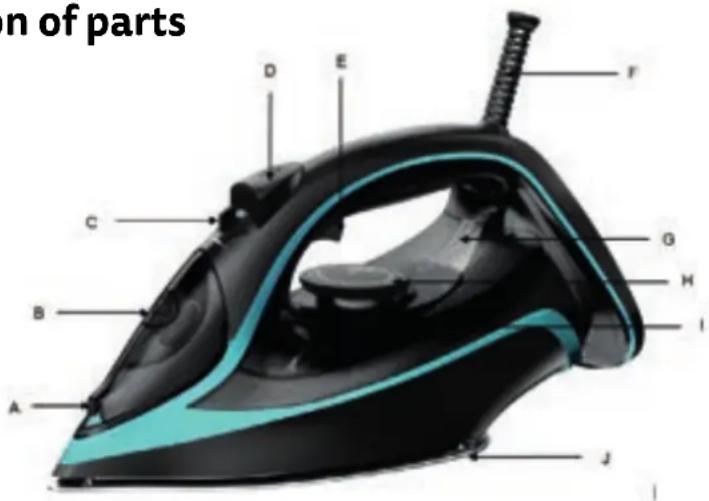
Identification of parts
text_image
n of parts D E F C G B H I A J| Description | |
| A Spray nozzle | |
| B Water opening | |
| C Steam regulator | |
| D Spray button | |
| E Steam stroke button | |
| F Cable protector | |
| G Indicator light | |
| Description | |
| H | Control button temperature |
| I Water tank | |
| J Sole | |
| M Thermostat button | |
Before first use
Remove any protective stickers that may be adhered to the soleplate or the body of the device.
Clean the soleplate with a soft, dry cloth.
Unwind the power cord.
NOTE: It is normal that, during the first use, the appliance emits a certain amount of smoke. This phenomenon is normal and will disappear with regular use.
Operation
Make sure that the appliance is disconnected from the mains. Place the appliance in a horizontal position and fill the tank with water through the water opening in the tank. Never fill the tank above the mark to avoid spillage.
NOTE: To extend the life of the product and improve its performance, it is recommended to use distilled or demineralized water.
NOTE: After use, place the appliance in an upright position and turn the temperature selection knob to the maximum position. Allow the device to heat up for two minutes. Then disconnect the appliance from the mains and wait for it to cool down completely before handling, cleaning or storing it.
Before ironing, always check the ironing instructions on the garment labels.
Connect the appliance to a suitable electrical outlet. The indicator light will come on.
Turn the temperature selection knob to the ideal position according to the label of the garment to be ironed.
When the indicator light goes out the appliance has reached the ideal temperature for ironing. If you select a different temperature during ironing, the indicator light will come on again; it is recommended to wait until the indicator light goes out before resuming ironing.
Dry ironing
The appliance can be used for dry ironing. It is recommended that the water tank is empty when using the dry ironing mode.
Set the steam regulator to the "OFF" position. Then set the temperature regulator knob to the appropriate position according to the ironing indications of the garments..
CAUTION: You must wait for the appliance to cool down completely before refilling the water tank.
Water spraying
You can use the water spray function at any temperature setting, in steam or dry ironing, as long as there is water in the tank.
Press the water spray button to spray the garments with water during ironing.
Steam planing
Set the temperature control knob to the "----" or "MAX" position.
When the iron has reached the optimum ironing temperature, the indicator light will go out. Then adjust the temperature regulator knob according to the indications on the label of the garment to be ironed.
Set the steam control knob to the desired position.
CAUTION: During ironing, the appliance heats up and emits steam at high temperature.
Use extreme caution when directing the steam flow towards the garments to avoid accidental damage. Avoid direct contact with hot parts.
Steam blow
You can use the steam jet function to remove wrinkles and deep creases. Set the temperature control knob to the "----" or "MAX" position.
When the iron has reached the optimum ironing temperature, the indicator light will go out. Then adjust the temperature regulator knob according to the indications on the label of the garment to be ironed.
Turn the steam control knob to the OFF position.
Press the steam stroke button repeatedly, with 5-second pause intervals between each press.
Self-cleaning
It is recommended to perform the self-cleaning process approximately every two weeks, following the steps described below:
- Fill the water tank to the maximum allowable level.
- Set the temperature regulator knob to the "MAX" position.
- Connect the power cord to a suitable electrical outlet.
- Allow the appliance to heat up to the optimum temperature. Once
Once it has reached the proper temperature, the indicator light will turn off. - Unplug the appliance from the electrical outlet.
- Hold the appliance in a horizontal position over a sink. Place the steam control knob the steam control knob to the self-cleaning position. The appliance will expel boiling water, steam and impurities from the holes in the soleplate for about 1 minute.
- When the self-cleaning process is complete, turn the steam control knob to the "OFF" position and plug the appliance back into the electrical outlet. The appliance will heat up to dry until the indicator light goes out.
- Turn the temperature control knob to the "OFF" position. Disconnect the appliance from the electrical outlet. Place the appliance in an upright position and allow the water to dry completely.
CAUTION: Allow to cool completely before handling, cleaning or storing.
Anti-scale system
A special resin filter installed inside the tank softens the water and prevents scale build-up on the soleplate. This resin filter is permanent and requires no maintenance or periodic replacement.
Do not use chemical additives, descalers or flavoring substances to clean the tank.
Antigoteo system
The anti-drip system allows precise ironing of delicate fabrics. Always use a low temperature setting for ironing very delicate fabrics. The soleplate may cool down to the point that no steam is emitted, but boiling water drips which may leave marks or stains on the garments. The anti-drip system prevents steaming to avoid this dripping.
Off
When ironing is finished, turn the temperature selection knob to the "OFF" position. Disconnect the appliance from the electrical outlet. Empty the water tank and allow the appliance to cool down completely. Wrap the cable around the vertical support base of the appliance, without coming into contact with the soleplate. To protect the soleplate, place the appliance in a vertical position.
Indications for ironing
Arrange the items to be ironed according to the type of fabric. This will reduce the frequency with which you will have to adjust the temperature for different fabrics.
Start by ironing the fabrics that require a lower temperature and work your way up to those that require a higher temperature. The iron takes longer to heat up than it does to cool down.
If you are not sure of the type of fabric, do a short test ironing on the reverse side of the garment. Start at a Low temperature and gradually increase the temperature until you find the right setting.
Wait approximately 3 minutes before ironing delicate fabrics. The temperature setting needs a certain amount of time to reach the selected temperature, regardless of whether it is going to decrease or increase from the previous temperature.
When ironing very delicate fabrics such as silk, wool or velvet, it is recommended to use an ironing cloth to avoid marks.
You may need to press the steam button several times to activate the steam stroke function.
Avoid contact with metallic, sharp or hard objects to keep the soleplate free of scratches.
| Type of fabric | Indication in the label | CTemperature setting |
| Nailon Seda | ● | MIN↑MAX |
| Lana | ●● | |
| Cotton | ●●● | |
| Lino |
CAUTION: The symbol

indicates that the garment should not be ironed.
Cleaning and maintenance
The appliance remains hot after use. Allow the appliance to cool down completely before handling for cleaning or storage.
The appliance must be disconnected from the mains before cleaning or handling.
Never immerse the appliance in water or any other liquid. Do not place it under running water. Do not put the appliance in the dishwasher.
Do not use detergents or aggressive products. Do not use brushes or metallic or pointed utensils for cleaning.
When you have finished ironing, place the iron in an upright position and make sure that there is no water left on the soleplate that could accumulate.
It is not necessary to empty the water tank after ironing. However, it is advisable to do this to avoid mineral build-up in the tank, ducts and holes of the appliance that could affect its correct operation.
Always keep the soleplate clean. You can use a wool cloth slightly dampened with a vinegar and water solution. The body of the appliance can be cleaned with a soft, slightly damp cloth..
Removal of the unit
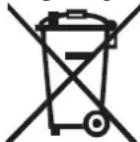

Waste electrical equipment regulations according to the WEEE DIRECTIVE 2002/96/EC. This symbol means that this product must not be treated as normal household waste, but must be returned to the distributor, or handed over to the appropriate collection point for electrical or electronic equipment, or taken to a collection point set up for this purpose so that its components can be recycled and not mixed with household waste.
You can also notify the collection service of your municipality so that it can be collected and treated in the appropriate manner, following the instructions for environmental protection or for advice on how to do so. The disposal of a household appliance means avoiding possible negative consequences for the environment and health. Proper disposal will result in significant energy and resource savings. As a reminder of the need for separate disposal of electrical appliances, a crossed-out wheeled dustbin appears on the product.
COINTER ELECTRÓNICA S.L. issues this document as a guarantee of the quality of the product you have purchased under the legally established terms for a period of three years from the date of purchase, so it is recommended to keep the original purchase receipt or invoice.
This warranty covers the repair of the device for any failure caused by manufacturing defects. It does not cover deficiencies or damage caused by negligence, blows, misuse or improper manipulation, voltage or incorrect installation carried out by installers outside the authorized Technical Service or by an Unauthorized Technical Service. Nor does it cover materials subject to wear due to normal use.
In the event of incidents that justify the use of this guarantee, repair will be chosen, in the legally established terms.
This guarantee will be invalidated:
If the ticket or original purchase invoice of the device is not presented
If any of the data on the same, on the receipt or purchase receipt are modified, altered or replaced.
If both the number or model, the serial number or the guaranteed device itself are tampered with or repaired without the knowledge of the authorized Technical Service.
If it lacks the signature or stamp of the establishment where it was purchased.
In the event of any incident that may arise, you can contact the establishment where you purchased it or the official Technical Service by calling the number mentioned below.
Customer Service: Phone: 902 110 909
Email: tecnico@counter.com
CUSTOMER CONTROL CARD
Brand Serial number
Model Date of purchase
Gender acquired in
Dealer signature

CONTROL CARD TO SEND BY MAIL
Brand Serial number
Model Date of purchase
Name of the buyer
Address
Population____ Province ____
Phone Acquired in
Dealer signature
User signature
To obtain technical assistance you can contact
