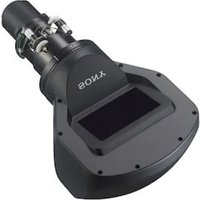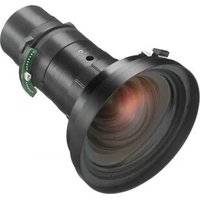
VPLL-Z3009 - Lens SONY - Free user manual and instructions
Find the device manual for free VPLL-Z3009 SONY in PDF.


User questions about VPLL-Z3009 SONY
0 question about this device. Answer the ones you know or ask your own.
Ask a new question about this device
Download the instructions for your Lens in PDF format for free! Find your manual VPLL-Z3009 - SONY and take your electronic device back in hand. On this page are published all the documents necessary for the use of your device. VPLL-Z3009 by SONY.
USER MANUAL VPLL-Z3009 SONY
Operating Instructions ____ GB
VPLL-Z3010/Z3024/Z3032
VPLL-Z3010/Z3024/Z3032
EAC
日本語
natural_image
Diagram of a device with a circular component and directional arrow, no text or symbols presentLENSRELEASEボタ投写レンズン
ご注意
natural_image
Technical line drawing of a mechanical component with a circular housing and mounting base (no text or symbols)ご注意
Before operating the unit, please read this manual thoroughly and retain it for future reference.
This lens is designed for use with the Sony Projector.
For details concerning compatible models, consult with qualified Sony personnel.
For the customers in Europe, Australia and New Zealand (VPLL-Z3010/VPLL-Z3024/VPLL-Z3032 only)
WARNING
This equipment is compliant with Class A of CISPR 32. In a residential environment this equipment may cause radio interference.
For the customers in Europe (VPLL-Z3010/VPLL-Z3024/VPLL-Z3032 only)
This apparatus shall not be used in the residential area.
If the room temperature where the projector is installed changes rapidly, or if the projector is moved suddenly from a cold to a warm place, condensation in the projector may occur. As the condensation may cause malfunction, be careful in adjusting temperature settings of the air conditioner. If condensation occurs, leave the projector turned on for about two hours before use.
Do not place this product close to medical devices
This product (including accessories) has magnet(s) which may interfere with pacemakers, programmable shunt valves for hydrocephalus treatment, or other medical devices. Do not place this product close to persons who use such medical devices. Consult your doctor before using this product if you use any such medical device. (VPLL-Z3010/Z3024/Z3032)
Notes
• Always verify that the unit is operating properly before use. SONY WILL NOT BE LIABLE FOR DAMAGES OF ANY KIND INCLUDING, BUT NOT LIMITED TO, COMPENSATION OR REIMBURSEMENT ON ACCOUNT OF THE LOSS OF PRESENT OR PROSPECTIVE PROFITS DUE TO FAILURE OF THIS UNIT, EITHER DURING THE WARRANTY PERIOD OR AFTER EXPIRATION OF THE WARRANTY, OR FOR ANY OTHER REASON WHATSOEVER.
- SONY WILL NOT BE LIABLE FOR CLAIMS OF ANY KIND MADE BY USERS OF THIS UNIT OR MADE BY THIRD PARTIES.
- SONY WILL NOT BE LIABLE FOR THE TERMINATION OR DISCONTINUATION OF ANY SERVICES RELATED TO THIS UNIT THAT MAY RESULT DUE TO CIRCUMSTANCES OF ANY KIND.
For the customers in the U.S.A. SONY LIMITED WARRANTY - Please visit http://www.sony.com/psa/warranty for important information and complete terms and conditions of Sony's limited warranty applicable to this product.
For the customers in Canada SONY LIMITED WARRANTY - Please visit http://www.sonybiz.ca/pro/lang/en/ca/article/resources-warranty for important information and complete terms and conditions of Sony's limited warranty applicable to this product.
For the customers in Europe Sony Professional Solutions Europe - Standard Warranty and Exceptions on Standard Warranty. Please visit https://pro.sony/support-services/primesupport/support-professional-solutions-europe-standard-product-warranty for important information and complete terms and conditions.
For the customers in Korea SONY LIMITED WARRANTY - Please visit http://bpeng.sony.co.kr/handler/BPAS-Start for important information and complete terms and conditions of Sony's limited warranty applicable to this product.
Supplied accessory
Operating Instructions (1)
Specifications
VPLL-3007
Manual focus,
Projected image size:
60" to 300" (1.52 m to 7.62 m),
Maximum external dimensions
(W× H× D)
150 × 150 × 222 ~mm
(5^29/32'' × 5^29/32'' × 8^3/_4'')
Mass: Approx. 1.7 kg (3.7 lb 60 oz)
VPLL-Z3009
Manual focus/zoom,
Projected image size:
60" to 300" (1.52 m to 7.62 m)
Maximum external dimensions
(W× H× D)
150× 150× 217mm
(5^29/32'' × 5^29/32'' × 8^19/_32'')
Mass: Approx. 1.7 kg (3.7 lb 60 oz)
VPLL-Z3010
Electric focus/zoom, (when attaching to the projector),
Projected image size:
60" to 300" (1.52 m to 7.62 m)
Maximum external dimensions
(W× H× D)
150× 150× 227mm
(5^29 / 32'' × 5^29 / 32'' × 9'')
Mass: Approx. 2.0 kg (4 lb 6.5 oz)
VPLL-Z3024
Electric focus/zoom, (when attaching to the projector),
Projected image size:
40" to 600" (1.02 m to 15.24 m)
Maximum external dimensions
(W× H× D)
97 × 105 × 177 ~mm
(3^13/16'' × 4^9/64'' × 6^31/_32'')
Mass: Approx. 1.2 kg (2.6 lb 42 oz)
VPLL-Z3032
Electric focus/zoom, (when attaching to the projector),
Projected image size:
40" to 600" (1.02 m to 15.24 m)
Maximum external dimensions
(W× H× D)
97 × 105 × 177 ~mm
(3^13/16'' × 4^9/64'' × 6^31/_32'')
Mass: Approx. 1.2 kg (2.6 lb 42 oz)
Note
The values for mass and dimensions are approximate.
Replacing the Projection Lens
Notes
- Be careful not to drop the projection lens.
- Avoid touching the lens surface.
- Lenses can be scratched easily. When handling lenses, always place them gently on a stable, level surface in a horizontal position.
- The illustration of VPL-FHZ65 is used for the explanations.
Removing
1 Return the projection lens to the center position. While the projector is turned on, press the LENS SHIFT button on the Remote Commander, then press the RESET button on it. The projection lens returns to the center position.
Note
The projection lens cannot be removed unless it has returned to the center position.
2 Turn off the projector, then unplug the AC power cord from the wall outlet.
Caution
When replacing the lens, your eyes may be damaged if a strong light accidentally gets into your eyes. Before replacing the lens, turn off the projector and then unplug the AC power cord.
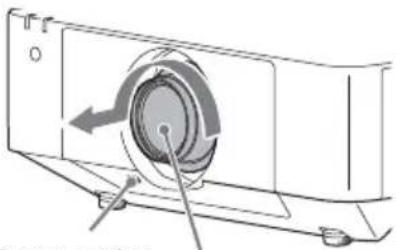
3 While pressing and holding down the LENS RELEASE button, rotate the projection lens counterclockwise to pull out the lens straight.
natural_image
Diagram of a device with a circular component and directional arrows indicating motion (no text or symbols)LENS RELEASE
button
Projection lens
Note
For the location of the LENS RELEASE button, refer to the Operating Instructions of the projector. The location of the button is different depending on the model.
Attaching
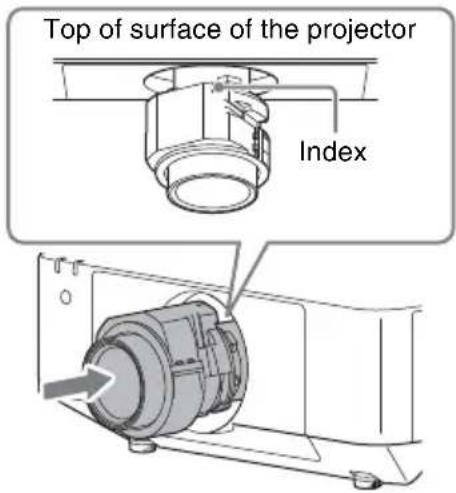
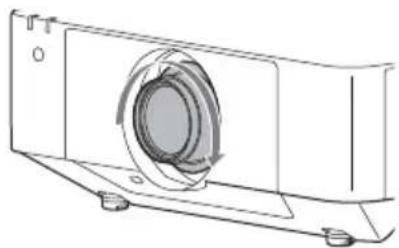
1 Fully insert the projection lens with the index on the lens facing toward the top surface of the projector.
text_image
Top of surface of the projector Index2 Rotate the lens clockwise until it clicks.
natural_image
Technical line drawing of a mechanical component with a circular housing and mounting base (no text or symbols)Note
When attaching the projection lens, do not press the LENS RELEASE button.
Adjusting the Projection Lens
| Focus | Peripheral focus(Corner Correction) | Size (Zoom) | |
| VPLL-Z3024/Z3032 | Press the FOCUS button on the Remote Commander or the control panel of the projector once, and adjust with ↑/↓/←/→ on the Lens Focus adjustment screen.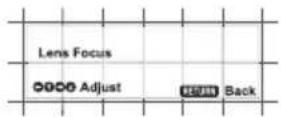 | - | Press the ZOOM button on the Remote Commander or the control panel of the projector, and adjust with ↑/↓/←/→. |
| VPLL-Z3010 P | on the Remote Commander or the control panel of the projector twice, and adjust with ↑/↓/←/→ on the Lens Corner Correction adjustment screen.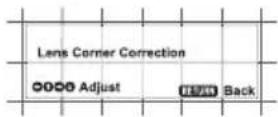 | ||
| VPLL-3007/Z3009 | Turn the focus lever to adjust the focus.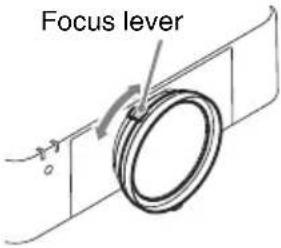 | Turn the peripheral focus ring to adjust the focus.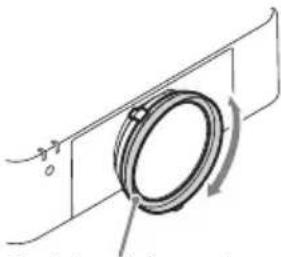 Peripheral focus ring Peripheral focus ring | Turn the zoom lever to adjust the size.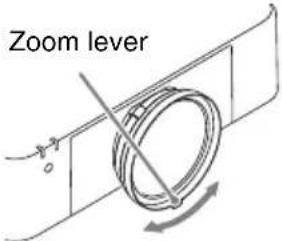 |
Français
(VPLL-Z3010/VPLL-Z3024/
VPLL-Z3032 uniquement)
AVERTISSEMENT
natural_image
Technical line drawing of a mechanical component with a circular aperture and mounting base (no text or symbols)Remarque
natural_image
Technical line drawing of a mechanical component with a circular aperture and mounting base (no text or symbols)Nota
(Nur VPLL-Z3010/VPLL-Z3024/
VPLL-Z3032)
WARNUNG
(Nur VPLL-Z3010/VPLL-Z3024/VPLL-Z3032)
Manueller Fokus/Zoom,
natural_image
Technical line drawing of a mechanical component with a circular housing and mounting base (no text or symbols)Hinweis
(Solo VPLL-Z3010/VPLL-Z3024/VPLL-Z3032)
AVVERTENZA
(Solo VPLL-Z3010/VPLL-Z3024/VPLL-Z3032)
natural_image
Technical line drawing of a mechanical component with a circular housing and mounting base (no text or symbols)Nota
natural_image
Diagram of a device with a circular component and directional arrows indicating motion (no text or symbols)LENS按钮
RELEASE
投影镜头