
XMZ-D1 - Heating Vevor - Free user manual and instructions
Find the device manual for free XMZ-D1 Vevor in PDF.
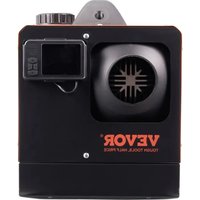


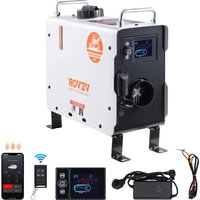
| Product Type | Diesel Air Heater |
| Model | XMZ-D1 (series ZM-1 to ZM-5) |
| Brand | Vevor |
| Heating Power | 2 kW / 5 kW / 8 kW depending on model |
| Fuel Type | Diesel (gasoil), do not use gasoline, kerosene, vegetable oil |
| Power Supply | 12 V DC (≥ 15 A) or 24 V DC depending on version |
| Rated Power Consumption | 12 V: 40 W; 24 V: 80 W |
| Dimensions (approx.) | 30 × 15 × 15 cm (main unit) |
| Weight (approx.) | 5 kg (depending on model) |
| Main Functions | Heating, ventilation, timer programming, manual/auto modes, optional remote control |
| Controls | Rotary panel, LCD digital panel, button panel or remote control (depending on version) |
| Temperature Set Range | 5 °C to 30 °C (auto mode) |
| Fan Speeds | 6 speeds (H1 to H6) in manual mode |
| Installation | Indoor or outdoor, observe safety distances, exhaust outlet to the outside |
| Safety | Overheat protection, automatic shutdown in case of fault, flame detection |
| Maintenance | Periodic cleaning of combustion chamber and filter, check oil circuit |
| Spare Parts | Available at vevor.com/support (glow plug, pump, fan, sensors) |
| Repairability | Professional repair recommended, use of original parts |
| Certifications | Compliant with FCC Part 15, European Directive 2012/19/EU (WEEE) |
| Warranty | Electronic warranty certificate at vevor.com/support |
Frequently Asked Questions - XMZ-D1 Vevor
Do not over-prime to avoid white smoke.
User questions about XMZ-D1 Vevor
0 question about this device. Answer the ones you know or ask your own.
Ask a new question about this device
Download the instructions for your Heating in PDF format for free! Find your manual XMZ-D1 - Vevor and take your electronic device back in hand. On this page are published all the documents necessary for the use of your device. XMZ-D1 by Vevor.
USER MANUAL XMZ-D1 Vevor
Technical Support and E-Warranty Certificate www.vevor.com/support
DIESEL HEATER
We continue to be committed to provide you tools with competitive price. "Save Half", "Half Price" or any other similar expressions used by us only represents an estimate of savings you might benefit from buying certain tools with us compared to the major top brands and does not necessarily mean to cover all categories of tools offered by us. You are kindly reminded to verify carefully when you are placing an order with us if you are actually saving half in comparison with the top major brands.
VEVOR®
TOUGH TOOLS, HALF PRICE
DIESEL HEATER
NEED HELP? CONTACT US!
Have product questions? Need technical support? Please feel free to contact us:
Technical Support and E-Warranty Certificate www.vevor.com/support
This is the original instruction. Please read all manual instructions carefully before operating. VEVOR reserves a clear interpretation of the user manual. The appearance of the product shall be subject to the product you received. Please forgive us that we won't inform you of any technology or software updates on our product.
| Symbol | Symbol Description |
| Warning: To reduce the risk of injury, the user must read the instructions manual carefully. | |
| This symbol, placed before a safety comment, indicates a kind of precaution, warning, or danger. Ignoring this warning may lead to an accident. To reduce the risk of injury, fire, or electrocution, please always follow the recommendations shown below. | |
| CORRECT DISPOSAL: This product is subject to the provision European Directive 2012/ 19/EC. The symbol showing a whee bin crossed through indicates that the product requires separate refuse collection in the European Union. This applies to the product and all accessories marked with this symbol. Products marked as such may not be discarded with normal domestic waste, but must be taken to a collection point for recycling electrical and electronic devices. | |
| Warning: Toxic material. Take care to avoid coming into contact with toxic material. | |
| Warning: Flammable material. Take care to avoid causing a fire by igniting flammable material. |
SAFETY INSTRUCTION

WARNING:

Read all safety warnings, instructions, illustrations, and specifications provided with this diesel heater. Failure to follow all instructions listed below may result in electric shock, fire, and/or serious injury.
- The following measures shall not be adopted
- Change the important component of the diesel heater.
- Make use of spare parts from other manufacturers without permission.
- Disobey the instruction and guide during installation or operation.
- Only allow using original attachment and spare parts during installation and maintenance.
- The heaters shall not be used in places where they may form flammable vapor or dust, for example:
- Fuel depot
- Carbon storehouse
- Timber storehouse
- Granary and similar sites Diesel/petrol station
And keep away from fuel tanks, compression tanks, fire extinguishers, clothes, or other flammable objects.
- Do not use cigarette lighter for startup.
- Do not use the heater in closed and/or unventilated places.
- The heaters shall be turned off when filling fuel.
- Do not cut off the electric power in operation.
- If the fuel leak or discharge from the fuel system of heaters, please contact VEVOR for repair.
- Place the exhaust outlet outside to prevent any penetration of exhaust fumes.
- In the process of work, it is forbidden to cut off the electric power directly to stop the heater from working.
- Seal all gaps between the mounting plate and the car body.
- The machine will stop heating after over-temperature protection. Please do not power off. After the machine is naturally cooled and turned off, it can be restarted.
- After turning off the machine, please do not immediately disconnect the power supply. It takes 3-5 minutes for the machine to stop working completely.
- After starting the machine for 3-5 minutes, it will work normally and heat up. Please wait patiently.
- When the heater is just started, the current is relatively high, so an adapter with a voltage of 12V and a current of 15A or greater is required for the power supply.
- This appliance can be used by children aged from 8 years and above and persons with reduced physical, sensory or mental capabilities or lack of experience and knowledge if they have been given supervision or instruction concerning use of the appliance in a safe way and understand the hazards involved. Children shall not play with the appliance. Cleaning and user maintenance shall not be made by children without supervision.
17. WARNING: Flammable material

During installation/use, service, and disposal of the appliance, please pay attention that there should be no flammable substances around the exhaust pipe. The temperature of the exhaust pipe is very high when i
is working. Take care to avoid causing a fire by igniting flammable material.
18. WARNING: Toxic material
- During installation/use, service, and disposal of the appliance, please install

the appliance with space for ventilation to prevent carbon monoxide poisoning. Place the exhaust outlet outdoors to prevent exhaust gas from seeping in.
SAVE THESE INSTRUCTIONS
FCC INFORMATION
CAUTION: Changes or modifications not expressly approved by the party responsible for compliance could void the user's authority to operate the equipment!
This device complies with Part 15 of the FCC Rules. Operation is subject to the following two conditions:
1) This product may cause harmful interference. 2) This product must accept any interference received, including interference that may cause undesired operation.
WARNING: Changes or modifications to this product not expressly approved by the party responsible for compliance could void the user's authority to operate the product.
Note: This product has been tested and found to comply with the limits for a Class B digital device pursuant to Part 15 of the FCC Rules. These limits are designed to provide reasonable protection against harmful interference in a residential installation.
This product generates, uses and can radiate radio frequency energy, and if not installed and used in accordance with the instructions, may cause harmful interference to radio communications. However, there is no guarantee that interference will not occur in a particular installation. If this product does cause harmful interference to radio or television reception, which can be determined by turning the product off and on, the user is encouraged to try to correct the interference by one or more of the following measures.
- Reorient or relocate the receiving antenna.
- Increase the distance between the product and the receiver.
- Connect the product to an outlet on a circuit different from that to which the receiver is connected.
- Consult the dealer or an experienced radio/TV technician for assistance.
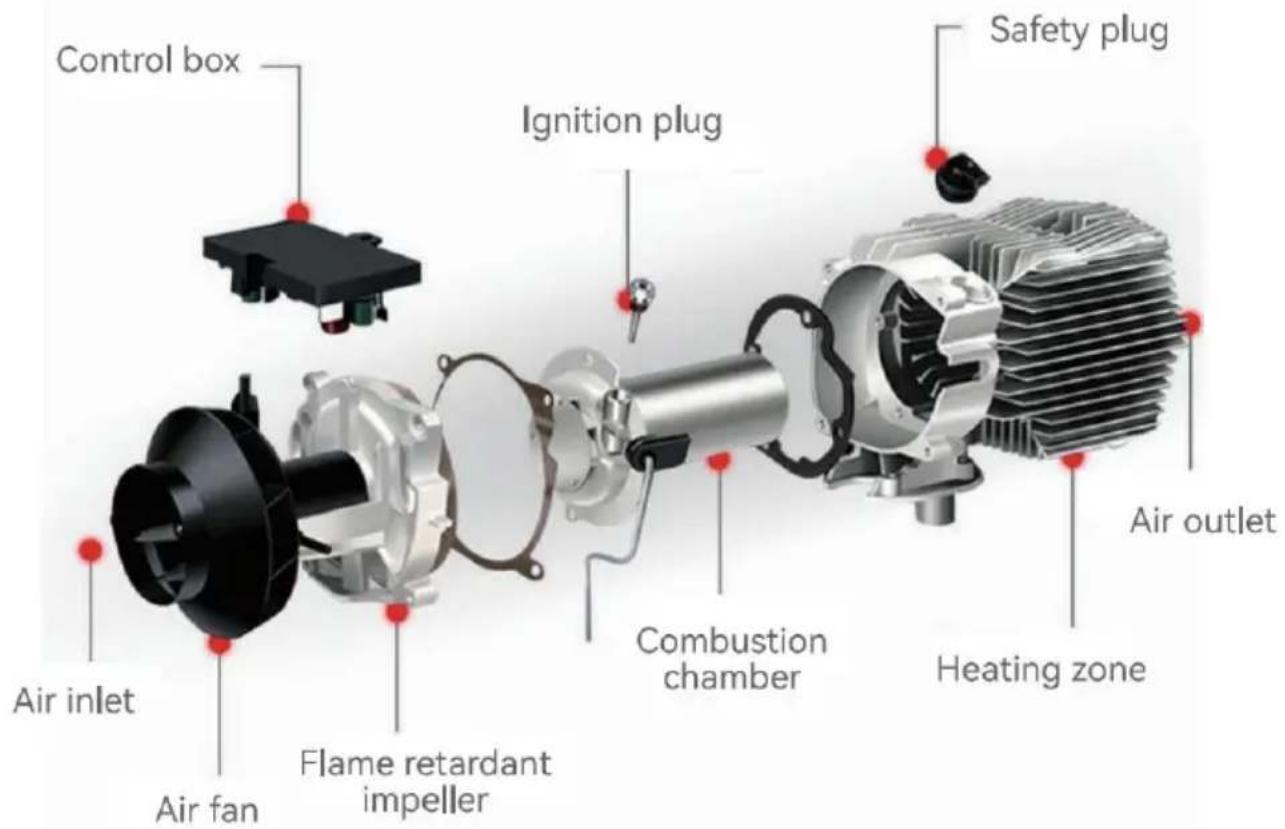
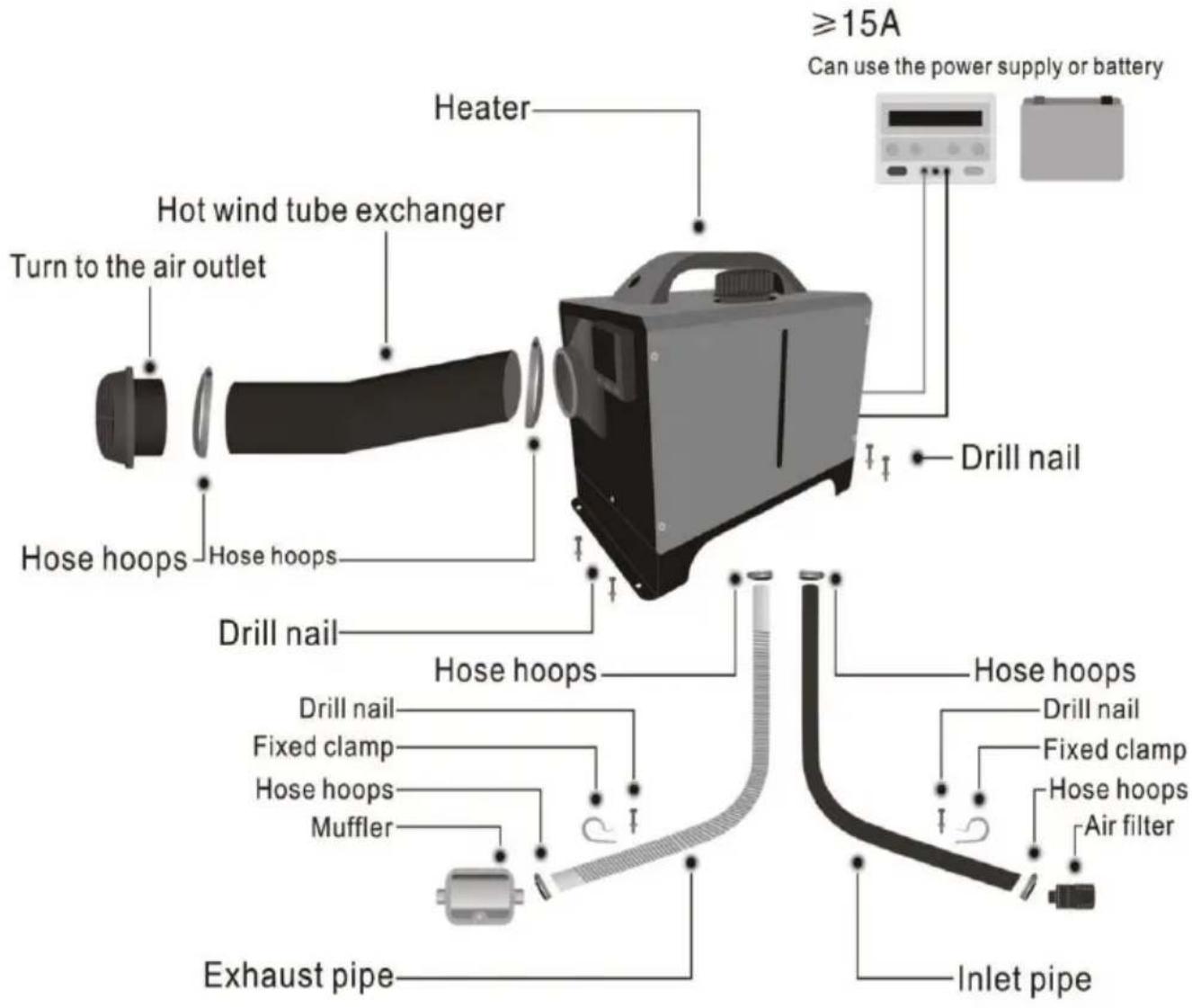
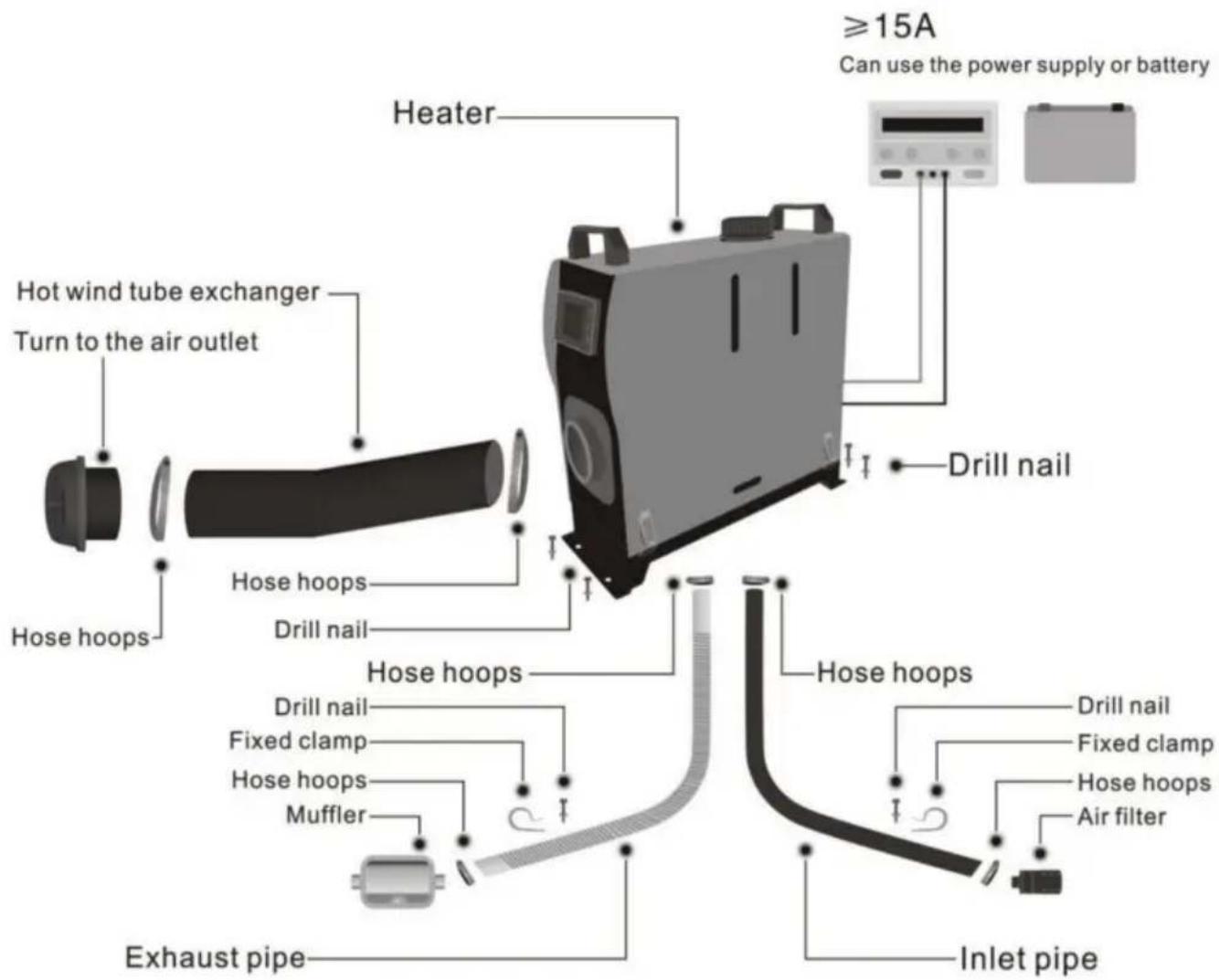
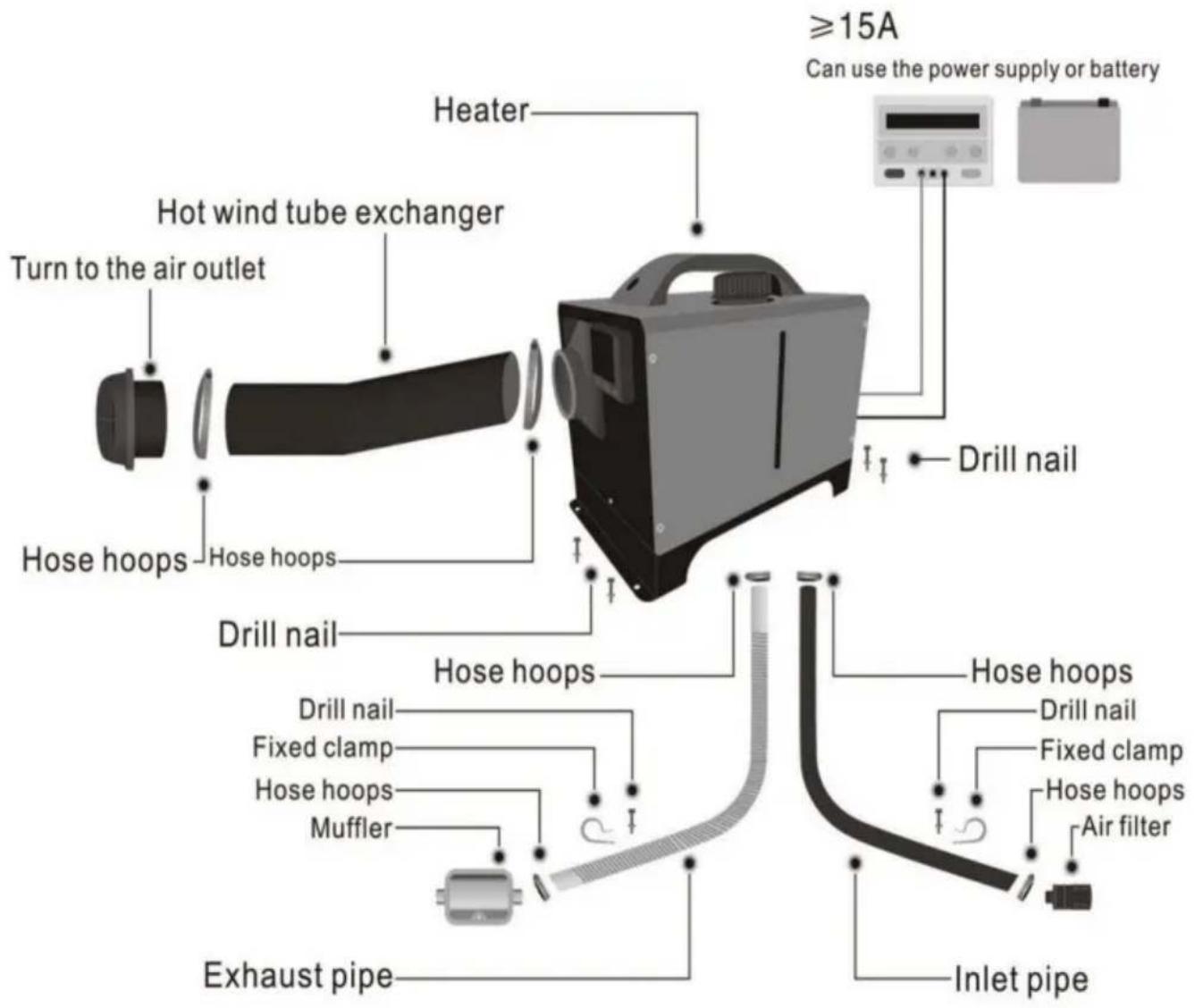
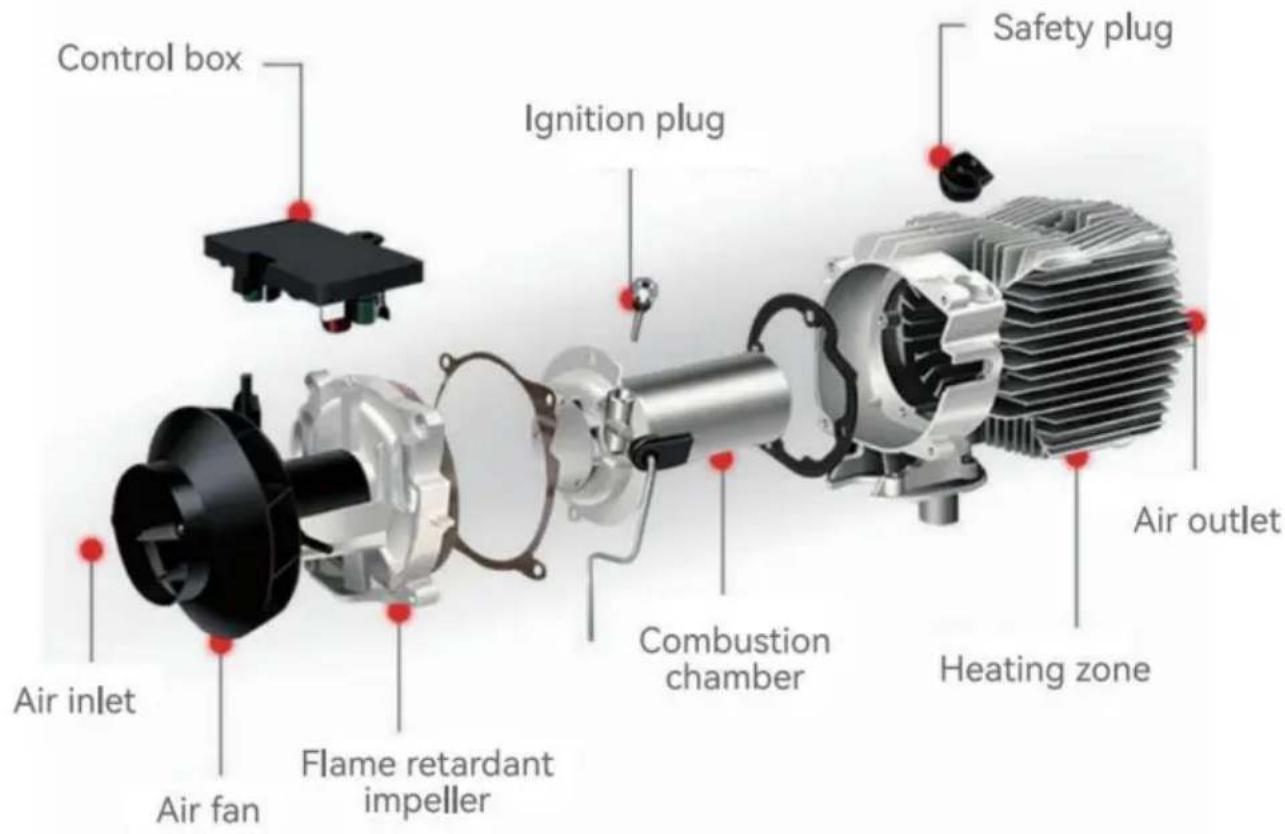
INTERNAL STRUCTURE
INSTALLATION POSITION
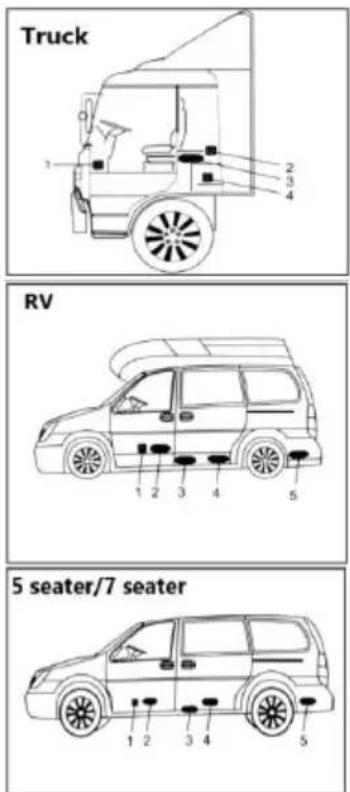
- On the co-driver's legroom.
- On the back wall of the cab.
- Driver's seat backrest.
- Within the tool box.
- In front of the passenger seat.
- Between the driver seat and passenger seat.
- 3 & 4 under the container.
- In the trunk.
The heater is mainly installed in the passenger room or baggage room of the vehicle. If it can be installed, fix the heater under the underside of the vehicle, but be ware of splashing.
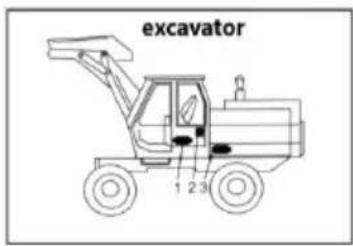
- Inside the driver's seat.
- On the back wall of the cab.
- Inside the protection box.

It is recommended to use high-grade diesel fuel when refueling the diesel heater. Other types of fuels, such as kerosene, vegetable oil, gasoline, waste oil, etc., cannot
be used. Otherwise, the heater may have an unpleasant odor and malfunction during operation.
MODEL
| Series Model | ZM-1 | ZM-1 | ZM-2 | ZM-3 | ZM-4 | ZM-5 |
| Product Model | ZM50 11 ZM50 12 ZM20 01 ZM2003 ZM50 14 | ZM50 03 | ZM50 02 ZM50 13 ZM80 01 ZM50 08 | ZM2002 ZM5001 ZM5005 ZM5007 ZM8002 ZM80 03 ZM80 04 ZM80 05 | ZM50 04 ZM50 06 ZM50 09 ZM50 10 ZM30 01 | ZM50 15 |
| Appearance | ||||||
| Power ZWH | 2/5/8KW | 5KW | 2/5/8KW | 2/5/8KW | 2/5/8KW | 2/5/8KW |
| Heating medium | Air | Air | Air | Air | Air | Air |
| Fuel | Diesel | Diesel | Diesel | Diesel | Diesel | Diesel |
| Ratings | 12V/40W | 24V/80W | 12V/40W | 12V/40W | 12V/40W | 12V/40W |
PACKING LIST
| Model | ZM-1 | ZM-2 | |
| Main engine | 1 | 1 | |
| Intake pipe | 1 | 1 | |
| Exhaust pipe | 1 | 1 | |
| Blowpipe | 1 | 2 | |
| Air outlet pipe clamp | 2 | 4 | |
| Remote control | 1 | 1 | |
| Silencer with 1 fixing piece and 2 screws | 1 | 1 | |
| Blowpipe clamp | 4 | 4 | |
| Clamp | 3 | 2 | |
| Pipe clip | 2 | 2 | |
| Air filter element | 1 | 1 | |
| Nut | 6 | 6 | |
| The screw for the lock catch | 6 | 6 | |
| Machine fixing screws | 1 | 1 | |
| Oil pipe | 1 | 1 | |
| Liquid crystal switch | 1 | 1 | |
| Rotary tuyere | 1 | 2 | |
| Power cord | 1 | 1 | |
| Oil filter | 1 | 1 | |
| Fuel pump sheath with a screw | 1 | 1 | |
| Ribbon | 12 | 12 | |
| Oil pipe clip | 12 | 12 | |
| Fuel tank | 1 | 1 | |
| Oil tank accessories | 1 | 1 | |
| Machine fixing piece | 1 | 1 | |
| Fuel pump | 1 | 1 | |
| User Manual | 1 | 1 | |
| Muffler Accessories | LEF | 1 | 1 |
PACKING LIST
| Model | ZM-3 | ZM-4/ZM-5 | |
| Main engine | 1 | 1 | |
| Intake pipe | 1 | 1 | |
| Exhaust pipe | 1 | 1 | |
| Blowpipe | 1 | 2 | |
| Air outlet pipe clamp | 2 | 4 | |
| Remote control | 1 | 1 | |
| Silencer with 1 fixing piece and 2 screws | 1 | 1 | |
| Blowpipe clamp | 4 | 4 | |
| Pipe clip | 2 | 2 | |
| Air filter element | 1 | 1 | |
| The screw for the lock catch | 6 | 6 | |
| Liquid crystal switch | or | 1 | 1 |
| Rotary tuyere | 1 | / | |
| User Manual | 1 | 1 | |
| Muffler Accessories | 1 | 1 |
INSTALLATION OF FUEL TANK AND NOZZLE
1. Splitting machine
Please strictly follow the following diagram to avoid inevitable losses caused by oil leakage during use:
(1) Drill holes with a 7.5 mm drill bit at the protruding position of the fuel tank. (2) Cover the fuel tank nozzle with a gasket. (3) Fix the fuel tank nozzle with iron wire and thread it into the punching position along the fuel tank opening. (4) Swivel the pointed pliers to remove the fuel tank nozzle. (5) Insert washers and nuts for locking. (6) The three installation holes of the fuel tank are fixed with bolts and washers, and the installation is completed.
Fuel Tank Installation Diagram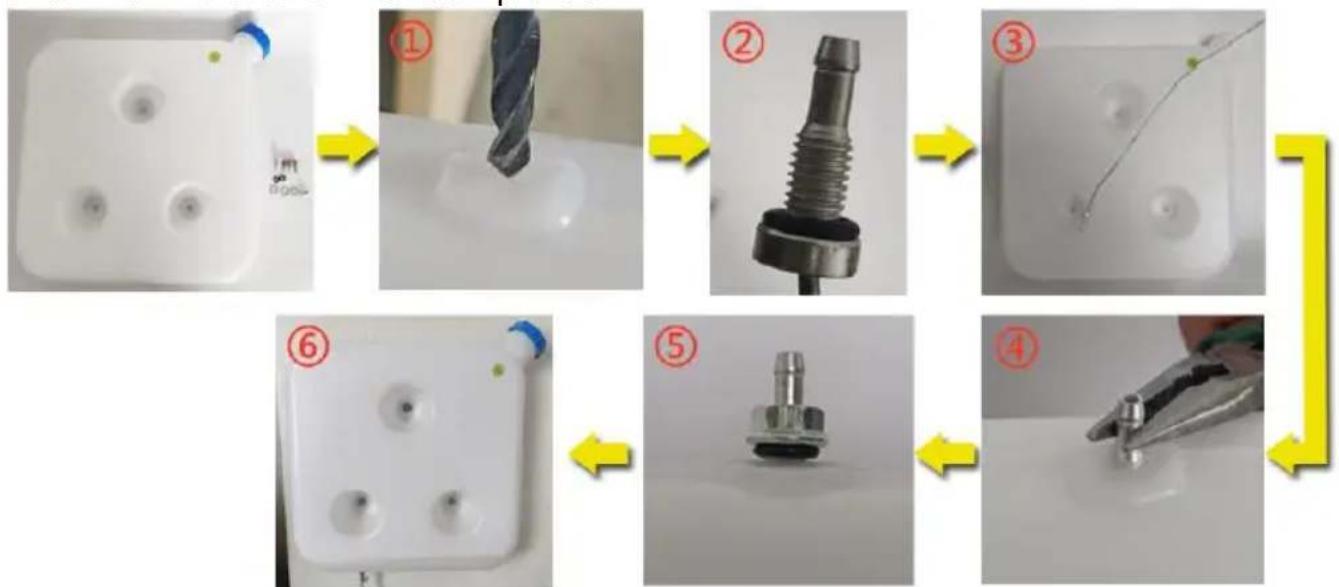
Refer to the installation diagram below and carefully read the precautions when installing or using:
1. No Side Installation:
※ Side installation of the diesel heater will result in oil leaks inside the machine after a period of use, producing a large amount of smoke and carbon monoxide poisoning. During installation, leave a space of 10 cm around the heater to ensure good ventilation.
※ If installing the heater inside a building:
① With the heater placed indoors: Make holes in the wall for the exhaust pipe to be placed outdoors. Pay attention to insulating the exhaust pipe as it can become very hot and could cause a fire. ② With the heater placed outdoors: It's necessary to extend the exhaust pipe to avoid the exhaust from being sucked into the building from the back fan position of the heater, which can lead to carbon monoxide poisoning.
3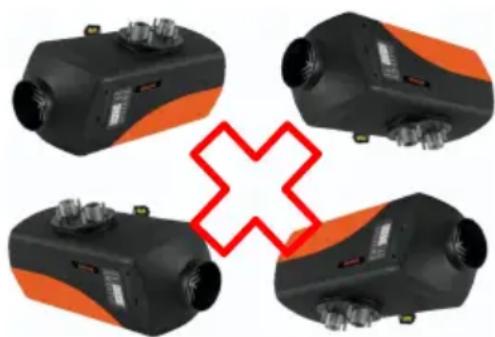
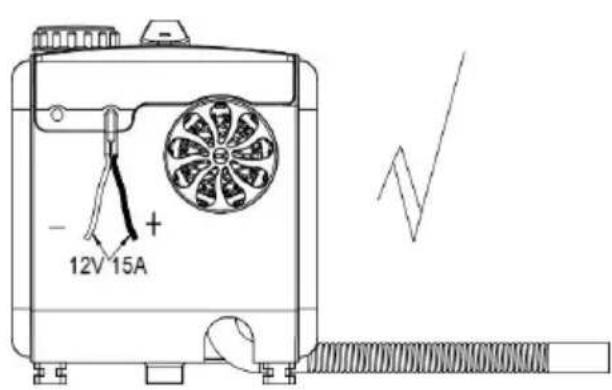
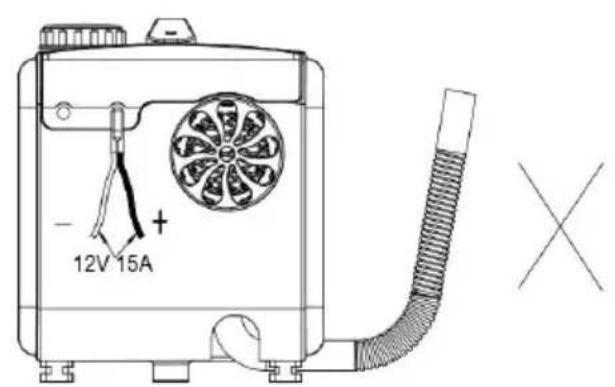
Incorrect Installation Direction Correct Installation Direction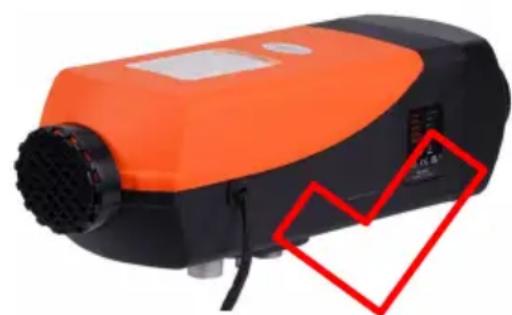
※ If installing the heater inside a building: ① With the heater placed indoors: Make holes in the wall for the exhaust pipe to be placed outdoors. Pay attention to insulating the exhaust pipe as it can become very hot and could cause a fire. ② With the heater placed outdoors: It's necessary to extend the exhaust pipe to avoid the exhaust from being sucked into the building from the back fan position of the heater, which can lead to carbon monoxide poisoning.
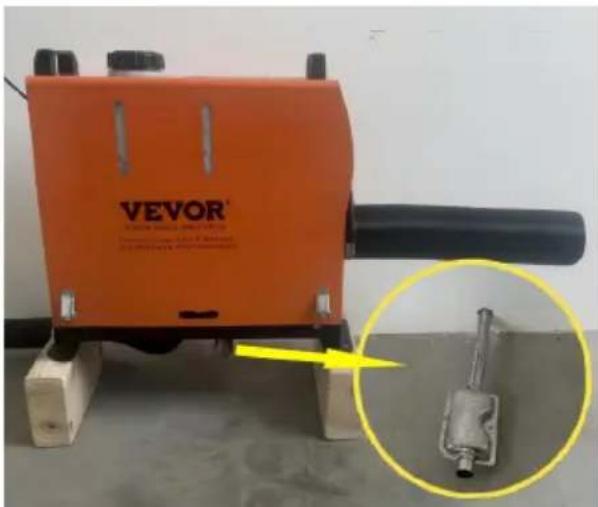
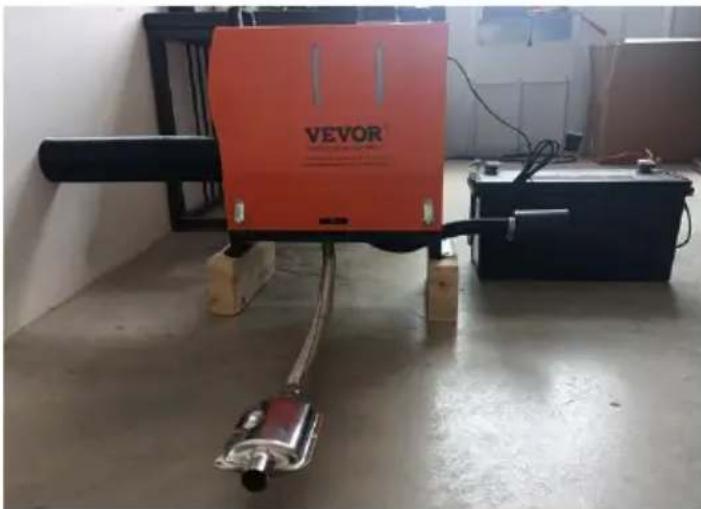
Indoor installation Outdoor installation diagram (wooden floor exhaust pipes need to be protected)
※ Installation position and precautions
① Reserve a 4-inch gap between the air inlet for unobstructed air intake
② Keep the bottom exhaust pipe at a distance of 2 inches from the ground and prevent fires if the exhaust pipe temperature is high;
③ Do not bend the exhaust pipe excessively, as it may cause uneven exhaust flow;
④ The air outlet duct is not easily too long and multiple bends can cause it to be unable to be discharged, resulting in a high temperature fault;
⑤ When refueling the fuel tank, do not flow onto the casing, as it will flow along the inside of the machine to the exhaust pipe position, causing smoke. Fill the oil level close to the fuel tank port;
⑥ Do not block the intake pipe, which will cause insufficient oxygen and the heater will not work;

Installation location precautions - schematic diagram
2. Precautions for the power supply:
The power supply for the diesel heater must meet the following requirements: Voltage: 12V; Current: ≥20A, either from a direct power source or a battery. When powered by a battery, do not charge the battery while using the heater as insufficient current can cause malfunction. Ensure a firm and secure connection to the battery. Using clamps for fixation can result in poor contact.
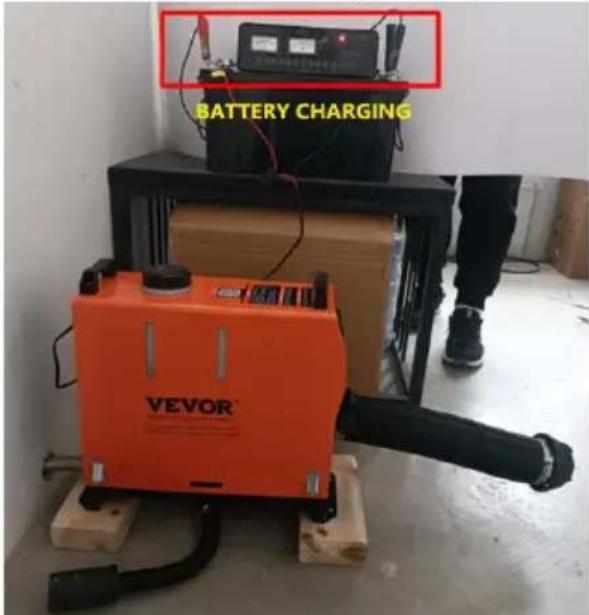
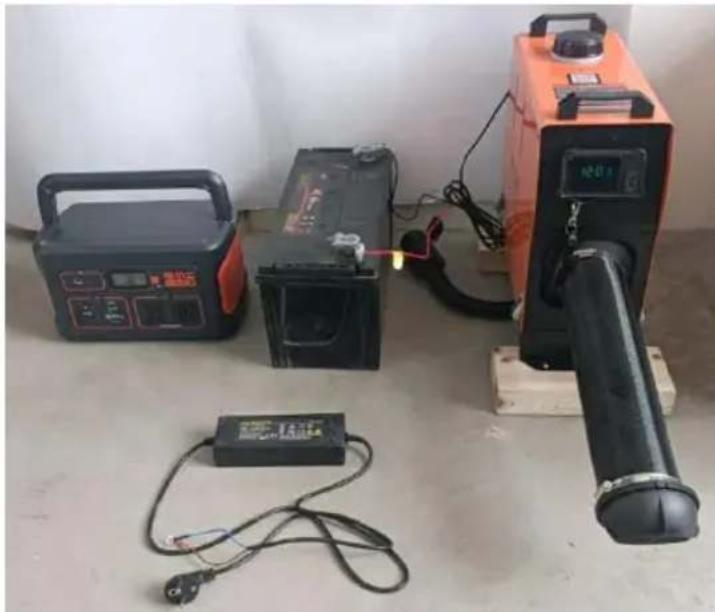
- Do not use the heater when charging the battery.
- The current is low and it does not work.
Suggest using energy storage power, batteries, and adapters for power supply.
When extending the power cable for the diesel heater, the wire diameter should be >2mm². Using a thin wire can lead to insufficient current, causing the heater not to work. After connecting, use insulating tape to protect the connection and prevent electrical leakage, which might lead to fires.
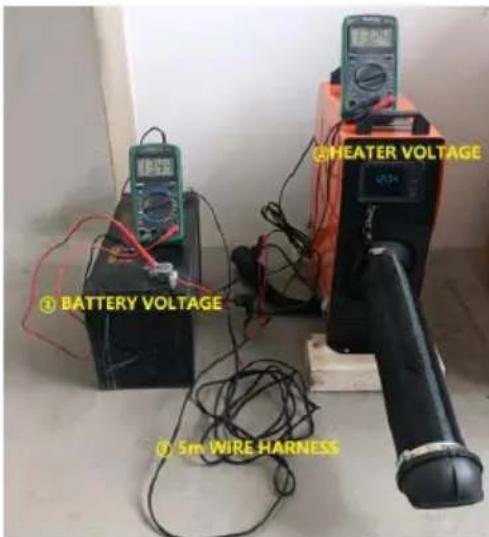
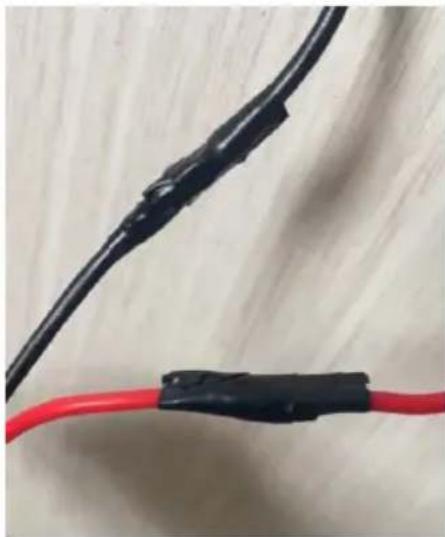
Do not disconnect the power when the diesel heater is operating at high temperatures. This can cause backfire due to high temperatures. Repeatedly doing so can cause permanent damage. Solutions:
- If power is cut and you immediately turn on the heater: Wait until the internal heat of the heater has completely dissipated before turning it on for normal operation.
- If the heater is turned on a long time after a power cut: Incomplete combustion inside may produce a large amount of smoke. Wait for the smoke to clear, and the heater will automatically start and operate normally.
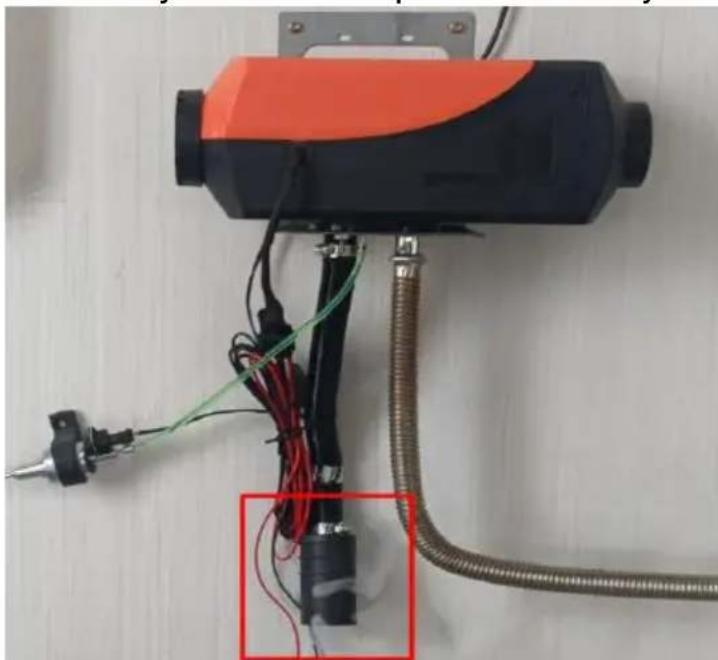
Abnormal power outage and smoke coming from the intake pipe.
- After the heater is installed, you need to manually pump oil before turning it on:
The fuel line of the heater is long. Before initially starting the heater, manually pump oil up to the fuel inlet. Otherwise, when turned on, the heater will take over.
30 minutes to detect the fuel (during this time, it will continuously check for the fuel signal). Once the ignition plug detects the fuel, it will ignite and heat. Refer to the LCD switch user guide for detailed instructions on manual fuel pumping.
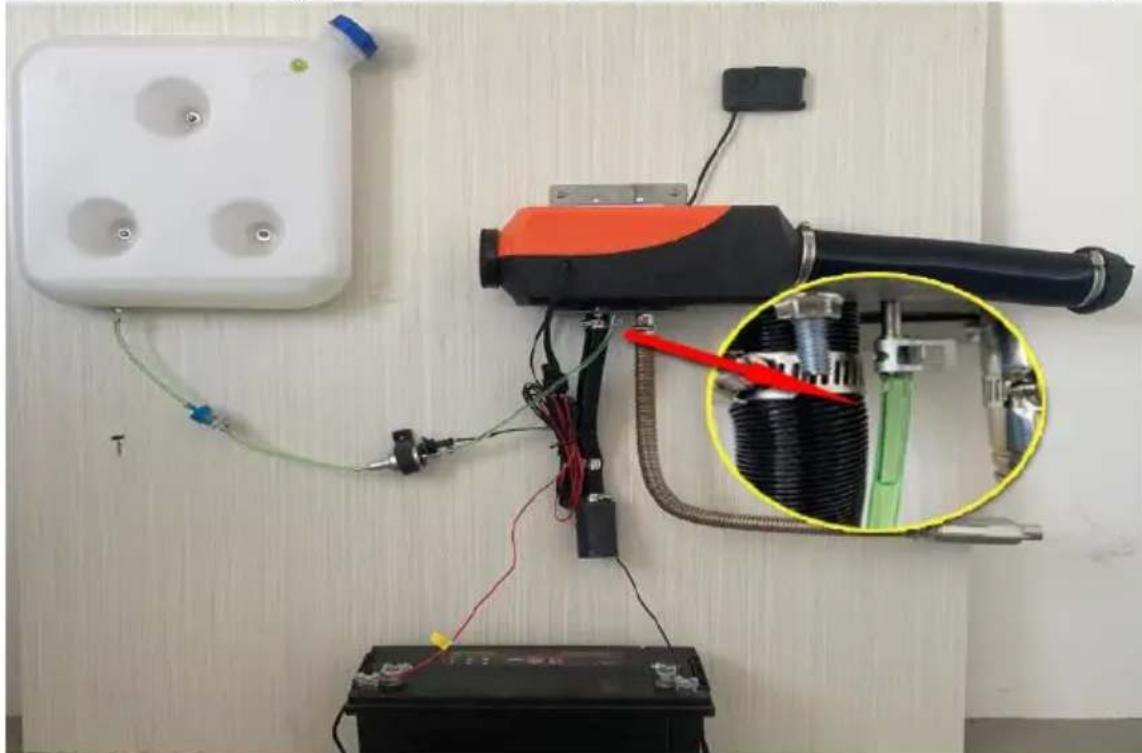
The first work requires manual pumping of oil to the position shown in the diagram and starting up.
※ When manually pumping fuel, pump just up to the fuel inlet. Over-pumping can result in the heater emitting a large amount of white smoke. Quick solution: Detach the fuel line, turn on the heater and let it stop naturally, then restart it. Repeat this process until no smoke is emitted. Reconnect the fuel line and turn the heater on to resume normal operation.
After starting the diesel heater, continuously blow air into the air pipe using an air pump or a high-speed blower until the heater starts and functions normally. If white smoke appears after operating for a period: This indicates that the atomizing net is clogged. Remove the ignition plug, take out the atomizing net, clean its surface or replace it with a new one.
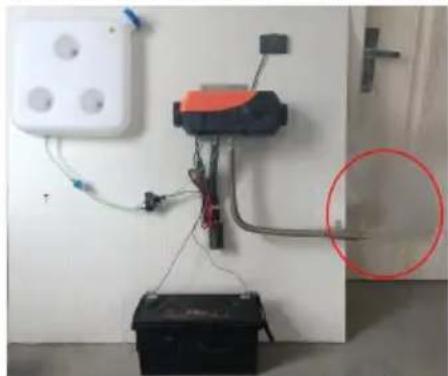
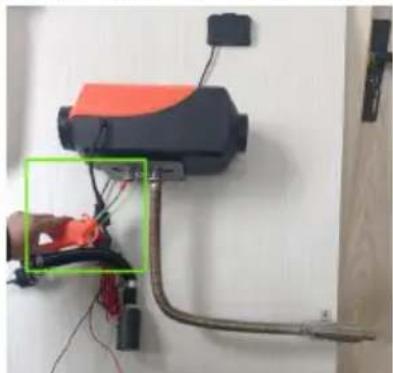
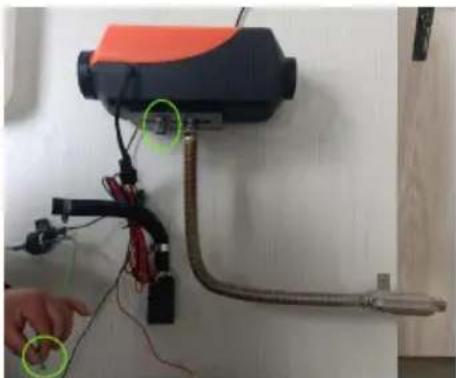
Excessive pump oil produces white smoke.
Blow the air gun towards the intake pipe to assist combustion.
Remove the oil pipe and insert it after it is normal.
× Oil circuit fault, such as E4/E8/E10 fault code, indicates that there is no oil heater or heat in the machine. The following steps need to be followed for troubleshooting:
① Is there a shortage of oil in the fuel tank;
② Whether the oil filter is blocked;
③ Is there any bending of the oil pipe that cannot accommodate oil;
④ Is the oil pump not working;
Inspection diagram.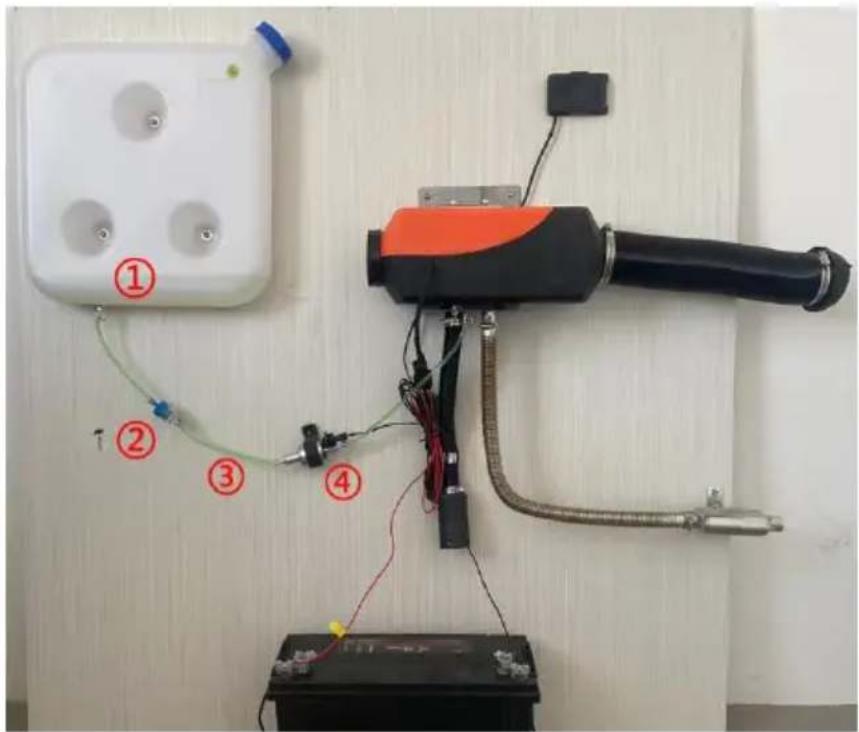
※ Maintenance: If black smoke is found during the operation of the heater for a period of time or the second year of use, it indicates that there is carbon accumulation in the combustion chamber that needs to be cleaned in a timely manner. The operation method is as follows:
(1) Remove the outer shell; ② Remove the motherboard bolts with an Allen wrench; ③ Remove the four bolts of the fan assembly with an Allen wrench; ④ Remove the four bolts of the combustion chamber with an Allen wrench.
⑤ Remove the combustion chamber and replace it with a new recovery heater;
Schematic diagram of combustion chamber replacement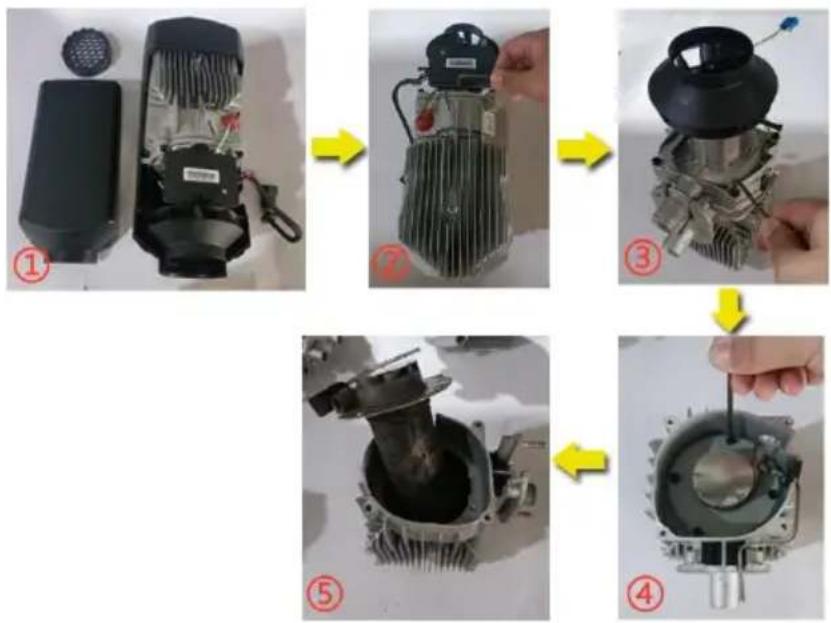
Cautions for Diesel Heater Power Supply:
※ Diesel heater power supply requirements: Voltage: 12V; Current: ≥ 20A; Use either a power source or a battery. (Avoid charging the battery while supplying power to the heater, as low current may lead to malfunctions. Ensure a secure battery connection without using clamps to prevent poor contact. Using the car's cigarette lighter as a power source is not recommended due to insufficient current.)
Fixing the battery clamp can easily cause poor contact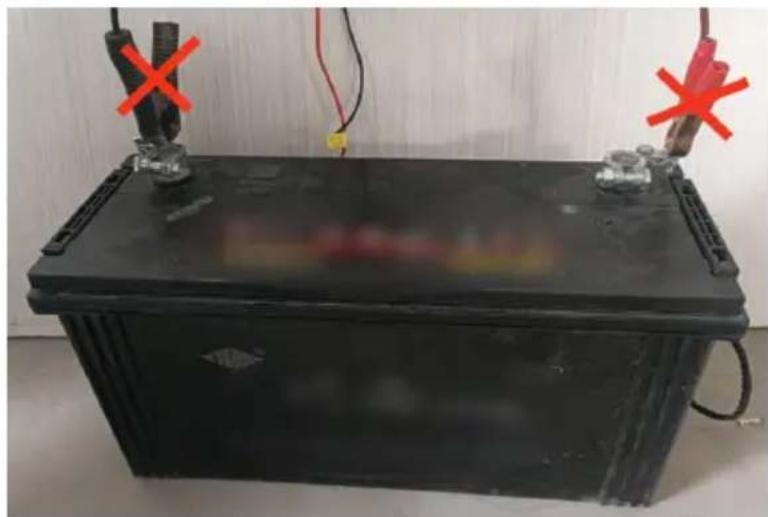
Cigarette lighter current low does not work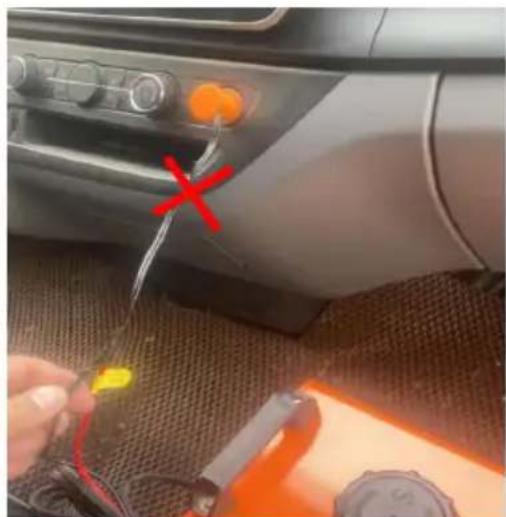
ZM-1:
(ZM5011, ZM5012, ZM2001, ZM2003, ZM5014)
ZM-2:
(ZM5002, ZM5013, ZM5008, ZM8001)
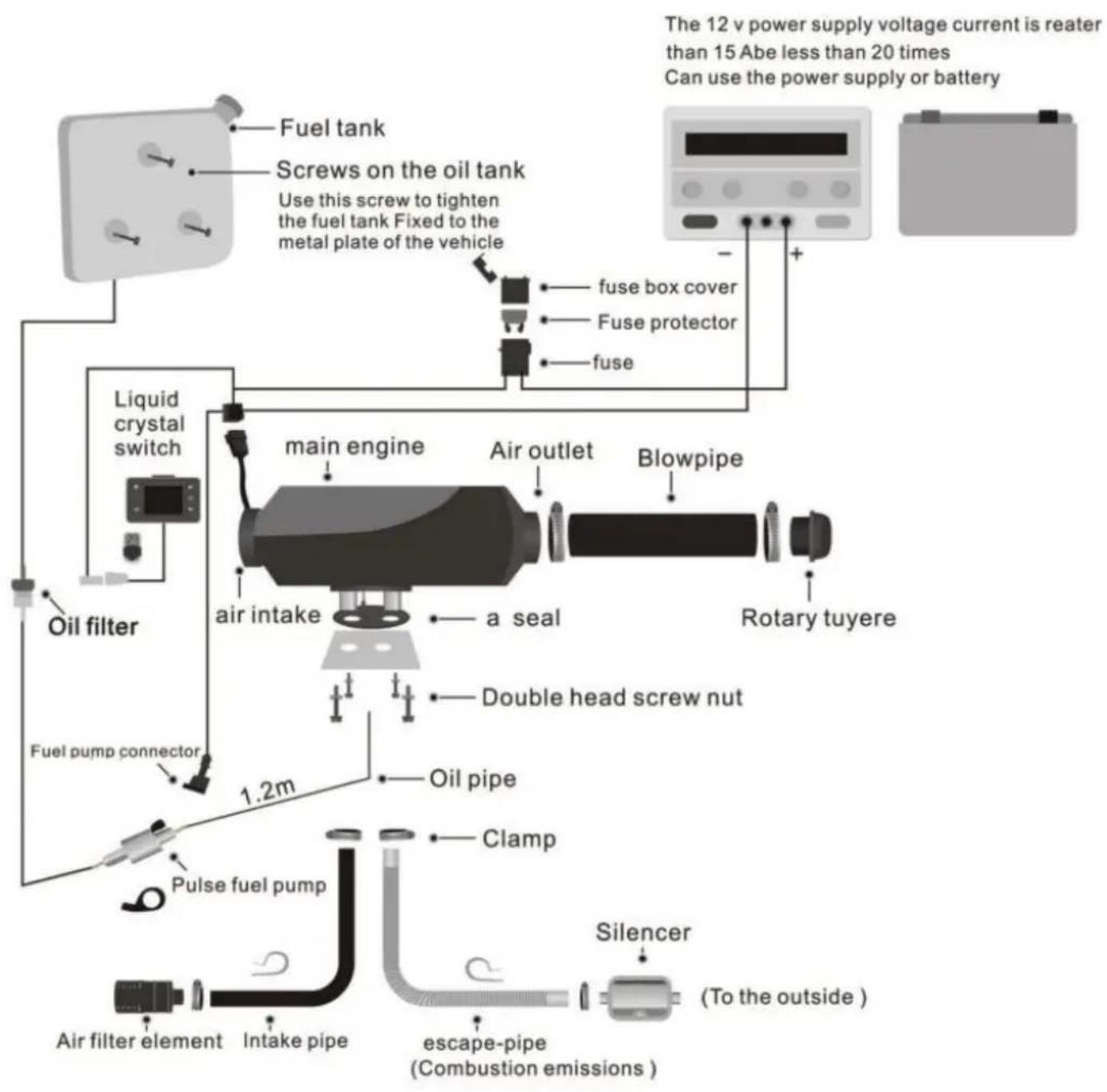
ZM-1:
(ZM5003)
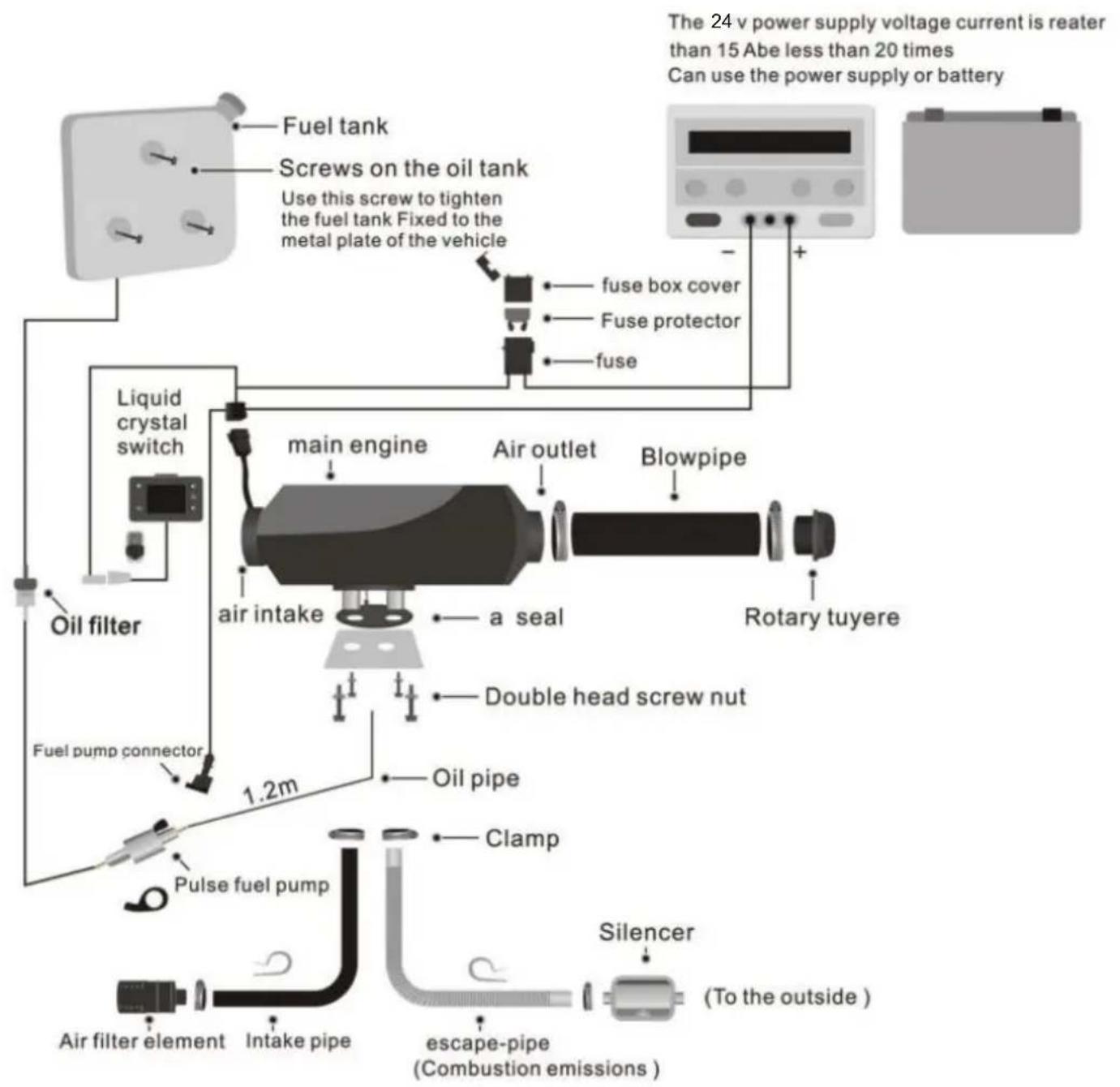
ZM-3:
(ZM2002, ZM5001, ZM5005, ZM5007, ZM8002, ZM8003, ZM80
04, ZM8005)
ZM-4:
(ZM5004, ZM5006, ZM5009, ZM5010, ZM3001)
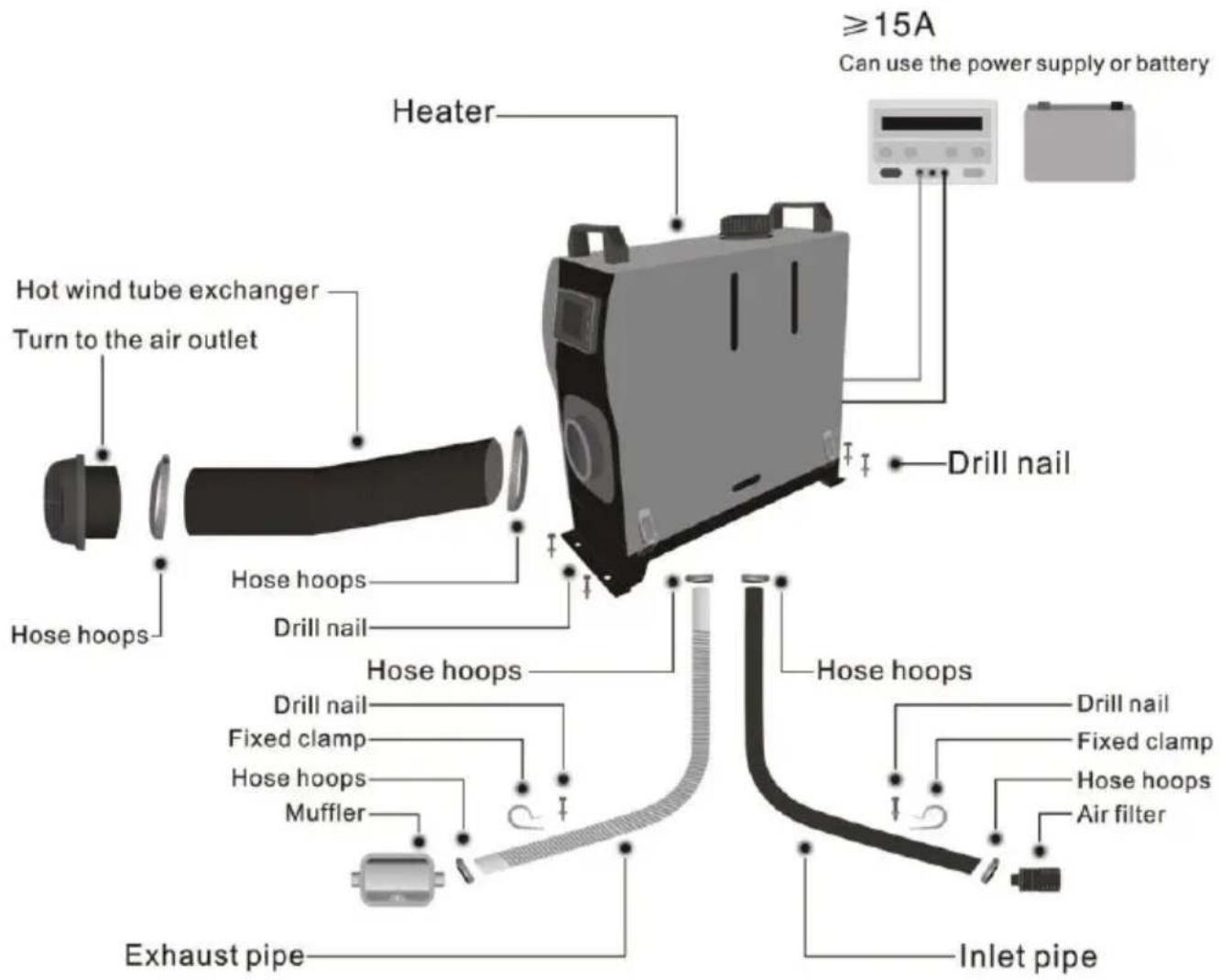
ZM-5:
ZM5015
For specific installation, please scan the QR code to view the installation video.


ZM-1/ZM-2 video QR code, ZM-3/ZM-4/ZM-5 video QR code

Warning:
- The air inlet shall not be blocked, and keep the inlet open and clear.
- Keep the exhaust pipe clear. The exhaust pipe outlet shall be kept away from anything flammable, and avoid heating and igniting the flammable goods and loading cargo on the ground.
- To ensure optimal combustion, please remember that the smoke exhaust pipe cannot be placed upward, but must be placed horizontally or downward.
1. Rotary Knob Panel Instructions
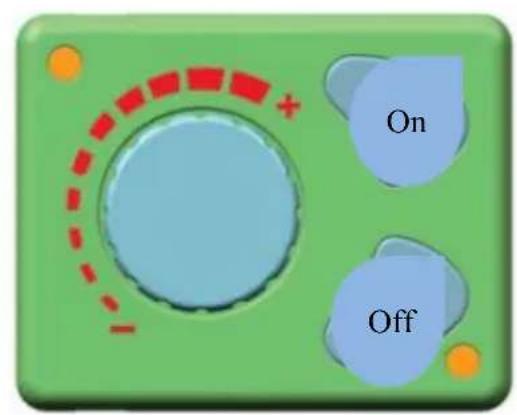
Introduction of keys:
ON - > startup
OFF - > shutdown
Rotary knob - > temperature adjustment and wind speed control
Lighting instructions:
Considering that there is lighting below the ON/OFF key, operators will find the rotary knob easily in dark environments. The lighting on the outside of the rotary knob will show the temperature value and failure state.
Key function introduction
ON: Please press the ON key gently when the working voltage has met the related conditions.
OFF: Please press the OFF key gently when the machine is under the working state.
Rotary knob: The temperature will rise when the rotary knob is rotated clockwise; at this moment, the red indicators on the outside of the rotary knob will increase.
The temperature will decrease when the rotary knob is rotated anti-clockwise; at this moment, the red indicators on the outside of the rotary knob will decrease.
Fuel filling by hand
Please rotate the rotary knob clockwise under the OFF state until the red indicators are on. Then, press the OFF button for more than 3 seconds; at this moment, manual oil pumping will start. Press the key gently to stop the oil pumping when the air has been removed from the circuit.
2. 12V-24V Common Digital Panel Operation Instruction
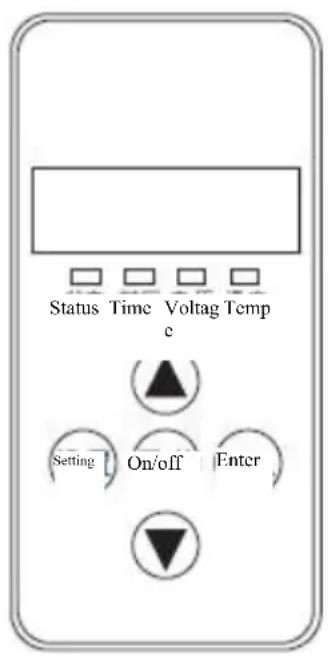
1. Indicators
Status: Permanently on upon startup, blinking upon the initialization of shutdown, off upon the completion of shutdown.
Time: Permanently on when displaying the time or setting the timed startup or shutdown, and off under other statuses.
Voltage: Permanently on when displaying voltage or setting the parameters in relation to voltage, and off under other statuses.
Temperature: Permanently on when displaying the ambient temperature or setting the operating temperature, and off under other statuses.
2. Key Function
riangle - > Under the setting status, press it to raise the parameter to be set; under the non-setting status, press it to raise the operating temperature to be set.
Set -> Enter the setting status to adjust parameters and change the machine's operating status.
On/off -> Promptly press it to start up the machine, and the status indicator becomes permanently on; press and hold the key for 2 s to shut down the machine, and the status indicator becomes blinking.
OK -> Under the setting status, press it to confirm the current setting value and proceed to the next.
| parameter to be set; under the non-setting status press it to view the machine's status▼ -> Under the setting status, press it to reduce the param to be set; under the non-setting status, press it reduce the operating temperature to be set |
3. Description of Setting Parameters (Press the Set Key to Enter)
| 1. Time setting | → | Use the up/down keys to adjust the parameter | → | Press the OK key, and consecutively set the Hour (24-hour system) and the Minute, and press the OK key to proceed to the next parameter |
| 2. Timed startup and shutdown setting | → | It is off by default, displaying 1-OF; press the up arrow key to activate it, displaying 1-on | → | Press the OK key to consecutively set the first group of startup/shutdown time values and the second group of startup/shutdown time values, and then press the OK key again to proceed to the next parameter |
| Admin password input | → | Press the up/down arrow keys, and when the correct value appears, press the OK key to proceed to the next digit. After all four digits are input correctly, press the key again to proceed to the next parameter | ||
| 3. Pump oil volume setting | → | Press the up/down keys to modify the minimum pump volume, and press the OK key when the required value is set | → | For the maximum pump oil volume setting, use the up/down arrow keys to modify it as required, and then press the OK key to proceed to the next parameter |
| 4. Fan revolution speed setting↓ | → | Press the up/down arrow keys to modify the minimum fan revolution speed, and press the OK key when the required value is set | → | For the maximum fan revolution speed setting, use the up/down arrow key to modify it as required, and then press the OK key to proceed to the next parameter |
| 5. Operating voltage setting | → | The main board's operating voltage can only be adjust under the shutdown status. Press the up/down arrow keys to switch the operating voltage to the 12V syste (displaying U-12) or to the 24V system (displaying U-2 (Before startup, please check whether the oil pump, the motor and the ignition plug are suitable to each other avoid damage) | ||
| 6. Revolution speed signal selection | → | Press the up/down arrow keys to set the revolution si signal. Select 1 if the vane wheel has two magnets with the opposite polarity or has only one magnet. Please select 2 if the vane wheel has two magnets with the same polarity. If the parameter is incorrect, 1-fold spe error will occur. | ||
| 7. Admin password modification | → | By default, the OFF status is displayed. Press the OK if no modification is needed, to skip the password modification and automatically quit after saving the parameters. Press the up arrow key, and when the ON status is displayed, press the OK key to enter the modification status, and input a 4-digit new password, and press the OK key again to save the new password and the adjusted parameters for automatic quit. | ||
| Note: after all parameters are set, you must press the OK key to quit and the set parameters. If you quit by pressing the Set key, the parameters will be saved. Please carefully check each digit of the new password, and ke mind so that you can use it to change parameters next time. | ||||
4. Description of Machine Status Query
| Time display | → | Ambient temperature display | → | Set temperature display (automatic temperature control) / set pump oil volume display (manual temperature control) |
| Under the non-setting status, press the OK key to view cyclically | ← | Historical fault code display | ← | Power supply voltage display |
5. Manual Fuel Filling Description
Under the non-setting status, first press and hold the down arrow key, and then press the OK key simultaneously to enter the manual oil pumping interface. When H-OF is displayed, first release the OK key, and then release the down arrow key. Press the up arrow key to activate manual oil pumping, H-ON will be displayed and you will hear the oil pumping noise. Simply press the down arrow key or the Set key to deactivate it and quit the manual oil pumping.
6. Timed Startup/Shutdown Description
After setting the run time, press the OK key to enter the timed startup/shutdown setting function. By default, OF indicates the off status, and please press the up arrow key to activate the ON status, then you can press the OK key to set the first group of values, with the hour and minute values for the startup to be set first, and secondly enter and set the hour and minute values for the shutdown if the values for the startup are set. Then, press the OK key to enter the second group of values, with similar setting measures as those of the first group. You may specify an interval between the two groups of values. The timing function can only be performed once upon each setting, i.e. if the set timing values are performed, they will be invalid, and you need to reactivate the timing function and set new values for the timing.
7. Temperature Control Mode Switchover Description
Under the non-setting status, first press and hold the up arrow key, and then press the Set key simultaneously, if the panel displays P-xx (xx indicates pump oil volume), it indicates that you have entered the manual temperature control mode and the pump oil volume for operation is restrained within a range between the current pump oil volume and the initial pump oil volume. When you press the above mentioned keys simultaneously and the panel displays xx ° C (xx indicates temperature value), it indicates that you have entered the automatic temperature
control mode and the pump oil volume for operation is restrained within a range between the maximum pump oil volume and the initial pump oil volume. Under the two modes, the automatic changes of pump oil volume both depend on the variation of the temperature, but the difference between the two modes is that, under the automatic mode, the pump oil volume can reach the maximum value set for the parameter, which leads to higher temperature of the machine; under the manual mode, the pump oil volume is limited to the current setting value and can not reach the maximum value set for the parameter, thus the equipment's temperature is limited to the selected range, which is more adaptable to certain old-fashioned drivers.
8. The instructions on the LCD panel
In the condition of not setting, press raised first, press the confirmation key at the same time, to keep more than 3 seconds. Remote control to the code into the interface, display HFA -, press on the remote control to open fire away.
Control code, the code after the exit of code interface, the machine into the boot state, if the code does not enter the boot failure state. Timeout is wrong code automatically withdraw from code.
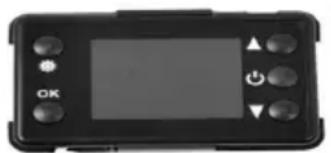
LCD panel using the above method
| Warnings | 1. The fixed backboard shall be sealed and separate from the vehicle sheet metal during installation to avoid the physical injury to the driver when the combustion gas flows in the driving cab from the gap. 2. The exhaust pipe length shall be 30cm at least. 3. The exhaust gas outlet shall be firmly placed in the empty space. 4. The exhaust pipe outlet shall not look at the driving direction. |
| Recommendations: It is suggested to apply the sealant to block off the installation gap when the heater has been fixed. | |
Instructions for Use of 12V-24V Universal LCD Panel
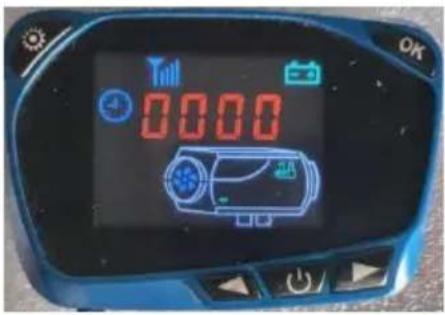
1. Function of key
- Under the setting mode, you can increase the setting parameters, and under the non-setting mode, we can increase the working temperature or oil volume.
On/Off ->A short press can turn on the device, and the LCD screen displays On. A long press for 3 seconds will shut down, and the LCD screen displays Off.
- > Under the setting mode, we can increase the setting parameters, and under the non-setting mode, you can increase the working temperature or oil volume.
To implement basic operations, you can use the above states. To implement the settings, you can use the following operations.
Setting ->Entering the setting mode, you can adjust the setting parameters and change the working state of the machine.
OK -> Under the setting mode, you can confirm the current setting value and enter the next parameter setting. If it is not in the setting state, you can view the operating status of the machine.
- Check the status of the machine (briefly press the OK button. After pressing the switch, the different statuses will change and be displayed accordingly.)
Time display → Environmental temperature display → Set temperature display (automatic temperature control mode) / Set oil quantity display (manual temperature control mode) → Power supply voltage display → Historical fault code display → In non-setting mode, press the OK button to cycle through the views.
3. Instructions for manual fuel filling
With the power off, press the Down and OK buttons simultaneously to enter manual fuel filling. The display screen will show 'H oF'. After releasing, press the Up button to display 'Hon' again. The oil pump will start working, and you can hear the sound of the oil pump working, and the oil pump icon will light up. When the H or F display is lowered, fuel refueling will exit and the fuel
pump icon will disappear. The process of exhausting pipeline gas needs to be observed by someone, and the oil can stop when it reaches the oil inlet position of the machine. If there is too much fuel entering the machine, black smoke will appear during ignition.
4. Instructions for switching temperature control methods
Press the Up and Setting buttons simultaneously to switch the temperature control mode. Manual temperature control (adjusting the oil quantity to display P-16, where the number represents the oil quantity), automatic temperature control (adjusting the temperature to display 25°C, where the number represents the temperature). The difference between the two temperature control methods is that the automatic mode can pump oil to the maximum value set by the parameter, while the manual mode is limited to the current set value due to high machine heat, and will not reach the maximum oil value set by the parameter. The gear is well integrated with the usage habits of some experienced drivers.
5. Instructions for remote control code
With the power off, press the Up button on the LCD panel. When entering the remote control code matching interface, the display screen will show 'HFA -', and then press the On button on the remote control to transmit the remote control code. After successful automatic code matching, the code matching interface will exit. If the code verification fails, it will not enter the boot state. If the remote control code is not received after a timeout, the pairing status will automatically exit.
6. Instructions for parameter setting process (press the Setting button to enter the setting state)
| 1 Time setting | → | Please press the buttons Up or Down to adjust the parameters→ Please set parameters, such as hours (24-hour system) minutes in sequence, and press the button OK to confirm the parameters before proceeding to the next item. | ||
| 2 Timing startup setting | → | Under default Off status, the screen displays 1 oF. Press button Up to turn on the display of 1 oN, and press the button OK to enter. → To set the hour and minutes in sequence. Timing is a countdown method, with a maximum of 99 hours and 59 minutes. | ||
| 3 Timing shutdown setting | → | Under default Off status, the screen displays 2 oF. Press button Up to turn on the display of 2 oN, and press the button OK to enter. To set the hour and minutes in sequence. Timing is a countdown method, with a maximum of 99 hours and 59 minutes. | ||
| Manage password input | → | Please press the buttons Up and Down to adjust. If the correct value appears, press the button OK to enter the position. After entering the correct 4-digit password, press the button OK to proceed to the next item. If there is a input error, it will return to waiting for the first numerical value to be entered. No need to modify subsequent data. You can press the set button until exiting, or wait for 10 seconds to automatically exit. | ||
| 4 Pump oil volume setting | → | Please press the buttons Up and Down to modify the minimum pump oil volume. After reaching the required value, please press the button OK to enter the maximum fuel setting. | → | Please press the buttons Up and Down to modify the maximum pump oil volume. After reaching the required value, please press the button OK to enter next item. |
| 5 Fan speed setting | → | Please press the buttons Up and Down to modify the minimum Fan speed. After reaching the required value, please press the button OK to enter the maximum Fan speed. | → | Please press the buttons Up and Down to modify the minimum pump oil volume. After reaching the required value, please press the button OK to enter the next item. |
| 6 Working voltage setting | → | The working voltage of the mainboard can only be selected under power-off status. Please press the buttons Up and Down to switch between setting the working voltage. Adjusting the 12V system to display U-12, and adjusting 24V system to display U-24 to complete the selection. Before powering on, please pay attention to check whether the oil pump, motor, and ignition plug are compatible to avoid damage. |
| 7 Speed signal selection | → | When displaying 5n-1, please press the buttons Up and Down to set the speed signal, and choose 5n-2 for the polarity of the two magnets on the impeller, as well as choose 5n-1 (default) when the polarity of the magnet is different or there is only one magnet. The incorrect selection of the parameter will result in a speed difference of one time. |
| 8 Ignition plug power selective scanning | → | When displaying PF-5, press the buttons Up and Down modify the value (1=35W, 2=40W, 3=45W, 4=80W, 5=85W, 6=90W), with a default value of 5. It is recommended to default values or modify the data after verification. |
| 9 Manage password modification | → | The initial displaying is the oF status, and there is no need to change it. Press the button OK to skip password modification and save the modified parameters mentioned above. If you need to modify it, please press the up but display On, and then press the button OK to enter the password modification status. Please press the buttons U and Down to adjust. When the 4-digit password is entered correctly, press the OK key to enter the next digit. After saving the new password and adjusting the set parameter the system will automatically exit. |
the set parameters. If quitting midway, the previous adjustment data will be lost and deemed invalid. Please carefully check each newly entered password and save it for entry and parameter changes in the future.
Main board Fault Code
| Machine Fault | LCD Panel Display | Digital Panel Display | Knob Panel Display | Solutions |
| Power supply under voltage | - + | Display E-01 | 1 indicator light flashing | Please increase the power supply voltage. |
| Power supply overvoltage | - + | Display E-02 | 2 indicators lights flashing | Please reduce the power supply voltage. |
| Ignition plug fault | - - | Display E-03 | 3 indicators lights flashing | Please check whether the ignition plug is open or short-circuited. |
| Oil pump fault | - - | Display E-04 | 4 indicators lights flashing | Please check whether the oil pump is disconnected. |
| Machine overheating | - - | Display E-05 | 5 indicators lights flashing | Please check whether the temperature sensor on the housing or the fast speed is abnormal. |
| Motor fault | - - | Display E-06 | 6 indicators lights flashing | Please check the polarity of the magnet, the position of the Hall sensor, or loose terminals. |
| Broken wire fault | - - | Display E-07 | 7 indicators lights flashing | Please check the panel connection plug, the blue harness connection is loose or disconnected |
| Flame extinguishing | - - | Display E-08 | 8 indicators lights flashing | Please check for air or wax blockage in the oil circuit, which may cause poor fuel supply. |
| Sensor fault | Display E-09 | 9 indicators lights flashing | Please check whether the sensor plug is loose disconnected, or short-circuited. | |
| Ignition failure | Display E-10 | 10 indicators lights flashing | Please check whether the oil circuit is blocked, whether the oil inlet is not smooth, the oil pum is stuck, or whether there is a problem with the oil, causing the volatile network to be blocked, which may cause the ignition to fail to burn normally. |
Note: The LCD panel will display graphics and numbers simultaneously when a fault occurs, and the number will match the digital panel.
Operation instructions for parking heater
- The control panel is shown below
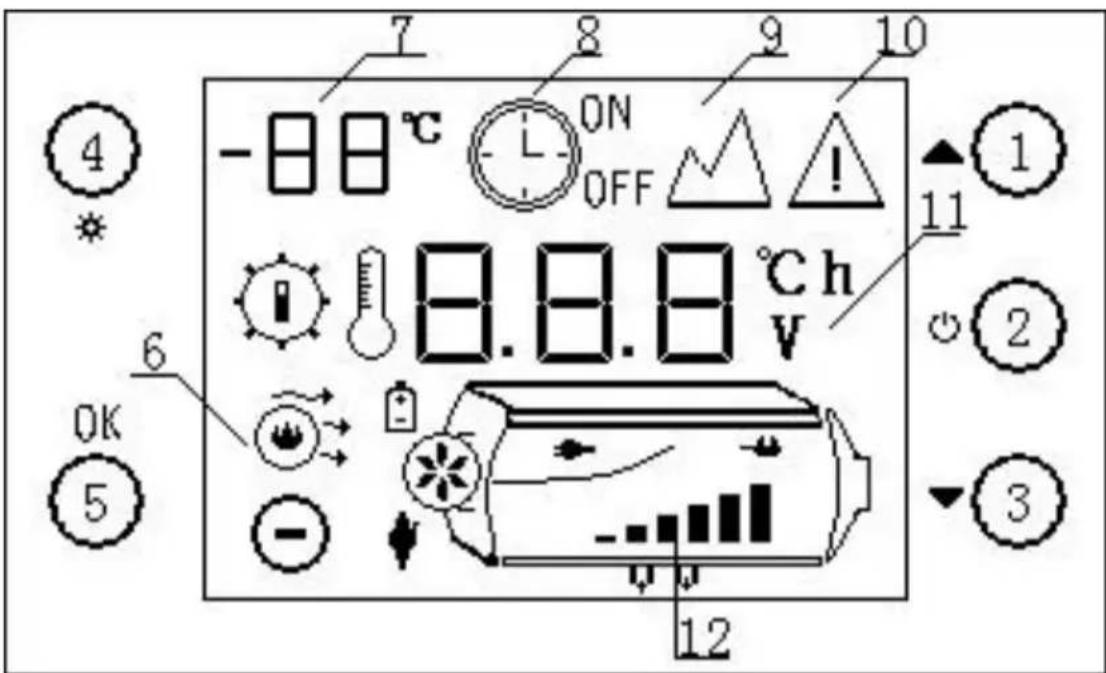
- 1. Shift up key 2. On/Off key 3. Shift down key
- 4. Setting key 5. Confirm key 6. Work status symbol
- 7. Display ambient temperature 8. Timing symbol
- 9. Plateau symbol 10. Fault symbol
- 11. Display data parameters 12. Host schematic
Operation
1. Switching operation
Shutdown status boot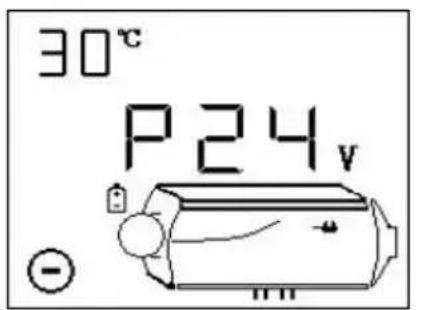
Mode boot mode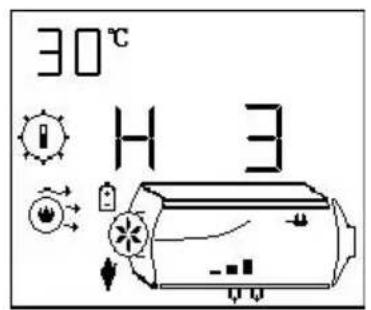
manual mode) (automatic mode)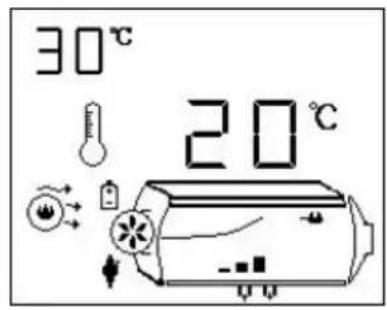
1) boot-up operation
In shutdown state, long press the "O" key for 2 seconds, the equipment starts up, and the boot status is displayed as shown above.
2) shutdown operation
In the on state, long press the "O" key for 2 seconds, the equipment enters the blow-off cooling process, and the display shows the cooling process. Turn off the equipment after cooling.
At this time, do not force the power off for the cooling block. Direct power failure can damage parts because the body temperature is too high to dissipate heat. Only when the machine is turned off can the power be cut off.
3) manual mode operation
Manual mode has six gears (H1-H6), with H6 representing maximum power. As shown above, in the boot status, add or subtract gears by pressing "▲" or "▼". The main engine schematic diagram and bar chart show the current gear.
4) automatic mode operation
In automatic mode, the figure above shows the setting of 20 degrees Celsius. Add or subtract temperature values by pressing "▲" or "▼". The setting range is 5-30 degrees Celsius. Switch between manual and automatic mode by long pressing the "" key.
2. manual oiling operation
In shutdown state, two seconds after pressing the "▲" and "▼" at the same time, manual control of pumping starts. Stop oiling after releasing the key. Please use cautiously!
3. plateau model operation
At the same time, press the button for 2 seconds to enter the plateau
mode. To start plateau mode, press the "" and "ok" keys for two seconds at the same time to exit plateau mode. Please use cautiously!
4. Setting timing switch time operation
Two seconds after pressing the "OK" and " " keys at the same time, enter the timing setup time interface, as shown in the figure below. The "tab" flickers, and the display shows 10.1 hours on time. If it displays OFF, it means setting a timed shutdown time.
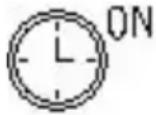
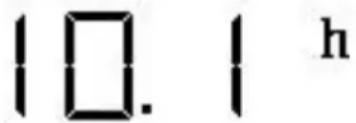
1) Press "▲" or "▼" key to adjust the time value, time range: 1-24 hours. 2) Short press the "O" key to switch to adjust digital bits. 3) Short press the "O" key to switch between Timed Start-up and Timed Shutdown Time values. 4) Short press the "OK" key to save the settings and exit the interface. 5) Press the "M" key for 2 seconds to exit without saving. 6) Starting Timing Function
At the same time, long press the " " and " " keys to start the timing function. Start the timed boot in the shutdown state, start the timed shutdown in the boot state. Press the C key briefly to see the remaining time.
5. Remote control code-matching operation
In shutdown state, simultaneously long press "O" and "▼" for two seconds to enter remote control code setting as follows.

1) Press "▲" or "▼" key to adjust the third digit value for remote control coding. The numerical range is 1-5, corresponding to five remote controls. 2) Choose the code of the remote controller, arbitrarily press a key of the remote control. Machine coding is successful and exits coding state. 3) Short press the "*" key to exit remote control code.
*Remote Control Requirements: 433MHz, 24-bit code. Remote control function is optional; please specify if you need to place an order.
6. Fault alarm
Show the following figure. The corresponding failure symbol flickers, and the corresponding failure device icon flickers. Display data as fault code; its meaning please refer to the fault table.
*Spark plug, oil pump, fan, sensor, power supply and other symbols flicker to indicate that the corresponding device has failed.
Fault table
| Fault code | Cause of failure | solutions |
| E-2 | Power supply voltage range | Normal range: 24V (18-32V), 12V (9-16V). Check whether the battery or generator is normal d whether the fuse is aging |
| E-3 | Ignition plug failure | Check whether the ignition plug connector is loose or the wire is short-circuited to the housi Detect whether the ignition plug is damaged |
| E-4 | Oil Pump Failure | Check for damage, loosening, oxidation, short circuit and breaking of oil pump connections and nectors |
| E-5 | High temperature alarm ( intake > 50 C; case > 230 C) | Check whether the heating duct is unobstructed Check whether the fan is working properly Check whether the temperature sensor is normal |
| E-6 | Fault of Fan | Check whether the impeller is stuck Check if the connection plug-in is loose Excessive gap between magnet on wind turbine at Hall sensor on controller Whether the line is short-circuit or open-circuit; leakage of motor |
| E-8 | Flame out | Check for oil shortage, low temperature solidification of oil, blockage of oil pipeline and bloc age of oil pump Check whether the intake and exhaust ducts are unblocked Check whether the housing temperature sensor is full contact with the housing and whether the pre re spring is strong |
| Unsuccessful start up | The shell temperature is too high to blow the cooling shell for 3 minutes after starting. There is a lot of white smoke in the exhaust gas | |
| 2.1) Check that the filter beside the ignition plug is Clean and not cleaned or replaced 2.2) Check whether the fuel injection is effective 2.3) Check whether the ignition plug is aging 2.4) Is the clearance of the internal wind turbine large? A small amount of white smoke or no smoke in the exhaust gas 3.1) Check for oil shortage, frozen or blocked oil pipelines 3.2) Check whether the pump is jammed or damaged and the pump is powerless to pump. 3.3) Check whether the intake and exhaust passage of combustion are unobstructed 3.4) Check whether the ignition plug is damaged 4) he ignition is normal but the failure of ignition is reported. Check whether the housing temperature sensor is in full contact with the housing, whether the fissure spring is strong, whether the sensor is normal. | ||
| E-9 | Sensor failure | Whether the temperature sensor connectors and connectors are damaged or loosened, whether the sensor is damaged or not |
Operation instructions for parking heater
- The control panel is shown below
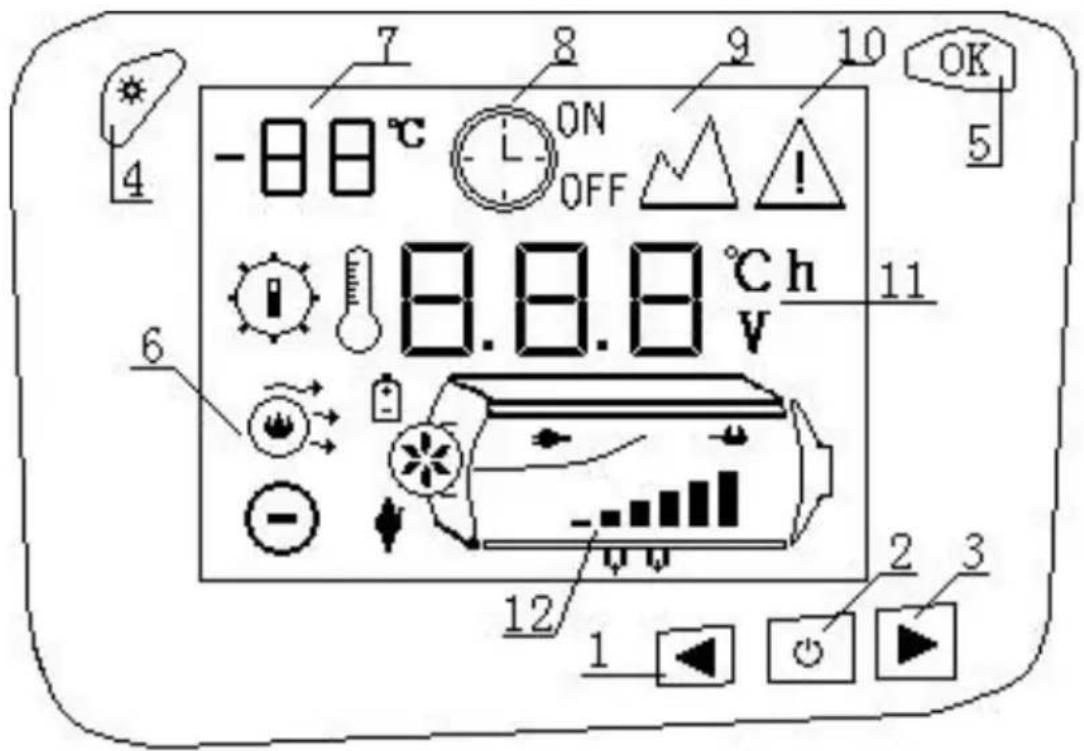
- 1. Shift key 2. On/Off key 3. Downshift key
- Setting key 5. Deterministic key 6. Work status symbol
- Display ambient temperature 8. Timing symbol
- Plateau symbol 10. Fault symbol
- Display data parameters 12. Host schematic
2. Operation
1. Switching operation
Shutdown status boot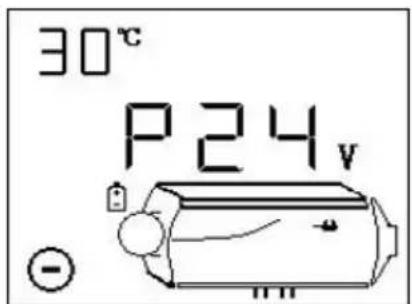
Mode boot mode (manual mode)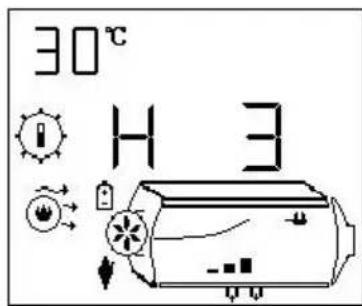
(automatic mode)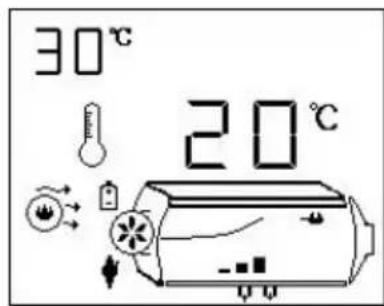
1) Boot-up operation
In shutdown state, long press "O" key for 2 seconds, equipment starts up, display boot status as shown above.
2) Shutdown operation
In on-state, long press the "O" key for 2 seconds – equipment entering blow-off cooling
process, display ". Turn off the equipment after cooling.
At this time, do not force the power off for the cooling block. Direct power failure can damage parts because the body temperature is too high to dissipate heat. Only when the machine is turned off can the power be cut off.
3) manual mode operation
Manual mode has six gears (H1-H6). H6 represents maximum power. As shown above, in the boot status, add or subtract gears by using "or", and the main engine schematic diagram and bar chart show the current gear.
4) automatic mode operation
In automatic mode, the figure above shows the setting of 20°C. Press the " " or "▶" key to increase or decrease the temperature value, and set the range of 5~30°C. Press and hold the "@" key to switch between manual and automatic mode. The panel display temperature range is -20~40°C. 2. Switch on display data.
2. Switch on display data
In the startup state, briefly press the "OK" key to switch the display data. The switching sequence is: gear (or set temperature) -> casing temperature -> working voltage.
3. Manual oiling operation
In the shutdown state, press and hold the "▶+" key for 2 seconds at the same time, manually control the oil pump for oil injection, and stop oil injection after releasing the key. Please use with caution!
4. Plateau model operation
At the same time, press the button for 2 seconds to enter the plateau
mode. "▲" display starts plateau mode. Press the " and "OK" key for two seconds to exit the plateau mode at the same time. Please use cautiously!
5. Setting timing switch time operation
Two seconds after pressing the "OK" and "O" key at the same time, enter the timing setup time interface, as shown in the following figure. The tab "L" flickers, and the display shows 10.1 hours on time.
ON: Indicates to set the scheduled startup time;
OFF: Indicates that the scheduled shutdown time is set;
10.1 h
1) Press the "or" key to adjust the time value, time range: 0.1-24.0 hours. 2) Short press the "O" key to switch to adjusting the digital bits. 3) Short press the "*" key to switch between the Timed Start-up and Timed Shutdown time values. 4) Short press the "OK" key to save the settings and exit the interface. 5) Press the "*" key for 2 seconds to exit the interface without saving the settings.
6. Starting Timing Function
At the same time, long press the " " " " " key to start the timing function. Start the timing startup in the shutdown state, start the timing shutdown in the startup state. ON or OFF flashes; ON indicates the timing startup, and OFF indicates the timing shutdown. Briefly press the " " key to view the remaining time.
7. Remote Control Code-Matching Operation
In the shutdown state, simultaneously long press "O" and "▶" for two seconds to enter the remote control code setting as follows.
O C 1
1) Press the "▲" or "▼" key to adjust the third digit value for remote control coding. The numerical range is 1-5, corresponding to five remote controls. 2) Choose the code of the remote controller, arbitrarily press a key of the remote control. The machine codes successfully and exits the coding state. 3) Short press the "*" key to exit the remote control code setting.
*Remote Control Requirements: 433 MHz, 24-bit code. The remote control function is optional; please specify if you need to place an order.
8. Fault Alarm
The following figure shows the corresponding failure symbol flickering, and the corresponding failure device icon flickering. The displayed data is the fault code; its meaning refers to the fault table.
*Spark plug, oil pump, fan, sensor, power supply, and other symbols flickering indicate that the corresponding device has failed.
Remote Control Operation Instructions
1. The panel is shown in the figure below
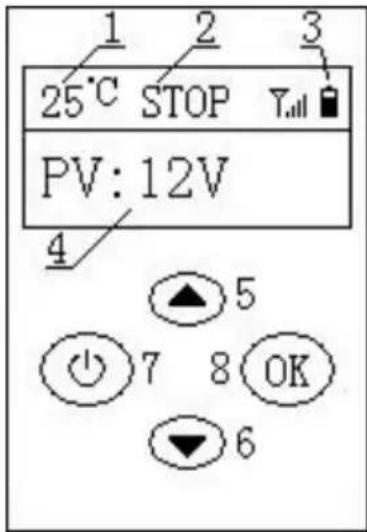
- Display ambient temperature; 2. Equipment status;
- Battery voltage symbol;
- Equipment operation data and parameters; 5. Upshift key; 6. Downshift key;
- On/off key; 8. OK key;
Equipment status: HEAT: heating;
COOL: blowing cooling; STOP: shutdown operation
data and parameters: PV: power supply voltage; SG: gear;
ST: set temperature; FT: casing temperature; ALM: fault
2. Use operation
1) Press and hold the "key for 2 seconds to turn on/off. 2) In the startup state, press the "or" key to increase/decrease the gear set temperature, and long press the "OK" key to switch to manual/automatic mode. 3) In the startup state, press the "OK" key to switch the display: gear (or set temperature) -> casing temperature -> working voltage. 4) In the shutdown state, press and hold the "▼" + " " key at the same time to pump oil. After releasing the key, stop oiling.
- Indicates that the battery is out of power. Please replace the battery.
*In order to reduce power consumption and increase battery service time, press the key for 30 seconds, and the remote controller will shut down automatically; Press any key to start the machine.
Operating instructions for parking heater
- The control panel is shown below
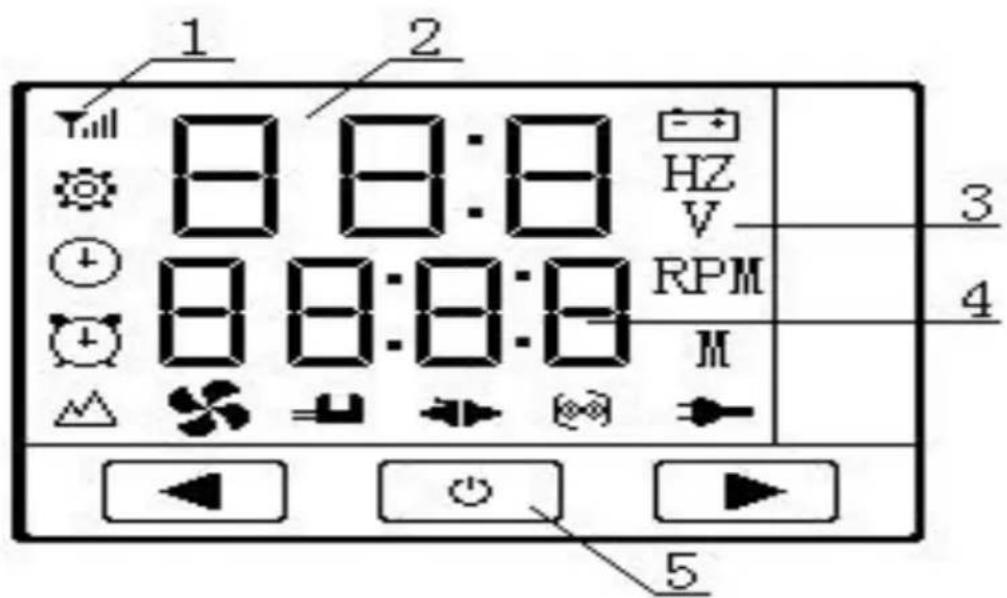
1. Indicator
Power symbol; Fan symbol; Symbol of temperature sensor; Oil pump symbol; Communication symbol; Ignition plug symbol; Wireless symbol; Set symbol; Clock symbol; Timing symbol; Plateau symbol; 2. Display running data parameters. 3. Unit symbol. 4. Display ambient temperature or time. 5. Key Shift key; On/off key; Downshift key;
2. Operation
1. On/off operation
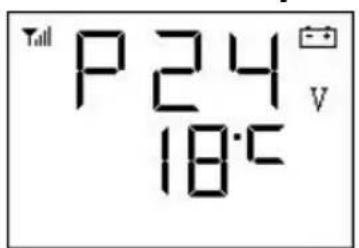
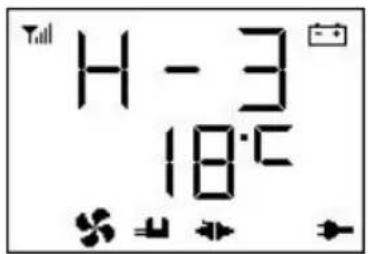
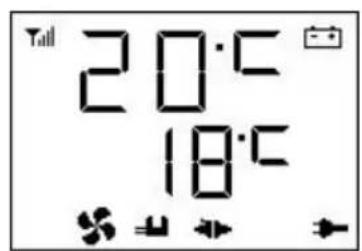
Shutdown status Power on status Power on status (manual mode) (automatic mode)
1) Boot-up operation
In shutdown state, long press the “Ⓞ” key for 2 seconds, equipment starts up,
displaying boot status as shown above.
2) Shutdown operation
In the power on state, long press the " " key for 2 seconds, the device will enter the shutdown and cooling process, and "off" will be displayed. The device is shut down after cooling, and the "shutdown status" is displayed as shown in the figure above. Do not force power off when blowing the body cold. "Direct power off will damage the parts because the body temperature is too high to dissipate heat!", Wait for the machine to display in the off state to power off!
3) Manual mode operation
There are 6 gears in manual mode (H1-H6). H6 represents the maximum power, as shown in the figure above "power on state (manual mode)", and gears can be increased or decreased by " " " " ".
4) Automatic mode operation
In the automatic mode, the "power on status (automatic mode)" in the figure above indicates that the setting temperature is 20°C . Through the "▲" or "▶" key, increase / decrease the temperature value, set the range of 5 30°C , and switch the manual / automatic mode by long pressing the and "▶" keys for 2 seconds in the start up state.
2. Manual oiling operation
In the off state, press and hold the " " and " " keys for 2 seconds to manually control the pump to pump oil, and release the key to stop pumping oil. This function is convenient for oil-free use, please use with caution!
3. Plateau model operation
Press and hold the "+" and "+" keys for 2 seconds to enter plateau mode, and the icon "▲" shows to start plateau mode. In plateau mode, the wind oil ratio is reduced to adapt to plateau hypoxia, and then press and hold the "+" and "+" keys for 2 seconds to exit plateau mode. Please use with caution!
4. Setting timing switch time operation
Long press "O" and "▲" for 2 seconds at the same time to enter the timing setting and starting timing interface, and the indicator "+" shows, indicating that the time status can be set, as shown in the figure below. In shutdown state, the machine will be started after 10 hours and 20 minutes; In the power on state, contrary to
above.
10:20
1) Press the ◀ or ▶ key to adjust the time value, the time adjustment range: 1 minute - 24 hours. 2) Short press the "key" to switch to adjust digital bits; the corresponding position number flashes. 3) Long press the "key" for 2 seconds to save the set value and start timing. 4) Long press the "O" and "◀" keys for 2 seconds to exit this interface without saving the set value.
After data adjustment, if there is no key operation, after 15 seconds it will be automatically saved and start timing, and the icon " " shows.
5. Remote control code operation
In the off state, long press "▶" key for 2 seconds at the same time to enter the remote control code matching, as shown in the figure below.
F1
1) Press the "▲" or "▼" key to adjust the third digit value as the number of the remote controller. The value range is 1-5, corresponding to 5 remote controllers. 2) Select the number of the remote control, press a key of the remote control at will, the machine code successfully and exit the code state. 3) Short press the "key" to exit the remote control code matching.
*Remote control requirements: frequency band 433MHz, 24 bit code. Remote control function is optional function, please indicate if you need to order.
6. Fault alarm
The display is as shown in the figure below. The corresponding fault symbol flashes, and the corresponding icon of the fault device flashes. The displayed data is the fault code. Please refer to the fault table for its meaning.
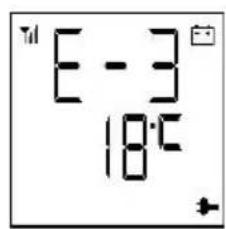
*Symbols of spark plug, oil pump, fan, sensor, power supply, etc. Flashing indicates that the corresponding device is faulty.
Fault table
| Fault code | Cause of failure | solutions |
| E-2 | Power supply voltage range | Normal range: 24V (18-32V), 12V (9-16V). Check whether the battery or generator is normal and whether the fuse is aging. |
| E-3 | Ignition plug failure | 1) Check whether the ignition plug connector is se or the wire is short-circuited to the housing. 2) Detect whether the ignition plug is damaged. |
| E-4 | Oil Pump Failure | Check for damage, loosening, oxidation, short circuit and breaking of oil pump connections and connectors |
| E-5 | High temperature alarm (intake > 50 C; case > 20 C) | 1) Check whether the heating duct is unobstruct. 2) Check whether the fan is working properly. 3) Check whether the temperature sensor is not l. |
| E-6 | Fault of Fan | 1) Check whether the impeller is stuck. 2) Check if the connection plug-in is loose. 3) Excessive gap between magnet on wind turb and Hall sensor on Controller. 4) Whether the line is short-circuit or open-circu leakage of motor. |
| E-8 | Flame out | 1. Check for oil shortage, low temperature solidation of oil, blockage of oil pipeline and blockage of oil pump. 2. Check whether the intake and exhaust ducts unblocked. 3. Check whether the housing temperature sens is in full contact with the housing and whether the pressure spring is strong. |
| Unsuccessful start up | 1) The shell temperature is too high to blow the ooling shell for 3 minutes after starting. 2) There is a lot of white smoke in the exhaus | |
| s.2.1)Check that the filter beside the ignition plug clean and not cleaned or replaced.2.2)Check whether the fuel injection is effective2.3)Check whether the ignition plug is aging.2.4)Is the clearance of the internal wind turbine large?3) A small amount of white smoke or no smokethe exhaust gas.3.1)Check for oil shortage, frozen or blocked oilpipelines.3.2)Check whether the pump is jammed or dam-ed and the pump is powerless to pump.3.3)Check whether the intake and exhaust passaes of combustion are unobstructed.3.4)Check whether the ignition plug is damaged3.5)Is the clearance of the inner wind wheel too large.4) he ignition is normal but the failure of ignitio still reported.Check whether the housing temperaturesensor is in fullcontact with the housing, whether the pressureng is strong, whether the sensor is normal. | ||
| E-9 | Sensor failure | Whether the temperature sensor connectorsand connectors aredamaged or loosened, whether the sensor is da ged or not. |
Code of use
- It is prohibited to use in high humidity, conductive dust, flammable and explosive gases, dust, materials, corrosive media, strong light, strong magnetic fields, high voltage and high current equipment nearby.
- Voltage range of power supply: DC24V controller is suitable for (19-32)V; DC12V controller is suitable for (9-16)V; different voltage controllers are not universal, and it is forbidden to use beyond the applicable voltage range.
- The 5KW controller must be used on the 5KW organism; the 2KW controller must be used on the 2KW organism.
- If the controller or external device is damaged, it must be replaced by the
prototype device and professionals.
- It is forbidden to open the controller shell privately.
- Equipment must be installed strictly and must be used under safe conditions.
- The company is not responsible for the loss and liability of the controller due to the misconnection, short circuit and damage of the external devices and lines.
- At the high temperature of the body, the fan can not operate, so it must be cooled quickly for the body to make its temperature. Cooling air is injected from the combustion inlet to make the body temperature less than 100°C. Prevent high temperature from burning parts or causing fire.
- Our company is not responsible for any loss or liability caused by the failure to install and use according to Articles 1 to 6.
Manufacturer: Shanghaiuxinmuyeyouxiangonsi
Address: Shuangchenglu 803nong11hao1602A-1609shi, Baoshan District, Shanghai 200000 CN.
Imported to AUS: SIHAO PTY LTD.
1 ROKEVA STREET, EASTWOOD NSW 2122 Australia
Imported to USA: Sanven Technology Ltd.
Suite 250, 9166 Anaheim Place, Rancho Cucamonga, CA 91730
YH CONSULTING LIMITED.
C/O YH Consulting Limited Office 147,
Centurion House, London Road, Staines
upon-Thames, Surrey, TW18 4AX
E-CrossStu GmbH
Mainzer Landstr. 69,
60329 Frankfurt am Main.
VEVOR
TOUGH TOOLS, HALF PRICE
Technical Support and E-Warranty Certificate
www.vevor.com/support
VEVOR®
TOUGH TOOLS, HALF PRICE
Temperature sensor symbol

C/O YH Consulting Limited Office 147, Centurion House, London Road, Staines-upon-Thames, Surrey, TW18 4AX
| Przedstawciel UE |
E-CrossStu GmbH Mainzer Landstr.69, 60329 Frankfurt am Main.
VEVOR
TOUGH TOOLS, HALF PRICE
(ZM2002, ZM5001, ZM5005, ZM5007, ZM8002, ZM8003, ZM8004, ZM8005)
ZM-4:
(ZM5004,ZM5006,ZM5009,ZM5010,ZM3001)
ZM-5:
ZM5015
Temperature sensor symbol;

Oil pump symbol;

Suite 250, 9166 Anaheim Place, Rancho Cucamonga, CA 91730
YH CONSULTING LIMITED.
C/O YH Consulting Limited Office 147,
Centurion House, London Road, Staines-upon
Thames, Surrey, TW18 4AX
E-CrossStu GmbH
Mainzer Landstr.69,
60329 Frankfurt am Main.
VEVOR
TOUGH TOOLS, HALF PRICE
www.vevor.com/support
VEVOR
TOUGH TOOLS, HALF PRICE
Technical support and electronic warranty certificate www.vevor.com/support
DIESEL HEATER
Downshift button;
Suite 250, 9166 Anaheim Place, Rancho Cucamonga, CA 91730
YH CONSULTING LIMITED.
C/O YH Consulting Limited Office 147,
Centurion House, London Road, Staines-upon
Thames, Surrey, TW18 4AX
E-CrossStu GmbH
Mainzer Landstr.69,
NEED HELP? CONTACT US!
YH CONSULTING LIMITED. C/O YH Consulting Limited Office 147, Centurion House, London Road, Staines-upon-Thames, Surrey, TW18 4AX
www.vevor.com/support
VEVOR
TOUGH TOOLS, HALF PRICE
Temperature sensor symbol;

Oil pump symbol;

prototypical cache proofs.
Suite 250, 9166 Anaheim Place, Rancho Cucamonga, CA 91730

YH CONSULTING LIMITED.
C/O YH Consulting Limited Office 147,
Centurion House, London Road, Staines-upon
Thames, Surrey, TW18 4AX
E-CrossStu GmbH
Mainzer Landstr.69,
60329 Frankfurt am Main.
VEVOR
TOUGH TOOLS, HALF PRICE
www.vevor.com/support
VEVOR
TOUGH TOOLS, HALF PRICE
Technical support and electronic warranty certificate www.vevor.com/support
DIESEL HEATER
INTERNAL STRUCTURE
1 ROKEVA STREET EASTWOOD NSW 2122 Australia
Suite 250, 9166 Anaheim Place, Rancho Cucamonga, CA 91730
YH CONSULTING LIMITED.
C/O YH Consulting Limited Office 147,
Centurion House, London Road, Staines-upon-
Thames, Surrey, TW18 4AX
E-CrossStu GmbH
Mainzer Landstr.69,
www.vevor.com/support
VEVOR®
TOUGH TOOLS, HALF PRICE
Imported into AUS: SIHAO PTY LTD.
1 ROKEVA STREET EASTWOOD NSW 2122 Australia
Suite 250, 9166 Anaheim Place, Rancho Cucamonga, CA 91730

YH CONSULTING LIMITED.
C/O YH Consulting Limited Office 147,
Centurion House, London Road, Staines-upon
Thames, Surrey, TW18 4AX
E-CrossStu GmbH
Mainzer Landstr.69,
60329 Frankfurt am Main.
VEVOR
TOUGH TOOLS, HALF PRICE
electronics www.vevor.com/support

- DIESEL HEATER
- VEVOR®
- NEED HELP? CONTACT US
- SAFETY INSTRUCTION
- WARNING
- WARNING: FLAMMABLE MATERIAL
- WARNING: TOXIC MATERIAL
- SAVE THESE INSTRUCTIONS
- FCC INFORMATION
- INTERNAL STRUCTURE
- INSTALLATION POSITION
- PACKING LIST
- INSTALLATION OF FUEL TANK AND NOZZLE
- SPLITTING MACHINE
- NO SIDE INSTALLATION
- PRECAUTIONS FOR THE POWER SUPPLY
- CAUTIONS FOR DIESEL HEATER POWER SUPPLY
- ZM
- (ZM5003)
- ROTARY KNOB PANEL INSTRUCTIONS
- KEY FUNCTION INTRODUCTION
- FUEL FILLING BY HAND
- V-24V COMMON DIGITAL PANEL OPERATION INSTRUCTION
- INDICATORS
- KEY FUNCTION
- DESCRIPTION OF SETTING PARAMETERS (PRESS THE SET KEY TO ENTER)
- DESCRIPTION OF MACHINE STATUS QUERY
- MANUAL FUEL FILLING DESCRIPTION
- TIMED STARTUP/SHUTDOWN DESCRIPTION
- TEMPERATURE CONTROL MODE SWITCHOVER DESCRIPTION
- THE INSTRUCTIONS ON THE LCD PANEL
- INSTRUCTIONS FOR USE OF 12V-24V UNIVERSAL LCD PANEL
- FUNCTION OF KEY
- INSTRUCTIONS FOR MANUAL FUEL FILLING
- INSTRUCTIONS FOR SWITCHING TEMPERATURE CONTROL METHODS
- INSTRUCTIONS FOR REMOTE CONTROL CODE
- INSTRUCTIONS FOR PARAMETER SETTING PROCESS (PRESS THE SETTING BUTTON TO ENTER THE SETTING STATE)
- OPERATION INSTRUCTIONS FOR PARKING HEATER
- OPERATION
- SWITCHING OPERATION
- BOOT-UP OPERATION
- SHUTDOWN OPERATION
- MANUAL MODE OPERATION
- AUTOMATIC MODE OPERATION
- MANUAL OILING OPERATION
- PLATEAU MODEL OPERATION
- SETTING TIMING SWITCH TIME OPERATION
- REMOTE CONTROL CODE-MATCHING OPERATION
- FAULT ALARM
- SWITCH ON DISPLAY DATA
- H
- STARTING TIMING FUNCTION
- O C
- REMOTE CONTROL OPERATION INSTRUCTIONS
- THE PANEL IS SHOWN IN THE FIGURE BELOW
- USE OPERATION
- OPERATING INSTRUCTIONS FOR PARKING HEATER
- ON/OFF OPERATION
- REMOTE CONTROL CODE OPERATION
- F
- CODE OF USE
- VEVOR
- TOUGH TOOLS, HALF PRICE
- OIL PUMP SYMBOL
Brand : Vevor
Model : XMZ-D1
Category : Heating