USER MANUAL Wireless Mouse 3 Xiaomi
Read this manual carefully before use, and retain it for future reference.
01
Package Contents
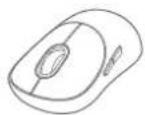

Dongle
(in the battery compartment)Mouse
User Manual

Warranty Notice
Note: Illustrations of product and accessories in the user manual are for reference purposes only. Actual product and functions may vary due to product enhancements.
C2
How to Use
Connecting via the 2.4 GHz channel
-
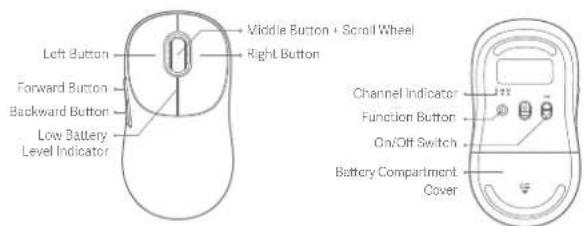
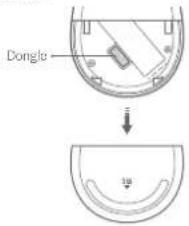
Slide down the battery compartment cover to remove it as illustrated.
-
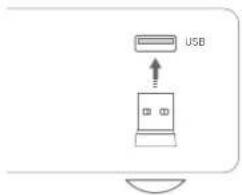
Take out the dongle and plug it into a USB port on the computer.
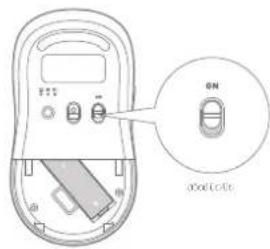
- Install the AA battery into the mouse's battery compartment and turn on the mouse.
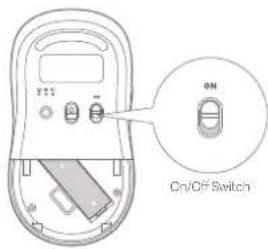
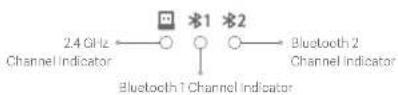
- When the mouse is turned on for the first time, it defaults to the 2.4 GHz channel (the mouse has been paired with the dongle before leaving the factory). The 2.4 GHz channel indicator remains on for 3 seconds and then goes out after the mouse connects to your computer successfully.

- When there is a pop-up on your computer to notify you that the mouse is ready for use, you can close the battery compartment cover and start using the mouse.

Note: Press the function button to cycle through the channels of 2.4 GHz, Bluetooth 1, and Bluetooth 2.
Connecting via Bluetooth
- Press the function button to change to a Bluetooth channel.

- Press and hold the function button for over 3 seconds to enter the Bluetooth pairing mode, and the corresponding Bluetooth channel indicator blinks quickly.

- In the Windows operating system, right-click the Bluetooth icon in the toolbar and click 'Add a Bluetooth device' to open the "Bluetooth and other devices" panel or click Settings > Devices". Then click 'Add Bluetooth or other device > Bluetooth > Ni Mouse3C' to complete the connection.
In the macOS operating system, open "System Settings" and click Bluetooth, then select the "VII Mouse3C" from the device list and click "Connect". Follow the onscreen instructions to finish pairing.
- When there is a pop-up on your computer to notify you that the mouse is ready for use, you can start using the mouse.
Notes:
• Make sure the computer to be connected supports Bluetooth and its Bluetooth function is enabled.
- Wireless signals between your computer and the mouse may be susceptible to interference. It is recommended to change to the 24 GHz channel when the Bluetooth connection is unstable.
Indicator Descriptions
| Indicator Status | Mouse Status |
| The selected channel's indicator slowly blinks white 6 times. | The selected channel is not paired. |
| The selected channel's indicator quickly blinks white for 3 minutes. | The mouse enters pairing mode after the function button has been pressed and held for 3 seconds. |
| The selected channel's indicator remains white for 3 seconds and then goes out. | The selected channel is paired successfully.The selected channel is connected properly when the mouse is turned on or woken up. |
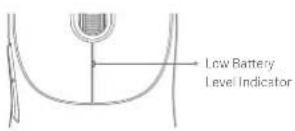
| The low battery level indicator slowly blinks orangeed for 10 seconds. | The mouse is working under a low battery level.Note: If the mouse is pressed or moved again within 10 seconds, the 10-second low battery reminder will start again. |
Battery Safety & Warnings
- Only use the battery approved by the manufacturer. Replacing with an incorrect battery type may invalidate the battery safety protection and cause a fire, or even an explosion.
- Keep the battery away from extreme heat sources, such as sunlight, fire, microwave, or oven. Failure to do so may lead to leakage of flammable liquid or gas, or even an explosion.
- Do not disassemble, strike, crush or cut the battery to avoid possible explosions.
- Do not subject the battery to extremely low air pressure as it might lead to leakage of flammable liquid or gas, or even an explosion.
-
Stop using the battery immediately if there is any swelling.
-
Do not swallow the battery to avoid chemical burns,
- If you think the battery may have been swallowed or may stay in any part of your or someone else's body, seek medical attention immediately.
- Stop using the mouse and keep it out of reach of children if the battery compartment is not closed securely.
- Keep new or used batteries out of reach of children.
- Do not dispose of used batteries with household waste. Dispose of them in a safe manner as per local laws and regulations.

Bluetooth
The Bluetooth *word mark and logos are registered trademarks owned by Bluetooth SIG, Inc. and any use of such marks by Xiaomi Inc. is under license. Other trademarks and trade names are those of their respective owners.
Specifications
| Name: Xiaomi Wireless Mouse 3 | Connectivity: 2.4 GHz wireless connection |
| Model: XMWXSE03YM (Mouse) | Bluetooth wireless connection |
| XMJSQ01 (Donglc) | Rated Input: 1.5 V=50 mA |
| Compatible with Windows 10 or abovemacOS 10.13 or above | Net Weight: Approx. 57 g (excluding the battery)Materials: Plastics, metals, and others |
| Item Dimensions: 119 × 64 × 41 mm | Operating Temperature: 0°C to 40°C |
Note: Part of the nameplate Information is inside the battery compartment.
| RF Specification Working Frequency Maximum Output Power | |
| 2.4 G | 2405-2476 MHz ≤10 dBm | |
| Bluetooth | 2402-2480 MHz ≤10 dBm | |

Herby, Beijing Yueme Technology Co., Ltd. declares that the radio equipment type XMWXSB03YM (Mouse)* XMUSQ01 (Dongle) is in compliance with Directive 2014/53/EU. The full text of the EU declaration of conformity is available at the following internet address: http://www.mi.com/global/service/support/declaration.html

All products bearing this symbol are waste electrical and electronic equipment (WEEE as in directive 2012/19/EU) which should not be mixed with unsorted household waste. Instead, you should protect human health and the environment by handing over your waste equipment to a designated collection point for the recycling of waste electrical and electronic equipment, appointed by the government or local authorities. Correct disposal and recycling will help prevent potential negative consequences to the environment and human health. Please contact the installer or local authorities for more information about the location as well as terms and conditions of such collection points.
11
Manufactured for: Xiaomi Communications Co., Ltd.
Manufactured by: Beijing Yueme Technology Co., Ltd.
(a Mi Ecosystem company)
Address: Room C608, Building No. B-2, Zhongguancun Dongsheng Science and Technology Park · Phase I, No. 66, Xixiaokou Road, Haidian District, Beijing, China
For further information, please go to www.mi.com
Made in China
User Manual Version: V1.0
12
產品介紹
使用产品前請仔細紙本說明書,妥善保管。
所在地:Room C608, Building No. B-2, Zhongguancun Dongsheng Science and Technology Park - Phase I, No. 66, Xixiaokou Road, Haidian District, Beijing, China
의뢰업체: Xiaomi Communications Co., Ltd.
제조사: Beijing Yueme Technology Co., Ltd.
(M) 생태계 기업)
주소: Room C608, Building No. B-2, Zhongguancun Dongsheng Science and Technology Park · Phase I, No. 65,
Xixiaokou Road, Haidian District, Beijing, China
Adrec: Room C608, Building No. B-2, Zhongguancun Dongsheng Science and Technology Park · Phase I, No. 68,
Xixiankou Road, Haidian District, Beijing, China
Adres: Room C803, Building No. B-2, Zhongguancun Dongsheng Science and Technology Park - Phase I, No. 66;
"V" مبّرَمْتُهُمْمِنْمَالْمَعْمِيُّةٌ مَحْدَّلَّهُمْمِنْمَالْمَعْمِيُّةٌ مَحْدَّلَّهُمْمِنْمَالْمَعْمِيُّةٌ مَحْدَّلَّهُمْمِنْمَالْمَعْمِيُّةٌ مَحْدَّ لَمْتُهُمْمِنْمَالْمَعْمِيُّةٌ مَحْدَّ لَمْتُهُمْمِنْمَالْمَعْمِيُّةٌ مَحْدَّ لَمْتُهُمْمِنْمَالْمَعْمِيُّةٌ مُحْدَّ لَمْتُهُمْمِنْمَالْمَعْمِيُّةٌ مُحْدَّ لَمْتُهُمْمِنْمَالْمَعْمِيُّةٌ مُحْدَّ لَمْتُهُمْمِنْمَالْمَجْسَّلِيُّةٌ مُحْدَّ لَمْتُهُمْمِنْمَالْمَجْسَّلِيُّةٌ مُحْدَّ لَمْتُهُمْمِنْمَالْمَجْسَّلِيُّةٌ مُحْدَّ لَمْتِهُمْمِنْمَالْمَجْسَّلِيُّةٌ مُحْدَّ لَمْتِهُمْمِنْمَالْمَجْسَّلِيُّةٌ مُحْدَّ لَمْتِهُمْمِنْمَالْمَجْسَّлِيُّةٌ مُحْدَّ لَمْتِهُمْمِنْمَالْمَجْسَّلِيُّةٌ مُحْدَّ لَمْتِهُمْمِنْمَالْمَجْسَّلِيُّةٌ مُحْدَّ لَمْتُهُمْمِنْمَالْمَجْسَّلِيُّةٌ مُحْدَّ لَمْتُهُمْمِنْمَالْمَجْسَّ лَا
الافرzan.
التصال عبر البانوت
الله بُمْدَّةِ الْمَّلَّةِ
*1 *2
○ ◎ ○
Room C608, Building No. B-2, Zhongguancun Dongsheng Science and Technology Park · Phase I, No. 66.
Xixiaokou Road, Haidian District, Beijing, China
Producent: Beijing Yueme Technology Co., Ltd.
Adres: Room C608, Building No. B-2, Zhongguancun Dongsheng Science and Technology Park - Phase I, No. 66, Xixiaokou Road, Haidian District, Beijing, China
Адреса: Room C608, Building No. B-2, Zhongguancun Dongsheng Science and Technology Park - Phase I, No. 66, Xixiaokou Road, Haidian District, Beijing, China
Xixiapkou Road, Haidian District, Beijing, China
- Inclusion of solution to the
The image contains no legible text or symbols. According to Rule 4 (Edge Noise Strategy), since the ground truth is not clearly visible, OCR should not output any character. Therefore, the corrected OCR text is:
[No text detected]
JUJU 2.4 GHz
The image contains no discernible text or characters.
00100100102
1
UJUUJLUUJLUJUU
The image contains no discernible text or characters.
[0] [0] [0] [0] [0] [0] [0] [0] [0] [0] [0] [0] [0] [0] [0] [0] [0] [0] [0] [0] [0] [0] [0] [0] [0] [0] [0] [0] [0] [0] [0] [0] [0] [0] [1]
[Non-Text]
□□□□□□□□□□□□□□□□□□□□□□□□□□□□□□□□□□□□□□□□□□□□□□□□□□□□□□□□□□□□□□□□□□□□□□□□□□□□□□□□□□□□□□□□□□□□□□□□□□□□
The image contains no text. The horizontal line is a stylistic or background element and must be ignored according to the rules.
UJLUJLU
-
-
-
-
-
-
-
-
-
-
-
-
-
-
-
-
-
-
-
-
-
-
-
-
-
-
-
-
-
-
-
-
-
-
-
-
-
-
-
-
-
-
-
-
-
-
-
-
-
-
-
-
-
-
-
-
-
-
-
-
-
-
-
-
-
-
-
-
-
-
-
-
-
-
-
-
-
-
- 80.
0100000000000000000000000
UJLUJLUJLUJLUJLUJLUJLUJLUJ

Bluetooth
FoschulunCumislaif Bluetooth 9 Cursco-Numsnrach-Uducu Bluetooth 910, no. kmts & discontracnend
for Asemi no. ogmaltouyra vdcun, umsetadumsnroun Udusavocou
ข้อมูลจำเพา:
| File: Lefebre, Asset. 2 | msfoucna msfoucnaufene 2.4 GB |
| qu. WMXG803Y (une) | msfoucnaufeneurgo |
| XvUscx1 (pura) | deshuhr 15 y = 10 YA |
| wJuldu: Windows 10.160gprnd | uhangpa, ducu 57 n. duzuwac#s |
| mac6 10.15 mfgprnd | doc, wanah fan radny |
| wJundan: 115 x 67 x 41 uo | ngunfamhunfumehn a## be er### |
nurc: doanlulunlunlunlunlunlunlunlunlunlunlunlunlunlunlunlunlunlunlunlunlunlunlunlunlunlunlunlunlunlunlunlunlunlunlunlunlunlunlunlunlunlunlunlunlunlunlunlunlunlunlun l
| 40.9876000 H. nourifumafonu m#d#w#n##y## | |
| 2.4 G | 2406-2478 MHz ≤10 uBm |
| ### | 2406-2460 MHz ≤10 uBm |
We can't run a long run to run a long run with a short run of IEEE and 2019. Our results are not only available for any reason, but we can be done in the following:
Wechsel, Xaetl Communications Co., Ltd.
Vishao: Beijing Yuomc Technology Co., Ltd.
10507263000000000000000000000000000000000
FQ: Poon, 0023, Building No. B-2, Zhongquanbu Dongsheng Science and Technology Park - Phase , No. 86.
Xiaokou Road, Haidian District, Beijing, China
Adresse: Room C608, Building No. B-2, Zhongguancun Dongsheng Science and Technology Park - Phase I, No. 66, Xixiaokou Road, Haidian District, Beijing, China
Adresse: Room C608, Building No. B-2, Zhongguancun Dongsheng Science and Technology Park - Phase I, No. 66, Xixiaokou Road, Haidian District, Beijing, China
Adresa: Room C608, Building No. B-2, Zhongguancun Dongsheng Science and Technology Park · Phase I, No. 66, Xixiaokou Road, Haidian District, Beijing, China
Adresã: Room C638, Building No. B-2, Zhongguancun Dongsheng Science and Technology Park · Phase I, No. 66, Xixiaokou Road, Haidian District, Beijing, China
Xiaomi Technology Netherlands B.V.
Prinses Beatrixlaan 582, 2595BM, The Hague, The Netherlands
contact@support.mi.com