
Wireless Mouse Lite 2 - Wireless Mouse Xiaomi - Free user manual and instructions
Find the device manual for free Wireless Mouse Lite 2 Xiaomi in PDF.


| Product Type | Wireless Mouse |
| Brand | Xiaomi |
| Model | Wireless Mouse Lite 2 (XMWXSB02YM) |
| Dimensions (L × W × H) | 108.5 × 57.5 × 35.6 mm |
| Net Weight | Approx 45 g (without battery) |
| Power Supply | 1 AA battery (not included) |
| Connection Technology | Wireless 2.4 GHz via USB dongle |
| Compatibility | Windows 7 or later, macOS 10.13 or later |
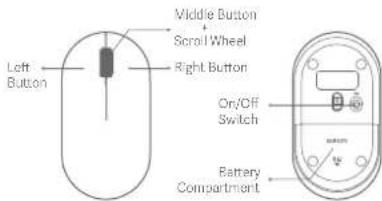
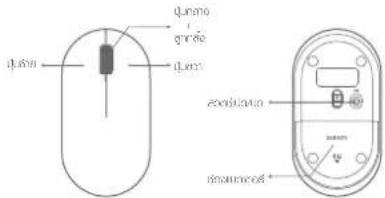
| Buttons | Left, right, middle buttons, scroll wheel |
| Switch | On/Off button |
| Materials | PC, ABS, metals |
| Operating Temperature | 0°C to 40°C |
| RF Frequency | 2405 - 2470 MHz |
| Max Output Power | ≤ 10 dBm |
| Package Contents | Mouse, USB dongle, user manual, warranty |
| Care and Cleaning | Clean with a dry cloth; do not use chemicals |
| Safety | Use only approved batteries; keep out of reach of children; do not expose to heat |
| Spare Parts | Electronic dongle (model XMJSQ02), AA battery |
Frequently Asked Questions - Wireless Mouse Lite 2 Xiaomi
User questions about Wireless Mouse Lite 2 Xiaomi
0 question about this device. Answer the ones you know or ask your own.
Ask a new question about this device
Download the instructions for your Wireless Mouse in PDF format for free! Find your manual Wireless Mouse Lite 2 - Xiaomi and take your electronic device back in hand. On this page are published all the documents necessary for the use of your device. Wireless Mouse Lite 2 by Xiaomi.
USER MANUAL Wireless Mouse Lite 2 Xiaomi
Read this manual carefully before use, and retain it for future reference.
Xiaomi Wireless Mouse Lite 2 uses 2.4 GHz wireless technology. Connect the dongle to your computer and then you can start using your mouse.
It is comfortable to hold, easy to move, and a good partner for your computer.
Note: Illustrations of product and accessories in the user manual are for reference purposes only. Actual product and functions may vary due to product enhancements.
Package Contents
Xiaomi Wireless Mouse Lite 2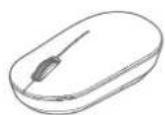
Dongle (in the battery compartment)

User Manual, Warranty Notice
How to Use
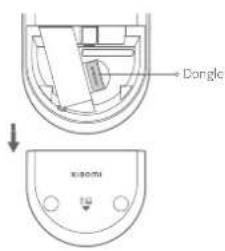
- Slide down the battery compartment cover to remove it as illustrated.
03
- Take out the dongle and plug it into the USB port on the computer.
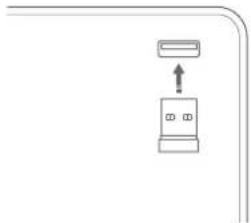
04
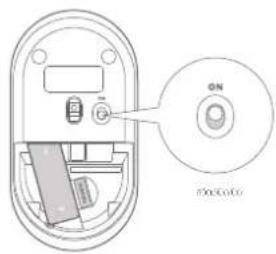
- Install an AA battery into the battery compartment, and turn on the mouse.
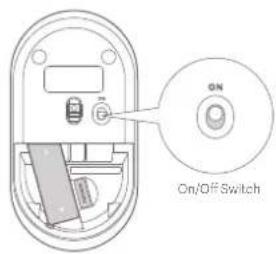
- The mouse is ready for use when your computer system notifies that the installation is successful.
Specifications
Name: Xiaomi Wireless Mouse Lite 2
Model: XMWXSB02YM (Mouse)
XMJSQ02 (Dongle)
Compatible with: Windows 7 or above, macOS 10.13 or above
Item Dimensions: 108.5 × 57.5 × 35.6 mm
Connectivity: 2.4 GHz wireless connection
Rated Input: 1.5 V = 50 mA
Net Weight Approx. 45 g (excluding the battery)
Materials: PC, ABS, metals, and others
Operating Temperature: 0°C to 40°C
Note: Part of the nameplate information is inside the battery compartment.
| RF Specification | Working Frequency | Maximum Output Power |
| 2.4 G | 2405-2470 MHz | ≤ 10 dBm |
Battery Safety & Warnings
- Only use the battery approved by the manufacturer. Replacing with an incorrect battery type may invalidate the battery safety protection and cause a fire, or even an explosion.
- Keep the battery away from extreme heat sources, such as sunlight, fire, microwave, or oven. Failure to do so may lead to leakage of flammable liquid or gas, or even an explosion.
- Do not disassemble, strike, crush or cut the battery to avoid possible explosions.
- Do not subject the battery to extremely low air pressure as it might lead to leakage of flammable liquid or gas, or even an explosion.
- Stop using the battery immediately if there is any swelling.
- Do not swallow the battery to avoid chemical burns.
- If you think the battery may have been swallowed or may stay in any part of your or someone else's body, seek medical attention immediately.
- Stop using the mouse and keep it out of reach of children if the battery compartment is not closed securely.
- Keep new or used batteries out of reach of children.
- Do not dispose of used batteries with household waste. Dispose of them in a safe manner as per local laws and regulations.
Regulatory Compliance Information
EU Declaration of Conformity

Heroby, Beijing Yueme Technology Co., Ltd. declares that the radio equipment type XMNXSBCZYM (Mouse)/XMJSQ02 (Dongle) is in compliance with Directive 2014/53/EU. The full text of the EU declaration of conformity is available at the following internet address: http://www.mi.com/global/service/support/declaration.html
WEEE Disposal and Recycling Information

All products bearing this symbol are waste electrical and electronic equipment (WEEE as in directive 2012/19/EU) which should not be mixed with unsorted household waste. Instead, you should protect human health and the environment by handing over your waste equipment to a designated collection point for the recycling of waste electrical and electronic equipment, appointed by the government or local authorities. Correct disposal and recycling will help prevent potential negative consequences to the environment and human health. Please contact the installer or local authorities for more information about the location as well as terms and conditions of such collection points.
Manufactured for: Xiaomi Communications Co., Ltd.
Manufactured by: Beijing Yueme Technology Co., Ltd.
(a MI Ecosystem company)
Address: Room C608, Building No. B-2, Zhongguancun Dongsheng Science and Technology Park · Phase I, No. 66,
Xixiaokou Road, Haidian District, Beijing, China
For further information, please go to www.ml.com
Made in China
User Manual Version: V1.0
Product Description
Address: Room C608, Building No. B-2, Zhongguancun Dongsheng Science and Technology Park - Phase I, No. 66,
Xixiaokou Road, Haidian District, Beijing, China
23
24
Model: XMWXSB02YM (Fare)
XMJSG02 (Dongle)
Address: Room CG08, Building No. 3-2, Zhongguancun Dongsheng Science and Technology Park - Phase I, No. 65,
Xixiaokou Road, Haidian District, Beijing, China
Beijing Yueme Technology Co., Ltd.
Room C608, Building No. B-2, Zhongguancun Dongsheng Science and Technology Park · Phase I, No. 66; (J)
Xixiaokou Road, Haidian District, Beijing, China
44
Manufacturer: Beijing Yueme Technology Co., Ltd.
Address: Room C603, Building No. 8-2, Zhongguancun Dongsheng Science and Technology Park - Phase I, No. 65, Xixiaokou Road, Haidian District, Beijing, China
54
Address: Room C608, Building No. B-2, Zhongguancun Dongsheng Science and Technology Park - Phase I, No. 96,
Xixiaokou Road, Haidian District, Beijing, China
WECNO: Xiaoti Communications Co., Ltd.
WuHai: Beijing Yuxin Technology Co., Ltd.
10.2016.03.1
FQ: Poon, 0023, Building No. B-2, Zhongguancun Dongsheng Science and Technology Park - Phase I, No. 86.
Shenzhen Road, Haidian District, Beijing, China
Address: Room C608, Building No. B-2, Zhongguancun Dongsheng Science and Technology Park · Phase I, No. 65,
Xixiaokou Road, Haidian District, Beijing, China
84
Address: Room C508, Building No. B-2, Zhongguancun Dongsheng Science and Technology Park - Phase I, No. 66, Xixiaokou Road, Haidian District, Beijing, China
94
Manufacturer: Beijing Yueme Technology Co., Ltd.
(a Mi Ecosystem company)
Address: Room C608, Building No. B-2, Zhongguancun Dongsheng Science and Technology Park - Phase I, No. 66, Xixiaokou Road, Haidian District, Beijing, China
103
104
Address: Room C608, Building No. B-2, Zhongguancun Dongsheng Science and Technology Park · Phase I, No. 56, Xixiaokou Road, Haidian District, Beijing, China
Address: Room C508, Building No. B-2, Zhongguancun Dongsheng Science and Technology Park · Phase I, No. 65, Xixiaokou Road, Haidian District, Beijing, China
Name: Mouse Wireless Xiaomi Lite 2
Model: XMWXSB02YM (Mouse)
XMJSQ02 (Dongle)
Address: Room C608, Building No. B-2, Zhongguancun Dongsheng Science and Technology Park - Phase I, No. 66, Xixiaokou Road, Haidian District, Beijing, China
Xiaomi Technology Netherlands B.V.
Prinses Beatrixlaan 582, 2595BM, The Hague, The Netherlands
contact@support.mi.com
Brand : Xiaomi
Model : Wireless Mouse Lite 2
Category : Wireless Mouse