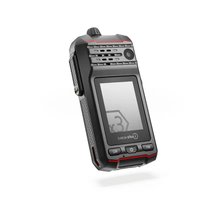
IS-DC440.1 - Uncategorized i.safe Mobile - Free user manual and instructions
Find the device manual for free IS-DC440.1 i.safe Mobile in PDF.


| Product Type | Explosion-proof communication device for explosive atmospheres (ATEX Zone 1/21, 2/22, M1, M2) |
| Brand | i.safe Mobile |
| Model | IS-DC440.1 (IS440.M1) |
| Battery | Rechargeable lithium-ion, replacement recommended after 2 years or 500 cycles |
| Power Supply | Universal AC adapter 10-15 W, i.safe PROTECTOR 2.0 USB-C cable (no USB PD fast charging) |
| Screen | Touch screen (size not specified) |
| Camera | Front |
| Connectivity | 4G, 5G, Bluetooth (9.25 dBm), BLE (8.82 dBm), Wi-Fi 2.4/5/5.8 GHz, NFC |
| SIM Cards | Nano SIM + integrated eSIM |
| Interfaces | USB-C (charge/data), 8-pin ISM for approved accessories |
| Approved Accessories | Headset IS-HS3A.1, IS-HDHS2x.1, PTT button IS-PTTB2A.1 with/without headset IS-HDHS1x.1 |
| Programmable Keys | M1, M2, red (SOS), left side, rotary (configurable via Button app) |
| Operating Temperature | -20 °C to +55 °C |
| Charging Temperature | 0 °C to +45 °C |
| ATEX Certification | II 2G Ex ib IIC T4 Gb / II 2D Ex ib IIIC T135°C Db / I M1 Ex ia I Ma |
| SAR (limb) | 1.49 W/kg (0 mm) |
| SAR (body) | 0.7 W/kg (at 5 mm) |
| Maintenance | Clean with a damp antistatic cloth, no chemicals, device off |
| Repairability | No user-serviceable parts, contact i.safe MOBILE GmbH support |
| Package Contents | IS440.M1, battery, safety instructions, screen protector, i.safe PROTECTOR 2.0 USB-C cable, universal AC adapter, TORX screwdriver, belt clip |
Frequently Asked Questions - IS-DC440.1 i.safe Mobile
User questions about IS-DC440.1 i.safe Mobile
0 question about this device. Answer the ones you know or ask your own.
Ask a new question about this device
Download the instructions for your Uncategorized in PDF format for free! Find your manual IS-DC440.1 - i.safe Mobile and take your electronic device back in hand. On this page are published all the documents necessary for the use of your device. IS-DC440.1 by i.safe Mobile.
USER MANUAL IS-DC440.1 i.safe Mobile

OPERATING MANUAL
i.safe MOBILE
IS440.M1 | MODEL M440A01
Document No. 1083MM01REV00
Version: 2025-02-03
i.safe MOBILE GmbH
i_Park Tauberfranken 10
97922 Lauda-Koenigshofen
Germany
Tel. +49 9343 60148-0
info@isafe-mobile.com
www.isafe-mobile.com
(c) 2025 i.safe MOBILE GmbH Template: TEMPMM01REV10
CONTENTS
English....4
Deutsch....22
Česky 40
Dansk....58
Español....76
Suomi....94
Français....112
Magyar 130
Italiano 148
Nederlands 166
Norsk 184
Polski 202
This Operating Manual complies with these standards:
IEC 60079, IEC 82079, ANSI Z535.6
IEC 60079, IEC 82079, ANSI Z535.6
ENGLISH

PROTECT YOUR LIFE AND READ THE OPERATING MANUAL
This Operating Manual is part of the device IS440.M1 (model M440A01).
This Operating Manual provides important information for safe use of the device.
» Before using the device, read this Operating Manual carefully and pay particular attention to the „Ex-relevant Safety Regulations“ section and the warnings highlighted with the warning symbol. If you do not follow these instructions or do not understand them, this could lead to death, severe injuries and damage to the device.
» Make sure you have access to this Operating Manual when you need it. You can find the current Operating Manual at www.isafe-mobile.com/en/support/downloads
» Follow all instructions given on the device and on the packaging.
»Follow local safety regulations.
» Only use the device in explosion hazardous areas of zones 1/21, 2/22, M1 and M2 or outside of explosion hazardous areas.
» Before entering an explosion hazardous area with the device,
- make sure that only approved accessories are connected to the device, see section "Connecting approved accessories",
- make sure that no gap can be seen between the two halves of the device,
- make sure the device is not damaged,
- make sure that all the labels on the device are readable,
- make sure that only the battery supplied or an approved replacement battery is installed in the device,
- make sure that the battery is not damaged, see section „Changing the battery“,
- make sure the battery is screwed tight.
» If you use the device in an explosion hazardous area,
- do not loosen the screws on the device,
- do not connect any accessories to the device,
- do not open any interface cover,
- do not charge the device,
- do not open the device,
- do not damage the device.
» Switch off the device immediately and leave the explosion hazardous area without delay if
- malfunctions occur on the device,
- you have damaged the housing of the device,
- you have exposed the device to excessive loads,
- the device has been stored improperly,
- the labels on the device are no longer readable.
» Do not modify the device structurally.
» Do not expose the device to high temperatures.
» Do not expose the device to strong UV radiation.
» Do not expose the device to processes with high electrical charges.
» Do not expose the device to aggressive acids or bases.
» Protect the device and the Power Adapter from strong electrical magnetic fields as for example those emitted by induction cookers or microwave ovens, for example.
» Protect the device from oils, greases and hydraulic fluids.
» Protect the device from high mechanical hazards, strong UV radiation and highly electrically charging processes.
» Only use accessories approved by i.safe MOBILE GmbH.
» Do not open the device or carry out any repairs yourself.
» Do not use the device in places where its use is prohibited.
» Turn off the device in clinics or other medical facilities.
» Always keep a safety distance of at least 15 cm between the device and a pacemaker or hearing aid. The device can affect the functioning of medical devices such as pacemakers and hearing aids.
» When using the device while driving a motor vehicle, be sure to comply with applicable national laws.
» When using earphones or headsets at the maximum volume setting, first set the volume control on the device to 50 % of the maximum volume. Gradually adjust the volume.
» Only charge the device using the i.safe PROTECTOR 2.0 USB-C Cable supplied or other charging equipment approved by i.safe MOBILE GmbH.
» If you use a third-party USB power supply unit, note the following:
- The third-party USB power supply unit must comply with applicable country regulations and international and regional safety standards.
- The third-party USB power supply unit must have a minimum output of 10 W to 15 W to ensure the specified charging rates. The device does not support USB PD fast charging.
- Even if you use a third-party USB power adapter, only charge the device using the i.safe PROTECTOR 2.0 USB-C Cable supplied.
» Only charge the device at ambient temperatures between 0 °C to +45 °C (+32 °F to +113 °F).
» Only charge the device under dry indoor conditions.
» Do not charge the device in environments dusty or humid.
» Do not charge the device in the vicinity of flammable substances.
» Do not touch the display with sharp objects.
EX-RELEVANT SAFETY REGULATIONS
Use of this device assumes that the operator observes the conventional safety regulations and has read and understood Operating Manual, Safety Instructions and certificate.
When used in explosion hazardous areas, the following Safety Instructions must also be complied with:
COVERS
» Inside explosion hazardous areas the USB interface must be closed.
ACCESSORIES
» Within explosion hazardous areas, the following accessories may be used when connected to the ISM interface:
- the Headset IS-HS3A.1
-
the Headset IS-HDHS2x.1
-
the PTT Button IS-PTTB2A.1 together with the Headset IS-HDHS1x.1
- the PTT Button IS-PTTB2A.1 without Headset IS-HDHS1x.1
- other accessories approved by i.safe MOBILE GmbH.
» If the PTT Button IS-PTTB2A.1 is connected to the 8-pin ISM interface of the device together with the Headset IS-HDHS1x.1, the connection between the IS-PTTB2A.1 and the Headset IS-HDHS1x.1 can be disconnected and reconnected in explosion hazardous areas.
When using the IS-PTTB2A.1 without the Headset IS-HDHS1x.1, the unused cable end of the IS-PTTB2A.1 may remain open in explosion hazardous areas.
» When using accessories with Velcro fasteners (e.g. Headset IS-HDHS1B.1), the Velcro fastener may only be adjusted outside explosion hazardous areas.
IP-PROTECTION
» To ensure the IP-protection, it has to be ensured that all gaskets are present and functional. There must be no large gap between the two halves of housing and between the battery and housing.
SIM CARDS
» Nano-SIM cards which comply with the intrinsic safety entity parameters mentioned in the certificate, may be used in the corresponding slot in the hazardous area.
CHARGING
» The device may only be charged outside explosion hazardous areas using the i.safe PROTECTOR 2.0 USB-C Cable or other charging equipment approved by i.safe MOBILE GmbH.
» The device may only be charged at temperatures between 0 °C to +45 °C (+32 °F to +113 °F).
IMPACTS
» The device may not be exposed to any aggressive acids or alkalis.
»The device must be protected from impacts with high impact energy, against excessive UV light emission and high electrostatic charge processes.
CONDITIONS OF USE
» The permitted ambient temperature range is -20 °C to +55 °C (-4 °F to +131 °F).
» The device may only be used in zones 1, 2, 21, 22, M1 or M2.
BATTERY
The battery contains flammable materials such as organic solvents. Mishandling the battery may cause fire, smoke or an explosion. This poses a risk of death and serious injury!
The following must be observed:
If the device is used daily, the battery should be replaced 2 years after first use, but at the latest after 500 charging cycles or when the operating time has been significantly reduced.
»The battery must not be used if there are noticeable abnormalities, such as smell, heat, discoloration or deformity.
» A leaking battery must not be used and touched.
» The battery must not be used or placed near an open flame, heater or high Temperature (above 80 °C (176 °F)).
» The battery must not be used where static electricity in excess of 100 V is generated.
» The battery must not be immersed in liquid such as water, beverages or other fluids.
» The battery must not be placed in or near a microwave or other cooking appliances.
» The battery must not be used in devices for which it was not intended.
» No short-circuit must be applied to the battery.
» The battery must not be exposed to excessive impacts.
» The battery must not be penetrated with a nail or strike with a hammer.
»The battery must not be disassembled.
» The battery must be packed securely in a case or carton for transport.
» The battery must not be charged in the vicinity of flammable substances.
»The battery must only be charged using the charging equipment approved by i.safe MOBILE GmbH.
» The battery must only be charged at ambient temperatures between 0 °C to +45 °C (+32 °F to +113 °F).
»The battery must only be charged under dry indoor conditions only.
» The battery must not be charged in environments dusty or humid.
» If the battery is not to be used for a longer period of time, it must be removed from the device. The battery must be charged to approx. 50 % to 70 % every 3 to 6 months to avoid deep discharge.
» The battery must be stored in a cool, dry place to keep it functional.
» The battery must not be stored with any metal objects.
» The battery must not be thrown away with household waste.
» The battery must be recycled to local rules and regulations.
FAULTS AND DAMAGES
If there is any reason to suspect that the safety of the device has been compromised, it must be withdrawn from use and removed from any ex-hazardous areas immediately.
Measures must be taken to prevent any accidental restarting of the device. The safety of the device may be compromised, if, for example:
» Malfunctions occur.
» The housing of the device shows damage.
» The device has been exposed to excessive loads.
» The device has been stored improperly
» Markings or labels on the device are illegible.
We recommend that a device displaying errors or in which an error is suspected be sent back to i.safe MOBILE GmbH to be checked.
MAXIMUM OUTPUT POWER
Frequency bands Maximum output power
| 4G | 22.9 dBm |
| 5G | 24.09 dBm |
| BT | 9.25 dBm |
| BLE | 8.82 dBm |
| 2.4G | 16.98 dBm |
| 5G | 15.81 dBm |
| 5.8G | 12.69 dBm |
| NFC | -16.678 dBuA/m at 10 m |
SAR
The SAR limit of Europe is 2.0 W/kg for the body at 5 mm. The SAR limit of Europe is 4.0 W/kg for the limbs at 0 mm. The device has been tested against this SAR limit. The highest SAR value reported under this standard during product certification for limbs is 1.49 W/kg. The highest SAR value reported under this standard during product certification for body is 0.7 W/kg. This device was tested for typical body worn operations with the back of the handset kept 5 mm from the body. The device complies with RF specifications when used at 5 mm from the body. Belt clips, holsters and similar accessories used should not contain metallic components in the assembly. The use of accessories that do not satisfy these requirements may not comply with RF exposure requirements, and should be avoided.
CALL FUNCTION
This product don't support VoLTE or Vo5G NR, WCDMA, GSM related function.
WI-FI WARNING
FREQUENCY BAND: 5150 - 5250 MHZ:
» Indoor use: Inside buildings only. Installations and use inside road vehicles and train arriages are not permitted.
» Limited outdoor use: If used outdoors, equipment shall not be attached to a fixed installation or to the external body of road vehicles, a fixed infrastructure or a fixed outdoor antenna. Use by unmanned aircraft systems (UAS) is limited to within the 5170 - 5250 MHz band.
FREQUENCY BAND: 5250 - 5350 MHZ:
» Indoor use: Inside buildings only. Installations and use in road vehicles, trains and aircraft are not permitted.
» Outdooruse is not permitted. Operation of WAS/RLAN installations in large aircraft (excluding multi-engined helicopters) is permitted until 31 December 2028.
FREQUENCY BAND: 5470 - 5725 MHZ:
» Installations and use in road vehicles, trains and aircraft and use for unmanned aircraft systems (UAS) are not permitted.
» Operation of WAS/RLAN installations in large aircraft (excluding multi-engined helicopters), except in the frequency band 5600 - 5650 MHz, is permitted until 31 December 2028.
SOUND PRESSURE WARNING
When using earphones or headsets
» First set the volume control on the device to 50 % of the maximum volume.
»Gradually adjust the volume.

INTENDED USE
The IS440.M1 is an Internet-capable communication device for industrial use in explosion hazardous areas of Zone 1/21, 2/22, M1 and M2, in accordance with Directives 2014/34/EU, 1999/92/EC and the IECEx system, among others.
Only use the device as described in this Operating Manual. Any other use is considered improper and can lead to death, severe injuries and damage to the device.
The manufacturer i.safe MOBILE GmbH does not assume any liability for damage caused by improper use. The warranty expires in the event of improper use.
USER
Only trained users who are qualified in the use of Ex devices in explosion hazardous areas and who have read and understood this Operating Manual may use this device.
WARRANTY
You can find the warranty conditions at www.isafe-mobile.com/en/support/service
For any damage caused by computer viruses that you download while using the Internet functions responsibility is at your hand.
There is no right of recourse against i.safe MOBILE GmbH.
EU DECLARATION OF CONFORMITY
You will find the EU declaration of conformity at
www.isafe-mobile.com/en/support/downloads
FCC/IC STATEMENT
The FCC/IC declaration can be found at
www.isafe-mobile.com/en/support/downloads
EX MARKINGS
> ATEX:
① I M1 Ex ia I Ma
Ea II 2G Ex ib IIC T4 Gb
① II 2D Ex ib IIIC T135°C Db
EU Type Examination Certificate:
EPS 24 ATEX 1 191 X
CE-designation: 2004
>IECEx:
Ex ia I Ma
Ex ib IIC T4 Gb
Ex ib IIIC T135°C Db
IECEx Certificate: IECExEPS 24.0066X
> Temperature range:
-20 °C ≤ Ta ≤ +55 °C (EN/IEC 60079-0) -10 °C ... +55 °C (EN/IEC 62368-1)
Manufactured by:
i.safe MOBILE GmbH
i_Park Tauberfranken 10
97922 Lauda-Koenigshofen
Germany
>SCOPE OF DELIVERY
Your device packaging contains the following:
1 × IS440.M1
1 x Battery
1 x Safety Instructions
1 x Display Protection Foil
1 x i.safe PROTECTOR 2.0 USB-C Cable
1 x Power Adapter universal (power supply unit and various country-specific adapters)
1 x Torx Screwdriver
1 x Belt Clip
CELL BROADCAST
The device supports cell broadcast. Cell broadcast is a cellular service for sending messages to all recipients within a cell.
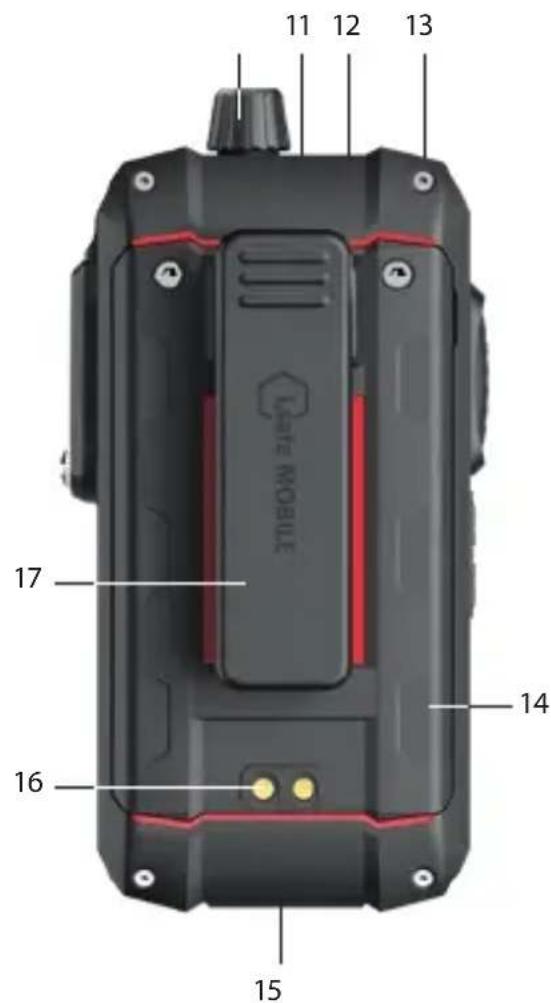
>DEVICE OVERVIEW/FUNCTIONS
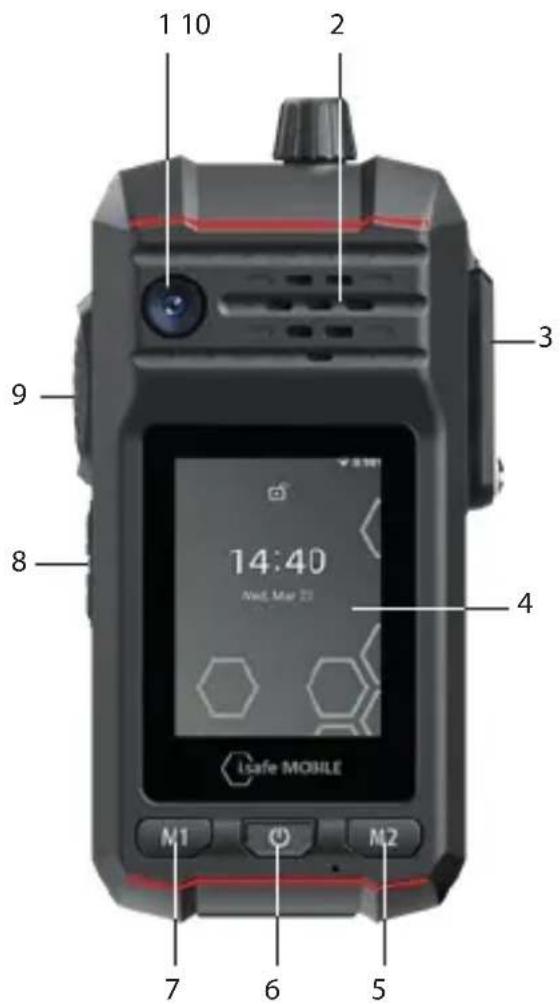
1> FRONT CAMERA
2> LOUDSPEAKER
3) 8-PIN ISM INTERFACE: Connection for approved accessories. Also see section "Connecting approved accessories".
4) TOUCHSCREEN
5> FUNCTION KEY M2: Optional function - function can be assigned via Button App (system integrated).
6) POWER KEY: A long press switches the device on/off. A short press switches the standby mode on/off.
7) FUNCTION KEY M1: Optional function - function can be assigned via Button App (system integrated).
8> LOUDNESS CONTROL: Volume up/Volume down.
9) SIDE KEY LEFT: Optional function - function can be assigned via Button App (system integrated).
10 > ROTARY KNOB: Optional function, e.g. channel selection - function can be assigned via Button App (system integrated).
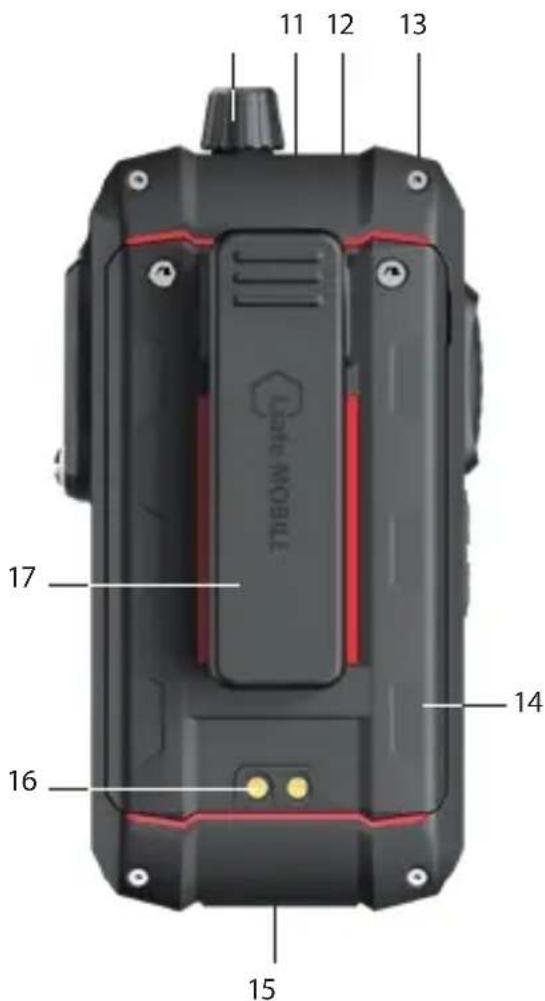
11>MICROPHONE
12> FUNCTION KEY RED: Optional function, e.g. SOS - function can be assigned via Button App (system integrated).
13 > EYELET: Eyelet for hand strap.
14) BATTERY
15 > USB INTERFACE: Connection for the i.safe PROTECTOR 2.0 USB-C Cable or for other equipment approved by i.safe MOBILE GmbH. Also see sections "Charging" and "Connecting approved accessories".
16>CHARGING CONTACTS
17>BELT CLIP
FUNCTION KEYS
The device has various freely programmable keys:
Function key M1
Function key M2
Function key red
Side key left
Rotary knob
You can assign a function to the freely programmable keys via the Button App installed on the device. You will find the Button App in the menu item „Settings“.
>INSTALLING THE BATTERY

DANGER
Installing the wrong battery in the device, poses a risk of explosion, which could result in death or serious injuries! Only fit the battery supplied or an approved replacement battery in the device outside of explosion hazardous areas. The approved replacement battery can be found on the website www.isafe-mobile.com/en/products
natural_image
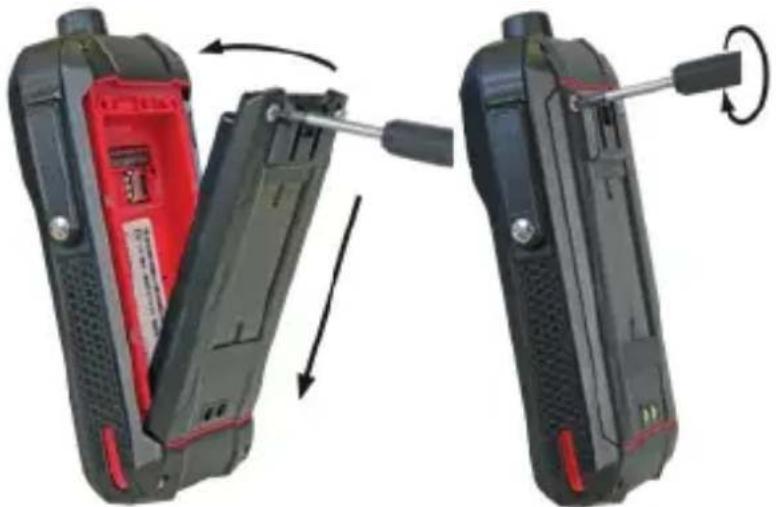
Two views of a mobile phone device showing internal components and a scroll wheel (no text or symbols visible)» Place the battery in the battery compartment as shown. Make sure that the gold-coloured contacts of the battery and the device face each other.
» Hand-tighten the screws using the Torx Screwdriver provided.
» Check that the battery is seated correctly and securely.
INSERT/REMOVE SIM CARD
The device has a nano-SIM card slot and an additional eSIM. The eSIM is a non-removable, integrated digital SIM. For more information contact your provider.

DANGER
An incorrect procedure in explosion hazardous areas poses a risk of death or severe injuries! Only open the device outside of explosion hazardous areas to insert or remove the SIM card.
NOTICE
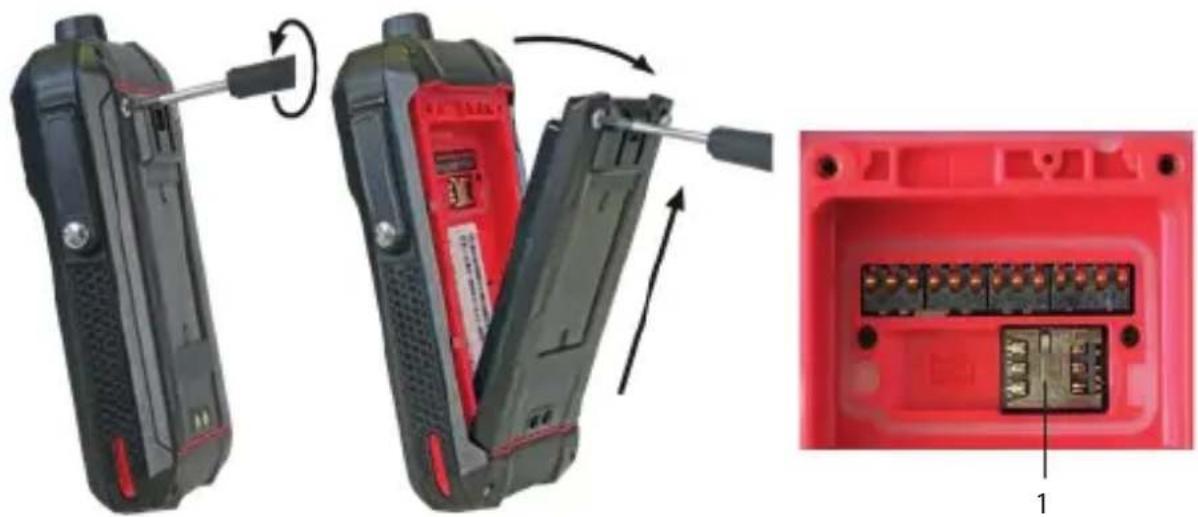
Proceeding incorrectly when inserting/removing the SIM card can damage the device and the SIM card. Switch off the device before inserting or removing a SIM card. Do not charge the device while inserting or removing a SIM card.
natural_image
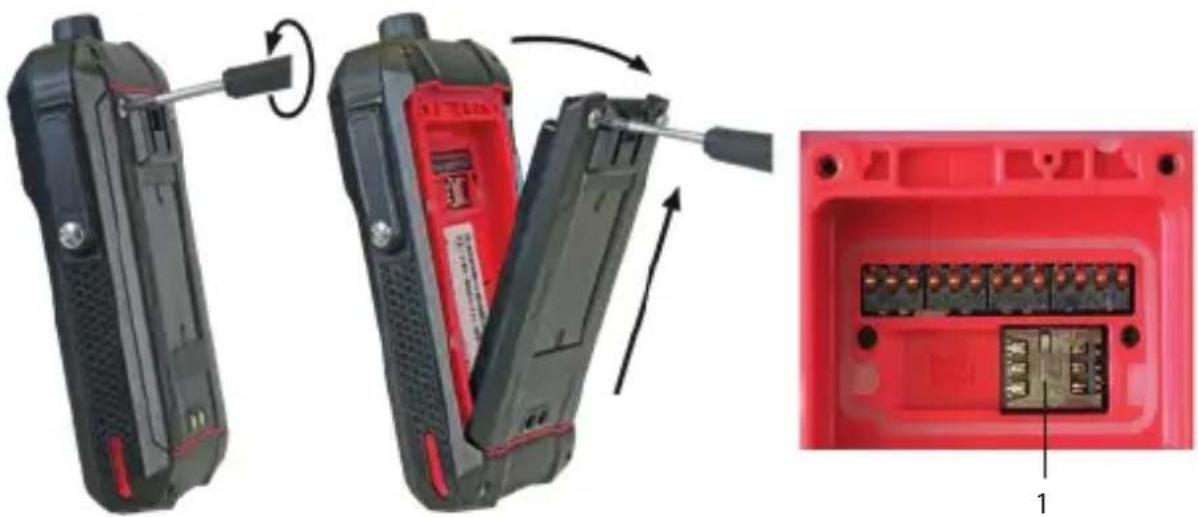
Two views of a red handheld device showing internal components and a close-up of its internal structure (no text or symbols visible)» Loosen the screws on the battery using the Torx Screwdriver provided.
» Remove the battery from the battery compartment.
» Insert the SIM card into the nano-SIM card slot (1) with the gold-coloured contacts facing down.
»Reinstall the battery. See section "Installing the battery".
Activate eSIM
You can activate the eSIM in several ways:
- Via the Setup Wizard during initial device setup:
» Scan the eSIM QR code that you have received from your service provider or manually enter the eID that you have received from your service provider. - Via the settings menu of the device:
»> Settings > Network & internet > SIMs > Download a SIM instead? > Next > scan (or manually enter) eSIM QR code that you have received from your service provider.
>CHARGING

DANGER
An incorrect procedure in explosion hazardous areas poses risk of death or severe injuries! Only charge the device outside of explosion hazardous areas. Do not charge the device in the vicinity of flammable substances.
NOTICE
Incorrect charging can cause damage to the device. Please note the following when charging:
» Only charge the device using the i.safe PROTECTOR 2.0 USB-C Cable supplied or other charging equipment approved by i.safe MOBILE GmbH.
»Only charge the device at ambient temperatures between 0 °C to +45 °C (+32 °F to +113 °F).
»Charge the device under dry indoor conditions only.
»Do not charge the device in environments dusty or humid.
Your device package contains a power supply unit, various country-specific adapters and an i.safe PROTECTOR 2.0 USB-C Cable.
This device can also be powered by third-party USB power supply units.

CAUTION
Charging with third-party USB power supply units poses a risk of property loss or personal injury
»The third-party USB power supply unit must comply with applicable country regulations and international and regional safety standards.
»The third-party USB power supply unit must have a minimum output of 10 W to 15 W to ensure the specified charging rates. The device does not support USB PD fast charging.
Even if you use a third-party USB power adapter, only charge the device using the i.safe PROTECTOR 2.0 USB-C Cable supplied.
» Connect the adapter suitable for your country to the power supply unit supplied.
» Connect the i.safe PROTECTOR 2.0 USB-C Cable to the power supply unit.
» Connect the i.safe PROTECTOR 2.0 USB-C Cable to the USB interface of the device.
» Connect the power supply unit to the power socket.
> SWITCHING ON/OFF
» Press and hold the power key for about 3 seconds.
» Enter the device or SIM PIN when the input dialog for the device or SIM PIN appears after switching on.
» Press and hold the power key to enter the power off menu. Select
>USING THE DEVICE

CAUTION
When using earphones or headsets at the maximum volume setting, you can damage your hearing. First set the volume control on the device to 50 % of the maximum volume. Gradually adjust the volume.
» Only use the device at ambient temperatures between -20 °C to +55 °C (-4 °F to +131 °F).
» When turning on the device for the first time, follow the instructions on the screen.
Further information on operating the device can be found at www.isafe-mobile.com/en/support/service under the menu item "FAQ".
CONNECTING APPROVED ACCESSORIES

DANGER
Improper use poses risk of death or severe injuries!
»Only connect accessories approved by i.safe MOBILE GmbH to the device. Accessories approved by i.safe MOBILE GmbH can be found at www.isafe-mobile.com/en/products
If you need approved accessories in explosion hazardous areas, please note the following before connecting:
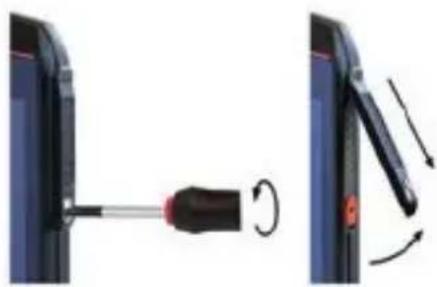
»Connect approved accessories to the 8-pin ISM interface of the device only outside of explosion hazardous areas.
»Never open the cover of the 8-pin ISM interface in explosion hazardous areas.
»Operate approved accessories in explosion hazardous areas only on the 8-pin ISM interface of the device. Wired connections via the USB interface are prohibited.
»Connect the plug of the accessory securely to the 8-pin ISM interface on the device.
»Only remove approved accessories from the 8-pin ISM interface outside of explosion hazardous areas.
»Close the 8-pin ISM interface with the cover provided when you are not using accessories.
8-PIN ISM INTERFACE
natural_image
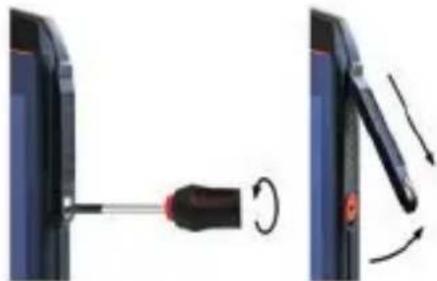
Diagram showing a screwdriver being inserted into a device, with motion arrows indicating rotation (no text or symbols present)» Loosen the screw on the 8-pin ISM interface cover using the Screwdriver included in the approved accessory package. Remove the cover as shown.
natural_image
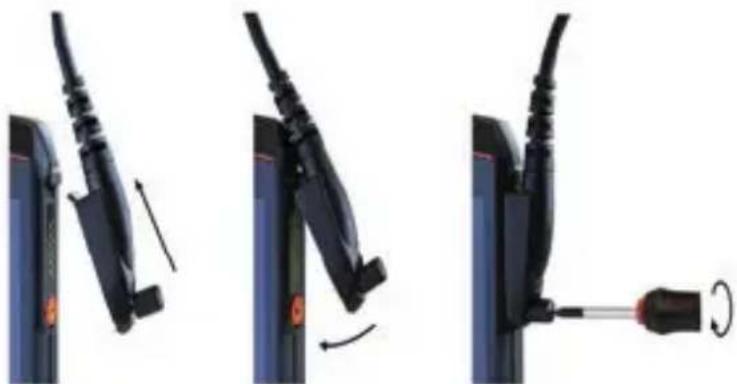
Three-step diagram showing cable fastening process: left panel with cable attachment, right panel with cable being inserted (no text or symbols)» Connect the plug of the approved accessory to the 8-pin ISM interface as shown.
» Hand-tighten the screws.
» Check that the plug is seated correctly and securely.
USB INTERFACE

DANGER
Improper use poses risk of death or severe injuries! Only use USB interface outside of explosion hazardous areas. Never open the cover of the USB interface in explosion hazardous areas.
The USB interface is used for charging and data transfer.
» Connect approved accessories or other devices to the USB interface only by using the i.safe PROTECTOR 2.0 USB-C Cable or by using other equipment approved by i.safe MOBILE GmbH.
>CHANGING THE BATTERY

DANGER
An outdated battery can overheat, inflate and cause a fire. This poses a risk of death and serious injury! If you use the device daily, you should replace the battery 2 years after first use, but at the latest after 500 charging cycles or when the operating time has been significantly reduced. If you have any further questions, please contact the i.safe MOBILE GmbH repair service at www.isafe-mobile.com/en/support/service

WARNING
If you replace the battery with the wrong battery in the device, there is a risk of explosion, which could result in death or serious injuries! Only replace the battery with an approved replacement battery outside of explosion hazardous areas. An approved replacement battery can be found on the website www.isafe-mobile.com/en/products
natural_image
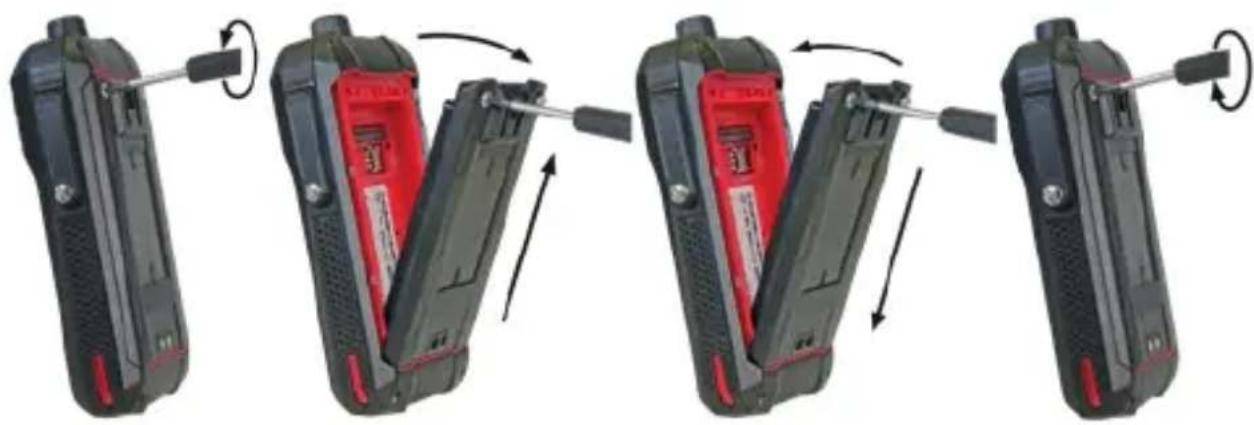
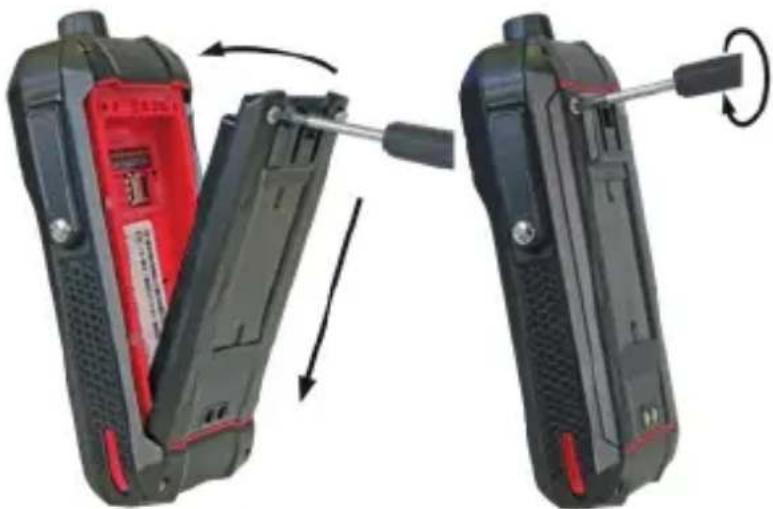
Four-panel diagram showing a device being adjusted for a cable, with arrows indicating motion (no text or symbols)» Loosen the screws on the battery using the Torx Screwdriver provided.
» Remove the battery from the battery compartment as shown.
» Place the approved replacement battery in the battery compartment as shown. Make sure that the gold-coloured contacts of the battery and the device face each other.
» Hand-tighten the screws using the Torx Screwdriver provided.
» Check that the battery is seated correctly and securely.
POSSIBLE DEVICE PROBLEMS
You can find information on possible device problems and how to rectify them at www.isafe-mobile.com/en/support/service under the menu item "FAQ".
If you have any further questions, please contact the i.safe MOBILE GmbH repair service at www.isafe-mobile.com/en/support/service
MAINTENANCE/REPAIR
The device itself has no serviceable parts.

WARNING
Incorrect repairs present a risk of explosion or fire, which can result in death or severe injuries! Do not open the device or carry out any repairs yourself.
» Contact the i.safe MOBILE GmbH repair service at
www.isafe-mobile.com/en/support/service if the device is not working normally, if the device needs to be repaired or if a replacement part is required.
RETURN SHIPMENT
Contact the i.safe MOBILE GmbH repair service at
www.isafe-mobile.com/en/support/service
DISTRIBUTION PARTNER
You can find the specialist distribution partner responsible for your country at
www.isafe-mobile.com/en/contact
CLEANING
NOTICE
Incorrect cleaning can cause damage to the device. Please note the following when cleaning:
» Turn off the device before cleaning.
» Do not charge the device while cleaning.
» Do not use chemical agents for cleaning.
» Clean the device and the Power Adapter with a soft, moistened antistatic cloth.
» Clean the display screen regularly with a soft, antistatic cloth.
STORAGE
NOTICE
Incorrect storage can cause damage to the device. Store the device at a humidity of 10% to 60% at the following ambient temperatures:
Up to one month: -20 °C to +45 °C (-4 °F to +113 °F)
Up to 3 months: -10 °C to +35 °C (+14 °F to +95 °F)
Over 3 months: -10 °C to +25 °C (+14 °F to +77 °F)
If you do not use the device for a longer period of time, note the following:
» Switch off the device.
» For longer storage without use, remove the battery from the device.
» Charge the battery to approx. 50 % to 70 % every 3 to 6 months to avoid deep discharge.
» Store the battery in a cool, dry place to keep it functional.
RECYCLING
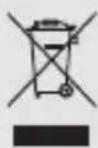
NOTICE
Incorrect disposal of electronic products, batteries and packaging material puts the environment at risk. Please note the following when disposing of items:
»DO NOT throw away batteries with household waste.
» Always dispose electronic products, batteries and packaging material at the appropriate collection points. This way, you prevent uncontrolled waste disposal and promote the recycling of material resources.
You can obtain further information from regional waste disposal companies, state authorities or the i.safe MOBILE GmbH service centre responsible for your country or region at www.isafe-mobile.com/en/support/service
TRADEMARKS
i.safe MOBILE GmbH and the i.safe MOBILE GmbH logo are registered trademarks of the i.safe MOBILE GmbH.
All other trademarks and copyrights are the properties of their respective owners.
DEUTSCH

natural_image
Two views of a handheld device with red and black casing, showing internal components and tool movement (no text or symbols visible)natural_image
Two views of a red mobile phone case showing internal components and a close-up of the internal terminal (no text or symbols visible)natural_image
Diagram showing a screwdriver inserted into a device, with rotation arrows indicating motion (no text or symbols)natural_image
Three-step diagram showing cable fastening process: left panel with cable attachment, right panel with cable insertion and screwdriver (no text or symbols)natural_image
Four-panel diagram showing a hand tool interacting with a black handheld device, illustrating the process (no text or symbols present)www.isafe-mobile.com/en/support/downloads
PROHLÁŠENÍ FCC/IC
www.isafe-mobile.com/en/support/downloads
ZNAČENÍ SOUVISEJÍCÍ S NEBEZPEČÍM VÝBUCHU
ATEX:
Ex1 M1 Ex ia I Ma
④ II 2G Ex ib IIC T4 Gb
II 2D Ex ib IIIC T135°C Db
natural_image
Two views of a handheld device with red and black casing, showing internal components and a scroll wheel (no text or symbols visible)natural_image
Two views of a red handheld device showing internal components and a close-up of its internal structure (no text or symbols visible)natural_image
Diagram showing a screwdriver being inserted into a device, with motion arrows indicating rotation (no text or symbols present)natural_image
Three-step diagram showing cable fastening process: left panel with cable being inserted, right panel with cable being inserted and then being wrapped in a screwdriver (no text or symbols)natural_image
Four-panel diagram showing a mobile phone's internal components being adjusted, with arrows indicating motion (no text or symbols)www.isafe-mobile.com/en/support/downloads
www.isafe-mobile.com/en/support/downloads
FCC/IC-ERKLÆRING
FCC/IC-erklæringen findes på www.isafe-mobile.com/en/support/downloads
TIDLIGERE MærKNINGER
ATEX:
Ex1 M1 Ex ia I Ma
④ II 2G Ex ib IIC T4 Gb
II 2D Ex ib IIIC T135°C Db
natural_image
Two views of a mobile phone device showing internal components and a wrench tool (no text or symbols visible)natural_image
Two views of a red handheld device showing internal components and a close-up of its internal structure (no text or symbols visible)natural_image
Diagram showing a screwdriver being inserted into a device, with rotation arrows indicating motion (no text or symbols)natural_image
Three-step diagram showing cable installation steps: wire insertion, switch press, and end cap (no text or symbols)natural_image
Four-panel diagram showing a foldable device being adjusted, with arrows indicating rotation and adjustment (no text or symbols)www.isafe-mobile.com/en/support/service
DETAILPARTNER
Du kan finde den specialiserede detailpartner med ansvar for dit land på www.isafe-mobile.com/en/contact
RENG∅RING
BEMÆRK
natural_image
Two views of a black foldable phone with red case, showing internal components and a scroll wheel (no text or symbols visible)natural_image
Two views of a red handheld device showing internal components and a close-up of its internal structure (no text or symbols visible)natural_image
Diagram showing a screwdriver being inserted into a device, with motion arrows indicating rotation (no text or symbols)natural_image
Three-step diagram showing cable fastening and screwdriver insertion (no text or symbols)natural_image
Four-panel diagram showing a hand tool interacting with a device, illustrating the process of rotation and adjustment (no text or symbols present)1 × IS440.M1
1 x akku
natural_image
Two views of a handheld device with red and black casing, showing internal components and tool movement (no text or symbols visible)natural_image
Two views of a red handheld device showing internal components and a close-up of its internal structure (no text or symbols visible)natural_image
Diagram showing a screwdriver being inserted into a device, with motion arrows indicating rotation (no text or symbols)natural_image
Three-step diagram showing cable fastening and screwdriver insertion (no text or symbols)natural_image
Four-panel diagram showing a hand tool interacting with a device, demonstrating a stepwise shift (no text or symbols present)DÉCLARATION DE CONFORMITÉ UE
Certification CE: 2004
IECEx:
Ex ia I Ma
Ex ib IIC T4 Gb
Ex ib IIIC T135°C Db
Certificat IECEx: IECExEPS 24.0066X
> Plage de temperature:
-20 °C ≤ Ta ≤ +55 °C (EN/IEC 60079-0)
-10 °C ... +55 °C (EN/IEC 62368-1)
> Fabrique par:
i.safe MOBILE GmbH
i_Park Tauberfranken 10
97922 Lauda-Koenigshofen
Allemagne
ÉTENDUE DE LA LIVRAISON
natural_image
Two views of a black handheld device with red internal components, showing a mechanical shift and rotation (no text or symbols visible)natural_image
Two views of a red handheld device showing internal components and a close-up of its internal structure (no text or symbols visible)MISE EN MARCHE/ARRÊT
natural_image
Diagram showing a screwdriver being inserted into a device, with motion arrows indicating rotation (no text or symbols present)natural_image
Three-step diagram showing cable fastening and screwdriver insertion (no text or symbols)natural_image
Four-panel diagram showing a device being adjusted for a cable, with arrows indicating motion (no text or symbols)natural_image
Two black handheld devices with red and black casing, showing a mechanical shift or assembly process (no text or symbols visible)natural_image
Two views of a red handheld device showing internal components and a close-up of its internal structure (no text or symbols visible)natural_image
Diagram showing a screwdriver inserted into a device, with motion arrows indicating rotation (no text or symbols)natural_image
Three-step diagram showing cable fastening and screwdriver insertion (no text or symbols)natural_image
Four-panel diagram showing a foldable device being adjusted, with arrows indicating rotation and adjustment (no text or symbols)POTENZA DI USCITA MASSIMA
natural_image
Two views of a black flip phone with red and black casing, showing internal components and a wrenching tool (no text or symbols visible)natural_image
Two views of a red handheld device showing internal components and a close-up of its internal structure (no text or symbols visible)INTERFACCIA 8-PIN ISM
natural_image
Diagram showing a screwdriver inserted into a device, with motion arrows indicating rotation (no text or symbols)natural_image
Three-step diagram showing cable fastening and screwdriver insertion (no text or symbols)natural_image
Four-panel diagram showing a hand tool interacting with a device, demonstrating a stepwise shift (no text or symbols present)www.isafe-mobile.com/en/support/downloads
FCC/IC-VERKLARING
www.isafe-mobile.com/en/support/downloads
EX-MARKERINGEN
ATEX:
Ea I M1 Ex ia I Ma
④ II 2G Ex ib IIC T4 Gb
II 2D Ex ib IIIC T135°C Db
natural_image
Two views of a mobile phone with red and black casing, showing internal components and a scroll wheel (no text or symbols visible)natural_image
Two open red electronic devices with a screwdriver, showing internal wiring and component details (no text or symbols visible)natural_image
Diagram showing a screwdriver inserted into a device, with motion arrows indicating rotation (no text or symbols)natural_image
Three-step diagram showing cable fastening and screwdriver insertion (no text or symbols)natural_image
Four-panel diagram showing a hand tool interacting with a device, demonstrating a stepwise shift (no text or symbols present)ADVARSEL OM LYDTRYKK
www.isafe-mobile.com/en/support/downloads
FCC/IC UTTALELSE
FCC/IC-erklæringen finner du på www.isafe-mobile.com/en/support/downloads
EX-MERKING
ATEX:
Ea I M1 Ex ia I Ma
④ II 2G Ex ib IIC T4 Gb
II 2D Ex ib IIIC T135°C Db
natural_image
Two views of a handheld device with red and black casing, showing internal components and tool movement (no text or symbols visible)natural_image
Two views of a red handheld device showing internal components and a close-up of its internal structure (no text or symbols visible)natural_image
Diagram showing a screwdriver inserted into a device, with motion arrows indicating rotation (no text or symbols)natural_image
Three-step diagram showing cable fastening and screwdriver insertion (no text or symbols)natural_image
Four-panel diagram showing a mobile phone with red and black casing, each demonstrating a hand tool rotation (no text or symbols)VEDLIKEHOLD/REPARASJON
www.isafe-mobile.com/en/support/service
DETALJHANDELSPARTNER
WYPOSAŻENIE DODATKOWE
natural_image
Two views of a black handheld device with red internal components, showing a mechanical shift and rotation (no text or symbols visible)natural_image
Two views of a red handheld device showing internal components and a close-up of its internal structure (no text or symbols visible)natural_image
Diagram showing a screwdriver inserted into a device, with motion arrows indicating rotation (no text or symbols)natural_image
Three-step diagram showing cable fastening and screwdriver insertion (no text or symbols)natural_image
Four-panel diagram showing a foldable device being adjusted, with arrows indicating rotation and adjustment (no text or symbols)www.isafe-mobile.com/en/support/service.
www.isafe-mobile.com/en/support/downloads
MARCAÇÕES EX
> ATEX:
① M1 Ex ia I Ma
II 2G Ex ib IIC T4 Gb
① II 2D Ex ib IIIC T135°C Db
natural_image
Two views of a black handheld device with red and black casing, showing internal components and a scroll wheel (no text or symbols visible)natural_image
Two views of a red handheld device showing internal components and a close-up of its internal structure (no text or symbols visible)natural_image
Diagram showing a screwdriver being inserted into a device, with motion arrows indicating rotation (no text or symbols present)natural_image
Three-step diagram showing cable fastening and screwdriver insertion (no text or symbols)» Ligue a ficha do acessório aprovado à interface 8-pin ISM, como indicado.
» Aperte os parafusos manualmente.
» Verifique se a ficha está colocada de forma correta e segura.
INTERFACE USB

PERIGO
natural_image
Four-panel diagram showing a foldable device being adjusted, with arrows indicating rotation and assembly (no text or symbols)www.isafe-mobile.com/en/support/service.
> PARCEIRO COMERCIAL
www.isafe-mobile.com/en/products
natural_image
Two black flip-flops with red plastic covers, showing internal components and a mechanical shift (no text or symbols visible)natural_image
Two views of a red handheld device showing internal components and a close-up of its internal structure (no text or symbols visible)natural_image
Diagram showing a screwdriver inserted into a device, with motion arrows indicating rotation (no text or symbols)natural_image
Three-step diagram showing cable fastening and screwdriver insertion (no text or symbols)natural_image
Four-panel diagram showing a hand tool interacting with a device, demonstrating a stepwise shift (no text or symbols present)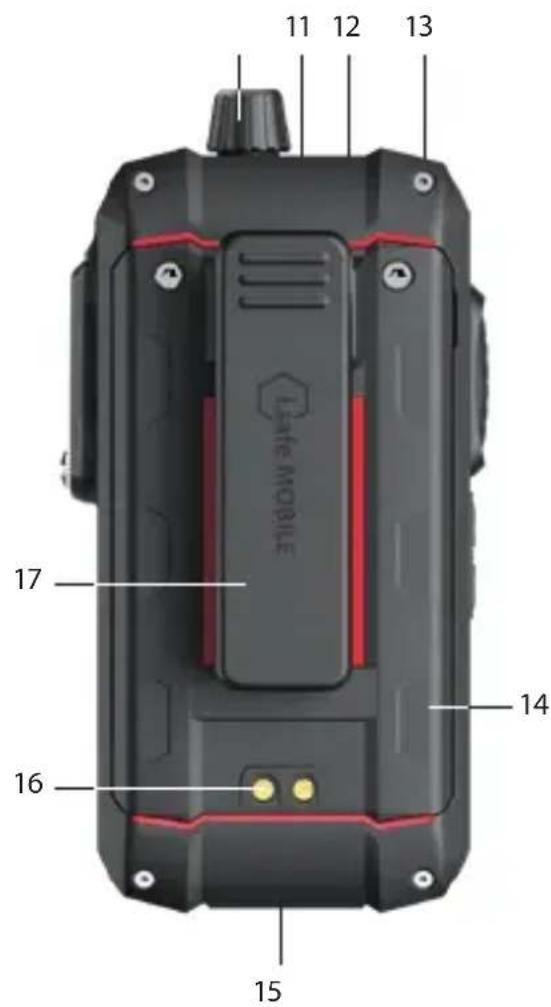
natural_image
Two views of a mobile phone device showing internal components and a scroll wheel (no text or symbols visible)natural_image
Two views of a red handheld device showing internal components and a close-up of its internal structure (no text or symbols visible)natural_image
Diagram showing a screwdriver being inserted into a device, with rotation arrows indicating motion (no text or symbols)natural_image
Three-step diagram showing cable fastening process: wire insertion, switch press, and end cap assembly (no text or symbols)natural_image
Four-panel diagram showing a hand tool interacting with a black and red handheld device, demonstrating a stepwise shift (no text or symbols present)natural_image
Two views of a black handheld device with red internal components, showing a mechanical shift or adjustment (no text or symbols visible)natural_image
Two views of a red handheld device showing internal components and a close-up of its internal structure (no text or symbols visible)natural_image
Diagram showing a screwdriver being inserted into a device, with rotation arrows indicating motion (no text or symbols)natural_image
Three-step diagram showing cable installation steps: wire insertion, switch press, and screwdriver insertion (no text or symbols)natural_image
Four-panel diagram showing a hand tool interacting with a black handheld device, illustrating the process of rotation and adjustment (no text or symbols present)natural_image
Two views of a mobile phone device showing internal components and tool application (no text or symbols visible)» Postavite bateriju u odjeljak za bateriju prema prikazu. Vodite računa o tome da kontakti baterije u zlatnoj boji i kontakti uređaja gledaju jedni prema drugima.
» Ručno zategnite vijke isporučenim Torx odvijačem.
» Provjerite da je baterija pravilno učvršćena.
UMETANJE/UKLANJANJE SIM KARTICE
Uređaj ima utor za nano SIM karticu i dodatnu eSIM karticu. eSIM kartica je nezamjenjiva, integrirana, digitalna eSIM kartica. Za više informacija kontaktirajte svog pružatelja usluga.

OPASNOST
Neodgovarajući postupak u područjima ugroženima eksplozijom predstavlja opasnost od smrti ili teških ozljeda! Otvarajte uređaj samo izvan područja ugroženih eksplozijom da biste umetnuli ili uklonili SIM karticu.
NAPOMENA
Neodgovarajući postupak pri umetanju/uklanjanju SIM kartice može oštetiti uređaj i SIM karticu. Isključite uređaj prije umetanja ili uklanjanja SIM kartice. Ne punite uređaj za vrijeme umetanja ili uklanjanja SIM kartice.
natural_image
Two views of a red handheld device showing internal components and a close-up of its internal structure (no text or symbols visible)» Otpustite vijke na bateriji isporučenim Torx odvijačem.
» Uklonite bateriju iz odjeljka za bateriju.
»Umetnite SIM karticu u utor za nano SIM karticu (1) tako da kontakti zlatne boje gledaju prema dolje.
» Ponovno ugradite bateriju. Pogledajte odlomak „Ugradnja baterije“.
AKTIVIRAJTE ESIM
natural_image
Diagram showing a screwdriver being inserted into a device, with motion arrows indicating rotation (no text or symbols present)natural_image
Three-step diagram showing cable fastening and screwdriver insertion (no text or symbols)» Spojite utikač odobrenog pribora na 8-pin ISM sučelje prema prikazu.
» Ručno zategnite vijke.
» Provjerite da je utikač pravilno učvršćen.
USB SUČELJE

OPASNOST
natural_image
Four-panel diagram showing a hand tool interacting with a device, demonstrating a stepwise shift (no text or symbols present)» Otpustite vijke na bateriji isporučenim Torx odvijačem.
» Uklonite bateriju iz odjeljka za bateriju prema prikazu.
» Postavite odobrenu zamjensku bateriju u odjeljak za bateriju prema prikazu. Vodite računa o tome da kontakti baterije u zlatnoj boji i kontakti uređaja gledaju jedni prema drugima.
» Ručno zategnite vijke isporučenim Torx odvijačem.
» Provjerite da je baterija pravilno učvršćena.
MOGUĆI PROBLEMI S UREĐAJEM
www.isafe-mobile.com/en/support/service
MALOPRODAJNI PARTNER
Možete pronaći stručnog maloprodajnog partnera odgovornog za svoju državu na www.isafe-mobile.com/en/contact
ČIŠĆENJE
NAPOMENA
www.isafe-mobile.com/en/support/downloads
VYHLÁSENIE FCC/IC
Vyhlásenie FCC/IC nájdete na www.isafe-mobile.com/en/support/downloads
OZNAČENIA SÚVISIACE S NEBEZPEČENSTVOM VÝBUCHU
ATEX:
Ex1 M1 Ex ia I Ma
④ II 2G Ex ib IIC T4 Gb
II 2D Ex ib IIIC T135°C Db
natural_image
Two black handheld devices with red internal compartments and a scroll wheel, showing mechanical adjustment (no text or symbols visible)» Batériu vložte do priehradky na batérie tak, ako je to znázornené. Uistite sa, že zlaté kontakty batérie a zariadenia smerujú k sebe.
» Skrutky ručne utiahnutie pomocou dodaného skrutkovača Torx.
» Skontrolujte, či je batéria vložená správne a pevne.
VKLADANIE/VYBERANIE SIM KARTY
natural_image
Two views of a red handheld device showing internal components and a close-up of its internal structure (no text or symbols visible)» Uvoľnite skrutky na batérii pomocou dodaného skrutkovača Torx.
»Vyberte batériu z priehradky na batérie.
» Vložte SIM kartu do slotu na kartu nano-SIM (1) tak, aby zlaté kontakty smerovali nadol.
» Vložte spät batériu. Pozrite časť „Inštalácia batérie“.
natural_image
Diagram showing a screwdriver being inserted into a device, with motion arrows indicating rotation (no text or symbols present)natural_image
Three-step diagram showing cable fastening and screwdriver insertion (no text or symbols)natural_image
Four-panel diagram showing a hand tool interacting with a device, illustrating the process of rotation and adjustment (no text or symbols present)» Uvoľnite skrutky na batérii pomocou dodaného skrutkovača Torx.
» Vyberte batériu z priehradky na batérie tak, ako je to znázornené.
» Schválenú náhradnú batériu vložte do priehradky na batérie tak, ako je to znázornené. Uistite sa, že zlaté kontakty batérie a zariadenia smerujú k sebe.
» Skrutky ručne utiahnutie pomocou dodaného skrutkovača Torx.
» Skontrolujte, či je batéria vložená správne a pevne.
> MOŽNÉ PROBLÉMY SO ZARIADENÍM
natural_image
Two black flip-flops with red plastic covers, showing internal components and a mechanical shift (no text or symbols visible)natural_image
Two views of a red handheld device showing internal components and a close-up of its internal structure (no text or symbols visible)natural_image
Diagram showing a screwdriver being inserted into a device, with motion arrows indicating rotation (no text or symbols present)natural_image
Three-step diagram showing cable fastening process: left panel with cable being inserted, right panel with cable being inserted and then being wrapped in a screwdriver (no text or symbols)natural_image
Four-panel diagram showing a foldable device being adjusted, with arrows indicating rotation and adjustment (no text or symbols)natural_image
Two views of a black flip phone with red and black casing, showing internal components and tool movement (no text or symbols visible)natural_image
Two views of a red mobile phone case with internal components and a close-up of its internal structure (no text or symbols visible)natural_image
Two-step diagram showing a screwdriver being inserted into a device, with rotation arrows indicating the process (no text or symbols present)natural_image
Three-step diagram showing cable fastening and fastening process (no text or symbols)natural_image
Four-step diagram showing a hand tool interacting with a device, demonstrating a rotational motion (no text or symbols present)natural_image
Two views of a mobile phone device showing internal components and a wrench tool (no text or symbols visible)natural_image
Two views of a red mobile phone case showing internal components and a close-up of the internal terminal (no text or symbols visible)natural_image
Diagram showing a screwdriver being inserted into a device, with motion arrows indicating rotation (no text or symbols present)natural_image
Three-step diagram showing cable fastening and fastening process (no text or symbols)natural_image
Sequence of four images showing a hand tool interacting with a black handheld device, illustrating the process (no text or symbols present)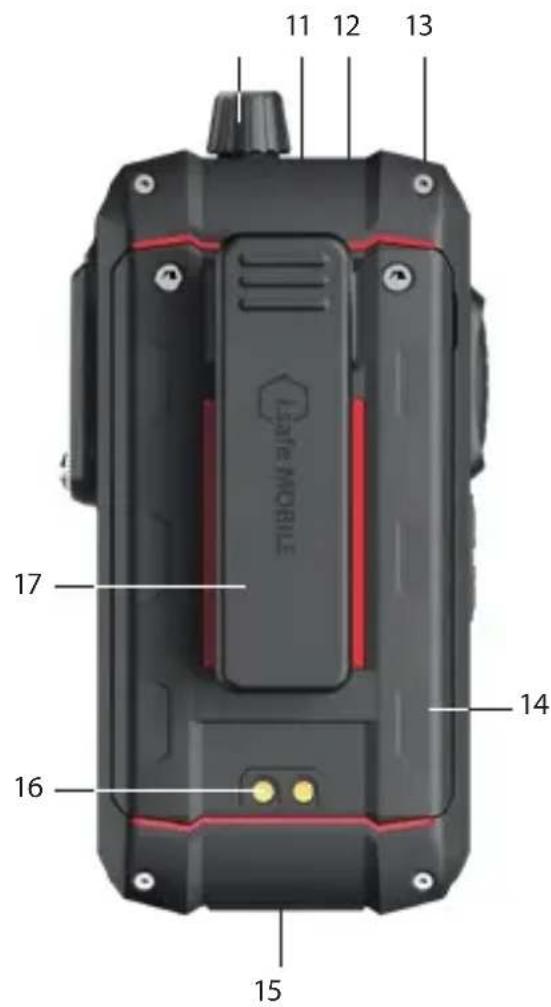
natural_image
Two black-and-red handheld devices with red buttons and a white plastic cover, showing internal components and a scroll wheel (no text or symbols visible)natural_image
Two views of a red mobile phone case with internal components and a close-up of the internal wiring (no text or symbols visible)natural_image
Diagram showing a screwdriver inserted into a device, with motion arrows indicating rotation (no text or symbols)natural_image
Three-step diagram showing cable fastening and disassembly process (no text or symbols)natural_image
Four-panel diagram showing a hand tool interacting with a black handheld device, illustrating the process (no text or symbols present)www.isafe-mobile.com/en/support/service
www.isafe-mobile.com/en/support/downloads
نطاق درجة الحرارة:
-20 °C ≤ Ta ≤ +55 °C (EN/IEC 60079-0)
-10 °C ... +55 °C (EN/IEC 62368-1)
المُصْبِع:
i.safe MOBILE GmbH
i Park Tauberfranken 10
Lauda-Koenigshofen 97922
ألمانيا
natural_image
Two views of a black and red mobile phone case with a red internal panel, showing mechanical adjustment (no text or symbols visible)natural_image
Three views of a red electronic device showing internal components and a tool interacting with the right side (no text or symbols visible)natural_image
Two-step diagram showing a switch mechanism and a screwdriver tool (no text or symbols)natural_image
Three-step diagram showing a cable being inserted into a device, with no visible text or symbols.Expected Investment is a domestic gathering of the USB. Except from the USB, it is not to be able to access USB for the purpose of this program.

natural_image
Four-panel diagram showing a device being adjusted for a cable, with arrows indicating motion (no text or symbols)FOR FURTHER QUESTIONS PLEASE CONTACT OUR SERVICE CENTRE:
»i.safe MOBILE GmbH, i_Park Tauberfranken 10, 97922 Lauda-Koenigshofen, Germany
» support@isafe-mobile.com
» https://support.isafe-mobile.com
ISAFE-MOBILE.COM


- CONTENTS
- ENGLISH
- PROTECT YOUR LIFE AND READ THE OPERATING MANUAL
- EX-RELEVANT SAFETY REGULATIONS
- COVERS
- ACCESSORIES
- IP-PROTECTION
- SIM CARDS
- CHARGING
- IMPACTS
- CONDITIONS OF USE
- BATTERY
- FAULTS AND DAMAGES
- MAXIMUM OUTPUT POWER
- SAR
- CALL FUNCTION
- WI-FI WARNING
- SOUND PRESSURE WARNING
- INTENDED USE
- USER
- WARRANTY
- EU DECLARATION OF CONFORMITY
- FCC/IC STATEMENT
- EX MARKINGS
- > ATEX:
- >IECEx:
- > Temperature range:
- Manufactured by:
- >SCOPE OF DELIVERY
- × IS440.M1
- CELL BROADCAST
- >DEVICE OVERVIEW/FUNCTIONS
- FUNCTION KEYS
- >INSTALLING THE BATTERY
- DANGER
- INSERT/REMOVE SIM CARD
- NOTICE
- Activate eSIM
- >CHARGING
- CAUTION
- > SWITCHING ON/OFF
- >USING THE DEVICE
- CONNECTING APPROVED ACCESSORIES
- 8-PIN ISM INTERFACE
- USB INTERFACE
- >CHANGING THE BATTERY
- WARNING
- POSSIBLE DEVICE PROBLEMS
- MAINTENANCE/REPAIR
- RETURN SHIPMENT
- DISTRIBUTION PARTNER
- CLEANING
- STORAGE
- RECYCLING
- TRADEMARKS
- DEUTSCH
- PROHLÁŠENÍ FCC/IC
- ZNAČENÍ SOUVISEJÍCÍ S NEBEZPEČÍM VÝBUCHU
- ATEX:
- www.isafe-mobile.com/en/support/downloads
- FCC/IC-ERKLÆRING
- TIDLIGERE MærKNINGER
- DETAILPARTNER
- RENG∅RING
- BEMÆRK
- DÉCLARATION DE CONFORMITÉ UE
- IECEx:
- > Plage de temperature:
- > Fabrique par:
- ÉTENDUE DE LA LIVRAISON
- MISE EN MARCHE/ARRÊT
- POTENZA DI USCITA MASSIMA
- INTERFACCIA 8-PIN ISM
- FCC/IC-VERKLARING
- EX-MARKERINGEN
- ADVARSEL OM LYDTRYKK
- FCC/IC UTTALELSE
- EX-MERKING
- VEDLIKEHOLD/REPARASJON
- DETALJHANDELSPARTNER
- WYPOSAŻENIE DODATKOWE
- MARCAÇÕES EX
- INTERFACE USB
- PERIGO
- > PARCEIRO COMERCIAL
- UMETANJE/UKLANJANJE SIM KARTICE
- OPASNOST
- NAPOMENA
- AKTIVIRAJTE ESIM
- USB SUČELJE
- MOGUĆI PROBLEMI S UREĐAJEM
- MALOPRODAJNI PARTNER
- ČIŠĆENJE
- VYHLÁSENIE FCC/IC
- OZNAČENIA SÚVISIACE S NEBEZPEČENSTVOM VÝBUCHU
- VKLADANIE/VYBERANIE SIM KARTY
- > MOŽNÉ PROBLÉMY SO ZARIADENÍM
Brand : i.safe Mobile
Model : IS-DC440.1
Category : Uncategorized