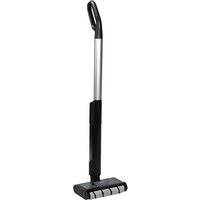
SHBRA 40 A1 - Vacuum Cleaner SILVERCREST - Free user manual and instructions
Find the device manual for free SHBRA 40 A1 SILVERCREST in PDF.


| Product type | Cordless stick vacuum for hard floors |
| Brand | SilverCrest |
| Model | SHBRA 40 A1 |
| Input voltage guide | 100 – 240 V ~, 50/60 Hz |
| Adapter output voltage | 9.5 V ⎓, 0.6 A |
| Battery type | Lithium-ion 7.4 V (2 x 3.7 V) |
| Battery capacity | 2600 mAh / 19.24 Wh |
| Runtime | Approx. 45 minutes |
| Rated power | 40 W |
| Clean water tank capacity | Approx. 200 ml (estimate) |
| Dirty water tank capacity | Approx. 150 ml (estimate) |
| Brush width | Approx. 25 cm (estimate) |
| Net weight | Approx. 3 kg (estimate) |
| Dimensions (L x W x H) | Approx. 30 x 25 x 110 cm (estimate) |
| Main functions | Hard floor cleaning, automatic spray, rotating cylindrical brush |
| Compatible floor types | PVC, linoleum, tile, stone, oiled/waxed parquet, water-resistant laminate |
| Maintenance and cleaning | Washable dirty water tank, hand-washable cylindrical brush, self-cleaning function |
| LED indicators | Battery level (3 LEDs), spray / dirty water tank |
| Safety | Auto shut-off in upright position, battery overheat protection, child safety (supervision required) |
| Spare parts and repairability | Spare parts available at www.kompernass.com, replaceable cylindrical brush |
| Warranty | 3 years (France and Belgium) |
| Item number (IAN) | 489178_2407 |
| Recycling | Device and packaging recyclable, integrated battery |
Frequently Asked Questions - SHBRA 40 A1 SILVERCREST
User questions about SHBRA 40 A1 SILVERCREST
0 question about this device. Answer the ones you know or ask your own.
Ask a new question about this device
Download the instructions for your Vacuum Cleaner in PDF format for free! Find your manual SHBRA 40 A1 - SILVERCREST and take your electronic device back in hand. On this page are published all the documents necessary for the use of your device. SHBRA 40 A1 by SILVERCREST.
USER MANUAL SHBRA 40 A1 SILVERCREST
CORDLESS HARD FLOOR CLEANER AKKU-HARTBODENREINIGER NETTOYEUR DE SOLS DURS SANS FIL SHBRA 40 A1
GB IE
CORDLESS HARD FLOOR CLEANER
Operating instructions
FR BE
NETTOYEUR DE SOLS DURS SANS FIL
Mode d'emploi
CZ
AKU PODLAHOVÝ ČISTIČ
Návod k obsluze
SK
AKU ČISTIČ PODLÁH
Návod na obsluhu
DK
GENOPLADELIG GULVRENSER TIL HÄRDE GULVE
Before reading, unfold the page containing the illustrations and familiarise yourself with all functions of the device.
DE AT CH
GB/IE Operating instructions Page 1
Contents
Introduction 2
Intended use 2
Warnings and symbols used .... 2
Safety information....3
Package contents and transport inspection....6
Appliance description 6
Technical data 6
Before first use ....8
Setting up the appliance 8
Assembling the charger 8
Getting started 8
Information about the battery 8
Charging the battery 9
Filling the fresh water tank 9
Operation and use 10
Wiping the floor 10
Interrupting operation 11
Emptying the dirty water tank 11
After use 12
Cleaning....12
Cleaning the dirty water tank 12
Self-cleaning function 13
Cleaning the roller brush 13
Cleaning the appliance and charger 14
Storage 14
Ordering replacement parts 14
Troubleshooting....15
Disposal....16
Disposal of the appliance....16
Disposal of the packaging 16
KompernassHandelsGmbHwarranty....17
Service 18
Importer 18
Introduction
Congratulations on the purchase of your new appliance. You have selected a high-quality product.
The instructions for use are part of this product. They contain important information about safety, usage and disposal. Before using the product, please familiarise yourself with all instructions regarding safety and use. Use the product only as described and for the specified range of applications. Please also pass on all documents to any future owner.
Intended use
The appliance may only be used for cleaning hard floors in private households and only on water-resistant hard floors. The appliance is suitable for cleaning PVC, linoleum, tile, stone, oiled and waxed parquet, laminate and all water-impervious flooring materials.
Any other usage of or modification to the appliance is deemed to be improper and carries a significant risk of accidents. The appliance is not intended for commercial use.
The manufacturer accepts no liability for damages caused by improper use or incorrect operation of the appliance.
Warnings and symbols used
The following warnings and symbols are used in these instructions for use, on the packaging and on the appliance (where applicable):
| DANGER! A warning with this symbol and the signal word "DANGER" indicates an imminently hazardous situation which will result in death or serious injury if not avoided. | |
| WARNING! A warning with this symbol and the signal word "WARNING" indicates a potentially hazardous situation which could result in death or serious injury if not avoided. | |
| CAUTION! A warning with this symbol and the signal word "CAUTION" indicates a potentially hazardous situation which could result in a minor or moderate injury if not avoided. | |
| ATTENTION! A warning with this symbol and the signal word "ATTENTION" indicates a potential situation which could result in property damage if not avoided. | |
| Note: A note provides additional information aimed at making it easier to use the appliance. | |
| DC current/voltage | |
| AC current/voltage |
Safety information
■ Check the appliance for visible external damage before use. Do not operate an appliance that has been damaged or dropped.
■ Do not use the mains adapter if it has a damaged plug or cable.
■ The mains adapter and permanently connected connection cord may not be repaired. In the event of a defect, the entire mains adapter must be replaced with another of identical design.
■ To prevent accidents, have defective plugs and/or power cables replaced immediately by an authorised specialist, our Customer Service or a similarly qualified person.
■ Have all repairs carried out by a specialist workshop. Under no circumstances should you open the appliance yourself. Repairs that are not carried out by a specialist workshop could lead to physical injuries.
■ Before switching on the appliance, make sure that the mains voltage corresponds to the voltage indicated in the technical data for the appliance.
■ Never touch the mains adapter or the appliance with wet or damp hands.
■ Do not use the mains adapter with an extension cable; connect the mains adapter directly to an outlet.

Do not charge or use the appliance outdoors.

WARNING! RISK OF INJURY!
■ Do not change any accessories while the appliance is switched on.
■ Always store the appliance indoors. To prevent accidents, keep the appliance in a dry location when not in use.
■ Under extreme conditions, leaks in the battery cells may occur. In the event that battery fluid comes into contact with skin or eyes, the affected area must be rinsed off with water immediately. Contact a physician.
■ This appliance may be used by children aged 8 years and above and by persons with limited physical, sensory or mental capabilities or lack of experience and knowledge, provided that they are under supervision or have been told how to use the appliance safely and are aware of the potential risks.
■ Do not allow children to play with the appliance. Cleaning and user maintenance tasks may not be carried out by children unless they are supervised.
■ Take special care when using the appliance on stairs or steps.

ATTENTION! PROPERTY DAMAGE!
■ Use only accessories recommended by the manufacturer.
■ The mains adapter may not be used for other purposes. Never carry the wall bracket or the mains adapter by the cable. Do not pull on the cable when you want to move the appliance.
■ Always grip the power plug of the mains adapter to disconnect the appliance from the power supply.
■ Never put down the appliance next to radiators, ovens or other heated appliances or surfaces.
■ Use only the type and quantity of liquids listed in these operating instructions when operating the appliance.
■ Do not use the appliance on water-sensitive floors, such as un treated cork or wood flooring. Otherwise, moisture can penetrate and damage the flooring.
■ Never leave the appliance unattended during operation.
■ Do not leave the appliance standing on wooden floors for any length of time when it is switched on. The wood could swell.
■ Do not operate the appliance with an empty fresh water tank. Otherwise, the pump could run empty and overheat.
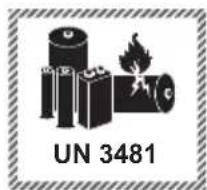
The product is equipped or supplied with a lithium-ion battery. Do not throw the rechargeable battery into a fire and do not subject it to high temperatures. There is a risk of an explosion!
■ Do not use the power adapter for a different product, and do not attempt to charge this appliance with a different mains adapter. Use only the mains adapter supplied with this appliance (model CZH008N095060EUWP).
■ Never store the appliance when it is discharged. Prolonged storage in a discharged state can cause permanent damage to the battery. If the appliance is stored for a longer period of time, the charge level of the battery must be checked regularly. The optimum charge level is between 50% and 80%.
Package contents and transport inspection
i Note
▶ Check the package for completeness and signs of visible damage.
▶ If any items are missing or damaged as a result of defective packaging or transportation, please contact the Service Hotline (see section Service).
1) Remove all parts of the appliance and the operating instructions from the packaging.
2) Remove all packaging materials and any films and labels.
The package contents include the following components (see fold-out page for illustrations):
- Hard hard floor cleaner
- Handle
- Charger (two-part)
- Mains adapter
- Instructions for use
Appliance description
(See fold-out page for illustrations)
① Handle
② Charging contacts (appliance)
③ Battery indicator (three LEDs)
④ Spray function/dirty water tank LED
⑤ Release button (fresh water tank)
6 Fresh water tank
⑦ Wiping unit
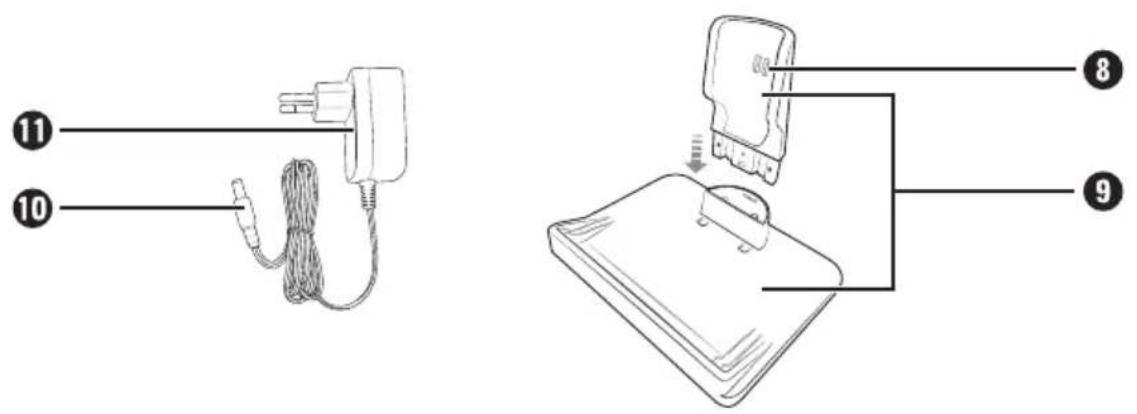
⑧ Charging contacts (charger)
⑨ Charger
10 Barrel plug
⑪ Mains adapter
12 Roller brush
⑬ Dirty water tank
14 Cover (dirty water tank)
15 Spray button
16 On/Off switch
Technical data
| Appliance | |
| Input voltage / current | 9.5 V---/0.6 A |
| Rated power 40 W | |
| Polarity | |
| Rechargeable battery | |
| Capacity 2600 mAh | / 19.24 Wh |
| Rechargeable battery | 7.4 V---(2 x 3.7 V lithium-ion batteries) |
| Operating time with full battery charge | Approx. 45 minutes |
| Mains adapter | |
| Manufacturer | Shenzhen CHANZEHO Technology Co., Limited CHANZEHO Technology Park, 114-1 Longxing North Road, Longtian Community, Longtian Street, Pingshan District, 518118 Shenzhen, Guangdong, China Commercial register number: 91440300695576136X |
| Importer: KOMPERNASS HANDELS GMBH, Burgstrasse 21, 44867 Bochum, Germany Registered court: AG Bochum Register number: HRB 4598 | |
| Model CZH008N095060EUWP | |
| Input voltage 100-240 V ~ | |
| Input AC frequency | 50/60 Hz |
| Output voltage 9.5 V --- | |
| Output current 0.6 A | |
| Output power 5.7 W | |
| Average efficiency in operation | 80,8 % |
| Power consumption at no load | 0,09 W |
| Power consumption 0.2 A | |
| Polarity | |
| Mains adapter | |
| Protection class | II/☐ (double insulation) |
| Efficiency class | 6 VI |
| Protection type | IP20: Protection against solid objects with a diameter of more than 12.5 mm |
| Safety mark of the German Product Safety Act (tested by TÜV Süd) |  |
i Note
▶ No user action is required to switch the product between 50 and 60 Hz. The product switches automatically to either 50 or 60 Hz.
Before fi rst use
Setting up the appliance
♦ Push the handle ① onto the appliance until it clicks into place (see Fig. 1).
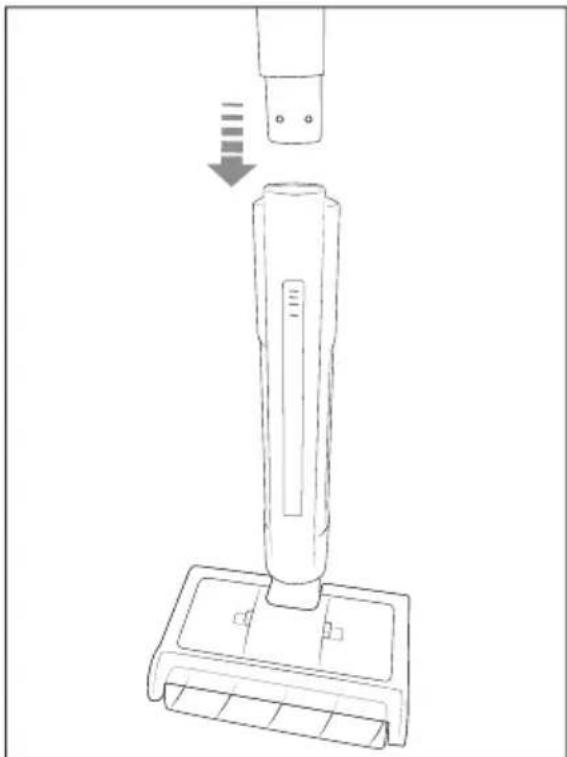
Fig. 1
Assembling the charger
1) Connect the two parts of the charger ⑨ together (see Fig. 2).
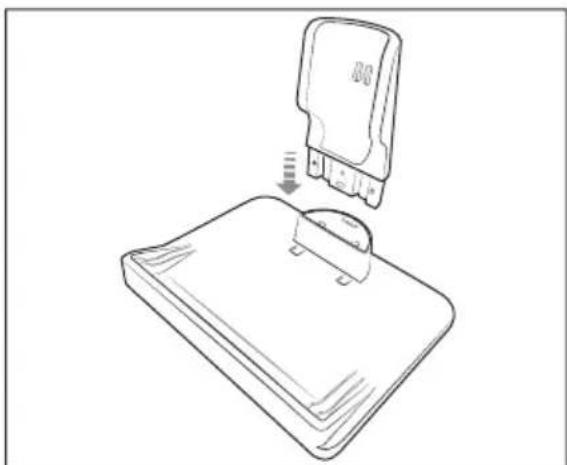
Fig. 2
2) Insert the barrel plug 10 of the mains adapter 11 into the charging socket on the left side of the charger 9. Connect the mains adapter 11 to a power outlet (see Fig. 3).
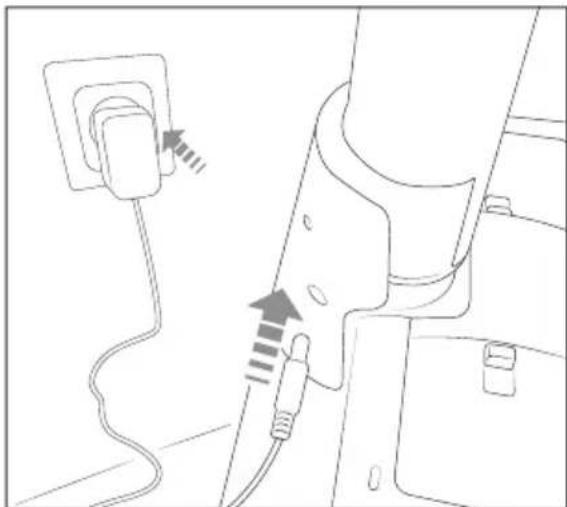
Fig. 3
Getting started Information about the battery
The appliance is powered by a rechargeable lithium-ion battery. Before using the appliance for the first time, the battery must be charged.
◆ For care of the batteries, we recommend the following:
Disconnect the mains adapter ⑪ from the power outlet after the battery is charged.
i Note
The appliance is equipped with a temperature monitor to protect the battery. At high ambient temperatures, the charging process may be interrupted or the appliance may switch off automatically in rare cases:
-All three LEDs of the battery indicator flash at one second intervals during charging. Charging is interrupted and automatically resumed as soon as the temperature of the appliance has dropped.
- The third LED of the battery indicator ③ flashes five times at one second intervals during operation. The appliance switches off automatically. Allow the appliance to cool down for about 20–30 minutes before switching it on again.
Charging the battery
Place the appliance in the charger ⑨ (see Fig. 4). Make sure that the appliance is standing straight in the charger ⑨ so that the charging contacts ⑧ of the charger ⑨ connect to the charging contacts ② of the appliance. The battery indicator ③ starts flashing, and the charging process starts.
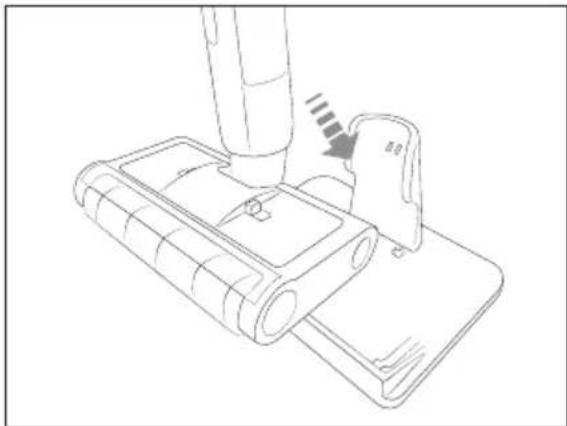
Fig. 4
Battery indicator
The battery indicator ③ indicates the current charge status of the battery:
The battery is fully charged.
The battery is about two thirds charged.
The battery is about one third charged.
The battery is empty (one LED flashing).
(i) Note
▶ Charge the battery again once the battery indicator ③ indicates that the battery is empty.
Filling the fresh water tank
! ATTENTION!
▶

Fill the fresh water tank ⑥ only with cold to warm tap water (up to max. 60°C) or distilled water. Do not used boiling water.
▶ Never operate the appliance without water in the fresh water tank ⑥.
1) Set the appliance upright and hold the handle ① firmly with one hand.
2) Press down the release button ⑤ of the fresh water tank ⑥ and pull the fresh water tank ⑥ out of the appliance (see Fig. 5).
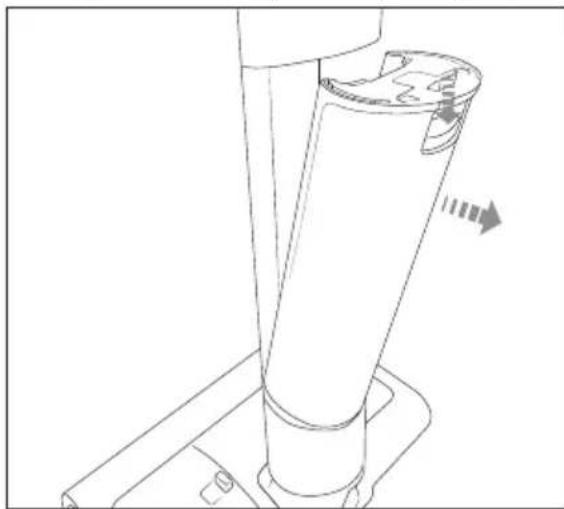
Fig. 5
3) Grip the closing tab of the fresh water tank ⑥ with your fingers and pull it upwards out of the filler opening of the fresh water tank ⑥. Press the closing tab to the side (see Fig. 6).
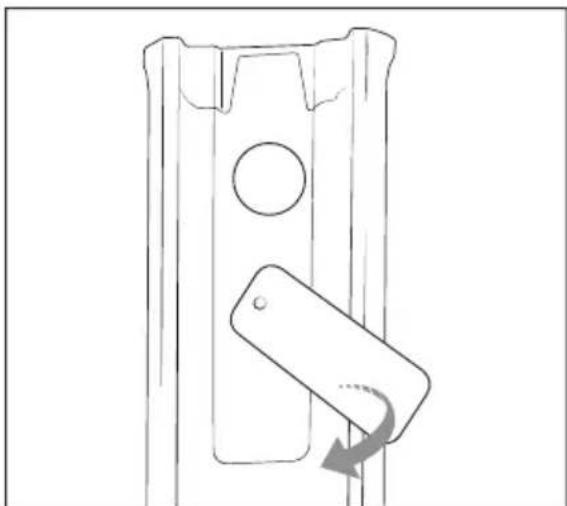
Fig. 6
4) Fill the fresh water tank ⑥ with tap water or distilled water (see Fig. 7). Do not fill the fresh water tank ⑥ beyond the MAX mark. Pour out any excess water through the filler opening.
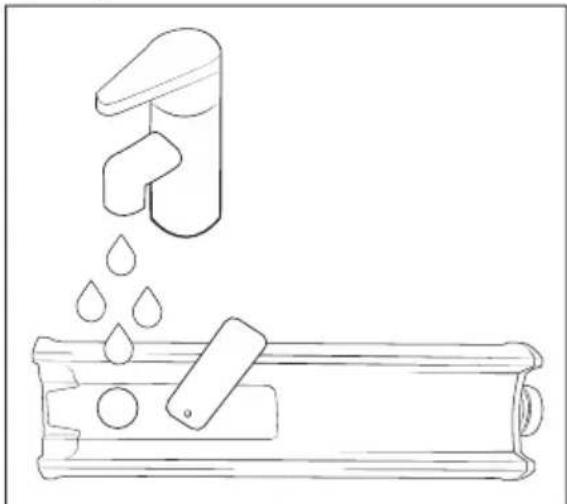
Fig. 7
5) Close the fi ller opening of the fresh water tank ⑥ again by pressing the closing tab fi rmly into the fi ller opening.
6) Place the fresh water tank ⑥ back in the appliance. Make sure that the fresh water tank ⑥ is firmly seated in the appliance.
Operation and use
Wiping the floor
! ATTENTION!
▶ Do not use the appliance on water-sensitive floors, such as untreated cork or wood flooring. Otherwise, moisture can penetrate and damage the flooring.
▶ Always hold the appliance by the handle ① when it is switched on.
(i) Note
▶ Vacuum or sweep the floor surface to be wiped before using the appliance.
▶ While wiping, move backwards with the appliance so that you do not leave any footprints on the freshly wiped floor.
▶ When not in the charger ⑨, the appliance can only be switched on while the handle ① is held at a slight angle (see Fig. 8).

Fig. 8
The appliance switches off automatically when the handle ① is brought to the upright position while in operation.
▶ Once the appliance is switched on, the spray function is automatically activated for 5 seconds, and this is then repeated every 15 seconds. The spray function / dirty water tank LED ④ lights up blue when the spray function is active.
▶ When you press the spray button 15 , the spray function is activated for 5 seconds, and this is then repeated automatically every 15 seconds.
1) Take the appliance out of the charger ⑨.
2) Hold the handle ① at a slight angle and press the On/Off switch ⑯ to switch on the appliance (see Fig. 8). The battery indicator ③ and the spray function / dirty water tank LED ④ light up and the roller brush ⑫ starts to turn. The spray function is automatically activated for 5 seconds, and this is then repeated every 15 seconds.
3) Move the appliance evenly forwards and backwards to wipe the floor. Press the spray button ⑮ when you would like to apply more water to the roller brush ⑫.
(i) Note
For heavy soiling, move the appliance more slowly and make multiple passes over the floor until the soiling has been removed. You do not need to exert any pressure on the appliance.
Interrupting operation
◆ Press the On/Off switch 16 or position the handle 1 upright to switch off the appliance. The battery indicator 3 and the spray function / dirty water tank LED 4 go out and the roller brush 12 stops.
◆ Place the appliance in the charger ⑨ during prolonged breaks in operation.
Emptying the dirty water tank
(i) Note
The appliance automatically switches off when the dirty water tank ⑬ is full to prevent overfl owing. The spray function / dirty water tank LED ④ lights up red.
▶ When emptying the dirty water tank ⑬, make sure that the drain (e.g. the wash basin) is not blocked by hair or coarse dirt.
1) Place the appliance in the charger ⑨.
2) Press the two release buttons on the cover 14 of the dirty water tank 13 and remove the cover 14 from the dirty water tank 13 (see Fig. 9).
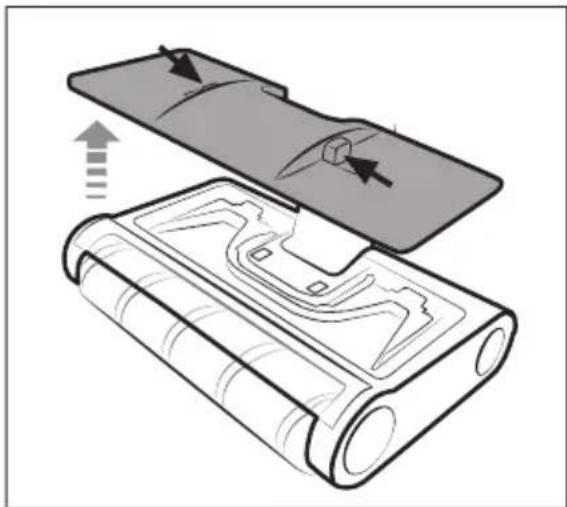
Fig. 9
3) Take the dirty water tank 13 out of the wiping unit 7 (see Fig. 10).
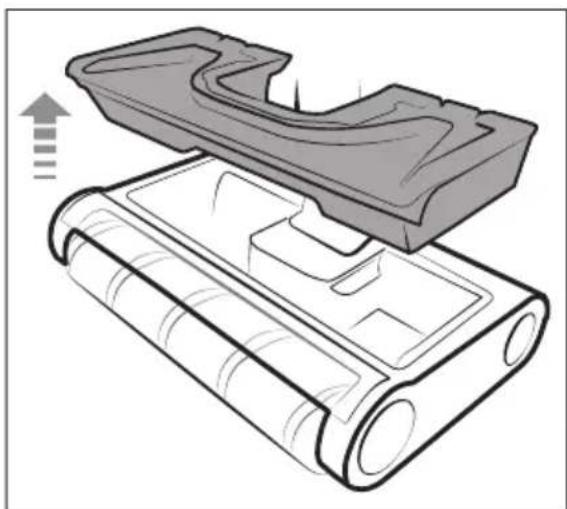
Fig. 10
4) Hold the dirty water tank 13 over a wash basin and press the two side release buttons upwards one after the other (see Fig. 11). Flip open the dirty water tank 13 and pour out the dirty water.
Fig. 11
5) Flip closed the dirty water tank 13 and place it back in the wiping unit 7.
6) Place the cover 14 on the dirty water tank 13. Press the cover 14 down until it clicks onto the dirty water tank 13.
After use
◆ Press the On/Off switch 16 or position the handle 1 upright to switch off the appliance. The battery indicator 3 and the spray function / dirty water tank LED 4 go out and the roller brush 12 stops.
◆ Place the appliance in the charger ⑨.
◆ Empty the dirty water tank ⑬ (see section Emptying the dirty water tank).
Cleaning
WARNING!
▶ Always switch off the appliance before cleaning it (except when using the self-cleaning function).
▶ Do not immerse the appliance in liquids or hold it under running water. There is a risk of electric shock!
Cleaning the dirty water tank
ATTENTION!
▶ Regularly clean the dirty water tank ⑬ to prevent encrustation of dirt or bacterial growth.
▶ Do not clean the dirty water tank 13 in the dishwasher. This could damage the dirty water tank 13.
1) Press the On/Off switch ⑯ to switch the appliance off.
2) Place the appliance in the charger ⑨.
3) Take the dirty water tank ⑬ out of the wiping unit ⑦ (see section Emptying the dirty water tank) and empty it in a wash basin.
4) Clean the dirty water tank 13 and the cover 14 with warm tap water.
5) Allow the dirty water tank 13 and the cover 14 to air dry completely before placing them back into the appliance. Alternatively, wipe the dirty water tank 13 and the cover 14 completely dry with a cloth before placing them back into the appliance.
Self-cleaning function
(i) Note
▶ Carry out a self-cleaning of the appliance after every use.
1) Place the appliance in the charger ⑨ for charging.
2) Press the On/Off switch ⑯ to start the self-cleaning function. The battery indicator ③ and the spray function / dirty water tank LED ④ light up or flash. The roller brush ⑫ turns, and the spray function is activated for 75 seconds.
3) After 80 seconds, the self-cleaning function is automatically stopped and charging is continued.
4) Take the dirty water tank ⑬ out of the wiping unit ⑦ (see section Emptying the dirty water tank) and empty it in a wash basin.
Cleaning the roller brush
ATTENTION!
▶ Only use the appliance with the roller brush ⑫ properly mounted.
(i) Note
▶ Clean the roller brush ⑫ regularly to ensure proper operation of the appliance and avoid malfunctions.
▶ Empty the fresh water tank ⑥ and dirty water tank ⑬ before taking the roller brush ⑫ out of the wiping unit ⑦ so that no water runs out.
▶ Observe the following care instructions for cleaning the roller brush 12:
| Hand wash at up to 40°C | |
| Do not bleach | |
| Do not clean in a rotary dryer | |
| Do not iron | |
| Do not dry clean |
1) Turn over the appliance and place it fl at on the floor so that the bottom of the wiping unit ⑦ faces up.
2) Push the release on the bottom of the wiping unit ⑦ forwards with your finger. Then flip down the side retainer of the roller brush ⑫ (see Fig. 12).
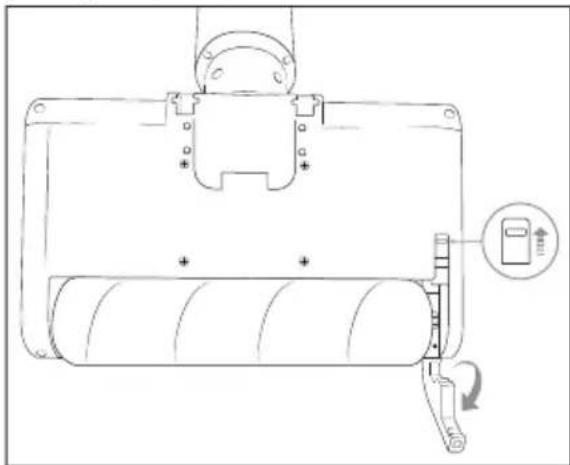
Fig. 12
3) Take the roller brush 12 out of the wiping unit 7 (see Fig. 13).
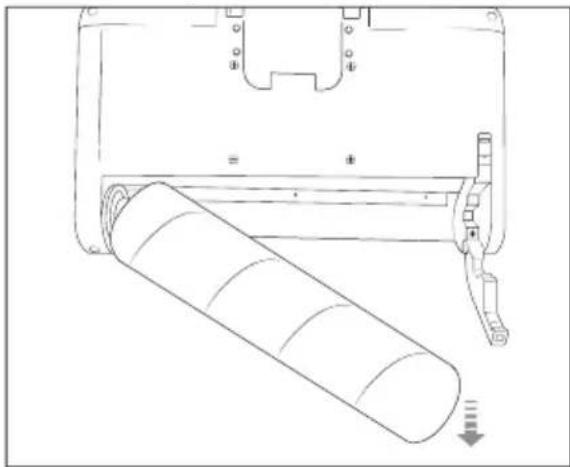
Fig. 13
4) Clean the roller brush ⑫ with warm tap water (see Fig. 14). If necessary, add some cleaning agent to the roller brush ⑫. Allow the roller brush ⑫ to air dry completely before placing it back in the wiping unit ⑦.
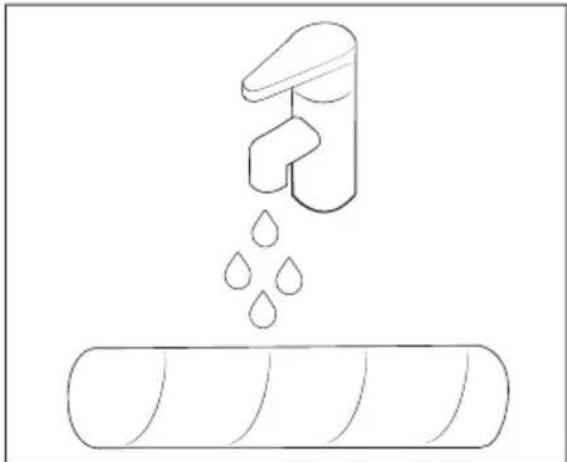
Fig. 14
5) Place the roller brush ⑫ back in the wiping unit ⑦. Flip in the retainer so that it clicks into the wiping unit ⑦.
Cleaning the appliance and charger

DANGER!
Before cleaning, always take the barrel plug ⑩ of the mains adapter ⑪ out of the charger ⑨. There is a risk of electric shock!

ATTENTION!
▶ Do not use aggressive, chemical or abrasive cleaning agents. They could damage the outer surfaces of the appliance.
▶ To avoid irreparable damage to the appliance, ensure that no moisture gets into it during cleaning.
Clean the housing of the appliance and the charger ⑨ with a slightly damp cloth. For stubborn dirt use a mild detergent on the cloth.
- Dry all parts thoroughly before using the appliance again or storing it.
Storage

ATTENTION!
▶ Never store the appliance when it is discharged. Prolonged storage in a discharged state can cause permanent damage to the battery. If the appliance is stored for a longer period of time, the charge level of the battery must be checked regularly. The optimum charge level is between 50% and 80%.
Empty the fresh water tank ⑥ and clean the dirty water tank ⑬ and the roller brush ⑫ (see section Cleaning) if you will not be using the appliance for a prolonged period of time.
◆ Store the appliance in the charger ⑨ in a dust-free and dry location out of direct sunlight.
Ordering replacement parts
You can order replacement parts for this product on the internet at www.kompernass.com.
Scan the QR code with your smartphone/tablet. You can use this QR code to go directly to our website to view and order the available replacement parts.

Note
▶ If you have problems with your online order, you can contact our Service Centre by phone or email.
▶ Always include the article number (IAN) 489178_2407 with your order.
▶ Please note that online ordering of replacement parts is not possible for all countries.
Troubleshooting
| Problem Cause Solution | ||
| The appliance cannot be switched on. | The battery is fully discharged. | Place the appliance in the charger 9 for charging (see section Charging the battery). |
| The handle 1 is in an upright position. | Hold the handle 1 at a slight angle and press the On/Off switch 16 to switch on the appliance. | |
| The appliance cannot be charged. | The charging contacts 2 of the appliance are not fully connected to the charging contacts 8 of the charger 9. | Ensure that the charging contacts 2 of the appliance and the charging contacts 8 of the charging station 9 are in full contact. |
| The mains adapter 11 is not (properly) connected to the charger 9/ power outlet. | Check the connection of the barrel plug 10 to the charger 9 and the connection of the mains adapter 11 to the power outlet. | |
| The appliance switches off automatically and can no longer be switched on again. | The battery is fully discharged. | Place the appliance in the charger 9 for charging (see section Charging the battery). |
| The dirty water tank 13 is full. | Empty the dirty water tank 13 (see section Emptying the dirty water tank). | |
| The handle 1 is in an upright position. | Hold the handle 1 at a slight angle and press the On/Off switch 16 to switch on the appliance. | |
| The appliance has overheated (e.g. if the room temperature is high). | Allow the appliance to cool down for about 20-30 minutes before switching it on again. | |
| The appliance does not clean as well as expected. | The fresh water tank 6 is empty. | Fill the fresh water tank 6 (see section Filling the fresh water tank). |
| The fresh water tank 6 and/or the roller brush 12 is not properly attached. | Make sure that the fresh water tank 6 and the roller brush 12 are attached. | |
| The roller brush 12 is too dry. | Press the spray button 15 to apply more water to the roller brush 12 while wiping. | |
| The roller brush 12 is dirty. | Clean the roller brush 12 (see section Cleaning the roller brush). | |
| The roller brush 12 is blocked. | Check the roller brush 12 and remove any blockages (see section Cleaning the roller brush). | |
| The roller brush 12 is worn out. | Replace the roller brush 12 (see the section Ordering replacement parts). | |
i Note
If you cannot solve the problem with the solutions described above, please contact the Service online (see section Service).
Disposal
Applies only to France:

The product, its packaging and the operating instructions are recyclable. They
are subject to an extended manufacturer responsibility and will be collected separately.
Disposal of the appliance
The adjacent symbol of a crossed-out dustbin means that this appliance is subject to Directive 2012/19/EU. This directive states that this appliance may not be disposed of in the normal household waste at the end of its useful life, but must be taken to specially set-up collection locations, recycling depots or disposal companies.
The disposal is free of charge for the user. Protect the environment and dispose of this appliance properly.
If your old appliance has stored any personal data, you are responsible for deleting it yourself before returning it.
If it is possible to do so without destroying the old appliance, remove the old batteries or rechargeable batteries before returning the appliance for disposal and take them to a separate collection point. In the case of permanently installed rechargeable batteries, you must indicate during disposal that the appliance contains a battery.
The integrated rechargeable battery in this appliance cannot be removed for disposal.

Your local community or municipal authorities can provide information on how to dispose of the worn-out product.
Disposal of the packaging

The packaging materials have been selected for their environmental friendliness and ease of disposal and are therefore recyclable. Dis-
pose of packaging materials that are no longer needed in accordance with applicable local regulations.
Dispose of the packaging in an environmentally friendly manner. Note the labelling on the packaging and separate the packaging material components for disposal,
if necessary. The packaging material is labelled with abbreviations (a) and numbers (b) with the following meanings: 1-7: plastics, 20-22: paper and cardboard, 80-98: composites.
Applies only to Spain:
The packaging contains paper and/or cardboard components.
The packaging contains plastic and/or metal components.
KompernassHandels GmbHwarranty
Dear Customer,
This appliance has a 3-year warranty valid from the date of purchase. If this product has any faults, you, the buyer, have certain statutory rights. Your statutory rights are not restricted in any way by the warranty described below.
Warranty conditions
The warranty period starts on the date of purchase. Please keep your receipt in a safe place. This will be required as proof of purchase.
If any material or manufacturing fault occurs within three years of the date of purchase of the product, we will either repair or replace the product for you or refund the purchase price (at our discretion). This warranty service requires that you present the defective appliance and the proof of purchase (receipt) within the three-year warranty period, along with a brief written description of the fault and of when it occurred.
If the defect is covered by the warranty, your product will either be repaired or replaced by us. The repair or replacement of a product does not signify the beginning of a new warranty period.
Warranty period and statutory claims for defects
The warranty period is not prolonged by repairs effected under the warranty. This also applies to replaced and repaired components. Any damage and defects present at the time of purchase must be reported immediately after unpacking. Repairs carried out after expiry of the warranty period shall be subject to a fee.
Scope of the warranty
This appliance has been manufactured in accordance with strict quality guidelines and inspected meticulously prior to delivery.
The warranty covers material faults or production faults. The warranty does not extend to product parts subject to normal wear and tear or to fragile parts which could be considered as consumable parts such as switches or parts made of glass.
The warranty does not apply if the product has been damaged, improperly used or improperly maintained. The directions in the operating instructions for the product regarding proper use of the product are to be strictly followed. Uses and actions that are discouraged in the operating instructions or which are warned against must be avoided.
This product is intended solely for private use and not for commercial purposes. The warranty shall be deemed void in cases of misuse or improper handling, use of force and modifications / repairs which have not been carried out by one of our authorised Service centres.
Warranty claim procedure
To ensure quick processing of your case, please observe the following instructions:
■ Please have the till receipt and the item number (IAN) 489178_2407 available as proof of purchase.
■ You will find the item number on the type plate on the product, an engraving on the product, on the front page of the operating instructions (below left) or on the sticker on the rear or bottom of the product.
If functional or other defects occur, please contact the service department listed either by telephone or by e-mail.
■ You can return a defective product to us free of charge to the service address that will be provided to you. Ensure that you enclose the proof of purchase (till receipt) and information about what the defect is and when it occurred.
You can download these instructions along with many other manuals, product videos and installation software at www.lidl-service.com.
This QR code will take you directly to the Lidl service page (www.lidl-service.com) where you can open your operating instructions by entering the item number (IAN) 489178_2407.
Service

Service Great Britain
Tel.: 0800 404 7657
E-Mail: kompernass@lidl.co.uk

Servicelreland
Tel.: 1800 101010
E-Mail: kompernass@lidl.ie
IAN 489178_2407
Importer
Please note that the following address is not the service address. Please use the service address provided in the operating instructions.
KOMPERNASS HANDELS GMBH
BURGSTRASSE 21
44867 BOCHUM
GERMANY
www.kompernass.com
Inhaltsverzeichnis
Einleitung 20
Abb. 1
Abb. 2
Abb. 3
Abb. 4
Batterieanzeige
Abb. 5
Abb. 6
Abb. 7
Abb. 8
Abb. 9
Abb. 10
Abb. 11
Abb. 12
Abb. 13
Abb. 14
KOMPERNASS HANDELS GMBH
BURGSTRASSE 21
44867 BOCHUM
DEUTSCHLAND
www.kompernass.com
Table des matières
Introduction 38
Fig. 1
Fig. 2
Fig. 3
Mise en service
Fig. 4
Fig. 5
Fig. 6
Fig. 7
Fig. 8
Fig. 9
Fig. 10
Fig. 11
Fig. 12
Fig. 13
Fig. 14
KOMPERNASS HANDELS GMBH
BURGSTRASSE 21
44867 BOCHUM
ALLEMAGNE
www.kompernass.com
Inhoud
Inleiding....58
WAARSCHUWING! LETSELGEVAAR!
Afb. 1
Afb. 2
Afb. 3
Ingebruikname
Afb. 4
Accu-indicatie
Afb. 5
Afb. 6
Afb. 7
Afb. 8
Afb. 9
Afb. 10
Afb. 11
Afb. 12
Afb. 13
Afb. 14
5) Plaats de rolborstel 12 terug in de dweilkop 7. Klap de houder in, zodat die vastklikt in de dweilkop 7.
Apparaat en laadstation reinigen
GEVAAR!
KOMPERNASS HANDELS GMBH
BURGSTRASSE 21
44867 BOCHUM
DUITSLAND
www.kompernass.com
Obsah
Úvod 76
! POZOR! HMOTNÉ ŠKODY!
Obr. 1
Obr. 2
Obr. 3
Obr. 4
Ukazatel stavu baterie
Obr. 5
Obr. 6
Obr. 7
Obr. 8
Obr. 9
Obr. 10
Obr. 11
Obr. 12
Obr. 13
Obr. 14
KOMPERNASS HANDELS GMBH
BURGSTRASSE 21
44867 BOCHUM
NĚMECKO
www.kompernass.com
Spis treści
Wstep....94
Rys. 1
Rys. 2
Rys. 3
Uruchomienie
Rys. 4
Rys. 5
Rys. 6
Rys. 7
Rys. 8
Rys. 9
Rys. 10
Rys. 11
Rys. 12
Rys. 13
Rys. 14
KOMPERNASS HANDELS GMBH
BURGSTRASSE 21
44867 BOCHUM
NIEMCY
www.kompernass.com
Obsah
Úvod 112
Obr. 1
Obr. 2
Obr. 3
Obr. 4
Obr. 5
Obr. 6
Obr. 7
5) Znova uzatvorte plniaci otvor zásobníka na čerstvú vodu 6 tak, že uzatváraciu sponu pevne zatlačíte v plniacom otvore.
Obr. 8
Obr. 9
Obr. 10
Obr. 11
5) Zaklopte zásobník na špinavú vodu 13 a nasad'te ho spät' do čistiacej hlavice 7.
Obr. 12
Obr. 13
Obr. 14
5) Valčekovú kefu 12 opat' nasad'te do čistiacej hlavice 7. Sklopte držiak tak, aby čistiaca hlavica 7 zaskočila.
KOMPERNASS HANDELS GMBH
BURGSTRASSE 21
44867 BOCHUM
NEMECKO
www.kompernass.com
índice
Introducción 130
Uso previsto 130
Fig. 1
Fig. 2
Fig. 3
Fig. 4
Fig. 5
Fig. 6
Fig. 7
Fig. 8
Fig. 9
Fig. 10
Fig. 11
Fig. 12
Fig. 13
Fig. 14
KOMPERNASS HANDELS GMBH
BURGSTRASSE 21
44867 BOCHUM
ALEMANIA
www.kompernass.com
Indholdsfortegnelse
Indledning....150
Anvendelsesområde 150
Fig. 1
Fig. 2
2) Sæt hulstikket 10 til strømadapteren 11 ind i ladestikket på venstre side af ladestationen 9. Slut strømadapteren 11 til en stikkontakt (se fi g. 3).
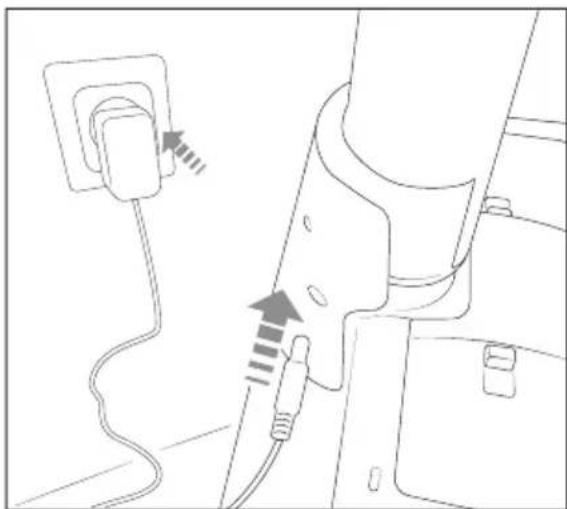
Fig. 3
Første brug
Fig. 4
Batteriindikator
Batteriindikatoren ③ viser den aktuelle ladetilstand for batteriet:
Fig. 5
Fig. 6
Fig. 7
Fig. 8
Fig. 9
Fig. 10
Fig. 11
Fig. 12
Fig. 13
Fig. 14
KOMPERNASS HANDELS GMBH
BURGSTRASSE 21
44867 BOCHUM
TYSKLAND
www.kompernass.com
Indice
Introduzione....168
Uso conforme....168
Fig. 1
Fig. 2
Fig. 3
Fig. 4
Fig. 5
Fig. 6
Fig. 7
Fig. 8
Fig. 9
Fig. 10
Fig. 11
Fig. 12
Fig. 13
Fig. 14
KOMPERNASS HANDELS GMBH
BURGSTRASSE 21
44867 BOCHUM
GERMANIA
www.kompernass.com
Tartalomjegyzék
Bevezető 188
- ábra
- ábra
- ábra
Üzembe helyezés
- ábra
Akkumulátor-kijelző
- ábra
- ábra
- ábra
- ábra
- ábra
- ábra
- ábra
- ábra
- ábra
- ábra
KOMPERNASS HANDELS GMBH
BURGSTRASSE 21
44867 BOCHUM
NÉMETORSZÁG
www.kompernass.com

KOMPERNASS HANDELS GMBH
BURGSTRASSE 21
44867 BOCHUM
GERMANY
www.kompernass.com
Last Information Update · Stand der Informationen · Version des informations
Stand van de informatie · Stav informací · Stan informacji · Stav informácií
Estado de las informaciones · Tilstand af information · Versione delle informazioni


- CORDLESS HARD FLOOR CLEANER AKKU-HARTBODENREINIGER NETTOYEUR DE SOLS DURS SANS FIL SHBRA 40 A1
- CORDLESS HARD FLOOR CLEANER
- NETTOYEUR DE SOLS DURS SANS FIL
- AKU PODLAHOVÝ ČISTIČ
- AKU ČISTIČ PODLÁH
- GENOPLADELIG GULVRENSER TIL HÄRDE GULVE
- CONTENTS
- INTRODUCTION
- INTENDED USE
- WARNINGS AND SYMBOLS USED
- SAFETY INFORMATION
- WARNING! RISK OF INJURY
- ATTENTION! PROPERTY DAMAGE
- PACKAGE CONTENTS AND TRANSPORT INSPECTION
- I NOTE
- APPLIANCE DESCRIPTION
- (SEE FOLD-OUT PAGE FOR ILLUSTRATIONS)
- TECHNICAL DATA
- BEFORE FI RST USE
- SETTING UP THE APPLIANCE
- ASSEMBLING THE CHARGER
- GETTING STARTED INFORMATION ABOUT THE BATTERY
- CHARGING THE BATTERY
- BATTERY INDICATOR
- NOTE
- FILLING THE FRESH WATER TANK
- ATTENTION
- OPERATION AND USE
- WIPING THE FLOOR
- INTERRUPTING OPERATION
- EMPTYING THE DIRTY WATER TANK
- FIG. 11
- AFTER USE
- CLEANING
- WARNING
- CLEANING THE DIRTY WATER TANK
- SELF-CLEANING FUNCTION
- CLEANING THE ROLLER BRUSH
- CLEANING THE APPLIANCE AND CHARGER
- DANGER
- STORAGE
- ORDERING REPLACEMENT PARTS
- DISPOSAL
- APPLIES ONLY TO FRANCE
- DISPOSAL OF THE APPLIANCE
- THE DISPOSAL IS FREE OF CHARGE FOR THE USER. PROTECT THE ENVIRONMENT AND DISPOSE OF THIS APPLIANCE PROPERLY
- THE INTEGRATED RECHARGEABLE BATTERY IN THIS APPLIANCE CANNOT BE REMOVED FOR DISPOSAL
- DISPOSAL OF THE PACKAGING
- APPLIES ONLY TO SPAIN
- KOMPERNASSHANDELS GMBHWARRANTY
- WARRANTY CONDITIONS
- WARRANTY PERIOD AND STATUTORY CLAIMS FOR DEFECTS
- SCOPE OF THE WARRANTY
- WARRANTY CLAIM PROCEDURE
- SERVICE
- IMPORTER
- INHALTSVERZEICHNIS
- BATTERIEANZEIGE
- TABLE DES MATIÈRES
- MISE EN SERVICE
- INHOUD
- WAARSCHUWING! LETSELGEVAAR
- INGEBRUIKNAME
- ACCU-INDICATIE
- APPARAAT EN LAADSTATION REINIGEN
- GEVAAR
- OBSAH
- POZOR! HMOTNÉ ŠKODY
- UKAZATEL STAVU BATERIE
- SPIS TREŚCI
- URUCHOMIENIE
- ÍNDICE
- INDHOLDSFORTEGNELSE
- FØRSTE BRUG
- BATTERIINDIKATOR
- INDICE
- TARTALOMJEGYZÉK
- ÜZEMBE HELYEZÉS
- AKKUMULÁTOR-KIJELZŐ
- KOMPERNASS HANDELS GMBH
Brand : SILVERCREST
Model : SHBRA 40 A1
Category : Vacuum Cleaner