Sogo SS-2900 - Scale

SS-2900 - Scale Sogo - Free user manual and instructions

Find the device manual for free SS-2900 Sogo in PDF.
📄 80 pages English EN Download 💬 AI Question
Notice Sogo SS-2900 - page 8
Pick your language and provide your email: we'll send you a specifically translated version.

User questions about SS-2900 Sogo

0 question about this device. Answer the ones you know or ask your own.

Ask a new question about this device

The email remains private: it is only used to notify you if someone responds to your question.

No questions yet. Be the first to ask one.

Download the instructions for your Scale in PDF format for free! Find your manual SS-2900 - Sogo and take your electronic device back in hand. On this page are published all the documents necessary for the use of your device. SS-2900 by Sogo.

USER MANUAL SS-2900 Sogo

Download your manual

Declaration of conformity, Responsibility of Electronic products disposal, Importers Details and After-sales service on the last pages.

text_image QR code with a blue house icon in the center, likely linking to a digital service or application.

Sogo SS-2900 - 1

Sogo SS-2900 - 2

text_image 2:08 PM Smart Life Smart Life Formal version Download

busque "Smart Life" O "Tuya" App

Sogo SS-2900 - 3

Sogo SS-2900 - 4

flowchart
graph LR
    A["User Agreement and Privacy Policy"] --> B["Register"]
    B --> C["Enter Verification Code"]
    C --> D["Set Password"]
text_image Add Device Balance & Health Balance & Health Balance & Health Balance & Health Balance & Health Balance & Health Balance & Health Balance & Health Balance & Health Balance & Health Balance & Health Balance & Health Balance & Health Balance & Health Balance & Health Balance & Health Balance & Health Balance & Health Balance & Health Balance & Health Balance & Health Balance & Health Balance & Health Balance & Health Balance & Health Balance & Healthcare Balance & Healthcare Balance & Healthcare Balance & Healthcare Balance & Healthcare Balance & Healthcare Balance & Healthcare Balance & Healthcare Balance & Healthcare Balance & Healthcare Balance & Healthcare Balance & Healthcare Balance & Healthcare Balance & Healthcare Balance & Healthcare Balance & Healthcare Balance & Healthcare Balance & Healthcare Balance & Healthcare Balance & Healthcare Balance & Healthcare Balance & Healthcare Balance & Healthcare Balance & Healthcare Balance & Healthcare Balance & Health Balance & Health Balance & Health Balance & Health Balance & Health Balance & Health Balance & Health Balance & Health Balance & Health Balance & Health Balance & Health Balance & Health Balance & Health Balance & Health Balance & Health Balance & Health Balance & Health Balance & Health Balance & Health Balance & Health Balance & Health Balance & Health Balance & Health Balance & Health Balance & Life Balance & Life Balance & Life Balance & Life Balance & Life Balance & Life Balance & Life Balance & Life Balance & Life Balance & Life Balance & Life Balance & Life Balance & Life Balance & Life Balance & Life Balance & Life Balance & Life Balance & Life Balance & Life Balance & Life Balance & Life Balance & Life Balance & Life Balance & Life Balance & Life
flowchart
graph LR
    A["Reset the device"] --> B["Add Device"]
    B --> C["Bluetooth Smart Scale"]
    C --> D["Reset Device Stop by Stop"]
    D --> E["Birthday: 2013-01-11"]
    E --> F["Weight: 170cm"]
    F --> G["Target weight: 'Your mask weight is AI/Drug'"]
    G --> H["Weight: 0.55kg"]
flowchart
graph LR
    A["Weighting confirmation prompt<br>The weighting in 41.36kg, which is<br>safe different from your last<br>weighting, it is your weighting?<br>It's mine Not mine"] --> B["The following in any data<br>Height 47.80kg<br>Dot 16.5<br>Solve No data<br>Score #nd<br>Show what I've been<br>Solve #nd<br>No more data"]
    B --> C[History (nearly one year)
History (nearly one year)
History( nearly one year)
History( nearly two) --> B
    B --> C
text_image BROCCOLATE SMART SCAKE 71.15 kg Weight 2 kg Body Mass Index Weight = 1 kg Weight = 1 kg Body Mass Index Weight = 1 kg Body Fat Index Obesity Level Weight Weight Weight Weight = 1 kg Weight = 1 kg Weight = 1 kg Weight = 1 kg Weight = 1 kg Weight = 1 kg Weight = 1 kg Weight = 1 kg Weight = 1 kg Weight = 1 kg Weight = 1 kg Weight = 1 kg Weight = 1 kg Weight = 1 kg Weight = 1 kg Weight = 1 kg Weight = 1 kg Weight =
flowchart
graph LR
    A["History: 57.10kg"] --> B["The following is any data: Weight 57.10kg, Body Fat Index 8.9%, Muscle Mass 62.80kg"]
    B --> C["The following is big data: Weight 57.10kg, Body Fat Index 8.9%, Muscle Mass 62.80kg"]
    C --> D["History (mainly one year): 14:00:20, 71.15kg, 14:00:40, 71.30kg, 14:00:30, 71.35kg, 14:07:04, 71.30kg, 14:00:06, 6.30kg"]
    D --> E["History (mainly two years): 71.15kg, BMI 28.8 kg, Body Fat Index 16.3%"]
    E --> F["Body Fat Index: 2.1 kg, Classify Level: 1.2 kg, Weak Weight: 3.8 kg"]

Tendencia de datos

text_image Bluetooth Smart Scale 71.15 Weight in 1 Day 24.0 22.3 52.62 Device Body Mass Index Weight in 1 Day Weight 71.15g User Management Unit Switch ThirdParty Services Bluetooth Smart Scale Device information Top-to-Run and Automation Items Share Device Create Group FAQ & Feedback Add to Home Screen Device Update An update available Remove Device

• Always read the instruction book carefully before using.
- This manual can be downloaded from our web page www.sogo.es
- Keep these instructions for future reference.

ADVICE FOR USE AND CARE

. Place the Bathroom scale on flat and stable floor surface.

  • The max. weighing limit of the scale is 180 kg, so make sure not to weigh more than this limit.
    • To ensure the life of the bathroom scale, do not keep it under wet, hot & cold condition.
  • The product belongs to high precision electronic weighing apparatus, please do not press or drop the scale otherwise the scale is easy to damage.
  • If the scale surface is dirty, please clean the scale with soft cloth, don't use any chemical detergent or allow water to get inside the scale.
  • This product is just to weigh the individual weight, do not use it for auto medication or weight loosing therapy.
  • If you think the results are incorrect, then check the batteries, if they are connected well with both of poles and in case not, place them correctly. Still if you don't get the correct results, then change the batteries and try again.

Dear users:

Thank you for choosing our smart body analysis scale.

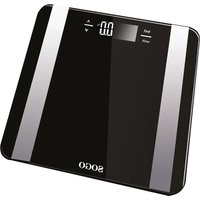
This product is designed to monitor body fat, water, muscle, bone, BMI, visceral fat and so on. The product use 2.4G HZ wireless transmission protocol, can connect Bluetooth from mobile or iPad to transmit data.

In order to ensure the accuracy of measurement data and service life, please read the instructions carefully before use and keep it safely for future reference.

PRODUCT FEATURES

  1. Measure weight, Body fat, Hydration, Visceral fat, Muscle mass, Bone mass, Calories, BMI, and so on.
  2. Keep datas in the app allowing you to check progress and maintain goals.

Technical Specifications

  1. Weighing scope/Graduation: 5kg - 180 kg / 0.05 kg
  2. Battery: 2 x AAA battery
  3. Three units kg/lb/st lb
  4. If the battery voltage is less than 2.6V, it shows "Lo" and unit switch off immediately.
  5. Overload Display "oL" if weight surpass the max weighing value of 182.5 kg units shows "oL".

How to Ensure Accurate Readings

  • Always weigh barefoot. Do not step on the scale with wet feet, wearing socks or shoes to prevent slipping, damage and inaccurate readings.
  • Recommended to be placed on hard and flat surface only.
    • Always weigh yourself on the same scale, same place and same surface if possible.
  • Recommended measurement time should be after waking up or before the breakfast and next weight should be two hours after your meal but before your next meal, or two hours after dinner but before bed.
  • Wrong measurements can occur if feet are dirty, dry or extremely callous.
  • Body fat percentage estimates will vary with the amount of water in the body, and can be affected by dehydration or over-hydration due to some factors as alcohol consumption, menstruation, illness, intense exercise.
  • Stand upright and not to the edge of the scale to ensure good contact with the film or electrodes(the film and electrodes are both conductive media depending on the scale models).
    • Horizontal line should be running below arch of each foot.
  • Complete features are available only with the apps.

Maintenance

  1. Keep scale surface dry to avoid accident by slipping.
  2. Please keep the scale in a dry place to protect the internal electronic components.
  3. Please use clean and damp cloth to clean the scale, don't immerse in water.
  4. Please don't move the scale, except timing of replacing the batteries.
  5. Please don't use heavy objects or throw from a height.

HOW TO USE

1) Installing the battery

1.1: Remove the battery, located at the back of smart body analysis scale, and insert 2*1.5V, AAA batteries (Not included). make sure to place the batteries according to the polarity. Place back the battery cover.

1.2: To set units, press the button located on the back part of the scale. Choose the right unit that you need to weigh. No SU 200 PM 50%

2) Installing App

2.1; Turn on the Bluetooth of your mobile phone device.
2.2: Connect your phone or device to the internet (WIFI, 4g, or 3G connection), to download the app.
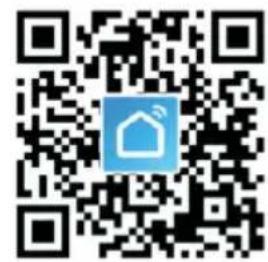
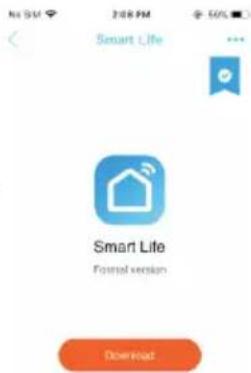
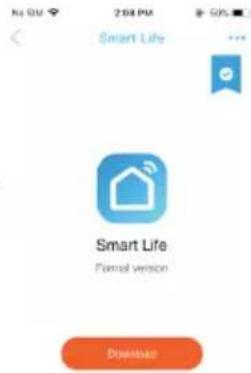
2.3: Use your device to scan the QR code or search

"Smart Life" App or "Tuya" App

from Appstore or Google play to install the app.

Sogo SS-2900 - 2) Installing App - 1

text_image QR code with a blue house icon in the center, likely linking to a digital service or application.

Sogo SS-2900 - 2) Installing App - 2

Sogo SS-2900 - 2) Installing App - 3

Sogo SS-2900 - 2) Installing App - 4

text_image Smart Life Smart Life Formal version Download

3) Register account

Open "Smart Life"

Please read Privacy Policy and Click "Agree", then register on app step by step.

If you have already registered before, you can login to your account by clicking "Login" with Existing Account.

If you are registered and forgot the Password, please click "Forget password", then type your email or mobile number and click "Get verification Code". A verification code will be sent to your account / phone. Type the code and reset your password again.

Completing a personal profile is essential because the data you enter will be used as reference for APP to analyse and assess health situation.

Sogo SS-2900 - 3) Register account - 1

flowchart
graph LR
    A["User Agreement and Privacy Policy"] --> B["Register"]
    B --> C["Enter Verification Code"]
    C --> D["Set Password"]

4) Pair your Bluetooth scale

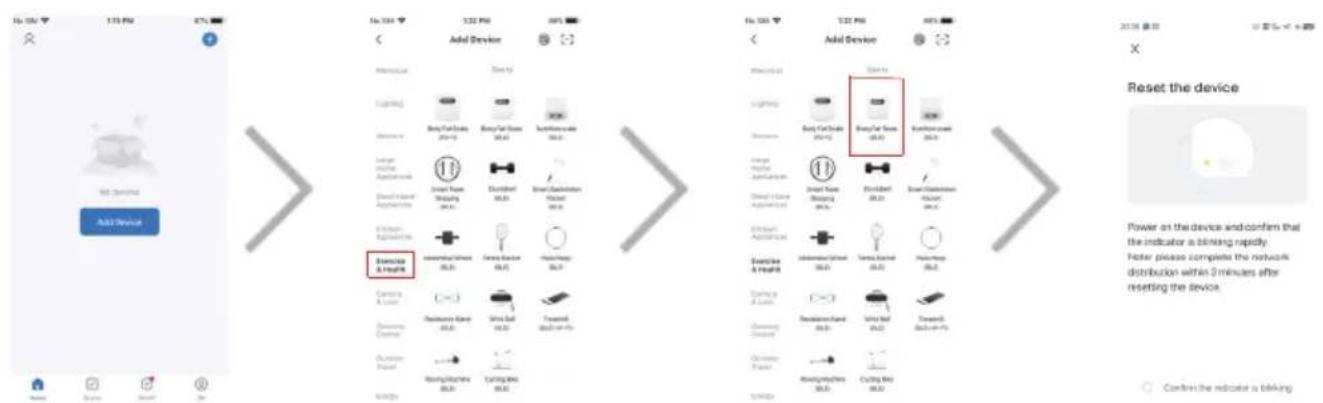
After registration you will be redirected to home page, here you can bind your body fat scale for measurement later. Click "Add Device", click "Exercise & Health", click Body Fat Scale (Bluetooth), then turn on the scale or press the unit button at the back of scale to turn it on, then you will find the Bluetooth icon is blinking

Sogo SS-2900 - 4) Pair your Bluetooth scale - 1

text_image Add Device Service & Health Add Device Reset the device Power on the device and confirm that the indicator is blinking rapidly. Note please complete the network distribution within 3 minutes after reseting the device. Confers the indicator is blinking

Turn on Bluetooth on your mobile device. Click "Confirm indicator rapidly blink", after scanning nearby devices you can choose the Bluetooth Smart Scale, and click "Add", then mobile will start to connect the unit, please keep the smart scale on in the Bluetooth pairing process and near the mobile phone.

Note: The device support to connect with many mobiles at the same time, but sometimes if you find the Bluetooth icon don't blink or couldn't connect successfully, then you need to press unit button at the back of the scale for long time or long press to clear the previous connection, the screen will display "off", restart the scale and now you connect it normally.

Sogo SS-2900 - 4) Pair your Bluetooth scale - 2

flowchart
graph LR
    A["Reset the device"] --> B["Add device"]
    B --> C["Bluetooth Smart Scale"]
    C --> D["Network distribution within 2 minutes after resetting the device."]
    D --> E["Reset Device Stop by Stop"]
    E --> F["Reset device is blocking"]
    F --> G["Bluetooth Smart Scale"]
    G --> H["Weight: 0.55 kg"]
    H --> I["Target weight: 100% weight in a 600g / kg"]
    I --> J["OK"]
    J --> K["Data transfer to Bluetooth Smart Scale"]
    K --> L["Weight: 0.5 kg"]

5) Basic Operations

Family Member Management

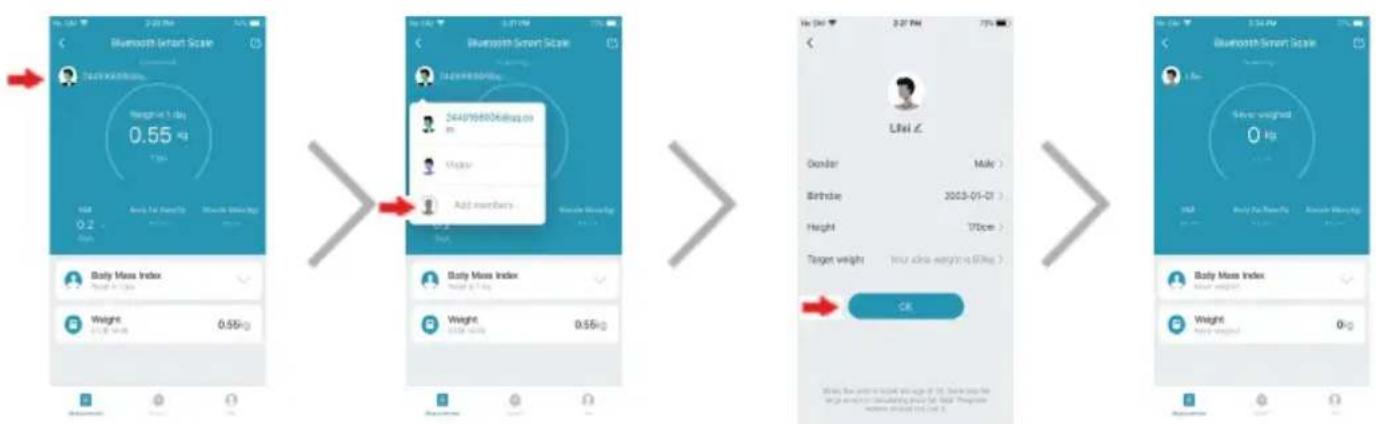
Enter main screen, click the avatar icon at the top left corner, now all family members' nicknames are displayed. You can select one member for current measurement results, show or manage his or her data. Also, you can use "Add" operation to add a family member or even a "visitor" for a guest to try a body fat scale. The Member Profile setting screen is shown. You can set personal profile, including nickname, gender, birthday, and height to register to your account.
Sogo SS-2900 - Family Member Management - 1

Save data

At first, you should save your weight data manually, after that if your weight doesn't have a great change, the data will be claimed automatically, otherwise you need to claim again by choosing "its mine" or "not mine". Click the claimed data with long time, you can delete it, click claim, the data will be in your account.

Sogo SS-2900 - Save data - 1

flowchart
graph LR
    A["Weighting confirmation prompt<br>The weighting is 41.36kg, which is<br>safe often from your last<br>weighting, it is your weighting?<br>It's mine<br>Not mine"] --> B["The following in-day data<br>Height: 47.00kg<br>Size: 4.5 kg"]
    B --> C["History (nearly one year)<br>No more data"]
    C --> D["History (nearly one year)<br>No more data"]

Body mass index

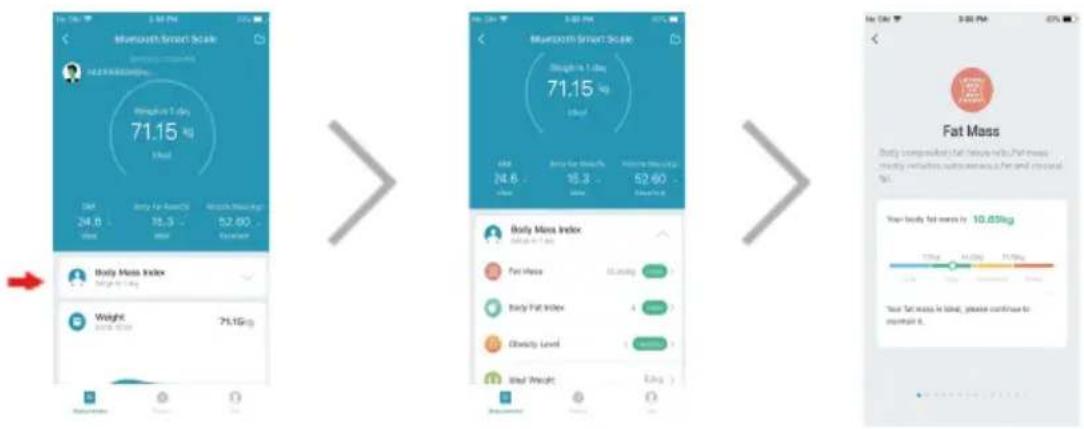
Click "Body mass index", you will see the details of this weighing, touch each of them, you will see the details of it.
Sogo SS-2900 - Body mass index - 1

text_image Bleuthouth Smart Scale Weight: 1 Day 71.15 Kg Fat Body Mass Index Weight: 1 Day 71.15 Kg Fat Mass Index Fat Mass Body Fat Index Obesity Level Weight Fat Weight Fat Mass Index Weight: 1 Day 71.15 Kg Fat Mass Index Fat Mass Body Fat Index Obesity Level Weight Fat Mass Index Fat Mass Body Fat Index Weight: 1 Day 71.15 Kg Fat Mass Index Fat Mass Body Fat Index Obesity Level Weight Fat Mass Index Fat Mass Body Fat Index Weight: 1 Day 71.15 Kg Fat Mass Index Fat Mass Body Fat Index Obesity Level Weight Fat Mass Index Fat Mass Body Fat Index Weight: 1 Day 71.15 Kg Fat MassIndex

Historical Data Checking

Click on "Record" on main screen, APP will display historical data of selected family member. long press the record and slide towards left to delete.

Sogo SS-2900 - Historical Data Checking - 1

flowchart
graph LR
    A["History"] --> B["The following is up, data"]
    B --> C["Weight Gain: 5710kg, Return: 15.8, Change: 0.9%"]
    C --> D["Weight Loss: 42.67kg, Return: 1, Change: 0.8%"]
    D --> E["Weight Loss: 5710kg, Return: 15.8, Change: 0.9%"]
    E --> F["Weight Loss: 38.41kg, Return: 1, Change: 0.8%"]
    F --> G["Weight Loss: 42.67kg, Return: 1, Change: 0.8%"]
    G --> H["Weight Loss: 38.41kg, Return: 1, Change: 0.8%"]
    H --> I["Weight Loss: 38.41kg, Return: 1, Change: 0.8%"]
    I --> J["Weight Loss: 38.41kg, Return: 1, Change: 0.8%"]
    J --> K["Weight Loss: 38.41kg, Return: 1, Change: 0.8%"]
    K --> L["Weight Loss: 38.41kg, Return: 1, Change: 0.8%"]
    L --> M["Weight Loss: 38.41kg, Return: 1, Change: 0.8%"]
    M --> N["Weight Loss: 38.41kg, Return: 1, Change: 0.8%"]
    N --> O["Weight Loss: 38.41kg, Return: 1, Change: 0.8%"]
    O --> P["Weight Loss: 38.41kg, Return: 1, Change: 0.8%"]
    P --> Q["Weight Loss: 38.41kg, Return: 1, Change: 0.8%"]
    Q --> R["Weight Loss: 38.41kg, Return: 1, Change: 0.8%"]
    R --> S["Weight Loss: 38.41kg, Return: 1, Change: 0.8%"]
    S --> T["Weight Loss: 38.41kg, Return: 1, Change: 0.8%"]
    T --> U["Weight Loss: 38.41kg, Return: 1, Change: 0.8%"]
    U --> V["Weight Loss: 38.41kg, Return: 1, Change: 0.8%"]
    V --> W["Weight Loss: 38.41kg, Return: 1, Change: 0.8%"]
    W --> X["Weight Loss: 38.41kg, Return: 1, Change: 0.8%"]
    X --> Y["Weight Loss: 38.41kg, Return: 1, Change: 0.8%"]
    Y --> Z["Weight Loss: 38.41kg, Return: 1, Change: 0.8%"]
    Z --> AA["Weight Loss: 38.41kg, Return: 1, Change: 0.8%"]
    AA --> AB["Weight Loss: 38.41kg, Return: 1, Change: 0.8%"]
    AB --> AC["Weight Loss: 38.41kg, Return: 1, Change: 0.8%"]
    AC --> AD["Weight Loss: 38.41kg, Return: 1, Change: 0.8%"]
    AD --> AE["Weight Loss: 38.41kg, Return: 1, Change: 0.8%"]
    AE --> AF["Weight Loss: 38.41kg, Return: 1, Change: 0.8%"]
    AF --> AG["Weight Loss: 38.41kg, Return: 1, Change: 0.8%"]
    AG --> AH["Weight Loss: 38.41kg, Return: 1, Change: 0.8%"]
    AH --> AI["Weight Loss: 38.41kg, Return: 1, Change: 0.8%"]
    AI --> AJ["Weight Loss: 38.41kg, Return: 1, Change: 0.8%"]
    AJ --> AK["Weight Loss: 38.41kg, Return: 1, Change: 0.8%"]
    AK --> AL["Weight Loss: 38.41kg, Return: 1, Change: 0.8%"]
    AL --> AM["Weight Loss: 38.41kg, Return: 1, Change: 0.8%"]
    AM --> AN["Weight Loss: 38.41kg, Return: 1, Change: 0.8%"]
    AN --> AO["Weight Loss: 38.41kg, Return: 1, Change: 0.8%"]
    AO --> AP["Weight Loss: 38.41kg, Return: 1, Change: 0.8%"]
    AP --> AQ["Weight Loss: 38.41kg, Return: 1, Change: 0.8%"]
    AQ --> AR["Weight Loss: 38.41kg, Return: 1, Change: 0.8%"]
    AR --> AS["Weight Loss: 38.41kg, Return: 1, Change: 0.8%"]
    AS --> AT["Weight Loss: 38.41kg, Return: 1, Change: 0.8%"]
    AT --> AU["Weight Loss: 38.41kg, Return: 1, Change: 0.8%"]
    AU --> AV["Weight Loss: 38.41kg, Return: 1, Change: 0.8%"]
    AV --> AW["Weight Loss: 38.41kg, Return: 1, Change: 0.8%"]
    AW --> AX["Weight Loss: 38.41kg, Return: 1, Change: 0.8%"]
    AX --> AY["Weight Loss: 38.41kg, Return: 1, Change: 0.8%"]
    AY --> AZ["Weight Loss: 38.41kg, Return: 1, Change: 0.8%"]
    AZ --> BA["Weight Loss: 38.41kg, Return: 1, Change: 0.8%"]
    BA --> BB["Weight Loss: 38.41kg, Return: 1, Change: 0.8%"]
    BB --> BC["Weight Loss: 38.41kg, Return: 1, Change: 0.8%"]
    BC --> BD["Weight Loss: 38.41kg, Return: 1, Change: 0.8%"]
    BD --> BE["Weight Loss: 38.41kg, Return: 1, Change: 0.8%"]
    BE --> BF["Weight Loss: 38.41kg, Return: 1, Change: 0.8%"]
    BF --> BG["Weight Loss: 38.41kg, Return: 1, Change: 0.8%"]
    BG --> BH["Weight Loss: 38.41kg, Return: 1, Change: 0.8%"]
    BH --> BI["Weight Loss: 38.41kg, Return: 1, Change: 0.8%"]
    BI --> BJ["Weight Loss: 38.41kg, Return: 1, Change: 0.8%"]
    BJ --> BK["Weight Loss: 38.41kg, Return: 1, Change: 0.8%"]
    BK --> BL["Weight Loss: 38.41kg, Return: 1, Change: 0.8%"]
    BL --> BM["Weight Loss: 38.41kg, Return: 1, Change: 0.8%"]
    BM --> BN["Weight Loss: 38.41kg, Return: 1, Change: 0.8%"]
    BN --> BO["Weight Loss: 38.41kg, Return: 1, Change: 0.8%"]
    BO --> BP["Weight Loss: 38.41kg, Return: 1, Change: 0.8%"]
    BP --> BQ["Weight Loss: 38.41kg, Return: 1, Change: 0.8%"]
    BQ --> BR["Weight Loss: 38.41kg, Return: 1, Change: 0.8%"]
    BR --> BS["Weight Loss: 38.41kg, Return: 1, Change: 0.8%"]
    BS --> BT["Weight Loss: 38.41kg, Return: 1, Change: 0.8%"]
    BT --> BU["Weight Loss: 38.41kg, Return: 1, Change: 0.8%"]
    BU --> BV["Weight Loss: 38.41kg, Return: 1, Change: 0.8%"]
    BV --> BW["Weight Loss: 38.41kg, Return: 1, Change: 0.8%"]
    BW --> BX["Weight Loss: 38.41kg, Return: 1, Change: 0.8%"]
    BX --> BY["Weight Loss: 38.41kg, Return: 1, Change: 0.8%"]
    BY --> BZ["Weight Loss: 38.41kg, Return: 1, Change; Body Fat Index = -2 for Age >2 (n=2) or -2 for Age <2 (n=2)"]
    BZ --> CA["Obesity Level = -2 for Age <2 (n=2)"]
    CA --> CB["Wear Height = -2 for Age <2 (n=2)"]

Unit Setting

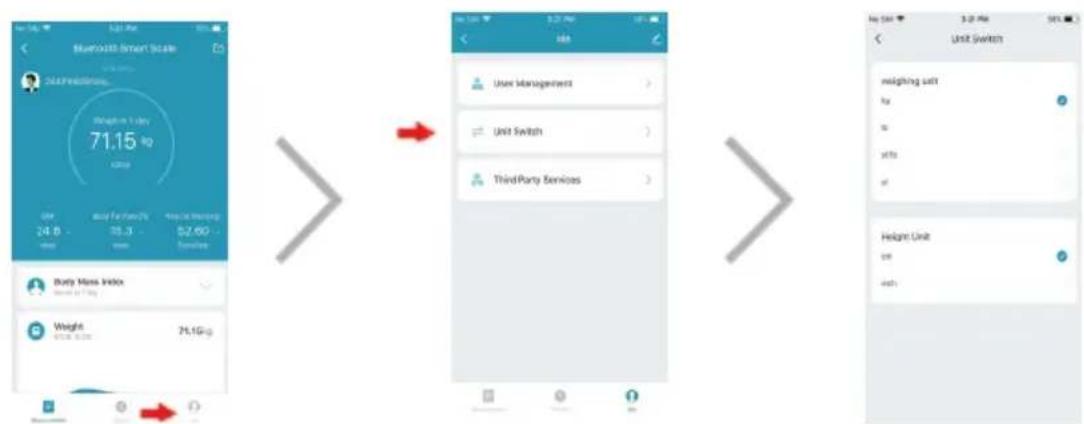
Click "me" icon at the bottom right corner of main screen, then click "unit switch", you can set up app unit you want. Click "user management", you can update your member information.
Sogo SS-2900 - Unit Setting - 1

text_image BlueMats Smart Scale 71.15 kg User 24.8 - 86.3 - 52.60 - 59.00 Usage Body Mass Index Weight 61.15 kg 71.15kg Unit Switch Third Party Services User Management Unit Switch Unit Switch Unit Switch Unit Switch Unit Switch Unit Switch Unit Switch Unit Switch Unit Switch Unit Switch Unit Switch Unit Switch Unit Switch Unit Switch Unit Switch Unit Switch Unit Switch Unit Switch Unit Switch Unit Switch Unit Switch Unit Switch Unit Switch Unit Switch Unit Switch Unit Switch Unit Switch Unit Switch Unit Switch Unit Switch Unit Switch Unit Switch Unit Switch Unit Switch

More functions

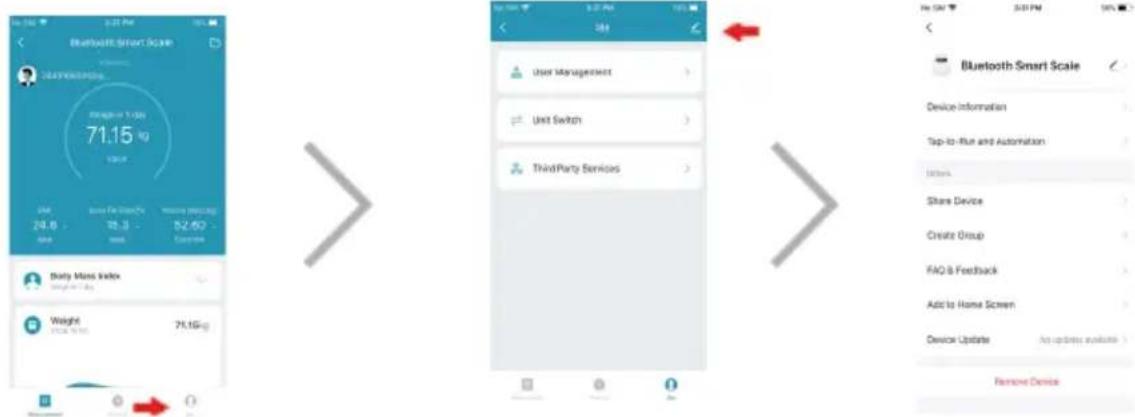
Click the “√” icon, you can get more information and more functions, share device or create group, and so on, also you can remove the device if you don’t want to use. Click the “<” icon, you will go into homepage, where you can see your device, and set up personal information and other things.
Sogo SS-2900 - More functions - 1

text_image Bluebauff Smart Scale 71.15 kg 24.8 26.3 52.40 Body Mass Index Weight 71.15 kg User Management Unit Switch Third Party Services Bluetooth Smart Scale Device information Top-to-Run and Automation Notes Share Device Create Group FAQ & Feedback Add to Home Screen Device Update An update available > Remove Device

i More features waiting for you to experience!

i IMPORTANT

text_image Add Device Add Device Reset the device Power on the device and confirm that the indicator is blinking rapidly. Note please complete the network distribution within 3 minutes after resetting the device. Confers the indicator is blinking
flowchart
graph LR
    A["Weighting confirmation prompt<br>The weighting in P.L.Sq, which is<br>aute different from your last<br>weighting, it is your weighting?<br>It's mine<br>Not mine"] --> B["The following in any data<br>Weight: 4700kg"]
    B --> C["History (nearly one year)<br>No more data"]
    C --> D["History (nearly one year)<br>No more data"]
text_image Microsoft Smart Scale Weighted Up Day 71.15 kg Weighted Up Day 24.8 kg Body Mass Index Weighted Up Day 71.15 kg Weighted Up Day Body Mass Index Weighted Up Day Body Mass Index Fat Mass Body Fat Index Obesity Level Weighted Up Day Body Fat Mass in Light, please continue to mount it. Fat Mass Your body fat mass is 10.65kg
flowchart
graph LR
    A["History: 57.0kg"] --> B["The following is any data: 57.0kg, 15.8, 0.9%, Heavy Fat Index: 40-67kg, 1, 65.8%, Weight: 6.2kg"]
    B --> C["The following is a day: 57.0kg, 15.8, 0.9%, Heavy Fat Index: 68-41kg, 1, 66.8%, Weight: 6.2kg"]
    C --> D["History (hereby one year): 16:00:20, 71.15kg, 14:30:80, 71.35kg, 14:00:30, 71.35kg, 14:27:04, 71.35kg, 14:00:06, 6.35kg"]
    D --> E["The more data: 71.15kg"]

Réglage de l'unité

flowchart
graph LR
    A["User Management"] --> B["Unit Switch"]
    B --> C["Third-Party Services"]
    C --> D["Weight Unit"]

Plus de fonctions

text_image Bluetooth Smart Scale 71.15 kg 24.8 26.3 52.60 Europe Body Mass Index Weight 71.15kg User Management Unit Switch Third Party Services Bluetooth Smart Scale Device information Top-to-Rut and Automation Items Share Device Create Group FAQ & Feedback Add to Home Screen Device Update An update available > Remove Device

i

text_image QR code with a blue home icon in the center, likely linking to a digital service or application.

Sogo SS-2900 - Plus de fonctions - 1

Sogo SS-2900 - Plus de fonctions - 2

Sogo SS-2900 - Plus de fonctions - 3

text_image Smart Life Smart Life Formal version Download

3) Registar a conta

Abrir "Smart Life"

text_image User Agreement and Privacy Policy Privacy Policy and Service Guidelines understand the importance of privacy correlations. Clearly person and owner and use of your personal information, we have involving "Privacy Policy" (Service Policy) and "Use of Third-Party Information Sharing List" in detail in accordance with the latest laws and regulations. If you are under the age of 14, please be sure to notify your questions to read our "Children's Policy Policy" to increase Privacy Policy Privacy Statement and Third-Party Information Electronic. Agree Disagree Register Enter Verification Code Set Password Chrome My Info Requested Enter your password Password you can't use this code or any other code. Get your password? Have what Accounted on Privacy Policy Add Device

4) Emparelhar a balança Bluetooth

text_image Add Device Add Device Reset the device Power on the device and confirm that the indicator is blinking rapidly. Hoter please complete the network distribution within 3 minutes after resetting the device. Confirm the indicator is blowing
flowchart
graph LR
    A["Reset the device"] --> B["Add device"]
    B --> C["Bluetooth Smart Scale"]
    C --> D["Reset Device Stop by Stop"]
    D --> E["2449166006@qq.com"]
    E --> F["Weight: 0.55kg"]
    F --> G["User: 0.2g/10000000000000000000000000000000000000000000000000000000000000000000000000000000000000000000000000000"]
flowchart
graph LR
    A["Weighting confirmation prompt<br>The weighting in P1.36kg, which is<br>auto different from your text<br>weighting, it's your weighting?<br>It's mine<br>Not mine"] --> B["The following in-tag, data<br>Height: 47.00kg"]
    B --> C["History (nearly one year)<br>No more data"]
    C --> D["History (nearly one year)<br>No more data"]
text_image Bleuthouth Smart Scale Weighted 1 Day 71.15 Kg Weighted 24.6 Kg Body Mass Index Weighted 1 Day 71.15 Kg Weighted 24.6 Kg Body Mass Index Weighted 1 Day 71.15 Kg Weighted 24.6 Kg Body Mass Index Weighted 1 Day 71.15 Kg Weighted 24.6 Kg Body Mass Index Weighted 1 Day 71.15 Kg Weighted 24.6Kg Body Mass Index Weighted 1 Day 71.15 Kg Weighted 24.6 Kg Body Mass Index Weighted 1 Day 71.15 Kg Weighted 24.6 Kg Body Mass Index Weighted 1 Day 71.15 Kg Weighted 24.6 Kg Body Mass Index Weighted 1 Day 71.15 Kg Weighted 30.00 Kg Body Mass Index Weighted 1 Day 71.15 Kg Weighted 30.00 Kg Body Mass Index Weighted 1 Day 71.15 Kg Weighted 30.00 Kg Body Mass Index Weighted 1 Day 71.15 Kg Weighted 30.00 Kg Body Mass Index Weighted 1 Day 71.15 Kg
flowchart
graph LR
    A["History: 57.0kg"] --> B["The following is any data: Weight 57.0kg, Body Fat Rate 0.9%, Muscle Mass 48.47kg, Body Fat Index 65.8%"]
    B --> C["The following is a day data: Weight 57.0kg, BMI 15.8, Body Fat Rate 0.9%, Muscle Mass 38.47kg, Body Fat Index 65.8%"]
    C --> D["History (hereby one year): 16:00:20, 71.15kg, BMI 14:30:80, 71.35kg, BMI 14:30:20, 71.35kg, BMI 14:37:04, 71.35kg, BMI 14:00:06, 6.35kg"]
    D --> E["The more data: 71.15kg"]
text_image Bluetooth Smart Scale 71.15 kg Weight in 1 Day 24.6 - 98.3 - 52.60 - 71.15kg Body Mass Index Weight 71.1Gkg Unit Switch Third-Party Services User Management Unit Switch Unit Switch Unit Switch Unit Switch weighting salt by by with of Height Unit per with

Mais funções

text_image i Bluetooth Smart Scale 71.15 kg Weight 71.16 kg 24.8 20.3 52.62 Device + - Unit Management Unit Switch ThirdParty Services User Management Unit Switch ThirdParty Services + - Device Information Top-to-Run and Automation Notes Share Device Create Group FAQ & Feedback Add to Home Screen Device Update An update available Remove Device
text_image QR code with a blue logo in the center containing a stylized house icon

Sogo SS-2900 - Mais funções - 1

text_image No SU 208 PM 50% Smart Life ... Smart Life Format version Download

Sogo SS-2900 - Mais funções - 2

Sogo SS-2900 - Mais funções - 3

3) Konto registrieren

text_image User Agreement and Privacy Policy Privacy Policy and Service Payments understand the importance of privacy previously. It helps present our activities and use of your personal information, so has investigate "Privacy Policy", "Order Phone" and "List of Third Party Information Sharing LIST" to find in accordance with the brand lines and regulations. If you are underbrace the age of 50, please be sure to notify your guardians read out "OrderNo" AccessLine Agree Disagree Register Enter Verification Code Set Password Password No Devices Add Device
text_image Add Device Power on the device and confirm that the indicator is blinking rapidly. Note please complete the network distribution within 3 minutes after resetting the device. Reset the device Power on the device and confirm that the indicator is blinking rapidly. Note please complete the network distribution within 3 minutes after resetting the device. Confirm the indicator is blinking
flowchart
graph LR
    A["Reset the device"] --> B["Add device"]
    B --> C["Bluetooth Smart Scale"]
    C --> D["Reset Device Step by Step"]
    D --> E["Weight 2449166006@Bq.com"]
    E --> F["Weight 0.65kg"]
    F --> G["Target weight: 70cm"]
    G --> H["OK"]
flowchart
graph LR
    A["Weighting confirmation prompt<br>This weighting is 17.36kg, which is<br>auto-conferent/loss you/no; <br>weighting, if it's your weighting?"] --> B["The following in any data<br>Pengue 47.00kg<br>Dot 16.5<br>Saway seed<br>Show what kind<br>Sally seed<br>No need data<br>Saway seed<br>No need data"]
    B --> C["History (nearly one year)<br>16:20:28 7.50kg<br>16:27:28 7.50kg<br>12:00:08 4.50kg<br>No need data"]
    C --> D["History (nearly one year)<br>14:37:04 7.50% 14:09:09 5.55%"]
    D --> E["End more data"]

Body-Mass-Index

text_image Bleuthouth Smart Scale Weighted 1 Day 71.15 Kg Weighted 24.6 Kg Body Mass Index Weighted 1 Day 71.15 Kg Weighted 24.6 Kg Body Mass Index Weighted 1 Day 71.15 Kg Weighted 24.6 Kg Body Mass Index Weighted 1 Day 71.15 Kg Weighted 24.6 Kg Body Mass Index Weighted 1 Day 71.15 Kg Weighted 24.6Kg Body Mass Index Weighted 1 Day 71.15 Kg Weighted 24.6 Kg Body Mass Index Weighted 1 Day 71.15 Kg Weighted 24.6 Kg Body Mass Index Weighted 1 Day 71.15 Kg Weighted 24.6 Kg Body Mass Index Weighted 1 Day 71.15 Kg Weighted 30.00 Kg Body Mass Index Weighted 1 Day 71.15 Kg Weighted 30.00 Kg Body Mass Index Weighted 1 Day 71.15 Kg Weighted 30.00 Kg Body Mass Index Weighted 1 Day 71.15 Kg Weighted 30.00 Kg Body Mass Index Weighted 1 Day 71.15 Kg
flowchart
graph LR
    A["History: 57.0kg"] --> B["The following is any data: Weight 57.0kg, Body Fat Index 1.5%, Heavy Water 65.8%"]
    B --> C["The following is a day data: Weight 57.0kg, Body Fat Index 1.5%, Heavy Water 65.8%"]
    C --> D["History (hereby one year): 16:00:20, 71.15kg, BMI 34.9%, BMI 34.9%, BMI 34.9%, BMI 34.9%, BMI 34.9%, BMI 34.9%, BMI 34.9%, BMI 34.9%, BMI 34.9%, BMI 34.9%, BMI 34.9%, BMI 34.9%, BMI 34.9%, BMI 34.9%, BMI 34.9%, BMI >"]
    D --> E["History: 71.15kg, BMI 34.9%, BMI 34.9%, BMI 34.9%, BMI 34.9%, BMI 34.9%, BMI 34.9%, BMI 34.9%, BMI >"]
text_image BlueMouth Smart Scale 71.15 kg User 24.8 Impact Impact Impact Impact Impact Impact Impact Impact Impact Impact Impact Impact Impact Impact Impact Impact Impact Impact Impact Impact Impact Impact Impact Impact Impact Impact Impact Impact Impact Impact Impact Impact Impact Impact Impact Impact Impact Impact Impact Impact Impact Impact Impact Impact Impact Impact Impact Impact Impact Impact Impulse Impact Impact Impact Impact Impact Impact Impact Impact Impact Impact Impact Impact Impact Impact Impact Impact Impact Impact Impact Impact Impact Impact Impact Impact Impact Impact Impact Impact Impact Impact Impact Impact Impact Impact Impact Impact Impact Impact Impact Impact Impact Impact Impact Impact Impact Impact Impact Impact Impact Initiate to the right of the right side of the right side of the left side of the left side of the left side of the left side of the left side of the left side of the left side of the left side of the left side of the left side of the left side of the left side of the left side of the left side of the left side of the left side of the left side of the left side of the left side of the left side of the left side of the left side of the left side of the left side of the left side of the right side of the right side of the right side of the right side of the right side of the right side of the right side of the right side of the right side of the right side of the right side of the right side of the right side of the right side of the right side of the right side of the right side of the right side of the right side of the right side of the right side of the right side of the right side of the right side of the right side of the left side of the left side of the left side of the left side of the left side of the left side of the left side of the left side of the left side of the left side of the left side of the left side of the left side of the left side of the left side of the left side of the left side of the left side of the left side of the left side of the left side of the left side of the left edge in a row for each other's position or position in a row for each other's position or position in a row for each other's position or position in a row for each other's position or position in a row for each other's position or position in a row for each other's position or position in a row for each other's position or position in a row for each other's position or position in a row for each other's position or position in a row for each other's position or position in a row for each other's position or location.

Weitere Funktionen

text_image Bluetooth Smart Scale 71.15 kg User Management Unit Switch Third Party Services Data for Security 24.8 78.3 52.602 Europe Brady Mass Index Weight 71.15kg Bluetooth Smart Scale Device information Top-to-Rise and Automation Items Share Device Create Group FAQ & Feedback Add to Home Screen Device Update An update available > Remove Device

i

Come garantire letture accurate

text_image Mobile app interface showing a QR code and smart life format version with download button
flowchart
graph LR
    A["User Agreement and Privacy Policy"] --> B["Register"]
    B --> C["Enter Verification Code"]
    C --> D["Set Password"]
text_image Add Device Add Device Reset the device Power on the device and confirm that the indicator is blinking rapidly. Hotter please complete the network distribution within 3 minutes after resetting the device. Confirm the indicator is blinking
flowchart
graph LR
    A["Reset the device"] --> B["Add device"]
    B --> C["Bluetooth Smart Scale"]
    C --> D["Reset Device Stop by Stop"]
    D --> E["Weight 0.65kg"]
    E --> F["Target weight: 170cm"]
    F --> G["OK"]
flowchart
graph LR
    A["Weighting confirmation prompt<br>The weighting is 11.26kg, which is<br>safe often from your last<br>weighting, it is your weighting?<br>It's mine<br>Not mine"] --> B["The following in-ve, data"]
    B --> C["History (nearly one year)<br>No more data"]
    C --> D["History (nearly one year)<br>No more data"]
flowchart
graph LR
    A["History: 5710kg"] --> B["The following is up, data: Weight 5710kg, BMI 15.8, Fat Index 0.9%"]
    B --> C["The following is up, data: Weight 6710kg, BMI 15.8, Fat Index 0.9%"]
    C --> D["History (hereby one year): 16:00:20, 71.6kg, BMI 14:30:85, 71.3kg, BMI 14:00:20, 71.3kg, BMI 14:27:04, 71.3kg, BMI 14:00:05, 6.3kg"]
    D --> E["History (hereby one year): 71.15kg, BMI 71.15kg, BMI 3.9%"]
    E --> F["Body Fat Index: BMI 19.3%, Fat Index 10.4%, Body Fat Index 1.9%, Body Fat Index 1.9%, Body Fat Index 1.9%, Body Fat Index 1.9%, Body Fat Index 1.9%, Body Fat Index 1.9%, Body Fat Index 1.9%, Body Fat Index 1.9%, Body Fat Index 1.9%, Body Fat Index 1.9%, Body Fat Index 1.9%, Body Fat Index 1.9%, Body Fat Index 1.9%, Body Fat Indels: BMI 2.9%, BMI 2.9%, BMI 2.9%, BMI 2.9%, BMI 2.9%, BMI 2.9%, BMI 2.9%, BMI 2.9%, BMI 2.9%, BMI 2.9%, BMI 2.9%, BMI 2.9%, BMI 2.9%, BMI 2.9%, BMI 2.9%, BMI 2.9%, BMI 2.9%, BMI 2,9%"]
flowchart
graph LR
    A["User Management"] --> B["Unit Switch"]
    B --> C["Third-Party Services"]
    C --> D["Weight 71.15 kg"]
    D --> E["Weight 67.08 kg"]
    E --> F["Weight 71.15 kg"]
    F --> G["Weight 67.08 kg"]
    G --> H["Weight 71.15 kg"]

Altre funzioni

text_image Bluetooth Smart Scale 71.15 24.0 24.0 18.3 52.60 40.0 24.0 18.3 52.60 40.0 24.0 18.3 52.60 40.0 24.0 18.3 52.60 40.0 24.0 18.3 52.60 40.0 24.0 18.3 52,60 40.0 24.0 18.3 52,60 40.0 24.0 18.3 52,60 40.0 24.0 18.3 52,60 40.0 24.0 18.3 52,60 40.0 24.0 18,3 52,60 40.0 24.0 18,3 52,60 40.0 24.0 18,3 52,60 40.0 24.0 18,3 52,60 40.0 24.0 18,3 52,60 40.0 24,0 18,3 52,60 40.0 24,0 18,3 52,60 40.0 24,0 18,3 52,60 40.0 24,0 18,3 52,60 40.0 24,0 18,3 52,60 40,0 24,0 18,3 52,60 40.0 24,0 18,3 52,60 40.0 24,0 18,3 52,60 40.0 24,0 18,3 52,60
text_image Mobile app interface showing a QR code and smart life app with version details
flowchart
graph LR
    A["User Agreement and Privacy Policy"] --> B["Register"]
    B --> C["Enter Verification Code"]
    C --> D["Set Password"]
text_image Add Device Service & Health Power on the device and confirm that the indicator is blinking rapidly. Note please complete the network distribution within 3 minutes after resetting the device. Confirm the indicator is blinking
flowchart
graph LR
    A["Reset the device"] --> B["Add Device"]
    B --> C["Bluetooth Smart Scale"]
    C --> D["Reset Device Setup by Stop"]
    D --> E["2449166006@sq.com"]
    E --> F["Weight: 0.55kg"]
    F --> G["Target weight: 70cm"]
    G --> H["OK"]

5) Základní operace

Správa členů rodiny

flowchart
graph LR
    A["Weighting confirmation prompt<br>The weighting in P.L.Sq, which is<br>aute different from your last<br>weighting, it is your weighting?<br>It's mine Not mine"] --> B["The following in any data<br>Weight: 47.00kg"]
    B --> C["History (nearly one year)<br>Day: 3.27 PM<br>18:20:26 7.00kg<br>19:37:33 7.00kg<br>12:00:08 4.00kg<br>No more data"]
    C --> D["History (nearly one year)<br>Day: 3.54 PM<br>71.00kg<br>14:37:04 71.00kg<br>14:00:00 6.00kg<br>No more data"]
text_image Microsoft Smart Scale Weighted Up Day 71.15 kg Weighted Up Day 24.8 kg Body Mass Index Weighted Up Day 71.15 kg Weighted Up Day Body Mass Index Weighted Up Day Body Mass Index Fat Mass Body Fat Index Obesity Level Weighted Up Day Body Fat Mass in Light, please continue to mount it. Fat Mass Your body fat mass is 10.65kg
flowchart
graph LR
    A["History: 57.0kg"] --> B["The following is any data"]
    B --> C["The following is big data"]
    C --> D["History (hereby one year): 57.0kg Weight 16:00:20 71.15kg 14:00:80 71.35kg 14:00:20 71.35kg 14:07:04 71.35kg 14:00:06 6.35kg"]
    D --> E["Product display: 71.15kg Weight 29.15kg 2.6kg BM 24.4kg Body Fat Ratio 19.3% BMI 2.6kg Muscle Mass 82.8kg Control 2.6kg Fat Index 1.6kg Body Fat Index 1.6kg Obesity Level 1.6kg Meat Weight 1.6kg"]

Nastavení jednotky

text_image BlueMats Smart Scale Weight in 1 Day 71.15 kg User 24.6 Easy for Family 18.3 Water Saving 52.60 Services Body Mass Index Reserve to Living Weight 61.15 Kg 71.15kg Unit Switch Third-Party Services > > Unit Switch weighting salt by is wks of Height Unit on with

Další funkce

text_image Bluetooth Smart Scale Weight on 1.6% 71.15 kg Disk Body Mass Index 24.0 35.3 52.69 Default Body Mass Index Weight 71.15kg User Management Unit Switch Third Party Services Bluetooth Smart Scale Device information Top-to-Rust and Automation Others Share Device Create Group FAQ & Feedback Add to Home Screen Device Update Remove Device
flowchart
graph LR
    A["User Agreement and Privacy Policy"] --> B["Register"]
    B --> C["Enter Verification Code"]
    C --> D["Set Password"]
text_image Add Device Add Device Reset the device Power on the device and confirm that the indicator is blowing rapidly. Hoter please complete the network distribution within 2 minutes after resetting the device. Confers the indicator is blowing
flowchart
graph LR
    A["Weighting confirmation prompt<br>The weighting in P1.36kg, which is<br>auto different from your text<br>weighting, it's your weighting?<br>It's mine<br>Not mine"] --> B["The following in-tag, data<br>Height: 47.00kg"]
    B --> C["History (nearly one year)<br>No more data"]
    C --> D["History (nearly one year)<br>No more data"]

Kropsmasseindeks

text_image Bleuthouth Smart Scale Weighted 1 Day 71.15 Kg Weighted 24.6 Kg Body Mass Index Weighted 1 Day 71.15 Kg Weighted 24.6 Kg Body Mass Index Weighted 1 Day 71.15 Kg Weighted 24.6 Kg Body Mass Index Weighted 1 Day 71.15 Kg Weighted 24.6 Kg Body Mass Index Weighted 1 Day 71.15 Kg Weighted 24.6Kg Body Mass Index Weighted 1 Day 71.15 Kg Weighted 24.6 Kg Body Mass Index Weighted 1 Day 71.15 Kg Weighted 24.6 Kg Body Mass Index Weighted 1 Day 71.15 Kg Weighted 24.6 Kg Body Mass Index Weighted 1 Day 71.15 Kg Weighted 30000000000000000000000000000000000000000000000000000000000000000000000000000000000000000000000000000 Fat Mass Body composition Fat Mass includes Fat mass. weight includes submasses of the and several. fat. Your body fat mass is 10.85kg
flowchart
graph LR
    A["History: 5710kg"] --> B["The following is up, share: 5710kg, 16.8, 0.9%"]
    B --> C["The following is up, split: 5710kg, 16.8, 0.9%"]
    C --> D["History: 6710kg"]
    D --> E["The following is up, split: 5710kg, 16.8, 0.9%"]
    E --> F["History (nearly one year): 16:00:20, 71.15kg, 14:30:40, 71.30kg, 14:50:20, 71.30kg, 14:57:04, 71.30kg, 14:00:06, 63.00kg"]
    F --> G["History (nearly one year): 71.15kg, weight: 71.15kg, BMI: 26.4, body fat risk: 19.3%, muscle mass: 82.80kg, weight: 10.40kg, body fat index: 2.2%, diversity level: 1.8%, weight: 2.8kg"]
flowchart
graph LR
    A["User Management"] --> B["Unit Switch"]
    B --> C["Third-Party Services"]
    C --> D["Weight Unit"]

Flere funktioner

text_image Bluetooth Smart Scale 71.15 Kg User Management Unit Switch Third Party Services Device Information Top-to-Run and Automation Users Share Device Create Group FAQ & Feedback Add to Home Screen Device Update No updates available > Remove Device
text_image Mobile app interface showing smart home and smart life app icons with download button
flowchart
graph LR
    A["User Agreement and Privacy Policy"] --> B["Register"]
    B --> C["Enter Verification Code"]
    C --> D["Set Password"]
text_image Add Device Reset the device Power on the device and confirm that the indicator is blinking rapidly. Hotter please complete the network distribution within 3 minutes after resetting the device. Confirm the indicator is blinking
flowchart
graph LR
    A["Reset the device"] --> B["Add device"]
    B --> C["Bluetooth Smart Scale"]
    C --> D["Reset Device Stop by Stop"]
    D --> E["Weight 0.65kg"]
    E --> F["Target weight: 170cm"]
    F --> G["OK"]

5) Osnovne operacije

flowchart
graph LR
    A["Weighting confirmation prompt<br>The weighting in Ft.30kg, which is auto-difference from your last weighting, if it's your weighting?"] --> B["Data transfer"]
    B --> C["Data conversion"]
    C --> D["Data conversion to next one year"]
    D --> E["Final data transfer"]

Indeks telesne mase

flowchart
graph LR
    A["History: 5710kg"] --> B["The following is up, data: Weight Gain 5710kg, Weight Loss 15.8%, Body Fat Rate 0.9%"]
    B --> C["The following is up, data: Weight Gain 5710kg, Weight Loss 15.8%, Body Fat Rate 0.9%"]
    C --> D["Weight Loss: 40-67kg, Body Fat Index: 1, 65.8%, Weight Loss: 38.4%, Body Fat Rate: 1, 65.8%, Weight Loss: 38.4%, Body Fat Index: 1, 65.8%, Weight Loss: 38.4%, Body Fat Index: 1, 65.8%, Weight Loss: 38.4%, Body Fat Index: 1, 65.8%, Weight Loss: 38.4%, Body Fat Index: 1, 65.8%, Weight Loss: 38.4%, Body Fat Index: 1, 65.8%, Weight loss"]
    D --> E["History (hereby one year): 16:00:20, 71.6kg, 14:00:49, 71.6kg, 14:00:20, 71.6kg, 14:07:04, 71.6kg, 14:00:06, 6.3kg"]
    E --> F["History (hereby one year): 71.15kg, BMI: 71.15kg, BMI: 38.4%, BMI: 38.4%, BMI: 38.4%, BMI: 38.4%, BMI: 38.4%, BMI: 38.4%, BMI: 38.4%, BMI: 38.4%, BMI: 38.4%, BMI: 38.4%, BMI: 38.4%, BMI: 38.4%, BMI: 38.4%, BMI: 71.15kg"]

Nastavitev enote

text_image BlueMatti Smart Scale 71.15 kg User 24.8 - 08.3 - 52.60 - 59.75 Weight 61.15 kg 24.8 - 08.3 - 52.60 - 59.75 Right Mass Index Weight 61.15 kg 24.8 - 08.3 - 52.60 - 59.75 Unit Switch Third Party Services User Management Unit Switch Unit Switch Unit Switch weight units in in in in in in in in in in in in in in in in in in in in in in in in in in in in in in in in in in in in in in in in in in in in in in in in in in out

Več funkci j

text_image Bluetooth Smart Scale Status: 71.15 kg 24.8 38.8 52.60 Body Mass Index Weight 71.15 kg User Management Unit Switch ThirdParty Services Bluetooth Smart Scale Device information Top-to-Rut and Automation Items Share Device Create Group FAQ & Feedback Add to Home Screen Device Update An update available Remove Device
text_image QR code with a blue house icon in the center, likely linking to a digital service or application.

Sogo SS-2900 - Več funkci j - 1

Sogo SS-2900 - Več funkci j - 2

Sogo SS-2900 - Več funkci j - 3

text_image 2:00 PM Smart Life Smart Life Formal version Download
flowchart
graph LR
    A["User Agreement and Privacy Policy"] --> B["Register"]
    B --> C["Enter Verification Code"]
    C --> D["Set Password"]

4) Uparite svoju Bluetooth vagu

text_image Add Device Add Device Reset the device Power on the device and confirm that the indicator is blinking rapidly. Hotter please complete the network distribution within 3 minutes after reseting the device. Confers the indicator is blinking
flowchart
graph LR
    A["Reset the device"] --> B["Add Device"]
    B --> C["Bluetooth Smart Scale"]
    C --> D["Reset Device Setup by Step"]
    D --> E["Weight"]
    E --> F["2449166006@qq.com"]
    F --> G["Weight 0.55kg"]

5) Osnovne operacije

text_image Bleuthouth Smart Scale Weight: 1 Day 71.15 Kg Fat Body Mass Index Weight: 1 Day 71.15 Kg Fat Mass Index Fat Mass Body Fat Index Obesity Level Weight Fat Weight Fat Mass Index Weight: 1 Day 71.15 Kg Fat Mass Index Fat Mass Body Fat Index Obesity Level Weight Fat Mass Index Fat Mass Body Fat Index Weight: 1 Day 71.15 Kg Fat Mass Index Fat Mass Body Fat Index Obesity Level Weight Fat Mass Index Fat Mass Body Fat Index Weight: 1 Day 71.15 Kg Fat Mass Index Fat Mass Body Fat Index Obesity Level Weight Fat Mass Index Fat Mass Body Fat Index Weight: 1 Day 71.15 Kg Fat MassIndex
flowchart
graph LR
    A["History: 5710kg"] --> B["The following is aq. data"]
    B --> C["Weight: 5710kg, 16.8, 0.9%, 40-60kg, 1, 65.8%, 20-30kg"]
    C --> D["The following is aq. data"]
    D --> E["Weight: 5710kg, 16.8, 0.9%, 40-60kg, 20-30kg, 1, 65.8%, 20-30kg"]
    E --> F["History (nearly one year): 16:00:20, 71.15kg, 14:30:40, 71.30kg, 14:50:20, 71.30kg, 14:57:04, 71.30kg, 14:00:05, 63.0kg"]
    F --> G["The most data"]
    G --> H["71.15kg"]

Postavka jedinice

flowchart
graph LR
    A["User Management"] --> B["Unit Switch"]
    B --> C["Third-Party Services"]
    C --> D["Unit Switch"]

Više funkcija

text_image Bluetooth Smart Scale Status Bar 71.15 Kg User Management Unit Switch Third Party Services Device Information Top-to-Run and Automation Share Device Create Group FAQ & Feedback Add to Home Screen Device Update Remove Device
text_image Mobile app interface showing a QR code and smart life app download options
flowchart
graph LR
    A["User Agreement and Privacy Policy"] --> B["Register"]
    B --> C["Enter Verification Code"]
    C --> D["Set Password"]

4) Sparuj wage Bluetooth

text_image Add Device Service & Health Power on the device and confirm that the indicator is blinking rapidly. Note please complete the network distribution within 3 minutes after resetting the device. Confirm the indicator is blinking
flowchart
graph LR
    A["Reset the device"] --> B["Add device"]
    B --> C["Bluetooth Smart Scale"]
    C --> D["Weight"]
    D --> E["Target weight: 100 gm / kg"]
    E --> F["Daily Mass Index: 0.65 kg"]
    F --> G["Weight: 0.6 kg"]
    G --> H["Reset Device Display Stop"]
    H --> I["Reset device switches a hiding"]
    I --> J["Reset device is ready to hold"]
flowchart
graph LR
    A["Weighting confirmation prompt<br>The weighting in P.L.Sq, which is<br>aute different from your last<br>weighting, it is your weighting?<br>It's mine<br>Not mine"] --> B["The following in any data<br>Weight: 4700kg"]
    B --> C["History (nearly one year)<br>No more data"]
    C --> D["History (nearly one year)<br>No more data"]

Indeks masy ciała

text_image Microsoft Smart Scale Weighted Up Day 71.15 kg Weighted Up Day 24.8 kg Body Mass Index Weighted Up Day 71.15 kg Weighted Up Day Body Mass Index Weighted Up Day Body Mass Index Fat Mass Body Fat Index Obesity Level Weighted Up Day Body Fat Mass in Daily, please continue to mount it. Fat Mass 10.65kg
flowchart
graph LR
    A["History: 57.0kg"] --> B["The following is any data: Weight 57.0kg, Body Fat Index 1.5%, Heavy Water 65.8%"]
    B --> C["The following is a day data: Weight 57.0kg, Body Fat Index 1.5%, Heavy Water 65.8%"]
    C --> D["History (hereby one year): 16:00:20, 71.15kg, BMI 34.9%, BMI 34.9%, BMI 34.9%, BMI 34.9%, BMI 34.9%, BMI 34.9%, BMI 34.9%, BMI 34.9%, BMI 34.9%, BMI 34.9%, BMI 34.9%, BMI 34.9%, BMI 34.9%, BMI 34.9%, BMI 34.9%, BMI >"]
    D --> E["History: 71.15kg, BMI 34.9%, BMI 34.9%, BMI 34.9%, BMI 34.9%, BMI 34.9%, BMI 34.9%, BMI 34.9%, BMI >"]
text_image BlueMouth Smart Scale 71.15 kg User 24.8 Impact Impact Impact Impact Impact Impact Impact Impact Impact Impact Impact Impact Impact Impact Impact Impact Impact Impact Impact Impact Impact Impact Impact Impact Impact Impact Impact Impact Impact Impact Impact Impact Impact Impact Impact Impact Impact Impact Impact Impact Impact Impact Impact Impact Impact Impact Impact Impact Impact Impact Impulse Impact Impact Impact Impact Impact Impact Impact Impact Impact Impact Impact Impact Impact Impact Impact Impact Impact Impact Impact Impact Impact Impact Impact Impact Impact Impact Impact Impact Impact Impact Impact Impact Impact Impact Impact Impact Impact Impact Impact Impact Impact Impact Impact Impact Impact Impact Impact Impact Impact Initiate to the right of the right side of the right side of the left side of the left side of the left side of the left side of the left side of the left side of the left side of the left side of the left side of the left side of the left side of the left side of the left side of the left side of the left side of the left side of the left side of the left side of the left side of the left side of the left side of the left side of the left side of the left side of the left side of the right side of the right side of the right side of the right side of the right side of the right side of the right side of the right side of the right side of the right side of the right side of the right side of the right side of the right side of the right side of the right side of the right side of the right side of the right side of the right side of the right side of the right side of the right side of the right side of the right side of the left side of the left side of the left side of the left side of the left side of the left side of the left side of the left side of the left side of the left side of the left side of the left side of the left side of the left side of the left side of the left side of the left side of the left side of the left side of the left side of the left side of the left side of the left edge in a row for each other's position or position in a row for each other's position or position in a row for each other's position or position in a row for each other's position or position in a row for each other's position or position in a row for each other's position or position in a row for each other's position or position in a row for each other's position or position in a row for each other's position or position in a row for each other's position or position in a row for each other's position or location.

Wiecej funkcji

text_image Bluetooth Smart Scale 71.15 kg User Management Unit Switch Third Party Services Data for Security 24.8 78.3 52.602 Europe Body Mass Index Weight 71.15kg Bluetooth Smart Scale Device information Top-to-Rise and Automation Items Share Device Create Group FAQ & Feedback Add to Home Screen Device Update An update available > Remove Device
text_image QR code with a blue house icon in the center, likely linking to a digital service or application.

Sogo SS-2900 - Wiecej funkcji - 1

Sogo SS-2900 - Wiecej funkcji - 2

Sogo SS-2900 - Wiecej funkcji - 3

Sogo SS-2900 - Wiecej funkcji - 4

text_image No 501 2:08 PM Smart Life Smart Life Formal version Download
flowchart
graph LR
    A["User Agreement and Privacy Policy"] --> B["Register"]
    B --> C["Enter Verification Code"]
    C --> D["Set Password"]
text_image Add Device Balance & Health Balance & Health Balance & Health Balance & Health Balance & Health Balance & Health Balance & Health Balance & Health Balance & Health Balance & Health Balance & Health Balance & Health Balance & Health Balance & Health Balance & Health Balance & Health Balance & Health Balance & Health Balance & Health Balance & Health Balance & Health Balance & Health Balance & Health Balance & Health Balance & Health Balance & Healthcare Balance & Healthcare Balance & Healthcare Balance & Healthcare Balance & Healthcare Balance & Healthcare Balance & Healthcare Balance & Healthcare Balance & Healthcare Balance & Healthcare Balance & Healthcare Balance & Healthcare Balance & Healthcare Balance & Healthcare Balance & Healthcare Balance & Healthcare Balance & Healthcare Balance & Healthcare Balance & Healthcare Balance & Healthcare Balance & Healthcare Balance & Healthcare Balance & Healthcare Balance & Healthcare Balance & Healthcare Balance & Health Balance & Health Balance & Health Balance & Health Balance & Health Balance & Health Balance & Health Balance & Health Balance & Health Balance & Health Balance & Health Balance & Health Balance & Health Balance & Health Balance & Health Balance & Health Balance & Health Balance & Health Balance & Health Balance & Health Balance & Health Balance & Health Balance & Health Balance & Health Balance & Life Balance & Life Balance & Life Balance & Life Balance & Life Balance & Life Balance & Life Balance & Life Balance & Life Balance & Life Balance & Life Balance & Life Balance & Life Balance & Life Balance & Life Balance & Life Balance & Life Balance & Life Balance & Life Balance & Life Balance & Life Balance & Life Balance & Life Balance & Life Balance & Life Balance & Live
flowchart
graph LR
    A["Reset the device"] --> B["Add device"]
    B --> C["Bluetooth Smart Scale"]
    C --> D["Reset Device Stop by Stop"]
    D --> E["Weight"]
    E --> F["2449166006@sq.com"]
    F --> G["Weight 0.55kg"]
flowchart
graph LR
    A["Weighting confirmation prompt<br>The weighting in P1.36kg, which is<br>auto different from your text<br>weighting, it's your weighting?<br>It's mine<br>Not mine"] --> B["The following in-tag, data<br>Height: 47.00kg"]
    B --> C["History (nearly one year)<br>No more data"]
    C --> D["History (nearly one year)<br>No more data"]
text_image Bluetooth Smart Scale 32.000 User Management Unit Switch Third Party Services Weight 71.15 kg Weight Mass Index 71.1Gkg Unit Switch weighting units by to photo of Height Unit on with

Mai multe functii

text_image Bluetooth Smart Scale 71.15 Weight 29.0 28.3 75.3 52.62 Battery Mass Index Weight (5) 71.15g User Management Unit Switch ThirdParty Services Bluetooth Smart Scale Device Information Top-to-Run and Automation Notes Share Device Create Group FAQ & Feedback Add to Home Screen Device Update An update available > Remove Device
text_image User Agreement and Privacy Policy Privacy Policy and Service Terminals understand the importance of privacy uberations. You're also present our information and use of your personal information, we have intendue "Privacy Policy", "Service Terminals" and "List of Third Party information driving Lift" in detail to access with the least days and regulations. If you are under the age of TC, please be sure to notify your questions to read like "Children's Registration" Agree Degree Register Enter Verification Code Set Password Password Add Device
flowchart
graph LR
    A["Weighting confirmation prompt<br>The weighting in P.L.SIg, which is safe different from your last weighting, it is your weighting?"] --> B["It's mine<br>Not mine"]
    B --> C["The following a eq. data<br>Height<br>4700kg<br>Box<br>1%"]
    C --> D["History (nearly one year)<br>No more data"]
    D --> E["History (nearly one year)<br>No more data"]

Індекс маси тіла

flowchart
graph LR
    A["History: 57.0kg"] --> B["The following is aq. date"]
    B --> C["The following is aq. date"]
    C --> D["History (hereby one year): 67.0kg"]
    D --> E["History (hereby one year): 71.15kg"]
    E --> F["Weight: 71.15kg"]
    E --> G["BAR: 24.4kg"]
    E --> H["Rusty Fat Pain: 19.3%"]
    E --> I["Muscle Mass: 82.0Kg"]
    E --> J["Fact Units: 10.4Kg"]
    E --> K["Body Fat Index: 1"]
    E --> L["Climbing Level: 1"]
    E --> M["Iced Weight: 1"]
text_image BlueMats Smart Scale Weight in 1 Day 71.15 Kg User Management Unit Switch Third-Party Services Weight 67.2Kg 71.1Gp Unit Switch weight left kg in width of Height Unit on with

Більше функцій

text_image Bluetooth Smart Scale 71.15 kg User Management Unit Switch ThirdParty Services Device Information Top-to-Run and Automation Share Device Create Group FAQ & Feedback Add to Home Screen Device Update Remove Device
text_image QR code with a blue house icon in the center, likely linking to a digital service or application.

Sogo SS-2900 - Більше функцій - 1

Sogo SS-2900 - Більше функцій - 2

Sogo SS-2900 - Більше функцій - 3

Sogo SS-2900 - Більше функцій - 4

text_image 2:08 PM Smart Life ... Smart Life Formal version Downstart

3) Registrar compte

Obrir «Smart Life»

flowchart
graph LR
    A["User Agreement and Privacy Policy"] --> B["Register"]
    B --> C["Enter Verification Code"]
    C --> D["Set Password"]
text_image Add Device Edit Device Reset the device Power on the device and confirm that the indicator is blinking rapidly. Hoter please complete the network distribution within 3 minutes after resetting the device. Confirm the indicator is blowing
flowchart
graph LR
    A["Reset the device"] --> B["Add device"]
    B --> C["Bluetooth Smart Scale"]
    C --> D["Reset Device Stop by Stop"]
    D --> E["Weight"]
    E --> F["2449166006@sq.com"]
    F --> G["Weight 0.55kg"]
flowchart
graph LR
    A["Weighting confirmation prompt<br>The weighing is 41.36kg, which is<br>aute different from your text<br>weighting. It's your weighing?<br>It's mine<br>Not mine"] --> B["The following in-eq. data<br>Height: 47.00kg<br>Size: 16.5<br>Balance sheet: 2.00g<br>Production rate: 100%<br>Balance sheet: 2.00g<br>Balance sheet: 2.00g<br>Balance sheet: 2.00g"]
    B --> C["History (nearly one year)<br>No more data"]
    C --> D["History (nearly one year)<br>No more data"]

Índex de massa corporal

text_image Bleuthouth Smart Scale Weight: 1 Day 71.15 Kg Fat Body Mass Index Weight: 1 Day 71.15 Kg Fat Mass Index Fat Mass Body Fat Index Obesity Level Weight Fat Weight Fat Mass Fat Mass Index Fat Mass (1 Day) 71.15 Kg Fat Mass (1 Day) 71.15 Kg Fat Mass (1 Day) 71.15 Kg Fat Mass (1 Day) 71.15 Kg Fat Mass (1 Day) 71.15 Kg Fat Mass (1 Day) 71.15 Kg Fat Mass (1 Day) 71.15 Kg Fat Mass (1 Day) 71.15 Kg Fat Mass (1 Day) 70.63 Kg Fat Mass (1 Day) 70.63 Kg Fat Mass (1 Day) 70.63 Kg Fat Mass (1 Day) 70.63 Kg Fat Mass (1 Day) 70.63 Kg Fat Mass (1 Day) 70.63 Kg Fat Mass (1 Day) 70.63 Kg Fat Mass (1 Day) 70.63 Kg Fat Mass (1 Day) 69.83 Kg Fat Mass (1 Day) 69.83 Kg Fat Mass (1 Day) 69.83 Kg Fat Mass (1 Day) 69.83 Kg Fat Mass (1 Day) 69.83 Kg Fat Mass (1 Day) 69.83 Kg Fat Mass (1 Day) 69.83 Kg Fat Mass (1 Day) 69.83 Kg Fat Mass (1 Day)
flowchart
graph LR
    A["History: 5710kg"] --> B["The blowing is any data"]
    B --> C["The blowing is a bag shot"]
    C --> D["History (nearly one year): 16:00:20, 71.15kg, 14:30:80, 71.30kg, 14:50:20, 71.30kg, 14:57:04, 71.30kg, 14:00:05, 6.30kg"]
    D --> E["History ( already on day.com) 71.15kg"]
flowchart
graph LR
    A["User Management"] --> B["Unit Switch"]
    B --> C["Third-Party Services"]
    C --> D["Unit Switch"]

Més functions

text_image User Management Unit Switch ThirdParty Services Device Information Top-to-Flue and Automation Share Device Create Group FAQ & Feedback Add to Home Screen Device Update Remove Device

DÉCLARATION DE CONFORMITÉ

DECLARATION OF CONFORMITY

This device complies with Electromagnetic Compatibility Directive 2014/30/EU, and the Directive 2015/863 UE on the restriction of the use of certain hazardous substances in electrical and electronic equipment.

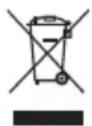
This symbol on the product or on the packaging indicates that this product can't be disposed as normal rubbish or household waste. All the electrical, electronic equipment's and battery-operated units must recycle in proper manner and according to the local municipal laws. You can recycle them by taking them to government authorized disposal centres or specialized bins which you can find in any nearby big super markets, electronics or electro domestics products stores or malls who have these types of facilities available.

Designed by: SOGO based on European quality standards Imported by: Sanysan Appliances S.L, NIF: B98753056, C/ Barcas 2, 2, 46002 Valencia, Spain Product manufactured in CHINA. After-sales service: www.sogosat.com sogosat@sogosat.com / 0034 902 222 161
Sogo SS-2900 - DECLARATION OF CONFORMITY - 1

Manual assistant
Powered by Anthropic
Waiting for your message
Product information

Brand : Sogo

Model : SS-2900

Category : Scale