SS-21250 - Fan Sogo - Free user manual and instructions
Find the device manual for free SS-21250 Sogo in PDF.


| Product Type | Column Fan |
| Brand | Sogo |
| Model | SS-21250 |
| Power Supply | 220-240 V ~ 50 Hz |
| Power | 45 W |
| Number of Speeds | 6 progressive levels |
| Operating Modes | Normal, Natural (NA), Sleep (SL) |
| Timer | 1 to 12 hours (12 intervals) |
| Oscillation | Yes, activation/deactivation via OSC button |
| Control | Touch panel and remote control |
| Display | Digital LED (ambient temperature, speed, mode, timer) |
| Height Adjustment | Yes, telescopic column with locking ring |
| Tilt | Yes, manual head tilt |
| Blade Type | Plastic blades |
| Protection Grille | Removable front and rear grilles |
| Intended Use | Indoor household use only |
| Maintenance and Cleaning | Unplug before cleaning; damp cloth for exterior, vacuum for interior; do not use solvents |
| Safety | Do not use near water, do not cover, do not insert objects, keep out of reach of children |
| Certifications | CE (Directives 2014/35/EU, 2014/30/EU, 2015/863/EU, 2009/125/EC) |
| Included Accessories | Remote control, base, column, grilles, blade, mounting screws |
Frequently Asked Questions - SS-21250 Sogo
User questions about SS-21250 Sogo
0 question about this device. Answer the ones you know or ask your own.
Ask a new question about this device
Download the instructions for your Fan in PDF format for free! Find your manual SS-21250 - Sogo and take your electronic device back in hand. On this page are published all the documents necessary for the use of your device. SS-21250 by Sogo.
USER MANUAL SS-21250 Sogo
natural_image
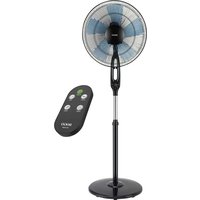
Exterior view of a modern office desk fan with a black stand and a remote control (no text or symbols visible)
VENTILADOR DE PIE CON PANEL DE CONTROL TÁCTIL STAND FAN WITH TOUCH CONTROL PANEL VENTILATEUR SUR PIED AVEC PANNEAU DE COMMANDE TACTILE VENTILADOR DE PÉ COM PAINEL DE CONTROLE DE TOQUE STANDVENTILATOR MIT TOUCH-BEDIENFELD VENTILATORE DA TERRA CON PANELLO DI CONTROLLO TOUCH
Caution: please read and preserve these important instructions
IMPORTANTE:
natural_image
Line drawings of four different types of cylindrical and flat stand designs (no text or symbols)natural_image
Technical line drawings of a mechanical fan assembly showing internal components and mounting features (no text or symbols)• Always read the instruction book carefully before using.
- This manual can be downloaded from our web page www.sogo.es
- Keep these instructions for future reference.
SAFETY INSTRUCTIONS FOR THE USER
- This product is intended for indoor, non-industrial, non-commercial; household use only household waffle maker. Do not use the item outdoors or for any other purpose. Misuse or improper handling may cause problems in the appliance and cause injury to the user.
- Ensure that the voltage indicated on the nameplate matches the mains voltage before plugging in the appliance.
- Do not use or store the appliance outdoors.
- Always remove the plug from the power socket when the appliance is not in use. Do not leave the appliance unattended when switched on.
- Before cleaning or storing your appliance, always unplug the appliance from the power supply.
- The appliances are not intended to be operated by means of an external timer or separate remote-control system.
- Do not place or operate this appliance near water sources.
- Never immerse the appliance or the plug-
in water or any other liquid. In the event of the appliance falling in water, disconnect immediately from the mains supply and take it to an authorized service agent for repair before reusing.
- Do not place or operate the appliance and its power cord on or near hot surfaces (e.g., stove plates) or open flames.
- Do not leave the power cord hanging from sharp edges and keep away from hot objects and flames. Do not wind the cord around the appliance and do not bend it.
- Do not use the appliance if the cable or plug is damaged. In case of the cord be damaged, it must be replaced only by the manufacturer, its service agent or similarly qualified persons in order to avoid Hazard.
- In case of appliance malfunction, or if it has been damaged in any manner, return the appliance to the nearest authorized service facility for examination, repair or adjustment.
- In case of hardware problèmes, do not attempt to repair the product yourself. Repairs should only be carried out by qualified technicians.
- Never use accessories that are not recommended by the manufacturer.
- The use of accessories not recommended or sold by the appliance manufacturer may result in fire, electric shock or injury to persons.
• Always place the appliance on to the flat and even surface.
- Do not use the appliance for any other
purpose than described in this manual.
- Do not let the appliance operate unattended.
- When you want to remove the plug from the wall contact, please do this at the plug itself and not by pulling on the cable or the appliance itself.
- Make sure your hands are dry before plug or unplugging.
- the appliance is not to be used by persons (including children) with reduced physical, sensory or mental capabilities, or lack of experience and knowledge, unless they have been given supervision or instruction.
• Children should be supervised to ensure that they do not play with the appliance. - Cleaning and user maintenance shall not be made by children without supervision.
- Keep the appliance and its cord out of the reach of the children.
- This appliance can be used by children aged from 8 years and above and persons with reduced physical, sensory or mental capabilities or lack of experience and knowledge if they have been given supervision or instruction concerning use of the appliance in a safe way and understand the hazards involved.
Things to remember while using the appliance
- Do not cover the grille.
- If the fan is to be stored for an extended period of time or not used regularly, replace it in the original packaging (or similar) and store it in a dry and clean place. Before using again, check if the unit is clean and dry if the fan blades rotates freely.
• Always disconnect the appliance from the supply if it is left unattended and before assembling, disassembling or cleaning. - Ensure that the fan is switched off and plug has been removed from the wall outlet before removing the protective grille for cleaning or storage purpose.
- A short power supply cord is provided with this product. An extension cord is not recommended for use with this product, but if one must be used:
- The marked electrical rating of the cord must be at least as great as that of the product.
-
Arrange the extension cord so that it does not hang where it can be tripped over or pulled unintentionally.
-
Children aged less than 8 years shall only switch on/off the appliance provided that it has been placed or installed in its intended normal operating position and they have been given supervision or instruction concerning use of the appliance in a safe way and understand the hazards involved.
- Please make sure that the fan will not meet any obstruction when oscillating.
- Do not put your fingers or any other object into the front case of the fan at any times. Please pay special attention when using the fan near children, to avoid children play with fan.
- Do not let hair, net curtains, tablecloth, clothes or curtains be next to the inlet or outlet of the fan. They could be sucked into the fan, causing damage or injuries.
- Do not use this fan with any semi-conductors speed control.
- Do not operate the fan in an area where gasoline is used or stocked, painting or such flammable liquids.
- Once the fan is assembled, it is forbidden to disassemble the housing when cleaning.
- If the unit requires external cleaning, make sure it is unplugged from the power supply. Use a soft tissue or dry cloth for general cleaning. To remove more persistent dirt or grime with a warm soapy dampened cloth. Do not use any solvents (such as thinners), and these may damage the plastic casing.
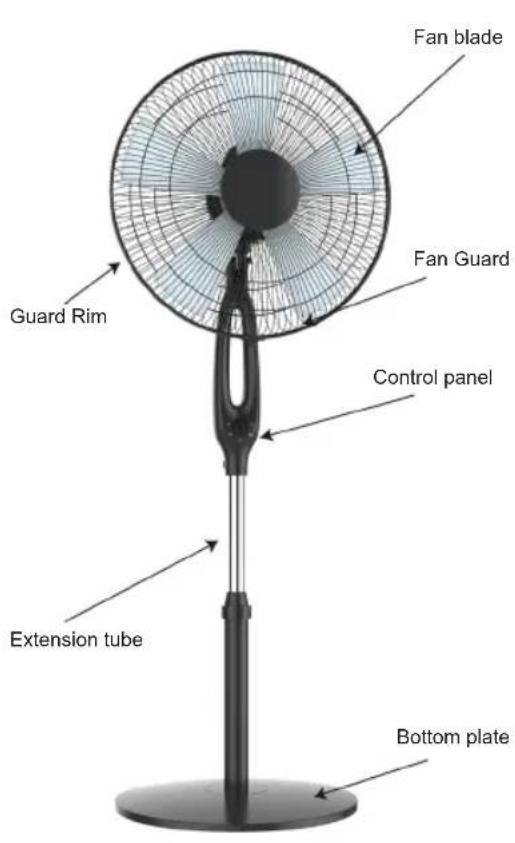
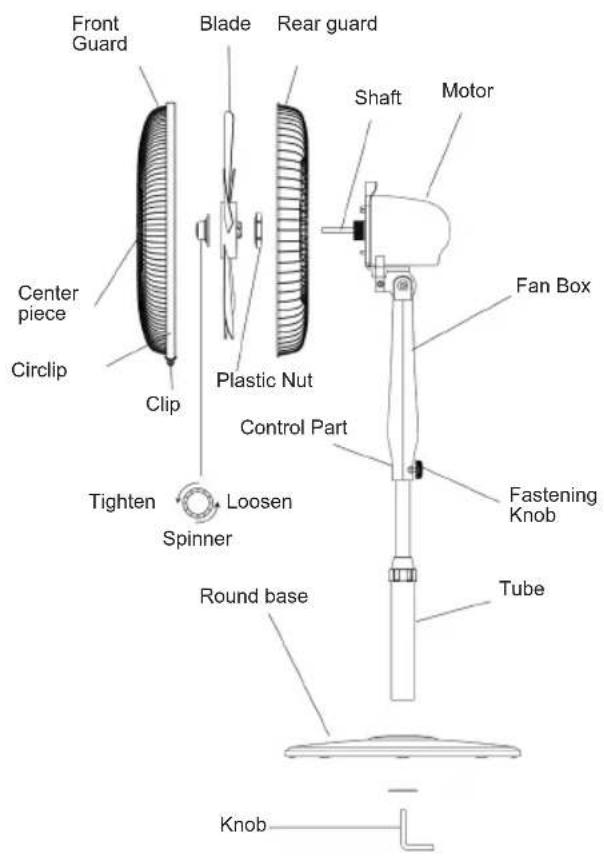
DESCRIPTION:
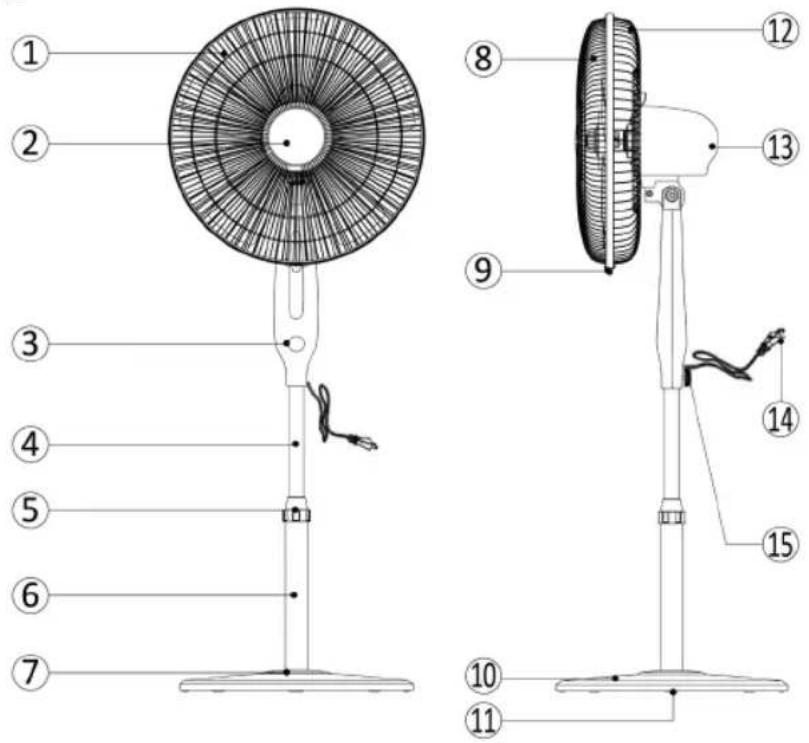
- Blade
- Front grill
- Touch control panel
- Extension column
- High adjustment ring
- Lower column
-
Base decorative cap
-
Front gill
- Ring screw
- Base
- Bae weight
- Rear grill
- Motor
- Power cord
- Fan connecting screw
FAN ASSEMBLING
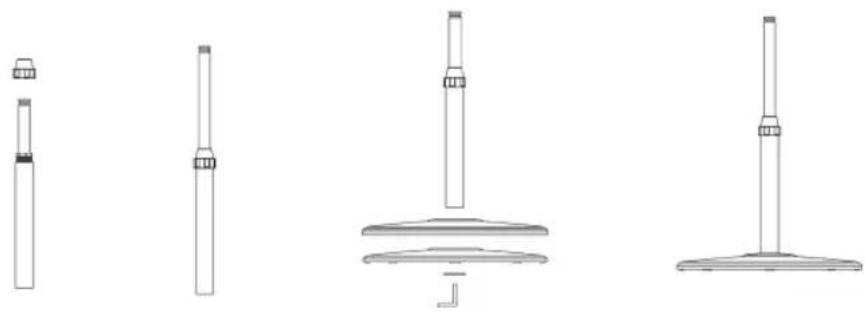
natural_image
Line drawings of four different types of cylindrical and flat stand designs (no text or symbols)Extension column assembling with the fan base:
In order to assemble the extension column with the base, place the base (part no.10) and fix with the base weight (no.11), tighten up from the bottom with the L shape knob given with the unit. now take the extension column (already mounted with part 4, 5, and 6), part 6 is lower column which fixed to the base and part 4 is extension column, with the help of extension tube you can enhance the height of the fan as per need and part 5 height adjustment rings helps to connect the extension column and lower column and keep them intact and tighten.
GRILLE & BLADE ASSEMBLY TO MOTOR
Mount the rear grill (part 12) on to the Motor and tighten up with plastic nut by tightening in clockwise direction. Mount blade (Part 1) and tighten up with plastic spinner to hold the blade in its place. Install the front grill on to the rear grill with the help of plastic ring and tighten up with the screw.
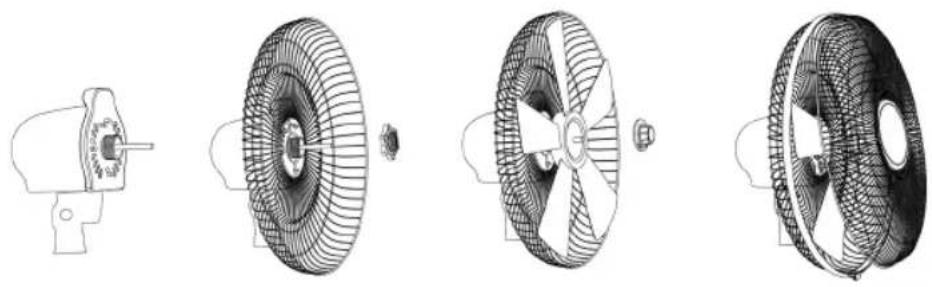
natural_image
Technical line drawings of a mechanical fan assembly, showing front, side, top, and side views (no text or symbols)Motor assembly to the extension column
Enhance the desired height of the fan with the help of extension column, insert the motor bottom (already assembled with blade and grills) part in to the extension tube and tighten up with fan connecting screw.
DIGITAL FAN DISPLAY
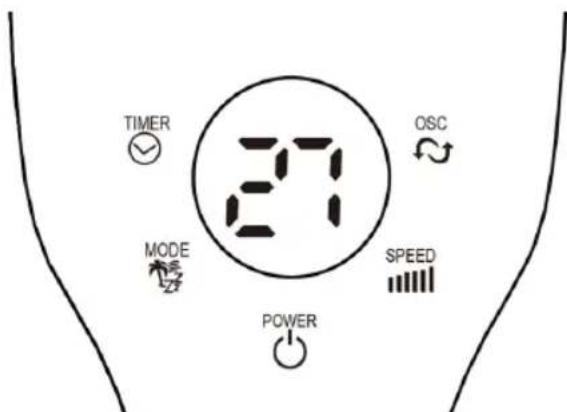
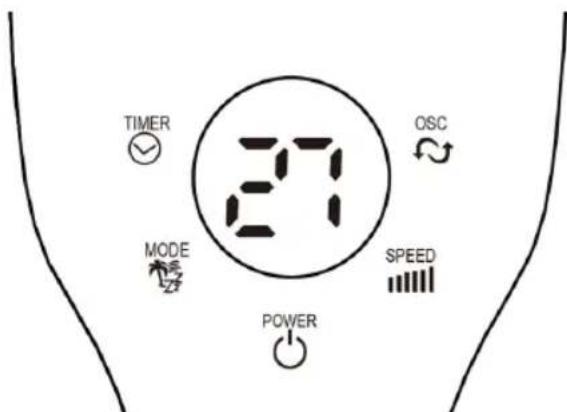
Front of display / soft panel of top cover (Figure 1)
Touch control panel
This Fan can be operated by the touch control panel located on front of the fan (as shown in Figure 1) or by your remote control.

-
Place the Fan on a stable and flat surface. Plug the Power Cord into an AC 220-240V electrical outlet. Make sure that fan wall outlet voltage is same as fan voltage. The LED screen will illuminate and display the current room temperature.
-
POWER: With the help of power key, you can turn the fan on and to turn off, press the same button. By turning on the fan it start automatically on to the preset speed which is low in normal fan mode.

- SPEED: The speed button helps you to adjust the speed, in order to change the speed, you can keep pressing until you get the desired speed This fan speed can be adjusted till 6 levels with gradually increasing 6 speeds. Once you set the speed level, is will be visible on to the fan panel.

- MODE: Press the button to set the Fan as Normal (Displayed by "1"), Natural (NA), or Sleep mode (SL). The mode will also display on the LED screen.

- OSC: To turn the fan on in oscillation mode, press the "OSC" button and fan starts oscillating. To stop the oscillation, press the button again.

- TIMER: Pressing the button to set desired power off time, there are 12time intervals. You can set the timer from 1-hour to 12-hours (Max).

- AMBIENCE TEMPERATURE: The digital display of the fan always shows the ambience temperature as a default function. When you change the speed settings or mode settings, then it starts showing the current speed settings and mode settings, but within few seconds it disappears automatically and once again it shows the temperature.
Note: Power save mode: when the "sleep" mode or the timer is on, the main display will be off after 30 seconds, and you can press any keys to turn on the display again.
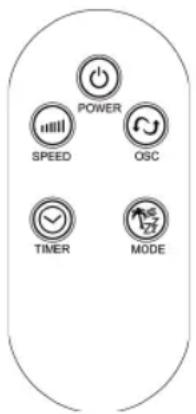
Remote Control
- This fan has provided with a remote control as well. You can use the remote control menu as well fan's front touch screen panel. The fan's remote control have the same buttons as fan's touch screen panel.
- To get the complete description of remote control button menu read thoroughly touch control panel description.
Tilt
You can tilt the fan head so that the breeze is targeted at an angle, steady the motor housing of the fan with one hand and grip the fan with another, carefully tilt the head of the fan until it reaches the desired angle. The fan head will be hold in that position. Be careful as to not to tilt the head back further than it is intended to go, doing so it will damage the unit.
Height Adjustment
To adjust the fan height, grip the extension column and loosen the height adjustment locking nut (5). Move upwards or downwards the extension column and once get the desired height, tighten up again with the help of height adjustment locking nut.
CLEANING AND MAINTENANCE:
WARNING: ALWAYS UNPLUG THE UNIT BEFORE MOVING OR MAINTENANCE. DO NOT IM-MERSE THE POWER CORD, PLUG AND THE UNIT INTO WATER OR RINSE UNDER THE TAP!
Caution: Do not use detergent, gasoline, benzene, thinner, or other solvents to clean the unit to avoid damage of the appliance.
- Unplug the unit and wait until the fan stop running before cleaning.
- Use a damp cloth to clean the surface of the fan.
- Use the vacuum cleaner to remove the dust inside the fan, you can use a soft brush as well. DO NOT use damp cloth to clean the inside parts of the fan.
- It is recommended to clean the fan every month.
- If the fan will not be used for a long time, store it in the cool, dry, safety place and far away from children. Do not store the appliance in hot place and under sunshine.
- If the unit requires external cleaning, make sure it is unplugged from the power supply. Use a soft tissue or dry cloth for general cleaning. To remove more persistent dirt or grime with a warm soapy dampened cloth. Do not use any solvents (such as thinners) as these may damage the plastic parts of the fan.
TECHNICAL SPECIFICATIONS
| Model No. | Voltage Power Frequency | ||
| SS-21250 | 220-240V | 45W 50Hz | |
IMPORTANT:
natural_image
Line drawings of four different types of cylindrical and flat stand designs (no text or symbols)natural_image
Technical line drawings of four different mechanical components with internal mesh structures (no text or symbols)natural_image
Line drawings of four different types of cylindrical and flat stand designs (no text or symbols)natural_image
Technical line drawings of a mechanical fan assembly showing internal components and mounting features (no text or symbols)natural_image
Line drawings of four different types of cylindrical and flat stand designs (no text or symbols)natural_image
Technical line drawings of a mechanical fan assembly, showing front, side, top, and side views (no text or symbols)
natural_image
Line drawings of four different types of cylindrical and flat stand designs (no text or symbols)natural_image
Technical line drawings of a fan assembly showing internal components and mounting features (no text or labels)DISPLAY DIGITALE DELLA VENTOLA
Directive 2009/125/EC
Directive 2009/125/EC
| DescriptionSymbol Value Unit | |||
| Alimentation / Fonte de energia | 220 – 240V~ 50Hz | ||
| Puissance / Potência | 45W | ||
| Classe / Class | II | ||
| Débit du ventilateur / Caudal do ventilador | F m3/min | 51.95 | |
| Puissance d'entrée du ventilateur / Entrada de energia do ventilador | P | 45.7 | W |
| Valeur du service / Valor do serviço | SV (m3/min) | 1W4 | |
| Consommation électrique en veille / Consumo de energia em espera | P_SB | 0.18 | W |
| Consommation d'électricité utilisée / Consumo de eletricidade em uso | Q | ||
| Niveau de puissance acoustique du ventilateur / Nível de potência sonora do ventilador | L WA dB(A) | 61.288 | |
| Vitesse de l'air / Velocidade do ar | C Meters/sec | 2.78 | |
| Norme de mesure pour voler du service /Padrão de medição para sair do serviço | IEC 60879:1986 (corr. 1992) | ||
ITA / ALE
Directive 2009/125/EC
| DescriptionSymbol Value Unit | |||
| Alimentazione / Stromversorgung | 220 – 240V~ 50Hz | ||
| Potere / Potenz 45W | |||
| Classe / Klasse | II | ||
| Portata del ventilatore / Lüfterdurchfluss F m3/min | 51.95 | ||
| Potenza assorbita dal ventilatore / Lüfterleistungseingang P W | 45.7 | ||
| Valore del servicio / Servicewert SV (m3/min) /W | 1.14 | ||
| Consumo energético in standby / Standby-Stromverbrauch P | SB | 0.18 | W |
| Consumo di elettricità in uso / Stromverbrauch im Einsatz Q | |||
| Livello di potenza sonora del ventilatore / Lüfter-Schalleistungspegel | L WA | 61.288 | dB(A) |
| Velocità dell'aria / Luftgeschwindigkeit C Meters/sec | 2.78 | ||
| Standard di misura per volare dal servicio / Messstandard, um vom Dienst zu fliegen | IEC 60879:1986 (corr. 1992) | ||
DECLARATION OF CONFORMITY
This device complies with Low Voltage Directive 2014/35/EC, Electromagnetic Compatibility Directive 2014/30/EU, Directive 2015/863/EU on the restriction of the use of certain hazardous substances in electrical and electronic equipment and Directive 2009/125/EC on the eco-design requirements applicable to energy-related products.


DÉCLARATION DE CONFORMITÉ
This symbol means that in case you wish to dispose of the product once its working life has ended, take it to an authorised waste agent for the selective collection of waste electrical and electronic equipment (WEEE).

Imported by:
Sanysan Appliances S.L, NIF: B98753056, C/ Barcas 2, 2
46002 Valencia, Spain
Product made in P.R.C. – Designed by SOGO based on the European Quality Standards
Customer Service: www.sogosat.com / sogosat@sogosat.com / 0034 902 222 161