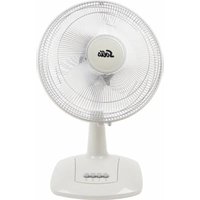
Viento 3D 759 - Fan Solis - Free user manual and instructions
Find the device manual for free Viento 3D 759 Solis in PDF.


User questions about Viento 3D 759 Solis
0 question about this device. Answer the ones you know or ask your own.
Ask a new question about this device
Download the instructions for your Fan in PDF format for free! Find your manual Viento 3D 759 - Solis and take your electronic device back in hand. On this page are published all the documents necessary for the use of your device. Viento 3D 759 by Solis.
USER MANUAL Viento 3D 759 Solis
natural_image
Black office air conditioner fan with 'Solis' branding, displayed on a stand with digital display (no text or symbols on fan body)natural_image
Black SOIS air conditioner fan with digital display and control buttons (no visible text or symbols)natural_image
Close-up of hands cleaning a black electric fan with a white plastic clip (no text or symbols visible)natural_image
Diagram of a mechanical component with a circular arrow and internal structure, no readable text or symbols present.Solis of Switzerland AG
natural_image
Black SOYA air conditioner fan with digital display and control buttons (no visible text or symbols)▲ DESCRIPTION DE L'APPAREIL
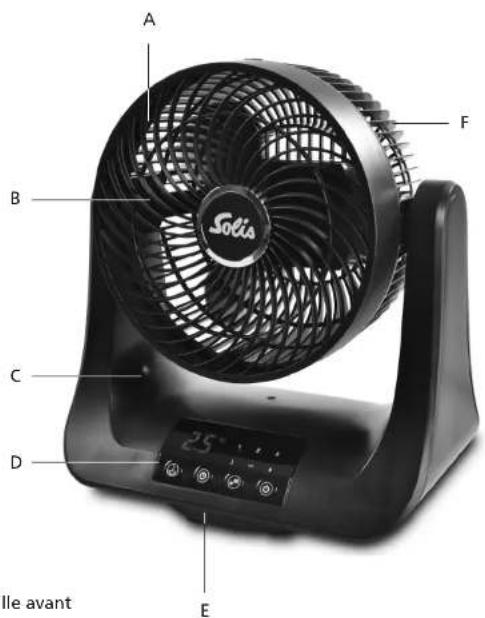
text_image
A B C D E F Solia 25° le avantnatural_image
Three identical fan diagrams showing angular changes from 60° to 70°, with no text or symbols present.effl eurer 1 x effl eurer 2 x
effl eurer 3 x
ETEINDRE L'APPAREIL
natural_image
Three-panel image showing a fan device with arrows indicating rotation, before and after cleaning (no text or symbols visible)natural_image
Diagram of a mechanical component with a circular arrow and arrowhead, no readable text or symbols present.Solis of Switzerland SA
Solis-Haus • CH-8152 Glattbrugg-Zurich • Suisse
natural_image
Black office air conditioner fan with visible brand logo and digital display (no text or symbols on fan body)▲DESCRIZIONE DEL DISPOSITIVO
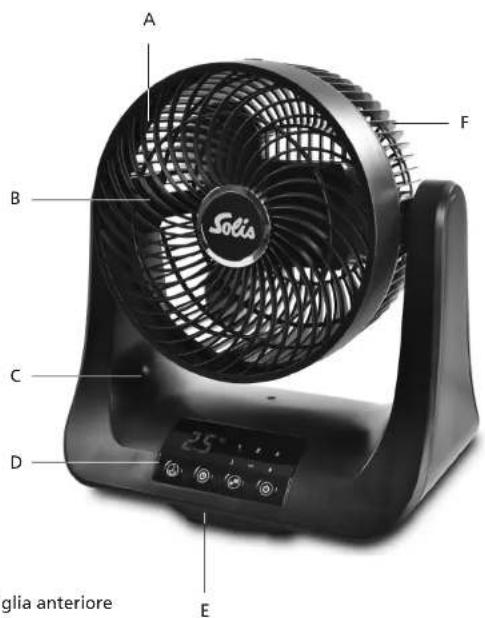
text_image
A B C D E Sogia anteriore 25°natural_image
Three-panel image showing a fan device with a black fan, being handled and then placed on a stand (no text or symbols visible)natural_image
Diagram of a mechanical component with a circular arrow and arrowhead, no readable text or symbols present.Dimensioni (L x A x P) ca. 29 x 33 x 20 cm
Peso ca. 2,4 kg
Solis of Switzerland SA
Solis-Haus • CH-8152 Glattbrugg-Zurigo • Svizzera
Telefono +41 44 874 64 54 • Fax +41 44 874 64 99
info@solis.ch • www.solis.ch • www.solis.com
▲ IMPORTANT SAFETY PRECAUTIONS
Please read through this user manual thoroughly before using your Solis ventilator Viento 3D so that you become familiar with your appliance and can use it safely. We thoroughly recommend that you keep these instructions and, if you pass the appliance on, that you also hand these instructions to the new owner.
For your own safety, please observe the following safety measures when using electrical appliances:
- To prevent electric shock, neither the appliance itself nor the power cord and plug must come into contact with water or any other liquids. Water can enter the housing and damage the appliance! Should the appliance resp. the power cord or plug come into contact with liquids, use dry rubber gloves to immediately pull the power plug from the power socket. Do not use the appliance before having it checked for functionality and safety by Solis or a Solis approved service centre.
- Do not operate or unplug the appliance with wet or moist hands or feet.
- Before using the appliance, check that the voltage stated on the type plate matches your mains voltage.
- During use, the appliance has to be placed on a solid and dry surface like e.g. a table. Do not place the ventilator on an unstable or textile-covered surface. Make sure that the appliance stands steadily, so that nobody can throw it over. A space of approx. 50 cm should be kept free around the appliance.
- Never use the ventilator near the edge of a table. Make sure it is kept out of the reach of children and pets to prevent it from being pulled down and damaged.
-
Do not leave the power cable hanging over table edges so that it can be pulled. Make sure that it does not come into contact with hot surfaces, such as hotplates or a radiator, or that it comes into contact with the appliance. Fully unwind the cord before use.
-
Keep the appliance away from hot gas, hot ovens and other heat-emitting appliances or heat sources. Never use the appliance on a hot or wet surface. Never place the appliance near moisture, heat and naked flames. Keep the appliance away from moving parts or appliances.
- Do not use the appliance in rooms with explosive resp. flammable substances or liquids. Do not use the ventilator in rooms with high humidity, at room temperatures above 40^ C or in dusty rooms.
- Never carry or pull the appliance by the power cable and do not place anything on the power cable.
- Do not spray anything into the ventilator – not even insect spray!
- We recommend that you do not use an extension cable with this appliance. Do not connect the power plug to a plug board to which other appliances are connected. Do not place the appliance directly underneath a power socket.
- Always pull on the power plug, not on the power cord, to disconnect the appliance from the power.
- Unplug the appliance when it is not in use or unattended and before cleaning. We recommend the use of a residual current device (RCD safety switch) to ensure additional protection during the use of electrical appliances. It is advisable to use a safety switch with a rated residual operating current of 30 mA maximum. For professional advice consult an electrician.
- Do not make any adjustments to the appliance, cable, plug or accessories.
- Never take hold of an appliance that has fallen into water. Always take the plug out of the power socket before removing the appliance from the water. Do not use the appliance again until you have had it's ability to function safely checked by Solis or a Solis approved service centre.
-
Never place the ventilator in a place where it could fall into water (e.g. next to sinks or swimming pools).
-
Place the appliance so that it is never exposed to direct sunlight.
- Do not leave the ventilator unattended when in use. Incorrect use may cause injury!
- Never put sharp or pointed objects and tools into the appliance openings. The appliance might be damaged resp. risk of electric shock and injury! Never insert fingers or other objects into the ventilator while it is in use. Pay special attention to children to prevent them from touching the ventilator.
- Do not shake or relocate the appliance while it is in operation.
- Use the appliance only as described in this manual. Improper use can cause personal injury.
- Only use with the provided accessories, or accessories recommended by Solis, incorrect accessories can lead to damage of the appliance.
- This appliance is only for domestic use and is not suitable for commercial use. Do not use in moving vehicles or boats.
- Do not use the appliance outdoors. Do not store the appliance outdoors or in rooms with high humidity.
- Check your ventilator before every use.
- In order to avoid electric shock, do not use the appliance if the cable or plug are damaged or the appliance is otherwise faulty, dropped or damaged. Never attempt repairs yourself, but take your appliance to Solis or a Solis approved service centre in order to get it inspected or mechanically and electrically repaired.
- People with limited physical, sensorial or mental capabilities as well as unknowing or inexperienced people (incl. children) must not use the ventilator except when supervised or thoroughly instructed on how to use the appliance by a person responsible for their safety. Additionally, they must be aware of the dangers arising from the appliance and know how to operate it safely. Cleaning and maintenance of the appliance must not be done by unsupervised children. The appliance
must not be operated or cleaned by children under the age of 8.
- Always keep the appliance and power cord out of the reach of children.
- Children must not clean the appliance except when supervised by a grown-up person responsible for their safety.
- Children must be supervised so that they don't play with the ventilator. Keep the packaging material incl. plastic bags out of reach of children. Suffocation hazard!
- Make sure that the Solis ventilator is correctly assembled before starting to use it.
- Before moving or cleaning the appliance, switch it off and always wait for the rotor blade to come to a full stop. Then, pull the power plug from the socket. This also applies when the appliance is not in use or during maintenance (e.g. if the front grid is removed).
- Be especially careful if there are children, older persons or animals in the vicinity of the ventilator.
- The airflow of the ventilator should not be pointed directly at older or ill persons resp. at children.
- Never cover the appliance during use, the space above the appliance and around the ventilator has to remain unobstructed at all times.
- Pull the plug after every use. Only then the appliance is definitely switched off.
- Do not mount the appliance to a wall or to the ceiling. The ventilator is only designed for freestanding use.
- Only use a soft, slightly moist towel for cleaning. Aggressive detergents and solvents or abrasive materials could damage the surface.
- Before first use, remove all packaging materials and stickers resp. labels. Please refer to the section "Before first use" on page 56 of this manual.
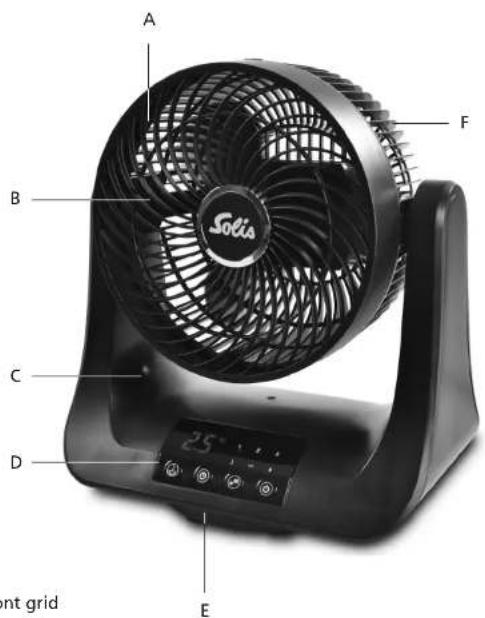
▲ APPLIANCE DESCRIPTION
text_image
A B C D E F SOIà 25° Front grid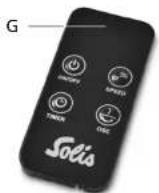
text_image
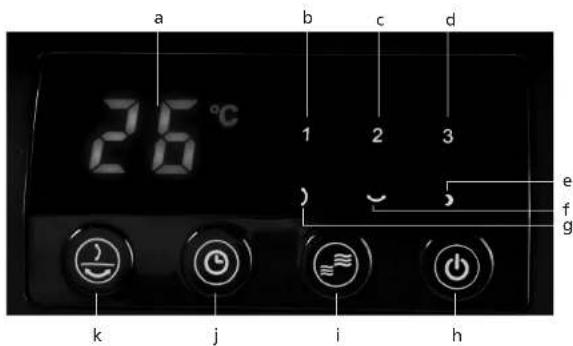
a 26°C 1 2 3 e f g k j i hCONTROL PANEL AND FUNCTION BUTTON DESCRIPTION
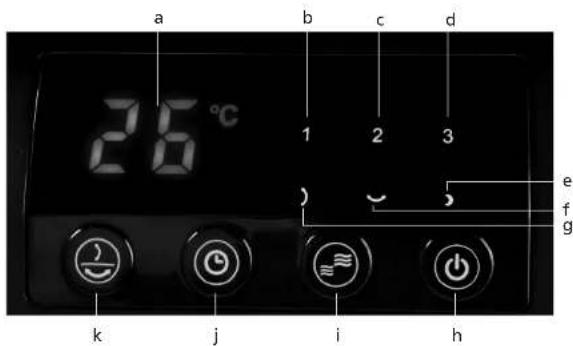
a Display
b Function light low ventilator speed
c Function light medium ventilator speed
d Function light high ventilator speed
e Function light sleep mode
f Function light horizontal oscillation
g Function light vertical oscillation
h ON/OFF button
i Ventilation speed control
j Timer button
k Oscillation button
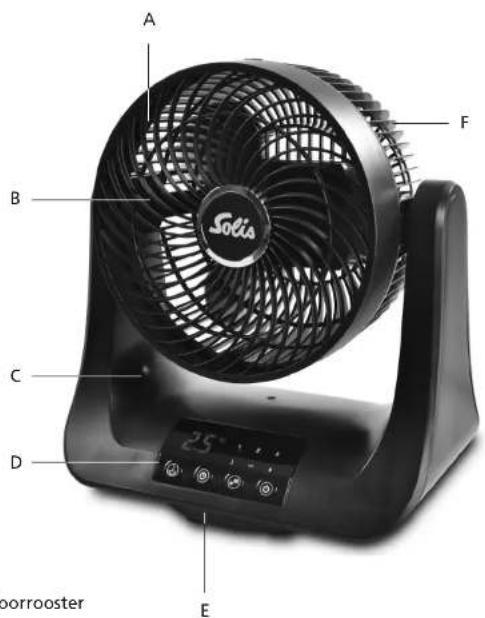
A Front grid
B Rotor blade
C Appliance base
D Control panel
E Foot
F Rear grid
G Remote control
▲ BEFORE FIRST USE
- Remove the appliance from its packaging and make sure that it is undamaged, firmly assembled and ready for use. Should you have any doubts, do not use the appliance and contact the nearest service centre authorised by Solis.
- Take care that children do not play with the packaging material, especially with the plastic bags – risk of suffocation!
- Place the appliance on a dry, stable surface resp. on a table, as described in the safety precautions.
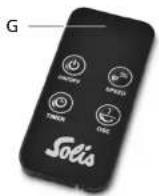
- Remove the battery protection film by pulling it off of the remote.
- Plug the power plug into a suitable power outlet. You can hear a twofold signal sound, the current room temperature is shown on the display. You can now use the appliance as described below.
▲ STARTING UP
text_image
26°C 1 2 3 ) ~ ,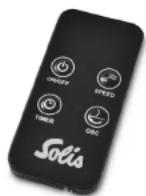
■ THE FUNCTION BUTTONS ON THE CONTROL PANEL AND ON THE REMOTE
• In general:
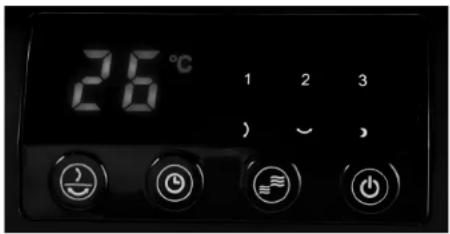
The function buttons on the remote control match the function buttons on the control panel of the ventilator.
Every set function is indicated by the corresponding function light on the control panel of the appliance. The current room temperature is shown on the display, or – should the timer be activated – the set time is briefly shown on the display.
1 ON/OFF button ⏻
If the power plug is connected to the power socket, you can use this button to switch the appliance on or off. If you touch the ⏻ button once, your appliance starts working in the lowest speed setting. The current room temperature is shown on the display and the blue function light behind the number 1 lights up by the control panel. If you touch the button once more, the appliance switches back off.
2 Ventilation speed control

You can choose from 3 speed settings. Each touch of the button changes the speed, the corresponding function light illuminates:
1 Function light for low ventilation speed (b)
2 Function light for medium ventilation speed (c)
3 Function light for high ventilation speed (d)
3 Timer button for operation time or sleep mode
a) Setting operation time
If the appliance is switched on, you can set the operation time between 1 hour and 10 hours at intervals of 1 hour. With each touch of the button you increase the operation time by one hour, the corresponding number lights up in the display and the clock symbol flashes to its lower right. A maximum of 10 operating hours can be set, then the timer starts over at "0".
Once operation time is set, the corresponding number of hours lights up in the display for a few seconds. After that, the display returns to showing the current room temperature. The clock symbol to the lower right of the room temperature display lights up constantly if the timer function is activated. The appliance switches off after the set number of hours has elapsed.
b) Setting sleep mode
If the appliance is switched on and you touch the timer button for 3 seconds, sleep mode is activated, meaning the appliance switches on and off at different intervals for 7 hours. "7" lights up in the display for a few seconds, also the clock symbol to its lower right. After that, the display returns to the current room temperature. The clock symbol to the lower right of the room temperature display lights up constantly if the sleep mode is activated.
First, the ventilator works for 1 hour, then it is switched off for 30 minutes. After that, it is switched on for 30 minutes and switched off for 10 minutes, then, it is switched on for 5 minutes and switched off for 10 minutes. This cycle repeats until the operation time of 7 hours has elapsed. The ventilator switches off after that.
If the sleep mode is enabled, the blue function light behind the symbol lights up in the control panel.
Note: If you wish to disable the sleep mode before that, either touch the timer button for another 3 seconds, until "0" lights up in the display, or switch the appliance off with the ON/OFF button ⏻.
4 Oscillation button

With the oscillation button, you can choose from 3 different oscillation motions:
- Touch once: The appliance moves horizontally from the left to right in an area of 60°, the blue function light behind the ∼ symbol lights up.
- Touch twice: The appliance moves vertically, bottom up, in an area of 70^ , the blue function light behind the 1 symbol lights up.
- Touch three times: The appliance moves in a 3D motion, horizontally and vertically, the blue function lights behind both symbols ∼ and ∞ light up.
If you touch the oscillation button a fourth time, the oscillation motion is deactivated again.
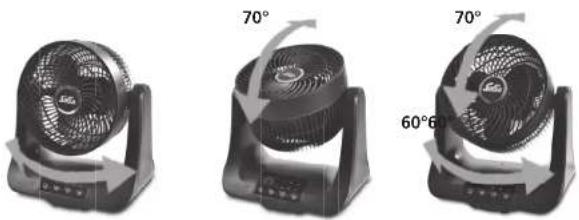
Touch 1 time Touch 2 times Touch 3 times
SWITCHING OFF THE APPLIANCE
- If you wish to switch the appliance off, touch the ON/OFF button ⏻ and wait for the rotor blade to come to a full stop.
- Then, pull the plug. The appliance should always be disconnected from the power while it is not in use.
▲ CLEANING AND CARE
- Before cleaning, moving or storing the appliance, switch the ventilator off with the ON/OFF button Ⓞ, wait for the rotor blade to come to a full stop and pull the power plug from the socket.
- The chassis of the ventilator should be cleaned once in a while with a slightly moist towel. Never submerge the appliance in water and do not spray any water or another liquid into the appliance!
If you wish to clean the rotor blade, you have to disassemble the appliance as follows:
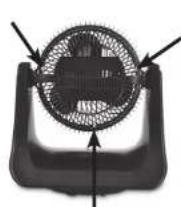
- Unscrew the three screws in the rear grid connecting the read grid with the front grid.
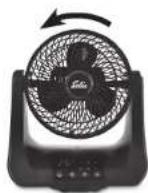
- Then, turn the front grid slightly to left and remove it.
natural_image
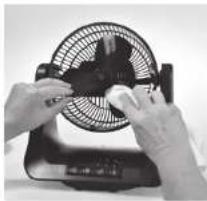
Close-up of hands cleaning a black electric fan with a white lid (no visible text or symbols)- Then, clock wisely unscrew the screw in the centre of the rotor blade and remove the rotor blade from the ventilator.
- Clean the rotor blade with a slightly moist, soft towel. Let all parts dry.
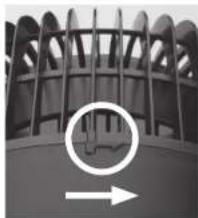
- Reassemble the appliance in the reverse order: Counter clock wisely screw on the rotor blade with the screw, then mount the front grid and turn it to the right to lock it into place. The tip of the arrow on the front grid frame has to line up with the marking on the frame of the rear grid. Then, clock wisely turn the front grid frame all the way in so that the two dashes line up.
- Reattach the front grid to the rear grid using the three screws.
Only use the appliance if it is correctly assembled!
natural_image
Close-up of a mechanical component with a circular arrow and internal structure, no visible text or symbols▲ STORAGE
- If the ventilator is not needed, it has to be switched off and disconnected from the power.
- Store your appliance in an upright position, best in the original packaging in a dry room. Do not place any objects on the appliance.
NOTES CONCERNING YOUR REMOTE CONTROL
Should the included battery be out of energy, insert a new CR 2032 battery. Pay attention to the correct polarity. Should you not use the remote control for longer periods of time, please remove the battery and keep it separately. This will increase the lifespan of the battery.
The operating distance of the remote control can decrease if you don't point the remote control directly at the receiver, meaning the ventilator control panel, resp. the ventilator does not respond to the signals of the remote control anymore.
Please make sure that there are no obstructions between the remote control and the receiver.
Please keep the remote control safe, it must not fall down or break.
▲ TECHNICAL SPECIFICATIONS
Model-No. FSG-E, type 759
Product description Table ventilator
Voltage/frequency 220-240V\~ / 50/60Hz
Output 45 Watt
Dimensions (W x H x D) approx. 29 x 33 x 20 cm
Weight approx. 2,4 kg
Technical changes reserved.
▲ DISPOSAL

EU 2002/96/EC
Directions for proper disposal of the product according to EU directive 2002/96/EU
At the end of its working life this equipment must not be disposed of as an household waste. It must be taken to special local community waste collection centres or to a dealer providing this service. Disposing of electrical and electronic equipment separately avoids possible negative effects on the environment and human health deriving from an inappropriate disposal and enables its components to be recovered and recycled to obtain significant savings in energy and resources. In order to underline the duty to dispose of this equipment separately, the product is marked with a crossed-out dustbin.
Solis of Switzerland Ltd reserves the right to carry out technical and visual changes and modifications to improve the product at any time.

(Only for customers in Switzerland)
This item stands out due to its long-life cycle and reliability. Despite this though, if a malfunction ever occurs, simply give us a call. Often a breakdown can be easily and quickly remedied with the right tip or technique without having to straight away send off the device for repair. We will give you all the advice and practical support you require.
Keep the original packaging in a safe place so that you may use it in the event that transportation or shipping of the product becomes necessary.
Solis of Switzerland Ltd
Solis-House • CH-8152 Glattbrugg-Zurich • Switzerland
Phone +41 44 874 64 54 • Fax +41 44 874 64 99
info@solis.ch • www.solis.ch • www.solis.com
natural_image
Black office air conditioner fan with visible grille and control panel (no text or symbols)▲ APPARAATBESCHRIJVING
text_image
A B C D E Sorica 25° borroosterA Voorrooster
B Rotorblad
C Apparaatbasis
D Bedieningspaneel
E Steun
F Achterrooster
G Afstandsbediening
text_image
a 26°C 1 2 3 e f g k j i hBESCHRIJVING VAN BEDIENINGSPANEELEN FUNCTIETOETSEN
natural_image
Close-up of hands cleaning a black electric fan with a white cloth (no visible text or symbols)natural_image
Close-up of a mechanical component with a circular arrow and arrowhead, no visible text or symbolsSolis of Switzerland AG
Solis-Haus • CH-8152 Glattbrugg-Zürich • Zwitserland
Telefoon +41 44 874 64 54 • Fax +41 44 874 64 99
info@solis.ch • www.solis.ch • www.solis.com