EasyManual
Easy Breezy 757 - Fan Solis - Free user manual and instructions
Find the device manual for free Easy Breezy 757 Solis in PDF.


Frequently Asked Questions - Easy Breezy 757 Solis
User questions about Easy Breezy 757 Solis
0 question about this device. Answer the ones you know or ask your own.
Ask a new question about this device
Download the instructions for your Fan in PDF format for free! Find your manual Easy Breezy 757 - Solis and take your electronic device back in hand. On this page are published all the documents necessary for the use of your device. Easy Breezy 757 by Solis.
USER MANUAL Easy Breezy 757 Solis
Solis of Switzerland AG
Solis-Haus · Europastrasse 11 · CH-8152 Glattbrugg-Zurich · Schweiz
Telefon +41 44 874 64 54 • Telefax +41 44 874 64 99
info@solis.ch · www.solis.ch · www.solis.com
CONSIGNES DE SECURITE IMPORTANTES
Solis of Switzerland SA
Solis-Haus · Europaastrasse 11 · CH-8152 Glattbrugg-Zurich · Suisse
Telephone +41 44 874 64 54 • Telefon +41 44 874 64 99
info@solis.ch · www.solis.ch · www.solis.com
IMPORTANTI ISTRUZIONI DI SICUREZZA
Solis of Switzerland SA
Solis-Haus · Europaastrasse 11 · CH-8152 Glattbrugg-Zurigo · Svizzera
Telefono +41 44 874 64 54 • Fax +41 44 874 64 99
info@solis.ch · www.solis.ch · www.solis.com
IMPORTANT SAFETY PRECAUTIONS
Please read through this user manual thoroughly before using your Solis fan, so that you become familiar with your appliance and can use it safely. We thoroughly recommend that you keep these instructions and, if you pass the appliance on, that you also hand these instructions to the new owner.
For your own safety, please observe the following safety measures when using electrical appliances:
- In order to avoid electric shock, neither the fan, cable or the plug, may come into contact with water or any other liquids. Water could seep into the appliance and damage it! If the appliance, the cable or the plug come into contact with fluid, remove the plug from the socket immediately, using dry rubber gloves.
- Do not operate or unplug the appliance with wet or moist hands or feet.
- Before operation, check whether the voltage stated on the type plate corresponds to your mains voltage.
- The appliance must stand on a secure and dry surface during use. Do not place the fan on unstable or textile covered surfaces. Ensure that the appliance is stable, so that nobody will knock it over.
- Lay the cable where it will not be tripped over or where it could topple the appliance. Do not cover the cable. Ensure that the cable does not come into contact with any hot surfaces. Always unroll the cable fully before plugging the appliance in.
- Keep the appliance away from hot gas, hot ovens or other heat-emitting appliances and heat sources. Do not use the appliance in rooms containing explosive or flammable, gasses or liquids. Do not use the appliance in rooms with high humi
dity (e.g. bathrooms), temperatures over 40^ or in dusty rooms.
- Never use the appliance on wet or hot surfaces. Keep the appliance away from damp, heat and naked flames. Keep the fan away from moving parts or appliances.
- Never carry or pull the appliance by the cable and do not place anything on top of the power cable.
- Do not spray anything into the appliance - e.g. bug spray.
- Always pull the plug, never the cord, to disconnect the appliance from the power mains.
- Unplug the appliance when it is not in use or unattended, and before cleaning. We recommend the use of a residual current device (RCD safety switch) to ensure additional protection during the use of electrical appliances. It is advisable to use a safety switch with a rated residual operating current of 30mA maximum. For professional advice consult an electrician.
- Do not make any adjustments to the appliance, cable, plug or accessories.
- Do not leave the fan unattended when in use. Incorrect use may cause injury!
- Never take hold of an appliance that has fallen into water. Always take the plug out of the power socket before removing the appliance from the water. Do not use the appliance again until you have had it's ability to function safely checked by Solis or a Solis approved service centre.
- Never place the appliance where it could fall into water (e.g. next to a swimming pool).
- Place the appliance so that it is never exposed to direct sunlight. Do not operate near windows.
- Never stick sharp or pointed objects or tools into the appliance openings. They could damage the appliance or cause dan
ger of electric shock. Never put your fingers or other objects, into the fan while it is in operation. Take especially care that children don't touch the fan.
- Never cover the appliance while in use.
- Do not shake or relocate the appliance while it is in operation.
- Only use the appliance as described in this manual. Only use with the provided accessories or accessories recommended by Solis, incorrect accessories can lead to damage of the appliance.
- This appliance is only for domestic use and is not suitable for commercial use. Do not use outdoors, in vehicles or on boats.
- Check your fan and the cable before each use.
- In order to avoid electric shock, do not use the appliance if the cable or plug are damaged or the appliance is otherwise faulty, dropped or damaged. Never attempt repairs yourself, but take your appliance to Solis or a Solis approved service centre in order to get it inspected or mechanically and electrically repaired.
- The appliance must not be operated by children under 8 years of age. Persons with limited physical, sensorial or mental capabilities (including children) or uninformed or inexperienced persons must not use the ventilator, except when supervised by a person responsible for their safety and thoroughly instructed on how to use the appliance.
- Children must be supervised, so that they do not play with the appliance. Cleaning of the appliance must not be done by children.
-
Always ensure the Solis fan is properly assembled before use. Never operate the appliance without foot, filter cover and net filter or in a lying position!
-
Before moving or cleaning the appliance, switch it off and wait for the fan to come to a standstill. Remove the power plug from the socket. This also applies when the appliance is not in use.
- You should take particular caution when children, elderly persons or animals are nearby to the fan.
- The air flow from the fan should not be directed on elderly or sick people, or on children.
- Ensure that the fan can rotate freely and it's oscillating movement is not blocked by another item.
- Ensure that no hair, curtains, drapes, table cloths or the like are in the proximity of the fan. They might be sucked in and cause personal or physical damage.

UNIT DESCRIPTION
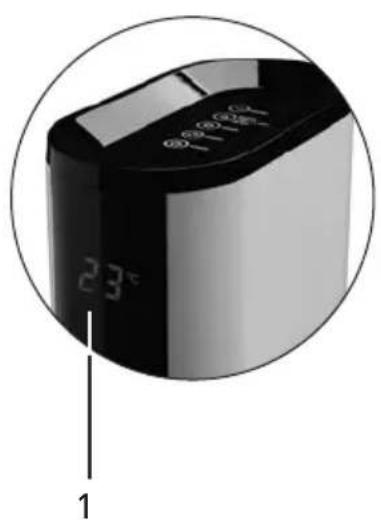
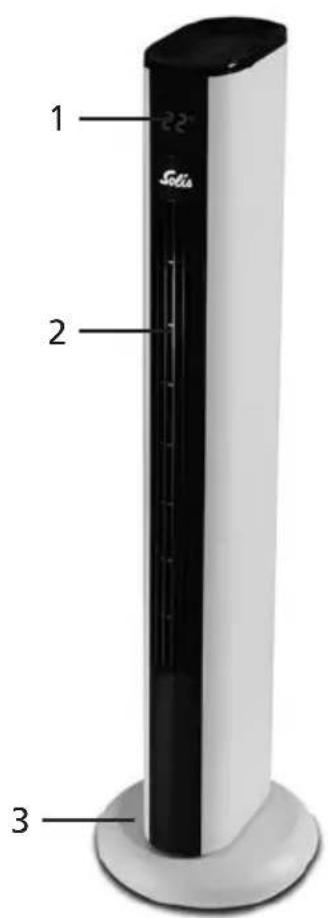
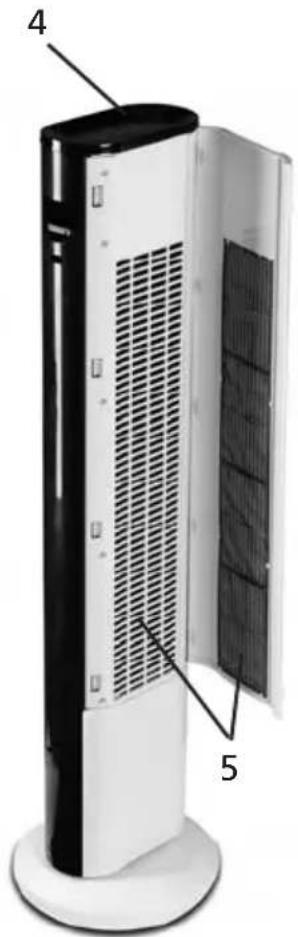
1 LED display
2 Air outlet
3 Foot
4 Control panel with sensor buttons
5 Air inlet with filter cover and inlying, washable net filter
6 Compartment for keeping the remote control
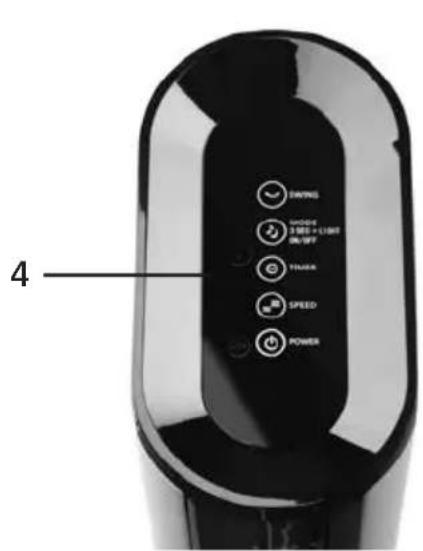
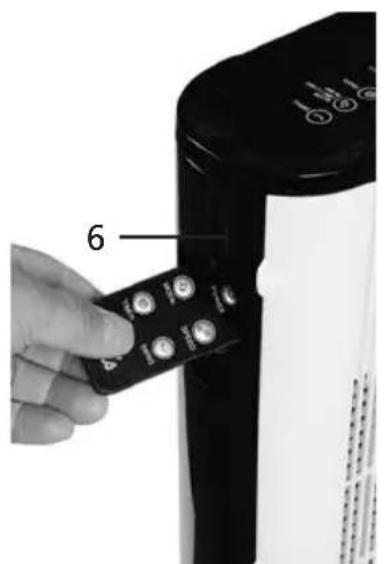
BEFORE OPERATION
- Take the appliance from the packaging and check it for damage and operability. Should you have doubts, do not begin to use the appliance and contact the nearest authorised Solis service centre.
- Ensure that children do not play with the packaging materials, especially plastic bags - risk of suffocation!
- Place the appliance on a dry and level surface as described in the safety precautions.
- Remove the protective film of the remote's battery by pulling it off.
- Connect the plug to a suitable socket.

THE FUNCTION BUTTONS
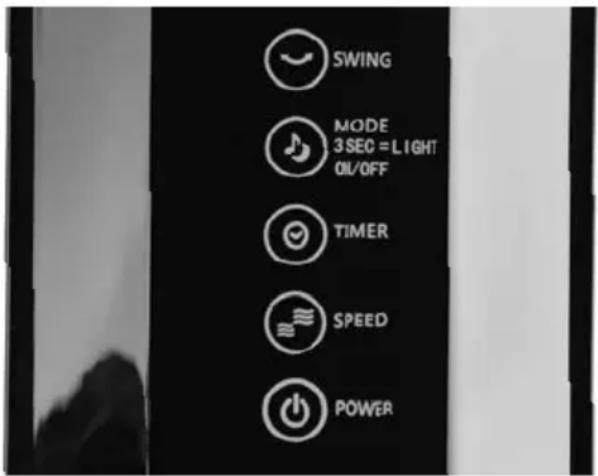
Generally applies: Every selected function (except „Normal Wind“) will be indicated by the corresponding symbol function light on the control panel or the LED display (Timer).
For activating horizontal oscillation
For switching the digital display on and off and for setting the following ventilation programmes:
Normal Wind - No function light will illuminate / standard setting.
Natural Wind - The function light will illuminate.
Sleeping Wind - The function light will illuminate.
Switching the digital display on or off:
Touch button for 3 seconds: Digital display on the front goes out.
Touch button for another 3 seconds: Digital display on the front lights up.
For setting operation time
You can set any amount of time between 0.5 and 8 hours at intervals of 0.5. During setting and shortly after the selected operation time will light up in the LED display.

For selecting ventilation speed
POWER-ON/OFF
Thebliance is plugged in, you can use this button to turn the
appliance on or off. Press the button once and the appliance will begin operating at the lowest speed. The function light LOW will light up on the control panel. By pressing the button once more, you will switch the appliance off, the function light goes out.

THE REMOTE CONTROL
In general:
-
Before first use, please pull the battery protection film from the remote control.
-
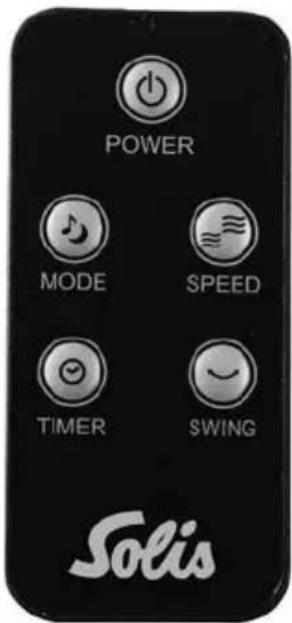
The function buttons on the remote control correspond to the touch sensor buttons on the control panel of the fan (except the On/Off function for the digital display, which can only be controlled on the appliance itself).
-
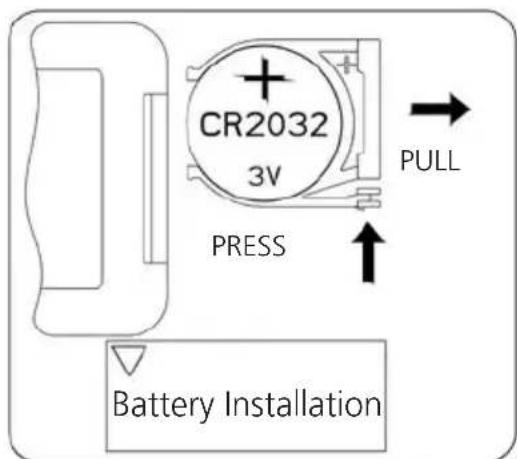
Should the included battery run out of power, insert a new CR2032 battery. Please regard the indicated polarity. In this context, please regard the depiction given below. Should you not use the remote control for longer periods of time, please remove the battery and store it separately. This will increase battery life.
- The operating range of the remote control is up to 4 meters. Not pointing the remote control directly towards the receiver, meaning towards the centre of the display, will reduce operating range resp. cause the fan to cease responding to the signals of the remote control.
- Please ensure that there are no obstacles between the remote control and the receiver.
- Please keep the remote control safe, it must not fall or break.

START-UP
When you have set up the fan in a suitable spot and plugged it in, you can begin to use the appliance. Once the power plug is connected, the LED display will state the current room temperature.
Touch the sensor buttons on the control panel or press the function buttons on the remote control. Every setting (except the operating mode „Normal Wind“) will be indicated on the control panel resp. on the LED display (Timer).
- Activate the appliance by pressing the POWER button. The standard setting is: Ventilation programme „Normal Wind" and ventilation speed LOW.
- If desired, choose another ventilation programme by pressing the MODE button. You have three programmes to choose from: „Normal Wind“ (constant), „Natural Wind“ (surging and receding) and „Sleeping Wind“ (soft wind, surging and receding). The MODE button can also be used to switch the digital display on the appliance front on and off. Touch the button for at least 3 seconds to switch the digital display off. Touch the MODE button for at least another 3 seconds to switch the digital display back on.
Note: In the „Normal Wind" standard setting, no symbol will illuminate in the control panel.
- If required, use the SPEED button to select another ventilation speed. You can choose from three speeds: HI, MID and LOW. The standard setting is LOW.
- If you want to set a certain operation time after which the fan should switch off automatically, use the TIMER button to set an amount of time between 0.5 and 8 hours. You can increase operation time in steps of 0.5. By pressing the TIMER button permanently for three seconds, operation time will increase at steps of 1 hour. The LED display will indicate the chosen amount of hours. Once the setting is done, meaning you stop pressing the TIMER button, the display will return to stating the current room temperature after a few seconds and the symbol will light up in the lower right.
- If you want to activate the oscillation function, press the SWING button. The fan will slowly swing from left to right. To deactivate oscillation, press the SWING button once again.

CLEANING AND CARE
Before you clean, move or store the appliance, please turn off the fan by pressing the POWER-button, then unplugging the appliance from the socket.
The outer parts of the fan should be wiped with a soft, damp cloth from time to time. Never submerge the appliance in water or any other liquid and do not spray anything into the appliance!
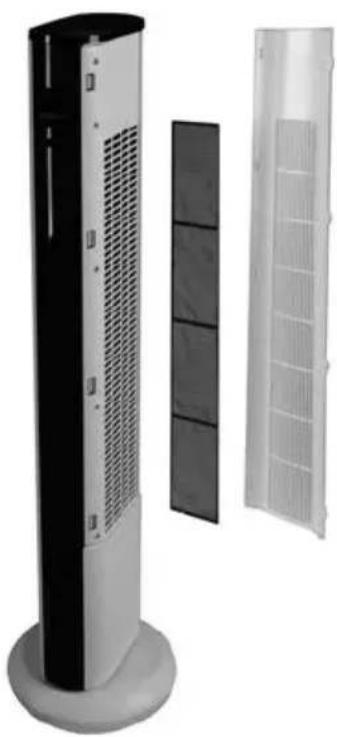
Once a month, you should clean the filter cover with inlying net filter. To do this, pull the side brackets gently outwards and remove the filter cover by pushing it slightly forwards.
Dryly wipe the filter cover and clean the inlying net filter under running, lukewarm tap water. Let the net filter dry completely and reinstall both items back into the appliance.
Caution: Apart from the filter cover and the net filter, no part of the fan should be dismantled. For questions or necessary repairs, please contact Solis or an authorised Solis service centre to have the appliance checked and, if need be, repaired. Never do repairs yourself!
Do not use aggressive or chemical cleaning agents, sharp or abrasive sponges or other similar cleaning equipment.
Should the tower fan be out of use for extended periods of time, store it in a cool, dry and dark place out of the reach of children. Do not store the appliance in a warm or sunny place.

TECHNICAL INFORMATION
Model number FTD, type 757
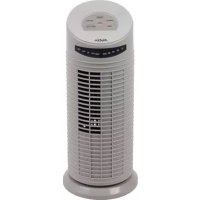
Product description Tower fan with remote control
Voltage / frequency 220-240 V~/50/60 Hz
Power 50 Watt
Sound level averagely 44.8 dB(A)
Dimensions approx. 24 × 91 cm (foot- x height)
Weight approx. 3.3kg
Technical changes reserved.
Information for correct disposal of the product in accordance with the European Directive EU 2011/65/EU.
At the end of its working life this equipment must not be disposed of as an household waste. It must be taken to special local community waste collection centres or to a dealer providing this service. Disposing of electrical and electronic equipment separately avoids possible negative effects on the environment and human health deriving from an inappropriate disposal and enables its components to be recovered and recycled to obtain significant savings in energy and resources. In order to underline the duty to dispose of this equipment separately, the product is marked with a crossed-out dustbin.
Solis of Switzerland Ltd reserves the right to carry out technical and visual changes and modifications to improve the product at any time.

HELpline:
091 802 90 10
(Only for customers in Switzerland)
This item stands out due to its long-life cycle and reliability. Despite this though, if a malfunction ever occurs, simply give us a call. Often a breakdown can be easily and quickly remedied with the right tip or technique without having to straight away send off the device for repair. We will give you all the advice and practical support you require.
Keep the original packaging in a safe place so that you may use it in the event that transportation or shipping of the product becomes necessary.
Solis of Switzerland Ltd
Solis-House · Europastrasse 11 · CH-8152 Glattbrugg-Zurich · Switzerland Phone +41 44 874 64 54 · Fax +41 44 874 64 99 info@solis.ch · www.solis.ch · www.solis.com

BELANGRIJKE
VEILIGHEIDSVOORSCHRIFTEN
Solis of Switzerland AG
Solis-Haus · Europastrasse 11 · CH-8152 Glattbrugg-Zurich · Zwitserland
Telefoo +41 44 874 64 54 Fax +41 44 874 64 99
info@solis.ch · www.solis.ch · www.solis.com