EasyManual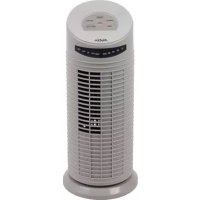
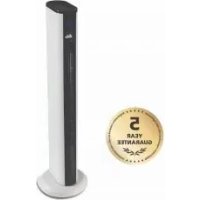
MiniTower 749 - Fan Solis - Free user manual and instructions
Find the device manual for free MiniTower 749 Solis in PDF.


User questions about MiniTower 749 Solis
0 question about this device. Answer the ones you know or ask your own.
Ask a new question about this device
Download the instructions for your Fan in PDF format for free! Find your manual MiniTower 749 - Solis and take your electronic device back in hand. On this page are published all the documents necessary for the use of your device. MiniTower 749 by Solis.
USER MANUAL MiniTower 749 Solis
Touche ON/OFF MARCHE/ARRET
IMPORTANT SAFETY PRECAUTIONS
Please read through this user manual thoroughly before using your Solis Tower Fan "Mini-Tower", so that you become familiar with your appliance and can use it safely. We thoroughly recommend that you keep these instructions and, if you pass the appliance on, that you also hand these instructions to the new owner.
For your own safety, please observe the following safety measures when using electrical appliances:
- To prevent electric shock, neither the appliance nor the power cord and the power plug must come into contact with water or other liquids. Water might enter the casing and damage the appliance. Danger of electric shock! Should the appliance respond, the power cord or the power plug come into contact with liquid, use dry rubber gloves to immediately pull the power plug out of the socket. Do not use the appliance again until you have had it's ability to function safely checked by Solis or a Solis approved service centre.
- Do not operate the appliance resp. pull or connect the power plug with wet or moist hands or feet.
- Before using the appliance, check that the voltage stated on the type plate of the appliance matches your mains voltage. Do not connect the power plug to a plug board to which other appliances are connected.
-
Lay the power cord in a way that makes it impossible to trip over it, the appliance might fall over and be damaged resp. cause personal damage. Do not let the power cord hang over table edges to prevent it from being pulled down. Please make sure that the power cord does not come into contact with hot surfaces like e.g. a stove top or a heater resp. with the appliance itself.
-
Keep the appliance away from hot gas, hot ovens and other heat-emitting appliances or heat sources. Never use the appliance on a hot or wet surface. Never place the appliance near moisture, heat and naked flames. Keep the appliance away from moving parts or appliances. Do not use the appliance in rooms that contain explosive resp. flammable substances or liquids. Do not use the fan in rooms with high levels of humidity, at room temperatures of over 40^ or in dusty rooms.
- Always keep a minimum distance to walls or heat sensitive materials like fabrics, blinds or curtains. Make sure that the fan can gyrate freely on all sides. The area around the fan must be kept open at all times and the fan must never be covered. It is to be ensured that there are no objects in the operation radius of the fan which might get caught in the appliance and block it. The fan must never be unsupervised during use.
- During use, the appliance has to be placed on an even, clean, stable and dry surface. Do not place the fan on an unstable or textile-covered surface. Make sure that the appliance is standing firmly so that it cannot be toppled over. An area of approx. 50~cm around the appliance should be kept free. Do not use the appliance outdoors or in moving vehicles or boats.
- Never use the fan near a table edge and make sure that it is out of the reach of children and pets, so that the appliance can not be pulled down and damaged.
- Never carry the appliance by the power cord and do not place anything on the power cord. Never pull on the power cord to disconnect the appliance from the power mains. Only pull on the plug.
- We recommend that you do not use an extension cable with this appliance. Do not place the appliance directly underneath a power socket.
-
Before disconnecting the power plug of the appliance from the power socket, please make sure that the appliance is not in use.
-
Always unplug the appliance if it is not in use or left unattended, and before cleaning. This also applies if you move or store the appliance. We recommend the use of a residual current device (RCD safety switch) to provide additional protection during the use of electrical appliances. It is advisable to use a safety switch with a rated residual operating current of 30mA maximum. For professional advice consult an electrician.
- Do not make any adjustments to the appliance, cable, plug or accessories.
- Improper use creates the risk of injury! No liability is assumed in the case of potential damages or injuries.
- Never take hold of an appliance that has fallen into water or another liquid. Always use dry rubber gloves to pull the power plug before removing it. Do not use the appliance again until you have had it's ability to function safely checked by Solis or a Solis approved service centre.
- Never place the appliance in such a way that it might fall into water or come into contact with water or another liquid (e.g. next to a swimming pool).
- Never submerge the appliance or parts of it, power cord or power plug in water, or bring it into contact with water or other liquids.
- Place the appliance so that it is never exposed to direct sunlight.
- Never insert any objects or tools into the appliance openings or the fan grid or reach into it with hands / fingers. The appliance might be damaged resp. risk of electric shock and injuries! Pay special attention to children to prevent them from touching the fan.
- Do not spray anything into the fan - not even insect spray.
-
Never move or lift the fan while it is in use.
-
Only use the appliance as described in this manual. Only use with the provided accessories or accessories recommended by Solis, incorrect accessories or misuse can lead to damage of the appliance, to fire, electric shock or personal damage.
- Never use the appliance with an external timer switch or a remote control.
- This appliance is only for domestic use and is not suitable for commercial use.
- Remove and discard all packaging materials and potential stickers or labels (except for the type plate) before using the appliance for the first time.
- Check the appliance before each use and ensure that the appliance, power cord and plug are not damaged and no parts have come loose.
- In order to avoid electric shock, do not use the appliance if the power cord or plug are damaged or the appliance is otherwise faulty, dropped or damaged or if parts have come loose. Never attempt repairs yourself, but take your appliance to Solis or a Solis approved service centre in order to get it inspected or mechanically and electrically repaired, in order to avoid a hazard.
- People with limited physical, sensorial or mental capabilities as well as unknowing or inexperienced people and children must not use the appliance except when supervised or thoroughly instructed on how to use the appliance by a person responsible for their safety. Additionally, they must be aware of the dangers arising from the appliance and know how to operate it safely. Cleaning and maintenance of the appliance must not be done by unsupervised children. Under no circumstances must the appliance be used or cleaned by children under the age of 8.
-
Always keep the appliance and power cord out of the reach of children. Keep the packaging material incl. plastic bags out of the reach of children. Suffocation hazard!
-
Children must be supervised, so that they do not play with the appliance.
- Before moving or cleaning the appliance, switch it off and wait for the fan to come to a standstill. Remove the power plug from the socket. This also applies when the appliance is not in use.
- You should take particular caution when children, elderly persons or animals are nearby to the fan.
- The air flow from the fan should not be directed on elderly or sick people, resp. children or pets.
- Never cover the appliance with blankets, clothing items or similar things during use. The space above the appliance and around the fan has to be kept free at all times.
- Never leave the fan unattended while the appliance is in use.
- Do not place any objects on the appliance
- Unwind the power cord fully before plugging the plug into the socket.
- Pull the plug after every use. Only then, the appliance is definitely switched off!
- Do not mount the appliance on a wall or the ceiling. Never use it in a lying position! The fan is designed for free-standing vertical use.
- Only use a soft, slightly moist towel for cleaning. Aggressive detergents and solvents or scouring materials could damage the surface.
- Make sure that the fan can rotate freely and that its oscillating movement is not obstructed by any items.
- Make sure that there are no hair, curtains, drapes, table cloths or similar items in the vicinity of the fan. They might be sucked in and cause personal or material damage.
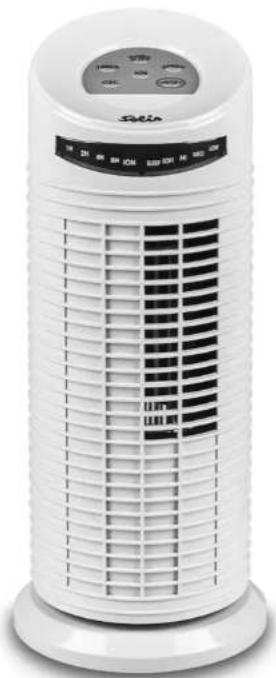
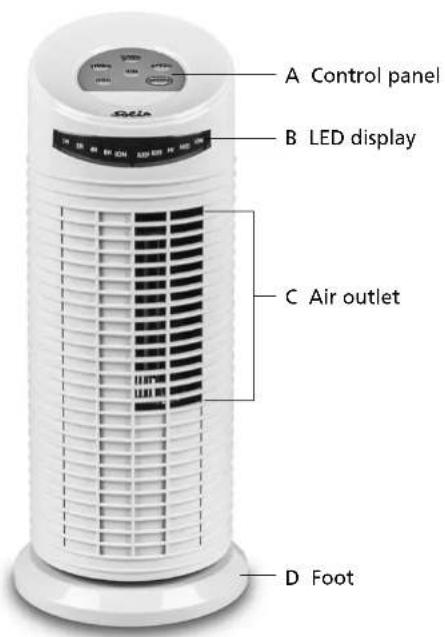
APPLIANCE DESCRIPTION
GB
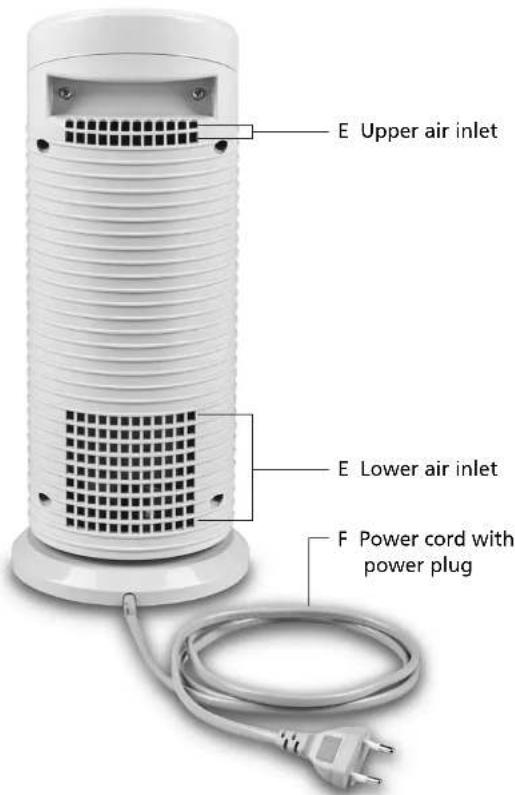
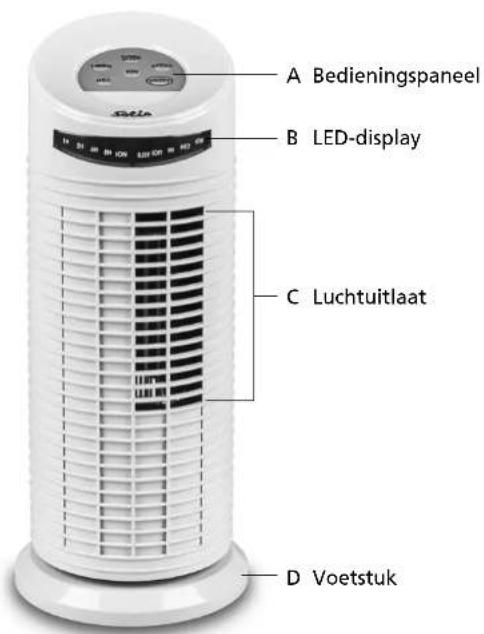
Appliance backAppliance front
THE FUNCTION BUTTONS ON YOUR APPLIANCE
GB
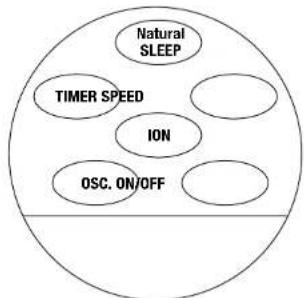
ON/OFF ON/OFF button
Use this button to switch your appliance on and off.
SPEED SPEED button
Use this button to adjust the ventilation speed. When you connect the power plug and switch the appliance on with the ON/OFF button, the appliance is set to the standard LOW speed. Press the SPEED button to change the speed to MED (medium). Press the speed button another time and the speed changes to Hi (high). If you press the speed button a third time, the speed changes back to LOW. The respective setting is indicated by a red LED light in the display.

Natural / SLEEP button (natural wind and sleep mode)
With this button, you can activate the functions "Natural Wind" and "Sleep mode". Press the button once to switch to "Natural Wind" mode, meaning the red LED light next to "SOFT" lights up. The wind is rising and subsiding. Press the button twice to switch to "Sleep mode", the wind is also rising and subsiding, but even softer. The red LED light next to "SLEEP" lights up.
Additionally, you can adjust the ventilation speed in this function with the SPEED button, so that the rising and subsiding wind is stronger or softer.

TIMER TIMER button
You can adjust the appliance operating time by pressing the TIMER button.
Settings of 1 hour (1H), 2 hours (2H), 4 hours (4H) and 8 hours (8H) are possible. Each press of the button increases the setting by one step, the current setting is indicated by the red LED light that illuminates next to the selected time. After the set amount of hours has elapsed, the appliance switches off automatically.
Press the TIMER button again to switch the timer function off. The LED next to the operating time does not light up. The appliance is in permanent operation mode, operating until you switch it off with the ON/OFF button.

ION button
You can additionally switch on the Ion function with the ION button. The blue LED light next to ION lights up. In the Ion function, the air is enriched with negative ions, increasing the air quality and well-being.
Pressing the ICON button again switches the Ion function off, the LED goes out.
OSC. OSC button (Oscillation)
You can adjust the oscillation function with this button. Press the button to make the ventilator slowly move from left to light. Press the button again to stop the oscillation.
BEFORE FIRST USE
- Carefully take the appliance out of the packaging and remove all stickers, labels (except for the type plate) and packaging materials.
- Make sure that the appliance is without damage, firmly assembled and ready for use. Should you have doubts, do not start using the appliance and contact your nearest authorised Solis service centre.
- Make sure that nobody plays with the packaging material, especially with the plastic bags - suffocation risk!
- Place the appliance on a dry, stable surface as described in the safety precautions.
- Connect the power plug to a suitable power outlet. Now, you can use the appliance as described further below.
STARTINGUP
In general:
Every set function is indicated by the corresponding LED light in the display.
SWITCHING THE APPLIANCE ON
- Press the ON/OFF button to switch the appliance on. The appliance begins working in the lowest ventilation speed, the red LED light next to LOW lights up.
- Now, adjust the desired functions with the function buttons. Use the TIMER button if you want the appliance to switch off after a certain operating time.
SWITCHING THE APPLIANCE OFF
- If you want to switch the appliance off, press the ON/OFF button and wait for the appliance to come to a full stop.
- Then, pull the power plug. The appliance should always be disconnected from the power when it is not in use.
CLEANING AND MAINTENANCE
Before cleaning, moving and storing the appliance, please always switch the fan off with the ON/OFF button and disconnect the power plug from the power socket.
- The outer parts of the fan should be cleaned once a month with a slightly moist towel. Take care to remove also the dust from the rear protection grids to ensure unimpeded air circulation.
- Never submerge the appliance in water or another liquid and do not spray any water or any other liquid into the appliance!
- Do not use any aggressive or chemical detergents resp. sharp or raw sponges and the like. They might damage the surface of the fan.
- Store the appliance in an upright position, best in the original packaging in a dry room. Do not place anything on the appliance.
TECHNICAL SPECIFICATIONS
Model no. FT14MI, Type 749
Product description Tower Fan
Voltage / Frequency 220-240 V/50 Hz
Output 35 Watt
Dimensions approx. 38 × 16 cm (H x Ø base)
Weight approx. 1,82kg
Technical changes reserved.
DISPOSAL

EU 2012/19/EU
Information for correct disposal of the product in accordance with the European Directive EU 2012/19/EU.
At the end of its working life this equipment must not be disposed of as an household waste. It must be taken to special local community waste collection centres or to a dealer providing this service. Disposing of electrical and electronic equipment separately avoids possible negative effects on the environment and human health deriving from an inappropriate disposal and enables its components to be recovered and recycled to obtain significant savings in energy and resources. In order to underline the duty to dispose of this equipment separately, the product is marked with a crossed-out dustbin.
Solis of Switzerland Ltd reserves the right to carry out technical and visual changes and modifications to improve the product at any time.
SOLIS HELPLINE
This item stands out due to its long-life cycle and reliability. Despite this though, if a malfunction ever occurs, simply give us a call. Often a breakdown can be easily and quickly remedied with the right tip or technique without having to straight away send off the device for repair. We will give you all the advice and practical support you require. The contact addresses can be found at the end of this manual.
Keep the original packaging in a safe place so that you may use it in the event that transportation or shipping of the product becomes necessary.
BELANGRIJKVEILIGHEIDSINFORMATIE
APPPARAATBESCHRIJVING
NL
APPARAAT INSCHAKELEN
Solis customer service
Please contact us in advance of sending in products for return or repair. We will gladly give you the respective address. Alternatively, you can simply visit www.solis.com.
Solis Klantendienst Helpline
Address for return shipment of
goods differs - please refer to
www.solis.com
+41-91-802 90 10
@ support.ch@solis.com
www.solis.com