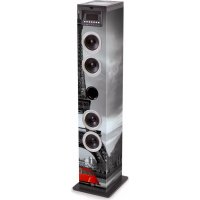
TW11 Laser - Speaker BIGBEN - Free user manual and instructions
Find the device manual for free TW11 Laser BIGBEN in PDF.


User questions about TW11 Laser BIGBEN
0 question about this device. Answer the ones you know or ask your own.
Ask a new question about this device
Download the instructions for your Speaker in PDF format for free! Find your manual TW11 Laser - BIGBEN and take your electronic device back in hand. On this page are published all the documents necessary for the use of your device. TW11 Laser by BIGBEN.
USER MANUAL TW11 Laser BIGBEN
OPERATING THIS UNIT AND RETAIN FOR
FUTURE REFERENCE
Contents
Setting Started 1
Safety and Notice
Care for your product 2
Care of the environment
What's in the box 3
Description of Parts
Remote control 4
Power
Operating the USB player
Connect the Bluetooth
Laser Light 5
Volume control
AUX input jack
Microphone
Headphone jack
WARNING! Risk of hearing impairment
Remarks
6
Setting Started
- Remove the appliance from the box.
- Remove any packaging from the product.
- Place the packaging inside the box and either or dispose of safely.
Safety and Notice
Read and understand all instructions before you use this product. If damage is caused by failure to follow the instructions, the warranty does not apply.
Safety
Warning
This product is classified as a CLASS 2 laser product, please avoid direct eye exposure within 950cm for the laser aperture.

- Never remove the casing of this apparatus.
- Never lubricate any part of this apparatus.
- Never place this apparatus on other electrical equipment.
- Keep this apparatus away from direct sunlight, naked Fames or heat.
-
Ensure that you always have easy access to the power cord, plug or adaptor to disconnect this apparatus from the power
-
Read these instructions.
- Keep these instructions.
- Heed all warnings.
- Follow all instructions.
- Do not use this apparatus near water.
- Clean only with dry cloth.
- Do not block any ventilation openings. Install in accordance with the manufacturer's instructions.
- Do not install near any heat sources such as radiators, heat registers, stoves, or other apparatus (including amplifiers) that produce heat.
- Protect the power cord from being walked on or pinched, particularly at plugs, convenience receptacles, and the Point where they exit from the apparatus.
- Only use attachments/accessories specified by the manufacturer.
- Use only with the cart, stand, tripod, bracket, or table specified by the manufacturer or sold with the apparatus. When a cart is used, use caution when moving the cart/apparatus combination to avoid injury from tip-over.
-
Unplug this apparatus during lightning storms or when unused for long periods of time.
-
Refer all servicing to qualified service personnel. Servicing is required when the apparatus has been damaged in anyway, such as power-supply cord or plug is damaged, liquid has been spilled or objects have fallen into the apparatus, apparatus has been exposed to rain or moisture, does not operate normally, or has been dropped.
- Apparatus shall not be exposed to dripping or splashing.
- Do not place any sources of danger on the apparatus (e.g. liquid filled objects, lighted candles).
- Where the MAINS plug or an appliance coupler is used as the disconnect device, the disconnect device shall remain readily operable.
- Make sure there is enough free space around the product for ventilation.
Care for your product
- Always unplug the appliance when not in use and before cleaning.
- Do not play music at excessive volume levels as damage to hearing and or the equipment may occur.
- Do not use this unit in wet or damp conditions.
- Always disconnect the unit from the mains power supply before cleaning. Clean the appliance with a soft, damp, lint free cloth. Do not use abrasives or harsh cleaners.
Care of the environment

Your product is designed and manufactured with high quality materials and components, which can be recycled and reused.
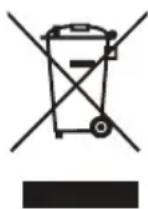
When this crossed-out wheeled bin symbol is attached to a product it means that the product is covered by the European Directive 2002/96/EC. Please inform yourself about the local separate collection system for electrical and electronic products. Please act according to your local rules and do not dispose of your old products with your normal household waste. Correct disposal of your old product helps to prevent potential negative consequences for the environment and human health.
If safety relevant, the following information should be included as far as applicable:
-
minimum distances around the apparatus for sufficient ventilation;
-
the ventilation should not be impeded by covering the ventilation openings with items, such as newspapers, table-cloths, curtains, etc.;
- no naked flame sources, such as lighted candles, should be placed on the apparatus;
- attention should be drawn to the environmental aspects of battery disposal;
-
the use of apparatus in tropical and/or moderate climates.
-
A warning that batteries (battery pack or batteries installed) shall not be exposed to excessive heat such as sunshine, fire or the like.
- For apparatus containing a user-replaceable coin/bution cell battery, the following text or equivalent:
WARNING
Do not ingest the battery, Chemical Burn Hazard
(The remote control supplied with) This product contains a coin/button cell battery. If the coin/button cell battery is swallowed, it can cause severe internal burns in just 2 hours and can lead to death.
Keep new and used batteries away from children.
If the battery compartment does not close securely, stop using the product and keep it away from children. If you think batteries might have been swallowed or placed inside any part of the body, seek immediate medical attention.
What's in the box
Check and identify the contents of your package:
- Main unit
- AC/DC adaptor
Remote Control - User manual
- Microphone x 2pcs
Description of Parts
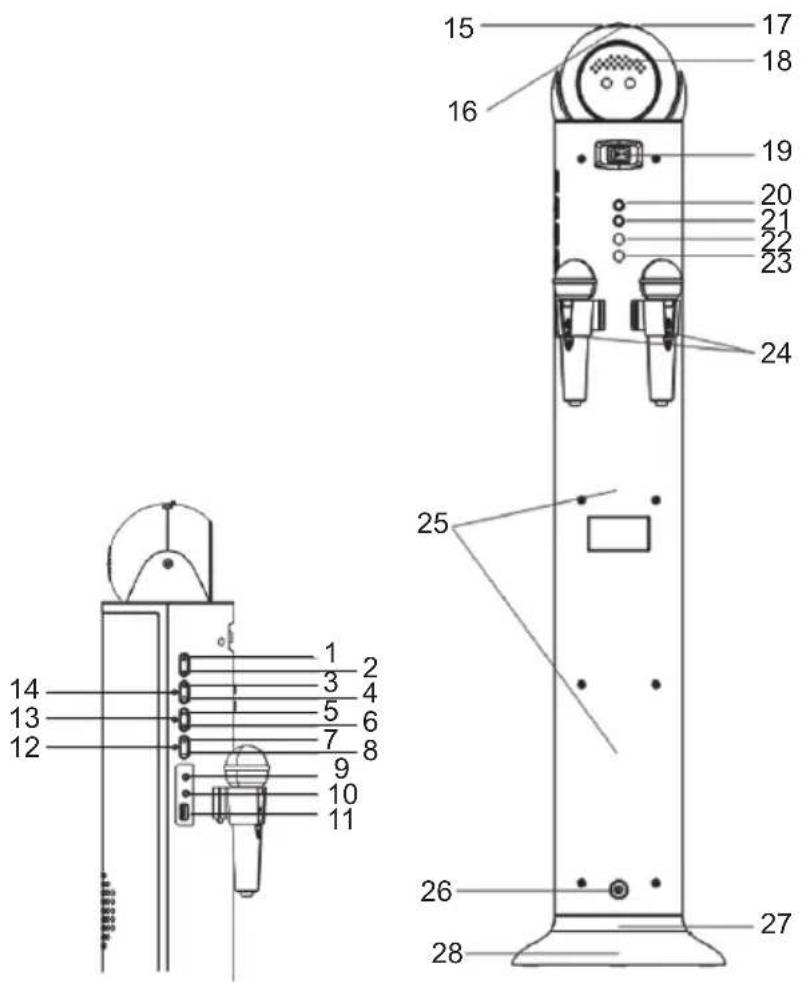
- POWER BUTTON
- MODE BUTTON
- PLAY/PAUSE BUTTON
- STOP BUTTON
-
|SKIP + BUTTON
- |<< SKIP-B BUTTON
- VOLUME + BUTTON
- VOLUME-BUTTON
- AUX IN JACK
- HEADPHONE JACK
- USB PORT
- BLUETOOTH LED INDICATOR (Blue)
- AUX LED INDICATOR (Green)
-
USB LED INDICATOR (Yellow)
-
SPEED
- SENSITIVITY TUNING BUTTON
- MODE BUTTON FOR LASER LIGHT
- VENTS
- ON/OFF SWITCH (LIGHT)
- MIC+ BUTTON
- MIC-B BUTTON
- MIC IN1 JACK
- MIC IN2 JACK
- ON/OFF SWITCH (MICROPHONE)
- SPEAKER
- DC JACK
- BASE DISCO LIGHT
- BASE
REMOTE CONTROL
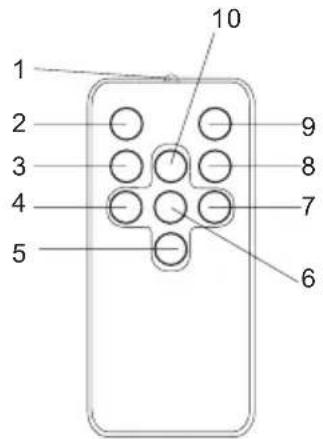
- TRANSMITTER
- POWER BUTTON
- STOP BUTTON
- SKIP-B BUTTON
- VOLUME-BUTTON
- PLAY/PAUSE BUTTON
- SKIP + BUTTON
- FUNCTION BUTTON
- MUTE BUTTON
- VOLUME + BUTTON
Power
- This unit is designed to operate on with a DC 7V adaptor.
- Insert the small plug of the adaptor into the DC Jack.
- Insert the AC/DC adaptor into any convenient having 230V AC , 50Hz household outlet that is either vertical or horizontal.
Auto standby
When no music play from a connected device, the product automatically switches to standby if: No audio from a connected device for 10 minutes.
Operating the USB player
- Press the POWER button then press the MODE button repeatedly until the USB yellow LED indicator is on.
- Connect the USB disk to the system's USB slot.
- The USB disk will play automatically
- Press the PLAY/PAUSE button again to stop playing temporarily. Resume normal play by pressing the PLAY/PAUSE button again.
- To stop playback, press the STOP button.
- To turn off the unit, press the POWER button again.
Connect the Bluetooth
- Press the POWER button and press the MODE button repeatedly until the Bluetooth blue LED indicator begins to flash.
- Turn on the Bluetooth feature on your mobile compatible device. Search for TW11 Laser. Pair and connect to TW11 Laser. The blue LED indicator will be steadily illuminated once the bluetooth is paired.
- You can now start playing your music by pressing the PLAY/PAUSE button.
- Press the PLAY/PAUSE button again to stop playing temporarily. Resume normal play by pressing the PLAY/PAUSE button again.
- Press the |<< or >>| button to choose the previous or next song.
- When you have finished listening, press the POWER button again.
Note: The maximum connection distance is around 10 meters. Please place your Bluetooth speaker as close as possible to this device to avoid the connection being disturbed.
Laser Light
Press the Laser Light switch to control the laser lights ON or OFF
- When no music input or Pause: LASER LIGHT and BASE DISCO LIGHT flash with different pattern.
- When input music: LASER LIGHT and BASE DISCO LIGHT flash with variation of the music loudness.
- You can adjust the laser light speed by the tuning button.
Volume control
Adjust the volume by pressing the "VOLUME +" or "VOLUME - " button
AUX input jack
- Press the POWER button then press the MODE button repeatedly until the AUX green LED is on.
- Connect the AUX connecting wire from the output jack of your personal player, such as a portable MP3 player, to the AUX input jack.
- Play the music from your personal player and adjust the volume
- To turn off the unit, press the POWER button again.
Microphone
You may connect the microphone during Bluetooth, USB or AUX mode to use the Karaoke function.
- Connect the microphone to the MIC socket (MIC IN1 or MIC IN2) on the back
- Slide the On/off switch on the microphone to on position.
- Press the Mic+ or Mic- button to adjust the volume of Microphone.
Note:
- You shall play the music first then can use the Karaoke function.
- In order to avoid acoustic feedback (sharp whistling sound), use the microphone outside the speaker radiation zone.
Headphone jack
A 3.5mm stereo headphones socket is provided. When you connect to the headphone socket, please turn the volume down to its minimum to avoid damaging your ears or the headphones before connecting. After connecting the headphones to the headphone jack, the speakers will be automatically disconnected.
Warning: Prolonged exposure to high sound levels may permanently damage your hearing. You may not hear some warning sounds while wearing these headphones.
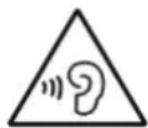
WARNING! Risk of hearing impairment
- Set a low volume on the playback device before connecting the headphones to the sound source.
- Avoid excessive volume, particularly over extended periods or frequent use. Excessive volume can result in permanent hearing impairment.
Specification:
Model: PSED070250V W
Input: 100-240V~50/60Hz 0.6A
Output: 7V 2.5A
Remarks:
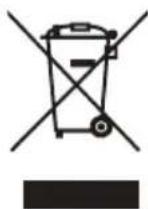
Don't discard the electrical and electronic appliances in the regular waste disposal.
- Take them to a collection point.
-
Some components in these appliances may be hazardous to health and the environment.
-
In order to save energy when the unit has no sound output for a while, the unit will be switched to stand-by automatically. It can be switched ON by pressing the POWER button again.
- If there is an incoming call while the Tower is connected to your cell phone for music playback, it will pause at once and resume after end the call. (Sometimes it will pause after end the call, it depend on your cell phone.)
- The Bluetooth® word, mark and logo are registered trademarks owned by Bluetooth SIG, Inc. and any use of such marks by Bigben Interactive is under license. Other trademarks and trade names are those of their respective owners.
- You can find the information on the plate located at the back of the unit.
The undersigned, Bigben Interactive declares that the radio equipment of the TW11 Laser type complies with the 2014/53/EU directive.
The complete text is available at www/bigben.fr/support
Manufactured by BIGBEN INTERACTIVE SA
396, Rue de la Voyette
CRT2-FRETIN
CS 90414
59814 LESQUIN Cedex - France
www/bigben.eu
Made in China








Fabricant: Bigben Interactive FRANCE 396, Rue de la Voyette, C.R.T. 2 Fretin, CS 90414-59814 LESQUIN Cedex, France