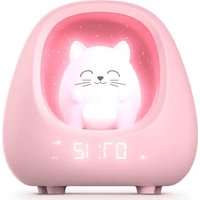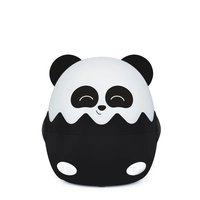
NLPKIDSPANDA - Night lamp BIGBEN - Free user manual and instructions
Find the device manual for free NLPKIDSPANDA BIGBEN in PDF.


User questions about NLPKIDSPANDA BIGBEN
0 question about this device. Answer the ones you know or ask your own.
Ask a new question about this device
Download the instructions for your Night lamp in PDF format for free! Find your manual NLPKIDSPANDA - BIGBEN and take your electronic device back in hand. On this page are published all the documents necessary for the use of your device. NLPKIDSPANDA by BIGBEN.
USER MANUAL NLPKIDSPANDA BIGBEN
NLPKIDSCAT / NLPKIDSPANDA /
NLPKIDSDOG / NLPKIDSKOALA
natural_image
Four identical cartoon cat-shaped devices with different expressions and colors, arranged side by side (no text or symbols visible)MODE D'EMPLOI
AVANT D'UTILISER CET APPAREIL, VEUILLEZ LIRE ATTENTIVEMENT CE MODE D'EMPLOI ET LE CONSERVER AFIN DE POUVOIR LE CONSULTER ULTÉRIEUREMENT.
natural_image
Three-step line drawing of a cute, cartoon cat-shaped object with closed eyes and curled ears, shown in different angles (no text or symbols)text_image
Diagram of a cat's head with five labeled buttons and icons for lighting or adjustment, likely illustrating a camera or display system.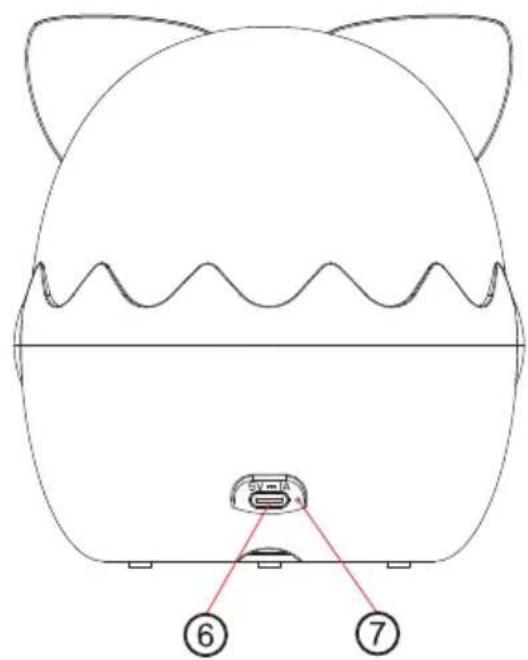
text_image
⑥ ⑦Commandes
flowchart
graph TD
    A["Initial cylindrical component"] --> B["Assembly of cylindrical parts"]
    B --> C{Transformation: Curve is closed, indicated by arrow}
    C --> D["Final mechanical part with shaded sections"]
Télécommande
natural_image
Blue circular icon with white human and child silhouettes, no text or symbols presentBELGIQUE, customerservice@bigben-interactive.be
NEDERLAND, customerservice@bigben-interactive.nl
ESPAÑA, soporte@metronic.com
Tel.: 93 713 26 25
Night light with projector
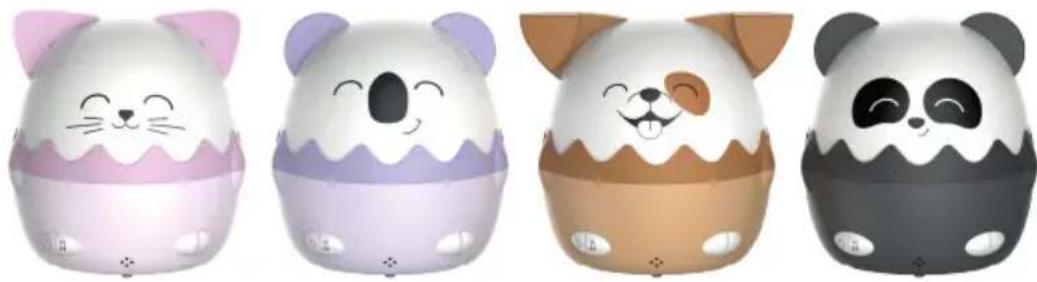
natural_image
Four identical cartoon cat-shaped objects with different expressions and colors, arranged side by side (no text or symbols visible)USER GUIDE
PLEASE READ THIS USER MANUAL CAREFULLY BEFORE OPERATING THE UNIT AND RETAIN FOR FUTURE REFERENCE.
| Getting started 12 | Remote control | 17 | |
| Safety warning and notice 12 | Warning about batteries | 18 | |
| Contents of the box 14 | Technical specifications | 19 | |
| Description of parts 14 | Environmental protection | 19 | |
| Controls | 15 | Additional information | 19 |
| Control functions. 15 | Declaration of conformity | 20 | |
| Projection set-up 16 |
Getting started
• Take the device out of the box.
- Remove all the packaging from the product.
- Place the packaging inside the box or dispose of it safely in compliance with the waste sorting instructions shown on the outside.
Safety warning and notice
You must read and understand all the instructions before using this device. The warranty will not apply if damage is caused by failure to follow the instructions.

- Never remove the device casing.
- Never place this device on top of other electrical equipment.
- Protect the power cable from being stepped on or pinched, particularly at the plugs, sockets, and the point where it exits the device. Make sure that the power rating corresponds to the voltage shown on the rating plate at the rear of the device. Always pull the plug from the socket when disconnecting from the mains. Never pull on the cable. Ensure you have completed all the other connections before connecting the mains plug.
- Only use attachments/accessories that are recommended by the manufacturer.
-
Entrust all device repairs to qualified repairers. Repair is needed when the s been damaged in any fashion, and in particular:
-
if the power cable is damaged;
- in the event of a liquid spill or objects being inserted into the device;
- if the device is exposed to rain or dampness;
- if the device does not operate normally;
-
or if the device has been dropped or impacted.
-
The series panel is located on the back of the device.
-
Never block the air vents.
-
Make sure you have enough space for ventilation. Place the product on a stable surface.
-
This device must be used in a moderate climate, away from direct sunlight, naked flames or sources of heat, heaters, cookers or any other devices (including amplifiers) that generate heat. Do not install near a heat source.
-
The batteries (battery pack or inserted batteries) must not be exposed to excessive heat, such as sunshine, fire, etc.
-
Always unplug the device before cleaning it. Never lubricate any part of this device. Clean it using a soft cloth. Do not use abrasive products or harsh cleaners.
-
Ensure that you always have easy access to the power cable, plug or adapter to disconnect this device from the mains if necessary.
-
Do not use this device near water. It must not be dripped on or splashed. Do not use this device in a damp or wet environment.
-
Disconnect this device in the event of a storm, or if you intend not to use it for a long period of time.
-
This device can be used by children aged 8 and over, and by persons with a physical or sensory disability, learning difficulties or a lack of experience and knowledge, provided they are supervised or have received instructions on the safe use of the device, and they understand the risks involved. Children must not play with the device or the power cable (risk of strangulation). Children must not clean or maintain the device without supervision.
-
This device must only be supplied with very low safety voltage as indicated on the device.
-
The battery should be removed from the device before disposal. The device must be disconnected from the power supply when removing the battery.
-
The product must be at a minimal distance of 20 cm from the human body when working.
-
Risk of suffocation: Small parts are not intended for children under 3 years old or for people with a tendency to put inedible objects in their mouths.
-
This toy should only be connected to equipment bearing one of the following symbols:

- This device is for household use only; do not use outdoors.
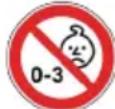
- This is not a toy. WARNING! Not suitable for children under 36 months. Risk of choking due to small components that could be swallowed.
Warning: If on play and charging mode at the same time, the light will automatically turn off after working for 10 hours to protect the motor.
text_image
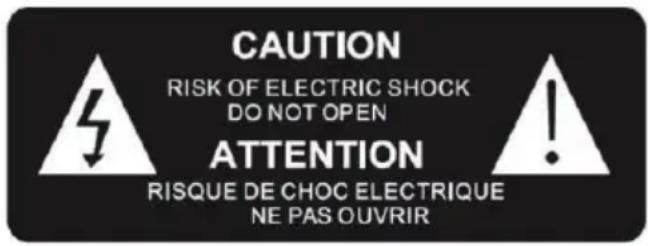
CAUTION RISK OF ELECTRIC SHOCK DO NOT OPEN ATTENTION RISQUE DE CHOC ELECTRIQUE NE PAS OUVRIR
The exclamation mark inside a triangle indicates the presence of important operating and maintenance (repair) instructions in the literature accompanying the device.
| Class III material |  |
| Direct current | 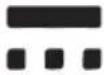 |
| Alternating current |  |
| For indoor use only |  |
The light source of this luminaire is not replaceable; when the light source reaches its end of light the whole luminaire shall be replaced.
Contents of the box
Check and identify the contents of your box:
• Night life with projector x 1
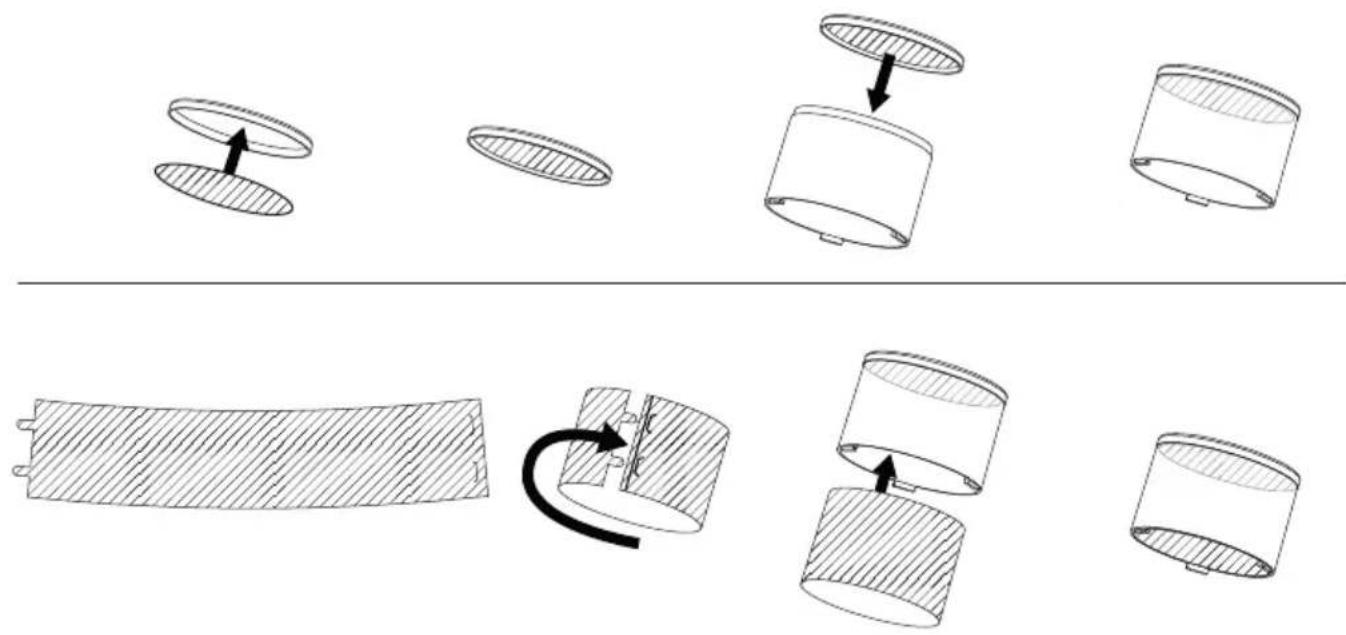
- Projection films: Upper circles x 13 / Rectangular strips x 13
- Remote control x 1
- USB-C to USB-A charging cable x 1
- User guide x 1
Description of parts
Detachable head
natural_image
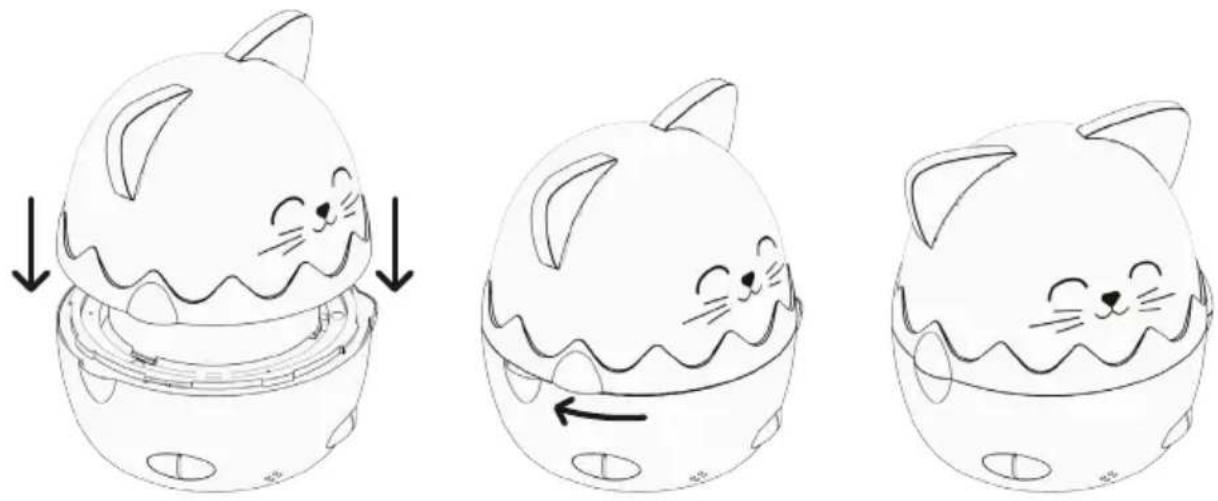
Three-step line drawing of a cute, cartoon cat-shaped object with closed eyes and curled ears, shown in different angles (no text or symbols)Position the head as shown in the diagram. The face should be next to the buttons and slightly offset to the right.
Once positioned, turn the head clockwise to lock it into the correct position and to align the arms. There's also a marking at the rear to indicate the locked position.
To remove the head, follow the same instructions but in reverse order.
text_image
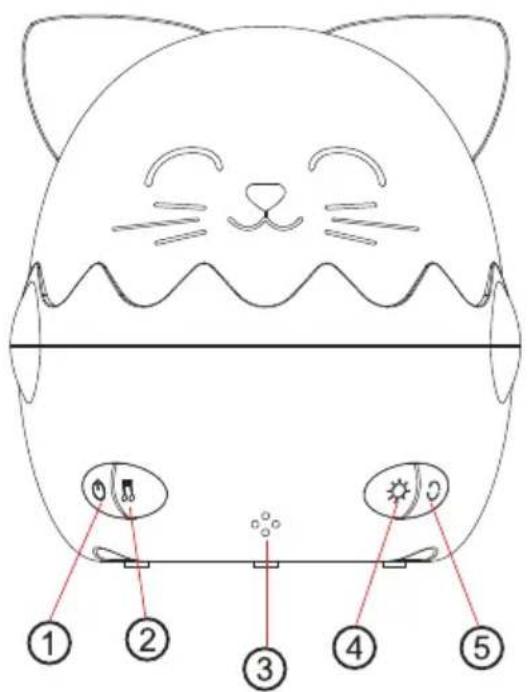
Diagram of a cat's head with five labeled parts: eyes, mouth, sun, and feet, marked with numbered labels 1 to 5.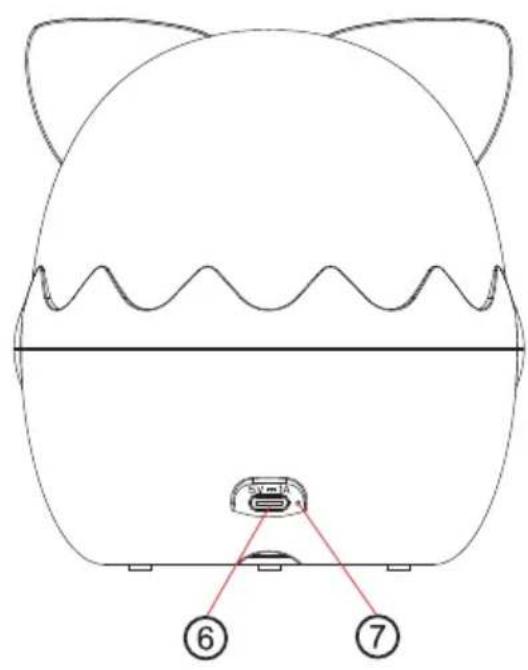
text_image
Diagram of a cat-shaped device with labeled parts, showing front view and internal component with numbered annotations.Controls
- Main switch
- Music button
- Infrared sensor
- LED mode button
- Motor rotation button
- Charging port
- LED indicator
Control functions.
- Main switch:
Press and hold to switch the night light on and off.
Briefly press to switch between the 8 different volume levels.
By default, when you switch the device on for the first time, the music is set to the lowest volume, switching between light modes and with the projection motor running. You'll hear a sound signal when you reach the highest or lowest volume level.
- Music button:
Briefly press to change track. Press and hold to pause.
- Infrared sensor on the remote control:
when using the remote control, point it towards the infrared sensor.
- LED mode button
Briefly press to switch between the different lighting modes.
→ All lights → Slow breathing between each colour → Cool white only → Warm white only → Blue only → Lights off.
Press and hold to switch between the 7 different brightness levels.
- Motor rotation button:
Briefly press to start rotating.
Press and hold to start the timer (15-minute interval). A beep confirms that the timer has been successfully set.
-
Charging port.
-
LED indicator:
The red LED light comes on during charging. The blue LED light comes on when the charge is complete.
During playback, the red LED light will come on if the battery level is below 15%.
Projection set-up
text_image
Diagram illustrating a mechanical assembly process with labeled components and directional arrows indicating motion or transformation.Remote control
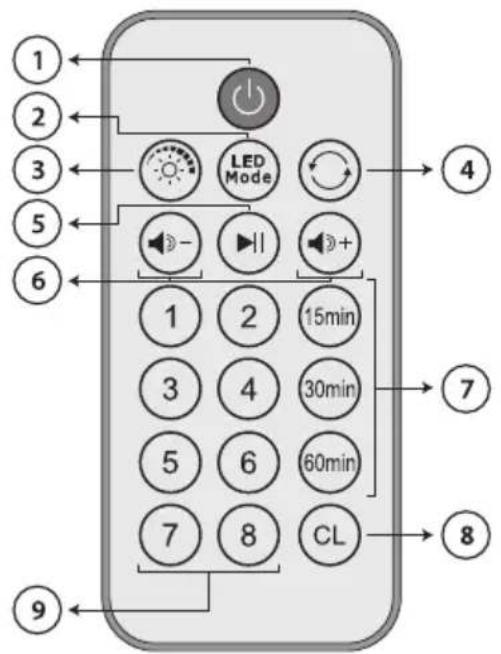
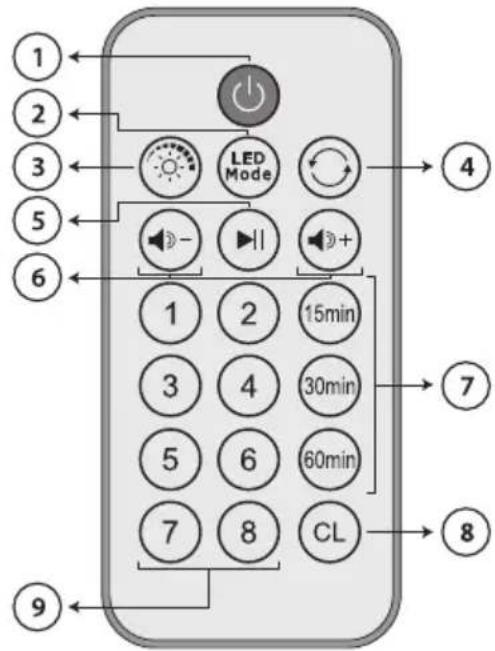
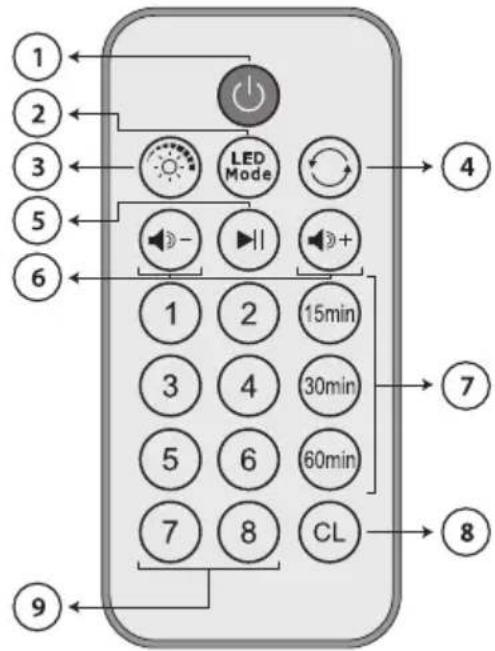
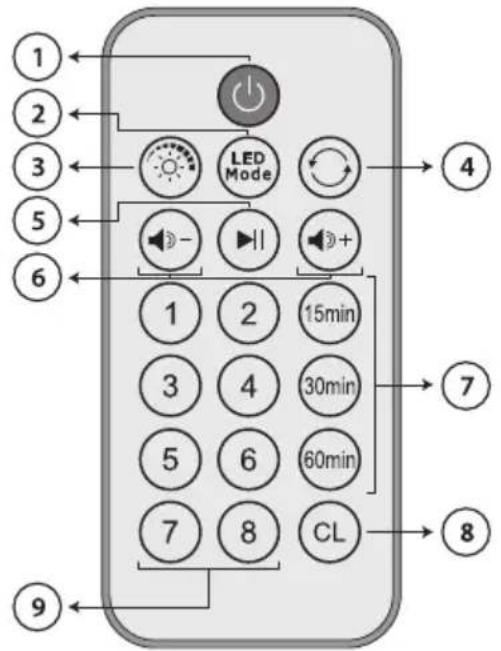
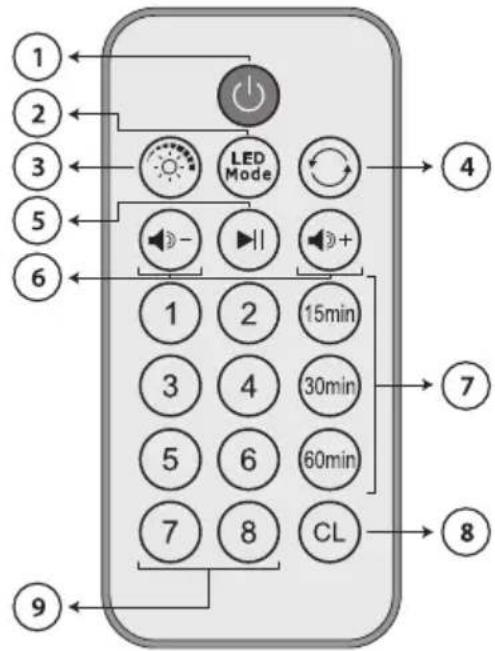
Remote control functions
1. ON/OFF switch:
This button will only work once you've switched on the main device.
Press this button to switch on the night light or to put it into standby.
2. LED mode button:
Switch the colour mode.
3. LED dimmer button:
Press this button to switch between the 7 different light brightness levels.
4. Motor ON/OFF button:
Press to start or stop the motor.
5. Play/Pause button:
Play or pause a song.
6. Vol +/Vol - button :
Turn the volume up or down.
7. Timer button:
Stop after 15 minutes/30 minutes/60 minutes
8. Cancel button:
Cancel the timer.
9. Buttons numbered 1 to 8:
Direct song selection.
This product contains one or more batteries.
- Use batteries correctly to prevent any injury or fire caused by a leak, overheating, explosion, erosion or other damage.
- Keep new and used batteries out of the reach of children or any vulnerable person. Stop using the device if the battery compartment does not close properly.
- If the liquid from an alkaline battery comes into contact with skin or eyes, rinse immediately with fresh water and consult a physician.
- If an alkaline battery leaks, clean the liquid with a cloth and replace the battery with a new one.
- Do not swallow batteries. If swallowed, a battery can cause severe internal burns in 2 hours and can cause death. If batteries are swallowed, contact a poison centre immediately and consult a physician.
- Use AA Ni-MH, alkaline or lithium batteries.
- Do not charge these batteries. Charging non-rechargeable batteries generates gas or heat emissions that can cause explosions or fires.
- Do not use different types of batteries or a mixture of new and old batteries.
- Insert the batteries according to the correct polarity (+ and -).
- Do not allow the same battery poles to be in contact.
- Remove spent batteries quickly. There is a risk of the battery exploding if it is not replaced or if the device is unused for a long period of time.
- Replace the battery with an identical or equivalent model.
- The batteries (or battery pack) must not be exposed to excessive heat, such as sunlight, fire, etc.
- Do not heat batteries or dispose of them in a fire or in water.
- Do not use metal pliers or metal objects such as the point of a pen or tweezers to remove batteries. Avoid deforming, crushing or piercing batteries.
- Do not disassemble the batteries.
- Cover the ends of the batteries with tape to prevent explosions and combustion when these are scrapped.
- Scrap batteries in an environmentally friendly way
- Do not dispose of batteries in ordinary household waste.
- When disposing of batteries, be sure to follow local disposal regulations.

BATTERY WARNING
KEEP OUT OF REACH OF CHILDREN
Swallowing can lead to chemical burns, perforation of soft tissue, and death. Severe burns can occur within 2 hours of ingestion. Seek medical attention immediately.
natural_image
Blue circular icon with white pictogram of a person handing over a box to a child (no text or symbols)Technical specifications
| Type Technical specifications | |
| Models | NLPKIDSCAT, NLPKIDSDOG, NLPKIDSKOALA, NLPKIDSPANDA |
| Material ABS + PP + PS + PET | |
| LED 3 × SMD 3030 | |
| LED colours Cool white + Warm white + Blue | |
| Power supply 5 V, 1 A | |
| Battery 3.7 V / 1,200 mAh Lithium-ion | |
| Charging time Approx. 3 hours | |
| Battery life 2 to 4 hours | |
| Size | NLPKIDSCAT: 123.3 × 120 × 133.3 mmNLPKIDSDOG: 141.3 × 120 × 131.9 mmNLPKIDSKOALA: 123.3 × 120 × 132.5 mmNLPKIDSPANDA: 123.3 × 120 × 132.5 mm |
The device may turn off in an environment with electrostatic discharge. The user must then recharge the battery and reset the device.
Environmental protection

Your product has been designed and manufactured using high-quality materials and components that can be recycled and reused. Attention should be drawn to the environmental aspects of battery disposal.
When the crossed-out wheelie bin symbol appears on a product, it means that the product is covered by European Directive 2002/96/EC. Please find out about the local sorting and collection system for electrical and electronic products. Please act according to local rules and do not dispose of your old products in your household waste. By ensuring this product is disposed of correctly, you are helping to prevent potentially negative consequences for the environment and human health.
Additional information
- This product is manufactured and sold under the responsibility of Bigben Interactive.
- All other products, services, corporate names, trademarks, trade names, product names and logos referenced herein are the property of their respective owners.
Declaration of conformity
- Bigben Interactive hereby declares that the night light with projector (NLPKIDSCAT/NLPKIDSDOG /NLPKIDSKOALA/ NLPKIDSPANDA) conforms with Directive 2014/53/EU. The full text of the EU declaration of conformity is available at the following internet address: https://www.bigben-interactive.co.uk/support/
Warranty
This product is guaranteed by Bigben for a period of 2 years from the date of purchase, except in countries of the European Economic Area, which offer a longer warranty period. We recommend that you keep your receipt for any claims. The warranty covers breakdowns due to defective material, a missing element or manufacturing defect. In this case, contact our technical support. For any problem with a defective product, contact your point of purchase with your receipt. The warranty does not cover problems of improper use.
Support
www.bigben-interactive.co.uk/support
support@bigben.fr
Made in China
Manufactured by BIGBEN INTERACTIVE SA
396, Rue de la Voyette
CRT2 - FRETIN
CS 90414
59814 LESQUIN Cedex - France
www.bigben.eu
flowchart
graph LR
    A["EN"] --> B["This product can be recycled"]
    B --> C["TO DROP OFF IN STORE"]
    C --> D["or"]
    D --> E["TO DROP OFF IN A RECYCLING CENTER"]



Fabricant : Bigben Interactive FRANCE
396, Rue de la Voyette, C.R.T. 2, Fretin, CS90414 - 59814 Lesquin Cedex, France
BELGIQUE, customerservice@bigben-interactive.be
NEDERLAND, customerservice@bigben-interactive.nl
ESPAÑA, soporte@metronic.com
Tel.: 93 713 26 25
natural_image
Four identical cartoon cat-shaped devices with different expressions and colors, arranged side by side (no text or symbols visible)natural_image
Line drawing of a cute cartoon cat character with closed eyes and waving mouth, partially enclosed in a container (no text or symbols)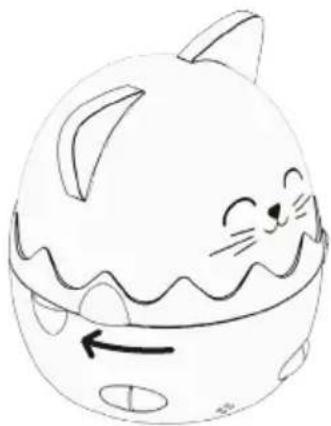
natural_image
Simple line drawing of a cute cartoon cat character with closed eyes and a wavy mouth (no text or symbols)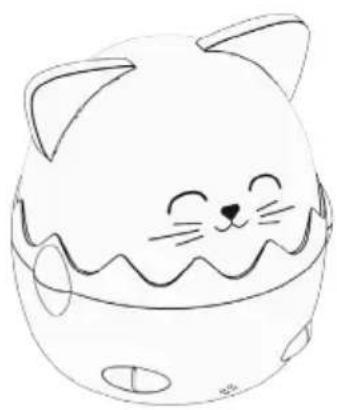
natural_image
Simple line drawing of a cute cartoon cat face with closed eyes and fluffy ears (no text or symbols)text_image
Diagram of a cat's head with five labeled parts pointing to camera and display elements, likely for educational or technical purposes.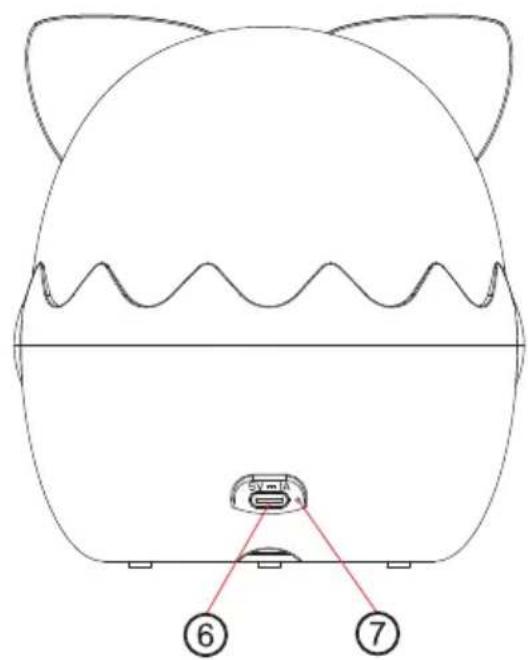
text_image
⑥ ⑦Controles
text_image
Diagram illustrating a mechanical assembly process with labeled components and directional arrows indicating motion or transformation.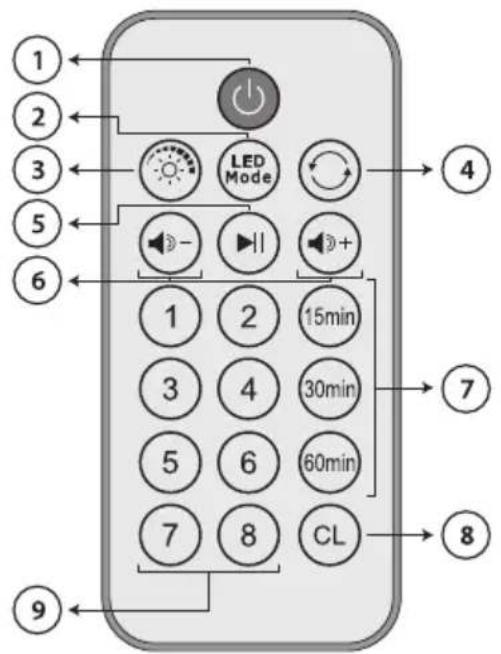
natural_image
Blue circular icon with white pictogram showing a person handing a box to a child (no text or symbols)BELGIQUE, customerservice@bigben-interactive.be
NEDERLAND, customerservice@bigben-interactive.nl
ESPANA, soporte@metronic.com
Tel.: 93 713 26 25
natural_image
Four identical cartoon cat-shaped devices with different expressions and colors, arranged side by side (no text or symbols visible)ISTRUZIONI PER L'USO
LEGGERE IL PRESENTE MANUALE CON ATTENZIONE PRIMA DI METTERE IN FUNZIONE IL DISPOSITIVO E CONSERVARLO PER UNA CONSULTAZIONE FUTURA.
natural_image
Three-step line drawing of a cute, cartoon cat-shaped object with wavy edges and small ears, shown in different angles (no text or symbols)text_image
Diagram of a cute cat face with five labeled parts, likely for educational or technical purposes.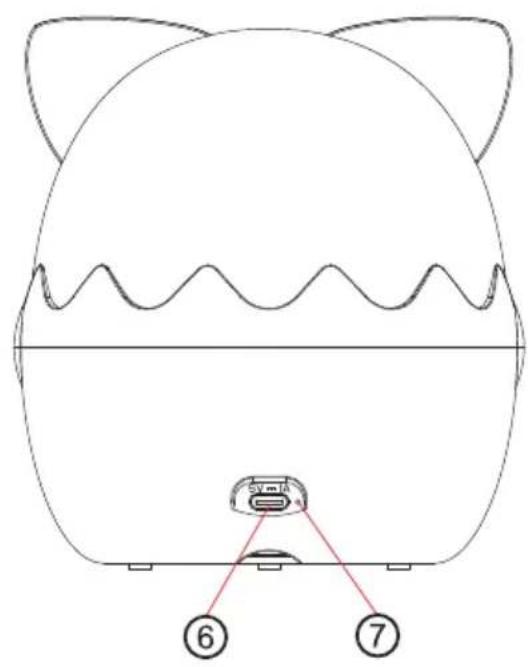
text_image
Diagram of a cat-shaped device with labeled parts, showing front view and internal componentComandi
natural_image
Diagram showing four stages of a cylindrical container with shading and an arrow indicating motion (no text or symbols)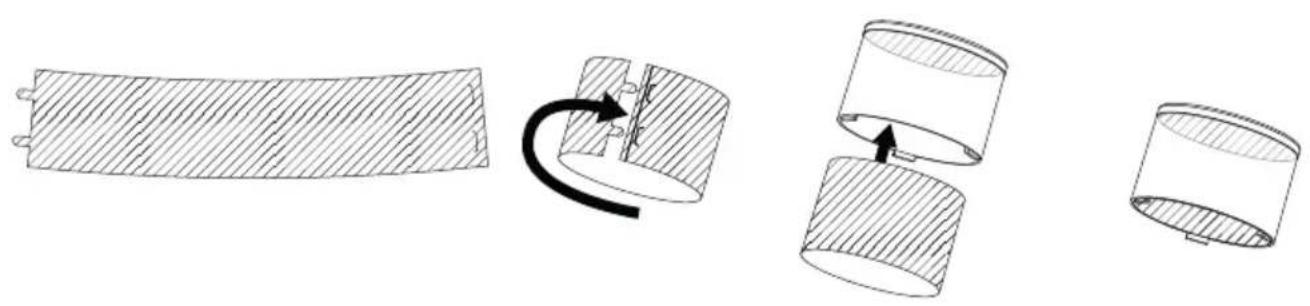
natural_image
Diagram showing a mechanical assembly with three stages: solid, curved section, and two cylindrical components (no text or symbols)Telecomando
TENERE FUORI DALLA PORTATA DEI BAMBINI
natural_image
Blue circular icon with white human and child silhouettes, no text or symbols presentSpecifiche tecniche
| Tipo Specifiche tecniche | |
| Modelli | NLPKIDSCAT, NLPKIDSDOG, NLPKIDSKOALA, NLPKIDSPANDA |
| Materiale ABS + PP + PS + PET | |
| LED 3 SMD 3030 | |
| Colori LED Bianco freddo + Bianco caldo + Blu | |
| Alimentazione elettrica | 5 V , 1 A |
| Batteria 3,7 V / 1200 mAh ioni di litio | |
| Tempo di caricamento | Circa 3 ore |
| Durata autonomia | 2-4 ore |
| Dimensioni | NLPKIDSCAT 123,3 × 120 × 133,3 mmNLPKIDSDOG: 141,3 × 120 × 131,9 mmNLPKIDSKOALA: 123,3 × 120 × 132,5 mmNLPKIDSPANDA: 123,3 × 120 × 132,5 mm |
BELGIQUE, customerservice@bigben-interactive.be
NEDERLAND, customerservice@bigben-interactive.nl
ESPAÑA, soporte@metronic.com
Tel.: 93 713 26 25
natural_image
Four identical cartoon cat-shaped devices with different expressions and colors, arranged side by side (no text or symbols visible)natural_image
Line drawing of a cute cartoon cat character with closed eyes and waving mouth, partially enclosed in a container (no text or symbols)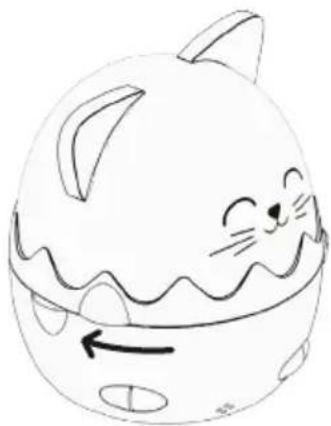
natural_image
Simple line drawing of a cute cartoon cat character with closed eyes and a wavy mouth, no text or symbols present.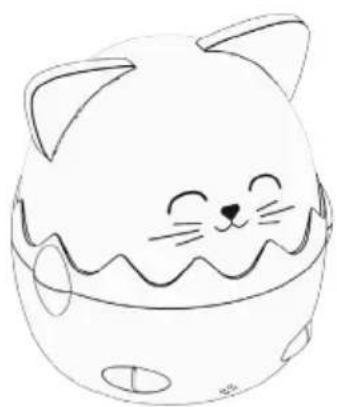
natural_image
Simple line drawing of a cute cartoon cat face with closed eyes and wavy mouth (no text or symbols)text_image
Diagram of a cat's head with five labeled parts pointing to camera buttons and display indicators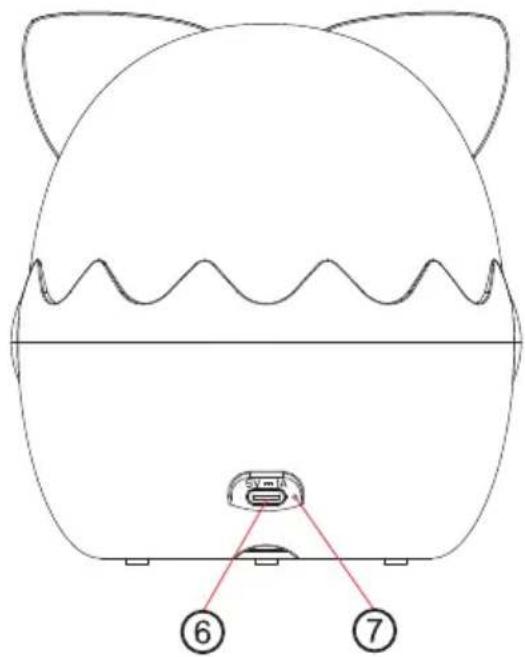
text_image
Diagram of a cat-shaped object with labeled parts, showing a base and two numbered points (6 and 7) pointing to a device.Comandos
text_image
Diagram illustrating a mechanical assembly process with labeled components and directional arrows indicating motion or transformation.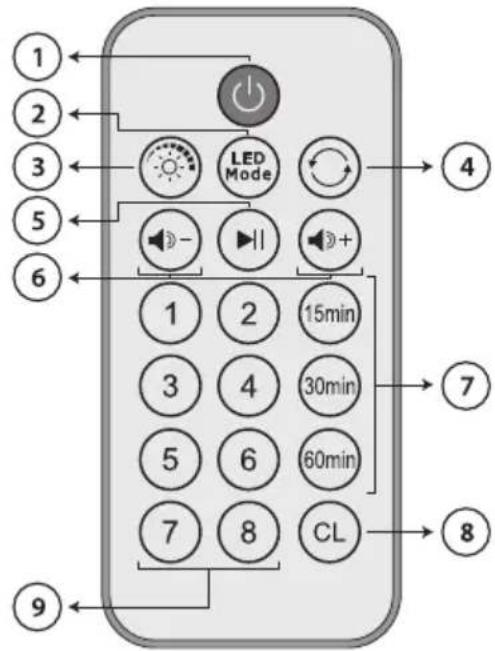
natural_image
Blue circular icon with white pictogram showing a person handing a box to a child (no text or symbols)BELGIQUE, customerservice@bigben-interactive.be
NEDERLAND, customerservice@bigben-interactive.nl
ESPAÑA, soporte@metronic.com
Tel.: 93 713 26 25
natural_image
Four identical cartoon cat-shaped devices with different expressions and colors, arranged side by side (no text or symbols visible)BEDIENUNGSANLEITUNG
natural_image
Line drawing of a cute cartoon cat character inside a container with arrows indicating movement or change (no text or symbols)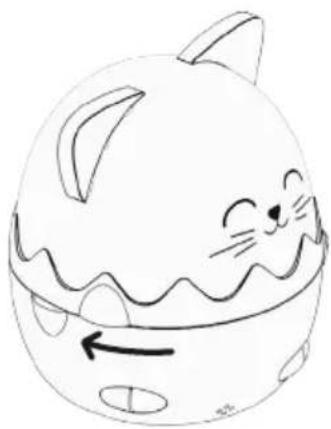
natural_image
Simple line drawing of a cute cartoon cat face with a wavy mouth and circular ears, no text or symbols present.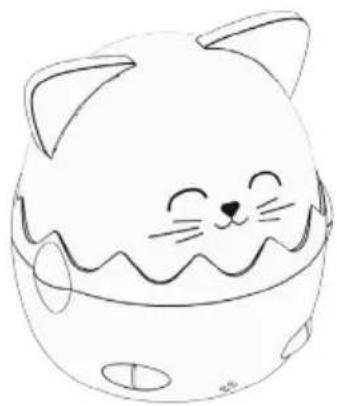
natural_image
Simple line drawing of a cute cartoon cat face with closed eyes and wavy mouth (no text or symbols)text_image
Diagram of a cat's head with five labeled parts pointing to camera and display elements, likely for educational or technical purposes.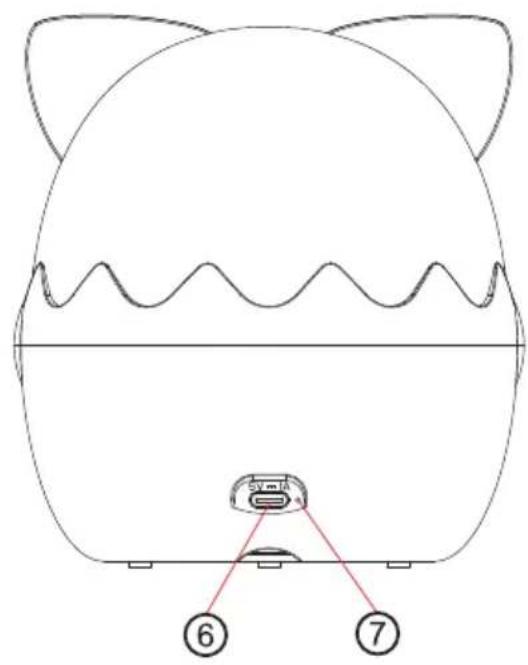
text_image
Diagram of a cat-shaped object with labeled parts, showing front and side views with numbered annotations.Bedienelemente
flowchart
graph TD
    A["Initial cylindrical component"] --> B["Assembly of cylindrical parts"]
    B --> C{Transformation: Curve is closed, indicated by arrow}
    C --> D["Final mechanical part with shaded sections"]
Fernbedienung
natural_image
Blue circular icon with white human and child silhouettes, no text or symbols presentBELGIQUE, customerservice@bigben-interactive.be
NEDERLAND, customerservice@bigben-interactive.nl
ESPAÑA, soporte@metronic.com
Tel.: 93 713 26 25
natural_image
Four identical cartoon cat-shaped devices with different expressions and colors, arranged side by side (no text or symbols visible)GEBRUIKSAANWIJZING
ALVORENS DIT APPARAAT TE GEBRUIKEN, LEES DEZE INSTRUCTIES AANDACHTIG DOOR EN BEWAAR DEZE VOOR TOEKOMSTIGE RAADPLEGING.
natural_image
Three-step line drawing of a cute, cartoon cat-shaped object with closed eyes and curled ears, shown in different angles (no text or symbols)text_image
Diagram of a cat's head with five labeled parts, likely for educational or technical purposes.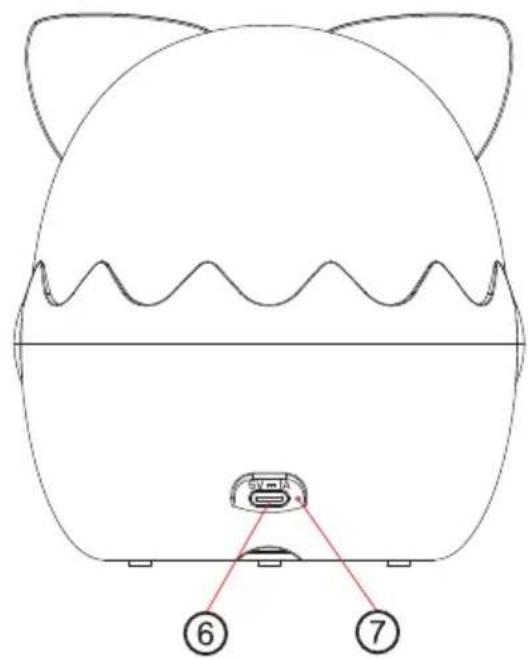
text_image
Diagram of a cat-shaped device with labeled ports and internal components, marked with numbers 6 and 7.Bedieningsknoppen
text_image
Diagram illustrating a mechanical assembly process with labeled components and directional arrows indicating motion or transformation.Afstandsbediening
natural_image
Blue circular icon with white pictogram of a person handing a box to a child (no text or symbols)Technische specificaties
BELGIQUE, customerservice@bigben-interactive.be
NEDERLAND, customerservice@bigben-interactive.nl
ESPAÑA, soporte@metronic.com
Tel.: 93 713 26 25
natural_image
Four identical cartoon cat-shaped devices with different expressions and colors, arranged side by side (no text or symbols visible)INSTRUKCJA OBSŁUGI
natural_image
Three-step line drawing of a cute, cartoon cat-shaped object with closed eyes and curled ears, shown in different angles (no text or symbols)text_image
Diagram of a cat's head with five labeled parts pointing to camera and display elements, likely for educational or technical purposes.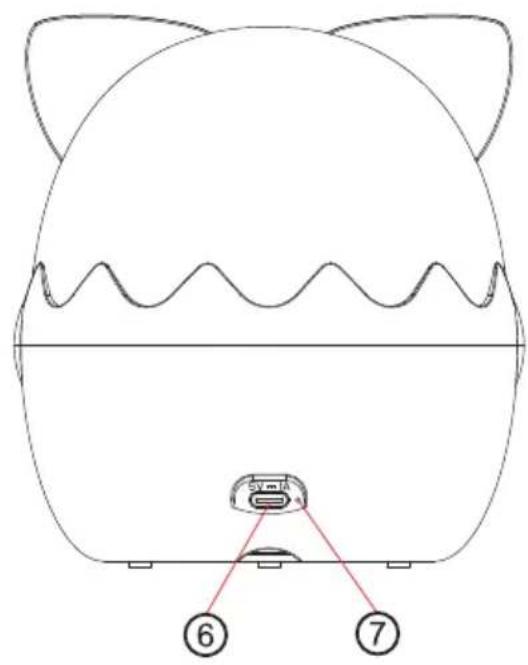
text_image
Diagram of a cat-shaped object with labeled parts, showing front and side views with numbered annotations.Elementy sterujące
natural_image
Blue circular icon with white pictograms of a person and child interacting (no text or symbols)BELGIQUE, customerservice@bigben-interactive.be
NEDERLAND, customerservice@bigben-interactive.nl
ESPAÑA, soporte@metronic.com
Tel.: 93 713 26 25