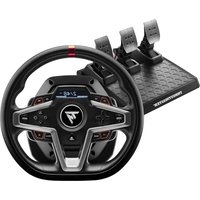
THRUSTMASTER T248 - Controller

T248 - Controller THRUSTMASTER - Free user manual and instructions

Find the device manual for free T248 THRUSTMASTER in PDF.

English EN Download 💬 AI Question 10 questions ⚙️ Specs
📄

Document temporarily unavailable

The manual is currently being transferred to our new server. It will be accessible again in a few hours. Thank you for your patience.

Pick your language and provide your email: we'll send you a specifically translated version.
Product Type Force Feedback Racing Wheel
Brand Thrustmaster
Model T248
Compatibility PlayStation 5, PlayStation 4, PC
Connectivity USB-C (wheel), USB-A (console/PC), RJ12 (pedal set), mini-DIN (accessories)
Power Supply Power adapter 18.5V, 2.6A, 47.9W
Rotation Angle 270° to 900° (automatic or adjustable via MODE menu)
Force Feedback Yes, with 3 FFB profiles (linear, boosted)
Built-in Screen Yes, T-RDD (Thrustmaster Race Dash Display) for telemetry
Encoders 4 rotary encoders (E1-E4) with push function
Paddle Shifters 2 magnetic paddles (up/down)
Included Pedal Set Yes, T3PM with 3 adjustable pedals
Pedal Adjustments Height, spacing, inclination, brake force (4 configurations with springs and bumper)
Mounting On table/desk (clamping system with tightening screws) or on cockpit (M6 screws)
Firmware Update Via support.thrustmaster.com (Wheels / T248 / Firmware)
Warranty 2 years (EU) from delivery, according to local legislation
Safety Do not use barefoot, risk of pinching, automatic calibration, do not open the device
Maintenance Do not block ventilation grilles, clean with a dry cloth
Included Accessories Power adapter, USB-C to USB-A cable, cable tie, 2.5 mm Allen key, additional brake springs
Certification CE marking, compliant with standards, WEEE recycling

Frequently Asked Questions - T248 THRUSTMASTER

How to calibrate the T248 wheel?
Connect the power adapter and USB cable to the console or PC. The wheel auto-calibrates with left-to-right movements over 900° before centering. Do not touch the wheel during this phase.
How to adjust the rotation angle?
Press the MODE button, use the directional buttons to access the ROT° option, then choose from 270°, 360°, 540°, 720°, 900° or AUTO (automatic). Confirm with the MODE button.
How to use the E1-E4 encoders?
Move the encoder selector up to choose the active encoder (E1 to E4 displayed on screen). Use the + or - encoder to adjust, or push down for the Push function. The encoders work in compatible games.
How to change the force feedback strength?
Press the MODE button, access the FORCE option, then choose a level from 20% to 100% in steps of approximately 15%. Confirm with MODE. This adjusts all force effects in real time.
How to adjust the pedal height?
First disconnect the wheel's USB cable. Use the supplied 2.5 mm Allen key to unscrew the 2 screws on the metal head, choose the position (low or high), then retighten. By default, the accelerator pedal is in the high position.
What to do if the wheel does not calibrate correctly?
Turn off the console, fully disconnect the wheel, reconnect all cables (including the power adapter and pedal set), restart the console and relaunch the game. If the issue persists, check for firmware updates.
How to update the firmware?
Go to support.thrustmaster.com, click on Wheels / T248 / Firmware and follow the downloaded instructions. Connect the wheel to a PC via USB and run the update program.
What are the available FFB profiles?
Three profiles: FFB1 (linear, force proportional to the game), FFB2 (boosted by default) and FFB3 (boosted stronger). They amplify the perceived force compared to the game's request. Select in the MODE menu under the FFB option.
How to mount the wheel on a cockpit?
Place the base on the cockpit tray. Screw two M6 screws (not supplied) into the threaded holes under the wheel (reference 19). The screw length must not exceed support thickness +12 mm. If needed, add the standard mounting system into the large threaded hole.
How to clean the T248 wheel?
Use a dry, soft cloth. Do not use liquids or abrasive products. Do not clean ventilation grilles with sharp objects. Ensure the product is unplugged before cleaning.

User questions about T248 THRUSTMASTER

0 question about this device. Answer the ones you know or ask your own.

Ask a new question about this device

The email remains private: it is only used to notify you if someone responds to your question.

No questions yet. Be the first to ask one.

Download the instructions for your Controller in PDF format for free! Find your manual T248 - THRUSTMASTER and take your electronic device back in hand. On this page are published all the documents necessary for the use of your device. T248 by THRUSTMASTER.

USER MANUAL T248 THRUSTMASTER

Manual assistant
Powered by Anthropic
Waiting for your message
Product information

Brand : THRUSTMASTER

Model : T248

Category : Controller