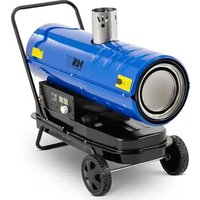
TW-ET30000 - Heating MSW - Free user manual and instructions
Find the device manual for free TW-ET30000 MSW in PDF.


| Product type | Mobile diesel heater |
| Brand | MSW |
| Model | TW-ET30000 |
| Heating power | 30 kW |
| Nominal power | 340 kW |
| Supply voltage | 230 V ~ / 50 Hz |
| Protection class | I |
| IP rating | IPX2 |
| Dimensions (L x W x H) | 1000 x 430 x 610 mm |
| Net weight | 30 kg |
| Fuel type | Diesel or heating kerosene |
| Tank capacity | 38 L |
| Average fuel consumption | 3.24 kg/h |
| Maximum air flow | 1,560 m³/h |
| Max. heating area | 310 m² |
| Ignition electrode gap | 4 - 5 mm |
| Operating pressure (barometer) | 3.5 - 4 PSI (while running) |
| Main functions | Air heating, temperature adjustment, automatic shut-off, overheat protection, safety alarm (codes E1, E2, E3) |
| Maintenance and cleaning | Clean electrodes and combustion chamber every month, tank every 6 months. Use a soft, dry cloth. Do not immerse. |
| Safety | Automatic shut-off in case of excessive flame, fuel cut-off, manual restart after power failure. Do not use in explosive areas. |
| Spare parts and repairability | Repairs only by the manufacturer's after-sales service. Use original parts. |
| General information | Free user manual available in PDF. Indoor use only. Stable and fireproof surface required. |
Frequently Asked Questions - TW-ET30000 MSW
User questions about TW-ET30000 MSW
0 question about this device. Answer the ones you know or ask your own.
Ask a new question about this device
Download the instructions for your Heating in PDF format for free! Find your manual TW-ET30000 - MSW and take your electronic device back in hand. On this page are published all the documents necessary for the use of your device. TW-ET30000 by MSW.
USER MANUAL TW-ET30000 MSW
natural_image
Technical line drawing of a mechanical assembly with two components and alignment lines (no text or symbols)natural_image
Technical line drawing of a mechanical assembly with rotating components (no text or symbols)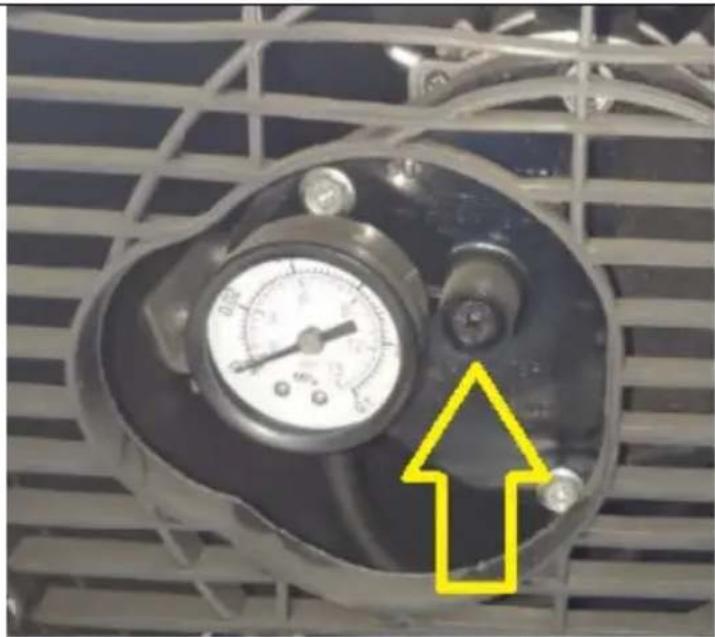
natural_image
Close-up of a pressure gauge mounted on an industrial fan grille, with a yellow arrow pointing to a component (no text or symbols visible)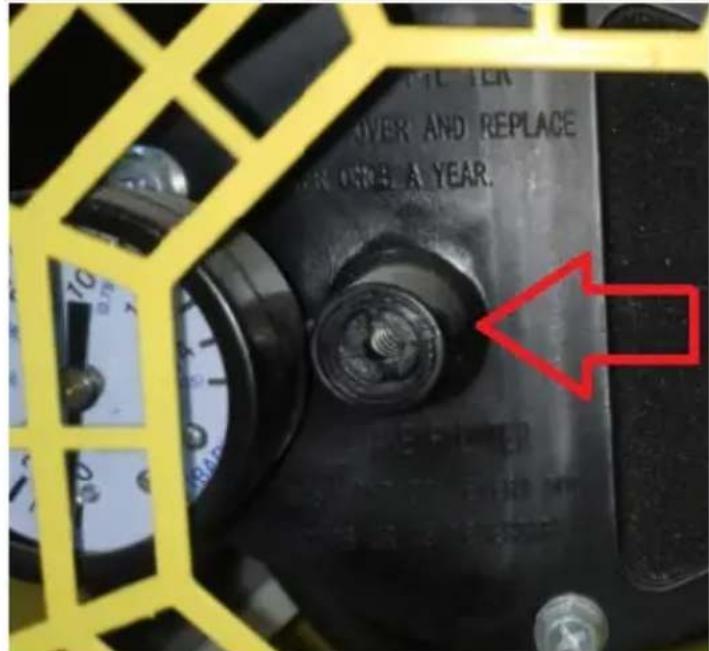
natural_image
Diagram of a mechanical device with a wrench and tool, no text or symbols presentThis User Manual has been translated for your convenience using machine translation. Reasonable efforts have been made to provide an accurate translation; however, no automated translation is perfect nor is it intended to replace human translators. The official User Manual is the English version. Any discrepancies or differences created in the translation are not binding and have no legal effect for compliance or enforcement purposes. If any questions arise related to the accuracy of the information contained in the User Manual, please refer to the English version of those contents which is the official version.
Technical data
| Description of the parameter | Value of the parameter | ||
| Product name | Diesel heater | ||
| Model | MSW-TW-ET20000 | MSW-TW-ET30000 | MSW-GHW-POWER-30000 |
| Supply voltage [V~] / Frequency [Hz] | 230/50 | ||
| Rated power [kW]. | 230 | 340 | 340 |
| Heating power [kW] | 20 | 30 | 30 |
| Safety class | I | ||
| IP class | IPX2 | ||
| Dimensions [width x depth x height; mm] | 880 x 370 x 490 | 1000 x 430 x 610 | 1015 x 440 x 590 |
| Net weight [kg] | 20.9 | 30 | 28.1 |
| Fuel type | Diesel fuel or heating kerosene | ||
| Maximum air flow [m3/h] | 1071 | 1560 | 760 |
| Fuel tank capacity [L] | 20 | 38 | 38 |
| Average fuel consumption [kg/h] | 3.24 | ||
| Maximum space for heating [m2] | 210 310 310 | ||
| Space between ignition electrodes [mm] | 4-5 | ||
| Air pressure setting [PSI] | 3-3,5 | 3,5-4 | 3,5-4 |
Ensure the pointer of barometer at the rear of the machine is pointing in range of 3-3.5 PSI for MSW-TW-ET20000 / 3.5-4 PSI for MSW-TW-ET30000 / MSW-GHW-POWER-30000 when the machine is running.
1. General Description
This manual is intended to assist you for safe and reliable use. The product is designed and manufactured strictly according to technical specifications using the latest technology and components and maintaining the highest quality standards.
PLEASE CAREFULLY READ AND UNDERSTAND THIS INSTRUCTION MANUAL BEFORE OPERATION,
To ensure long and reliable operation of the device, make sure to operate and maintain it properly in accordance with the guidelines in this instruction manual. The technical data and specifications in this manual are up-to-date. The manufacturer reserves the right to make changes in order to improve the quality. Taking the technical progress and the possibility of reducing noise into account, the unit is designed and built in such a way so that risks resulting from noise emissions are reduced to the lowest possible level.
Explanation of symbols
| CE | The product complies with applicable safety standards. | |
 | Read the manual before use. | |
 | Recyclable product. | |
 | CAUTION! or WARNING! or REMEMBER! describing a given situation (general warning sign). | |
 | CAUTION! Risk of electric shock! | |
 | CAUTION! Danger of fire - flammable material! | |
 | Warning against poisoning by toxic substances! | |
EN
 | Caution! Hot surface can cause burns! |
 | For indoor use only. |
 | Do not cover the screw with any materials or objects! |

CAUTION! The figures in this manual are illustrative only and may vary in some details from the actual appearance of the product.
2. Safety of use
CAUTION! Read all safety warnings and instructions. Failure to follow the warnings and instructions may result in electric shock, fire and/or serious injury or death.
The term "device" or "product" in the warnings and in the description of the manual refers to Diesel heater.
2.1. Electrical safety
a) The plug of this device must fit into the outlet. Do not modify the plug in any way. Original plugs and matching outlets reduce the risk of electric shock.
b) Avoid touching grounded parts, such as pipes, heaters, ovens, and refrigerators. There is an increased risk of electric shock if your body is grounded and touches the device while exposed to direct rain, wet pavement, or while working in a damp environment. If water enters the device, there is an increased risk of damage to the unit and electric shock.
c) Do not touch the device with wet or damp hands.
d) Do not use the cord in an unintended manner. Never use it to carry the device or to pull the plug out of the socket. Keep the cord away from heat sources, oil, sharp edges or moving parts. Damaged or tangled cords increase the risk of electric shock.
e) When operating the product outdoors, use an extension cord designed for outdoor use. Using an extension cord designed for outdoor use reduces the risk of electric shock.
f) If you cannot avoid using the product in a wet environment, use a residual current device (RCD) to connect the product to electrical mains. Using an RCD reduces the risk of electric shock.
g) Do not use the device if the power cord is damaged or shows signs of wear. A damaged power cord should be replaced by a qualified electrician or the manufacturer's service department.
h) To avoid electric shock, do not immerse the cable, plug, or the device itself in water or other liquid. Do not use the appliance on wet surfaces.
i) CAUTION – DANGER TO LIFE! When cleaning or using the appliance, never immerse it in water or other liquids.
j) Do not use the appliance in rooms with very high humidity / in the immediate vicinity of water tanks!
k) Do not allow the machine to get wet. Risk of electric shock!
2.2. Safety in the workplace
a) Keep the work area tidy and well lit. Disorder or poor lighting can lead to accidents. Be foresighted, watch what you are doing and use common sense when using the unit.
b) Do not use the unit in an explosive area, for example in the presence of flammable liquids, gases or dust. The unit produces sparks that can ignite dust or fumes.
c) If in doubt as to whether the product is working properly or found to be damaged, contact the manufacturer's technical service.
d) Only the manufacturer's service department may repair the appliance. Do not attempt to repair the product on your own!
e) In case of open flames or fire, use only dry powder or snow (CO2) fire extinguishers to extinguish the live equipment.
f) No children or unauthorized persons are allowed in the work area. (Inattention may result in loss of control of the unit.)
g) Use the unit in a well-ventilated area.
h) Check the condition of the safety stickers regularly. Replace them if they are illegible.
i) Keep these instructions for use for future reference. If the product is to be handed over to a third party, hand it over with this user manual.
j) Keep packaging components and small installation parts out of the reach of children.
k) Keep the device away from children and animals.
I) When using this product together with other devices, also follow the other instructions for use.
EN
m) Do not keep fuel near the unit.
n) Provide adequate ventilation in the area where the unit is operating.
Remember! Keep children and other bystanders safe while operating the equipment.
2.3. Personal safety
a) Do not operate this device if you are tired, ill or under the influence of alcohol, drugs or medication that could impair your ability to operate the device.
b) The unit may be operated by persons who are physically fit, capable of operating it and appropriately trained, and who have read this instruction manual and have been trained in occupational safety and health.
c) Use caution and common sense when operating this unit. A moment's inattention during operation may result in serious personal injury.
d) To prevent accidental start-up, make sure the switch is in the off position before connecting to a power source.
e) Do not wear loose clothing or jewelry. Keep hair, clothing, and gloves away from moving parts. Loose clothing, jewelry, or long hair can be caught in moving parts.
f) Before switching the unit on, remove any regulating tools or keys. Any tools or keys left in the rotating part of the unit may cause injury.
g) The product is not a toy. Children should be watched to ensure that they do not play with the product.
h) Do not place your hands or any objects inside the running device!
i) CAUTION: Some parts of the unit may become very hot - burn risk!
2.4. Safe use of the device
a) Do not overload the device. Use tools that are suitable for the application. A correctly selected product will do a better and safer job for which it was designed.
b) Do not use the device if the ON/OFF switch does not function properly (does not turn on and off). Units that cannot be controlled by the switch are unsafe, cannot operate, and must be repaired.
c) Disconnect the device from the power supply before adjusting, cleaning, or servicing. This precaution reduces the risk of accidental start-up.
d) Keep unused product out of the reach of children and anyone unfamiliar with the device or this manual. Products are dangerous when used by inexperienced users.
e) Keep the product in good working order. Check before each use for general damage or damage to moving parts (cracks in parts and components or any other condition that may affect the safe operation of the device). If damaged, have the device repaired before use.
f) Keep the product out of the reach of children.
g) Repairs and maintenance should be carried out by qualified personnel using only original spare parts. This will ensure the safety of use.
h) To ensure the designed operational integrity of the device, do not remove factory-installed covers or loosen screws.
i) When transporting or moving the device from storage to the place of use, observe the health and safety rules for manual handling applicable in the country where the device is used.
j) Avoid situations in which the device stops under heavy loads during operation. This can cause overheating of the drive elements and consequent damage to the equipment.
k) Do not touch any moving parts or accessories unless the device is unplugged.
I) Do not move, shift, or rotate the device while in operation.
m) Do not leave the device switched on unattended.
n) Clean the device regularly to prevent permanent dirt build-up.
o) If you notice any leakage from the unit, immediately disconnect the power.
p) Do not obstruct the air inlet or outlet.
q) The product is not a toy. Cleaning and maintenance must not be performed by children without adult supervision.
r) Do not tamper with the device to alter its performance or design.
s) Keep the unit away from sources of fire and heat.
t) Do not block the ventilation openings of the unit!
u) Do not transport the unit with fuel in the tank.
v) Do not use fuel other than that recommended by the manufacturer!
w) Do not fill the fuel tank while the unit is operating!
x) The working surface should be even, dry and resistant to heat.

CAUTION! Although the product has been designed to be safe and has adequate safeguards and despite the additional safety features provided to the user, there is still a slight risk of accident or injury when handling the product. Caution and common sense are advised when using the product.
3. Instructions for use
The product is designed to heat indoor air.
The user is responsible for any damage resulting from misuse.
3.1. Product overview
(illustrative picture - some deviations from the real product possible)
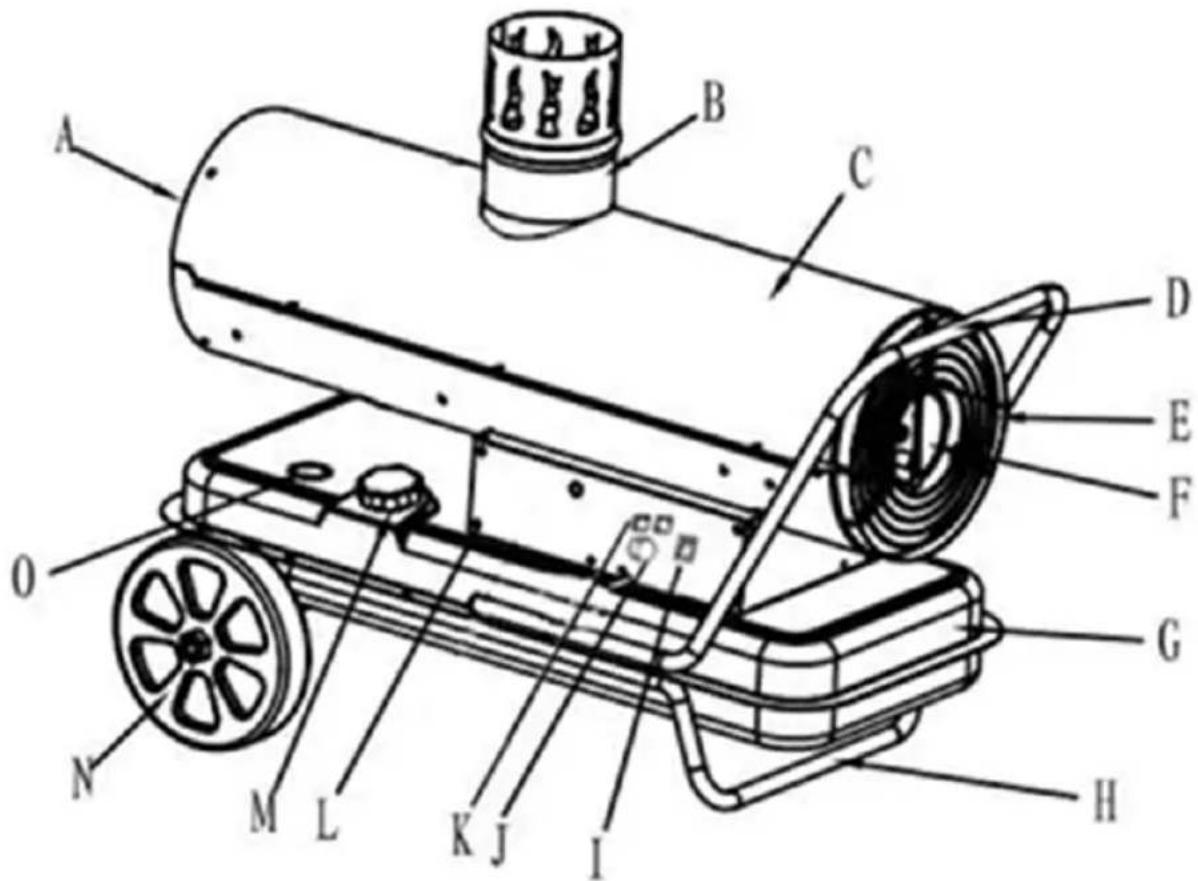
A. Warm air outlet
B. Gas exhaust
C. Casing
D. Transport handle
E. Air inlet grill
F. Pressure gauge and pressure adjustment screw
G. Fuel tank
H. Leg
I. Power switch
J. Temperature setting knob
K. Display
L. Control panel
M. Fuel filler cap
N. Circle (x2)
O. Fuel gauge
3.2. Preparation for operation
POSITIONING OF THE UNIT
The ambient temperature must not exceed 40^ C and ambient humidity should not exceed 85%. Place the unit in a way that ensures good air circulation. Maintain a minimum distance of 3 m from each side of the unit. Keep the unit away from any hot surfaces and flammable materials as well as direct sunlight. Always operate the unit on a level, stable, clean, fireproof and dry surface and out of the reach of children and persons of impaired mental, sensory and intellectual functions. Place the unit in such a way that the mains plug can be reached at any time. Ensure that the power supply to the unit corresponds to that specified on the identification plate! Refuel only with the unit turned off.
ASSEMBLY OF THE UNIT
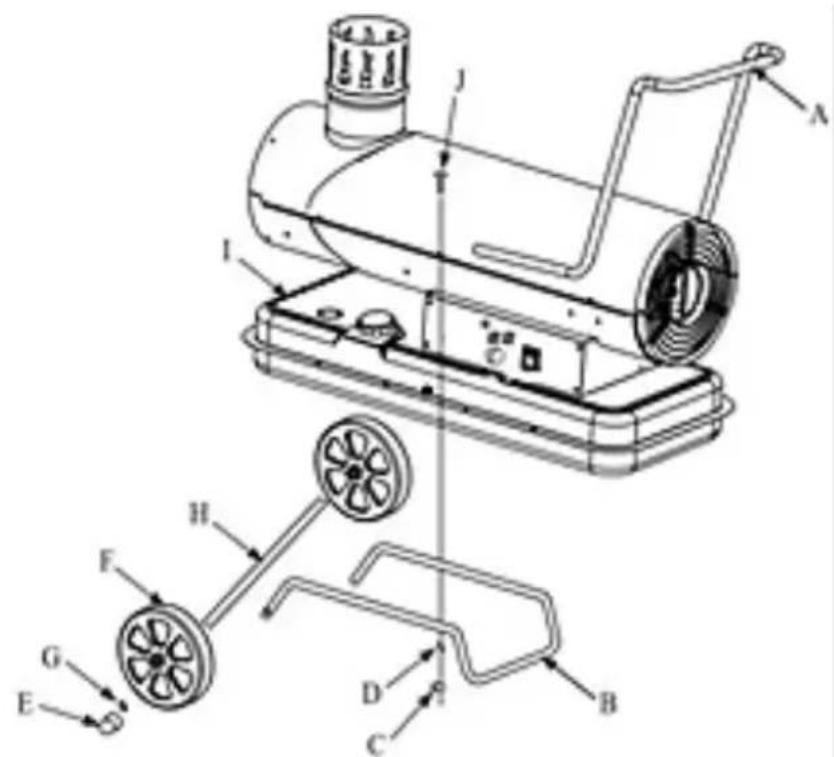
- Insert the axle (H) of the wheels into the holes at the ends of the lower frame (B), then place the wheels (F) on its ends.
- Then, on the ends of the axle (H) protruding through the holes in the wheels, put flat washers (G) and secure them with self-locking nuts (E) at its ends.
- Through the holes in the axles from the inside of the wheels, insert the safety clips and bend their ends to prevent them from falling out.
- Place the heating unit with the fuel tank on the so-prepared lower frame (B), making sure that the holes at the ends of the tank are aligned with the holes in the lower frame.
EN
- Attach the transport handle (A) from above, also making sure that the holes in it are aligned with the holes at the ends of the tank and the lower frame (B).
- Insert the screws (J) through all of these holes from the top, and tighten them firmly from the bottom with nuts (C), so that some of the screws also hold the handle on each side of the unit.
- This way, the device is ready for use, i.e. the entire heating unit is permanently connected to the frame base and the transport handle.
• Finally, mount the end of the exhaust outlet on the top.
3.3. Working with the device
3.3.1 Refueling
IMPORTANT: Use only diesel fuel or heating kerosene to power the unit.
The fuel should be fresh and free from contamination - it is not recommended to store fuel in an unused device for more than 1-2 months.
For refueling, use a special funnel (not included in the set), which will help in preventing fuel spilling on and around the device.
Before refueling, the device should be turned off, disconnected from the power supply and cooled down to minimize the risk of ignition.
- Place the device on a stable, flat and even surface.
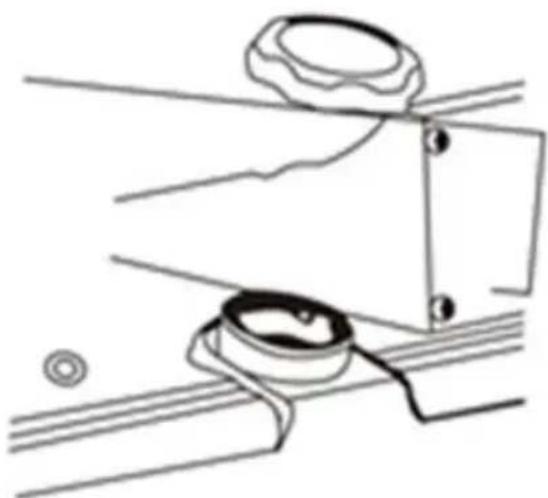
- Unscrew the fuel cap - do not remove the mesh filter (it protects against dirt accidentally entering the fuel system)!
natural_image
Technical line drawing of a mechanical assembly with two components and alignment lines (no text or symbols)- Insert a special funnel into the opening.
- Refill the fuel tank, paying attention to when the gauge approaches the "F" position (full tank), then stop refuelling and tighten the fuel cap.
- Wipe off any spilled or dripped fuel immediately with a dry cloth. If the unit has cooled down completely, the greasy stains from the fuel can be removed with a cloth lightly dipped in benzine or alcohol.
3.3.2 Working with the device
After a general inspection of the device for damage and refilling the fuel in the tank if necessary, proceed to the following:
- Connect the plug to a suitable power outlet.
- Set the power switch to the on ("I") position.
- Set the desired temperature with the temperature control knob.
IMPORTANT: If the set temperature is higher than the ambient temperature in which the device is located, it will turn on. When the ambient temperature reaches a value higher than the temperature set on the device, it will automatically turn off. If the ambient temperature drops below the set value, the device will restart.
When the temperature set on the device is lower than the ambient temperature during the first start-up, the device will not start up until the ambient temperature is lower than the set temperature.
- Before turning off the unit, set the knob to the lowest temperature, then set the power switch to the off ("O") position. When the fan stops, disconnect the plug from the power supply.
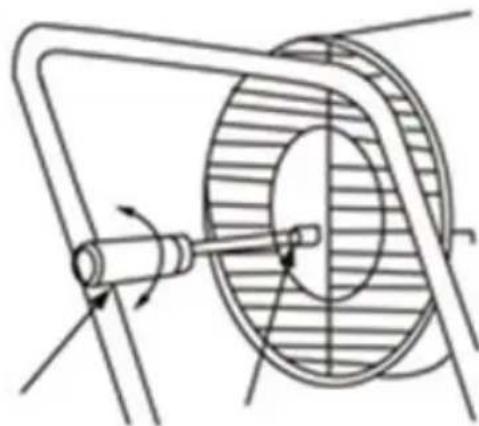
NOTE: if the device works in breaks/bursts flames or does not heat (despite the fuel being in the tank), adjust the pressure on the turned-on device by turning the screw located next to the manometer (see the following 3 pictures) using, for example, a suitable size screwdriver with a flat tip:
- When the unit bursts flames - counterclockwise until its operation is stabilized - then leave the screw in this position.
EN
- When the device does not heat up, turn the screw clockwise until it starts to heat normally - then leave the screw in this position
When the power switch is lit as usual, it means that the device is working properly. When it blinks, it indicates a problem with the device - see more in "Troubleshooting".
natural_image
Technical line drawing of a mechanical component with rotating shaft and housing (no text or symbols)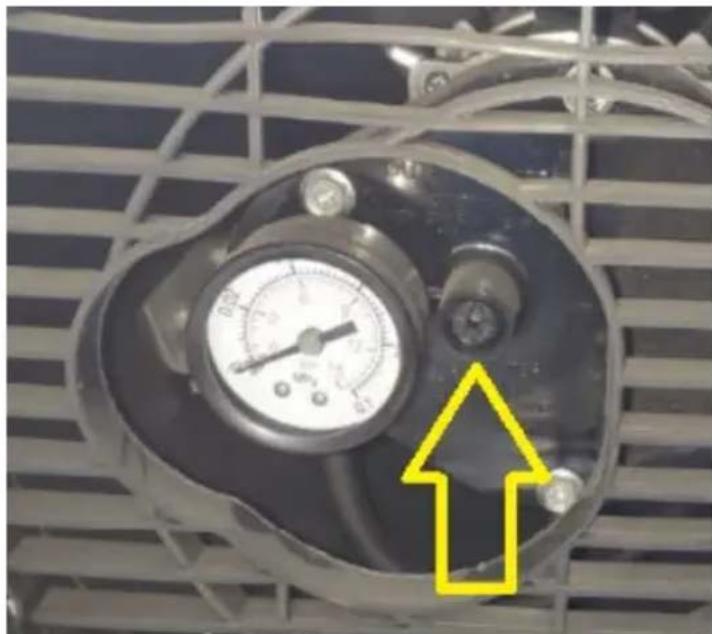
natural_image
Close-up of an industrial air pressure gauge mounted on a metal panel, with a yellow arrow pointing to it (no text or symbols visible)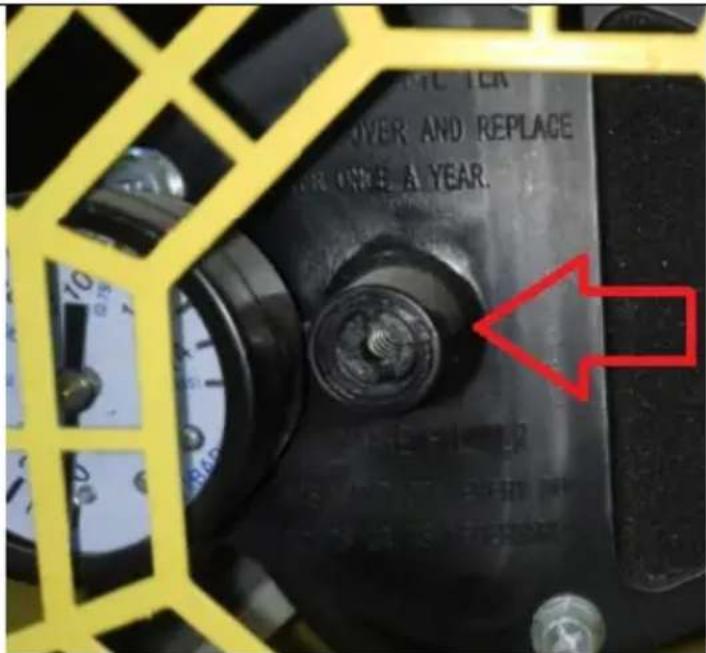
IMPORTANT: the device has a built-in protection in the event of excessive flame, which, for safety reasons, will cut off the fuel supply and turn off the fan after 90 seconds. In the event of a power failure, the unit will stop working immediately. When the power returns, the device will only signal this fact by lighting up the power supply control, but it will not start up automatically - for safety reasons, you should restart it manually.
3.3.3 Diesel heater safety alarm
A. Ignition failure, white fog/smoke is sprayed at the air outlet during ignition, E1 alarm.
-
Check whether there is oil in the oil tank. Please add oil.
-
Check the barometer at the rear of the machine when the machine is running. It is required that the barometer (for MSW-TW-ET20000 (20KW): 3-3.5Psi or above, MSW-TW-ET30000 / MSW-GHW-POWER-30000 (30KW) 4-4.5Psi or above, for 50KW: 4.5-5 Psi or above) can properly lower the air pressure when filling up the oil but not less than the minimum value.
-
Please check whether the ignition pin of the igniter works. If it is damaged, please replace the igniter or ignition pin in time.
-
1-3 points above are all checked without problems. Please check whether the machine nozzle and air pipe are blocked by foreign matters, whether the air pipe leaks, and whether the oil pipe leaks. If there is any problem, please clean or replace the nozzle, air pipe and oil pipe in time.
B. Ignition failure, no white smoke at the air outlet during ignition, E1 alarm (nozzle, air pipe and oil pipe are not blocked).
- Please check whether the solenoid valve is damaged, or the solenoid valve power line is damaged
C. The ignition is successful, and there is no white fog and smoke at the air outlet during ignition, but the machine E1 alarms.
- Please check the bright resistor (photo resistance), clean the oil stain on the surface of the bright resistor, or replace the bright resistor (photo resistance).
D. E2 alarm.
- Please check whether the temperature sensor probe is damaged, whether the plug of the temperature sensor probe is plugged or in poor contact.
E. E3 alarm (voltage alarm).
- Please check the input voltage (machine alarm when the voltage is lower than 168V).
3.4. Cleaning and maintenance
a) Pull the mains plug and let the unit cool down completely before cleaning, adjusting or replacing accessories and when the unit is not in use. Wait until the rotating parts stop.
b) Use only non-corrosive cleaning agents for cleaning the surfaces.
c) Store the unit in a dry and cool place protected from moisture and direct sunlight.
d) Do not spray the unit with a stream of water or immerse it in water.
e) Make sure that no water enters through the ventilation openings in the casing.
f) Clean the ventilation openings with a brush and compressed air.
g) Perform regular inspections of the unit checking technical fitness and any damages.
h) Use a soft cloth for cleaning.
i) Do not use sharp and/or metal objects (e.g. wire brush or metal spatula) for cleaning as they may damage the surface of the appliance material.
j) Do not store fuel in an unused unit for more than 2 months.
k) In the case of regular use (8-10 hours a day), clean the unit:
• Once a month - the ignition electrodes and the combustion chamber.
• Every six months - the fuel tank.
3.4.1 Draining the fuel tank
natural_image
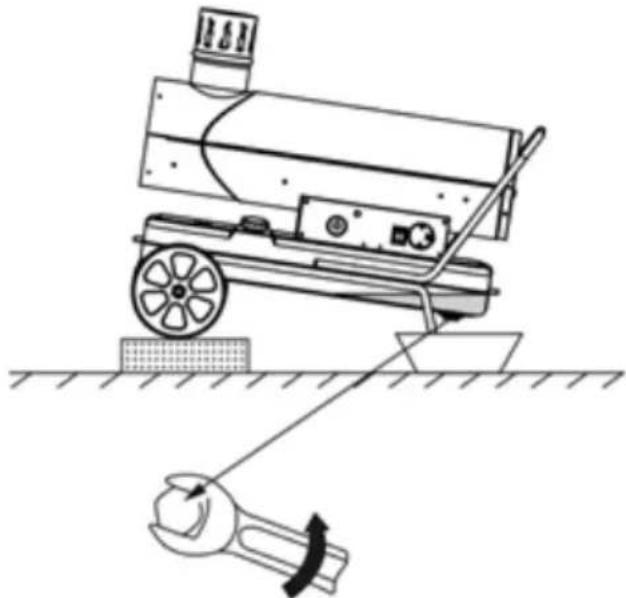
Line drawing of a mechanical device with a wrench and tool, no text or symbols presentIn order to empty the fuel from the tank, place a fuel container under the device near the leg, and place under the wheels some wooden blocks, etc., so that the device is slightly tilted towards the transport handle (see the picture above). Then unscrew the drain plug located at the bottom of the tank and drain the fuel completely. After draining and before refueling, tighten the drain plug.
3.4.2 Cleaning the electrodes and checking the space between them
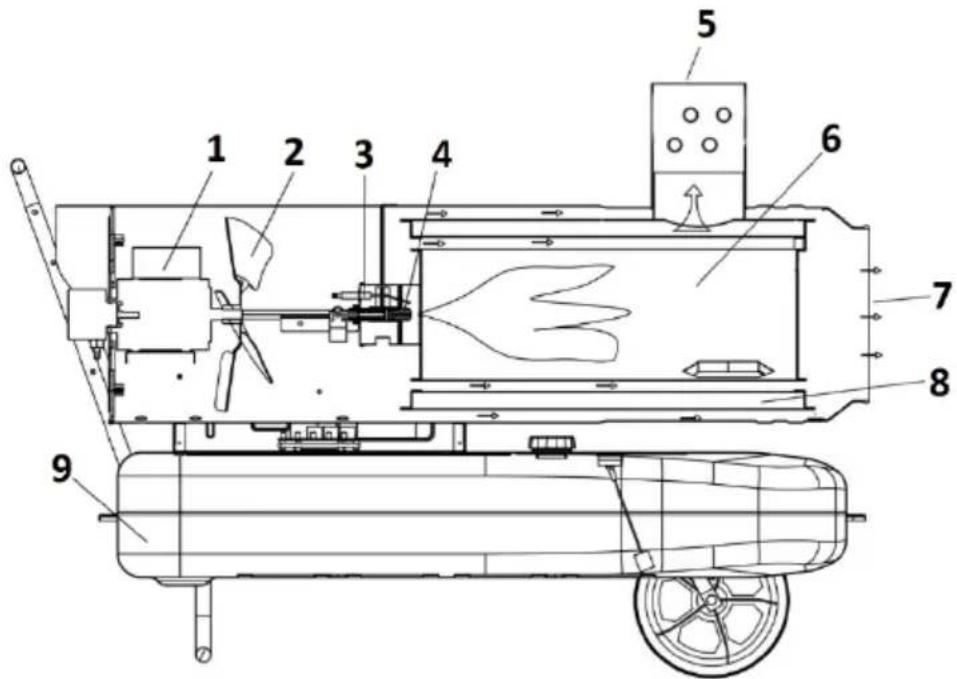
- Motor
- Fan
- Ignition electrodes
-
Oil nozzle
-
End of exhaust
-
Combustion chamber
-
Warm air outlet
-
Air circulation chamber
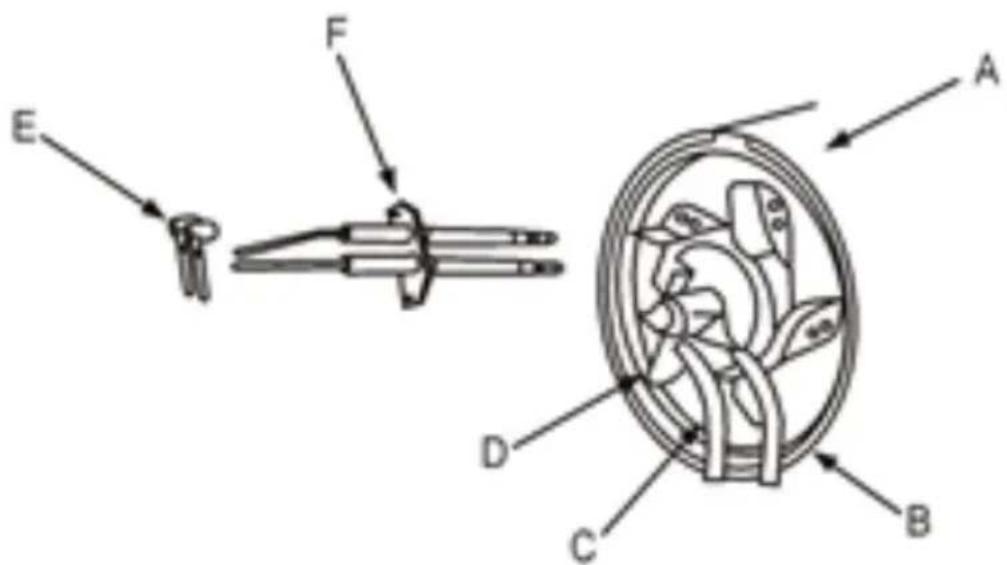
The ignition electrodes are located in the burner head:
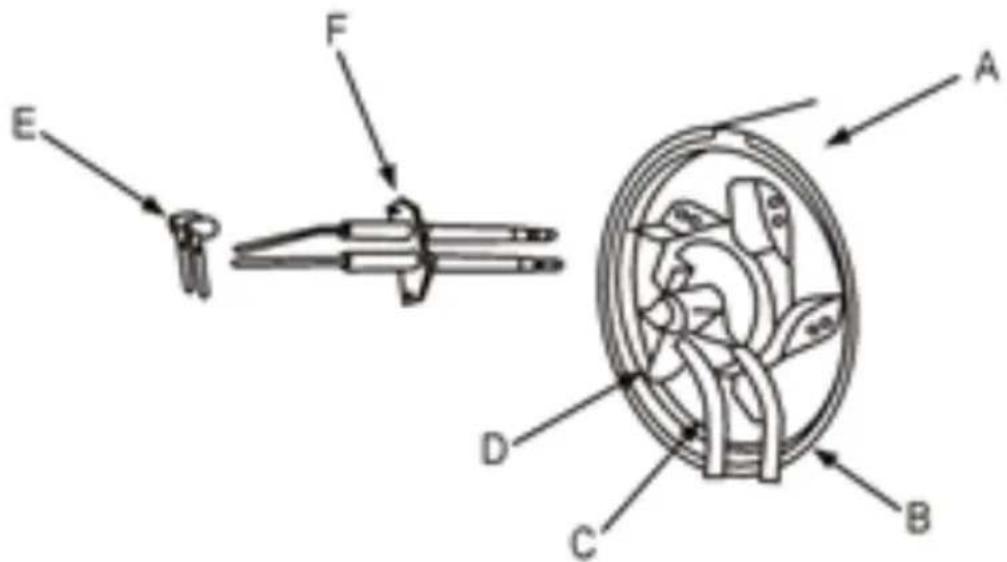
To get to them, you need to disassemble, among others, the air inlet grill. Clean the electrodes with, e.g., benzine using a fine brush. Before reassembly, check and, if necessary, set a proper distance between them (see technical data table).
DISPOSAL OF WASTE APPLIANCES
At the end of its useful life, this product should not be disposed of with normal household waste but should be taken to a collection point for the recycling of electrical and electronic equipment. This is indicated by the symbol on the product, operating instructions or packaging. The materials used in this appliance are recyclable according to their marking. By reuse, recycling or applying other forms of use of waste machines, you make a significant contribution to the protection of our environment.
Your local administration will provide you with information about the appropriate disposal point for used appliances.
TROUBLESHOOTING
| Problem | Possible cause | Action |
EN
| Foul smell, smoke and sparks appear when the device is first turned on. | This is normal during the first start-up as there is air and some dust around the burner. | Let the device work, and they should disappear over time. |
| Ignition on first start-up or when all the fuel has been used up, strange noises during operation, bad smell, white smoke. | Air has leaked into the circuit. | The symptoms should disappear as soon as the air is pushed out of the chamber. |
| A weird sound when ignited or flames. | Metal elements expand in heat and come into contact with one another. | Normal phenomenon. |
| Fire comes out of the outlet when ignited, sparkling. | Some fuel and air from previous use remained in the oil tube leading to the nozzle and were not mixed together in the correct proportion, so ignition is unstable. Sparks arise as a result of a coal raid. | Normal phenomenon, it should disappear over time. |
| The unit does not work. | No power supply. | Check that there is power supply and that it has the correct voltage. |
| Power switch in the off "O" position. | Turn the switch to the "I" position. | |
| The set temperature is lower than the ambient temperature. | Set the temperature knob to a setting higher than the ambient temperature. | |
| The device stopped working. | Unstable supply voltage. | Change the current source or stabilize the voltage. |
| The ambient temperature has exceeded that set on the unit. | Normal operation of the appliance - you can set the knob to an even higher temperature. | |
| The fuel has run out. | Add fuel. |
EN
| The power light flashes quickly. | The sun heats the device very much and the sensor has detected overheating. | Avoid exposing the unit to strong sunlight, especially when used in open spaces. |
| Blocked air outlet or inlet. | Unblock the air outlet or inlet. | |
| Defective photocell (fire protection). | Contact the manufacturer's service - the photocell is to be checked and possibly replaced. | |
| The power switch flashes twice. | Empty fuel tank | Add fuel. |
| The fuel is frozen or too thick or too old. | Defrost the fuel and replace it with fresh fuel. | |
| Fuel line damaged or loose. | Check the fuel and air lines, including their connections - if there are leaks, remove or replace the components. |

natural_image
Technical line drawing of a mechanical assembly with two components and alignment lines (no text or symbols)natural_image
Technical line drawing of a mechanical component with rotating shaft and housing (no text or symbols)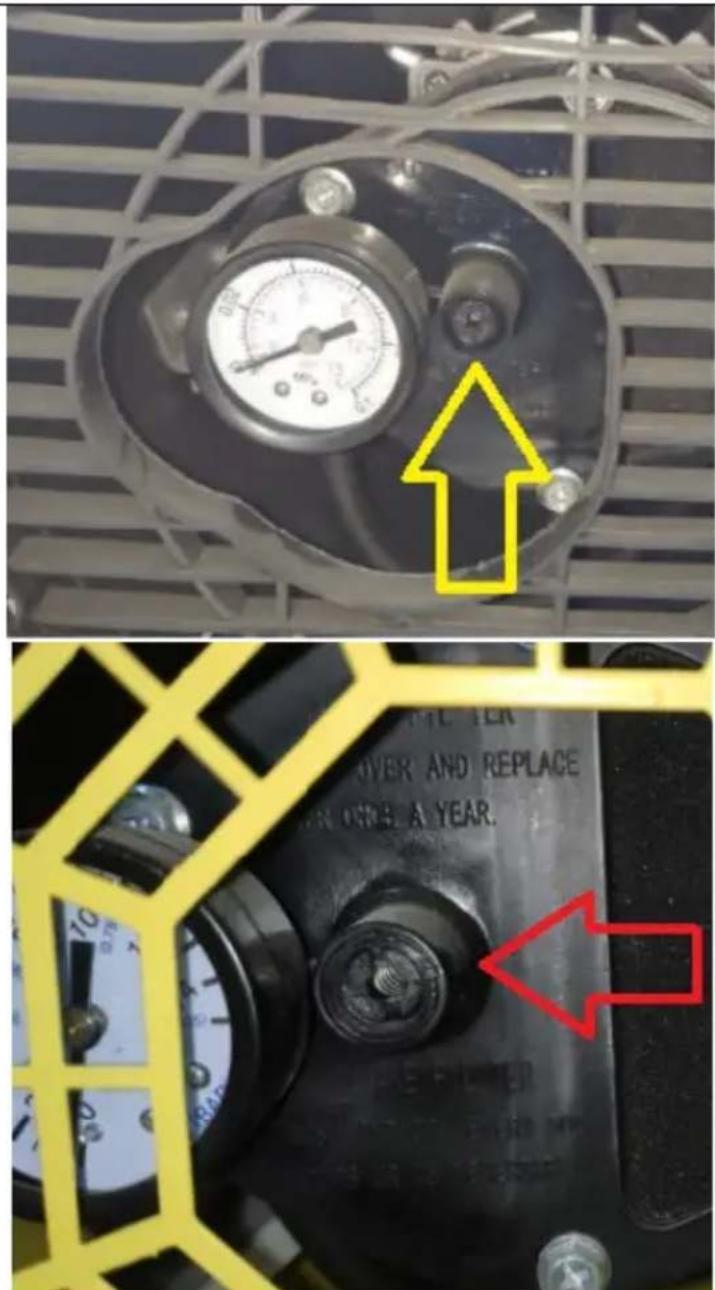
natural_image
Diagram of a mechanical device with a wrench and tool, no text or symbols presentnatural_image
Technical line drawing of a mechanical assembly with two components and alignment lines (no text or symbols)natural_image
Mechanical diagram showing a rotating shaft and wheel assembly (no text or labels)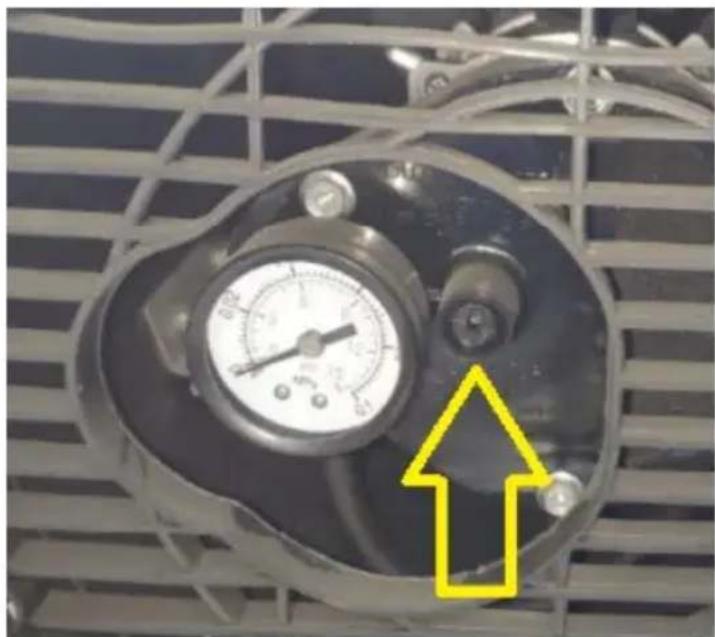
natural_image
Close-up of a pressure gauge mounted on an industrial fan panel, with a yellow arrow pointing to a component (no text or symbols visible)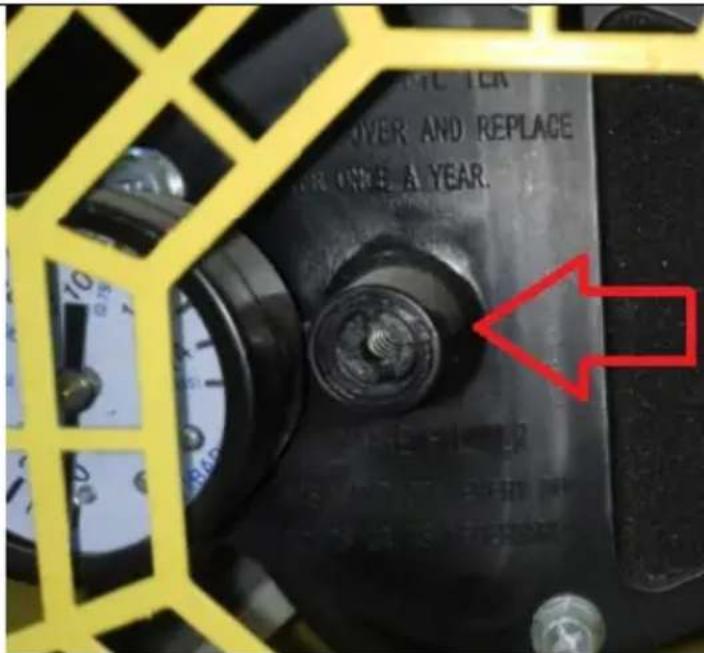
natural_image
Line drawing of a mechanical device with a wrench and gear, no text or symbols presentnatural_image
Technical line drawing of a mechanical assembly with two components and alignment lines (no text or symbols)natural_image
Technical line drawing of a mechanical assembly with rotating components (no text or symbols)FR

natural_image
Diagram of a mechanical device with a wrench and tool, no text or symbols presentnatural_image
Technical line drawing of a mechanical assembly with two components and alignment lines (no text or symbols)natural_image
Technical line drawing of a mechanical device with rotating shaft and housing (no text or symbols)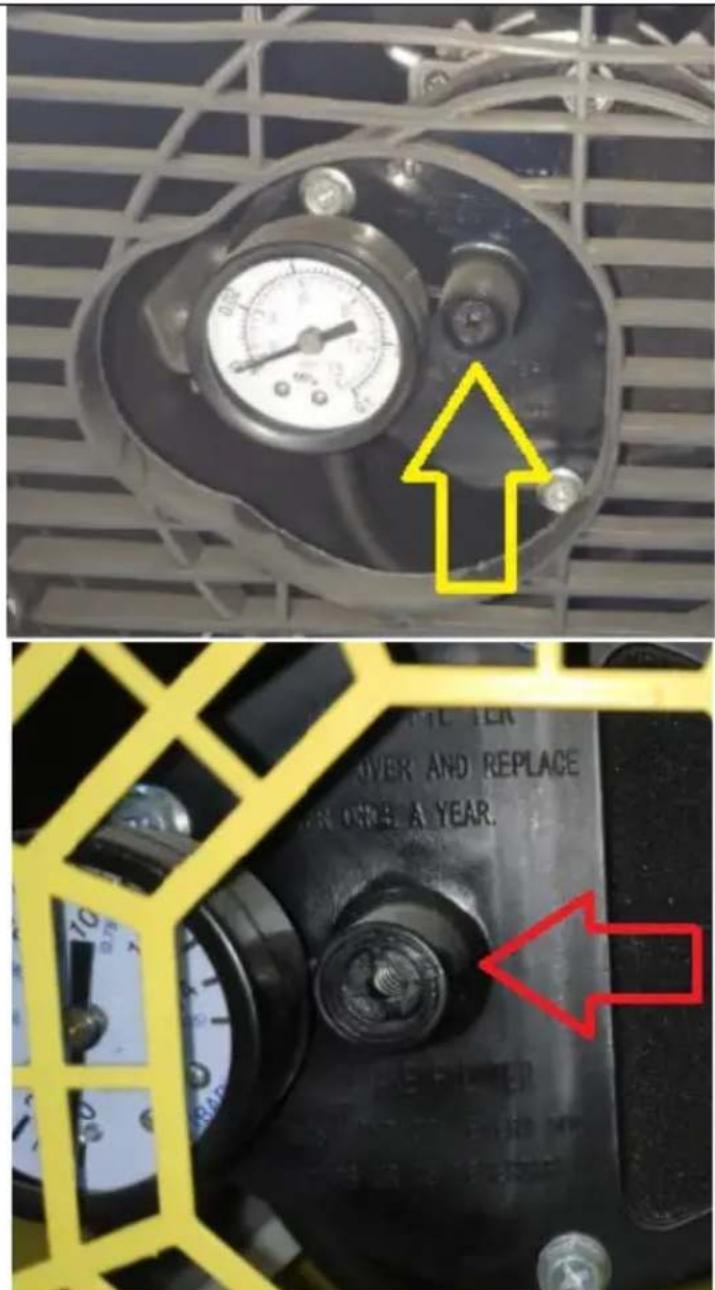
natural_image
Line drawing of a mechanical device with a wrench and gear, no text or symbols presentnatural_image
Technical line drawing of a mechanical assembly with no visible text or symbolsnatural_image
Technical line drawing of a mechanical component with rotating shaft and housing (no text or symbols)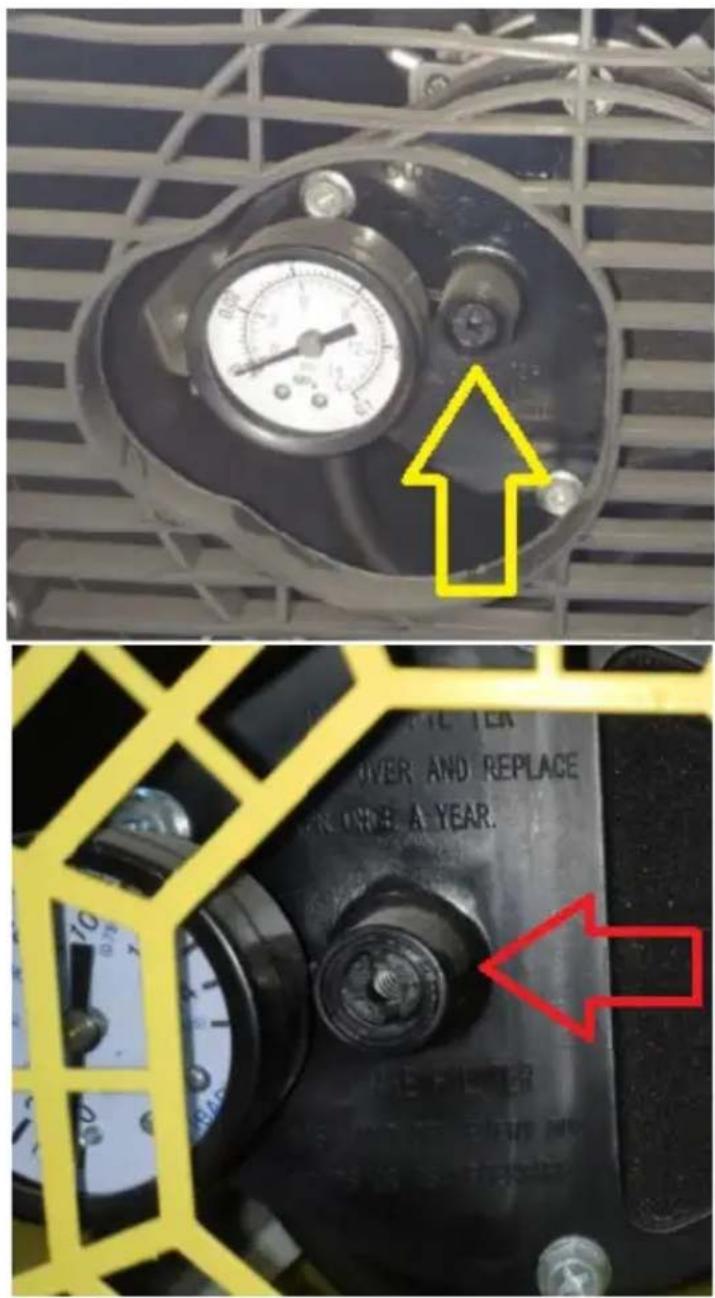
natural_image
Diagram of a mechanical device with a wrench and tool, no text or symbols presentnatural_image
Technical line drawing of a mechanical assembly with no visible text or symbolsnatural_image
Technical line drawing of a mechanical assembly with rotating components (no text or symbols)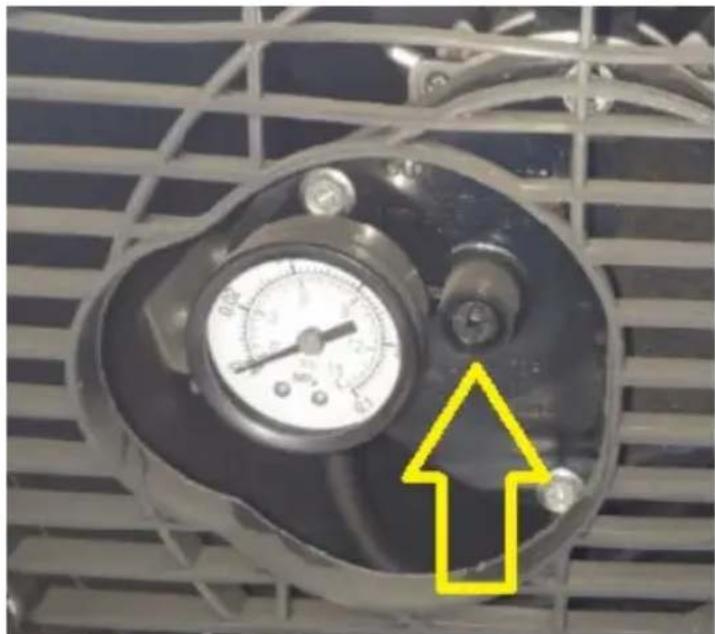
natural_image
Close-up of a pressure gauge mounted on an industrial fan grille, with a yellow arrow pointing to a component (no text or symbols visible)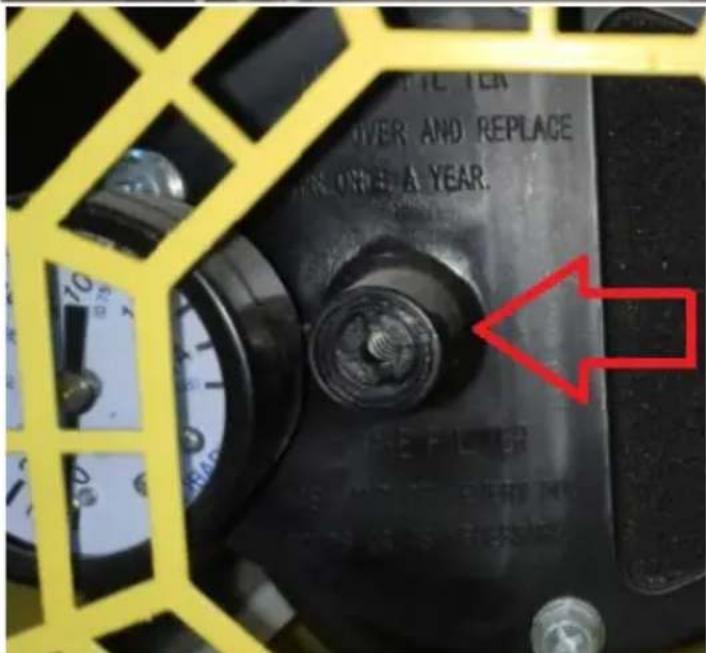
natural_image
Line drawing of a mechanical device with a wrench and tool, no text or symbols presentAPPARATETS PLACERING
natural_image
Technical line drawing of a mechanical assembly with two components and alignment lines (no text or symbols)natural_image
Technical line drawing of a mechanical assembly with rotating components (no text or symbols)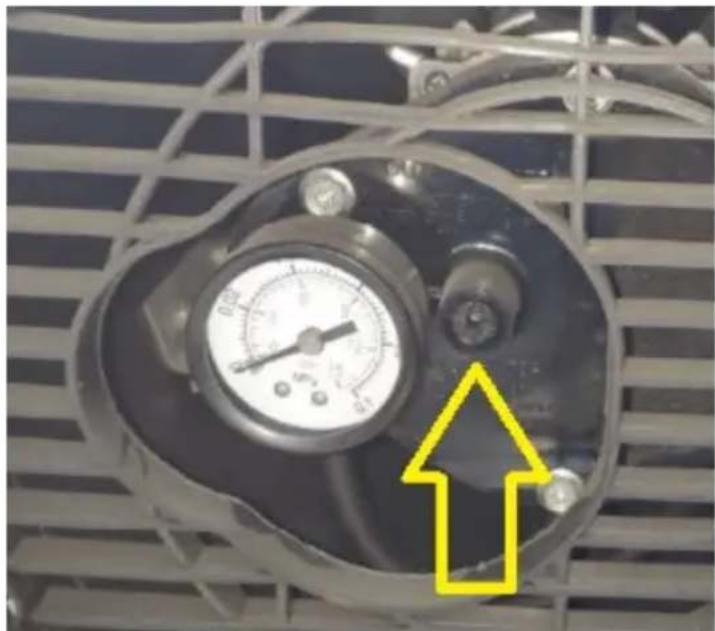
natural_image
Close-up of a pressure gauge mounted on an industrial fan grille, with a yellow arrow pointing to a component (no visible text or symbols)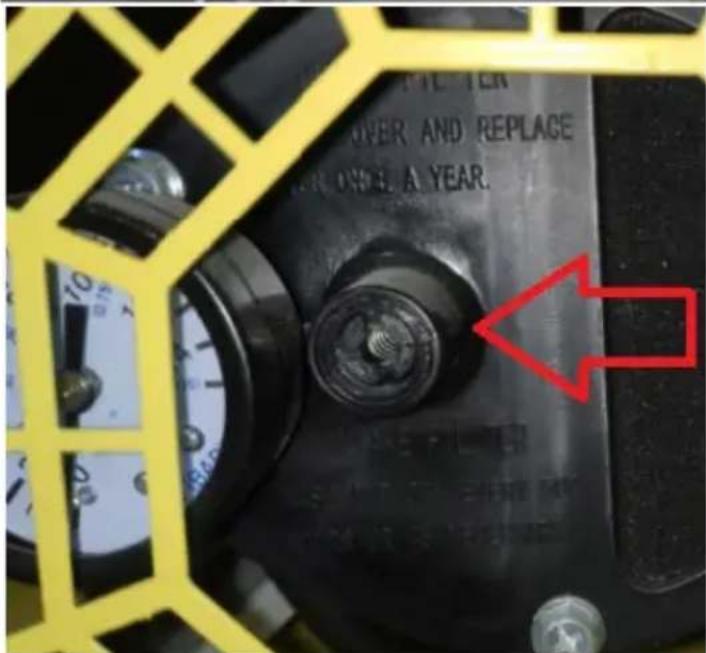
natural_image
Diagram of a mechanical device with a wrench and tool, no text or symbols presentnatural_image
Technical line drawing of a mechanical assembly with two components and alignment lines (no text or symbols)natural_image
Technical line drawing of a mechanical assembly with rotating components (no text or symbols)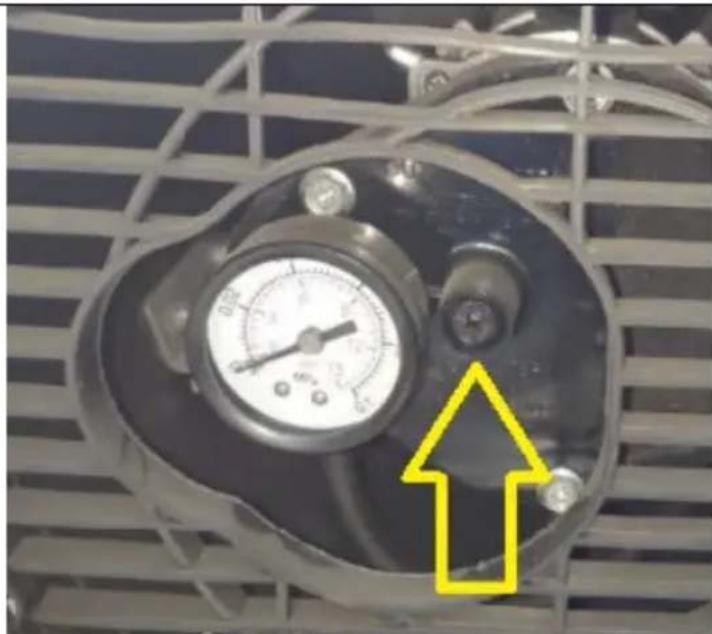
natural_image
Close-up of an industrial air pressure gauge mounted on a metal grate, with a yellow arrow pointing to a component (no text or symbols visible)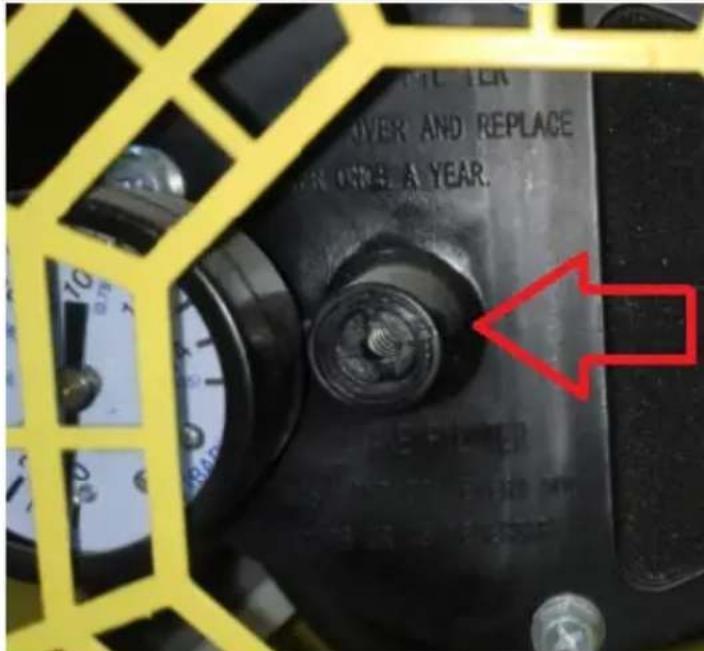
natural_image
Line drawing of a mechanical device with a wrench and gear, no text or symbols presentnatural_image
Technical line drawing of a mechanical assembly with two components and alignment lines (no text or symbols)natural_image
Technical line drawing of a mechanical component with rotating shaft and housing (no text or symbols)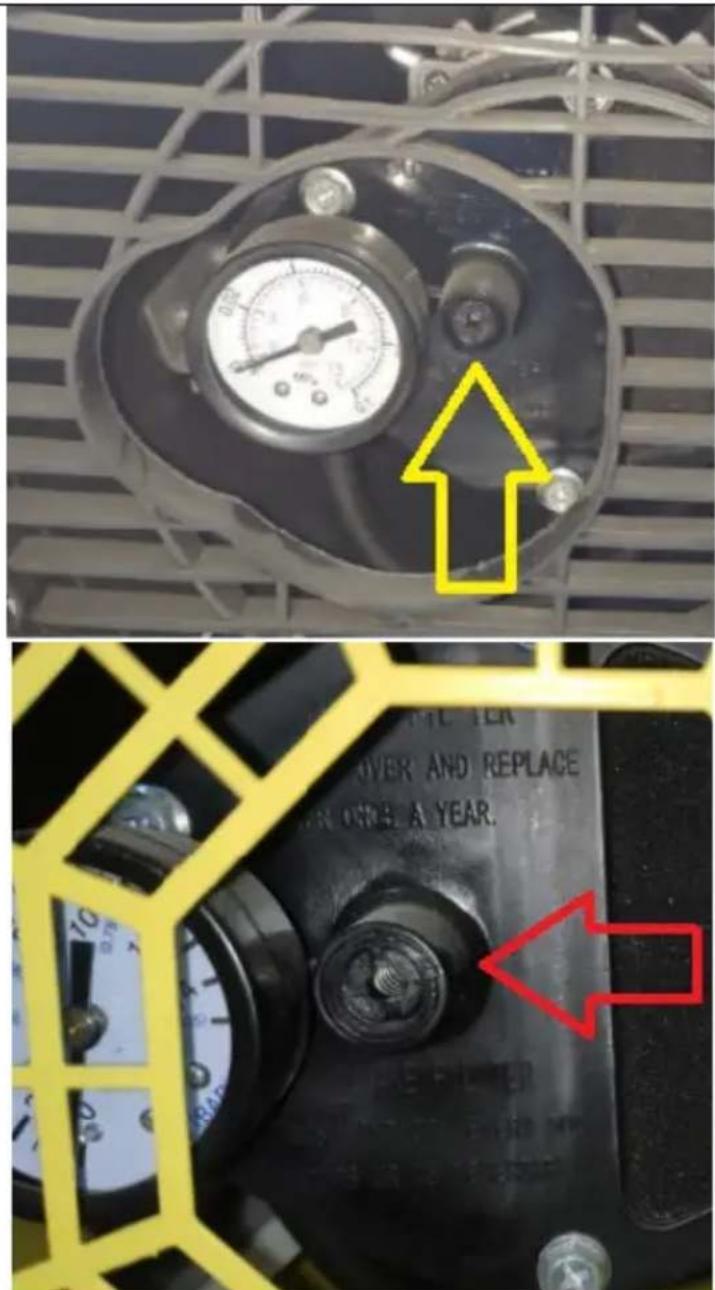
natural_image
Diagram of a mechanical device with a wrench and tool, no text or symbols presentA. Varmluftsuttak
B. Gasseksos
C. Hus
D. Transporthåndtak
E. Luftinntaksgrill
natural_image
Technical line drawing of a mechanical assembly with two components and alignment lines (no text or symbols)natural_image
Technical line drawing of a mechanical component with rotating shaft and housing (no text or symbols)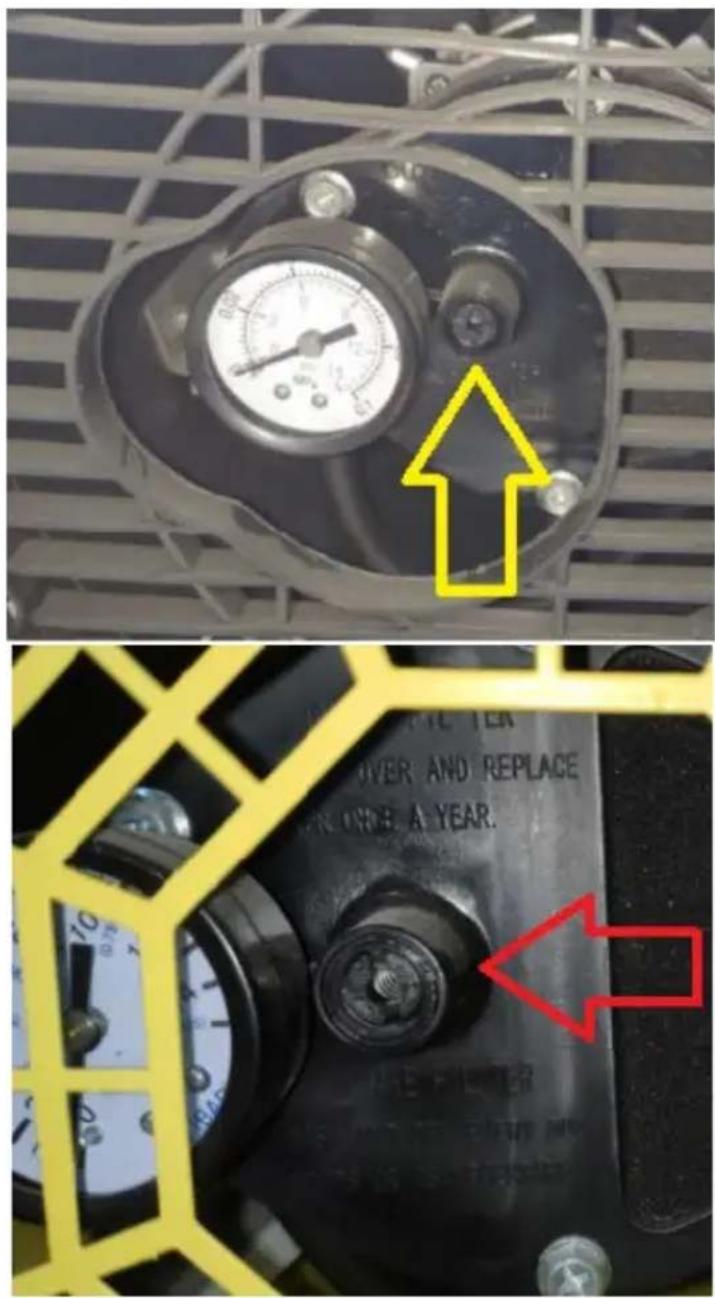
natural_image
Diagram of a mechanical device with a wrench and tool, no text or symbols present- Motor
- Vifte
- Tennelektroder
- Oljedyse
- Slutt på eksos
- Forbrenningskammer
- Varmluftsuttak
- Luftsirkulasjonskammer
Tennelektrodene er plassert i brennerhodet:
PLACERING AV APPARATEN
natural_image
Technical line drawing of a mechanical assembly with two components and alignment lines (no text or symbols)natural_image
Technical line drawing of a mechanical assembly with rotating components (no text or symbols)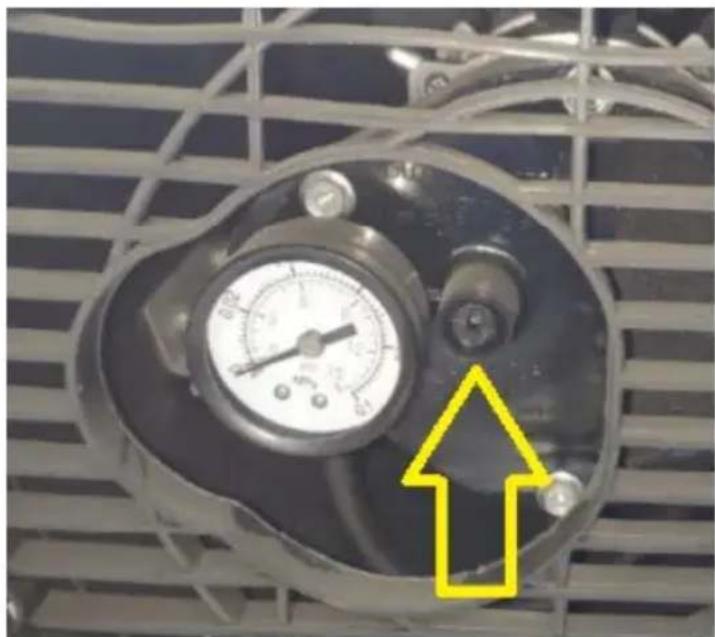
natural_image
Close-up of a pressure gauge mounted on an industrial fan panel, with a yellow arrow pointing to a component (no text or symbols visible)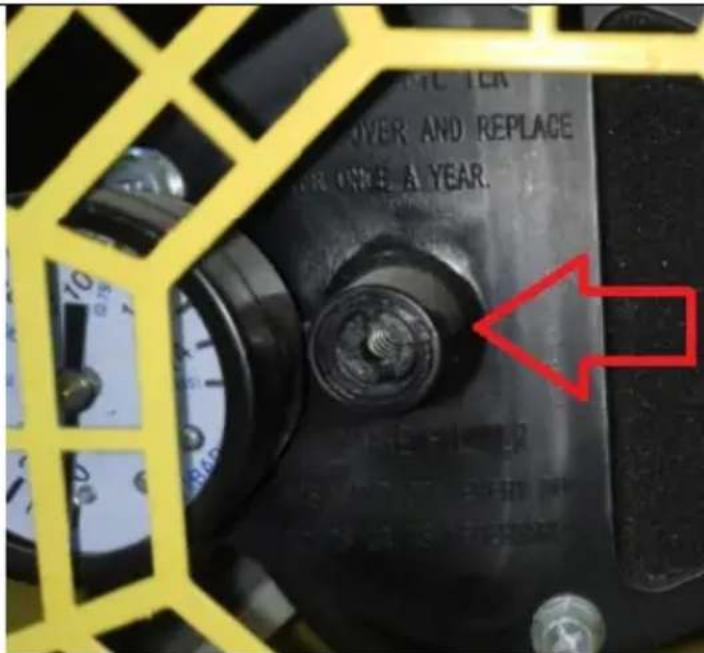
natural_image
Line drawing of a mechanical device with a wrench and tool, no text or symbols presentnatural_image
Technical line drawing of a mechanical assembly with two components and a handle (no text or symbols)natural_image
Technical line drawing of a mechanical component with rotating shaft and housing (no text or symbols)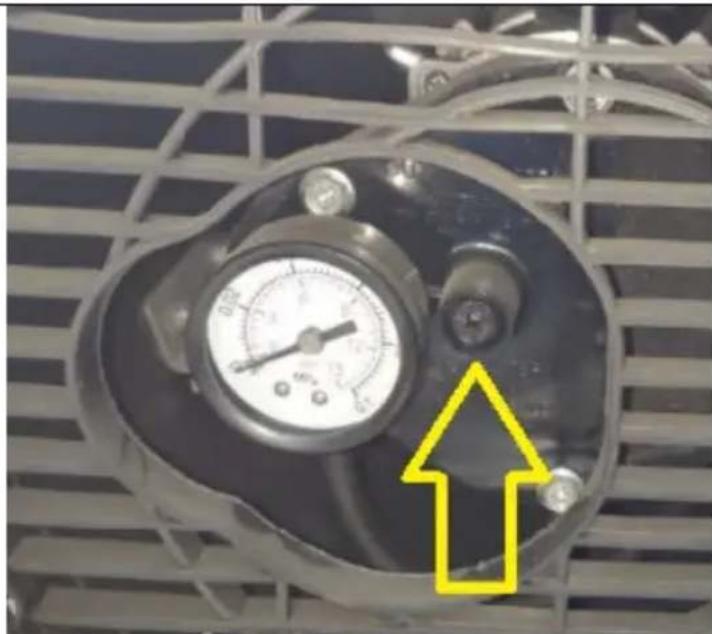
natural_image
Close-up of an industrial air conditioning unit with a pressure gauge and a yellow arrow pointing to it (no text or symbols visible)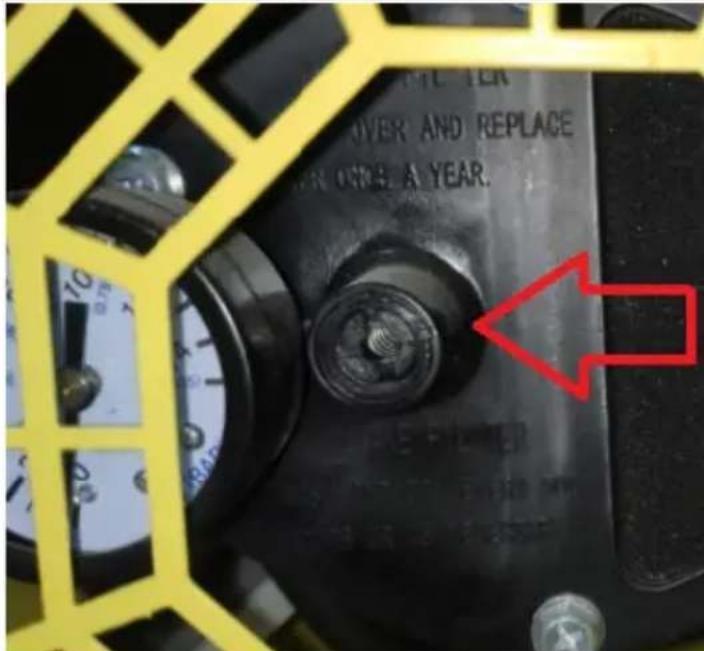
natural_image
Diagram of a mechanical device with a wrench and tool, no text or symbols presentPT
natural_image
Technical line drawing of a mechanical assembly with two components and alignment lines (no text or symbols)natural_image
Technical line drawing of a mechanical assembly with rotating components (no text or symbols)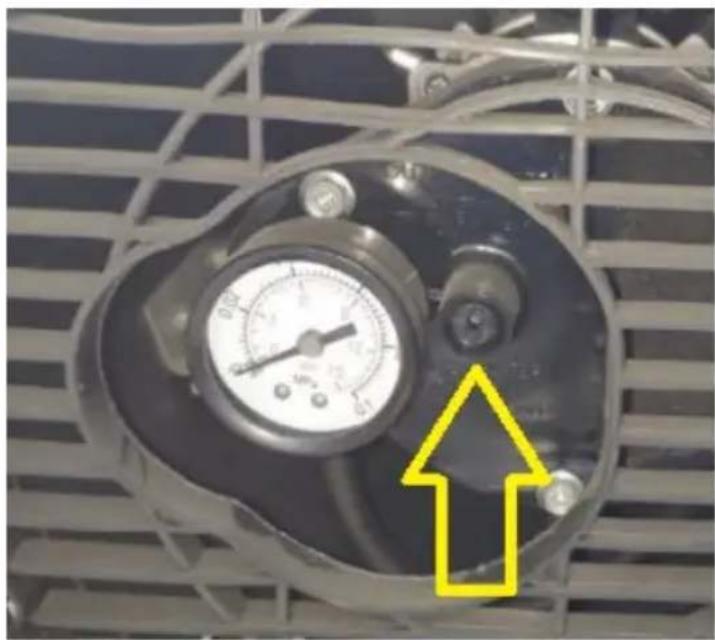
natural_image
Close-up of a pressure gauge mounted on an industrial fan panel, with a yellow arrow pointing to a component (no text or symbols visible)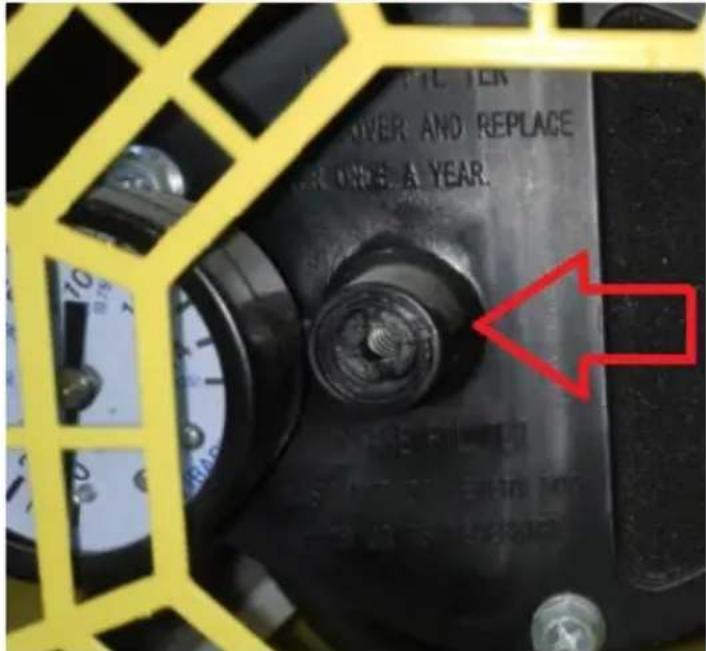
natural_image
Diagram of a mechanical device with a wrench and tool, no text or symbols presentFor the disposal of the device please consider and act according to the national and local rules and regulations.
CONTACT
expondo Polska sp. z o.o. sp. k.