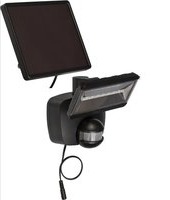
SOL 800 DE 3495 - Lamp BRENNENSTUHL - Free user manual and instructions
Find the device manual for free SOL 800 DE 3495 BRENNENSTUHL in PDF.


| Product type | Solar LED lamp with motion detector |
| Brand | Brennenstuhl |
| Model | SOL 800 DE 3495 |
| Main power supply | Solar module (max. 300 mA / 6 V) or mains charger 5 V DC, min. 800 mA, connector 5.5/2.5 (inner positive) |
| Battery type | Li-Ion 3.7 V / 3.6 Ah |
| Number of LEDs | 8 LED LG SMD |
| Adjustable lighting duration | Approximately 10 seconds to 1 minute |
| Detection angle of motion detector | 180° horizontal, 60° vertical |
| Range of motion detector | 12 meters maximum |
| Light sensitivity | Fixed setting at 10 Lux |
| Protection rating | IP44 |
| Operating temperature | -10 °C to +45 °C |
| Solar module dimensions | 160 x 200 mm |
| Weight | Approximately 1.2 kg (estimate) |
| Main functions | Automatic lighting by motion detection, adjustable lighting duration, AUTO/OFF switch |
| Maintenance and cleaning | Clean the detector and solar module with a damp cloth, without chemicals or abrasives |
| Safety | Do not use another solar module, check cable condition, replace battery only by after-sales service |
| Spare parts and repairability | Battery replaceable only by Brennenstuhl after-sales service |
| General information | Warranty: see instructions; manufacturing: Brennenstuhl, 4 rue de Bruxelles, F-67170 Bernolsheim |
Frequently Asked Questions - SOL 800 DE 3495 BRENNENSTUHL
User questions about SOL 800 DE 3495 BRENNENSTUHL
0 question about this device. Answer the ones you know or ask your own.
Ask a new question about this device
Download the instructions for your Lamp in PDF format for free! Find your manual SOL 800 DE 3495 - BRENNENSTUHL and take your electronic device back in hand. On this page are published all the documents necessary for the use of your device. SOL 800 DE 3495 by BRENNENSTUHL.
USER MANUAL SOL 800 DE 3495 BRENNENSTUHL
natural_image
Line drawing of a wall-mounted electrical outlet connected to a motor (no text or symbols)Thank you for choosing our product. Before you use the product for the first time, you need to familiarize yourself with the following operating instructions and safety warnings. Only use the device as described and only for the areas of use that are indicated. Keep these instructions. If the device is given to someone else, make sure these instructions go with it.
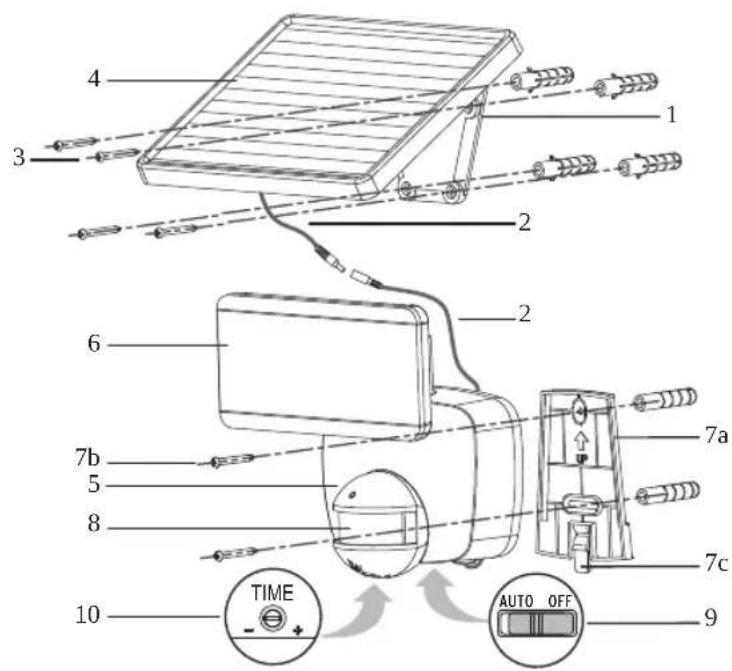
PARTS LIST
1 Bracket
2 Connecting cable light solar module
3 Mounting screws for solar module (4x)
4 Solar module
5 Main unit
6 LED-unit
7a Main unit holder
7b Main unit mounting screws
7c Clip
8 Motion detector
9 AUTO / OFF switch
10 Control-light duration
Before you put the solar light into operation, it will need to be charged.
You have two options:
Charging via the Solar Module:
Connect the solar module (4) cable (2) with the main unit (5).
The ON / OFF switch (9) on the main unit must be set to OFF. Put the solar module in a location where it will get maximum exposure to direct sunlight. Refer to the notes on suitable installation locations in the following section.
Depending on time of year, weather and the location of the solar module, it may take up to 4 days before the light is charged and ready to use.

Directions for use Solar LED-Spot SOL 800 DE 3495
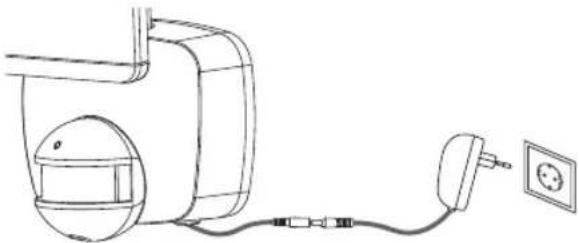
Charging from a power outlet:
natural_image
Line drawing of a wall-mounted electrical outlet connected to a wall-mounted power plug (no text or symbols)A commercially available stabilised power supply with the following specifications can be used for charging: 5 V DC, min. 800 mA, hollow plug 5.5/2.5 (positively charged inside). The ON / OFF switch on the main unit must be set to OFF.
Disconnect the socket and plug of the cable to the solar panel.
Plug the power supply into the socket leading to the solar light.
Connect the power supply to a power outlet.
The light's rechargeable battery is now being charged. It may take up to 8 hours to charge the battery.
Unplug the power supply after a maximum of 8 hours and reconnect the light with the solar panel.
Important: Do not interrupt the power supply during charging because the battery may not be fully charged.
SUITABLE LOCATIONS FOR INSTALLING THE SOLAR LIGHT AND THE SOLAR MODULE
Installing the Main Unit:
The main unit contains the light, the motion detector and the rechargeable battery (Li-ion, 3.7 V/3.6 Ah).
Please note when installing the main unit that the monitoring range of the motion detector is a maximum of 180^ within a 12-metre range, depending on installation height.
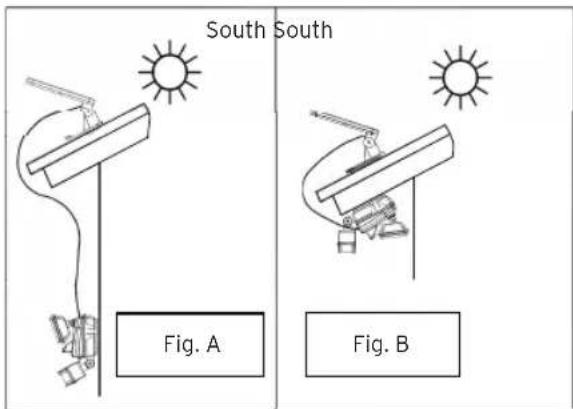
Install the device as shown in Fig. A or B. Use the two screws (7) included in the package to attach the main unit holder.
Push the main unit onto the holder until it snaps in place.
Attention: If using the installation method shown in Fig. B it is essential to ensure that no water can get inside the light fixture. Make sure the light is installed in a location where it is protected from rain.
Removing the Main Unit:
Squeeze the clip, push the main unit upwards and remove it.

Directions for use Solar LED-Spot SOL 800 DE 3495
Solar module:
The solar module is the main power source for the solar lights. It converts sunlight in to electricity and charges the battery. Please keep in mind when mounting the solar module that the solar cell requires as much DIRECT SUNLIGHT as possible. The longer the solar cell is exposed to direct sunlight, the longer the light can stay on.
To the greatest extent possible, the solar module should be aimed to the southern sky in order to maximize exposure to direct sunlight. In central Europe, an angle of inclination approximately 30^ to 40^ is recommended.
Use the four screws included in the packet (item 3 in the parts list) to mount the solar module on a very stable, solid supporting surface.
SETTINGS AND START-UP
After successfully installing the solar light, you can set-up the device in a few easy steps.
Important:
Make sure that the solar light was charged as described in the section „Initially Charging the Solar Powered Light“ before you activate the light.
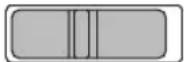
The main unit features a switch (9) with two settings: AUTO and OFF.
AUTO: Position for operation using motion sensor.
OFF: Switches the motion sensor function / LED-light off Position for charging.
AUTO OFF
Adjusting the Motion Detector
Switch the button to the AUTO position after initial charging has been completed.
Point the motion detector in the direction you wish to monitor. Set the TIME adjusting knob on the bottom of the motion detector to "Minimum" (-).
Test the detection range by slowly walking around the area you wish to monitor.
If the solar light does not light up as desired the angle of the motion detector must be adjusted.
The motion detector has one adjusting knob:
TIME
- TIME = Light duration: You can set the time that the light stays on after motion has been detected to a period of between around 10 seconds and 1 minute.
Turn the TIME-control in toward (+) to increase the light duration and toward (-) to reduce the light duration.
Note: The time period set begins after the motion detector has been triggered.
Each time motion is detected, this period begins again.
REPLACING THE BATTERY
Attention: The battery must be taken to Brennenstuhl Service for replacement.

Directions for use Solar LED-Spot SOL 800 DE 3495
GENERAL SAFETY TIPS
- Do not use any other solar module than the one provided. Using another solar module can cause injuries or damage to the light and termination of the warranty.
- Lay the cable such that it is secured and cannot create any kind of hazard (e.g. hazard of tripping). Discontinue use of the solar light if the cable is damaged or defective.
CLEANING
Keep the motion detector free of dust and deposits by occasionally cleaning it with a damp cloth. Do not use any chemicals or abrasive agents to clean the device. Also, make sure that the solar module is always free of dirt and deposits. A dirty solar cell cannot completely charge the battery. This can cause premature aging in the battery and lead to unreliable function in the device.
STORAGE
Follow these steps if you are going to store you light for more than two or three days inside, in order to prevent damage to the battery:
- Set the switch to the OFF-position.
- Store the light and the solar module where the module can receive either sunlight or indoor light every day. The battery needs light in order to retain its charge while stored.
- During long-term storage, the unit must be completely recharged every four months. In order to preserve complete and proper performance, do not store it for long periods.
NOTE THE FOLLOWING TROUBLESHOOTING SOLUTIONS:
- Problem: Light does not activate when there is motion in the monitored area.
Possible Solutions: Make sure that:
- The switch is in the "AUTO" position.
- The motion detector is set such that movements can be detected.
- The solar cell is aimed so that it can receive as much direct sunlight as possible during the day.
-
The battery's charge is not insufficient (charge for 3-4 sunny days with the switch set to OFF).
-
Problem: Light flickers.
Possible Solution:
- Weak battery. Charge the solar light for 3-4 sunny days, during which the switch must be set to OFF.
- Problem: The light does not work after 8 hours of charging with the power supply.
Possible Solutions:
- Check to see if the power supply you're using complies with the prescribed specifications.
- Have the battery voltage checked by a technician; it is possible that the battery has been damaged and needs to be replaced.

Directions for use Solar LED-Spot SOL 800 DE 3495
Technical Data:
Rechargeable batteries: Li-ion, 3.7 V/3.6 Ah
Solar Module: 160 x 200mm, max. 300 mA/6 V
Power supply connection: 5 V DC, min. 800 mA, hollow plug 5.5/2.5
(positively charged inside)
Number of LEDs: 8 LG SMDs
Illumination time: adjustable from approx. 10 seconds to 1 minute
Sensing angle: 180^ horizontal, 60^ vertical
Range: max. of 12 metres
Response sensitivity: set to 10 lux
Protection class: IP44
Ambient temperature: -10^ - +45^
DISPOSAL

Dispose of electronic devices in an eco-friendly fashion! Electronic devices do not belong in your household waste. Compliant with European Guideline 2012/19/EG for electric and electronic devices, used electronic devices must be collected separately taken in for environmentally sound re-cycling. Options for disposing of used devices be obtained from your township, city or municipal government.

Incorrect disposal of batteries rechargeable batteries can harm the environment! Batteries and rechargeable batteries do not belong in the household waste. They can contain poisonous heavy metals and are subject to treatment as hazardous wastes.
Take your used batteries to a municipal collection site.

natural_image
Line drawing of a wall-mounted electrical outlet connected to a device with wires and a power plug (no text or symbols)REPLACEMENT DE L'ACCU
natural_image
Line drawing of a wall-mounted electrical outlet connected to a device with wires and a power plug (no text or symbols)natural_image
Line drawing of a wall-mounted electrical outlet connected to a motor (no text or symbols)natural_image
Line drawing of a wall-mounted electrical outlet connected to a wall-mounted power plug (no text or symbols)natural_image
Line drawing of a wall-mounted electrical outlet connected to a power plug and a circular component (no text or symbols)natural_image
Line drawing of a wall-mounted electrical outlet connected to a wall-mounted power plug (no text or symbols)natural_image
Line drawing of a wall-mounted electrical outlet connected to a power plug and a circular component (no text or symbols)
- PARTS LIST
- Charging via the Solar Module:
- Directions for use Solar LED-Spot SOL 800 DE 3495
- Charging from a power outlet:
- SUITABLE LOCATIONS FOR INSTALLING THE SOLAR LIGHT AND THE SOLAR MODULE
- Installing the Main Unit:
- Removing the Main Unit:
- Solar module:
- SETTINGS AND START-UP
- Important:
- AUTO OFF
- Adjusting the Motion Detector
- TIME
- REPLACING THE BATTERY
- GENERAL SAFETY TIPS
- CLEANING
- STORAGE
- NOTE THE FOLLOWING TROUBLESHOOTING SOLUTIONS:
- Possible Solution:
- Possible Solutions:
- Technical Data:
- DISPOSAL
- REPLACEMENT DE L'ACCU
Brand : BRENNENSTUHL
Model : SOL 800 DE 3495
Category : Lamp