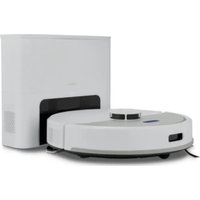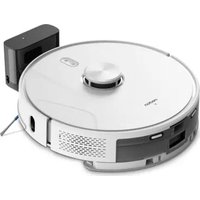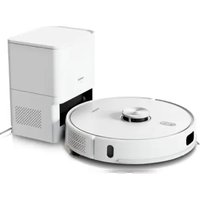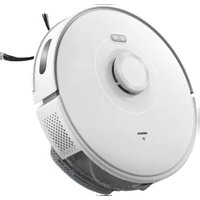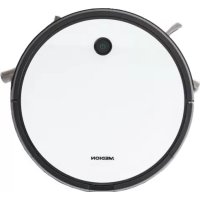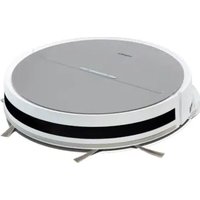
E35 (MD 11157) - Robot vacuum MEDION - Free user manual and instructions
Find the device manual for free E35 (MD 11157) MEDION in PDF.


| Product type | Robot vacuum cleaner |
| Model | E35 (MD 11157) |
| Brand | MEDION |
| Dimensions | Approximately 300 x 70 mm |
| Weight | Approximately 2.0 kg |
| Power supply | Lithium-ion battery 14.4 V, 2500 mAh nominal, 2600 mAh typical, 36.0 Wh |
| Runtime | Up to 120 min (depending on mode) |
| Charging time | Max. 6 hours |
| Dustbin capacity | Approximately 0.4 L |
| Suction power | Approximately 1.0 kPa (ECO mode) / 2.0 kPa (MAX mode) |
| Noise level | 62 dB (ECO mode) / 65 dB (MAX mode) |
| Cleaning programs | Automatic, spot cleaning, edge cleaning, timer |
| Control | Remote control with AAA batteries (included), buttons on unit |
| Safety functions | Anti-drop sensors, anti-collision sensor, automatic stop if blocked |
| Filter | HEPA filter + foam filter, washable |
| Maintenance | Empty dustbin after each use, clean filters regularly, clean side brushes |
| Spare parts | Available from the MEDION online shop |
| Package contents | Robot vacuum, charging station, power adapter, remote control (with batteries), 4 side brushes (2 spare), cleaning brush, quick start guide |
| General information | Indoor use only, for hard floors, dry and wet cleaning (with optional water tank) |
Frequently Asked Questions - E35 (MD 11157) MEDION
User questions about E35 (MD 11157) MEDION
0 question about this device. Answer the ones you know or ask your own.
Ask a new question about this device
Download the instructions for your Robot vacuum in PDF format for free! Find your manual E35 (MD 11157) - MEDION and take your electronic device back in hand. On this page are published all the documents necessary for the use of your device. E35 (MD 11157) by MEDION.
USER MANUAL E35 (MD 11157) MEDION
natural_image
Exterior view of a white robotic vacuum cleaner (no visible text or symbols)Saugroboter
Robot aspirateur
Robotstofzuiger
Robot aspirador
Robot aspirapolvere
Robot vacuum cleaner
MEDION E35 (MD 11157)
Inhaltsverzeichnis
DE
natural_image
Diagram showing a hand inserting a component into a circular device with arrows indicating motion (no text or symbols)natural_image
Line drawing of a hand inserting a component into a circular electronic device (no text or symbols)natural_image
Diagram showing a device being processed into a control panel, with no visible text or symbols.natural_image
Line drawing of hands holding an open mechanical device with internal components (no text or symbols)natural_image
Line drawing of a hand inserting a component into an open device (no text or symbols)natural_image
Line drawing of a hand holding a hairdryer above a striped rectangular object (no text or symbols)Abb. 13 - Filter trocknen
natural_image
Illustration of a faucet spraying water onto a flat surface (no text or symbols)Abb. 14 - Filter abspülen
natural_image
Exploded view diagram of a printer internal structure showing layered components and a downward arrow indicating assembly (no text or symbols present)natural_image
Technical line drawing of a mechanical component inside a circular frame (no text or symbols)natural_image
Line drawing of a hand holding a small object with a string, no text or symbols presentnatural_image
Line drawing of a hand inserting a small component into a device (no text or symbols)Abb. 18 - Laufrad reinigen
natural_image
Technical line drawing of a mechanical assembly with no visible text or symbols3.1. Consignes relatives aux batteries/piles
-1 station de charge
-2 filtres (1 filtre de rechange)
natural_image
Diagram showing a hand inserting a small component into a circular device with arrows indicating motion (no text or symbols)Fig. 8 - Insertion des piles
natural_image
Line drawing of a hand inserting a component into a circular electronic device (no text or symbols)natural_image
Diagram showing a device being processed into a device, with no visible text or symbols.natural_image
Line drawing of hands holding an open mechanical device with internal components (no text or symbols)natural_image
Line drawing of a hand inserting a component into an open device (no text or symbols)natural_image
Line drawing of a hand holding a pipette above a rectangular block (no text or symbols)natural_image
Illustration of a faucet spraying water onto a flat surface (no text or symbols)natural_image
Exploded view diagram of a printer internal structure showing layered components and a downward arrow indicating assembly (no text or symbols present)natural_image
Technical line drawing of a mechanical component inside a circular frame (no text or symbols)natural_image
Line drawing of a hand holding a thin rod with a small object attached (no text or symbols)natural_image
Line drawing of a hand inserting a small component into a device panel (no text or symbols)natural_image
Technical line drawing of a mechanical assembly with no visible text or symbolsWAARSCHUWING! Explosiegevaar!
-2 x filter (1 x reservefilter)
natural_image
Diagram showing a hand inserting a small component into a circular device with arrows indicating motion (no text or symbols)natural_image
Hand inserting a cable into a circular electronic device with internal components (no text or symbols visible)Afb. 9 - Laadcontacten reinigen
9.1. Stofreservoir reinigen
DE
natural_image
Diagram showing a device with a magnified circular component being processed into a handheld device (no text or symbols present)natural_image
Line drawing of a hand opening a device casing with internal components (no text or symbols)Afb. 11 – Stofreservoir openklappen
natural_image
Line drawing of a hand inserting a component into an open device (no text or symbols)Afb. 12 – Filtervak reinigen
natural_image
Line drawing of a hairdryer emitting powder into a rectangular block (no text or symbols)Afb. 13 - Filter drogen
natural_image
Illustration of a faucet spraying water onto a flat surface (no text or symbols)natural_image
Technical illustration of a mechanical assembly with layered components and an arrow indicating downward motion (no text or symbols present)natural_image
Technical line drawing of a mechanical component inside a circular frame (no text or symbols)natural_image
Line drawing of a hand holding a thin wire with a small object attached (no text or symbols)natural_image
Line drawing of a hand inserting a small electronic component into a device (no text or symbols visible)natural_image
Technical line drawing of a mechanical assembly with no visible text or symbolsnatural_image
Diagram showing a hand inserting a small component into a circular device with arrows indicating motion (no text or symbols)natural_image
Hand inserting a component into a circular electronic device (no text or symbols visible)natural_image
Diagram showing a device being processed into a clamp or holder, with no visible text or symbols.natural_image
Line drawing of a hand holding an open mechanical device with internal components (no text or symbols)natural_image
Line drawing of a hand inserting a component into an open device (no text or symbols)natural_image
Line drawing of a hand holding a hairdryer above a striped rectangular object (no text or symbols)natural_image
Illustration of a faucet spraying water onto a flat surface (no text or symbols)Fig. 14 - Enjuague del filtro
natural_image
Technical diagram of a mechanical assembly showing layered components and a downward arrow indicating a process (no text or symbols present)natural_image
Diagram of a mechanical device with rotating blades and housing (no text or symbols)natural_image
Line drawing of a hand holding a small object with a small protrusion, resembling a tool or device (no text or symbols present)natural_image
Line drawing of a hand inserting a small electronic component into a device (no text or symbols visible)natural_image
Technical line drawing of a mechanical assembly with internal components (no text or symbols)natural_image
Diagram showing a hand inserting a component into a circular device with arrows indicating direction (no text or symbols)Fig. 8 - Inserimento delle batterie
natural_image
Hand inserting a component into a circular electronic device (no text or symbols visible)natural_image
Diagram showing a device with a circular component being processed into a handheld device (no text or symbols visible)natural_image
Line drawing of a mechanical device with open lid and internal structure (no text or symbols)natural_image
Line drawing of a hand inserting a component into an open device (no text or symbols)natural_image
Line drawing of a hairdryer emitting powder into a rectangular block (no text or symbols)natural_image
Illustration of a faucet spraying water onto a flat surface (no text or symbols)Fig. 14 - Lavaggio del filtro
natural_image
Technical line drawing of a printer internal structure with a downward arrow indicating assembly (no text or symbols present)Fig. 15 - Inserimento del filtro
natural_image
Diagram of a mechanical device inside a circular frame, showing blades and components without any text or symbols.natural_image
Line drawing of a hand holding a small object with a small circular mark, no text or symbols presentnatural_image
Line drawing of a hand inserting a plug into a device (no text or symbols)natural_image
Technical line drawing of a mechanical assembly with internal components (no text or symbols)https://www.medion.com/medionserviceshop,
- About this user manual 124
1.1. Explanation of symbols ......124 FR - Proper use 125
- Safety instructions ....125
3.1. Information on the battery/rechargeable batteries 128 - Package contents ...... E\$30
- Appliance overview 130
- Before using the appliance for the first time ....132
6.1. Positioning the charging station 132
6.2. Charging the battery pack 132
6.3. Inserting batteries in the remote control....132
6.4. Setting the time 133 - Vacuum cleaning mode 133
- Cleaning programmes 134
8.1. Spot cleaning programme 134
8.2. Corner cleaning programme....134
8.3. Timer function....134 - Cleaning and care....135
9.1. Cleaning the dust container 135
9.2. Cleaning the side brushes....136
9.3. Cleaning the wheel/drive wheels 137 - Energy management of the robot vacuum cleaner....137
- Prolonged non-use/transport 138
- Troubleshooting ....139
- Replacing battery block.... 141
- Spare parts 141
- Technical specifications.... 142
- EU declaration of conformity.... 143
- Disposal 143
- Service information.... 144
- Legal Notice....145
1. About this user manual

Thank you for choosing our product. We hope you enjoy using this appliance.
Read the safety instructions carefully before using the appliance for the first time. Note the warnings on the appliance and in the user manual.
Always keep the user manual close to hand. If you sell the appliance or give it away, please ensure that you also pass on this user manual. It is an essential component of the product.
1.1. Explanation of symbols
If a passage is marked with one of the warning symbols listed below, follow the warning notices in order to prevent the hazards described in the text and the potential consequences described there.

DANGER!
Warning: risk of fatal injury!

WARNING!
Warning: risk of possible fatal injury and/or serious irreversible injuries!
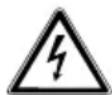
WARNING!
Warning: risk of electric shock!

WARNING!
Warning: risk of explosive materials!

CAUTION!
Warning: risk of minor and/or moderate injuries!

NOTICE!
Follow these instructions to prevent damage to the appliance!

More detailed information about using the appliance!

NOTICE!
Follow the instructions in the user manual!

Symbol for protection class II electrical appliances
Direct current symbol
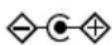
Polarity marking
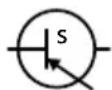
Symbol for electrical switched-mode power supply unit
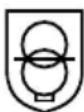
Symbol for transformer – short-circuit proof

Indoor use

Symbol for energy efficiency level VI
IP20 The mains adapter offers protection class IP20 in compliance with DIN EN 60529. This means: The mains adapter is protected: - against access to hazardous parts by fingers. - against intrusion of solid foreign objects with a diameter of 12.5 mm or larger. The mains adapter is not waterproof.
T_a=40 C The mains adapter can be used at ambient temperatures of up to 40^ .
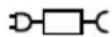
Only use the SA182V-190060V mains adapter that has been supplied
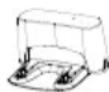
Only use the charging station included in the original package contents.
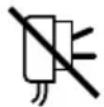
This symbol means that the mains power adapter must no longer be used if the plug or plug contacts are damaged.
2. Proper use
The robot vacuum cleaner is a domestic appliance product. It is designed to automatically dry clean smooth and level floors. With the inserted water tank and wiping cloth, it is also designed for damp cleaning of smooth and level floors indoors. Do not use the appliance outdoors.
The product is only intended for private use, and is not to be used commercially. Only use the product for the purpose stated above. Please note that we shall not be liable in cases of improper use:
▶ Do not modify the appliance without our consent and do not use any auxiliary equipment that we have not approved or supplied.
▶ Only use replacement parts or accessories that we have supplied or approved.
▶ Comply with all the information in this user manual, especially the safety instructions. Any other use is considered improper and can cause personal injury or property damage.
3. Safety instructions
DE
■ Keep the appliance and its FR accessories out of the reach of children. NL
■ This appliance can be used by children of 8 years and older, and by people with reduced physical, sensory or mental capacity, or with a lack of experience and/or knowledge, but only with proper supervision, or if they have been told how to use the appliance safely, and have understood the risks involved if they use it improperly.
■ Children must not be allowed to play with the appliance.
■ Do not allow children to clean the appliance or perform maintenance tasks on it unless they are aged 8 years or older, and properly supervised.
■ Children younger than 8 should be kept away from the appliance, mains adapter and mains cable.

DANGER!
Risk of electric shock!
Live parts. There is a risk of electric shock/short circuit.
■ Use the supplied, removable mains adapter and the charging station to charge the battery.
■ The mains adapter may only be used in dry rooms.
■ Only connect the mains adapter to a properly installed, easily accessible power socket. The local mains voltage must correspond to the technical specifications for the mains adapter.
■ The socket must be easily accessible so that you can unplug the appliance from the mains quickly if necessary.
■ When unplugging the mains cable from the socket, always pull on the plug rather than on the mains cable. Do not kink or crush the mains cable.
■ Unplug the appliance mains adapter from the socket
– before cleaning or maintaining the appliance
- in the event of damage to the plug, mains cable, charging station or the appliance itself
- if liquids or foreign objects have penetrated inside the appliance
– before fitting or removing accessories
– the appliance is damp or wet
- if you are away for a long period
– during thunderstorms.
■ Only use the appliance in enclosed spaces and never expose the appliance to water droplets or spray.
■ Do not touch the appliance with damp or wet hands while the appliance is charging.
■ Check the robot vacuum cleaner and the mains cable for damage before using the appliance for the first time and after every use.
■ Do not use the appliance if the robot vacuum cleaner, charging station or mains cable is visibly damaged.
■ Contact our Service Centre without delay if the appliance has been damaged during transport.
■ Never immerse the robot vacuum cleaner, charging station or mains adapter in water or other liquids!
WARNING! Risk of explosion!
There is a risk of fire or explosion when vacuuming up flammable liquids or certain solid materials.
■ Never use the appliance near highly flammable materials.
■ Do not vacuum up sharp-edged or highly flammable objects and liquids such as matches, hot ashes or petrol.
■ Do not vacuum up toner dust (carbon black from laser printers, photocopiers) under any circumstances.

CAUTION!
Risk of injury/risk of damage to the appliance!
There is a risk of injury and/or damage to the appliance due to improper use.
DE
FR
NL
ES
IT
■ Only use the appliance to vacuum small amounts of dust, dirt and crumbs. Empty the dust container after every use.
EN
■ Do not use the appliance to vacuum up liquids or damp dirt. Allow damp, cleaned carpets to dry fully before vacuuming.
In order to avoid the risk of tripping, do not use an extension cable and inform any persons present about the operation of the robot vacuum cleaner.
■ Do not cover the sensors and ventilation slots on the robot vacuum cleaner.
■ Avoid collisions with rough, brushed or grainy surfaces (e.g. skirting boards on fireplaces or stoves), as the surfaces themselves or those on the appliance
may be damaged. Exclude these types of areas from vacuuming.
■ Do not expose the appliance to extreme conditions.
Avoid:
–high humidity or wet conditions
—extremely high or low temperatures
-direct sunlight
-open flames.
3.1. Information on the batt ery/ rechargeable batteries
This appliance contains a removable lithium-ion battery block. The remote control contains two AAA batteries.

WARNING!
Risk of explosion!
Risk of explosion if batteries/rechargeable batteries are replaced incorrectly.
■ Do not heat up the rechargeable battery to temperatures above the specified maximum ambient temperature.
■ Never open the rechargeable battery.
■ Never throw the batteries/rechargeable battery into an open fire.
■ Never short-circuit the batteries/rechargeable battery.
■ Only replace the batteries/rechargeable battery with the same type or an equivalent type recommended by the manufacturer.
■ Dispose of used batteries/rechargeable batteries according to the manufacturer's specifications.
■ Never try to recharge non-rechargeable batteries.
■ Always remove flat batteries from the remote control.
■ If the remote control is not going to be used for long periods, remove the batteries.
■ Store batteries/rechargeable batteries in a cool, dry place. Strong direct heat can damage batteries/rechargeable batteries. Do not expose the appliance to sources of intense heat.
■ Use only the supplied genuine mains cable to charge the rechargeable battery.

WARNING! Risk of chemical burns!
Leaking batteries/ rechargeable batteries can cause chemical burns if they come into contact with skin.
- Seek medical help immediately if you think that batteries/rechargeable batteries may have been swallowed or secreted in any part of the body.
■ Avoid contact with battery acid. If battery acid comes into contact with skin, eyes or mucous membranes, rinse the affected areas with plenty of clean water and consult a doctor as soon as possible.
■ Remove leaking batteries from the appliance immediately. Clean the contacts before inserting new batteries. Battery acid can cause chemical burns!
- Keep new and used batteries/rechargeable batteries out of the reach of children.
■ Stop using the remote control if you cannot close the battery compartment securely, and keep it well away from children.
■ Clean all contacts on the battery/rechargeable battery and in the battery compartment before inserting.
■ Always use new batteries/rechargeable batteries of the same type. Never use old and new batteries/rechargeable batteries together.
■ Pay attention to the polarity (+/-) when inserting the batteries/rechargeable batteries.
4. Package contents

DANGER!
Risk of choking and suffocation!
There is a risk of choking and suffocation due to swallowing or inhaling small parts or plastic wrap.
- Keep the plastic packaging out of the reach of children.
Please check your purchase to ensure that all items are included and in perfect condition. If anything is missing or damaged, contact us within 14 days of purchase.
The following items are supplied with your product:
-Robot vacuum cleaner with integrated lithium-ion battery pack
-1 x charging station
-2 x filters (1 x replacement filter)
-4 x side brushes (2 x replacement side brushes)
-1 x remote control, incl. 2 x AAA batteries
-1 x cleaning brush
-Short manual
5. Appliance overview
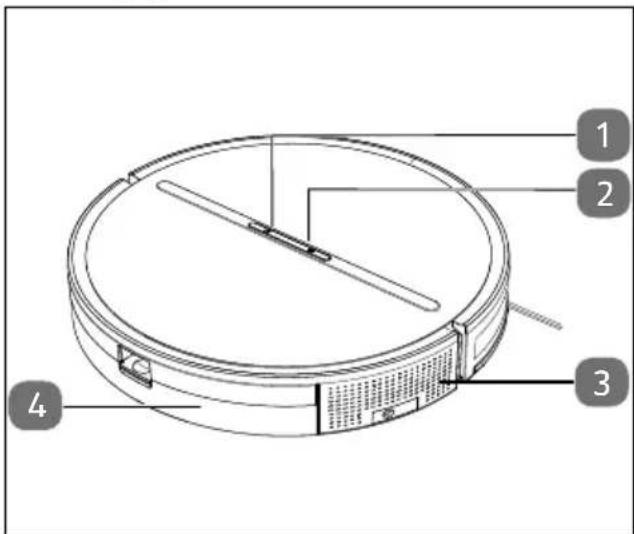
Fig. 1 - Top
- Start/pause button
- Return to the charging station, long press: Setting the vacuum power level
- Ventilation openings
- Dust container
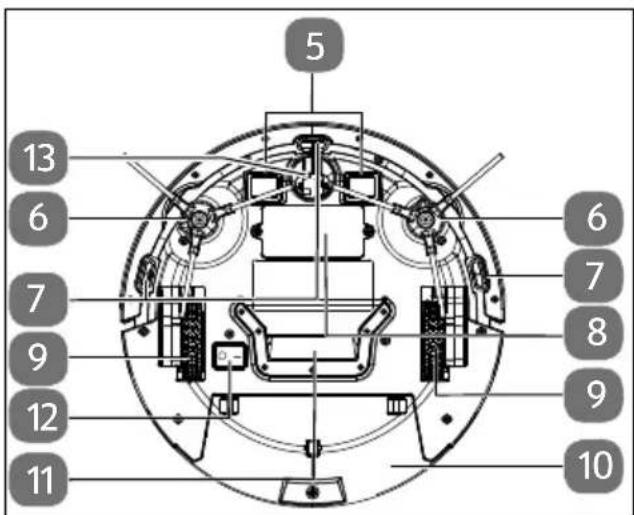
Fig. 2 - Bottom view
- Charging contacts
- Side brush
- Anti-fall sensor
- Battery compartment
- Drive wheel
- Dust container
- Suction opening
- On/Off switch
- Wheel
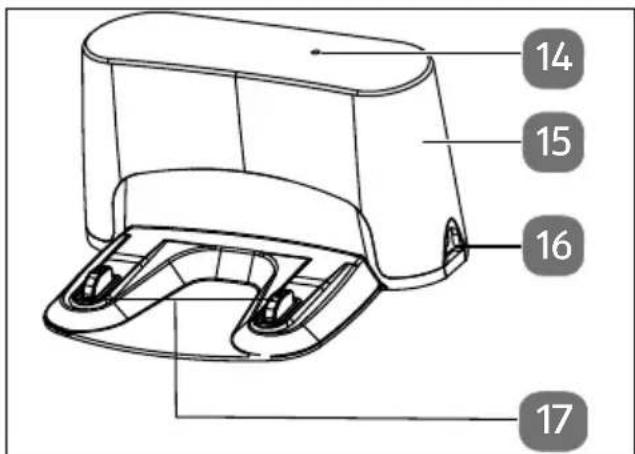
Fig. 3 - Charging station
- Operating light
- Infrared reception range (remote control)
- Connection for mains adapter
- Charging contacts
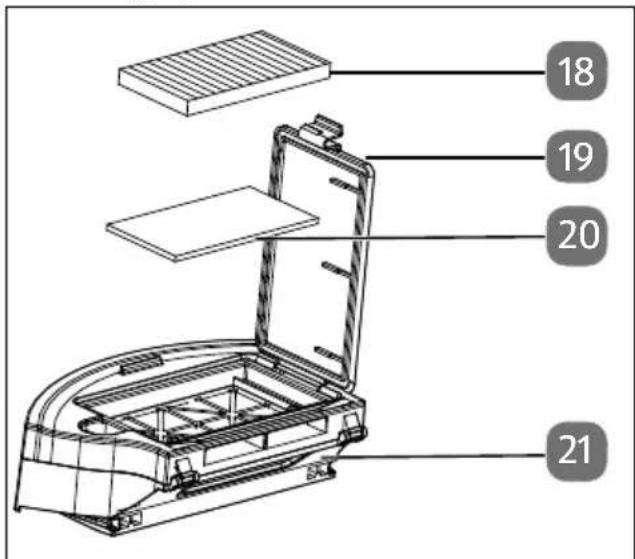
Fig. 4 - Dust container
- Filter
- Dust container cover
- Sponge filter
- Dust container
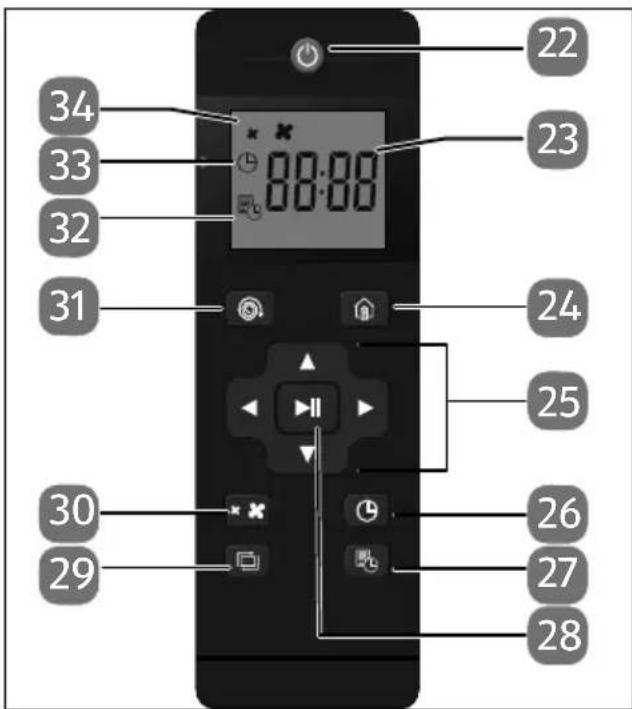
Fig. 5 - Remote control
- On/Off switch
- LCD screen
- Return to the charging station
- Manual operation (right, left, forwards, backwards)
- Time setting
- Timer setting
- Start/pause button (automatic cleaning), vacuum power level setting
- "Corner cleaning" programme
- Vacuum power setting (level 1/level 2)
- "Spot cleaning" programme
- Timer programming display
- Time display
- Vacuum power level display
6. Before using the appliance for the first time
6.1. Positioning the charging station
▶ Position the charging station on a wall with a level surface and avoid direct sunlight.
▶ Ensure that the required clearance of approx. 0.5 m to the sides and approx. 1.5 m to the front is maintained and that the charging contacts for the robot vacuum cleaner are freely accessible.
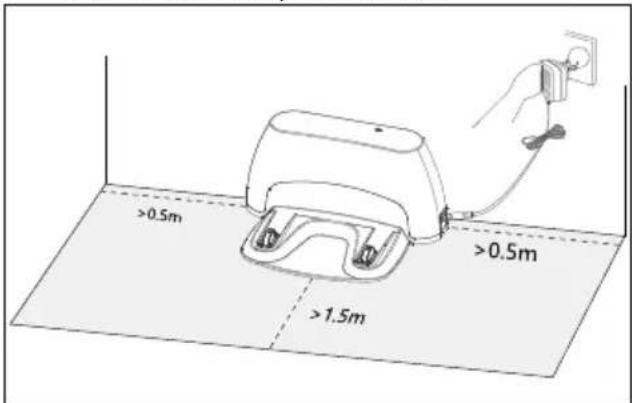
Fig. 6 – Charging station installation Connect the mains adapter to the mains adapter connection on the charging station.
Connect the mains adapter to a socket.
natural_image
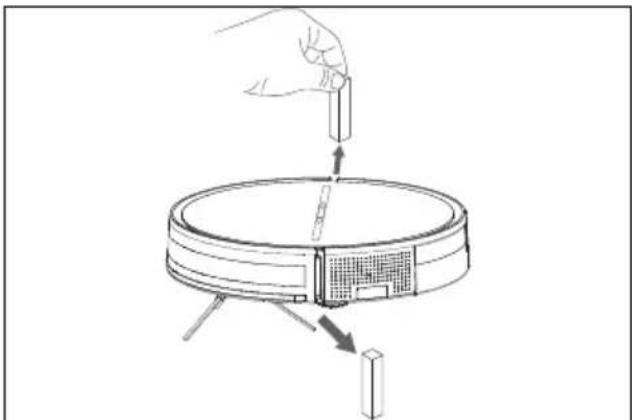
Diagram showing a hand inserting a component into a circular device with arrows indicating direction (no text or symbols)Fig. 7 - Removing the transport lock
Remove the two transport locks on the impact sensors (bumpers) before use.
6.2. Charging the battery pack
The robot vacuum cleaner is fitted with a lithium-ion battery pack. Charge the appliance battery block for at least 6 hours the first time it is used to ensure that the full performance and longevity of the rechargeable battery is reached.
Place the robot vacuum cleaner onto the charging station so that the charging contacts lie on top of each other.
While the robot vacuum cleaner is charging, the battery status indicator light on the
button flashes white at short intervals.
When the battery block is fully charged and charging is complete, the operating light
lights up continuously.
The robot vacuum cleaner automatically returns to the charging station if the battery level is low. This return to the charging station interrupts the cleaning process.

If the performance of the battery decreases significantly even when charged, contact our Service Centre.
6.3. Inserting batt eries in the remote control
Remove the battery compartment cover on the back of the remote control.
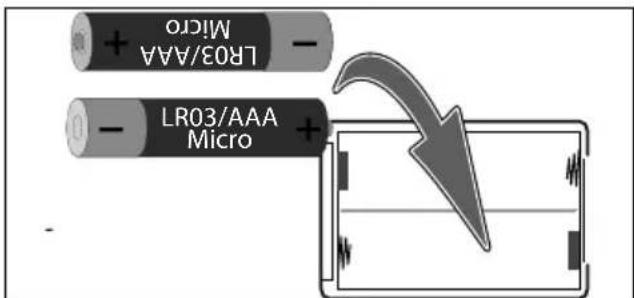
Fig. 8 - Inserting batteries
Insert two AAA/1.5 V batteries in the battery compartment of the remote control. Check the battery polarity (as shown on the bottom of the battery compartment).
▶ Close the battery compartment.
6.4. Setting the time
Press the button on the remote control. The hour display begins to flash.
▶ Increase or decrease the hour display using the control buttons (▲ up/▼ down).
▶ Use the right control button to switch
▶ to the minute display. The minute display begins to flash.
▶ Increase or decrease the minute value using the control buttons (▲ up/▼ down).
▶ Press the button again to save the setting.
7. Vacuum cleaning mode

NOTICE!
Risk of damage to property!
Loose cabling can become caught around your robot vacuum cleaner during vacuuming and be pulled by the appliance. This can result in appliances being pulled off a table and consequently damaged.
■ Lay cables out of the reach of the appliance.
■ Remove all fragile items (e.g. glass, lamps, vases) and objects that could become trapped in the brushes or sucked up (e.g. cords, clothing, newspapers, curtains) from the working area before operating the appliance.

Remove all rugs from the room before vacuuming.
This robot vacuum cleaner is intended for use on hard floors. Ensure that the dust container is clean and that the filter has been correctly inserted.
▶ Press the operating switch on the underside of the robot vacuum cleaner:
Position I: ON
Position O: OFF
▶ Briefly press the button on the appliance or the ⏻ button on the remote control to turn on the robot vacuum cleaner.
▶ Press the || button on the appliance or on the remote control to start the automatic cleaning process.
During automatic cleaning, the vacuum robot cleaner cleans the room at random until the programme comes to an end or the battery charging capacity is exhausted.
The ▶ button on the robot vacuum cleaner lights up white continuously during cleaning. The robot vacuum cleaner then automatically returns to the charging station.
▶ Press the ▶ button again or press the ▶ button on the remote control to interrupt the automatic cleaning programme.
▶ Press the ▶ button again to continue cleaning.
▶ Use the control buttons(,▼,◀,▶) to direct the robot vacuum cleaner around the room manually.
▶ Change the vacuum power used directly on the robot vacuum cleaner by pressing and holding the 📄 button or using the ✿ button on the remote control.

When the vacuum power is changed, one beep indicates vacuum level 1 and two beeps indicate the use of vacuum level 2.

Press the button on the appliance for approx. 3 seconds or the ⏻ button on the remote control to switch off the robot vacuum cleaner. The battery status indicator light and operating status indicator light on the robot vacuum cleaner turn off.
8. Cleaning programmes
The robot vacuum cleaner features various cleaning programmes that can be selected individually.
8.1. Spot cleaning programme
This programme is suitable for an area with a high concentration of dirt or dust. During the Spot cleaning programme, the robot vacuum cleaner concentrates on cleaning a particular area.
Press the button on the remote control to start the programme.
▶ Change the vacuum power used by pressing and holding the button on the robot vacuum cleaner or using the
button on the remote control.
Press the button again or press the button on the remote control to end the Spot cleaning programme.

Once the area has been cleaned, the robot vacuum cleaner automatically returns to the charging station.
8.2. Corner cleaning programme
This programme is suitable for cleaning the corners and edges of a room. During the Corner cleaning programme, the product runs along a border (e.g. a wall).
▶ Press the button on the remote control to start the programme.
▶ Change the vacuum power used by pressing and holding the button on the robot vacuum cleaner or using the
button on the remote control.
▶ Press the button again or press the ▶ button on the remote control to end the Corner cleaning programme.

8.3. Timer function
The timer function makes it possible for cleaning to take place automatically in a specified time window.
▶ Press the button on the remote control. The hour display flashes.
▶ Use the ▼ control buttons to set the hours.
▶ Use the control buttons to switch to the minute display. The minute display begins to flash.
▶ Use the ▼ control buttons to set the minutes.
▶ Press the button to complete and save the programming.
When the programmed time is reached, the robot vacuum cleaner automatically switches on and starts cleaning.

If you switch off the robot vacuum cleaner using the operating switch, the stored settings are lost.
9. Cleaning and care

WARNING!
Risk of electric shock!
There is a risk of electric shock/short circuit from live parts.
■ Never immerse the robot vacuum cleaner, charging station or mains adapter in water or other liquids!
■ Only clean the appliance and all accessories with a dry or slightly damp cloth.
■ Switch off the appliance completely and pull the mains plug out of the socket before cleaning and maintenance as well as before assembly or disassembly of the accessories.
Clean and maintain your robot vacuum cleaner as follows:
▶ Empty the dust container and clean the filter after every use.
▶ Clean the suction openings as required.
Do not use any solvents or caustic/gaseous cleaning agents to clean the appliance's surfaces.
▶ Wipe the surface of the robot vacuum cleaner and the charging station with a slightly damp cloth.
▶ Switch off the robot vacuum cleaner completely using the operating switch on the underside.
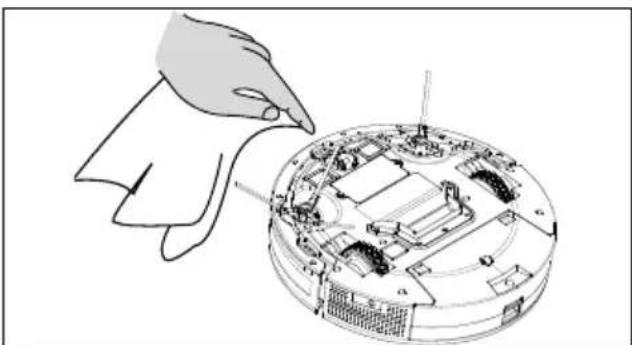
▶ Clean the charging contacts with a clean, dry cloth.
natural_image
Illustration of a hand inserting a cable into a computer motherboard (no text or symbols visible)Fig. 9 - Cleaning charging contacts
9.1. Cleaning the dust container
We recommend emptying the dust container and cleaning the filter after every use. To do so, carry out the following steps:
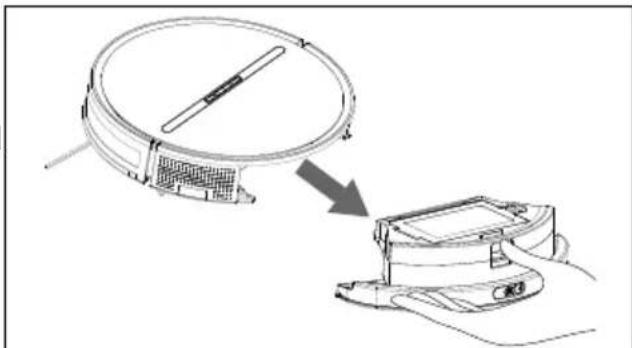
▶ Press the release button on the dust container and pull the dust container (including the water tank if applicable) out to the front.
natural_image
Diagram showing a device being processed into a digital display unit (no text or symbols present)Fig. 10 - Removing the dust container
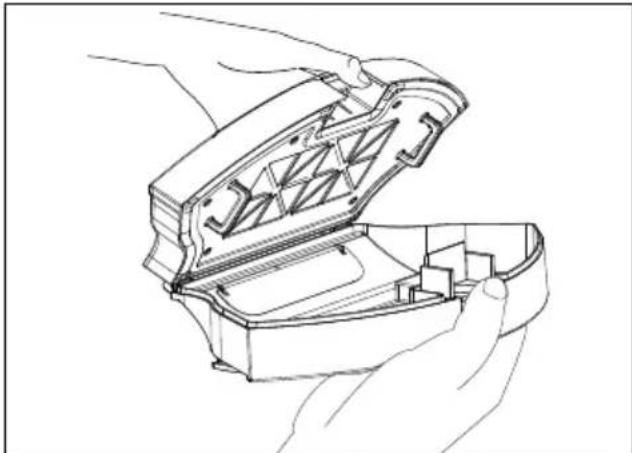
▶ Lift up the dust container lid.
natural_image
Line drawing of hands assembling a mechanical device with internal components (no text or symbols)Fig. 11 - Opening the dust container
▶ Empty the dust container over a dustbin.
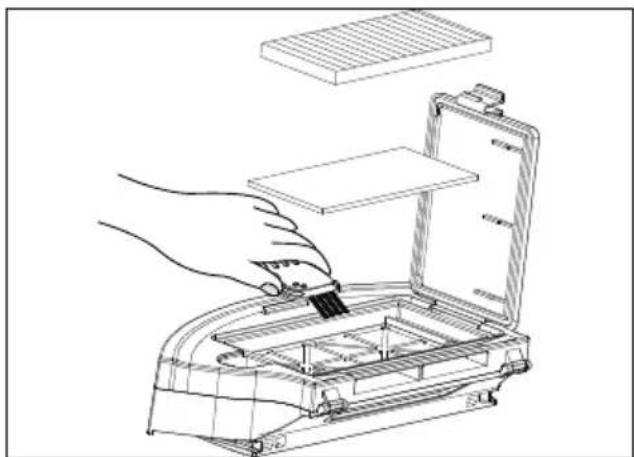
▶ Clean the dust container with the cleaning brush supplied.
Remove the HEPA filter and the sponge filter.
natural_image
Line drawing of a hand inserting a component into an open device (no text or symbols)Fig. 12 - Cleaning the filter compartment
▶ Clean the HEPA filter, the sponge filter and the dust container regularly using the cleaning brush supplied.
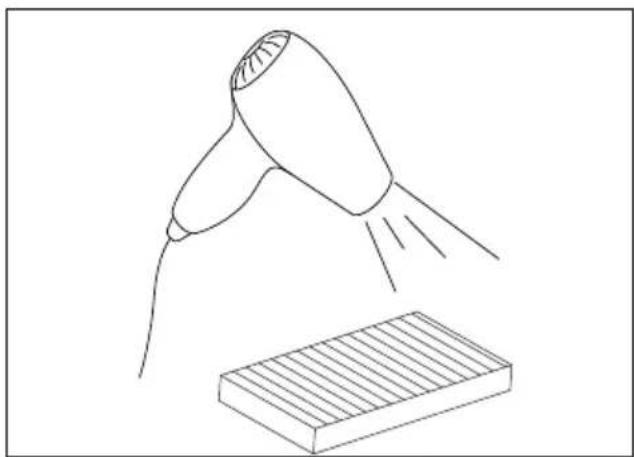
Tap or blow out the dust from the HEPA filter and sponge filter (using a hair dryer) with cold air.
natural_image
Line drawing of a hairdryer emitting powder into a rectangular block (no text or symbols)Fig. 13 - Drying the filter
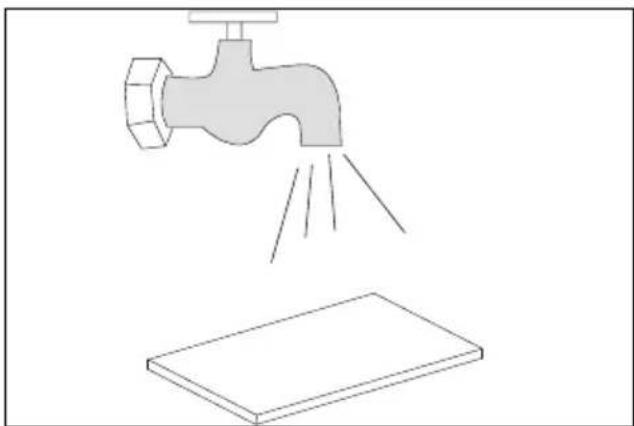
- Rinse the dust container, HEPA filter and sponge filter thoroughly under running water.

The dust container is not suitable for cleaning in the dishwasher.
natural_image
Illustration of a faucet spraying water onto a flat surface (no text or symbols)Fig. 14 - Rinsing the filter
▶ Allow the HEPA filter and sponge filter to dry overnight before using the filters again. A hair dryer with cold air can also be used to dry them.
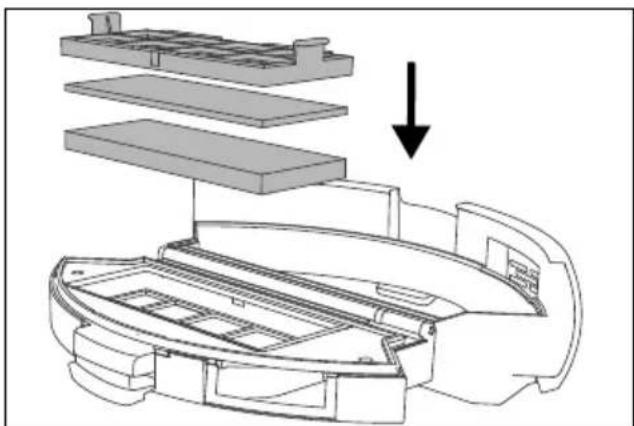
▶ Once the dust container and filter components are dry, insert the filters back into the dust container in reverse order.
Before using the appliance again, ensure that the filters have been inserted correctly in the dust container.
natural_image
Exploded view diagram of a printer internal structure showing layered components and a downward arrow indicating assembly (no text or symbols present)Fig. 15 - Inserting the filter
9.2. Cleaning the side brushes
Clean the side brushes regularly.
▶ Switch off the appliance and place it upside down onto a flat surface with the bottom of the appliance facing upwards.
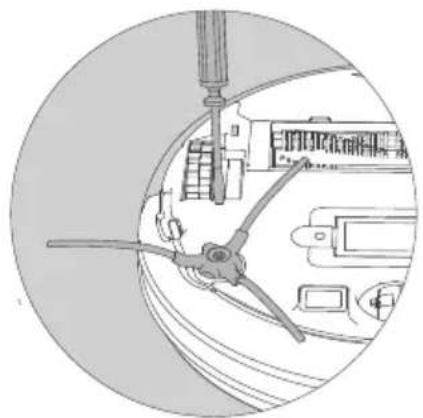
If necessary, remove the side brush to make it easier to clean:
▶ Release the screw on the brushes using a Phillips screwdriver.
▶ Hold the side brushes firmly and pull them straight up to remove them from the appliance.
natural_image
Technical line drawing of a mechanical component inside a circular frame (no text or symbols)Fig. 16 - Removing side brushes
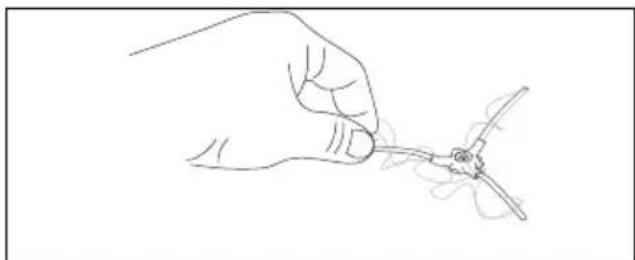
Remove dirt and hair from the side brushes.
natural_image
Line drawing of a hand holding a small object with a string, no text or symbols presentFig. 17 - Removing dirt
▶ After cleaning, reattach the side brushes.

Replace the brushes at intervals of 3-6 months depending on the degree of wear to ensure good cleaning performance. For accessories, please contact the Service Centre.

If the bristles become bent, place the brushes in hot water so that the bristles return to their original shape.
9.3. Cleaning the wheel/drive wheels
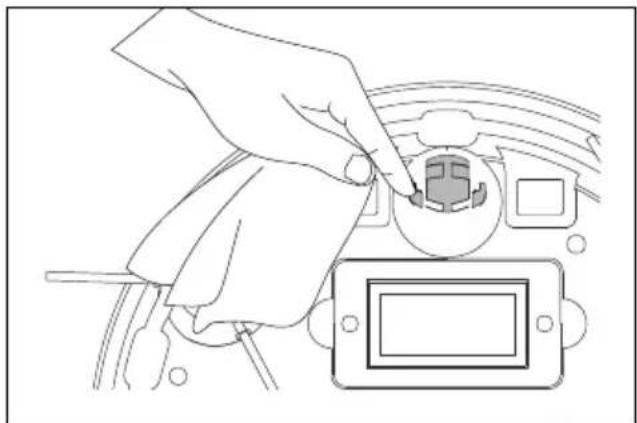
▶ If the front wheel or side wheels are obstructed, remove the dirt using a slightly damp cloth.
natural_image
Line drawing of a hand inserting a small electronic component into a device (no text or symbols)Fig. 18 - Cleaning the wheel
10. Energy management of the robot vacuum cleaner
| Usage | Charge recommendation |
| Occasional Disconnect the charging station from the socket after each full charge. | |
| Daily, repeated use | Charging station is permanently connected to the socket.When fully charged, energy consumption is minimised by trickle charging. |
| Occasionally or regularly for small areas | Set the appliance to sleep mode when the battery level is sufficient.Disconnect the charging station from the socket.The robot vacuum cleaner switches to sleep mode.The robot vacuum cleaner can be activated for vacuuming at any time using an existing programme or the ▶ button. |
| Consumption in watts | |
| Mains adapter 0.080 W | |
| Charging directly using the mains adapter on the vacuum robot cleaner | 12.68 W |
| Charging with charging station | 13.01 W |
| Trickle charging on the charging station | 1.09 W |
| Trickle charging on the mains adapter | 0.778 W |
11. Prolonged non-use/transport
▶ If you are not going to use the appliance for a longer period of time, fully charge the battery, then completely disconnect the mains adapter and charging station from the power supply.
▶ Clean the robot vacuum cleaner and store it in a dry, dust- and frost-free place, away from direct sunlight.
In case of non-use, fully charge the rechargeable battery every 2 months to prevent the battery from becoming fully discharged.
▶ Remove the batteries from the remote control.
▶ To avoid damage during transport, we recommend that you use the original packaging.
12. Troubleshooting
If the robot vacuum cleaner stops working properly, please refer to the troubleshooting table shown below to see if you can resolve the problem yourself.
Never attempt to repair the robot vacuum cleaner yourself. If a repair is necessary, please contact our Service Centre or a suitable authorised repair workshop.
| Error message Possible cause Solution | ||
| Robot vacuum cleaner does not moveOperating light-ll flashes white 2 timesBeep | Error on the left drive wheel | ▶ Check the left wheel on the robot vacuum cleaner for dirt and obstructions. |
| Robot vacuum cleaner does not moveOperating light-ll flashes white 3 timesBeep | Error on the right drive wheel | |
| Robot vacuum cleaner does not move and switches off after a secondOperating light-ll flashes white 4 timesBeep | Error message from floor sensor. | ▶ Place the robot vacuum cleaner on a flat surface. |
| Robot vacuum cleaner does not moveOperating light-ll flashes white 6 timesBeep | Error message from anti-fall sensors | ▶ Check the anti-fall sensors for dirt.▶ Clean the sensor. |
| Robot vacuum cleaner does not moveOperating light-ll flashes white 7 timesBeep | The rechargeable battery in the robot vacuum cleaner is almost flat. | ▶ Charge the robot vacuum cleaner battery on the charging station or using the mains adapter. |
| Error message Possible cause Solution | ||
| Robot vacuum cleaner does not moveOperating light flashes white 8 timesBeep | Error message from front impact sensor | Check whether the front impact sensor is obstructed. |
| Robot vacuum cleaner does not moveOperating light flashes white 10 times, beep | The side brushes are obstructed. | Check the side brushes for dirt and obstructions.Clean the side brushes with the cleaning brush. |
| Robot vacuum cleaner does not moveOperating light flashes 12x whiteBeep | Error message from fan | Contact the service department. |
| Robot vacuum cleaner does not moveOperating light flashes 14x whiteBeep | Error message when charging the rechargeable battery in the robot vacuum cleaner. | Check whether the robot vacuum cleaner is correctly connected to the charging station or mains adapter.Correct the connection between the robot vacuum cleaner to the charging station or the mains adapter. |
| Robot vacuum cleaner does not moveOperating light flashes 16x whiteBeep | The robot vacuum cleaner has become stuck on an object and obstructed. | Check the position of the robot vacuum cleaner.Remove the object and set up the robot vacuum cleaner again. |
13. Replacing batt ery block

CAUTION!
Risk of injury!
There is a risk of injury in case of contact with the removed batteries.
- Keep removed batteries away from children. Do not throw batteries into fire, short-circuit or dismantle them.
■ Do not expose removed batteries to extreme conditions such as radiators, direct sunlight! Increased risk of leakage!
■ Avoid contact with the skin, eyes and mucous membranes. In the event of contact with battery acid, rinse the affected areas immediately with plenty of clean water and consult a doctor immediately.
Remove the battery pack before disposing of the robot vacuum cleaner or in case of a fault with the battery pack.
▶ Make sure that the battery pack is completely discharged before removing.
▶ Completely switch off the appliance via the operating switch, unplug the mains adapter from the socket, if necessary.
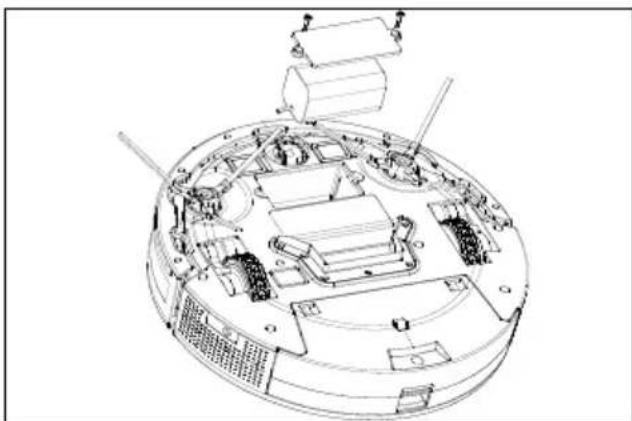
▶ Loosen both screws on the battery compartment lid using a Phillips screwdriver and open the battery compartment.
Remove the battery pack by pulling on the tab.
Remove the battery block plug from the appliance socket.
Remove the rechargeable battery.
▶ Replace the rechargeable battery with an identical rechargeable battery.
natural_image
Technical line drawing of a mechanical assembly with no visible text or symbolsFig. 19 - Inserting the battery pack
▶ Connect the plug of the new battery block to the appliance socket.
▶ Close the battery compartment and secure the battery compartment lid using the two screws.
▶ Charge the battery.
▶ Switch the appliance on again using the operating switch.
14. Spare parts
Please visit our MEDIONserviceshop at https://www.medion.com/ medionserviceshop to order any spare parts you need.
You will be able to find out all the details about your specific product while you're there.
- Technical specifi cations
| Appliance | |
| Vacuum power: Approx. 1.0 kPa (ECO mode) | Approx. 2.0 kPa (MAX mode) |
| Noise level: 62 dB (ECO mode) | 65 dB (MAX mode) |
| Dust container capacity: Approx. 0.4 l | |
| Operating duration: Max. 120 min. | (depending on mode and ground conditions) |
| Weight: Approx. 2.0 kg | |
| Dimensions: Approx. 300 x 70 mm | |
| Battery pack | |
| Lithium-ion battery pack | |
| Model: | H18650CH-4S1PBAK cell |
| Manufacturer: BYD, Company Ltd. China | |
| Battery voltage: 14.4 V | |
| Battery capacity: Rated 2500 mAh | |
| Typical 2600 mAh | |
| Output: 36.0 Wh | |
| Charging time: Max. 6 hours | (depending on previous charge level) |
| Operating temperature: Charging: 10–40°C | |
| Mains adapter | |
| Manufacturer: Dongguan Sunun Power Co., Ltd. | Importer:MEDION AGAm Zehnthof 7745307 EssenGermanyHR number: HRB 13274 |
| Model name: SA182V-190060V | |
| Input voltage/current/input AC frequency: 100 | -240 V~, 50/60 Hz, 0.4 A max. |
| Output voltage/current: | 19.0 V— — — 0.6 A |
| Power output: 11.4 W | |
| Average efficiency during operation: 83.95% | |
| Efficiency with low load (10%): 76.67% | |
| Power consumption with zero load 0.075 W | |
| Remote control | |
| Battery: 2x AAA LR03 1.5 V | |
| Manufacturer: Zhongyin (Ningbo) Battery Co., Ltd. | |

(only for mains adapter)
16. EU declaration of conformity
CE MEDION AG hereby declares that this appliance complies with the fundamental requirements and the other relevant provisions of:
• EMC Directive 2014/30/EU
• Low Voltage Directive 2014/35/EU
• Ecodesign Directive 2009/125/EC
• RoHS Directive 2011/65/EU
17. Disposal
PACKAGING
Your appliance has been packaged to protect it from damage in transit.
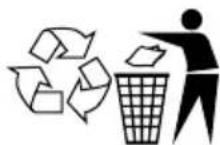
The packaging is made of materials that can be recycled in an environmentally friendly manner.

Observe the following labels on the packaging materials regarding waste separation with the abbreviations (a) and numbers (b): 1–7: plastics/20–22: paper and cardboard/80–98: composite materials

(France only)
The “Triman” symbol tells the consumer that the product can be recycled, is covered by an extended system of manufacturer’s responsibility and must be sorted by material type in France.
APPLIANCE
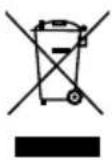
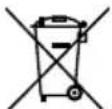
All old appliance marked with the symbol shown must not be disposed of in normal household waste.
In accordance with Directive 2012/19/EU, the appliance must be properly disposed of at the end of its service life.
This involves separating the materials in the appliance for the purpose of recycling as well as minimising the environmental impact and negative effects on human health.
Take old appliances to an electrical scrap collection point or a recycling centre.
Contact your local waste disposal company or your local authority for more information on this subject.
BATTERIES
Do not dispose of used batteries with normal household rubbish. Batteries must be disposed of correctly. For this purpose, retailers that sell batteries and local collection points provide containers in which you can dispose of them. Contact your local waste disposal company or your local authority for more information.
In connection with the sale of batteries or the supply of appliances containing batteries, we are obliged to draw your attention to the following:
As the end user, you are legally required to return used batteries. The crossed-out wheelie bin symbol means that the battery must not be disposed of with household rubbish.
18. Service information
Please contact our Customer Service team if your device ever stops working the way you want or expect it to. There are several ways for you to contact us:
- In our Service-Community, you can meet other users, as well as our staff, and you can exchange your experiences and pass on your knowledge there. You will find our Service-Community at community.medion.com.
• Alternatively, use our contact form at www.medion.com/contact. - You can also contact our Service team via our hotline or by post.
| Opening times | Hotline number UK |
| Mon – Fri: 08.00 – 20.00Sat – Sun: 10.00 – 16.00 | 1 0333 3213106 |
| Service address | |
| MEDION Electronics Ltd.120 Faraday Park, Faraday Road, DorcanSwindon SN3 5JF, Wiltshire United Kingdom | |

You can download this and many other sets of operating instructions from our service portal at www.medionservice.com.
We have stopped providing printed copies of our warranty terms and conditions as part of our commitment to sustainability, but you can access the warranty terms and conditions on our service portal.
You can also scan the QR code on the side of the screen, to download the operating instructions onto your mobile device from the service portal.
19. Legal Notice
Copyright 2024
Date: 29. May 2024
All rights reserved.
These operating instructions are protected by copyright.
Mechanical, electronic and any other forms of reproduction are prohibited without the written permission of the manufacturer.
Copyright is owned by the company:
MEDION AG
Am Zehnthof 77
45307 Essen
Germany
Please note that you cannot use the address above for returns. Please always contact our Customer Service team first.