
IW 3/4" 1600 18-EC - Drill Flex - Free user manual and instructions
Find the device manual for free IW 3/4" 1600 18-EC Flex in PDF.


| Product type | Cordless Impact Wrench |
| Brand | Flex |
| Model | IW 3/4" 1600 18-EC |
| Power supply | 18 V lithium-ion battery (models AP 18.0/2.5, 5.0, 8.0, 12.0) |
| No-load speed | 0 - 500 / 1000 / 1900 rpm |
| Impact rate | 0 - 2350 ipm |
| Max tightening torque | 1600 Nm |
| Max nut-breaking torque | 2100 Nm |
| Drive square | 3/4 inch |
| Weight (without battery) | 3.05 kg |
| LED light | Yes, two lamps with 6 adjustable brightness levels |
| Variable speed trigger | Yes |
| Speed control panel | Yes, 3 preset modes + M mode (automatic stop) |
| Rotation direction presetting | Forward / center lock / reverse |
| Lanyard attachment points | 2 points |
| Intended use | Tightening and loosening bolts/nuts in industry and trade |
| Maintenance | Regularly clean the ventilation slots and housing with dry compressed air |
| Safety | Wear hearing protection above 85 dB(A) and protective gloves |
| Spare parts | Available at www.flex-tools.com |
| Compatible charger | CA 12/18, CA 18.0-LD, CA 10.8/18.0 |
| Operating temperature | -10 °C to 40 °C |
Frequently Asked Questions - IW 3/4" 1600 18-EC Flex
User questions about IW 3/4" 1600 18-EC Flex
0 question about this device. Answer the ones you know or ask your own.
Ask a new question about this device
Download the instructions for your Drill in PDF format for free! Find your manual IW 3/4" 1600 18-EC - Flex and take your electronic device back in hand. On this page are published all the documents necessary for the use of your device. IW 3/4" 1600 18-EC by Flex.
USER MANUAL IW 3/4" 1600 18-EC Flex
IW 1/2" 1500 18-ECIW 1/2" 15 IW 3/4" 1600 18-ECIW 3/4" 16
natural_image
Line drawings of two FLEX electric drillers with visible stator and base (no text or symbols)en Original operating instructions....14
natural_image
Line drawing of a mechanical device with a cylindrical housing and an arrow indicating direction (no text or symbols)C
natural_image
Line drawing of a Flex power tool with visible wiring and base (no text or symbols)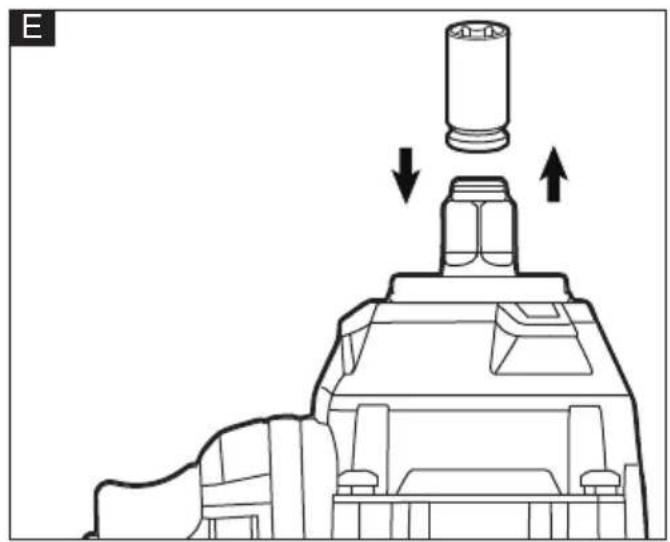
natural_image
Technical line drawing of a mechanical component with arrows indicating assembly or movement (no text or symbols)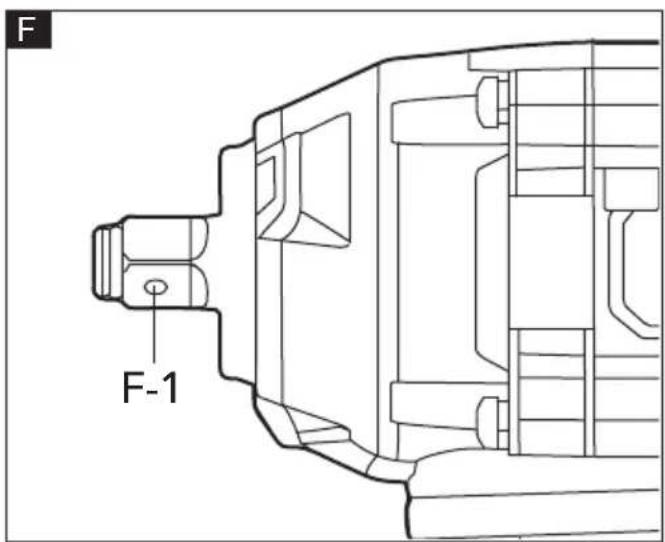
natural_image
Diagram of a vehicle's rear view with directional arrow and play button (no text or symbols)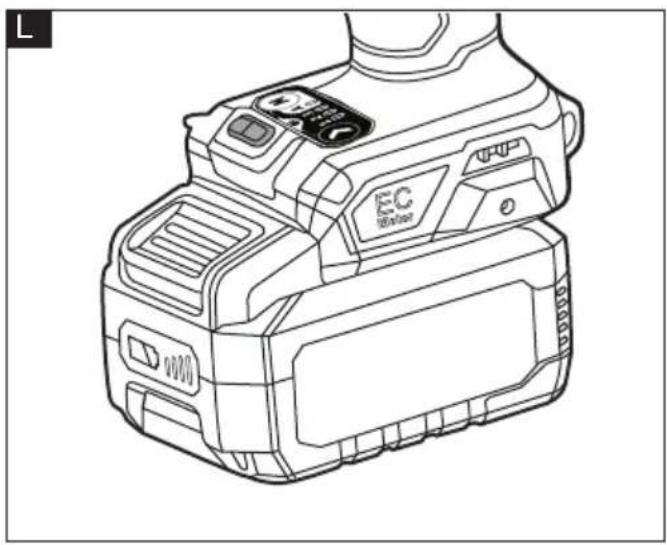
natural_image
Line drawing of a digital camera module with no visible text or symbols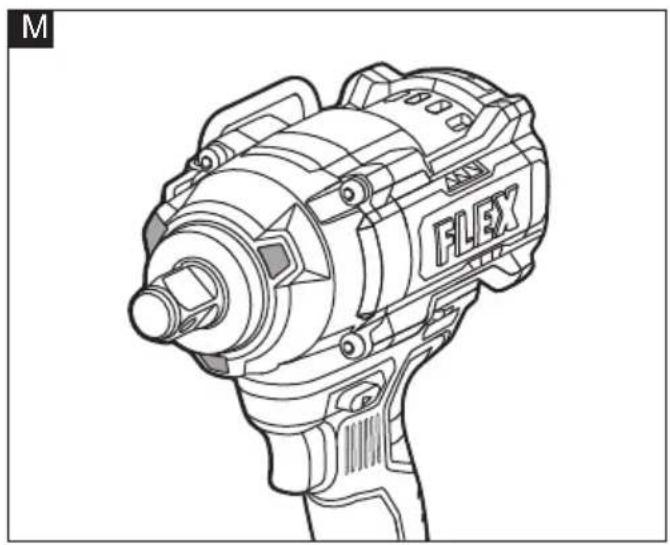
natural_image
Technical line drawing of a Flex electric drill (no text or symbols)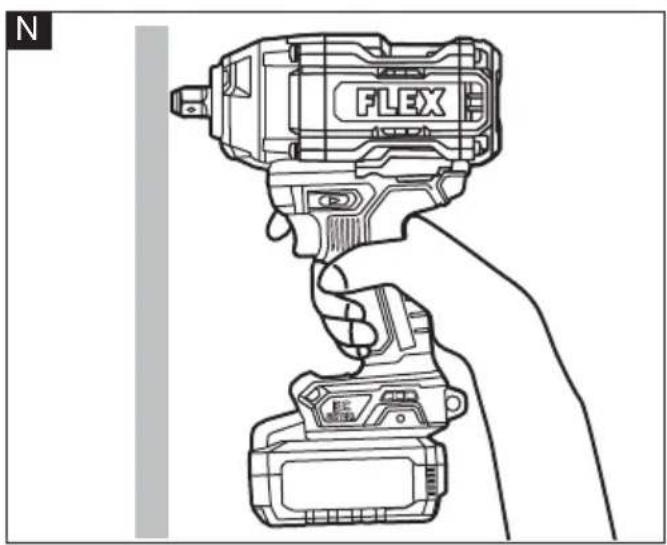
natural_image
Line drawing of a hand holding a Flex electric drill, no text or symbols presentSymbols used in this manual

WARNING!
Denotes impending danger. Non-observance of this warning may result in death or extremely severe injuries.

CAUTION!
Denotes a possibly dangerous situation. Non-observance of this warning may result in slight injury or damage to property.

NOTE
Denotes application tips and important information.
Symbols on the power tool
V Volts
/min Rotation rate

Read the instructions

Disposal information for the old machine (see page 19)!
For your safety

WARNING!
Before using the power tool, please read the follow:
– these operating instructions,
- the "General safety instructions" on the handling of power tools in the enclosed booklet (leaflet-no.: 315.915),
– the currently valid site rules and the regulations for the prevention of accidents.
This power tool is state of the art and has been constructed in accordance with the acknowledged safety regulations.
Nevertheless, when in use, the power tool may be a danger to life and limb of the user or a third party, or the power tool or other property may be damaged.
The cordless impact wrench may be used only –asintended,
– in perfect working order.
Faults which impair safety must be repaired immediately.
Intended use
The cordless impact wrench is intended
– for commercial use in industry and trade,
– for fastening and loosening of bolts, nuts and various threaded fasteners.
Safety instructions for impact wrench

WARNING!
Read all safety warnings, instructions, illustrations and specifications provided with this power tool. Failure to follow all instructions listed below may result in electric shock, fire and/or serious injury. Save all warnings and instructions for future reference.
■ Hold the power tool by insulated gripping surfaces, when performing an operation where the fastener may contact hidden
wiring. Fasteners contacting a "live" wire may make exposed metal parts of the power tool "live" and could give the operator an electric shock.
Noise and vibration
The noise and vibration values have been determined in accordance with EN 62841.
The A evaluated noise level of the power tool is typically:
– Sound pressure level L_pA :
IW 1/2" 1500 18-EC 97.6 dB(A)
IW 3/4" 1600 18-EC 98.2 dB(A)
– Sound power level L_WA :
IW 1/2" 1500 18-EC 105.6 dB(A)
IW 3/4" 1600 18-EC 106.2 dB(A)
- Uncertainty: K = 3 dB.
Total vibration value:
- Emission value a_h :
IW 1/2" 1500 18-EC 14.1 m/s ^2 - IW 3/4" 1600 18-EC 17.4 m/s ^2
- Uncertainty: K = 1.5 m/s

CAUTION!
The indicated measurements refer to new power tools. Daily use causes the noise and vibration values to change.

NOTE
The declared vibration total value(s) and the declared noise emission level given in this information sheet has been measured in accordance with a measurement method standardized in EN 62841 and may be used to compare one tool with another.
It may be used for a preliminary assessment of exposure. The specified vibration emission level represents the main applications of the tool.
However, if the tool is used for different applications, with different cutting accessories or poorly maintained, the vibration emission level may differ.
This may significantly increase the exposure level over the total working period.
To make an accurate estimation of the vibration exposure level, it is also necessary to take into account the times when the tool is switched off or running but not actually in use.
This may significantly decrease the exposure level over the total working period.
Identify additional safety measures to protect the operator from the effects of vibration such as: maintain the tool and the cutting accessories, keep the hands warm, organization of work patterns.

WARNING!
The vibration and noise emissions during actual use of the power tool can differ from the declared value in which the tool is used; In order to protect the operator, user should wear gloves and ear protectors in the actual conditions of use.

CAUTION!
Wear ear defenders at a sound pressure above 85 dB(A).
Technical data
| Tool | IW 1/2"1500 18-EC | IW 3/4"1600 18-EC | |
| Type Impact Wrench | |||
| Rated voltage | Vdc 18 | ||
| No-load speed | rpm 0 - 500/1000/1900 | ||
| Impact rate ipm 0-2350 | |||
| Fastening torque | Nm 1500 1600 | ||
| Nut-busting torque | Nm 2000 2100 | ||
| Weight according to"EPTA Procedure 01/2003" (without battery) | kg 2.85 3.05 | ||
| Battery 18V | AP 18.0/2.5AP 18.0/5.0AP 18.0/8.0AP 18/12.0 | ||
| Weight of battery | kg | AP 18.0/2.5AP 18.0/5.0AP 18.0/8.0AP 18/12.0 | 0.40.71.11.6 |
| Working temperature | -10-40°C | ||
| Storage temperature | < 50°C | ||
| Charging temperature | 4-40°C | ||
| Charger | CA 12/18,CA 18.0-LD,CA 10.8/18.0 | ||
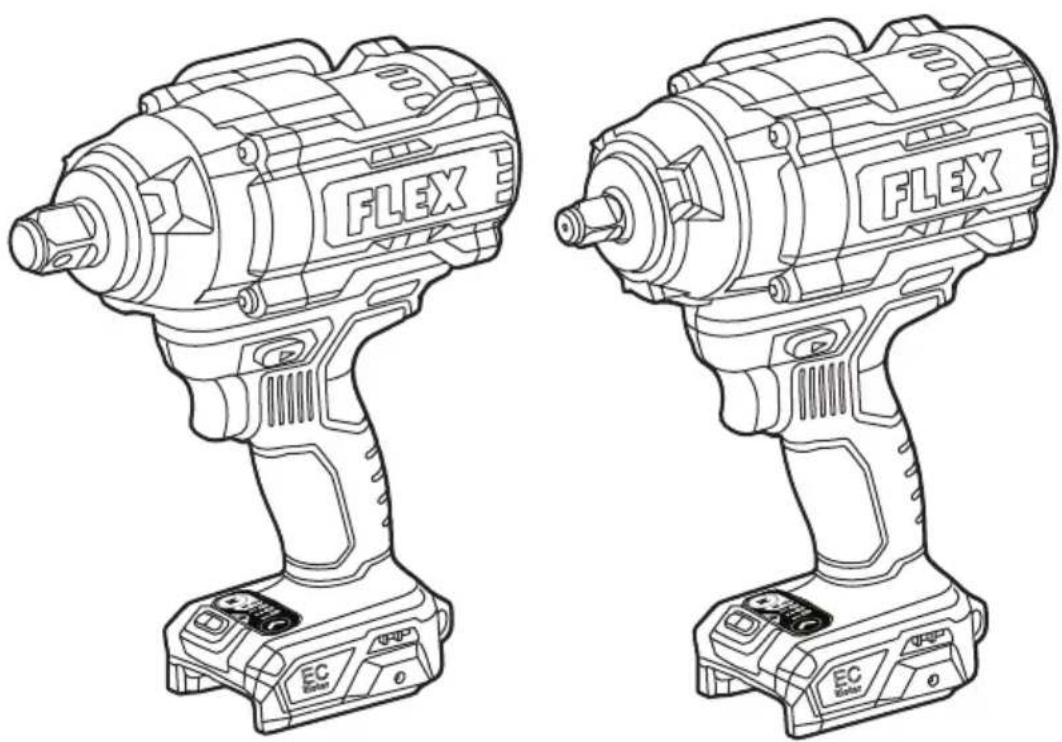
Overview (see figure A)
The numbering of the product features refers to the illustration of the machine on the graphics page.
- Square drive
- Variable-speed trigger switch
- Speed control panel
- LED work light
- LED work light
- Direction preselector switch (forward / center-lock /reverse)
- Handle
- Lanyard connection point
Operating instructions
WARNING!
Remove the battery before carrying out any work on the power tool.
Before switching on the power tool
Unpack the cordless impact wrench and check that here are no missing or damaged parts.
NOTE
The batteries are not fully charged on delivery. Prior to initial operation, charge the batteries fully. Refer to the charger operating manual.
Inserting/replacing the battery
■ Press the charged battery into the power tool until it clicks into place (see figure B).
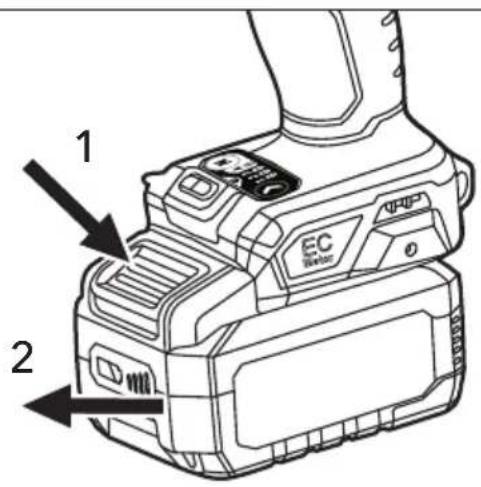
■ To remove, press the release button and pull out the battery (see figure C).
CAUTION!
When the device is not in use, protect the battery contacts. Loose metal parts may short circuit the contacts, explosion and fire hazard!
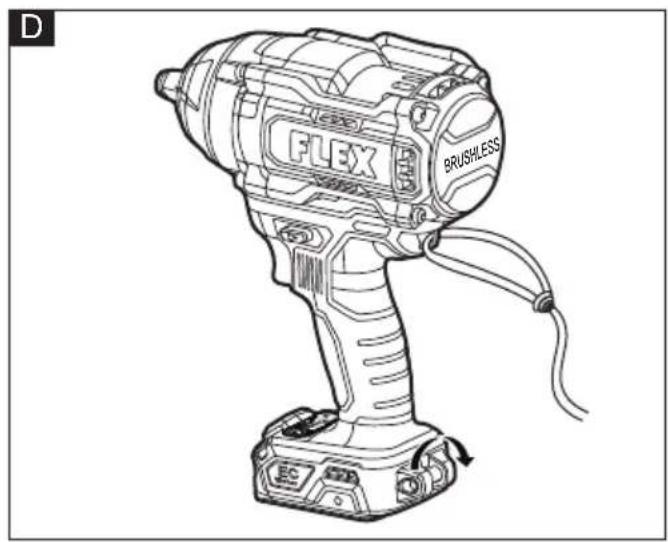
Lanyard strap connect points (see figure. D)
■ This tool features two lanyard connection points. A lanyard (sold separately) reduces the risk of dropping the tool.
WARNING
Tool is heavy! To reduce the risk of injury, do not use wrist strap.
Install and remove the impact socket (see figure E&F)
CAUTION!
Before carrying out any work on the power tool, move the direction preselector switch (7) to the middle position.
Make sure that the impact socket and the mounting portion are not damaged before installing the impact socket.
■ Align the square of the impact socket with the square drive (1) and push the impact socket onto the square drive as far as it will go.
■ Tap it lightly if required.
■ To remove the impact socket, simply pull it off.
The square drive of IW 3/4" 1600 18-EC is equipped with a through-hole (F-1) (see figure F). The through-hole allows for more secure socket retention via compatible socket and use of accessory pin and ring or one piece retainer.
WARNING!
Do not use worn or damaged sockets.
WARNING!
The impact socket may be hot after prolonged use. Use protective gloves when removing the impact socket from the tool, or first allow the impact socket to cool down.
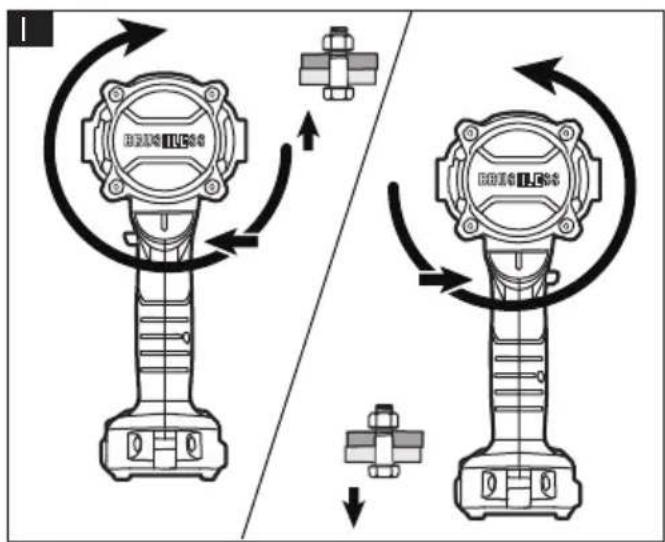
Direction preselection (see figure I)
CAUTION!
Change the direction of rotation only when the power tool is stopped.
Move the direction preselector switch (7) to the required position:
■ Position the direction preselector switch (7) to the far left of the tool to tighten bolts/nuts
■ Position the direction preselector switch (7) to the far right of the tool to loosen bolts/nuts.
■ Position the direction preselector switch (7) in the "OFF" (center-lock) position to help reduce the possibility of accidental starting when not in use.
NOTE
The impact wrench will not run unless the direction preselector switch is engaged fully to the left or to the right.
WARNING!
Battery tools are always in operating condition. Therefore, the direction preselector switch should always be locked in the center position when the tool is not in use or when carrying it at your side.
Mode selection (see figure J)
CAUTION!
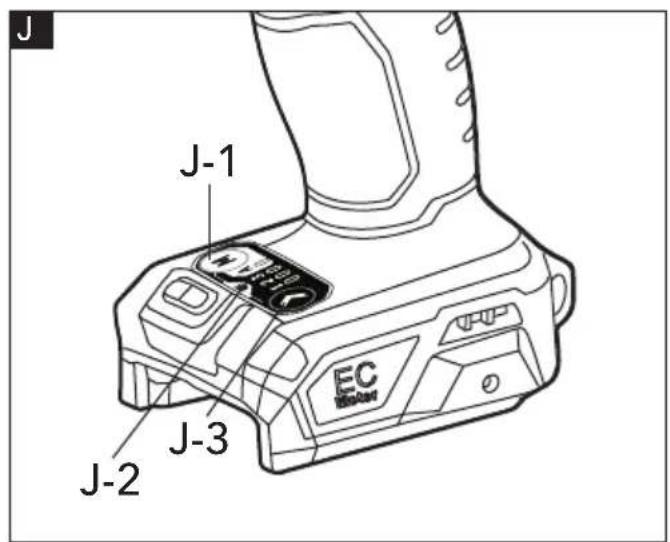
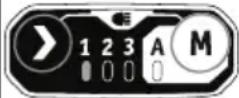
Your tool is equipped with a mode control panel (3), located on the foot of the tool. It consists of the drive-control button ➤ (J-3), the "M" Ⓜ button (J-1), and LED indicators (J-2) for working modes.
The drive-control button (J-3) is used to select
among three modes to adjust the torque, rotation-speed (RPM), and impact-speed (IPM) setting for an application. The modes 1, 2, and 3 are the only modes where the speed is controlled by the variable-speed trigger switch.
To select the drive control mode:
■ First, check the active mode. Press the drive control button(J-3) directly without touching the trigger switch. The LED indicator below the mode number will illuminate to indicate the active mode setting.
- Press the drive-control button(J-3) briefly (less than 0.5 second) to cycle through the 3 modes. Each press changes one torque level. See more details in the chart below. "M" (J-1) is a special mode, that is designed
Forward Rotation:
to be used both with forward rotation for tightening the bolts or nuts and reverse rotation for loosening the bolts or nuts.
■ Forward: bolt auto stop mode; the tool stops after applying a number of impacts to avoid fasten too tightly.
■ Reverse: bolt removal mode; the tool stops automatically as soon as it has loosened the bolt/nut.
Using the "M" button:
Press the "M" button(J-1) directly without touching the trigger switch. The corresponding indicator light "A" will illuminate to indicate the active mode.
Each press changes one mode. See more details in the chart below:
| Indicator light on control panel | Working Mode | Maximum IPM (Impacts per minute) | Application |
 | 1 1000 | Fine-tuned tightening of small bolts and nuts. | |
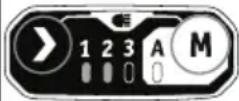 | 2 2000 | Moderate tightening torque. | |
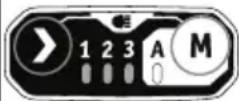 | 3 2350 | Maximum tightening torque. | |
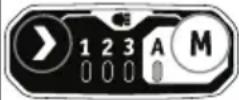 | A | / | Tightening with automatic stop. |
Reverse Rotation:
| Indicator light on control panel | Working Mode | Maximum IPM (Impacts per minute) | Application |
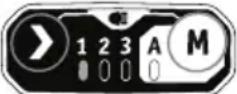 | 1 1000 | Fine-tuned loosening of small bolts and nuts. | |
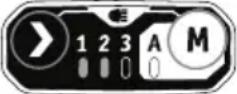 | 2 2000 | Moderate loosening torque. | |
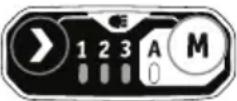 | 3 2350 | Maximum loosening torque. | |
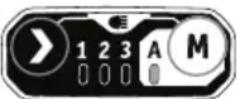 | A | / | Loosening with automatic stop. |
ON; OFF
WARNING!
Do not change the working mode while the tool is running. Sudden change of torque may cause the loss of control causing possible injury or damage to the tool or workpiece.
NOTE
The variety of wood density and metal material may affect the final outcome. The user should select appropriate mode based on the application.
NOTE
The LED indicator will turn off approximately 1min after the trigger switch is released.
i NOTE
When the tool is next turned on, the working mode will revert to the previous setting.
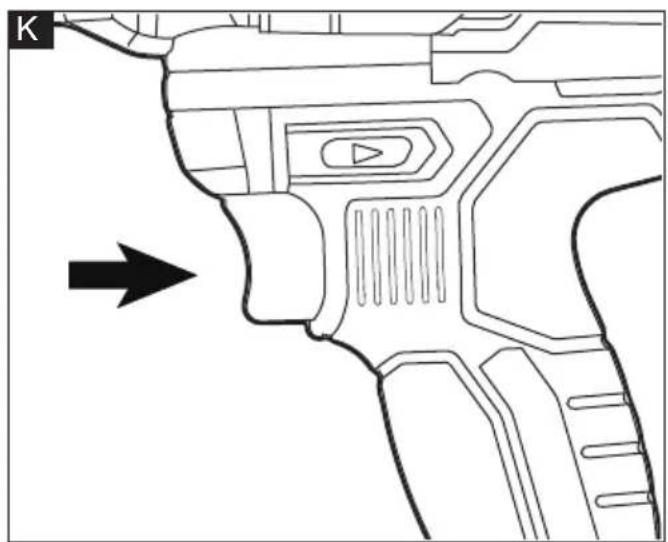
Switching on the power tool (see figure K)
■ To switch the power tool on:
Press the trigger switch (2).
The variable-speed trigger switch (2) delivers higher speed with increased trigger pressure and lower speed with decreased trigger pressure.
■ To switch the power tool off:
Release the trigger switch(2).
LED light (see figure L& M)
Your tool is equipped with two LED work
lights (4&5) with adjustable brightness. The two LED work lights(4&5) are on and off at the same time and also adjust the brightness synchronously.
To adjust the work light brightness, Press the "drive-control button" (J-3) and "M" button(J-1) simultaneously for 2 seconds until the four indicator lights (J-2) start flashing at the same time, indicating that the tool has entered the work light brightness adjustment mode.
In the work light brightness adjustment mode, each time you press the trigger switch(2), the brightness will change to the next level and will a cycle among the following six brightness levels.
| 1 2 3 | 4 5 6 | ||||
| Light off | Lowest → Highest | ||||
The next time the tool is turned on and the memory function will remember and revert to the last work light brightness level. The light will turn off automatically approximately 10 seconds after the trigger switch is released.
Tighten and loosen nuts and bolts (see figure N)
To tighten nuts and bolts
Use either mode 1, 2, 3 or "M" mode to tighten nuts and bolts depending on the
application.
Use the socket that matches the nut or bolt. Select a proper working mode depending on the type or size of the bolt and nut. Before starting your job, always perform a test operation to determine the proper fastening time for your bolt or nut. It is advisable to perform a trial run on a scrap material to determine the best mode selection.
■ Set the direction preselector switch (7) to forward setting.
- Hold the tool firmly and place the socket over the bolt or nut. Ensure that full length of the bolt head or nut is fully engaged into socket.
■ Depress the variable-speed trigger switch (2) to turn the impact wrench on. Start slowly, increasing the speed as the nut or bolt runs downs. Set the nut or bolt snugly by slowing the tool to a stop. If this procedure is not followed, the tool will have a tendency to torque or twist in your hand when the nut or bolt seats.
■ Fasten the bolt or nut to the proper torque.
■ After fastening, always check the torque with a torque wrench. If the fasteners are too tight, reduce the impacting time.
NOTICE:
■ Hold the tool straight along the axis of the bolt or nut.
■ Excessive fastening torque may damage the bolt/nut or socket.
To loosen nuts and bolts
Use either mode 1, 2, 3 or "M" mode to loosen nuts and bolts depending on the application.
When working overhead or working on car tires, to prevent the loosened fasteners from falling to the ground or into a tight space, it is recommended to use the "M" mode to do this job.
■ Set the direction preselector switch (7) to reverse setting.
■ Hold the tool firmly and place the socket over the bolt or nut. Ensure that full length of the bolt head or nut is fully engaged into socket.
■ Depress the variable-speed trigger switch (2) to turn the impact wrench on. Once the fastener is loose, the tool will stop running. This tool also allows you to continue to
depress the trigger switch for removing the nut from the long bolt, if necessary.
Maintenance and care

WARNING!
Remove the battery before carrying out any work on the power tool.
Cleaning
■ Clean the power tool and grille in front of the vent slots regularly. Frequency of cleaning is dependent on the material and duration of use.
■ Regularly blow out the housing interior and motor with dry compressed air.
Spare parts and accessories
For other accessories, in particular tools and polishing aids, see the manufacturer's catalogues.
Exploded drawings and spare-part lists can be found on our homepage:
www.flex-tools.com.
Disposal information

WARNING!
Render redundant power tools unusable:
- battery operated power tool by removing the battery.

EU countries only
Do not throw electric power tools into the household waste!
In accordance with the European Directive 2012/19/EU on Waste Electrical and Electronic Equipment and transposition into national law used electric power tools must be collected separately and recycled in an environmentally friendly manner.

Raw material recovery instead of waste disposal.
Device, accessories and packaging should be recycled in an environmentally friendly manner. Plastic parts are identified for recycling according to material type.

WARNING!
Do not throw batteries into the household waste, fire or water. Do not open used batteries.
EU countries only:
In accordance with Directive 2006/66/EC defective or used batteries must be recycled.
i NOTE
Please ask your dealer about disposal options!
(€-Declaration of conformity
We declare on our sole responsibility that the product described in "Technical specifications" conforms to the following standards or normative documents: EN 62841 in accordance with the regulations of the directives 2014/30/EU, 2006/42/EC, 2011/65/EU. Responsible for technical documents: FLEX-Elektrowerkzeuge GmbH, R & D Bahnhofstrasse 15, D-71711 Steinheim/Murr
Peter Lameli Klaus Peter Weinper Technical Director Head of Quality Department
Exemption from liability
The manufacturer and his representative are not liable for any damage and lost profit due to interruption in business caused by the product or by an unusable product. The manufacturer and his representative are not liable for any damage which was caused by improper use of the product or by use of the product with products from other manufacturers.
UK CA Declaration of Conformity
We as the manufacturer: FLEX Elektrowerkzeuge GmbH, Business address: Bahnhofstr. 15, 71711 Steinheim, Germany declare under our sole responsibility, that the product(s) described under „Technical specifications“ fulfills all the relevant provisions of The Supply of Machinery (Safety) Regulations S.I. 2008/1597 and also fulfills all the relevant provisions of the following UK Regulations:
Electromagnetic Compatibility Regulations S.I. 2016/1091, The Restriction of the Use of Certain Hazardous Substances in Electrical and Electronic Equipment Regulations S.I. 2012/3032 and are manufactured in accordance with the following designated Standards:
BS EN 62841-1:2015 + A11:2022 BS EN 62841-2-2:2014+AC:2015 BS EN IEC 55014-1:2021 BS EN IEC 55014-2:2021
Place of declaration: Steinheim, Germany. Responsible person: Peter Lameli, Technical Director - FLEX-Elektrowerkzeuge GmbH Contact details for Great Britain: FLEX Power Tools Limited, Unit 8 Anglo Office Park, Lincoln Road, HP 12, 3RH Buckinghamshire, United Kingdom.
Peter Lameli Klaus Peter Weinper Technical Director Head of Quality Department (QD)
1.09.2023
| 1 2 3 | 4 5 6 | ||||
| Light off | Lowest → Highest | ||||
| 1 2 3 | 4 5 6 | ||||
| Light off | Lowest → Highest | ||||
- Negotovost: K = 3 dB(A).



- Symbols used in this manual
- WARNING!
- CAUTION!
- NOTE
- Symbols on the power tool
- For your safety
- Intended use
- Safety instructions for impact wrench
- Noise and vibration
- Overview (see figure A)
- Operating instructions
- Before switching on the power tool
- Inserting/replacing the battery
- Lanyard strap connect points (see figure. D)
- WARNING
- Install and remove the impact socket (see figure E&F)
- Direction preselection (see figure I)
- Mode selection (see figure J)
- To select the drive control mode:
- Using the "M" button:
- ON; OFF
- i NOTE
- Switching on the power tool (see figure K)
- ■ To switch the power tool on:
- ■ To switch the power tool off:
- LED light (see figure L& M)
- Tighten and loosen nuts and bolts (see figure N)
- To tighten nuts and bolts
- NOTICE:
- To loosen nuts and bolts
- Maintenance and care
- Cleaning
- Spare parts and accessories
- Disposal information
- Raw material recovery instead of waste disposal.
- (€-Declaration of conformity
- Exemption from liability
- UK CA Declaration of Conformity
Brand : Flex
Model : IW 3/4" 1600 18-EC
Category : Drill