
CD-UB100 - Audio accessory PIONEER - Free user manual and instructions
Find the device manual for free CD-UB100 PIONEER in PDF.


| Product Type | USB Adapter for Portable Audio Player / USB Memory |
| Brand | Pioneer |
| Model | CD-UB100 |
| Dimensions (W × H × D) | 146 × 24 × 90 mm |
| Weight | 0.32 kg |
| Rated Power Supply | 14.4 V DC (allowable range: 12.0 – 14.4 V DC) |
| Maximum Current Consumption | 2.0 A |
| USB Interface | USB 2.0 Full Speed, MSC Class, Supply Current 500 mA |
| Supported Memory Capacity | Up to 250 GB, File Systems FAT12/FAT16/FAT32 |
| Supported Audio Formats | MP3 (MPEG-1/2/2.5 Layer 3), WMA (Windows Media Player 7-10), AAC (iTunes) |
| Maximum Number of Files | 15,000 |
| Maximum Number of Folders | 500 |
| Signal-to-Noise Ratio | 95 dB (1 kHz, IEC-A network) |
| Dynamic Range | 95 dB (1 kHz) |
| Channel Separation | 90 dB (1 kHz) |
| Playback Functions | Play, Pause, Repeat (Track/Folder/All), Random Play, Scan, Fast Forward/Reverse, Direct Number Selection |
| Display | Text Information: Time, Folder/File Name, Artist, Album, Title, Comments, Scrolling |
| Compatibility with Head Units | Pioneer Car Stereo with IP-BUS Input (Groups 1 to 4) |
| Installation | In-vehicle, Mount with Velcro Fasteners, Careful Wiring, 3 A Fuse |
| Safety | Protection against Moisture and Liquids, Microprocessor Reset Possible |
| Maintenance | Clean with a soft dry cloth, Avoid Solvents |
| Repairability | Contact a Pioneer Distributor or Authorized Service Center |
Frequently Asked Questions - CD-UB100 PIONEER
User questions about CD-UB100 PIONEER
0 question about this device. Answer the ones you know or ask your own.
Ask a new question about this device
Download the instructions for your Audio accessory in PDF format for free! Find your manual CD-UB100 - PIONEER and take your electronic device back in hand. On this page are published all the documents necessary for the use of your device. CD-UB100 by PIONEER.
USER MANUAL CD-UB100 PIONEER
Pleasereadthroughtheseoperatinginstructionssoyouwillknowhowtooperate yourmodelproperly.Afteryouhavefinishedreadingtheinstructions,keepthismanualinasafeplaceforfuturereference.
01 BeforeYouStart
Aboutthisunit3
Aboutthismanual3
AboutWMA4
AboutMP34
AboutAAC4
Resettingthemicroprocessor4
AbouthandlingtheUSBportableaudio player/USBmemory5
ConnectinganddisconnectingtheUSB portableaudioplayer/USBmemory5
02 PlayingsongsonUSBportableaudio player/USBmemory
BasicOperations6
Selectinganaudiofiledirectlyinthecurrent folder7
Introductionofadvancedoperations7
Selectingarepeatplayrange7
Playingfilesinrandomorder7
Scanningfoldersandfiles8
Pausing playback8
Displayingtextinformationofanaudio file8
Scrollingtextinformationinthedisplay9
Selectingfilesfromthefilenamelist9
03 Operatingwithdifferentheadunits
Usingasanexternalunit10
Functioncompatibilitycharts10
-Headunitgroup1 10
-Headunitgroup211
-Headunitgroup311
-Headunitgroup412
Displayingtextinformation12
Selectingarepeatplayrange12
Scanningfoldersandfiles13
Playingfilesinrandomorder13
04 Connections
Connectingtheunits15
05 Installation
Installingthisunit16
-MountingwithVelcrofasteners16
AdditionalInformation
Errormessages17
USBaudioplayer/USBmemory compatibility17
Compressedaudiocompatibility17
-ThesequenceofaudiofilesonUSB memory18
-Compressedaudiofiles18
Specifications19
BeforeYouStart
If you want to dispose this product, donot mix it with general household waste. There is a separate collection system for used electronic products in accordance with legislation that requires proper treatment, recovery and recycling.
Privatehouseholdsinthe25memberstatesof theEU,inSwitzerlandandNorwaymayreturn theirusedelectronicproductsfreeofchargeto designatedcollectionfacilitiesortoaretailer(if youpurchaseasimilarnewone).
For countries not mentioned above, please contact your local authorities for the correct method of disposal.
Bydoingsoyouwillensurethatyourdisposed productundergoesthenecessarytreatment,recoveryandrecyclingandthuspreventpotential negativeeffectsontheenvironmentandhuman health.
Aboutthisunit
ThisunitistheadapterforaPioneerheadunit featuringanIP-BUSinputtocontrolandlisten tosongsonaportableaudioplayerwitha USBinterface.
YoucanlistentosongsbyconnectingUSB portableaudioplayer/USBmemorythatis USBMassStorageClasscompliant. For details about the supported USB memory, refer to USB audioplayer/USB memory compatibility on page 17.
- This unit is designed for use in vehicles only.
- Thisunitcan playbackWMA/MP3/AAC files. Fordetailsaboutthesupportedfile
format,refertoCompressedaudiocompatibilityonpage17.

CAUTION
- Donotallowthisunittocomeintocontact withliquids. Electricalshockcouldresult. Also, thisunitdamage, smoke, and overheat could result from contact with liquids.
- Keep this manual handy as a reference for operating procedures and precautions.
• Always keep the volumelowenough so that you can hear sounds from outside the vehicle. - Protectthisunitfrommoisture.
- Should this product fail to operate properly, contact your dealer or nearest authorized PioneerServiceStation.
Aboutthismanual
Operatethisunitwiththeconnectedhead unit.InstructionsinthismanualuseDEH-P6980IB,DEH-P6950IB,DEH-P6900IBasan exampleofheadunit. WhenusingtheheadunitsotherthanDEH-P6980IB,DEH-P6950IB,DEH-P6900IB,referto Operatingwithdifferentheadunitsonpage10. Werecommendthatyoufamiliarizeyourself withthefunctionsandtheiroperationbyreadingthroughthemanualbeforeyoubegin usingthisunit.Itisespeciallyimportantthat youreadandobserveWARNINGsandCAUTIONsinthismanual.
AboutWMA
TheWindowsMedia™logoprintedonthebox indicatesthatthisunitcan playbackWMA data.
WMAisshortforWindowsMedia™Audio andreferstoanaudiocompressiontechnology that is developed by Microsoft Corporation. WMAdatacanbeencoded by using WindowsMediaPlayerversion7or later.
WindowsMediaandtheWindowslogoaretrademarksorregisteredtrademarksofMicrosoft CorporationintheUnitedStatesand/orother countries.

Note
Thisunitmaynotoperatecorrectlydependingon theapplicationusedtoencodeWMAfiles.
AboutMP3
Supplyofthisproductonlyconveysalicense forprivate,non-commercialuseanddoesnot conveyalicensenorimplyanyrighttouse thisproductinanycommercial(i.e.revenue-generating)realtimebroadcasting(terrestrial, satellite,cableand/oranyothermedia),broadcasting/streamingviinternet,intranetsand/orothernetworksorinotherelectroniccontentdistributionsystems,suchaspay-audioor audio-on-demandapplications.Anindependentlicenseforsuchuseisrequired.Fordetails,pleasevisit
http://www.mp3licensing.com.
AboutAAC
AACisshortforAdvancedAudioCodingand referstoanaudiocompressiontechnology standardusedwithMPEG2andMPEG4.
Several applications can be used to encode AACfiles, but file formats and extensions differ depending on the application which is used to encode.
ThisunitplaysbackAACfilesencoded by iTunes® version6.0.5andearlier.
iTunesisatrademarkofAppleComputer,Inc.,
registeredintheU.S.andothercountries.

Resettingthemicroprocessor
Themicroprocessormustberesetunderthe followingconditions:
- Priortousingthisunitforthefirsttime afterinstallation
• If the unit fail to operate properly - Whenstrangeorincorrectmessagesappearonthedisplay
- PressRESETwithapentiporother pointedinstrument.
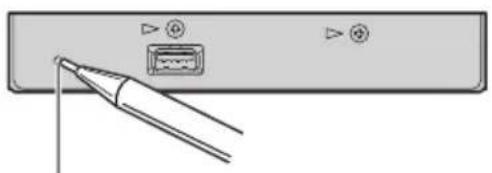
natural_image
Pure electrical circuit lines without any symbolsRESETbutton

AbouthandlingtheUSB portableaudioplayer/USB memory

CAUTION
- Pioneeracceptsnoresponsibilityfordatalost ontheUSBportableaudioplayer/USBmemoryevenifthatdataislostwhileusingthis unit.
- DonotleavetheUSBportableaudioplayer/USBmemoryindirectsunlightforextendedamountsoftime.ExtendedexposuretodirectsunlightcanresultinUSBportableaudioplayer/USBmemorymalfunctionduetotheresultinghighttemperature.
- DonotleavetheUSBportableaudioplayer/USBmemoryinanylocationwithahighttemperature.
- FirmlysecuretheUSBportableaudioplayer/USBmemorywhendriving.DonotlettheUSBportableaudioplayer/USBmemoryfall ontothefloor,whereitmaybecomejammed underthebrakeoracceleratorpedal.
Formoredetails, refertothemanual for the USB portable audioplayer/USBmemory.

Connectinganddisconnecting theUSBportableaudioplayer/USBmemory
- ConnecttheUSBportableaudioplayer/USBmemorytothisunit.
AboutthewaytoconnecttheUSBportable audioplayer/USBmemorytothisunit,referto Connectingtheunitsonpage15.
■YoucandisconnecttheUSBportableaudio player/USBmemoryanytimeyouwanttofinish listeningto.
■RefertoUSBaudioplayer/USBmemorycompatibilityonpage17anduseaUSBportable
audioplayer/USBmemorythatiscompatible. SomeUSBportableaudioplayers/USBmemory deviceswhichmeetthecompatibilityrequirementsmaynotoperateproperlywiththisunit.
■PartitionedUSBmemoryisnotcompatible withthisunit.
■ DependingonthekindofUSBportableaudio player/USBmemoryyouuse,thisunitmaynotrecognizetheUSBaudioplayer/USBmemoryor audiofilesmaynotbeplayedbackproperly.
■YoucannotconnectaUSBportableaudio player/USBmemorytothisunitviaaUSBhub.
■ DonotconnectanythingotherthantheUSB portableaudioplayer/USBmemory.

Note
When the USB portable audioplayer having battery charging function connect to this unit and the ignition switch is set to ACC or ON, the battery is charged.
PlayingsongsonUSB portableaudioplayer/USBmemory
BasicOperations
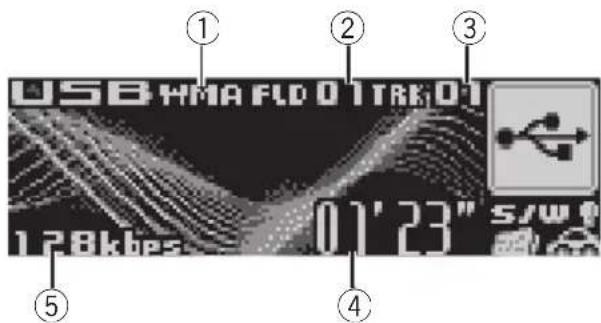
ThisdisplayistheexampleofDEH-P6900IB.In thecaseofDEH-P6980IBandDEH-P6950IB,the displaydiffersslightly.
①MP3/WMA/AACindicator
Showsthetypeoffilecurrentlyplaying.
②Foldernumberindicator
Showsthefoldernumbercurrentlyplaying.
③Tracknumberindicator
Showsthetrack(file)numbercurrentlyplaying.
④Playtimeindicator
Showstheelapsedplayingtimeofthecurrenttrack(file).
⑤Bitrateindicator
Showsthebitrateofthecurrentaudiofile.
1PressSOURCEtoselectUSB.
Playbackstarts.
■Theremaybeaslightdelaywhenstarting playbackofaudiofilesdependingonthekindof USBportableaudioplayer/USBmemoryused.
2PushMULTI-CONTROLupordownto selectafolder.
■Youcannotselectafolderthatdoesnothave acompressedaudiofilerecordedinit.
■Toreturntofolder01(ROOT),pressandhold
BAND(BAND/ESC).However,iffolder01(ROOT)
containsnofiles, playbackcommenceswith folder02.
3Toperformfastforwardorreverse, pushandholdMULTI-CONTROLleftor right.
4 Toskipbackorforwardtoanother audiofile, push MULTI-CONTROL leftor right.
PushingMULTI-CONTROLrightskipstothe startofthenextaudiofile.Pushing
MULTI-CONTROL leftonceskipstothestart of the current audio file. Pushing again will ski to the previous audio file.

Notes
- Playbackiscarriedoutinorderoffilenumber. Foldersareskippediftheycontainnofiles.(If folder01(ROOT)containsnofiles, playback commenceswithfolder02.)
- WhenplayingbackfilesrecordedasVBR (variablebitrate)files,theplaytimewillnotbe correctlydisplaydiffastforwardorreverse operationsareused.
- WhenplayingbackVBR-recordedWMAfiles, theaveragebitratevalueisdisplayed.
- WhenplayingbackVBR(variablebitrate)-recordedMP3files, VBRisdisplayedinsteadof bitratevalue.
- Thereisnosoundonfastforwardorreverse.
- IfanerrormessagesuchasNOAUDIOisdisplayed,refertoErrormessagesonpage17.
- Whenthedisplaysettingisswitchedtothe textinformationbypassingDISPLAY, thetext automaticallybegintoscrollinthedisplay. WhenEverScrollissettoONattheinitialsetting, folderandfilenamescrollcontinuously. AboutEverScroll, refertotheoperationmanualofDEH-P6980IB, DEH-P6950IB, DEH-P6900IB.
PlayingsongsonUSB portableaudioplayer/USBmemory
Selectinganaudiofile directlyinthecurrentfolder
When using theremote control, you can select an audio file directly by entering the desired track number.
1PressDIRECT.
Audiofilenumberinputdisplayappears.
2Press0to9buttonstoenterthedesired tracknumber.
■Youcancanceltheinputnumberbypassing CLEAR.
3PressDIRECT.
Theaudiofileofenterednumberwillplay.

Note
Afterenteringthenumberinputmode, if you do not perform an operation within about eight seconds, themode is automatically canceled.
Introduction of advanced operations
1PressMULTI-CONTROLtodisplaythe mainmenu.
FUNC, AUDIO and ENTERTAINMENT appear on the display.
2UseMULTI-CONTROLtoselectFUNC.
Turntochangethemenuoption;presstose-lect.
Thefunctionnameappearsonthedisplay.
3TurnMULTI-CONTROLtoswitchbetweenthefunctionsinthefollowingorder:
Playmode(repeatplay)—Randommode
(randomplay)—Scanmode(scanplay)—Pause(pause)
■Youcanalsoswitchbetweenthefunctionsin reverseorderbyturningMULTI-CONTROLcounterclockwise.
■Toreturntotheplaybackdisplay,press BAND(BAND/ESC).

Note
If you donotoperatethe function within about 30 seconds, the display is automatically returned to the playback display.
Selectingarepeatplayrange
Therearethreerepeatplayranges:
Trackrepeat(one-filerepeat), Folderrepeat (folderrepeat), and Allrepeat(repeatallfiles).
1UseMULTI-CONTROLtoselect Playmodeinthefunctionmenu.
2PressMULTI-CONTROLrepeatedlytoselecttherepeatrange.
- Trackrepeat—Repeatjustthecurrentfile
- Folderrepeat—Repeatthecurrentfolder
- Allrepeat—Repeatallfiles

Notes
- If you select another folder during repeat play, therepeat play range changesto All repeat.
- If you perform track search or fast forward/reversed during Track repeat, therepeat play range changesto Folder repeat.
- WhenFolderrepeatisselected,itisnotpossibletoplaybackasubfolderofthatfolder.

Playingfilesinrandomorder
Randomplayletsyouplaybackfilesinarandomorderwithintherepeatplayrange,
Folderrepeat and All repeat.
PlayingsongsonUSB portableaudioplayer/USBmemory
1Selecttherepeatrange.
RefertoSelectingarepeatplayrangeonthe previouspage.
2UseMULTI-CONTROLtoselect Randommodeinthefunctionmenu.
3PressMULTI-CONTROLtoturnrandom playon.
Audiofileswillplayinarandomorderwithin thepreviouslyselectedFolderrepeater Allrepeatranges.
■Toturnrandomplayoff, press MULTI-CONTROLagain.
Scanningfoldersandfiles
WhileyouareusingFolderrepeat, the beginning of each file in these selected folder plays for about 10 seconds. When you are using
Allrepeat, the beginning of the first file of each folder is played for about 10 seconds.
1Selecttherepeatrange.
RefertoSelectingarepeatplayrangeonthe previouspage.
2UseMULTI-CONTROLtoselect Scanmodeinthefunctionmenu.
3PressMULTI-CONTROLtoturnscanplay on.
The first 10 second of each file of the current folder (orthefirst file of each folder) is played.
4Whenyoufindthedesiredfile(or folder)pressMULTI-CONTROLtoturnscan playoff.
Thefile(orfolder)willcontinuetoplay.
■ Ifthedisplayhasautomaticallyreturned to the playbackdisplay, select Scanmodeagain by using MULTI-CONTROL.
■Afterfileorfolderscanningisfinished,normalplaybackofthefileswillbeginagain.
Pausing playback
1UseMULTI-CONTROLtoselectPausein thefunctionmenu.
2PressMULTI-CONTROLtoturnpause on.
Playbackofthecurrenttrackpauses.
■Toturnpauseoff,pressMULTI-CONTROL again.
Displayingtextinformation ofanaudiofile
- PressDISPLAY.
PressDISPLAY repeatedlytoswitchbetween the following settings:
Playtime—Foldername(foldername)and
Filename(filename)—Artistname(artist name)andTracktitle(tracktitle)—
Artistname(artistname)andAlbumtitle (albumtitle)—Albumtitle(albumtitle)and
Track title (track title) — Track title (track title) and playtime—Comment(comment)and playtime
■Ifthecharactersrecordedontheaudiofileare notcompatiblewithaheadunit,thosecharacters willnotbedisplayed.
■Ifspecificinformationhasnotbeenrecorded onanaudiofile, titleornameisnotdisplayed.
■Thetextinformationofsomeaudiofilesmay notbecorrectlydisplayed.
PlayingsongsonUSB portableaudioplayer/USBmemory
Scrollingtextinformation inthedisplay
Thisunitcandisplaythefirst14letersonlyof Folder name, File name, Track title, ArtistnameandAlbumtitle.Whenthere-cordedinformationislongerthan14letters, youcanscrollthetexttotheleftsothatthe restofthetextinformationcanbeseen.
- PressDISPLAYandholduntilthetext informationbeginstoscrollthroughthe display.

Note
When Ever ScrollissettoONattheinitialsetting, textinformationscrollscontinuouslyinthedisplay. RefertotheoperationmanualofDEH-P6980IB, DEH-P6950IB, DEH-P6900IB.
Selectingfilesfromthefile namelist
Filenamelistletsyouseethelistoffilenames (orfoldernames) and select one of them to playback.
1PressLISTtoswitchtothefilenamelist mode.
Namesoffilesandfoldersappearinthedisplay.
2UseMULTI-CONTROLtoselectthedesiredfilename(orfoldername).
Turntochangethenameoffileorfolder; presstoplay; pushrighttoseealistofthe files(orfolders) intheselectedfolder.
■Youcanalsochangethenameoffileorfolder bypushingMULTI-CONTROLupordown.
■Toreturntothepreviouslist(thefolderone levelhigher),pushMULTI-CONTROLleft.
■ Ifthefolder/filenumberismorethan100, last 2-digitofthefolder/filenumberisdisplayed.
■Numberofthefolders/filesinthecurrentlyselectedfolderwillbeindicatedontherightsideofthedisplay.
■ If you donotoperatethelist within about 30 seconds, the filenamelist mode is canceled automatically.
Operatingwithdifferent headunits
Usingasanexternalunit
The following head units operatethis unitas an external unit. Formoredetails about the external unit, refertothe head unit's manual.
- 1KEY to 6KEY doesn't be used to operate thisunit.
Headunitgroup1
The following head units featuring FUNCTION button operation or SOFT KEY operation.
DEH-P9650MP, DEH-P9600MP, DEH-P7700MP, DEH-P6800MP, DEH-P6750MP, DEH-P6700MP, DEH-P5980MP, DEH-P5950MP, DEH-P5900MP, DEH-P5850MPH, DEH-P5800MP, DEH-P5750MP, DEH-P5700MP, DEH-P4990MP, DEH-P4980MP, DEH-P4950MP, DEH-P4900MP, DEH-P4850MPH, DEH-P4850MP, DEH-P4800MP, DEH-P4750MP, DEH-P3980MP, DEH-P3950MP, DEH-P77MP, DEH-P65BT, DEH-P55BT *1, DEH-P40MP, DEX-P90RS, DVH-P5850MP, DVH-P5000MP, DVH-P580MP
Headunitgroup2
The followingheadunitsfeaturing
MULTI-CONTROLoperation.
DEH-P9880BT, DEH-P9850BT, DEH-P9800BT,
DEH-P8980BT, DEH-P8950BT, DEH-P8850MP,
DEH-P8650MP, DEH-P8600MP, DEH-P7980UB,
DEH-P7950UB, DEH-P7900UB, DEH-P7750MP,
DEH-P6850MP, DEH-P88RS, DEH-P85BT, DEH-P80MP, DEH-P70BT
Headunitgroup3
The followingheadunitsfeaturingtouch panelkeyoperation.
AVH-P7650DVD, AVH-P7500DVDII, AVH-
P5700DVD
Headunitgroup4
The following head units are navigation units featuring touch panel key operation.
AVIC-HD1BT,AVIC-X1R
Functioncompatibilitycharts

Notes
- Theremaybeaslightdelaywhenstarting playbackofaudiofilesdependingonthekind ofUSBportableaudioplayer/USBmemory used.
- You cannot select a folder that does not have a compressed audio filerecordedinit.
- Playbackiscarriedoutinorderoffilenumber. Foldersareskippediftheycontainnofiles.(If folder01(ROOT)containsnofiles, playback commenceswithfolder02.)
- WhenplayingbackfilesrecordedasVBR (variablebitrate)files,theplaytimewillnotbe correctlydisplaydiffastforwardorreverse operationsareused.
- Thereisnosoundonfastforwardorreverse.
- IfanerrormessagesuchasNOAUDIOisdisplayed,refertoErrormessagesonpage17.
Headunitgroup1
| Controls | |
| SelectUSBasasource | PressSOURCE. |
| SelectafolderPress▲or▼. | |
| Skipbackorforwardtoanothersong*2 | Press◄or►. |
| Fastforward/re-verse*3 | Pressandhold◄or►. |
| Returntofolder01(ROOT)*4. | PressandholdBAND(BAND/ESC). |
| SelectafunctionPressFUNCTION(FUNC). | |
| Pause a song | Press▲or▼in FUNC1 (F1). |
| Switch the display | Press▲or▼in FUNC2 (F2). |
| Scrollthetitle | Pressandhold▲or▼inFUNC2(F2). |
*1 It is necessary to use remote control (sold separately) to perform the operations by ▲/▼/◄/►.
*2 You can use this function when you select AUTO in AUTO/MANUAL (A/M).
*3 You can use this function when you select MANUAL in AUTO/MANUAL (A/M).
*4 Iffolder01(ROOT)containsnofiles, playbackcommenceswithfolder02.
Operatingwithdifferent headunits
| Controls | |
| Turnscanplayonor off | Press ▲ or ▼ in FUNC3 (F3). |
| Selectarepeatplay range | Press ▲ or ▼ in FUNC4 (F4). |
| Turnrandomplayon oroff | Pressandhold ▲or▼in FUNC4(F4). |
| Switchbetween AUTOandMANUAL | Press ◀ or ▶ in AUTO/ MANUAL(A/M). |
Headunitgroup2
| Controls | |
| SelectUSBasa source | PressSOURCE. |
| Selectafolder | PushMULTI-CONTROLup ordown. |
| Skipbackorforward toanothersong *1 | PushMULTI-CONTROLleft orright. |
| Fastforward/reverse *2 | PushandholdMULTI-CON-TROLleftorright. |
| Returntofolder01 (ROOT) *3. | PressandholdBAND (BAND/ESC). |
| SelectafunctionUse MULTI-CONTROL. | |
| Pauseasong | PressMULTI-CONTROLin FUNC1(F1). |
| Switchthedisplay | PressMULTI-CONTROLin FUNC2(F2). |
| Scrollthetitle | PressandholdMULTI-CON-TROLinFUNC2(F2). |
| Turnscanplayonor off | PressMULTI-CONTROLin FUNC3(F3). |
| Selectarepeatplay range | PressMULTI-CONTROLin FUNC4(F4). |
| Controls | |
| Turnrandomplayon oroff | PressandholdMULTI-CONTROLinFUNC4(F4). |
| Switchbetween AUTOandMANUAL | PressMULTI-CONTROLin AUTO/MANUAL(A/M). |
Headunitgroup3
| Controls | |
| SelectUSBasa source | PressSOURCE. |
| SelectafolderTouch▲or▼. | |
| Skipbackorforward *1 toanothersong | Touch◀ or ▶. |
| Fastforward/reverse *2 | Keeptouching◀or▶. |
| Returntofolder01 (ROOT) *3. | KeeptouchingBAND. |
| Selectafunction | TouchA.MENUandthen touchFUNCTION. |
| Pause a song | Touch▲▼ in FUNCTION1. |
| Switch the display | Touch▲▼ in FUNCTION2. |
| Scrollthetitle | Keeptouching▲▼inFUNC-TION2. |
| Turnscanplayonor off | Touch▲▼inFUNCTION3. |
| Selectarepeatplay range | Touch▲▼inFUNCTION4. |
| Turnrandomplayonoroff | Keeptouching▲▼inFUNC-TION4. |
| Switchbetween AUTOandMANUAL | Touch◀ or ▶ in AUTO/MANUAL. |
*1 YoucanusethisfunctionwhenyouselectAUTOinAUTO/MANUAL(A/M).
*2 YoucanusethisfunctionwhenyouselectMANUALinAUTO/MANUAL(A/M).
*3 Iffolder01(ROOT)containsnofiles, playbackcommenceswithfolder02.
Operatingwithdifferent headunits
Headunitgroup4
| Controls | |
| SelectUSBasa source | PressSOURCE. |
| SelectafolderTouch▲or▼. | |
| Skipbackorforward toanothersong *1 | Touch◀ or ▶. |
| Fastforward/re-verse *2 | Keeptouching◀or▶. |
| Returntofolder01 (ROOT) *3. | KeeptouchingBAND. |
| Selectafunction | TouchA.MENUandthen touchFUNCTION. |
| Pause a song | TouchSEND in FUNCTION1. |
| Switch the display | TouchSEND in FUNCTION2. |
| Scrollthetitle | KeeptouchingSENDin FUNCTION2. |
| Turnscanplayonor off | TouchSENDinFUNCTION3. |
| Selectarepeatplay range | TouchSENDinFUNCTION4. |
| Turnrandomplayonoroff | KeeptouchingSENDin FUNCTION4. |
| Switchbetween AUTOandMANUAL | TouchAUTO/MANUAL. |

Displayingtextinformation
Textinformationrecordedontheaudiofilecan bedisplayed.
- Selectthedesiredinformation.
RefertoFunctioncompatibilitychartsonpage 10.
Foldernumber—tracknumber—playtime—foldername—filename—albumtitle—track title—artistname
■Ifthecharactersrecordedontheaudiofileare notcompatiblewithaheadunit,thosecharacters willnotbedisplayed.

Notes
- When using this unit as an external unit, head units and display the first 8 letters of the folder name, the filename, the album title, the song title, the artist name.
- If the characters recorded on the audio file are not compatible with a head unit, those characters will not be displayed.
- If specific information has not been recorded on an audio file, title or name is not displayed.
- Thetextinformationofsomeaudiofilesmay notbecorrectlydisplayed.
- Youcanscrolltotheleftthefoldername,the filename,thealbumtitle,thesongtitle,the artistname.
Selectingarepeatplayrange
There are three repeaters play ranges: TRK(one-filerepeat), FLD(folderrepeat), and ALL(repeatallfiles).
- Selecttherepeatrange.
RefertoFunctioncompatibilitychartsonpage 10.
- TRK–Repeatjustthecurrentfile
- FLD-Repeatthecurrentfolder
- ALL-Repeatallfiles

Notes
- If you select another folder during repeat play, therepeat play range changesto ALL.
*1 YoucanusethisfunctionwhenyouselectAUTOinAUTO/MANUAL(A/M).
*2 You can use this function when you select MANUAL in AUTO/MANUAL (A/M).
*3 Iffolder01(ROOT)containsnofiles, playbackcommenceswithfolder02.
Operatingwithdifferent headunits
- If you perform track search forward/reversed during TRK, therepeat play range changestoFLD.
- WhenFLDisselected, it is not possible to play back as subfolder of that folder.
Scanningfoldersandfiles
WhileyouareusingFLD,thebeginningof eachfileintheselectedfolderplaysforabout 10seconds.WhenyouareusingALL,thebeginningofthefirstfileofeachfolderisplayed forabout10seconds.
1Selecttherepeatrange.
RefertoFunctioncompatibilitychartsonpage 10.
- FLD—thebeginningofeachfileinthese-lectedfolderplaysforabout10seconds
- ALL – the beginning of the first file of each folderisplayedforabout10seconds
2Turnscanplayon.
RefertoFunctioncompatibilitychartsonpage 10.
3Whenyoufindthedesiredfile(or folder)turnscanplayoff.
Thefile(orfolder)willcontinuetoplay.
■ Ifthedisplayhasautomaticallyreturned to the playbackdisplay, selectscanplayon/off modeagain.
■Afterfileorfolderscanningisfinished,normalplaybackofthefileswillbeginagain.
Playingfilesinrandomorder
Randomplayletsyou playbackfilesinarandomorderwithintherepeatplayrange,FLD andALL.
1Selecttherepeatrange.
RefertoFunctioncompatibilitychartsonpage 10.
- FLD-Playbackaudiofilesinarandom orderwithintheselectedfolder
- ALL – Play back all the audio files in a random order
2Turnrandomplayon.
RefertoFunctioncompatibilitychartsonpage 10.

Important
- Use this unit in other than the following conditions could result in fireormal function.
—Vehicleswitha12-voltbatteryandnegative grounding.
- Topreventshort-circuit,overheatingormal-function,besuretofollowthedirections below.
—Disconnectthenegativeterminalofthe batterybeforeinstallation.
—Securethewiringwithcableclampsoradhesivetape.Toprotectthewiring,wrapadhesivetapearoundthemwheretheylie againstmetalparts.
—Placeallcablesawayfrommovingparts, suchasgearshiftandseatrails.
—Placeallcablesawayfromhotplaces, suchasneartheheateroutlet.
—Donotpasstheyellowcablethrougha holeintotheenginecompartmenttoconnecttoabattery.
—Donotshortenanycables.
—Nevercuttheinsulationofthepowercable ofthisunitinordertosharethepowerto otherequipment.Currentcapacityofthe cableislimited.
—Useafuseoftheratingprescribed.
- IP-BUSconnectorsarecolor-coded.Besure toconnectconnectorsofthesamecolor.
- Placeantennacableasfarawayaspossible fromtheothercablestopreventnoise.
- Blackcableisground. This cable and other product's ground cable (especially, high-current product such as power and power) must be wired separately. Otherwise, fireormal function may result if they are accidentally detached.
- DonotconnectanythingotherthantheUSB portableaudioplayer/USBmemory.
- PlugtheterminaloftheUSBportableaudio player/USBmemoryfirmlyintotheconnector toconnect,otherwisethisunitmaynotwork properlyoranerrormaybedisplayedonthe headunit.
Cordfunctionmaydifferaccordingtothepro- duct,evenifcordcoloristhesame.Whencon- nectingthissystem,besuretocheckall manualsandconnectcordscorrectly.
Connectingtheunits
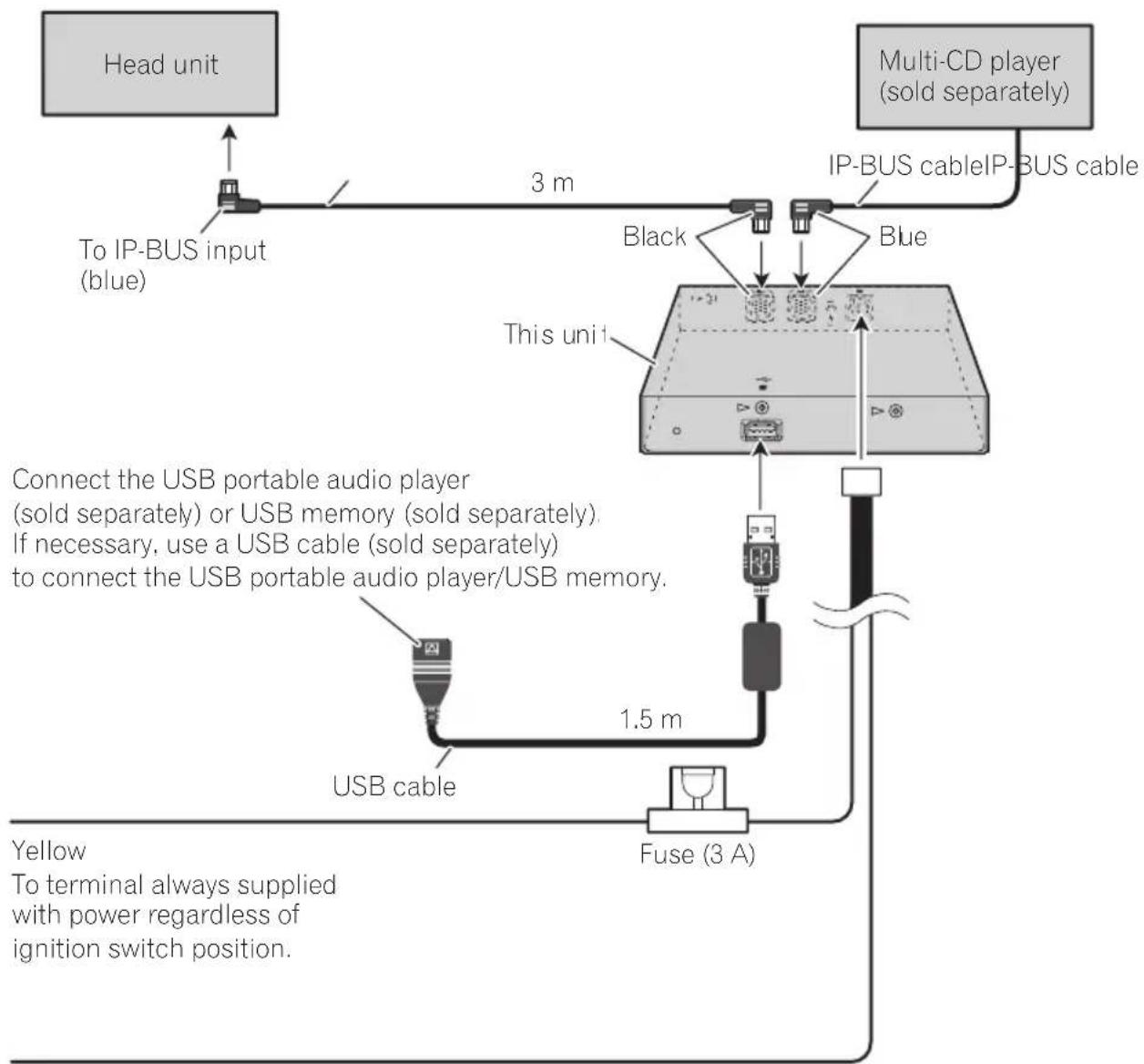
flowchart
graph TD
    A["Head unit"] --> B["To IP-BUS input (blue)"]
    B --> C["3 m"]
    C --> D["Black"]
    D --> E["This unit"]
    E --> F["Blue"]
    F --> G["Multi-CD player (sold separately)"]
    G --> H["IP-BUS cable"]
    H --> I["IP-BUS cable"]
    I --> J["1.5 m"]
    J --> K["Fuse (3 A)"]
    K --> L["USB cable"]
    L --> M["USB portable audio player (sold separately) or USB memory (sold separately). If necessary, use a USB cable (sold separately) to connect the USB portable audio player/USB memory."]
    M --> N["Yellow To terminal always supplied with power regardless of ignition switch position."]
Black (ground)
To vehicle (metal) body.


Important
- Checkallconnectionsandsystemsbefore finalinstallation.
- Donotuseunauthorizedparts.Theuseofunauthorizedpartsmaycausemalfunctions.
- Consultwithyourdealerifinstallationrequiresdrillingofholesorothermodifications ofthevehicle.
- Donotinstallthisunitwhere: —itmayinterferewithoperationofthevehicle. —itmaycauseinjurytoapassengerasaresultofasuddenstop.
- Whenmountingthisunit, makesurenoneof theleadsaretrappedbetweenthisunitand thesurroundingmetalworkorfittings.
- Donotmountthisunitneartheheateroutlet, whereitwouldbeaffectedbyheat,ornearthe doors,whererainwatermightsplashontoit.
- Beforedrillinganymountingholesalways checkbehindwhereyouwanttodrillthe holes.Donotdrillintothegasline,brakeline, electricalwiringorotherimportantparts.
- If this unit installed in the passenger compartment, anchor it securely so it does not break freewhile the vehicle is moving, and cause injury or an accident.
- If this unit is installed under a front seat, makes sure it does not obstruct seat movement. Route all leads and cord scarefully around the sliding mechanisms so they don't caught or pinched in themechanism and cause short-circuit.
Installingthisunit
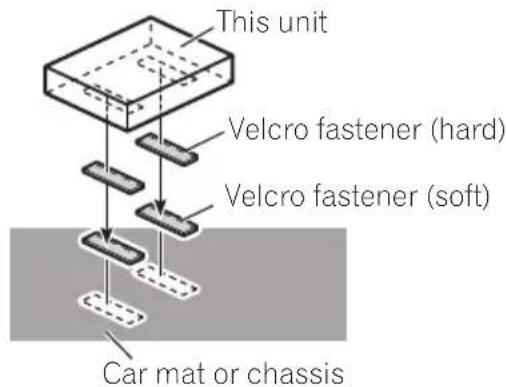
MountingwithVelcrofasteners
Thoroughlywipeoffthesurfacebeforeaffixing theVelcrofasteners.
- IftheVelcrofasteners(hard)adheretothe carmatdirectly,youmayinstallthisunit withoutusingtheVelcrofasteners(soft).
●MountthisunitusingtheVelcrofasteners.

AdditionalInformation
Errormessages
Whenyoucontactyourdealeroryournearest PioneerServiceCenter,besuretorecordthe errormessage.
MessageCauseAction
| N/AUSBTheUSBdevice connectedtois notsupportedby thisunit. | ConnectaUSB portableaudio playerorUSB memorythatis USBMassStorage Classcompliant. |
| CHKUSBTheUSBconnec-tororUSBcable isshort-circuited. | Confirmthatthe USBconnectoror USBcableisnot caughtinsome-thingordamaged. |
| Theconnected USBportable audioplayer/ USBmemory consumesmore than500mA (maximumallow-ablecurrent). | Disconnectthe USBportable audioplayer/USB memoryanddo notuseit.Turnthe ignitionswitchto OFF,thentoACC orONandthen connectthecom-pliantUSBportableaudioplayer/ USBmemory. |
NOAUDIO Nosongs Transfer the audio
| filestotheUSB portableaudio player/USBmemoryandconnect. | ||
| USBmemory withsecurityenabledisconnected | FollowtheUSB memoryinstructionstodisablethe security. | |
| DRMSKIPTheconnected | USBportable audioplayer/USBmemory containsWMA filesthatareprotectedby WindowsMedia DRM9/10 | Playanaudiofile notprotectedby WindowsMedia DRM9/10. |
MessageCauseAction
| PROTECTAllthefileson | Transferaudiofiles |
| theconnected | notprotectedby |
| USBportable | WindowsMedia |
| audioplayer/ | DRM9/10tothe |
| USBmemoryare | USBportable |
| protectedby | audioplayer/USB |
| WindowsMedia | memoryandconnect. |
| DRM9/10 |

USBaudioplayer/USB memorycompatibility
•Specification:USB2.0fullspeed
- USBClass:MSC(MassStorageClass)device
- Protocol:bulk
• Maximumamountofmemory:250GB
- Filesystem:FAT12,FAT16,FAT32
• Supplycurrent:500mA

Notes
- PartitionedUSBmemoryisnotcompatible withthisunit.
- DependingonthekindofUSBportableaudio player/USBmemoryyouuse,thisunitmay notrecognizetheUSBaudioplayer/USB memoryoraudiofilesmaynotbeplayedback properly.
- YoucannotconnectaUSBportableaudio player/USBmemorytothisunitviaaUSB hub.
Compressedaudio compatibility
- Upto15000filesonaUSBportableaudio player/USBmemorycanbeplayedback.
AdditionalInformation
• Upto500foldersonaUSBportableaudio player/USBmemorycanbeplayedback.
- Theremaybeaslightdelaywhenstarting playbackofaudiofilesonaUSBportable audioplayer/USBmemorywithnumerous folderhierarchies.
- Fileextensionssuchas.wma,.mp3or.m4a mustbeusedproperly.
- Only64charactersfromthebeginningcan bedisplayedasafilename(includingthe extensionsuchas.wma,.mp3or.m4a)ora foldername.
Dependingonthecharactersets,onlythe first32charactersmaybedisplayed.
- Thetextinformationofsomeaudiofiles maynotbecorrectlydisplayed.
- Theremaybeaslightdelaywhenstarting playbackofaudiofilesencodedwithimage data.
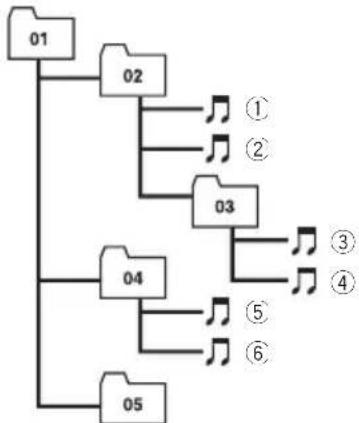
Thesequenceofaudiofileson USBmemory
ForUSBportableaudioplayers, thesequence is different from that of USB memory and depends on the player.
Exampleofahierarchy

Folder

Compressedaudiofile
flowchart
graph TD
    A["01"] --> B["02"]
    A --> C["03"]
    A --> D["04"]
    A --> E["05"]
    B --> F["①"]
    B --> G["②"]
    C --> H["③"]
    C --> I["④"]
    D --> J["⑤"]
    D --> K["⑥"]
Level 1 L level 2 L level 3 L level 4
- 01to05representassignedfoldernumbers.①to⑥representtheplaybacksequence.Theusercannotassignfolder numbersandspecifytheplaybacksequencewiththisunit.
- Thesequenceofaudiofiles/folderstobe playedback,selectedbythescanplayand displayedinthefilenamelistisdetermined asfollows:
—Thesequenceoffilesisgivenpriority overthesequenceofsubfolders.
—Inafolder,thesequenceofaudiofiles/subfoldersisthesameastheorderyou copyfromapersonalcomputertothe USBmemory.
However, thesequencemaybealtereddependingonthesettingsandtheoperating systemofthepersonalcomputer.
Also, when you select several folders/files atonetime and copy to the USB memory, the expected sequence of audio file stobe played back, selected and displayed may not coincidewith the actual sequence.
- If you want to specify these sequence of the audio files, refer to Example of a hierarchy on this page and copy the folders / files in order.
—Werecommendthatyouspecifythefile namesinthedesiredplaybacksequence(e.g.,001xxxxx.mp3forthefirst, 099yyyyy.wmafor99th,etc.).
Compressedaudiofiles
WMA
- Compatible format: WMAencoded by WindowsMediaPlayerVer.7,7.1,8,9or10
- Bitrate:5kbpsto384kbps(CBR),VBR
- Samplingfrequency:32kHz,44.1kHz,48 kHz
- WindowsMediaAudio9Professional, Lossless, Voice: No
AdditionalInformation
MP3
- Compatible format: MPEG-1,2,2.5 Audio Layer3
- Bitrate:8kbpsto320kbps(CBR),VBR
- Samplingfrequency:8kHzto48kHz(32, 44.1,48kHzforeemphasis)
- CompatibleID3tagversion:1.0,1.1,2.2, 2.3,2.4(ID3tagVersion2.xisgivenpriority thanVersion1.x.)
• M3uplaylist:No - MP3i(MP3interactive),mp3PRO:No
AAC
- Compatible format: AACencoded by iTunes® version 6.0.5 and earlier
•Samplingfrequency:8kHzto48kHz
•Transmissionrate:16kbpsto320kbps - AACfileboughtontheiTunesMusicStore (.m4pfileextension):No
-AppleLossless:No
Specifications
General
Ratedpowersource....14.4VDC (allowablevoltagerange: 12.0Vto14.4VDC)
Groundingsystem......Negativetype
Max.currentconsumption 2.0A
Dimensions(W×H×D)...146×24×90mm
Weight....0.32kg
USB
Specification......USB2.0fullspeed
Supplycurrent.....500mA
Maximumamountofmemory 250GB
Filesystem.....FAT12,FAT16,FAT32
Maximumnumberoffiles...15000
Maximumnumberoffolders 500
MP3decodingformat......MPEG-1,2&2.5AudioLayer 3
WMAdecodingformat......Ver.7,7.1,8,9,10(2ch audio)
(WindowsMediaPlayer)
AACdecodingformat......MPEG-4AAC(iTunes ^® encodedonly)
Audio
Signal-to-noiseratio....95dB(1kHz)(IEC-Anetwork)
Dynamicrange....95dB(1kHz)
Channelseparation......90dB(1kHz)
Numberofchannels......2(stereo)

Note
Specificationsandthedesignaresubjecttopossiblemodificationswithoutnoticeduetoim-provements.
natural_image
Diagram of a device panel with ports and a pen tip, no readable text or symbols presentBotónRESET

DEH-P9650MP, DEH-P9600MP, DEH-P7700MP, DEH-P6800MP, DEH-P6750MP, DEH-P6700MP, DEH-P5980MP, DEH-P5950MP, DEH-P5900MP, DEH-P5850MPH, DEH-P5800MP, DEH-P5750MP, DEH-P5700MP, DEH-P4990MP, DEH-P4980MP, DEH-P4950MP, DEH-P4900MP, DEH-P4850MPH, DEH-P4850MP, DEH-P4800MP, DEH-P4750MP, DEH-P3980MP, DEH-P3950MP, DEH-P77MP, DEH-P65BT, DEH-P55BT ^* , DEH-P40MP, DEX-P90RS, DVH-P5850MP, DVH-P5000MP, DVH-P580MP
natural_image
Diagram of a device panel with ports and a pen tip, no text or symbols presentTasteRESET

natural_image
Diagram of a device panel with ports and a pen tip, no text or symbols presentToucheRESET
2AppuyezsurMULTI-CONTROLpourac-tiverlapause.
Lalecturedelaplageencourssemeten pause.
■AppuyezànouveausurMULTI-CONTROL pourmettrelapausehorsservice.
- AppuyezsurDISPLAY.
Fixation Velcro (souple)
natural_image
Diagram of a device panel with ports and a pen tip, no text or symbols presentTastoRESET

Leunitàprincipaliriportatediseguitovengono controllatetramiteiltastoFUNCTIONotramitetastoSOFTKEY. DEH-P9650MP, DEH-P9600MP, DEH-P7700MP, DEH-P6800MP, DEH-P6750MP, DEH-P6700MP, DEH-P5980MP, DEH-P5950MP, DEH-P5900MP, DEH-P5850MPH, DEH-P5800MP, DEH-P5750MP, DEH-P5700MP, DEH-P4990MP, DEH-P4980MP, DEH-P4950MP, DEH-P4900MP, DEH-P4850MPH, DEH-P4850MP, DEH-P4800MP, DEH-P4750MP, DEH-P3980MP, DEH-P3950MP, DEH-P77MP, DEH-P65BT, DEH-P55BT ^* , DEH-P40MP, DEX-P90RS, DVH-P5850MP, DVH-P5000MP, DVH-P580MP
4-1,MEGURO1-CHOME,MEGURO-KU
TOKYO153-8654,JAPAN
PIONEERELECTRONICS(USA)INC.
P.O.Box1540, LongBeach, California90801-1540, U.S.A.
TEL:(800)421-1404
PIONEEREUROPENV
Haven1087, Keetberglaan1, B-9120Melsele, Belgium
TEL:(0)3/570.05.11
PIONEERELECTRONICSASIACENTREPTE.LTD.
253AlexandraRoad,#04-01,Singapore159936
TEL:65-6472-7555
PIONEERELECTRONICSAUSTRALIAPTY.LTD.
178-184BoundaryRoad, Braeside, Victoria3195, Australia
TEL:(03)9586-6300
PIONEERELECTRONICSOFCANADA, INC.
300AllstateParkway, Markham, OntarioL3ROP2, Canada
TEL:1-877-283-5901
PIONEERELECTRONICSDEMEXICO,S.A.deC.V.
Blvd.ManuelAvilaCamacho13810piso
Col.LomasdeChapultepec,Mexico,D.F.11000
TEL:55-9178-4270
先鋒股份有限公司
總公司:台北市中山北路二段44號13樓
電話:(02)2521-3588
先鋒電子(香港)有限公司
香港九龍尖沙咀海港城世界商業中心
9樓901-6室
電話:(0852)2848-6488
PublishedbyPioneerCorporation.
Copyright©2006byPioneerCorporation.
Allrightsreserved.
PubliéparPioneerCorporation. Copyright
©2006parPioneerCorporation.Tous
droitsréservés.
PrintedinThailand
ImpriméenThaïlande

- BeforeYouStart
- PlayingsongsonUSBportableaudio player/USBmemory
- Operatingwithdifferentheadunits
- Connections
- Installation
- AdditionalInformation
- BeforeYouStart
- Aboutthisunit
- CAUTION
- Aboutthismanual
- AboutWMA
- Note
- AboutMP3
- AboutAAC
- Resettingthemicroprocessor
- AbouthandlingtheUSB portableaudioplayer/USB memory
- Connectinganddisconnecting theUSBportableaudioplayer/USBmemory
- PlayingsongsonUSB portableaudioplayer/USBmemory
- BasicOperations
- 1PressSOURCEtoselectUSB.
- 2PushMULTI-CONTROLupordownto selectafolder.
- 3Toperformfastforwardorreverse, pushandholdMULTI-CONTROLleftor right.
- Toskipbackorforwardtoanother audiofile, push MULTI-CONTROL leftor right.
- Notes
- Selectinganaudiofile directlyinthecurrentfolder
- 1PressDIRECT.
- 2Press0to9buttonstoenterthedesired tracknumber.
- 3PressDIRECT.
- Introduction of advanced operations
- 1PressMULTI-CONTROLtodisplaythe mainmenu.
- 2UseMULTI-CONTROLtoselectFUNC.
- 3TurnMULTI-CONTROLtoswitchbetweenthefunctionsinthefollowingorder:
- Playmode(repeatplay)—Randommode
- Selectingarepeatplayrange
- 1UseMULTI-CONTROLtoselect Playmodeinthefunctionmenu.
- 2PressMULTI-CONTROLrepeatedlytoselecttherepeatrange.
- Playingfilesinrandomorder
- 1Selecttherepeatrange.
- 2UseMULTI-CONTROLtoselect Randommodeinthefunctionmenu.
- 3PressMULTI-CONTROLtoturnrandom playon.
- Scanningfoldersandfiles
- 2UseMULTI-CONTROLtoselect Scanmodeinthefunctionmenu.
- 3PressMULTI-CONTROLtoturnscanplay on.
- 4Whenyoufindthedesiredfile(or folder)pressMULTI-CONTROLtoturnscan playoff.
- Pausing playback
- 1UseMULTI-CONTROLtoselectPausein thefunctionmenu.
- 2PressMULTI-CONTROLtoturnpause on.
- Displayingtextinformation ofanaudiofile
- - PressDISPLAY.
- Scrollingtextinformation inthedisplay
- Selectingfilesfromthefile namelist
- Operatingwithdifferent headunits
- Usingasanexternalunit
- Headunitgroup1
- Headunitgroup2
- Headunitgroup3
- Headunitgroup4
- Functioncompatibilitycharts
- Displayingtextinformation
- - Selectthedesiredinformation.
- - Selecttherepeatrange.
- 2Turnscanplayon.
- 3Whenyoufindthedesiredfile(or folder)turnscanplayoff.
- 2Turnrandomplayon.
- Important
- Installingthisunit
- MountingwithVelcrofasteners
- Errormessages
- USBaudioplayer/USB memorycompatibility
- Compressedaudio compatibility
- Thesequenceofaudiofileson USBmemory
- Exampleofahierarchy
- Compressedaudiofiles
- WMA
- MP3
- AAC
- Specifications
- General
- USB
- Audio
Brand : PIONEER
Model : CD-UB100
Category : Audio accessory