CDBTB100 - Audio accessory PIONEER - Free user manual and instructions
Find the device manual for free CDBTB100 PIONEER in PDF.


| Product type | Bluetooth Adapter |
| Brand | Pioneer |
| Model | CD-BTB100 |
| Compatibility | Pioneer car stereos with CD changer port |
| Connectivity | Bluetooth 2.1+EDR |
| Range | Up to 10 meters |
| Bluetooth profiles | A2DP, AVRCP, HFP |
| Main functions | Wireless music playback, track control, information display |
| Power supply | 12 V DC (via power cable) |
| Dimensions (W x D x H) | 100 x 50 x 20 mm |
| Weight | 50 g |
| Display | Backlit LCD screen |
| Operating temperature | 0 °C to 40 °C |
| Included cable | Yes, connection cable |
| Installation | Inside the dashboard |
| Care and cleaning | Clean with a soft, dry cloth, avoid liquids |
| Safety | Do not block ventilation slots, do not use while driving if it distracts |
| Warranty | 2 years |
| Certifications | CE, directive 1999/5/EC |
| Spare parts and repairability | Not user repairable, no spare parts available |
Frequently Asked Questions - CDBTB100 PIONEER
User questions about CDBTB100 PIONEER
0 question about this device. Answer the ones you know or ask your own.
Ask a new question about this device
Download the instructions for your Audio accessory in PDF format for free! Find your manual CDBTB100 - PIONEER and take your electronic device back in hand. On this page are published all the documents necessary for the use of your device. CDBTB100 by PIONEER.
USER MANUAL CDBTB100 PIONEER
EU Representative's:
Pioneer Europe NV
Haven 1087, Keetberglaan 1, B-9120
Melsele, Belgium
C E
English:
Hereby, Pioneer declares that this unit CD-BTB100 is in compliance with the essential requirements and other relevant provisions of Directive 1999/5/EC.
Suomi:
Please read through these operating instructions, you will know how to operate your model properly. After you have finished reading the instructions, keep this manual as safe place for future reference.
01 BeforeYouStart
Aboutthisunit5
Operatingenvironment5
Visitourwebsite5
Aboutthismanual5
Incaseoftrouble6
AboutBluetooth6
Resettingthisunit6
-Resettingthisunitwithouterasingthedataaboutphone6
-Resettingthisunitwithclearingall memory7
02 BluetoothTelephone
Hands-freephoningwithcellularphones featuringBluetoothwireless technology8
Aboutthetelephonesource9 -Standbymode9
Settingupforhands-freephoning9
Basicoperationofhands-freephoning10
-Makingaphonecall10
-Takingaphonecall10
Introduction of advanced hands-freephoning operation11
Connectingacellularphone12
-Searchingforavailablecellularchines12
-Usingacellularphonetoinitiatae connection12
Disconnectingacellulararphone13
Registeringconnectedcellularphone13
Delegatingeregisteredphone13
Connectingoaregisteredcellularphone14
-Connectingoaregisteredphone manually14
-Connectingoaregisteredphone automatically14
UsingthePhoneBook14
-Transferringentriestothephone Book15
-ChangingthePhoneBookdisplay order15
- CallinganumberinthePhone Book15
-SearchinganumberinthePhone Book16
-EditingthenameofaPhoneBook entry16
UsingtheCallHistory18
-DisplayingtheCallHistory18
- CallinganumberfromtheCall History18
Usingpresetnumbers18
-Assigningpresetnumbers18
-Recallingpresetnumbers19
Makingacallbyenteringphonenumber19
Echocancelingandnoisereduction19
Switchingtheringtone19
Settingtheautomaticrejecting20
Settingtheautomaticanswering20
DisplayingBD(BluetoothDevice) address20
03 BluetoothAudio
ListeningtosongsonBTAudio(Bluetooth audioplayer)21
ConnectingaBluetoothaudioplayer22
PlayingsongsonBluetoothaudiolayer22
DisconnectingaBluetoothaudiolayer23
DisplayingBD(BluetoothDevice) address23

InitialSettings
EnteringPINcodeforBluetoothwireless connection24

Operatingwithdifferentheadunits
Usingasanexternalunit25
Functioncompatibilitycharts26
-Headunitgroup126
-Headunitgroup227
-Headunitgroup329
-Headunitgroup430
-Headunitgroup531
Connectingacellulararphone32
-Usingacellularphonetoinitiatae connection33
Registeringconnectedcellularphone33
Disconnectingacellulararphone33
Voicerecognition34
Settingtheautomaticanswering34
Connectingtoaregisteredphone automatically34
Settingtheringtone34
Displayingthedevicereinformationofthis unit35
ConnectingaBluetoothaudiolayer35
DisconnectingaBluetoothaudioplayer35

Connections
Connectingtheunits37

Installation
Installingthisunit38
-MountingwithVelcrofasteners38
Installingthemicrophone38
-Wheninstallingthemicrophoneonthe survivor39
-Wheninstallingthemicrophoneonthe steeringcolumn39
Adjustingthemicrophoneangle40

AdditionalInformation
Errormasses41
Specifications41
BeforeYouStart

Ifyouwanttodisposethisproduct,donotmix itwithgeneralhouseholdwaste.Thereiseaseparatecollectionsystemforusedelectronic productsinaccordancedewithlegislationthatrequirespropertreatment,recoveryandrecyclng.
Privatehouseholdsinthe25memberstates of theEU,inSwitzerland and Norway may return theirusedelectronicproductsfreeofcharge todesignatedcollectionfacilitiesortoaretailer(ifyoupurchaseasimilarnewone).
For countriesnotmentionedabove,please contactyourlocalauthoritiesforthecorrect methodofdisposal.
Bydoingsoyouwillensurethatyourdisposed productundergoesthenecessarytreatment, recoveryandrecyclingandthuspreventpotentialnegativeeffectsontheenvironment andhumanhealth.
Aboutthisunit
ThisunitistheadapterforaPioneerheadunit toconnectcellularphonefeaturingBluetooth wirelessstechnologyforhands-freeandlisten tosongsonBluetoothaudioplayer.
Thisunitisdesignedtouseonlyinvehicle.

CAUTION
- Donotallowthisunittocomeintocontact withliquids. Electricalshockcouldresult. Also, thisunitdamage, smoke, and overheat couldresultfromcontactwithliquids.
-
Keepthismanualhandyasareferenceforoperatingproceduresandprecautions.
-
Alwayskeep the volume low enough so that you can hear sounds from outside the vehicle.
- Protectthisunitfrommoisture.
- Should this product fail to operate properly, contact your dealer or nearest authorized Pioneer Service Station.
Operatingenvironment
Thisunitshouldbeusedwithinthe temperatureangesshownbelow.
Operatingtemperaturerange: -10^ + 60^ 14^140^) EN300328ETCtesttemperature:-20°Cand +55^(4^131^)
Visitourwebsite
Visitusatthefollowingsite:

- Registryourproduct. Wewill keepthedetailsofyourpurchaseonfiletohelpyourefertothisinformationintheeventofaninsuranceclaimssuchaslossortheft.
- WeofferthelatestinformationaboutPioneerCorporationonourwebsite.
Aboutthismanual
Operatethisunitwiththeconnectedhead unit.InstructionsinthismanualuseAVH-P7800DVD(Russianmodel)asanexampleof headunit.
- When using with AVH-P6800DVD (Russian model), refertotheoperationmanuals supplied with it for operating instructions.
BeforeYouStart
- When using the headunitsotherthan AVH-P7800DVD (Russianmodel) and AVH-P6800DVD (Russianmodel), refertoUsing asanexternalunitonpage25.
Werecommendthatyoufamiliarizeyourself withthefunctionsandtheiroperationbyreadingthroughthemanualbeforeyoubegin usingthisunit.Itisespeciallyimportantthat youreadandobserveWARNINGsandCAUTIONsinthismanual.
Incaseoftrouble
Shouldthisproductfailtooperateproperly, contactyourdealerornearestauthorizedPioneererServiceStation.
AboutBluetooth

Bluetooth
Bluetoothisashort-rangewirelessradioconnectivitytechnologythatisdevelopeda cablereplacementformobilephones,handheldPCsandotherdevices.Bluetoothoperatesin2.4GHzfrequencyrangeandtransmits voiceanddataatspeedsupto1megabitper second.Bluetoothwaslaunchedbyaspecial interestgroup(SIG)thatcomprisesofEricsson Inc.,IntelCorp.,NokiaCorp.,ToshibaandIBM in1998,anditiscurrentlydevelopedbymeanly 2000companiesworldwide.
TheBluetoothwordmarkandlogosare ownedbytheBluetoothSIG,Inc.andany useofsuchmarksbyPioneerCorporation isunderlicense.Othertrademarksand
tradenamesarethoseoftheirrespective owners.
Resettingthisunit

CAUTION
PressingRESETbuttonofthisunitwiththeignitionswitchON(ACCON)erasingthecontentsof theunit'smemory.
Resettingthisunitwithout erasingthedataaboutphone
PressingRESETbuttonofthisunitletsyouresettheunittoitsinitialsettingswithouterasingthedataaboutphone.Howeverthevalueofthefollowingsettingsarecleared:
- PHONEBOOKNAMEVIEW
- AUTOANSWER
- REFUSEALLCALLS
RINGTONE - AUTOCONNECT
- ECHOCANCEL
When usingasanexternalunit, the value of the following settings are cleared:
automaticanswering
- automaticconnection
-ringtone
Thisunitmustberesetunderthefollowing conditions:
- Priortousingthisunitforthefirsttim afterinstallation
- Whenthisunitandtheheadunitarere-connected
- If the unit failssto operateproperly
- Whenstrangeorincorrectmessagesappearonthedisplay
- If there appear to be problems with the operation of the Hands-free Phoning function
1TurntheignitionswitchOFF.
BeforeYouStart
2PressRESETwithapentiporother pointedinstrument.
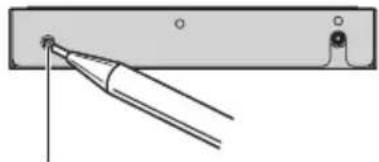
RESETbutton
Resettingthisunitwith clearingallmemory
Toprotectpersonalandprivateinformation, dataaboutthephonestoredinthisunitcan bedeleted.
1TurntheignitionswitchtoACCorON position.
2PressRESETwithapentiporother pointedinstrument.
Allmemoryisnowcompletelycleared.
- Ittakesabout10secondstodeletededata.
Tomakeitsure,leavetheignitionswitchACCor ONpositionfor10secondsaferyouoperatethe deletion.
- Please confirm if data have been completely cleared. For confirmation of the data status, refer to Registering connected cellular phone on page 13. If fall phone's statuses are blank, data has been completely cleared.
BluetoothTelephone
Hands-freephoningwith cellularphonesfeaturing Bluetoothwirelessstechnology
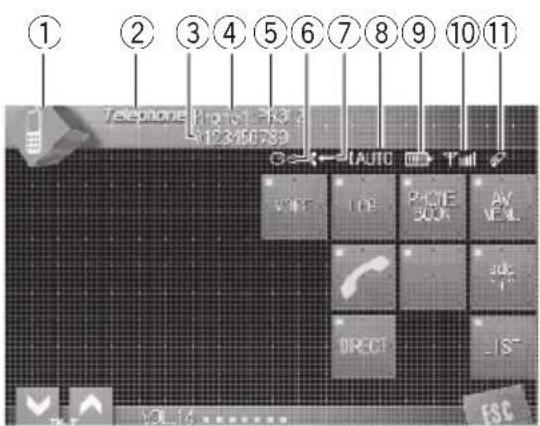
If your cellular phone features Bluetooth wireless technology, you can use this adaptation to connect to a Pioneer head unit for hands-free, wireless calls, even while driving.

Important
Sincethisunitisonstandbytoconnectwithyour cellularphonesviaBluetoothwirelessstechnology,usingthisunitwithoutrunningshengine canresultinbatterydrainage.
① SourceIcon
Showswhichsourcehasbeenselected.
②Sourcename
Showstheasedsourcename.
③Phonenumber
Showsthephonenumbyyouselected.
④numnumberindicator
Showstheregistrationnumberofthecellularphone.
⑤Devicename
Showsthedevicenameofthecellular phone.
⑥ Voicerecognitionindicator
Showswhenthevoicerecognitionfunction ison(formoredetails,refertoVoicerecognitiononpage10).
⑦ Incomingcallnoticeindication
Showswhenanincomngcallhasbeenreceivedandnotcheckedyet.
Automaticansweringindicator
Showswhentheautomaticansweringfunctionison(formoredetails,refertoSetting theautomaticansweringonpage20).
⑨ Batterystrengthindicator
Showsthebatterystrengthofcellularch phone.
- Batterystrengthindicatormaydiffer fromtheactualbatterystrength.
- Ifthebatterystrengththisnotavailable, nothingisdisplayedinthebattery strengthindicatorarea.
⑩ Signalvelindicator
Showsthesignalstrengthofcellularphone.
- Signalvelindicatormaydifferfromthe actualsignallevel.
- Depending on the cellular phones, featuring Bluetooth wireless technology, radio field intensity is not available.
⑪Telephoneindicator
Showswhenaphoneconnectionusing Bluetoothwirelessstechnologyisestablished(formoredetails,refertoConnecting acellularphoneonpage12).

Notes
- This unit's phone call reception is on standby whenignitionswitchissettoACCorON.
BluetoothTelephone
- Theline-of-sightdistancebetweenthisisunit andyourcellularphonemustbe10metersor lessforsendingandreceivingvoiceanddata viaBluetoothwirelessstechnology.However, thetransmissiondistancemaybecomesshorterthantheestimateddistance,depending on theenvironmentinuse.
- InordertouseBluetoothwirelessstechnology, devicesmustbeabletointerpretcertainprofiles. Thisunitiscompatiblewiththefollowing profiles.
—GAP(GenericAccessProfile)
SDP(ServiceDiscoveryProtocol)
—OPP(ObjectPushProfile)
—HSP(HeadSetProfile)
—HFP(HandsFreeProfile)
—A2DP(AdvancedAudioDistributionProfile)
AVRCP(Audio/VideoRemoteControlProfile)
- WhenyouuseRDS(radiodatasystem)or DAB(digitalaudiobroadcasting)andturnthe announcementstandbyon, phonecallmaybe interruptedbyreceivinganannouncement signal.
- Whenphoneisselectedasasource, volume andequalizercurveareaautomatically changedtosuitablesettingsforthephoneresource. Whenthesourceisreturnedtoanother source, volumeandequalizersettingsautomaticallyreturntotheoriginalsetting.
- Equalizercurveforthephoneourceis fixed.
Aboutthetelephonesource
Standbymode
OnceconnectedviaBluetoothwirelessstechnology, theheadunitwillremainontelephone sourcestandbyinthebackgroundallthe whiletheconnectionissustained. This means you can freelyusetheotherfunctionsofthe headunit,butstillbereadytoreceiveacall.
- Touchthesourceiconandthentouch Telephoneselectthetelephone.
- Whenthesourceiconisnotdisplayed, you can display it by touching the screen.
Settingupforhands-free phoning
Beforeyoucanusethehands-freephoning functionyouwillneedtosetuptheunitfor usewithyourcellularphone.ThisentailsestablishingaBluetoothwirelessconnectionbetweenthisunitandyourphone,registering yourphonewiththisunit,andadjustingthe volumelevel.
1Connection
Fordetailedinstructionsonconnectingyour phonetothisunitviaBluetoothwirelessstechnology,refertoConnectingacellularphoneon page12.
- Yourphoneshouldnowbetemporarilyconnected;however,tomakebestuseothetechnology,werecommendyouregisterthephoneto thisunit.
2Registration
RefertoRegisteringconnectedcellularphone onpage13forinstructionsonhowtoregister yourtemporarilyconnectedphone.
3Volumeadjustment
Adjusttheearpiecevolumeonyourcellar phoneforcomfort.Whenadjusted,thevolume levelismemorizedinthisunitasthedefault setting.
- Caller's voice volume and ring volume may varydependingonthetypeofcellularphones.
Ifthedifferencebetweentheringvolumeand caller'svoicevolumeisbig,overallvolumelevel maybecomeunstable.
BluetoothTelephone
- Beforedisconnectingcellularphonefromthis unit, makesuretoadjustthevolumetoproper level. If the volume has been muted (zerolevel) on your cellular phone, the volume level of your cellular phoner remains muted even after the cellular phone is disconnected from this unit.
Basicoperationofhands-freephoning
Thesearethebasicoperationstousehands-freephoningviaBluetoothwirelessstechnology.Moreadvancedhands-freephoningoperationsareexplainedstartingon/Introduction of advanced hands-freephoning operation on thenextpage.

Important
Advancedoperationsthatrequireyourattention suchasdialingnumbersonthemonitor,using phonebook,etc.,areprohibitedwhileyouaredriving.Whenyouneedtousetheseadvanced operations,stopyourvehicleinasafeplaceand operate.
Makingaphonecall
Voicerecognition
If your cellular phone features voice recognition technology, you can make acallbyvoice commands.
Operationvariesdependingonthetypeof yourcellularphone.Refertotheinstruction manualthatcamewithyourcellularphone fordetailedinstructions.
- Thisfunctioncanbeoperatedonlywhen theconnectionistablishedwithHFP (HandsFreeProfile).
1TouchVOICEoturnthevoicerecognitionfunctionon.
Voicedialiconappearsontheinformationbar. Voicerecognitionfunctionisnowready.
Ifyourcellularphonedoesnotfeaturevoice recognitionfunction,youcannottouchVOICE.
2Pronouncethenameofyourcontact.
Takingaphonecall
Answeringanincomingcall
EvenwhenasourceotherthanTelephoneis selectedorwhenthisisunititselffisturnedoff, youcanstillanswerincomingcalls.Ifyouset thisunittoautomaticallyansweringincoming calls,referetoSettingtheautomaticanswering onpage20.
1Whenacallcomesin,touch
Iftheprivatemodeisselectedonthecellular phone, hands-freephoningmaynotbe performed.
2Toendthecall,touch.
Theestimatedcalltimeappearsinthedisplay (thismaydifferslightlyfromtheactualcall time).
- Youmayhearanoisewhenyoudisconnect thephone.
Rejectinganincomingcall
Youcanrejectanincomingcall.Ifyouwantto setthisunittoautomaticallyrejectingallincomingcalls,refertoSettingtheautomaticreje ctingonpage20.
- Whenacallcomesin,touch
Thecallisrejected.
BluetoothTelephone

Note
Themeanuallyrejectedcallisrecordedinmissed callhistorylist.Aboutthemisseddallhistorylist, refertoUsingtheCallHistoryonpage18.
Answeringacallwaiting
If while you are talking on the phone another call comes in, then number (ornameifitisin your phonebook) of thenew caller appearson the displaytosignal that you have acallwaiting. You can put the first caller on hold while you answer the call waiting, or you can choose to reject the call.
1Touch

toansweracallwaiting.
2Touch

toendthecall.
The calleryouhavebeentalkingtoisnowon hold.Toendthecall,bothyouandyour caller needtohangupthephone.
While your callers holdtheline, touching switches between callers.
Rejectingacallwaiting
Ifyouwouldrathernotinterruptyourcurrent calltoansweracallwaiting,youcanrejectit.
Touch

torejectacallwaiting.
- Thenumberyouhavenegativejectedisnotaddedto thecallhistorylist.
Introductionofadvanced hands-freephoningoperation

Important
You are required to park your vehicle and set the parking brake in order to perform this operation.
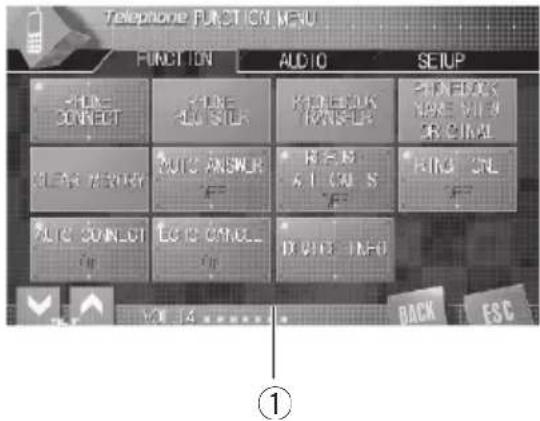
①Functiondisplay
1SelectTelephoneasasource.
2TouchAVMENUtodisplayMENU.
MENUappearsonthedisplay.
- When AV MENU is not displayed, you can displayitbytouchingthescreen.
- You canalsodisplay MENU by clicking the joystick.
3TouchFUNCTIONtodisplaythefunctionnames.
Thefunctionnamesaredisplayedandoperableonesarehighlighted.
To return to the previous display, touch BACK.
Toreturntotheplaybackdisplay,touch
ESC.
Connectingacellularphone
Touseaphonewirelesslywiththisunit,itis necessaryfirsttoestablishhaconnectionusing Bluetoothwirelessstechnology.Thereareseveralwaysyoucandothis.
- ConnectionisnormallyestablishedbyHFP, whichgivestyouafullcontroloffunctions availableonthetelephonesource.However,insomecaseswhenyoumakeconnectionfromyourcellularphone,the connectionmaybemadebyHSPandseveralfunctionsmaynotbeavailable.
- AphonemaybeconnectedviaBluetooth wirelessstechnologybutnotyetregistered withthisunit. Inthiscaseitissaidtob etemporarilyconnected, andtheavailable featuresarelimited.Totakefulladvantage ofallthefeaturesavailable, werecommend youregisteryourphonewiththisunit. RefertoRegisteringconnectedcellular phoneonthenthengpageformoreonthis.
Searchingforavailablecellularchones
You can have this unit search for any available phones in the areaathave Bluetooth wireless technology, then select which you want to connect from a realist displayed on-screen.
1TouchPHONECONNECTOnthefunction menu.
2TouchSearchtosearchforavailablecellularphones.
Whilesearching,SEARCHisdisplayed. Whenavailablecellularphonesfeaturing Bluetoothwirelessstechnologyarefound,devicenamesorNameNotFound(ifnames cannotbeobtained)aredisplayed.
Ifthisunitfailstofindanyavailablecellular phones,NOTFOUNDisdisplayed.
3Touchthedevicenameyouwantto connect.
Whileconnecting,CONNECTINGisdisplayed. Tocompletetheconnection,pleasecheckthe devicename(PioneerBTunit)andenterthe linkcodeonyourcellularphone.Ifthecon- nctionistablished,CONNECTEDisdis- played.
- Thelinkcodeissetto0000asdefault.You canchangethiscodeintheinitialsetting.Refer toEnteringPINcodeforBluetoothwireless connectiononpage24.
Usingacellularphoneto initiateaconnection
PuttingtheunitinConnectionopenmodeallowsyoutoestablishaBluetoothwirelessconnectionfromyourphone.Youmayneedertorefertotheoperationmanualthatcamewithyourhoneifyouareunsurehowtoinitiatea connectionfromyourphone.
1TouchPHONECONNECTonthefunction menu.
2TouchCONNECTIONOPEN.
Theunitisnowonstandbyforconnection fromcellularphone.
3Usecellularphonoconnecttothis unit.
Operationvariesdependingonthetypeof yourcellularphone.Refertotheinstructionmanualthatcamewithyourcellularphonenumberfordetailedinstructions.
- Youmayneedtoenterthelinkcodeonyour cellularphonetocompletetheconnection.
- Thelinkcodeissetto0000asdefault.You canchangethiscodeintheinitialsetting.Refer toEnteringPINcodeforBluetoothwireless connectiononpage24.
BluetoothTelephone
Disconnectingcellularphone
Whenyouaredoneusingyourphonewiththis unit,youanclosetheBluetoothwirelessconnection.
1TouchPHONECONNECTOnthefunction menu.
2TouchDISCONNECTtodisconnectthe currentlyconnectedcellularphonefrom thisunit.
Afterthedisconnectioniscompleted, NOCONNECTIONisdisplayed.
Registeringconnected cellularphone
You can register a phone that is temporarily connected to this unit in order to take full advantage of the features available with Bluetooth wireless technology. At total offive phonescanberegistered: threeusercellular phones and twoguestphones. When registered as userphone, all the possible functions are available for use. When registered as aguestphone, some functions are limited.
1TouchPHONEREGISTERonthefunction menu.
2Touchandholdoneoftheregistration assignmentstoregisterthecurrenctlyconnectedphone.
Selectfromthefollowing:
1 (user 1)—2 (user 2)—3 (user 3)—G (guest 1) —G(guest2)
Iftheregistrationissucceeded,thedevicenameoftheconnectedphoneisdisplayedin theselectedassignment.
- Iftheassignmentisempty, thedevice name is not displayed. Iftheassignment is already taken, the device name appears. Toreplaceanassign-
mentwithanewphone,firstdelete tetecurrent assignment.Formoredetailedinstructions,see Delet ingaregisteredphoneonthi spage.
Iftheregistrationfailed,deviceinameofthe connectedphoneisnotdisplayedintheselected assignment.Inthiscase,returntostep1andtry again.

Note
Audioadjustmentcanbesetindependentlyforeachuser.
Deletingaregisteredphone
Ifyoulongerneedtouseregistered phonewiththisunit,youcandleitfromtheregistrationassignmentforanotherphone.
1TouchPHONEREGISTERonthefunction menu.
2TouchDELETEnttothedevicename youwanttod delete.
Aconfirmationdisplayappears.TouchYESto delete the phone.
- Ittakesabout10secondstodeletededata. Tomakeitsure,leavetheignitionswitchACCor ONpositionfor10secondsafteryouoperatethe deletion.
Tocanceldeletingaregisteredphone,touch NO.
Connectingoaregistered cellularphone
Onceyourphoneisregisteredwiththisunitit isasimplemattertoestablishaBluetooth wirelessconnection,eithermanuallybyselectingaregistrationassignment,orautomatically whenareregisteredphoneiswithinrange.
Connectingoaregistered phonemanually
Selectaphonefromtheregistrationassignmentstoconnecttothephonemanually.
1TouchPHONECONNECTOnthefunction menu.
2TouchDIRECTCONNECT.
3Touchthedevicenameyouwantto connect.
Whileconnecting, CONNECTINGisflashing. Iftheconnectionistablished,CONNECTED isdisplayed.
Connectingoregistered phoneautomatically
WhenAutomaticConnectionisactivetheunit willautomaticallyestablishaconnectionwith aregisteredphonewhenitcomesintorange.
- Thisfeaturemaynotworkwithallphones. Ifyourregisteredphonefailstoconnect withAutomaticConnection,usethemanualconnectionmethodexplainedinConnectingtoaregisteredphonemanuallyon thispage.
- Withsomecellularphones, you mayberequiredtomakeaconfirmedationonthecellularphoneinconnectingtothisunit. Insuchcase, the connection maynot bemadeuntilyouconfirmitonthephone eveniftheAutomaticConnectionofthis
unitisettoon.Ifpossible,setyourcellu-larphonetonotseekingaconfimrationfor theBluetoothconnection.Fordetails, pleaserefertotheoperationmanualthat camewithyourcellularphone.
- ThisfeatureisnotpossibleifyouareplayingbacksongsonyourBluetoothaudio playerviaBluetoothwirelessstechnology.In suchcase,stopheplaybackandswitchto anothersourceforyourcellularphoneto connectthisunitthroughthisfunction.
Whileyouareoperatinginthefunction menuofTelephonesourceorBTAUDIO source, thisunitdoesnotinitiatean automaticconnectiontoyourregisteredphone. - Thisfeaturecannotbesetforeachdifferentuserphone.
- TouchAUTOCONNECTOnthefunction - menutoturntheAutomaticConnection functionon.
If your cellular phone is ready for Bluetooth wireless connection, the connection to this unit will be automatically established.
- ToturnAutomaticconnectionoff,touch
AUTOCONNECTagain.
UsingthePhoneBook
ThePhoneBookcanstoreupto500names andnumbers.UsethePhoneBooktobrowse fornumbersontheunit'sdisplayandselect numberstocall.Namesandphonenumberstoredinaregistereduserphone'saddress bookcanbetransferredtothePhoneBook,allowingyoutofillthePhoneBookquicklyand easilywithyourcontacts.
- Themaxumnumberofcharacterswhich canbedisplayedisifferentdepending on yourcellularphone.Thisunitcandisplay upto24to48letters.
BluetoothTelephone
Transferringentriestothe PhoneBook
TopopulatethePhoneBookyoucantransfer thenumbersinaregistereduserphone'saddressbook.
ThePhoneBookcanholdatatof500entries:300fromUser1,150fromUser2,and50fromUser3.
- OncethetransferringPhoneBookfunction starts, the Bluetooth connection is disconnected and the hands-freephoningisnot possible. Inorderto start the hands-free phoning, connect your cellular phone to this unit again. If the automatic connection of this unit is turned on, however, the connection will be automatically established several ten seconds after the phone is disconnected for the transferring.
- Somesymbolsusedinthephonenum of thephonebookentriescannotbetransferredtothisunit.Only+,#and*canbecorrectlyrecognizedbythisunit.
- Withsomecellularphones, it may not be possible to transfer wholephonebookata time. Inthis case, transfer phone bookentriesonebyone from your phone by using your cellular phone.
Depending on the cellular phone connected via Bluetooth wireless technology, this unit cannot display the PhoneBook correctly. (Some characters may be garbled.) - If the phonebook in the cellular phone contains imagedata, phonebook may not be correctly transferred.
1TouchPHONEBOOKTRANSFERonthe functionmenu.
2TouchSTARTtoturnthePhoneBook Transferfunctionon.
ThePhoneBookTransfersnowonstandby.
3Usecellularphonetoperformphone booktransfer.
Performphonebooktransferingthecellularphone.Fordetailedinstructiononthis,refertotheinstructionmanualthatcamewithyourcellularphone.
While transferring the phonebook, hourglass icon is displayed.
- Thedisplayindicateshowmanyentrieshave beentransferredandthetotalnumbertobetransferred.
Tocancelthetransferringprocess,touch STOP.
4Completedisdisplayedandphone booktransferiscompleted.
ChangingthePhoneBook displayorder
You can choose to display the Phone Book sorted alphabetically by firstname or last name.
- Withsomecellularphones, this feature maynotbepossible.
- TouchPHONEBOOKNAMEVIEWonthe functionmenutoturnPhoneBookName Viewfunctionon.
DisplayorderforthePhoneBookischanged.
Tochangetotheotherdisplayorder,touch PHONEBOOKNAMEVIEWagain.
CallinganumberinthePhone Book
You can select the entry in the Phone Book and makethecall.
1TouchPHONEBOOKtodisplaythe PhoneBook.
BluetoothTelephone
2TouchaPhoneBookentryyouwantto call.
TheDISPLAYISSwitchedtothePhoneBookedit display.
- Touch PREV or NEXT to display other phone bookentries.
3TouchphonenumberofthePhone Bookentryyouwanttocall.
Ifseveralphonenumberssareenteredtoan entry,touchoneyouwanttocall. Thedisplayreturnstothenormaldisplayand thePhoneBookentryyouselecteddisdisplayedontheinformationbar.
4Touch tomakeacall.
Theestimatedcalltimeappearsinthedisplay (thismaydifferslightlyfromtheactualcall time).
- Foraninternationalcall,touchadd" + "toadd
+tothephonenumber.
5Toendthecall,touch.
Theestimatedcalltimeappearsinthedisplay (thismaydifferslightlyfromtheactualcall time).
Searchinganumberinthe PhoneBook
AfterfindingthenumberinthePhoneBook youwanttocall,youcanselecttheentryand makethecall.
1TouchPHONEBOOKtodisplaythe PhoneBook.
2TouchSEARCHtodisplaythePhone Booksearchdisplay.
3Touchanalphabetlettertoselectthe firstletterofthenameyouarelookingfor.
4TouchENTERtoshowentriesstarting withtheletteryouchose.
TheDISPLAYshowsthefirstsixPhoneBookentries starting with that letter (e.g. "Ben", "Brian" and "Burt" when "B" is selected).
- Touch PREV or NEXT to display other phone bookentries.
Torefinethesearchwithadifferentletter, touchCLEAR.
5TouchaPhoneBookentryandmakeacall.
SeestptwotofiveonCallinganumberinthe PhoneBookonthepreviouspageforhowtdothis.
EditingthenameofaPhone Bookentry
You can edit thenames of Phone Book entries. Eachname can be up to 16 characters long.
1TouchPHONEBOOKtodisplaythe PhoneBook.
2SelectaPhoneBookentryyouwantto edit.
SeesteptwotothreeonCallinganumberin thePhoneBookonthepreviouspageforhow todothis.
3TouchEDITnexttothePhoneBook entryname.
TheDISPLAYISCHANGEDtothePhoneBookedit display.
4Touch123orABCtoselectthedesired charactertype.
TouchingABCswitchesthecharactertypesin thefollowingorder.
Alphabet(uppercase),numbersandsymbols alphabet(lowercase)—numbersandsymbols—Russiancharacters
BluetoothTelephone
OnlywhenyouuseaRussianmodel,you can switchthecharactertypetoRussian.
5Touchalettertoenter.
- Todeleteachacterandleaveaspace,touch
6TouchMEMORYtostorethenew name.
Editingphonenumbers
YoucaneditthephonenumbersofPhone Bookentries.
1TouchPHONEBOOKtodisplaythe PhoneBook.
2SelectaPhoneBookentryyouwantto edit.
SeesteptwotothreeonCallinganumberin thePhoneBookonpage15forhowtodhis.
3TouchEDITnexttothephonenumber youwanttoedit.
TheDISPLAYIsChangedtothePhoneBookdial editdisplay.
4Touch0—9toinputnumbers.
Foraninternationalcall,touchadd" ^+ "toadd
+tothephonenumber.
- TouchCLEARtodeteletethenumber.
5Touchor>tomovethecursorand editthenumber.
Repeatthesestepsuntilyouhavefinished changing.
6TouchENTERtostorethenewnumber.
ClearingaPhoneBookentry
YoucandlePhoneBookentriesinthe PhoneBookonebyone.
ToclearallofyouentriesinthePhoneBook,
refertoClearingmemoryonthispage.
1TouchPHONEBOOKtodisplaythe PhoneBook.
2SelectaPhoneBookentryyouwantto delete.
SeesteptwotothreeonCallinganumberin thePhoneBookonpage15forhowtodothis.
3TouchDELETEEtodeletethePhoneBook entry.
A confirmation display appears. Touch YES to delete the entry.
Ittakesabout10secondstodeletededata.
Tomakeitsure,leavetheignitionswitchACCor ONpositionfor10secondsafteryouoperatethe deletion.
IfyoudonotwanttoclearaPhoneBookentry thatyouhavenselected,touchNO.
Clearingmemory
You can clear memory of each item; Phone Book, dialed/received/missed call history list and preset phonenumber.
1TouchCLEARMEMORYOnthefunction menu.
2TouchCLEARnexttotheitemyouwant todeletefromthememory.
Selectfromthefollowing:
PHONEBOOK phonebook) DIALEDCALLS
(dialedcallhistory)—RECEIVEDCALLS(receivedcallhistory)—MISSEDCALLS(missed callhistory)—PRESETDIALS(presetphone numbers)
Afterselectingadesireditem,aconfirmation displayappears.TouchOKtodeletememory.
IfyouwanttoclearallthePhoneBook,dialed/received/missedcallhistorylstandpresetphonenumbertouchCLEARALL.
- Ittakesabout10secondstodeletedata. Tomakeitsure,leavetheignitionswitchACCor ONpositionfor10secondsafteryouoperatethe deletion.
If youdonotwanttoclearmemorythatyou haveselected,touchCANCEL.
UsingtheCallHistory
The12mostrecentcallsmade(dialed),receivedandmissedarestoredintheCallHistory.YoucanbrowsetheCallHistoryandcallnumbersfromit.
DisplayingtheCallHistory
TheCallHistoryisdividedintothreegroups: Missedcalls, Dialects, and Received calls. You canseethenumber(andnameifthen numberisinthePhoneBook).
- TouchLOGtodisplaytheCallHistory.
TouchingLOGrepeatedlyswitchesbetween thefollowingcallhistories: Missedcall—Dialedcall—Receivedcall
- Ifnophonenumbershavebeenstoredin the selectedlist,nothingisdisplayed.
- Youcanswitchbetweenphonenumberand name(ifentered)bypressingABC/123.
CallinganumberfromtheCall History
1Displaythelistandselectaphonenumber.
Displaythephonenumberyouwanttomakea call.
2Touchaphonenumberorname(ifentered)youwanttocall.
TheDISPLAYRETURNSTOthenormaldisplayand thephonenumberyouselecteddisplayed ontheinformationbar.
- Touch PREV or NEXT to display other phone numberorname(ifentered).
3Touchtomakeacall.
Theestimatedcalltimeappearsinthedisplay (thismaydifferslightlyfromtheactualcall time).
-Foraninternationalcall,touchadd" +"toadd
+tothephonenumber.
4Toendthecall,touch.

Usingpresetnumbers
Assigningpresetnumbers
Numbersthatyoudialfrequentlycanbeassignedtopresetsforquickrecall. Youcanassignuptosixfrequentlycalled phonenumberstonumberpresets(P1-P6).
1Selectadesiredphonenumberfrom thePhoneBookortheCallHistory.
Seetheinstructionsexplainedinprevious pagesforhowtoselectadesiredphonenumberfromthePhoneBookortheCallHistory. Thedisplayshouldnowbethenormaldisplay andtheselectedphonenumberisdisplayed ontheinformationbar.
2TouchLISTtodisplaypresetnumbers P1-P6.
3KeeptouchingoneofP1-P6topreset thephonenumber.
Thephonenumberyouselecteddisstoredin presets.
BluetoothTelephone
- Upto30phonenumbers(sixphonenumbers foreachofththreeeregisteredphonesandtwo guestphones)canbestoredinmemory.
Recallingpresetnumbers
Youcaneasilyrecallthepresetphonenumbers.
1TouchLISTtodisplaypresetnumbers P1-P6.
PresetnumbersP1-P6appearinthedisplay.
2TouchoneofpresetnumbersP1-P6.
Theselectedphonenumbershouldnowbe displayedontheinformationbar.
3Touch tomakeacall.
4Toendthecall,touch
Theestimatedcalltimeappearsinthedisplay (thismaydifferslightlyfromtheactualcall time).
Makingacallbyentering phonenumber
Youcanmakeacallbydirectlyenteringphonenumbersonthisunit.
1TouchDIRECTtodisplaythedirectdial display.
2Touch0—9toinputnumbers.
■Foraninternationalcall,touchadd" ^+ "toadd
+tothephonenumber.
- TouchCLEARtodeteletethenumber.
Upto24digitscanbeentered.
3Whenyoucompletedenteringthenumber,touch tomakeacall.
4Toendthecall,touch
Theestimatedcalltimeappearsinthedisplay (thismaydifferslightlyfromtheactualcall time).
Echocancelingandnoisereduction
Whenyouareoperatinghands-freephoning inthevehicle,youmayhearundesiredecho. Thisfunctionreduceestheechoandnoiseand keepsacertainsoundquality.
- Thisfeaturecannotbesetforeachdifferentuserphone.
- TouchECHOANCELonthefunctionmenutoturnEchoCancelfunctionon.
- Toturnechocancelingoff,touch ECHOCANCEagain.
Switchingtheringtone
Theunitoffersyoutoturntheringtoneforincomingcallsonoroff.
- Theringtoneyouselectforthisunithasno effectontheringtoneusedbyyourphone. Ifyoudonotwantyourphoneandthisunit toringatthesametime,werecommend youturntheringtoneofoneorthotheother off.
- TouchRINGTONEonthefunctionmenu toturntheringtoneon.
- Toturntheringtoneoff,touchRINGTONE again.
Settingtheautomatic rejecting
Ifthisfunctionison,thisunitautomatically rejectsallincomingcalls.
- Thisfeaturecannotbesetforeachdifferentuserphone.
- Therejectedcallisnotmemorizedinreceivedormissedcallhistorylist.
- TouchREFUSEALLCALLS on the functionmenutoturnthe automatic call rejection.
ONappearsinthedisplay.
- Toturntheautomaticcallrejectionoff,touch
REFUSEALLCALLSagain.
Settingtheautomatic answering
Ifthisfunctionison,thisunitautomatically answersallincomingcalls.
- Thisfeaturecannotbesetforeachdifferentuserphone.
- TouchAUTOANSWERonthefunction menusoturntheautomaticansweron.
ONappearsinthedisplay.
- Toturntheautomaticansweroff,touch AUTOANSWERagain.

Note
IfboththeautomaticrejectandautomaticanswerfunctionsaresettoON,theautomaticrejectisprioritizedandallincomingcallsareautomaticallyrejected.
DisplayingBD(Bluetooth Device)address
EachdevicefeaturingBluetoothwirelessstechnologyisallocatedaunique48-bitdeviceaddress.Eachdeviceaddressconsistsofa12-digitofhexadecimalstring.YoucandisplaytheBDaddressofyourcellularphoneandthisunit.
Shouldthisunitfailstooperateproperlyand youconsultwithdealerforrepair,youmaybe askedtoindicatethesystemversionsothis unitandofBluetoothmodule.Youcandisplay theversionsandconfirmthem.
- TouchDEVICEINFOOnthefunction menusutodisplaytheBDaddress.
Variousinformationregardingthebluetooth wirelesstechnologyaredisplayed.
- BDADDRESS(systemaddress)
-SYSTEMNAME(systemname)
-SYSTEMVER.(version) - BTMODULEVER.(Bluetoothmodule version)
BluetoothAudio
ListeningtosongsonBTAudio (Bluetoothaudioplayer)
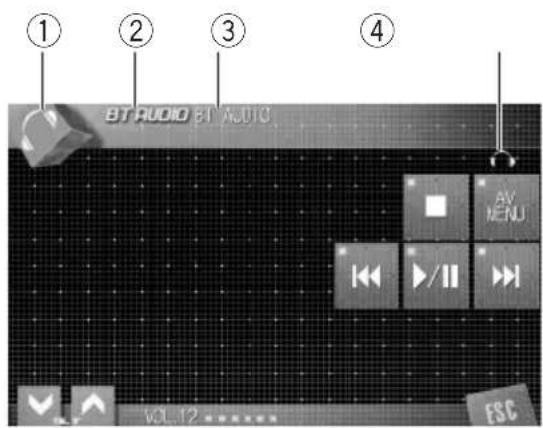
IfyouconnectthisadaptertoaPioneerhead unit,youcancontrolaBluetoothaudiolayer viaBluetoothwirelessstechnology.

Important
- ThisunitcancontrolaBluetoothaudioplayer viaA2DPorAVRCPprofile.Bluetoothaudio players(orBluetoothadapters)compatible withthoseprofilescanbeconnectedtothis unit.
A2DPprofile(AdvancedAudioDistribution Profile):Onlyplayingbacksongsonyour audioplayerispossible.
AVRCPprofile(Audio/VideoRemoteControlProfile):Playingback,pausing,selectingsongs,etc.,arepossible. - SincethereareanumberofBluetoothaudio playersavailableonthemarket,operations withyourBluetoothaudioplayerusingthis unitvaryinggreatrange. Pleaseerefertothe instructionmanualthatcamewithyourBluetoothaudioplayeraswellasthismanual whileoperatingyourplayeronthisunit.
Informationaboutsongs(e.g.theelapsed playingtime, songtitle, songindex, etc.) cannot be displayed on this unit.
WhileyouarestlisteningtosongsonyourBluetoothaudioplayer,please refrainfromoperat
ingonyourcellarphoneeasmuchas possible.Ifyoutryoperatingonyourcellar phone,thesignalfromyourcellarphone maycauseanoiseonthesongplayback.
- Whenyouaretalkingonthecellularphone connectedtothisunitviaBluetoothwireless technology,thesongplaybackfromyourBluetoothaudioplayerconnectedtothisunitismuted.
Evenifwhileyouarelisteningtosongonyour Bluetoothaudiplayeryouswitchtoanother source, the playback of song continuesto elapse.
① Sourceicon
Showswhichsourcehasbeenselected.
②Sourcename
Showstheasedsourcename.
③Devicename
Showsthedevicenameoftheconnected Bluetoothaudiolayer(orBluetoothadapter).
④Bluetoothaudioindicator
ShowswhenaBluetoothaudioplayerconnectionistablished(formoredetails,refertoConnectingaBluetoothaudioplayeronthenextpage).
- Touchthesourceiconandthentouch BTAUDIOtoselecttheBluetoothaudio source.

Note
Theline-of-sightdistancebetweenthisisunitand yourcellularphonemustbe10metersorlessfor sendingandreceivingvoiceanddataviaBluetoothwirelessstechnology.However,thetransmissiiondistancemaybecomesshorterthanthe estimateddistance,dependingontheenvironmentuse.
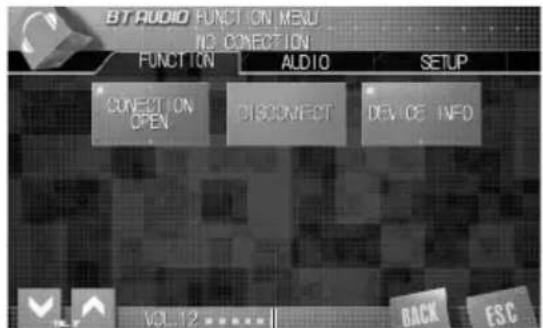
(1)
ConnectingaBluetooth audioplayer
①Functiondisplay
- When AV MENU is not displayed, you can display it by touching the screen.
- You canalsodisplay MENUbyclicking the joystick.
2TouchFUNCTIONtodisplaythefunctionnames.
Thefunctionnamesaredisplayedandoperableonesarehighlighted.
To return to the previous display, touch BACK.
To return to the playback display, touch ESC.
3TouchCONNECTIONOPEN.
ONisdisplayed.Thisunitisnowstandby forconnectionfromBluetoothaudiolayer. IfyourBluetoothaudioplayerissetreadyfor Bluetoothwirelessconnection,theconnection tothisunitwillbeautomaticallyestablished.

Note
Beforeyoucanuseaudioplayersyoumayneed toenterthePINcodeintothisunit.Ifyourplayer requiresaPINcodetoestablishaconnection, lookforthecodeontheplayerorinitssaccompanyingdocumentation.EnterthePINcoderefer-ringtoEnteringPINcodeforBluetoothwireless connectiononpage24.
PlayingsongsonBluetooth audioplayer

Important
OperationvariesdependingonthetypeofyourBluetoothaudiolayer.Refertotheinstruction manualthatcamewithyourBluetoothaudiolayerfordetailedinstructions.
1Touch>II.
Playbackstarts.
- Whenyouwanttopauseasong,touch>11 again.
2Toskipbackorforwardtoanother track,touchor.
Touching▶skipstothestartofthenext track.Touching!▶oneskipstothestartof thecurrenttrack.Touchingitagainwillskipto thepreviousrack.
- You canalsoskipbackforwardtoanother trackbypressing or buttonormoving the joystickleftorright.
3Toperforfastforwardorreverse, keptouchingor.
- You canalsoperfamfastreverse/fastforward bypressingandholding or buttonorholding thejoysticklefttoright.
- Whenyouperformfastforwardorreverse, thereisasoundornot.Thisdifferencedepends ontheBluetoothaudioplayerwhichyouse.
4Tostopplayback,touch■.

BluetoothAudio
DisconnectingaBluetooth audioplayer
WhenyouaredoneusingyourBluetooth audioplayerwiththisunit,youanclosethe Bluetoothwirelessconnection.
1TouchAVMENUtodisplayMENU.
MENUappearsonthedisplay.
- When AV MENU is not displayed, you can displayitbytouchingthescreen.
- You canalsodisplay MENU by clicking the joystick.
2TouchFUNCTIONtodisplaythefunctionnames.
Thefunctionnamesaredisplayedandoperableonesarehighlighted.
To return to the previous display, touch BACK.
To return to the playback display, touch ESC.
3TouchDISCONNECT.
Afterthedisconnectioniscompleted, Disconnectedisdisplayed.
DisplayingBD(Bluetooth Device)address
EachdevicefeaturingBluetoothwirelessstechnologyisallocatedaunique48-bitdeviceaddress.Eachdeviceaddressconsistsofa12-digitofhexadecimalstring.YoucandisplaytheBDaddresssoftthisunit.Shouldthisunitfailstooperateproperlyandyouconsultwithdealerforrepair,youmaybeaskedtoindicatethesystemversionsofthisunitandofBluetoothmodule.Youcandisplaytheversionsandconfirmthem.
1TouchAVMENUtodisplayMENU.
MENUappearsonthedisplay.
-
WhenAVM MENU isnot displayed, you can display it by touching the screen.
-
You canalsodisplay MENUbyclicking the joystick.
2TouchFUNCTIONtodisplaytheffunctionnames.
Thefunctionnamesaredisplayedandoperableonesarehighlighted.
To return to the previous display, touch BACK.
To return to the playback display, touch ESC.
3TouchDEVICEINFOOtodisplaytheBD address.
Various information regarding the bluetooth wireless technology are displayed.
- BDADDRESS(systemaddress)
-SYSTEMNAME(systemname) - SYSTEMVER.(version)
- BTMODULEVER.(Bluetoothmodule version)
EnteringPINcodefor Bluetoothwirelessconnection
WithsomeBluetoothaudiolayers,youmayberequiredtoentertothisunitinadvancePINcodeofyourBluetoothaudiolayer,inordertosetthisunitreadyforaconNECTIONfromyourBluetoothaudiolayer.
1Touchthesourceiconandthentouch OFFtoturnthisunitoff.
- Whenthesourceiconisnotdisplayed, you candisplayitbytouchingthescreen.
2TouchAVMENUandthentouchINITIAL todisplaythefunctionnames.
Thefunctionnamesaredisplayedandoperableonesarehighlighted.
- WhenAVMUSnnotdisplayed,youcandisplayitbytouchingthescreen.
- YoucanalsodisplayMENubyclickingtheJoystick.
Togotothenextgroupoffunctionnames, touchNEXT.
Toreturntothepreviousgroupoffunction names,touchPREV.
To return to the previous display, touch BACK.
Toreturntothedisplayofeachsource,touch ESC.
3TouchPINCODEINPUT.
PINcodeinputdisplayappears.
4Touch0—9toinputthePINcodeof yourBluetoothaudioplayer.
- TouchCtodelethenumber.
5AfterinputtingPINcode(upto16digits),touchENTER.
ThePINcodeyouentereddisstoredinthis unit.
Operatingwithdifferent headunits
Usingasanexternalunit
Thefollowingheadunitsoperatethisunitas anexternalunit.Formoredetailsabouttheexternaunit,refertotheheadunit'smanual.
1-6KEY doesn't be used to operate this unit.
- WhenselectingTELasasource, AUTO/MANUAL(A/M)doesn'tbeusedto operatethisunit.
- Whenselecting BTAUDIOasasource, FUNC3(F3)/FUNCTION3andFUNC4(F4)/ FUNCTION4doesn'tbeusedtooperate thisunit.
Headunitgroup1
ThefollowingheadunitsfeaturingFUNCTION buttonoperationorSOFTKEYoperation. DEH-P9600MP,DEX-P90RS,DEH-P7700MP, DEH-P7600MP,DEH-P77MP*1,DEH-P6800MP, DEH-P6700MP,DEH-P6600R,DEH-P5800MP, DEH-P5700MP,DEH-P5600MP,DEH-P55BT*2, DEH-P4800MP,DEH-P3600MP,DEH-P2600R, DVH-P580MP,DVH-P5000MP,KEH-P7020R, KEH-P6020R
Headunitgroup2
Thefollowingheadunitsfeaturing
MULTI-CONTROLoperation.
DEH-P8600MP,DEH-P88RS,DEH-P80MP, DEH-P70BT ^*2
Headunitgroup3
Thefollowingheadunitsfeaturingtouch panelkeyoperation. AVH-P7500DVDII,AVH-P6600DVD,AVH-P5700DVD
Headunitgroup4
Thefollowingheadunitsarenavigationunits
featuringtouchpanelkeyoperation.
AVIC-HD1BT*2,AVIC-X1,AVIC-X1R
Headunitgroup5
RS-D7RII

Important
- Sincethisunitisonstandbytoconnectwith yourcellularphonesviaBluetoothwireless technology,usingthisunitwithoutrunning theenginecanresultinbatterydrainage.
- InordertouseBluetoothwirelessstechnology, devicesmustbeabletointerpretcertainprofiles.Whenusingasanexternalunit,thisunit iscompatiblewiththefollowingprofiles.
—GAP(GenericAccessProfile)
—SDP(ServiceDiscoveryProtocol)
—HSP(HeadSetProfile)
—HFP(HandsFreeProfile)
—A2DP(AdvancedAudioDistributionProfile)
—AVRCP(Audio/VideoRemoteControlProfile) - ThisunitcancontrolaBluetoothaudioplayer viaA2DPorAVRCPprofile.Bluetoothaudio players(orBluetoothadapters)compatible withthoseprofilescanbeconnectedtothis unit.
—A2DPprofile(AdvancedAudioDistribution Profile):Onlyplayingbacksongsonyour audioplayerispossible.
—AVRCPprofile(Audio/VideoRemoteControlProfile):Playingback,pausing,selectingsongs,etc.,arepossible. - When using this unit as external unit, the PIN code is set to 0000. You cannot change the PIN code. This unit can connect only the Bluetooth audioplayer which request 0000 as the PIN code does not request any PIN code.
Operatingwithdifferent headunits
- SincethereareanumberofBluetoothaudio playersavailableonthemarket,operations withyourBluetoothaudioplayerusingthis unitvaryinggreatrange. Pleaseerefertothe instructionmanualthatcamewithyourBluetoothaudioplayeraswellasthismanual whileoperatingyourplayeronthisunit.
Informationaboutsongs(e.g.theelapsed playingtime,songtitle, songindex,etc.) cannotbe displayedonthisunit.
WhileyouarelisteningtosongsonyourBluetoothaudiolayer,pleaserefrainfromoperat ingonyourcellularphoneasmuch as possible.Ifyoutryoperatingonyourcellular phone,thesignalfromyourcellularphone maycauseanoiseonthesongplayback. - Whenyouaretalkingonthecellularphone connectedtothisunitviaBluetoothwireless technology,thesongplaybackfromyourBluetoothaudioplayerconnectedtothisunitismuted.
Evenifwhileyouarelisteningtosongonyour Bluetoothaudiplayeryouswitchtoanother source, the playback of songcontinuesto elapse.
Operationvariesdependingonthetypeof yourcellularphoneandBluetoothaudio player.Refertotheinstructionmanualthat camewiththemfordetailedinstructions.

Notes
- This unit's phone call reception is on standby whenignitionswitchissettoACCorON.
-
Theline-of-sightdistancebetweenthisunit andyourcellularphonemustbe10metersor lessforsendingandreceivingvoiceanddata viaBluetoothwirelessstechnology.However, thetransmissiondistancemaybecomesshorterthantheestimateddistance,depending on theenvironmentinuse.
-
TEL and BTA AUDIO are set to the same volume and the same SLA(SourceLevelAdjustment)volume.Changethevolumevaluefor TELorBTAUDIOeachtime,ifneeded.
- IftheremotecontrolhavePGMbutton, you can perform following operations within:
—WhenselectingTELasasource,you can scrollaphonenumberinthecallhistory.
—WhenselectingBTAUDIOasasource, youcapanpauseasong.
Functioncompatibilitycharts Headunitgroup1
| ControlsofBluetoothtelephone | |
| SelectTEL/BTAUDIO asasource | PressSOURCE. |
| SwitchbetweenTEL andBTAUDIO | WhenselectingTEL/BT AUDIOasasource,press BAND. |
| PuttheunitiVoice ONmode* | WhenselectingTELasa source,pressandhold BAND. |
| Takeaphonecall | Whenacallcomesin,press ▲. |
| EndacallPress▼. | |
| Displaythereceived/ missedcallhistory | Press▲. |
| Displaythedialed callhistory | Press▲. |
| Selectaphonenumber- berfromthedialedor received/missedcall history | Whendisplayingthedialed orreceived/missedcallhis- tory,press▲or▲. Ifyouwanttoreturntothe telephonestandbydisplay, press▼. |
| Makeacall | Whenselectingaphone numberfromthedialedand receivedcallhistory,press▲. |
Operatingwithdifferent headunits
| ControlsofBluetoothtelephone | |
| Selectafunction | WhenselectingTELasa source,pressFUNCTION (FUNC). |
| Scrollaphonenumber-berinthecallhistory | WhenselectingTELasa source,press▲or▼in FUNC1(F1). |
| Puttheunitin C.OPENmode | WhenselectingTELasa source,pressandhold▲or▼inFUNC1(F1). |
| PuttheunitinRE-GISTmode | WhenselectingTELasa source,press▲or▼in FUNC2(F2). |
| PuttheunitinDIS-CONN.mode | WhenselectingTELasa source,pressandhold▲or▼in FUNC2(F2). |
| Turntheautomatic answeringonoroff | WhenselectingTELasa source,press▲or▼in FUNC3(F3). |
| Turntheautomatic connectiononoroff | WhenselectingTELasa source,pressandhold▲or▼inFUNC3(F3). |
| Turntheringtononeon oroff | WhenselectingTELasa source,press▲or▼in FUNC4(F4). |
| Displayandswitch thedeviceinformation | WhenselectingTELasa source,pressandhold▲or▼inFUNC4(F4). |
| ControlsofBluetoothaudio | |
| SelectTEL/BTAUDIO asasource | PressSOURCE. |
| SwitchbetweenTEL andBTAUDIO | WhenselectingTEL/BT AUDIOasasource,press BAND. |
| Skipbackforward toanothersong *1 | WhenselectingBTAUDIO asasource,press▶. |
| Fastforward/re- verse*2 | WhenselectingBTAUDIO asasource,pressandhold ▶or▶. |
| ControlsofBluetoothaudio | |
| Selectafunction | WhenselectingBTAUDIO asasource,pressFUNC- TION(FUNC). |
| Pauseason | WhenselectingBTAUDIO asasource,press▲or▼in FUNC1(F1). |
| Puttheunitin C Opens mode | WhenselectingBTAUDIO asasource,pressandhold ▲or▼inFUNC1(F1). |
| Playsongs | WhenselectingBTAUDIO asasource,press▲or▼in FUNC2(F2). |
| PuttheunitinDIS- CONN.mode | WhenselectingBTAUDIO asasource,pressandhold ▲or▼inFUNC2(F2). |
| Switchbetween AUTOandMANUAL | WhenselectingBTAUDIO asasource,press▲or▼in AUTO/MANUAL(A/M). |

Note
When usingasanexternalunit, this unit doesn't automatically return to the original source after a phone call. Selectadesiredsource manually after a phone call.
Headunitgroup2
| ControlsofBluetoothtelephone | |
| SelectTEL/BTAUDIO asasource | PressSOURCE. |
| SwitchbetweenTEL andBTAUDIO | WhenselectingTEL/BT AUDIOasasource,press BAND. |
| PuttheunitINVOICE ONmode *3 | WhenselectingTELasa source,pressandhold BAND. |
| Takeaphonecall | Whenacallcomesin,push MULTI-CONTROLup. |
1 You can use this function when you select AUTO in AUTO/MANUAL (A/M).
2 You can use this function when you select MANUAL in AUTO/MANUAL (A/M).
*3 You can use this function if your cellular phone features voice recognition technology.
Operatingwithdifferent headunits
| ControlsofBluetoothtelephone | |
| Endacall | PushMULTI-CONTROL down. |
| Displaythereceived/missedcallhistory | PushMULTI-CONTROLleft. |
| Displaythedialed callhistory | PushMULTI-CONTROLright. |
| Selectaphonenumber berfromthedialedor received/missedcall history | Whendisplayingthedialed orreceived/missedcallhis-tory,pushMULTI-CONTROL leftorright. Ifyouwanttoreturntothe telephonestandbydisplay, pushMULTI-CONTROL down. |
| Makeacall | Whenselectingaphone numberfromthedialledand receivedcallhistory,push MULTI-CONTROLup. |
| Selectafunction | WhenselectingTELasa source,useMULTI-CON-TROL. |
| Scrollaphonenumber berinthecallhistory | WhenselectingTELasa source,pressMULTI-CON-TROLinFUNC1(F1). |
| Puttheunitin C Opens mode | WhenselectingTELasa source,pressandhold MULTI-CONTROLinFUNC1 (F1). |
| PuttheunitinRE-GISTmode | WhenselectingTELasa source,pressMULTI-CON-TROLinFUNC2(F2). |
| PuttheunitinDIS-CONN.mode | WhenselectingTELasa source,pressandhold MULTI-CONTROLinFUNC2 (F2). |
| Turntheautomatic answeringonoroff | WhenselectingTELasa source,pressMULTI-CON-TROLinFUNC3(F3). |
| Turntheautomatic connectiononoroff | WhenselectingTELasa source,pressandhold MULTI-CONTROLinFUNC3 (F3). |
| ControlsofBluetoothtelephone | |
| Turntheringtoneon oroff | WhenselectingTELasa source,pressMULTI-CON-TROLinFUNC4(F4). |
| Displayandswitch thedeviceinformation | WhenselectingTELasa source,pressandhold MULTI-CONTROLinFUNC4 (F4). |
| ControlsofBluetoothaudio | |
| SelectTEL/BTAUDIO asasource | PressSOURCE. |
| SwitchbetweenTEL andBTAUDIO | WhenselectingTEL/BT AUDIOasasource,press BAND. |
| Skipbackforward toanothersong *1 | WhenselectingBTAUDIO asasource,pushMULTI- CONTROLleftorright. |
| Fastforward/re- verse *2 | WhenselectingBTAUDIO asasource,pushandhold MULTI-CONTROLleftorright. |
| Selectafunction | WhenselectingBTAUDIO asasource,useMULTI- CONTROL. |
| Pauseasong | WhenselectingBTAUDIO asasource,pressMULTI- CONTROLinFUNC1(F1). |
| Puttheunitin C Opensmode | WhenselectingBTAUDIO asasource,pressandhold MULTI-CONTROLinFUNC1 (F1). |
| Playsongs | WhenselectingBTAUDIO asasource,pressMULTI- CONTROLinFUNC2(F2). |
Operatingwithdifferent headunits
| ControlsofBluetoothaudio | |
| PuttheunitDIS-CONN_mode | WhenselectingBTAUDIOasasource,pressandholdMULTI-CONTROLinFUNC2(F2). |
| SwitchbetweenAUTOandMANUAL | WhenselectingBTAUDIOasasource,pressMULTI-CONTROLinAUTO/MANUAL(A/M). |

Note
When usingasanexternalunit, this unit doesn't automatically return to the original source after a phone call. Selectadesiredsource manually after a phone call.
Headunitgroup3
| ControlsofBluetoothtelephone | |
| SelectTEL/BTAUDIO asasource | PressSOURCE. |
| SwitchbetweenTEL andBTAUDIO | WhenselectingTEL/BT AUDIOasasource,touch BAND. |
| PuttheunitiVoice ONmode *1 | WhenselectingTELasa source,keptouching BAND. |
| Takeaphonecall | Whenacallcomesin,tou-ch▲. |
| EndacallTouch▼. | |
| Displaythereceived/ missedcallhistory | Touch▲. |
| Displaythedialed callhistory | Touch▲. |
| Selectaphonenumber- berfromthedialedor received/missedcall history | Whendisplayingthedialed orreceived/missedcallhis-tory,touch▲or▲. Ifyouwanttoreturntothe telephonestandbydisplay, touch▼. |
| ControlsofBluetoothtelephone | |
| Makeacall | Whenselectingaphone numberfromthedialedand receivedcallhistory,touch▲. |
| Selectafunction | WhenselectingTELasa source,touchAVMENUand thentouchFUNCTION. |
| Scrollaphonenumber-berinthecallhistory | WhenselectingTELasa source,touch▲▼in FUNC-TION1. |
| Puttheunitin C Opens mode | WhenselectingTELasa source,keeptouching▲▼in FUNC1. |
| PuttheunitinRE-GISTmode | WhenselectingTELasa source,touch▲▼in FUNC-TION2. |
| PuttheunitinDIS-CONN.mode | WhenselectingTELasa source,keeptouching▲▼in FUNC2. |
| Turntheautomatic answeringonoroff | WhenselectingTELasa source,touch▲▼in FUNC-TION3. |
| Turntheautomatic connectiononoroff | WhenselectingTELasa source,keeptouching▲▼in FUNC3. |
| Turntheringtononeon oroff | WhenselectingTELasa source,touch▲▼in FUNC-TION4. |
| Displayandswitch thedeviceinformation | WhenselectingTELasa source,keeptouching▲▼in FUNC4. |
| ControlsofBluetoothaudio | |
| SelectTEL/BTAUDIO asasource | PressSOURCE. |
| SwitchbetweenTEL andBTAUDIO | WhenselectingTEL/BT AUDIOasasource,press BAND. |
| Skipbackforward toanothersong *2 | WhenselectingBTAUDIO asasource,touchor. |
Operatingwithdifferent headunits
| ControlsofBluetoothaudio | |
| Fastforward/re-verse*1 | WhenselectingBTAUDIO asasource,keeptouching←or▶. |
| Selectafunction | WhenselectingBTAUDIO asasource,touchAV MENUandthentouch FUNCTION. |
| Pauseasong | WhenselectingBTAUDIO asasource,touch▲▼in FUNCTION1. |
| Puttheunitin C Opens mode | WhenselectingBTAUDIO asasource,keeptouching ▲▼inFUNCTION1. |
| Playsongs | WhenselectingBTAUDIO asasource,touch▲▼in FUNCTION2. |
| PuttheunitinDIS- CONN.mode | WhenselectingBTAUDIO asasource,keeptouching ▲▼inFUNCTION2. |
| Switchbetween AUTOandMANUAL | WhenselectingBTAUDIO asasource,touch←or▶in AUTO/MANUAL(A/M). |

Note
When usingasanexternalunit, this unit doesn't automatically return to the original source after a phone call. Selectadesiredsource manually after a phone call.
Headunitgroup4
| ControlsofBluetoothtelephone | |
| SelectTEL/BTAUDIO asasource | PressSOURCE. |
| SwitchbetweenTEL andBTAUDIO | WhenselectingTEL/BT AUDIOasasource,touch BAND. |
| ControlsofBluetoothtelephone | |
| PuttheunitinoVoice ONmode *2 | WhenselectingTELasa source,keeptouching BAND. |
| Takeaphonecall | Whenacallcomesin,touch▲. |
| EndacallTouch▼. | |
| Displaythereceived/missedcallhistory | Touch▲. |
| Displaythedialed callhistory | Touch▲. |
| Selectaphonenumber-berfromthedialedor received/missedcall history | Whendisplayingthedialed orreceived/missedcallhistory,touch▲or▲. Ifyouwanttoreturntothe telephonestandbydisplay, touch▼. |
| Makeacall | Whenselectingaphone numberfromthedialedand receivedcallhistory,touch▲. |
| Selectafunction | WhenselectingTELasa source,touchAVMENUor pressthejoystickandthen touchFUNCTION. |
| Scrollaphonenumber-berinthecallhistory | WhenselectingTELasa source,touchSENDin FUNCTION1. |
| Puttheunitin C Opens mode | WhenselectingTELasa source,keeptouchingSEND inFUNCTION1. |
| PuttheunitinRE-GISTmode | WhenselectingTELasa source,touchSENDin FUNCTION2. |
| PuttheunitinDIS-CONN.mode | WhenselectingTELasa source,keeptouchingSEND inFUNCTION2. |
| Turntheautomatic answeringonoroff | WhenselectingTELasa source,touchSENDin FUNCTION3. |
1 You can use this function when you select MANUAL in AUTO/MANUAL (A/M).
2 You can use this function if your cellular phone features voice recognition technology.
Operatingwithdifferent headunits
| ControlsofBluetoothtelephone | |
| Turntheautomatic connectiononoroff | WhenselectingTELasa source,keeptouchingSEND inFUNCTION3. |
| Turntheringtoneon oroff | WhenselectingTELasa source,touchSENDin FUNCTION4. |
| Displayandswitch thedeviceinformation | WhenselectingTELasa source,keeptouchingSEND inFUNCTION4. |
| ControlsofBluetoothaudio | |
| SelectTEL/BTAUDIO asource | PressSOURCE. |
| SwitchbetweenTEL andBTAUDIO | WhenselectingTEL/BT AUDIOasource,press BAND. |
| Skipbackforward toanothersong*1 | WhenselectingBTAUDIO asource,touchor. |
| Fastforward/re- verse*2 | WhenselectingBTAUDIO asource,keptouchingor. |
| Selectafunction | WhenselectingBTAUDIO asource,touchAV MENUorpressthejoystick andthentouchFUNCTION. |
| Pauseason | WhenselectingBTAUDIO asource,touchSENDin FUNCTION1. |
| Puttheunitin C_OPENmode | WhenselectingBTAUDIO asource,keptouching SENDinFUNCTION1. |
| Playsongs | WhenselectingBTAUDIO asource,touchSENDin FUNCTION2. |
| ControlsofBluetoothaudio | |
| PuttheunitDIS-CONN_mode | WhenselectingBTAUDIOasasource,keeptouchingSENDinFUNCTION2. |
| SwitchbetweenAUTOandMANUAL | WhenselectingBTAUDIOasasource,touchAUTO/MANUAL(A/M). |

Note
When usingasanexternalunit, this unit doesn't automatically return to the original source after a phone call. Selectadesiredsource manually after a phone call.
Headunitgroup5
| ControlsofBluetoothtelephone | |
| SelectTEL/BTAUDIO asasource | PressSOURCE(AUX). |
| SwitchbetweenTEL andBTAUDIO | WhenselectingTEL/BT AUDIOasasource,press BAND. |
| PuttheunitINVOICE ONmode *3 | WhenselectingTELasa source,pressandhold BAND. |
| Takeaphonecall | Whenacallcomesin,press▲. |
| EndacalliPress▼. | |
| Displaythereceived/ missedcallhistory | Press▲. |
| Displaythedialed callhistory | Press▲. |
| Selectaphonenumber- berfromthedialedor received/missedcall history | Whendisplayingthedialed orreceived/missedcallhis- tory,press▲or▲. Ifyouwanttoreturntothe telephonestandbydisplay, press▼. |
1 You can use this function when you select AUTO in AUTO/MANUAL (A/M).
2 You can use this function when you select MANUAL in AUTO/MANUAL (A/M).
*3 You can use this function if your cellular phone features voice recognition technology.
Operatingwithdifferent headunits
| ControlsofBluetoothtelephone | |
| Makeacall | Whenselectingaphone numberfromthedialedand receivedcallhistory,press▲. |
| Selectafunction | WhenselectingTELasa source,openthecoverofthe remotecontrol. |
| Scrollaphonenumber | WhenselectingTELasa source,pressFUNCTION button1. |
| Puttheunitin C Opens mode | WhenselectingTELasa source,pressFUNCTION button1. |
| PuttheunitinRE-GISTmode | WhenselectingTELasa source,pressFUNCTION button2. |
| PuttheunitinDIS-CONN.mode | WhenselectingTELasa source,pressFUNCTION button2. |
| Turntheautomatic answeringonoroff | WhenselectingTELasa source,pressFUNCTION button3. |
| Turntheautomatic connectiononoroff | WhenselectingTELasa source,pressandhold FUNCTION button3. |
| Turntheringtononeon oroff | WhenselectingTELasa source,pressFUNCTION button4. |
| Displayandswitch thedeviceinformation | WhenselectingTELasa source,pressandhold FUNCTION button4. |
| ControlsofBluetoothaudio | |
| SelectTEL/BTAUDIO asasource | PressSOURCE(AUX). |
| SwitchbetweenTEL andBTAUDIO | WhenselectingTEL/BT AUDIOasasource,press BAND. |
| Skipbackforward toanothersong *1 | WhenselectingBTAUDIO asasource,pressor▶. |
| ControlsofBluetoothaudio | |
| Fastforward/re-verse*2 | WhenselectingBTAUDIO asasource,pressandhold or▶. |
| Selectafunction | WhenselectingBTAUDIO asasource,openthecover oftheremotecontrol. |
| Pauseasong | WhenselectingBTAUDIO asasource,pressFUNC- TIONbutton1. |
| Puttheunitin C Opens mode | WhenselectingBTAUDIO asasource,pressandhold FUNCTIONbutton1. |
| Playsongs | WhenselectingBTAUDIO asasource,pressFUNC- TIONbutton2. |
| PuttheunitinDIS- CONN.mode | WhenselectingBTAUDIO asasource,pressandhold FUNCTIONbutton2. |
| Switchbetween AUTOandMANUAL | WhenselectingBTAUDIO asasource,pressFUNC- TIONbutton5. |

Note
When usingasanexternalunit, this unit doesn't automatically return to the original source after a phone call. Selectadesiredsource manually after a phone call.
Connectingacellulararphone
Touseaphonewirelesslywiththisunit,itis necessaryfirsttoestablishhaconnectionusing Bluetoothwirelessstechnology.
- You can use this function when you select AUTO in AUTO/MANUAL (A/M).
*2 You can use this function when you select MANUAL in AUTO/MANUAL (A/M)
Operatingwithdifferent headunits
- ConnectionisnormallyestablishedbyHFP, whichgivestyouafullcontroloffunctions availableonthetelephonesource.However,insomecaseswhenyoumakeconnectionfromyourcellularphone,the connectionmaybemadebyHSPandseveralfunctionsmaynotbeavailable.
- AphonemaybeconnectedviaBluetooth wirelessstechnologybutnotyetregistered withthisunit. Inthiscaseitissaidtobepotemporarilyconnected, andtheavailable featuresarelimited. Totakefulladvantage ofallthefeaturesavailable, werecommend youregisteryourphonenumberwiththisunit. RefertoRegisteringconnectedcellular phoneonthispageformoreonthis.
Usingacellulararphoneto initiateaconnection
Putting the unit in C. OPEN mode allows you to establish a Bluetooth wireless connection from your phone. You may need to refer to the operation manual that came with your phone if you are unsure how to initiate a connection from your phone.
1Puttheunitin.C_OPENmode
RefertoFunctioncompatibilitychartsonpage 26.
- BeforeyouputtheunitinC_OPENmode
NOTELisdisplayed.
2Usecellularphonoconnecttothis unit.
Whentheconnectionistablished,TELis displayed.
Operationvariesdependingonthetypeof yourcellularphone.Refertotheinstructionmanualthatcamewithyourcellulararphonefordetailedinstructions.
- Youmayneedtoenterthelinkcodeonyour cellularphonetocompletetheconnection.
Registeringconnected cellularphone
You can register a phone contact. You can register a phone number. You can register a phone number to a contact. You can register a phone number to a contact. You can register a phone number to a contact. You can register a phone number to a contact. You can register a phone number to a contact. You can register a phone number to a contact. You can register a phone number to a contact. You can register a phone number to a contact. You can register a phone number to a contact. You can register a phone number to a contact. You can register a phone number to a
1PuttheunitinREGISTmode
RefertoFunctioncompatibilitychartsonpage 26.
BeforeyouputtheunitinREGISTmodeTELis displayed.
2Usecellularphonetoregistertothis unit.
Whentheregistrationiscompleted,TELREG. isdisplayed.
Operationvariesdependingonthetypeof yourcellularphone.Refertotheinstructionmanualthatcamewithyourcellularphorefordetailedinstructions.
- Youmayneedtoenterthelinkcodeonyour cellularphonetocompletetheconnection.
Disconnectingcellularphone
Whenyouaredoneusingyourphonewiththis unit,youanclosetheBluetoothwirelessconnection.
- PuttheunitinDISCONN.mode
RefertoFunctioncompatibilitychartsonpage 26.
Afterthedisconnectioniscompleted,NOTEL isdisplayed.
Operatingwithdifferent headunits
Voicerecognition
If your cellular phone features voiceerecognition technology, you can make acallbyvoice commands.
Operationvariesdependingonthetypeof yourcellularphone.Refertotheinstruction manualthatcamewithyourcellularphone fordetailedinstructions.
- Thisfunctioncanbeoperatedonlywhen theconnectionistablishedwithHFP (HandsFreeProfile).
1PuttheunitINVOICEONmode.
2Pronouncethenameofyourcontact.

Settingtheautomatic answering
Ifthisfunctionison,thisunitautomatically answersallincomingcalls.
- Turntheautomaticansweringonoroff
RefertoFunctioncompatibilitychartsonpage 26.
Thestatuswillbedisplayed(e.g.,
ANSWON).
Connectingoregistered phoneautomatically
WhenAutomaticConnectionisactivetheunit willautomaticallyestablishhaconnectionwith aregisteredphonewhenitcomesintorange.
- This feature may not work with all phones.
- Withsomecellularphones, you mayberequiredtomakeaconfirmedonthecellu-larphoneinconnectingtothisunit. In suchcase, the connection maynotbe madeuntilyouconfirmitonthephone
eveniftheAutomaticConnectionofthis unitissettoon.Ifpossible,setyourcellularphonetonotseekingaconfimrationfor theBluetoothconnection.Fordetails, pleaserefertotheoperationmanualthat camewithyourcellularphone.
- ThisfeatureisnotpossibleifyouareplayingbacksongsonyourBluetoothaudio playerviaBluetoothwirelessstechnology.In suchcase,stopheplaybackandswitchto anothersourceforyourcellularphoneto connecttothisunitthroughthisfunction.
- Turntheautomaticconnectiononor off
RefertoFunctioncompatibilitychartsonpage 26.
Thestatuswillbedisplayed(e.g.,AUTOON).
- When you turn the automatic connection on and this unit is searching forthere registered cellular phone, SEARCH is displayed.
- When you turn the automatic connection on and this unit is establishing a connection with theregistered cellular phone, WAIT is displayed.
Settingtheringtone
Theunitoffersyoutoturntheringtoneforin-comingcallsonoroff.
Theringtoneyouselectforthisunithasnoef- fectontheringtoneusedbyyourphone.If youdonotwantyourphoneandthisunitto ringatthesametime,werecommendyou turntheringtoneofoneorthotheoroff.
- Turntheringtoneonoroff.
RefertoFunctioncompatibilitychartsonpage 26.
Thestatuswillbedisplayed(e.g.,BEEPON).

Operatingwithdifferent headunits
Displayingthedeviceminformationofthisunit
Youcandisplaythedeviceinformationofthis unitsuchastheBDaddresssandthedevicename.
Shouldthisunitfailstooperateproperlyand youconsultwithdealerforrepair,youmaybe askedtoindicatethesystemversionsothis unitandofBluetoothmodule.Youcandisplay theversionsandconfirmthem.
EachdevicefeaturingBluetoothwireless technologyisallocatedaunique48-bit deviceaddress.Eachdeviceaddressconsists ofa12-digitofhexadecimalstring.
- Displayandswitchthedevicereinformation
RefertoFunctioncompatibilitychartsonpage 26.
Eachtimeyou operate according to Function compatibilitychartsthe information changes in the following order:
BD(BluetoothDevice)address—Device name (PIONEER)—System version—Bluetooth moduleversion
- Onyourcellularphone,youcanconfirmthe devicenameofthisunitasPioneerBTunit.
ConnectingaBluetooth audioplayer
ForthisunittocontrolyourBluetoothaudio playeritneedstoestablishaBluetoothwirelessconnection.
ThisfunctioninitiatestheconnectionviaBluetoothwirelessstechnology.

Important
When using this unit as external unit, the PIN code is set to 0000. You cannot change the PIN code. This unit can connect only the Bluetooth
audiplayerwhichrequest000a sthePINcode ordoesnotrequestanyPINcode.
1Puttheunitin.C_OPENmode
RefertoFunctioncompatibilitychartsonpage 26.
Thisunitisnowstandbyforconnection fromBluetoothaudiolayer.
If your Bluetooth audioplayer is set ready for Bluetooth wireless connection, the connection to this unit will be automatically established.
- BeforeyouputtheunitinC.opENmode
NOAUDIOisdisplayed.
2UsetheBluetoothaudioplayertoconnecttothisunit.
Whentheconnectionistablished, BTAUDIOisdisplayed.
Operationvariesdependingonthetypeof yourBluetoothaudiolayer.RefertotheinstructionmanualthatcamewithyourBluetoothaudiolayerfordetailedinstructions.
- Youmayneedtoenterthelinkcodeonyour Bluetoothaudioplayertocompletetheconnection.
DisconnectingaBluetooth audioplayer
WhenyouaredoneusingyourBluetooth audioplayerwiththisunit,youanclosethe Bluetoothwirelessconnection.
- PuttheunitDISCONN_mode.
RefertoFunctioncompatibilitychartsonpage 26.
Afterthedisconnectioniscompleted,
NOAUDIOisdisplayed.

Important
- Thisunitcannotbeinstalledinvehiclethat doesnothaveanACC(accessory)positionon theignitionswitch.

ACC position

No ACC position
- Thisunitisforvehicleswitha12-voltbattery andnegativegrounding.Beforeinstallingitin arecreationalvehicle,truck,orbus,checkthe batteryvoltage.
- Toavoidshortsintheelectricalsystem, besuretodisconnectthe-batterycablebeforebeginninginstallation.
Refer to the owner's manual for details on connecting the powerampandotherunits, then make connections correctly. - Securethewiringwithcableclampsoradhesivetape.Toprotectthewiring,wrapadhesive tapearoundthemwheretheylieagainst metalparts.
- Routeandsecurellwiringsoitcannottouch anymovingparts,suchasthegearshift, handbrakeandseatrails.Donotroutewiring inplacesthatgethot,suchasneartheheater outlet.lftheinsulationofthewiringmeltors getstorn,thereisadangerofthewiringshortcircircuittothevehiclebody.
- Don't pass the yellow lead through a hole into the engine compartment to connect to the battery. This will damage the lead insulation and cause averydangerous short.
- Donotshortenanyleads.Ifyoudo,the protectioncircuitmayfailtoworkwhenitshould.
-
Neverfeedpowertootherequipmentbycuttingtheinsulationofthepowersupplyleadof theunitandtappingintothelead.Thecurrent capacityoftheleadwillbeexceeded,causing overheating.
-
Whenreplacingtheuse, besuretoonlyuseafuseoftheratingprescribedonthefuse holder.
- Topreventincorrectconnection, theinputside ofthelP-BUSconnectorblue, andtheoutputsideisblack. Connecttheconnectorof the samecolorscorrectly.
Cordsforthisproductandthoseforotherproductsmaybedifferentcolorseveniftheyhavethesamefunction.Whenconnectingthisproducttoanotherproduct,refertothesuppliedmanualsofbothproductsandconnectcordsthathavethesamefunction.
Connectingtheunits
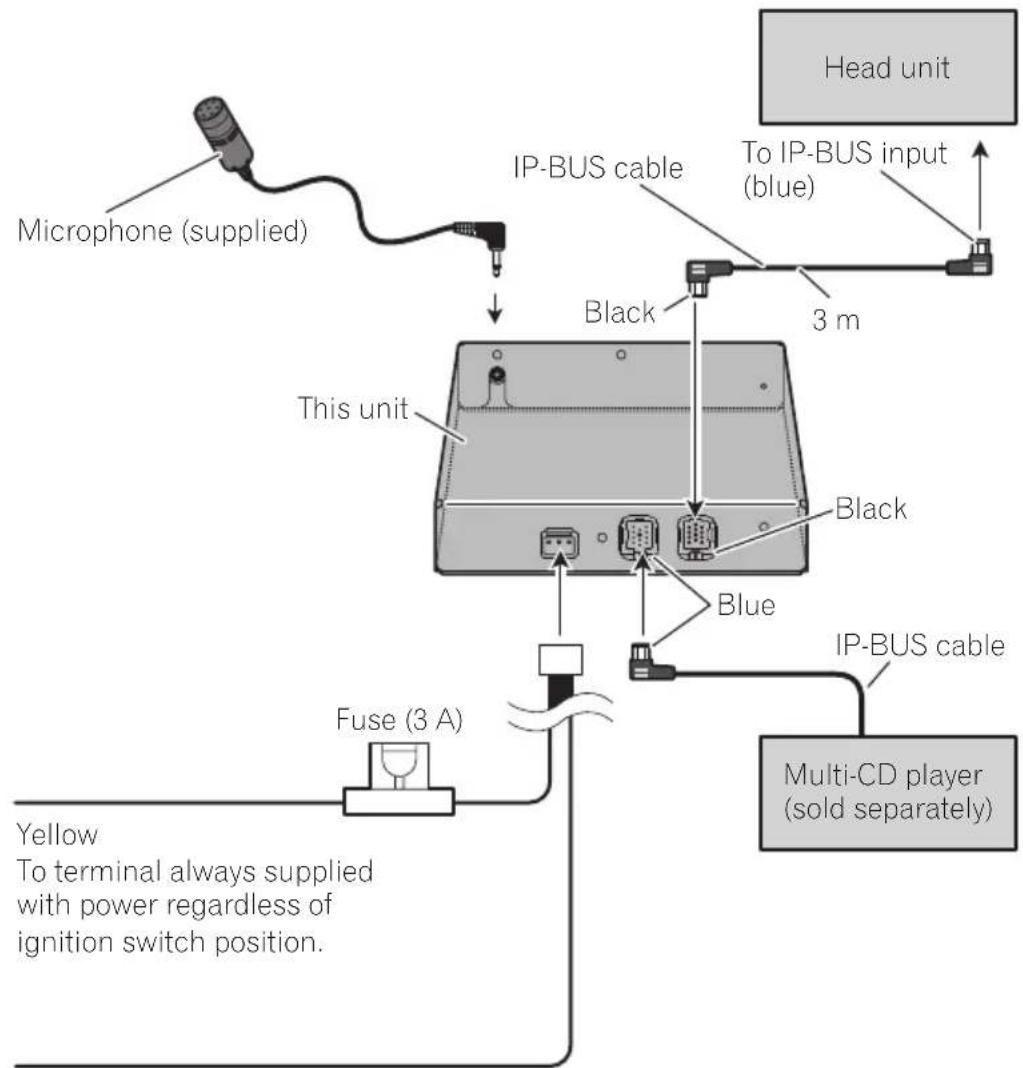
Black (ground)
To vehicle (metal) body.


Important
- Beforemakingafinalinstallationoftheunit, temporarilyconnectthewiringtoconfirmthat theconnectionsarecorrectandthesystem workproperly.
- Useonlythepartsincludedwiththeunitto ensureproperinstallation. Theuseofunauthorizedpartscancausemalfunctions.
- Consultwithyournearestdealerinstallation requireshedrillingofholesorthermodificationsfthevehicle.
Installtheunitwhereitdoesnotgetinthedriver'swayandcannotinjecthepassengerifthereisasuddenstop,likeanemergencystop. - Wheninstallingthisunit, besuretomakesufficientspaceonitstopsurface. Thereisanantennaunderthetopsurfaceandcoveringit maycausetroubletotheradiotransmission andreception.
Dependingonthelocationofthisunit,some noisecouldbeheardduringplaybackofthe songsonBluetoothaudiolayer.Inthissitat ion,movethisunitsoastoreducenoise. - Whenmountingthisunit, makesurenone of theleadsaretrappedbetweenthisunit and thesurroundingmetalworkor fittings.
- Donotmountthisunitneartheheateroutlet, whereitwouldbeaffectedbyheat,ornearthe doors,whereerainwatermightsplashontoit.
- Beforedrillinganymountingholesalways checkbehindwhereyouwanttodrillthe holes.Donotdrillintothesgasline,brakeline, electricalwiringorotherimportantparts.
- Ifthisunitinstalledinthepassengercompartment,anchoritsecurelysoitdoesnotbreak freewhilethevehicleismoving,andcauseinjuryoranaccident.
- Ifthisunitisin installedunderafrontseat, makesureitdoesnotobstructseatmovement. Routeallleadssandcordscarefully aroundtheslidingmechanismssotheydonot caughttorpinchedinthemechanismand causeashort-circuit.
Installingthisunit MountingwithVelcrofasteners
Thoroughlywipeoffthesurfacebeforeaffixing theVelcrofasteners.
-
IftheVelcrofasteners(hard)adheretothe carmatdirectly,youmayinstallthisunit withoutusingtheVelcrofasteners(soft).
-
MountthisunitusingtheVelcrofasteners.
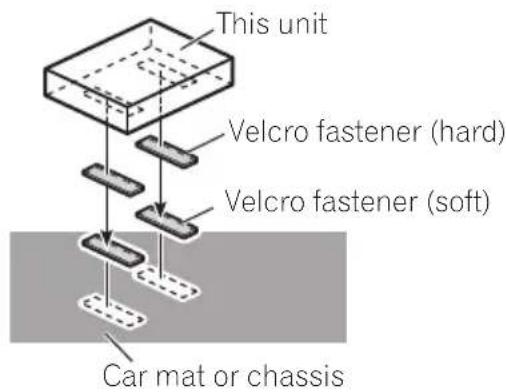

Installingthemicrophone

CAUTION
Itisextremelydangeroustoallowthemicrophoneleadobecomewoundaroundthe steeringcolumnnorgearstick.Besuretoinstallthe unitinsuchawaythatitwillnotobstructdriving.

Note
Installthemicrophoneinapositionandorientationthatwillenableitttopickupthevoiceofthe personoperatingthesystem.
Installation
Wheninstallingthemicrophoneonthesunvisor
1Installthemicrophoneonthemicrophoneclip.
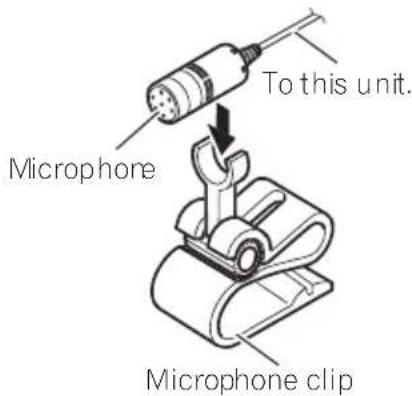
2Installthemicrophonecliponthesun visor.
Withthesunvisorup,installthemicrophone clip.(Loweringthesunvisorreducestherecognitionrateforvoiceoperations.)
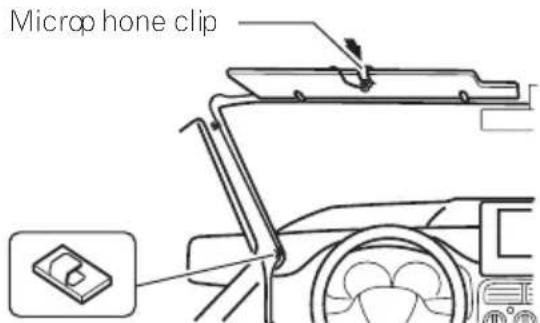
Clamps Use clamps to secure the lead where necessary inside the vehicle.
Wheninstallingthemicrophone onthesteeringcolumn
1Installthemicrophoneonthemicrophoneclip.
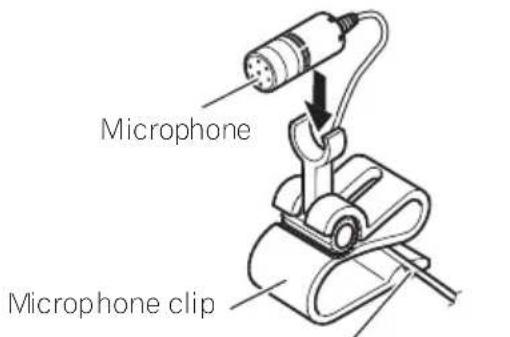
Fit the micropone lead into the groove.
2Installthemicrophonecliponthesteeringcolumn.
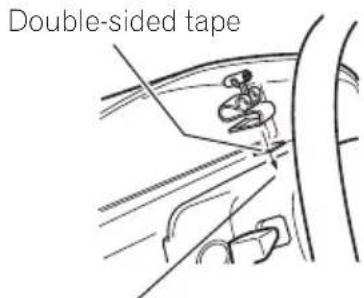
Install the microphone clip on the rear side of the steering column.
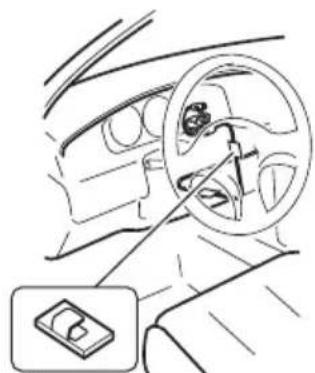
Clamps Use clamps to secure the lead where necessary inside the vehicle.

Adjustingthemicrophone angle
Themicrophoneanglecanbeadjustedby movingforwardorbackwardthemicrophone clipangle.
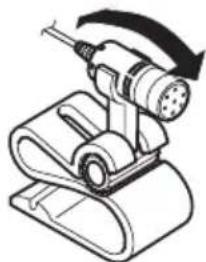

AdditionalInformation
Errormessages
Whenyoucontactyourdealeroryournearest PioneerServiceCenter, besuretorecordthe errormessage.
MessageCauseAction
| ERROR-10Built-inBlue-toothuniten-counteredan error | Turntheignition OFFandON. |
| ERROR-80Built-inFLASH ROMencounteredanerror | Turntheignition OFFandON. |

Specifications
General
Ratedpowersource.14.4VDC
ALLOWABLEVOLTAGERANGE:
12.0Vto14.4VDC)
Max.currentconsumption
0.2A
Dimensions(W×H×D)...146×25×90mm
Weight. 0.37kg
Version.............Bluetooth1.2certified
Outputpower. +4dBmMax
(Powerclass2)
Profile GAP (Generic Access Profile)
SDP(ServiceDiscoveryProtocol)
HSP(HeadSetProfile)
HFP(HandsFreeProfile)
A2DP(AdvancedAudioDis
tributionProfile)
AVRCP(AudioVideoRe
moteControlProfile)
OPP(ObjectPushProfile)

Note
Specificationsandthedesignaresubjecttopos-siblemodificationswithoutnoticeduetoim-provements.
DEH-P9600MP,DEX-P90RS,DEH-P7700MP
DEH-P7600MP,DEH-P77MP*1,DEH-P6800MP
DEH-P6700MP,DEH-P6600R,DEH-P5800MP
DEH-P5700MP,DEH-P5600MP,DEH-P55BT*2
DEH-P4800MP,DEH-P3600MP,DEH-P2600R,
DVH-P580MP, DVH-P5000MP, KEH-P7020R,
KEH-P6020R


- C E
- English:
- Suomi:
- BeforeYouStart
- BluetoothTelephone
- BluetoothAudio
- InitialSettings
- Operatingwithdifferentheadunits
- Connections
- Installation
- AdditionalInformation
- BeforeYouStart
- Aboutthisunit
- CAUTION
- Operatingenvironment
- Visitourwebsite
- Aboutthismanual
- Incaseoftrouble
- AboutBluetooth
- Bluetooth
- Resettingthisunit
- Resettingthisunitwithout erasingthedataaboutphone
- Resettingthisunitwith clearingallmemory
- 1TurntheignitionswitchtoACCorON position.
- 2PressRESETwithapentiporother pointedinstrument.
- BluetoothTelephone
- Hands-freephoningwith cellularphonesfeaturing Bluetoothwirelessstechnology
- Important
- ① SourceIcon
- ②Sourcename
- ③Phonenumber
- ④numnumberindicator
- ⑤Devicename
- ⑥ Voicerecognitionindicator
- ⑦ Incomingcallnoticeindication
- Automaticansweringindicator
- ⑨ Batterystrengthindicator
- ⑩ Signalvelindicator
- ⑪Telephoneindicator
- Notes
- Aboutthetelephonesource
- Standbymode
- - Touchthesourceiconandthentouch Telephoneselectthetelephone.
- Settingupforhands-free phoning
- 1Connection
- 2Registration
- 3Volumeadjustment
- Basicoperationofhands-freephoning
- Makingaphonecall
- Voicerecognition
- 1TouchVOICEoturnthevoicerecognitionfunctionon.
- 2Pronouncethenameofyourcontact.
- Takingaphonecall
- Answeringanincomingcall
- 1Whenacallcomesin,touch
- 2Toendthecall,touch.
- Rejectinganincomingcall
- - Whenacallcomesin,touch
- Note
- Answeringacallwaiting
- 1Touch
- toansweracallwaiting.
- 2Touch
- toendthecall.
- Rejectingacallwaiting
- Touch
- torejectacallwaiting.
- Introductionofadvanced hands-freephoningoperation
- ①Functiondisplay
- 1SelectTelephoneasasource.
- 2TouchAVMENUtodisplayMENU.
- 3TouchFUNCTIONtodisplaythefunctionnames.
- Connectingacellularphone
- Searchingforavailablecellularchones
- 1TouchPHONECONNECTOnthefunction menu.
- 2TouchSearchtosearchforavailablecellularphones.
- 3Touchthedevicenameyouwantto connect.
- Usingacellularphoneto initiateaconnection
- 2TouchCONNECTIONOPEN.
- 3Usecellularphonoconnecttothis unit.
- Disconnectingcellularphone
- Registeringconnected cellularphone
- 1TouchPHONEREGISTERonthefunction menu.
- Deletingaregisteredphone
- Connectingoaregistered cellularphone
- Connectingoaregistered phonemanually
- Connectingoregistered phoneautomatically
- - TouchAUTOCONNECTOnthefunction - menutoturntheAutomaticConnection functionon.
- UsingthePhoneBook
- Transferringentriestothe PhoneBook
- 1TouchPHONEBOOKTRANSFERonthe functionmenu.
- 2TouchSTARTtoturnthePhoneBook Transferfunctionon.
- 3Usecellularphonetoperformphone booktransfer.
- 4Completedisdisplayedandphone booktransferiscompleted.
- ChangingthePhoneBook displayorder
- - TouchPHONEBOOKNAMEVIEWonthe functionmenutoturnPhoneBookName Viewfunctionon.
- CallinganumberinthePhone Book
- 1TouchPHONEBOOKtodisplaythe PhoneBook.
- 2TouchaPhoneBookentryyouwantto call.
- 3TouchphonenumberofthePhone Bookentryyouwanttocall.
- 4Touch tomakeacall.
- 5Toendthecall,touch.
- Searchinganumberinthe PhoneBook
- 4TouchENTERtoshowentriesstarting withtheletteryouchose.
- 5TouchaPhoneBookentryandmakeacall.
- EditingthenameofaPhone Bookentry
- 2SelectaPhoneBookentryyouwantto edit.
- 3TouchEDITnexttothePhoneBook entryname.
- 4Touch123orABCtoselectthedesired charactertype.
- 5Touchalettertoenter.
- 6TouchMEMORYtostorethenew name.
- Editingphonenumbers
- 3TouchEDITnexttothephonenumber youwanttoedit.
- 4Touch0—9toinputnumbers.
- 5Touchor>tomovethecursorand editthenumber.
- 6TouchENTERtostorethenewnumber.
- ClearingaPhoneBookentry
- 2SelectaPhoneBookentryyouwantto delete.
- 3TouchDELETEEtodeletethePhoneBook entry.
- Clearingmemory
- 1TouchCLEARMEMORYOnthefunction menu.
- 2TouchCLEARnexttotheitemyouwant todeletefromthememory.
- PHONEBOOK phonebook) DIALEDCALLS
- UsingtheCallHistory
- DisplayingtheCallHistory
- - TouchLOGtodisplaytheCallHistory.
- CallinganumberfromtheCall History
- 1Displaythelistandselectaphonenumber.
- 2Touchaphonenumberorname(ifentered)youwanttocall.
- 3Touchtomakeacall.
- Usingpresetnumbers
- Assigningpresetnumbers
- 1Selectadesiredphonenumberfrom thePhoneBookortheCallHistory.
- 2TouchLISTtodisplaypresetnumbers P1-P6.
- 3KeeptouchingoneofP1-P6topreset thephonenumber.
- Recallingpresetnumbers
- 1TouchLISTtodisplaypresetnumbers P1-P6.
- 2TouchoneofpresetnumbersP1-P6.
- 4Toendthecall,touch
- Makingacallbyentering phonenumber
- 1TouchDIRECTtodisplaythedirectdial display.
- 2Touch0—9toinputnumbers.
- Echocancelingandnoisereduction
- - TouchECHOANCELonthefunctionmenutoturnEchoCancelfunctionon.
- Switchingtheringtone
- - TouchRINGTONEonthefunctionmenu toturntheringtoneon.
- Settingtheautomatic rejecting
- - TouchREFUSEALLCALLS on the functionmenutoturnthe automatic call rejection.
- Settingtheautomatic answering
- - TouchAUTOANSWERonthefunction menusoturntheautomaticansweron.
- DisplayingBD(Bluetooth Device)address
- - TouchDEVICEINFOOnthefunction menusutodisplaytheBDaddress.
- BluetoothAudio
- ListeningtosongsonBTAudio (Bluetoothaudioplayer)
- ③Devicename
- ④Bluetoothaudioindicator
- - Touchthesourceiconandthentouch BTAUDIOtoselecttheBluetoothaudio source.
- ConnectingaBluetooth audioplayer
- 2TouchFUNCTIONtodisplaythefunctionnames.
- 3TouchCONNECTIONOPEN.
- PlayingsongsonBluetooth audioplayer
- 1Touch>II.
- 2Toskipbackorforwardtoanother track,touchor.
- 3Toperforfastforwardorreverse, keptouchingor.
- DisconnectingaBluetooth audioplayer
- 1TouchAVMENUtodisplayMENU.
- 3TouchDISCONNECT.
- 2TouchFUNCTIONtodisplaytheffunctionnames.
- 3TouchDEVICEINFOOtodisplaytheBD address.
- EnteringPINcodefor Bluetoothwirelessconnection
- 1Touchthesourceiconandthentouch OFFtoturnthisunitoff.
- 2TouchAVMENUandthentouchINITIAL todisplaythefunctionnames.
- 3TouchPINCODEINPUT.
- 4Touch0—9toinputthePINcodeof yourBluetoothaudioplayer.
- 5AfterinputtingPINcode(upto16digits),touchENTER.
- Operatingwithdifferent headunits
- Usingasanexternalunit
- Headunitgroup1
- Headunitgroup2
- Headunitgroup3
- Headunitgroup4
- Headunitgroup5
- Functioncompatibilitycharts Headunitgroup1
- Connectingacellulararphone
- Usingacellulararphoneto initiateaconnection
- 1Puttheunitin.C_OPENmode
- 2Usecellularphonoconnecttothis unit.
- 1PuttheunitinREGISTmode
- 2Usecellularphonetoregistertothis unit.
- - PuttheunitinDISCONN.mode
- - Turntheautomaticconnectiononor off
- Settingtheringtone
- - Turntheringtoneonoroff.
- Displayingthedeviceminformationofthisunit
- - Displayandswitchthedevicereinformation
- 2UsetheBluetoothaudioplayertoconnecttothisunit.
- - PuttheunitDISCONN_mode.
- Installingthisunit MountingwithVelcrofasteners
- Installingthemicrophone
- Wheninstallingthemicrophoneonthesunvisor
- 2Installthemicrophonecliponthesun visor.
- Wheninstallingthemicrophone onthesteeringcolumn
- 2Installthemicrophonecliponthesteeringcolumn.
- Adjustingthemicrophone angle
- Errormessages
- Specifications
- General
Brand : PIONEER
Model : CDBTB100
Category : Audio accessory