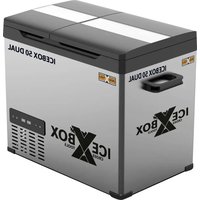
Icebox 50 DUAL - Refrigerator T.I.P. - Free user manual and instructions
Find the device manual for free Icebox 50 DUAL T.I.P. in PDF.


| Product type | Compressor portable refrigerator-freezer (cooler) |
| Brand | T.I.P. |
| Model | Icebox 50 DUAL |
| Energy efficiency class | D (EU 2019/2016) |
| Annual consumption | 115 kWh/year |
| Total useful volume | 39 L (freezer compartment 28 L + refrigerator 11 L) |
| Temperature range | From -20 °C to +20 °C |
| Ambient operating temperature | From 16 °C to 43 °C (classes N/ST/T) |
| Power supply | 12 V DC / 24 V DC / 230 V AC via power supply unit |
| Power supply unit | 100-240 V~ 50/60 Hz, 1.2-0.5 A |
| Noise level | 45 dB |
| Refrigerant | R1234yf, 0.04 kg |
| Protection class | IP20 / II |
| Dimensions (W x D x H) | 653 x 369 x 495 mm |
| Net weight | 16 kg |
| DC cable length (12/24 V) | 3.5 m |
| AC cable length (230 V) | 2.1 m |
| Delivery contents | Cooler, 12/24 V cable, 230 V power supply unit, storage basket, instruction manual |
| Settings | Target temperature, ECO/MAX modes, battery monitoring (3 levels), Icebox app |
| Maintenance | Cleaning with warm water and neutral detergent, regular defrosting, drainage plugs |
| Safety | Panel lock via app, automatic low-voltage shutdown, overload protection |
| Spare parts and repairability | Original parts available, repairs by qualified personnel |
| Article number | 68064 |
Frequently Asked Questions - Icebox 50 DUAL T.I.P.
User questions about Icebox 50 DUAL T.I.P.
0 question about this device. Answer the ones you know or ask your own.
Ask a new question about this device
Download the instructions for your Refrigerator in PDF format for free! Find your manual Icebox 50 DUAL - T.I.P. and take your electronic device back in hand. On this page are published all the documents necessary for the use of your device. Icebox 50 DUAL by T.I.P..
USER MANUAL Icebox 50 DUAL T.I.P.
Translation of original operating instructions Compressor cool box

EC declaration of conformity
We, T.I.P. Technische Industrie Produkte GmbH, Siemensstr. 17, D-74915 Waibstadt, declare in our sole responsibility that the products identified below comply with the basic requirements imposed by the EU directives specified below including all subsequent amendments: 2006/42/EC, 2014/30/EU, 2011/65/EU, 2014/53/EU

EU- izjava o sukladnosti
Mi,irma T.I.P. Technische Industrie Produkte GmbH, Siemensstr. 17, D-74915 Waibstadt, izjavljemu pod vlastitom odgovornosti, da niže naNazeni proizvodi ispunjavaju u daljinjem naznacene EU smjernice - i sve siljedgece izmjene: 2006/42/EC, 2014/30/EU, 2011/65/EU, 2014/53/EU

Documentation Representative:
Congratulations for buying your new device from CROSS TOOLS!
Please read through these operating instructions carefully to make sure that you can fully benefit from all features.
We hope you will enjoy your new device!
Inhaltsverzeichnis
- General safety information 1
- Intended use 2
- Technical data 3
- Scope of delivery 3
- Commissioning 3
- Maintenance, cleaning & defrosting 5
- Problems & faults 6
- Warranty 7
- How to order spare parts 8
- Service 8
1. General safety information
Please read through these operating instructions carefully and make yourself conversant with the control elements and the proper use of this product. We shall not be liable in the case of damage caused as a result of the non-observance of instructions and provisions of the present operating instructions. Any damage caused as a result of the non-observance of the instructions and regulations contained in the present operating instructions shall not be covered by the warranty terms. Please keep these operating instructions in a safe place and hand them on together with the device should you ever dispose of it.
Persons not familiar with the contents of these manual may not use this device.
The device must not be used by children.
The device may be used by persons with reduced physical, sensory or mental capabilities or lack of experience and / or knowledge if they have been supervised or instructed in the safe use of the equipment and have understood the resulting hazards. Children are not allowed to play with the device. Keep the appliance and its cord out of reach of children.
The mains power connection of this device cannot be replaced. In case the line is damaged, the device must be scrapped.
Do not store explosive substances such as spray cans with flammable propellants in the cooling unit.
Notes and instructions with the following symbols require particular attention:

Any non-observance of these instructions involves the danger of bodily harm to people and/or damage to property.

Any non-observance of this instruction bears the risk of an electrical shock which may cause damage to persons or property.
Please inspect the device for damage occurred during transportation. In case of damage, the retailer has to be informed immediately, at the latest within 8 days after the date of purchase.
In addition to the basic safety precautions for avoiding accidents, please note the following:

- ATTENTION: Before performing any installation or maintenance tasks, disconnect the electrical device from the power source by pulling the plug out of the socket outlet. Switch off the main fuse of the main domestic power supply before unplugging the mains cable, if the connection plug or the main power outlet are wet. Never transport or suspend the device by the mains cable.
- Ensure that the voltage specified on the type plate of the device agrees with the mains voltage.
-
Prior to connecting the device to the mains supply, ensure that the mains cable and the device are not damaged in any way.
-
Parts of the packaging can be dangerous (e.g. the plastic bags) - therefore keep these out of reach of children, people who not responsible for their actions and animals.
Only use accessories that are included in the scope of delivery, or only those that are specified in the op
erating manual. The use of accessories that have not been approved may impair safety.
Any use of the device that is not described in this manual may be dangerous and must therefore be avoided.
- The device must be correctly assembled with all parts before use. Check that the socket and plug match.
- Never touch the mains plug with wet hands.
- Switch off the device before maintenance, cleaning and after use, and unplug from the mains.
- Do not leave the device unattended, do not leave it within the reach of children or people who are not responsible for their actions.
- Children should be supervised so that they do not play with electrical devices.
- In case of incidents (e.g. contact with cleaning agents or chemicals) clean the machine with plenty of clean water.
- In the event of a malfunction, always pull out the mains plug to avoid any danger.
- Never leave the device unattended during operation.
- Carefully check whether the mains connection cable, housing or other parts of the device are damaged; if so, do not use the device under any circumstances and contact the customer service department for repairs.
- If you are using extension cables, make sure that they are suitable for the application in question and that they are placed on a dry surface and protected against water spray.
- Service and repairs shall only be carried out by qualified personnel. Defective parts of the device shall only be replaced with original parts.
- The manufacturer is not responsible for any damage to persons or objects caused by improper use of the device, or by a failure to follow the instructions provided in this manual.
1.1. Special safety instructions for the compressor coolers
- Make sure that the supply voltage is in the correct range for the supply line used. The type plate on the side of the device indicates the corresponding voltage ranges.
- Check the power cable used. If it is damaged or kinked, it must not be used.
- The device may only be operated if it is in a technically perfect condition and has no damage.
- Repairs may only be carried out by qualified personnel.
- Do not place any electrical appliances in the cooler as they could be damaged.
- During transport, the device should not be tilted more than 45^ and should be handled with care.
It is recommended to operate the device on a flat surface. The maximum angle of inclination during operation must not exceed 30^ - Your device requires good ventilation.
Leave the following free space for air circulation: Rear: 200mm & at the sides: 100mm
- Make sure that the ventilation openings are not covered.
- The temperature on the rear wall, but also on the entire outer surface of the cooler can be high (especially in summer) due to the heat emitted by the condenser and the compressor.
- The device must be placed in a dry and ventilated place far from heat sources (e.g. cooker, fireplace) and direct sunlight should be avoided.
- Do not fill any liquids into the inner container and do not store any corrosive or explosive substances.
- When operating from a 12 V socket: Disconnect the cooler from the power supply before using a quick charger for the on-board battery.
- Although the devices were cleaned before leaving the factory, we strongly recommend cleaning the interior of the cooler with a soft cloth moistened with warm water and some neutral detergent before first use. Then wipe with a dry, soft cloth.
- Moisture can form on the outside of the cooler or the door seals when it rains and the humidity is high. You can wipe damp surfaces with a dry cloth.
2. Intended use
This device is intended for private use and not for commercial or industrial purposes. The mobile cooling unit is suitable for both cooling and freezing food. The cooling unit is designed for operation by means of a DC accessories socket on a vehicle, boat or caravan or for operation on the AC mains.
The mobile cooling unit is also suitable for camping. This product is only suitable for the intended use specified and for use in accordance with these instructions. Any use deviating from the intended use is not permitted! Cross Tools accepts no liability for loss, damage or injury arising directly or indirectly from any use other than the intended use.

The outside temperature and operating temperature must not exceed or undershoot the maximum or minimum temperatures specified in the technical data.
3. Technical data
| Model | ICEBOX 50 DUAL |
| Energy efficiency class (EU 2019/2016) | D |
| Cool box power supply | 12 V (DC), 24 V (DC), 230 V (AC) via mains adapter |
| Mains adapter power supply | 100 – 240 V~ 50/60 Hz (1.2 - 0.5 A) |
| Usable volume | 39 l (28 l + 11 l) |
| Energy consumption | 115 kWh/year |
| Ambient temperature | 16 - 43 °C (N/ST/T) |
| Cooling performance | -20 - 20 °C |
| Noise level | 45 dB |
| Refrigerant quantity | 0.04 kg |
| Refrigerant | R1234yf |
| Protection class | IP20 / II ☑ |
| Length of the DC (12 / 24 V) connection cable | 3.5 m |
| Length of the AC (230 V) connection cable | 2.1 m |
| Dimensions (L x W x H) | 653 x 369 x 495 mm |
| Net weight | 16 kg |
| Item no. | 68064 |
4. Scope of delivery
Included in the product scope of supply are:
A compressor cooler, with 12 & 24 volt connection cable, mains adapter for 230V connection, storage basket and operating instructions.
If possible, retain the packaging until your guarantee has expired. Dispose of packing materials in an environmentally friendly manner.
5. Commissioning

Before using the device for the first time, it must be placed upright on a horizontal surface for at least 6 hours. Always place the cooling unit on the floor. If the cooling unit is operated in any other orientation, the unit may be damaged. It is possible to operate the device at an angle of max. 30^ for short periods of time. If the device has fallen over or been stored on its side, it must also be placed upright for at least 6 hours before it is put into operation.
5.1 Connecting the compressor cooler
12 V/24 volts (DC) Plug the DC connection cable into the DC socket and connect it to a DC receptacle. 230 volt (AC) Plug the supplied power supply unit into a 230V socket and connect it to the cooler.
5.2 Operating settings
Switching on/off
- Connect the cooler to the desired power supply.
- Press the ON/OFF button to start the device.
- Press the ON/OFF button again to switch the device off.
Setting the target temperature
- Press the + (for warmer) or - (for colder) button to set the target temperature to your preference. The device adopts the last displayed value as the target temperature.
Changing the operating mode (Eco mode & Max mode)
-
ECO mode (energy saving mode) / MAX mode (fast cooling mode)
-
Press the SET button ( ) to enter the ECO (economy) operating mode.
- Press the SET button ( again to return to MAX (maximum) mode.
- The factory setting of the cooler is MAX mode.
Changing the operating mode (Eco-Mode & Max-Mode)
-
ECO mode (energy-saving mode) / MAX mode (rapid cooling mode)
-
Press the SET-Button ( L to switch to ECO (Economy) operation mode.
- Press the SET-Button ( again to return to MAX (maximum) mode.
- The factory setting of the cooler is MAX mode.
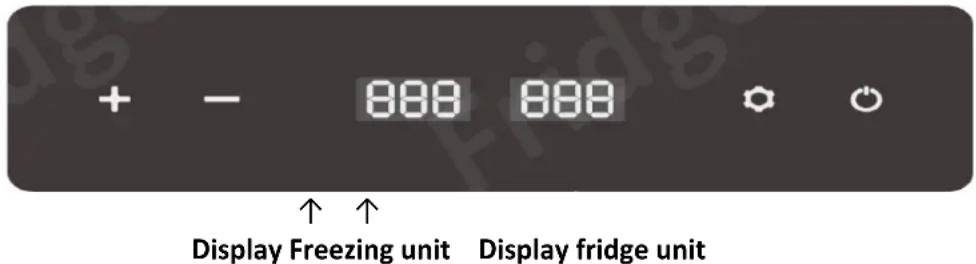
NOTE: Only the temperature of the freezer unit can be regulated. The temperature of the cooling unit adjusts automatically.
Temperature reference values:
| Setting Freezing unit | 5 °C | -8 °C | -18 °C | -20 °C |
| Temperature fridge unit | 15 °C | 6 °C | 2 °C | 0 °C |
5.3 Setting the battery monitor
The device is equipped with a three-stage battery monitor, which is intended to protect your vehicle battery from deep discharge during 12-volt operation.
If the cooling unit is operated in the vehicle with the ignition switched off, the cooling unit switches off automatically as soon as the supply voltage drops below the set value.
- Press the SET button (or 3 seconds.
- The battery monitor level (L, M, H) set starts flashing in the display.
- The battery monitor level can be changed by pressing the SET button ( ) again.
- The following settings are available for selection: L = 9 V / M = 11.5 V / H = 12 V
- Select the desired level and wait until the flashing stops, the level is now set and is shown in the display.
NOTE: Note that the battery monitor function is always active during 12 volt operation and so the cooler may unexpectedly stop cooling and only resume operation again once the DC supply voltage is above the set battery monitor voltage.
Recommendations:
When using a TRAVELBOX or another battery generator as a power source, it is recommended to set the battery monitor to "L" (Low) to ensure a long operating time.
If the compressor cooler is connected directly to the battery of a car or commercial vehicle, the battery protection should be set to H3 (H) to ensure that the remaining battery capacity is sufficient to start the vehicle. The settings H2 (M) and H1 (L) are only recommended in vehicles if the compressor cooler is operated via an auxiliary battery in the car or commercial vehicle.
As a rule, the power supply via the normal 12 volt socket is interrupted in most vehicles as soon as the ignition is switched off and thus the power supply to the cool box is also switched off. However, if it is possible to draw power from your vehicle even when the ignition is switched off, we also recommend setting the battery protection monitor to H3 (H) for the reasons mentioned above.
Caution! Vehicles may have different output voltages, make sure that the output voltage and the input voltage match.
If the display shows an error (F1), set the battery monitor correctly.
5.4 ICEBOX app
You can also conveniently control the settings described above using a wireless connection via app.
Download the ICEBOX app from your app store.
Before you can use the app, you must pair the ICEBOX with the app.
Now switch on the ICEBOX via the ON/OFF button on the device.
Open the ICEBOX app on your smart phone, select the button "Find your cool box". You will now see the ICEBOX on your smart phone, please select it and confirm the "Pairing" on the ICEBOX with the SET button.
The following functions and settings can be found in the app:
(1) current input voltage
(2) Lock/unlock control panel (child lock)
(3) Current battery capacity; (for devices with battery operation)
(4) current temperature
(5) set temperature
(6) ECO mode / power saving mode
(7) On/Off
(8) MAX mode / fast cooling mode
(9) Battery monitor high (12 V)
(10) Battery monitor medium (11.5 V)
(11) Battery monitor low (9 V)
(12) Home / Main menu
(13) Connect / Disconnect
(14) Settings (temperature range, Temperature unit and languages German / English)
Please note should the control panel on the ICE-BOX be locked via the app (see point 2) and suddenly lose connection with the smart phone the control panel can only be reactivated by disconnecting and reconnecting the power.
5.5 Tips for saving energy
- Choose a well-ventilated location that is protected from sunlight.
- Allow warm food to cool down before keeping it cool in the cooling unit.
- Do not open the cooling unit more often than necessary.
- Do not leave the refrigerator open longer than necessary.
- Defrost the refrigerator as soon as a layer of ice has formed.
- Avoid unnecessarily low internal temperatures.

6. Maintenance, cleaning & defrosting
ATTENTION: Before performing any maintenance tasks, disconnect the electrical device from the power source by pulling the plug out of the socket outlet.

Do not use aggressive solvents or cleaning agents such as scouring agents, bleach, soap powder, alkaline cleaning agents, petrol, acid, etc. to clean the lid seals and plastic parts.
- Disconnect the device from the power source.
- Open the lid and remove all the refrigerated goods from the cooler.
- Remove coarse dirt and any condensation from the interior.
- Clean the inside and outside surfaces of the cooler with a soft cloth moistened with warm water.
- If heavily soiled, use a neutral cleaning agent to clean the cooler. Then rub the surfaces dry with a soft, clean cloth.
- The cleaning intervals depend on the degree of soiling of the cooler box.
- If you are going to be absent for a longer period of time, remove all food from the cooler and unplug it from the mains. Clean it in accordance with the instructions above and store the cooler with the lid slightly open to prevent mould. Then place the cooler in a ventilated place. The same applies if you
do not use the cooler for a longer period of time.
- Store the device in a dry, frost-proof place.
Note: All types of repairs must be carried out by qualified personnel.
The unit contains HFC 1234yf (2,3,3,3-tetrafluoropropene, trade name: R-1234yf) as refrigerant with a very low GWP value (global warming potential) of 4 (based on 100 years, CO2 = 1). 1234yf is a combustible, colorless gas with a faint inherent odor.
Keep ignition sources away from the unit. The gas is under high pressure in the refrigerant circuit. There is a risk of fire and explosion if it escapes uncontrolled. Immediately take the unit out of operation and contact an authorized specialist if you suspect that refrigerant has escaped.
All persons who work on the refrigerant circuit must be appropriately trained and have certificates from an accredited certification body.
6.1 Defrosting the cooling unit
In the following cases, the cool box must be defrosted urgently:
- Ice can form inside the cool box during prolonged operation. This reduces the cooling performance and thus also increases the power consumption. In addition, ice formation can also affect the proper closing of the lid.
- Humidity in the air can form frost inside the cooling unit, which also reduces the cooling performance. Defrost the cooling unit in good time and regularly.
Proceed as follows to defrost the cooling unit:
- Switch off the cooling box and disconnect the mains plug.
- Open the lid and remove all items from the cooling unit.
If necessary, store the goods in another cooling unit so that they stay cold and do not thaw out. - Leave the lid open to defrost the ice more quickly.
- Never use hard, sharp or pointed tools to remove the layers of ice or to loosen frozen items. Disregard can cause damage to the unit.
- Remove the drain plug in the base to allow the water condensate to drain out. Dry the interior with a soft cloth.
- Close the drain plug.
- The cooler is now ready for use again.
7. Problems & faults
The following operating noises may occur during normal operation and do not indicate a malfunction:
- When starting or stopping the compressor, the refrigerant flow may cause a strong humming, gurgling or pulsating noise.
Metallic vibration sounds may be heard from the compressor when the device starts working and the cooler starts cooling.
If the device does not operate or start:
- Check the mains connection (if using vehicle power, check the ignition).
- Check that the plug and socket have a good connection.
- Check if the fuse is blown (see paragraph Replace fuse).
- Check whether the device is or has been switched on.
- Check if any of the error messages described below are shown on the display:
7.1 Fault table and error codes
In the event of a fault, the internal device management system can display various error codes in order to identify possible causes:
| Fault | Possible cause | Remedy |
| 1. Food or drinks inside the cooler are frozen | 1. The temperature set is too low | 1. Adjust the temperature in the panel |
| 2. Food or drinks inside the cooler do not get cold | 1. The temperature set is too high | 1. Adjust the temperature in the panel |
| 3. Sound of running water inside the box | 1. This is a normal noise due to the refrigerant flow. | 1. No remedy necessary or possible as this noise is normal |
| 4. F1 code displayed | 1. Low battery power protection activated | 1. Change the protection from H3 (H) to H2 (M) or H1 (L) |
| 5. F2 code displayed | 1. Fan overload protection activated | 1. Please switch the device off, store it in a ventilated place and restart it after 30 minutes. If F2 is still displayed, please contact customer service. |
| 6. F3 code displayed | 1. The compressor safeguard is activated | 1. Please switch the device off, store it in a ventilated place and restart it after 30 minutes. If F3 is still displayed, please contact customer service. |
| 7. F5 code displayed | 1. The compressor control module safeguard is activated. | 1. Please switch the device off, store it in a ventilated place and restart it after 30 minutes. If F5 is still displayed, please contact customer service. |
| 8. F6 code displayed | 1. Hardware controller error (controller could not recognise the normal parameters). | 1. Please switch the device off, store it in a ventilated place and restart it after 30 minutes. If F6 is still displayed, please contact customer service. |
| 9. F7/F8 code displayed | 1. Temperature sensor fault | 1. Please restart the device. If F7/F8 is displayed. |
7.2 Replacing the fuse
- Switch off the cooling box and disconnect the mains plug.
- Open the cover of the fuse holder directly above the power connection and check whether the fuse is defective.
- Using long nose pliers, pull the fuse out of the fuse holder.
If it is defective, replace the fuse with a new fuse of the same rating (15 A blade fuse, blue). - Re-fit the protective cover and connection cable in reverse order, to allow use of the device again.
8. Warranty
The present device was manufactured and inspected according to the latest methods. The seller warrants for faultless material and workmanship in accordance with the legal regulations of the country in which the device was purchased. The warranty period begins with the day of the purchase and is subject to the provisions below: Within the period of warranty, all defects which are to be attributable to defective materials or manufacturing will be eliminated free of charge. Any complaints are to be reported immediately upon their detection.
The warranty claim becomes void in the case of interventions undertaken by the purchaser or by third parties. Damage resulting from improper handling or operation, incorrect setting-up or storage, inappropriate connection or installation or Acts of God or other external influences are excluded from warranty.
Parts being subject to wear and tear, such as the pump wheel (impeller), mechanical shaft seals, membranes and pressure switch are excluded from warranty.
All parts were manufactured using maximum care and high-quality materials and are designed for a long lifecycle. It should be understood, however, that the wear and tear depends on the kind of use, the intensity of use and the internals of maintenance. Complying with the installation and maintenance information contained in the present operating instructions will therefore considerably contribute to a long lifecycle of these wearing parts.
In case of complaints, we reserve the option of repairing or replacing the defective parts or replace the entire device. Replaced parts will pass into our property.
Claims for liquidated damages are excluded unless they are caused by wilful acts or negligence on the side of the manufacturer.
The warranty does not provide for any claims beyond those referred to above. The warranty claim has to be evidenced by the purchaser in the form of the submission of the sales receipt. The present warranty commitment is valid in the country in which the device was purchased.
Please note:
- Should your device fail to function properly, please verify first whether an operating error or another cause is present which cannot be attributed to a defect of the device.
- In case you have to take or send in your defective device for repair, please be sure to enclose the following documents:
Sales receipt (sales slip).
A description of the occurring defect (a description as accurate as possible will expedite the repair work).
- In case you have to take or send in your defective device for repair, please remove any attached parts which do not belong to the original condition of the device. If any attached parts of this kind should be missing upon the return of the device, we shall not be liable for them.
9. How to order spare parts
The best way to order spare parts is by e-mail or fax. Please use the e-mail address service@crosstools.de or the fax number 07263/91 25 85.
10. Service
In the case of warranty claims or malfunction, please contact your point of sale.
A current operating manual is available as required as a PDF file via e-mail: service@tip-pumpen.de
D-74915 Waibstadt / Germany
Tel.: +49 (0) 7263 9125-0
Fax: +49 (0) 7263 9125-85
Website: http://www.crosstools.de
100

- EC declaration of conformity
- EU- izjava o sukladnosti
- Inhaltsverzeichnis
- General safety information
- Special safety instructions for the compressor coolers
- Intended use
- Technical data
- Scope of delivery
- Commissioning
- Connecting the compressor cooler
- Operating settings
- Switching on/off
- Setting the target temperature
- Changing the operating mode (Eco mode & Max mode)
- Changing the operating mode (Eco-Mode & Max-Mode)
- Setting the battery monitor
- Recommendations:
- ICEBOX app
- Tips for saving energy
- Maintenance, cleaning & defrosting
- Note: All types of repairs must be carried out by qualified personnel.
- Defrosting the cooling unit
- Problems & faults
- Fault table and error codes
- Replacing the fuse
- Warranty
- Please note:
- How to order spare parts
- Service
Brand : T.I.P.
Model : Icebox 50 DUAL
Category : Refrigerator