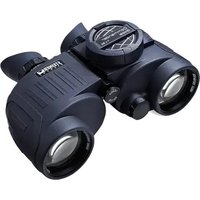
Commander Global 7x50 - Binoculars Steiner - Free user manual and instructions
Find the device manual for free Commander Global 7x50 Steiner in PDF.


User questions about Commander Global 7x50 Steiner
0 question about this device. Answer the ones you know or ask your own.
Ask a new question about this device
Download the instructions for your Binoculars in PDF format for free! Find your manual Commander Global 7x50 - Steiner and take your electronic device back in hand. On this page are published all the documents necessary for the use of your device. Commander Global 7x50 by Steiner.
USER MANUAL Commander Global 7x50 Steiner
text_image
Sports Auto Focus Commander Global 7 x 80STEINER
GERMA

N Y
Commander Global 7x50
Commander Global 7x50
natural_image
Yellow and black fitness belt with 'STEINER' branding (no additional text or symbols visible)We congratulate you on your purchase of the Commander Global marine binoculars and thank you for the trust you have placed in us. In buying these binoculars, you have purchased a STEINER product that represents the highest degree of innovative spirit, unprecedented quality and no-compromise ruggedness. We wish you many unique viewing experiences with your new Commander Global
1. Inserting the battery (3pcs):
Only use type CR 2 batteries
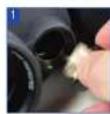
In order to be able to carry out electronic compass measurements, the binoculars are equipped with batteries. These are included in the scope of delivery, but are not installed when
delivered, to prevent premature discharging. To install the batteries, proceed as follows: Open the battery compartment cover of the binoculars (Fig. 1).
No tools are required to do so. Simply turning the cover in
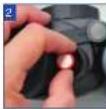
an anticlockwise direction is sufficient. You can now insert the batteries. Take care when doing this that the negative pole is visible (Fig. 2) when you replace the cover, and close until watertight by
turning the cover clockwise. The life of a set of batteries is more than 1000 measurements under normal conditions. In order to conserve the battery, the compass display switches off after 10 seconds of inactivity.
2. Basic information concerning the WORLDWIDE-COMPASS:
The new WORLDWIDE-COMPASS has integrated electronic magnetic field measurement and thus ensures absolutely correct bearings anywhere in the world, from Alaska to Fiji. Even the declination of the binoculars is unimportant, since it is compensated for by a sensor.
1110
ENGLISH
2.1 The compass function buttons:
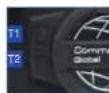
You operate the WORLDWIDE-COMPASS by means of two function pushbuttons that are located directly next to the compass housing:

ton 1: Pushbutton 2: (T1) Pause (T2)

With the help of these two pushbuttons you can:
■ Switch the compass on and off
■ Find your bearings
■ Temporarily store the value obtained
■ Set the declination manually
- Select the representation of the compass:
- 360 degrees
- 6400 mill
2.2 Explanation of the Individual compass functions: Switching on the compass:
This can only be done by pressing the button.
Finding bearings:
After pressing the ⏻ button, the binoculars automatically go into measurement mode. When you now look through the binoculars, the animated rotating compass scale is displayed.
Noting currently displayed measurement value: During measurement, press the 📄 button once briefly to retain the value. To continue measuring, it is only necessary to press the 📄 button again.

text_image
12 13 ENGLISH2.3 Individual compass settings menu
With this menu you can conveniently make the following settings for the compass:
■ Declination correction (magnetic variation)
- Set the compass scale representation to "360 degrees" or "6400 mill"
2.3.1 Activating the compass settings menu
To do so, press the ⏻ button and the ⏻ button simultaneously for 3 seconds to activate the settings menu.
You can now make the desired settings with the help of the ⏻ and the ⏱ button. For this, study the structure of the compass settings menu on the adjacent page.
2.4 Overview of structure of the settings menu
Activating the menu Press both buttons for 3 seconds.

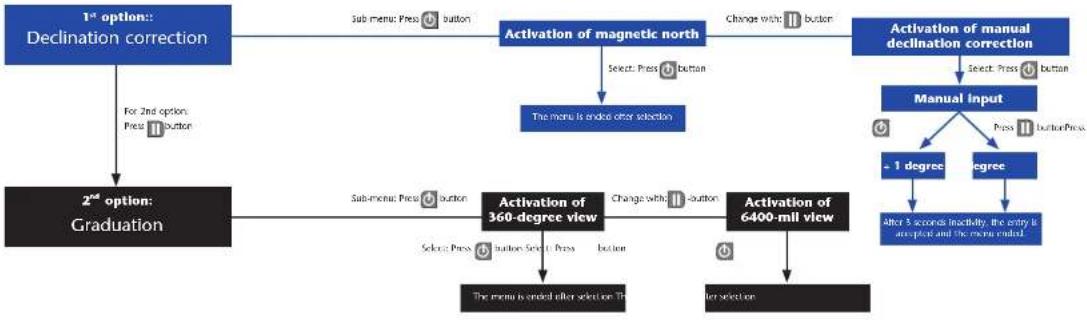
flowchart
graph TD
    A["1st option:: Declination correction"] --> B["For 2nd option: Press Button"]
    B --> C["2nd option: Graduation"]
    C --> D["Sub-menu: Press Button"]
    D --> E["Activation of magnetic north"]
    E --> F["Select: Press Button"]
    F --> G["The menu is ended after selection"]
    G --> H["Activation of 360-degree view"]
    H --> I["Sub-menu: Press Button"]
    I --> J["The menu is ended after selection. To"]
    J --> K["Activation of 6400-mill view"]
    K --> L["After selection"]
    M["Activation of manual declination correction"] --> N["Select: Press Button"]
    N --> O["Manual Input"]
    O --> P["+ 1 degree"]
    O --> Q["Degree"]
    P --> R["After 5 seconds inactivity, the entry is accepted and the menu ended"]
    Q --> S["After selection"]
14
2.5 Compass display
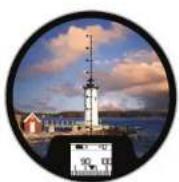
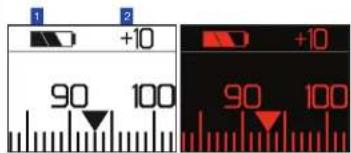
Under the reticule plate you will see the compass display, which, as well as the bearings value, gives you further information: The current battery status (Fig. 1) and the set declination offset (Fig. 2).
Switch-over of the compass display from day to night mode is done automatically, and depends on ambient light conditions.
text_image
1 2 +10 90 100 +10 90 100Day mode Night mode
- Strap attachment and floating strap
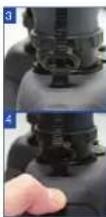
The ClicLoc system of the Commander Global (Fig. 3) allows the carrying strap to be connected very quickly and easily. The lock clip slides easily into the ClicLoc holder and clicks noticeably into the end position. The ergonomically optimised trigger depressions reliably prevent accidental release of the lock clips. The strap can be quickly and extremely conveniently released by
briefly pressing down on the depressions (Fig. 4).
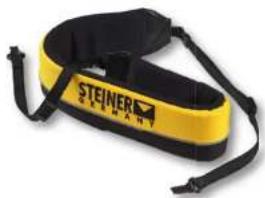
The floating strap prevents the binoculars sinking. The strap is fitted with reflecting elements from 3M that aid in finding the binoculars even in bad light conditions.
natural_image
Yellow and black fitness belt with 'STEINER' branding (no additional text or symbols visible)The padding is soft and permits fatigue-free carrying.
Further information about STEINER binoculars can be found on our website www.steiner.de
15
ENGLISH
text_image
Space Scan Focus Commender Global T.A. 5016
natural_image
Yellow and black fitness belt with 'STEINER' branding (no additional text or symbols visible)natural_image
Yellow and black fitness belt with 'STEINER' branding (no additional text or symbols visible)natural_image
Yellow and black fitness belt with 'STEINER' branding (no additional text or symbols visible)33
ESPAÑOL
natural_image
Yellow and black BEU 1600 SLR headband with 'STEINER' branding (no additional text or symbols)39
РУССКИЙ
STEINER is a Beretta Holding company