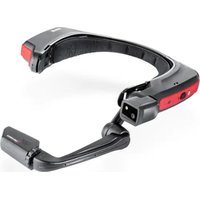
HMT-1Z1 - Tablet i.safe Mobile - Free user manual and instructions
Find the device manual for free HMT-1Z1 i.safe Mobile in PDF.


| Product type | Wearable tablet (head-mounted device) |
| Brand | i.safe Mobile |
| Model | HMT-1Z1 (T1100S) |
| Power supply | Integrated rechargeable lithium-ion battery (non-user replaceable) |
| Charging | Special Micro USB cable with safety enclosure (i.safe PROTECTOR 1.0) |
| Charging temperature range | +5°C to +40°C |
| Operating temperature range | -20°C to +60°C |
| Certification | ATEX and IECEx for zones 1, 2, 21, 22; NEC/CEC Division 1 and 2 Class I, II, III |
| Protection rating | IP (check seal integrity) |
| Display | Head-up display module |
| Camera | Integrated, adjustable |
| Speaker | Integrated |
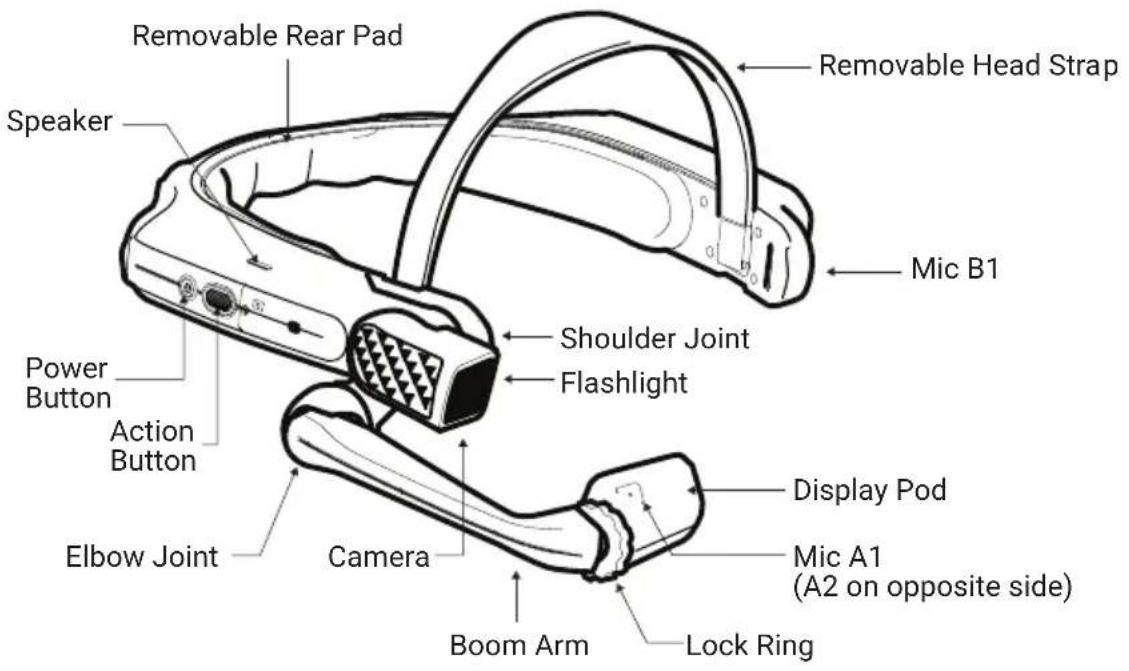
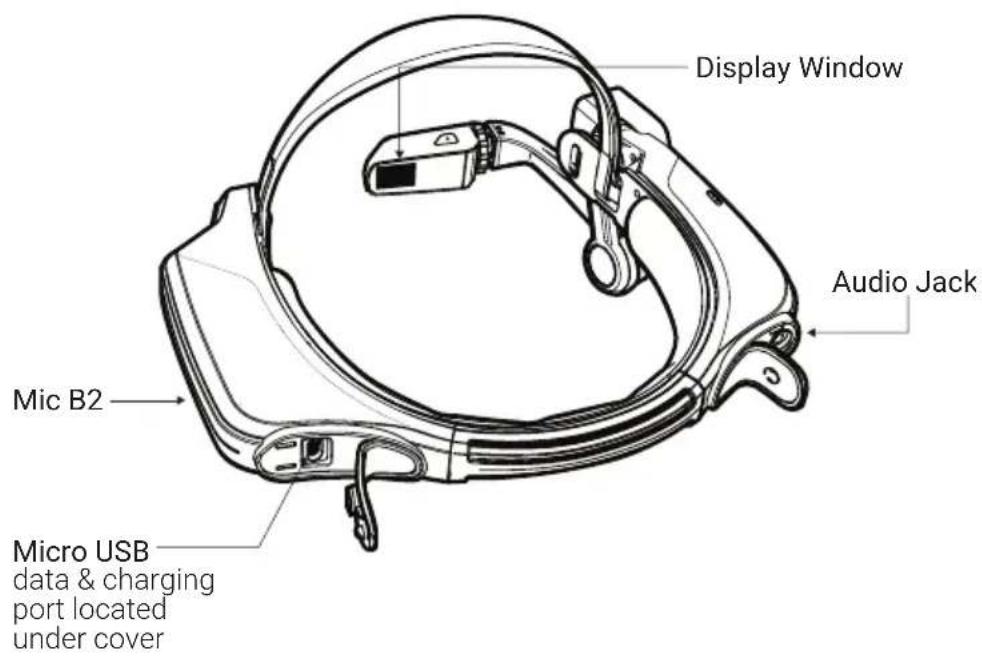
| Microphones | 4 microphones (A1, A2, B1, B2) |
| Audio jack | Yes (for approved headsets only) |
| Data and charging port | Micro USB (under cover) |
| Card slot | Micro SD (under cover) |
| Controls | Power button, action button, voice command, and head movements |
| Connectivity | Wi-Fi |
| Approved accessories | Head strap, rear cushion, safety helmet clips, i.safe PROTECTOR 1.0 USB cable |
| Safety | Do not use in zone 0/20; protect from impacts, UV, electrostatic charges |
| Maintenance and cleaning | Clean with a soft cloth; check seals; do not expose to acids or alkalis |
| Repairability | In case of damage, return to an i.safe MOBILE authorized service center |
Frequently Asked Questions - HMT-1Z1 i.safe Mobile
User questions about HMT-1Z1 i.safe Mobile
0 question about this device. Answer the ones you know or ask your own.
Ask a new question about this device
Download the instructions for your Tablet in PDF format for free! Find your manual HMT-1Z1 - i.safe Mobile and take your electronic device back in hand. On this page are published all the documents necessary for the use of your device. HMT-1Z1 by i.safe Mobile.
USER MANUAL HMT-1Z1 i.safe Mobile
https://www.realwear.com/supportsupport@realwear.com
i.safe MOBILE Safety Instructions HMT-1Z1 model T1100S
1 Note
This document contains the safety instructions necessary for the safe use of the HMT-1Z1 model T1100S device in explosive and potentially explosive atmospheres. Such areas or zones are referred to as "ex-hazardous areas" in this document.
2 Introduction
This document contains information and safety regulations which are to be observed – without fail - for safe operation of the device under the described conditions. Non-observance of this information and instructions can have serious consequences and / or may violate regulations. Please read the manual and these safety instructions before using the device. In case of any translation or printing errors, the English version shall apply.
3 Application
3.1 ATEX & IECEx
The HMT-1Z1 model T1100S is approved for use in zone 1, zone 2, zone 21 and zone 22 in accordance with directives 2014/34/EU (ATEX) and the IECEx System.
3.2 NEC & CEC
The HMT-1Z1 model T1100S is approved for use in Division 1 and 2 Class I, II, III.
3.3 Manufacturer
i.safe MOBILE GmbH,
i_Park Tauberfranken 10
97922 Lauda-Koenigshofen; Germany
4 Faults and Damage
Before entering ex-hazardous areas, the safety of the device must be checked. If there is any reason to suspect that the safety of the device has been compromised, it must be withdrawn from use and removed from any ex-hazardous areas immediately.
Measures must be taken to prevent any accidental restarting of the device. The safety of the device may be compromised, if, for example:
- Malfunctions occur.
• The housing of the device shows damage.
• The device has been exposed to excessive loads.
• The device has been stored improperly. - Markings or labels on the device are illegible.
- Permitted limit values have been exceeded.
It is recommended that a device displaying errors or for which an error is suspected be sent back to an authorized service center to be checked.
5 Ex-relevant / Intrinsic Safety Regulations
Use of this device assumes that the operator observes the conventional safety regulations and has read and understood the user manual, safety instructions and safety certificate. The following additional safety regulations must be complied with:
5.1 Charging and battery
- The device may only be charged outside ex-hazardous areas using the i.safe PROTECTOR 1.0 USB-cable (or other equipment approved by i.safe MOBILE GmbH.)
- The device may only be charged at temperatures between +5°C and +40°C.
• The battery is not removable by the user.
5.2 Connections and covers
- Physical connections to other equipment are only permitted outside ex-hazardous areas, using the i.safe PROTECTOR 1.0 USB-cable (or other equipment approved by i.safe MOBILE GmbH.)
- Inside ex-hazardous areas the covers of the Micro USB connector and the Micro SD card slot must be kept closed.
- The audio jack can be used to connect approved headsets inside ex-hazardous areas.
- To ensure the integrity of ingress protection (IP), check that all gaskets are present and functional.
- During charging any headset or accessory must be unplugged from the audio jack.
5.3 Usage environments
• The device may not be taken into zones 0 or 20.
- The device may not be exposed to any aggressive acids or alkalis.
- The device must be protected from impacts with high impact energy, against excessive UV emission and high electrostatic charge processes.
- The permitted ambient operating temperature range is -20^ to +60^ .
5.3 Accessories
- Only accessories approved by i.safe MOBILE GmbH may be used.
- Adjustment of the head strap in ex-hazardous areas is not permitted.
Using the HMT-1Z1 with a Hard Hat
To get hard hat clips, visit shop.realwear.com.
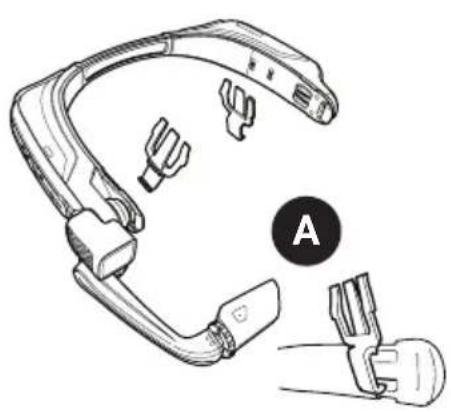
- Hook the Hard Hat Clips into the HMT-1Z1 band and snap them into place.
- Slide the clips into the hard hat accessory slots; the HMT-1Z1 band should sit outside of the hard hat's harness.
- Put on the hard hat and if applicable, tighten until secure and comfortable.
- To remove the HMT-1Z1 from the hard hat, pinch the clip fingers and push the clip out of the hard hat slots.
natural_image
Line drawing of a swimmer's head and neck assembly with labeled parts (no text or symbols)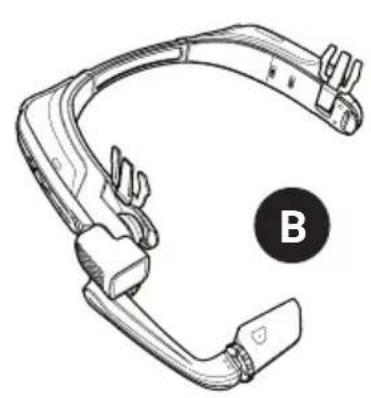
natural_image
Line drawing of a swimmer's head and neck (no text or symbols)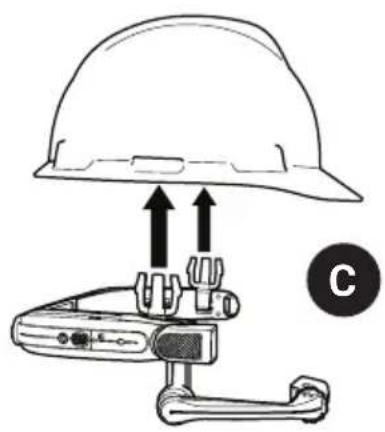
natural_image
Diagram of a hard hat with two upward arrows pointing to a device component, labeled 'C' (no text or symbols on the diagram itself)Using the HMT-1Z1 without a Hard Hat
Attaching the Rear Pad
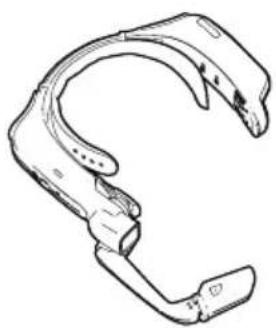
The Rear Pad snaps onto the HMT-1Z1's rear band; align the openings on the Rear Pad to the pegs on the HMT-1Z1's rear band, and snap into place.
natural_image
Line drawing of a mechanical clamp or bracket component (no text or symbols)Attaching the Head Strap
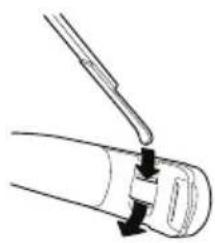
Insert the end of the strap into the inside slot on both sides of the HMT-1Z1 as shown. Fold the end back on itself and secure using the velcro patch.
natural_image
Diagram of a mechanical component with a tool inserted, showing a curved section and a base (no text or symbols)
During operation, remove the Rear Pad to view intrinsically safe regulatory information.
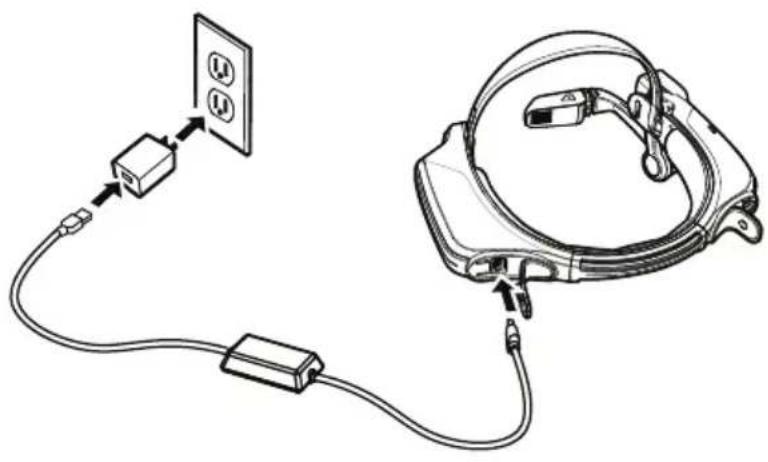
Charging the HMT-1Z1
- Connect the Micro USB charging cable as shown.
- Connect the cable to the wall charger as shown and plug in.
The power button will blink RED when charging and turn GREEN when fully charged.
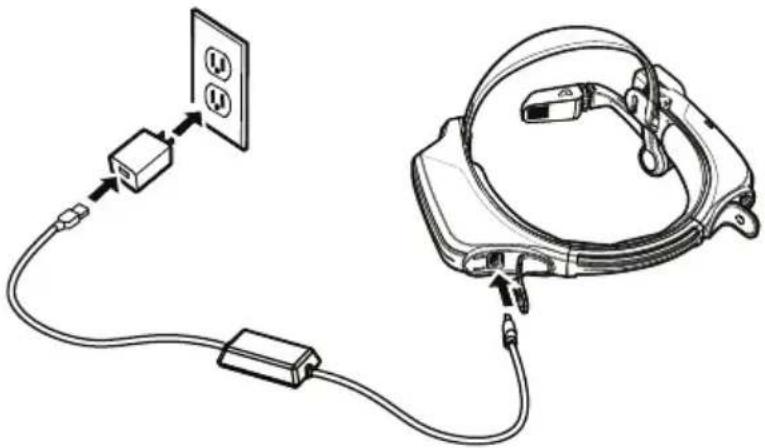
natural_image
Diagram of a cable connection with a device and power outlet, showing wiring and connector (no text or symbols)
Safety Warning Only use the Provided Charger
The USB cable included with the HMT-1Z1 is a special micro-USB cable for data transfer and charging. It includes a safety box that protects the HMT-1Z1's safety circuits from power surges. These surges can damage the HMT-1Z1 and may occur when connecting the HMT-1Z1 to computers, wall chargers, car chargers, and other power sources that are not certified or approved as intrinsically safe. It is the only cable approved for charging the HMT-1Z1 and for moving files to and from the HMT-1Z1.
1 Generate a QR Code for Configuration
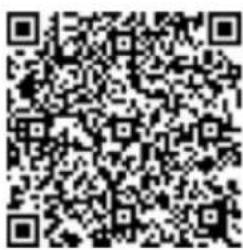
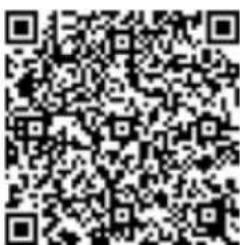
Use the RealWear Companion App UseRealwear.setupmyhmt.com
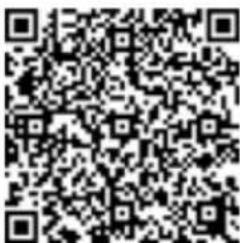
Scan this code from your smartphone to download RealWear Companion.


- Go to realwear.setupmyhmt.com from your computer or mobile device.
- Select Configuration.
-
Follow the prompts to enter information and generate a QR Code.
-
Download the RealWear Companion app from the Google Play or Apple App Store.
- Launch RealWear Companion from your smartphone.
- Select Configuration.
- Select First Time Setup.
- Follow the steps in the application in enter information and generate a QR Code.
2 Check your eye dominance
Eye dominance is the tendency to prefer visual input from one eye to the other. Most people are right-eye dominant; however in a small portion of the population neither eye is dominant. It is best to use your dominant eye when viewing the display.
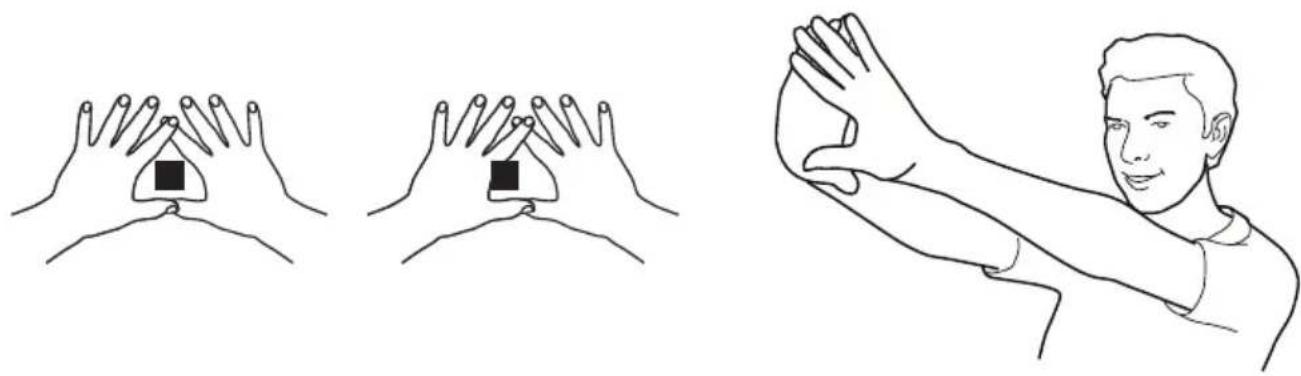
To determine which eye is dominant
- Form a triangle with your hands placed together at arms length.
- With both eyes open, focus on any distant object centered in the triangle.
- Maintaining focus on the object centered in the triangle, close your right eye. If the object is still in the triangle, you are left eye dominant.
- Maintaining focus on the object centered in the triangle, close your left eye. If the object is still in the triangle, you are right eye dominant.
- If the object is in the triangle with either eye then you are dominant eye neutral.
- Repeat test to confirm.
natural_image
Illustration showing three hand positions with square markers, one being held by a person in a martial arts stance (no text or symbols)3 Put on the HMT-1Z1
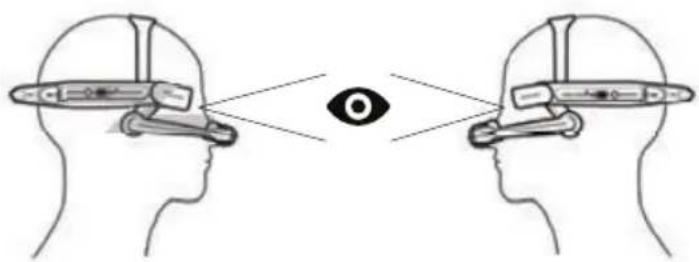
Do not extend the display too far from your eye. Keep the display as close to the eye as possible for the best viewing experience. Adjust the overhead strap such that the HMT-1Z1 rests horizontally, slightly above the tops of your ears. Position the shoulder and elbow joints into a "Z" shape, below the line of sight, left or right eye.
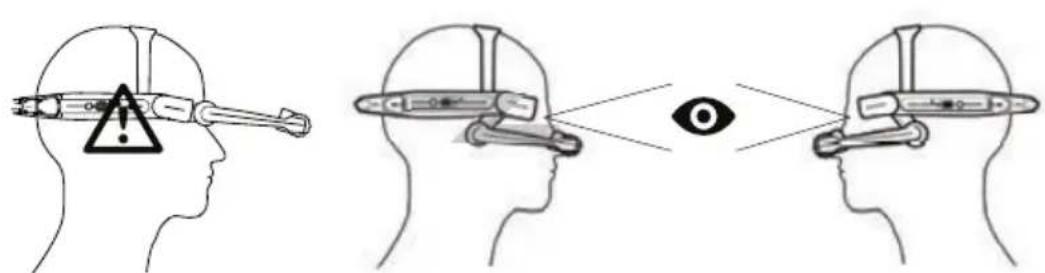
4 Turn on the HMT-1Z1
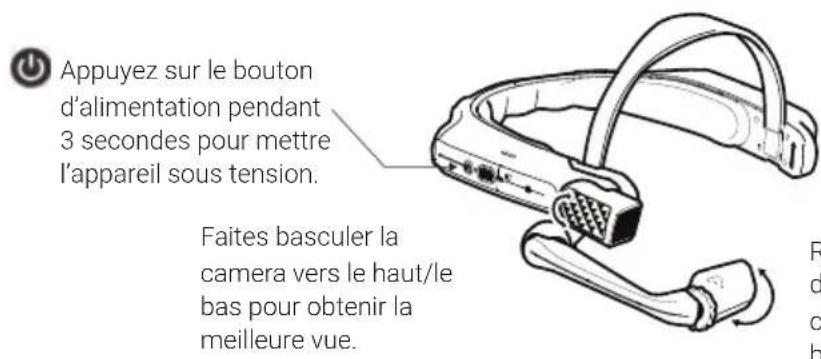
Press and hold the power button for 3 seconds to turn on the device.
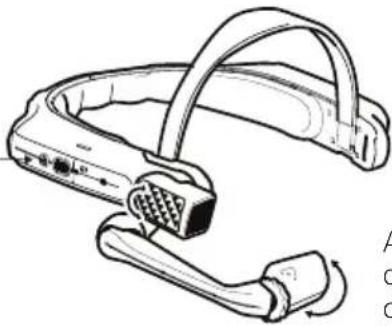
natural_image
Line drawing of a medical device with attached tubing and connector (no text or symbols)Adjust display pod so you can clearly see all 4 corners of the display and then lock into position using ring.
5 Scan the Configuration QR Code from the HMT-1Z1
- The HMT-1Z1 will automatically launch into configuration mode.
- Point the camera at the QR code you generated in Step 1.
- The HMT-1Z1 will detect the QR code and configure the device.
Note: Once the device connects to WiFi an update of RealWear Device Agent may occur.
6 Say What You See
The HMT-1Z1 is controlled by voice and head motion. Say what you see on the screen and move your head to navigate. If you get stuck say Show Help.
Note: To change your language, press and hold the action button on the side of the HMT-1Z1. The language selection will switch automatically, let go of the button when the language you want is selected.
natural_image
Line drawing of a swimmer's head and neck components, labeled A (no text or symbols on the diagram itself)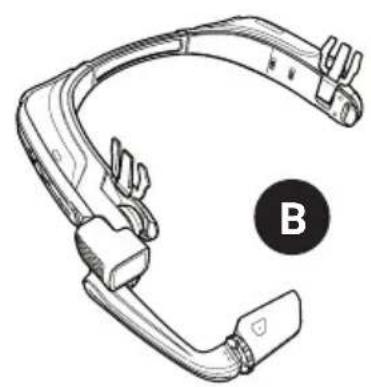
natural_image
Line drawing of a swimmer's head and neck assembly (no text or symbols)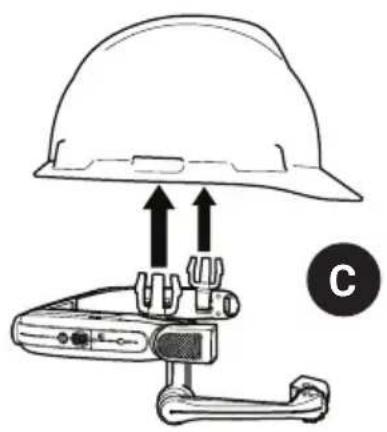
natural_image
Diagram of a hard hat with two upward arrows above a device labeled 'C' (no text or symbols on the diagram itself)不与安全帽配合使用HMT-1Z1
natural_image
Line drawing of a mechanical clamp or bracket component (no text or symbols)装上头带装上后垫
natural_image
Diagram of a mechanical tool interacting with a cylindrical component (no text or symbols)
natural_image
Diagram of a device with connected cables and a wall-mounted power outlet (no text or symbols)
安全警告 仅可使用原装充电器
natural_image
Illustration showing three hand gestures: touching a square object, touching a triangular object, and touching the right palm of a person (no text or symbols present)3 戴上HMT-1Z1设备
4 开启HMT-1Z1

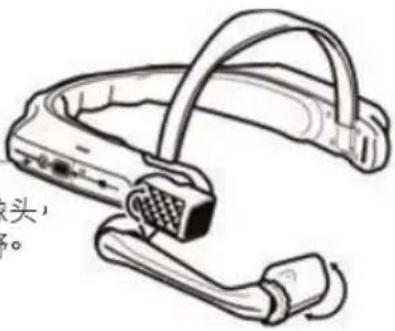
按住电源按钮3秒钟,打开设备。
上下旋转摄像头,获得最佳视野。
natural_image
Line drawing of a mechanical device with a connector and cable (no text or symbols)natural_image
Line drawing of a swimming gear with labeled component A (no text or symbols beyond label)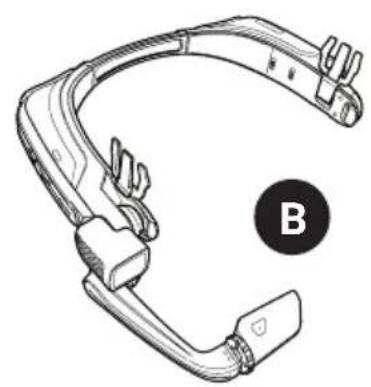
natural_image
Technical line drawing of a mechanical clamp or connector (no text or symbols)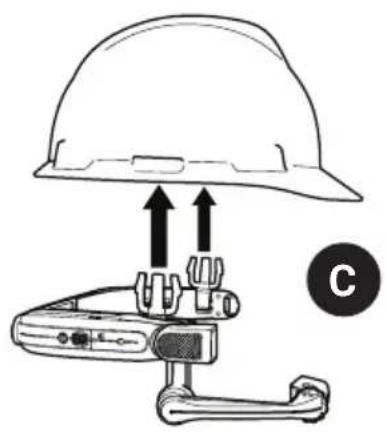
natural_image
Diagram of a hard hat with two upward arrows above a device labeled 'C' (no text or symbols on the diagram itself)natural_image
Line drawing of a mechanical clamp or bracket component (no text or symbols)natural_image
Simple line drawing of a tool interacting with a mechanical component (no text or symbols)
natural_image
Diagram of a device with cable, connector, and power outlet (no text or symbols)

OU Utilisez realwear.setupmyhmt.com
natural_image
Two hand diagrams showing finger positions with a central triangle and square markers (no text or symbols)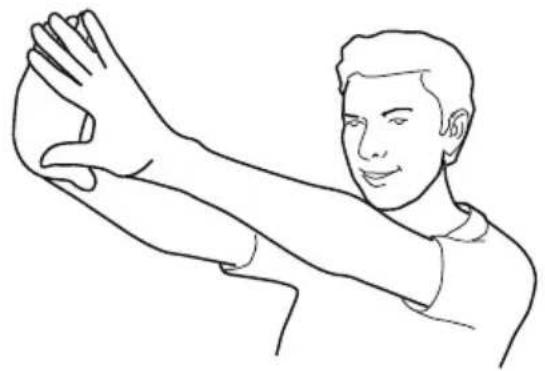
natural_image
Line drawing of a person in a wide stance, no text or symbols present3 Mettez le HMT-1Z1
4 Allumez le HMT-1Z1
natural_image
Line drawing of a swimming gear with labeled component A (no text or symbols beyond label)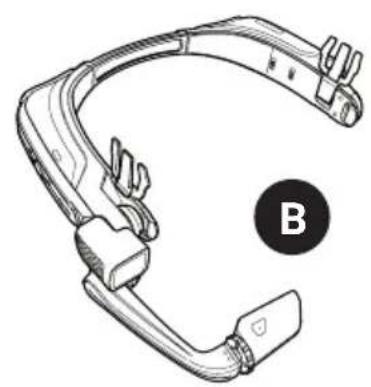
natural_image
Line drawing of a mechanical clamp or connector with a labeled point B (no text or symbols on the diagram itself)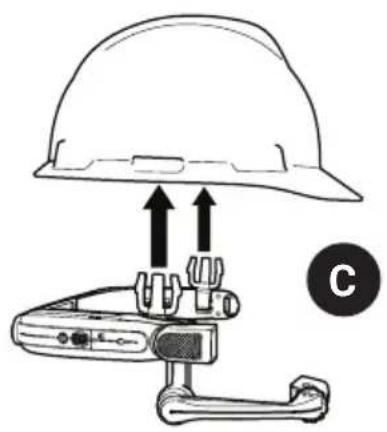
natural_image
Diagram of a hard hat with two upward arrows above a device labeled 'C' (no text or symbols on the diagram itself)natural_image
Line drawing of a mechanical clamp or bracket component (no text or symbols)natural_image
Diagram of a tool interacting with a mechanical component (no text or symbols)
natural_image
Diagram of a device with connected cables and a wall-mounted power outlet (no text or symbols)

natural_image
Illustration showing three hand gestures: touching a square object, touching the surface of a triangular object, and striking a human arm (no text or symbols)natural_image
Line drawing of a swimming gear with labeled component A (no text or symbols beyond label)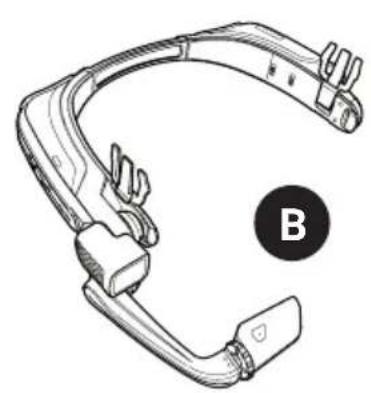
natural_image
Line drawing of a swimming gear with handle and clip, labeled B (no text or symbols on the diagram itself)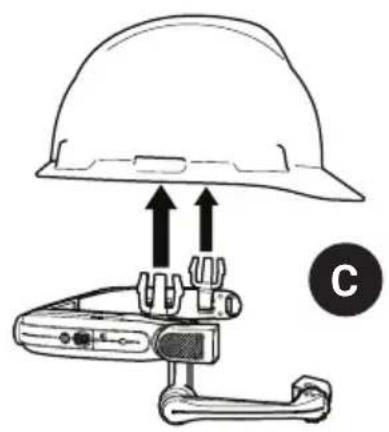
natural_image
Diagram of a hard hat and a handheld device with directional arrows indicating movement or force (no text or symbols)natural_image
Line drawing of a mechanical clamp or bracket component (no text or symbols)natural_image
Diagram of a mechanical tool interacting with a cylindrical component (no text or symbols)


natural_image
Illustration showing three hand gestures: touching a square object, touching another square object, and striking a human arm (no text or symbols)natural_image
Line drawing of a swimming gear with labeled component A (no text or symbols beyond label)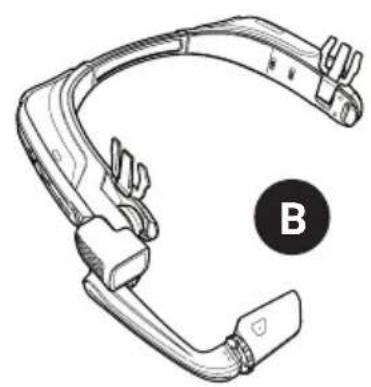
natural_image
Technical line drawing of a mechanical clamp or connector (no text or symbols)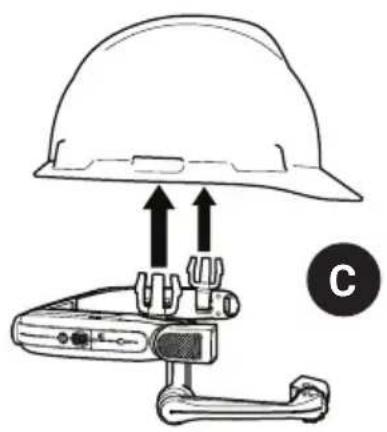
natural_image
Diagram of a hard hat with two upward arrows above a device labeled 'C' (no text or symbols on the diagram itself)natural_image
Line drawing of a mechanical clamp or bracket component (no text or symbols)natural_image
Simple line drawing of a tool interacting with a mechanical component (no text or symbols)
natural_image
Diagram of a device with connected cables and a wall-mounted power outlet (no text or symbols)
natural_image
Illustration showing three hand gestures: touching a triangular object, touching a square object, and touching the right palm of a person (no text or symbols present)3 Indossare l'HMT-1Z1

Accendere l'HMT-1Z1

natural_image
Diagram of a camera with attached audio jack (no text or symbols)natural_image
Line drawing of a swimming gear with labeled component A (no text or symbols beyond label)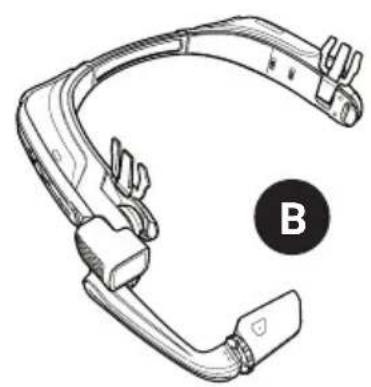
natural_image
Line drawing of a mechanical clamp or connector with a circular label marked 'B' (no text or symbols on the diagram itself)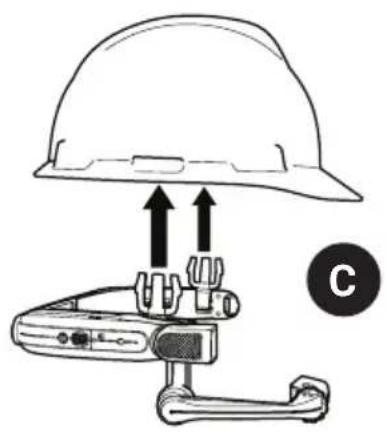
natural_image
Diagram of a hard hat with two upward arrows above a device labeled 'C' (no text or symbols on the diagram itself)natural_image
Line drawing of a mechanical clamp or bracket component (no text or symbols)natural_image
Diagram of a mechanical tool interacting with a cylindrical component (no text or symbols)
natural_image
Diagram of a device with connected cables and a wall-mounted power outlet (no text or symbols)

OU Use realwear.setupmyhmt.com
natural_image
Illustration showing three hand positions: one with a square head, two with square hands, and a person demonstrating the gesture (no text or symbols)3 Coloque o HMT-1Z1
4 Ligue o HMT-1Z1

natural_image
Line drawing of a swimming gear with labeled component A (no text or symbols beyond label)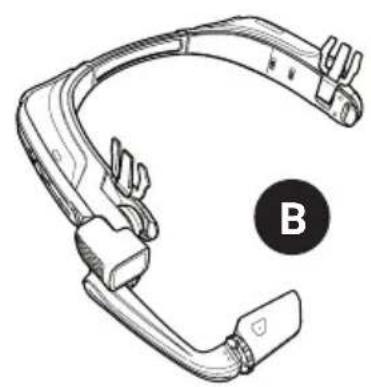
natural_image
Line drawing of a mechanical clamp or connector with a labeled point B (no text or symbols on the diagram itself)
natural_image
Diagram of a hard hat with two upward arrows above a device labeled 'C' (no text or symbols on the diagram itself)natural_image
Line drawing of a mechanical clamp or bracket component (no text or symbols)natural_image
Diagram of a mechanical tool interacting with a cylindrical component (no text or symbols)
natural_image
Diagram of a device with connected cables and a wall-mounted power outlet (no text or symbols)

natural_image
Illustration showing three hand positions with square markers, one being held by a person's arm (no text or symbols)Наденьте НМТ-1Z1
4
Включите НМТ-1Z1

natural_image
Line drawing of a swimming gear with labeled component A (no text or symbols beyond label)
natural_image
Line drawing of a swimming cap with handle and clasp, labeled B (no text or symbols on the diagram itself)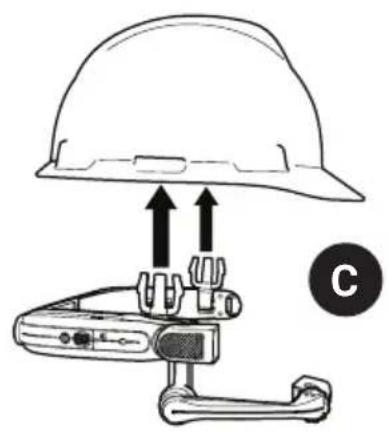
natural_image
Diagram of a hard hat and a handheld device with directional arrows indicating movement or force (no text or symbols)natural_image
Line drawing of a mechanical clamp or bracket component (no text or symbols)natural_image
Diagram of a mechanical component with a lever and adjustment mechanism (no text or symbols)
natural_image
Diagram of a device with connected cables and a power outlet, showing wiring connections without any text or symbols.

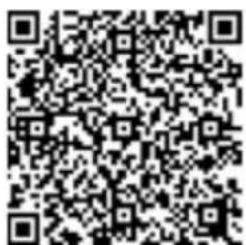

Gunakan realwear.setupmyhmt.com
natural_image
Illustration showing three hand positions with square markers, one being held by a person's arm (no text or symbols)Pasangkan HMT-1Z1
4 Hidupkan HMT-1Z1
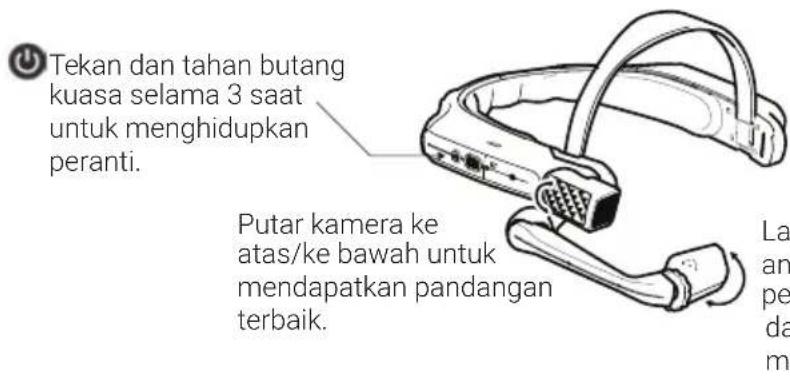
natural_image
Diagram of a hard hat with two upward arrows pointing to a device component, labeled 'C' (no text or symbols on the diagram itself)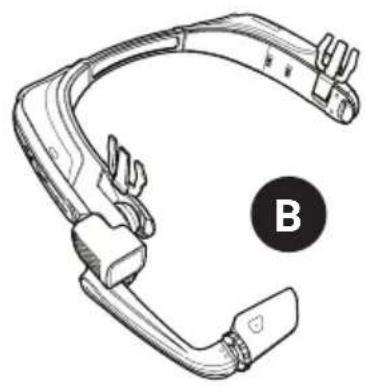
natural_image
Line drawing of a swimmer's head and neck (no text or symbols)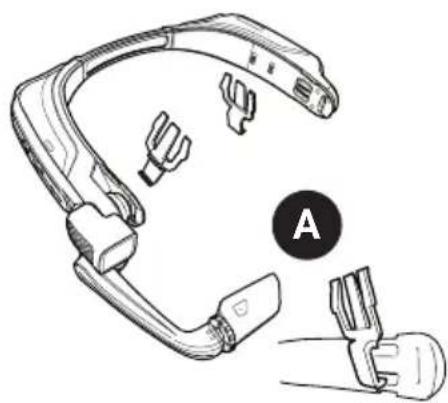
natural_image
Line drawing of a medical or automotive device component with labeled parts (A), no text or symbols present.natural_image
Diagram of a tool interacting with a cylindrical object, showing a handle and lever mechanism (no text or symbols)natural_image
Line drawing of a person in a wide stance, no text or symbols present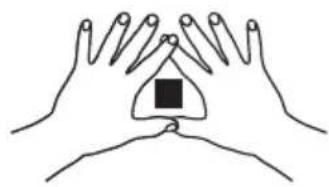
natural_image
Line drawing of two hands holding a central object with a square block, no text or symbols present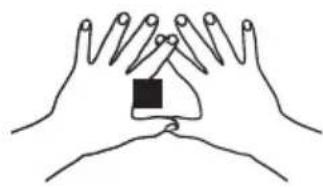
natural_image
Line drawing of two hands holding a small object, no text or symbols presentHMT-1Z1 ارتد

natural_image
Diagram of a cable connection with a device and two wall outlets, no text or symbols presentHMT-1Z1 شحن
-1 - توصيل USB مصغر


App Store
- i.safe MOBILE Safety Instructions HMT-1Z1 model T1100S
- Note
- Introduction
- Application
- ATEX & IECEx
- NEC & CEC
- Manufacturer
- Faults and Damage
- Ex-relevant / Intrinsic Safety Regulations
- Charging and battery
- Connections and covers
- Usage environments
- Accessories
- Using the HMT-1Z1 with a Hard Hat
- Using the HMT-1Z1 without a Hard Hat
- Attaching the Rear Pad
- Attaching the Head Strap
- Charging the HMT-1Z1
- Safety Warning Only use the Provided Charger
- Generate a QR Code for Configuration
- Check your eye dominance
- Put on the HMT-1Z1
- Turn on the HMT-1Z1
- Scan the Configuration QR Code from the HMT-1Z1
- Say What You See
- 不与安全帽配合使用HMT-1Z1
- 装上头带装上后垫
- 安全警告 仅可使用原装充电器
- 戴上HMT-1Z1设备
- 开启HMT-1Z1
- Mettez le HMT-1Z1
- Allumez le HMT-1Z1
- Indossare l'HMT-1Z1
- Accendere l'HMT-1Z1
- Coloque o HMT-1Z1
- Ligue o HMT-1Z1
- Наденьте НМТ-1Z1
- 4
- Включите НМТ-1Z1
- Pasangkan HMT-1Z1
- Hidupkan HMT-1Z1
- HMT-1Z1 شحن
Brand : i.safe Mobile
Model : HMT-1Z1
Category : Tablet