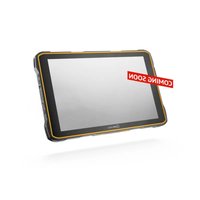
IS940.RG - Tablet i.safe Mobile - Free user manual and instructions
Find the device manual for free IS940.RG i.safe Mobile in PDF.


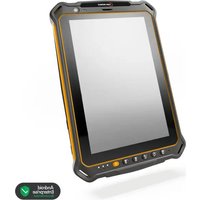
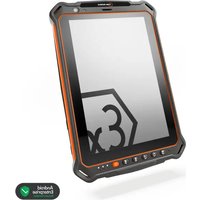
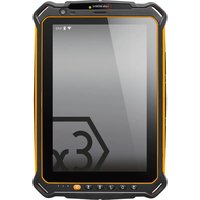
| Product type | Industrial rugged tablet |
| Brand | i.safe Mobile |
| Model | IS940.RG (M940A01) |
| Operating system | Android |
| Battery | Removable, recommended replacement after 2 years or 500 charge cycles |
| Charging | USB-C, power adapter 10-15 W, does not support USB PD |
| Operating temperature | -20 °C to +55 °C |
| Charging temperature | 0 °C to +45 °C |
| Cellular connectivity | LTE (multiple bands), eSIM + nano SIM |
| Wireless connectivity | Wi-Fi 2.4 / 5 / 5.8 GHz, Bluetooth, NFC |
| Expandable storage | microSD slot up to 512 GB |
| Camera | Front and rear with LED flash |
| Sensors | Proximity, optical sensor |
| Programmable buttons | Red button (SOS) and M1/M2 buttons (assignable via the Button app) |
| Mounting | VESA 100 standard, wrist strap included |
| Accessory interface | 16-pin ISM interface, optional docking station (IS-DS940.1) |
| Supplied accessories | Battery, USB-C cable, universal power adapter, TORX screwdriver, wrist strap, screen protector |
| Safety | Do not use in explosive area, follow safety instructions |
| Maintenance | Clean with a soft, damp antistatic cloth, without chemicals |
| Repairability | Repair only by i.safe MOBILE GmbH, no user-serviceable parts |
| Warranty | Terms available at www.isafe-mobile.com/fr/support/service |
Frequently Asked Questions - IS940.RG i.safe Mobile
User questions about IS940.RG i.safe Mobile
0 question about this device. Answer the ones you know or ask your own.
Ask a new question about this device
Download the instructions for your Tablet in PDF format for free! Find your manual IS940.RG - i.safe Mobile and take your electronic device back in hand. On this page are published all the documents necessary for the use of your device. IS940.RG by i.safe Mobile.
USER MANUAL IS940.RG i.safe Mobile
natural_image
Exterior view of a black and gold tablet device with a blank screen (no visible text or symbols)IS940.RG
OPERATING MANUAL
i.safe
MOBILE
IS940.RG | MODEL M940A01
Document No. 1089MM01REV00
Version: 2025-04-03
i.safe MOBILE GmbH
i_Park Tauberfranken 10
97922 Lauda-Koenigshofen
Germany
Tel.+49 9343 60148-0
info@isafe-mobile.com
www.isafe-mobile.com
(c) 2025 i.safe MOBILE GmbH Template: TEMPMM01REV10
CONTENTS
English. 4
Deutsch....22
Česky 40
Dansk....58
Español....76
Suomi....94
Français....112
Magyar 130
Italiano 148
Nederlands 166
Norsk 184
Polski 202
This Operating Manual complies with these standards:
IEC 60079, IEC 82079, ANSI Z535.6
IEC 60079, IEC 82079, ANSI Z535.6
ENGLISH

PROTECT YOUR LIFE AND READ THE OPERATING MANUAL
This Operating Manual is part of the device IS940.RG (model M940A01).
This Operating Manual provides important information for safe use of the device.
» Before using the device, read this Operating Manual carefully and pay particular attention to the warnings highlighted with the warning symbol. If you do not follow these instructions or do not understand them, this could lead to death, severe injuries and damage to the device.
» Make sure you have access to this Operating Manual when you need it. You can find the current Operating Manual at www.isafe-mobile.com/en/support/downloads
» Follow all instructions given on the device and on the packaging.
» Follow local safety regulations.
» Do not use the device in explosion hazardous areas.
» Make sure that no gap can be seen between the two halves of the device.
» Do not modify the device structurally.
» Do not expose the device to high temperatures.
» Do not expose the device to strong UV radiation.
» Do not expose the device to processes with high electrical charges.
» Do not expose the device to aggressive acids or bases.
» Protect the device and the Power Adapter from strong electrical magnetic fields as for example those emitted by induction cookers or microwave ovens, for example.
» Only use accessories approved by i.safe MOBILE GmbH.
» Do not open the device or carry out any repairs yourself.
» Do not use the device in places where its use is prohibited.
» Turn off the device in clinics or other medical facilities.
» Always keep a safety distance of at least 15 cm between the device and a pacemaker or hearing aid. The device can affect the functioning of medical devices such as pacemakers and hearing aids.
» When using the device while driving a motor vehicle, be sure to comply with applicable national laws.
» When using earphones or headsets at the maximum volume setting, first set the volume control on the device to 50 % of the maximum volume. Gradually adjust the volume.
» Only charge the device using the charging equipment specified by i.safe MOBILE GmbH.
» If you use a third-party USB power supply unit, note the following:
- The third-party USB power supply unit must comply with applicable country regulations and international and regional safety standards.
- The third-party USB power supply unit must have a minimum output of 10 W to 15 W to ensure the specified charging rates. The device does not support USB PD fast charging.
» Only charge the device at ambient temperatures between 0 °C to +45 °C (+32 °F to +113 °F).
» Only charge the device under dry indoor conditions.
» Do not charge the device in environments dusty or humid.
» Do not charge the device in the vicinity of flammable substances.
» Do not touch the display with sharp objects.
FAULTS AND DAMAGES
If there is any reason to suspect that the safety of the device has been compromised, it must be withdrawn from use immediately. Measures must be taken to prevent any accidental restarting of the device. The safety of the device may be compromised, if, for example:
» Malfunctions occur.
» The housing of the device shows damage.
» The device has been exposed to excessive loads.
» The device has been stored improperly
» Markings or labels on the device are illegible.
We recommend that a device displaying errors or in which an error is suspected be sent back to i.safe MOBILE GmbH to be checked.
BATTERY
The battery contains flammable materials such as organic solvents. Mishandling the battery may cause fire, smoke or an explosion. This poses a risk of death and serious injury!
The following must be observed:
» If the device is used daily, the battery should be replaced 2 years after first use, but at the latest after 500 charging cycles or when the operating time has been significantly reduced.
» The battery must not be used if there are noticeable abnormalities, such as smell, heat, discoloration or deformity.
» A leaking battery must not be used and touched.
» The battery must not be used or placed near an open flame, heater or high Temperature (above 80 °C (176 °F)).
» The battery must not be used where static electricity in excess of 100 V is generated.
» The battery must not be immersed in liquid such as water, beverages or other fluids.
» The battery must not be placed in or near a microwave or other cooking appliances.
» The battery must not be used in devices for which it was not intended.
» No short-circuit must be applied to the battery.
» The battery must not be exposed to excessive impacts.
» The battery must not be penetrated with a nail or strike with a hammer.
» The battery must not be disassembled.
» The battery must be packed securely in a case or carton for transport.
» The battery must not be charged in the vicinity of flammable substances.
» The battery must only be charged using the charging equipment approved by i.safe MOBILE GmbH.
» The battery must only be charged at ambient temperatures between 0 °C to +45 °C (+32 °F to +113 °F).
» The battery must only be charged under dry indoor conditions only.
» The battery must not be charged in environments dusty or humid.
» If the battery is not to be used for a longer period of time, it must be removed from the device. The battery must be charged to approx. 50 % to 70 % every 3 to 6 months to avoid deep discharge.
» The battery must be stored in a cool, dry place to keep it functional.
» The battery must not be stored with any metal objects.
» The battery must not be thrown away with household waste.
» The battery must be recycled to local rules and regulations.
MAXIMUM OUTPUT POWER
Frequency bands Maximum output power
LTE Band 1: 22.87 dBm LTE Band 3: 22.81 dBm LTE Band 5: 22.94 dBm
LTE Band 7: 22.86 dBm LTE Band 8: 22.76 dBm LTE Band 20: 22.95 dBm
LTE Band 28: 22.73 dBm LTE Band 40: 23.12 dBm LTE Band 41: 23.19 dBm
LTE Band 42: 22.83 dBm LTE Band 43: 23.12 dBm LTE Band 68: 22.55 dBm
n1: 22.96 dBm n3: 23.15 dBm n5: 23.22 dBm
n7: 23.09 dBm n8: 23.10 dBm n20: 23.07 dBm
n28: 22.97 dBm n38: 23.14 dBm n40: 23.17 dBm
n41: 23.13 dBm n77: 23.13 dBm n78: 23.22 dBm
n41 UL MIMO: 22.78 dBm n77 UL MIMO: 22.43 dBm n78 UL MIMO: 22.45 dBm
CA_1C: 22.85 dBm CA_3C: 22.79 dBm CA_7C: 22.72 dBm
CA_42C: 22.82 dBm CA_8B: 22.74 dBm CA_38C: 22.95 dBm
CA_40C: 23.01 dBm CA_5B: 22.93 dBm CA_41C: 23.10 dBm
BT: 8.33 dBm
BLE: 8.24 dBm
2.4G: 19.35 dBm
5G: 16.34 dBm
5.8G: 13.89 dBm
NFC: -27.30 dBuA/m at 10 m
SAR
The SAR limit of Europe is 2,0 W/kg for the body at 5 mm. The SAR limit of Europe is 4,0 W/kg for the limbs at 0 mm. The device has been tested against this SAR limit. The highest SAR value reported under this standard during product certification for limbs is 1,131 W/kg. This device was tested for typical body worn operations with the back of the handset kept 0 mm from the body. Belt clips, holsters and similar accessories used should not contain metallic components in the assembly. The use of accessories that do not satisfy these requirements may not comply with RF exposure requirements, and should be avoided.
WI-FI WARNING
FREQUENCY BAND: 5150 - 5250 MHZ:
» Indoor use: Inside buildings only. Installations and use inside road vehicles and train arriages are not permitted.
» Limited outdoor use: If used outdoors, equipment shall not be attached to a fixed installation or to the external body of road vehicles, a fixed infrastructure or a fixed outdoor antenna. Use by unmanned aircraft systems (UAS) is limited to within the 5170 - 5250 MHz band.
FREQUENCY BAND: 5250 - 5350 MHz:
» Indoor use: Inside buildings only. Installations and use in road vehicles, trains and aircraft are not permitted.
» Outdooruse is not permitted. Operation of WAS/RLAN installations in large aircraft (excluding multi-engined helicopters) is permitted until 31 December 2028.
FREQUENCY BAND: 5470 - 5725 MHZ:
» Installations and use in road vehicles, trains and aircraft and use for unmanned aircraft systems (UAS) are not permitted.
» Operation of WAS/RLAN installations in large aircraft (excluding multi-engined helicopters), except in the frequency band 5600 - 5650 MHz, is permitted until 31 December 2028.

 | AT | BE | BG | CH | CY | CZ | DE |
| DK | EE | EL | ES | FI | FR | HR | |
| HU | IE | IS | IT | LI | LT | LU | |
| LV | MT | NL | NO | PL | PT | RO | |
| SE | SI | SK | TR | UK(NI) | |||
INTENDED USE
The IS940.RG is an Internet-capable communication device for industrial use.
Only use the device as described in this Operating Manual. Any other use is considered improper and can lead to death, severe injuries and damage to the device.
The manufacturer i.safe MOBILE GmbH does not assume any liability for damage caused by improper use. The warranty expires in the event of improper use.
USER
Only trained users who have read and understood this Operating Manual may use this device.
WARRANTY
You can find the warranty conditions at www.isafe-mobile.com/en/support/service
For any damage caused by computer viruses that you download while using the Internet functions responsibility is at your hand.
There is no right of recourse against i.safe MOBILE GmbH.
EU DECLARATION OF CONFORMITY
You will find the EU declaration of conformity at
www.isafe-mobile.com/en/support/downloads
FCC/IC STATEMENT
The FCC/IC declaration can be found at
www.isafe-mobile.com/en/support/downloads
>SCOPE OF DELIVERY
Your device packaging contains the following:
1 x IS940.RG
1 x Battery
1 x Safety Instructions
1 x Display Protection Foil
1 x USB-C Cable
1 x Power Adapter universal (power supply unit and various country-specific adapters)
1 x Torx Screwdriver
1 x Hand Strap
CELL BROADCAST
The device supports cell broadcast. Cell broadcast is a cellular service for sending messages to all recipients within a cell.
DEVICE OVERVIEW/FUNCTIONS

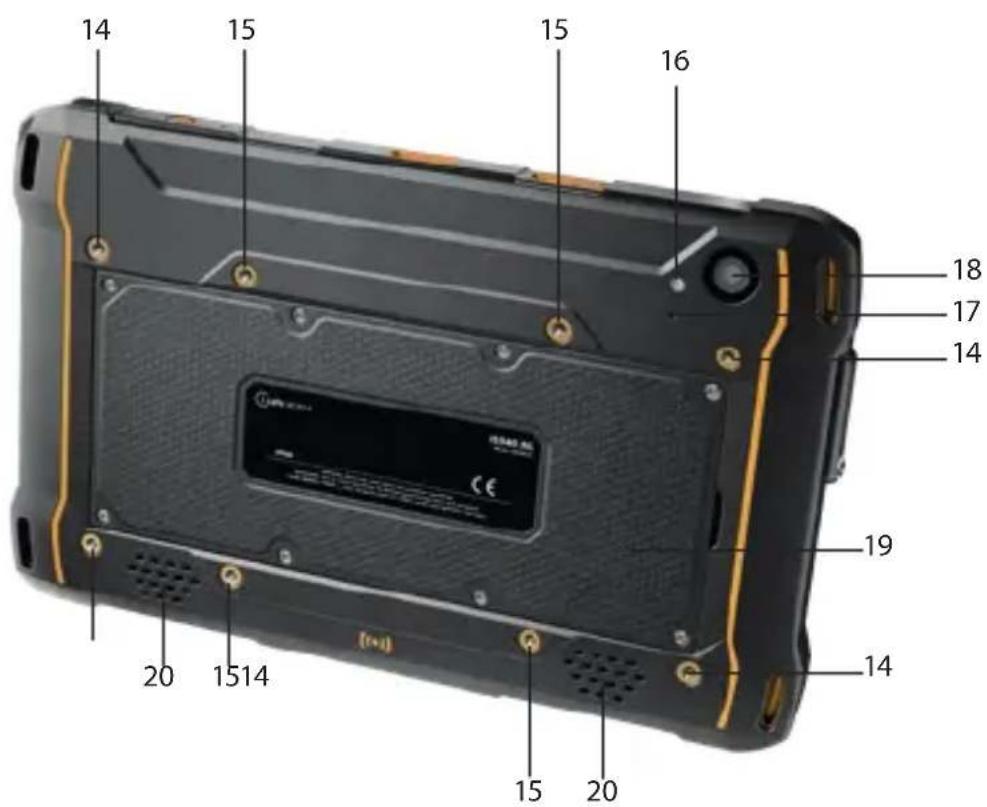
1 > MOUNTING IS-AS1.1: Mounting for the optional IS-AS1.1 Active Stylus Pen.
2 LOCK DOCKING STATION
3 MICROPHONE
4) FUNCTION KEY RED: Optional function, e.g. SOS - function can be assigned via Button App (system integrated).
5> FUNCTION KEY M1: Optional function, e.g. camera - function can be assigned via Button App (system integrated).
6> FUNCTION KEY M2: Optional function, e.g. camera - function can be assigned via Button App (system integrated).
7 USB INTERFACE: Connection for the USB-C Cable or for other equipment approved by i.safe MOBILE GmbH. Also see sections "Charging" and "Connecting approved accessories".
8> LOUDNESS CONTROL: Volume up/Volume down.
9) 12-PIN DOCKING INTERFACE: Connection for the optional IS-DS940.1 Docking Station.
10 POWER KEY: A long press switches the device on/off. A short press switches the standby mode on/off.
11 > 16-PIN ISM INTERFACE: Connection for approved accessories. Also see section "Connecting approved accessories".
12> SENSORS: Proximity sensor, light sensor.
13 FRONT CAMERA
14 MOUNTING HANDSTRAP
15 MOUNTING VESA STANDARD 100
16 LED FLASH
17 MICROPHONE
18 BACK CAMERA
19 BATTERY
20 LOUDSPEAKER
FUNCTION KEYS
The device has various freely programmable keys:
Function keyM1
Function key M2
Function key red
You can assign a function to the freely programmable keys via the Button App installed on the device. You will find the Button App in the menu item „Settings“
>INSTALLING THE BATTERY

DANGER
Installing the wrong battery in the device, poses a risk of explosion, which could result in death or serious injuries! Only fit the battery supplied or an approved replacement battery in the device. The approved replacement battery can be found on the website www.isafe-mobile.com/en/products
natural_image
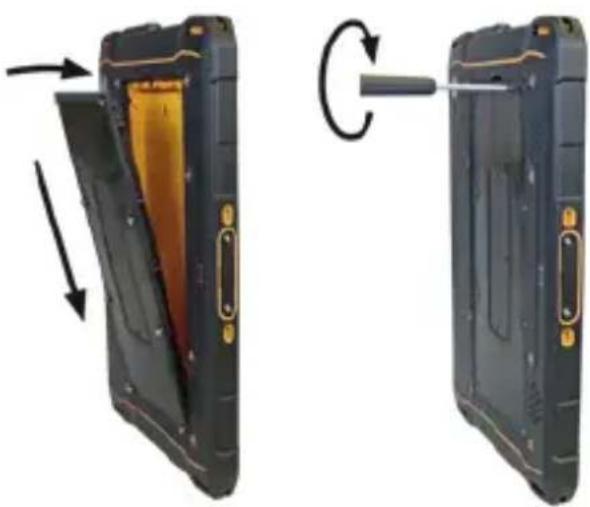
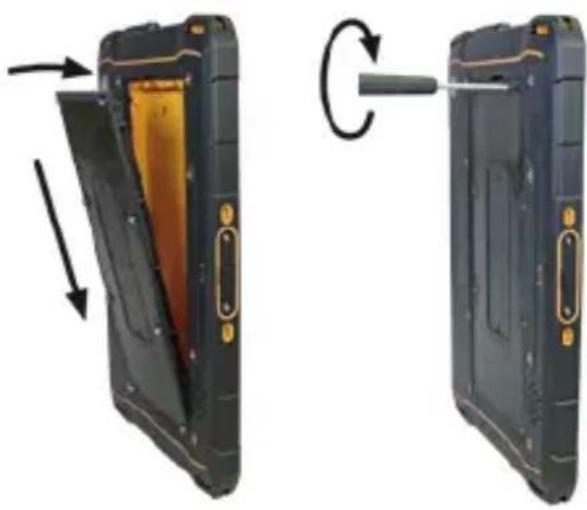
Two views of a black handheld device showing internal components and a circular arrow indicating rotation (no text or symbols)» Place the battery in the battery compartment as shown. Make sure that the gold-coloured contacts of the battery and the device face each other.
» Hand-tighten the screws using the Torx Screwdriver provided.
» Check that the battery is seated correctly and securely.
> INSERT/REMOVE SIM CARD
The device has a nano-SIM card slot and an additional eSIM. The eSIM is a non-removable, integrated digital SIM. For more information contact your provider.
NOTICE
Proceeding incorrectly when inserting/removing the SIM card can damage the device and the SIM card. Switch off the device before inserting or removing a SIM card. Do not charge the device while inserting or removing a SIM card.
natural_image
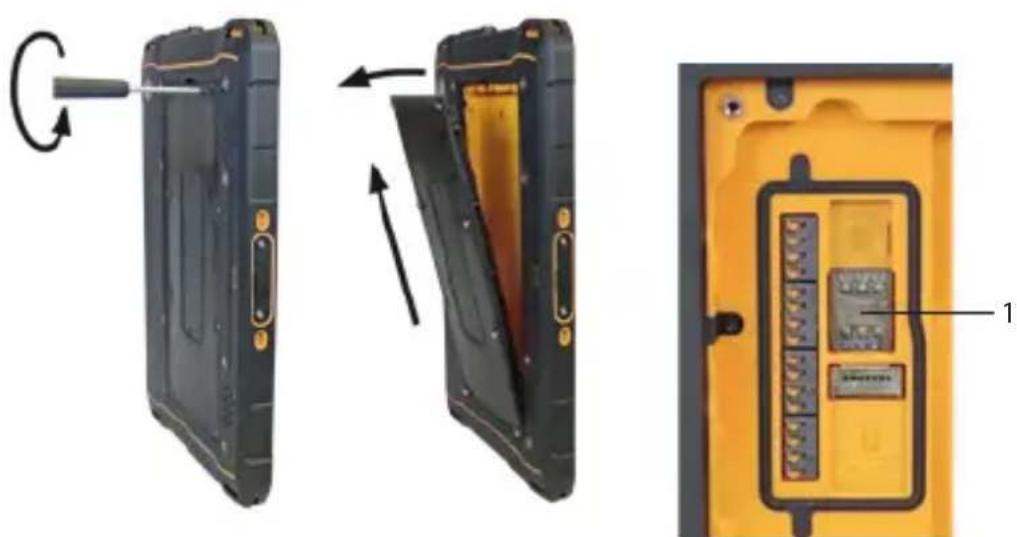
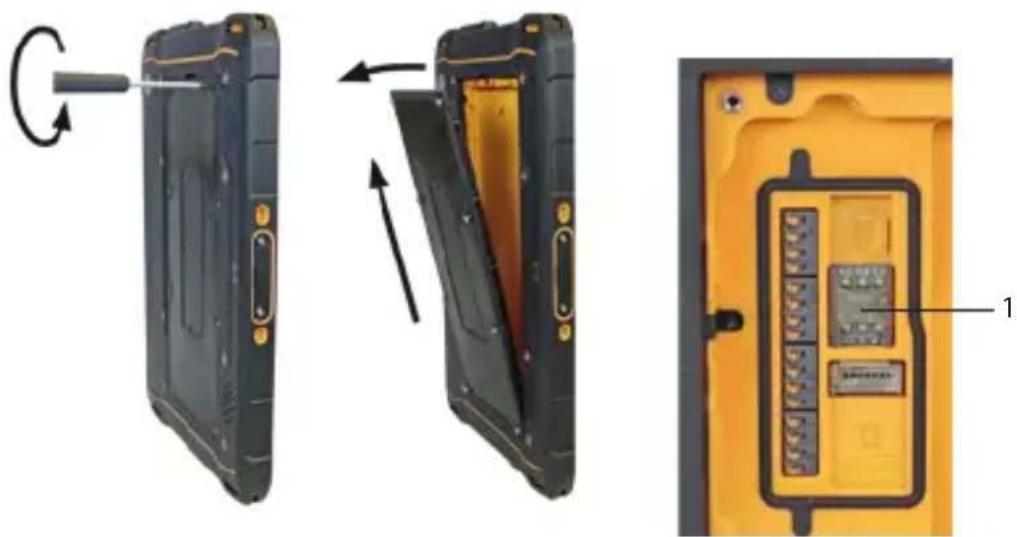
Three views of a black handheld device showing internal components and a yellow panel with labeled parts (no text or symbols on the device itself)» Loosen the screws on the battery using the Torx Screwdriver provided.
» Remove the battery from the battery compartment.
» Insert the SIM card into the nano-SIM card slot (1) with the gold-coloured contacts facing down.
»Reinstall the battery. See section "Installing the battery".
Activate eSIM
You can activate the eSIM in several ways:
- Via the Android™ Setup Wizard during initial device setup:
» Scan the eSIM QR code that you have received from your service provider or manually enter the eID that you have received from your service provider. - Via the settings menu of the device:
»> Settings > Network & Internet > Mobile network (add Network) > Download SIM > scan (or manually enter) eSIM QR code that you have received from your service provider.
> INSERT/REMOVE microSD CARD
NOTICE
Proceeding incorrectly when inserting/removing the microSD card can damage the device and the microSD card. Switch off the device before inserting or removing a microSD card. Do not charge the device while inserting or removing a microSD card.
natural_image
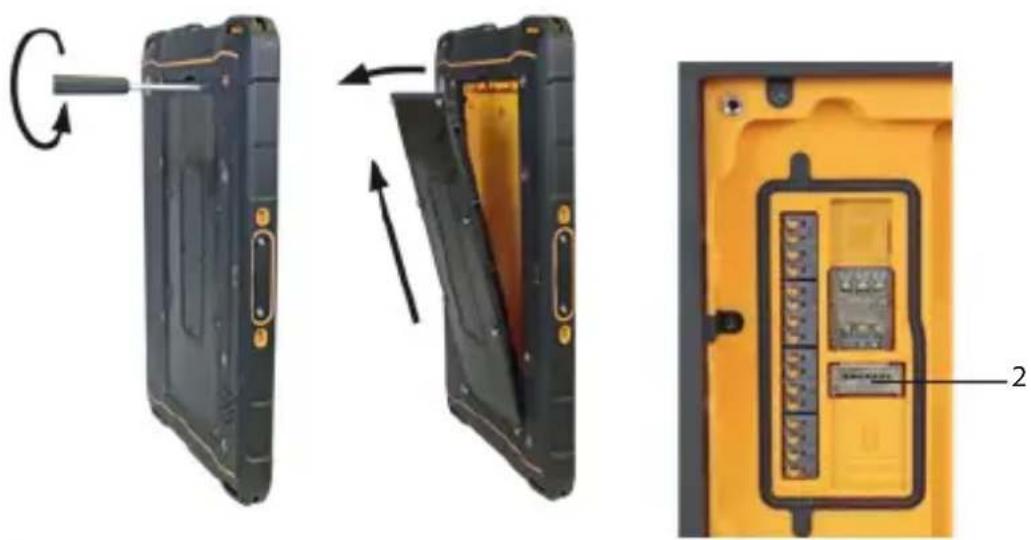
Three views of a black electronic device showing internal components: left, side, and top (no text or symbols visible)» Loosen the screws on the battery using the Torx Screwdriver provided.
» Remove the battery from the battery compartment.
» Insert the microSD card into the slot provided (2) with the gold-colored contacts facing down. The device has a slot for a microSD card up to 512 GB.
»Reinstall the battery. See section "Installing the battery".
INSTALLING ACCESSORIES
The Hand Strap is included with the device package.
» Install the Hand Strap to the device.
» Hand-tighten the screws using the Torx Screwdriver provided.
>ATTACHING THE DEVICE TO A MONITOR MOUNT
You can mount the device to a monitor mount with Vesa standard 100.
NOTICE
Incorrect mounting to the monitor mount can cause damage to the device.
» Note the maximum screw depth of 4,5 mm on the IS940.RG.
>CHARGING
NOTICE
Incorrect charging can cause damage to the device. Please note the following when charging:
» Only charge the device using the charging equipment specified by i.safe MOBILE GmbH.
» Only charge the device at ambient temperatures between 0 °C to +45 °C (+32 °F to +113 °F).
» Charge the device under dry indoor conditions only.
» Do not charge the device in environments dusty or humid.
Your device package contains a power supply unit, various country-specific adapters and a USB-C Cable.
This device can also be powered by third-party USB power supply units.

CAUTION
Charging with third-party USB power supply units poses a risk of property loss or personal injury
»The third-party USB power supply unit must comply with applicable country regulations and international and regional safety standards.
»The third-party USB power supply unit must have a minimum output of 10 W to 15 W to ensure the specified charging rates. The device does not support USB PD fast charging.
» Connect the adapter suitable for your country to the power supply unit supplied.
» Connect the USB-C Cable to the power supply unit.
» Connect the USB-C Cable to the USB interface of the device.
» Connect the power supply unit to the power socket.
> SWITCHING ON/OFF
» Press and hold the power key for about 3 seconds.
» Enter the device or SIM PIN when the input dialog for the device or SIM PIN appears after switching on.
»Press and hold the power key to enter the power off menu. Select
>USING THE DEVICE

CAUTION
When using earphones or headsets at the maximum volume setting, you can damage your hearing. First set the volume control on the device to 50 % of the maximum volume. Gradually adjust the volume.
» Only use the device at ambient temperatures between -20 °C to +55 °C (-4 °F to +131 °F).
» When turning on the device for the first time, follow the instructions on the screen.
Further information on operating the device can be found at www.isafe-mobile.com/en/support/service under the menu item "FAQ".
Detailed information on operating the Android operating system can be found at:
https://support.google.com/android
CONNECTING APPROVED ACCESSORIES

DANGER
Improper use poses risk of death or severe injuries!
»Only connect accessories approved by i.safe MOBILE GmbH to the device. Accessories approved by i.safe MOBILE GmbH can be found at www.isafe-mobile.com/en/products
16-PIN ISM INTERFACE
flowchart
graph TD
    A["Device with switch"] --> B["Switch switch"]
    B --> C{Switch turn}
    C -->|Upward arrow| D["Device with switch"]
    C -->|Downward arrow| E["Device with switch"]
    D --> F["Switch switch with cable"]
    E --> G["Switch switch with cable"]
    F --> H["Device with switch"]
    G --> I["Device with switch"]
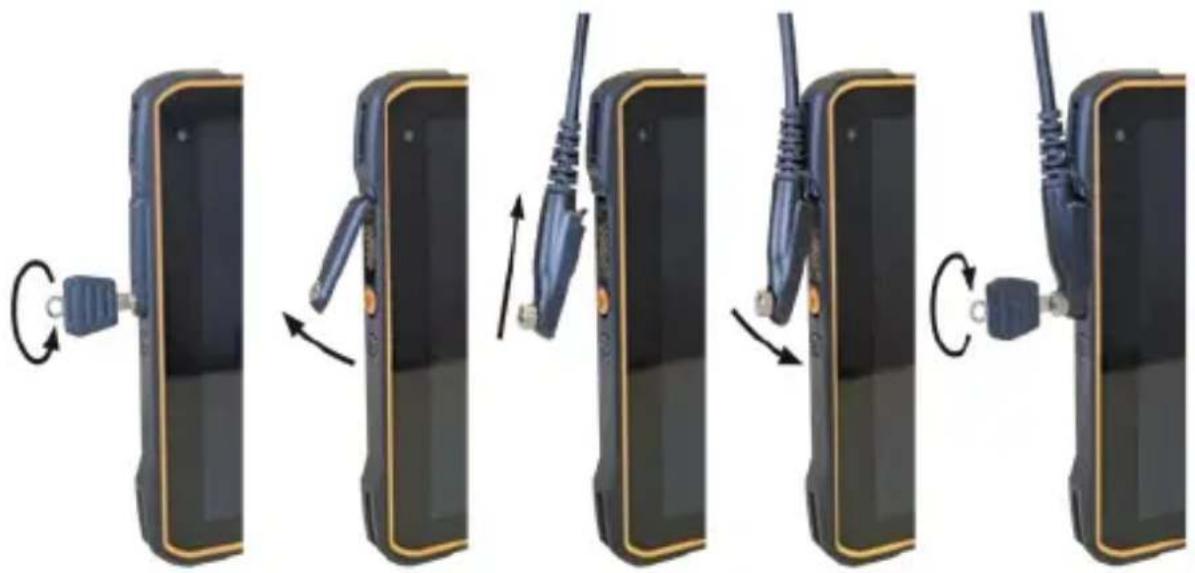
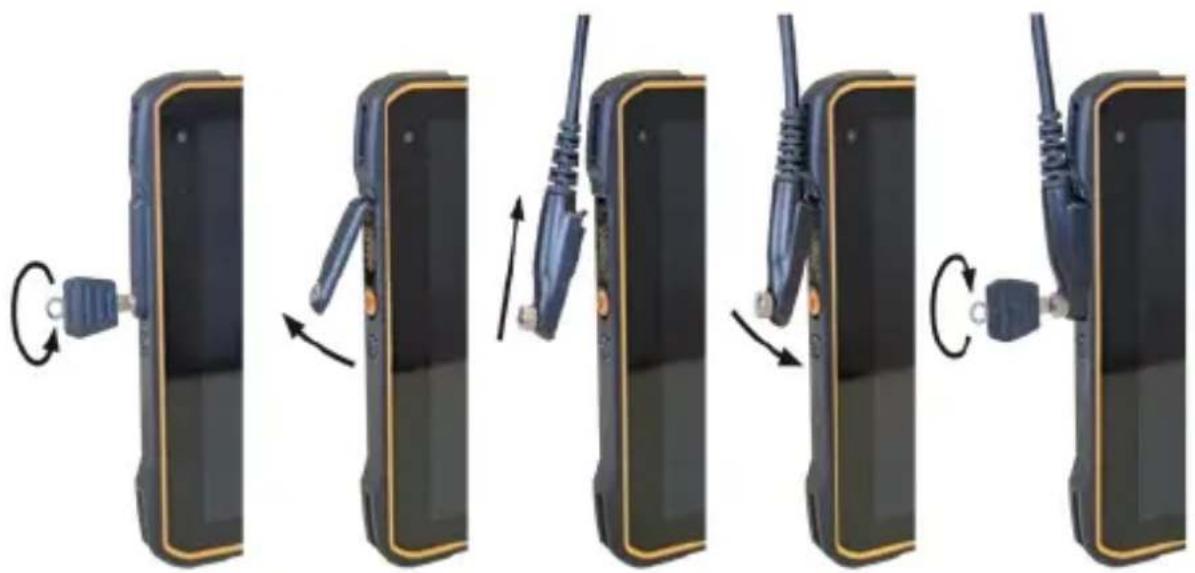
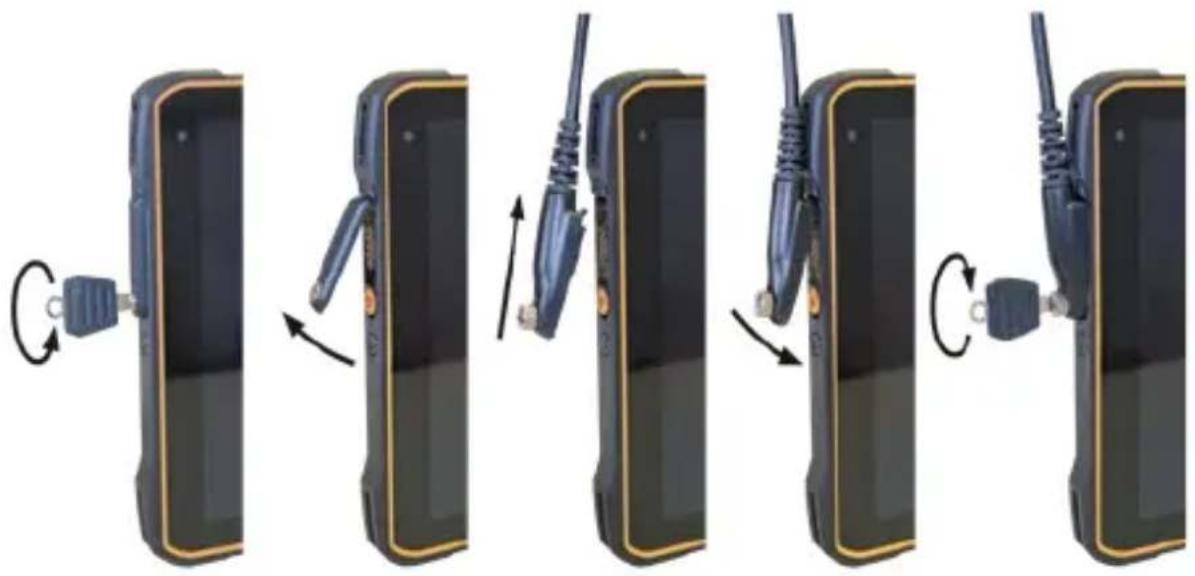
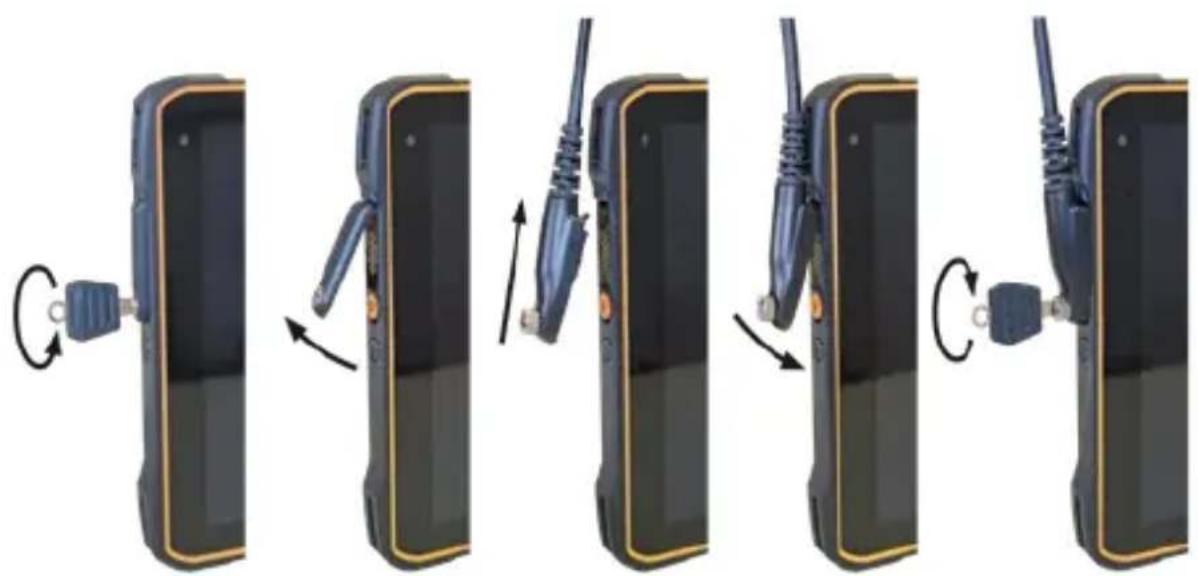
» Loosen the screw on the 16-pin ISM interface cover using the Screwdriver included in the approved accessory package. Remove the cover as shown.
» Connect the plug of the approved accessory to the 16-pin ISM interface as shown.
» Hand-tighten the screws.
» Check that the plug is seated correctly and securely.
USB INTERFACE
The USB interface is used for charging and data transfer.
» Connect approved accessories or other devices to the USB interface only by using the USB-C Cable or by using other equipment approved by i.safe MOBILE GmbH.
12-PIN DOCKING INTERFACE
The 12-pin docking interface is used for charging and data transfer via the optional IS-DS940.1 Docking Station.
>CHANGING THE BATTERY

DANGER
An outdated battery can overheat, inflate and cause a fire. This poses a risk of death and serious injury! If you use the device daily, you should replace the battery 2 years after first use, but at the latest after 500 charging cycles or when the operating time has been significantly reduced. If you have any further questions, please contact the i.safe MOBILE GmbH repair service at www.isafe-mobile.com/en/support/service

WARNING
If you replace the battery with the wrong battery in the device, there is a risk of explosion, which could result in death or serious injuries! Only replace the battery with an approved replacement battery. An approved replacement battery can be found on the website www.isafe-mobile.com/en/products
natural_image
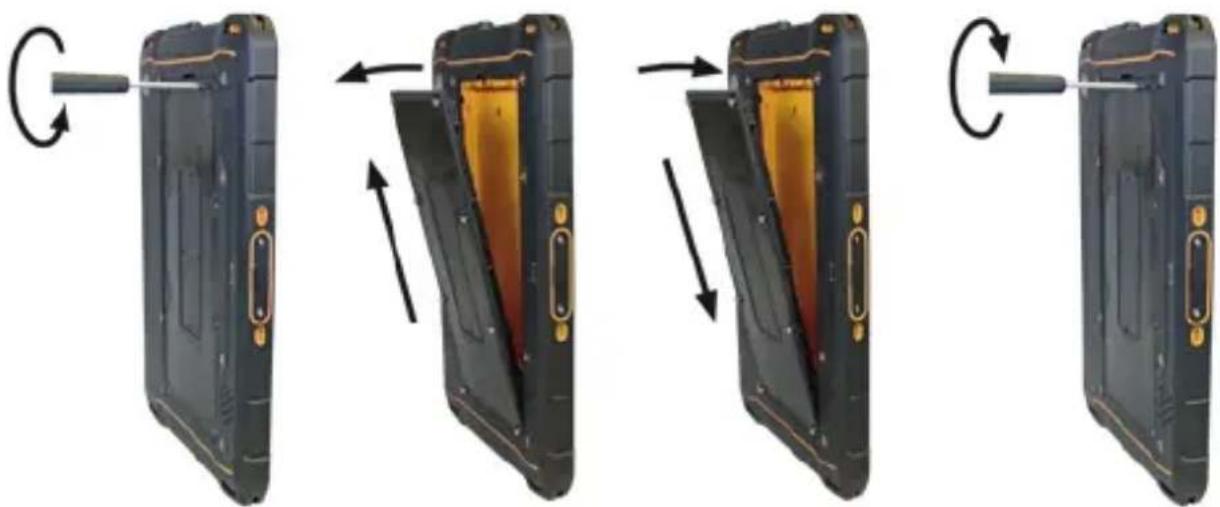
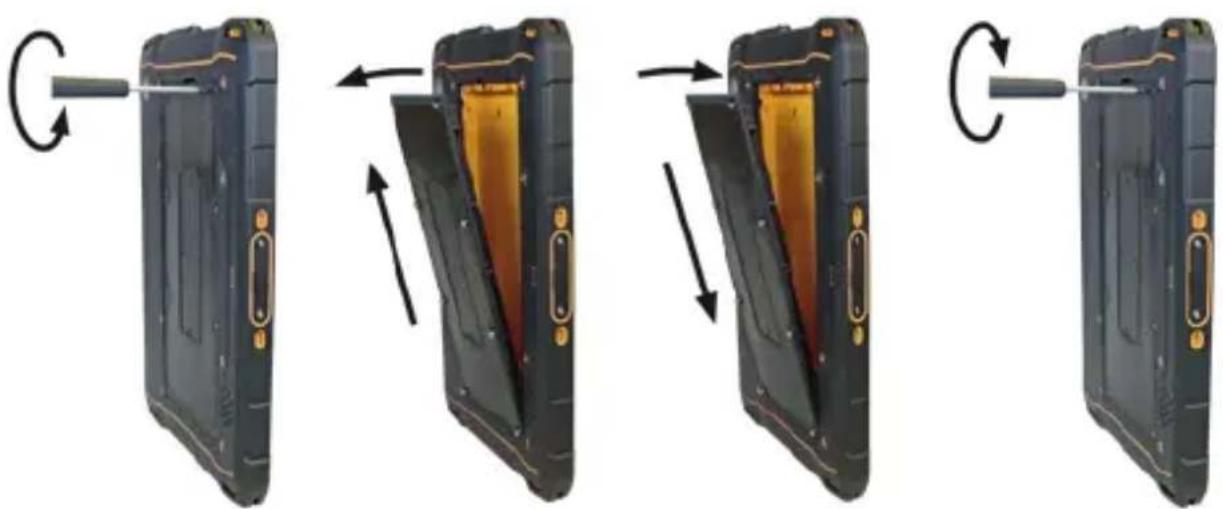
Four-step diagram showing a device being transferred from a black case to a yellow case, with arrows indicating the process (no text or symbols present)» Loosen the screws on the battery using the Torx Screwdriver provided.
» Remove the battery from the battery compartment as shown.
» Place the approved replacement battery in the battery compartment as shown. Make sure that the gold-coloured contacts of the battery and the device face each other.
» Hand-tighten the screws using the Torx Screwdriver provided.
» Check that the battery is seated correctly and securely.
POSSIBLE DEVICE PROBLEMS
You can find information on possible device problems and how to rectify them at www.isafe-mobile.com/en/support/service under the menu item "FAQ".
If you have any further questions, please contact the i.safe MOBILE GmbH repair service at www.isafe-mobile.com/en/support/service
MAINTENANCE/REPAIR
The device itself has no serviceable parts.

WARNING
Incorrect repairs present a risk of explosion or fire, which can result in death or severe injuries! Do not open the device or carry out any repairs yourself.
Contact the i.safe MOBILE GmbH repair service at w.isafe-mobile.com/en/support/service if the device is not working normally, if the device needs to be repaired or if a replacement part is required.
RETURN SHIPMENT
Contact the i.safe MOBILE GmbH repair service at www.isafe-mobile.com/en/support/service
DISTRIBUTION PARTNER
You can find the specialist distribution partner responsible for your country at www.isafe-mobile.com/en/contact
CLEANING
NOTICE
Incorrect cleaning can cause damage to the device. Please note the following when cleaning:
» Turn off the device before cleaning.
» Do not charge the device while cleaning.
» Do not use chemical agents for cleaning.
» Clean the device and the Power Adapter with a soft, moistened antistatic cloth.
» Clean the display screen regularly with a soft, antistatic cloth.
>STORAGE
NOTICE
Incorrect storage can cause damage to the device. Store the device at a humidity of 10% to 60% at the following ambient temperatures:
Up to one month: -20 °C to +45 °C (-4 °F to +113 °F)
Up to 3 months: -10 °C to +35 °C (+14 °F to +95 °F)
Over 3 months: -10 °C to +25 °C (+14 °F to +77 °F)
If you do not use the device for a longer period of time, note the following:
» Switch off the device.
» For longer storage without use, remove the battery from the device.
» Charge the battery to approx. 50 % to 70 % every 3 to 6 months to avoid deep discharge.
» Store the battery in a cool, dry place to keep it functional.
RECYCLING
NOTICE
Incorrect disposal of electronic products, batteries and packaging material puts the environment at risk. Please note the following when disposing of items:
»DO NOT throw away batteries with household waste.
» Always dispose electronic products, batteries and packaging material at the appropriate collection points. This way, you prevent uncontrolled waste disposal and promote the recycling of material resources.
You can obtain further information from regional waste disposal companies, state authorities or the i.safe MOBILE GmbH service centre responsible for your country or region at www.isafe-mobile.com/en/support/service
TRADEMARKS
i.safe MOBILE GmbH and the i.safe MOBILE GmbH logo are registered trademarks of the i.safe MOBILE GmbH.
Comes with the Google™ app and Google Chrome™
Google and Google Chrome are trademarks of Google LLC.
Android is a trademark of Google LLC.
All other trademarks and copyrights are the properties of their respective owners.
DEUTSCH

www.isafe-mobile.com/de/support/downloads
natural_image
Two views of a black electronic device showing internal components and a tool interacting with it (no text or symbols visible)natural_image
Three views of a black electronic device showing internal components and a yellow interior panel (no text or symbols visible)natural_image
Three views of a black electronic device showing internal components and a yellow interior panel (no text or symbols visible)natural_image
Sequence of five images showing a device transitioning from a rectangular panel to a multi-panel device, each with a cable or connector and directional arrows indicating motion (no text or symbols present)natural_image
Four-step diagram showing a device being opened into a closed panel, with arrows indicating the process (no text or symbols present)www.isafe-mobile.com/en/support/downloads
PROHLÁŠENÍ FCC/IC
www.isafe-mobile.com/en/support/downloads
ROZSAH DODÁVKY
natural_image
Two views of a black handheld device showing internal components and a circular arrow indicating rotation (no text or symbols)natural_image
Three views of a black handheld device showing internal components and a close-up view of the interior panel (no text or symbols visible)natural_image
Three views of a black handheld device showing internal components and a close-up view of the internal panel (no text or symbols visible)https://support.google.com/android
flowchart
graph LR
    A["Left Device"] --> B["Right Device"]
    B --> C["Left Device"]
    C --> D["Right Device"]
    D --> E["Left Device"]
    E --> F["Right Device"]
    F --> G["Left Device"]
natural_image
Four-step diagram showing a device being transferred from a black case to a yellow case, with arrows indicating the process (no text or symbols present)www.isafe-mobile.com/en/support/downloads
FCC/IC-ERKLÆRING
FCC/IC-erklæringen findes på www.isafe-mobile.com/en/support/downloads
LEVERANCENS OMFANG
natural_image
Two views of a black electronic device showing internal components and a scroll wheel (no text or symbols visible)natural_image
Three views of a black handheld device showing internal components and a close-up view of the interior panel (no text or symbols visible)natural_image
Three views of a black electronic device showing internal components and a yellow interior panel (no text or symbols visible)flowchart
graph LR
    A["Left Mobile Phone"] --> B["Right Mobile Phone"]
    B --> C["Left Mobile Phone"]
    C --> D["Right Mobile Phone"]
    D --> E["Left Mobile Phone"]
    E --> F["Right Mobile Phone"]
natural_image
Four sequential images showing a device being opened into a black case, with arrows indicating the process (no text or symbols present)www.isafe-mobile.com/en/support/service
DETAILPARTNER
Du kan finde den specialiserede detailpartner med ansvar for dit land på www.isafe-mobile.com/en/contact
RENG∅RING
BEMÄRK
www.isafe-mobile.com/en/support/service
www.isafe-mobile.com/en/support/downloads
www.isafe-mobile.com/en/support/downloads
>ALCANCE DEL SUMINISTRO
natural_image
Two views of a black hard-shell device showing internal components and a circular arrow indicating rotation (no text or symbols)natural_image
Three views of a black and yellow electronic device showing internal components and a circular arrow indicating rotation (no text or symbols)natural_image
Three views of a black handheld device showing internal components and a close-up view of the internal panel (no text or symbols visible)https://support.google.com/android
flowchart
graph LR
    A["Left Mobile Phone"] --> B["Right Mobile Phone"]
    B --> C["Left Mobile Phone"]
    C --> D["Right Mobile Phone"]
    D --> E["Left Mobile Phone"]
    E --> F["Right Mobile Phone"]
natural_image
Four-step diagram showing device state changes: left, top, side, and right views of a black rectangular device with gold contacts (no text or symbols)www.isafe-mobile.com/en/support/downloads
TOIMITUSSISÄLTÖ
natural_image
Two views of a black handheld device showing internal components and a circular arrow indicating rotation (no text or symbols)natural_image
Three-panel diagram showing a device's internal structure: front panel, side panel, and top view (no text or symbols)natural_image
Three views of a black electronic device showing internal components and a yellow panel with labeled parts (no text or symbols on the device itself)https://support.google.com/android
HYVÄKSYTTYJEN LISÄLAITTEIDEN LIITTÄMINEN

VAARA
natural_image
Sequence of five images showing a device transitioning from a black rectangular panel to a black rectangular device with attached wires, each with an arrow indicating rotation (no text or symbols present)natural_image
Four-panel diagram showing a device being shifted from left to right, illustrating the process of battery charging (no text or symbols present)DÉCLARATION DE CONFORMITÉ UE
natural_image
Two views of a black handheld device showing internal components and a circular arrow indicating rotation (no text or symbols)natural_image
Three views of a black electronic device showing internal components and a close-up view of the interior panel (no text or symbols visible)natural_image
Three views of a black handheld device showing internal components and a yellow interior panel (no text or symbols visible)MISE EN MARCHE/ARRÊT
INTERFACE 16-PIN ISM
flowchart
graph LR
    A["Start"] --> B["Switch with cable"]
    B --> C["Arrow to right"]
    C --> D["Switch with cable"]
    D --> E["Arrow to left"]
    E --> F["Switch with cable"]
    F --> G["Arrow to right"]
    G --> H["Switch with cable"]
    H --> I["Arrow to left"]
    I --> J["Switch with cable"]
natural_image
Four-step diagram showing a device being opened into a black case, with arrows indicating the process (no text or symbols present)natural_image
Two views of a black electronic device showing internal components and a cylindrical tool inserted into its side (no text or symbols visible)natural_image
Three views of a black electronic device showing internal components and a close-up view of the interior panel (no text or symbols visible)natural_image
Three views of a black hard drive showing internal components, with arrows indicating rotation and assembly (no text or symbols)natural_image
Four sequential images showing a device being opened into a black case, with arrows indicating the process (no text or symbols present)POTENZA DI USCITA MASSIMA
www.isafe-mobile.com/en/support/service
www.isafe-mobile.com/en/support/downloads
DICHIARAZIONE FCC/IC
www.isafe-mobile.com/en/support/downloads
natural_image
Two views of a black electronic device showing internal components and a tool interacting with it (no text or symbols visible)natural_image
Three views of a black electronic device showing internal components and a close-up view of the interior panel (no text or symbols visible)natural_image
Three views of a black handheld device showing internal components and a yellow interior panel (no text or symbols visible)natural_image
Four-step diagram showing a device being opened into a black case, with arrows indicating the process (no text or symbols present)www.isafe-mobile.com/en/support/downloads
FCC/IC-VERKLARING
www.isafe-mobile.com/en/support/downloads
OMVANG VAN DE LEVERING
natural_image
Two views of a black electronic device showing internal components and a circular arrow indicating rotation (no text or symbols)natural_image
Three views of a black electronic device showing internal components and a close-up view of the interior panel (no text or symbols visible)natural_image
Three views of a black electronic device showing internal components and a yellow housing (no text or symbols visible)https://support.google.com/android
GOEDGEKEURDE ACCESSOIRES AANSLUITEN

GEVAAR
natural_image
Four-step diagram showing a device being transferred from a black case to an open gold-colored case, with arrows indicating the process (no text or symbols present)www.isafe-mobile.com/en/support/downloads
FCC/IC UTTALELSE
FCC/IC-erklæringen finner du på www.isafe-mobile.com/en/support/downloads
LEVERINGSOMFANG
natural_image
Two views of a black handheld device showing internal components and a circular arrow indicating rotation (no text or symbols)natural_image
Three views of a black handheld device showing internal components and a close-up view of the interior panel (no text or symbols visible)natural_image
Three views of a black hard drive showing internal components, with arrows indicating rotation and assembly (no text or symbols)https://support.google.com/android
TILKOBLING AV GODKJENT TILBEH∅R

FARE
Feil bruk kan føre til dødelige eller alvorlige personskader!
flowchart
graph LR
    A["Left Device"] --> B["Right Device"]
    B --> C["Left Device"]
    C --> D["Right Device"]
    D --> E["Left Device"]
    E --> F["Right Device"]
    F --> G["Left Device"]
natural_image
Four-step diagram showing a device being transferred from a black case, with arrows indicating the process (no text or symbols present)VEDLIKEHOLD/REPARASJON
www.isafe-mobile.com/en/support/service
DETALJHANDELSPARTNER
natural_image
Two black rectangular devices with internal gold contacts, shown from different angles (no text or symbols visible)natural_image
Three views of a black and yellow electronic device showing internal components and a circular arrow indicating rotation (no text or symbols)natural_image
Three views of a black electronic device showing internal components and a yellow interior panel (no text or symbols visible)natural_image
Four-step diagram showing a device being processed, with arrows indicating the process (no text or symbols present)www.isafe-mobile.com/en/support/service
natural_image
Two views of a black handheld device showing internal components and a circular arrow indicating rotation (no text or symbols)natural_image
Three views of a black electronic device showing internal components and a close-up view of the interior panel (no text or symbols visible)natural_image
Three views of a black electronic device showing internal components and a yellow interior panel (no text or symbols visible)INTERFACE 16-PIN ISM
flowchart
graph LR
    A["Left Device"] --> B["Right Device"]
    B --> C["Left Device"]
    C --> D["Right Device"]
    D --> E["Left Device"]
    E --> F["Right Device"]
    F --> G["Left Device"]
natural_image
Four-step diagram showing device state changes: left, top, side, and right (no text or symbols)www.isafe-mobile.com/en/support/service
> PARCEIRO COMERCIAL
www.isafe-mobile.com/en/support/service
www.isafe-mobile.com/en/support/downloads
www.isafe-mobile.com/en/support/downloads
ESCOPO DE ENTREGA
natural_image
Two views of a black electronic device showing internal components and a rotating button (no text or symbols visible)natural_image
Three views of a black handheld device showing internal components and a yellow panel with labeled parts (no text or symbols on the device itself)natural_image
Three views of a black hard drive showing internal components, with arrows indicating rotation and assembly (no text or symbols)INTERFACE 16-PIN ISM
flowchart
graph TD
    A["Left Door Switch"] --> B["Step 1: Rotation to Left"]
    B --> C["Step 2: Rotation to Right"]
    C --> D["Step 3: Rotation to Right"]
    D --> E["Step 4: Rotation to Right"]
    E --> F["Step 5: Rotation to Right"]
natural_image
Four-step diagram showing device state changes: battery, internal panel, and external panel (no text or symbols)natural_image
Two views of a black handheld device showing internal components and a circular arrow indicating rotation (no text or symbols)natural_image
Three views of a black electronic device showing internal components and a close-up view of the interior panel (no text or symbols visible)natural_image
Three views of a black handheld device showing internal components and a close-up view of the interior panel (no text or symbols visible)flowchart
graph LR
    A["Left Device"] --> B["Right Device"]
    B --> C["Left Device"]
    C --> D["Right Device"]
    D --> E["Left Device"]
    E --> F["Right Device"]
natural_image
Four-panel diagram showing a device being transferred from a black case, with arrows indicating the process (no text or symbols present)natural_image
Two views of a black handheld device showing internal components and a circular arrow indicating rotation (no text or symbols)natural_image
Three views of a black handheld device showing internal components and a close-up view of the interior panel (no text or symbols visible)natural_image
Three views of a black electronic device showing internal components and a yellow panel with labeled parts (no text or symbols on the device itself)natural_image
Four sequential images showing a device's internal structure before and after rotation, with no visible text or symbols.natural_image
Two views of a black handheld device showing internal components and a scroll wheel (no text or symbols visible)» Postavite bateriju u odjeljak za bateriju prema prikazu. Vodite računa o tome da kontakti baterije u zlatnoj boji i kontakti uređaja gledaju jedni prema drugima.
» Ručno zategnite vijke isporučenim Torx odvijačem.
» Provjerite da je baterija pravilno učvršćena.
UMETANJE/UKLANJANJE SIM KARTICE
Uređaj ima utor za nano SIM karticu i dodatnu eSIM karticu. eSIM kartica je nezamjenjiva, integrirana, digitalna eSIM kartica. Za više informacija kontaktirajte svog pružatelja usluga.
NAPOMENA
Neodgovarajući postupak pri umetanju/uklanjanju SIM kartice može oštetiti uređaj i SIM karticu. Isključite uređaj prije umetanja ili uklanjanja SIM kartice. Ne punite uređaj za vrijeme umetanja ili uklanjanja SIM kartice.
natural_image
Three views of a black electronic device showing internal components and a yellow panel with labeled parts (no text or symbols on the device itself)» Otpustite vijke na bateriji isporučenim Torx odvijačem.
» Uklonite bateriju iz odjeljka za bateriju.
» Umetnite SIM karticu u utor za nano SIM karticu (1) tako da kontakti zlatne boje gledaju prema dolje.
» Ponovno ugradite bateriju. Pogledajte odlomak „Ugradnja baterije“.
AKTIVIRAJTE ESIM
natural_image
Three views of a black and yellow electronic device showing internal components and a mechanical assembly (no text or symbols visible)» Otpustite vijke na bateriji isporučenim Torx odvijačem.
» Uklonite bateriju iz odjeljka za bateriju.
» Umetnite mikro SD karticu u pripadajući utor (2) tako da kontakti zlatne boje gledaju prema dolje. Uređaj ima a utor za microSD karticu do 512 GB.
» Ponovno ugradite bateriju. Pogledajte odlomak „Ugradnja baterije“.
INSTALACIJA PRIBORA
Traka za ruku dio su opsega isporuke uređaja.
» Montirajte traku za ruku na uređaj.
» Ručno zategnite vijke isporučenim Torx odvijačem.
PRIČVRSTITE UREĐAJ NA DRŽAČ ZA MONITOR.
Uređaj možete montirati na držač za monitor s pomoću Vesa standard 100.
NAPOMENA
https://support.google.com/android
> SPAJANJE ODOBRENOG PRIBORA

OPASNOST
Neodgovarajuća uporaba može dovesti do smrti ili teških ozljeda!
» Spajajte na uređaj samo pribor koji je odobrila tvrtka i.safe MOBILE GmbH. Pribor koji je odobrila tvrtka i.safe MOBILE GmbH možete pronaći na www.isafe-mobile.com/en/products
16-PIN ISM SUČELJE

flowchart
graph LR
    A["Left Device"] --> B["Right Device"]
    B --> C["Left Device"]
    C --> D["Right Device"]
    D --> E["Left Device"]
    E --> F["Right Device"]
    F --> G["Left Device"]
12-PINSKO DOCKING SUČELJE
12-pinsko docking sučelje koristi se za punjenje i za prijenos podataka preko opcHand Strapionalne IS-DS940.1 docking stanice.
PUNJENJE BATERIJE

OPASNOST
Stara baterija može se pregrijati, napuhnuti se i prouzročiti požar. To može dovesti do smrti i teških ozljeda! Ako uređaj koristite svakodnevno, trebali biste zamijeniti bateriju 2 godine nakon prve uporabe, ali najkasnije nakon 500 ciklusa punjenja ili kada se vrijeme rada značajno smanji. Ako imate dodatnih pitanja, obratite se servisnoj službi tvrtke i.safe MOBILE GmbH na www.isafe-mobile.com/en/support/service

UPOZORENJE
Ako zamijenite bateriju pogrešnom baterijom u uređaju, postoji opasnost od eksplozije, što može dovesti do smrti ili teških ozljeda! Zamijenite bateriju samo odobrenom zamjenskom baterijom. Odobrenu zamjensku bateriju možete pronaći na internetskoj stranici www.isafe-mobile.com/en/products
natural_image
Four-step diagram showing a device being opened into a closed panel, with arrows indicating the process (no text or symbols present)» Otpustite vijke na bateriji isporučenim Torx odvijačem.
» Uklonite bateriju iz odjeljka za bateriju prema prikazu.
» Postavite odobrenu zamjensku bateriju u odjeljak za bateriju prema prikazu. Vodite računa o tome da kontakti baterije u zlatnoj boji i kontakti uređaja gledaju jedni prema drugima.
» Ručno zategnite vijke isporučenim Torx odvijačem.
» Provjerite da je baterija pravilno učvršćena.
MOGUĆI PROBLEMI S UREĐAJEM
www.isafe-mobile.com/en/support/service
> MALOPRODAJNI PARTNER
Možete pronaći stručnog maloprodajnog partnera odgovornog za svoju državu na www.isafe-mobile.com/en/contact
ČIŠĆENJE
NAPOMENA
www.isafe-mobile.com/en/support/downloads
VYHLÁSENIE FCC/IC
Vyhlásenie FCC/IC nájdete na www.isafe-mobile.com/en/support/downloads
ROZSAH DODANIA
natural_image
Two views of a black handheld device showing internal components and a circular arrow indicating rotation (no text or symbols)» Batériu vložte do priehradky na batérie tak, ako je to znázornené. Uistite sa, že zlaté kontakty batérie a zariadenia smerujú k sebe.
» Skrutky ručne utiahnutie pomocou dodaného skrutkovača Torx.
» Skontrolujte, či je batéria vložená správne a pevne.
>VKLADANIE/VYBERANIE SIM KARTY
natural_image
Three views of a black electronic device showing internal components and a yellow panel with labeled parts (no text or symbols on the device itself)» Uvolnite skrutky na batérii pomocou dodaného skrutkovača Torx.
»Vyberte batériu z priehradky na batérie.
» Vložte SIM kartu do slotu na kartu nano-SIM (1) tak, aby zlaté kontakty smerovali nadol.
» Vložte spät batériu. Pozrite časť „Inštalácia batérie“.
natural_image
Three views of a black electronic device showing internal components: left, side, and top (no text or symbols visible)https://support.google.com/android
PRIPOJENIE SCHVÁLENÉHO PRÍSLUŠENSTVA

NEBEZPEČENSTVO
natural_image
Four-step diagram showing a device being transferred from a black case to a yellow case, with arrows indicating the process (no text or symbols present)» Uvolnite skrutky na batérii pomocou dodaného skrutkovača Torx.
» Vyberte batériu z priehradky na batérie tak, ako je to znázornené.
» Schválenú náhradnú batériu vložte do priehradky na batérie tak, ako je to znázornené. Uistite sa, že zlaté kontakty batérie a zariadenia smerujú k sebe.
» Skrutky ručne utiahnutie pomocou dodaného skrutkovača Torx.
» Skontrolujte, či je batéria vložená správne a pevne.
> MOŽNÉ PROBLÉMY SO ZARIADENÍM
natural_image
Two views of a black hard-shell device showing internal components and a circular arrow indicating rotation (no text or symbols)natural_image
Three views of a black electronic device showing internal components and a close-up view of the interior panel (no text or symbols visible)natural_image
Three views of a black electronic device showing internal components: left, side, and top (no text or symbols visible)https://support.google.com/android
natural_image
Sequence of five images showing a device transitioning from a black rectangular panel to a black rectangular device with a walkie-talkie, each with directional arrows indicating motion (no text or symbols present)natural_image
Four-step diagram showing device state changes: left, top, bottom, and right (no text or symbols)natural_image
Two views of a black electronic device showing internal components and a cylindrical tool inserted into the interior (no text or symbols visible)natural_image
Three views of a black handheld device showing internal components and a close-up view of the internal panel (no text or symbols visible)natural_image
Three views of a black electronic device showing internal components: left, side, and top (no text or symbols visible)natural_image
Four-step diagram showing a device being transferred from a black case to an open, then returned to a black case (no text or symbols present)natural_image
Two views of a black electronic device showing internal components and a tool interacting with it (no text or symbols visible)natural_image
Three views of a black and yellow mobile phone case showing internal components and a circular arrow indicating rotation (no text or symbols)natural_image
Three views of a black electronic device showing internal components and a yellow panel with labeled parts (no text or symbols on the device itself)natural_image
Sequence of five images showing a device transitioning from a black rectangular panel to a multi-pin device, each with a hand and cable, demonstrating a mechanical or electrical process (no text or symbols present)natural_image
Four-step diagram showing device state changes: left, top, side, and right views of a black rectangular device with gold contacts (no text or symbols)natural_image
Two views of a black hard drive showing internal components and a rotating shaft (no text or symbols visible)natural_image
Three views of a black electronic device showing internal components and a close-up view of the interior panel (no text or symbols visible)natural_image
Three views of a black handheld device showing internal components and a yellow interior panel (no text or symbols visible)flowchart
graph LR
    A["Start"] --> B["Switch with USB cable"]
    B --> C["Arrow indicating clockwise motion"]
    C --> D["Switch with USB cable"]
    D --> E["Arrow indicating clockwise motion"]
    E --> F["Switch with USB cable"]
    F --> G["Arrow indicating clockwise motion"]
natural_image
Sequence of four images showing a device being folded or rotated, with arrows indicating the process (no text or symbols present)www.isafe-mobile.com/en/support/downloads
www.isafe-mobile.com/en/products
natural_image
Two views of a black electronic device showing internal components and a cylindrical tool inserted into the interior (no text or symbols visible)natural_image
Three views of a black handheld device showing internal components and a close-up view of the interior panel (no text or symbols visible)natural_image
Three views of a black hard drive showing internal components, with one view showing a cable being inserted (no text or symbols visible)flowchart
graph TD
    A["Device with left-hand switch"] --> B["Step 1: Rotation to right-hand switch"]
    B --> C["Step 2: Rotation to left-hand switch"]
    C --> D["Step 3: Rotation to right-hand switch"]
    D --> E["Step 4: Rotation to left-hand switch"]
    E --> F["Step 5: Rotation to right-hand switch"]
natural_image
Four-step diagram showing a device being transferred from a black case, with arrows indicating the process (no text or symbols present)FOR FURTHER QUESTIONS PLEASE CONTACT OUR SERVICE CENTRE:
» i.safe MOBILE GmbH, i_Park Tauberfranken 10, 97922 Lauda-Koenigshofen, Germany
» support@isafe-mobile.com
» https://support.isafe-mobile.com
ISAFE-MOBILE.COM
- CONTENTS
- ENGLISH
- PROTECT YOUR LIFE AND READ THE OPERATING MANUAL
- FAULTS AND DAMAGES
- BATTERY
- MAXIMUM OUTPUT POWER
- SAR
- WI-FI WARNING
- INTENDED USE
- USER
- WARRANTY
- EU DECLARATION OF CONFORMITY
- FCC/IC STATEMENT
- >SCOPE OF DELIVERY
- CELL BROADCAST
- FUNCTION KEYS
- >INSTALLING THE BATTERY
- DANGER
- > INSERT/REMOVE SIM CARD
- NOTICE
- Activate eSIM
- > INSERT/REMOVE microSD CARD
- INSTALLING ACCESSORIES
- >ATTACHING THE DEVICE TO A MONITOR MOUNT
- >CHARGING
- CAUTION
- > SWITCHING ON/OFF
- >USING THE DEVICE
- CONNECTING APPROVED ACCESSORIES
- 16-PIN ISM INTERFACE
- USB INTERFACE
- 12-PIN DOCKING INTERFACE
- >CHANGING THE BATTERY
- WARNING
- POSSIBLE DEVICE PROBLEMS
- MAINTENANCE/REPAIR
- RETURN SHIPMENT
- DISTRIBUTION PARTNER
- CLEANING
- >STORAGE
- RECYCLING
- TRADEMARKS
- DEUTSCH
- www.isafe-mobile.com/de/support/downloads
- PROHLÁŠENÍ FCC/IC
- ROZSAH DODÁVKY
- FCC/IC-ERKLÆRING
- LEVERANCENS OMFANG
- DETAILPARTNER
- RENG∅RING
- BEMÄRK
- >ALCANCE DEL SUMINISTRO
- TOIMITUSSISÄLTÖ
- HYVÄKSYTTYJEN LISÄLAITTEIDEN LIITTÄMINEN
- VAARA
- DÉCLARATION DE CONFORMITÉ UE
- MISE EN MARCHE/ARRÊT
- INTERFACE 16-PIN ISM
- POTENZA DI USCITA MASSIMA
- DICHIARAZIONE FCC/IC
- FCC/IC-VERKLARING
- OMVANG VAN DE LEVERING
- GOEDGEKEURDE ACCESSOIRES AANSLUITEN
- GEVAAR
- FCC/IC UTTALELSE
- LEVERINGSOMFANG
- TILKOBLING AV GODKJENT TILBEH∅R
- FARE
- VEDLIKEHOLD/REPARASJON
- DETALJHANDELSPARTNER
- > PARCEIRO COMERCIAL
- ESCOPO DE ENTREGA
- UMETANJE/UKLANJANJE SIM KARTICE
- NAPOMENA
- AKTIVIRAJTE ESIM
- INSTALACIJA PRIBORA
- PRIČVRSTITE UREĐAJ NA DRŽAČ ZA MONITOR.
- > SPAJANJE ODOBRENOG PRIBORA
- OPASNOST
- 16-PIN ISM SUČELJE
- 12-PINSKO DOCKING SUČELJE
- PUNJENJE BATERIJE
- UPOZORENJE
- MOGUĆI PROBLEMI S UREĐAJEM
- > MALOPRODAJNI PARTNER
- ČIŠĆENJE
- VYHLÁSENIE FCC/IC
- ROZSAH DODANIA
- >VKLADANIE/VYBERANIE SIM KARTY
- PRIPOJENIE SCHVÁLENÉHO PRÍSLUŠENSTVA
- NEBEZPEČENSTVO
- > MOŽNÉ PROBLÉMY SO ZARIADENÍM
Brand : i.safe Mobile
Model : IS940.RG
Category : Tablet