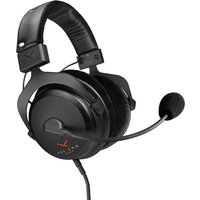
MMX 300 PRO - Earphones BEYERDYNAMIC - Free user manual and instructions
Find the device manual for free MMX 300 PRO BEYERDYNAMIC in PDF.


User questions about MMX 300 PRO BEYERDYNAMIC
0 question about this device. Answer the ones you know or ask your own.
Ask a new question about this device
Download the instructions for your Earphones in PDF format for free! Find your manual MMX 300 PRO - BEYERDYNAMIC and take your electronic device back in hand. On this page are published all the documents necessary for the use of your device. MMX 300 PRO by BEYERDYNAMIC.
USER MANUAL MMX 300 PRO BEYERDYNAMIC
Safety instructions 3
Versions....4
Supplied accessories 4
Accessories and replacement parts 4
Putting into operation....4
How to connect the cable.... 4
How to connect the headset to a PC.... 4
How to connect the headset to a game console.... 5
Putting on the headset....5
Adjusting the headband 5
Adjusting the microphone....5
Remote control....5
Maintenance....5
How to change the ear pads....6
How to change the headband pad 6
Technical Specifications 7
Service....7
Disposal....7
Warranty....7
Thank you for purchasing the MMX 300 PRO gaming headset with STELLAR.45 drivers from beyerdynamic.
Please take some time and read this information carefully before using the product.
SAFETY INSTRUCTIONS

Risk of injury
We would like to point out that an excess of high volumes and long periods of listening may cause hearing damage. Hearing defects always constitute an irreversible impairment of hearing ability.
▶ If you suffer from tinnitus, do not use headphones, or reduce the volume.
According to regulations to protect employees against damages caused by noise and vibrations, please follow these instructions:
| Sound pressure level | Period of listening |
| at 85 dB max. 8 hours | |
| at 88 dB max. 4 hours | |
| at 91 dB max. 2 hours | |
| at 94 dB max. 1 hour | |
| at 97 dB max. 30 minutes | |
| at 100 dB max. 15 minutes |
When connecting the headphone, please ensure that the volume is turned down to minimum. Adjust the volume after putting on the headphone.
When wearing wired headphones, avoid sudden movements. You could seriously injure yourself, especially if you have any piercings or wear earrings or glasses, etc. that can get caught in the cable.
Microphone
▶ Please make sure that you do not connect the microphone to microphone inputs supplying phantom power (12 - 48 V), as this will damage the microphone.

Danger to life
▶ Headphones drastically reduce perception of external sounds. Using headphones in road traffic can be potentially dangerous. The user's hearing must not be impaired to the extent that it causes road safety risks. Please also make sure that you do not use the headphones in traffic, especially within an area of potentially dangerous machines and tools.
Furthermore, avoid using the headphones in situations where hearing must not be affected, especially when crossing a railway crossing or at a construction site.
Liability / intended use
▶ Do not use the headphones for any application which is not described in this product information.
The company beyerdynamic GmbH & Co. KG accepts no liability for damage to the headphones or injury to persons caused by careless, improper or incorrect use of the headphones, or by use for purposes not specified by the manufacturer.
VERSIONS
MMX 300 PRO Gaming headset, closed, black.... Order # 730670
MMX 300 PRO MANUFAKTUR Gaming headset, closed, with individually selectable features ..... Order # 1000081
SUPPLIED ACCESSORIES
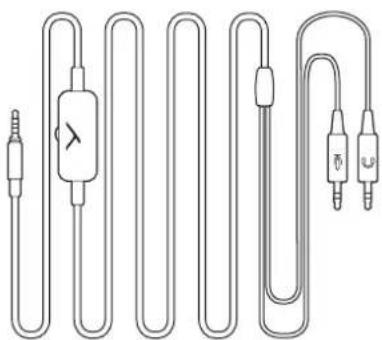
1 x Connection cable with 2 x 3-pole mini jack plugs (3.5 mm) to connect to a headphone output and microphone input, e.g. PC
natural_image
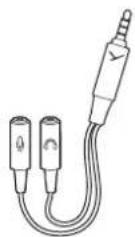
Pure electrical circuit lines without any symbols1 x Adapter with 2 x mini jack sockets (3.5 mm) and 1 x mini stereo jack plug (3.5 mm) to connect to mini combination jacks (3.5 mm), e.g. game consoles, tablets, smartphones etc.
ACCESSORIES AND REPLACEMENT PARTS
Accessories and replacement parts can be found on the internet at: https://www.beyerdynamic.com
If you have technical problems while using the MMX 300 PRO or need further guidance, please visit our FAQ website at: https://support.beyerdynamic.com
How to connect the cable
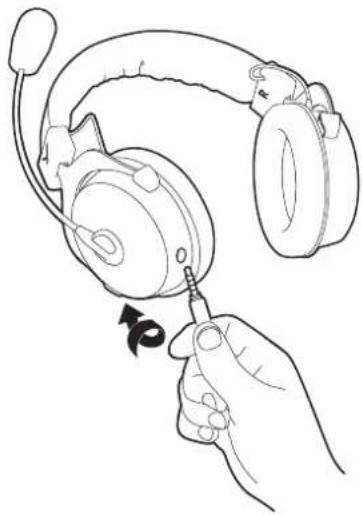
The cable that connects to the headphone is provided with a 5-pole jack plug that has a locking protection.
Connect the cable to the headset with a slight twisting motion.
natural_image
Line drawing of a hand using a screwdriver to adjust the ear of an耳机 (no text or symbols present)
A common source of error is that the 5-pole jack plug is not connected properly to the headset.
When a malfunction occurs, simply pull out the plug again and push it firmly into the socket with a slight twisting motion.
How to connect the headset to a PC
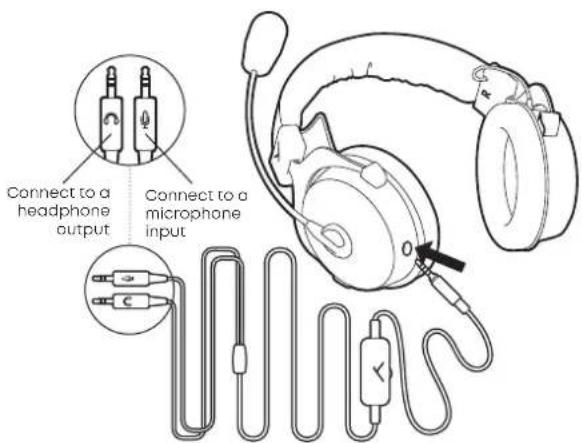
At the other end, the cable is provided with two 3-pole mini jack plugs (3.5 mm) to connect to a PC.
Connect the plug with the headphone symbol to the headphone output of your PC.
Connect the plug with the microphone symbol to the microphone input of your PC.
text_image
Connect to a headphone output Connect to a microphone inputHow to connect the headset to a game console
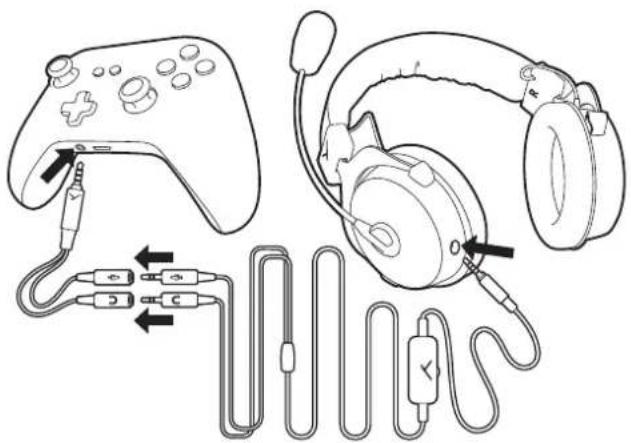
In contrast to a PC, game consoles only have one mini jack connection (3.5 mm).
Connect the supplied adapter and the cable to your game console as illustrated.
▶ Optionally, you can purchase a 1.2 m long console cable (order # 918105) with a mini jack plug (3.5 mm).
natural_image
Line drawing of a game controller and headphones connected to audio/video cables (no text or symbols)Putting on the headset
▶ Put the headset on your head. The microphone is on the left-hand side.
▶ Position the microphone in front of the middle of your mouth. In order to avoid pop noise, you should use the microphone with a pop shield.
Adjusting the headband
To optimise the wearing comfort, adjust the headband of the headset to your head via the adjustable yokes on the left and right side of the housing shells.
▶ Wear the headset so that the headband runs over the centre of your head and adjust the headband so that
- your ears are completely enclosed by the ear pads,
• you feel a gentle pressure around your ears,
• both ends of the headband have the same length.
Adjusting the microphone
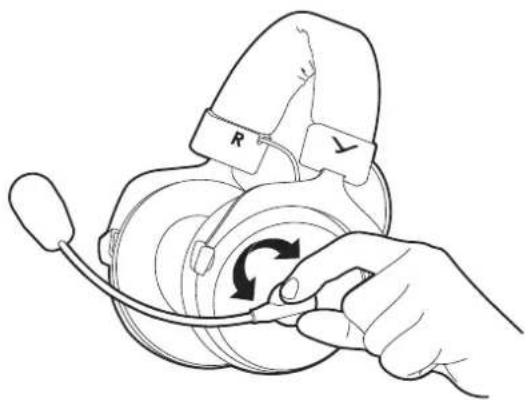
▶ Turn the microphone holder (never the gooseneck!) to position the microphone as requested.
natural_image
Line drawing of a hand holding a headset with a circular arrow indicating rotation (no text or symbols)▶ Make sure that the pop shield completely encloses the microphone.
▶ Bend the flexible gooseneck so that the microphone is placed about two centimetres in front of your mouth.

In order to avoid overstretching and premature wear and tear never bend the gooseneck more than 90°.
Remote control
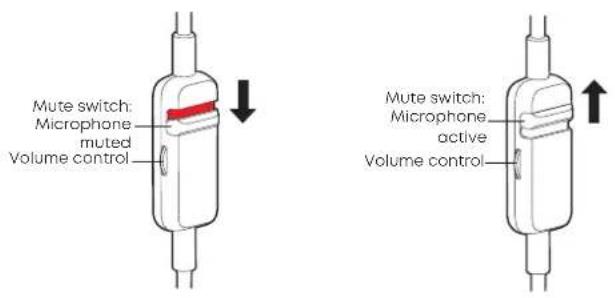
The connection cable has an integrated remote control with a volume control and a mute switch. Use the volume control to adjust the volume of the headset. Use the mute switch to mute or activate the microphone.
Increase the volume:
▶ Turn the volume control upwards.
▶ Turn the volume control downwards.
Reduce the volume:
Mute the microphone:
▶ Slide the mute switch downwards (red marking visible).
Activate microphone:
▶ Slide the mute switch upwards (red marking not visible).
text_image
Mute switch: Microphone muted Volume control Mute switch: Microphone active Volume controlMAINTENANCE
As with any equipment which will be used near sensitive areas of the body, it is essential that the ear pads and headband are kept clean.
Use a soft cloth moistened with water for cleaning. Make sure that no water drops into the ear cups or transducers.
If necessary, you can carefully remove the ear pads and headband pad and clean them with mild soapy water.

Never use any solvent cleaning agents! Furthermore, the pads must be completely dry before they are reattached to the MMX 300 PRO.
Never use a vaccum cleaner for cleaning the MMX 300 PRO, as this may cause irreparable damage.
Should it become necessary to replace the ear pads or the headband pad, refer to "Replacement parts and Accessories". You can easily do this yourself. Refer to the chapters "How to change the ear pads" and "How to change the headband pad".
If other components must be replaced, please contact your local beyerdynamic representative.
HOW TO CHANGE THE EAR PADS
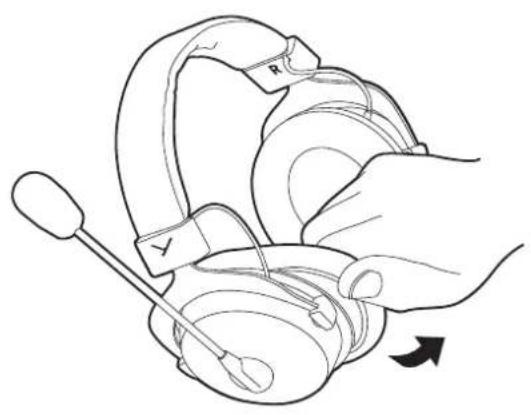
▶ Use your fingertips to carefully pull the ear pad away from the housing.
natural_image
Line drawing of a hand holding a medical device with a needle inserted, showing no text or symbols.HOW TO CHANGE THE HEADBAND PAD
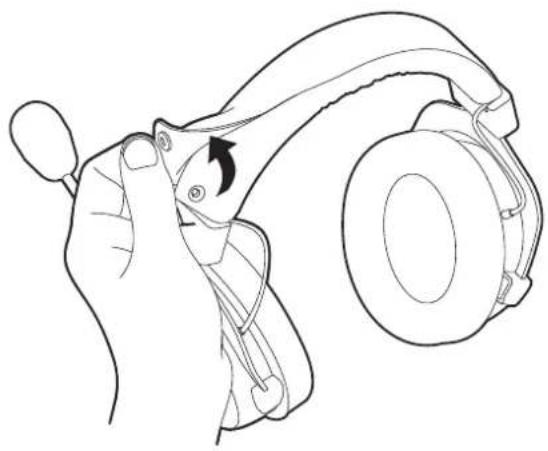
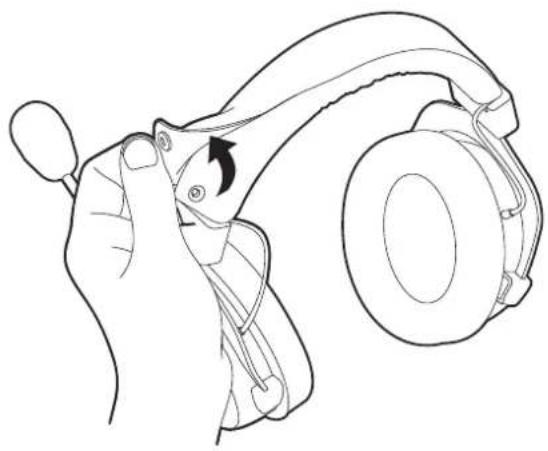
Carefully unbutton the headband pad and remove it.
natural_image
Line drawing of a hand holding a device with a curved handle and a circular head (no text or symbols)▶ Attach a new ear pad to the housing. The new ear pad can be attached easier if you warm it beforehand (e.g. using a hairdryer).
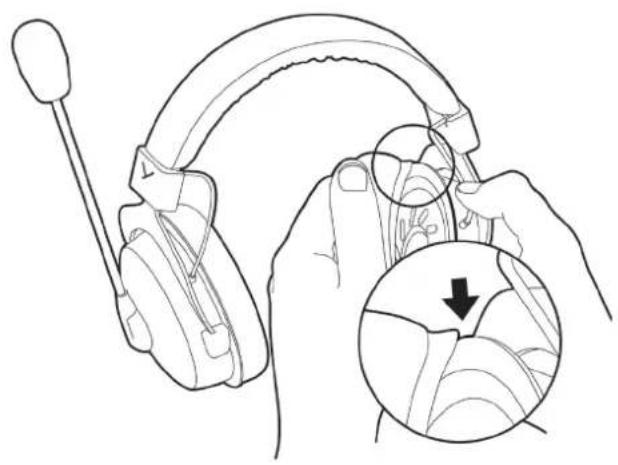
Place the new headband pad around the headband and connecting cable and fasten the buttons.
natural_image
Line drawing of a person using a headset to adjust head wiring, with an inset showing the cable being inserted (no text or symbols present)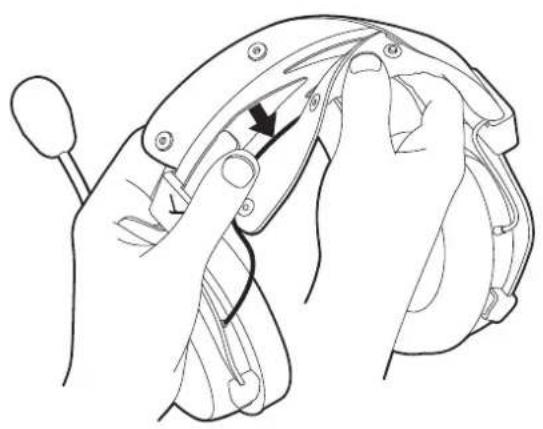
natural_image
Line drawing of hands adjusting a mechanical component with a black arrow indicating the turning point (no text or symbols present)TECHNICAL SPECIFICATIONS
Headphone
| Transducer type Dynamic | |
| Operating principle Closed | |
| Wearing type Over-ear | |
| Frequency response 5 - 40,000 Hz | |
| Nominal impedance 48 Ω per system | |
| Sound pressure level @ 1 mW/500 Hz | 96 dB |
| T.H.D. @ 500 Hz < 0.05 % | |
| Power handling capacity 30 mW | |
| Ambient noise attenuation | 18 dBA |
| Headband pressure 5.5 N | |
| Weight 314 g | |
| Length and type of cable 2.5 m / straight cable, detachable, single-sided with 5-pole stereo jack plug | |
| Connection 2 x mini stereo jack plugs (3.5 mm) & mini jack adapter (3.5 mm) for consoles | |
Microphone
| Transducer type Condenser | (back electret) |
| Operating principle | Pressure gradient |
| Polar pattern Cardioid | |
| Power supply | AB powering |
| Supply voltage | 2 - 9 V |
| Current consumption | 0.6 mA |
| Sensitivity at f = 1 kHz | 21.6 mV/Pa |
| Frequency response | 20 - 20,000 Hz |
| Max. sound pressure level | 121 dB |
| Microphone output unbalanced | |
| Length mic boom | approx. 190 mm |
| Microphone head diameter | 13 mm |
(All specifications acc. to EN 60 268-7)
SERVICE
▶ If you require service, please contact qualified service personnel or directly:
beyerdynamic service and logistics centre E-mail: service@beyerdynamic.de
Dismantling the MMX 300 PRO yourself will invalidate the guarantee.
DISPOSAL
This symbol on the product, in the operating instructions or on the packaging means that electrical and electronic devices must be disposed of separately from household waste at the end of their life cycle.
▶ Always dispose of used equipment in accordance with applicable regulations.
For sale within the EU only:
For the return of old equipment, there are free collection points or a free return to beyerdynamic, as well as other acceptance points for reuse. The addresses are available at the local city or municipal administration.
▶ Dealers for electronic equipment are generally obliged to take back waste electrical/electronic equipment free of charge. This obligation also applies to sales via remote communication.
For further information, please contact the local authorities or the dealer from whom the product was purchased.
WARRANTY
The company beyerdynamic GmbH & Co. KG offers a limited warranty of 2 years on the purchased beyerdynamic product. The exact warranty conditions can be found on our website at https://www.beyerdynamic.com/service/warranty
INHALT
natural_image
Pure electrical circuit lines without any symbolsnatural_image
Line drawing of a hand using a screwdriver to adjust the ear of an耳机 (no text or symbols present)
text_image
Diagram showing audio recording setup with game controller, headphones, and cable connectors labeled with iconsHeadset aufsetzen
natural_image
Line drawing of a hand holding a headset with a circular arrow indicating rotation (no text or symbols)natural_image
Line drawing of a hand using a medical or surgical tool to interact with a device (no text or symbols present)KOPFPOLSTER WECHSELN
natural_image
Line drawing of a hand holding a device with a curved handle and a circular head (no text or symbols)natural_image
Line drawing of a person using a headset to adjust head wiring, with an inset showing a magnified view of the cable being inserted (no text or symbols present)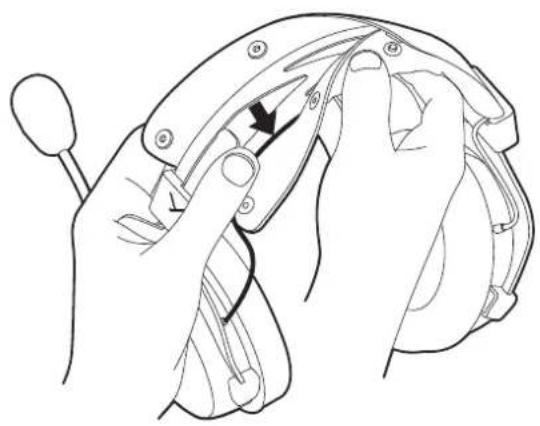
natural_image
Line drawing of hands adjusting a mechanical component with a black arrow indicating the adjustment (no text or symbols present)TECHNISCHE DATEN
Kopfhörer
natural_image
Pure electrical circuit lines without any symbolsnatural_image
Line drawing of a hand holding a headset being adjusted for a screwdriver (no text or symbols present)
natural_image
Line drawing of a game controller and headphones connected to audio/video cables (no text or symbols)natural_image
Line drawing of a hand holding a headset with a circular arrow indicating rotation (no text or symbols)REMPLACEMENT DES COUSSINETS
natural_image
Line drawing of a hand using a handheld device to interact with a mechanical component (no text or symbols)REMPLACEMENT DU REMBOURRAGE DE L'ARCEAU SERRE-TÊTE
natural_image
Line drawing of a hand holding a device with a curved handle and arrow indicating rotation (no text or symbols)natural_image
Line drawing of a person using a headset to adjust ear structure, with an inset showing a magnified view of the ear detail (no text or symbols present)natural_image
Line drawing of hands operating a mechanical device with a tool, no text or symbols presentCARACTÉRISTIQUES TECHNIQUES
Casque
https://www.beyerdynamic.com/service/warranty
ÍNDICE
natural_image
Pure electrical circuit lines without any symbolsnatural_image
Line drawing of a hand using a screwdriver to adjust the ear of an耳机 (no text or symbols present)
natural_image
Line drawing of a game controller and headphones connected to audio/video cables (no text or symbols)natural_image
Line drawing of a hand holding a headset with a circular arrow indicating rotation (no text or symbols)natural_image
Illustration of a hand using a medical or surgical tool to interact with a device (no text or symbols visible)CAMBIO DE LA ALMOHADILLA DE LA DIADEMA
natural_image
Line drawing of a hand holding a device with a curved handle and a circular head (no text or symbols)natural_image
Illustration of hands using a headset to adjust head wiring, showing a magnified inset with a downward arrow (no text or symbols)natural_image
Line drawing of hands operating a mechanical device with a black arrow indicating the handle (no text or symbols present)CARACTERÍSTICAS TÉCNICAS
Auriculares
https://www.beyerdynamic.com/service/warranty
CONTENUTO
natural_image
Pure electrical circuit lines without any symbolsnatural_image
Line drawing of a hand using a screwdriver to adjust the ear of an耳机 (no text or symbols present)
natural_image
Line drawing of a game controller and headphones with attached audio cable (no text or symbols)natural_image
Line drawing of a hand holding a headset with a curved arrow indicating rotation (no text or symbols)natural_image
Line drawing of a hand holding a headband with a screwdriver, showing mechanical components (no text or symbols)natural_image
Line drawing of a hand holding a device with a curved handle and a black arrow indicating rotation (no text or symbols)natural_image
Line drawing of a person using a headset to adjust ear structure, with an inset showing a magnified view of the ear detail (no text or symbols present)natural_image
Line drawing of hands operating a mechanical device with a black arrow indicating the handle (no text or symbols present)SPECIFICHE
Cuffie
https://www.beyerdynamic.com/service/warranty
GUIDA AL RICICLAGGIO

natural_image
Pure electrical circuit lines without any symbolsnatural_image
Line drawing of a hand using a screwdriver to adjust the ear of an耳机 (no text or symbols present)
natural_image
Line drawing of a game controller and headphones connected to audio/video cables (no text or symbols)Sätta på headset
natural_image
Line drawing of a hand holding a headset with a circular arrow indicating rotation (no text or symbols)natural_image
Line drawing of a hand holding a medical device with a needle inserted, showing no text or symbols.BYTA KUDDE FÖR HUVUDBYGEL
natural_image
Line drawing of a hand holding a device with a curved handle and a circular head (no text or symbols)natural_image
Line drawing of a person using a headset to adjust ear structure, with an inset showing the detail of the ear being adjusted (no text or symbols present)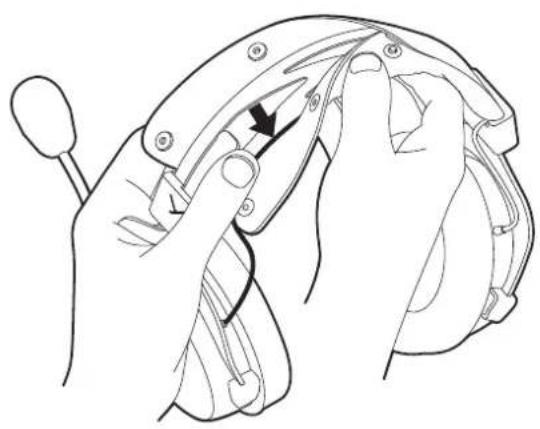
natural_image
Line drawing of hands adjusting a mechanical component with a black arrow indicating the turning point (no text or symbols present)TEKNISKA DATA
Hörlurar
https://www.beyerdynamic.com/service/warranty

目次
安全上のご注意....39
バージョン 40
同梱付属品 40
付属品と交換部品 40
使用開始手順 40
接続ケーブルの接続……40
ヘッドセットをPCに接続 40
natural_image
Pure electrical circuit lines without any symbolsnatural_image
Line drawing of a hand using a screwdriver to adjust the ear of an耳机 (no text or symbols present)
natural_image
Line drawing of a game controller and headphones connected to audio/video cables (no text or symbols)natural_image
Line drawing of a hand holding a headset with a circular button and arrow indicating rotation (no text or symbols)natural_image
Illustration of a hand using a medical or surgical tool to adjust a device (no text or symbols visible)ヘッド バンドクッション の 交換
natural_image
Line drawing of a hand adjusting a device component with a curved handle and scroll (no text or symbols)natural_image
Line drawing of a person using a headset to adjust ear structure, with an inset showing a magnified view of the ear detail (no text or symbols present)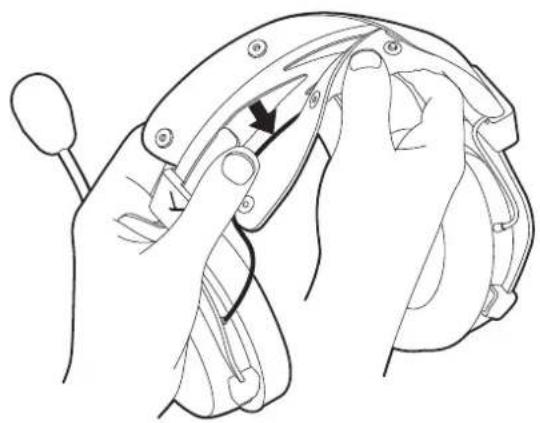
natural_image
Line drawing of hands operating a mechanical device with a tool, no text or symbols present技術データ
ヘッド ホン
natural_image
Pure electrical circuit lines without any symbolsnatural_image
Line drawing of a hand using a screwdriver to adjust the ear of headphones (no text or symbols present)
natural_image
Line drawing of a game controller and headphones connected to audio cable (no text or symbols)佩戴头戴式耳机
natural_image
Line drawing of a hand holding a headset with a circular button and arrow indicating rotation (no text or symbols)确保防喷罩完全包裹麦克风。
natural_image
Line drawing of a hand using a handheld device to interact with a mechanical component (no text or symbols)更换头箍垫
▶ 小心地打开按扣并取下头箍垫。
natural_image
Line drawing of a hand holding a device with a curved handle and a circular head (no text or symbols)natural_image
Line drawing of a person using a headset to adjust the ear area, with an inset showing a magnified view of the ear structure (no text or symbols present)natural_image
Line drawing of hands adjusting a mechanical component with a tool, no text or symbols present技术指标
耳机
For further distributors worldwide, please go to www.beyerdynamic.com
Non-contractual illustrations. Subject to change without notice.