Ferrari Challenge - Controller THRUSTMASTER - Free user manual and instructions
Find the device manual for free Ferrari Challenge THRUSTMASTER in PDF.


User questions about Ferrari Challenge THRUSTMASTER
0 question about this device. Answer the ones you know or ask your own.
Ask a new question about this device
Download the instructions for your Controller in PDF format for free! Find your manual Ferrari Challenge - THRUSTMASTER and take your electronic device back in hand. On this page are published all the documents necessary for the use of your device. Ferrari Challenge by THRUSTMASTER.
USER MANUAL Ferrari Challenge THRUSTMASTER
Ferrari Challenge wheel
Compatible/Kompatibel
PC / PS3™
Ferrari Challenge wheel
For: PlayStation®3 / PC
User manual
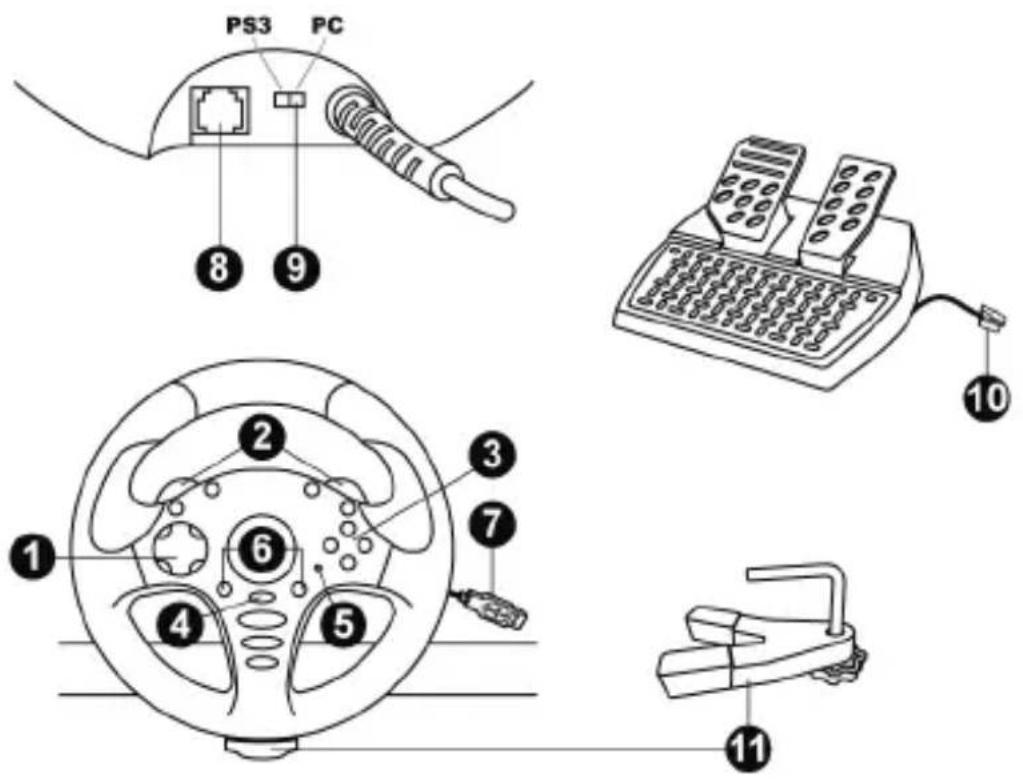
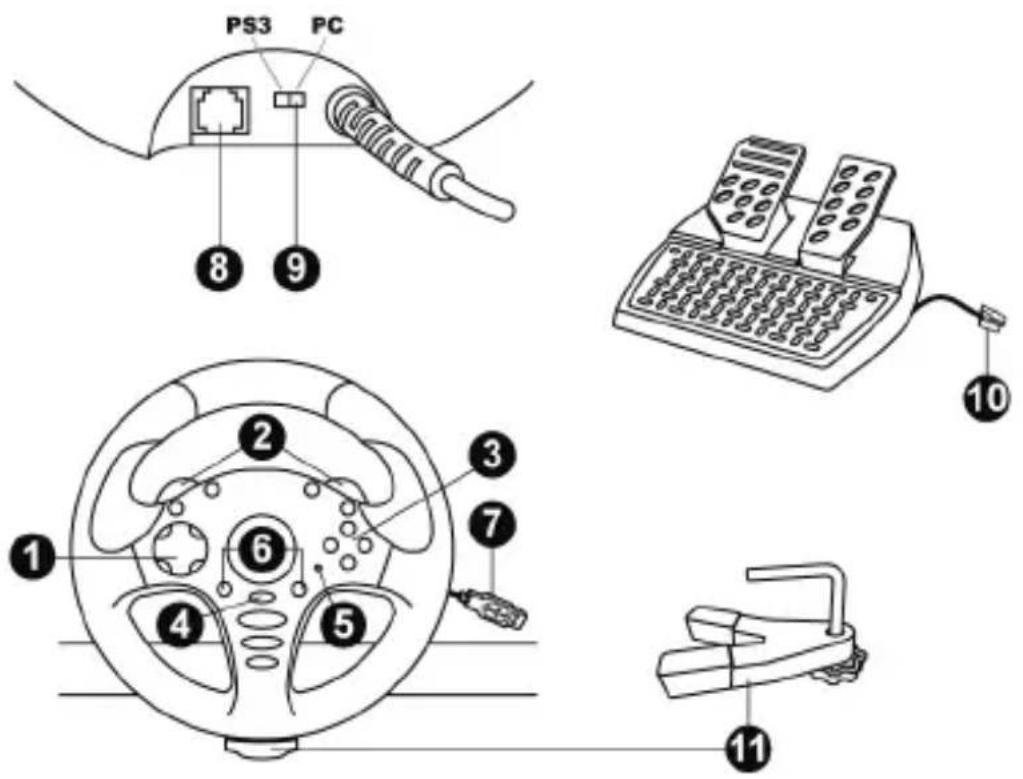
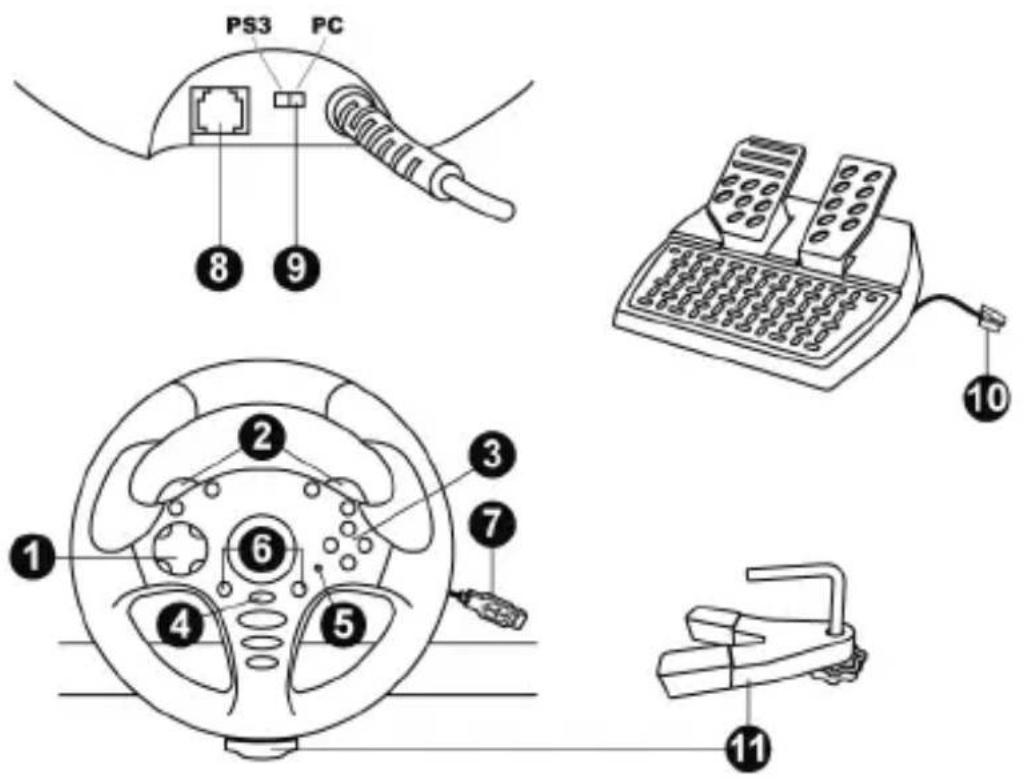
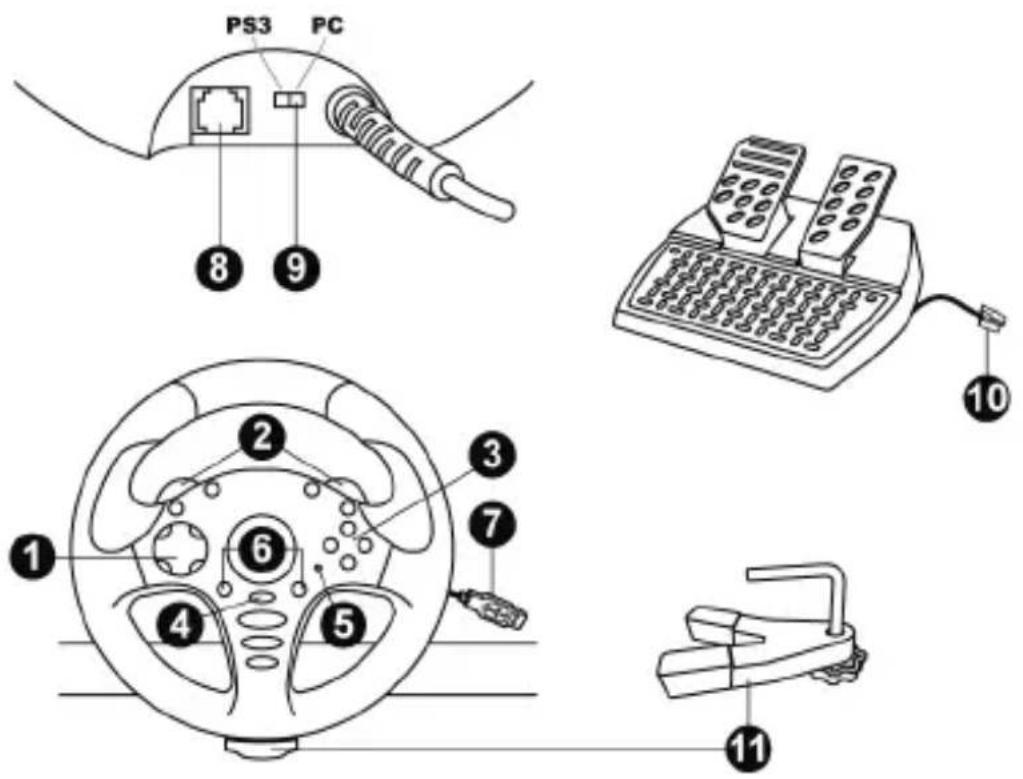
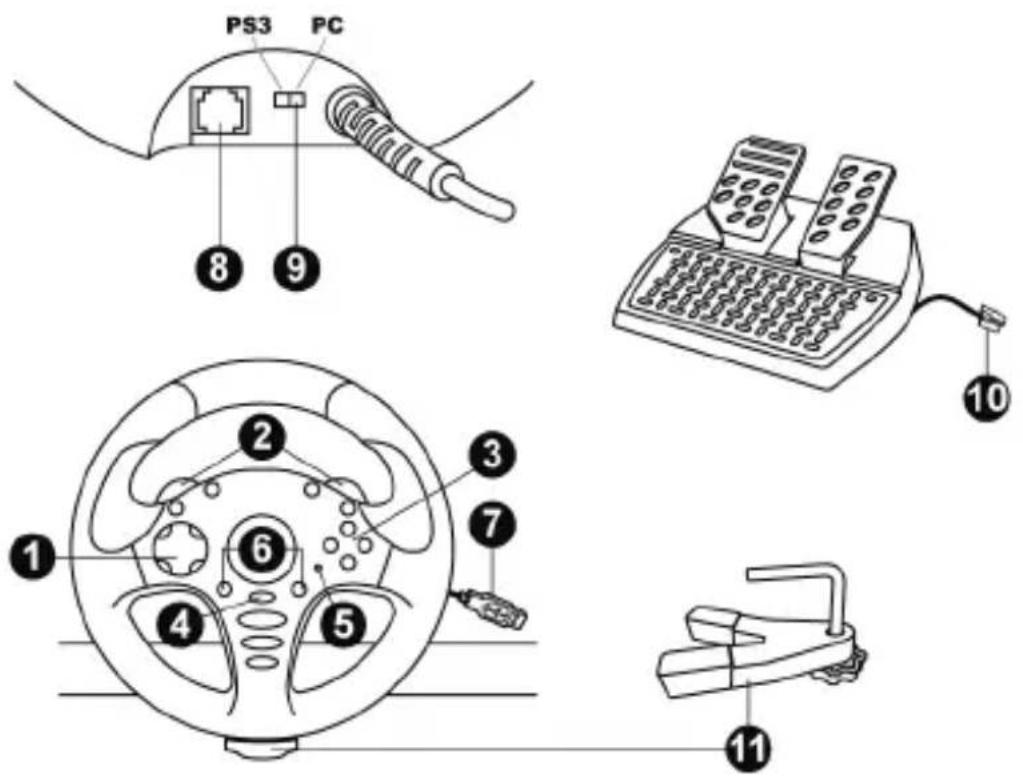
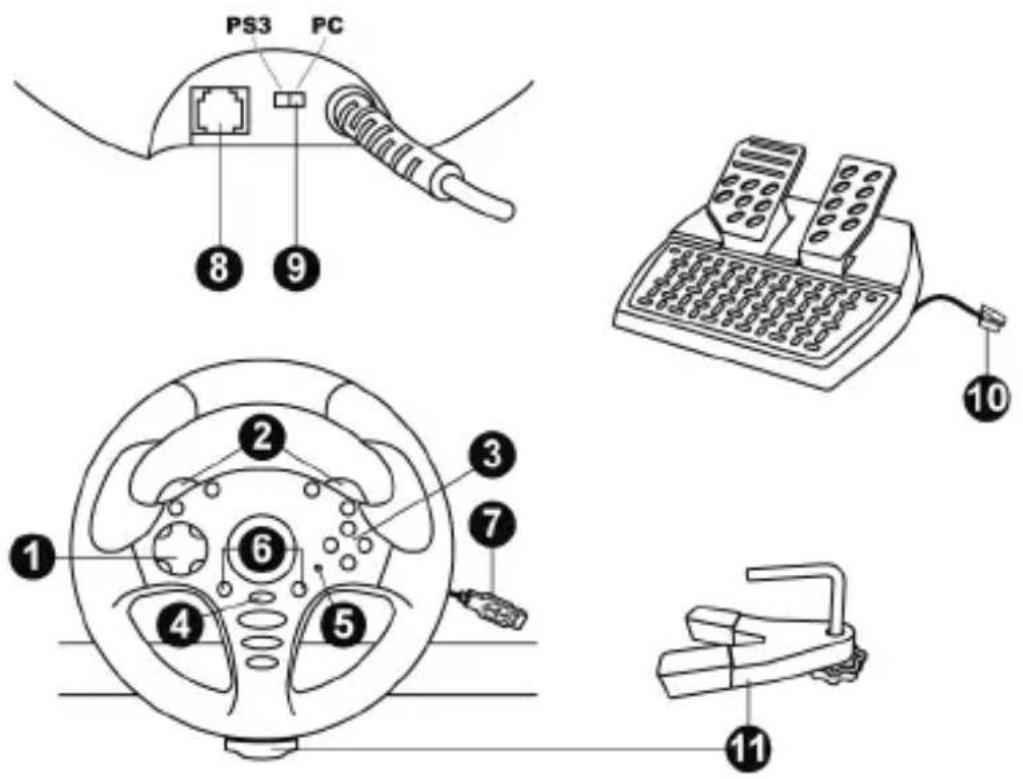
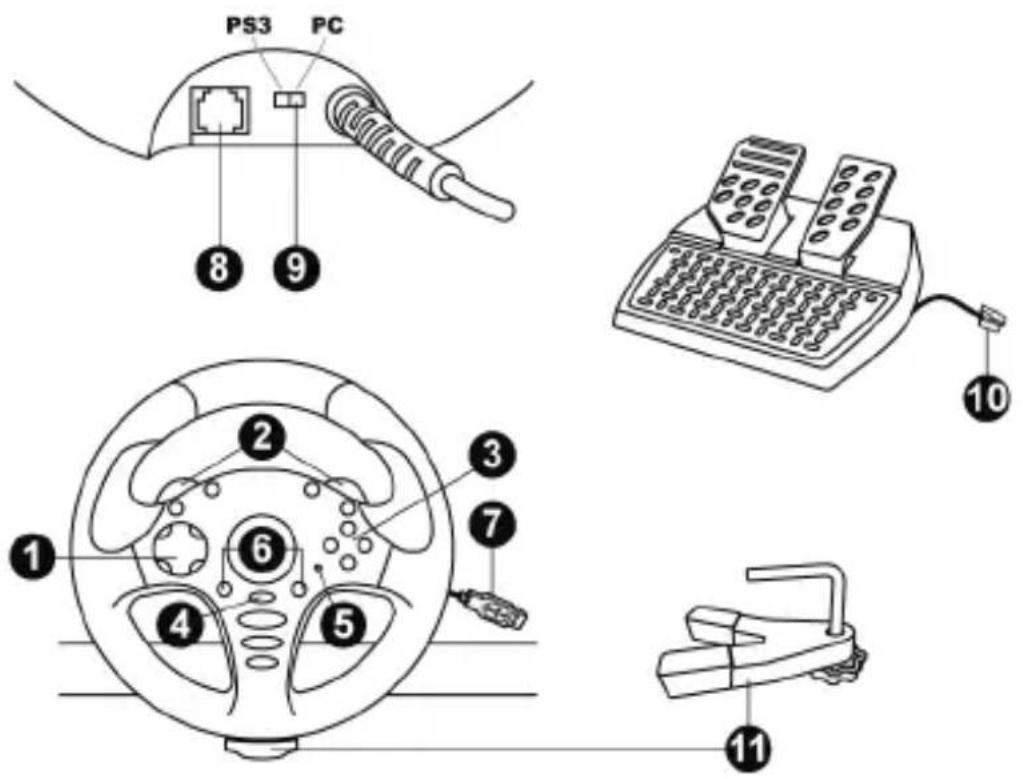
TECHNICAL FEATURES
1 D-Pad
2 2 Up & Down paddle shifters
3 Action buttons
4 PS button for PS3
5 LED
6 SE and ST buttons
(Select and Start/Programming)
7 USB connector (for PC and PS3)
8 Wheel's RJ45 port
9 PS3/PC switch
10 Pedal set's RJ45 connector
11 Table/desk mounting system
INSTALLING THE WHEEL
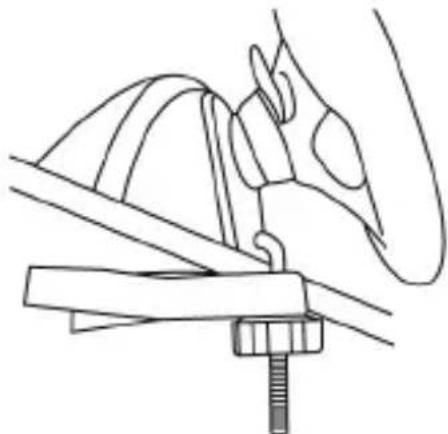
Fixing the wheel in place (11)
- Place the wheel on the edge of a table or other flat surface.
- Insert the shorter end of the threaded rod into the opening at the base of the wheel.
- Slide the V-shaped piece onto the threaded rod, so that the jaws of the V clamp against the underside of the table.
- Place the tightening screw onto the threaded rod, and tighten everything together until the wheel is perfectly stable. Be sure not to over-tighten the screw, as you risk damaging the mounting system and/or the table.
natural_image
Line drawing of a mechanical assembly with a bracket and screw base (no text or symbols)Connecting the pedal set
Connect the pedal set's RJ45 connector (10) to the wheel's RJ45 port (8).
Always connect the pedal set to the wheel before plugging in the wheel's USB connector (7) or starting a game!
Calibration of the wheel and pedal set
Calibration is carried out automatically.
Always make sure that the wheel is centered, and be sure not to press on the pedals, when plugging in the wheel's USB connector (7) or when starting a game!

For safety reasons, never use the pedal set with bare feet or while wearing only socks on your feet. THRUSTMASTER® DISCLAIMS ALL RESPONSIBILITY IN THE EVENT OF INJURY RESULTING FROM USE OF THE PEDAL SET WITHOUT SHOES.
PLAYSTATION®3
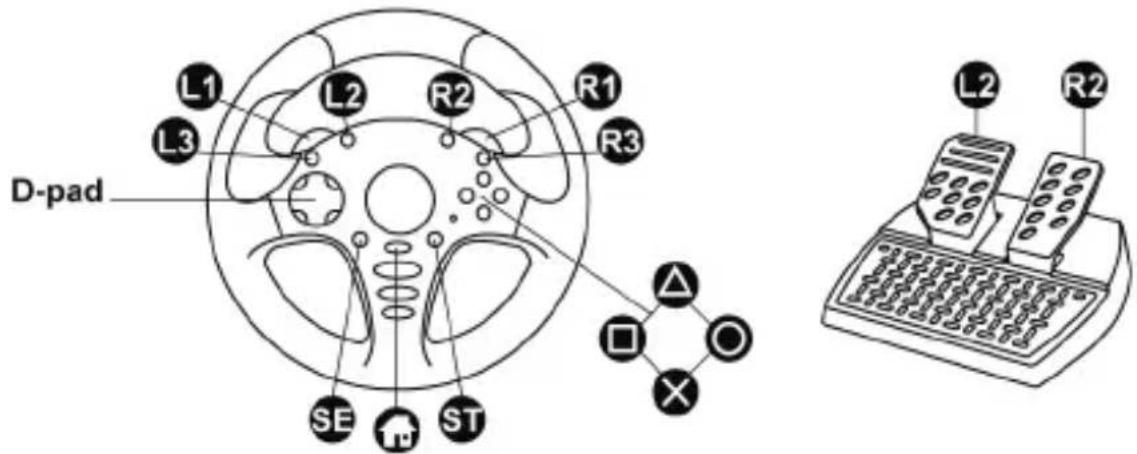
Installing the wheel on PlayStation®3
- Set the PS3/PC switch (9) (on the back of the wheel) to the PS3 position.
- Plug the wheel's USB connector (7) into USB port 1 on the console.
- Switch on your console.
- Start your game.
You are now ready to play!
Important notes regarding PlayStation®3
- The wheel's PS3/PC switch (9) must always be set to the PS3 position before connecting the wheel.
- The wheel emulates the PS3 gamepad controller (go to Options / Controller / Gamepads to modify the configuration).
- In 1 player mode: if your official PS3 gamepad controller is powered on, you must switch it to controller port 2 in order for your wheel to be functional.
- Don't hesitate to test out your wheel's 2 sensitivity modes, to optimize its precision.
PC
Installing the wheel on PC
- Set the PS3/PC switch (9) (on the back of the wheel) to the PC position.
- Plug the wheel's USB connector (7) into one of your computer's USB ports. Windows® XP, Vista, 7 or 8 will automatically detect the new device.
- In the Windows Game Controllers window and in games, the wheel will be detected under the name FGT Rumble 3-in-1 or Ferrari GT Experience.
You are now ready to play!
Important notes regarding PC
- The wheel's PS3/PC switch (9) must always be set to the PC position before connecting the wheel.
- Advanced programming software for PC is also available for download from our website, at the following address: http://ts.thrustmaster.com/ (under Updates and Downloads/PC/Wheels/Challenge PS3 PC/Drivers). The Test Forces tab (in the advanced programming software) is not compatible with this wheel.
ADVANCED FUNCTIONS
ADJUSTING THE WHEEL'S SENSITIVITY
Your wheel's steering features 2 sensitivity modes:
- Normal sensitivity (the default mode)
- High sensitivity (must be selected)
• To switch to High sensitivity mode:
| Action | LED (5) |
| Simultaneously press and release: the D-Pad (1) + the 2 Up & Down paddle shifters (2). | FLASHES SLOWLY |
Your wheel's steering is now more sensitive.
(This procedure must be carried out following every restart or disconnection of your wheel)
- To return to Normal sensitivity mode (the default mode):
| Action | LED (5) |
| Simultaneously press and release: the D-Pad (1) + the 2 Up & Down paddle shifters (2). | DOES NOT FLASH |
Your wheel's steering has now returned to Normal sensitivity (the default mode).
PROGRAMMING THE WHEEL AND THE PEDALS
Your wheel is fully programmable:
- All action buttons can be swapped.
- All buttons can be programmed onto the paddle shifters or onto the pedals.
• Examples of possible uses:
- On PS3, programming L2/R2 or L3/R3 onto the 2 Up & Down paddle shifters (L1/R1).
- On PS3, programming the Cross/Square buttons onto the pedals (L2/R2 by default).
- Switching different buttons for greater accessibility.
- Programming procedure:
| Steps | Action | LED (5) |
| 1 | Simultaneously press and release: SE + ST (6). | OFF |
| 2 Press and release the button to program. | FLASHES QUICKLY | |
| 3 | Press and release the button or pedal on which you want to place your function. | ON |
Your programming has now been carried out.
(This procedure must be carried out following every restart or disconnection of your wheel)
- Erasing your programming:
| Action | LED (5) |
| Press and hold down for 2 seconds: SE + ST (6). | TURNS OFF AND THEN COMES BACK ON AGAIN |
Your programming has now been erased.
CONFIGURING THE PEDAL SET
By default, your wheel's gas and brake pedals function in Separate mode, meaning that the pedals function on independent axes.
This mode allows you to considerably improve your driving precision.
If your game does not support Separate mode, your wheel's pedal set will not function properly. You will then have to switch to Combined mode.
- Pedal set mode changing procedure:
Simultaneously press and release: the 2 pedals + the PS button (4).
(This procedure must be carried out following every restart or disconnection of your wheel)
| PEDAL SET MODE | LED (5) |
| SEPARATE (default mode: recommended) | RED |
| COMBINED | GREEN |
- Setup of pedals on PLAYSTATION®3:
| Separate pedals(default mode) | Combined pedals(must be selected) |
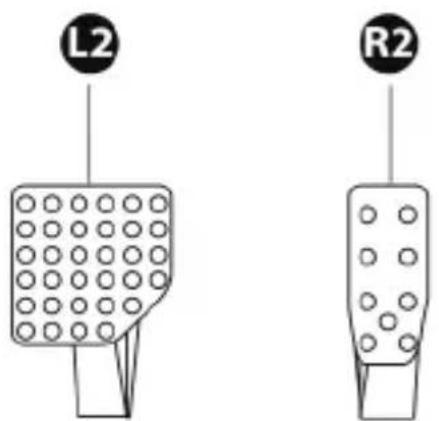 - Gas = R2 triggeron the PS3 controller- Brake = L2 triggeron the PS3 controller - Gas = R2 triggeron the PS3 controller- Brake = L2 triggeron the PS3 controller | 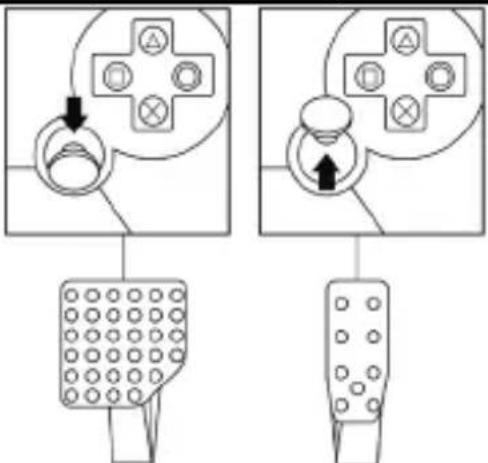 - Gas = Up direction on the PS3 controller's right mini-stick- Brake = Down direction on the PS3 controller's right mini-stick - Gas = Up direction on the PS3 controller's right mini-stick- Brake = Down direction on the PS3 controller's right mini-stick |
- Setup of pedals on PC:
| Separate pedals(default mode) | Combined pedals(must be selected) | ||
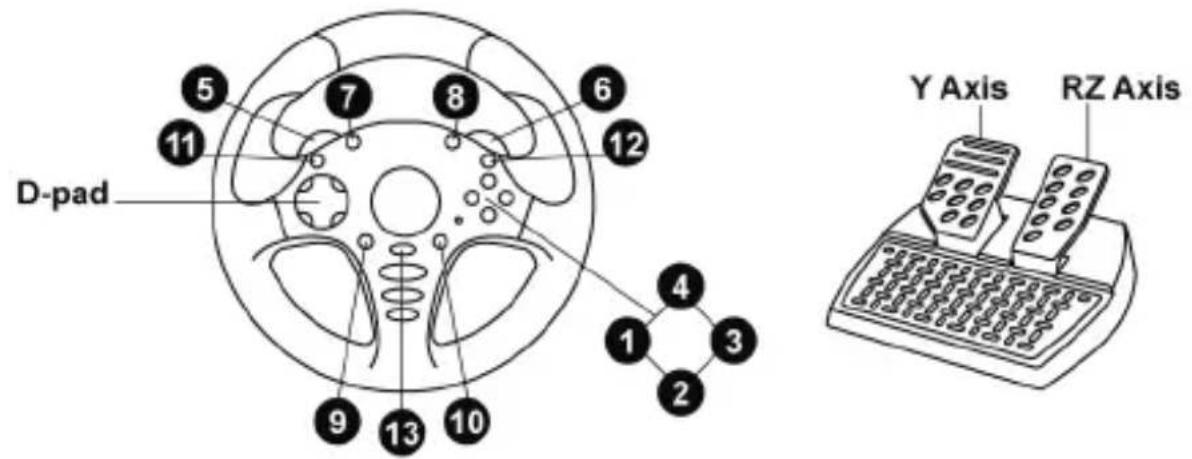
| Y Axis | RZ Axis | RZ Axis (-) | RZ Axis (+) |
 | 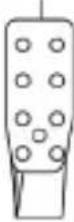 | 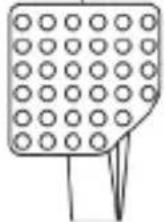 | 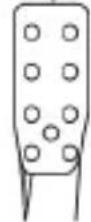 |
| - Gas = RZ axis- Brake = Y axis | - Gas = Up direction on RZ axis- Brake = Down direction on RZ axis | ||
TROUBLESHOOTING AND WARNING
- My wheel is not functioning correctly or seems improperly calibrated:
- Switch off your PC or your PS3, verify that the PS3/PC switch (9) is in the proper position, completely disconnect your wheel and all cables, reconnect everything and then restart your game.
- Never move the wheel or the pedals when connecting your wheel, in order to avoid any calibration problems.
• My pedal set is not functioning correctly:
- Always connect the pedal set to the wheel (10/8) before connecting the wheel's USB connector (7).
- Reconfigure your wheel in your game's controller options.
• I can't configure my wheel:
- On PS3, in your game's Options / Controller / Gamepads menu: select the most appropriate configuration.
- On PC, in your game's Options / Controller / Wheels menu: select the most appropriate configuration.
- You can also use your wheel's programming function to resolve this type of problem.
- On PC, the menus in my game are scrolling by themselves:
- Exit the game and switch the pedal set to Combined mode (2 axes). Then return to your game to reconfigure the wheel with the new axes.
• My wheel's steering is not responsive enough:
- Switch your wheel to High sensitivity mode.
- Adjust the sensitivity in your game's options.
- On PC: in some games, use the pre-existing presets for FGT Rumble 3-in-1 or Ferrari GT Experience.
TECHNICAL SUPPORT
If you encounter a problem with your product, please go to http://ts.thrustmaster.com and click Technical Support. From there you will be able to access various utilities (Frequently Asked Questions (FAQ), the latest versions of drivers and software) that may help to resolve your problem. If the problem persists, you can contact the Thrustmaster products technical support service ("Technical Support"):
By email:
In order to take advantage of technical support by email, you must first register online. The information you provide will help the agents to resolve your problem more quickly. Click Registration on the left-hand side of the Technical Support page and follow the on-screen instructions. If you have already registered, fill in the Username and Password fields and then click Login.
By telephone (if you do not have Internet access):
Days and hours of operation and telephone numbers are subject to change. Please visit http://ts.thrustmaster.com for the most up-to-date Technical Support contact information.
| United Kingdom | 08450800942Charged at local rate | Monday to Friday from 8 a.m. to 7 p.m. |
| United States | 1-866-889-5036Free | Monday to Friday from 9 a.m. to 8 p.m.(Eastern Standard Time)Monday to Friday from 6 a.m. to 5 p.m.(Pacific Standard Time) |
| Canada | 1-866-889-2181Free | Monday to Friday from 9 a.m. to 8 p.m.(Eastern Standard Time)Monday to Friday from 6 a.m. to 5 p.m.(Pacific Standard Time) |
| Denmark | 80887690Free | Monday to Friday from 9 a.m. to 8 p.m.(English) |
| Sweden | 0200884567Free | Monday to Friday from 9 a.m. to 8 p.m.(English) |
| Finland | 0800 913060Free | Monday to Friday from 10 a.m. to 9 p.m.(English) |
Consumer warranty information
Worldwide, Guillemot Corporation S.A. (hereinafter “Guillemot”) warrants to the consumer that this Thrustmaster product shall be free from defects in materials and workmanship, for a warranty period which corresponds to the time limit to bring an action for conformity with respect to this product. In the countries of the European Union, this corresponds to a period of two (2) years from delivery of the Thrustmaster product. In other countries, the warranty period corresponds to the time limit to bring an action for conformity with respect to the Thrustmaster product according to applicable laws of the country in which the consumer was domiciled on the date of purchase of the Thrustmaster product (if no such action exists in the corresponding country, then the warranty period shall be one (1) year from the original date of purchase of the Thrustmaster product).
Notwithstanding the above, rechargeable batteries are covered by a warranty period of six (6) months from the date of original purchase.
Should the product appear to be defective during the warranty period, immediately contact Technical Support, who will indicate the procedure to follow. If the defect is confirmed, the product must be returned to its place of purchase (or any other location indicated by Technical Support).
Within the context of this warranty, the consumer's defective product shall, at Technical Support's option, be either repaired or replaced. If permitted under applicable law, the full liability of Guillemot and its subsidiaries (including for consequential damages) is limited to the repair or replacement of the Thrustmaster product. If permitted under applicable law, Guillemot disclaims all warranties of merchantability or fitness for a particular purpose. The consumer's legal rights with respect to laws applicable to the sale of consumer goods are not affected by this warranty.
This warranty shall not apply: (1) if the product has been modified, opened, altered, or has suffered damage as a result of inappropriate or abusive use, negligence, an accident, normal wear, or any other cause unrelated to a material or manufacturing defect (including, but not limited to, combining the Thrustmaster product with any unsuitable element, including in particular power supplies, rechargeable batteries, chargers, or any other elements not supplied by Guillemot for this product); (2) in the event of failure to comply with the instructions provided by Technical Support; (3) to software, said software being subject to a specific warranty; (4) to consumables (elements to be replaced over the product's lifespan: disposable batteries, audio headset or headphone ear pads, for example); (5) to accessories (cables, cases, pouches, bags, wrist-straps, for example); (6) if the product was sold at public auction.
This warranty is nontransferable.
Additional warranty provisions
In the United States of America and in Canada, this warranty is limited to the product's internal mechanism and external housing. In no event shall Guillemot or its affiliates be held liable to any third party for any consequential or incidental damages resulting from the breach of any express or implied warranties. Some States/Provinces do not allow limitation on how long an implied warranty lasts or exclusion or limitation of liability for consequential or incidental damages, so the above limitations or exclusions may not apply to you. This warranty gives you specific legal rights, and you may also have other rights which vary from State to State or Province to Province.
Liability
If permitted under applicable law, Guillemot Corporation S.A. (hereinafter "Guillemot") and its subsidiaries disclaim all liability for any damages caused by one or more of the following: (1) the product has been modified, opened or altered; (2) failure to comply with assembly instructions; (3) inappropriate or abusive use, negligence, an accident (an impact, for example); (4) normal wear. If permitted under applicable law, Guillemot and its subsidiaries disclaim all liability for any damages unrelated to a material or manufacturing defect with respect to the product (including, but not limited to, any damages caused directly or indirectly by any software, or by combining the Thrustmaster product with any unsuitable element, including in particular power supplies, rechargeable batteries, chargers, or any other elements not supplied by Guillemot for this product).
FCC STATEMENT
- This device complies with Part 15 of the FCC Rules. Operation is subject to the following two conditions:
(1) This device may not cause harmful interference, and
(2) This device must accept any interference received, including interference that may cause undesired operation.
- Changes or modifications not expressly approved by the party responsible for compliance could void the user's authority to operate the equipment.
COPYRIGHT
© 2014 Guillemot Corporation S.A. All rights reserved. Thrustmaster® is a registered trademark of Guillemot Corporation S.A. Ferrari® is a registered trademark of Ferrari S.p.A. PlayStation® is a registered trademark of Sony Computer Entertainment, Inc. Windows® is a registered trademark of Microsoft Corporation in the United States and/or in other countries. All other trademarks and brand names are hereby acknowledged and are the property of their respective owners. Illustrations not binding. Contents, designs and specifications are subject to change without notice and may vary from one country to another. Made in China.
ENVIRONMENTAL PROTECTION RECOMMENDATION
natural_image
Symbol of a trash bin with crossed lines indicating no waste, and a black rectangle below (no text or labels)At the end of its working life, this product should not be disposed of with standard household waste, but rather dropped off at a collection point for the disposal of Waste Electrical and Electronic Equipment (WEEE) for recycling.
This is confirmed by the symbol found on the product, user manual or packaging.
Depending on their characteristics, the materials may be recycled.
Through recycling and other forms of processing Waste Electrical and Electronic Equipment, you can make a significant contribution towards helping to protect the environment. Please contact your local authorities for information on the collection point nearest you.
Retain this information. Colours and decorations may vary.
This product conforms to all standards regarding children 14 years of age and older. This product is not suitable for use by children less than 14 years of age.
www.thrustmaster.com

natural_image
Abstract black and white circular arrow symbol (no text or symbols)CE
Ferrari Challenge wheel
natural_image
Line drawing of a mechanical assembly with a screw and bracket (no text or symbols)Relier le pédalier
natural_image
Symbol of a trash bin with crossed lines indicating no waste or discharge, and a solid black rectangle below (no text or labels)www.thrustmaster.com

natural_image
Abstract black and white circular arrow symbol (no text or symbols)
Ferrari Challenge wheel
Für: PlayStation®3 / PC
Benutzerhandbuch
TECHNISCHE FEATURES
natural_image
Line drawing of a mechanical clamp or bracket assembly (no text or symbols)natural_image
Symbol of a trash bin crossed with no text or labels, representing environmental restriction (no text present)www.thrustmaster.com

Ferrari Challenge wheel
Voor: PlayStation®3 / pc
Handleiding
natural_image
Line drawing of a mechanical assembly with a bracket and screw base (no text or symbols)DE PEDAALSET CONFIGUREREN
natural_image
Symbol of a trash bin crossed with diagonal lines, no text or labels presentwww.thrustmaster.com

Ferrari Challenge wheel
Per: PlayStation®3 / PC
Manuale d'uso
CARATTERISTICHE TECNICHE
natural_image
Line drawing of a mechanical assembly with a tool inserted into a bracket (no text or symbols)natural_image
Symbol of a trash bin crossed with diagonal lines, no text or labels presentwww.thrustmaster.com

Ferrari Challenge wheel
Para: PlayStation®3 / PC
Manual del usuario
CARACTERÍSTICAS TÉCNICAS
natural_image
Line drawing of a mechanical assembly with a tool inserted into a bracket (no text or symbols)natural_image
Simple line drawing of a trash bin with crossed lines indicating no waste or discharge (no text or symbols)www.thrustmaster.com

Ferrari Challenge wheel
Para: PlayStation®3 / PC
Manual do utilizador
CARACTERÍSTICAS TÉCNICAS
natural_image
Line drawing of a mechanical assembly with a bracket and screw base (no text or symbols)natural_image
Symbol of a trash bin with crossed lines indicating no waste or discharge (no text or labels)www.thrustmaster.com

Ferrari Challenge wheel
natural_image
Line drawing of a mechanical assembly with a bracket and screw base (no text or symbols)natural_image
Symbol of a trash bin with crossed lines indicating no waste, and a solid black rectangle below (no text or labels)www.thrustmaster.com

natural_image
Abstract black and white circular arrow symbol (no text or symbols)CE
Ferrari Challenge wheel
natural_image
Line drawing of a mechanical assembly with a bracket and screw base (no text or symbols)natural_image
Symbol of a trash bin with crossed lines indicating no waste, and a solid black rectangle below (no text or labels)www.thrustmaster.com

natural_image
Abstract black and white circular logo design with curved arrows (no text or symbols)CE
Ferrari Challenge wheel
natural_image
Line drawing of a mechanical assembly with a bracket and screw (no text or symbols)natural_image
Simple line drawing of a trash bin with crossed lines and a blank rectangular base (no text or symbols)www.thrustmaster.com

Ferrari Challenge wheel
Na: PlayStation®3/PC
Instrukcja obsługi
ELEMENTY
natural_image
Line drawing of a mechanical assembly with a tool inserted into a bracket (no text or symbols)Downloads/PC/Wheels/Challenge
PS3
PC/Drivers).
Karta
Test
natural_image
Symbol of a trash bin crossed with no text or numbers, representing waste sorting or disposal (no text present)www.thrustmaster.com

Ferrari Challenge wheel
natural_image
Line drawing of a mechanical assembly with a tool inserted into a bracket (no text or symbols)Updates and Downloads/PC/Wheels/Challenge http://ts.thrustmaster.com/)
.(Thrustmaster : Educational Domain) : Educational Domain (1) : Educational Domain (1) : Educational Domain (1) : Educational Domain (1) : Educational Domain (1) : Educational Domain (1) : Educational Domain (1) : Educational Domain (1) : Educational Domain (1) : Educational Domain (1) : Educational Domain (1) : Educational Domain (1) : Educational Domain (1) : Educational Domain (1) : Educational Domain (1) : Educational Domain (1) : Educational Domain (1) : Educational Dominant (1) : Educational Dominant (1) : Educational Dominant (1) : Educational Dominant (1) : Educational Dominant (1) : Educational Dominant (1) : Educational Dominant (1) : Educational Dominant (1) : Educational Dominant (1) : Educational Dominant (1) : Educational Dominant (1) : Educational Dominant (1) : Educational Dominant (1) : Educational Dominant (1) : Educational Dominant (2) : Educational Dominant (2) : Educational Dominant (2) : Educational Dominant (2) : Educational Dominant (2) : Educational Dominant (2) : Educational Dominant (2) : Educational Dominant (2) : Educational Dominant (2) : Educational Dominant (2) : Educational Dominant (2) : Educational Dominant (2) : Educational Dominant (2) : Educational Dominant (2) : Educational Dominant (2)
natural_image
Symbol of a trash bin crossed with two crossed lines and a solid black rectangle below (no text or labels)natural_image
Abstract black and white curved logo design (no text or symbols)CE
www.thrustmaster.com