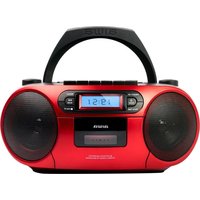
BBTC-550 - Hi-fi system AIWA - Free user manual and instructions
Find the device manual for free BBTC-550 AIWA in PDF.


User questions about BBTC-550 AIWA
0 question about this device. Answer the ones you know or ask your own.
Ask a new question about this device
Download the instructions for your Hi-fi system in PDF format for free! Find your manual BBTC-550 - AIWA and take your electronic device back in hand. On this page are published all the documents necessary for the use of your device. BBTC-550 by AIWA.
USER MANUAL BBTC-550 AIWA
Read these safety instructions before using your device and store them for possible future reference.
- If the cord is damaged, have it repaired by the manufacturer, its service or a similarly qualified person in order to avoid any hazard.
- The power supply must be replaced by a new one in case of malfunction, because this power supply is not repairable.
- The socket-outlet should be installed near the equipment and should be easily accessible.
- The product is not intended for use by persons (including children) with reduced physical, sensory or mental capacity. Persons who have not read the manual, unless they have received explanations by a person responsible for their safety and supervision should not use this unit.
- Children should be monitored to ensure that they do not play with the product.
- When connected the cord should always be readily accessible.
- The apparatus should not be exposed to dripping or splashing of water or liquids and no objects filled with liquids such as flowers vases shall be placed on the product.
- Do not impede the normal ventilation of the product when intended to use.
- Always leave a minimum distance of 10cm around the unit to ensure sufficient ventilation.
- Open flame sources, such as candles, should not be placed on top of the device.
- The device is intended for use only in a temperate climate.
12. CAUTION:
Danger of explosion if battery is incorrectly replaced or not replaced by the same type or equivalent.
- The battery should not be exposed to excessive heat such as sunshine, fire or similar.
- Different types of batteries, new and used batteries should not be mixed.
- The battery must be installed according to the polarity.
- If the battery is worn, it must be removed from the product.
- The battery must be disposed off safely. Always use the collection bins provided (check with your dealer) to protect the environment.
SAFETY PRECAUTIONS
Thank you for purchasing BBTC-550: Multifunction CD Boombox with Bluetooth, Digital FM tuner, USB, Cassette compatible.
This is your assurance of quality, performance and value. Our engineers have included many useful and convenient features in this product. Please be sure to read this instruction Manual completely to make sure you are getting the maximum benefit from each feature.
This product was manufactured using the highest quality components and standards of workmanship. It was tested by inspectors and found to be in perfect working order before it left our factory.
Model: BBTC-550
TO PREVENT FIRE OR SHOCK HAZARD DO NOT EXPOSE THIS APPLIANCE TO RAIN OR MOISTURE.
EN 3

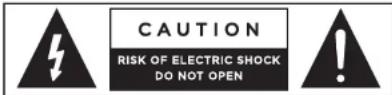
LIGHTNING FLASH WITH ARROWHEAD SYMBOL
The lightning flash with arrowhead symbol within an equilateral triangle, it is intended to alert the user of the presence of uninsulated dangerous voltage within the products' enclosure that may be of sufficient magnitude to constitute a risk of electric shock to persons.

EXCLAMATION POINT
The exclamation point within an equilateral triangle, is used to indicate that a specific component should be replaced only by the component specified in the literature for safety reasons.
The following label has been affixed to the unit, listing the proper procedure for working with the laser beam:
CLASS 1 LASER PRODUCT PRODUCTO LÁSER CLASE 1 APPAREIL À LASER DE CLASSE 1 KLASSE 1 LASER PRODUKT PRODOTTO LASER DI CLASSE 1 CLASSE DE PRODUTOS LASER 1
CLASS 1 LASER PRODUCT LABEL
You will find a label similar to that of the image indicating that the boombox has a laser component.
Notes:
• The images appearing in this manual are for reference only.
• Due to continual revision and improvement of our products designs and specifications are subject to change without further notice.
EN 4
SAFETY PRECAUTIONS
1. READ INSTRUCTIONS:
All the safety and operating instructions should be read before the product is operated.
2. RETAIN INSTRUCTIONS:
The safety and operating instructions should be retained for future reference.
3. HEED WARNINGS:
All warnings on the product and in the operating instructions should be adhered.
4. FOLLOW INSTRUCTIONS:
All operating and use instructions should be followed.
5. CLEANING:
Turn Off the unit if it's On before cleaning.
- Unplug the unit from the wall outlet before cleaning.
- Do not use liquid cleaners or aerosol cleaners. - Use a damp cloth for cleaning.
6. WATER AND MOISTURE:
Do not use this product near water.
For example:
Near a bath tub, wash bowl, kitchen sink, or laundry tub; in a wet basement; or near a swimming pool; and similar.
7. ACCESSORIES:
Do not place this product on an unstable cart, stand, tripod, bracket, or table. The product may fall, causing serious injury to a child or adult and serious damage to the product.
Use only with a cart, stand, tripod, bracket, or table recommended by the manufacturer, or sold with the product. Any mounting of the product should follow the manufacturer's instructions, and should use a mounting accessory recommended by the manufacturer. A product and cart combination should be moved with care - quick stops, excessive force and uneven surfaces may cause the product and cart combination to overturn.
8. VENTILATION:
Slots and openings in the unit are provided for ventilation and to ensure reliable operation of the product and to protect it from overheating, and these openings must not be blocked or covered. The openings should never be blocked by placing the product on a bed, sofa, rug or other similar surface. This product should not be placed in a built-in installation, such as a bookcase or rack, unless proper ventilation is provided or the manufacturer's instructions have been adhered.
9. POWER SOURCES:
This product should be operated only from the type of power source indicated on the marking label. If you are not sure of the type of power supply of your home, consult your product dealer or local power company. For products intended to operate from battery power, or other sources, refer to the operating instructions.
10. POWER-CORD PROTECTION:
Power-supply cords should be routed so that they are not likely to be walked on or pinched by items placed upon or against them, paying particular attention to cords at the power plug and jack plug socket. During movement, please take care of the power cord.
For example:
Tie up the power cord with a cable tie.
11. NON-USE PERIODS:
The power cord of the product should be unplugged from the outlet when left unused for long periods of time.
If the speaker has to be left unused for a long time, please leave the battery fully charged, otherwise it will cause damage to the battery.
12. LIGHTNING:
For added protection of this product during a lightning storm, or when it is left unattended and unused for long periods of time, unplug it from the wall outlet and disconnect the antenna or cable system. This will prevent damage to the product due to lightening and power-line surges.
13. POWER LINES:
An outside antenna system should not be located in the vicinity of overhead power lines or other electric light or power circuit. When installing an outside antenna system, extreme care should be taken to keep it from touching such power lines or circuits as contact with them might be fatal.
14. OVERLOADING:
Do not overload wall outlets and extension cords as this can result in a risk of fire or electric shock.
15. OBJECT AND LIQUID ENTRY:
Never push objects of any kind into this product through the openings as they may touch dangerous voltage points or shoot-out parts that could result in a fire or electric shock. Never spill liquid of any kind on the product.
16. SERVICING:
Do not attempt to repair this product yourself as opening or removing cover may expose you to dangerous voltage or other hazards. Refer all to qualified service personnel.
17. DAMAGES REQUIRING SERVICE:
Unplug this product from the wall outlet and refer to qualified service personnel under the following conditions.
a) When the power-supply cord, battery or plug are damaged.
b) If the product has been exposed to rain or water.
c) If liquid has been spilled, or objects have fallen into the product.
d) If the product does not operate normally by following the operating instructions, adjust only those controls that are covered by the operating instructions, as an improving adjustment of other controls may result in damage and will often require extensive work by a qualified technician to restore the product to its normal operation.
e) When the product exhibits a distinct change in performance it indicates a need for service.
18. REPLACE PARTS:
When parts require to be replaced, be sure the service technician has used official parts specified by the manufacturer or they have the same characteristics as the original parts, unauthorized substitutions may result in fire, electric shock and other hazards.
19. HEAT:
The product should be situated away from heat sources such as radiators, heat registers, stoves or other products that produce heat.
FN 6
PREPARATION FOR USE
Carefully take out all the components from the carton and remove all packaging materials from the components. Make sure that nothing is accidentally discarded with the packing materials.
If possible, save the carton and packaging materials for the unlikely event that the product ever needs to be sent for service. Using the original carton and packing materials is the only proper way to protect the unit from shipping damage.

CD Boombox x1

AC power cord x1

Quick start guide x1

Warranty sheet x1
FEATURES OF THE BOOMBOX
• Top loading CD player with Japanese Optics.
• Audio Output Power 50W p.m.p.o, 6W RMS at max volume 9.
• High Dynamic Range Speaker Drivers with Extended Bass - Treble.
- CD/CDR/MP3 Disc playback with CD-20/ MP3-99 program memories.
• FM PLL Radio with 40 Preset stations.
• Cassette Player and Recorder with Auto-Stop.
• Record to tape from BT, CD, FM, USB and AUX IN.
- Bluetooth V5.0 for wireless streaming from any mobile device.
• USB-MP3 Port for music playback.
- Wide-Screen LCD with soft white led backlight.
- Aux-in jack (3.5mm) to connect external devices.
• Stereo Earphone jack (3.5mm).
• Digital clock with 24h display format.
- Battery Operation 6X1,5V LR 14 (Batteries not included).
• AC Operation 230V -50HZ
DESCRIPTION OF UNIT AND CONTROLS
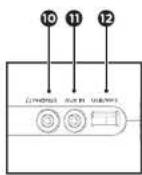
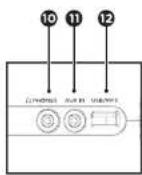
FRONT VIEW SIDE DETAIL
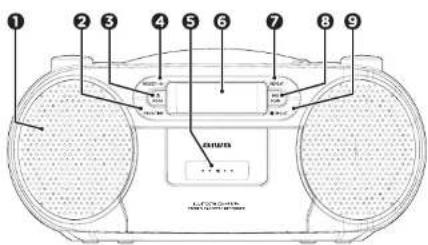
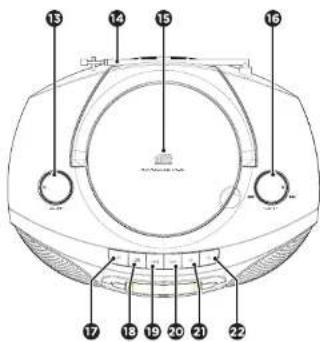
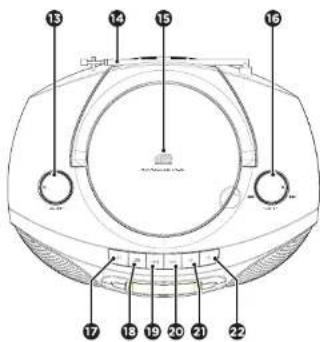
TOP VIEW
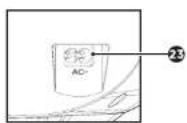
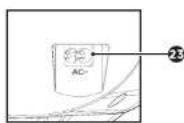
REAR DETAIL
① SPEAKER
② PROGRAM / TIME SET
3 ON/OFF / MODE
4 PRESET / +10
⑤ CASSETTE DOOR
6 DISPLAY
⑦ REPEAT
8 PLAY/PAUSE / SCAN
9 STOP / MONO/STEREO
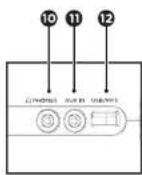
10 EARPHONE JACK
11 AUXILIARY INPUT
12 USB PORT
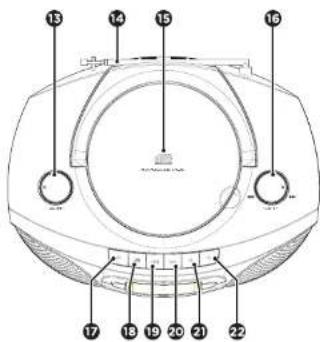
13 VOLUME KNOB
14 TELESCOPIC ANTENNA
15 CD COMPARTMENT LID
15 FORWARD/BACKWARD/TUNER
17 PAUSE
18 STOP/EJECT
FASTFORWARD
20 FASTREWIND
PLAY
22 RECORD
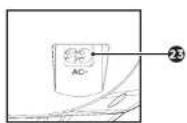
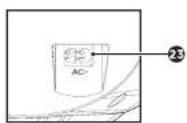
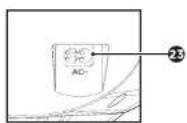
AC INPUT
FN 8
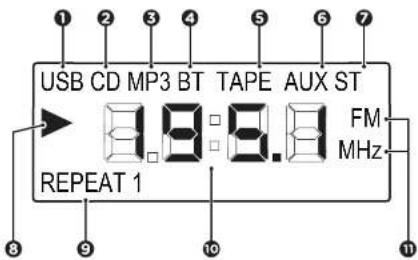
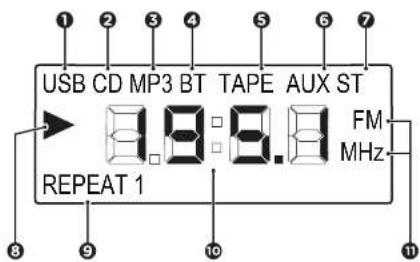
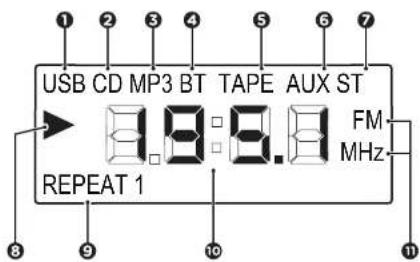
DESCRIPTION OF THE DISPLAY
LCD DISPLAY VIEW
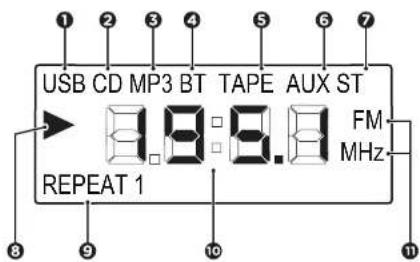
USB MODE INDICATOR
2 CD MODE INDICATOR
3 CD-MP3 MODE INDICATOR
4 BLUETOOTH MODE INDICATOR
5 TAPE MODE INDICATOR
6 AUXILIARY INPUT MODE INDICATOR
7 FM STEREO FUNCTION INDICATOR
8 PLAYING INDICATOR
9 REPEAT FUNCTION INDICATOR
10 PLAYBACK TIME / MODE / HOUR
11 MHz AND FM RADIO MODE INDICATOR
CONNECTIONS
MAINS CONNECTION
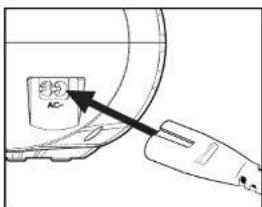
- Check if the power voltage shown on the rating label located on the back of the set, corresponds to your local AC power supply.
- Connect the power cord to the wall outlet.
Notes:
- Unplug the power cord from the wall outlet to protect your set during heavy thunderstorms.
- The power cord is used as a disconnection device, the cord shall remain always readily accessible.
BATTERY INSTALLATION
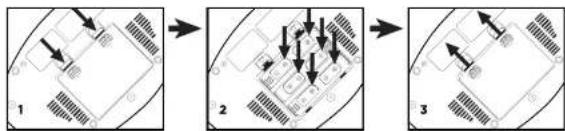
Batteries must be inserted correctly to avoid damage to the boombox. Always remove the batteries when the apparatus is not going to be used for a long period of time as this may cause leakage of the batteries and subsequently damage to your device.
BATTERY INSTALLATION
Slide out the battery compartment cover located at the bottom of the unit and insert 6 LR14/UM-2/C TYPE batteries (not included) according to the polarity shown in the battery compartment.
flowchart
graph TD
    A["1 State"] --> B["2 State"]
    B --> C["3 State"]
Notes:
• Always detach the power cord from the wall outlet if the boombox is going to be operated with batteries.
BASIC OPERATION
POWER ON & STANDBY MODE
- Once the boombox has been connected to a wall outlet, or charged with batteries, turn on the main power by briefly pressing the Ⓗ/MODE button. The LCD display will turn on showing the current playback mode.
- Press the ⬆/MODE button on the front of the unit, to initiate the function modes.
- To put the boombox on standby mode, just press and hold the ⏻/MODE button for 2 secs and the display will turn off.
Note:
- When turning on the unit, the display will show the last playback mode that was used.
POWER OFF
To turn off the boombox completely it has to be done from a standby position. Then you can unplug the device from the wall outlet or remove the batteries safely.
MODE BUTTON
Press the ⚙MODE button repeatedly to switch among bt (Bluetooth) / AUX (Auxiliary input) / rd (Radio) / tAP (Tape) / Cd (CD) / USB (USB).
VOLUME LEVEL
Turn the VOLUME KNOB on the top left panel to adjust the volume level.
REPEAT
Press repeatedly the REPEAT button on the front panel to scroll through the following repeating settings: One-All-OFF.
FN 10
-
Press the ⏻/MODE button to turn on the unit.
-
Press the ⏻/MODE button repeatedly until tAP (tape) function mode appears flashing on the display. Once the tape mode has been entered, the TAPE MODE INDICATOR will appear on the display.
-
Press the button ■/▲ of the top panel to open the cassette door.
-
Insert a cassette and close gently the door of the compartment.
-
To start the playback, press the button of the top panel. Press the || button of the top panel to temporarily stop the playback and press it again to resume it.
-
Press the ▪/▲ button to stop playback.
CASSETTE FORWARDING/REWINDING
-
Press and hold◀or ▶ttons of the top panel to find a specific passage within the track and release it at the point you want to listen to.
-
Press the ■/▲ button to stop fast-forwarding or rewinding.
Notes:
The buttons will automatically release at the end of the cassette playback.
While fast-forwarding or rewinding, the buttons will not release automatically at the end of the cassette.
RECORDING TO CASSETTE
This boombox allows the user to record cassettes from every input source available ranging from CD's to Bluetooth playback. In order to do that follow these simple steps:
-
Press the ⏻/MODE button repeatedly to select the desired function mode.
-
Prepare the medium you want to record from e.g insert a CD, tune into a radio station, plug the auxiliary cable...
-
Insert a suitable cassette into the cassette compartment.
-
Press the band buttons of the top panel at the same time to start the recording.
-
Start the playback of the desired source
-
Press the II button to pause the recording and press it again to resume it
-
Press the ▼/▲button to stop recording.
Notes:
- This boxbox is not suitable for recording on CHROME (IEC II) or METAL (IEC IV) cassettes. To record, use NORMAL cassettes (IEC I) on which the record tabs (small squares found on the top corners of the cassette tape) have not been removed.
- To prevent re-recording on a cassette, remove the record tabs.
• To re-record a cassette that does not have recording tabs, just put some adhesive tape over the squares where the tabs used to be.
- When recording to a cassette from a auxiliary input or Bluetooth, you can adjust the volume level from the external device.
- The best recording volume level is set automatically. Adjusting the volume control will not affect the recording.
• No recording will take place in the first 7 seconds and last 7 seconds of the cassette.
You can play your audio CD/CD-R/CD-RW/MP3 in your boombox.
-
Press the ⬇MODE button to turn on the unit.
-
Lift up manually the CD COMPARTMENT LID.
-
Insert a CD with the printing side facing up and manually gently close the disc tray.
-
Press the cYMODE button repeatedly until Cd (CD) function mode appears flashing on the display.
Once the CD mode has been selected, the CD MODE INDICATOR will appear on the display.
Then the player will start reading the disc, and the total number of tracks found will be displayed.
-
Press SCAN/▶II to start or resume the playback. Press SCAN/▶II pain to stop the playback temporarily. When the player is in pause mode the screen will flash to indicate it.
-
Press the button to stop playing. The display will show again the total number of tracks.
SELECT ANOTHER TRACK OR FILE
Turn the TUNING KNOB on the right top panel to the ◀ or ▶ positions to select a different track number. Rotate briefly to ◀ once to hear the beginning of the current track, and turn it twice or more to hear the previous track.
LISTENING TO YOUR TRACKS REPEATEDLY
Press the REPEAT button on the front panel repeatedly to activate the REPEAT FUNCTION in the following order:
-
REPEAT1(repeat the current track)
-
REPEAT (repeat all the available tracks)
-
OFF (cancel the repeat function)
CREATING A CD PLAYLIST
The Program feature may be used to program up to 20 tracks for CD and 99 tracks for CD-MP3 in a programmable playlist.
-
While in stop mode only (CD is not playing), press PROG, and the LCD display will show the wording "POT" and the "Program" indicator.
-
Turn the TUNING KNOB to the ◀ or ▶ position to allocate the desired track.
-
Press the PROG button to select and store the track into the memory. The program sequence will change to "P02" to choose the next track.
-
Repeat steps 2 and 3 to select up to 20/99 tracks.
-
To play the selected tracks (in the program mode), press the ▶ button.
-
Turn the knob to ▶ position to hear the previous programmed track or turn to ▶ position to hear the next programmed track
-
To clear the programmed tracks from the memory, press the button twice or open the CD TRAY LID.
ABOUT MP3 DISC COMPATIBILITY
This unit is compatible with: Sampling Frequency: 32-48 (MP3) Bit rate: 32-320kbps (MP3)
Do not use special letters such as: /^?<> otc
Even if the total number of files on the disc is more than 1000, it will only show up to 999.
Note:
Because MP3 discs have a large capacity, disc access times are a little longer.
FN 12
FM RADIO
You can store up to 40 of your favorite stations in the tuner memory for easy recall at any time.
AUTO SCAN
- Press the C/MODE button repeatedly until "rd" (radio) function mode appears flashing on the display.
Once the radio mode has been selected, the FM/MHz and ST FUNCTION INDICATOR will appear on the right side of the display.
-
Press the SCAN/▶II button, and the boombox will scan and briefly stop automatically whenever it finds a station with sufficient signal strength.
-
The display will update showing the current station frequency.
-
Turn the TUNING KNOB to the or positions to view and listen to the scanned radio stations,
MANUAL SCAN
-
Press the dYMODE button to select "rd" (radio) mode.
-
Turn the TUNING KNOB to the or positions to tune to a station. Each turn on the tuning knob will change the frequency up or down by 100 kHz.
-
Once you find a station you want to save, press and hold the PROG button on the front panel for 2 seconds. "S01" will be shown on the display; turn the knob to or positions until the desired memory position number appears on the display. Press PROG again to confirm and save the current station.
-
Repeat steps 2 and 3 to store up to 40 stations.
PLAYING STORED STATIONS
Press the PRESET/+10 button repeatedly to select the desired preset number.
Note:
• To remove a preset station, store another station in it's place.
STEREO/MONO BROADCAST
Select stereo or mono broadcast
-
By default "ST" (stereo) broadcast is the setting for the tuner mode. The display will show briefly the word "ST" when the stereo mode is set and the ST FUNCTION INDICATOR will appear on the right top corner.
-
To improve the reception when tuning to stations with weak signal, change the mode to monaural sound. The display will briefly show the word "NO" when the mono mode is set, and the ST FUNCTION INDICATOR will disappear.
USB MODE
This boombox has been developed using the latest technical advances in the USB field. However, given the wide range of USB storage device types that are currently in the market, we unfortunately cannot guarantee full compatibility with all of them. For this reason, in rare cases, there may be problems playing files from some USB storage devices. This is not due to device malfunction.
-
Press the button to turn on the unit.
-
Press the ⬤/MODE button repeatedly until the "USB" (USB) function mode appears flashing on the display. Once the USB function mode has been entered, the USB MODE INDICATOR will appear on the top left of the display.
-
Connect a USB storage device directly to the USB/MP3 port. The display briefly shows the number of folders and then the total number of tracks. Playback will automatically start after a few seconds.
-
To temporarily stop playback, press the ▶||SCAN button, and to resume playback, press it again.
-
Turn the TUNING KNOB to ▶ or ▶ positions to select a different track number.
-
Press the button to stop playing.
LISTENING TO YOUR TRACKS REPEATEDLY
Press the REPEAT button on the front panel repeatedly to activate the REPEAT FUNCTION in the following order:
-
REPEAT1 (repeat the current track)
-
REPEAT (repeat all the available tracks)
-
OFF (cancel the repeat function)
CREATING A USB PLAYLIST
The Program feature may be used to program up to 99 tracks for the USB mode too, in a programmable playlist.
-
While in stop mode only (no USB playback), press PROG, and the LCD display will show the wording "POT" and the "Program" indicator.
-
Turn the TUNING KNOB to the ▶or the ▶positions to allocate the desired track.
-
Press the PROG button to select and store the track into the memory. The program sequence will change to "P02" to choose the next track.
-
Repeat steps 2 and 3 to select up to 99 tracks.
-
To play the selected tracks (in the program mode), press the ▶|| button.
-
Turn the knob to the ▶ position to hear the previous programmed track or turn it to the ▶ position to hear the next programmed track.
-
To clear the programmed tracks from the memory, press the ■ button twice or change to another function mode.
Notes:
- If there's an incompatible, or no USB storage device is connected, the display will show the word "NO".
- Because some storage devices have a large capacity, USB access time is a little longer.
- Switch the device to a different operating mode before you remove the USB storage device.
• To avoid damaging the boombox or other devices, do not try to charge any external device using the USB port.
FN 14
BLUETOOTH MODE
BLUETOOTH PAIRING
Prior to using the Bluetooth function, your boombox should be paired first with your Bluetooth device. ("Pairing" means establish connection between Bluetooth devices such as mobile phones, tablets, pc, etc).
-
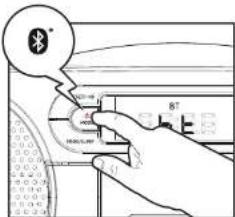
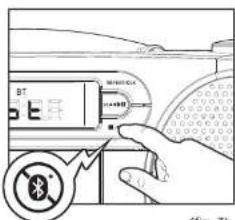
Press the /MODE button to switch to "bt" Bluetooth mode. (fig. 1)
-
In Bluetooth mode, a voice prompt will announce Bluetooth pairing mode and the "bt" will flash on the display. The BLUETOOTH MODE INDICATOR will appear on the top middle of the display. And the boombox will search automatically for Bluetooth devices.
-
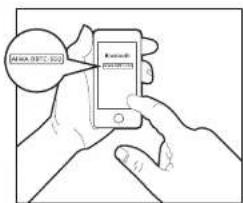
Turn on the Bluetooth function on your device and make it visible (see your device's instructions to add or setup a Bluetooth device).
-
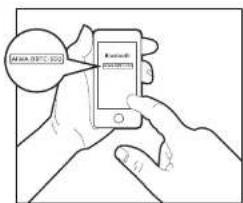
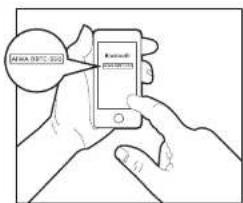
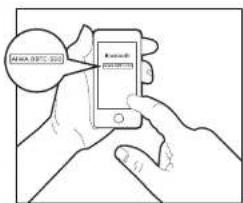
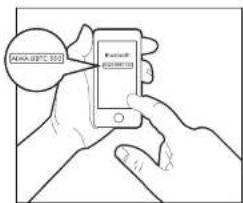
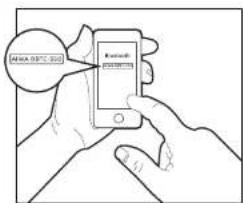
Search for Bluetooth devices and select AIWA BBTC-550 Enter the code "0000" if needed. (fig. 2)
If the devices are paired successfully, the word "bt" will keep bright on the display, and a prompt voice will notify that Bluetooth device is connected. Having paired successfully, the device will connect automatically next time.
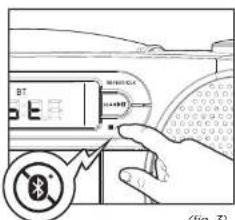
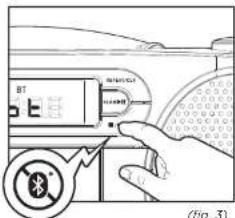
- Briefly press ■ to disconnect the paired bluetooth device. (fig. 3)
(fig. 1)
(fig. 2)
PLAY FROM A BLUETOOTH DEVICE
-
Press the ▶|| button to play
-
To pause or resume play, press the ▶|| button again.
-
Turn the tuning knob to ◀ or ▶ position to select a different track number.
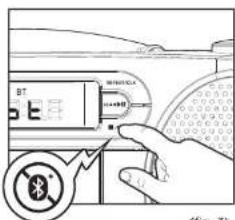
(fig. 3)
Note:
- Compatibility with all Bluetooth devices is not guaranteed.
AUX-IN MODE
AUXILIARY INPUT FUNCTION MODE
This unit can be used as an active speaker for laptop computers. MP3 and other small audio players following the steps below.
-
Press the MODE button to turn on the unit.
-
Press the /MODE button repeatedly until the "AUX" (auxiliary input) function mode appears flashing on the display. Once the auxiliary input mode has been entered, the AUXILIARY INPUT MODE INDICATOR will appear on the top right of the display.
-
Connect an auxiliary cable ended with a 3.5mm to the desired external audio device, and connect the other end to the AUX IN socket on the side of the unit.
-
Start playback on the external audio device. Adjust the volume on the external audio device (do not set the volume to a high level in order to avoid distortion). You may also adjust the volume on the boombox. To control playback function, use the controls on the external audio device.
Note:
- The boombox cannot access the contents in the connected external device.
TIME SETTING
SETTING THE CURRENT TIME
This unit has a built in 24 hours format clock function. Follow the below steps in order to set the time.
-
While the boombox is in standby mode, press and hold the PROG/TIME button for 2 seconds. The time 00:00 will appear flashing on the display.
-
Turn the TUNING KNOB to the ◀◀ or ▶▶ positions to set the hour and press the PROG/TIME button to confirm. Then the minutes digits on the display will start flashing.
-
Turn the TUNING KNOB to the 🔊 or to the ▶positions to set the minutes and press the PROG/TIME button to confirm.
Note:
If no button is pressed for 10 seconds, the boombox will automatically cancel the time setting operation.
EN 16
CARE AND MAINTENANCE
CARE OF COMPACT DISCS

- Treat the disc carefully. Hold the disc only by the edges. Never allow your fingers to come in contact with the shiny, unpainted side of the disc.
- Do not attach adhesive tape, stickers, etc. to the disc label.
- Clean the discs periodically with a soft lint-free, dry cloth. Never use detergents or abrasive cleaners to clean the disc. If necessary, use a CD cleaning kit. If a disc skips or gets stuck on a section of the disc, it is probably dirty or damaged (scratched). When cleaning the disc, wipe in straight lines from the center of the disc to the outer edge of the disc. Never wipe in circular motions.
- This unit is designed to play discs bearing the identification logo as shown here or MP3 format Disc. Other discs may not co standard and may not
- Discs should be stored in their cases after each use to avoid damage.
- Do not expose discs to direct sunlight, high humidity, high temperatures, or dust. Prolonged exposure or extreme temperatures can warp the disc.
- Do not stick or write anything on either side of the disc. Sharp writing instruments or the ink may damage the surface.
TO CLEAN THE LENS
If the lens gets dirty, your speaker may skip or may not play a CD:
- Open the CD door.
- Use a camera lens blower/brush to blow on the lens once or twice, brush the dust or particles off the lens then blow again.
- To remove fingerprints, use a dry cotton swab to wipe from the middle to outer edge of the lens.
CARING OF CASSETTES/TAPES
- Treat the cassettes carefully. Never allow your fingers to come in contact with the playing surfaces; handle the cassettes/tapes by their outer casings.
- Rewind the tapes before storage. Tapes must be stored vertically.
- Clean equipment (tape heads, guides, etc.) often and thoroughly with isopropyl alcohol and cotton swabs.
- Play your tapes every few years, in order to check their condition and avoid symptoms of the sticky-shed syndrome (a common issue that affects the layers of some cassette tapes that results in sticking together).
- Cassettes should be stored in their cases after each use to avoid damage.
- Do not expose cassettes to direct sunlight, high humidity, high temperatures, or dust. Prolonged exposure or extreme temperatures may damage the cassette/tape.
CARE OF THE BOOMBOX
- To prevent fire or shock hazard, remove the batteries, or disconnect your unit from the AC power source when cleaning.
- The outside of your unit may be cleaned with a dusting cloth and taken cared of as any other furniture. Use caution when cleaning and wiping the plastic parts.
- Mild soap and a damp cloth may be used on the top panel.
TROUBLE SHOOTING GUIDE
If a fault occurs, first check the points listed below before taking the boombox to repair. Do not open the boombox as there is a risk of electric shock.
| SYMPTOM CAUSE CORRECTION | ||
| General | ||
| No power. | The power cord is not plugged. | Plug in the power cord. |
| Check whether electricity failed. | Check the condition by operation of other electronic devices. | |
| No sound. Volume low or non-existent. Increase the main unit, or the external device volume. | ||
| CD | ||
| The unit does not start playback. | An unplayable disc is inserted. | Insert a playable disc. |
| The disc is dirty. Clean the disc. | ||
| Radio | ||
| Radio stations cannot be tuned in. | The antenna is positioned poorly. | Extend the antenna at it's full length. |
| Relocate the boombox in another place. | ||
| Cassette | ||
| Recording function does not work. | The cassette tabs may have been removed. | Apply adhesive tape over the empty tab space. |
| Poor cassette sound quality. The cassette is dirty. Clean the cassette. | ||
| An incompatible cassette (IEC II or IEC IV) is inserted. | Insert a compatible (IEC I) cassette. | |
| USB | ||
| The USi3 does not start the playback. | Incompatible or damaged audio files. | Insert another device with compatible audio files. |
| AUX | ||
| Sound becomes distorted on Auxiliary Input mode. | Volume level is too high. | Adjust the playback volume on the external device to an adequate level. |
| Auxiliary cable is inserted Incorrectly. | Insert the auxiliary cable completely. | |
WARNING!
Under no circumstances should you try to repair the apparatus yourself, as this will invalidate the warranty.
FN 18
TECHNICAL SPECIFICATION
| MODEL: | BBTC-550 |
| Rated voltage: | AC 100-230V 50HzDC 9V** (C/LR14) batteries, x6 |
| Power consumption: | 16W / <1 W in standby |
| Bluetooth version: | 5.0+EDR, A2DP profile |
| Audio output power (L+R): | 3Wx2 (6W RMS) |
| RADIO SECTION | |
| Frequency range | |
| FM 87.5-108MHz | |
| FM Stereo crosstalk: | < 20 dB |
| Number of preset radio stations: | 40 |
| USB SECTION | |
| Maximum storage allowed: | 64GB (FAT/ExFAT) |
| CASSETTE PLAYER | |
| Cassette type: | Standard cassettes (IEC I) |
| Tape speed: | 4.75 cm/sec |
| Tape recording system: | DC Blas |
| CD PLAYER | |
| Disc compatibility: | CD/CD-R/CD-RW/MP3 DISC |
| AMPLIFIER | |
| Frequency response: | 70Hz-17kHz |
| Audio S/N: | < _60dB |
| ACCESSORIES | |
| AC Power cord x1 | |
| User manual x1 | |
| DIMENSIONS & WEIGHTS | |
| Dimensions of the speaker drivers: | x2 (O/ 77mm, 3W/4 Ohm) |
| Dimensions of the boombox: | W 298° D 230° H 138°mm |
| Net weight: | 1500g (batteries not included) |
END OF LIFE DISPOSAL
[Non-Text]


The European directive 2002/96/EC on Waste Electrical and Electronic Equipment (WEEE), requires that old household electrical appliances must not be disposed of in the normal unsorted municipal waste stream.
Old appliances must be collected separately in order to optimize the recovery and recycling of the materials they contain, and reduce the impact on human health and the environment.
The crossed out "wheeled bin" symbol on the product reminds you of your obligation, that when you dispose of the appliance, it must be separately collected.
EN 19

IMPORTANT:
To avoid possible hearing damage, do not listen at high audio volume for long periods of time.
ES 20
ESPAÑOL
DETALLE POSTERIOR
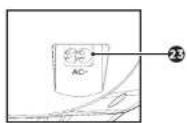
1 ALTAVOZ
2 PROGRAMA (PROG) / RELOJ (TIME)
③ ENCENDER/APAGAR / MODO (MODE)
4 PRESINTONÍA (PRESET) / +10
5 COMPARTIMENTO DE CASETES
6 PANTALLA
⑦ REPETIR (REPEAT)
⑧ REPRODUCIR/PAUSAR / ESCANEAR (SCAN)
9 STOP / MONO/STEREO (MO.ST)
10 TOMA DE AURICULARES (PHONES)
ENTRADA AUXILIAR (AUX)
12 PUERTO USB (USB)
13 DIAL DE VOLUMEN (VOLUME)
14 ANTENA TELESCÓPICA
15 BANDEJA DE CDS
16 SINTONIZADOR (TUNING) /
ATRÁS/ADELANTE
17 PAUSA
18 STOP / EXPULSAR
19 AVANCE RÁPIDO
20 REBOVINADO RÁPIDO
21 REPRODUCIR
27 GRABAR
23 TOMA DE CORRIENTE
FS 26
(USB) INDICADOR DE MODO USB
② (CD) INDICADOR DE MODO CD
③ (MP3) INDICADOR DE MODO CD-MP3
(67) INDICADOR DE MODO BLUETOOTH
⑤ (TAPE) INDICADOR DE MODO CASETE
(AUX) INDICADOR DE MODO AUXILIAR
(fig. 1)
(fig 2)
(FIG. 3)
Nota:
DÉTAIL DU ARRIÈRE
HAUT-PARLEUR
② PROGRAMME (PROG) / HORLOGE (TIME)
3 ON/OFF / MODE
4 PRÉRÉGLAGE (PRESET) / +10
5 COMPARTIMENT DES CASSETTES
6 ÉCRAN
7 RÉPÉTER (REPEAT)
8 JOUER/PAUSE/SCANNER (SCAN)
9 STOP / MONO/STÈRÉO (MO.ST)
10 PRISE POUR CASQUE D'ÉCOUTE (PHONES)
11 ENTRÉE AUXILIAIRE (AUX)
12 PORT USB (USB)
13 CADRAN DE VOLUME
14 ANTENNE TÉLESCOPIQUE
15 PLATEAU DE CD
16 ACCORDEUR (TUNING) /
AVANT/ARRIÈRE
17 PAUSE
18 STOP / EJECTION
19 AVANCE RAPIDE
20 REMBOBINAGE RAPIDE
21 JOUER
27 RECORD
23 PRISE DE COURANT
FR 44
DESCRIPTION D'ÉCRAN
VUE DE L'ÉCRAN LCD
(USB) INDICATEUR DE MODE USB
② (CD) INDICATEUR DE MODE CD
③ (MP3) INDICATEUR DE MODE CD-MP3
(67) INDICATEUR DE MODE BLUETOOTH
5 (TAPE) INDICATEUR DE MODE DE
CASSETTE
⑥ (AUX) INDICATEUR DE MODE AUXILIAIRE
⑦ (ST) INDICATEUR DE FONCTION
STEREO POUR LE MODE RADIO FM
8 INDICATEUR DE REPRODUCTION
(9) (REPEAT) INDICATEUR DE FONCTION RÉPÉTITION
TEMPS DE LECTURE / MODE / TEMPS
(FM/MHZ) INDICATEUR DE MODE RADIO FM ET MHZ
CONNEXIONS
LIEN PRINCIPAL
(fig. 1)
(fig. 2)
(FIG. 3)
MODE AUX-IN
MODE D'ENTRÉE AUXILIAIRE (AUX-IN)
KLASSE 1 LASERPRODUKT
Carefully remove all the components from the carton and remove all packing materials from the components. Make sure that nothing is accidentally discarded with the packing materials.
OBERE ANSICHT
HECK-DETAIL
WIEDERHOLEN SIE IHRE TRACKS
Bitrate: 32-320kbps (MPS)
WIEDERHOLEN SIE IHRE TRACKS
(fig. 1)
(fig. 2)
(fig. 3)
AUX-IN-MODUS
VISTA SUPERIORE
ALTRO DETTAGLIO
1 ALTOPARLANTE
2 PROGRAMMA (PROG) / OROGLIO (TIME)
③ ACCESO/SPENTO / MODALITÀ (MODE)
4 PREIMPOSTATO (PRESET) / +10
5 VANO PER CASSETTA
6 SCHERMO
7 RIPETERE (REPEAT)
③ RIPRODUCI/PAUSA / SCANSIONE (SCAN)
9 STOP / MONO/STEREO (MO.ST)
10 PRESA PER CUFFIE (PHONES)
INGRESSO AUSILIARIO (AUX)
12 PORTA USB (USB)
VOLUME DIAL (VOLUME)
14 ANTENNA TELESCOPICA
15 VASSOIO PER CD
16 SINTONIZZATORE (TUNING) /
INDIETRO/ANVERNO
17 PAUSA
18 STOP / ESPULSIONE
19 VELOCE AVANTI
20 RETRO VELOCE
21 RIPRODURRE
27 REGISTRAZIONE
23 PRESA ELETTRICA
17 80
SCHERMO DESCRIZIONE
VISTA SCHERMO LCD
① (USB) INDICATORE DELLA MODALITÀ USB
② (CD) INDICATORE DEL MODO CD
③ (MP3) INDICATORE DI MODALITÀ CD-MP3
(4) (BT) INDICATORE DI MODALITÀ BLUETOOTH
⑤ (TAPE) INDICATORE DI MODALITÀ CASSETTA
COLLEGAMENTI
ACCENSIONE E STANDBY
Bit rate: 32-320kbps (MP3)
(fig. 1)
(fig. 2)
CURA DEI COMPACT DISC
DETALHE SUBSEQUENTE
① FALADOR
② PROGRAMA (PROG) / RELÓGIO (TIME)
③ LIGAR/DESLIGAR / MODO (MODE)
4 PRÉ-DEFINIDO (PRESET) / +10
⑤ COMPARTIMENTO DA CASSETE
⑥ TELA
⑦ REPITA (REPEAT)
⑧ REPRODUZIR/PAUSAR / VARREDURA (SCAN)
9 STOP / MONO/STEREO (MO.ST)
10 TOMADA DE AUSCULTADORES (PHONES)
ENTRADA AUXILIAR (AUX)
PORTA USB (USB)
VOLUME DIAL (VOLUME)
14 ANTENA TELESCÓPICA
15 CD COMPARTAMENTO
15 AFINADOR (TUNING) / VOLTAR/ADIANTE
17 PAUSA
18 STOP / EJECTAR
19 RÁPIDO PRÓXIMO
20 RÁPIDO RETORNO
21 REPRODUZIR
27 RECORDE
23 TOMADA ELÉTRICA
PT 98
DESCRIÇÃO DA TELA
VISÃO DE TELA LCD
(USB) INDICADOR DO MODO USB
② (CD) INDICADOR DO MODO CD
③ (MP3) INDICADOR DO MODO CD-MP3
(67) INDICADOR DO MODO BLUETOOTH
⑤ (TAPE) INDICADOR DO MODO CASSETE
6 (AUX) INDICADOR DE MODO AUXILIAR
⑦ (ST) INDICADOR DA FUNÇÃO ESTÉREO
PARA O MODO FM RADIO
8 INDICADOR DE REPRODUÇÃO
(REPEAT) INDICADOR DE FUNÇÃO
10 TEMPO DE REPRODUÇÃO / MODO / HORA
(FM/MHz) INDICADOR DO MODO
RÁDIO FM E MHz
CONEXÕES
PRINCIPAL LIGAÇÃO
OUVIR UMA OU MAIS FAIXAS REPETIDAMENTE
(fig. 1)
(fig. 2)

(FIG. 3)