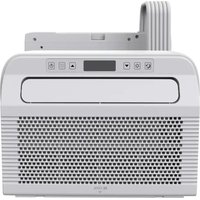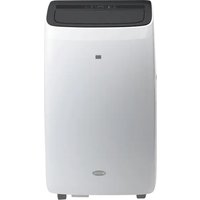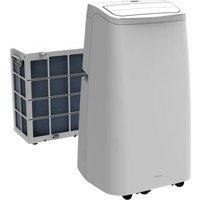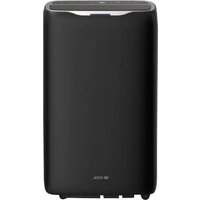
BC14KL2402FW - Air Conditioning Be Cool - Free user manual and instructions
Find the device manual for free BC14KL2402FW Be Cool in PDF.


User questions about BC14KL2402FW Be Cool
0 question about this device. Answer the ones you know or ask your own.
Ask a new question about this device
Download the instructions for your Air Conditioning in PDF format for free! Find your manual BC14KL2402FW - Be Cool and take your electronic device back in hand. On this page are published all the documents necessary for the use of your device. BC14KL2402FW by Be Cool.
USER MANUAL BC14KL2402FW Be Cool
natural_image
Black rectangular electronic device labeled 'BE COOL' on a white background (no other text or symbols visible)HERZLICHEN GLÜCKWUNSCH!
m = 311
PL
169
IT
43
SL
190
NL
64
HR
211
ES
85
EN
232
CZ
106
CE-DOC
259
BE COOL


text_image
QR code image containing encoded data, no visible human-readable texttext_image
locking openSchritt 1:
natural_image
Diagram showing a window with an upward arrow and a separate view of a rectangular frame (no text or symbols)Schritt 2:
natural_image
Line drawing of a portable air purifier device with coiled tubing and ventilation slots (no text or symbols)Schritt 3:
natural_image
Line drawing of two identical containers with arrows indicating movement, showing a close-up of the interior (no text or symbols)natural_image
Interior view of a room with a white hose and ventilation duct, overlooking a window and trees (no text or symbols visible)natural_image
Line drawing of a portable water purifier connected to a cup (no text or symbols)Symbolbild
natural_image
Illustration of various household air purifiers and household appliances, showing internal components and airflow direction (no text or labels)HINWEIS
natural_image
Line drawing of a portable air conditioner unit with control panel and display (no text or symbols)Symbolbild
text_image
QR code with a blue home icon in the center, likely linking to a digital service or application.Scan QR code
Registrierung
text_image
09:17 Add Device Turn on Bluetooth? Bluetooth make your devices more disasurals. Add Device Select 2.4 GHz Wi-Fi Network and enter password. If your Wi-Fi is 5GHz, please set it to be 2.4GHz. Common router setting method X Wi-Fi: 5GHz ✓ Wi-Fi - 2.4GHz XK001 Select Wi-Fi 123456789 Add Manually Electrical Air Conditioning Lighting Vencous Air Control unit (BL-6vHFE) Air Control unit (BL-7s) Air Control unit (BL-8s) Large Home Appliance Next 09:17 Reset the device Press and hold the RESET button for 6 seconds until the indicator drinks (subject to the own microphone). Select the status of the indicator light or hear the beep: Blink Slowly Blink Quickly 09:21 Connect your mobile phone to the device's hotspot: Connect your phone to the hotspot shown below: WLAN ✓ SmartLife-XXXX ✓ SL-XXXX “请用”Wants to Join WLAN Network "SmartLife-E75B"? Cancel Join Go to Connect 10/12 Add Device I have any added hardware吗? Parlasalt Air Conditioner(L... Add software吗) DoneBE COOL
text_image
my screen Cable Amplification All Devices Shortleaf center Wireless Sensors Browser Use Home Music Drive Mode Mouse Map 12 PC Headlight Bluetooth Send out Location Mode Contact network Cable Amplification All Devices Devices to be added: 1 Air Conditioner Add Enter Wi-Fi Information Choose Wi-Fi and enter password Xiaomi 12 Pro 1234567890 Next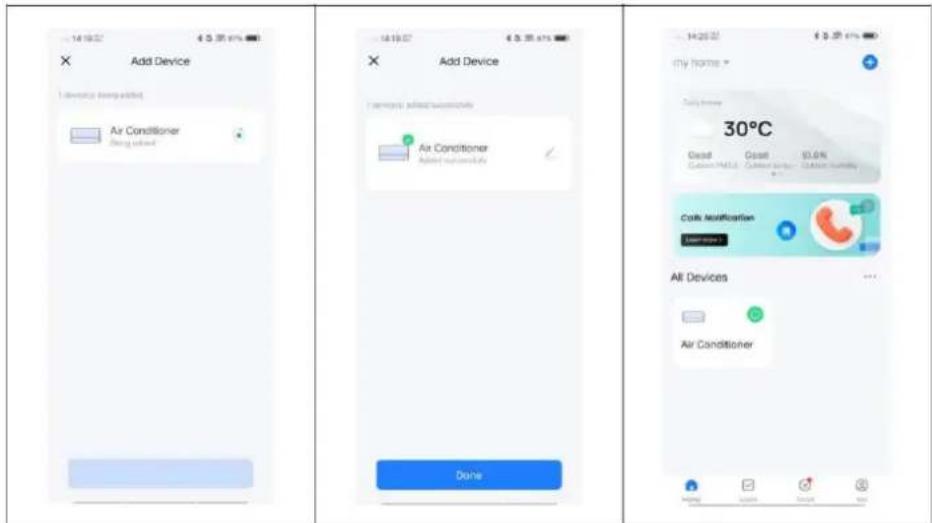
text_image
Add Device Air Conditioner Doing without Add Device Air Conditioner Added without Done 14:28:02 € 5.35 67% 14:19:02 € 5.35 67% 14:28:02 € 5.35 67% my home Daily heater 30°C Cold Custom PMI-2 Cold Custom Sienna 10.0% Cool Automation Clear window All Devices Air Conditionertext_image
WORKS WITH amazon alexa works with the Google AssistantBE COOL
natural_image
Black BE COOL air purifier device with visible branding and mounting feet (no text or symbols on body)FÉLICITATIONS !
MERCI D'AVOIR CHOISI UN PRODUIT BE COOL.
BE COOL


text_image
QR code image containing encoded data, no visible human-readable textVEUILLEZ LIRE ATTENTIVEMENT LE MODE D'EMPLOI AVANT DE PROCÉDER AU MONTAGE, À L'INSTALLATION, À L'UTILISATION OU À L'ENTRETIEN. PROTÉGEZ-VOUS ET PROTÉGEZ LES AUTRES EN RESPECTANT LES CONSIGNES DE SÉCURITÉ. LE NON-RESPECT DES INSTRUCTIONS POURRAIT ENTRAÎNER DES DOMMAGES CORPORELS ET/OU MATÉRIELS ET/OU LA PERTE DU DROIT À LA GARANTIE !
INFORMATIONS IMPORTANTES SUR LA SÉCURITÉ, L'EMPLACEMENT ET LE RACCORDEMENT ÉLECTRIQUE.
text_image
Warning symbols including no hand, flame, open book, and warning signsDÉCLARATION DE CONFORMITÉ
www.becool.at/downloads
text_image
locking opennatural_image
Diagram showing a window with an open door and a side view of a cabinet or storage unit (no text or symbols present)Étape 2 :
natural_image
Line drawing of a portable air conditioner unit with coiled hose and ventilation duct (no text or symbols)Étape 3 :
natural_image
Line drawing of two identical air purifiers in a room, one with a belt and the other with arrows indicating force or movement (no text or symbols)natural_image
Line drawing of hands holding a mobile phone with an arrow indicating the device (no text or symbols present)Image symbolique
natural_image
Interior view of a room with a large white hose and ventilation duct, overlooking a window and trees (no text or symbols visible)CONSEILS POUR UNE BONNE UTILISATION
natural_image
Line drawing of a portable water heater with a bucket pouring liquid from its side (no text or symbols)Image symbolique
natural_image
Diagram showing a device with airflow arrows and component layouts, no text or symbols present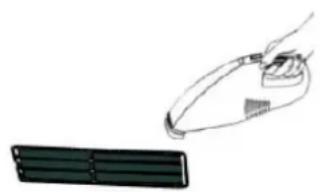
natural_image
Simple line drawing of a hand using a vacuum cleaner to lift a black rectangular object (no text or symbols)REMARQUE
natural_image
Line drawing of a portable air conditioner unit with control panel and display (no text or symbols)Image symbolique
ACTIVITÉS DE DÉBUT/FIN DE SAISON
ACTIVITÉS DE FIN DE SAISON
text_image
QR code with a blue house icon in the center, likely linking to a digital service or website.Scan QR code
Inscription
text_image
09:17 我的家... Learn about DIY homep Duty homeep Add Device Create Scene Add Quick Toggle Card Scan All Devices Edit 09:17 Add Device Turn on Bluetooth Bluetooth make your devices more accessible. 00:17 Select 2.4 GHz Wi-Fi Network and enter password. If your Wi-Fi SGP, please set it to be 2.4GHz. Common router setting method × WiFi - 6GHz ✓ WiFi - 2.4GHz XK001 Select Wi-Fi 123456789 Add Manually Decidual Air Conditioning Lighting Sensor Air Conditioner Air Conditioner Air Conditioner Large Home Appliance Next 09:17 Reset the device Reset and hold the RESET Button for a device until the indicator while selected the device manual. Select the status of the indicator light or hear the beep: Blink Slowly Blink Quickly 09:21 Connect your mobile phone to the device's hotspot ● Connect your phone to the hotspot server before: WLAN ✓ SmartLife-XXXX ✓ SL-XXXX “涂鸦” Wants to Join WLAN Network "SmartLife-E75B"? Cancel Join Go to Connect 10:12 Add Device Connect only color microwave by: PortaspIt Air Conditioner#. Audio successfully DoneBE COOL
text_image
Add Device Air Conditioner Being selected Dune Add Device Air Conditioner Being successfully Dune 30°C Good Good $1.0% Costs Modification All Devices Air Conditionertext_image
WORKS WITH amazon alexa works with the Google AssistantBE COOL
natural_image
Black rectangular electronic device labeled 'BE COOL' on a white background (no other text or symbols visible)CONGRATULAZIONI! GRAZIE PER AVER SCELTO UN PRODOTTO BE COOL.
BE COOL


text_image
QR code image containing encoded data, no visible human-readable textLEGGERE ATTENTAMENTE LE ISTRUZIONI PER L'USO PRIMA DI INIZIARE IL MONTAGGIO, L'INSTALLAZIONE, IL FUNZIONAMENTO O LA MANUTENZIONE. PROTEGGERE SE STESSI E GLI ALTRI SEGUENDO LE ISTRUZIONI DI SICUREZZA. LA MANCATA OSSERVANZA DELLE ISTRUZIONI PUÒ CAUSARE LESIONI PERSONALI E/O DANNI MATERIALI E/O LA PERDITA DELLA COPERTURA DELLA GARANZIA!
IMPORTANTI INFORMAZIONI SULLA SICUREZZA, L'UBICAZIONE E IL COLLEGAMENTO ELETTRICO.
text_image
Warning symbols including no hand, flame, open book, and lightning warning signswww.becool.at/downloads
natural_image
Diagram of a cylindrical structure with vertical supports and a tapered top, no text or symbols presenttext_image
locking opennatural_image
Diagram showing a window frame with an arrow indicating vertical motion, alongside a separate view of a rectangular device (no text or symbols present)Fase 2:
natural_image
Line drawing of a portable air purifier device with coiled hose and ventilation duct (no text or symbols)Fase 3:
natural_image
Line drawing of two identical air purifiers in a room, one with a black strap and the other with arrows indicating force or movement (no text or symbols)natural_image
Illustration of hands holding a mobile phone with an arrow indicating the right side (no text or symbols present)Immagine simbolica
natural_image
Interior view of a room with a large white hose and ventilation duct, overlooking a window and trees (no text or symbols visible)SUGGERIMENTI PER UNA CORRETTA APPLICAZIONE
natural_image
Line drawing of a portable water purifier with a bucket, no text or symbols presentImmagine simbolica
natural_image
Illustration of various household air purifiers and household appliances, showing structural changes without any text or symbols.NOTA
natural_image
Line drawing of a portable air conditioner unit with control panel and speaker (no text or symbols)Immagine simbolica
RIMEDIARE AI PROBLEMI
text_image
QR code with a blue home icon in the center, likely linking to a digital service or application.Scan QR code
Registrazione
text_image
09:17 我的家... Learn about DIY homep Duty homeep Add Device Create Scene Add Quick Toggle Card Scan All Devices Edit 09:17 Add Device Turn on Bluetooth Bluetooth make your devices more accessible. 00:17 Select 2.4 GHz Wi-Fi Network and enter password. If your Wi-Fi SGP, please set it to be 2.4GHz. Common router setting method × WiFi - 6GHz ✓ WiFi - 2.4GHz XK001 Select Wi-Fi 123456789 Add Manually Decidual Air Conditioning Lighting Sensor Air Conditioner Air Conditioner Air Conditioner Large Home Appliance Next 09:17 Reset the device Reset and hold the RESET Button for a device until the indicator while selected the device manual. Select the status of the indicator light or hear the beep: Blink Slowly Blink Quickly 09:21 Connect your mobile phone to the device's hotspot ● Connect your phone to the hotspot server before: WLAN ✓ SmartLife-XXXX ✓ SL-XXXX “涂鸦” Wants to Join WLAN Network "SmartLife-E75B"? Cancel Join Go to Connect 10:12 Add Device Connect only color microwave by: PortaspIt Air Conditioner#. Audio successfully DoneBE COOL
text_image
Air Security Cable Notification All Devices Shortset center BASIC Settings Bluetooth Air Conditioner Add Devices to be added: 1 Air Conditioner Add Enter Wi-Fi Information Choose Wi-Fi and enter password Xiaomi 12 Pro 1234567890 No.4 Add Device Firearming being added Air Conditioner Getting added Add Device Firearming is added successfully Air Conditioner Getting successfully Air Conditioner Dyne 30°C Good Excellent PUE Good Excellent Group 81.0% Air Conditioner Cable Notification All Devices Air Conditionertext_image
WORKS WITH amazon alexa works with the Google AssistantBE COOL
natural_image
Black BE COOL air purifier device with visible branding (no text or symbols on body)GEFELICITEERD!
BEDANKT VOOR HET KIEZEN VAN EEN PRODUCT VAN BE COOL.
BE COOL


Actuele handleidingen en andere talen
text_image
QR code image containing encoded data, no visible human-readable textLEES DE BEDIENINGSINSTRUCTIES ZORGVULDIG DOOR VOORDAT U BEGINT MET DE MONTAGE, INSTALLATIE, BEDIENING OF HET ONDERHOUD. BESCHERM UZELF EN ANDEREN DOOR DE VEILIGHEIDSINSTRUCTIES OP TE VOLGEN. HET NIET OPVOLGEN VAN DE INSTRUCTIES KAN LEIDEN TOT PERSOONLIJK LETSEL EN/OF MATERIËLE SCHADE EN/OF VERLIES VAN DE GARANTIEDEKKING!
BELANGRIJKE INFORMATIE OVER VEILIGHEID, LOCATIE EN ELEKTRISCHE AANSLUITING.
text_image
Warning symbols including no hand, flame, open book, and warning signswww.becool.at/downloads
PLAATSING EN INSTALLATIE
Plaatsing
text_image
locking opennatural_image
Diagram showing a window with an open door and a side view of a cabinet or storage unit (no text or symbols present)Stap 2:
natural_image
Line drawing of a portable air purifier device with coiled hose and ventilation slots (no text or symbols)Stap 3:
natural_image
Line drawing of a portable air conditioner unit with attached cable, shown from front and side views (no text or symbols)natural_image
Line drawing of a hand holding a mobile phone with an arrow indicating the right-hand rule (no text or symbols present)Symbolisch beeld
natural_image
Interior view of a room with a white hose and air conditioner unit, overlooking a window with trees and windows in the background (no text or symbols visible)TIPS VOOR CORRECTE TOEPASSING
Hier vind je enkele tips om de airconditioner optimaal te laten presteren:
natural_image
Line drawing of a portable water purifier with a cup, no text or symbols presentSymbolisch beeld
text_image
Diagram illustrating the internal structure and airflow of a solar panel, showing components like air vent, fan blade, and heat dissipation.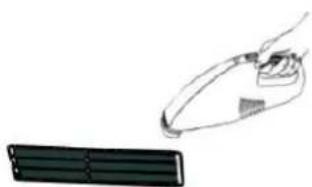
natural_image
Simple line drawing of a hand holding a small object above a rectangular panel (no text or symbols)OPMERKING
natural_image
Line drawing of a portable air conditioner unit with control panel and speaker (no text or symbols)Symbolisch beeld
text_image
QR code with a blue house icon in the center, likely linking to a digital service or application.Scan QR code
Registratie
text_image
09:17 我的家... Learn about DIY homep Duty homep Add Device Create Scene Add Quick Toggle Card Scan All Devices Edit 09:17 Add Device Turn on Bluetooth Bluetooth make your devices more accessible. 00:17 Select 2.4 GHz Wi-Fi Network and enter password. If your Wi-Fi SGP, please set it to be 2.4GHz. Common router setting method × WiFi - 6GHz ✓ WiFi - 2.4GHz XK001 Select Wi-Fi 123456789 Add Manually Decidual Air Conditioning Lighting Sensor Air Conditioner Air Conditioner Air Conditioner Large Home Appliance Next 09:17 Reset the device Reset and hold the RESET Button for a device until the indicator while selected the device manual. Select the status of the indicator light or hear the beep: Blink Slowly Blink Quickly 09:21 Connect your mobile phone to the device's hotspot ● Connect your phone to the hotspot server before: WLAN ✓ SmartLife-XXXX ✓ SLXXX “涂鸦” Wants to Join WLAN Network "SmartLife-E75B"? Cancel Join Go to Connect 10:12 Add Device Connect only color microwave by: PortaspIt Air Conditioner#. Audio successfully DoneBE COOL
text_image
WORKS WITH amazon alexa works with the Google AssistantBE COOL
| Technische gegevens WiFi | |
| Draadloze technologie: | Wifi (WLAN) |
| Radiofrequentie | 2412 MHz-2472 MHz |
| BLE-frequentie | 2402 MHz-2480 MHz |
| Modulatietype | 802.11b: DSSS802.11g: OFDM802.11n (20 MHz): OFDM |
| Vaste frequentie-software | SecureCRT.exe |
| Antenneversterking | 2,5 dBi |
| Antennetype | PCB |
| Zendvermogen | :520dBm |
natural_image
Black BE COOL air purifier device with visible branding and mounting feet (no text or symbols on body)¡ENHORABUENA!
GRACIAS POR ELEGIR UN PRODUCTO DE BE COOL.

text_image
QR code image containing encoded data, no visible human-readable texttext_image
Warning symbols including no hand, flame, open book, and warning trianglewww.becool.at/downloads
natural_image
Diagram of a cylindrical structure with internal vertical bars and a tapered top, no text or symbols presenttext_image
locking opennatural_image
Diagram showing a window with an open door and a side view of a cabinet (no text or symbols)Segundo paso:
natural_image
Line drawing of a portable air conditioner unit with coiled hose and ventilation duct (no text or symbols)Paso 3:
natural_image
Line drawing of two identical air purifiers in a room, one with a black strap and the other with arrows indicating force (no text or symbols)natural_image
Line drawing of hands holding a mobile phone with an arrow indicating the right-hand rule (no text or symbols present)Imagen simbólica
natural_image
Line drawing of a portable water purifier with a bucket, no text or symbols presentImagen simbólica
natural_image
Diagram showing a device with airflow arrows indicating internal flow or movement, alongside its three-sectional views (no text or symbols present)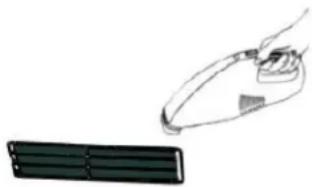
natural_image
Simple line drawing of a hand holding a device above a black rectangular object (no text or symbols)NOTA
natural_image
Line drawing of a portable air conditioner unit with control panel and speaker (no text or symbols)Imagen simbólica
ACTIVIDADES AL PRINCIPIO/FINAL DE LA TEMPORADA
ACTIVIDADES DE FIN DE TEMPORADA
text_image
QR code with a blue house icon in the center, likely linking to a digital service or website.Scan QR code
Registro
text_image
09:17 Add Device Learn about DIY homep Start home Add Quick Toggle Card Scan All Devices Edit 09:17 Add Device Turn on Bluetooth Bluetooth make your devices more accessible. Add Manually Deckput Air Conditioning Lighting Sensors Air Condition (SL-40+50) Air Condition (SL-3) Large Home Appliances Select 2.4 GHz Wi-Fi Network and enter password. If your Wi-Fi SGRP, please set it to be 2.4GHz. Common router setting method × Wi-Fi - 6GHz ✓ Wi-Fi - 2.4GHz XK001 Select Wi-Fi 123456789 Next 09:17 Reset the device Reset and hold the RESET Button for a seconds until the indicator lights instead of become menu. Select the status of the indicator light or hear the beep. Blink Slowly Blink Quickly 09:21 Connect your mobile phone to the device's hotspot ● Connect your phone to the hotspot server button WLAN ✓ SmartLife-XXXX ✓ SL-3XXX "没掉" Wants to Join WLAN Network "SmartLife-E758"? Cancel Join Go to Connect 10:12 Add Device Linking by color microwave.org Portaspit Air Conditioner#. Video successfully DoneBE COOL
text_image
My Devices Costs Authentication All Devices Shortput Center Wireless Settings Browser Live Game Tools Make Us Help Air Conditioner Add Device Air Conditioner Doing them? Add Devices Air Conditioner Added them? Only Add Device Air Conditioner Doing them? Only Done Enter Wi-Fi Information Choose Wi-Fi and enter password Xiaomi 12 Pro 1234567890 Next 14:00:07 4.5.37.07% 4.5.37.07% 4.5.37.07% 4.5.37.07% 4.5.37.07% 4.5.37.07% 4.5.37.07% 4.5.37.07% 4.5.37.07% 4.5.37.07%text_image
WORKS WITH amazon alexa works with the Google AssistantBE COOL
natural_image
Black BE COOL air purifier device with visible branding and mounting feet (no text or symbols on body)GRATULUJEME!
DĚKUJEME, ŽE JSTE SI VYBRALI PRODUKT OD SPOLEČNOSTI BE COOL.
BE COOL


text_image
QR code image containing encoded data, no visible human-readable textPŘED ZAHÁJENÍM MONTÁŽE, INSTALACE, PROVOZU NEBO ÚDRŽBY SI POZORNĚ PŘEČTĚTE NÁVOD K OBSLUZE. DODRŽOVÁNÍM BEZPEČNOSTNÍCH POKYNŮ CHRAŇTE SEBE I OSTATNÍ. NEDODRŽENÍ POKYNŮ MŮŽE MÍT ZA NÁSLEDEK ZRANĚNÍ OSOB A/NEBO POŠKOZENÍ MAJETKU A/NEBO ZTRÁTU ZÁRUKY!
DÜLEŽITÉ INFORMACE O BEZPEČNOSTI, UMÍSTĚNÍ A ELEKTRICKÉM PŘIPOJENÍ.
text_image
Warning symbols including no hand, flame, open book, and warning triangletext_image
locking openKrok 1:
natural_image
Diagram showing a window with an open door and a side view of a cabinet or storage unit (no text or symbols)Krok 2:
natural_image
Line drawing of a portable electronic device with a coiled cable and ventilation duct (no text or symbols)Krok 3:
natural_image
Line drawing of a portable air conditioner unit with attached cable, shown from front and side views (no text or symbols)natural_image
Line drawing of hands holding a handheld device with an arrow indicating motion (no text or symbols)Symbolický obraz
natural_image
Interior view of a window with a white flexible hose and a small appliance on the floor (no visible text or symbols)TIPY PRO SPRÁVNOU APLIKACI
natural_image
Line drawing of a portable water purifier connected to a bucket (no text or symbols)Symbolický obraz
natural_image
Illustration of various household air conditioner units including a large heater, solar panels, and a hand washing machine (no text or symbols present)POZNÁMKA
natural_image
Line drawing of a portable air conditioner unit with control panel and speaker (no text or symbols)Symbolický obraz
AKTIVITY NA ZAČÁTKU/KONCI SEZÓNY
AKTIVITY NA KONCI SEZÓNY
text_image
QR code with a blue house icon in the center, likely linking to a digital service or application.Scan QR code
Registrace
text_image
09:17 我的家... Learn about DIY homep Add Device Create Scene Add Quick Toggle Card Scan All Devices Edit 09:17 Add Device Turn on Bluetooth Bluetooth make your devices more disasurably. Add Manually Decidual Air Conditioning Lighting Sensors Air Credit user (SL-624-FI) Air Comforter (M-7a) Air Comforter (Zyban) Next 09:17 Reset the device People will hold the RESET Button for Standards and the indicator. Use the device to switch manual. Select the status of the indicator light or hear the beep. Blink Slowly Blink Quickly 09:21 Connect your mobile phone to the device's hotspot Connect your phone to the hotspot sheet below: WLAN ✓ SmartLife-XXXX ✓ SL-XXXX "添利" Wants to Join WLAN Network "SmartLife-E769"? Cancel Join Go to Connect 10:12 Add Device Connection to select automaticly Portasoft Air Conditioner... Add successfully Donetext_image
Send Messages Costa Antifunction All Devices Shortcar center Wireless Smartphone Bluetooth Hi-Fi Windows Bluetooth Add Costa Antifunction All Devices Devices to be added: 1 Air Conditioner Add Enter Wi-Fi Information Choose Wi-Fi and enter passwords Xiaomi 12 Pro 1234567800 Next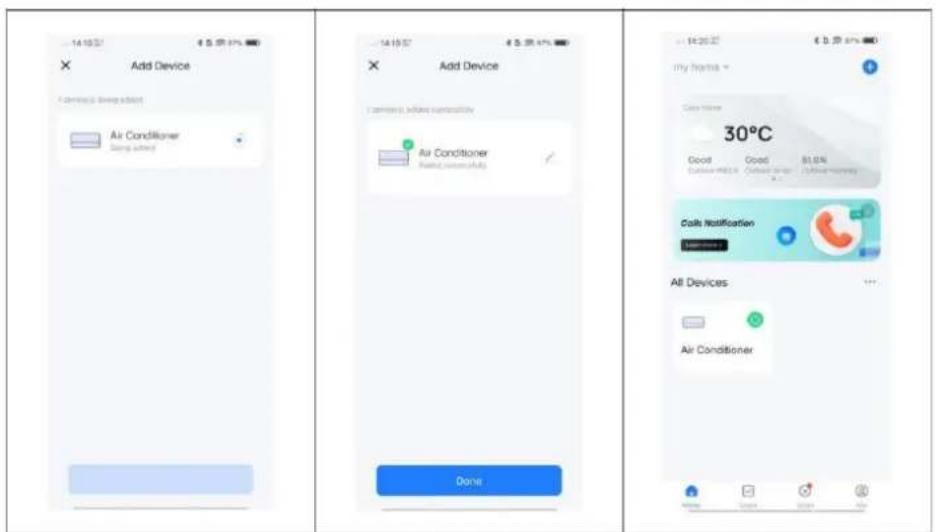
text_image
Add Device Air Conditioner Doing adhered Add Device Air Conditioner Ready successfully Done 30°C Good Excellent weather Good Excellent weather 51.6% Cable Notification All Devices Air ConditionerAplikace funguje také s Amazon Alexa a Google Assistant.

text_image
WORKS WITH amazon alexa works with the Google AssistantBE COOL
natural_image
Black rectangular electronic device labeled 'BE COOL' with no visible text or symbols on its bodyGRATULUJEME!
ĎAKUJEME, ŽE STE SI VYBRALI PRODUKT OD SPOLOČNOSTI BE COOL.

text_image
QR code image containing encoded data, no visible human-readable textPRED ZAČATÍM MONTÁŽE, INŠTALÁCIE, PREVÁDZKY ALEBO ÚDRŽBY SI POZORNE PREČÍTAJTE NÁVOD NA OBSLUHU. DODRŽIAVANÍM BEZPEČNOSTNÝCH POKYNOV CHRÁŇTE SEBA AJ OSTATNÝCH. NEDODRŽANIE POKYNOV MÓŽE MAŤ ZA NÁSLEDOK ZRANENIE OSÔB A/ALEBO POŠKODENIE MAJETKU A/ALEBO STRATU ZÁRUČNÉHO KRYTIA!
DÔLEŽITÉ INFORMÁCIE O BEZPEČNOSTI, UMIESTNENÍ A ELEKTRICKOM PRIPOJENÍ.
text_image
Warning symbols including no hand, flame, open book, and warning triangletext_image
locking openKrok 1:
Rukovät' - plynulo nastavitelná dížka
natural_image
Diagram showing a window with an open door and a side view of a cabinet or storage unit (no text or symbols)Krok 2:
natural_image
Line drawing of a portable electronic device with a coiled cable and handle (no text or symbols)Krok 3:
natural_image
Line drawing of a portable air conditioner unit with attached cable, shown from front and side views (no text or symbols)natural_image
Line drawing of hands holding a mobile phone with an arrow indicating action (no text or symbols)Symbolický obraz
natural_image
Interior view of a room with a white hose and ventilation duct, overlooking a window near trees (no text or symbols visible)TIPY PRE SPRÁVNU APLIKÁCIU
POKYNY NA MANIPULÁCIU
REŽIM CHLADENIA
natural_image
Line drawing of a portable water heater with a bucket and hose (no text or symbols)Symbolický obraz
natural_image
Illustration of various household air purifiers and household appliances, showing internal components and airflow direction (no text or labels)POZNÁMKA
natural_image
Line drawing of a portable air conditioner unit with control panel and speaker (no text or symbols)Symbolický obraz
AKTIVITY NA ZAČIATKU/KONCI SEZÓNY
AKTIVITY NA KONCI SEZÓNY
text_image
QR code with a blue house icon in the center, likely linking to a digital service or application.Scan QR code
Registrácia
text_image
09:17 我的家... Learn about DIY homep Duty homeep Add Device Create Scene Add Quick Toggle Card Scan All Devices Edit 09:17 Add Device Turn on Bluetooth Bluetooth make your devices more accessible. 00:17 Select 2.4 GHz Wi-Fi Network and enter password. If your Wi-Fi SGP, please set it to be 2.4GHz. Common router setting method × WiFi - 6GHz ✓ WiFi - 2.4GHz XK001 Select Wi-Fi 123456789 Add Manually Decidual Air Conditioning Lighting Sensor Air Conditioner Air Conditioner Air Conditioner Large Home Appliance Next 09:17 Reset the device Reset and hold the RESET Button for a device until the indicator while selected the device manual. Select the status of the indicator light or hear the beep: Blink Slowly Blink Quickly 09:21 Connect your mobile phone to the device's hotspot ● Connect your phone to the hotspot server before: WLAN ✓ SmartLife-XXXX ✓ SL-XXXX “涂鸦” Wants to Join WLAN Network "SmartLife-E75B"? Cancel Join Go to Connect 10:12 Add Device Connect only color microwave by: PortaspIt Air Conditioner#. Audio successfully DoneBE COOL
Automatické pridanie zariadenia
text_image
WORKS WITH amazon alexa works with the Google AssistantBE COOL
| Technické údaje WiFi | |
| Bezdrótová technológia: | Wifi (WLAN) |
| Frekvencia rádiového prevádzky | 2412 MHz – 2472 MHz |
| Pracovná frekvencia BLE | 2402 MHz – 2480 MHz |
| Typ modulácie | 802.11b: DSSS802.11g: OFDM802.11n (20 MHz): OFDM |
| Softvér s pevnou frekvenciou | SecureCRT.exe |
| Zosilnenie antény | 2,5 dBi |
| Typ antény | PCB |
| Prenosový výkon | :520 dBm |
natural_image
Black BE COOL air purifier device with visible branding and mounting feet (no text or symbols on body)FELICITĂRI!
VĂ MULȚUMIM CĂ AȚI ALES UN PRODUS BE COOL.
BE COOL


text_image
QR code image containing encoded data, no visible human-readable textVĂ RUGĂM SĂ CITIȚI CU ATENȚIE INSTRUCTIUNILE DE UTILIZARE ÎNAINTE DE A ÎNCEPE ASAMBLAREA, INSTALAREA, FUNCȚIONAREA SAU ÎNTRETINEREA. PROTEJAȚI-VĂ PE DUMNEAVOASTRĂ ȘI PE CEILALȚI RESPECTÂND INSTRUCTIUNILE DE SIGURANȚĂ. NERESPECTAREA INSTRUCTIUNILOR AR PUTEA DUCE LA VĂTĂMĂRI CORPORALE ȘI/SAU DAUNE MATERIALE ȘI/SAU PIERDEREA ACOPERIRII GARANȚIEI!
INFORMATII IMPORTANTE PRIVIND SIGURANTA, AMPLASAREA ŞI CONECTAREA ELECTRICĂ.
text_image
Warning symbols including no hand, flame, open book, and lightning warning signstext_image
locking opennatural_image
Diagram showing a window frame with an arrow indicating vertical motion, alongside a separate view of a rectangular device (no text or symbols present)Pasul 2:
natural_image
Line drawing of a portable air purifier device with coiled hose and ventilation duct (no text or symbols)Pasul 3:
natural_image
Line drawing of a portable air conditioner unit being lifted by a cable, showing front and side views (no text or symbols)natural_image
Line drawing of hands holding a mobile phone with an arrow indicating the device (no text or symbols present)Imagine simbolică
natural_image
Interior view of a room with a white hose and ventilation duct, overlooking a window and trees (no text or symbols visible)SFATURI PENTRU O APLICARE CORECTĂ
natural_image
Line drawing of a portable water purifier with a bucket, no text or symbols presentImagine simbolică
natural_image
Illustration of various household air purifiers and household appliances, including a portable air conditioner and a refrigerator (no text or symbols present)NOTĂ
natural_image
Line drawing of a portable air conditioner unit with front panel and control panel (no text or symbols)Imagine simbolică
ACTIVITĂȚI LA ÎNCEPUTUL/FINALUL SEZONULUI
ACTIVITĂȚI DE SFÂRȘIT DE SEZON
text_image
QR code with a blue house icon in the center, likely linking to a digital service or application.Scan QR code
Înregistrare
text_image
09:17 我的家... Learn about DIY homep Duty homeep Add Device Create Scene Add Quick Toggle Card Scan All Devices Edit 09:17 Add Device Turn on Bluetooth Bluetooth make your devices more accessible. 00:17 Select 2.4 GHz Wi-Fi Network and enter password. If your Wi-Fi SGP, please set it to be 2.4GHz. Common router setting method × WiFi - 6GHz ✓ WiFi - 2.4GHz XK001 Select Wi-Fi 123456789 Add Manually Decidual Air Conditioning Lighting Sensor Air Conditioner Air Conditioner Air Conditioner Large Home Appliance Next 09:17 Reset the device Reset and hold the RESET Button for a device until the indicator while selected the device manual. Select the status of the indicator light or hear the beep: Blink Slowly Blink Quickly 09:21 Connect your mobile phone to the device's hotspot ● Connect your phone to the hotspot server before: WLAN ✓ SmartLife-XXXX ✓ SL-XXXX “涂鸦” Wants to Join WLAN Network "SmartLife-E75B"? Cancel Join Go to Connect 10:12 Add Device Connect only color microwave by: PortaspIt Air Conditioner#. Audio successfully DoneBE COOL
text_image
Enter Wi-Fi Information Choose Wi-Fi and enter password Xiaomi 12 Pro 1234567890 Devices to be added: 1 Add Next Add Device Device not being used Air Conditioner Getting used Add Device Device not being used Air Conditioner Added using this device Air Conditioner Added using this device Done 30°C Good Good Customer status 80.0% Cash Notification All Devices Air Conditionertext_image
WORKS WITH amazon alexa works with the Google AssistantBE COOL
natural_image
Black BE COOL air conditioner unit with visible branding and mounting feet (no text or symbols on device body)GRATULACJE! DZIEKUJEMY ZA WYBRANIE PRODUKTU OD BE COOL.
BE COOL


text_image
QR code image containing encoded data, no visible human-readable textPRZED ROZPOCZĘCIEM MONTAŻU, INSTALACJI, OBSŁUGI LUB KONSERWACJI NALEŻY UWAŻNIE PRZECZYTAĆ INSTRUKCJĘ OBSŁUGI. NALEŻY CHRONIĆ SIEBIE I INNYCH POPRZEZ PRZESTRZEGANIE INSTRUKCJI BEZPIECZEŃSTWA. NIEPRZESTRZEGANIE INSTRUKCJI MOŻE SKUTKOWAĆ OBRAŻENIAMI CIAŁA I/LUB USZKODZENIEM MIENIA I/LUB UTRATĄ GWARANCJI!
WAŻNE INFORMACJE DOTYCZĄCE BEZPIECZEŃSTWA, LOKALIZACJI I PODŁĄCZENIA ELEKTRYCZNEGO.
text_image
Warning symbols including no hand, flame, open book, and warning triangletext_image
locking openKrok 1:
natural_image
Diagram showing a window frame with an arrow indicating direction, alongside a separate view of a cabinet or storage unit (no text or symbols present)Krok 2:
natural_image
Line drawing of a portable air conditioner unit with coiled hose and ventilation slots (no text or symbols)Krok 3:
natural_image
Line drawing of two identical air purifiers in a room, one with a handle and the other with a handle, against a wall-mounted device (no text or symbols)natural_image
Line drawing of hands holding a mobile phone with an arrow indicating the right hand (no text or symbols present)Obraz symboliczny
natural_image
Interior view of a room with a white hose and sheer tubing near a window, overlooking trees (no text or symbols visible)WSKAZÓWKI DOTYCZĄCE PRAWIDŁOWEJ APLIKACJI
natural_image
Line drawing of a portable air conditioner with a bucket and fan (no text or symbols)Obraz symboliczny
natural_image
Diagram showing various components of a portable air conditioner unit with arrows indicating assembly or transformation (no text or labels present)UWAGA
natural_image
Line drawing of a portable air conditioner unit with control panel and speaker (no text or symbols)Obraz symboliczny
DZIAŁANIA NA POCZĄTKU/KOŃCU SEZONU
DZIAŁANIA NA KONIEC SEZONU
text_image
QR code with a blue home icon in the center, likely linking to a digital service or application.Scan QR code
Rejestracja
text_image
09:17 我的家... Learn about DIY homep Add Device Create Scene Add Quick Toggle Card Scan All Devices Edit 09:17 Add Device Turn on Bluetooth Bluetooth make your devices more disasurably. Add Manually Decidual Air Conditioning Lighting Sensors Air Credit user (SL-624-FI) Air Comforter (M-7a) Air Comforter (Zyban) Next 09:17 Reset the device People will hold the RESET Button for Standards and the indicator. Use the device to switch manual. Select the status of the indicator light or hear the beep. Blink Slowly Blink Quickly 09:21 Connect your mobile phone to the device's hotspot Connect your phone to the hotspot sheet below: WLAN ✓ SmartLife-XXXX ✓ SL-XXXX "添利" Wants to Join WLAN Network "SmartLife-E769"? Cancel Join Go to Connect 10:12 Add Device Connection to select automaticly Portasoft Air Conditioner... Add successfully Donetext_image
City Android Cable Authentication All Devices Shortcase center Wireless Bluetooth Air Conditioner Add Device Air Conditioner Doing without Device to be added: 1 Air Conditioner Add Device Air Conditioner Added without Device to be added: 1 Enter Wi-Fi Information Choose Wi-Fi and enter password Xiaomi 12 Pro 1234567890 Next Add Device Air Conditioner Air Conditioner Added without Device to be added: 1 Add Device Air Conditioner Air Conditioner Added without Device to be added: 1 Add Device Air Conditioner Air Conditioner Added without Device to be added: 1 Add Device Air Conditioner Air Conditioner Added without Device to be added: 1 Add Device Air Conditioner Air Conditioner Added without Device to be added: 1text_image
WORKS WITH amazon alexa works with the Google AssistantBE COOL
natural_image
Black industrial air purifier device with 'BE COOL' branding on front (no other text or symbols visible)ČESTITAMO!
HVALA, KER STE IZBRALI IZDELEK BE COOL.

text_image
QR code image containing encoded data, no visible human-readable textPRED ZAČETKOM MONTAŽE, NAMESTITVE, DELOVANJA ALI VZDRŽEVANJA NATANČNO PREBERITE NAVODILA ZA UPORABO. Z UPOŠTEVANJEM VARNOSTNIH NAVODIL ZAŠČITITE SEBE IN DRUGE. NEUPOŠTEVANJE NAVODIL LAHKO POVZROČI TELESNE POŠKODBE IN/ALI MATERIALNO ŠKODO IN/ALI IZGUBO GARANCIJSKEGA KRITJA!
POMEMBNE INFORMACIJE O VARNOSTI, LOKACIJI IN ELEKTRIČNEM PRIKLJUČKU.
text_image
Warning symbols including no hand, flame, open book, and triangular warning signswww.becool.at/downloads

Razen napak in tehničnih sprememb.
www.becool.at
BE COOL
OPIS ENOTE IN OBSEG DOBAVE
text_image
locking openKorak 1:
natural_image
Diagram showing a window with an open door and a side view of a cabinet or storage unit (no text or symbols present)Korak 2:
natural_image
Line drawing of a portable air conditioner unit with coiled hose and ventilation slots (no text or symbols)Korak 3:
natural_image
Line drawing of a portable air conditioner unit with attached cable, shown from front and side views (no text or symbols)natural_image
Line drawing of a hand holding a mobile phone with an arrow indicating the right-hand rule (no text or symbols present)Simbolna podoba
Varnostna navodila za zamenjavo baterije:
natural_image
Line drawing of a portable water dispenser with a bucket, no text or symbols presentSimbolna podoba
natural_image
Illustration of a portable air conditioner with various internal components and airflow direction arrows (no text or symbols)OPOMBA
Naprave nikoli ne uporabljajte brez filtra.
ČIŠČENJE OHIŠJA
natural_image
Line drawing of a portable air conditioner unit with control panel and speaker (no text or symbols)Simbolna podoba
DEJAVNOSTI NA ZAČETKU/KONCU SEZONE
DEJAVNOSTI OB KONCU SEZONE
text_image
QR code with a blue home icon in the center, likely linking to a digital service or application.Scan QR code
Registracija
text_image
09:17 我的家... Learn about DIY homep Add Device Create Scene Add Quick Toggle Card Scan All Devices Edit 09:17 Add Device Turn on Bluetooth Bluetooth make your devices more disasurably. Add Manually Decidual Air Conditioning Lighting Sensors Air Credit user (SL-624-FI) Air Comforter (M-7a) Air Comforter (Zyban) Select 2.4 GHz Wi-Fi Network and enter password. If your WiFi is SHP, please set it to be 2.4GHz. Common router setting method × WiFi - 6GHz √ WiFi - 2.4GHz XK001 Select WiFi 123456789 Next 09:17 Reset the device People will hold the RESET Button for Standards and the indicator under subject to the power menu. Select the status of the indicator light or hear the beep. Blink Slowly Blink Quickly 09:21 Connect your mobile phone to the device's hotspot ● Connect your phone to the hotspot shower below! WLAN ✓ SmartLife-XXXX ✓ SL-XXXX “添利” Wants to Join WLAN Network "SmartLife-E769"? Cancel Join Go to Connect 10:12 Add Device Lowering a selected automaticly Portasoft Air Conditioner... Add success with DoneSamodejno dodajanje naprave
- Preden vzpostavite povezavo, se prepričajte, da je naprava v stanju pripravljenosti.
- Pritisnite gumb WIFI za 5 sekunde, da preklopite v način povezave Wi-Fi, in signalna lučka Wi-Fi bo začela utripati.
BE COOL
text_image
Cable Antifunction All Devices Shortcase center BETR Sendage Bluetooth Air Conditioner Add Enter Wi-Fi Information Choose Wi-Fi and enter password Xiaomi 12 Pro 1234567890 Devices to be added: 1 Air Conditioner Add Next Add Device Device being added Air Conditioner Doing without Add Device Device being added Air Conditioner Doing without Add Device Device being added Air Conditioner Doing without Add Device Device being added Air Conditioner Doing without Add Device Device being added Air Conditioner Doing without Add Device Device being added Air Conditioner Doing without Add Device Device being added Air Conditioner Doing without Add Device Device being added Air Conditioner Doing without All Devices Air Conditionertext_image
WORKS WITH amazon alexa works with the Google AssistantBE COOL
| Tehnični podatki WiFi | |
| Brezžična tehnologija: | Wifi (WLAN) |
| Frekvenca delovanja radijskega signala | 2412 MHz–2472 MHz |
| BLE-frekvenca delovanja | 2402 MHz–2480 MHz |
| Tip modulacije | 802.11b: DSSS802.11g: OFDM802.11n (20 MHz): OFDM |
| Programska oprema s fiksno frekvenco | SecureCRT.exe |
| Ojačitev antene | 2,5 dBi |
| Tip antene | PCB |
| Prenosna moč | :520dBm |
natural_image
Black rectangular electronic device labeled 'BE COOL' on a white surface, no other text or symbols visible.ČESTITAMO!
HVALA VAM ŠTO STE ODABRALI PROIZVOD BE COOL.

Ažurirani korisnički priručnici i drugi jezici
text_image
QR code image containing encoded data, no visible human-readable textMOLIMO VAS, PAŽLJIVO PROČITAJTE UPUTE ZA KORISNIKE PRIJE POČETKA SASTAVLJANJA, INSTALACIJE, RADA ILI ODRŽAVANJA. ZAŠTITITE SEBE I DRUGE PRIDRŽAVANJEM SIGURNOSNIH UPUTA. NEPRIDRŽAVANJE UPUTA MOŽE REZULTIRATI OSOBNIM I/ILI ŠTETAMA NA IMOVINI I/ILI PONIŠTENJEM JAMSTVA!
VAŽNE INFORMACIJE O SIGURNOSTI, LOKACIJI I ELEKTRIČNOM POVEZIVANJU.
text_image
Warning symbols including no hand, flame, open book, and lightning warning signswww.becool.at/downloads

text_image
locking openKorak 1:
Ručka - kontinuirano podesiva duljina
- Izmjerite veličinu prozora.
- Duljinu brtvene ploče prozora prilagodite veličini prozora. Nakon podešavanja brtvene ploče prozora, pričvrstite je gumbima kao što je prikazano.
BE COOL
natural_image
Diagram showing a window with an open door and a side view of a cabinet or storage unit (no text or symbols present)Korak 2:
Postavite fiksnu brtvenu ploču prozora na prozor. (vidi sliku).

natural_image
Line drawing of a portable air purifier device with coiled hose and ventilation slots (no text or symbols)Korak 3:
natural_image
Line drawing of a portable air conditioner unit in a room, showing front and side views with no text or symbolsnatural_image
Line drawing of hands holding a smartphone with an arrow indicating the process (no text or symbols present)Simbolička slika
Sigurnosne upute za zamjenu baterije:
- Kada se daljinski upravljač zamijeni ili odloži, baterije se moraju ukloniti i odložiti u skladu s važećim zakonima jer su štetne za okoliš.
- Stare i nove baterije ne smiju se miješati. Ne miješajte alkalne, standardne (ugljik-cink) ili punjive (nikl-kadmij) baterije.
- Ne bacajte baterije u vatru. Baterije mogu eksplodirati ili iscuriti.
- Ako se daljinski upravljač neće koristiti dulje vrijeme, izvadite baterije.
OBAVIJEST
Ako daljinski upravljač treba zamijeniti ili zbrinuti, baterije se moraju izvaditi i pravilno zbrinuti u skladu s važećim propisima!
natural_image
Line drawing of a portable water purifier with a bucket, no text or symbols presentSimbolička slika
U suhom načinu rada, ventilator prema zadanim postavkama radi malom brzinom i brzina vjetra se ne može podesiti.
Temperatura se ne može podešavati.
natural_image
Diagram showing various components of an air conditioner unit with arrows indicating assembly or transformation (no text or labels present)OBAVIJEST
natural_image
Line drawing of a portable air conditioner unit with front panel and control panel (no text or symbols)Simbolička slika
AKTIVNOSTI NA POČETKU/KRAJU SEZONE
AKTIVNOSTI ZA KRAJ SEZONE
text_image
QR code with a blue house icon in the center, likely linking to a digital service or application.Scan QR code
Registracija
text_image
09:17 我的家... Learn about DIY homep Add Device Create Scene Add Quick Toggle Card Scan All Devices Edit 09:17 Add Device Turn on Bluetooth Bluetooth make your devices more disasurably. Add Manually Decidual Air Conditioning Lighting Sensors Air Credit user (SL-624-FI) Air Comforter (M-7a) Air Comforter (Zyban) Select 2.4 GHz Wi-Fi Network and enter password. If your Wi-Fi SHP, please set it to be 2.4GHz. Common router setting method × Wi-Fi - 6GHz ✓ Wi-Fi - 2.4GHz XK001 Select Wi-Fi 123456789 Next 09:17 Reset the device People will hold the RESET Button for Standards and the indicator under subject to the power menu. Select the status of the indicator light or hear the beep. Blink Slowly Blink Quickly 09:21 Connect your mobile phone to the device's hotspot ● Connect your phone to the hotspot shower below! WLAN ✓ SmartLife-XXXX ✓ SL-XXXX “添利” Wants to Join WLAN Network "SmartLife-E769"? Cancel Join Go to Connect 10:12 Add Device Lowering added automaticly Portasoft Air Conditioner... Add success with Donetext_image
WORKS WITH amazon alexa works with the Google AssistantBE COOL
| Tehnički podaci WiFi-ja | |
| Radio tehnologija: | Wi-Fi (WLAN) |
| Radna frekvencija radija | 2412 MHz - 2472 MHz |
| Radna frekvencija BLE- a | 2402 MHz - 2480 MHz |
| Vrsta modulacije | 802.11b: DSSS802.11g: OFDM802.11n (20 MHz) : OFDM |
| Softver s fiksnom frekvencijom | SecureCRT.exe |
| Pojačanje antene | 2,5 dBi |
| Vrsta antene | PCB |
| Prijenosna snaga | :520dBm |
| Tehničke informacije | |
| broj predmeta | BC14KL2402FW |
| Učinkovitost hlađenja | 14 000 BTU/h |
| Potrošnja energije (hlađenje) | 4.100 vata |
| Maks. ulaz | 1.520 vata |
| Ulazni napon | 220 – 240 V |
| frekvencija | 50 Hz |
| Frekvencija prijenosa WIFI | 2,4 GHz |
| Izhodna moč oddajanja: | max. 100 mW |
| Rashladno sredstvo/punjenje | R290 |
| Energetska učinkovitost EER/COP | 2.7 |
| Klasa energetske učinkovitosti | A/A+ |
| Kruženje zraka | 500m3/h |
| Razina buke (snaga zvuka) | 65 dB(A) |
| Težina | 35 kg |
| Dimenzije | 470x800x404 mm |
| Kontakt adresa za dodatne informacije | Schuss Home Electronic GmbHScheringgasse 3, A-1140 BečTel: +43 (1) 97 0 21 – 0Servisna linija: +43 (1) 97 0 21 – 502www.becool.atFB broj : 236974 t / FB sud: Beč |
BE COOL
| Zahtjevi za informacije za jednocijevne i dvocijevne klima uređaje | P | ||
| Podaci koji identificiraju model(e) na koje se podaci odnose: | |||
| Opis | simbol | Vrijednost | Jedinica |
| Nominalni kapacitet hlađenja | P_rated za hlađenje | 3.898 | kW |
| Nazivna snaga za grijanje | P_rated za grijanje | 2.932 | kW |
| Nazivna potrošnja energije za hlađenje | P_EER | 1.419 | kW |
| Nazivna potrošnja energije za grijanje | P_COP | 1.060 | kW |
| Nominalni omjer energetske učinkovitosti | EER_d | 2,75 | - |
| Nominalni koeficijent snage | COP_d | 2,77 | - |
| Podaci koji identificiraju model(e) na koje se podaci odnose: | |||
| Opis | simbol | Vrijednost | Jedinica |
| Potrošnja energije u isključenom načinu rada termostata | P_TO | N/A | W |
| Potrošnja energije u stanju pripravnosti P | P_SB | Wi-Fi isključen: 0,9 WIFI uključen: 1.5 | W |
| Potrošnja energije jednokanalnih ili dvokanalnih uređaja (zasebno navesti za hlađenje i grijanje) | Q_SD | SD: 1,419 (hlađenje) SD: 1,060 (grijanje) | kWh/h |
| Razina zvučne snage | L_WA | 64,9 | dB(A) |
| Potencijal globalnog zagrijavanja | GWP | 3 | kg CO_2 eq. |
| Kontaktni podaci za daljnje informacije | Schuss Home Electronic GmbH Scheringgasse 3 1140 Beč, Austrija Telefon: +43 (1) 97 0 21 – 0 www.becool.at | ||
BE COOL
JAMČITI
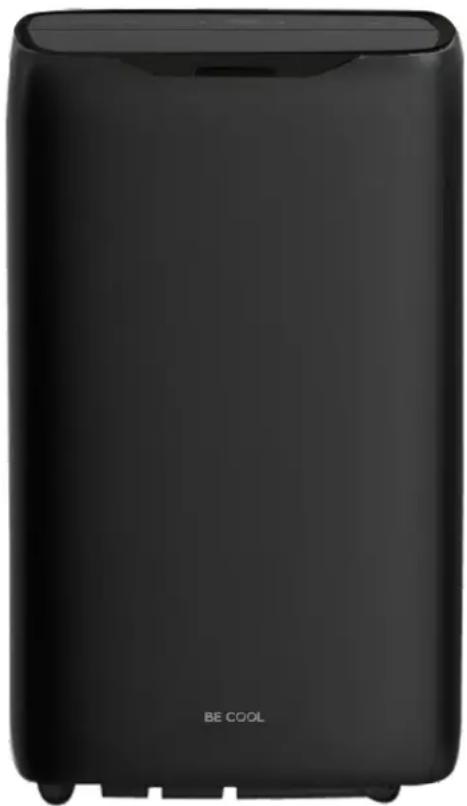
Mobile air conditioner BC14KL2402FW
natural_image
Black BE COOL air purifier device with visible branding and mounting feet (no text or symbols on body)CONGRATULATIONS!
THANK YOU FOR CHOOSING A PRODUCT FROM BE COOL.
BE COOL


Latest user manuals and other languages
Download the latest user manuals in various languages via the link www.becool.at/downloads or scan the displayed QR code. Follow the instructions on the website.

text_image
QR code image containing encoded data, no visible human-readable textPLEASE READ THE OPERATING INSTRUCTIONS CAREFULLY BEFORE STARTING ASSEMBLY, INSTALLATION, OPERATION OR MAINTENANCE. PROTECT YOURSELF AND OTHERS BY FOLLOWING THE SAFETY INSTRUCTIONS. FAILURE TO FOLLOW INSTRUCTIONS COULD RESULT IN PERSONAL INJURY AND/OR PROPERTY DAMAGE AND/OR LOSS OF WARRANTY COVERAGE!
IMPORTANT SAFETY, LOCATION AND ELECTRICAL CONNECTION INFORMATION.
text_image
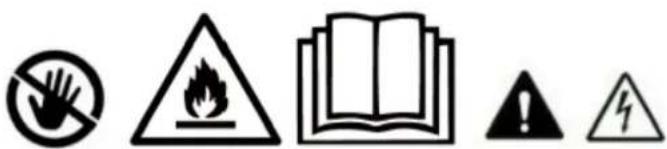
Warning symbols including no hand, flame, open book, and warning triangle- Please read all instructions carefully before using the appliance.
- Only use this appliance in accordance with the guidelines in the operating instructions. Any other use not recommended by the manufacturer could result in fire, electric shock or personal injury.
- This appliance is intended exclusively for air-conditioning domestic living spaces and must not be used for any other purpose.
- The unit is not suitable for continuous or precision operation and should not be used for cooling electrical systems (e.g.: in server rooms).
- It is forbidden to adapt or modify the characteristics of this appliance in any way and use only spare parts and accessories recommended by the manufacturer (failure to do so will invalidate the guarantee and warranty).
- Always and only contact customer service centres authorised by the manufacturer for any repairs to the appliance, mains plug or cable. You can find the service centres online at www.becool.at.
- Remove the packaging and make sure that the air conditioner is not damaged. If in doubt, do not use the air conditioner and contact the service centre or your dealer.
- Keep children away from packaging material. Danger of suffocation if swallowed!
- If the power supply cable is damaged, it must be replaced by the manufacturer or an authorised service centre in order to avoid all possible risks.
- The unit must be installed in accordance with local installation and operating regulations for electrical installations.
BE COOL
- The electrical socket in which you connect the unit must not be defective or loose and must be suitable for the required current load and, above all, reliably earthed. If in doubt, have your electrical installation checked by a qualified electrician.
- Before connecting to the mains, you must check that the type of current and mains voltage correspond to the information on the unit type plate on the back.
- Avoid using an extension cord as it could overheat and cause a fire.
- Do not twist or bend the mains cable.
- This appliance may only be used by adults.
- Children under the age of 8 and persons with reduced physical, mental, sensory or spiritual capabilities or lack of experience and knowledge should not use this appliance unless they have been given supervision or instruction concerning use of the appliance in a safe way and understand the hazards involved.
- Do not let children play with the packaging and also make sure that children do not play with the appliance.
- Do not use the air conditioner outdoors.
- Do not use the appliance with wet hands.
- Never operate the unit in rooms where gas, oil or sulphur are present.
- Do not place the appliance near heat sources (e.g.: next to heating systems and gas boilers) and avoid direct sunlight.
- Keep a minimum distance of at least 50 cm from flammable substances (e.g. alcohol, etc.) or vessels under pressure (e.g. spray containers).
- Do not use the air conditioner near water or high humidity, e.g. in a damp basement, next to a swimming pool, bathtub or shower. Make sure that no water enters the unit.
- Do not place heavy or hot objects on the appliance and never cover the appliance.
- Never insert fingers, pens or other objects into the unit and make sure that the air inlet and outlet are never blocked.
- Always switch off the appliance before unplugging it from the mains.
- Do not pull on the mains cable to disconnect the appliance from the mains power. Always pull on the plug to unplug the mains cable. Do not handle the plug with wet hands to avoid electric shock.
- Unplug the appliance when you are not using it, before cleaning it, when it needs maintenance or when it is moved from one place to another.
- If the unit has a defect, switch it off with the on/off button on the control panel and contact the customer hotline.
- Keep the air conditioner in good condition by maintaining and cleaning the unit.
- The air filter must be cleaned at least once a week.
- Store the unit upright in a safe, dry place out of reach of children when not in use. Do not cover the unit with plastic packaging.
- Store the unit in a room without operating ignition sources (e.g. open fire, an operating gas appliance or an electric heater with an open heat source).
- The air conditioner is to be transported in an upright position or slightly on its side. Empty the internal condensation water tank beforehand. Wait at least one hour after transporting the unit before switching it on.
- Always and only contact service centres authorised by the manufacturer for any repairs to the appliance, mains plug or cable.
- Do not use any means to accelerate or eliminate the defrosting process, the appliance does this on its own.
BE COOL
- If you have any questions about maintenance, you can contact the customer hotline/service centre authorised by the manufacturer.
WARNING
The main switch and the On/Off switch should not be used as the sole means of disconnecting power. Always unplug the appliance before starting maintenance or moving the appliance.
To avoid the risk of electric shock, unplug the appliance from the mains when not in use - also before any cleaning.
SPECIFIC INFORMATION ON REFRIGERANT R290
- R290 is a refrigerant in accordance with EC environmental specifications.
- The refrigerant is odourless.
- The appliance must be installed in a room where there are no sources of ignition in operation (e.g.: open fire, gas and electrical appliances in operation with an open heat source).
- You must not perforate or burn the air conditioner.
- Care must be taken not to drill into the cooling circuit.
- Non-ventilated spaces where the unit is installed, operated or stored must be constructed in such a way that any refrigerant leaks do not accumulate. This prevents fire or explosion hazards caused by ignition of the refrigerant by electric cookers, cookers or other sources of ignition.
- The unit must be stored in such a way that no mechanical damage can occur.
- Persons working on or intervening in a refrigeration circuit must be in possession of a valid certificate issued by an authorised authority attesting to their expertise in handling refrigerants through an assessment specification recognised by industry associations.
- Repair work must be carried out in accordance with the instructions provided by the manufacturer of the unit. Repair and maintenance operations that require the use of additional qualified personnel must be carried out under the supervision of the qualified person responsible for handling flammable refrigerants.
BE COOL


RECYCLING
The packaging materials can be recycled. Therefore, it is recommended to dispose of them in sorted waste.
DISPOSAL
The symbol "crossed-out dustbin" requires the separate disposal of waste electrical and electronic equipment (WEEE). Electrical and electronic equipment may contain hazardous and environmentally dangerous substances. Therefore, do not dispose of this in unsorted residual waste, but at a designated collection point for waste electrical and electronic equipment. By doing so, you are helping to protect resources and the environment.
For more information, please contact your dealer or local authorities.
DISPOSAL OF THE BATTERIES
BATTERY DISPOSAL
In accordance with Legislative Decree 188 of November 20, 2008 on the implementation of Directive 2006/66/EC on batteries, accumulators and related waste, the crossed-out wheeled garbage can symbol on the battery indicates that it is forbidden to dispose of used batteries in household waste.batteries and accumulators contain highly polluting substances. The user is obliged to dispose of used batteries at the collection points in the municipality or in the appropriate containers. The service is free of charge. In this way, the legal requirements are complied with and the environment is protected.
These symbols can be found on batteries:
Li = battery contains lithium
Al = battery contains alkali
Mn = battery contains manganese
CR 2025 (Li); AA (Al, Mn); AAA (Al, Mn)
DECLARATION OF CONFORMITY

We hereby certify that this article complies with the essential requirements, regulations and directives of the EU.
You can view the detailed declaration of conformity at any time under the following link: www.becool.at/downloads
Errors and technical modifications excepted.
www.becool.at
BE COOL
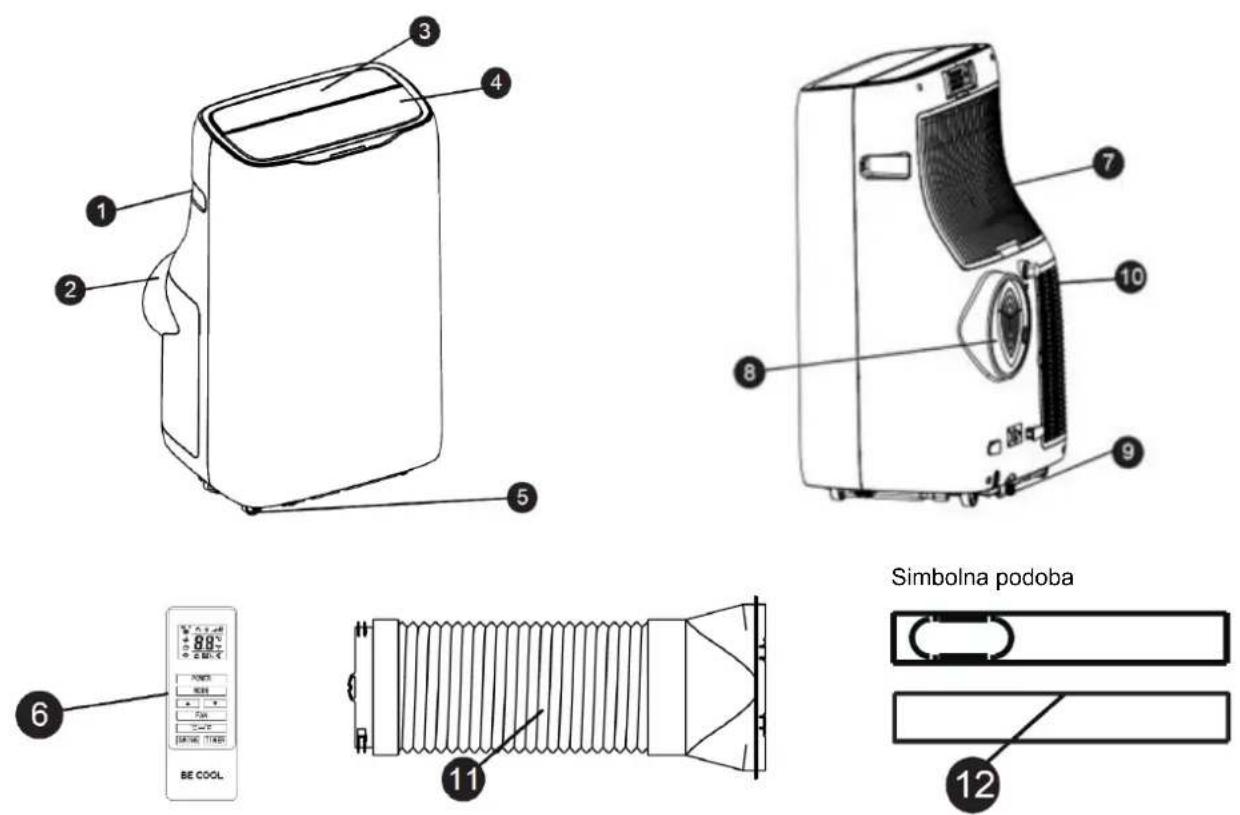
DESCRIPTION OF THE UNIT AND SCOPE OF DELIVERY
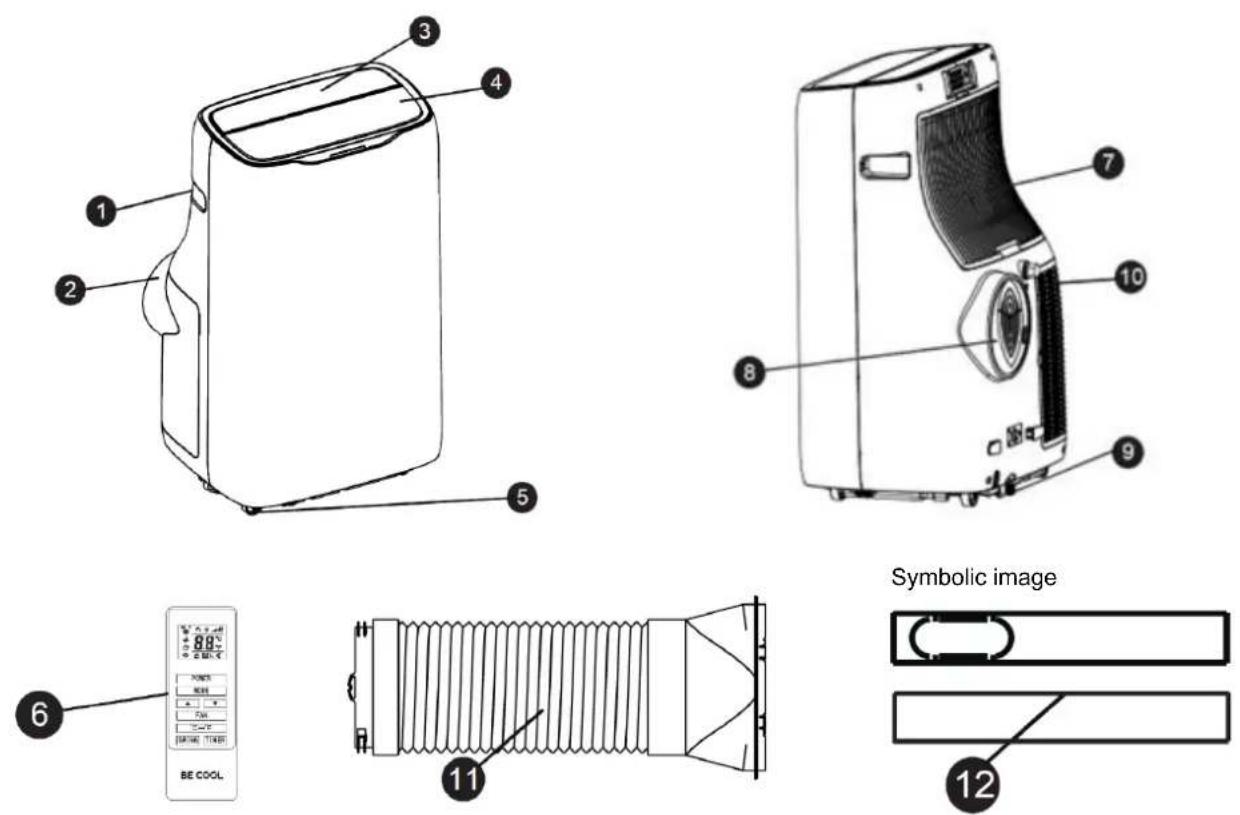
- Handle (both sides)
- Air inlet
- Control panel
- Air outlet grille
- Rollers
-
Remote control
-
Upper air inlet
- Outlet for exhaust air
- Drainage nozzle
- Air inlet
- Exhaust air hose with adapter
- Window sealing
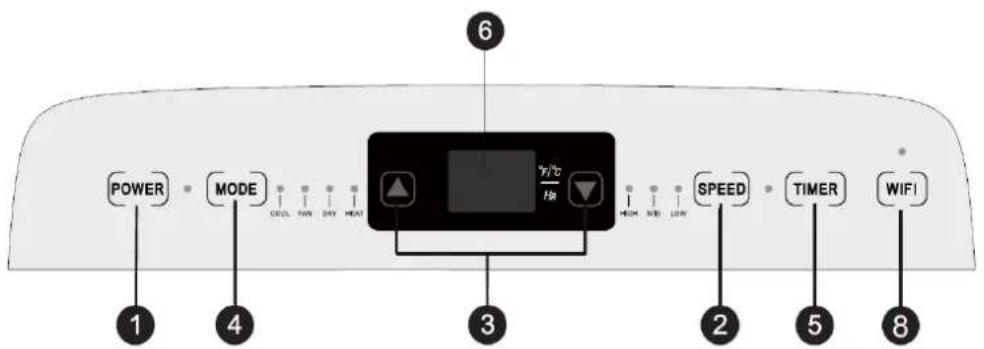
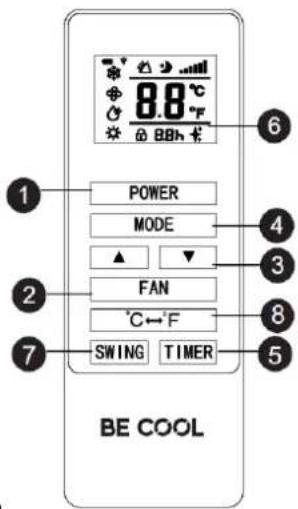
CONTROL PANEL AND REMOTE CONTROL
text_image
POWER MODE CEUL FAN DAY HEAT 6 3 SPEED TIMER WIFI 1 4 2 5 8BE COOL
- On/Off switch
Press the button to switch the air conditioner on or off.
- Speed button
Press the button to select the high/medium/low speed.
- Temperature/time setting button
Press it in cooling mode to increase/decrease the set temperature. Press it in time mode to adjust the on/off time. Press the "High" and "Low" buttons simultaneously to switch between Fahrenheit and degrees Celsius.
- Mode button
Press the button to select between cooling, ventilation, drying and heating.
- Timer button
Press the key in standby mode to set the switch-on time. Press this key in on mode to set the switch-off time.
- Temperature/time display window
This window shows the set temperature and time.
- Pan key
Press the key for the swivel function.
- WiFi button
Press the button to turn on the WiFi function, the device must be in standby mode.
- Temperature switch button
The key is used to switch between ^ C and ^ F .
text_image
8.8°C 88h POWER MODE FAN °C←°F SWING TIMER BE COOLCOMMISSIONING
PREPARATION FOR USE
IMPORTANT!
Leave the appliance upright for at least 2 hours before operating it for the first time and make sure that the condensation water outlet is well closed.
- With a properly earthed socket, place the unit on a level surface near the window.
- The distance to walls or other objects must be at least 50 cm.
- Before using the unit, make sure that both air inlet and air outlet are free of obstructions and not blocked.
- Observe the instructions in the chapter "Important information on safety, location and electrical connection".
BE COOL
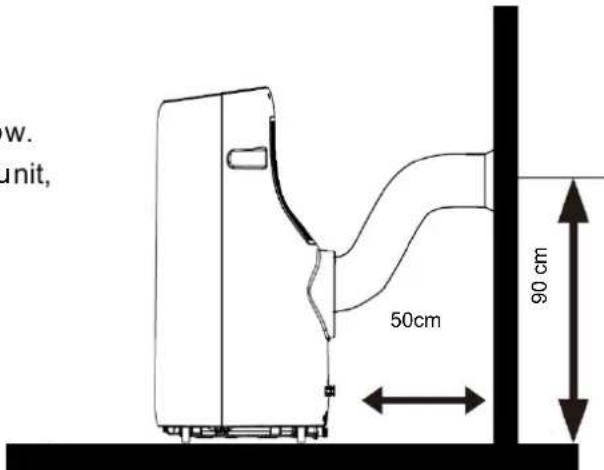
PLACEMENT AND INSTALLATION
Placement
- Place the unit on the horizontal floor near the window.
- For proper ventilation and best performance of the unit, the unit should be at least 50 cm away from the surroundings.
text_image
W. unit, 50cm 90 cmInstallation
Mounting the exhaust air pipe
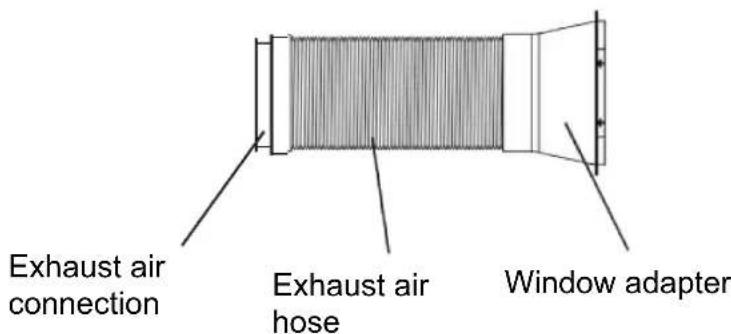
text_image
Exhaust air connection Exhaust air hose Window adapterInstallation of the window seal

text_image
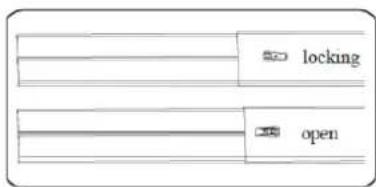
Window sealing plate 1 Window sealing plate 2 ButtonStep 1:
Handle - infinitely adjustable length
text_image
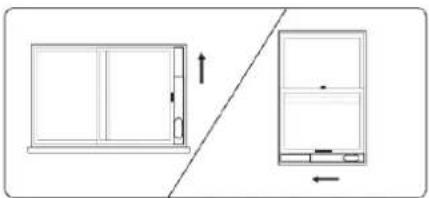
locking open- Measure the size of the window.
- Adjust the length of the window sealing plate to the size of the window. After you have adjusted the window sealing plate, fasten it with knobs (see illustration).
BE COOL
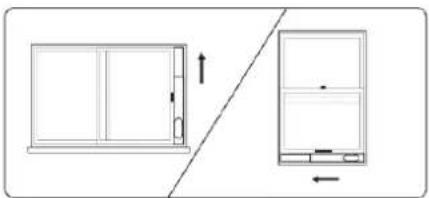
natural_image
Diagram showing a window with an open door and a side view of a cabinet or storage unit (no text or symbols)Step 2:
Install the fixed window sealing plate on the window. (see illustration).
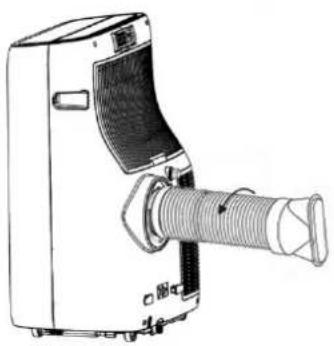
natural_image
Line drawing of a portable air conditioner unit with coiled hose and ventilation slots (no text or symbols)Step 3:
Turn the exhaust air hose (exhaust air joint) counterclockwise into the exhaust air outlet of the rear housing.
Step 4:
Attach the exhaust air pipe assembly (window adapter) to the window seal plate assembly and screw it tight.
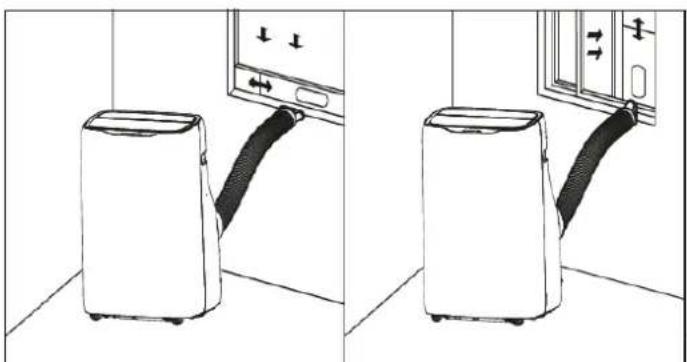
natural_image
Line drawing of a portable air conditioner unit with attached cable, shown from front and side views (no text or symbols)Overall view diagram after assembly
NOTE
If the window opening is smaller than the minimum length of the window slider set, cut the end without the hatch until it fits into the window.
Never cut into the hole of the window slider set.
BE COOL
| ATTENTION!!!Please observe the following instructions for both installations: | The exhaust air hose must be as short as possible and as little bent as possible so that the air can flow freely. |
| The air conditioner should be placed on a solid floor to minimise noise and vibration. Place the unit on a straight, level surface that is strong enough to support the unit. | |
| The appliance must be placed within reach of a properly earthed socket. Never obstruct the air intake or exhaust openings of the appliance. | |
| The exhaust air hose is precisely matched to this appliance. Do not extend it or replace it with another hose, otherwise you could damage the appliance |
First use of the remote control or replacement of the betterien:
- Remove the cover on the back of the remote control.
- Insert two "AAA" 1.5V batteries in the correct position (see instructions in the battery compartment).
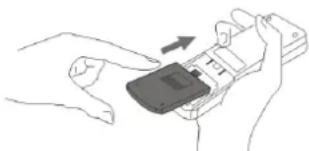
natural_image
Line drawing of hands holding a mobile phone with an arrow indicating the right hand (no text or symbols present)Symbolic image
Safety instructions for battery replacement:
- When the remote control is replaced or disposed of, the batteries must be removed and disposed of in accordance with current legislation as they are harmful to the environment.
- Do not mix old and new batteries. Do not mix alkaline, standard (carbon zinc) or rechargeable (nickel cadmium) batteries.
- Do not dispose of batteries in fire. Batteries can explode or leak.
- If the remote control will not be used for a long time, remove the batteries.
NOTE
If the remote control needs to be replaced or disposed of, the batteries must be removed and disposed of properly according to valid regulations!
Also remove the batteries if the remote control will not be used for a long time to prevent corrosion damage.
If the batteries need to be replaced, always replace both with ones of the same type and state of charge.
BE COOL
RECOMMENDATION FROM BE COOL
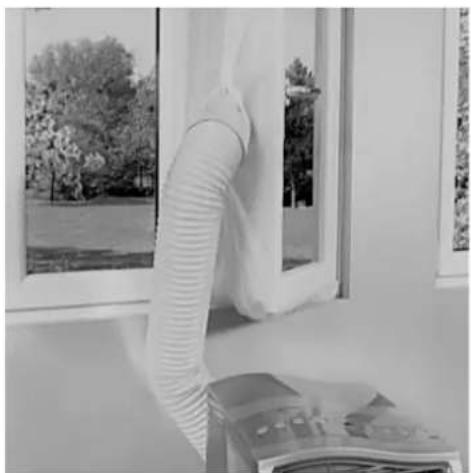
We recommend a SHE Hot-Air Stop when installing on windows, balcony doors or sliding doors.
These offer the following advantages:
- No warm air flows into the living space→ therefore energy saving
- Simple and quick assembly
• Durable, water-repellent material - Opening and closing possible
- Washable
Available from your air conditioner supplier.
natural_image
Interior view of a room with a large white hose and a small appliance on the floor, overlooking a window with trees and a tree in the background (no text or symbols visible)TIPS FOR CORRECT APPLICATION
Find here some hints to achieve the optimal performance of the air conditioner:
| Close windows and doors in the room to be air-conditioned. | 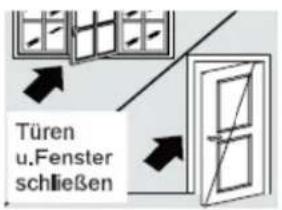 |
| Protect the room from direct sunlight with curtains, blinds or shutters.This will save you energy. | 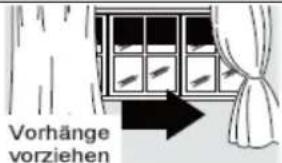 |
| Do not place any objects on the appliance and do not cover the air inlet and outlet. Keep the grilles clear. | |
| Make sure that no heat sources are operating in the room. | |
| Never use the appliance in very humid rooms (e.g. laundry rooms). | |
| Do not use the appliance outdoors. | |
| Make sure that the air conditioner is placed on a level floor. | |
HANDLING INSTRUCTIONS
COOLING MODE
- After switching on, the default setting is cooling mode. After the cooling mode is selected, the cooling indicator lights up.
- Press the up/down button to adjust the set temperature from 16^ to 30^ .
- Press the speed button to select between the speed levels High/Medium/Low.
BE COOL
VENTILATOR MODE
- After the fan mode has been selected with the remote control, the wind indicator lights up.
- Press the speed button to select between the speed levels High/Medium/Low.
The temperature cannot be adjusted.
DEHUMIDIFICATION MODE
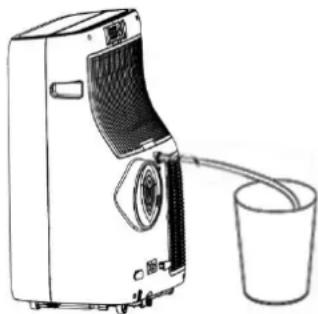
In dry mode, the dry indicator light is activated.
Remove the water plug on the back of the appliance as shown in the illustration. Insert the water pipe (not supplied) and place the other end in a water tank or drain.
In dry mode, the compressor starts when the room temperature is higher than ≥17^ (63T). The compressor follows the following rules:
- When the room temperature is ≤15^ ( 59^ ), the compressor is switched off.
- When the room temperature is ≥ 17^ (63°F), the compressor is restarted. (The restart takes place after three minutes due to the protective function).
natural_image
Line drawing of a portable water purifier with a bucket, no text or symbols presentSymbolic image
In dry mode, the fan runs at low speed by default and the wind speed cannot be adjusted.
The temperature cannot be adjusted.
Note: The exhaust pipe should be removed in dry mode as this may affect performance and the "FL" water level alarm light will illuminate.
HEATING MODE
- After selecting the heating mode by the remote control, the wind indicator lights up.
- Press the up/down button to adjust the set temperature from 16^ to 30^ .
- Press the speed button to select between high/medium/low speed.
TIMER MODE
- In standby mode, press the timer button to set the switch-on time. Press the up and down buttons to set between 0 and 24 hours and the timer indicator lights up.
- After the air conditioner is switched on, press the timer button to set the switch-off time. Press the up and down buttons to set between 0 and 24 hours and the timer indicator lights up.
BE COOL
MAINTENANCE AND CLEANING
CLEAN AIR FLITER
To ensure efficient operation of the air conditioner, clean the air filter after each week of operation.
- Before cleaning, switch off the appliance, wait a few minutes and then unplug the appliance to disconnect it from the mains.
- Pull off the exhaust hose.
- The air conditioner has a total of 2 air filters:
Open the two air inlet grilles on the back and remove the filter underneath as shown in the picture:
- To remove the dust accumulated in the air filters, use a hoover.
- If the air filter is very dirty, you can immerse it in hot water and rinse it several times - however, the water temperature should not exceed 40^ C.
- After washing, let the air filter dry out well and then replace them.
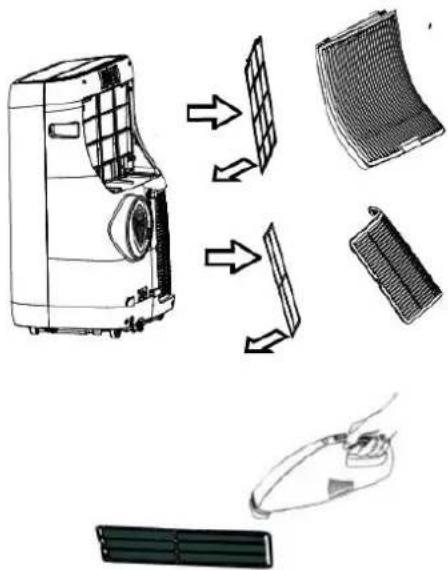
natural_image
Diagram showing various components of a portable air conditioner with arrows indicating flow or assembly (no text or labels present)NOTE
Never use the appliance without a filter.
CLEANING THE HOUSING
Before cleaning, switch off the appliance, wait a few minutes and then always unplug the appliance from the electrical mains.
Clean the unit with a moderately damp cloth and then wipe it with a dry cloth.
- For safety reasons, never clean the appliance with water. This could be dangerous.
- Never use petrol, alcohol or solvents for cleaning.
- Do not spray insecticides or similar agents on the air conditioner.
BE COOL
EMPTY WATER TANK MANUALLY
The unit has an automatic water evaporation system. The circulation of the condensed water cools the compressor, which not only improves the cooling performance but also saves energy.
If the water tank is still full, "FL" appears on the control panel display and the air conditioner switches off automatically. The unit is locked until the water tank is emptied.
To empty the condensation water tank, follow the steps below:
- Pull the mains plug out of the socket.
- Place a collecting vessel under the condensation water outlet at the back of the appliance, carefully remove the cap from the outlet and allow the water to drain into the collecting vessel.
- At the end, you can tilt the air conditioner slightly - but not more than 30^ .
- Once the tank is completely empty, carefully reinsert the plug into the water outlet.
- Plug in the mains plug and restart the unit.
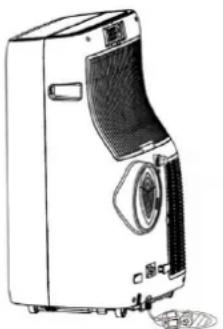
natural_image
Line drawing of a portable air conditioner unit with control panel and front-mounted screen (no text or symbols)Symbolic image
ACTIVITIES AT THE BEGINNING/END OF THE SEASON
END OF SEASON ACTIVITIES
- Carefully empty the condensation water tank completely into a suitable container as described in the section "Emptying the water tank".
- Run the air conditioner in fan mode for 2 hours until the unit is completely dry inside.
- Switch off the unit and disconnect the mains plug.
- Clean the filter and push it back in after it has dried (see section "Cleaning the air filter").
- Remove the exhaust hose and accessories and stow them carefully.
- Remove the batteries from the remote control
- Pack the unit and store it in a cool, dry place.
CONTROLS AT THE BEGINNING OF THE SEASON
- Check that the power supply cable and the socket are in order and that the earthing is functional.
- Make sure that the plug is carefully fitted in the condensation water outlet and that the filters are inserted.
- Follow the installation and safety instructions carefully.
BE COOL
REMEDYING THE PROBLEMS
The following table lists common problems and maintenance procedures for this series of portable air conditioners. If the machine exhibits unusual operating conditions, you can refer to this table for easy diagnosis and maintenance. If the problem persists, we recommend that you contact qualified service personnel.
| PROBLEM | POSSIBLE CAUSE | SOLUTION |
| The air conditioner does not work | The display shows 'FL | Switch off the air conditioner, disconnect the power supply and drain the condensation water. |
| The timer OFF function is activated. | The air conditioner can only be switched on again after 3 minutes after it has been switched off. | |
| The air conditioner only works for a short time. | Restricted passage of air through the hose. | Attach the exhaust air hose correctly and keep it as short as possible without bending. |
| Air outlet is blocked by something. | Check and remove any obstacles blocking the airway. | |
| Unpleasant odour appears in the room during operation. | Air filter dirty | Clean the air filter according to the description. |
| The air conditioner works, but the room does not cool down. | Open windows, doors and/or curtains that are not drawn. | Close windows and doors and draw the curtains. Adhere to the "Tips for correct use" listed above |
| The temperature you have set is too high. | Set a lower temperature. | |
| The air inlet grille is blocked/dirty. | Make sure the air intake grille is clear/clean the air filter. | |
| There are heat sources in the room (stove, hair dryer, etc.). | Switch offheat sources: | |
| Exhaust air hose is separated from the unit. | Attach the exhaust air hose to the opening on the back of the unit. | |
| The technical specifications of the unit are not sufficient for the room in which it is placed. | ||
| While the unit is in operation, there is an unpleasant smell in the room. | Ventilation filter is clogged | Clean the filter as described above. |
| The unit does not work for about 3 minutes after you restart it. | An automatic protection function prevents the unit from being restarted earlier than 3 minutes after the last switch-off. | Wait. This waiting time is part of the normal functioning of the unit. |
BE COOL
ERROR CODES
| Error code | Error description |
| E1 | Error of the temperature sensor of the coil |
| E2 | Error of the indoor temperature sensor |
| E4 | Frost protection: The temperature of the evaporator is too low and the entire air conditioner switches off. If the temperature rises above 8 degrees, the protection is cancelled and the previous operating state is restored. |
Smart Home Wi-Fi Connection Guide
IMPORTANT
Please note that only 2.4GHz networks are supported!
Transmission power: max. 100mW
App installation
Download the "Smart life" app from the Play Store (Android) or the App Store (iOS). The following QR code will take you directly to the app download:

text_image
QR code with a blue house icon in the center, likely linking to a digital service or application.Scan QR code
Registration
If you do not yet have a Smart Life account, you can register or log in with a verification code that will be sent to you via SMS.
To register:
- Navigate to the registration area in the app.
- The system will automatically detect your country or region. You also have the option of selecting the country code manually. Enter your mobile phone number or email address and tap "Continue."
- If you choose the mobile phone number option, enter the verification code you received via SMS. Then set a password and tap "Confirm" to complete the registration.
Adding a device manually:
- When the air conditioner is in standby mode, press and hold the WIFI button on the control panel for 5 seconds to enter Wi-Fi connection mode. The Wi-Fi signal light will start flashing.
BE COOL
- Open the Smart Home app and tap "+" in the upper right corner to add a new device via the network.
- Make sure the operating light is flashing, tap "Confirm" that the light is flashing, and follow the instructions on the screen.
- Select the Wi-Fi network (note: the network must be in the 2.4 GHz band) and enter the password. The device will start the pairing process and connect to the app.
- Once the device has been successfully configured, the air conditioner will be displayed on the Smart Home page. Tap on it to access the device controls.
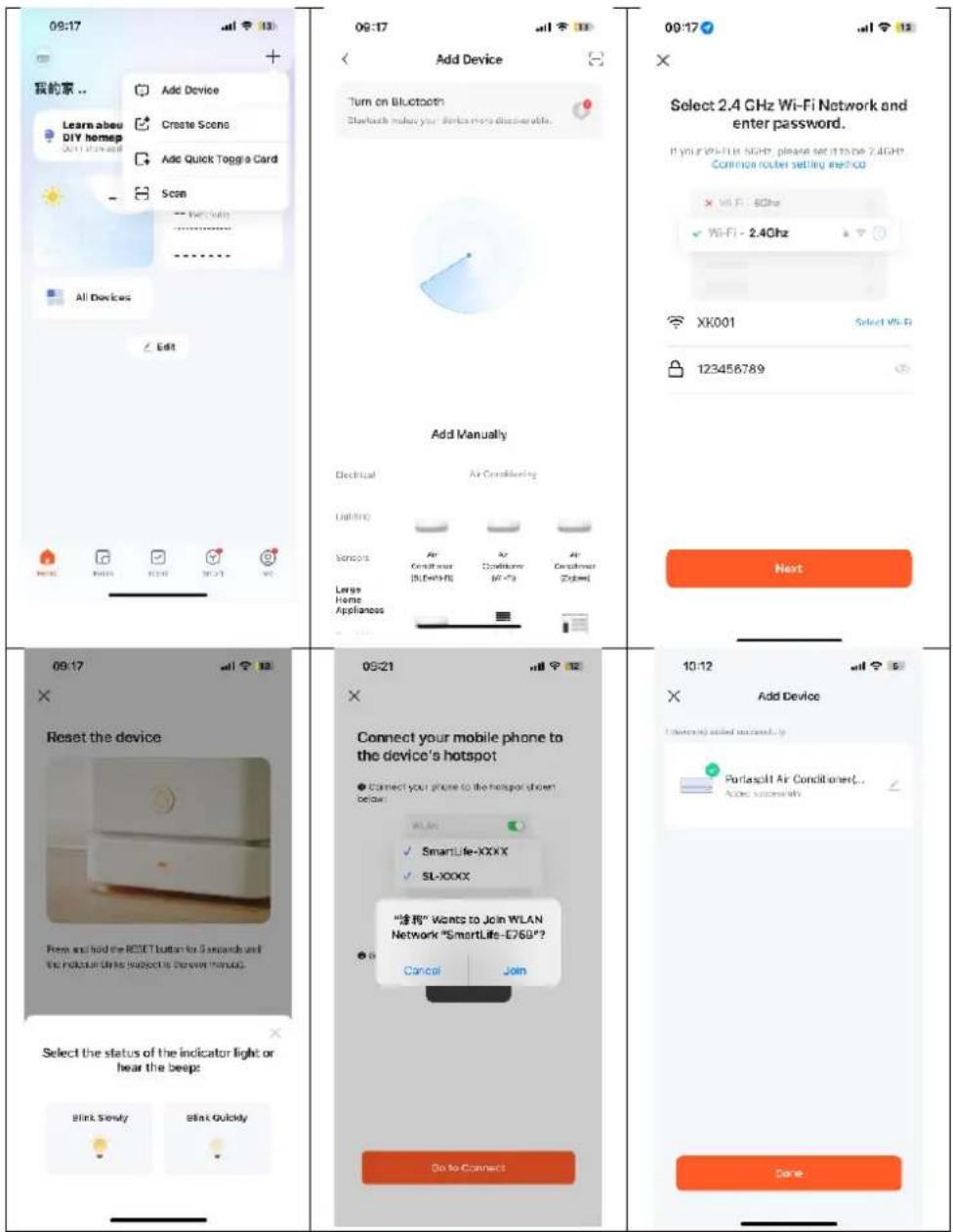
text_image
09:17 我的家... Learn about DIY homep Add Device Create Scene Add Quick Toggle Card Scan All Devices Edit 09:17 Add Device Turn on Bluetooth Bluetooth make your devices more disasierable. Add Manually Decidual Air Conditioning Lighting Sonopos Air Condition (BLDC+FE) Air Condition (M-Fe) Air Condition (ZoMe) Large Home Appliance Next 09:17 Reset the device People will hold the RESET button for Standards and the indicator. Use the device to show inventory. Select the status of the indicator light or hear the beep. Blink Slowly Blink Quickly 09:21 Connect your mobile phone to the device's hotspot Connect your phone to the hotspot shown below! WLAN ✓ SmartLife-XXXX ✓ SL-XXXX "添利" Wants to Join WLAN Network "SmartLife-E769"? Cancel Join Go to Connect 10:12 Add Device Connection added automaticly Portasolt Air Conditioner... Add successfully DoneAdding a device automatically
- Make sure the device is in standby mode before connecting.
- Press the WIFI button for 5 seconds to switch to Wi-Fi connection mode, and the Wi-Fi signal light will start flashing.
BE COOL
■ Activate Bluetooth on your phone.
- Open the app and wait a moment until the device is automatically detected and displayed.
- Click the "Add" button to connect.
- Enter the WiFi SSID (WiFi connection name), enter the WiFi password, and click "Next" to continue with the setup. (Note: The network must be in the 2.4 GHz band.)
- When the progress bar is complete, the device pairing interface will be displayed and the device will be successfully connected.
- Click the "Done" button to go to the device control interface.
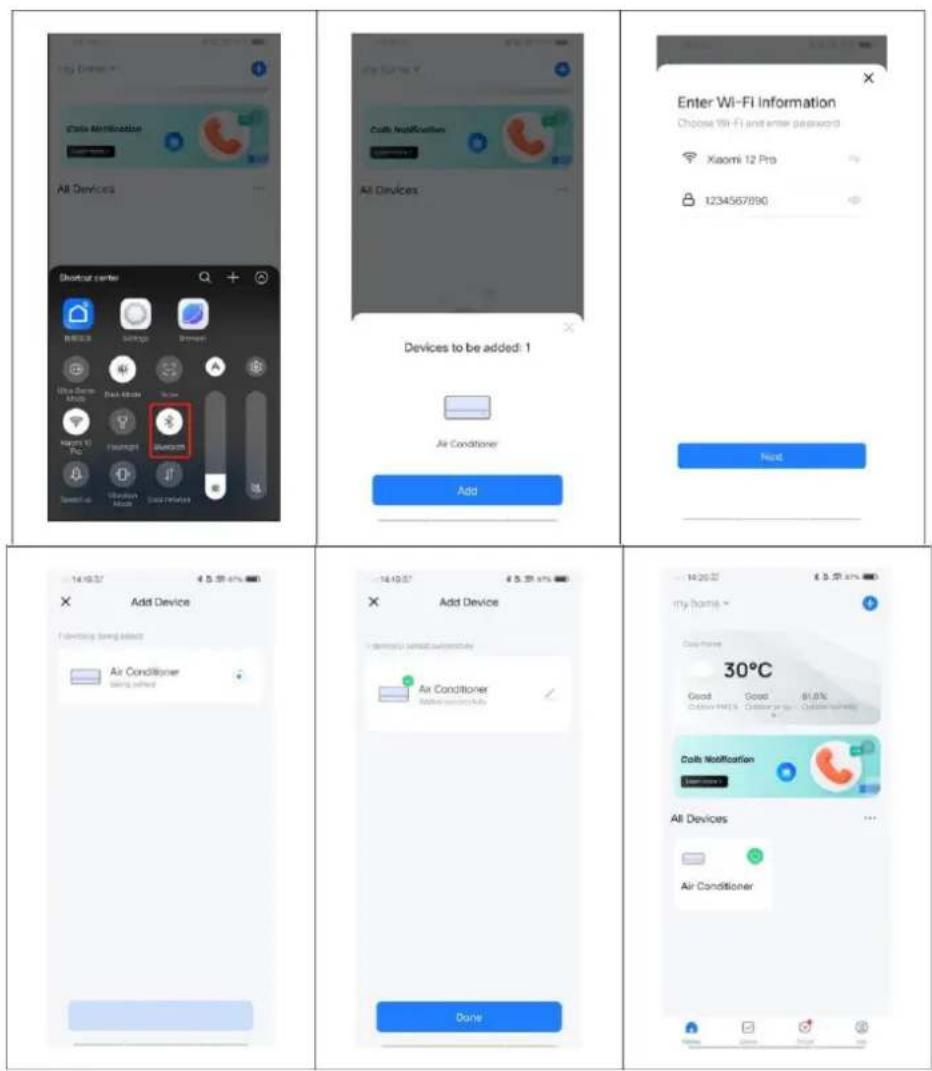
text_image
Enter Wi-Fi information Choose Wi-Fi and enter password Xiaomi 12 Pro 1234567890 Devices to be added: 1 Add Next Add Device Air Conditioner Air Conditioner Air Conditioner Air Conditioner Air Conditioner Air Conditioner Air Conditioner Air Conditioner Air Conditioner Air Conditioner Air Conditioner Air Conditioner Air Conditioner Air Conditioner Air Conditioner Air Conditioner Air Conditioner Air Conditioner Air Conditioner Air Conditioner Air Conditioner Air Conditioner Air Conditioner Air Conditioner Air Conditioner Air Conditioners Air Conditioners Air Conditioners Air Conditioners Air Conditioners Air Conditioners Air Conditioners Air Conditioners Air Conditioners Air Conditioners Air Conditioners Air Conditioners Air Conditioners Air Conditioners Air Conditioners Air Conditioners Air Conditioners Air Conditioners Air Conditioners Air Conditioners Air Conditioners Air Conditioners Air Conditioners Air Conditioners Air Conditioners Air ConditionesThe application also works with Amazon Alexa and Google Assistant.

text_image
WORKS WITH amazon alexa works with the Google AssistantBE COOL
| Technical Specifications WiFi | |
| Wireless technology: | WiFi (WLAN) |
| Radio operating frequency | 2412MHz-2472MHz |
| BLE operating frequency | 2402 MHz–2480 MHz |
| Modulation type | 802.11b: DSSS802.11g: OFDM802.11n (20 MHz): OFDM |
| Fixed frequency software | SecureCRT.exe |
| Antenna gain | 2.5 dBi |
| Antenna type | PCB |
| Transmission power | :520dBm |
| Technical information | |
| Article number | BC14KL2402FW |
| Cooling capacity | 14,000 BTU/h |
| Power consumption (cooling) | 4,100 watts |
| Max. Power consumption | 1,520 watts |
| Input voltage | 220 - 240 V |
| Frequency | 50 Hz |
| WIFI transmission frequency | 2,4GHz |
| Transmitting power: | max. 100mW |
| Refrigerant/Filling | R290 |
| Energy efficiency EER/COP | 2,7 |
| Energy efficiency class | A / A+ |
| Air circulation | 500m3/h |
| Noise level (sound power) | 65dB(A) |
| Weight | 35 kg |
| Dimensions | 470 x 800 x 404 mm |
| Contact address for further information | Schuss Home Electronic GmbHScheringgasse 3, A-1140 ViennaTel: +43 (1) 97 0 21 - 0Service line: +43 (1) 97 0 21 - 502www.becool.atFB-No: 236974 t / FB-Court: Vienna |
BE COOL
| Information requirements for single duct and double duct air conditionier | P | ||
| Information to identify the model(s) to which the information relates to: | |||
| Description | Symbol | Value | Unit |
| Description | P_rated for cooling | 3.898 | kW |
| Rated capacity for cooling | P_rated for heating | 2.932 | kW |
| Rated capacity for heating | P_EER | 1.419 | kW |
| Rated power input for cooling | P_COP | 1.060 | kW |
| Rated power input for heating | EER_d | 2.75 | - |
| Rated Energy efficiency ratio | COP_d | 2.77 | - |
| Information identifying the model(s) to which the information relates: | |||
| Description | Symbol | Value | Unit |
| Power consumption in thermostat-off mode | P_TO | N/A | W |
| Power consumption in standby P mode | P_SB | WIFI off: 0.9WIFI on: 1.5 | W |
| Electricity consumption of single/double duct appliances (indicate for cooling and heating separately) | Q_SD | SD: 1.419(cooling)SD: 1.060(heating) | kWh/h |
| Sound power level | L_WA | 64.9 | dB(A) |
| Global warming potential | GWP | 3 | kgCO2 eq. |
| Contact details for obtaining more information | Schuss Home Electronic GmbHScheringgasse 31140 Vienna, AustriaTel.: +43 (1) 97 0 21 – 0www.becool.at | ||
BE COOL
GUARANTEE
With this quality product from BE COOL, you have made a decision for innovation, durability and reliability.
For this BE COOL appliance we grant a warranty period of 2 years from the date of purchase valid in Austria!
If, contrary to expectations, service work should nevertheless be necessary on your device during this period, we hereby guarantee to repair the device free of charge (spare parts and labour) or (at the discretion of Schuss) to exchange the product. Should neither repair nor exchange be possible for economic reasons, we reserve the right to issue a credit note for the current value.
In the case of air conditioners, please contact the customer hotline as a first step (see sticker on the unit or cover page of the operating instructions), in the case of fans, please contact your specialist dealer or us directly. We would like to point out that repair work that has not been carried out by the authorised contract workshop in Austria will immediately terminate the validity of this warranty.
This warranty does not cover:
- Repair or replacement of parts due to normal wear and tear
- Damage due to non-observance of the operating instructions
• Devices that are used - even only partially - for commercial purposes - equipment mechanically damaged by external influence (fall, impact, breakage, improper use, etc.) as well as wear and tear of an aesthetic nature.
• Equipment that has been improperly handled - Units that have not been opened by our authorised service workshop.
- Damage caused as a result of improperly closed condensation drain valves of air conditioners or improperly inserted water tank.
- Consumer expectations not met.
- Damage caused by force majeure, water, lightning, overvoltage.
- Units where the type designation and/or serial number on the unit has been changed, deleted, made illegible or removed.
- Services outside our authorised workshops, the transport costs to an authorised workshop or to us and back, and the associated risks.
We expressly point out that within the warranty period, a lump sum of € 60,- (indexed basis CPI 2015, June 2020) will be charged in case of operating errors or if no error was detected.
The provision of warranty service (repair or replacement of the appliance) does not extend the absolute warranty period of 2 years from the date of purchase.
The 2-year warranty is only valid on presentation of the purchase receipt (must contain the name and address of the dealer as well as the complete designation of the unit) and the corresponding warranty certificate, on which the type of unit as well as the serial number (visible on the box and on the back or bottom of the unit) must be noted! Without the warranty certificate, only the legal warranty applies!
We expressly point out that the statutory warranty rights are not affected by this guarantee and continue undiminished.
Schuss Home Electronic GmbH and its vicarious agents shall only be liable for damages in the event of gross negligence or intent. Liability for loss of profit, expected but not realised savings, consequential damage and damage from third party claims is excluded in any case. Damages to or for recorded data are always excluded from the liability for damages.
Congratulations on your choice. We hope you enjoy your BE COOL appliance!
ADDRESS
BE COOLDistribution
Schuss Home Electronic GmbH
1140 Vienna, Scheringgasse 3
Tel.: +43 (0)1/ 970 21
Type designation:
Serial number:......
In the event of a warranty claim, this warranty certificate must be handed over together with the unit to the authorised service workshop or the dealer from whom you purchased the unit!
BE COOL
WICHTIG!
These instructions are only for the BECOOL-Service center!

A Service or repairing of the device must only be performed by a qualified technician who is allowed to handle the R290 refrigerant.
Do not attempt to repair or open the case of the air conditioner yourself, this leads to the immediate loss oft he warranty.
INSTRUCTIONS FOR REPAIRING APPLIANCES CONTAINING R290
1 GENERAL INSTRUCTIONS
1.1 Checks to the area
Prior to beginning work on systems containing flammable refrigerants, safety checks are necessary to ensure that the risk of ignition is minimized. For repair to the refrigerating system, the following precautions shall be complied with prior to con-ducting work on the system.
1.2 Work procedure
Work shall be undertaken under a controlled procedure so as to minimize the risk of a flammable gas or vapor being present while the work is being performed.
1.3 General work area
All maintenance staff and others working in the local area shall be instructed on the nature of work being carried out. Work in confined spaces shall be avoided. The area around the workspace shall be sectioned off. Ensure that the conditions within the area have been made safe by control of flammable material.
1.4 Checking for presence of refrigerant
The area shall be checked with an appropriate refrigerant detector prior to and during work, to ensure the technician is aware of potentially flammable atmospheres. Ensure that the leak section equipment being used is suitable for use with flammable refrigerants, i.e. non sparking, adequately sealed or intrinsically safe.
1.5 Presence of fire extinguisher
If any hot work is to be conducted on the refrigeration equipment or any associated parts, appropriate fire extinguishing equipment shall be available to hand. Have a dry powder or CO 2 fire extinguisher adjacent to the charging area.
BE COOL
1.6 No ignition sources
No person carrying out work in relation to a refrigeration system which involves exposing any pipe work that contains or has contained flammable refrigerant shall use any sources of ignition in such a manner that it may lead to the risk of fire or explosion. All possible ignition sources, including ecigarette smoking, should be kept sufficiently far away from the site of installation, repairing, removing and disposal, during which flammable refrigerant can possibly be released to the surrounding space. Prior to work taking place, the area around the equipment is to be surveyed to make sure that there are no flammable hazards or ignition risks. "No Smoking" signs shall be displayed.
1.7 Ventilated area
Ensure that the area is in the open or that it is adequately ventilated before breaking into the system or conducting any hot work. A degree of ventilation shall continue during the period that the work is carried out. The ventilation should safely disperse any released refrigerant and preferably expel it externally into the atmosphere.
1.8 Checks to the refrigeration equipment
Where electrical components are being changed, they shall be fit for the purpose and to the correct specification. At all times the manufacturer's maintenance and service guidelines shall be followed. If in doubt consult the manufacturer's technical department for assistance. The following checks shall be applied to installations using flammable refrigerants: the charge size is in accordance with the room size within which the refrigerant containing parts are installed; the ventilation machinery and outlets are operating adequately and are not obstructed; if an indirect refrigerating circuit is being used, the secondary circuit shall be checked for the presence of refrigerant; marking to the equipment continues to be visible and legible. Markings and signs that are illegible shall be corrected; refrigeration pipe or components are installed in a position where they are unlikely to be exposed to any substance which may corrode refrigerant containing components, unless the components are constructed of materials which are inherently resistant to being corroded or are suitably protected against being so corroded.
1.9 Checks to electrical devices
Repair and maintenance to electrical components shall include initial safety checks and component inspection procedures. If a fault exists that could compromise safety, then no electrical supply shall be connected to the circuit until it is satisfactorily dealt with. If the fault cannot be corrected immediately but it is necessary to continue operation, an adequate temporary solution shall be used. This shall be reported to the owner of the equipment so all parties are advised.
Initial safety checks shall include: Those capacitors are discharged: this shall be done in a safe manner to avoid possibility of sparking; that there no live electrical components and wiring are exposed while charging, recovering or purging the system; that there is continuity of earth bonding.
2 REPAIRS TO SEALED COMPONENTS
2.1 During repairs to sealed components, all electrical supplies shall be disconnected from the equipment being worked upon prior to any removal of sealed covers, etc. If it is absolutely necessary to have an electrical supply to equipment during servicing, then a permanently operating form of leak detection shall be located at the most critical point to warn of a potentially hazardous situation.
2.2 Particular attention shall be paid to the following to ensure that by working on electrical components, the casing is not altered in such a way that the level of protection is affected.
This shall include damage to cables, excessive number of connections, terminals not made to original specification, damage to seals, incorrect fitting of glands, etc. Ensure that apparatus is mounted securely.
Ensure that seals or sealing materials have not degraded such that they no longer serve the purpose of preventing the ingress of flammable atmospheres. Replacement parts shall be in accordance with the manufacturer's specifications.
NOTE The use of silicon sealant may inhibit the effectiveness of some types of leak detection equipment. Intrinsically safe components do not have to be isolated prior to working on them.
3 REPAIR TO INTRINSICALLY SAFE COMPONENTS
Do not apply any permanent inductive or capacitance loads to the circuit without ensuring that this will not exceed the permissible voltage and current permitted for the equipment in use.
Intrinsically safe components are the only types that can be worked on while live in the presence of a flammable atmosphere. The test apparatus shall be at the correct rating. Replace components only with parts specified by the manufacturer. Other parts may result in the ignition of refrigerant in the atmosphere from a leak.
4 CABLING
Check that cabling will not be subject to wear, corrosion, excessive pressure, vibration, sharp edges or any other adverse environmental effects. The check shall also take into account the effects of aging or continual vibration from sources such as compressors or fans.
5 DETECTION OF FLAMMABLE REFRIGERANTS
Under no circumstances shall potential sources of ignition be used in the searching for or detection of refrigerant leaks. A halide torch (or any other detector using a naked flame) shall not be used.
6 LEAK DETECTION METHODS
The following leak detection methods are deemed acceptable for systems containing flammable refrigerants. Electronic leak detectors shall be used to detect flammable refrigerants, but the sensitivity may not be adequate, or may need recalibration. (Detection equipment shall be calibrated in a refrigerant-free area.) Ensure that the detector is not a potential source of ignition and is suitable for the refrigerant used. Leak detection equipment shall be set at a percentage of the LFL of the refrigerant and shall be calibrated to the refrigerant employed and the appropriate percentage of gas (25 % maximum) is confirmed. Leak detection fluids are suitable for use with most refrigerants but the use of detergents containing chlorine shall be avoided as the chlorine may react with the refrigerant and corrode the copper pipe-work. If a leak is suspected, all naked flames shall be removed/extinguished. If a leakage of refrigerant is found which requires brazing, all of the refrigerant shall be recovered from the system, or isolated (by means of shut off valves) in a part of the system remote from the leak. Oxygen free nitrogen (OFN) shall then be purged through the system both before and during the brazing process.
7 REMOVAL AND EVACUATION
When breaking into the refrigerant circuit to make repairs – or for any other purpose – conventional procedures shall be used. However, it is important that best practice is followed since flammability is a consideration. The following procedure shall be adhered to: remove refrigerant; purge the circuit with inert gas; evacuate; purge again with inert gas; open the circuit by cutting or brazing. The refrigerant charge shall be recovered into the correct recovery cylinders. The system shall be “flushed” with OFN to render the unit safe. This process may need to be repeated several times. Compressed air or oxygen shall not be used for this task. Flushing shall be achieved by breaking the vacuum in the system with OFN and continuing to fill until the working pressure is achieved, then venting to atmosphere, and finally pulling down to a vacuum. This process shall be repeated until no refrigerant is within the system. When the final OFN charge is used, the system shall be vented down to atmospheric pressure to enable work to take place. This operation is absolutely vital if brazing operations on the pipework are to take place.
Ensure that the outlet for the vacuum pump is not close to any ignition sources and there is ventilation available.
8 CHARGING PROCEDURES
In addition to conventional charging procedures, the following requirements shall be followed.
- Ensure that contamination of different refrigerants does not occur when using charging equipment. Hoses or lines shall be as short as possible to minimize the amount of refrigerant contained in them.
- Cylinders shall be kept upright.
- Ensure that the refrigeration system is earthed prior to charging the system with refrigerant.
- Label the system when charging is complete (if not already).
• Extreme care shall be taken not to overfill the refrigeration system. - Prior to recharging the system it shall be pressure tested with OFN. The system shall be leak Tested on completion of charging but prior to commissioning. A follow up leak test shall be Carried out prior to leaving the site.
9 DECOMMISSIONING
Before carrying out this procedure, it is essential that the technician is completely familiar with the equipment and all its detail. It is recommended good practice that all refrigerants are recovered safely. Prior to the task
BE COOL
being carried out, an oil and refrigerant sample shall be taken in case analysis is required prior to re-use of reclaimed refrigerant. It is essential that electrical power is available before the task is commenced.
- Become familiar with the equipment and its operation.
- Isolate system electrically.
- Before attempting the procedure ensure that :mechanical handling equipment is available, if required, for handling refrigerant cylinders; all personal protective equipment is available and being used correctly; the recovery process is supervised at all times by a competent person; recovery equipment and cylinders conform to the appropriate standards.
- Pump down refrigerant system, if possible.
- If a vacuum is not possible, make a manifold so that refrigerant can be removed from various parts of the system.
- Make sure that cylinder is situated on the scales before recovery takes place.
- Start the recovery machine and operate in accordance with manufacturer's instructions.
- Do not overfill cylinders. (No more than 80 % volume liquid charge).
- Do not exceed the maximum working pressure of the cylinder, even temporarily.
- When the cylinders have been filled correctly and the process completed, make sure 11. that the cylinders and the equipment are removed from site promptly and all isolation
- valves on the equipment are closed off.
- Recovered refrigerant shall not be charged into another refrigeration system
- unless it has been cleaned and checked.
10 LABELLING
Equipment shall be labelled stating that it has been de-commissioned and emptied of refrigerant. The label shall be dated and signed. Ensure that there are labels on the equipment stating the equipment contains flammable refrigerant.
11 RECOVERY
When removing refrigerant from a system, either for servicing or decommissioning, it is recommended good practice that all refrigerants are removed safely. When transferring refrigerant into cylinders, ensure that only appropriate refrigerant recovery cylinders are employed. Ensure that the correct number of cylinders for holding the total system charge is available. All cylinders to be used are designated for the recovered refrigerant and labelled for that refrigerant (i.e. special cylinders for the recovery of refrigerant). Cylinders shall be complete with pressure relief valve and associated shut-off valves in good working order. Empty recovery cylinders are evacuated and, if possible, cooled before recovery occurs.
The recovery equipment shall be in good working order with a set of instructions concerning the equipment that is at hand and shall be suitable for the recovery of flammable refrigerants. In addition, a set of calibrated weighing scales shall be available and in good working order. Hoses shall be complete with leak-free disconnect couplings and in good condition. Before using the recovery machine, check that it is in satisfactory working order, has been properly maintained and that any associated electrical components are sealed to prevent ignition in the event of a refrigerant release. Consult manufacturer if in doubt.
The recovered refrigerant shall be returned to the refrigerant supplier in the correct recovery cylinder, and the relevant Waste Transfer Note arranged. Do not mix refrigerants in recovery units and especially not in cylinders. If compressors or compressor oils are to be removed, ensure that they have been evacuated to an acceptable level to make certain that flammable refrigerant does not remain within the lubricant. The evacuation process shall be carried out prior to returning the compressor to the suppliers. Only electric heating to the compressor body shall be employed to accelerate this process. When oil is drained from a system, it shall be carried out safely.
Competence of service personnel
General
Special training additional to usual refrigerating equipment repair procedures is required when equipment with flammable refrigerants is affected.
In many countries, this training is carried out by national training organizations that are accredited to teach the relevant national competency standards that may be set in legislation. The achieved competence should be documented by a certificate.
BE COOL
Training
The training should include the substance of the following:
Information about the explosion potential of flammable refrigerants to show that flammables may be dangerous when handled without care.
Information about potential ignition sources, especially those that are not obvious, such as lighters, light switches, vacuum cleaners, electric heaters.
Information about the different safety concepts:
Unventilated – (see Clause GG.2) Safety of the appliance does not depend on ventilation of the housing. Switching off the appliance or opening of the housing has no significant effect on the safety. Nevertheless, it is possible that leaking refrigerant may accumulate inside the enclosure and flammable atmosphere will be released when the enclosure is opened.
Ventilated enclosure – (see Clause GG.4) Safety of the appliance depends on ventilation of the housing. Switching off the appliance or opening of the enclosure has a significant effect on the safety. Care should be taken to ensure a sufficient ventilation before.
Ventilated room – (see Clause GG.5) Safety of the appliance depends on the ventilation of the room. Switching off the appliance or opening of the housing has no significant effect on the safety. The ventilation of the room shall not be switched off during repair procedures. Information about the concept of sealed components and sealed enclosures according to IEC 60079-15:2010.
Information about the correct working procedures:
1. Commissioning
o Ensure that the floor area is sufficient for the refrigerant charge or that the ventilation duct is assembled in a correct manner.
o Connect the pipes and carry out a leak test before charging with refrigerant.
o Check safety equipment before putting into service.
2. Maintenance
- o Portable equipment shall be repaired outside or in a workshop specially equipped for servicing units with flammable refrigerants.
o Ensure sufficient ventilation at the repair place.
o Be aware that malfunction of the equipment may be caused by refrigerant loss and a refrigerant leak is possible.
o Discharge capacitors in a way that won't cause any spark. The standard procedure to short circuit the capacitor terminals usually creates sparks. o Reassemble sealed enclosures accurately. If seals are worn, replace them.
o Check safety equipment before putting into service.
- Repair o Portable equipment shall be repaired outside or in a workshop specially equipped for servicing units with flammable refrigerants.
o Ensure sufficient ventilation at the repair place.
o Be aware that malfunction of the equipment may be caused by refrigerant loss and a refrigerant leak is possible.
o Discharge capacitors in a way that won't cause any spark.
When brazing is required, the following procedures shall be carried out in the right order:
- Remove the refrigerant. If the recovery is not required by national regulations, drain the refrigerant to the outside. Take care that the drained refrigerant will not cause any danger. In doubt, one person should guard the outlet. Take special care that drained refrigerant will not float back into the building.
• Evacuate the refrigerant circuit.
- Purge the refrigerant circuit with nitrogen for 5 min.
- Evacuate again.
- Remove parts to be replaced by cutting, not by flame.
• Purge the braze point with nitrogen during the brazing procedure.
- Carry out a leak test before charging with refrigerant.
- Reassemble sealed enclosures accurately. If seals are worn, replace them. ☐ Check safety equipment before putting into service.
- Decommissioning o If the safety is affected when the equipment is put out of service, the refrigerant charge shall be removed before decommissioning.
o Ensure sufficient ventilation at the equipment location.
o Be aware that malfunction of the equipment may be caused by refrigerant loss and a refrigerant leak is possible.
BE COOL
o Discharge capacitors in a way that won't cause any spark.
Remove the refrigerant. If the recovery is not required by national regulations, drain the refrigerant to the outside. Take care that the drained refrigerant will not cause any danger. In doubt, one person should guard the outlet. Take special care that drained refrigerant will not float back into the building.
o Evacuate the refrigerant circuit.
o Purge the refrigerant circuit with nitrogen for 5 min.
o Evacuate again.
o Fill with nitrogen up to atmospheric pressure.
o Put a label on the equipment that the refrigerant is removed.
- Disposal o Ensure sufficient ventilation at the working place.
Remove the refrigerant. If the recovery is not required by national regulations, drain the refrigerant to the outside. Take care that the drained refrigerant will not cause any danger. In doubt, one person should guard the outlet. Take special care that drained refrigerant will not float back into the building.
o Evacuate the refrigerant circuit.
o Purge the refrigerant circuit with nitrogen for 5 min.
o Evacuate again.
o Cut out the compressor and drain the oil.
Transportation, marking and storage for units that employ flammable refrigerants
Transport of equipment containing flammable refrigerants
Attention is drawn to the fact that additional transportation regulations may exist with respect to equipment containing flammable gas. The maximum number of pieces of equipment or the configuration of the equipment, permitted to be transported together will be determined by the applicable transport regulations.
Marking of equipment using signs
Signs for similar appliances used in a work area generally are addressed by local regulations and give the minimum requirements for the provision of safety and/or health signs for a work location.
All required signs are to be maintained and employers should ensure that employees receive suitable and sufficient instruction and training on the meaning of appropriate safety signs and the actions that need to be taken in connection with these signs.
The effectiveness of signs should not be diminished by too many signs being placed together. Any pictograms used should be as simple as possible and contain only essential details.
Disposal of equipment using flammable refrigerants See national regulations.
Storage of equipment/appliances
The storage of equipment should be in accordance with the manufacturer's instructions. Storage of packed (unsold) equipment Storage package protection should be constructed such that mechanical damage to the equipment inside the package will not cause a leak of the refrigerant charge. The maximum number of pieces of equipment permitted to be stored together will be determined by local regulations.
DECLARATION OF CONFORMITY
This declaration of conformity is issued under the sole responsibility of the manufacturer.
[1]
Schuss Home Electronic GmbH
Scheringgasse 3
1140 Wien, AUSTRIA
Declares, that the product
[11]
Manufacturer
Hersteller
is conformity with following directives, norms and/or regulations:
of 16 April 2014 amending Directives 2003/71/EC and 2009/138/EC and Regulations (EC) No 1060/2009, (EU) No 1094/2010 and (EU) No 1095/2010 in respect of the powers of the European Supervisory Authority (European Insurance and Occupational Pensions Authority) and the European Supervisory Authority (European Securities and Markets Authority)
Article 3.1(a) Safety:
EN 60335-2-40:2003+A11:2004+A12:2005+A1:2006+A2:2009+A13:2012
EN 60335-1:2012+A11:2014+A13:2017+A1:2019+A14:2019+A2:2019
EN62233: 2008
Article 3.1(a) Health:
EN 50665:2017, EN 62311:2008
Article 3.1(b) EMC:
EN 301 489-1 V2.1.1(2017-02)
EN 301 489-17 V3.1.1(2017-02)
EN 55014-1:2017+A11:2020, EN 55014-2:2015
EN IEC 61000-3-2:2019, EN IEC 61000-3-11: 2019
Article 3.2 Radio:
EN 300 328 V2.1.1 (2016-11)
EMC Directive (EMC): 2014/30/EU Directive of the European Parliament and of the Council of 26 February 2014 on the harmonisation of the laws of the Member States relating to electromagnetic compatibility; Official Journal of the EU L96, 29/03/2014, p. 79–106
Low Voltage Directive (LVD):2014/35/EU Directive of the European Parliament and of the Council of 26 February 2014 on the harmonisation of the laws of the Member States relating to the making available on the market of electrical equipment designed for use within certain voltage limits; Official Journal of the EU L96, 29/03/2014, p. 357–374
Ökodesign-Richtlinie Energy-Related-Products-Directive (ErP)2009/125/EC;
Official Journal EU L285/10-35 (31.10.2009) and associated regulation 2015/1188
RoHS Directive: 2011/65/EU Directive of the European Parliament and of the Council of 8 June 2011 on the restriction of the use of certain hazardous substances in electrical and electronic equipment; Official Journal of the EU L174, 1/07/2011, p. 88–110
Reach SVHC(EC)NO. 1907/2006 Schuss Home Electronic GmbH hereby confirms that in the products we supply, there are no substances of very high concern (SVHC) in the candidate list (last ECHA update from June 14, 2023, 235 substances) above 0.1% in accordance with Article 33 of the REACH Regulation (EC) No .1907/2006 are included.
Place and date of issue:
Vienna, 2025-11-19
text_image
SCHUSS HOME ELECTRONIC GMBH 1140 Wixl. Soleringesse 3 Tel. 430-87621. Fax: 95-222 www.schuss-home.atBevollmächtigter Vertreter des Herstellers Authorized representative of manufacture
Scharl, Alexander
Senior product and purchasing manager I.V.
Name, Funktion / name, function
Unterschrift / signature
Declaration reference:
SCHUSS HOME ELECTRONIC GMBH
Scheringgasse 3, 1140 Wien, AUSTRIA