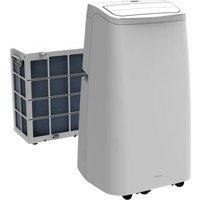
BCPSK12KW - Air Conditioning Be Cool - Free user manual and instructions
Find the device manual for free BCPSK12KW Be Cool in PDF.


| Product type | Split mobile air conditioner |
| Brand and model | Be Cool BCPSK12KW |
| Cooling capacity | 12 000 BTU/h (3500 W) |
| Heating capacity | 12 000 BTU/h (3500 W) |
| Power consumption (cooling) | 1200 W max |
| Power consumption (heating) | 1100 W max |
| Power supply | 220-240 V, 50 Hz |
| Refrigerant | R32, 640 g |
| Energy class (cooling / heating) | A+ / A+ |
| SEER / SCOP | 5,6 / 4,0 |
| Dehumidification | 1,2 L/h |
| Airflow | 380-440 m³/h |
| Noise level (indoor / outdoor) | 59 dB(A) / 65 dB(A) |
| Indoor unit dimensions | 430 × 320 × 730 mm |
| Outdoor unit dimensions | 492 × 263 × 460 mm |
| Net / gross weight | 34,5 kg / 43 kg |
| Functions | Cooling, heating, ventilation, dehumidification, timer, sleep mode, oscillation |
| WiFi connectivity | Smart Life (2,4 GHz), compatible with Amazon Alexa and Google Assistant |
| Remote control | Yes, with AAA batteries included |
| Air filter | Washable (weekly cleaning recommended) |
| Warranty | 2 years (Austria) |
Frequently Asked Questions - BCPSK12KW Be Cool
User questions about BCPSK12KW Be Cool
0 question about this device. Answer the ones you know or ask your own.
Ask a new question about this device
Download the instructions for your Air Conditioning in PDF format for free! Find your manual BCPSK12KW - Be Cool and take your electronic device back in hand. On this page are published all the documents necessary for the use of your device. BCPSK12KW by Be Cool.
USER MANUAL BCPSK12KW Be Cool
natural_image
Line drawing of a large industrial machine next to a smaller storage unit (no text or symbols visible)HERZLICHEN GLÜCKWUNSCH!

natural_image
Simple line drawing of an open book with no text or symbols visible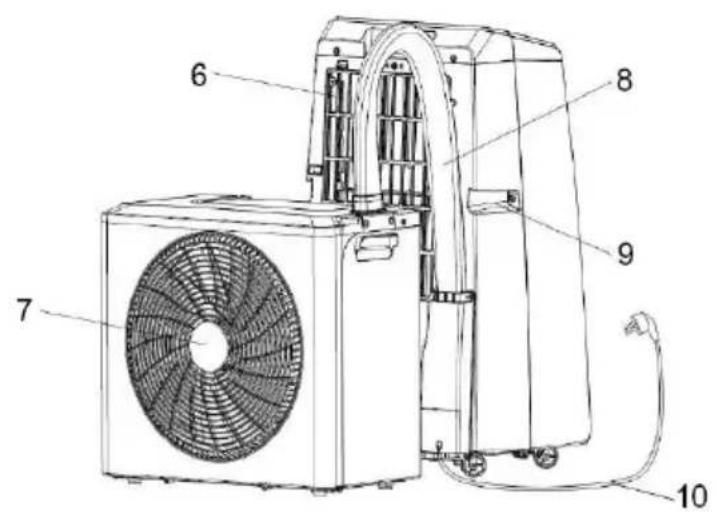
natural_image
Technical line drawing of a handheld device with internal components and battery assembly (no text or symbols)BE COOL
Bedienfeld
① Power-Taste
natural_image
Simple line drawing of a door with an open lid, no text or symbols present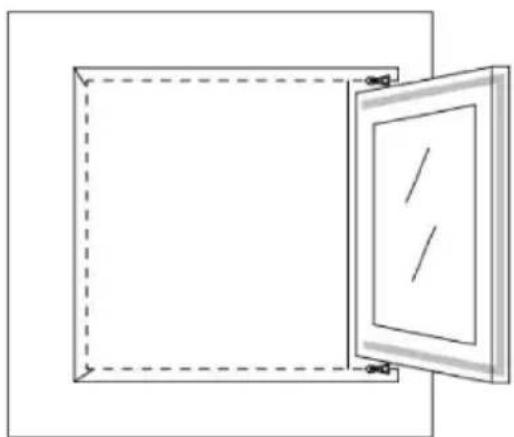
natural_image
Simple line drawing of a square frame with a door open, no text or symbols presentTROUBLE SHOOTING GUIDE
Scan QR code
Registrierung
BE COOL
WORKS WITH amazon alexa

works with the Google Assistant
natural_image
Line drawing of a two-wheeled storage unit with wheels and a closed storage unit (no text or symbols)FÉLICITATIONS ! MERCI D'AVOIR CHOISI UN PRODUIT DE BE COOL.
BE COOL


VEUILLEZ LIRE ATTENTIVEMENT LE MODE D'EMPLOI AVANT DE COMMENCER L'ASSEMBLAGE, L'INSTALLATION, LE FONCTIONNEMENT OU L'ENTRETIEN. PROTÉGEZ-VOUS ET PROTÉGEZ LES AUTRES EN RESPECTANT LES CONSIGNES DE SÉCURITÉ. LE NON-RESPECT DES INSTRUCTIONS PEUT ENTRAÎNER DES BLESSURES ET/OU DES DOMMAGES MATÉRIELS ET/OU ANNULER LA GARANTIE !
natural_image
Technical line drawing of a handheld device with internal components and battery assembly (no text or symbols)BE COOL
Panneau de contrôle
natural_image
Two technical line drawings of open doors, one with a handle and the other with a handle (no text or symbols)BE COOL
natural_image
Line drawing of a washing machine with fan and control panel (no text or symbols)BE COOL
CONTRÔLES EN DÉBUT DE SAISON
Scan QR code
Inscription
BE COOL
WORKS WITH amazon alexa

works with the Google Assistant
natural_image
Line drawing of a large industrial air purifier with wheels and a smaller storage unit (no text or symbols)CONGRATULAZIONI!
GRAZIE PER AVER SCELTO UN PRODOTTO BE COOL.
BE COOL


LEGGERE ATTENTAMENTE LE ISTRUZIONI PER L'USO PRIMA DI INIZIARE IL MONTAGGIO, L'INSTALLAZIONE, IL FUNZIONAMENTO O LA MANUTENZIONE. PROTEGGERE SE STESSI E GLI ALTRI SEGUENDO LE ISTRUZIONI DI SICUREZZA. LA MANCATA OSSERVANZA DELLE ISTRUZIONI PUÒ CAUSARE LESIONI PERSONALI E/O DANNI MATERIALI E/O INVALIDARE LA GARANZIA!
natural_image
Warning symbol of a flame inside a triangle (no text or numbers)
natural_image
Simple line drawing of an open book with no text or symbols visiblenatural_image
Technical line drawing of a handheld device with internal components and battery assembly (no text or symbols)BE COOL
natural_image
Simple line drawing of a door with an open lid, no text or symbols present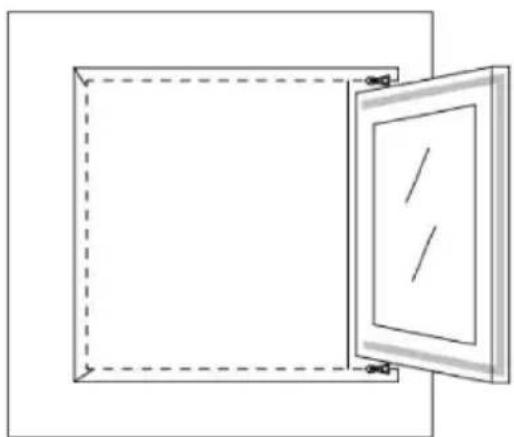
natural_image
Simple line drawing of a square frame with a door open, no text or symbols presentBE COOL
BE COOL
Scan QR code
Registrazione
BE COOL
WORKS WITH amazon alexa

works with the Google Assistant
Mobiele split airconditioner
BCPSK12KW
natural_image
Line drawing of a large industrial machine next to a smaller storage unit (no text or symbols)GEFELICITEERD! BEDANKT VOOR HET KIEZEN VAN EEN PRODUCT VAN BE COOL.
BE COOL


LEES DE BEDIENINGSINSTRUCTIES ZORGVULDIG DOOR VOORDAT U BEGINT MET DE MONTAGE, INSTALLATIE, BEDIENING OF HET ONDERHOUD. BESCHERM UZELF EN ANDEREN DOOR DE VEILIGHEIDSINSTRUCTIES OP TE VOLGEN. HET NIET OPVOLGEN VAN DE INSTRUCTIES KAN LEIDEN TOT PERSOONLIJK LETSEL EN/OF MATERIËLE SCHADE EN/OF HET VERVALLEN VAN DE GARANTIE!
natural_image
Technical line drawing of a handheld device with internal components and battery assembly (no text or symbols)BE COOL
Bedieningspaneel
① Aan/uit-knop
natural_image
Two technical line drawings of open doors, one with a handle and arrow, the other with a dashed border (no text or symbols)GIDS VOOR PROBLEEMOPLOSSING
Scan QR code
Registratie
BE COOL
Verbinding maken via Bluetooth

BE COOL
natural_image
Line drawing of a large industrial machine next to a smaller modular unit (no text or symbols)GRATULÁLUNK! KÖSZÖNJÜK, HOGY A BE COOL TERMÉKÉT VÁLASZTOTTA.
BE COOL


natural_image
Technical line drawing of a handheld device with internal components and battery assembly (no text or symbols)BE COOL
Vezérlőpanel
① Bekapcsológomb
natural_image
Simple line drawing of a door with an open lid, no text or symbols present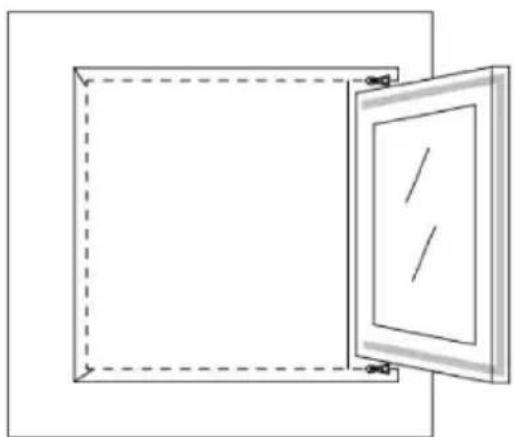
natural_image
Simple line drawing of a square frame with a door open, no text or symbols presentScan QR code
Regisztráció
BE COOL
WORKS WITH amazon alexa

works with the Google Assistant
natural_image
Line drawing of a large industrial machine next to a smaller storage unit (no text or symbols)GRATULUJEME!
DĚKUJEME, ŽE JSTE SI VYBRALI PRODUKT OD SPOLEČNOSTI BE COOL.
BE COOL

PŘED ZAHÁJENÍM MONTÁŽE, INSTALACE, PROVOZU NEBO ÚDRŽBY SI POZORNĚ PŘEČTĚTE NÁVOD K OBSLUZE. DODRŽOVÁNÍM BEZPEČNOSTNÍCH POKYNŮ CHRAŇTE SEBE I OSTATNÍ. NEDODRŽENÍ POKYNŮ MŮŽE MÍT ZA NÁSLEDEK ZRANĚNÍ OSOB A/NEBO POŠKOZENÍ MAJETKU A/NEBO ZTRÁTU ZÁRUKY!
1. Instalace a provoz
natural_image
Technical line drawing of a battery casing with internal components and an exploded view showing battery assembly (no text or symbols)BE COOL
Ovládací panel
① Tlačítko napájení
natural_image
Simple line drawing of a cabinet with open door and side panel (no text or symbols)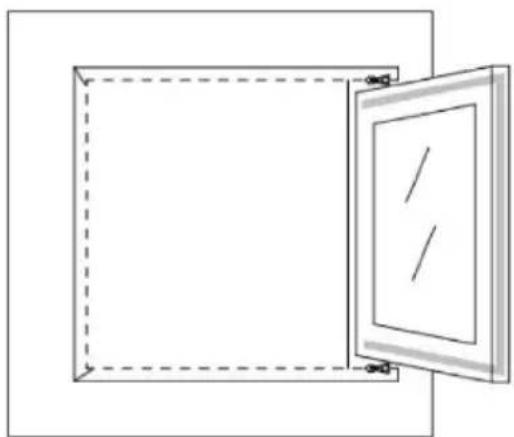
natural_image
Simple line drawing of a door frame with dashed border and open door (no text or symbols)Scan QR code
Registrace
Aplikace funguje také se službami Amazon Alexa a Google Assistant.

WORKS WITH amazon alexa

works with the Google Assistant
natural_image
Line drawing of a large industrial machine next to a smaller storage unit (no text or symbols)GRATULUJEME!
ĐAKUJEME, ŽE STE SI VYBRALI PRODUKT OD SPOLOČNOSTI BE COOL.
BE COOL


PRED ZAČATÍM MONTÁŽE, INŠTALÁCIE, PREVÁDZKY ALEBO ÚDRŽBY SI POZORNE PREČÍTAJTE NÁVOD NA OBSLUHU. DODRŽIAVANÍM BEZPEČNOSTNÝCH POKYNOV CHRÁŇTE SEBA AJ OSTATNÝCH. NEDODRŽANIE POKYNOV MÔŽE MAŤ ZA NÁSLEDOK ZRANENIE OSÔB A/ALEBO POŠKODENIE MAJETKU A/ALEBO STRATU ZÁRUKY!
natural_image
Technical line drawing of a battery pack with internal components and battery assembly (no text or symbols)BE COOL
Ovládací panel
natural_image
Two technical line drawings of open doors with dashed outlines, no text or symbols presentScan QR code
Registrácia
BE COOL
Nadviazanie spojenia cez Bluetooth
- Pred nadviazaním spojenia sa uistite, že je zariadenie v pohotovostnom režime.
- Stlačením tlačidla "FAN" na 3 sekundy prepnite na režim pripojenia Wi-Fi a kontrolka signálu Wi-Fi začne blikat'.
- Aktivujte funkciu Bluetooth v telefóne.
- Ak je zariadenie zapnuté a má sa nadviazat' spojenie, po chvíli otvorenia aplikácie sa automaticky zobrazí pripojené zariadenie Bluetooth. Kliknutím na tlačidlo "Pridat" nadviažete spojenie.
- Zadajte SSID WiFi (názov pripojenia WiFi), zadajte heslo WiFi a kliknutím na tlačidlo "Next" (Ďalej) pokračujte v nastavovaní. (Poznámka: Sieť musí byť v pásme 2,4 GHz).
- Po dokončení ukazovatel'a priebehu sa zobrazí rozhranie párovania zariadenia a zariadenie je úspešne pripojené.
- Kliknutím na tlačidlo "Hotovo" prejdite do používatel'ského rozhrania zariadenia.
BE COOL
Aplikácia funguje aj so službami Amazon Alexa a Google Assistant

WORKS WITH amazon alexa

works with the Google Assistant
BE COOL
| Technické údaje WiFi | |
| rádiová technológia: | Wifi (WLAN) |
| Rádiová prevádzková frekvencia | 2412MHz-2472MHz |
| Pracovná frekvencia BLE | 2402MHz-2480MHz |
| Typ modulácie | 802.11b: DSSS802.11g: OFDM802.11n (20 MHz): OFDM |
| Softvér s pevnou frekvenciou | SecureCRT.exe |
| Zosilnenie antény | 2,5 dBi |
| Typ antény | DPS |
| Prenosový výkon | 520 dBm |
BE COOL
natural_image
Line drawing of a large industrial machine next to a smaller storage unit (no text or symbols)FELICITĂRI! VĂ MULTUMIM PENTRU CĂ AȚI ALES UN PRODUS DE LA BE COOL.
BE COOL


VĂ RUGĂM SĂ CITIȚI CU ATENȚIE INSTRUCTIUNILE DE UTILIZARE ÎNAINTE DE A ÎNCEPE ASAMBLAREA, INSTALAREA, FUNCTIONAREA SAU ÎNTRETINEREA. PROTEJATI-VĂ ȘI PROTEJATI-I PE CEILALȚI RESPECTÂND INSTRUCTIUNILE DE SIGURANȚĂ. NERESPECTAREA INSTRUCTIUNILOR POATE DUCE LA VĂTĂMĂRI CORPORALE ȘI/ȘAU DAUNE MATERIALE ȘI/ȘAU ANULAREA GARANȚIEI!

natural_image
Simple line drawing of an open book with no text or symbols visiblenatural_image
Technical line drawing of a battery casing with internal components and battery stack (no text or symbols)BE COOL
Panou de control
natural_image
Two technical line drawings of open doors with dashed outlines and alignment marks (no text or symbols)natural_image
Line drawing of a washing machine with fan and control panel (no text or symbols)CONTROALE LA ÎNCEPUTUL SEZONULUI
Scan QR code
Înregistrare
BE COOL
Stabilirea unei conexiuni prin Bluetooth
WORKS WITH amazon alexa

works with the Google Assistant
BE COOL
natural_image
Line drawing of a large industrial machine next to a smaller storage unit (no text or symbols)GRATULACJE!
DZIĘKUJEMY ZA WYBRANIE PRODUKTU OD BE COOL.
BE COOL


PRZED ROZPOCZĘCIEM MONTAŻU, INSTALACJI, OBSŁUGI LUB KONSERWACJI NALEŻY UWAŻNIE PRZECZYTAĆ INSTRUKCJĘ OBSŁUGI. NALEŻY CHRONIĆ SIEBIE I INNYCH, PRZESTRZEGAJĄC INSTRUKCJI BEZPIECZEŃSTWA. NIEPRZESTRZEGANIE INSTRUKCJI MOŻE SPOWODOWAĆ OBRAŻENIA CIAŁA I/LUB USZKODZENIE MIENIA I/LUB UNIEWAŻNIENIE GWARANCJI!

natural_image
Simple line drawing of an open book with no text or symbols visible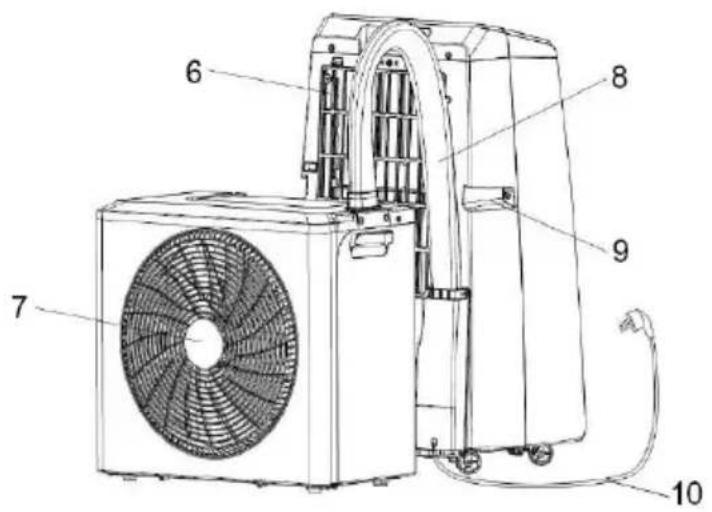
natural_image
Technical line drawing of a battery pack with internal components and battery assembly (no text or symbols)BE COOL
Panel sterowania
① Przycisk zasilania
natural_image
Two technical line drawings of open doors with dashed outlines and alignment marks (no text or symbols)BE COOL
Scan QR code
Rejestracja
WORKS WITH amazon alexa

works with the Google Assistant
natural_image
Line drawing of a large industrial machine next to a smaller storage unit (no text or symbols)ČESTITAMO!
HVALA, KER STE IZBRALI IZDELEK BE COOL.
BE COOL

Aktualna navodila za uporabo in drugi jeziki
PRED ZAČETKOM MONTAŽE, NAMESTITVE, DELOVANJA ALI VZDRŽEVANJA NATANČNO PREBERITE NAVODILA ZA UPORABO. Z UPOŠTEVANJEM VARNOSTNIH NAVODIL ZAŠČITITE SEBE IN DRUGE. NEUPOŠTEVANJE NAVODIL LAHKO POVZROČI TELESNE POŠKODBE IN/ALI MATERIALNO ŠKODO IN/ALI IZGUBO GARANCIJE!
natural_image
Technical line drawing of a mobile phone casing with battery pack and internal components (no text or symbols)BE COOL
Nadzorna plošča
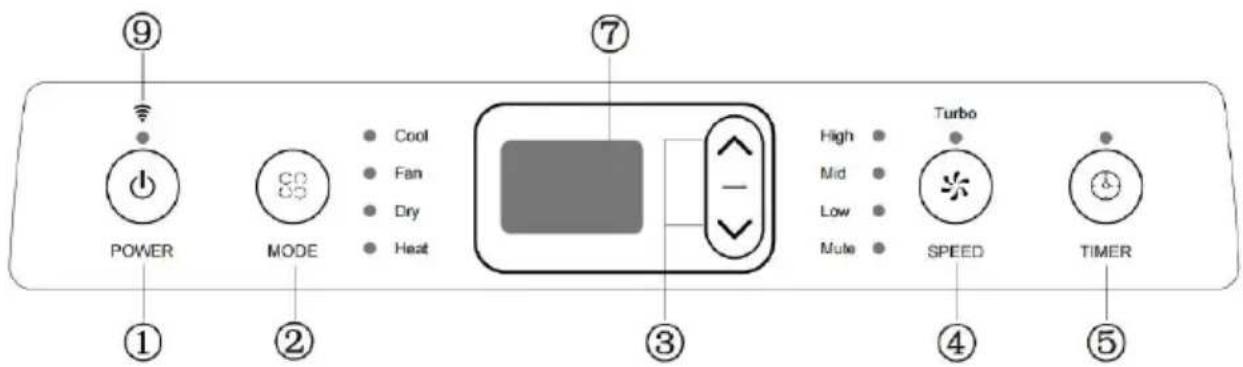
① Gumb za vklop
S pritiskom na ta gumb vklopite ali izklopite klimatsko napravo.
② Gumb Mode
S pritiskom na ta gumb izberete načine delovanja hlajenja, prezračevanja, razvlaževanja in ogrevanja.
natural_image
Simple line drawing of a cabinet with an open door, no text or symbols present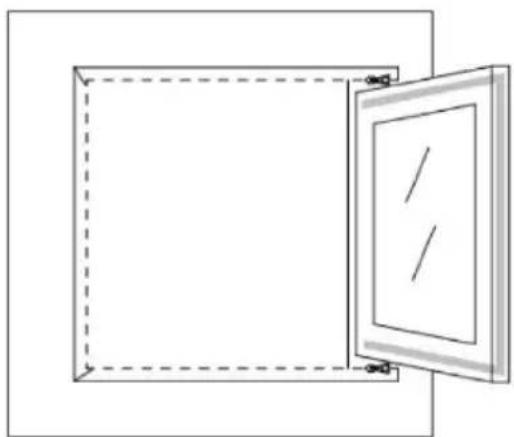
natural_image
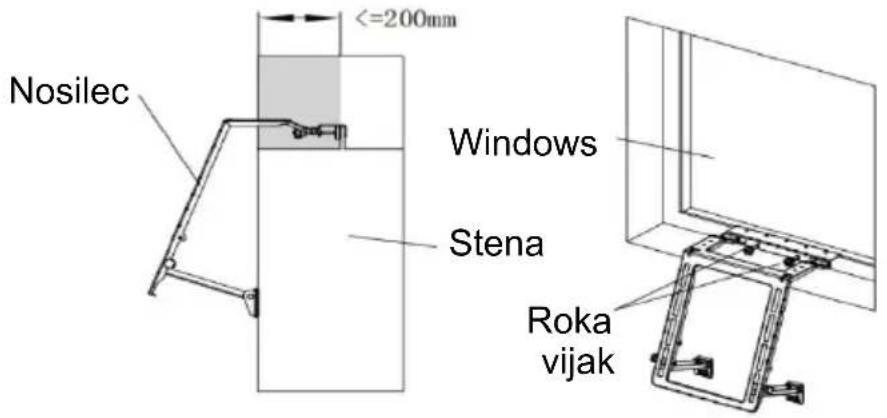
Simple line drawing of a door frame with dashed border and open door (no text or symbols)6) Pritrdite montažni nosilec na okno. Montaža nosilca je razmeroma preprosta, kot je prikazano na sliki. Nato z roko privijte vijak, da se nosilec trdno pritrdi na okno. Kot je prikazano na sliki:
BE COOL
Namestitev
Scan QR code
Registracija
BE COOL
WORKS WITH amazon alexa

works with the Google Assistant
BE COOL
| Tehnični podatki WiFi | |
| radijska tehnologija: | Wifi (WLAN) |
| Radijska delovna frekvenca | 2412 MHz-2472 MHz |
| Delovna frekvenca BLE | 2402 MHz-2480 MHz |
| Vrsta modulacije | 802.11b: DSSS802.11g: OFDM802.11n (20 MHz): OFDM |
| Programska oprema s fiksno frekvenco | SecureCRT.exe |
| Ojačanje antene | 2,5 dBi |
| Vrsta antene | PCB |
| Prenosna moč | 520 dBm |
BE COOL
natural_image
Line drawing of two large industrial storage units with wheels, one open and one partially filled (no text or symbols)ČESTITAMO!
HVALA VAM ŠTO STE ODABRALI PROIZVOD IZ BE COOL .
BE COOL


Aktualne upute za uporabu i drugi jezici
Preuzmite najnovije upute za uporabu ili upute za instalaciju raznim jezicima putem poveznice www.becool.at/ ili skenirajt prikazani QR kod. Slijedite upute na web stranici.

MOLIMO VAS, PAŽLJIVO PROČITAJTE UPUTE ZA UPOTREBU PRIJE POČETKA SASTAVLJANJA, INSTALACIJE, RADA ILI ODRŽAVANJA. ZAŠTITITE SEBE I DRUGE PRIDRŽAVANJEM SIGURNOSNIH UPUTA. NEPRIDRŽAVANJE UPUTA MOŽE DOVESTI DO OSOBNIH OZLJEDA I/ILI ŠTETE IMOVINE I/ILI PONIŠTENJE JAMSTVA!
1. Montaža i rad
natural_image
Technical line drawing of a battery casing with internal components and battery stack (no text or symbols)BE COOL
Upravljačka ploča
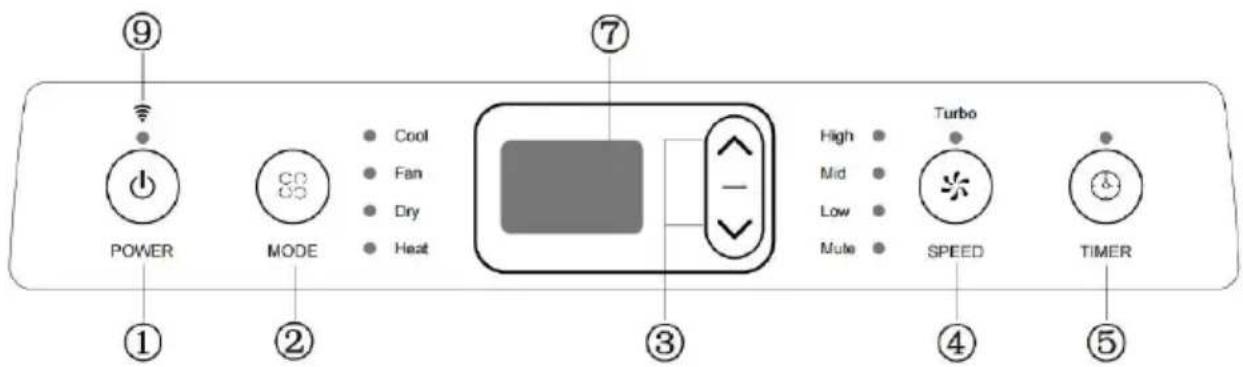
① Gumb za napajanje
natural_image
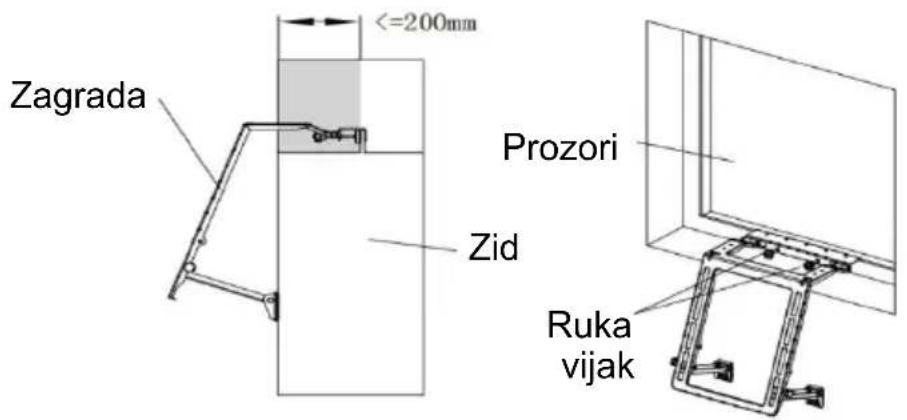
Two technical line drawings of open doors, one with a handle and arrow, the other with a dashed outline (no text or symbols)6) Pričvrstite montažni nosač na prozor. Montaža nosača je relativno jednostavna, kao što je prikazano na slici. Zatim rukom zategnite vijak kako biste čvrsto pričvrstili nosač za prozor. Kao što je prikazano na slici:
Instalacija
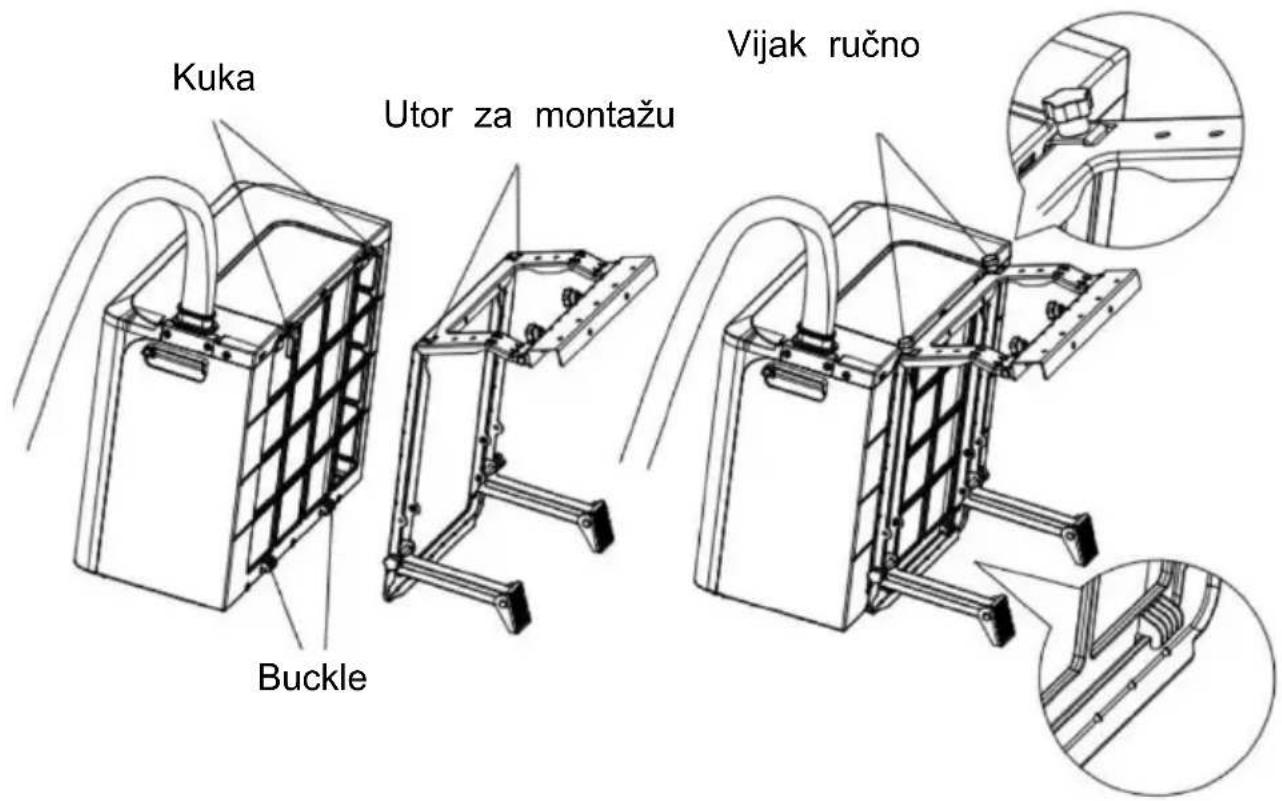
Prilikom postavljanja vanjske jedinice, kopča za pričvršćivanje vanjske jedinice treba biti pričvršćena na nosač. Kuka vanjske jedinice mora biti zakačena u otvor predviđen u nosaču. Zatim rukom zategnite vijak. Pogledajte ilustraciju:
BE COOL
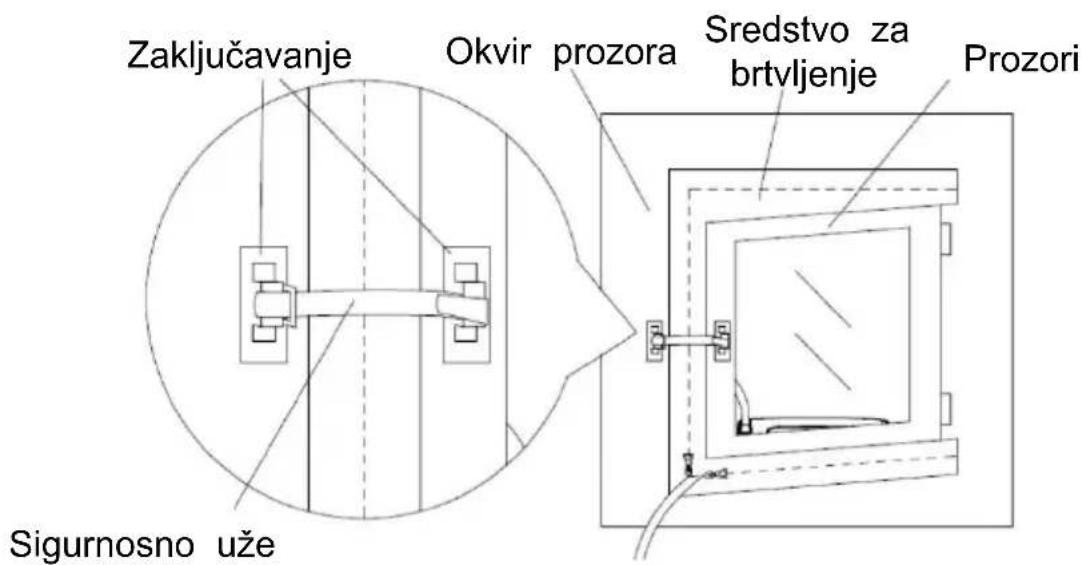
8) Pričvrstite bazu mehanizma za zaključavanje na prozor i na željeni položaj. Oprez: dva temeljna elementa ne smiju biti predaleko, inače bi sigurnosni kabel mehanizma za zaključavanje mogao biti prekratak. Pogledajte ilustraciju:
BE COOL
PROVJERE NA POČETKU SEZONE
- Provjerite jesu li kabel napajanja i utičnica ispravni te je li uzemljenje ispravno.
- Uvjerite se da je čep pažljivo postavljen u otvor za kondenziranu vodu i da su filtri na mjestu.
Scan QR code
Registracija

BE COOL
BE COOL
WORKS WITH amazon alexa

works with the Google Assistant
| Tehnički podaci WiFi | |
| radio tehnologija: | Wifi ( WLAN) |
| Radna frekvencija radija | 2412MHz-2472MHz |
| BLE radna frekvencija | 2402MHz-2480MHz |
| Vrsta modulacije | 802.11b: DSSS802.11g: OFDM802.11n (20MHz) : OFDM |
| Softver fiksne frekvencije | SecureCRT.exe |
| Antensko pojačanje | 2,5 dBi |
| Vrsta antene | PCB |
| Snaga prijenosa | 520 dBm |
BE COOL
| Tehničke informacije | |
| Broj stavke | BCPSK12KW |
| Kapacitet hlađenja | 12 000 BTU/h |
| 3500 vata | |
| Izlaz topline | 12 000 BTU/h |
| 3500 vata | |
| Maks. Potrošnja energije za hlađenje | 1200 vati |
| Maks. Potrošnja energije za grijanje | 1100 vati |
| Stopa odvlaživanja | 1,2 L/h |
| Ulazni napon | 220 - 240 V |
| Frekvencija | 50 Hz |
| Frekvencija WIFI prijenosa: | 2,4 GHz |
| Snaga prijenosa: | max. 100 mW |
| Rashladno sredstvo/punjenje | R32, 640 g |
| VIDJELAC | 5,6 |
| SCOP | 4,0 |
| Klasa energetske učinkovitosti (hlađenje/grijanje) | A+ / A+ |
| Kruženje zraka | 380 - 440 m3/h |
| Razina buke (unutar/vani) | 59 dB(A) / 65 dB(A) |
| Težina (neto/bruto) | 34,5 kg / 43 kg |
| Dimenzije unutarnje jedinice | 430×320×730 mm |
| Dimenzije vanjske jedinice | 492×263×460 mm |
| Kontakt adresa proizvođača za dodatne informacije | Schuss Home Electronic GmbHScheringgasse 3, A-1140 Beč Tel: +4(1) 97 0 21 - 0Servisna linija: +43 (1) 97 0 21 - 50www.becool.atFB-br.: 236974 t / FB-Sud: Beč |
BE COOL
JAMSTVO
Mobile split air conditioner
BCPSK12KW
natural_image
Line drawing of a large industrial machine next to a smaller storage unit (no text or symbols)CONGRATULATIONS!
THANK YOU FOR CHOOSING A PRODUCT FROM BE COOL.
BE COOL


Current operating instructions and other languages
Download the latest operating instructions or installation instructions in various languages via the link www.becool.at/scan the QR code shown. Follow the instructions on the we

PLEASE READ THE OPERATING INSTRUCTIONS CAREFULLY BEFORE STARTING ASSEMBLY, INSTALLATION, OPERATION OR MAINTENANCE. PROTECT YOURSELF AND OTHERS BY FOLLOWING THE SAFETY INSTRUCTIONS. FAILURE TO FOLLOW INSTRUCTIONS COULD RESULT IN PERSONAL INJURY AND/OR PROPERTY DAMAGE AND/OR VOID THE WARRANTY!
Attention: Air conditioners should always be stored and transported in an upright position to avoid damage to t compressor. If the appliance has been moved to a different position during transportation, we recommend leaving it to rest for at least 24 hours after installation before putting it into operation. This ensures that the refrigerant in the system stabilizes and smooth operation is guaranteed.
BE COOL
IMPORTANT INFORMATION ON SAFETY, LOCATION AND ELECTRICAL CONNECTION.

1. Installation and operation
- Always place the appliance on a firm, level surface. The air conditioner must not be tilted or inclined during operation.
- This air conditioner is only intended for use in a residential building and must not be used outdoors.
- Always keep the appliance in an upright position, both during storage and transportation, to protect the compressor.
- Avoid placing the appliance near strong heat sources, flammable or explosive gases and chemicals.
- Make sure that the air conditioner's inlets and outlets are unobstructed to ensure optimum air circulation.
- Do not use the air conditioner in dusty or particularly dirty environments, as this can clog the filters more quickly and reduce efficiency.
- Ensure that the device is not exposed to direct sunlight, as this can impair performance and lead to overheating.
BE COOL
- Users are strictly prohibited from adding refrigerant themselves.
2. Electrical connection
- Only use the appliance in well-earthed sockets and check the suitability of the socket beforehand.
- Do not use extension cables or multiple sockets as this can lead to overheating and fires.
- Ensure that the power cable is not twisted or kinked. Do not pull the cable to disconnect the appliance from the power supply - always use the plug.
- Avoid using the device when the voltage fluctuates greatly or in regions with frequent power failures, as this can damage the electronics.
- Prevent liquids from dripping or spilling onto the appliance. If water gets into the appliance, disconnect it from the power supply immediately and contact an authorized service centre.
3. Handling and handling
- Do not expose the device to extreme conditions such as high humidity or water. Avoid using the device in damp rooms such as basements or near swimming pools.
- To avoid electric shock, do not touch the appliance or the plug with wet hands.
BE COOL
○ Make sure that no objects, such as fingers or hard objects, get into the air outlet or the ventilation grille, as this can lead to damage and injury.
- Do not pull directly on the hose and do not damage it with sharp objects. If you notice that the hose is damaged, stop using it and contact the dealer for repair.
4. Child and user safety
○ Children under the age of 8 and persons with reduced physical, sensory or mental capabilities may only use the appliance under supervision.
- Keep packaging material out of the reach of children - risk of suffocation!
- Do not allow children to play with the appliance.
5. Maintenance and cleaning
- Unplug the appliance before cleaning or servicing it.
- Clean the air filter at least once a week to ensure optimum performance.
- Store the appliance in a safe, dry place that is inaccessible to children when it is not in use.
- Do not use any chemical cleaning agents or tools that could damage the appliance.
6. Storage and transportation
BE COOL
- Store the device in an upright position and in a dry, cool place when it is not in use.
- For transportation, empty the condensation container and allow the appliance to rest for at least one hour after transportation before switching it on again.
- If the appliance will not be used for a longer period of time, empty the condensation container completely and clean the appliance before storing it.
7. Emergency measures
- In the event of unusual noises, odors or smoke, switch off the appliance immediately, disconnect the mains plug and do not continue to use the air conditioner. Contact an authorized service centre.
Important note: In the event of uncertainties or repairs, please only contact a service center authorized by the manufacturer in order to guarantee the warranty and safety.
BE COOL
SPECIFIC INFORMATION ON THE REFRIGERANT R32
- The refrigerant circuit between the indoor and outdoor units is sealed during the manufacturing process.
- R32 is a refrigerant in accordance with EC environmental regulations.
- The refrigerant can be odorless.
- The appliance must be installed in a room where there are no sources of ignition during operation (e.g. open fire, operating gas and electrical appliances with an open heat source)
- Do not perforate or burn the air conditioner.
- Ensure that the cooling circuit is not drilled into.
- Non-ventilated rooms in which the appliance is installed, operated or stored must be constructed in such a way that any refrigerant losses do not accumulate. This prevents the risk of fire or explosion caused by ignition of the refrigerant by electric ovens, stoves or other ignition sources.
- The device must be stored in such a way that no mechanical damage can occur.
- The persons who work on a refrigeration circuit or carry out interventions must be in possession of a valid certificate issued by an authorized authority, which certifies their expertise in handling refrigerants by means of an assessment specification recognized by the industry associations.
- Repairs must be carried out in accordance with the instructions of the appliance manufacturer. Repair and maintenance work that requires the intervention of other specialist personnel must be carried out under the supervision of the specialist responsible for handling flammable refrigerants.
BE COOL
Recycling, disposal, declaration of conformity
 | RECYCLINGThe packaging materials can be recycled. It is therefore recommended to dispose of them in sorted waste |
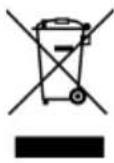 | DISPOSALThe "crossed-out dustbin" symbol requires the separate disposal of waste electrical and electronic equipment (WEEE). Electrical and electronic equipment may contain hazardous and environmentally harmful substance. Therefore, do not dispose of them in unsorted residual waste, but at a designated collection point for waste electrical and electronic equipment. This will help to protect resources and the environment. For further information, please contact your dealer or the local authorities. Directive 2012/19/EU |
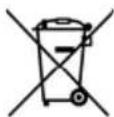 | BATTERY DISPOSALIn accordance with current legislation on batteries, accumulators and rela waste, the crossed-out wheeled garbage can symbol on the battery indi that it is prohibited to dispose of used batteries in household waste. Ba and accumulators contain highly polluting substances. The user is oblige dispose of used batteries at the collection points in the municipality or i appropriate containers. The service is free of charge. In this way, the le requirements are complied with and the environment is protected.These symbols can be found on batteries:Li = battery contains lithiumAl = battery contains alkaliMn = battery contains manganeseCR 2025 (Li); AA (Al, Mn); AAA (Al, Mn) |
 | DECLARATION OF CONFORMITYWe hereby confirm that this product complies with the essential requirements, regulations and directives of the EU. You can view the de declaration of conformity at any time under the following link:https://www.schuss-home.at/downloads |
Errors and technical changes excepted.
BE COOL
DESCRIPTION OF THE DEVICE AND SCOPE OF DELIVERY
SCOPE OF DELIVERY
The BE COOL air conditioner is supplied with:
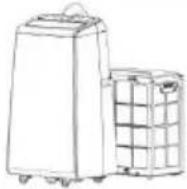 | [XXK8] | 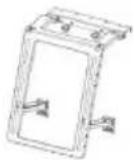 |
| Air conditioner | Remote control | Bracket |
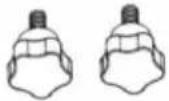 |  |  |
| 2×hand screws | Sealing cloth | Velcro fastener |
 | 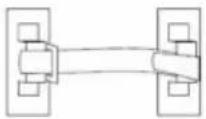 | 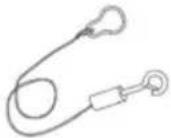 |
| Drain hose | Snap lock | Steel wire safety rope |
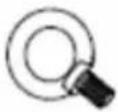 | 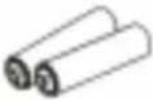 |  |
| Eye bolt (optional) | 2×battery (1.5V, AAA) | Operating instructions |
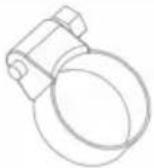 | 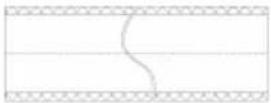 | |
| Clamp for the drain hose | Thermal insulation for connecting pipe |
BE COOL
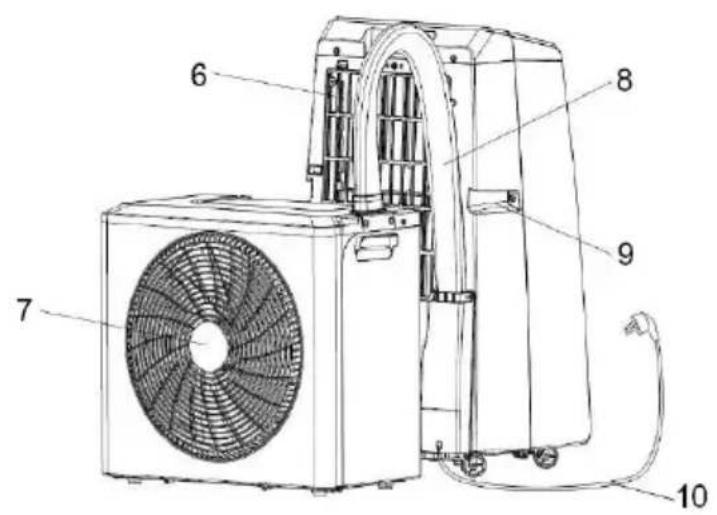
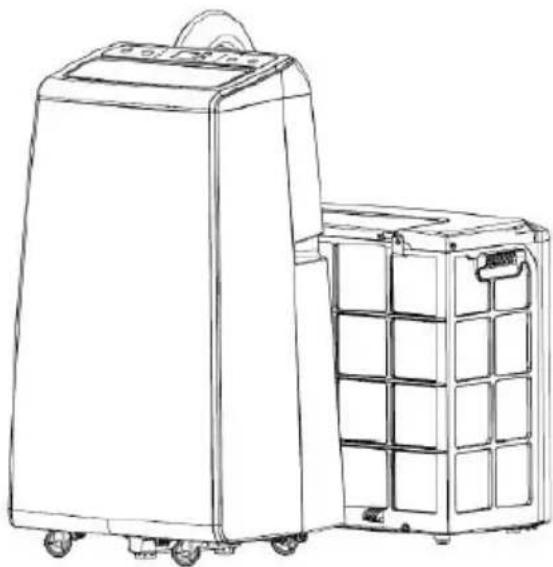
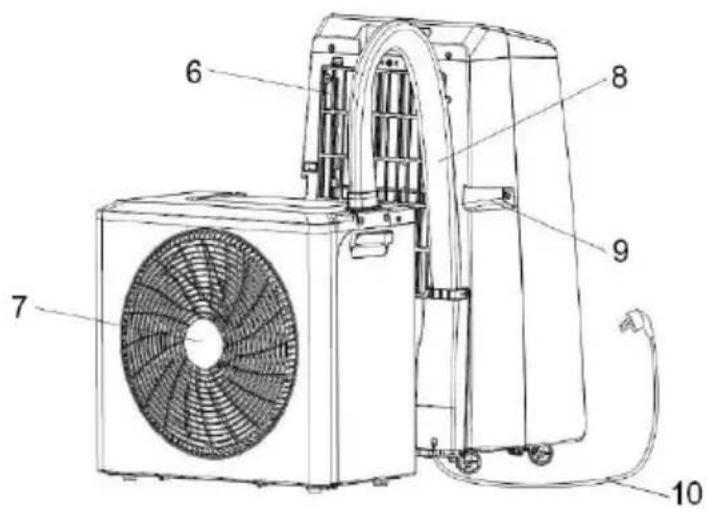
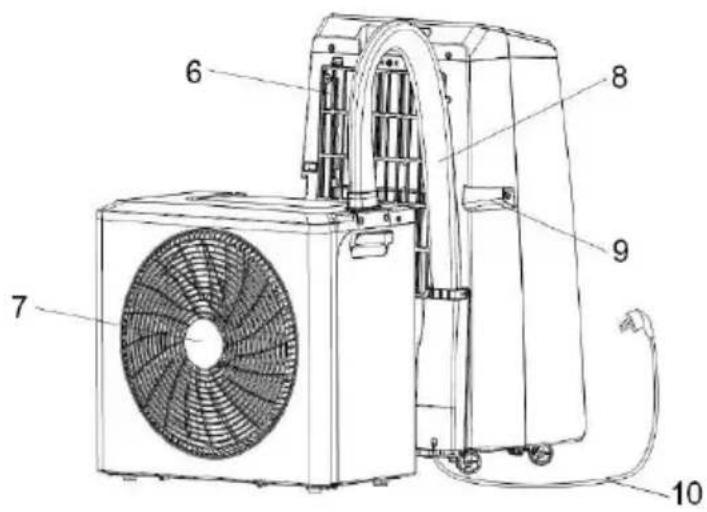
DESCRIPTION
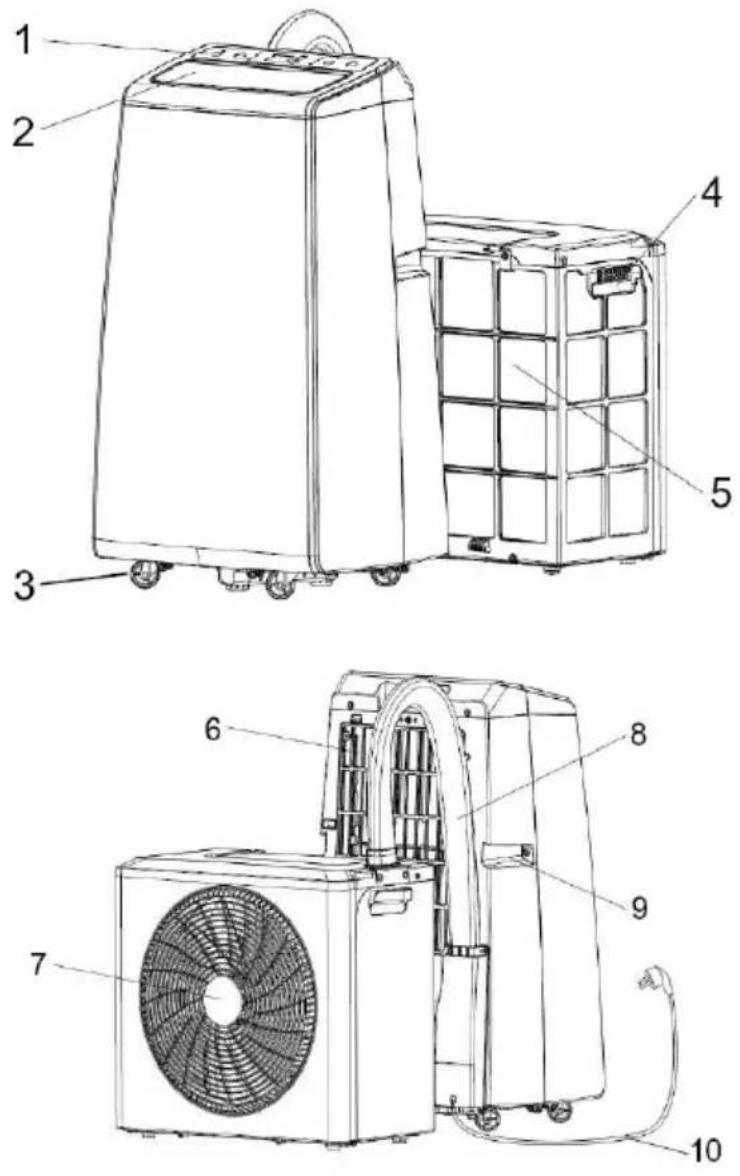
- Control panel
- Indoor unit air outlet
- Castors
- Handle
-
Air supply for outdoor unit
-
Indoor unit air inlet
- Vent opening
- Connecting tube
- Handle
- Power cable
BE COOL
CONTROL PANEL AND REMOTE CONTROL
REMOTE CONTROL
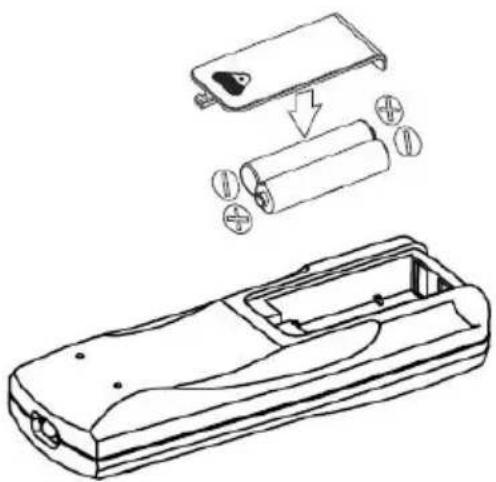
Make sure that the batteries are inserted correctly before using the remote control.
The steps for installation are as follows:
- Slide open the cover on the back o remote control to open it.
- Insert two new AAA batteries (DC1.5V and make sure that the poles are correctly aligned.
- Make sure that the batteries are firmly inserted.
natural_image
Technical line drawing of a mobile phone casing with battery pack and internal components (no text or symbols)BE COOL
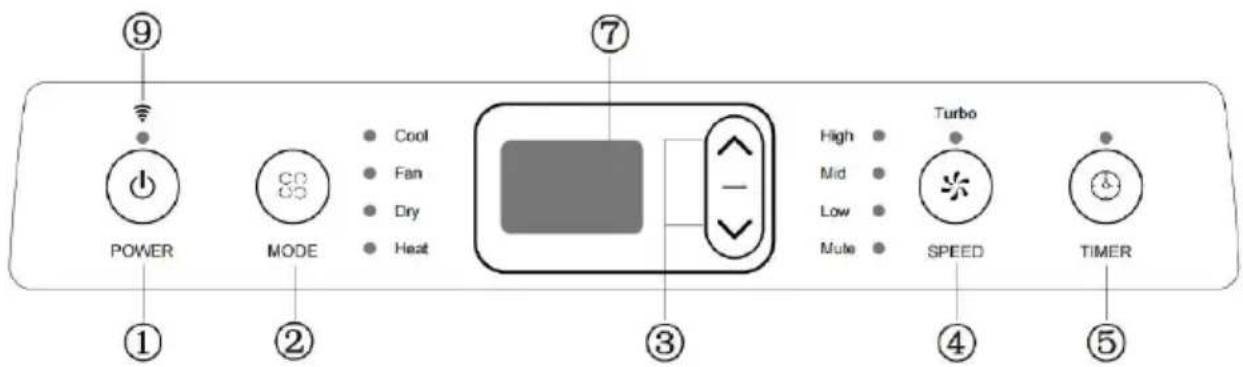
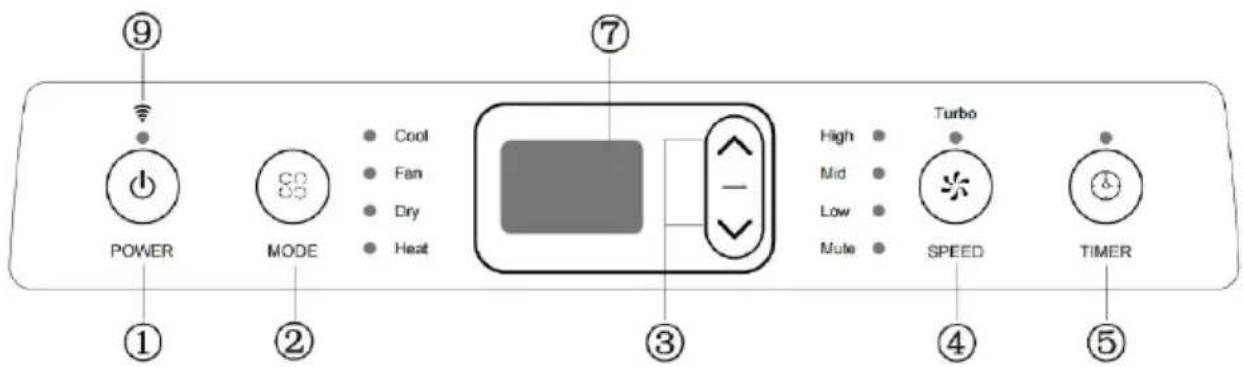
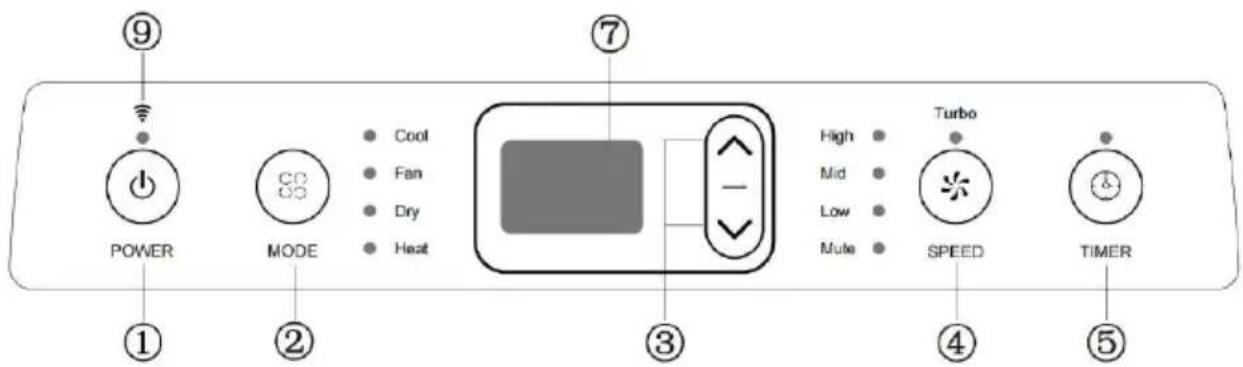
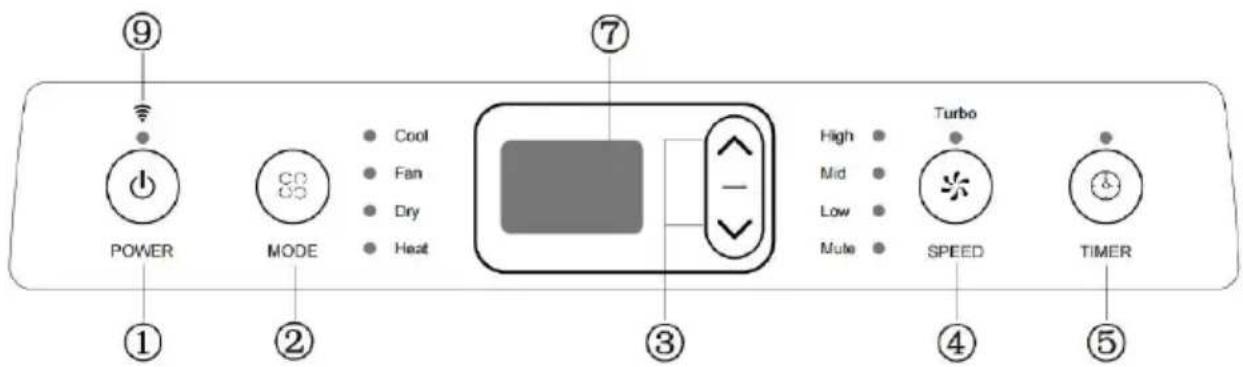
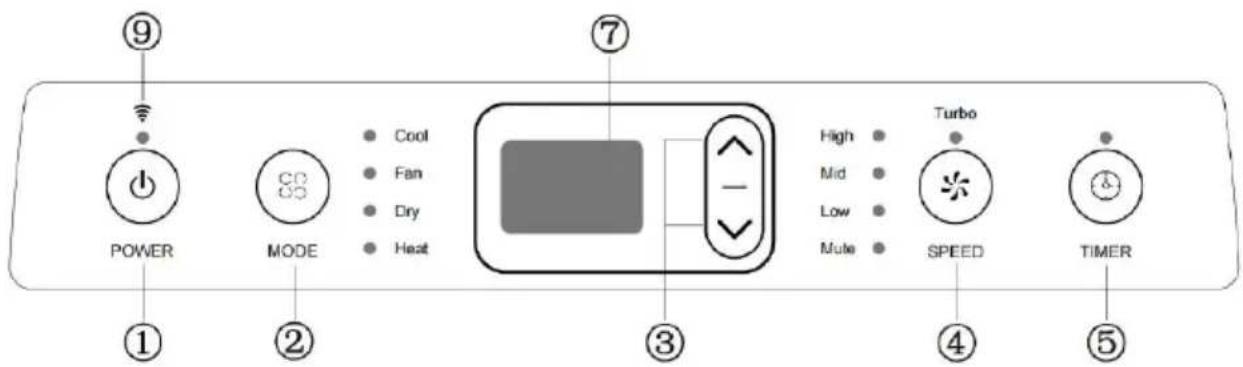
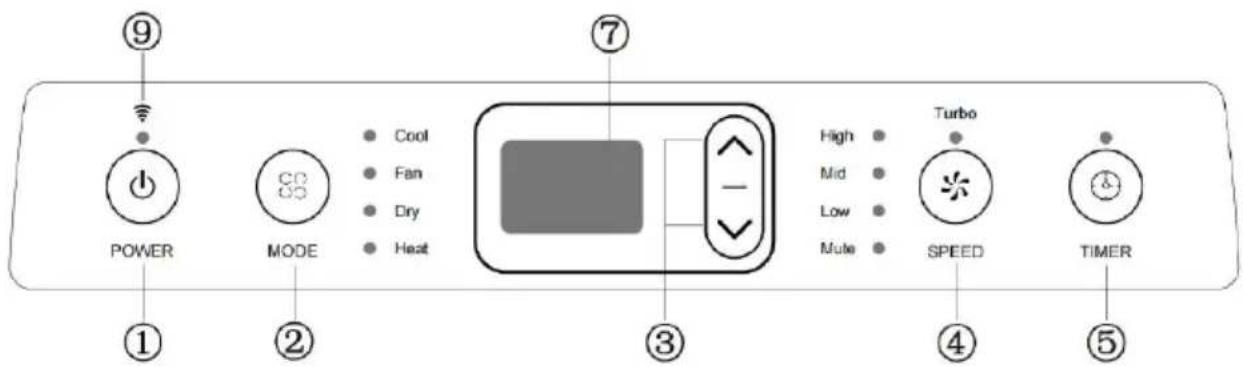
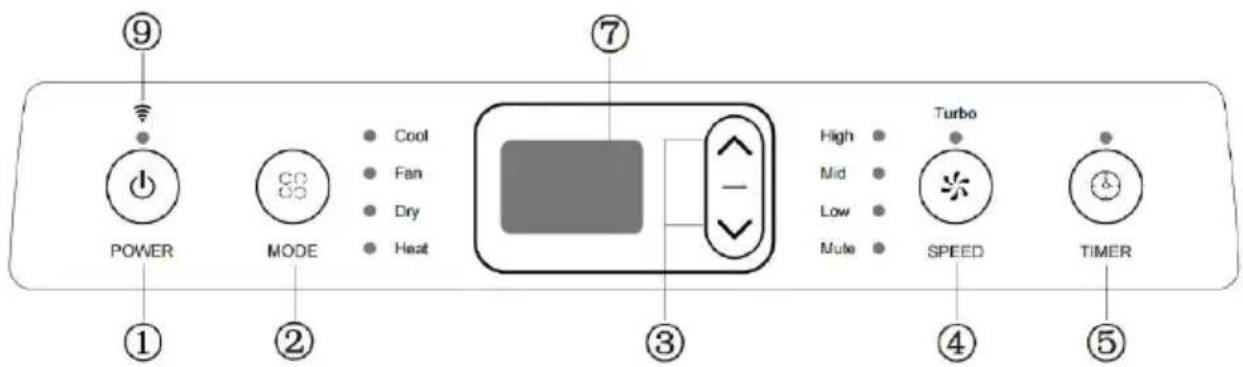
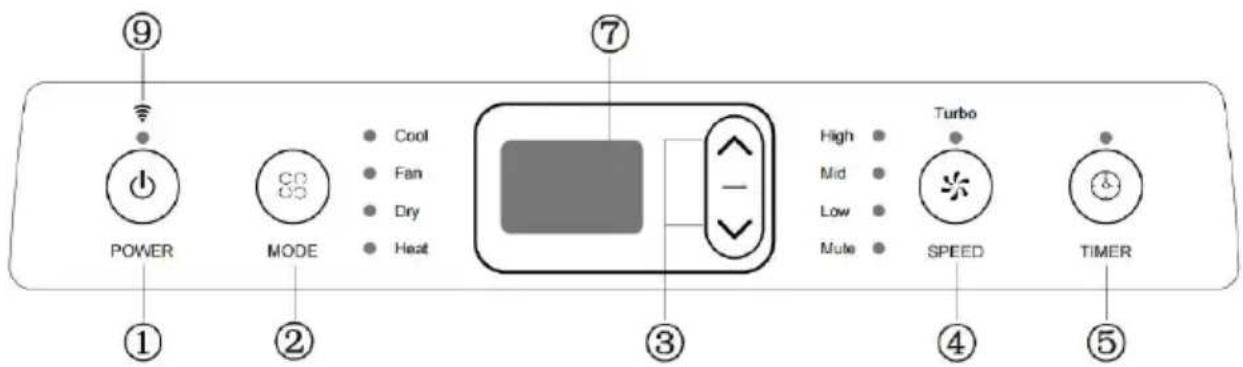
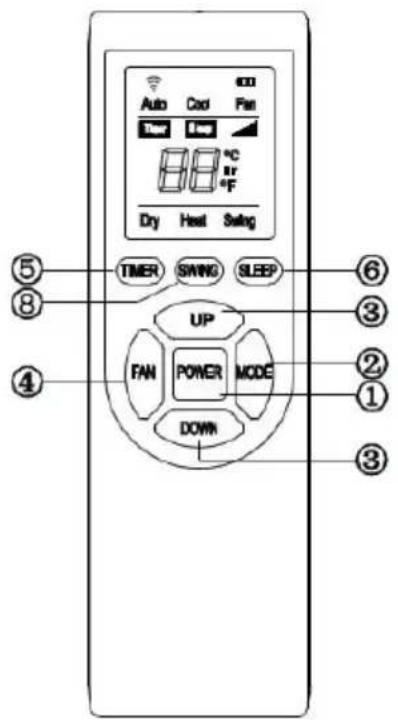
Control panel
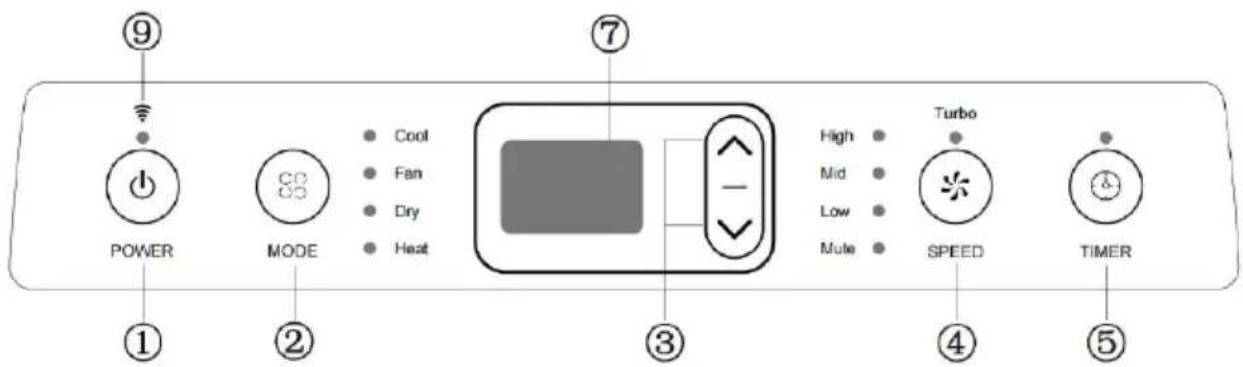
① Power button
Press this button to switch the air conditioning on or off.
② Mode button
Press this button to select the cooling, ventilation, dehumidification and heating operating modes.
③ Temperature/time setting
In cooling/heating mode: press this button to increase or decrease the set temperature;
In timer mode: press this button to set the switch-on/switch-off time.
④ SPEED button
Press this button to select between turbo, high, medium, low and quiet fan speed.
⑤ Timer button
Press this button in standby mode to set the switch-on time; Press this button when the device is switched on to set a switch-off time.
BE COOL
⑥ Sleep mode (up + timer button)
Press this button combination: "up + timer button" in cooling/heating mode to switch to sleep mode.
⑦ Display indication
The display shows the temperature and time.
⑧ Swivel function (speed + timer button)
Press the button combination (speed + timer button) to switch the swivel function on or off.
⑨ WiFi function
In standby mode, press and hold the SPEED button on the control panel for 3 seconds to reset the WiFi network or disconnect the WiFi connection.
Installing the air conditioning system
1) Open the packaging of the device and the accessories. First check that all accessories are present. Then check that the hoses between the indoor and outdoor units are connected correctly. Finally, make sure that the water connection is firmly plugged in.
2) Connect the steel wire safety cable to the mounting bracket component. As shown in the picture:
BE COOL
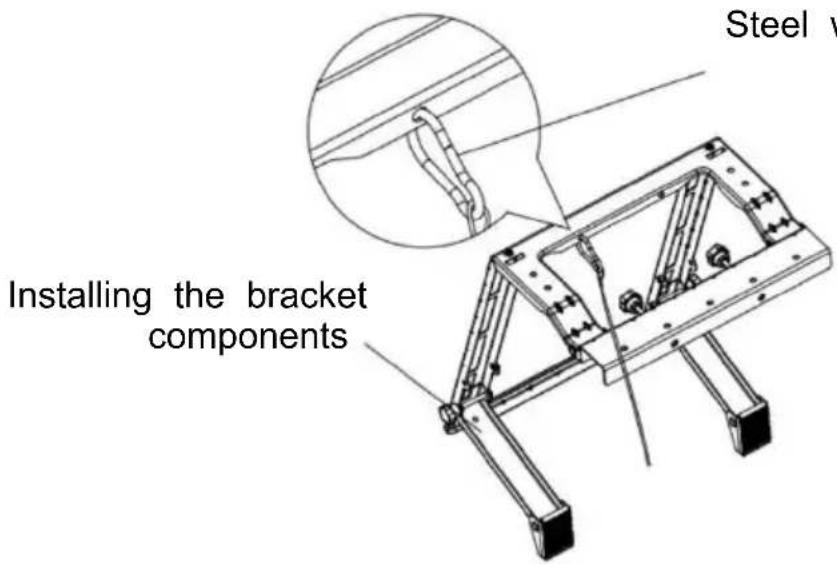
Steel wire safety rope
3 ) Install the eye bolt on the indoor unit and then attach the steel wire safety cable to the eye bolt. As shown in the picture:
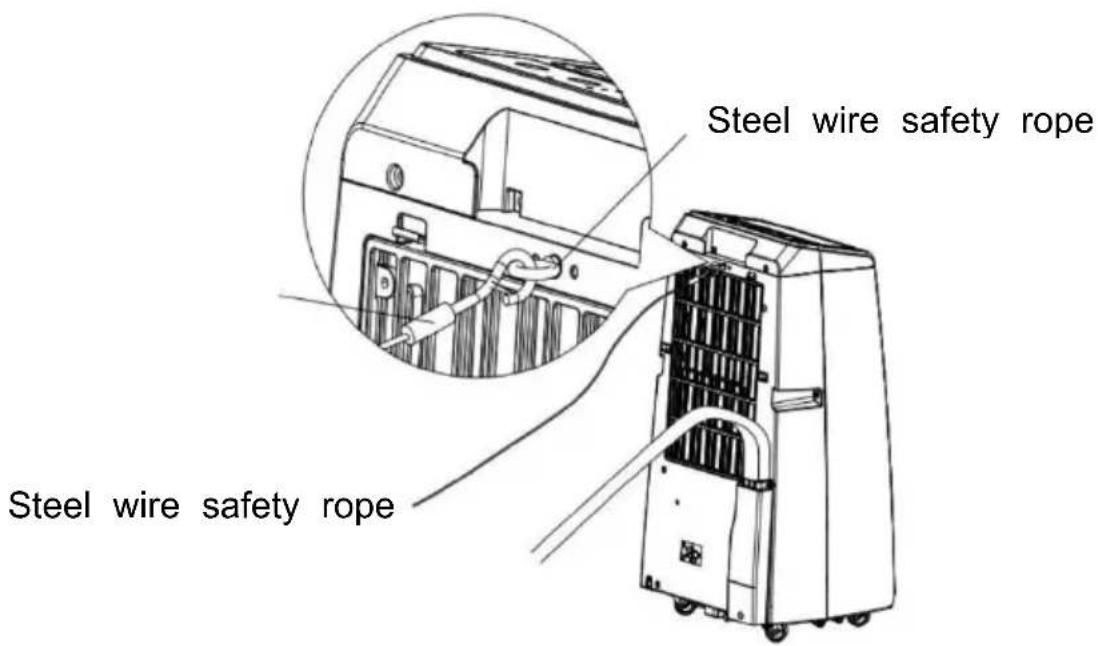
4) Stick the Velcro onto the window frame and onto the window. As shown in the picture:
BE COOL
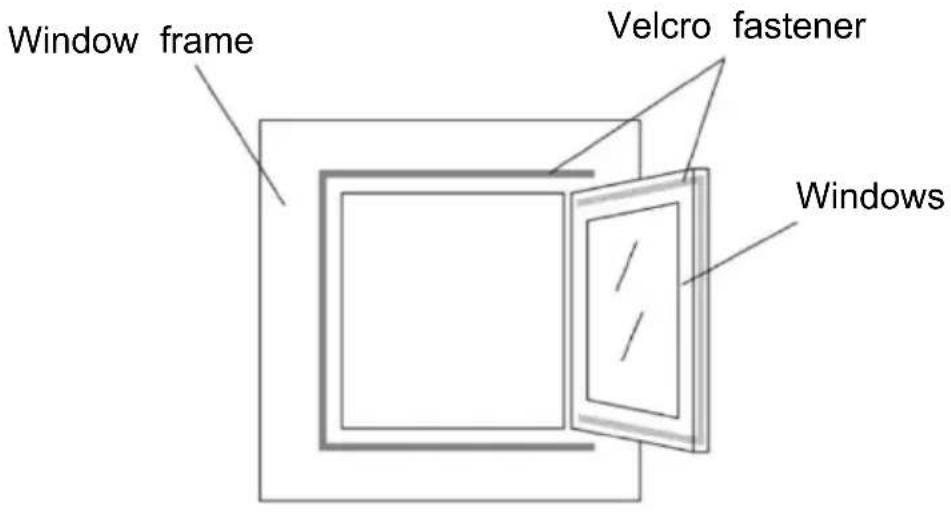
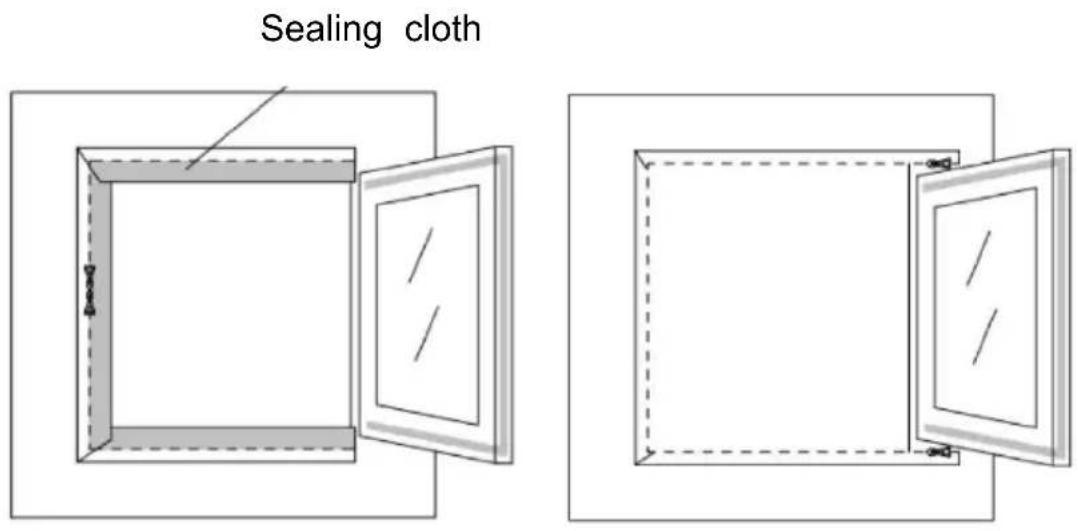
5) First stick the sealing cloth firmly onto the window frame, then pull off the sealing cloth and stick the other side of the sealing cloth onto the window. As shown in the picture:
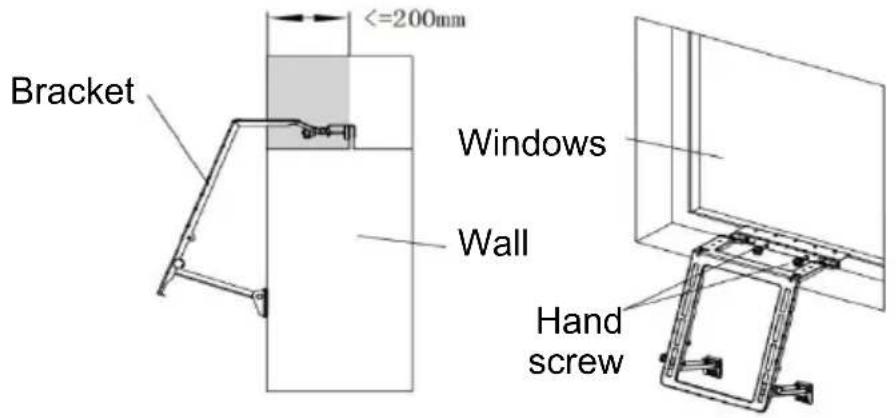
6) Attach the mounting bracket to the window. Mounting the bracket is relatively simple, as shown in the illustration. Then tighten the screw by hand to secure the bracket firmly to the window. As shown in the picture:
BE COOL
Installation
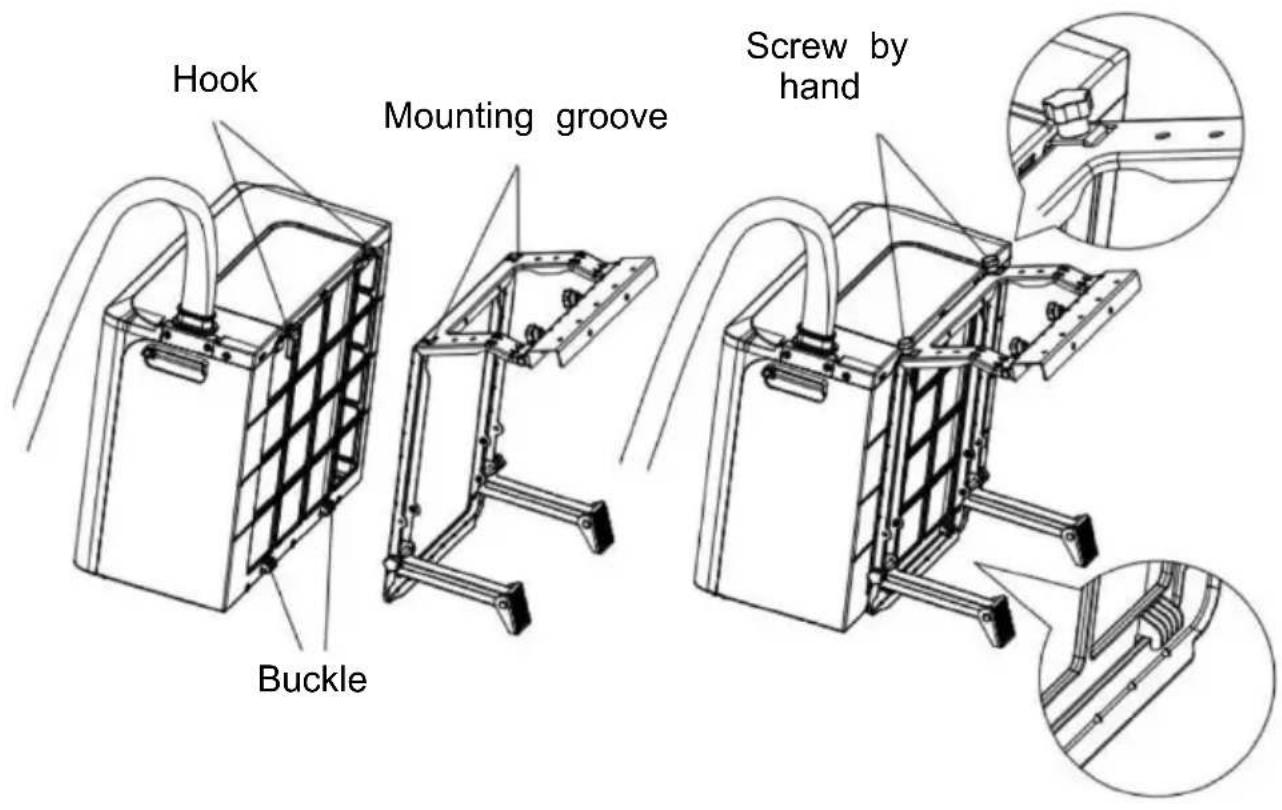
When installing the outdoor unit, the fastening buckle of the outdoor unit should be attached to the bracket. The hook of the outdoor unit must be hooked into the opening provided in the bracket. Then tighten the screw by hand. See illustration:
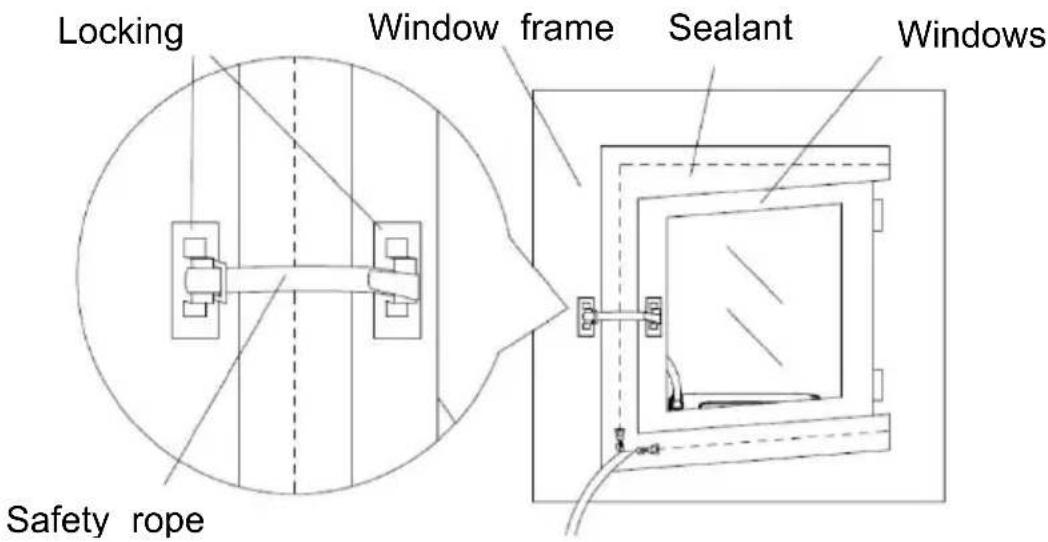
8) Attach the base of the locking mechanism to the window and to the intended position.
Caution: The two base elements must not be too far apart, otherwise the safety cable of the locking mechanism could be too short.
See illustration:
BE COOL
9) After completing the installation. NOTE: The air conditioner must be installed in a level and unobstructed location. Ensure that the air outlet is not blocked. The minimum distance required is 50 cm on all sides.
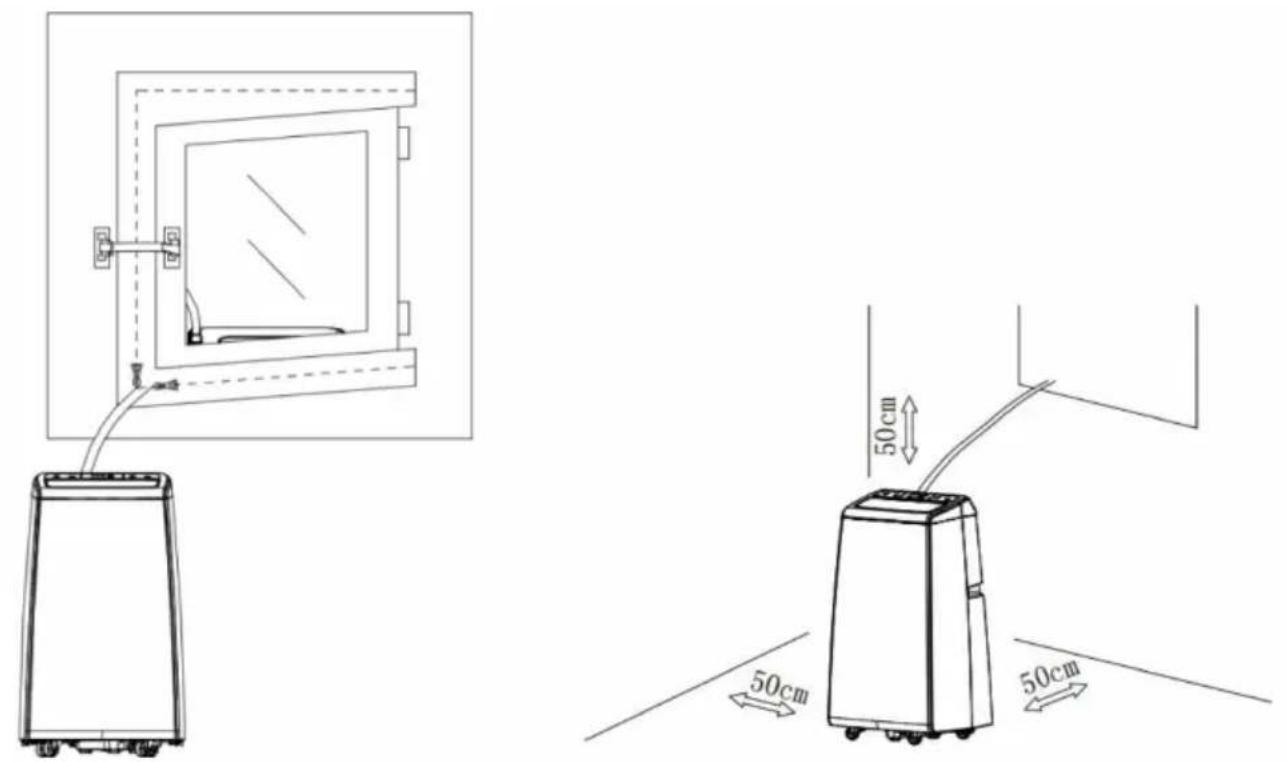
10) If the outdoor unit requires the use of a drain hose, simply install the drain hose directly to the drain socket. Install as follows.
BE COOL
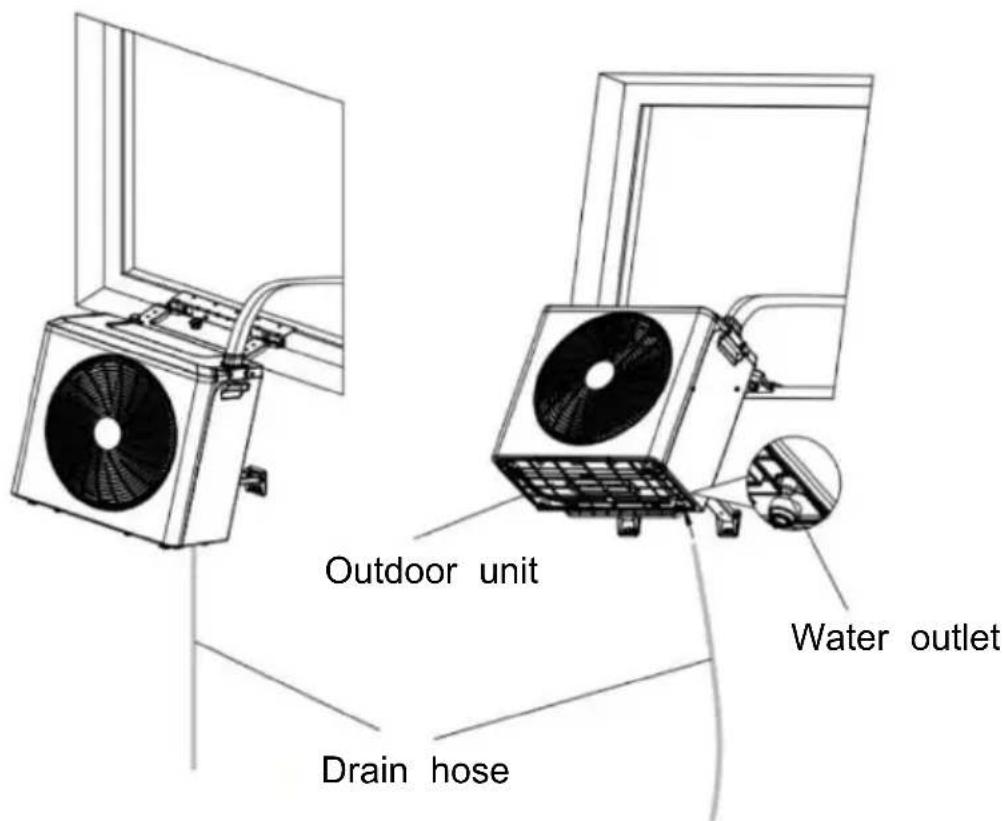
MAINTENANCE AND CLEANING
- Ensure that the appliance is disconnected from the power supply before carrying out maintenance work.
- Do not use chemical cleaning agents such as petrol to clean the appliance.
- Do not clean the appliance directly under running water.
- If the air conditioner is damaged, please contact the dealer or a specialist workshop.
Cleaning
Caution: Always unplug the power cable from the socket before cleaning or maintenance.
Cleaning the air filter
- It is important to remove dust from the filter regularly.
- Remove the filter as shown in the illustration below.
BE COOL
- Clean the filter with tap water and/or a vacuum cleaner to remove dirt.
- Do not use water that is hotter than 40 °C and do not expose the filter to the sun.
- Make sure that the filter is completely dry before reinserting it into the air
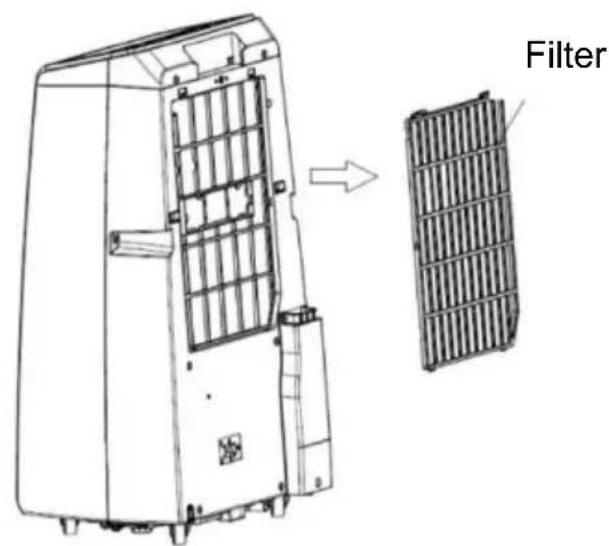
conditioner.
Maintenance
- Remove the rubber plug from the drain outlet and drain the condensation in a suitable place.
- If the air conditioner is not used for a longer period of time, it is necessary to bring the outdoor unit inside to prevent dust, dirt, etc. from getting into the air outlet.
Cleaning the surface of the appliance
- First wipe the surface with a neutral cleaning agent and a damp cloth.
- Then dry the appliance thoroughly with a dry cloth.
• Make sure that neither water nor cleaning agents get inside the appliance.
- Do not use aggressive cleaning agents or petrol to clean the air conditioner.
BE COOL
Storage
- Remove the air conditioner from the installation site.
- Remove the rubber seal from the indoor unit and the outdoor unit and drain off the condensation.
- Operate the appliance in fan mode to dry the inside.
- Switch off the air conditioner and unplug it.
- Clean the filter and reinsert it.
- Remove all brackets from the air conditioner, fit the brackets of the outdoor unit to the indoor unit and assemble the appliance as shown in the illustration below.
- Store the air conditioner in a cool and dry place. We recommend storing the air conditioner in its original packaging to prevent dirt and dust from accumulating on it.
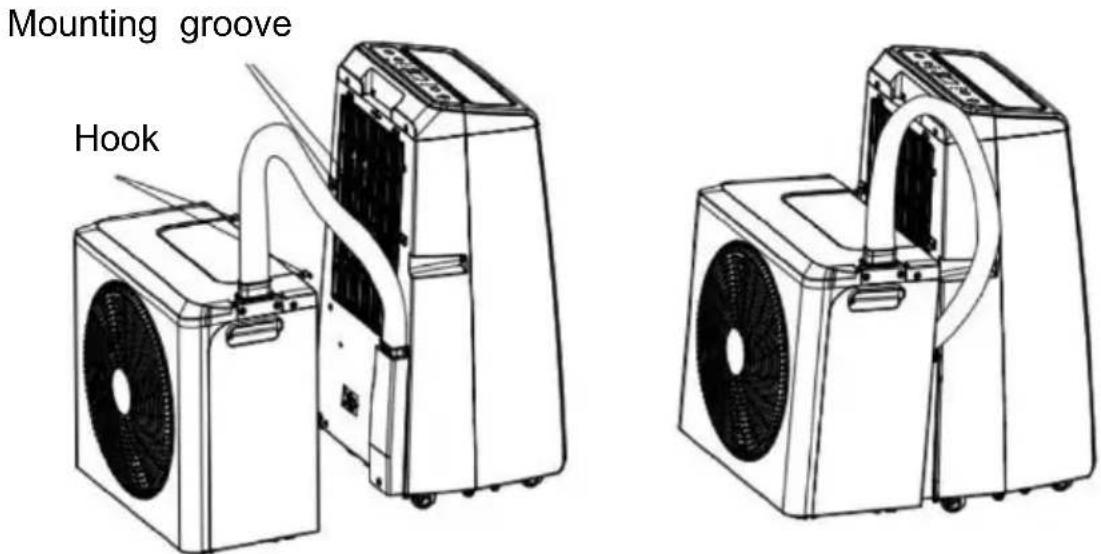
CHECKS AT THE START OF THE SEASON
- Check that the power supply cable and the socket are in order and that the earthing is functional.
- Ensure that the plug is carefully fitted in the condensation water outlet and that the filters are in place.
- Follow the installation and safety instructions carefully.
BE COOL
TROUBLESHOOTING
If the appliance does not work or only works to a limited extent: Check whether an error code appears on the display and refer to the code table to find a solution. If no error code is displayed, refer to the error table to find a possible solution.
| No | Cause | Code |
| 1 | Compressor drive IPM error | F1 |
| 2 | PFC/IPM error | F2 |
| 3 | Abnormal compressor start sequence | F3 |
| 4 | Compressor operating error (pressure outside the permissible range) | F4 |
| 5 | Malfunction of the position detection circuit | F5 |
| 6 | Phase current overcurrent protection | FA |
| 7 | DC bus voltage Over/undervoltage protection | P2 |
| 8 | Communication error between indoor and outdoor | E4 |
| 9 | Error in communication between main control b and driver board | F6 |
| 10 | AC input voltage protection | P3 |
| 11 | AC current overcurrent protection | P4 |
| 12 | AC over-/undervoltage protection | P5 |
| 13 | Malfunction of the outdoor sensor of the outdo (reserved) | F7 |
| 14 | Malfunction of the return air sensor (reserved) (reserved) | F8 |
| 15 | Malfunction of the exhaust air sensor | E0 |
| 16 | Malfunction of the outdoor temperature sensor (reserved) | E6 |
| 17 | Malfunction of the outdoor DC fan | E7 |
| 18 | Malfunction of the outdoor unit (EE) | FE |
| 19 | Abnormal temperature protection function of the return air sensor | PA |
| 20 | Overheating protection on the upper part of the compressor | P1 |
| 21 | Abnormal coolant circulation | PE |
BE COOL
| 22 | Exhaust air temperature protection | PH |
| 23 | Overload protection of the outer coil (reserved) | PC |
| 24 | Feedback error of the indoor DC fan | E3 |
| 25 | Overload protection of the inner coil | P6 |
| 26 | Freeze protection of the inner coil | P7 |
| 27 | Malfunction of the internal coil temperature sens | E2 |
| 28 | Malfunction of the indoor temperature sensor | E1 |
| 29 | Malfunction of the zero monitoring unit of the fittings | P8 |
| 30 | Malfunction of the internal EE | EE |
| 31 | Feedback error of the water motor | E5 |
| 32 | Feedback error of the cooling fan | E8 |
| 33 | Condensation tank full | FL |
| 34 | The four-way valve reversing is abnormal | EA |
| 35 | System error | Eb |
TROUBLE SHOOTING GUIDE
| Problem | Cause | Solution |
| The device cannot be switched on | No power | Switch on the power |
| Damaged socket outlet | Switch off the appliance and check/repair the socket. | |
| Unknown reason | Contact the dealer. | |
| Low air displacement or limited cooling effect | The lowest fan level selected | Select the high fan spe mode. |
| The air filter is dirty | Check and clean the fi | |
| The air supply or the outlet of the indoor u is blocked | Make sure that the dev is not blocked and rem the blockage if necessar | |
| The air supply or the outlet of the outdoor is blocked | Make sure that the dev is not blocked and rem the blockage if necessar | |
| The ambient temperatur is too low or too hig | The ambient temperature must be between 18 ar |
BE COOL
| 40 °C. | ||
| Insufficient voltage from the power supply | Consult our service department or use a different power connection. | |
| Only air displacement, but no cooling effect | The appliance runs in ventilation mode | Wait about 3-5 minutes until the thermostat switches on again. |
| Cooling mode has just switched off automatically | Check that the mounting bracket is secure and tighten the mounting screws of the device. | |
| Water leaks from the indoor unit | The rubber plug on the underside of the indoor unit is missing or not sufficiently pressed in | Check or replace the rubber plug. |
| The device is tilted | The appliance must be mounted horizontally. | |
| The appliance emits a corresponding odor | There is a serious problem | Switch off the device immediately and contact the dealer. |
Smart Home Wi-Fi connection guide
IMPORTANT
Please note that only 2.4 GHz networks are supported!
Transmission power: max. 100mW
App installation
Download the "Smart life" app from the Play Store (Android) or the App Store (iOS). The following QR will take you directly to the app download:
BE COOL

Scan QR code
Registration
If you do not yet have a Smart Life account, you can register or log in with a verification code that will be sent to you by SMS.
To register:
- Navigate to the registration area in the app.
- The system automatically recognizes your country or region. You also have the option of selecting the country code manually. Enter your cell phone number or e-mail address and tap "Next".
- If you select the cell phone number option, enter the verification code you received by text message. Then set a password and tap "Confirm" to complete the registration.
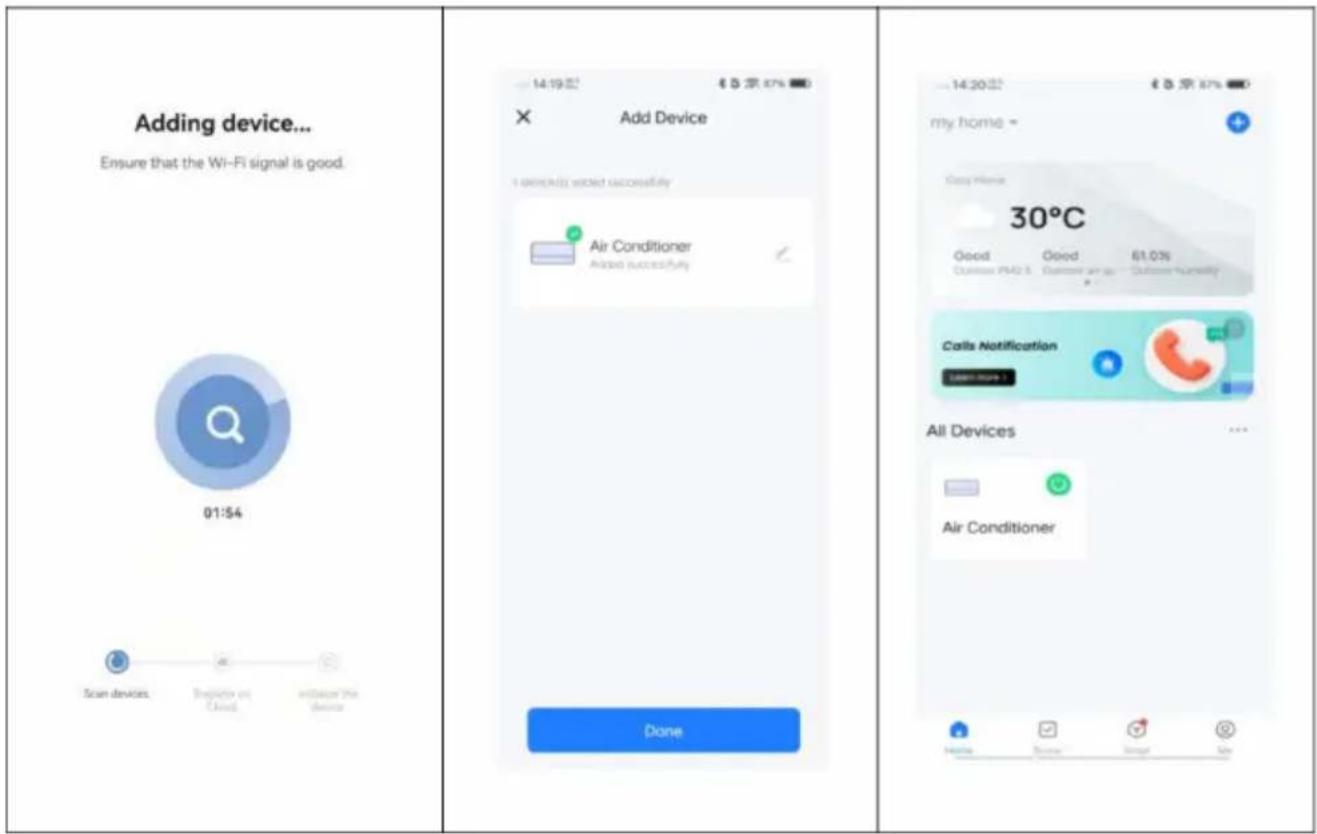
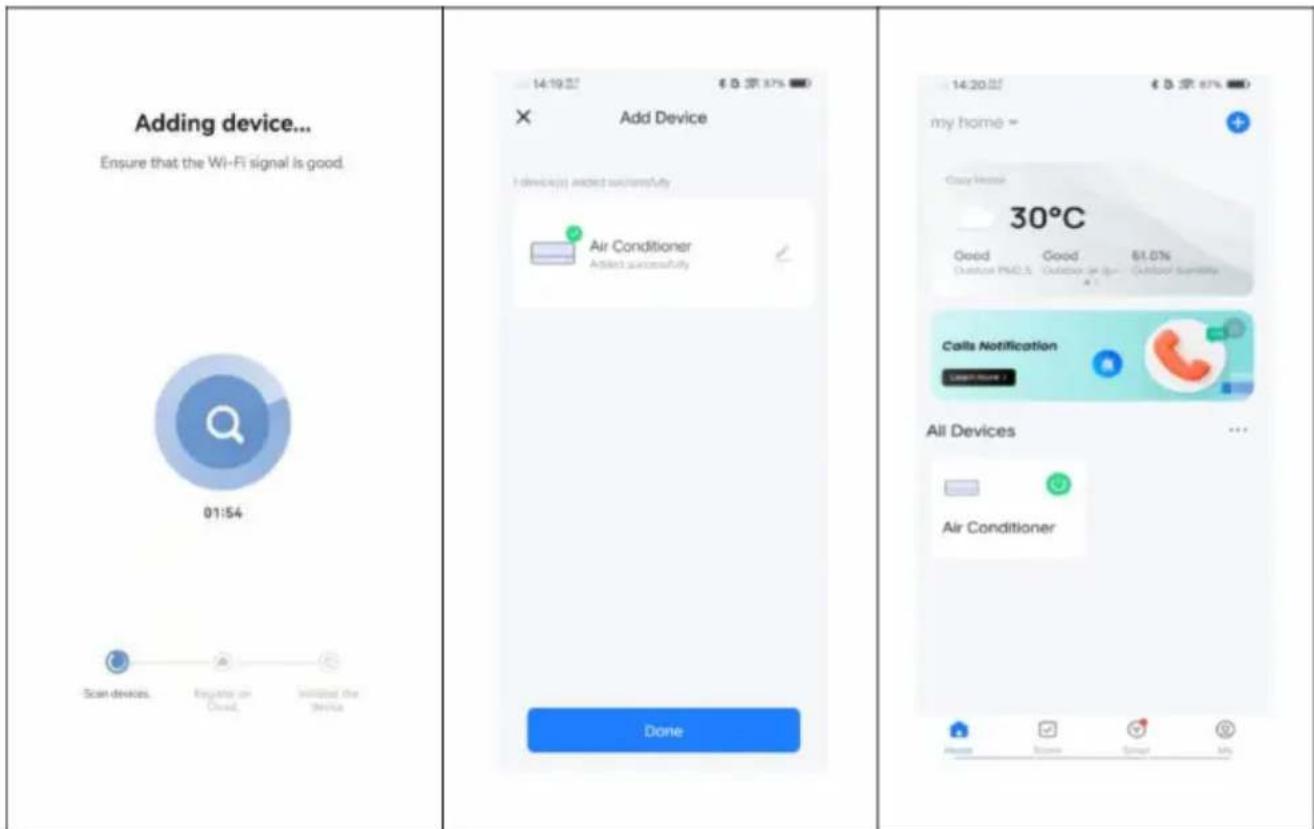
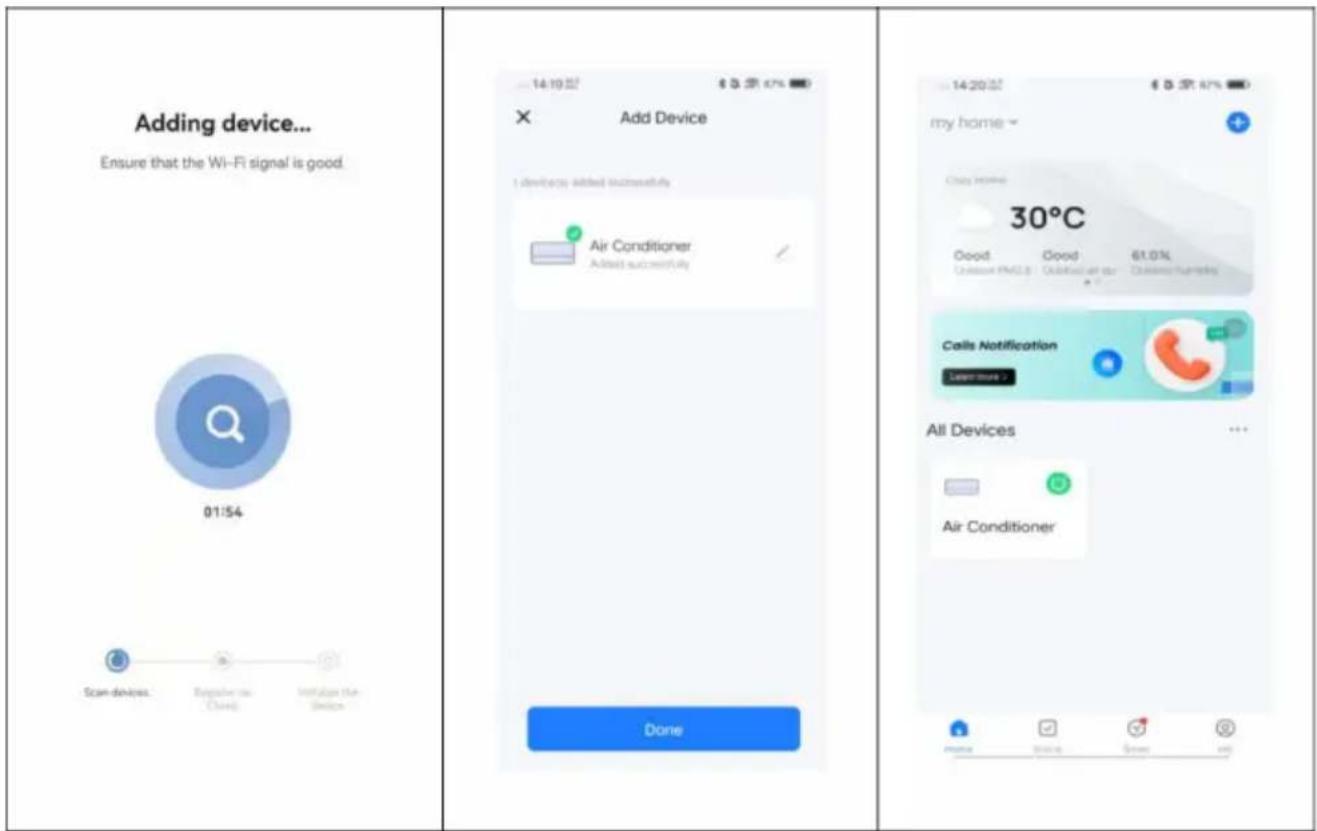
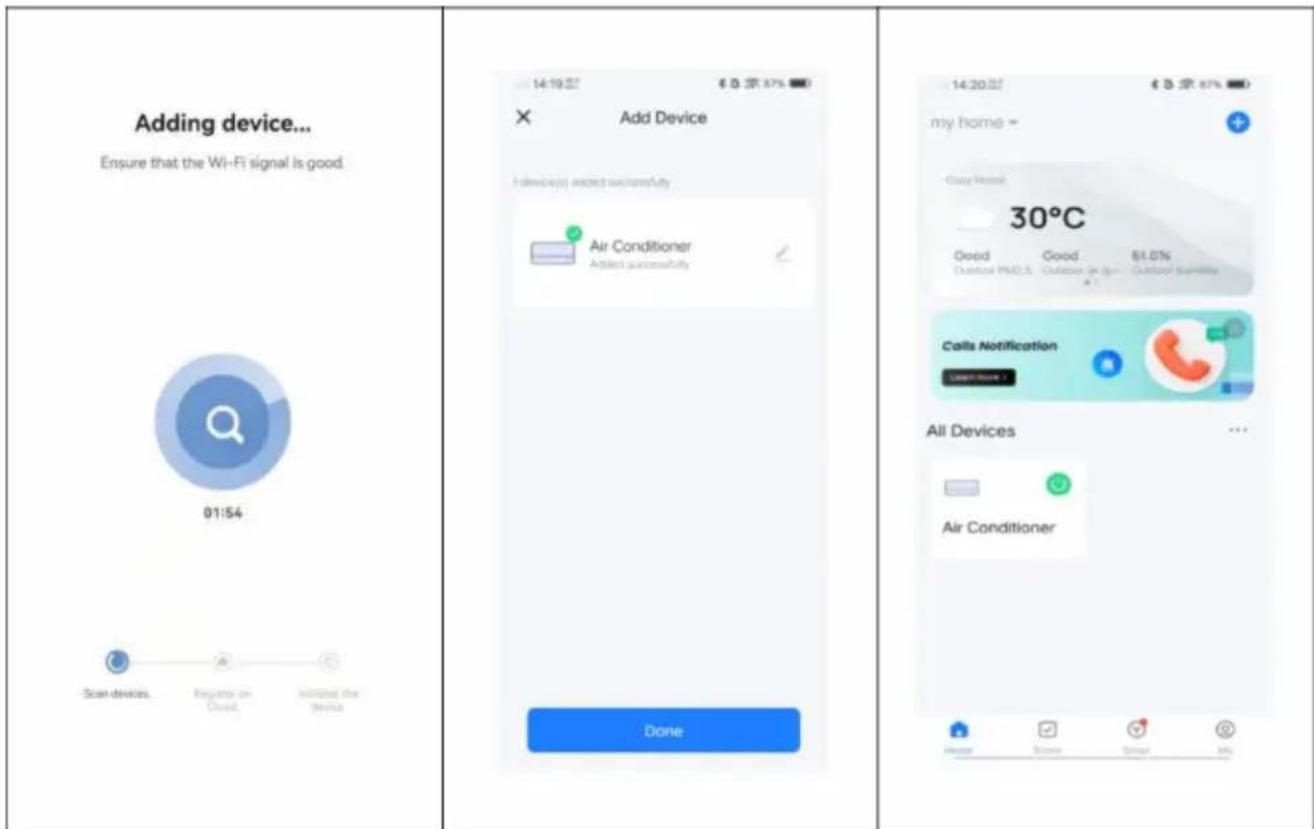
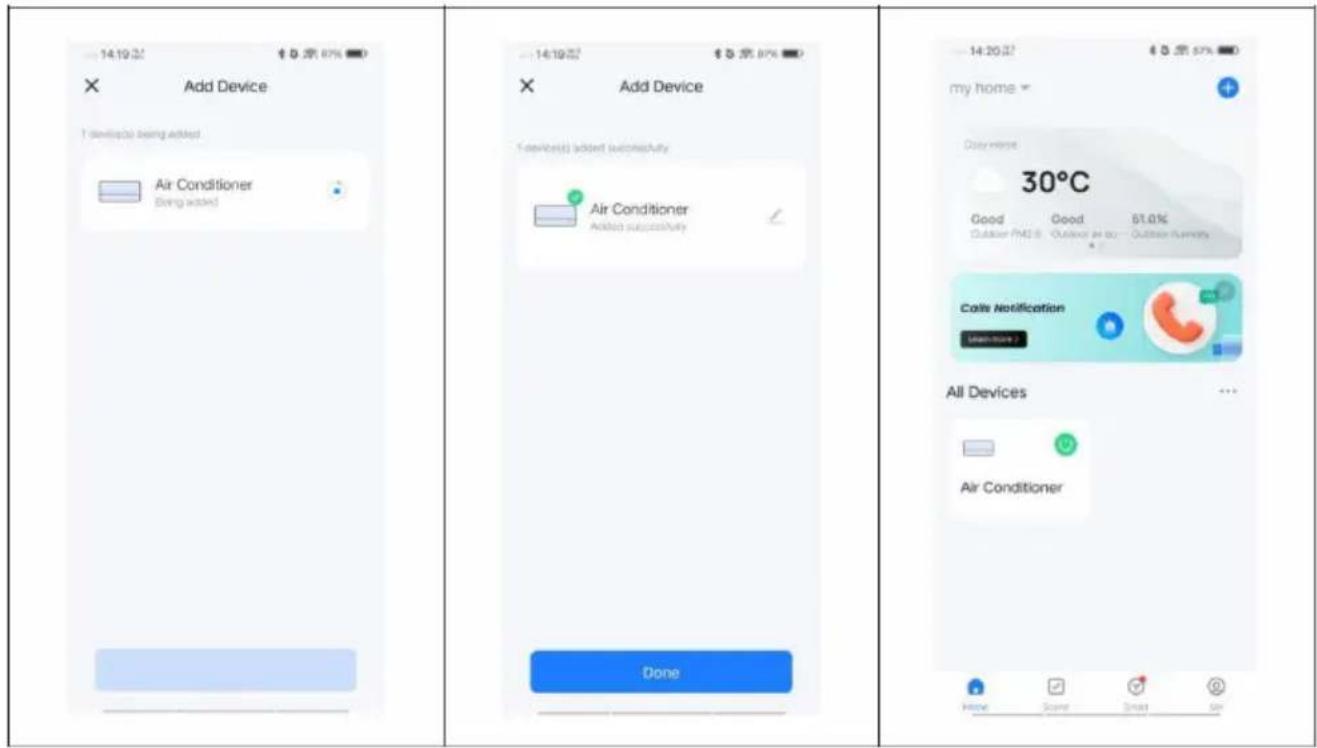
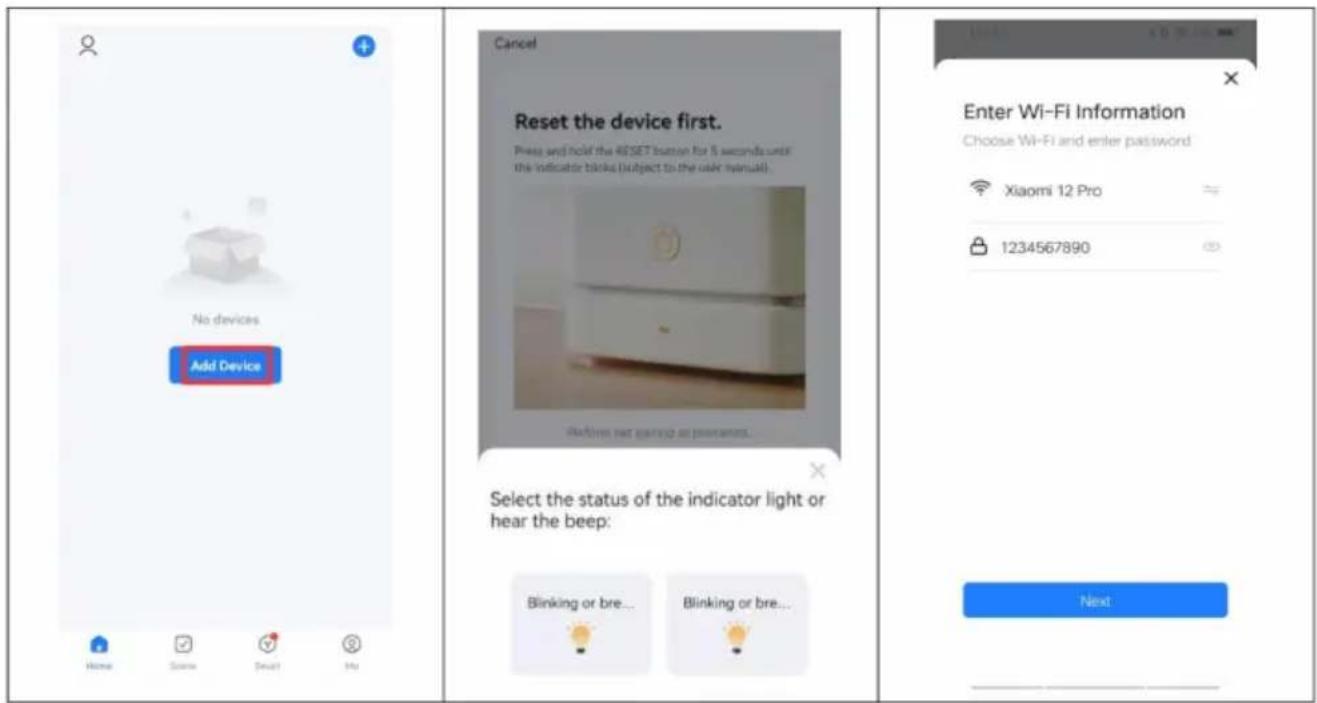
Connect a device to the network:
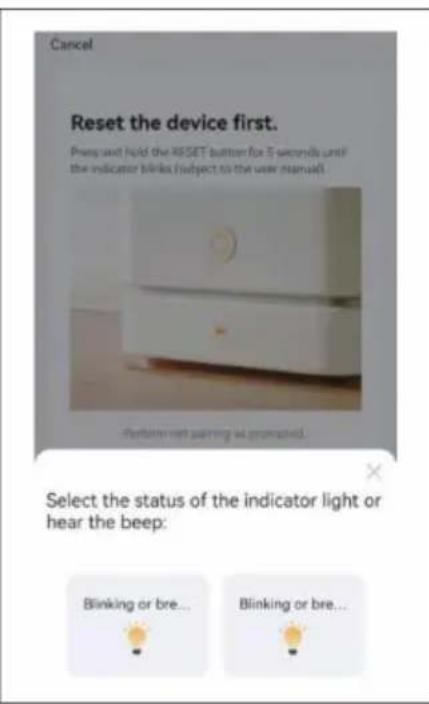
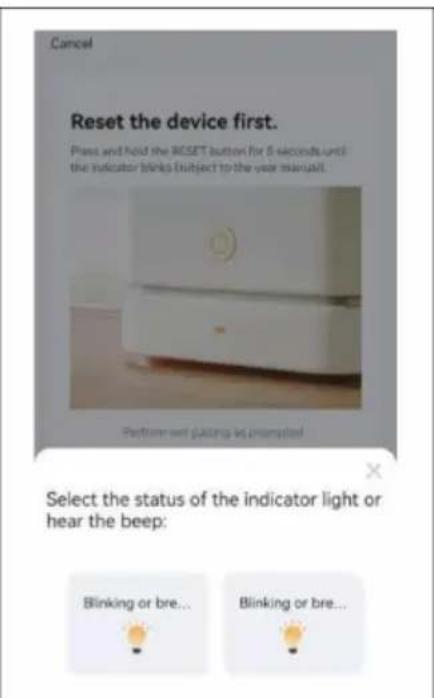
- When the air conditioner is in standby mode, press the FAN button on the control panel for 3 seconds to switch to Wi-Fi connection mode.
The Wi-Fi signal light starts to flash.
- Open the Smart Home app and tap "+" in the top right-hand corner to add a new device via the network.
- Make sure that the operating light flashes quickly (2 times per second) and tap on "Confirm that the light flashes quickly".
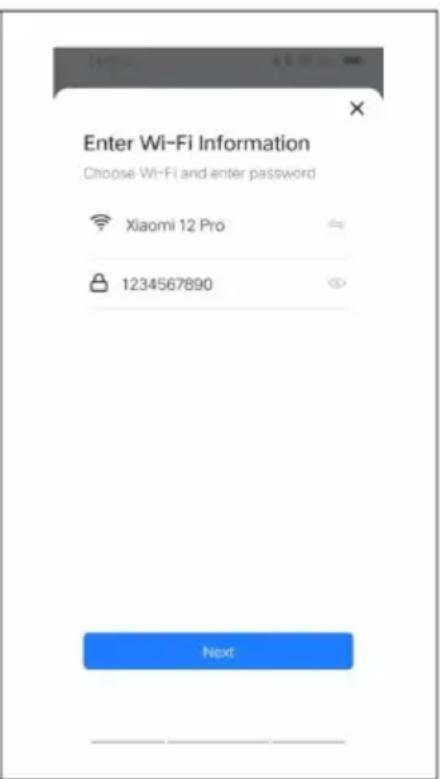
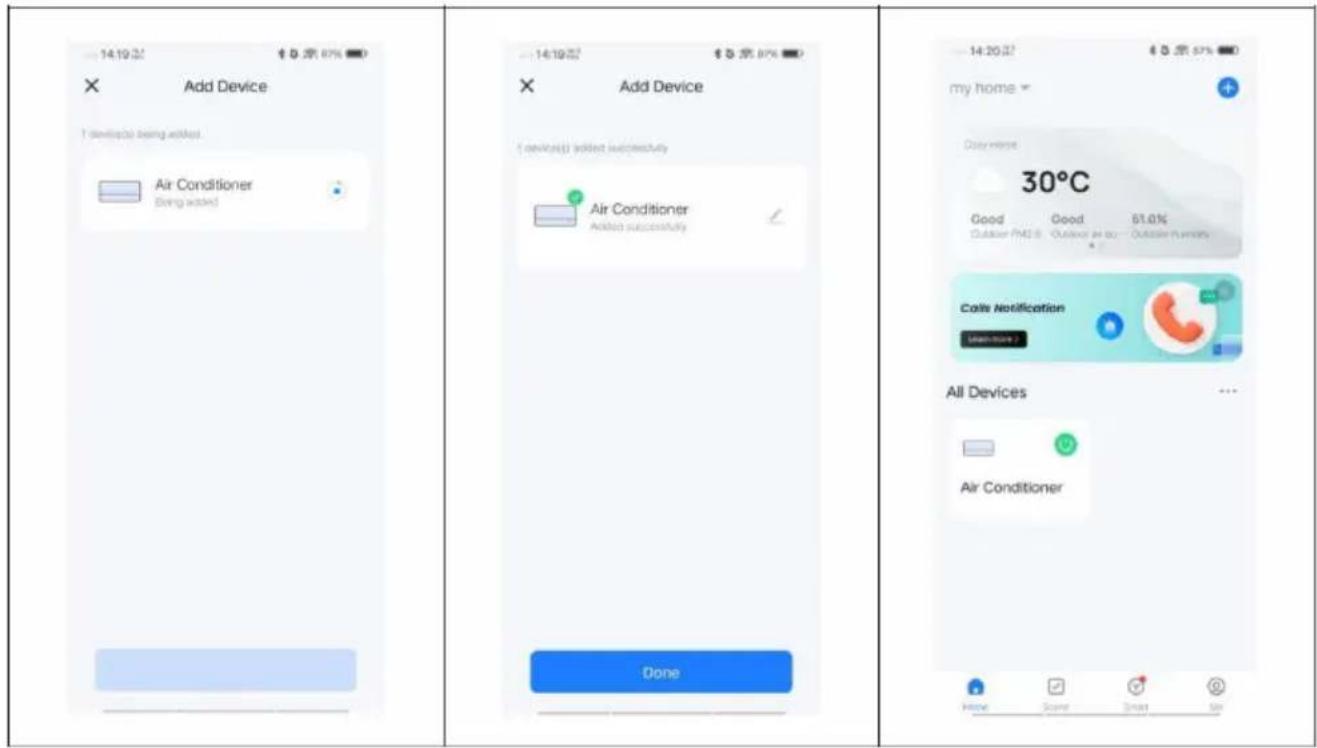
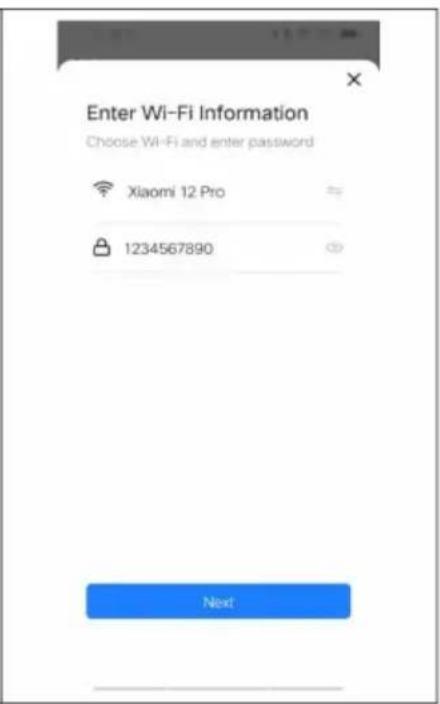
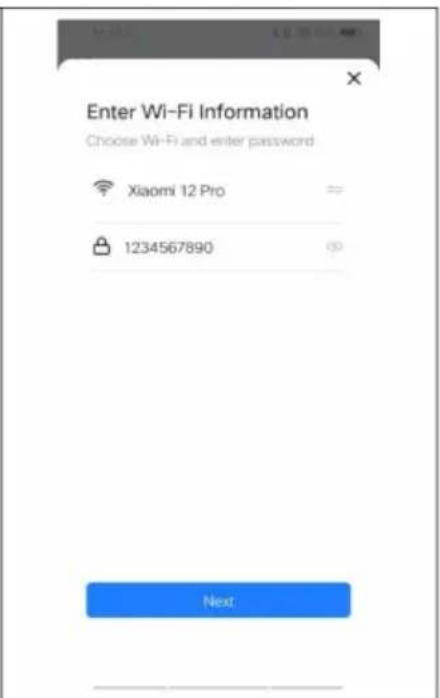
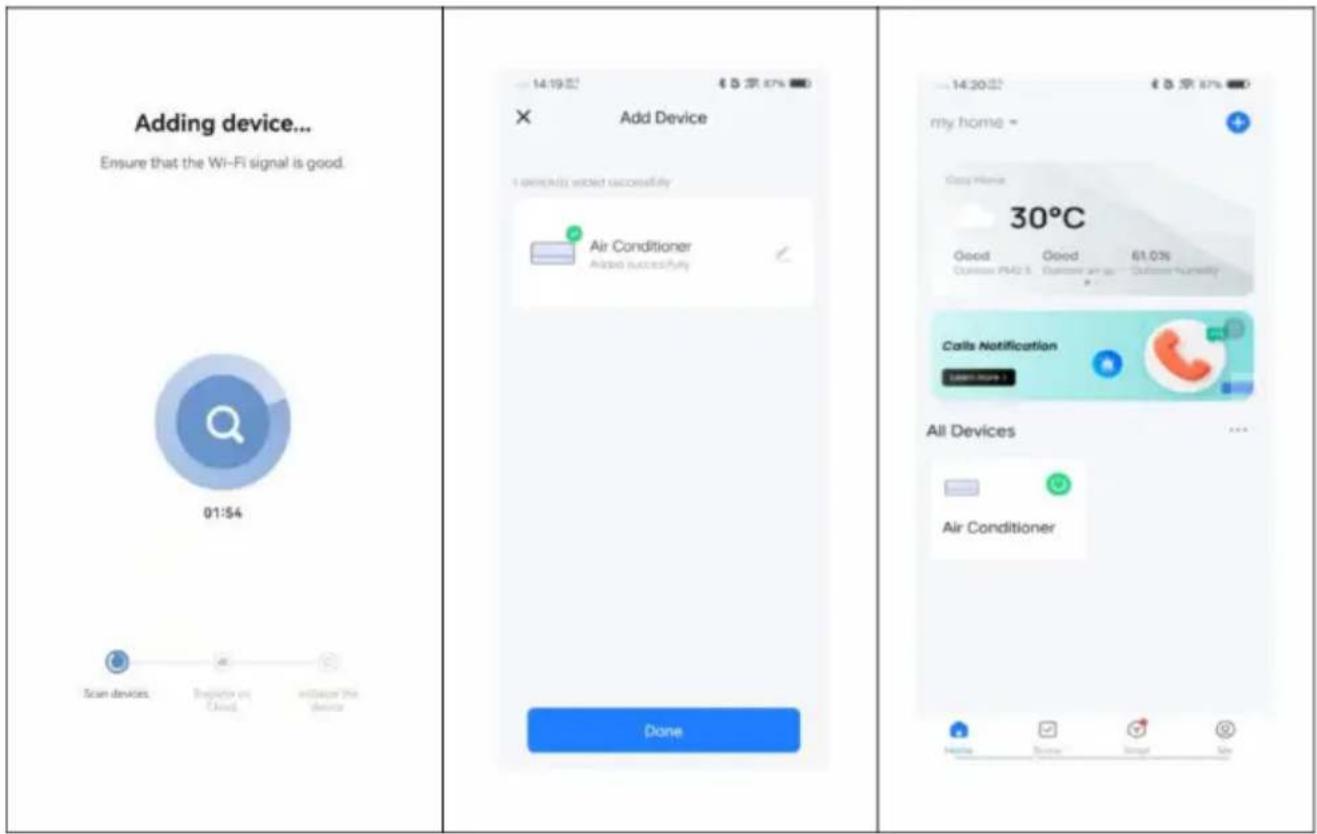
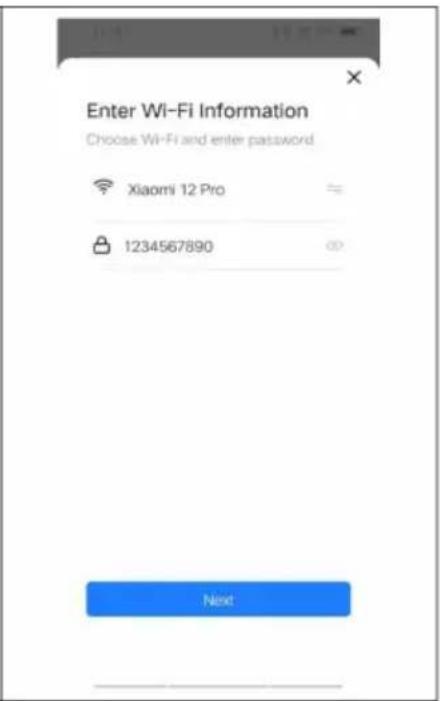
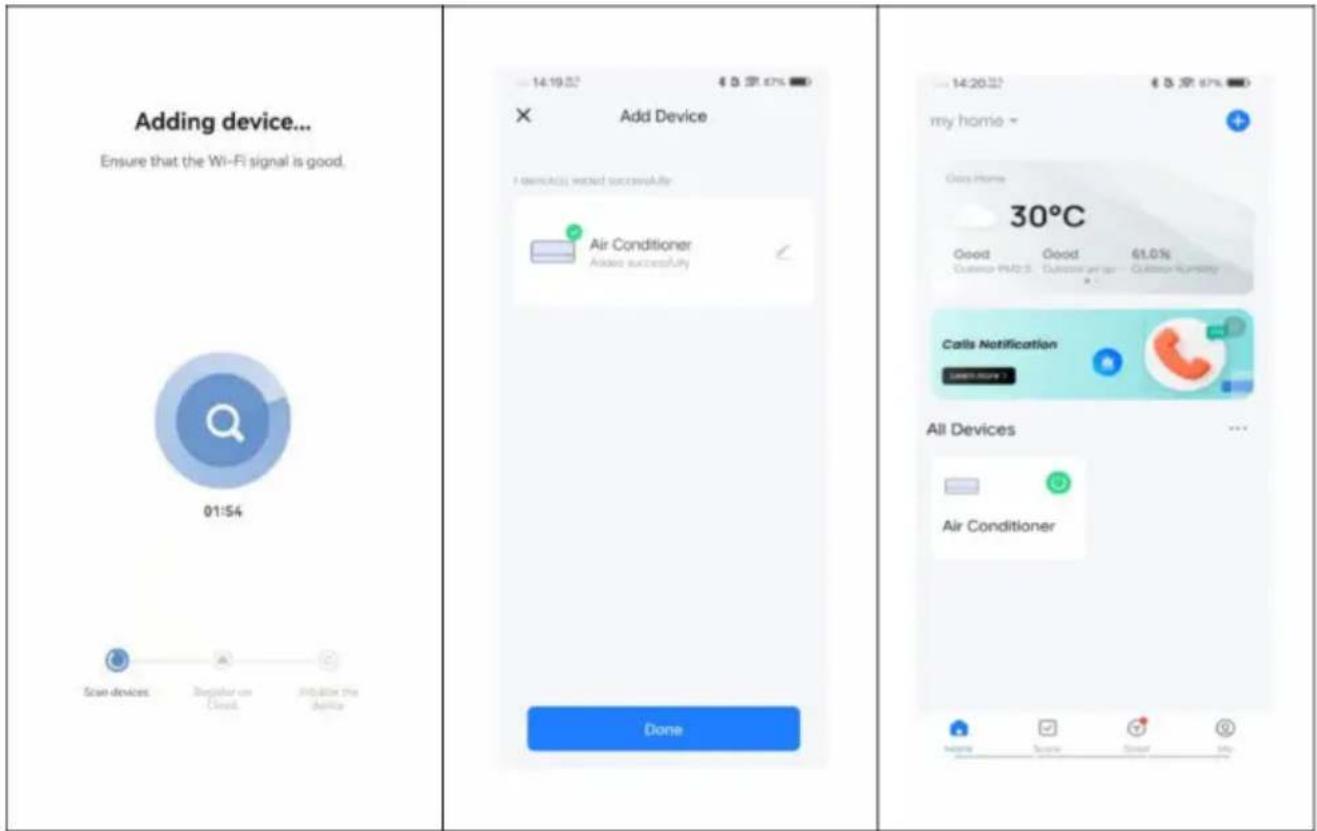
- Select the Wi-Fi network (note: the network must be in the 2.4 GHz band) and enter the password. The device starts the pairing process and connects to the app.
BE COOL
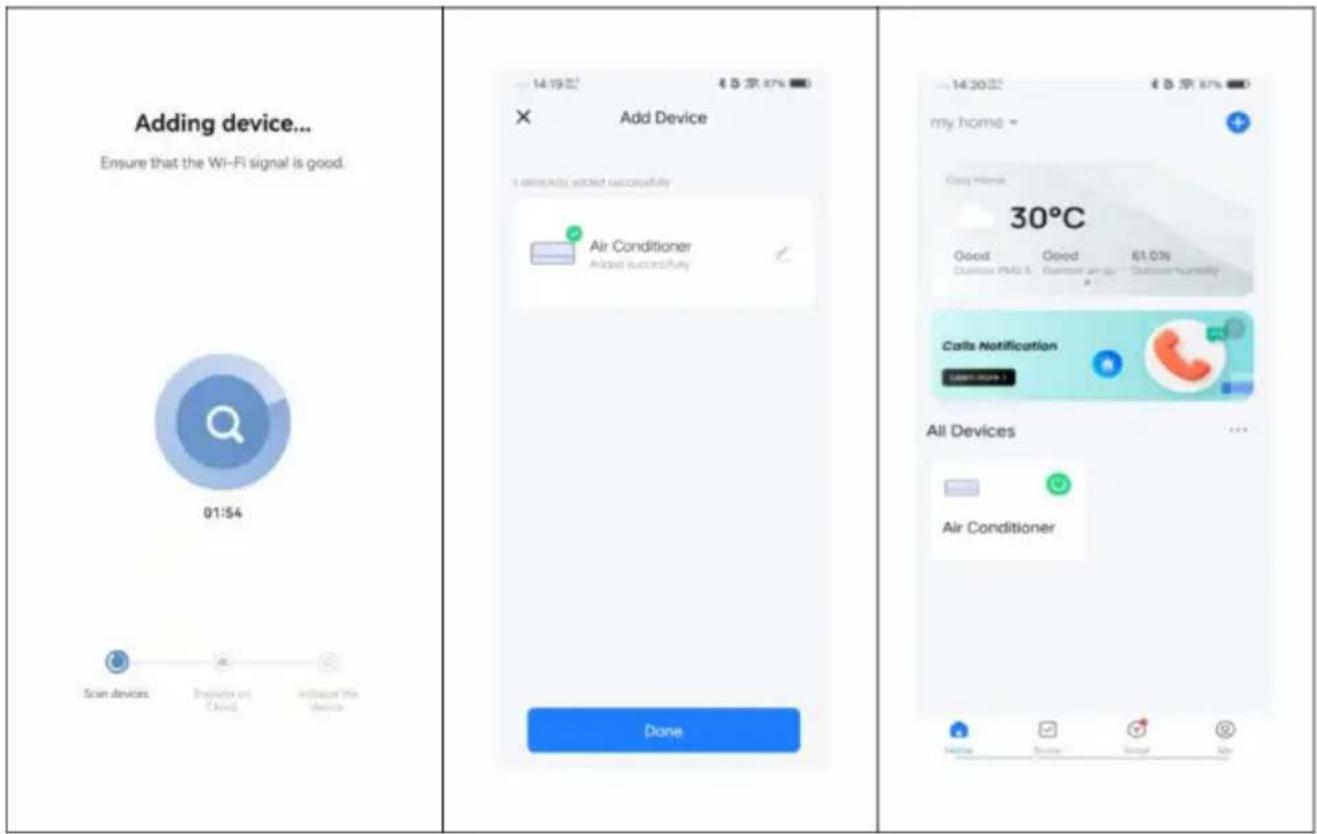
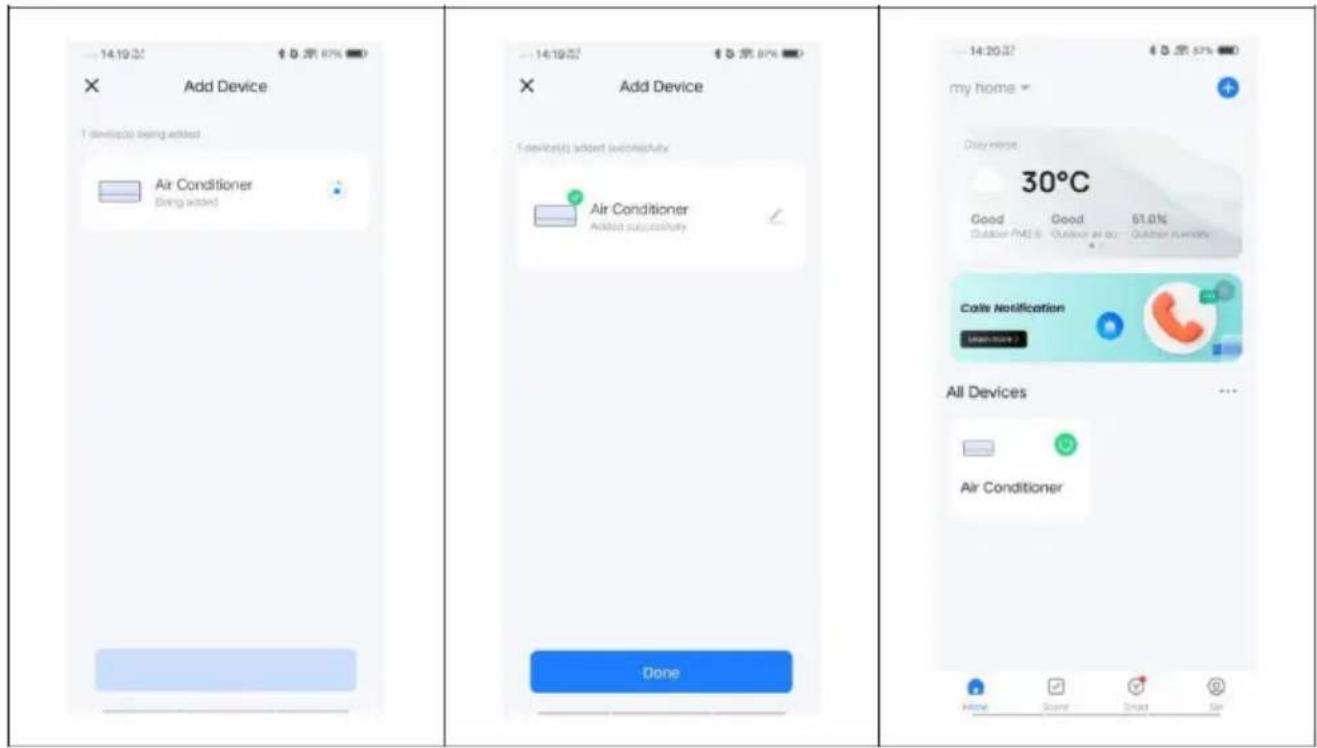
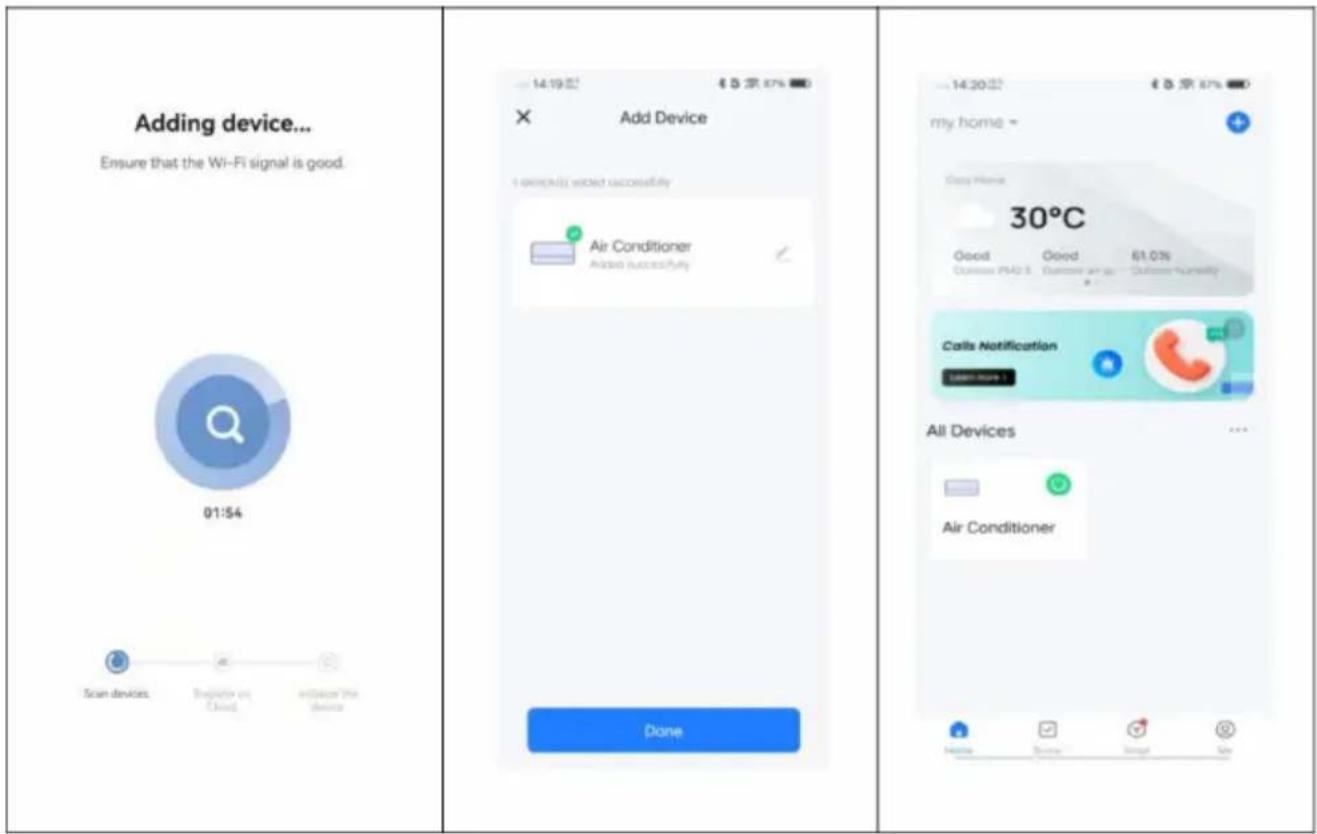
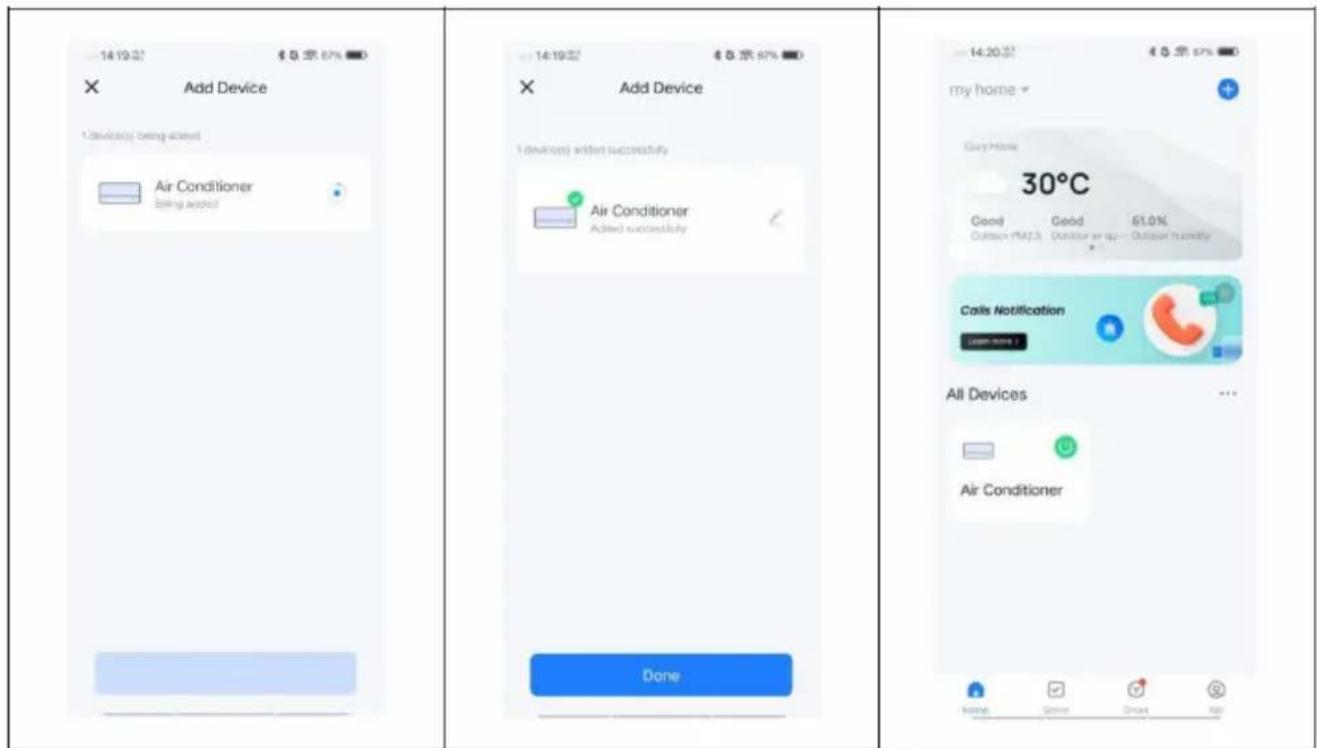
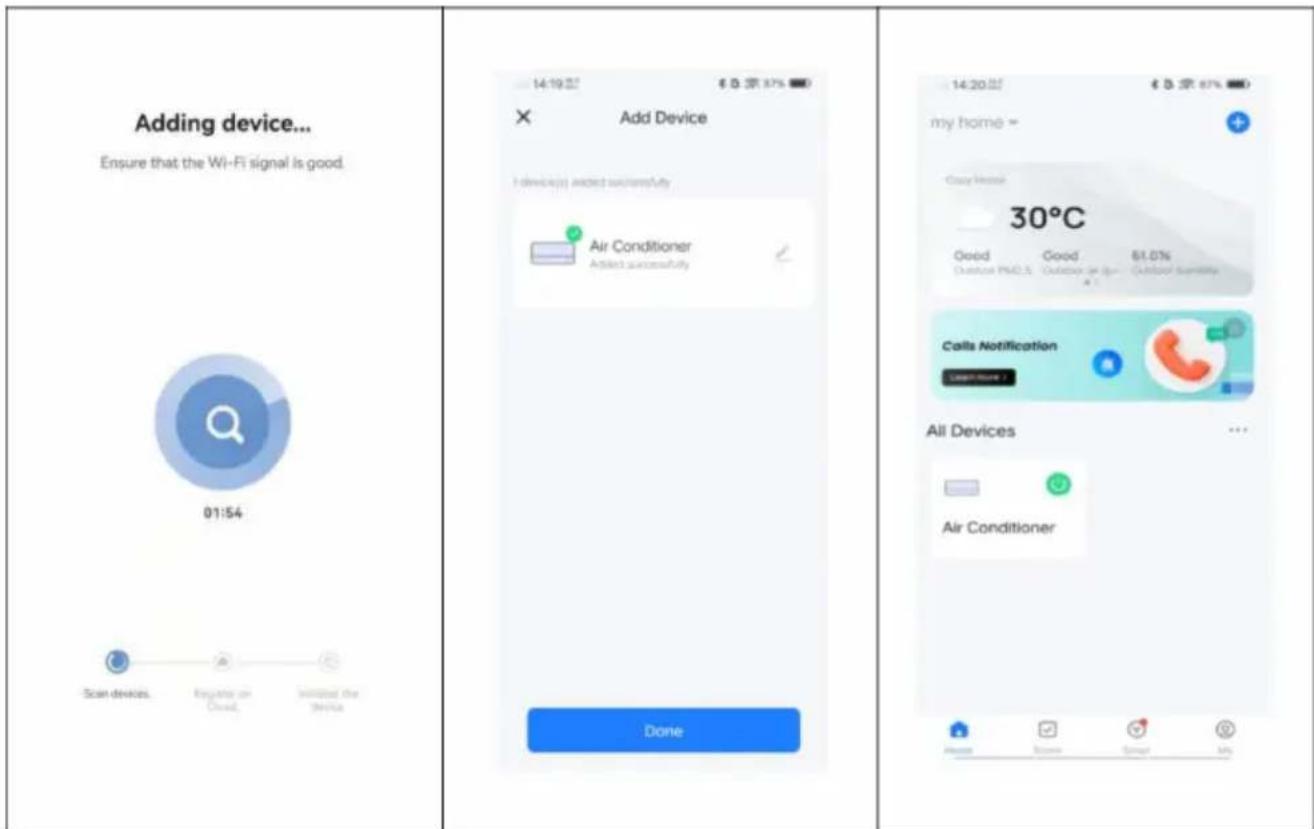
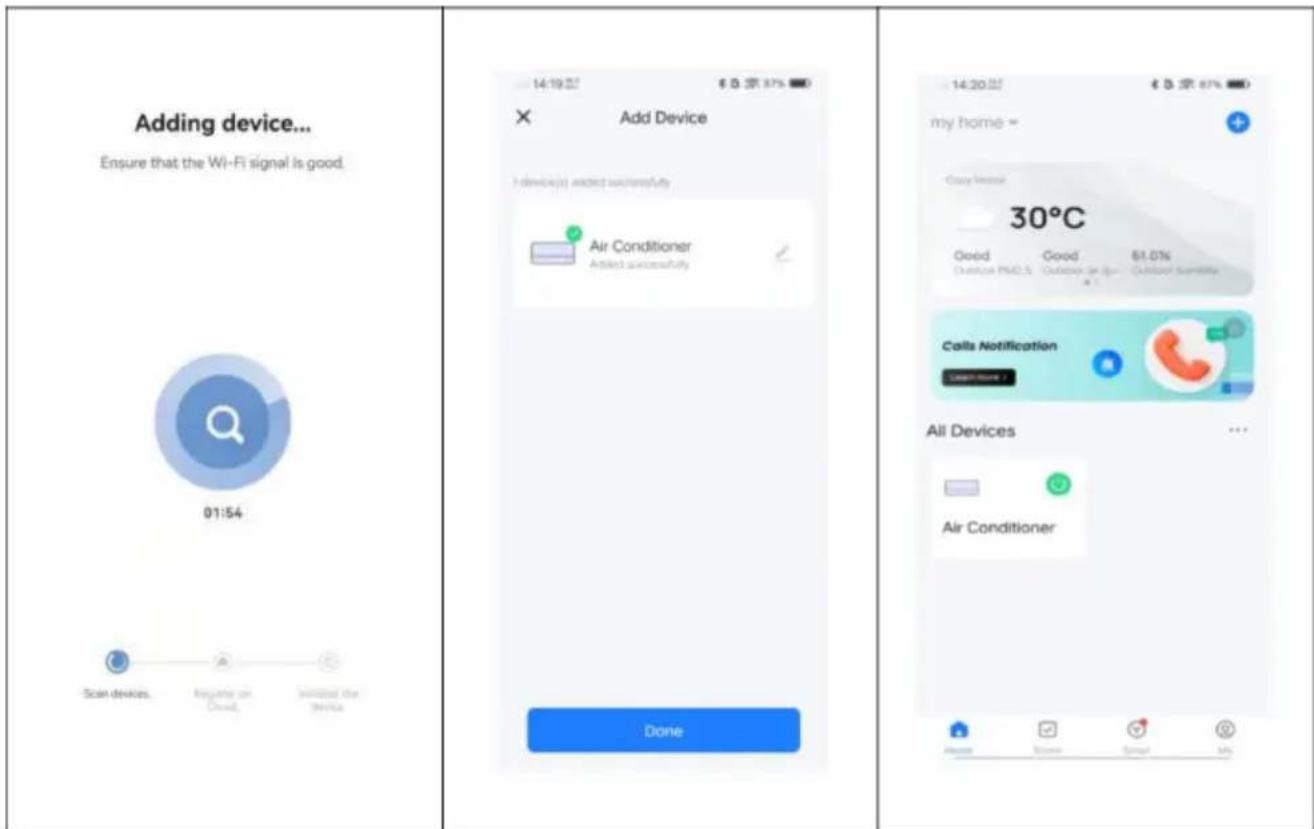
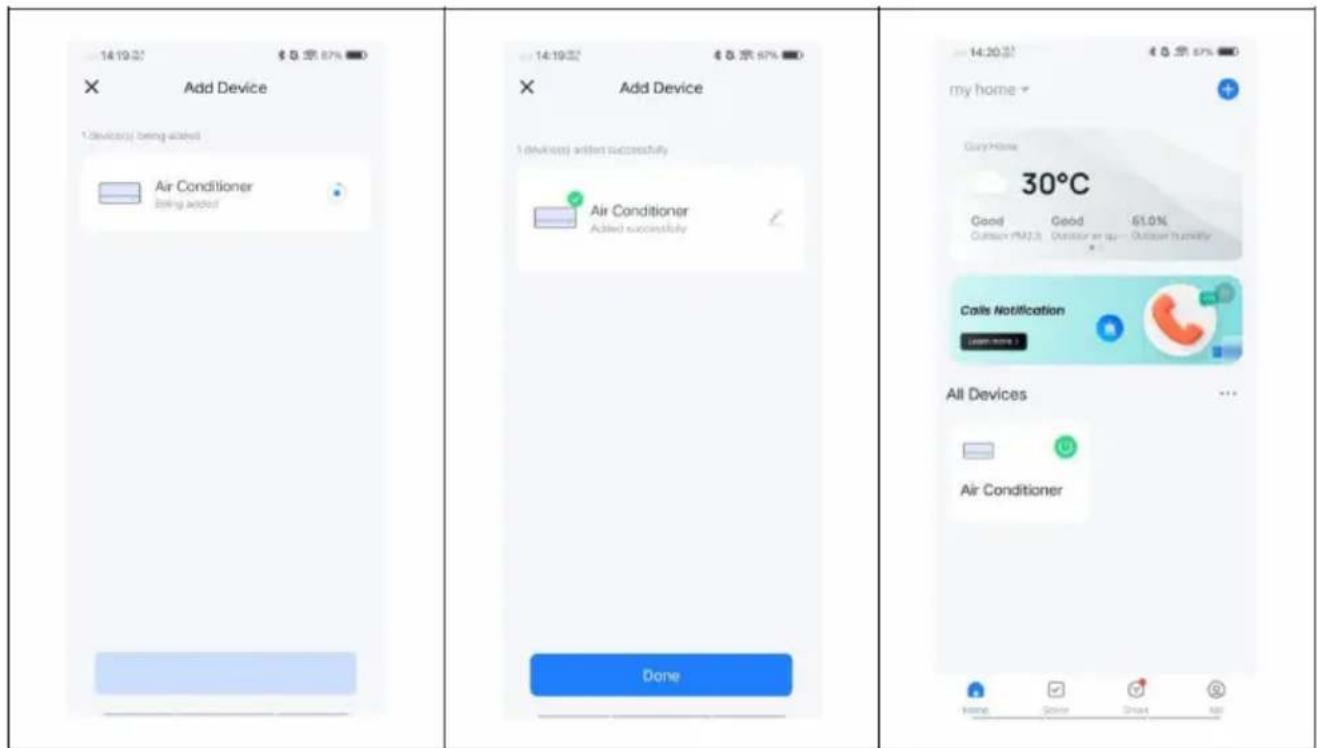
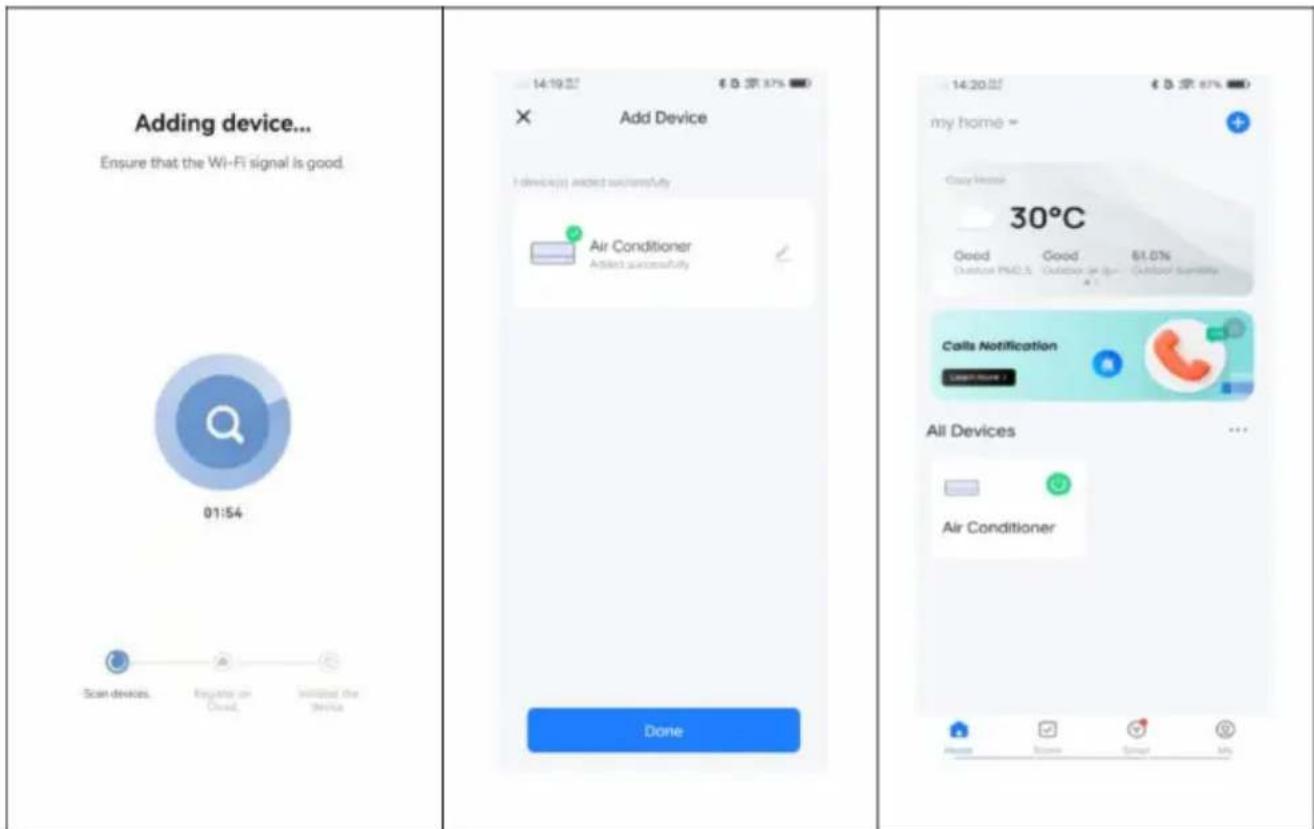
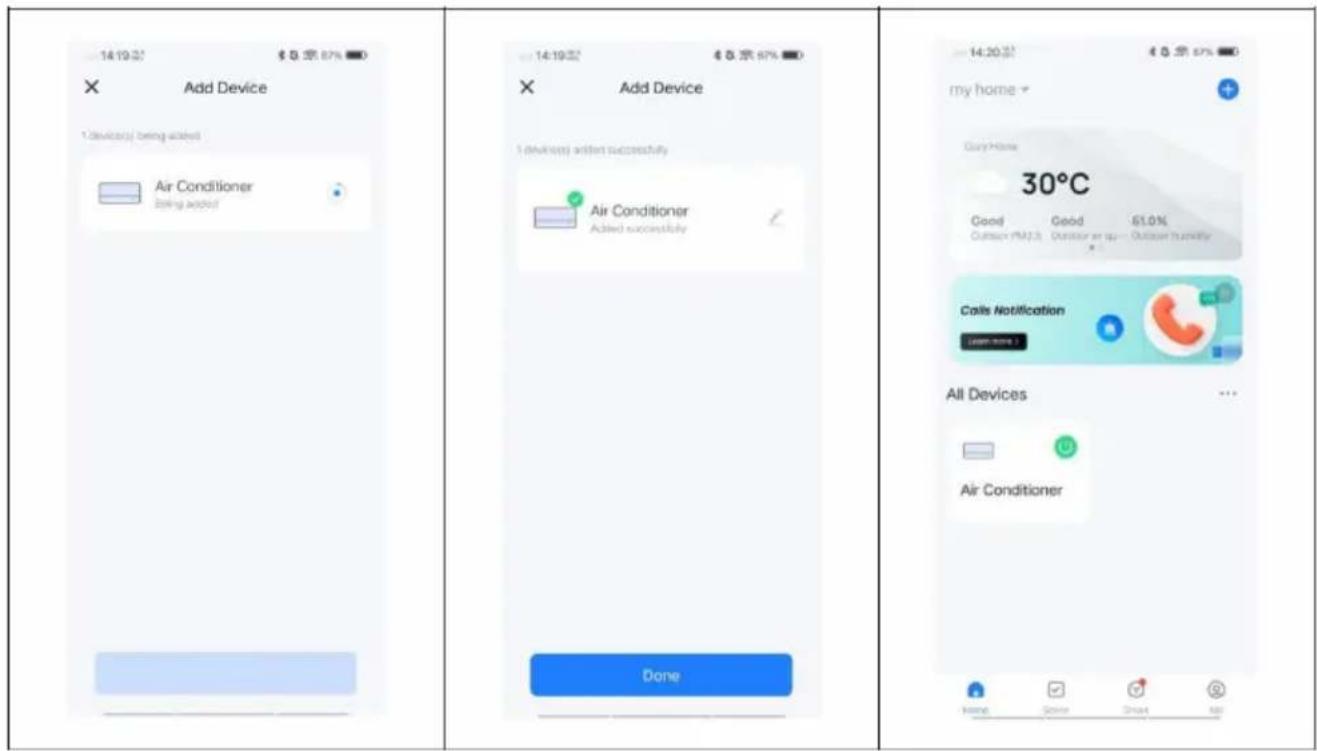
- Once the appliance has been successfully configured, the air conditioning unit is displayed on the Smart Home page. Tap on it to access the operation of the appliance.
BE COOL
Establishing a connection via Bluetooth
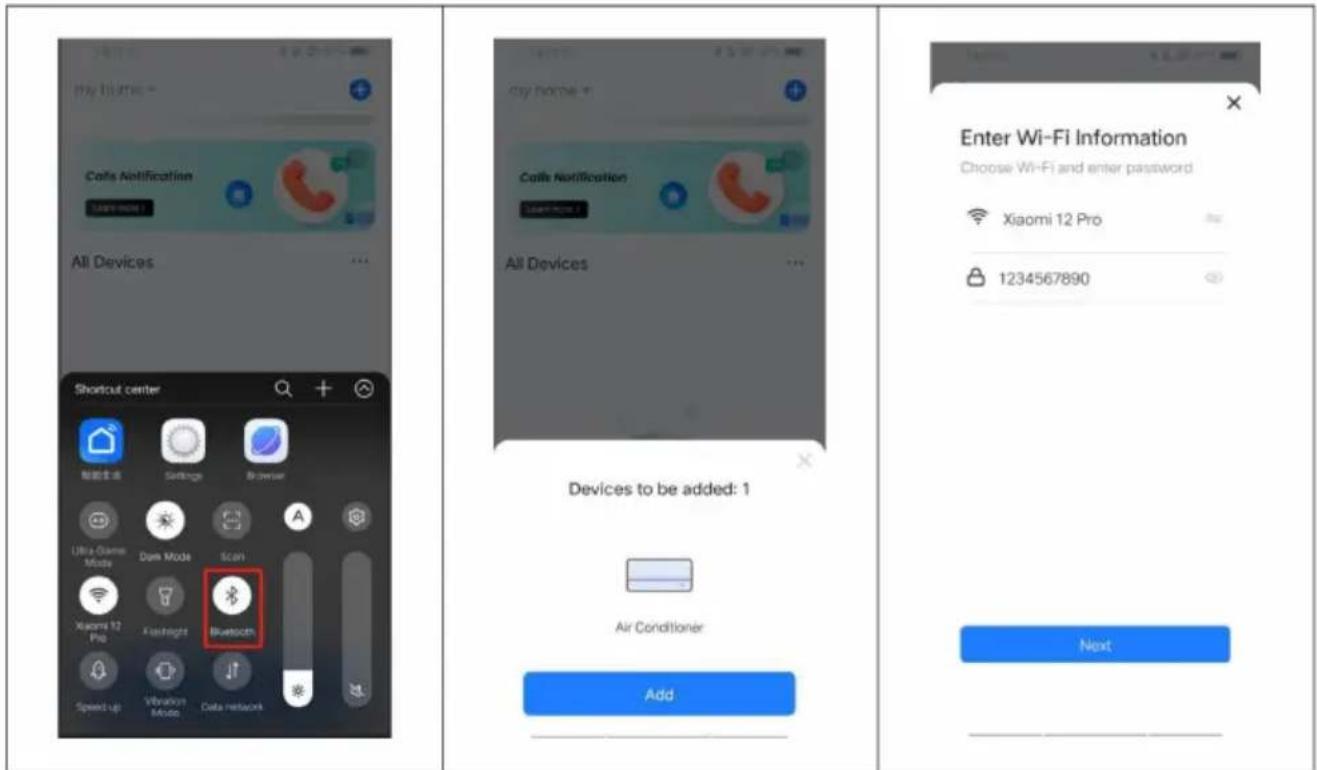
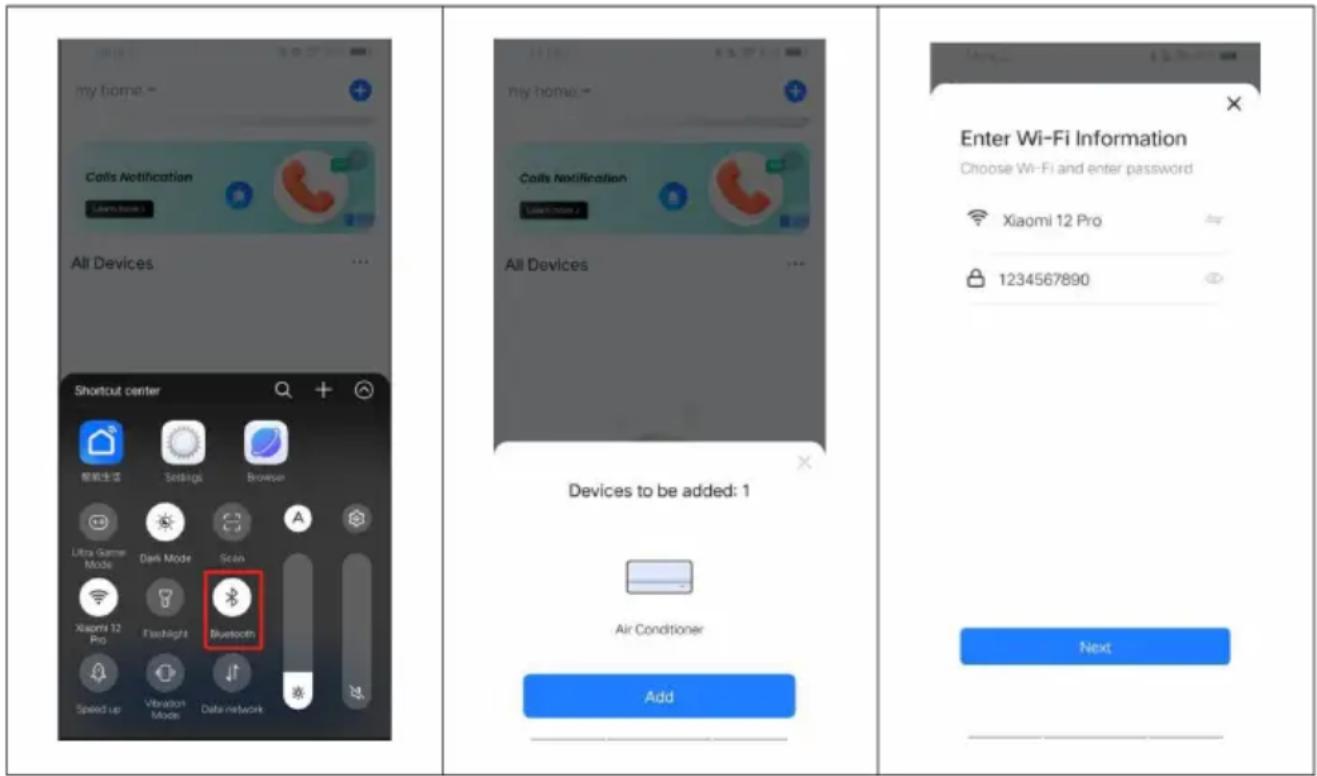
- Make sure that the device is in standby mode before you establish the connection.
- Press the "FAN" button for 3 seconds to switch to Wi-Fi connection mode and the Wi-Fi signal light will start flashing.
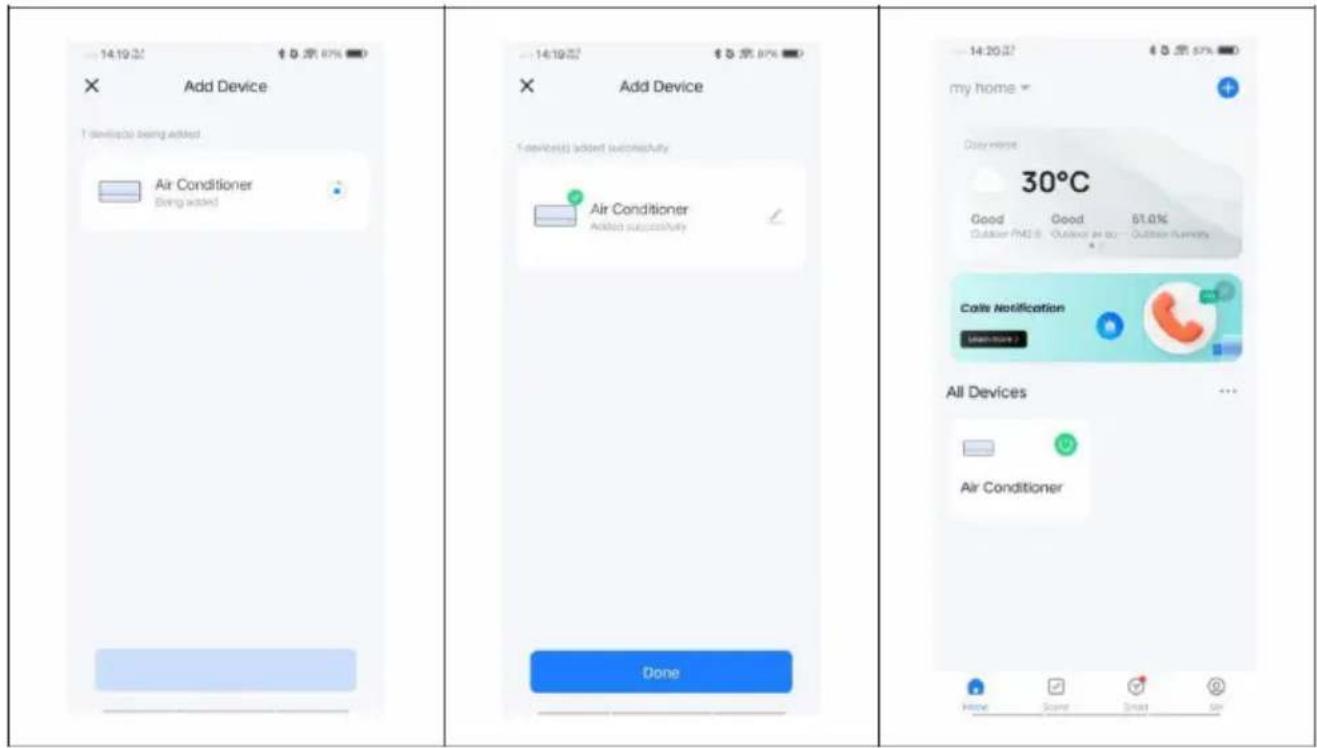
■ Activate Bluetooth on your phone. - If the device is switched on and a connection is to be established, the connected Bluetooth device is automatically displayed after the app has been opened for a moment. Click on the "Add" button to establish the connection.
- Enter the WiFi SSID (name of the WiFi connection), enter the WiFi password and click "Next" to continue with the setup. (Note: The network must be in the 2.4 GHz band).
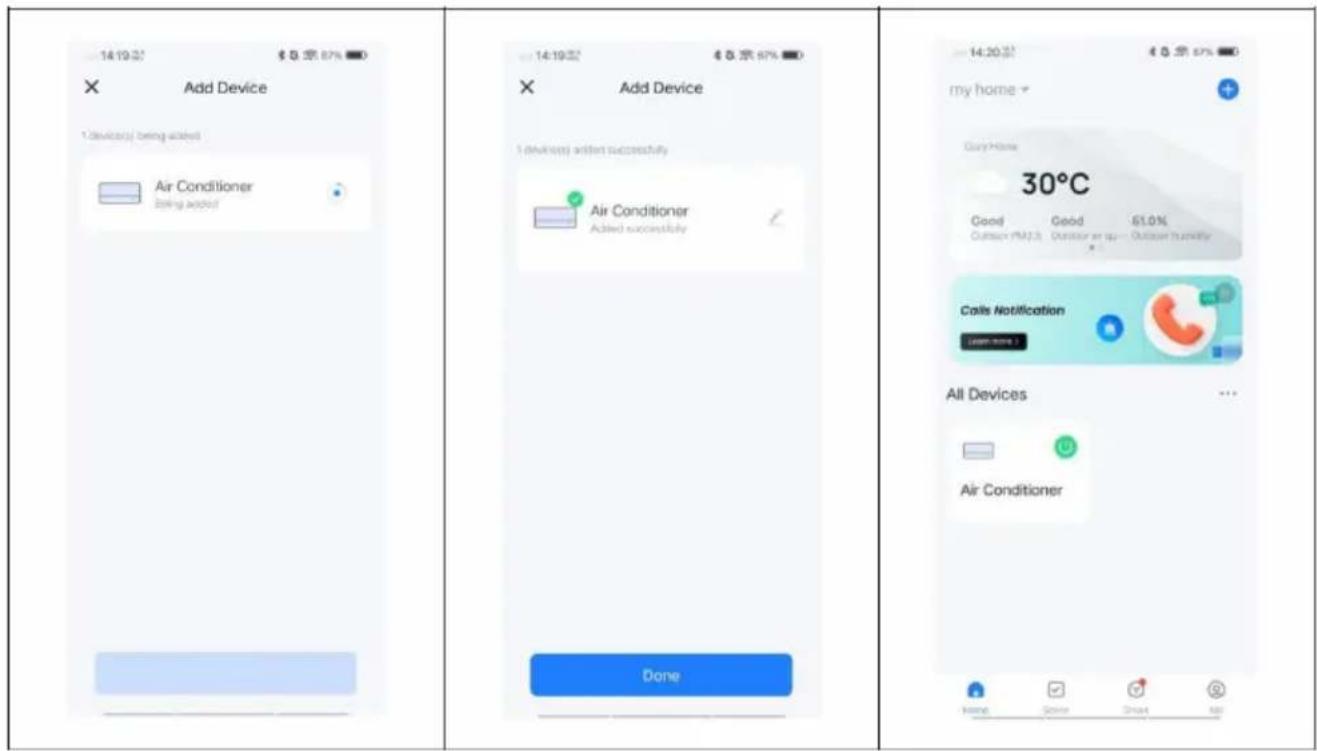
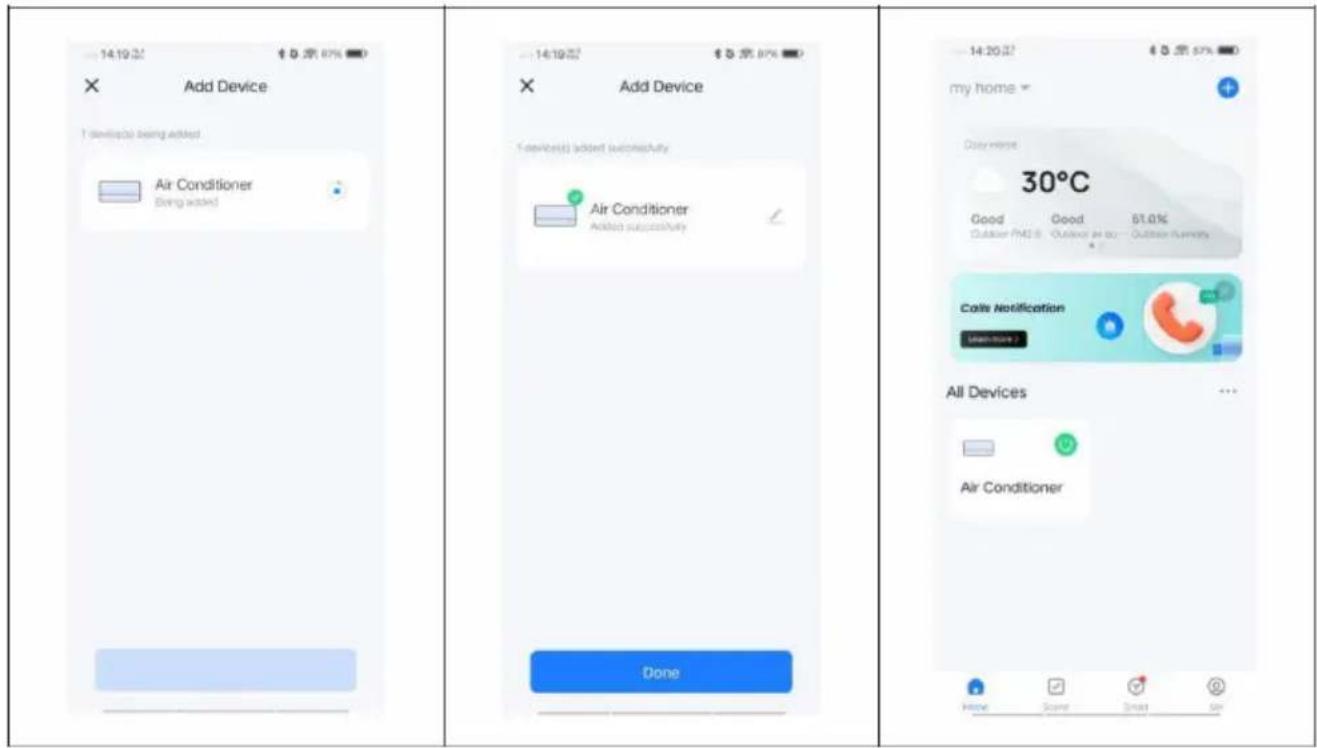
- Once the progress bar is complete, the device pairing interface is displayed and the device is successfully connected.
- Click on the "Done" button to go to the user interface of the device.
BE COOL
The application also works with Amazon Alexa and Google Assistant

WORKS WITH amazon alexa

works with the Google Assistant
| Technical data WiFi | |
| radio technology: | Wifi (WLAN) |
| Radio operating frequency | 2412MHz-2472MHz |
| BLE operating frequency | 2402MHz-2480MHz |
| Modulation type | 802.11b: DSSS802.11g: OFDM802.11n(20MHz): OFDM |
| Fixed frequency software | SecureCRT.exe |
| Antenna amplification | 2.5dBi |
| Antenna type | PCB |
| Transmission power | 520dBm |
BE COOL
| Technical information | |
| Item number | BCPSK12KW |
| Cooling capacity | 12,000 BTU/h |
| 3500 watts | |
| Heat output | 12,000 BTU/h |
| 3500 watts | |
| Max. Power consumption coolir | 1200 watts |
| Max. Power consumption heatir | 1100 watts |
| Dehumidification rate | 1.2 L/h |
| Input voltage | 220 - 240 V |
| Frequency | 50 Hz |
| WIFI transmission frequency: | 2.4 GHz |
| Transmission power: | max. 100 mW |
| Refrigerant/filling | R32, 640 g |
| SEER | 5,6 |
| SCOP | 4,0 |
| Energy efficiency class (cooling/heating) | A+ / A+ |
| Air circulation | 380 - 440 #h |
| Noise level (indoor/outdoor) | 59 dB(A) / 65 dB(A) |
| Weight (net/gross) | 34.5 kg / 43 kg |
| Indoor unit dimensions | 430×320×730mm |
| Dimensions outdoor unit | 492×263×460mm |
| Manufacturer contact address f further information | Schuss Home Electronic GmbHScheringgasse 3, A-1140 ViennaTel: +43 (1) 97 0 21 - 0Service line: +43 (1) 97 0 21 - 502www.becool.atFB-No.: 236974 t / FB-Court: Vienna |
BE COOL
WARRANTY
With this quality product from BE COOL, you have made a decision for innovation, durability and reliability.
This BE COOL appliance is guaranteed for 2 years from the date of purchase in Austria!
If, contrary to expectations, service work on your device should nevertheless be necessary during this period, we hereby guarantee you a free repair (spare parts and labor) or (at Schuss's discretion) replacement of the product. If neither repair nor replacement is possible for economic reasons, we reserve the right to issue a time value credit note.
In the case of air conditioners, please always contact the customer hotline as a first step (see sticker on the appliance or front page of the operating instructions); in the case of fans, please contact your specialist dealer or us directly. We would like to point out that any repair work not carried out by an authorized workshop in Austria will immediately invalidate this guarantee.
This guarantee does not cover
- Repair or replacement of parts due to normal wear and tear
- Damage due to non-compliance with the operating instructions
• Devices that are used - even partially - for commercial purposes - devices mechanically damaged by external influences (fall, impact, breakage, improper use, etc.) as well as signs of wear and tear of an aesthetic nature.
• Devices that have been handled improperly
• Devices that have not been opened by our authorized service workshop. - Damage caused by improperly closed condensation drain valves on air conditioning units or incorrectly inserted water tanks.
- Unfulfilled consumer expectations.
- Damage caused by force majeure, water, lightning, overvoltage.
- Devices where the type designation and/or serial number on the device has been changed, deleted, made illegible or removed.
- services outside our authorized workshops, the transport costs to an authorized workshop or to us and back, as well as the associated risks.
We would like to emphasize that within the warranty period, a lump sum of € 60,- (indexed based on CPI 2015, June 2020 will be charged in the event of operating errors or if no error has been detected.
The provision of a warranty service (repair or replacement of the device) does not extend the absolute warranty period of 2 years from the date of purchase.
The 2-year guarantee is only valid on presentation of the proof of purchase (must include the name and address of the dealer and the full name of the appliance) and the corresponding guarantee certificate, on which the appliance type and the serial number (visible on the box and on the back or underside of the appliance) must be noted! Without the warranty certificate, only the statutory warranty applies!
We expressly point out that the statutory warranty rights are not affected by this guarantee and remain unaffected.
Schuss Home Electronic GmbH and its vicarious agents are only liable for damages in the event of gross negligence or intent. Liability for loss of profit, expected but unrealized savings, consequential damages and damages from third party claims is excluded. Damage to or for recorded data is always excluded from the liability for damages.
Congratulations on your choice. We hope you enjoy using your BE COOL appliance!
ADDRESS
Schuss Home Electronic GmbH
1140 Vienna, Scheringgasse 3
Tel.: +43 (0)1/ 970 21
Type designation:....
Serial numbet......
In the event of a warranty claim, this warranty certificate must be handed over together with the device to the authorized service workshop or the dealer from whom you purchased the device!
BE COOL
WICHTIG!

These instructions are only for the BE COOL-Service cen
A Service or repairing of the device must only be performed by a qu technician who is allowed to handle the R32 refrigerant.
Do not attempt to repair or open the case of the air conditioner yours leads to the immediate loss oft he warranty.
INSTRUCTIONS FOR REPAIRING DEVICES WITH R32
1. Inspection of the work area
Before starting work on systems containing flammable refrigerants, safety checks are required to minimize the risk of ignition. The following precautions must be taken before repairing the cooling system.
2. Working procedures
The work must be carried out under a controlled procedure to minimize the risk of the presence of flammable gases or vapors during the work.
3. General work area
All maintenance personnel and other persons in the vicinity must be informed of the type of work being carried out. Work in confined spaces should be avoided.
4. Check for refrigerant
The work area must be checked with a suitable refrigerant detector before and during the work to ensure that the technician is aware of possible toxic or flammable atmospheres.
Ensure that the leak detector used is suitable for all relevant refrigerants, i.e. it must be non-sparking, adequately sealed or intrinsically safe.
BE COOL
5. Presence of a fire extinguisher
If work involving heat is carried out on the refrigeration system or associated components, appropriate fire extinguishing equipment must be available nearby. Keep a dry powder or CO_2 fire extinguisher close to the filling area.
6. No ignition sources
Persons working on a refrigeration system and exposing pipework must not use ignition sources in such a way that could lead to a risk of fire or explosion. All possible sources of ignition, including cigarette smoking, should be kept sufficiently far away during installation, repair, dismantling and disposal where refrigerant may be released into the surrounding space. Before starting work, the area around the appliance must be checked to ensure that there are no flammable hazards or ignition risks. "No smoking" signs must be displayed.
7. Ventilated area
Ensure that the area is open or sufficiently ventilated before reaching into the system or working hot. Sufficient ventilation must be ensured during work. The ventilation should safely remove the released refrigerant and preferably release it into the atmosphere.
8. Inspections of the refrigeration unit
If electrical components are replaced, they must be suitable for the intended purpose and meet the correct specifications. The manufacturer's maintenance and service guidelines must be followed at all times. If in doubt, the manufacturer's technical department should be contacted for assistance.
The following tests must be carried out for installations with flammable refrigerants:
- The actual refrigerant quantity corresponds to the room size in which the parts containing refrigerant are installed.
- The ventilation system and outlets work perfectly and are not blocked.
- If an indirect refrigeration circuit is used, the secondary circuit must be checked for the presence of refrigerant.
- The markings on the device are still visible and legible. Illegible markings and signs must be corrected.
- Refrigerant lines or components are installed in such a way that they are not at risk of being corroded by substances that could attack components containing refrigerant, unless the components are made of corrosion-resistant materials or are protected accordingly.
9. Inspections of electrical devices
Repair and maintenance on electrical components must include initial safety checks and component inspections. If there is a fault that could jeopardize safety, no electrical supply may be connected to the circuit until the fault has been properly rectified. If the fault cannot be rectified immediately but operation must continue, a suitable temporary solution must be used. This circumstance must be reported to the owner of the appliance so that all parties are informed.
■ The initial safety checks must include the following:
Discharging capacitors: This must be done in a safe manner to avoid sparking.
- That no live electrical components and lines are exposed during filling, pumping or venting of the system, That earthing continuity is ensured.
BE COOL
10. Repairs to sealed components
During repairs to sealed components, all electrical connections to the appliance must be disconnected before removing sealed covers etc. If it is absolutely necessary to connect an electrical supply to the appliance during maintenance, a permanently operated leakage detection device must be fitted at the most critical point to warn of a potentially dangerous situation.
Particular attention must be paid to ensuring that work on electrical components does not modify the housing in such a way that the degree of protection is impaired. This also includes damage to cables, too many connections, connections that do not correspond to the original specification, damaged seals, improper insertion of screw connections, etc.
Ensure that the appliance is securely mounted.
Make sure that seals or sealing materials are not so worn that they no longer fulfill their task o preventing the ingress of flammable atmospheres to . Spare parts must comply with the manufacturer's specifications.
NOTE: The use of silicone sealants may reduce the effectiveness of some leak detection devices. Intrinsically safe components do not need to be insulated before working on them.
11. Repair of intrinsically safe components
Do not apply permanent inductive or capacitive loads to the circuit without ensuring that the permissible voltage and current for the device used are not exceeded. Intrinsically safe components are the only ones that can be operated under voltage in the presence of a flammable atmosphere. The tester must have the correct power rating.
Replace components only with parts specified by the manufacturer. Other parts could cause ignition of refrigerant in the atmosphere in the event of a leak.
12. Cable laying
Check that cables are not subject to wear, corrosion, excessive pressure, vibration, sharp edges or other harmful environmental influences. The test must also take into account the effects of ageing or continuous vibration from sources such as compressors or fans.
13. Detection of flammable refrigerants
Under no circumstances may potential ignition sources be used to search for or detect refrigerant leaks. A halogen lamp (or other detection device with an open flame) must not be used.
14. Leakage detection methods
The following leak detection methods are considered acceptable for systems containing flammable refrigerants. Electronic leak detectors should be used to detect flammable refrigerants, but sensitivity may not be sufficient or recalibration may be required. (Detection devices should be calibrated in a refrigerant-free area). Ensure that the detector is not a potential ignition source and is suitable for the refrigerant used.
The leak detection equipment must be set to a percentage of the lower explosion limit (LEL) of the refrigerant and must be calibrated to the refrigerant used. The corresponding percentage of the gas (maximum 25%) must be confirmed.
Leak detection fluids are suitable for most refrigerants, but the use of cleaning agents containing chlorine should be avoided as the chlorine could react with the refrigerant and corrode the copper piping.
If a leak is suspected, all open flames must be removed or extinguished. If a refrigerant leak is found that requires brazing, all refrigerant must be removed from the system or isolated in an area of the system away from the leak (using isolation valves). Oxygen-free nitrogen gas (OFN) must then be purged through the system both before and during the brazing process.
BE COOL
15. removal and evacuation
When opening the refrigerant circuit for repairs - or for any other reason - conventional procedures must be followed. For flammable refrigerants, however, it is important that best practice is followed as flammability must be taken into account. The following procedure must be followed:
- Remove refrigerant;
- Flush the circuit with inert gas;
- Evacuate;
- Flush with inert gas;
- Open the circuit by cutting or soldering.
The refrigerant charge must be collected in the correct recovery cylinders. For appliances containing flammable refrigerants, the system must be purged with oxygen-free nitrogen to make the appliance safe for flammable refrigerants. This process may need to be repeated several times.
Compressed air or oxygen must not be used to purge refrigerant systems.
For appliances with flammable refrigerants, the refrigerant must be flushed with oxygen-free nitrogen by breaking the vacuum in the system and then charged further until the operating pressure is reached. The system must then be vented to the atmosphere and finally a vacuum must be created. This process must be repeated until there is no more refrigerant in the system. If the last batch of oxygen-free nitrogen is used, the system must be vented to atmospheric pressure so that work can be carried out. This process is essential if soldering work is to be carried out on the pipes.
Ensure that the outlet of the vacuum pump is not close to ignition sources and that there is sufficient ventilation.
16. filling procedure
In addition to the conventional filling methods, the following requirements must be observed:
- Ensure that there is no cross-contamination between different refrigerants when using charging devices. Hoses or lines should be kept as short as possible to minimize the amount of refrigerant they contain.
- Cylinders should be held in the correct position according to the instructions.
Ensure that the cooling system is earthed before filling with refrigerant. Mark the system when filling is complete (if not already done).
• Take particular care not to overfill the cooling system.
- Before refilling the system, a pressure test must be carried out with the appropriate purge gas. The system must be checked for leaks after filling has been completed, but before commissioning. A follow-up check for leaks must be carried out before leaving the site.
17. Decommissioning
Before carrying out this procedure, it is essential that the technician is fully familiar with the appliance and all the details. It is recommended that all refrigerants are recovered safely. Before starting the task, an oil and refrigerant sample should be taken in case analysis is required before the recovered refrigerant is reused. It is essential that the power supply is available before starting work.
a) Familiarize yourself with the device and its operation
b) Insulate the system electrically.
c) Before attempting to carry out the procedure, ensure that:
BE COOL
- Mechanical handling equipment, if required, is available for handling the refrigerant cylinders;
All personal protective equipment is available and used correctly;
- The recovery process is monitored by a competent person at all times;
- The recovery equipment and cylinders comply with the relevant standards.
d) Pump out the refrigerant system if possible.
e) If a vacuum is not possible, create a manifold so that refrigerant can be removed from various parts of the system.
f) Ensure that the cylinder is on the scales before starting recovery.
g) Start the recovery machine and operate it according to the instructions.
h) Do not overfill the cylinder (no more than 80 % of the liquid volume).
i) Do not exceed the maximum operating pressure of the cylinder, not even temporarily.
j) When the cylinders are correctly filled and the process is complete, ensure that the cylinders and equipment are quickly removed from site and all shut-off valves on the appliance are closed.
k) The recovered refrigerant must not be filled into another cooling system unless it has been cleaned and checked.
18. Labeling
The appliance must be provided with a label stating that it has been decommissioned and freed of refrigerant. The label must be dated and signed. For appliances containing flammable refrigerants, it must be ensured that labels are affixed to the appliance indicating that the appliance contains flammable refrigerant.
19. recovery
When removing refrigerant from a system, whether for maintenance or decommissioning, it is good practice to safely remove all refrigerant.
When transferring refrigerant to cylinders, ensure that only suitable refrigerant recovery cylinders are used. Ensure that the correct number of cylinders are available for the total system volume. All cylinders used are dedicated to the recovered refrigerant and labeled accordingly for that refrigerant (i.e. dedicated cylinders for refrigerant recovery). Cylinders must be fitted with a pressure relief valve and associated shut-off valves in good working order. Empty recovery cylinders must be evacuated and, if possible, cooled before recovery.
The recovery equipment must be in good condition and have operating instructions. It shall be suitable for the recovery of all relevant refrigerants, including, where applicable, flammable refrigerants. In addition, a set of calibrated scales must be available and in working order. The hoses must be fitted with leak-proof quick-release couplings and be in good condition. Before using the recovery machine, check that it is in good working order, has been properly maintained and that all associated electrical components are sealed to prevent ignition in the event of a refrigerant leak. If in doubt, consult the manufacturer.
The recovered refrigerant must be returned to the refrigerant supplier in the correct recovery cylinder and the appropriate waste transfer note must be organized. Refrigerants must not be mixed in recovery units and especially not in cylinders.
If compressors or compressor oils need to be removed, ensure that they have been evacuated to an acceptable level to ensure that no flammable refrigerant remains in the lubricant. The evacuation process must be carried out before the compressor is returned to the supplier. Only electrical heating of the compressor housing may be used to accelerate this process. If oil is drained from a system, this must be done safely.
EU-DECLARATION OF CONFORMITY
This declaration of conformity is issued under the sole responsibility of the manufacturer.
(1)
Schuss Home Electronic GmbH
Scheringgasse 3
1140 Wien, AUSTRIA
Declares, that the product
(II)
is conformity with following directives, norms and/or regulations:
(III)
DIRECTIVE 2014/53/EU OF THE EUROPEAN PARLIAMENT AND OF THE COUNCILof 16 April 2014 on the harmonisation of the laws of the Member States relating to the making available on the market of radio equipment and repealing Directive 1999/5/EC EU L 153/62 22.5.2014
Article 3.1(a) Health & Safety:
EN IEC 62311:2020
Article 3.1(b) EMC:
EN 301 489-1
EN 301 489-17
Article 3.2 Radio:
EN 300 328 V2.2.2
Low Voltage Directive (LVD):2014/35/EU Directive of the European Parliament and of the Council of 26 February 2014 on the harmonisation of the laws of the Member States relating to the making available on the market of electrical equipment designed for use within certain voltage limits; Official Journal of the EU L96, 29/03/2014, p. 357–374
EN IEC 60335-2-40:2023 + A11:2023
EN 60335-1:2012 + A11:2014 + A13:2017 + A1:2019 + A2:2019 + A14:2019 + A15:2021 + A16:2023
EN 62233:2008
Ökodesign-Richtlinie Energy-Related-Products-Directive (ErP)2009/125/EC;
Official Journal EU L285/10-35 (31.10.2009) and associated regulation 2015/1188
BE COOL
RoHS Directive: 2011/65/EU Directive of the European Parliament and of the Council of 8 June 2011 on the restriction of the use of certain hazardous substances in electrical and electronic equipment; Official Journal of the EU L174, 1/07/2011, p. 88–110
Reach SVHC(EC)NO. 1907/2006 Schuss Home Electronic GmbH hereby confirms that in the products we supply, there are no substances of very high concern (SVHC) in the candidate list (last ECHA update from June 14, 2023, 235 substances) above 0.1% in accordance with Article 33 of the REACH Regulation (EC) No .1907/2006 are included.
Place and date of issue:
Vienna, 2025-03-21
Scharl, Alexander
Senior product and purchasing mana
Declaration reference:
SCHUSS HOME ELECTRONIC GMBH
Scheringgasse 3, 1140 Wien, AUSTRIA
- BE COOL
- Bedienfeld
- ① Power-Taste
- Registrierung
- Panneau de contrôle
- CONTRÔLES EN DÉBUT DE SAISON
- Inscription
- Registrazione
- Bedieningspaneel
- ① Aan/uit-knop
- Registratie
- Verbinding maken via Bluetooth
- Vezérlőpanel
- ① Bekapcsológomb
- Regisztráció
- Instalace a provoz
- Ovládací panel
- Registrace
- Registrácia
- Nadviazanie spojenia cez Bluetooth
- Panou de control
- CONTROALE LA ÎNCEPUTUL SEZONULUI
- Înregistrare
- Stabilirea unei conexiuni prin Bluetooth
- Panel sterowania
- Rejestracja
- Aktualna navodila za uporabo in drugi jeziki
- Nadzorna plošča
- Registracija
- Aktualne upute za uporabu i drugi jezici
- Montaža i rad
- Upravljačka ploča
- PROVJERE NA POČETKU SEZONE
- JAMSTVO
- Current operating instructions and other languages
- Installation and operation
- Electrical connection
- Handling and handling
- Child and user safety
- Maintenance and cleaning
- Storage and transportation
- Emergency measures
- SPECIFIC INFORMATION ON THE REFRIGERANT R32
- DESCRIPTION OF THE DEVICE AND SCOPE OF DELIVERY
- SCOPE OF DELIVERY
- DESCRIPTION
- CONTROL PANEL AND REMOTE CONTROL
- REMOTE CONTROL
- Control panel
- ① Power button
- ② Mode button
- ③ Temperature/time setting
- ④ SPEED button
- ⑤ Timer button
- Installing the air conditioning system
- MAINTENANCE AND CLEANING
- Cleaning
- Cleaning the air filter
- Maintenance
- Cleaning the surface of the appliance
- Storage
- CHECKS AT THE START OF THE SEASON
- TROUBLESHOOTING
- Smart Home Wi-Fi connection guide
- IMPORTANT
- App installation
- Registration
- Establishing a connection via Bluetooth
- WARRANTY
- This BE COOL appliance is guaranteed for 2 years from the date of purchase in Austria!
- This guarantee does not cover
- ADDRESS
- WICHTIG!
- INSTRUCTIONS FOR REPAIRING DEVICES WITH R32
- Inspection of the work area
- Working procedures
- General work area
- Check for refrigerant
- Presence of a fire extinguisher
- No ignition sources
- Ventilated area
- Inspections of the refrigeration unit
- Inspections of electrical devices
- Repairs to sealed components
- Repair of intrinsically safe components
- Cable laying
- Detection of flammable refrigerants
- Leakage detection methods
- removal and evacuation
- filling procedure
- Decommissioning
- Labeling
- recovery
- EU-DECLARATION OF CONFORMITY
- (1)
- Schuss Home Electronic GmbH
- (II)
- (III)
- Article 3.1(a) Health & Safety:
- Article 3.1(b) EMC:
- Article 3.2 Radio:
Brand : Be Cool
Model : BCPSK12KW
Category : Air Conditioning