UVC-130959 - Vacuum Cleaner Emerio - Free user manual and instructions
Find the device manual for free UVC-130959 Emerio in PDF.


| Product type | Cordless stick vacuum |
| Brand | Emerio |
| Model | UVC-130959 |
| Power | 130 W |
| Rated voltage | 22.2 V |
| Battery type | Rechargeable lithium-ion |
| Charging time | 4.5 to 5 hours |
| Runtime | Approximately 20 to 40 minutes |
| Dust bin capacity | 0.6 L (estimated) |
| Filter | Washable HEPA |
| Motorized brush | Yes, with removable roller |
| LED lighting | Yes, LED headlights on floor brush |
| Included accessories | 2-in-1 crevice tool, wall mount, charging adapter |
| Usage | Indoor only, dry surfaces |
| Filter maintenance | Rinse with clean water, air dry |
| Warranty | 2 years |
| Country of origin | Netherlands (Emerio B.V.) |
Frequently Asked Questions - UVC-130959 Emerio
User questions about UVC-130959 Emerio
0 question about this device. Answer the ones you know or ask your own.
Ask a new question about this device
Download the instructions for your Vacuum Cleaner in PDF format for free! Find your manual UVC-130959 - Emerio and take your electronic device back in hand. On this page are published all the documents necessary for the use of your device. UVC-130959 by Emerio.
USER MANUAL UVC-130959 Emerio
natural_image
Exterior view of a modern vacuum cleaner with black handle and silver body (no text or symbols visible)Upright vacuum cleaner (EN)
Instruction manual – English ...... - 2 -
Before use make sure to read all of the below instructions in order to avoid injury or damage, and to get the best results from the appliance. Make sure to keep this manual in a safe place. If you give or transfer this appliance to someone else make sure to also include this manual.
In case of damage caused by user failing to follow the instructions in this manual the warranty will be void. The manufacturer/importer accepts no liability for damages caused by failure to follow the manual, a negligent use or use not in accordance with the requirements of this manual.

- Read operator's manual.
- This appliance can be used by children aged from 8 years and above and persons with reduced physical, sensory or mental capabilities or lack of experience and knowledge if they have been given supervision or instruction concerning use of the appliance in a safe way and understand the hazards involved.
- Children shall not play with the appliance.
- Cleaning and user maintenance shall not be made by children without supervision.

Detachable supply unit
WARNING: For the purposes of recharging the battery, only use the detachable supply unit provided with this appliance.
- This appliance contains batteries that are non-replaceable.
- Ensure that the mains cable is not hung over sharp edges and keep it away from hot objects and open flames.
- Do not immerse the appliance or the mains plug in water or other liquids. There is danger to life due to electric shock!
- To remove the plug from the plug socket, pull the plug. Do not pull the power cord.
- Never attempt to open the housing of the appliance, or to repair the appliance yourself. This could cause electric shock.
- Never leave the appliance unattended during use.
- This appliance is not designed for commercial use. For indoor use only.
- Do not use the appliance for other than intended use.
- Do not wind the cord around the charger and do not bend it.
- Close supervision is necessary for any appliance being used by or near children. Do not leave the system unattended while connected. Keep hair, loose clothing, fingers and all parts of body away from opening and moving parts.
- Do not use to pick up flammable or combustible liquids such as gasoline or use in areas where they may be present.
- Do not pick up anything that is burning or smoking such as cigarettes, matches or hot ashes.
- Do not pick up hard or sharp objects such as glass, nails, screws, coins, etc.
- Use extra care when cleaning on stairs.
- Do not use the appliance without the dust cup filter in place.
- The use of accessory attachment not recommended by the appliance manufacturer may cause injuries.
- Do not put any objects into openings. Do not use with any opening blocked. Keep free of dust, lint, hair and anything else that may reduce air flow.
- Use only on dry surfaces.
- Important: If the suction opening in the unit is blocked, switch off the appliance and remove the blocking substance before you start the unit again.
-
Do not operate the appliance too close to heaters, radiators or cigarette butts.
-
Before you start vacuuming, make sure to remove large or sharp objects that might damage the dust cup filter.
-
The appliance is only to be used with the power supply unit provided with the appliance.
-
The charger must be removed from the socket before removing the battery.
-
Use the included charger to charge the vacuum cleaner and do not use the charger for other purposes.
-
This appliance includes a rechargeable lithium-ion battery pack. Do not expose the battery pack or appliance to fire or excessive temperature (above 130^ C/265°F), as it may catch fire and/or explode.
-
Do not use a damaged or modified battery pack, as it may catch fire and/or explode.
-
Do not attempt to disassemble the battery pack.
-
Leaks from the battery cells can occur under extreme conditions. Do not touch any liquid that leaks from the battery. If the liquid that gets on skin wash immediately with soap and water. If the liquid gets into the eyes, flush them immediately with clean water for a minimum of 10 minutes and seek medical attention. Wear gloves to handle the battery and dispose of immediately in accordance with local regulations.
-
In an emergency situation contact professional help immediately.
-
When the battery pack is not in use, keep it away from paper clips, coins, keys, nails, screws or other small metal objects that could make a connection from one terminal to another.
-
In order to avoid the battery to self discharge, please charge the battery at least one time every 6 months.
-
If the appliance is to be stored unused for a long period, the battery pack should be removed.
-
Regarding the instructions for the method of replacing battery pack, thanks to refer to the below paragraph of the manual.
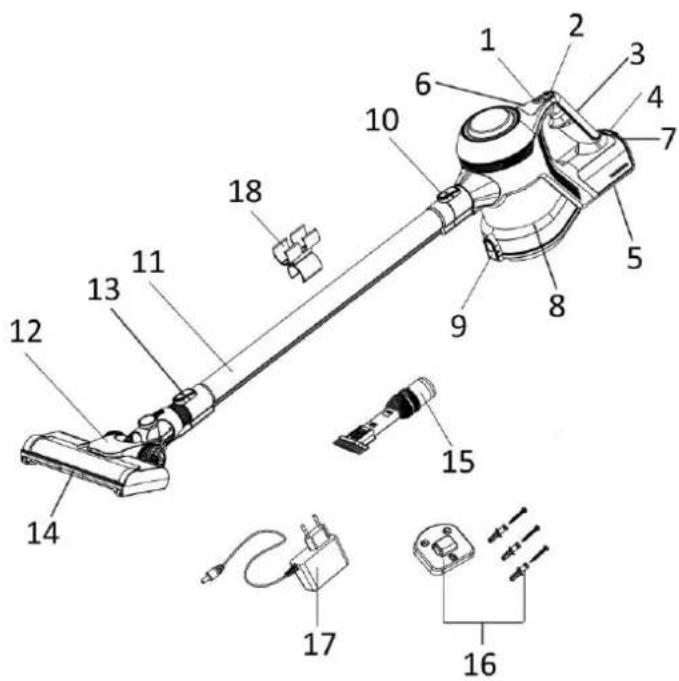
PARTS DESCRIPTION
-
Speed button
-
On/off button
-
Handle
-
Battery release button
-
Battery pack
-
Battery indicator lights
-
Charging port
-
Dust cup
-
Dust empty button
-
Extension tube release button
-
Extension tube
-
Floor brush
-
Floor brush release button
-
LED headlights
-
2 in 1 crevice nozzle
-
Wall-mounted bracket + expansion bolts + screws
-
Charging adapter
-
Storage bracket for 2 in 1 crevice nozzle
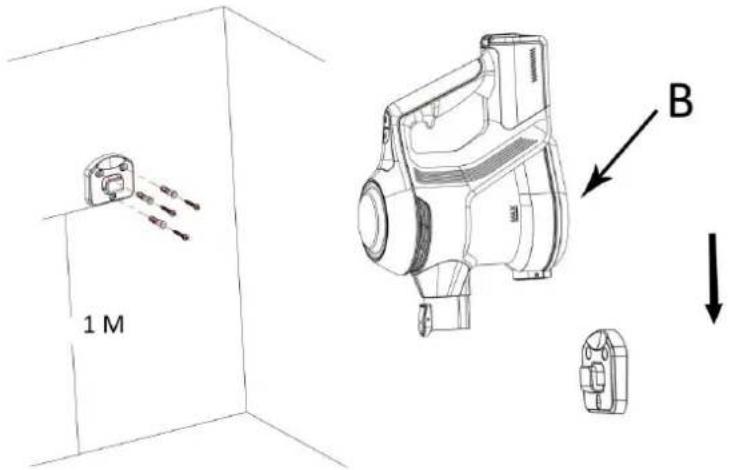
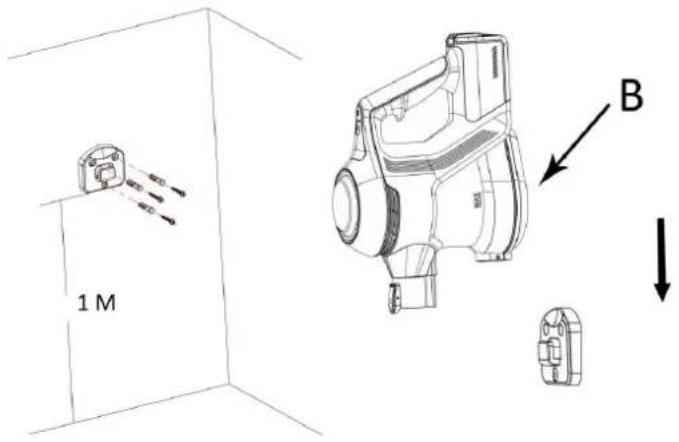
HOW TO WALL-MOUNT BRACKET:
- Measure the distance between the holes situated at the back of the bracket and drill three holes in the wall with the same distance.
- Put the expansion bolts into the holes and then use the screws to fix the bracket onto the wall.
- Pay attention to the height of the bracket mounted (at least 1m above the ground).
- You can hang the appliance to the bracket by the buckles (B) on the bottom of the dust cup.
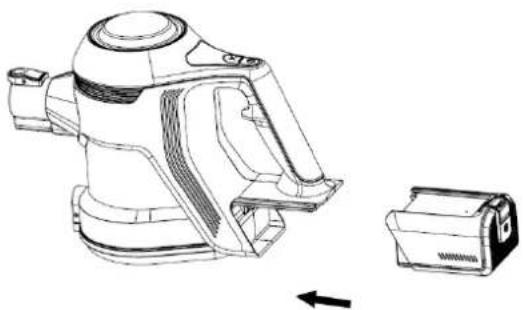
HOW TO DETACH AND ATTACH THE BATTERY PACK
- To detach the battery pack, press and hold the battery release button and pull the battery pack outwards to take it off the main unit.
• To attach the battery pack, simply slide it back into place until locked well.
natural_image
Technical line drawing of a mechanical device with a separate housing component (no text or symbols)BATTERY CHARGING:
- Press and hold the battery release button and pull the battery pack out.
- Insert the charging adapter into the charging port of the battery, and then into the power socket. When charging, its indicator light (A) will be red and blink. Once fully charged, it will illuminate white. (Fig.1)
- You can also charge the appliance without taking the battery out. When charging, the battery indicator lights in the top of the main unit will blink to indicate the charging state. Once fully charged, the charger will automatically switch off and three battery indicator lights will stop flashing and light up continuously. (Fig. 2)
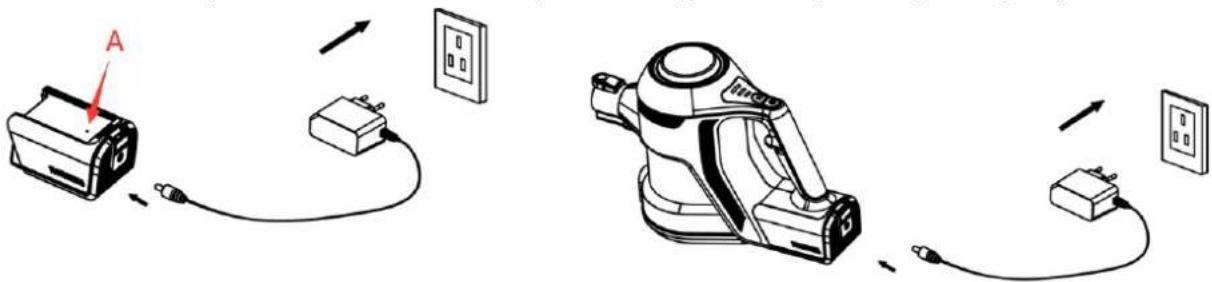
- Before first use, fully charge the battery. The battery may need 4.5-5 hours to be fully charged. Unplug from the socket after fully charged.
-
The appliance cannot work while charging.
-
When the last battery indicator light blinks indicates that the battery is low and it shall be recharged immediately.
- The appliance cannot be charged when the ambient temperature is below 10°C/50°F or above 45°C/113°F
- In order to avoid the battery to self discharge please charge the battery at least one time every 6 months.
OPERATION
Caution: Before use, make sure that the appliance is fully charged and the dust cup and filters are cleaned, dried, and fixed in place.
-
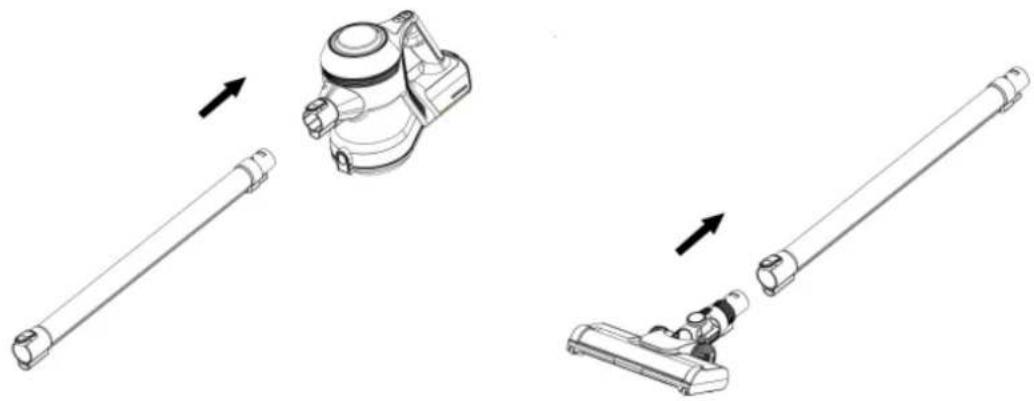
Assemble the battery pack into the main body. It will "click" to secure.
-
Insert the extension tube into the suction hole opening; make sure it fits firmly.
-
Attach the floor brush to the other side of the extension tube.
natural_image
Technical line drawing of a vacuum cleaner assembly with three stages: straight pipe, mechanical component, and long rod (no text or symbols)- If you want to use the attachment 2 in 1 crevice nozzle, attach it to the suction hole opening directly or to the other side of the extension tube instead of the floor brush according to your own desire. Once the click sound is heard, the nozzle is properly locked.
- Press the on/off button to turn on the appliance. The battery indicator lights will illuminate showing the battery capacity.
- Press the speed button to adjust Min/Max speed.
NOTE: During use, please pay attention to the dust capacity and do not exceed the "MAX" level indicated on the dust cup. This appliance is for dry suction only.
- After use, press the on/off button to turn off the appliance.
Caution: The suction hole opening must be open and free of any obstructions at all times. Otherwise, the motor will overheat and could become damaged.
CLEANING AND MAINTENANCE
- Do not immerse the main unit, battery pack, charging adapter or floor brush in water or any other liquids.
- Use only a soft dry cloth to clean the appliance.
- Do not use aggressive chemicals or abrasives.
- Do not use the device if the filter is broken or worn out.
-
The unit does not contain parts serviceable by you, do not disassemble it and do not try to repair it yourself.
-
How to empty the dust cup and clean the dust cup filter:
1) Press the release button to take out the extension tube;
2) Press the dust empty button to empty the dust cup.
3) Turn the filter case anti-clockwise to release it and then take off the HEPA filter.

natural_image
Technical line drawings of a mechanical device showing assembly and component alignment (no text or symbols)4) Rinse them thoroughly under clean fresh water. Do not use soap or other cleaning agents.
5) Allow them to dry naturally before placing back into the vacuum. Do not place on radiators or use additional appliances, such as a hair dryer, to dry the filter.
2. How to clean the rolling brush
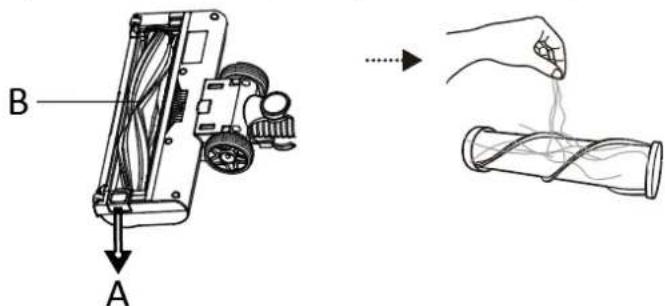
1) Push the lock (A) outwards to unlock the rolling brush (B) from the floor brush. Take it out and remove any dirt (hair and other fibers) tangled around the roller.
2) Clean the brush by a damp cloth and air-day. Make sure that it is completely dry before replacing it.
TROUBLESHOOTING
All three battery indicator lights blinks
In the event of a maintenance issue with the appliance such as a jammed brush roll, all three battery indicator lights will blink until the issue is resolved, in this case turn off the appliance until the issue is rectified.
The appliance cannot power on.
This may be caused by a flat battery. This can occur if the appliance has been used or stored for an extended period of time. Connect the vacuum to the charger and allow for a full charging cycle to complete.
The appliance stops suddenly:
This will occur if the safety cut-out device has been activated. This device is designed to prevent your appliance from overheating. Ensure the vacuum is turned off, disconnect all accessories and leave to cool down for at least half an hour before attempting to operate again. Try to identify the source of the overheat by checking for blockages in the extension tube and accessories. Empty the dust container and clean or replace the filter.
The suction of the vacuum has reduced:
Turn the vacuum off. Disconnect the floor brush, extension tube and any accessories. Check for and remove any blockages from the dustbin filter, air duct, extension tube, floor brush and accessories.
The battery indicator light does not flash while charging:
There may be no power reaching the appliance/battery from the charger.
Ensure that adaptor is correctly connected to the appliance and the mains socket, and the mains socket is powered on.
The application time of the appliance is less than it used to be:
Ensure the battery has completed a full charging cycle. An insufficient charging cycle will result in reduced application time.
There may be reduced energy discharge in the battery. This is normal and gradually occurs in all batteries over time.
TECHNICAL DATA:
| Wattage | 130W |
| Voltage | 22.2V |
| Charger input voltage | 100-240VAC, 50/60Hz |
| Charger output voltage | 26.5VDC |
| Charge time | 4.5-5 hours |
| Running time | About 20-40 minutes |
GUARANTEE AND CUSTOMER SERVICE
Before delivery our devices are subjected to rigorous quality control. If, despite all care, damage has occurred during production or transportation, please return the device to your dealer.
For the purchased device we provide 2 years guarantee, commencing from the day of sale. If you have a defective product, you can directly go back to the point of purchase.
Defects which arise due to improper handling of the device and malfunctions due to interventions and repairs by third parties or the fitting of non-original parts are not covered by this guarantee. Always keep your receipt, without the receipt you can't claim any form of warranty. Damage caused by not following the instruction manual, will lead to a void of warranty, if this results in consequential damages then we will not be liable. Neither can we hold responsible for material damage or personal injury caused by improper use if the instruction manual is not properly executed. Damage to accessories does not mean free replacement of the whole appliance. In such case please contact our service department. Broken glass or breakage of plastic parts is always subject to a charge. Defects to consumables or parts subjected to wearing, as well as cleaning, maintenance, replacement of said parts or shipping and transportation costs to and from any place of repair are not covered by the warranty and are to be paid.
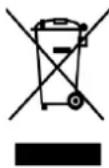
The crossed out wheelie bin symbol means that this product shall not be disposed of with normal household waste. Electronic and Electrical Equipment not included in the selective sorting process are potentially dangerous for the environment and human health due to the presence of hazardous substances. Please dispose of responsibly at an approved waste or recycling facility.
Emerio B.V.
Oudeweg 115
2031 CC Haarlem
The Netherlands
Customer service:
T: +31 (0) 23 3034369
www.emerio.eu/service
Kundeninformation:
T: +49 (0) 3222 1097 600
www.emerio.eu/service
Klantenservice:
T: +31 (0) 23 3034369
www.emerio.eu/service
Looking for spare parts? Have a look at https://spareparts.emerio.eu
CUSTOMER SERVICE

SPARE PARTS
SICHERHEITSHINWEISE
MONTAGE DER WANDHALTERUNG:
natural_image
Technical line drawing of a vacuum cleaner with a separate housing component (no text or symbols)LADEN DES AKKUS:
natural_image
Technical line drawing of a vacuum cleaner assembly with three views (no text or symbols)natural_image
Technical line drawings of a mechanical device showing assembly and component alignment (no text or symbols)Looking for spare parts? Have a look at https://spareparts.emerio.eu
KUNDENDIENST
ERSATZTEILE
MONTAGE DU SUPPORT MURAL :
natural_image
Technical line drawing of a mechanical device with a separate close-up view showing internal components (no text or symbols)RECHARGE DE LA BATTERIE :
natural_image
Technical line drawing of a vacuum cleaner assembly with three different parts (no text or symbols)natural_image
Technical line drawings of a mechanical device showing assembly and component alignment (no text or symbols)Looking for spare parts? Have a look at https://spareparts.emerio.eu
SERVICE CLIENT

PIÈCES DÉTACHÉES
Bruksanvisning – Swedish
SÄKERHETSANVISNINGAR
TA LOSS OCH SÄTTER FAST BATTERIPAKETET
natural_image
Technical line drawing of a portable air purifier with a separate device shown in its view (no text or symbols present)BATTERILADDNING
natural_image
Technical line drawings of a vacuum cleaner assembly with three different parts (no text or symbols)natural_image
Technical line drawings of a mechanical device showing assembly steps from powder input to final component (no text or symbols)Looking for spare parts? Have a look at https://spareparts.emerio.eu
KUNDTJÄNST

RESERVDELAR
natural_image
Technical line drawing of a mechanical device with a separate component, showing no text or symbols.DE ACCU OPLADEN:
natural_image
Technical illustration of a vacuum cleaner assembly with three different parts and directional arrows indicating assembly steps (no text or symbols present)natural_image
Technical line drawings of a mechanical device showing assembly and component alignment (no text or symbols)Looking for spare parts? Have a look at https://spareparts.emerio.eu
KLANTENSERVICE

RESERVEONDERDELEN
INSTRUKCJE DOTYCZĄCE BEZPIECZEŃSTWA
JAK ZAMONTOWAĆ UCHWYT ŚCIENNY:
natural_image
Technical line drawing of a mechanical device with a separate component, showing no text or symbols.ŁADOWANIE AKUMULATORA:
natural_image
Technical line drawing of a vacuum cleaner assembly with three different parts (no text or symbols)Looking for spare parts? Have a look at https://spareparts.emerio.eu
OBSŁUGA KLIENTA

CZEŚCI ZAMIENNE
Manual de Instrucciones – Spanish
CÓMO MONTAR EL SOPORTE EN LA PARED:
natural_image
Technical line drawing of a mechanical device with a separate close-up view showing internal components (no text or symbols)CÓMO CARGAR LA BATERÍA:
natural_image
Technical line drawings of a vacuum cleaner assembly with three views (no text or symbols)PIEZAS DE RECAMBIO