
UVC-111159 - Vacuum Cleaner Emerio - Free user manual and instructions
Find the device manual for free UVC-111159 Emerio in PDF.


| Type of product | Bagless Upright Vacuum Cleaner |
| Model | UVC-111159 |
| Dimensions (L x W x H) | 25 cm x 25 cm x 45 cm |
| Weight | 4.5 kg |
| Power consumption | 800 W |
| Dust capacity | 1.5 L |
| Cord length | 5 m |
| Filtration system | HEPA 13 filter |
| Noise level | 80 dB |
| Main functions | Dry vacuum cleaning for carpets and hard floors |
| Included accessories | Crevice tool, brush tool, upholstery nozzle |
| Dust container emptying | Press release button and empty into trash |
| Filter cleaning | Washable HEPA filter, clean every 3 months |
| Filter replacement | Replace filter every 6-12 months |
| Safety features | Overheat protection, double insulation, automatic shut-off |
| Spare parts availability | Replacement filters, dust container, brush rolls available online |
| Repairability index | High – easy to disassemble and replace parts |
| Warranty | 2 years |
Frequently Asked Questions - UVC-111159 Emerio
User questions about UVC-111159 Emerio
0 question about this device. Answer the ones you know or ask your own.
Ask a new question about this device
Download the instructions for your Vacuum Cleaner in PDF format for free! Find your manual UVC-111159 - Emerio and take your electronic device back in hand. On this page are published all the documents necessary for the use of your device. UVC-111159 by Emerio.
USER MANUAL UVC-111159 Emerio
2 in 1 Upright vacuum cleaner (EN)
natural_image
Black and green vacuum cleaner with blue LED array (no visible text or symbols)Content – Sisukord – Saturs – Turinys
Instruction manual – English ...... - 2 -
Kasutusjuhend – Estonian ...... - 12 -
Instrukciju rokasgrāmata – Latvian.... - 22 -
Instrukciju vadovas – Lithuanian.... - 32 -
SAFETY INSTRUCTIONS
Before use make sure to read all of the below instructions in order to avoid injury or damage, and to get the best results from the appliance. Make sure to keep this manual in a safe place. If you give or transfer this appliance to someone else make sure to also include this manual.
In case of damage caused by user failing to follow the instructions in this manual the warranty will be void. The manufacturer/importer accepts no liability for damages caused by failure to follow the manual, a negligent use or use not in accordance with the requirements of this manual.

-
Read operator's manual.
-
This appliance can be used by children aged from 8 years and above and persons with reduced physical, sensory or mental capabilities or lack of experience and knowledge if they have been given supervision or instruction concerning use of the appliance in a safe way and understand the hazards involved.
-
Children shall not play with the appliance.
-
Cleaning and user maintenance shall not be made by children without supervision.
-
This appliance is intended to be used in household and similar applications such as: staff kitchen areas in shop, offices and other working environment; farm houses; by clients in hotels, motels and other residential type environments; bed and breakfast type environments.
-
Do not use the appliance in confined spaces where there are explosive or toxic vapors.
-
Keep your vacuum cleaner and the charger away from heat.
-
This product includes rechargeable lithium batteries. Do not expose the product to high temperatures or fire as it could explode.
-
The appliance is only to be used with the power supply unit provided with the appliance.
- Use the included charger to charge the vacuum cleaner and do not use the charger for other purposes.
- Do not attempt to use the vacuum cleaner to pick up either liquids or burning or glowing articles. Do not suck sharp objects, toner dust or plaster.
- Do not use the machine in a damp environment or outdoors. The unit is intended for domestic use only. Store the machine in a dry place.
- If any blockage is found in brush, the appliance can be re-operated only after the blockage is cleaned away.
- Do not store or use the appliance close to high temperature places.
- Do not let children use the appliance.
- Keep infants away from the unit.
- Do not use the machine if the charger, the power cord or other parts of the machine are damaged. Have the machine repaired by an authorized technician.
- Never immerse the device in water! Do not use aggressive chemicals, abrasives or solvents such as benzene to clean the machine.
- Never leave the appliance unattended during use.
- The machine should not be operated by means of an external timer-switch or by means of a separate system with remote control.
- The appliance's plug must fit into the mains socket properly. Do not alter the plug. Do not use plug adaptors.
- Do not touch the plug with wet hands.
- Disconnect the battery charger from the mains when not in use and before undertaking any cleaning task.
- Do not force the appliance's work capacity. Stop using the machine once the dust contanior is full.
- Do not use the appliance if the filter is not correctly in place.
-
Do not use the appliance if the accessories or parts are not fastened together properly.
-
Do not open the batteries under any circumstances whatsoever. The batteries should be stored at a temperature of below 40^ C.
- Make sure that dust, dirt or other foreign objects do not block the fan grill on the appliance.
- Detachable supply unit
WARNING: For the purposes of recharging the battery, only use the detachable supply unit provided with this appliance. - This appliance contains batteries that are only replaceable by skilled persons.
PARTS DESCRIPTION
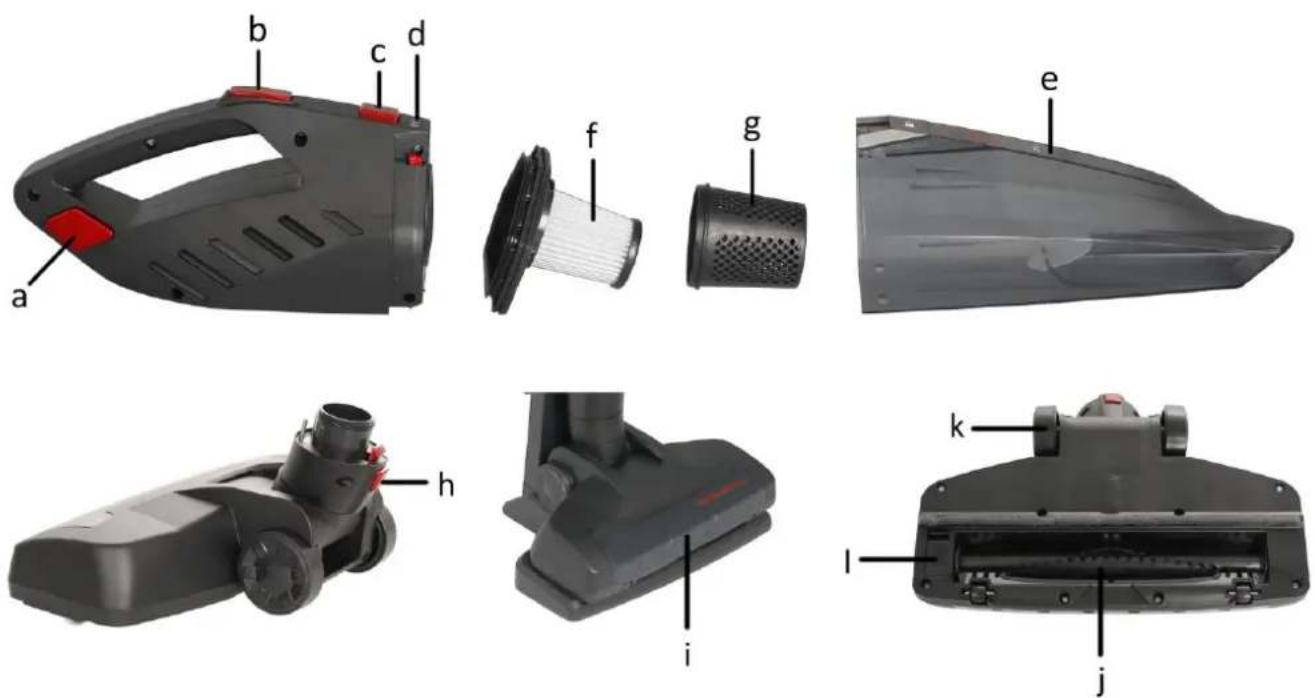
1. Main body
2. Handheld vacuum cleaner
a. Release button for handheld vacuum cleaner
b. On/Off button for handheld vacuum cleaner
c. Release button for dust container
d. Pilot lights of charging
e. Dust container
f. Hepa filter
g. Filter protector
3. Suction head
h. Suction head lock/release button
i. LED lights
j. AnimalPro brush
k. Wheels
I. AnimalPro brush lock
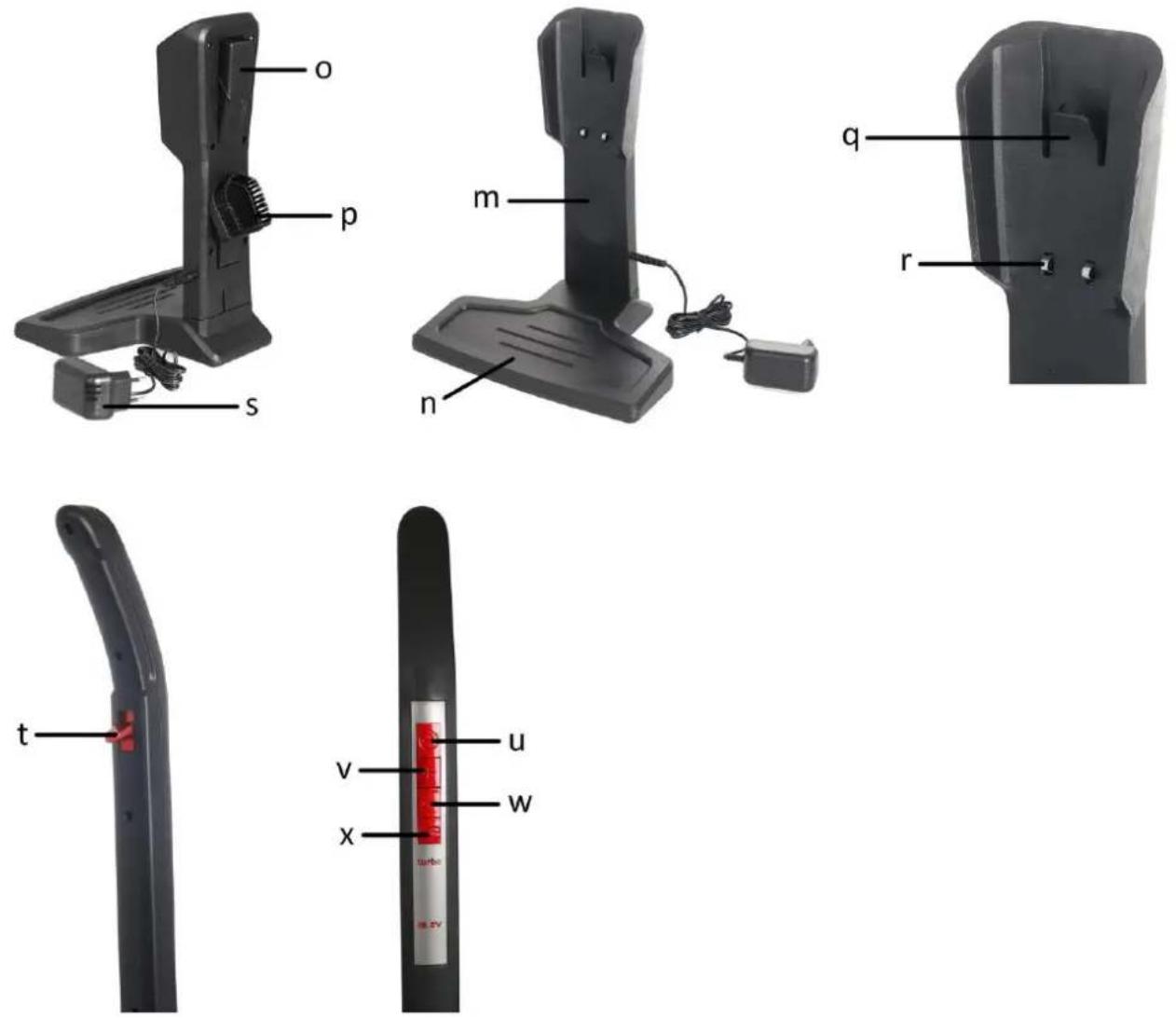
4. Charging base
m. Charging support piece
n. Charging support base
o. Small nozzle
p. Small square brush
q. Vacuum body hook
r. Charging conducting strip
s. Battery charger
5. Handle
t. Handle bending/upright lock
u. On/off button for the upright vacuum cleaner
v. High suction power button
w. Low suction power button
x. On/off button for the LED lights & AnimalPro brush


BEFORE FIRST USE
- Remove the main body of the appliance and other parts/accessories from the packaging.
- Unfold the main body to have the handle uprightly fixed.
- Insert the suction head into the bottom of the main body. Make sure they are fastened firmly. To remove the suction head from the main body, press the suction head lock/release button and pull it out.
- There is a lock on bottom of suction head to fix the AnimalPro brush. Make sure it's locked in place for use.

natural_image
Hand holding a black mechanical device with red buttons and a curved handle (no text or symbols visible)
natural_image
Hand holding a black handheld device with red buttons, against a white background (no text or symbols visible)
natural_image
Hand holding a black vacuum cleaner with red buttons, against a white background (no text or symbols visible)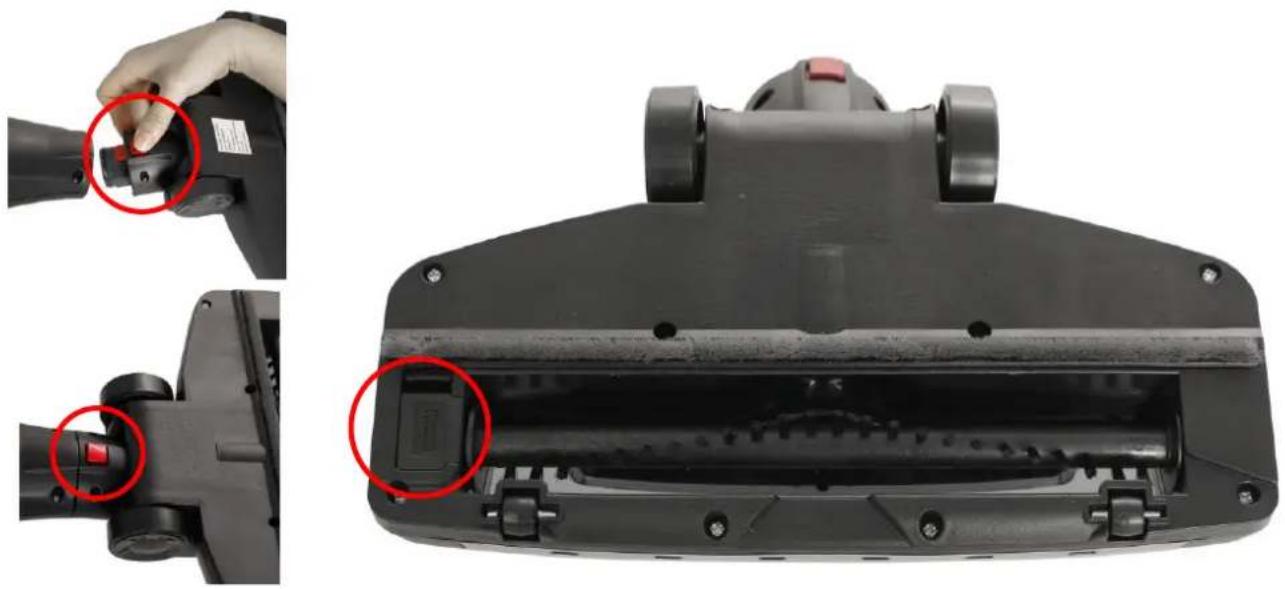
natural_image
Close-up of a black vacuum cleaner's head and side, showing adjustment of the component with red circles highlighting the parts (no text or symbols visible)BATTERY CHARGING
Warning: Do not use any chargers other than the one supplied. All repairs or battery replacement should be performed by an authorized technical service. Before the first use, it is important to charge the batteries completely. This charge will take approximately 4-5 hours.
- Attach the charging support piece to the charging support base.
- Hang the appliance onto the vacuum body hook of the charging base. Make sure the appliance fits steadily on the base.
- Plug the charger into the charging base first, and then into the mains socket.
- Charge the batteries at room temperature between 4 and 40°C.
- While charging, the pilot light will be flashing to indicate the charger is under working. When the charging operation is finished, the charger will switch off automatically and the pilot lights will be on instead of flashing.
- After charging, unplug the charger from the mains socket and the appliance. Do not use the appliance while it is connected to the charger. Store the charger in a safe place for future charges. The appliance is now ready for use.

natural_image
Three-step diagram showing a hand holding a black vacuum cleaner, with a blue arrow indicating the process (no text or symbols present)Note:
• Do not store or charge the appliance near radiators or other sources of heat, or exposed to direct sunlight.
- Do not charge the appliance in dirty or wet places.
OPERATION
- To switch the appliance on, press the on/off button (u) on the handle. Both the LED lights on the suction head and the pilot lights on the handheld vacuum cleaner will light on in blue.
- You can choose the suction power by pressing the high suction power button (v) or low suction power button (w) on the handle.
- AnimalPro brush and LED lights on the suction head will be working or stop working at the same time controlled by the on/off button (x) on the handle. Use the brush to clean the carpet or floor.
- You can also push up the bending/upright lock (t) on the handle to fold the appliance inwards for easy cleaning under the beds, desks and other similar places.
- After use, switch off the appliance and push up the bending/upright lock on the handle to fold the appliance for easy parking.
Note: Please charge the appliance while the pilot lights of charging only show one bar of power left or you feel the suction power is becoming weaker and weaker. Do not let the batteries drain the last drop before charging.

To use the handheld vacuum cleaner separately
- Press the release button to uncouple the handheld vacuum cleaner from the main body.
- Take off the nozzle and the small square brush from the back of charging base.
- Install the nozzle to clean corners and crevices. Install the brush to clean the upholsteries, such as sofa.
- Press the center of on/off button for handheld vacuum cleaner to make the machine work. Press the center of the button again to switch off the machine.
- Put the handheld vacuum cleaner back into its place on the main body after use.

natural_image
Three-step diagram showing a hand holding a black vacuum cleaner, interacting with a device and finally projecting the air vent (no text or symbols present)TIPS
- This appliance has been designed exclusively to vacuum clean floors, carpets and rugs, furniture and fabrics. Do not use it for any other purpose.
- Its AnimalPro brush can remove lint, hair and pet hair embedded in carpets and rugs.
- Never pick up live ash, splinters or other sharp objects or liquids. Do not use it to pick up construction dust, cement, etc.
• Never pick up lit matches or cigarette butts. Do not pick up toxic materials (e.g. ammonia). - Before adding or removing any accessories or performing any maintenance task, unplug the appliance from the mains.
- Check that the AnimalPro brush is free of tangled threads, hair, and animal hair. Otherwise, cut them off carefully and remove them so that the appliance does not become jammed.
• Do not use the brush on deep pile carpets, animal hair or fringe materials.
CLEANING AND MAINTENANCE
IMPORTANT! Before cleaning the product or performing any maintenance, make sure that the product is unplugged from the mains supply.
- Switch off the appliance and let it cool before undertaking any cleaning task.
• Clean the outside of the appliance with a damp cloth. Do not use abrasive products or solvents.
• Do not submerge the appliance in water or any other liquid. Make sure that no water enters the appliance. - Remove any dirt (hair and other fibers) tangled around the AnimalPro brush and wheels.
Cleaning dust container and filter
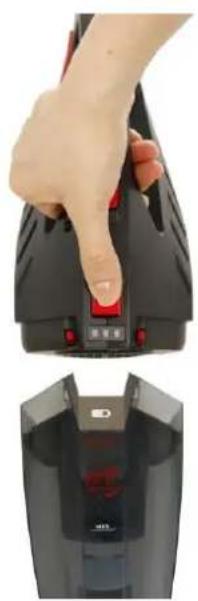
- Uncouple the handheld vacuum cleaner. Dismantle it by pressing the release button for dust container.
- Take out the Hepa filter and filter protector. Empty the dust container and filter.
- If the parts are heavily soiled, wash the dust container, filter and its protector under running water with a mild detergent. Check that all the parts are completely dry before fitting them back.
Note: It is recommended to clean the dust container and filter after each use. The vacuum cleaner does not work on its full potential when the dust container is full. The Hepa filter is washable and we recommend change it annually.
natural_image
Close-up of a hand pressing down on a black industrial vacuum cleaner with red control buttons (no visible text or symbols)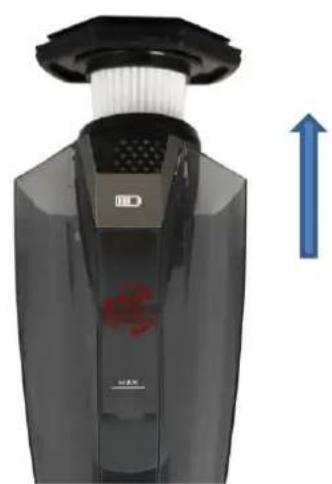
natural_image
Close-up of a black handheld device with a white top and blue upward arrow, no visible text or symbolsCleaning the AnimalPro brush
- Unlock the AnimalPro brush from the suction head. Take it out and remove any dirt (hair and other fibers) tangled around the roller.
(Press down the tab (A) of the AnimalPro brush lock and then pull it outwards to remove the lock from the suction head.)
- Wash the brush under running water with mild detergent. Make sure that it is completely dry before replacing it.

GUARANTEE AND CUSTOMER SERVICE
Before delivery our devices are subjected to rigorous quality control. If, despite all care, damage has occurred during production or transportation, please return the device to your dealer. In addition to statutory legal rights, the purchaser has an option to claim under the terms of the following guarantee:
For the purchased device we provide 3 years guarantee, commencing from the day of sale. If you have a defective product, you can directly go back to the point of purchase.
Defects which arise due to improper handling of the device and malfunctions due to interventions and repairs by third parties or the fitting of non-original parts are not covered by this guarantee. Always keep your receipt, without the receipt you can't claim any form of warranty. Damage caused by not following the instruction manual, will lead to a void of warranty, if this results in consequential damages then we will not be liable. Neither can we hold responsible for material damage or personal injury caused by improper use if the instruction manual is not properly executed. Damage to accessories does not mean free replacement of the whole appliance. In such case please contact our service department. Broken glass or breakage of plastic parts is always subject to a charge. Defects to consumables or parts subjected to wearing, as well as cleaning, maintenance or the replacement of said parts are not covered by the warranty and are to be paid.
ENVIRONMENT FRIENDLY DISPOSAL

Recycling – European Directive 2012/19/EU
This marking indicates that this product should not be disposed with other household wastes. To prevent possible harm to the environment or human health from uncontrolled waste disposal, recycle it responsibly to promote the sustainable reuse of material resources. To return your used device,
please use the return and collection systems or contact the retailer where the product was purchased. They can take this product for environmental safe recycling.
Emerio B.V.
Zomervaart 1A
2033 DA Haarlem
The Netherlands
Customer service:
T: +49 (0) 3222 1097 600
E: info.de@emerio.eu
www.saubereurope.com
Spare parts:
www.buyspareparts.eu
OHUTUSJUHISED
ENNE ESMAKORDSET KASUTAMIST
natural_image
Three-panel image showing a hand holding a black handheld device, with no visible text or symbols.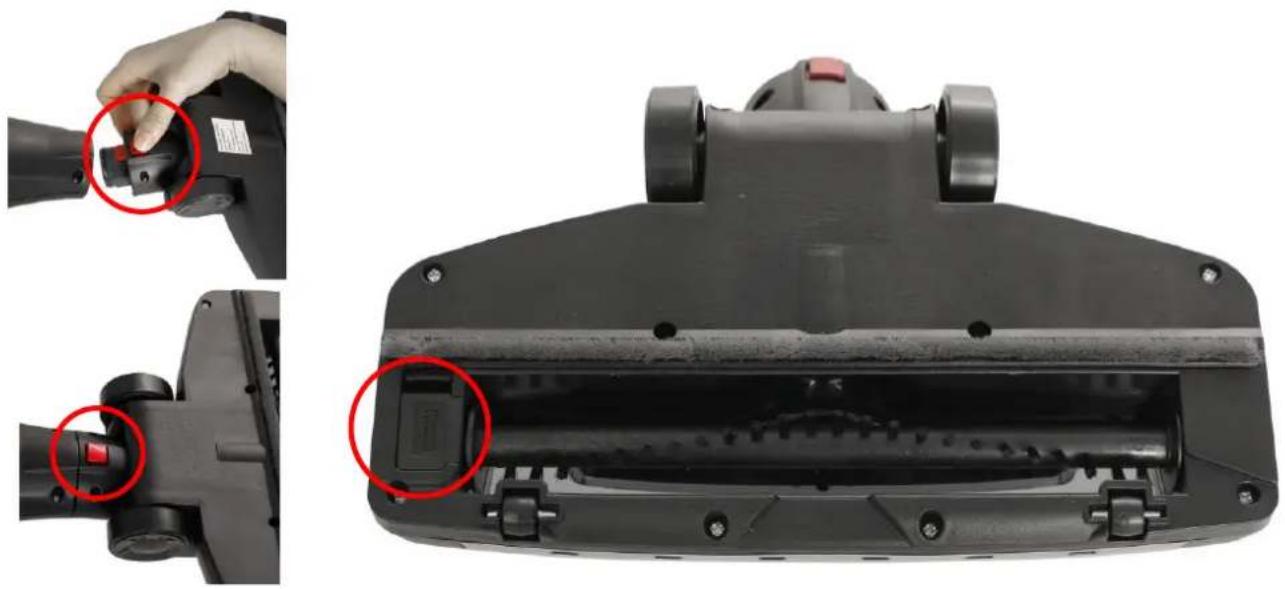
natural_image
Close-up of a black vacuum cleaner's head and side, showing adjustment of the handle and internal component (no text or symbols visible)AKU LAADIMINE
natural_image
Three-step illustration of a black vacuum cleaner's base, showing step-by-step assembly and adjustment (no text or symbols)Märkus:
natural_image
Hand holding a black ergonomic device with red circular buttons and a blue arrow indicating rotation (no text or symbols visible)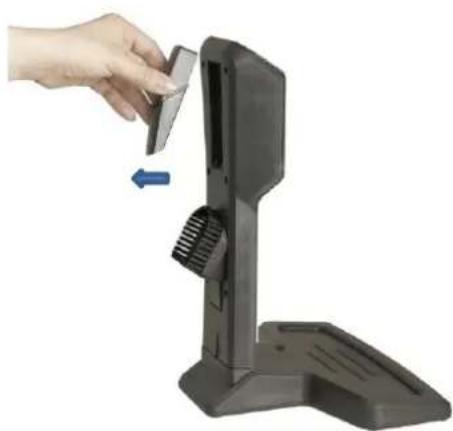
natural_image
Hand placing a small component into a black electronic device with a blue arrow indicating left motion (no text or symbols visible)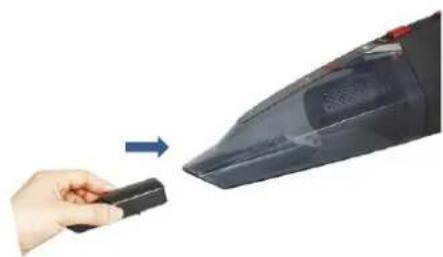
natural_image
Hand holding a black remote control device next to a black vacuum cleaner (no text or symbols visible)NÄPUNÄITED
natural_image
Close-up of a hand pressing down on a black vacuum cleaner's air vent (no visible text or symbols)
natural_image
Close-up of a black handheld device with a white filter and blue upward arrow, no visible text or symbolsAnimalPro harja puhastamine


PIRMS PIRMĀS LIETOŠANAS REIZES
natural_image
Hand holding a black ergonomic device with red buttons and a curved handle (no text or symbols visible)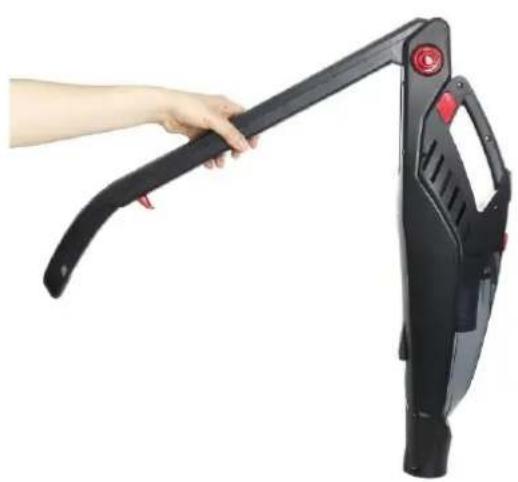
natural_image
Hand holding a black adjustable vacuum cleaner against white background (no text or symbols visible)
natural_image
Hand holding a black vacuum cleaner with a red handle, against a white background (no text or symbols visible)
natural_image
Close-up of a black vacuum cleaner's head and side, showing adjustment of the left arm and internal component (no text or symbols visible)AKUMULATORA UZLĀDĒŠANA
natural_image
Three-step illustration of a black vacuum cleaner's base, showing step-by-step assembly and adjustment (no text or symbols)Piezīme!
natural_image
Hand holding a black ergonomic device with red circular button and blue arrow indicator (no text or symbols)
natural_image
Hand inserting a small component into a black device holder, with a blue arrow indicating left motion (no text or symbols visible)
natural_image
Hand holding a remote control device next to a black handheld vacuum cleaner (no text or symbols visible)PADOMI
natural_image
Close-up of a hand pressing down on a black vacuum cleaner's air vent (no text or symbols visible)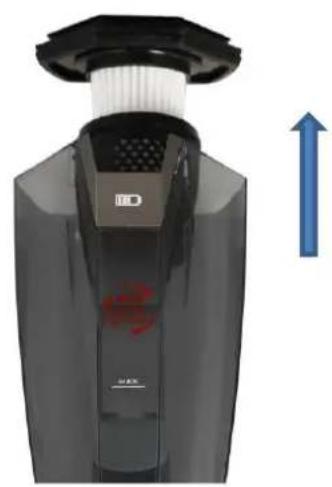
natural_image
Close-up of a black handheld device with white filter and blue upward arrow, no visible text or symbols

PRIEŠ NAUDOJANT PIRMA KARTA
natural_image
Hand holding a black ergonomic device with red buttons and a curved handle (no text or symbols visible)
natural_image
Hand holding a black handheld device with red buttons, against a white background (no text or symbols visible)
natural_image
Hand holding a black vacuum cleaner with red buttons, against a white background (no text or symbols visible)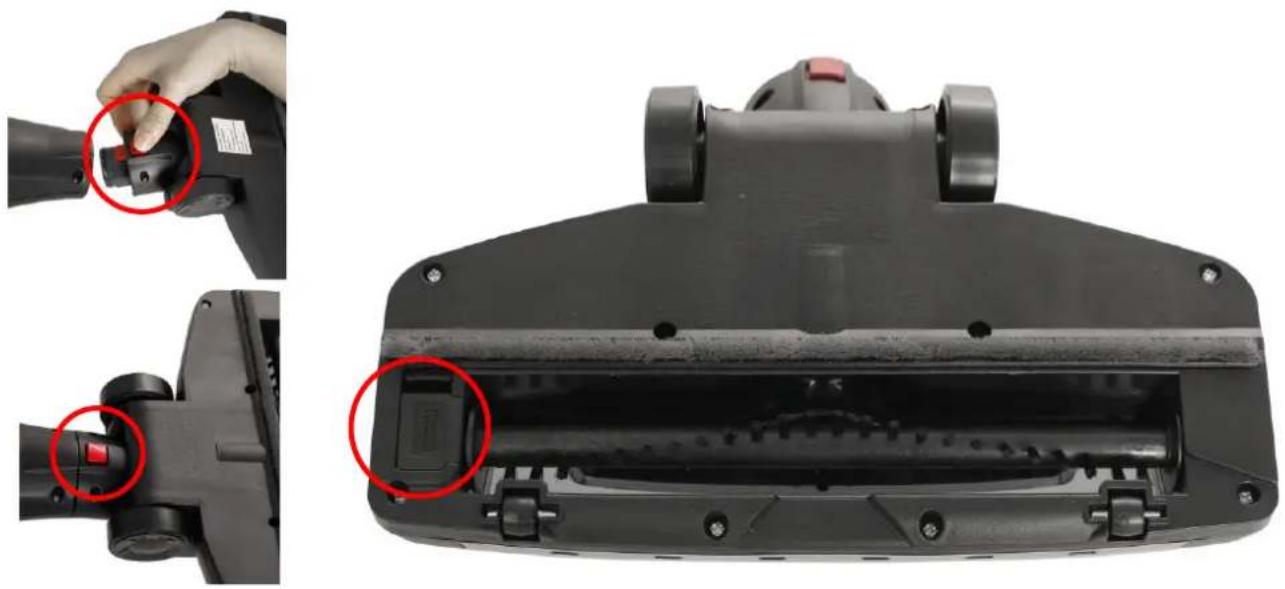
natural_image
Close-up of a black vacuum cleaner's head and side, showing adjustment of the component with red circles highlighting the parts (no text or symbols visible)BATERIJOS JKROVIMAS
natural_image
Three-step diagram showing a hand holding a black vacuum cleaner, with a blue arrow indicating the process (no text or symbols present)Pastaba:
natural_image
Three-step diagram showing a hand holding a black remote control device, interacting with a small device and finally adding a power adapter (no text or symbols visible)PATARIMAI
natural_image
Hand pressing down of a black electronic device with red buttons, showing a close-up of its internal components (no text or symbols visible)
natural_image
Close-up of a black handheld device with white filter and blue upward arrow indicator (no text or symbols)- Content – Sisukord – Saturs – Turinys
- SAFETY INSTRUCTIONS
- PARTS DESCRIPTION
- Main body
- Handheld vacuum cleaner
- Suction head
- Charging base
- Handle
- BEFORE FIRST USE
- BATTERY CHARGING
- Note:
- OPERATION
- To use the handheld vacuum cleaner separately
- TIPS
- CLEANING AND MAINTENANCE
- Cleaning dust container and filter
- Cleaning the AnimalPro brush
- GUARANTEE AND CUSTOMER SERVICE
- ENVIRONMENT FRIENDLY DISPOSAL
- Customer service:
- OHUTUSJUHISED
- ENNE ESMAKORDSET KASUTAMIST
- AKU LAADIMINE
- Märkus:
- NÄPUNÄITED
- AnimalPro harja puhastamine
- PIRMS PIRMĀS LIETOŠANAS REIZES
- AKUMULATORA UZLĀDĒŠANA
- Piezīme!
- PADOMI
- PRIEŠ NAUDOJANT PIRMA KARTA
- BATERIJOS JKROVIMAS
- Pastaba:
- PATARIMAI
Brand : Emerio
Model : UVC-111159
Category : Vacuum Cleaner