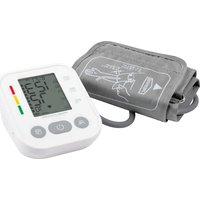
PC-BMG 3121 - Sphygmomanometer ProfiCare - Free user manual and instructions
Find the device manual for free PC-BMG 3121 ProfiCare in PDF.


| Product type | Automatic arm blood pressure monitor |
| Brand | ProfiCare |
| Model | PC-BMG 3121 (AOJ-30E) |
| Measurement method | Oscillometric |
| Systolic pressure measurement range | 57 – 255 mmHg |
| Diastolic pressure measurement range | 25 – 195 mmHg |
| Pressure accuracy | ±3 mmHg |
| Pulse measurement range | 40 – 200 beats/min |
| Pulse accuracy | ±5% |
| Cuff size | 22 – 42 cm |
| Power supply | 4 AAA batteries 6 V or USB Type-C cable 5 V |
| Dimensions (L x W x H) | 118 x 98 x 62.5 mm |
| Weight (without batteries) | Approximately 220 g |
| Display | LCD screen |
| Main functions | Arrhythmia detection, WHO classification, memory for 99 measurements per user, 2 users |
| Automatic shut-off | 1 minute |
| Cleaning | Soft clean cloth, 75% medical alcohol |
| Maintenance | No special maintenance |
| Safety | BF type applied part, IP21 protection rating |
| Lifespan | 5 years |
| Included accessories | Cuff, instruction manual |
Frequently Asked Questions - PC-BMG 3121 ProfiCare
User questions about PC-BMG 3121 ProfiCare
0 question about this device. Answer the ones you know or ask your own.
Ask a new question about this device
Download the instructions for your Sphygmomanometer in PDF format for free! Find your manual PC-BMG 3121 - ProfiCare and take your electronic device back in hand. On this page are published all the documents necessary for the use of your device. PC-BMG 3121 by ProfiCare.
USER MANUAL PC-BMG 3121 ProfiCare
natural_image
Simple line drawing of a rectangular device with a triangular base and internal components (no text or symbols)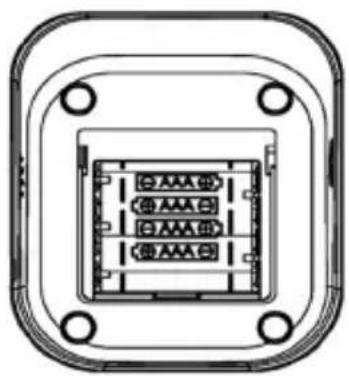
natural_image
Technical line drawing of a rectangular electronic component with internal channels and mounting holes (no text or symbols)flowchart
graph LR
    A["Initial Procedure"] --> B["8.0 MPa"]
    B --> C["8.0 mmHg"]
    C --> D["8.0"]
natural_image
Illustration showing two steps of a blood pressure measurement: one being held and the other in hand, both with arrows indicating direction (no text or symbols present)Hinweis
D
natural_image
Line drawing of a person sitting at a desk using a computer (no text or symbols)D
natural_image
Simple line drawing of a bottle and a cylindrical container (no text or symbols)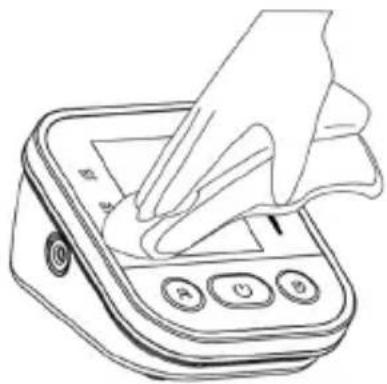
natural_image
Line drawing of a hand using a handheld digital pressure meter (no text or symbols)Shenzhen AOJ Medical Technology Co., Ltd.
Raum 301&4F, Block A, Gebäude A, Jingfa Intelligent Manufacturing Park, Xiawei-yuan, Gushu Community, Xixiang Street, Bao'an District, 518126 Shenzhen, CHINA
E-Mail: info@aojmedical.com
Website: https://www.aojmedical.com
Telefon: 86-755-2778 6026
Handbuch Version: A0
Version der Software: V1.0
- Unpacking and checking....26
- Package contents and overview of controls .....27
- Safety precautions....27
- Product composition....29
- Intended use/instructions for use 29
- Contraindication....29
- Preparation....29
- Function setting 30
- How to measure correctly....31
- Contraindications, precautions, warnings and immediate instructions......35
- General questions and answers about blood pressure 37
- Abnormal phenomena and handling....38
- Cleaning and disinfection 40
- Maintenance and servicing ....41
- Specifications ....41
- Attachment 1 EMC information....43
Thank you for choosing the Arm Sphygmomanometer. The appliance works with the oscillometric method of blood pressure measurement. This means that the appliance detects the blood movement in the brachial artery and converts it into a digital reading.
The appliance can be used in home maintenance, and the patient is an designated operator, and all functions can be used safely.
1. Unpacking and checking

Read all information in the operating instructions and all other documents in the packaging before operating the appliance.
Before putting into operation, open the packaging carefully and check that all parts are present according to the following package contents and that no parts have been damaged during transport.
2. Package contents and overview of controls
| Number Description Quantity | |
| 1 Blood Pressure Monitor 1 | |
| 2 Cuff 22 – 42 cm (8.66 – 16.53 inches) 1 | |
| 3 Instruction Manual 1 |
GB
① Appliance
1 Screen
2 USB C port
3 Memory button
4 On- / Off Taste
5 User selection button (setting button)
6 Air outlet
② Screen
1 Date / time
2 Blood pressure classification
3 Pulse rate value
4 Battery icon
5 Pressure measurement indicator
6 Irregular heartbeat symbol
7 Average blood pressure symbol
8 Heartbeat symbol
9 Stillness detection
10 Memory number
11 Cuff detection
12 Memory symbol
13 Air outlet symbol
14 Air inlet symbol
15 User symbol
3. Safety precautions
Knowing the warning signs and symbols is essential for the safe and proper use of this appliance. Please refer to the following signs and symbols that you may find in this instruction manual or on the label:
| Legend, signs and meaning | |
 | Information on the warning document, see appendix |
 | Equipment classification: Type BF Applied part |
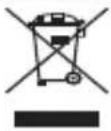 | Observe local regulations for disposal |
 | Observe instructions for use |
 | Keep dry |
 | Request low voltage |
 | Keep away from sunlight |
 | Vertically upwards |
 | The appliance is protected against splashing water. Water splashing against the enclosure from any direction should have no harmful effects. |
 | RoHS mark |
| CE | CE mark |
 | Manufacturer |
 | Production date |
 | Serial number |
 | Lot number |
 | EU authorised representative |
4. Product composition
This product consists of the main part and the cuff.
5. Intended use / instructions for use
The brachial blood pressure monitor is intended for the measurement of systolic and diastolic pressure and pulse rate in adult subjects by means of non-invasive oscillo-metric technique in medical facilities or at home.
6. Contraindication
There are no known contraindications.
7. Preparation
(1) Inserting the battery
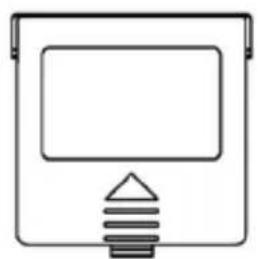
1) Open the battery compartment cover as shown in the illustration.
2) Insert 4 AAA batteries into the battery compartment, paying attention to the electrode markings on the batteries. Install the batteries as indicated in the illustration on the right below this set.
natural_image
Simple line drawing of a rectangular device with a triangular base and internal components (no text or symbols)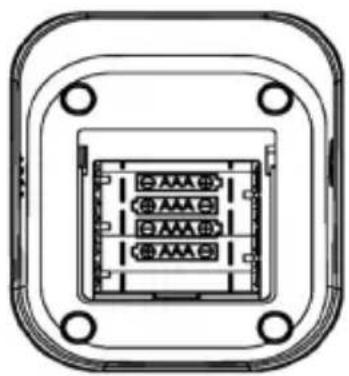
natural_image
Technical line drawing of a rectangular electronic component with internal slots and mounting holes (no text or symbols)(2) Replacing the batteries

Remove the batteries if you do not intend to use the appliance for a longer period of time (more than 3 months).
(3) Type-C connector for power supply (the cable is not included in the package contents)
In addition to the batteries, power can also be supplied by connecting to an external 5 V DC power supply via a type C connector.
8. Function setting
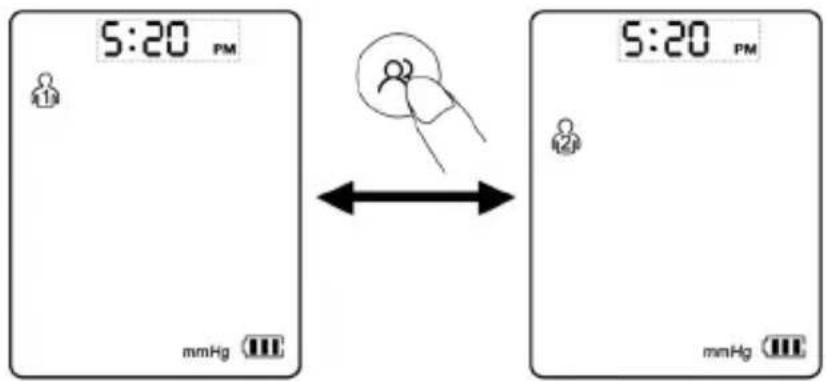
(1) User mode
With the unit switched off, press the “💡” button to access the user group selection interface. Then press the button “💡” again to switch and select the user groups.
(2) Setting the date and time
When the unit is switched off, press the “☐” button for approx. 3 seconds to call up the date setting to call up the date setting; the year flashes (2.1). Press the button “☐” to set the year and press the “☐” button to confirm the selection. When the year is set, the month setting is called up automatically (2.2). Press the button “☐” to set the month and press the button “☐” to confirm the selection. Cause the same steps to be followed to set the date (2.3) / hour (2.4) / minute (2.5).
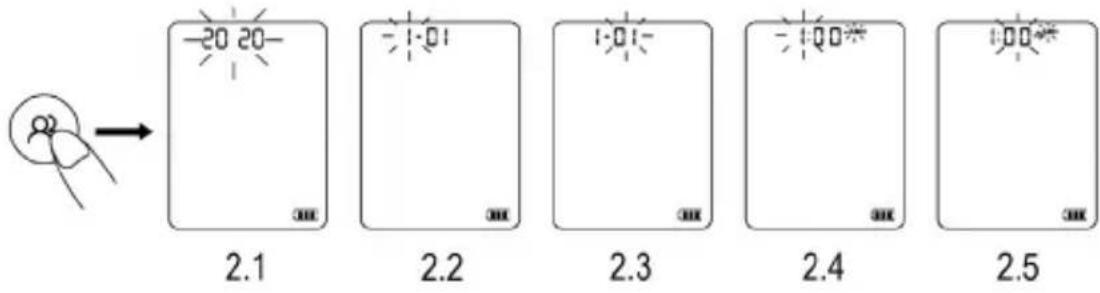
(3) Setting the display unit
There are two units for blood pressure display, mmHg and kPa. The default unit is mmHg.
With the unit off, press the “☐” button for about 5 seconds to access the unit selection. Press the “☐” button to switch between mmHg and kPa, then press the “☐” button to confirm the selection.
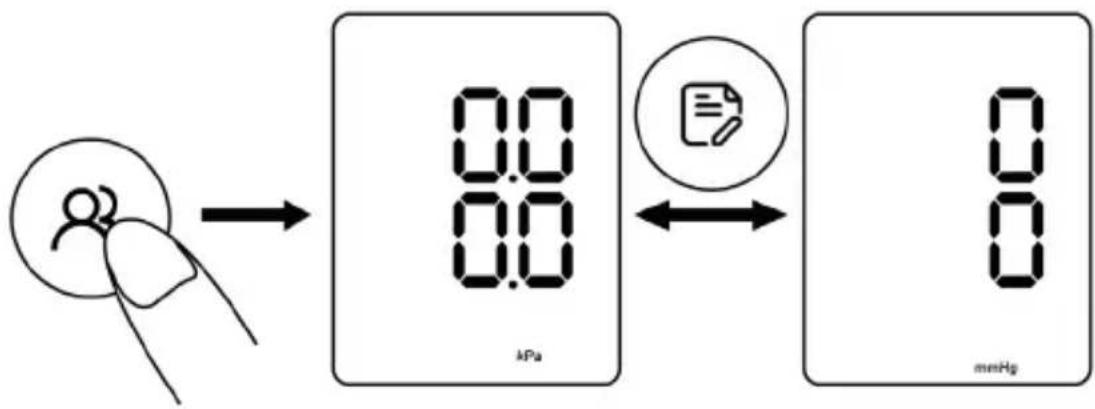
flowchart
graph LR
    A["Initial Procedure"] --> B["8.0 kPa"]
    B --> C["8 mmHg"]
    C --> D["Document Icon"]
    D <--> B
9. How to measure correctly
(1) Preparation before measurement
- Take off the clothes on your arm.
- Always measure on the same arm (usually the left arm).
- Stay calm and quiet during the measurement.
- Relax as much as possible and do not talk during the measurement.
- Measure your blood pressure at about the same time every day.
- Do not take your blood pressure immediately after physical exertion or a bath. Rest for 20 to 30 minutes before taking the measurement.
- Measurements taken under the conditions listed below may affect the results: Within an hour of eating; after drinking wine, coffee or tea; after exercising; after talking; in a nervous or agitated mood; leaning forward; in motion; if the room temperature changes drastically during the measurement; in a moving vehicle; during repeated and continuous measurements.
(2) Putting on the arm cuff
1) Connect the arm cuff to your monitor by inserting the air plug firmly into the air socket.
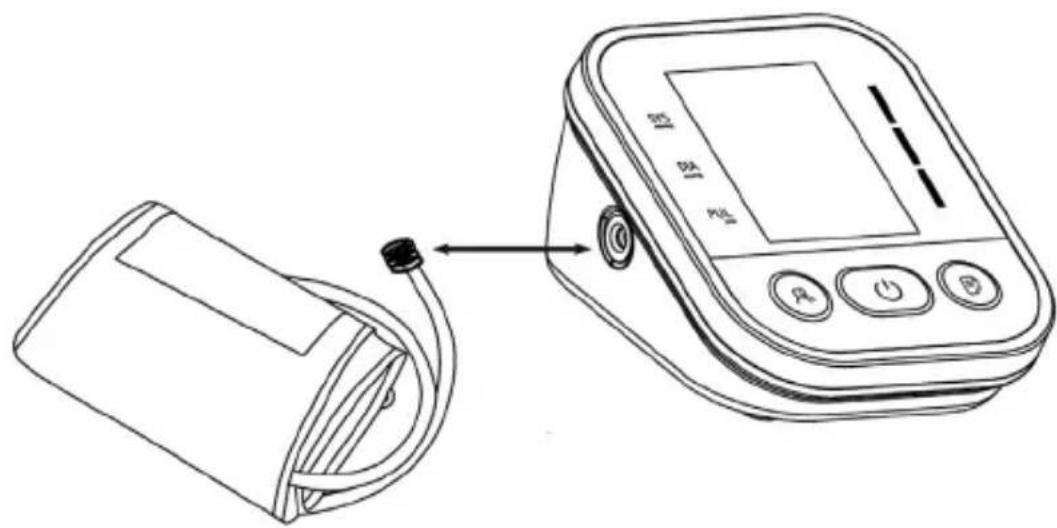
2) Cause your hand to pass through the loop of the cuff. Pull the cuff until it reaches your left upper arm.
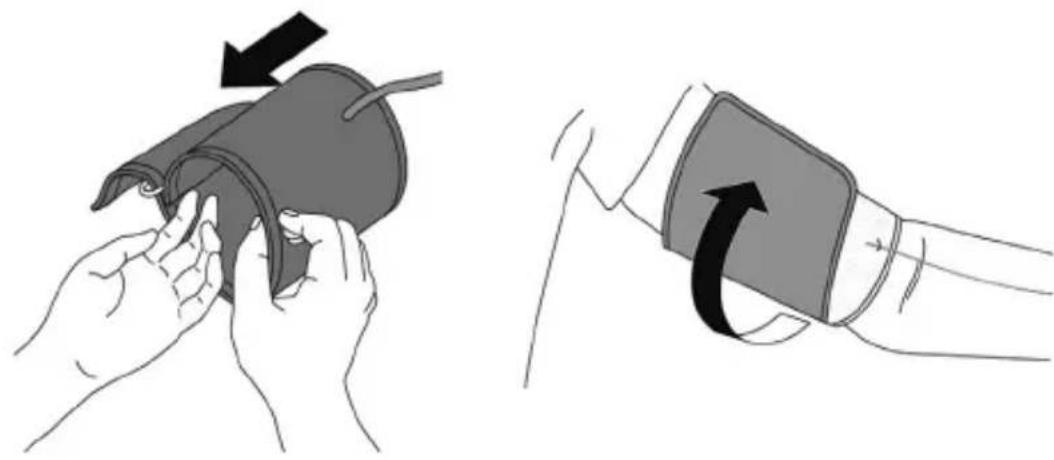
natural_image
Illustration showing two steps of a blood pressure measurement: left panel with hand holding test tube, right panel with hand holding blood pressure monitor (no text or symbols)Note
- The lower edge of the arm cuff should be 2 to 3 cm above the inside of your elbow. The air tube is on the inside of your arm and is aligned with your middle finger
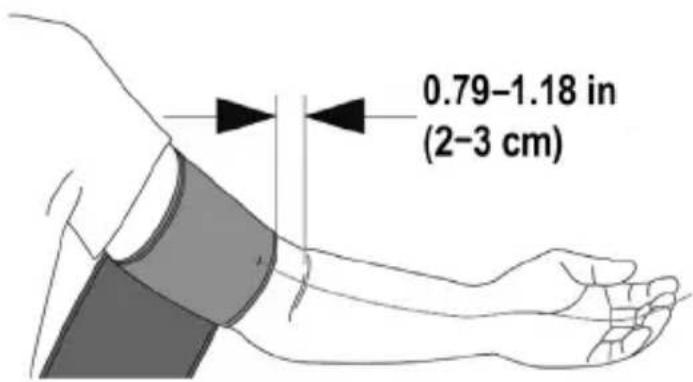
GB
3) Make sure the air tube is on the inside of your arm and wrap the cuff tightly so that it cannot move around your arm.
4) When you take a measurement on your arm, the air tube should run along the side of your elbow and the underside of your arm. Make sure that you do not rest your arm on the air tube.
Note: Repeated measurement causes blood congestion in the arm which affects the measurement result. Improvement: Raise your left hand and hold it in a fist several times or remove the cuff and rest for at least 2 – 3 minutes before measuring.
(3) Sitting correctly
For the measurement, you need to sit relaxed and comfortable in a room with a pleasant temperature. Put your arm on the table.
- Sit on a comfortable chair and support your back and arm.
- Place your feet flat on the floor and do not cross your legs.
- Place the arm cuff on your arm at the level of your heart, with your arm resting comfortably on the table.
(4) Performing the measurement
Start the measurement after you have put on the cuff:
Press the “💡” button and the cuff will start to inflate. Please do not worry and do not speak during the measurement.
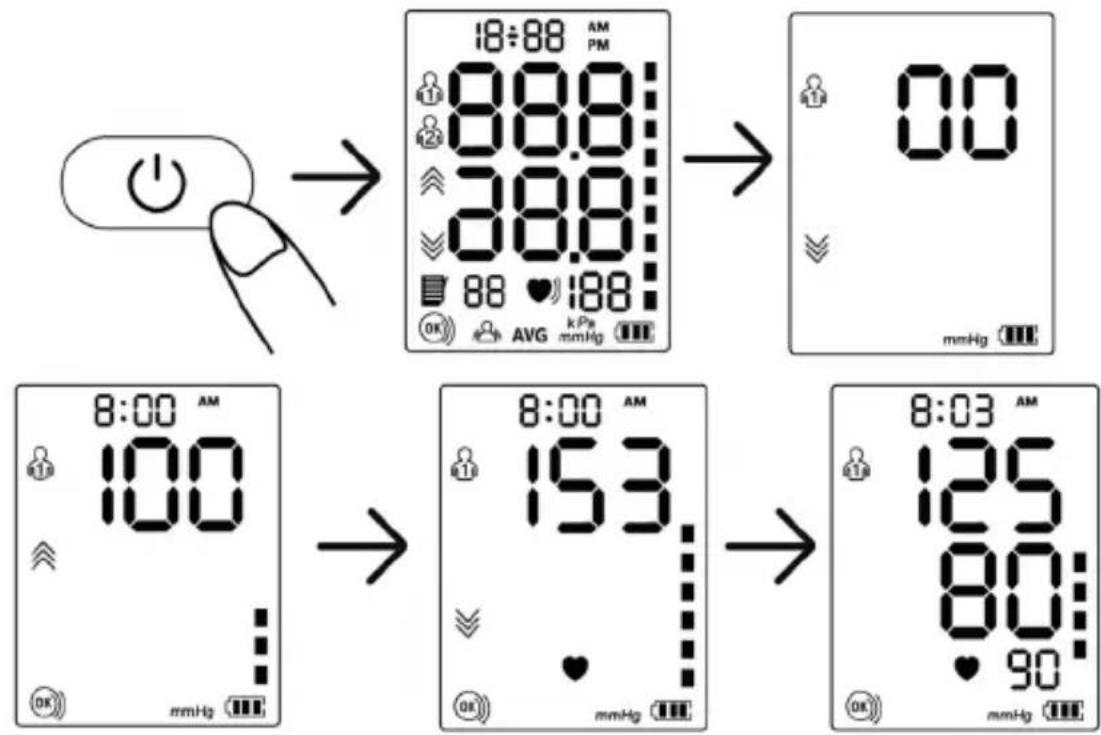
Note: If you feel uncomfortable during the measurement, press the "○" button immediately to stop the measurement.
When the air pressure has filled up to a certain value, the value on the screen drops slowly and with a certain speed and the heartbeat symbol flashes. When the measurement is complete, the systolic pressure, diastolic pressure and pulse are displayed on the screen.
Note: Contact your doctor if you get unexpected readings.
(5) Memory function
1) Each reading is automatically stored under the corresponding user group. The appliance can store up to 99 series of measurements per user. As soon as the memory is full, the old values are replaced by new ones.
2) Press the “☐” button once when the appliance is switched off and the appliance shows the average value of the blood pressure measurements of the last 2 or 3 times. Press the button “☐” again and the last measured value is displayed.
Press the button " again and the remaining readings are displayed one after the other.
(6) Delete memory
In the off mode, press the button “☐” to select the user group whose readings are to be deleted. Press the button “☐” to switch off the appliance and press the button “☐” once to activate the screen. Then press and hold the “☐” button for about 3 seconds to delete the selected user’s memories and the “NO” symbol appears on the screen.
(7) "Cuff worn" detection
The “OK” icon is always displayed on the screen when the cuff is correctly applied. If the cuff is too loose, the “” symbol will always flash to remind you. When the “○” symbol flashes, please press the “1” button to stop the measurement.
(8) "Hold still" display
The “💡” symbol flashes if you move or shake your arm during measurement, which may cause incorrect measurement results. Please correct your posture and measure again.
10. Contraindications, precautions, warnings and immediate instructions
- No maintenance or servicing during use.
- Maintenance should be carried out as recommended by the manufacturer.
- Portable RF communication devices (including peripherals such as antenna cables and external antennas) should be at least 30 cm away from the appliance and its parts to avoid interference with the monitor.
- If the ambient temperature is less than 5 °C, move the appliance to a place where the ambient temperature is between 5 °C and 40 °C for at least 1 hour; if the ambient temperature is above 40 °C, move the appliance to a place where the ambient temperature is between 5 °C and 40 °C for at least 2 hours.
- DO NOT use this monitor for infants, toddlers, children or persons who cannot express themselves.
- DO NOT take medication based on the readings from the appliance. Consult your doctor for specific information about your blood pressure. The patient should not self-diagnose or self-medicate based on the reading. Please follow the instructions of your doctor or healthcare provider.
- DO NOT use the appliance on an arm that is injured or under medical treatment.
-
DO NOT use the appliance if you are on an intravenous drip or receiving a blood transfusion.
-
DO NOT use this monitor in areas where surgical radio frequency (RF) equipment, magnetic resonance imaging (MRI) scanners or computer tomography (CT) scanners are located. This may cause the monitor to operate incorrectly and/or give inaccurate readings.
- Consult your physician before using this monitor if you have frequent arrhythmias such as premature atrial or ventricular beats or atrial fibrillation, arterial sclerosis, poor perfusion, diabetes, pregnancy, pre-eclampsia or kidney disease.
- NEVER diagnose or treat yourself based on the readings. ALWAYS consult your doctor.
- To avoid strangulation, please keep the air tube and the Type-C charging cable away from infants, toddlers and children.
- Stop using this monitor and contact your doctor if you experience skin irritation or discomfort.
- Consult your doctor before using this monitor if you have had a mastectomy.
- Consult your doctor before using this monitor if you have severe blood flow problems or blood disorders, as cuff inflation may cause bruising.
- DO NOT use this appliance for any purpose other than measuring blood pressure and pulse rate.
- DO NOT disassemble or attempt to repair the appliance or any other component. This may cause inaccurate readings.
- DO NOT use the appliance in a place where it is damp or where there is a risk of water splashing onto the appliance. This may damage the monitor.
- DO NOT use the monitor in a moving vehicle, such as a car.
- DO NOT drop the monitor or subject it to strong shocks or vibrations.
- DO NOT use this monitor in locations with high / low humidity and temperature.
- DO NOT use this appliance near active RF surgical equipment or in an RF-shielded room of an ME system for magnetic resonance imaging, where strong EM interference may occur.
- Do not use this appliance next to or on top of other equipment to avoid malfunction. If such use is necessary, all accessories involved must be checked for normal operation.
- The use of accessories and transducers not specified or supplied by the manufacturer is prohibited. Failure to comply with this instruction may cause increased electromagnetic emissions or reduced electromagnetic immunity of the appliance.
11. General questions and answers about blood pressure
Q1: Why is the blood pressure value measured at home lower than that measured in hospital?
- The difference in blood pressure between measurements taken at home and in hospital is about 20 mmHg – 30 mmHg (2.7 kPa – 4.0 kPa). This is because people are more relaxed at home than in hospital.
- When the appliance is placed over the heart, the blood pressure tends to be much lower than it actually is. Make sure that the appliance is placed exactly at the level of the heart.
Q2: Why is the blood pressure reading at home higher than the reading at the hospital?
- The antihypertensive medication may have lost its effect. Please follow your doctor's instructions.
- The cuff may not be applied correctly. If the cuff is not fitted correctly, no arterial pressure reading will be obtained and the blood pressure reading may be much higher than it is. Therefore, put the cuff on correctly.
- The cuff is not applied tightly enough. If the cuff is too loose, the pressure force cannot be transmitted to the artery, so the blood pressure value is much higher than it is. Therefore, readjust the cuff and tighten it more firmly.
- The patient is not sitting properly during the measurement. Stooping, tilting, bending and sitting cross-legged are not desirable during blood pressure measurement, as this increases the pressure in the abdominal cavity or the arm position is below the heart. Please take the measurements in the correct posture.
Q3: When can I get better readings?
- Measurements are best taken in the morning immediately after urination or when your mind and body are stable. We recommend that you always take the measurements at the same time of day.
12. Abnormal phenomena and handling
One of the following symbols may appear in the event of abnormal measurements.
Please use the recommended measurement method.
| Error Cause/Solution | |
| Er U The | pressure cannot reach 30 mmHg (4 kPa) in 12 seconds. |
| Er H Inflation | reaches 295 mmHg and air is automatically released after 20 ms. |
| Er 1 Pulse rate is not detected correctly. | |
| Er 2 | Too much interference (movement, conversation or magnetic interference during a measurement). |
| Er 3 The | measurement result is abnormal. |
| Er 23 SYS value is lower than 57 mmHg. | |
| Er 24 SYS value is higher than 255 mmHg. | |
| Er 25 DIA value is lower than 25 mmHg. | |
| Er 26 DIA value is higher than 195 mmHg. | |
* Troubleshooting
| Anomaly Possible | Error Solution | |
| No switch-on possible | The power is insufficient Re | place the batteries or insert the Type-C charging cable for power supply |
| The plus and minus poles of the battery are inserted the wrong way round | Insert the batteries correctly | |
| No pressure application | The air hose plug is not firmly inserted | Insert the plug of the air hose firmly into the socket |
| The air hose is broken or leaking | Please contact the dealer to get a new cuff | |
| Measurement not possible due to display error | The arm has been moved K | Keep your arm and body still |
| You speak during the measurement | Keep quiet while measuring the blood pressure | |
| Air leakage at the cuff | The cuff is too loose Please | tighten the cuff |
| The airbag of the cuff is ripped | Please contact the dealer to replace with a new cuff | |
 If the blood pressure still cannot be measured after the above attempts to solve the problem, please contact your dealer. DO NOT attempt to disassemble the appliance yourself. If the blood pressure still cannot be measured after the above attempts to solve the problem, please contact your dealer. DO NOT attempt to disassemble the appliance yourself. | ||
13. Cleaning and disinfection
(1) Cleaning
The appliance can be cleaned with a soft, clean cloth moistened with a small amount of neutral detergent or water.

Do not use corrosive cleaning agents and make sure that no part of the monitor is immersed in any liquid.
(2) Disinfection
Recommended disinfectant
75 % medical grade alcohol
Steps:
1) Gently wipe the appliance with a soft, clean cloth that has been moistened dampened with a small amount of the above disinfectant and dry immediately with a soft, clean, dry cloth.
2) The casing of the appliance can also be cleaned with a soft, clean cloth moistened with a small amount of 75 % medical alcohol for disinfection.

Do not disinfect with methods such as high temperature steam or ultraviolet radiation. These could damage the appliance and shorten its life.
It is recommended to disinfect the monitor before and after each use. Each disinfection must be completed within 1 minute. The number of repeated disinfections should not exceed 2 times.
(3) Disposal
Dispose of the monitor, other components and optional accessories in accordance with applicable local regulations. Improper disposal may cause environmental pollution.
Notes
- Do not bend or kink the air hose too much.
- Do not store the monitor or its components:
- if the monitor or its parts are wet.
- in locations with extreme temperatures, humidity, direct sunlight, dust or corrosive gases.
- in locations with a high risk of vibration or shock.
14. Maintenance and servicing

natural_image
Line drawing of a bottle and a cylindrical container (no text or symbols)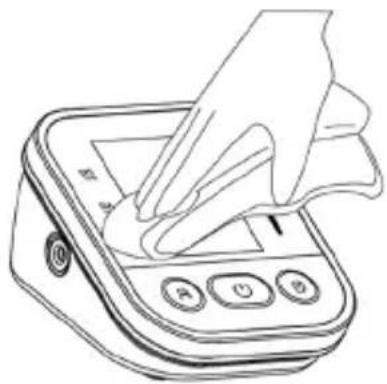
natural_image
Line drawing of a hand pressing down on a digital pressure meter (no text or symbols)GB
- Always keep the surface of the appliance clean and tidy to prolong the life of the appliance.
- If the appliance is dirty, wipe it with a dry, soft cloth. If the dirt is not easily removed, wipe it with a soft cloth soaked in water or a neutral detergent and then dry it with a dry cloth.
- No maintenance or servicing is required to operate the appliance.

Do not allow water or other liquids to flow into the appliance.
15. Specifications
| Product Name Arm | Blood Pressure Monitor | ||
| Model AOJ-30E (PC-BMG 3121) | |||
| Display LCD screen | |||
| Measuring method | Oscillometric measurement | ||
| Measuring part Upper arm | |||
| Measuring range B | blood pressure value | SYS: 57 – 255 mmHg (7.6 – 33.4 kPa); DIA: 25 – 195 mmHg (3.33 – 26 kPa); | |
| Pulse rate 40–19 | 9bpm | ||
| Accuracy Blood pressure | pressure value | ±3 mmHg (±0.4 kPa) | |
| Pulse rate ±5% | |||
| Low battery 4.2 V± | 0.1 V: weak battery; <4.0 V±0.1 V: appliance is switched off | ||
| Automatic switch-off | 1 Minute without operation | ||
| Power source 4xAA d.c. 6 V or d.c. 5 V type C cable | |||
| Part used Type BF | |||
| Operating mode Continuous operation | |||
| IP classification IP21 | |||
| Weight approx. 220 g (without batteries) | |||
| Dimensions 118 mm (1) x 98 mm (B) x 62.5 mm (H)(4.65 in. x 3.86 in. x 2.46 in.) | |||
| Screen size 44.5 mm (1) x 58.5 mm (B) 2.9 in. | |||
| Cuff size 22 – 42 cm (8.66 – 16.53 in.) | |||
| Lifetime 5 years | |||
| Protection against electric shock | Internal power supply | ||
| Operation Environment | Temperature condition | 5°C–40°CIf it is stored or used outside the specified temperature and humidity range, it cannot be used properly. | |
| Humidity 15% – | 95 % RH | ||
| Atmospheric condition | 70kPa–106kPa | ||
| Transport and storage environment | Avoid strong impacts, direct shocks, exposure or rain during transport. The packaged blood pressure monitor should be stored indoors at a temperature of -20 °C – 55 °C and a relative humidity of 10% – 93%: 70 kPa – 106 kPa. Without corrosive gases and with good ventilation. | ||
- Attachment 1 EMC information
| Guidance and manufacturer's declaration – Electromagnetic emission | ||
| The brachial blood pressure monitor is intended for use in the electromagnetic environment specified below. The customer or the user of the arm blood pressure monitor should ensure that it is used in such an environment. | ||
| Emissions Compliance | Electromagnetic | Environment-Guid-ance |
| RF emissionsCISPR 11 | Group 1 The blood | d pressure monitor uses RF energy only for its internal functions. Therefore, its RF emissions are very low and unlikely to cause interference with nearby electronic appliances. |
| RF emissionsCISPR 11 | Class B The blood | pressure monitor is suitable for use in all establishments, including domestic establishments and those directly connected to the public low-voltage power supply network that supplies buildings used for domestic purposes. |
| Harmonic emissionsIEC 61000-3-2 | Not applicable | |
| Voltage fluctuations / Flicker emissionsIEC 61000-3-3 | Not applicable | |
GB
| Manufacturer's Guide and Declaration – Electromagnetic Immunity | ||||||||
| The brachial blood pressure monitor is intended for use in the electromagnetic environment specified below. The customer or the user of the arm blood pressure monitor should ensure that it is used in such an environment. | ||||||||
| Immunity test IEC 60601 test | Conformity level | |||||||
| Electrostatic discharge (ESD) IEC 61000-4-2 | ±8 kV contact±2 kV, ±4 kV, ±8 kV, ±15 kV air | ±8 kV contact±2 kV, ±4 kV, ±8 kV, ±15 kV air | ||||||
| Electrostatic discharge (ESD) IEC 61000-4-2 | ±8 kV air±2 kV, ±4 kV, ±8 kV, ±15 kV air | ±8 kV contact±2 kV, ±4 kV, ±8 kV, ±15 kV air | ||||||
| Fast electrical trans-sients / bursts IEC 61000-4-4 | Not applicable Not applicable | |||||||
| Overvoltage IEC 61000-4-5 Not applicable Not applicable | ||||||||
| Voltage dips, short interrup-tions and voltage fluctuations on power supply input lines IEC 61000-4-11 | Not applicable Not applicable | |||||||
| Mains frequency Magnetic field IEC 61000-4-8 | 30A/m, 50 / 60Hz 30A/m, | 50 / 60Hz | ||||||
| Wired HF IEC 61000-4-6 Not applicable Not applicable | ||||||||
| Radiated HF IEC 61000-4-3 10V/m80 MHz – 2.7GHz 80 % AM at 1 kHz | 10V/m80 MHz – 2.7GHz 80 % AM at 1 kHz | |||||||
| NOTE: UT is the AC mains voltage before the application of the lowest level. | ||||||||
| Guidance and manufacturer's declaration – Electromagnetic immunity | ||||||||
| The brachial blood pressure monitor is intended for use in the electromagnetic environment specified below. The customer or the user of the arm blood pressure monitor should ensure that it is used in such an environment. | ||||||||
| Radiated RF0-4-3 (Test specifications for enclosures or immunity to wireless communications equipment appliances) | Test frequency (MHz) | Band (MHz) | Service Modulation | Max power (W) | Distance (m) | IEC 60601-1-2 Test level (V/m) | Conformity level (V/m) | |
| 385 380–390 | TETRA 400 | Pulse modulation 18 Hz | 1.8 0.3 27 | 27 | ||||
| 450 430–470 | GMRS 460, FRS 460 | ±5 kHz 2 deviation 1 kHz Sinus | 2 0.3 28 | 28 | ||||
| 710 | 704–787 | LTE band 13, 17 | Pulse modulation 217 Hz | 0.2 0.3 9 | 9 | |||
| 745 | ||||||||
| 780 | ||||||||
| 810 | 800–960 | GSM 800/900 TETRA 800, DEN 820, CDMA 850, LTE band 5 | Pulse modulation 18 Hz | 2 0.3 28 | 28 | |||
| 870 | ||||||||
| 930 | ||||||||
| 1720 | 1700–1990 | GSM 1800; CDMA 1900; DECT; LTE band 1, 3, 4, 25; UMTS | Pulse modulation 217 Hz | 2 0.3 28 | 28 | |||
| 1845 | ||||||||
| 1970 | ||||||||
| 2450 | 2400–2570 | Bluetooth, WLAN, 802.11 b/g/n, RFID 2450, LTE band 7 | Pulse modulation 217 Hz | 2 0.3 28 | 28 | |||
| 5240 | 5100–5800 | WLAN 802.11 a/n | Pulse modulation 217 Hz | 0.2 0.3 9 | 9 | |||
| 5500 | ||||||||
| 5785 | ||||||||
GB
| Guidance and manufacturer's declaration – Electromagnetic immunity | ||||
| Radiated HF IEC 61000-4-39 (Test specifications for enclosures or immunity to magnetic near fields) | Test frequency | Modulation IC 6060 | 1-1-2 | Compliance level (A/m) |
| 30 kHz CW | 8 8 | |||
| 134.2 kHz Pulse modulation 2.1 kHz | 65 65 | |||
| 13.56 kHz Pulse modulation 50 kHz | 7.5 7.5 | |||
NOTE:
- The optional mains adapter should meet the requirements of the IEC 60601-1 standard.
- Use only the exclusive mains adapter specified by authorised dealers. Other mains adapters may vary in output voltage and polarity and pose a risk to your life and damage to the appliance.
If you have any questions, please contact:
Representative for Europe:
EC REP
Share Info GmbH
Address: Heerdter Lohweg 83, 40549 Düsseldorf, GERMANY
Shenzhen AOJ Medical Technology Co., Ltd.
Room 301&4F, Block A, Building A, Jingfa Intelligent Manufacturing Park, Xiawei-yuan, Gushu Community, Xixiang Street, Bao'an District, 518126 Shenzhen, CHINA
E-Mail: info@aojmedical.com
Website: https://www.aojmedical.com
Phone: 86-755-2778 6026
Manual Version: A0
Software Version: V1.0
Date of update: 2022-09 AOJ-WI-30E-0007
NL
Inhoudsopgave
6. Contra-indicaties
natural_image
Simple line drawing of a rectangular device with a triangular base and internal components (no text or symbols)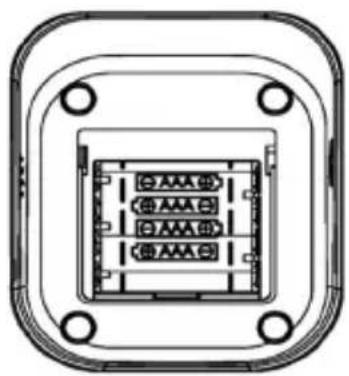
natural_image
Technical line drawing of a rectangular electronic component with internal slots and mounting holes (no text or symbols)(2) De batterijen vervangen

flowchart
graph LR
    A["Start: Stimulus with person icon"] --> B["Pressure Measurement: 0.0 kPa"]
    B --> C["Document Icon: Paper icon"]
    C <--> D["Pressure Measurement: 8 mmHg"]
NL
9. Correct meten
natural_image
Illustration showing two steps of a blood pressure measurement: one being held and the other in hand, both with arrows indicating direction (no text or symbols present)Opmerking
natural_image
Line drawing of a person sitting at a desk using a computer (no text or symbols)natural_image
Line drawing of a bottle and a cylindrical container (no text or symbols)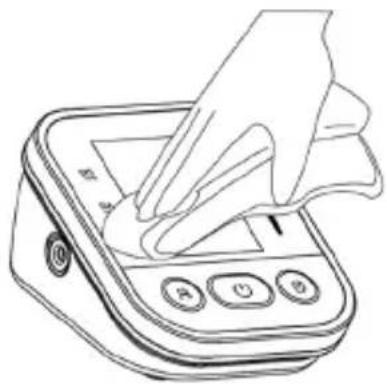
natural_image
Line drawing of a hand using a digital pressure meter to press or<|rotate_right|> (no text or symbols visible)Shenzhen AOJ Medical Technology Co., Ltd.
Room 301&4F, Block A, Building A, Jingfa Intelligent Manufacturing Park, Xiawei-yuan, Gushu Community, Xixiang Street, Bao'an District, 518126 Shenzhen, CHINA
E-Mail: info@aojmedical.com
Website: https://www.aojmedical.com
Telefoon: 86-755-2778 6026
Handmatige versie: A0
Software: V1.0
natural_image
Simple line drawing of a rectangular device with a light bulb at the bottom (no text or symbols)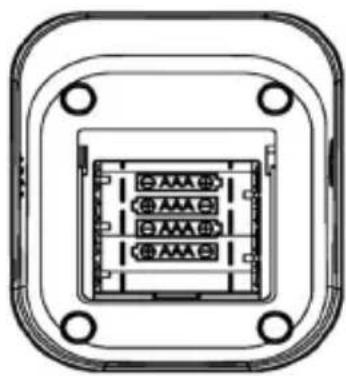
natural_image
Pure electrical connector diagram without any text, numbers, or symbolsflowchart
graph LR
    A["Start: Stimulus"] --> B["Pressure Measurement: 0.0 kPa"]
    B --> C["Write: Document Icon"]
    C --> D["Write: Text: 0 mmHg"]
F
natural_image
Illustration showing two steps of a blood pressure measurement: one being held and the other in hand, both with arrows indicating direction (no text or symbols present)Note
natural_image
Line drawing of a person sitting at a desk using a computer (no text or symbols)natural_image
Line drawing of a bottle and a cylindrical container (no text or symbols)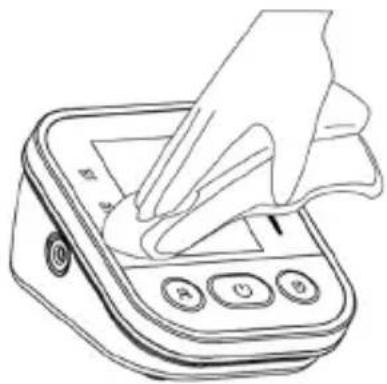
natural_image
Line drawing of a hand pressing down on a digital pressure meter (no text or symbols)Shenzhen AOJ Medical Technology Co., Ltd.
Room 301&4F, Block A, Building A, Jingfa Intelligent Manufacturing Park, Xiaweiyuan, Gushu Community, Xixiang Street, Bao'an District, 518126 Shenzhen, CHINA
natural_image
Simple line drawing of a rectangular device with a light bulb at the bottom (no text or symbols)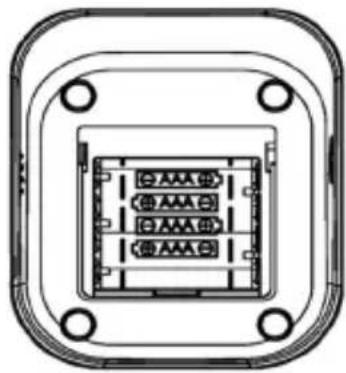
natural_image
Pure electrical connector diagram without any text, numbers, or symbolsnatural_image
Illustration showing two steps of a blood pressure measurement: one being held and the other in a hand holding a device (no text or symbols present)Nota
natural_image
Line drawing of a person sitting at a desk using a computer (no text or symbols)natural_image
Line drawing of a bottle and a cylindrical container (no text or symbols)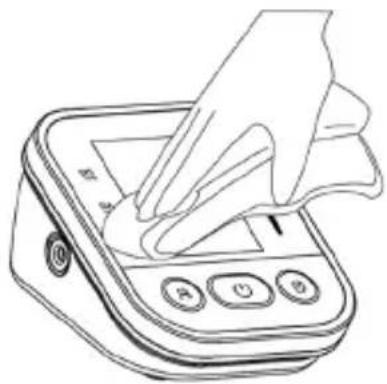
natural_image
Line drawing of a hand pressing down on a digital pressure meter (no text or symbols)Shenzhen AOJ Medical Technology Co., Ltd.
Room 301&4F, Block A, Building A, Jingfa Intelligent Manufacturing Park, Xiawei-yuan, Gushu Community, Xixiang Street, Bao'an District, 518126 Shenzhen, CHINA
natural_image
Simple line drawing of a rectangular device with a light bulb at the bottom (no text or symbols)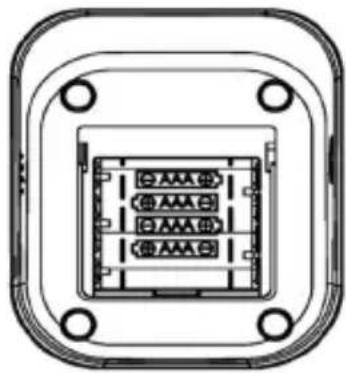
natural_image
Pure electrical connector diagram without any text, numbers, or symbolsflowchart
graph LR
    A["Initial Procedure"] --> B["Pressure Measurement: 0.0 kPa"]
    B <--> C["Read Output: 8 mmHg"]
natural_image
Illustration showing two steps of a blood pressure measurement: one being held and the other in a hand holding a swab.Nota
natural_image
Line drawing of a person sitting at a desk using a computer (no text or symbols)natural_image
Line drawing of a bottle and a cylindrical container (no text or symbols)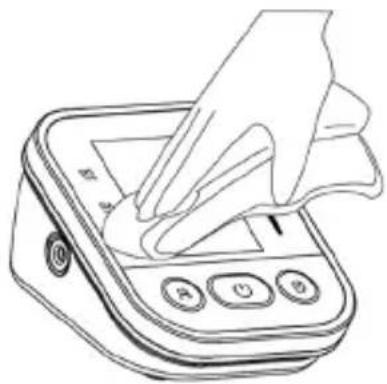
natural_image
Line drawing of a hand using a digital pressure meter to press or<|rotate_right|> (no text or symbols visible)Shenzhen AOJ Medical Technology Co., Ltd.
Room 301&4F, Block A, Building A, Jingfa Intelligent Manufacturing Park, Xiaweiyuan, Gushu Community, Xixiang Street, Bao'an District, 518126 Shenzhen, CINA
Email: info@aojmedical.com
Sito web: https://www.aojmedical.com
Telefono: 86-755-2778 6026
natural_image
Technical line drawing of two electronic device components: a front panel and a top view showing internal circuitry (no text or symbols)PL
(2) Wymiana baterii

natural_image
Illustration showing two steps of a blood pressure measurement: one being held and the other in a hand, both with arrows indicating direction (no text or symbols present)Uwaga
natural_image
Line drawing of a person sitting at a desk using a tablet (no text or symbols)natural_image
Simple line drawing of a bottle and a cylindrical container (no text or symbols)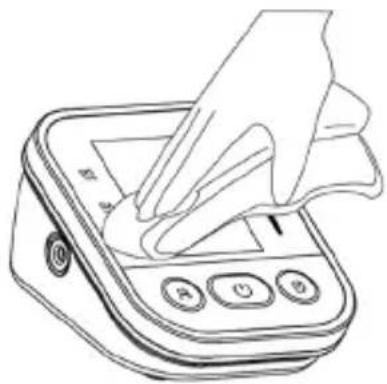
natural_image
Line drawing of a hand pressing down on a digital pressure meter (no text or symbols)Shenzhen AOJ Medical Technology Co., Ltd.
Room 301&4F, Block A, Building A, Jingfa Intelligent Manufacturing Park, Xiaweiyuan, Gushu Community, Xixiang Street, Bao'an District, 518126 Shenzhen, CHINY
E-mail: info@aojmedical.com
Strona internetowa: https://www.aojmedical.com
Telefon: 86-755-2778 6026
natural_image
Simple line drawing of a rectangular device with a light bulb at the bottom (no text or symbols)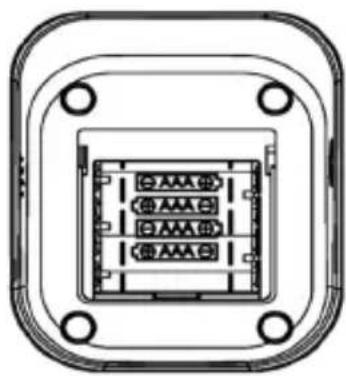
natural_image
Technical line drawing of a rectangular electronic component with internal slots and mounting holes (no text or symbols)natural_image
Illustration showing two steps of a blood pressure measurement: one being held and the other in a hand holding a device (no text or symbols present)Megjegyzés:
natural_image
Line drawing of a person sitting at a desk using a computer (no text or symbols)H
natural_image
Line drawing of a bottle and a cylindrical container (no text or symbols)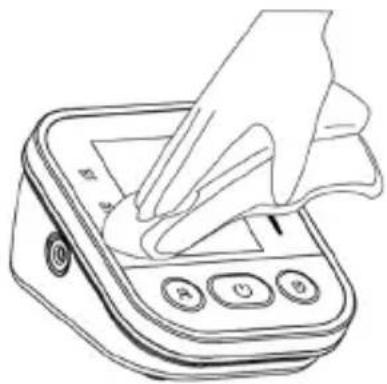
natural_image
Line drawing of a hand pressing down on a digital pressure meter (no text or symbols)Shenzhen AOJ Medical Technology Co., Ltd.
Room 301&4F, Block A, Building A, Jingfa Intelligent Manufacturing Park, Xiaweiyuan, Gushu Community, Xixiang Street, Bao'an District, 518126 Shenzhen, KÍNA
Email: info@aojmedical.com
Honlap internetowa: https://www.aojmedical.com
Telefon: 86-755-2778 6026
natural_image
Simple line drawing of a rectangular device with a light bulb at the bottom (no text or symbols)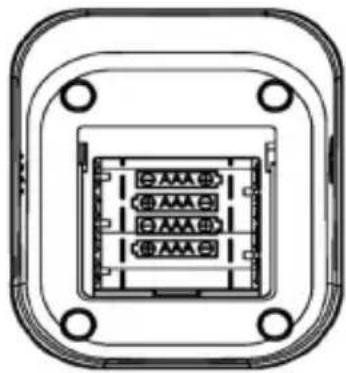
natural_image
Pure electrical connector diagram without any text, numbers, or symbols(2) Замена батарей

natural_image
Illustration showing two steps of a blood pressure measurement: one being held and the other in a hand holding a device (no text or symbols present)RUS
Примечание
natural_image
Line drawing of a person sitting at a desk, viewed from the side (no text or symbols)RUS
natural_image
Line drawing of a bottle and a cylindrical container (no text or symbols)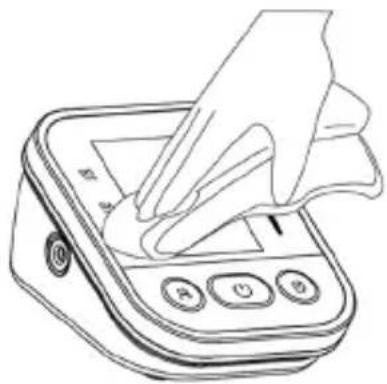
natural_image
Line drawing of a hand using a handheld digital pressure meter (no text or symbols)Shenzhen AOJ Medical Technology Co., Ltd.
Room 301&4F, Block A, Building A, Jingfa Intelligent Manufacturing Park, Xiaweiyuan, Gushu Community, Xixiang Street, Bao'an District, 518126 Shenzhen, KITAI
Email: info@aojmedical.com
Веб-сайт: https://www.aojmedical.com
Shenzhen AOJ Medical Technology Co., Ltd

Jingfa Intelligent Manufacturing Park, Xiaweiyuan, 4F&301 alغرفة
الصين، Bao'an, 518126 Shenzhen منطقة, Xixiang شارع, GushuGroup
natural_image
Line drawing of two containers, one bottle and one container, with no text or symbols present.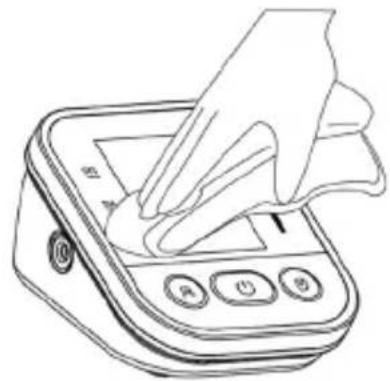
natural_image
Line drawing of a hand using a digital pressure meter to press or<|rotate_right|> (no text or symbols visible)natural_image
Illustration showing two steps of a blood pressure measurement: one being held and the other in a hand, both with arrows indicating direction (no text or symbols present)ملاحظة
natural_image
Technical line drawing of two electronic device components with internal connectors (no text or symbols)
- Hinweis
- D
- Shenzhen AOJ Medical Technology Co., Ltd.
- Unpacking and checking
- Package contents and overview of controls
- ① Appliance
- ② Screen
- Safety precautions
- Product composition
- Intended use / instructions for use
- Contraindication
- Preparation
- Inserting the battery
- Replacing the batteries
- Type-C connector for power supply (the cable is not included in the package contents)
- Function setting
- User mode
- Setting the date and time
- Setting the display unit
- How to measure correctly
- Preparation before measurement
- Putting on the arm cuff
- Note
- Sitting correctly
- Performing the measurement
- Note: Contact your doctor if you get unexpected readings.
- Memory function
- Delete memory
- "Cuff worn" detection
- "Hold still" display
- Contraindications, precautions, warnings and immediate instructions
- General questions and answers about blood pressure
- Q1: Why is the blood pressure value measured at home lower than that measured in hospital?
- Q2: Why is the blood pressure reading at home higher than the reading at the hospital?
- Q3: When can I get better readings?
- Abnormal phenomena and handling
- Cleaning and disinfection
- Cleaning
- Disinfection
- Disposal
- Notes
- Maintenance and servicing
- Specifications
- NOTE:
- Representative for Europe:
- NL
- Inhoudsopgave
- Contra-indicaties
- De batterijen vervangen
- Correct meten
- Opmerking
- Nota
- Wymiana baterii
- Uwaga
- Megjegyzés:
- Замена батарей
- RUS
- Примечание
- Shenzhen AOJ Medical Technology Co., Ltd
Brand : ProfiCare
Model : PC-BMG 3121
Category : Sphygmomanometer